speed TOYOTA COROLLA 2019 (in English) User Guide
[x] Cancel search | Manufacturer: TOYOTA, Model Year: 2019, Model line: COROLLA, Model: TOYOTA COROLLA 2019Pages: 608, PDF Size: 10.15 MB
Page 84 of 608

842. Instrument cluster
COROLLA_TMMMS_TMMC_U■
Customization
Some settings can be changed
. (Customizable features: P. 5 6 4 )
■The meters and display illuminate when
Vehicles without a smart key system
The engine switch is in the “ON” position.
Vehicles with a smart key system
The engine switch is in IGNITION ON mode.
■ When disconnecting and reco nnecting battery terminals
The following information data will be reset:
● Driving range
● Average vehicle speed
● Elapsed time
● Average fuel consumption
■ Liquid crystal display
Small spots or light spots may appear on the display. This phen omenon is
characteristic of liquid crystal displays, and there is no prob lem continuing to
use the display.
■ Setting display automatic suspension
In the following situations, the setting display will be suspen ded.
● When a message appears.
● When the vehicle begins to move.
Page 85 of 608
852. Instrument cluster
2
Instrument cluster
COROLLA_TMMMS_TMMC_U
WARNING
■The display at low temperatures
Allow the interior of the vehicle to warm up before using the d isplay. At
extremely low temperatures, the display monitor may respond slo wly, and
display changes may be delayed.
For example, there is a lag between the driver’s shifting and t he new gear
number appearing on the display. This lag could cause the drive r to down-
shift again, causing rapid and excessive engine braking and pos sibly an
accident resulting in death or injury.
■ Cautions during setting up the display
As the engine needs to be running during setting up the display , ensure that
the vehicle is parked in a place with adequate ventilation. In a closed area
such as a garage, exhaust gases including harmful carbon monoxi de (CO)
may collect and enter the vehicle. This may lead to death or a serious
health hazard.
NOTICE
■ To prevent damage to the engine and its components
● Do not let the indicator needle of the tachometer enter the red zone, which
indicates the maximum engine speed.
● The engine may be overheating if the engine coolant temperature gauge
are in the red zone. In this case, immediately stop the vehicle in a safe
place, and check the engine after it has cooled completely. ( P. 531)
Page 86 of 608
862. Instrument cluster
COROLLA_TMMMS_TMMC_U
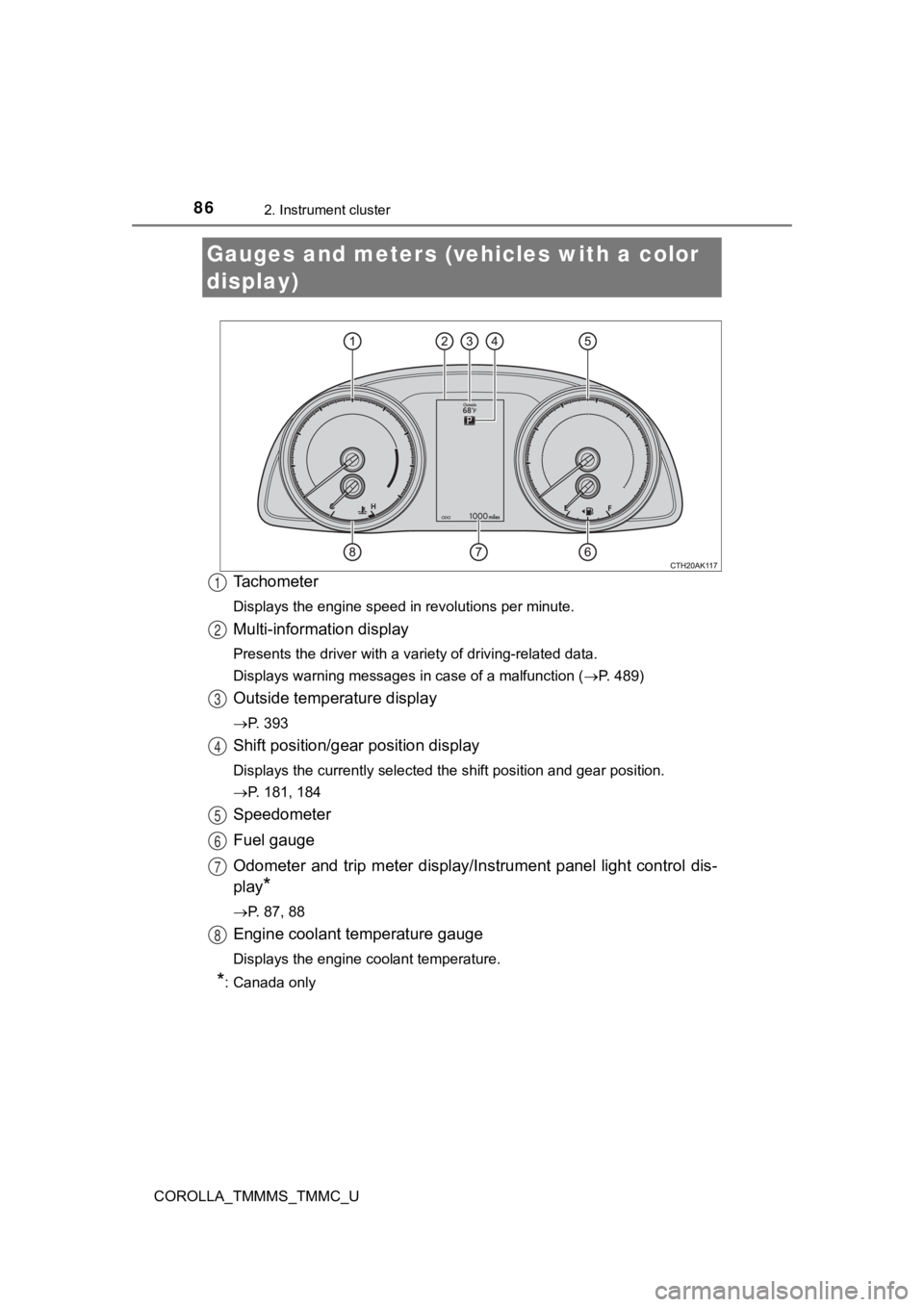
Tachometer
Displays the engine speed in revolutions per minute.
Multi-information display
Presents the driver with a variety of driving-related data.
Displays warning messages in case of a malfunction (P. 489)
Outside temperature display
P. 393
Shift position/gear position display
Displays the currently selected the shift position and gear pos ition.
P. 181, 184
Speedometer
Fuel gauge
Odometer and trip meter display/Instrument panel light control dis-
play
*
P. 87, 88
Engine coolant temperature gauge
Displays the engine coolant temperature.
*: Canada only
Gauges and meters (vehicles with a color
display)
1
2
3
4
5
6
7
8
Page 89 of 608
892. Instrument cluster
2
Instrument cluster
COROLLA_TMMMS_TMMC_U
■The meters and display illuminate when
Vehicles without a smart key system
The engine switch is in the “ON” position.
Vehicles with a smart key system
The engine switch is in IGNITION ON mode.
NOTICE
■ To prevent damage to the engine and its components
● Do not let the indicator needle of the tachometer enter the red zone, which
indicates the maximum engine speed.
● The engine may be overheating if the engine coolant temperature gauge is
in the red zone. In this case, immediately stop the vehicle in a safe place,
and check the engine after it has cooled completely. ( P. 531)
Page 92 of 608

922. Instrument cluster
COROLLA_TMMMS_TMMC_U
●Current fuel consumption*1
●Average fuel consumption (after reset*2/after start/after refuel)*1
Displays the average fuel consum ption since the function was
reset, the engine was started, and the vehicle was refueled, re spec-
tively
Use the displayed average fuel consumption as a reference.
● Average speed (after reset*2/after start)*1
Displays the average vehicle speed since the function was reset
and the engine was sta rted, respectively
● Distance (driving range/after start)
*1
Displays the estimated maximum distance that can be driven with
the quantity of fuel remaining and the distance driven after th e
engine was started, respectively.
• This distance is computed based on your average fuel consumpti on. As
a result, the actual distance that can be driven may differ fro m that dis-
played.
• When only a small amount of fuel is added to the tank, the dis play may
not be updated.
When refueling, turn the engine switch off. If the vehicle is r efueled with-
out turning the engine switch off, the display may not be updat ed.
●Elapsed time (after reset*2/after start)*1
Displays the elapsed time since the function was reset and the
engine was started, respectively
● Eco Driving Indicator Zone Display (vehicles with a continuousl y
variable transmission)
P. 1 0 0
● LDA (Lane Departure Alert with steering control) vehicle sway
warning
P. 2 2 7
● Display off
A blank screen is displayed
*1: Can be registered to Drive information 1 or 2. ( P. 93)
*2: Resetting procedures:
• Select a function to be reset using the meter control switch a nd then
press and hold to reset.
• If there is more than one function that can be reset, check bo xes will be
displayed next to those functions.
Drive information
Page 97 of 608

972. Instrument cluster
2
Instrument cluster
COROLLA_TMMMS_TMMC_U
Average vehicle speed
Elapsed time
Range
Previous fuel consumption
per minute
Current fuel consumption
Reset the trip information
data
“Past Record” screen appears
Vehicles without a smart key system:
Average fuel consumption for the past 15 minutes is divided by color
into past averages and averages attained since the engine switch was
last turned to the “ON” position. Use the displayed average fue l con-
sumption as a reference.
Vehicles with a smart key system:
Average fuel consumption for the past 15 minutes is divided by color
into past averages and averages attained since the engine switch was
last turned to IGNITION ON mode. Use the displayed average fuel
consumption as a reference.
This image is an example only.
1
2
3
4
5
6
7
Page 100 of 608
1002. Instrument cluster
COROLLA_TMMMS_TMMC_U
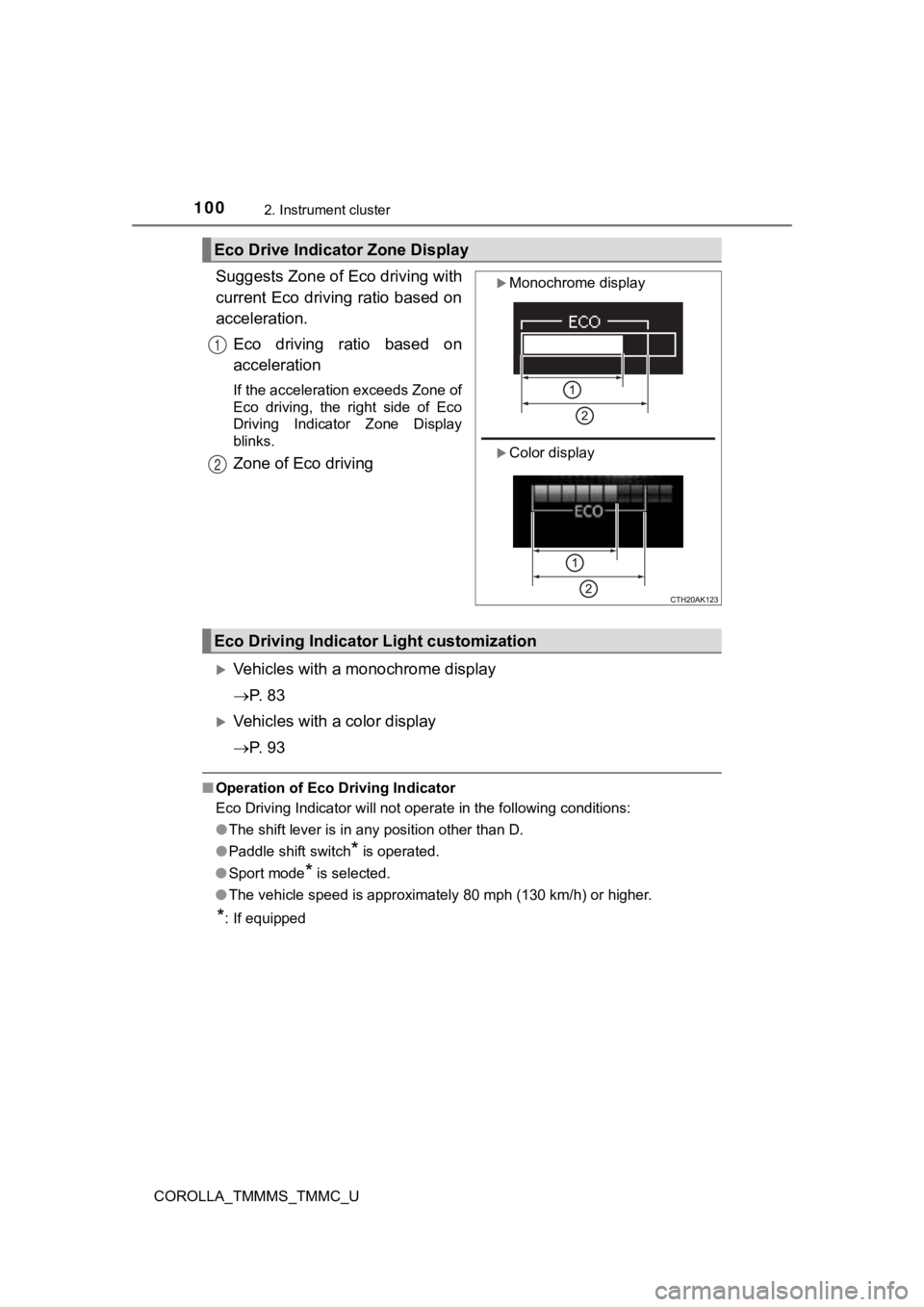
Suggests Zone of Eco driving with
current Eco driving ratio based on
acceleration.Eco driving ratio based on
acceleration
If the acceleration exceeds Zone of
Eco driving, the right side of Eco
Driving Indicator Zone Display
blinks.
Zone of Eco driving
Vehicles with a monochrome display
P. 8 3
Vehicles with a color display
P. 9 3
■Operation of Eco Driving Indicator
Eco Driving Indicator will not operate in the following conditi ons:
● The shift lever is in any position other than D.
● Paddle shift switch
* is operated.
● Sport mode
* is selected.
● The vehicle speed is approximately 80 mph (130 km/h) or higher.
*: If equipped
Eco Drive Indica tor Zone Display
Monochrome display
Color display
1
2
Eco Driving Indicato r Light customization
Page 113 of 608
1133-2. Opening, closing and locking the doors
3
Operation of each component
COROLLA_TMMMS_TMMC_U
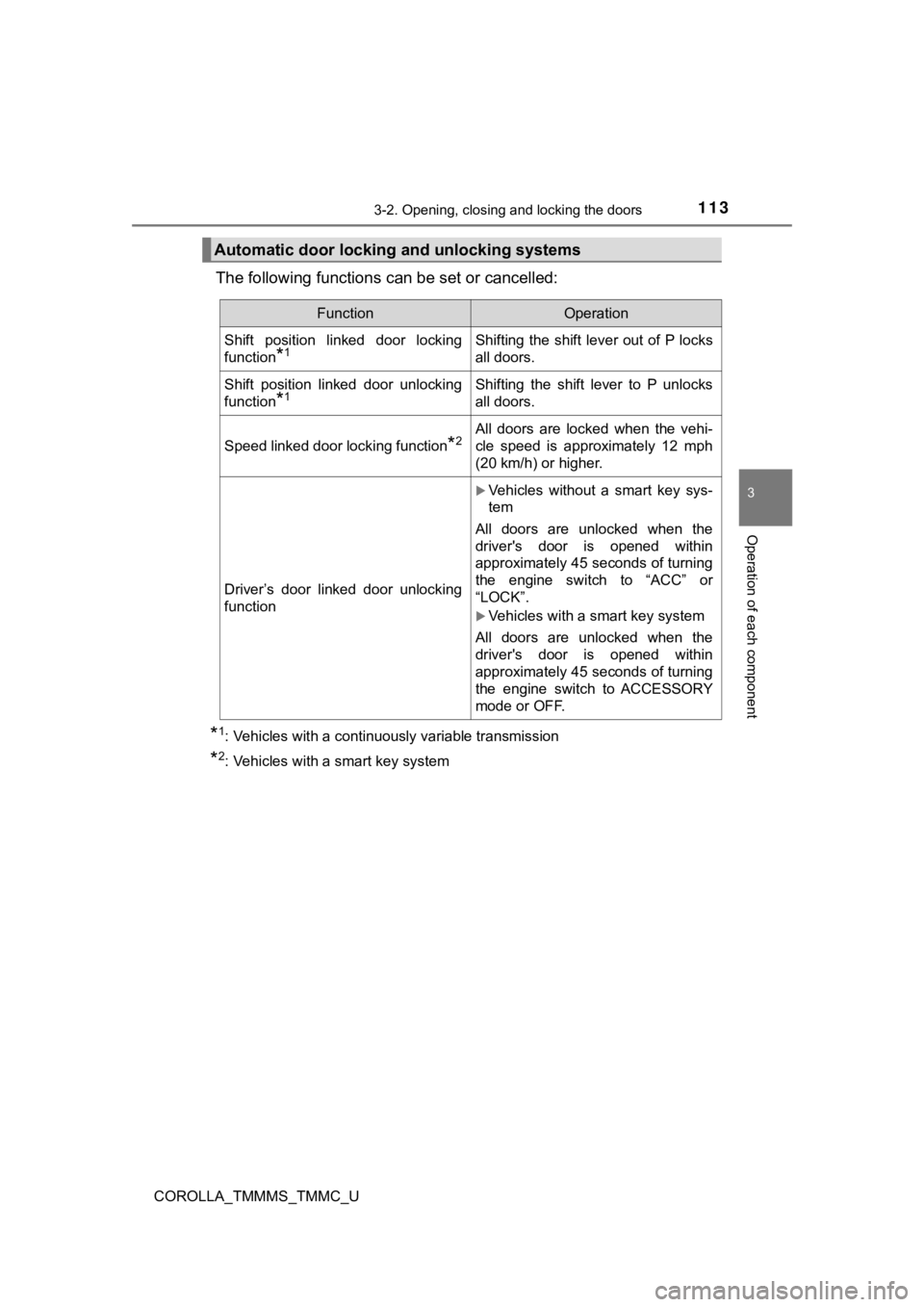
The following functions can be set or cancelled:
*1: Vehicles with a continuously variable transmission
*2: Vehicles with a smart key system
Automatic door locking and unlocking systems
FunctionOperation
Shift position linked door locking
function
*1Shifting the shift lever out of P locks
all doors.
Shift position linked door unlocking
function
*1Shifting the shift lever to P unlocks
all doors.
Speed linked door locking function*2All doors are locked when the vehi-
cle speed is approximately 12 mph
(20 km/h) or higher.
Driver’s door linked door unlocking
function
Vehicles without a smart key sys-
tem
All doors are unlocked when the
driver's door is opened within
approximately 45 seconds of turning
the engine switch to “ACC” or
“LOCK”.
Vehicles with a smart key system
All doors are unlocked when the
driver's door is opened within
approximately 45 seconds of turning
the engine switch to ACCESSORY
mode or OFF.
Page 114 of 608
1143-2. Opening, closing and locking the doors
COROLLA_TMMMS_TMMC_U■
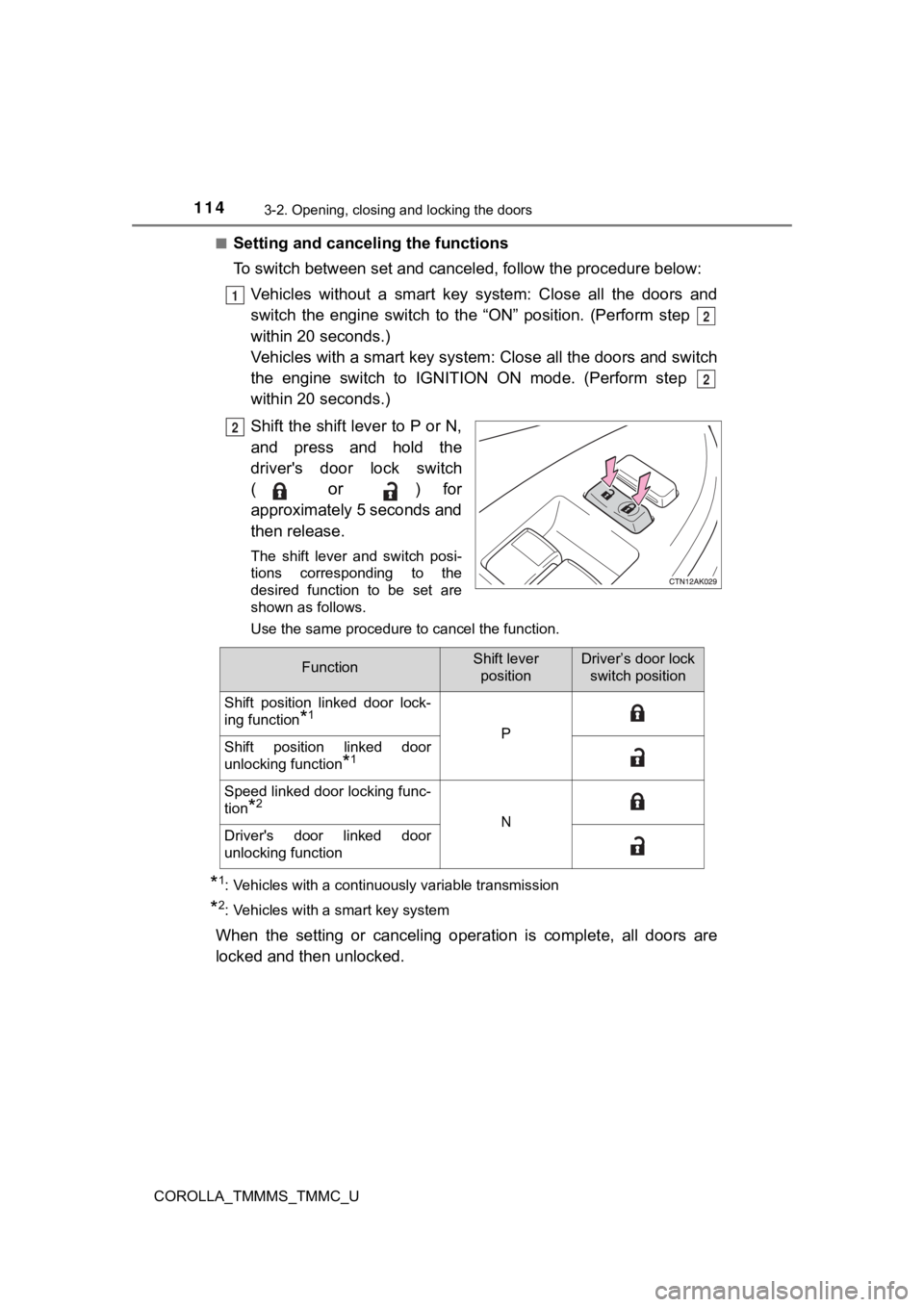
Setting and cance
ling the functions
To switch between set and cancel ed, follow the procedure below:
Vehicles without a smart key system: Close all the doors and
switch the engine switch to the “ON” position. (Perform step
within 20 seconds.)
Vehicles with a smart key system : Close all the doors and switch
the engine switch to IGNITION ON mode. (Perform step
within 20 seconds.)
Shift the shift lever to P or N,
and press and hold the
driver's door lock switch
(
or ) for
approximately 5 seconds and
then release.
The shift lever and switch posi-
tions corresponding to the
desired function to be set are
shown as follows.
Use the same procedure to cancel the function.
*1: Vehicles with a continuously variable transmission
*2: Vehicles with a smart key system
When the setting or canceling oper ation is complete, all doors are
locked and then unlocked.
1
2
2
2
FunctionShift lever positionDriver’s door lock switch position
Shift position linked door lock-
ing function
*1
PShift position linked door
unlocking function
*1
Speed linked door locking func-
tion
*2
NDriver's door linked door
unlocking function
Page 154 of 608
1544-1. Before driving
COROLLA_TMMMS_TMMC_U
Continuously variable transmission
Make sure that the parking brake is set and shift the shift lever to D.
Gently depress the accelerator pedal.
Release the parking brake.
Manual transmission
With the parking brake firmly set and the clutch pedal fully
depressed, shift the shift lever to 1.
Lightly depress the accelerato r pedal at the same time as gradu ally
releasing the clutch pedal.
Release the parking brake.
■ When starting off on an uphill
The hill-start assist control will activate. ( P. 257)
■ Driving in the rain
●Drive carefully when it is raining, because visibility will be reduced, the win-
dows may become fogged-up, and the road will be slippery.
● Drive carefully when it starts to rain, because the road surface will be espe-
cially slippery.
● Refrain from high speeds when driving on an expressway in the r ain,
because there may be a layer of water between the tires and the road sur-
face, preventing the steering and brakes from operating properl y.
Starting off on a steep uphill
1
2
3
1
2
3