brake TOYOTA COROLLA 2023 Owner's Guide
[x] Cancel search | Manufacturer: TOYOTA, Model Year: 2023, Model line: COROLLA, Model: TOYOTA COROLLA 2023Pages: 468, PDF Size: 14.4 MB
Page 172 of 468
1724-2. Driving procedures
switch until the standby indicator
(green) turns off, and then turn the
engine switch off.
■When the parking brake is set
automatically while the system
is holding the brakes
Perform any of the following opera-
tions to release the parking brake:
●Depress the accelerator pedal.
(The parking brake will not be
released automatic ally if the seat
belt is not fastened.)
●Operate the parking brake switch
with the brake pedal depressed.
Make sure that the parking brake
indicator light goes off. ( P.168)
■When an inspection at your
Toyota dealer is necessary
When the brake hold standby indi-
cator (green) does not illuminate
even when the brake hold switch is
pressed with the brake hold system
operating conditions met, the sys-
tem may be malfunctioning. Have
the vehicle inspected at your Toyota
dealer.
■If “Brake Hold Malfunction
Press Brake to Deactivate Visit
Your Dealer” or “Brake Hold
Malfunction Visit Your Dealer”
is displayed on the multi-infor-
mation display
The system may be malfunctioning.
Have the vehicle inspected by your
Toyota dealer.
■Warning messages and buzzers
Warning messages and buzzers are
used to indicate a system malfunc-
tion or to inform the driver of the
need for caution. If a warning mes-
sage is shown on the multi-informa-
tion display, read the message and
follow the instructions.
■If the brake hold operated indi-
cator flashes
P. 3 6 3
WARNING
■When the vehicle is on a
steep incline
Take care when using the brake
hold system on a steep incline,
exercise caution. The brake hold
function may not hold brakes in
such situations.
Also, the system may not activate
depending on the angle of the
slope.
■When stopped on a slippery
road
The system cannot stop the vehi-
cle when the gripping ability of the
tires has been exceeded. Do not
use the system w hen stopped on
a slippery road.
NOTICE
■When parking the vehicle
The brake hold system is not
designed for use when parking
the vehicle for a long period of
time. Turning the engine switch off
while the system is holding the
brake may release the brake,
which would cause the vehicle to
move. When operating the engine
switch, depress the brake pedal,
shift the shift lever to P and set
the parking brake.
Page 174 of 468
1744-3. Operating the lights and wipers
●To make your vehicle more visible
to other drivers during daytime
driving, the daytime running lights
turn on automatically when all of
the following conditions are met.
(The daytime running lights are
not designed for use at night.)
• The engine is running
• The parking brake is released
• The headlight switch is in the
or
* position
*: When the surroundings are bright
The daytime running lights remain
on after they illumi nate, even if the
parking brake is set again.
●For the U.S.A.: Daytime running
lights can be turned off by operat-
ing the switch.
●Compared to turning on the head-
lights, the daytime running light
system offers gr eater durability
and consumes less electricity, so
it can help improve fuel economy.
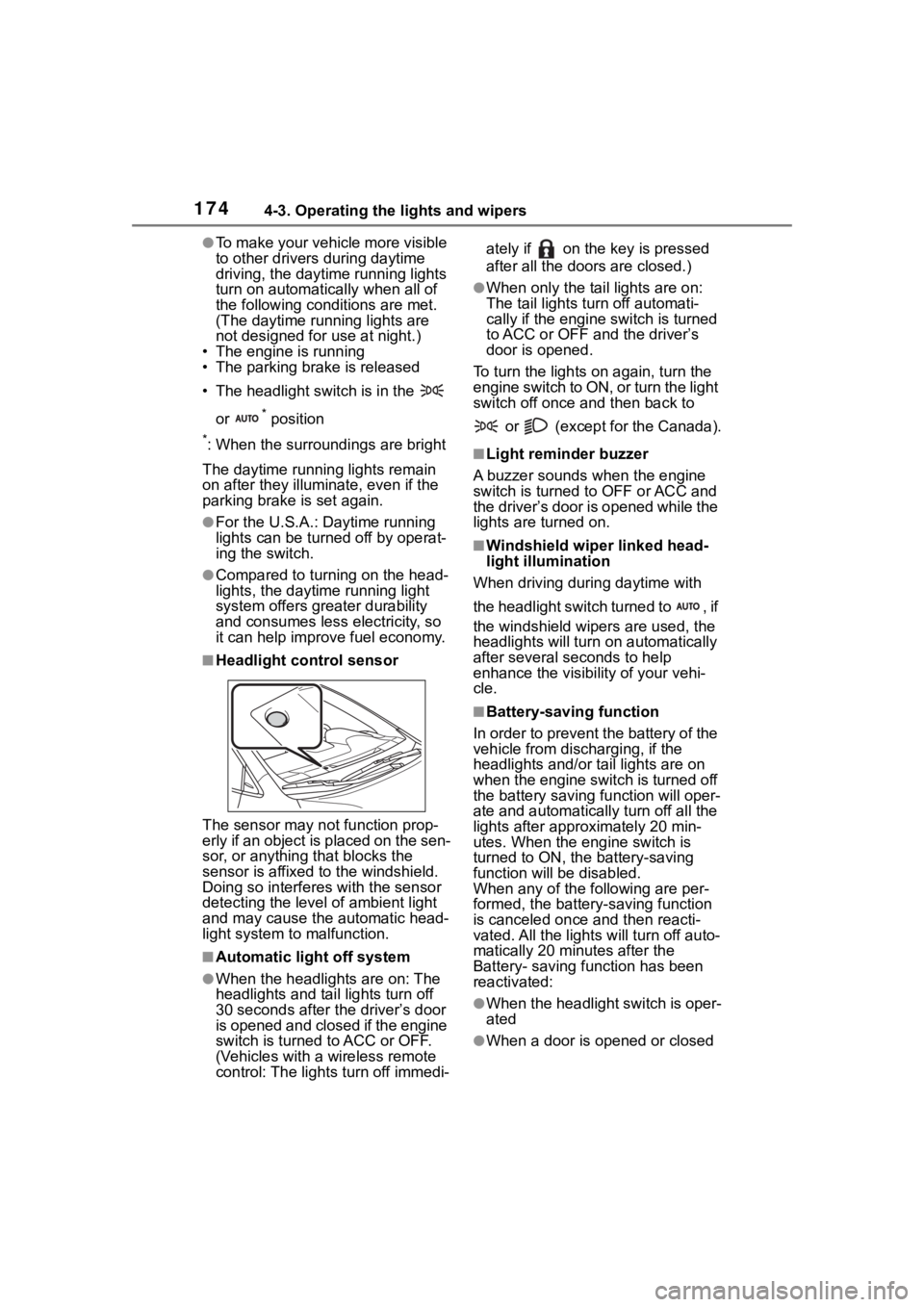
■Headlight control sensor
The sensor may not function prop-
erly if an object is placed on the sen-
sor, or anything that blocks the
sensor is affixed to the windshield.
Doing so interfere s with the sensor
detecting the level of ambient light
and may cause the automatic head-
light system to malfunction.
■Automatic light off system
●When the headlights are on: The
headlights and tail lights turn off
30 seconds after the driver’s door
is opened and closed if the engine
switch is turned to ACC or OFF.
(Vehicles with a wireless remote
control: The lights turn off immedi- ately if on the key is pressed
after all the doors are closed.)
●When only the tail lights are on:
The tail lights turn off automati-
cally if the engine switch is turned
to ACC or OFF and the driver’s
door is opened.
To turn the lights on again, turn the
engine switch to ON, or turn the light
switch off once and then back to
or (except for the Canada).
■Light reminder buzzer
A buzzer sounds when the engine
switch is turned t o OFF or ACC and
the driver’s door is opened while the
lights are turned on.
■Windshield wiper linked head-
light illumination
When driving during daytime with
the headlight switch turned to , if
the windshield wipers are used, the
headlights will turn o n automatically
after several se conds to help
enhance the visibility of your vehi-
cle.
■Battery-saving function
In order to prevent the battery of the
vehicle from discharging, if the
headlights and/or tail lights are on
when the engine switch is turned off
the battery saving function will oper-
ate and automatically turn off all the
lights after approximately 20 min-
utes. When the engine switch is
turned to ON, the battery-saving
function will be disabled.
When any of the following are per-
formed, the battery-saving function
is canceled once and then reacti-
vated. All the lights will turn off auto-
matically 20 minutes after the
Battery- saving function has been
reactivated:
●When the headlight switch is oper-
ated
●When a door is opened or closed
Page 189 of 468
1894-5. Using the driving support systems
4
Driving
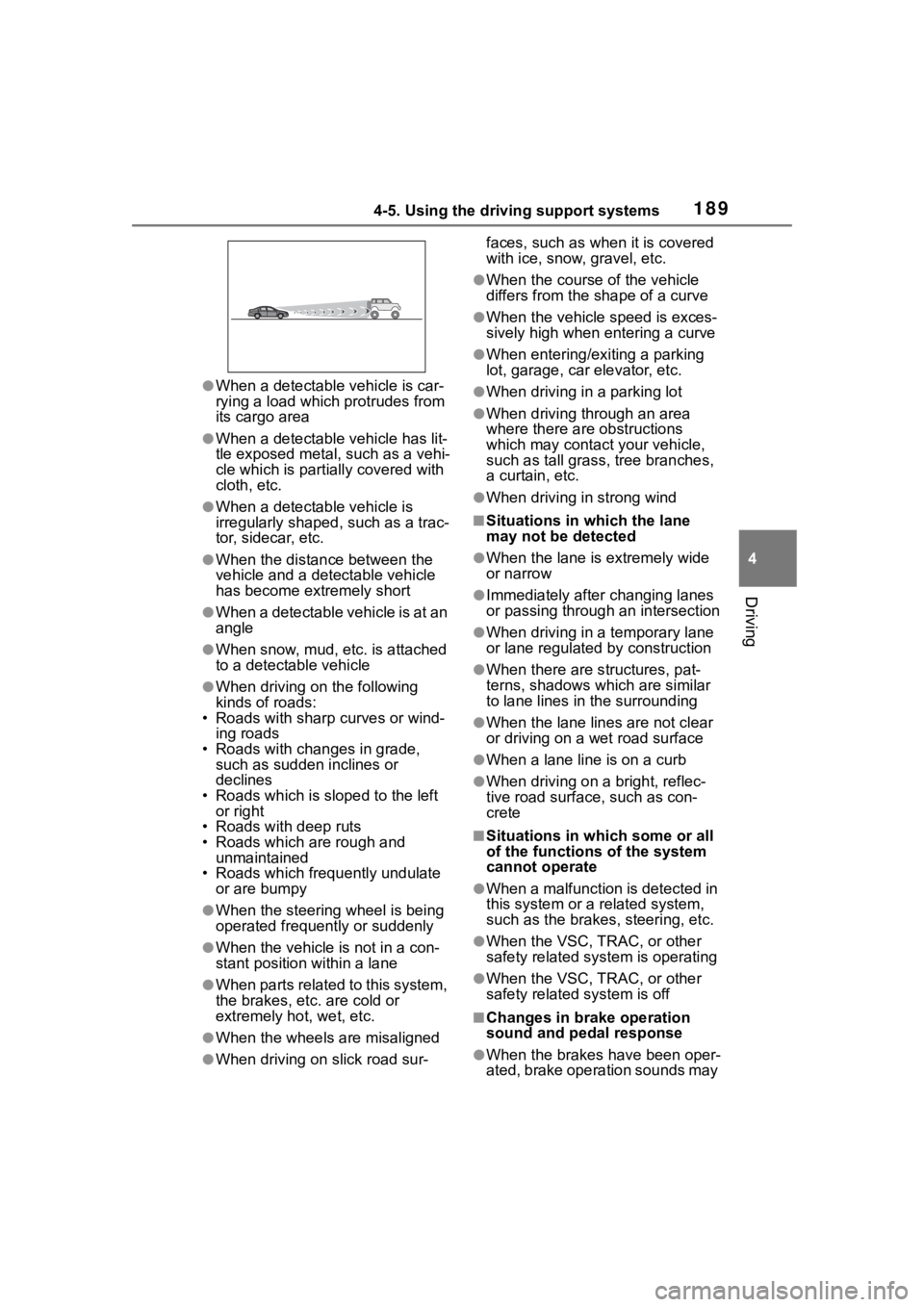
●When a detectable vehicle is car-
rying a load which protrudes from
its cargo area
●When a detectable vehicle has lit-
tle exposed metal, such as a vehi-
cle which is parti ally covered with
cloth, etc.
●When a detectabl e vehicle is
irregularly shaped , such as a trac-
tor, sidecar, etc.
●When the distance between the
vehicle and a detectable vehicle
has become extremely short
●When a detectable vehicle is at an
angle
●When snow, mud, etc. is attached
to a detectable vehicle
●When driving on the following
kinds of roads:
• Roads with sharp curves or wind- ing roads
• Roads with chang es in grade,
such as sudden inclines or
declines
• Roads which is slo ped to the left
or right
• Roads with deep ruts
• Roads which are rough and
unmaintained
• Roads which frequently undulate
or are bumpy
●When the steering wheel is being
operated frequently or suddenly
●When the vehicle is not in a con-
stant position within a lane
●When parts related to this system,
the brakes, etc. are cold or
extremely hot, wet, etc.
●When the wheels are misaligned
●When driving on slick road sur- faces, such as when it is covered
with ice, snow, gravel, etc.
●When the course of the vehicle
differs from the
shape of a curve
●When the vehicle speed is exces-
sively high when entering a curve
●When entering/exiting a parking
lot, garage, car elevator, etc.
●When driving in a parking lot
●When driving through an area
where there are obstructions
which may contact your vehicle,
such as tall grass , tree branches,
a curtain, etc.
●When driving in strong wind
■Situations in which the lane
may not be detected
●When the lane is extremely wide
or narrow
●Immediately after changing lanes
or passing through an intersection
●When driving in a temporary lane
or lane regulated by construction
●When there are s tructures, pat-
terns, shadows which are similar
to lane lines in the surrounding
●When the lane lines are not clear
or driving on a wet road surface
●When a lane line is on a curb
●When driving on a bright, reflec-
tive road surface, such as con-
crete
■Situations in which some or all
of the functions of the system
cannot operate
●When a malfunction is detected in
this system or a related system,
such as the brakes, steering, etc.
●When the VSC, TRAC, or other
safety related system is operating
●When the VSC, TRAC, or other
safety related system is off
■Changes in brake operation
sound and pedal response
●When the brakes have been oper-
ated, brake operation sounds may
Page 190 of 468
1904-5. Using the driving support systems
be heard and the brake pedal
response may change, but this
does not indicate a malfunction.
●When the system is operating, the
brake pedal may feel stiffer than
expected or sink. In either situa-
tion the brake pedal can be
depressed further. Further
depress the brake pedal as nec-
essary.
PCS (Pre-Collision Sys-
tem)
The pre-collision system
uses sensors to detect
objects ( P.191) in the path
of the vehicle. When the
system determines that the
possibility of a frontal colli-
sion with a detectable
object is high, a warning
operates to urge the driver
to take evasive action and
the potential brake pressure
is increased to help the
driver avoid the collision. If
the system determines that
the possibility of a collision
is extremely high, the
brakes are automatically
applied to help avoid the
collision or help reduce the
impact of the collision.
The pre-collision system
can be disabled/enabled
and the warning timing can
be changed. ( P.200)
Page 192 of 468
1924-5. Using the driving support systems
■Pre-collision brake assist
If the system determines that
the possibility of a collision is
high and the brake operation by
the driver is insufficient, the
braking power will be increased.
■Pre-collision brake control
If the system determines that
the possibility of a collision is
extremely high, the brakes are
automatically applied to help
avoid the collision or reduce the
impact of the collision.
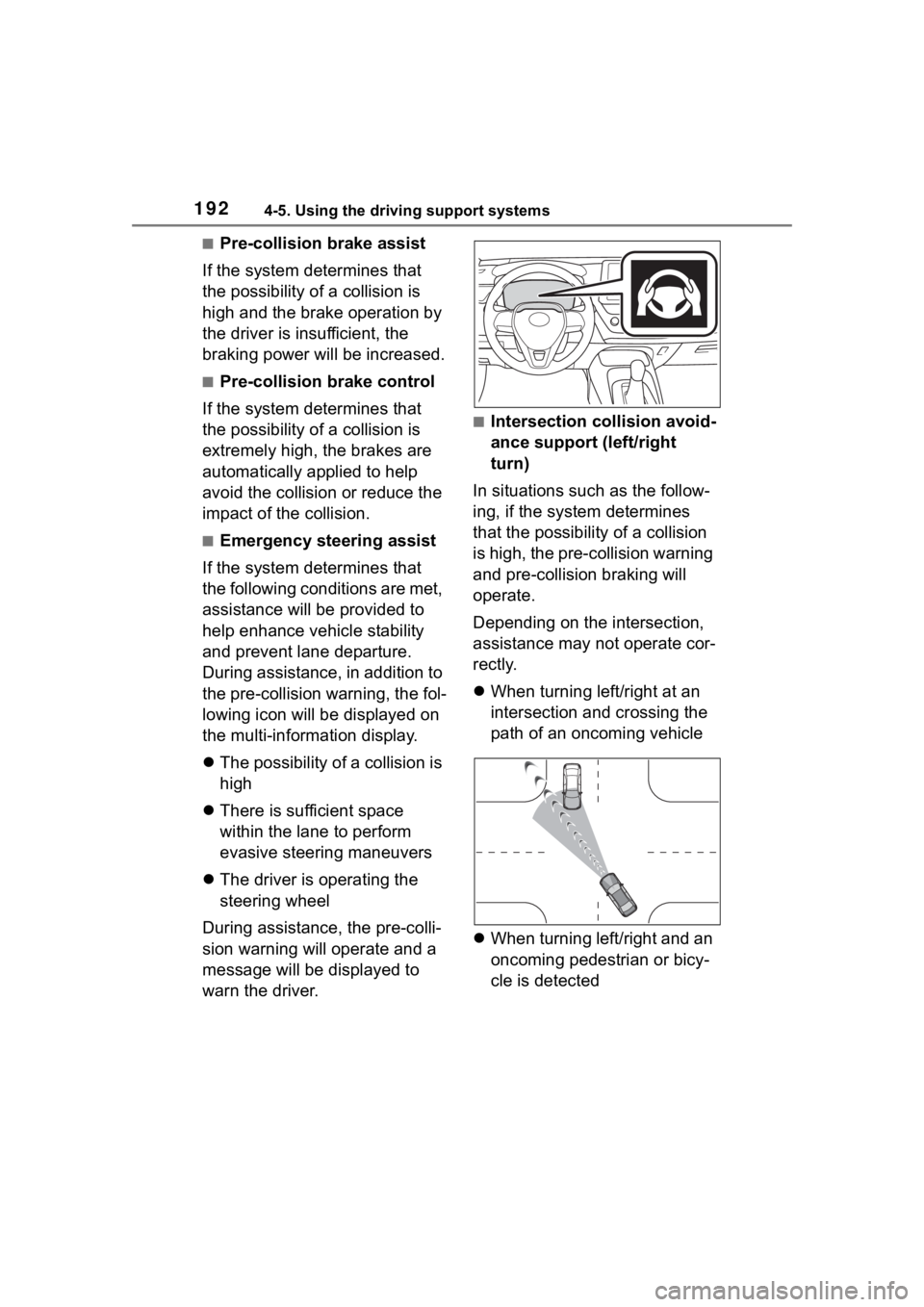
■Emergency steering assist
If the system determines that
the following conditions are met,
assistance will be provided to
help enhance vehicle stability
and prevent lane departure.
During assistance, in addition to
the pre-collision warning, the fol-
lowing icon will be displayed on
the multi-information display.
The possibility of a collision is
high
There is sufficient space
within the lane to perform
evasive steering maneuvers
The driver is operating the
steering wheel
During assistance, the pre-colli-
sion warning will operate and a
message will be displayed to
warn the driver.
■Intersection collision avoid-
ance support (left/right
turn)
In situations such as the follow-
ing, if the system determines
that the possibility of a collision
is high, the pre-collision warning
and pre-collision braking will
operate.
Depending on the intersection,
assistance may not operate cor-
rectly.
When turning left/right at an
intersection and crossing the
path of an oncoming vehicle
When turning left/right and an
oncoming pedestrian or bicy-
cle is detected
Page 193 of 468
1934-5. Using the driving support systems
4
Driving
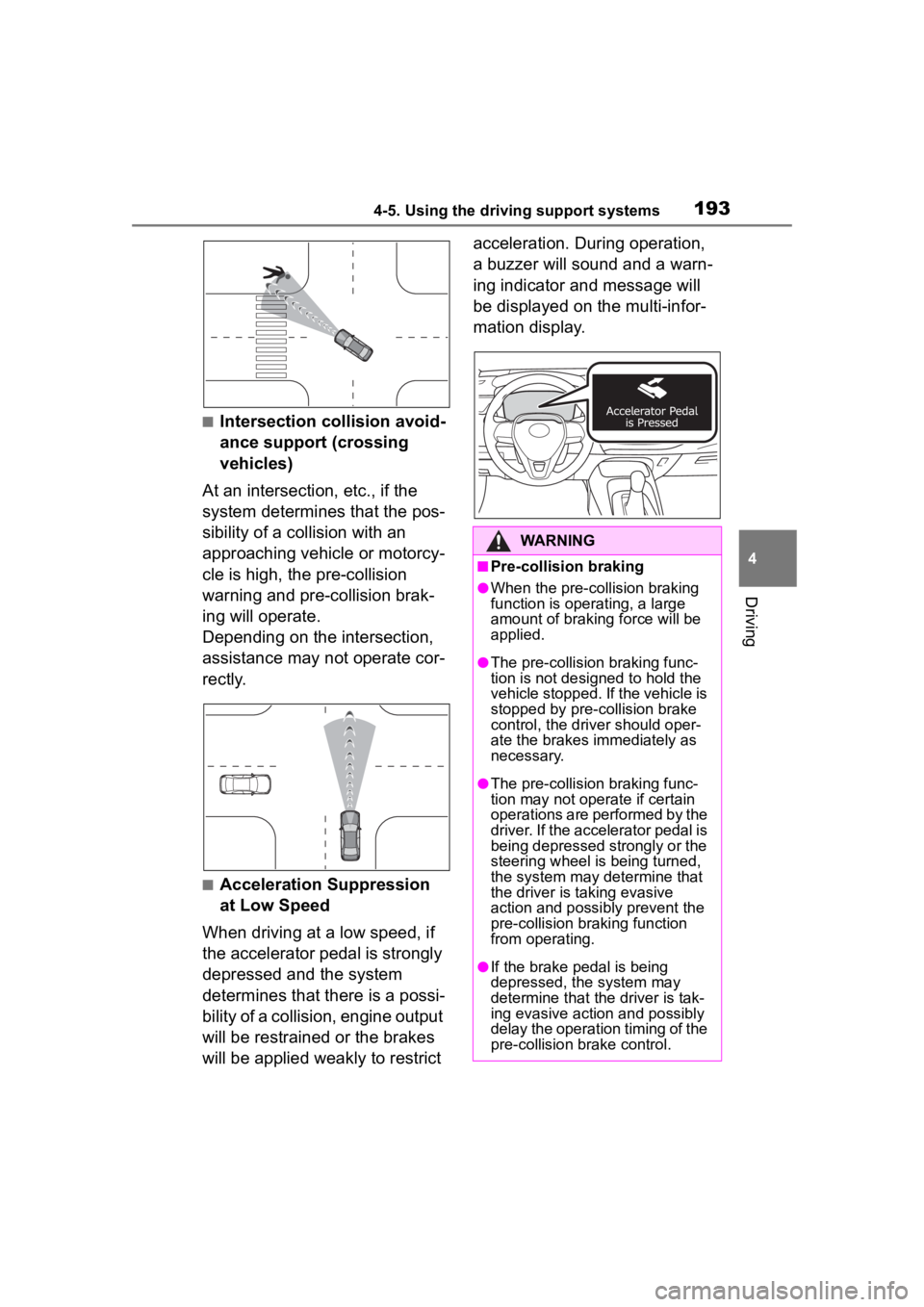
■Intersection collision avoid-
ance support (crossing
vehicles)
At an intersection, etc., if the
system determines that the pos-
sibility of a collision with an
approaching vehicle or motorcy-
cle is high, the pre-collision
warning and pre-collision brak-
ing will operate.
Depending on the intersection,
assistance may not operate cor-
rectly.
■Acceleration Suppression
at Low Speed
When driving at a low speed, if
the accelerator pedal is strongly
depressed and the system
determines that there is a possi-
bility of a collision, engine output
will be restrained or the brakes
will be applied weakly to restrict acceleration. During operation,
a buzzer will sound and a warn-
ing indicator and message will
be displayed on the multi-infor-
mation display.
WARNING
■Pre-collision braking
●When the pre-collision braking
function is operating, a large
amount of braking force will be
applied.
●The pre-collision braking func-
tion is not desig
ned to hold the
vehicle stopped. If the vehicle is
stopped by pre-collision brake
control, the dri ver should oper-
ate the brakes immediately as
necessary.
●The pre-collision braking func-
tion may not operate if certain
operations are performed by the
driver. If the accelerator pedal is
being depressed strongly or the
steering wheel is being turned,
the system may determine that
the driver is taking evasive
action and possibly prevent the
pre-collision braking function
from operating.
●If the brake pedal is being
depressed, the system may
determine that t he driver is tak-
ing evasive action and possibly
delay the operation timing of the
pre-collision brake control.
Page 194 of 468
1944-5. Using the driving support systems
WARNING
■Acceleration Suppression at
Low Speed
If the steering wheel is being
turned, the syste m may determine
that the driver is taking evasive
action and possibly prevent the
Acceleration Suppression at Low
Speed function from operating.
■Emergency steering assist
●The emergency steering assist
will be canceled when the sys-
tem determines that lane depar-
ture prevention control has
completed.
●Depending on operations per-
formed by the driver, emer-
gency steering assist may not
operate or operation may be
canceled.
• If the accelerator pedal is depressed strongly, the steering
wheel is turned heavily, the
brake pedal is depressed, or the
turn signal lever is operated, the
system may determine that the
driver is taking evasive action
and the emergency steering
assist may not operate.
• While the emergency steering assist is operating, if the accel-
erator pedal is depressed
strongly, the st eering wheel is
turned heavily, or the brake
pedal is depressed, the system
may determine that the driver is
taking evasive action and emer-
gency steering assist operation
may be canceled.
• While the emergency steering assist is operating, if the steer-
ing wheel is held or turned in the
opposite direction of system
operation, emergency steering
assist operation will be can-
celed.
Page 195 of 468
1954-5. Using the driving support systems
4
Driving
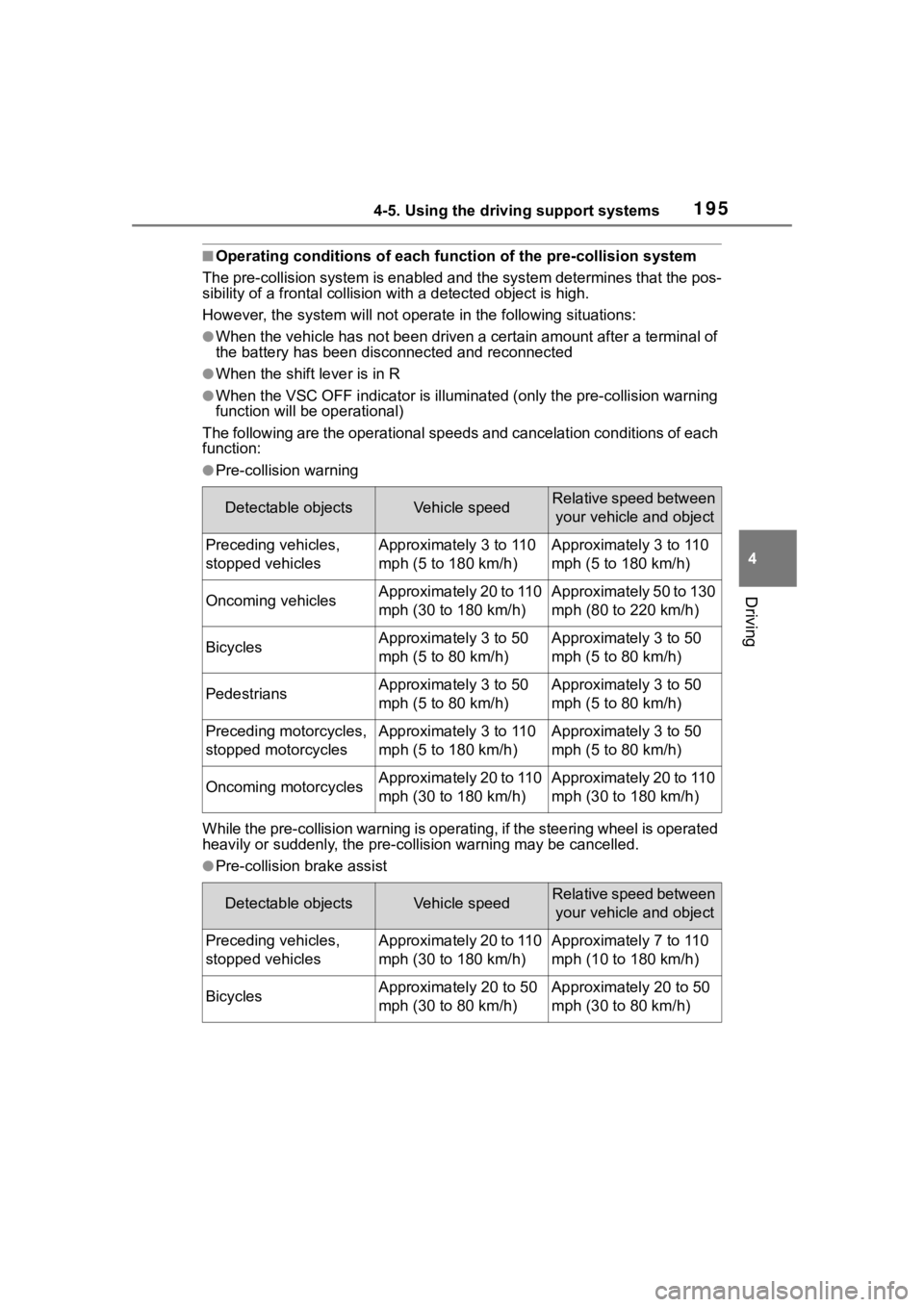
■Operating conditions of each function of the pre-collision system
The pre-collision syst em is enabled and the system determines t hat the pos-
sibility of a frontal c ollision with a detected object is high.
However, the system will not operate in the follo wing situations:
●When the vehicle has not been driven a certain amount after a t erminal of
the battery has been disc onnected and reconnected
●When the shift lever is in R
●When the VSC OFF indicator is illuminated (only the pre-collision warning
function will be operational)
The following are the operational speeds and cancelation condit ions of each
function:
●Pre-collision warning
While the pre-collision warning is operating, if the steering w heel is operated
heavily or suddenly, the pre-co llision warning may be cancelled.
●Pre-collision brake assist
Detectable objectsVehicle speedRelative speed between
your vehicle and object
Preceding vehicles,
stopped vehiclesApproximately 3 to 110
mph (5 to 180 km/h)Approximately 3 to 110
mph (5 to 180 km/h)
Oncoming vehiclesApproximately 20 to 110
mph (30 to 180 km/h)Approximately 50 to 130
mph (80 to 220 km/h)
BicyclesApproximately 3 to 50
mph (5 to 80 km/h)Approximately 3 to 50
mph (5 to 80 km/h)
PedestriansApproximately 3 to 50
mph (5 to 80 km/h)Approximately 3 to 50
mph (5 to 80 km/h)
Preceding motorcycles,
stopped motorcyclesApproximately 3 to 110
mph (5 to 180 km/h)Approximately 3 to 50
mph (5 to 80 km/h)
Oncoming motorcyclesApproximately 20 to 110
mph (30 to 180 km/h)Approximately 20 to 110
mph (30 to 180 km/h)
Detectable objectsVehicle speedRelative speed between your vehicle and object
Preceding vehicles,
stopped vehiclesApproximately 20 to 110
mph (30 to 180 km/h)Approximately 7 to 110
mph (10 to 180 km/h)
BicyclesApproximately 20 to 50
mph (30 to 80 km/h)Approximately 20 to 50
mph (30 to 80 km/h)
Page 197 of 468
1974-5. Using the driving support systems
4
Driving
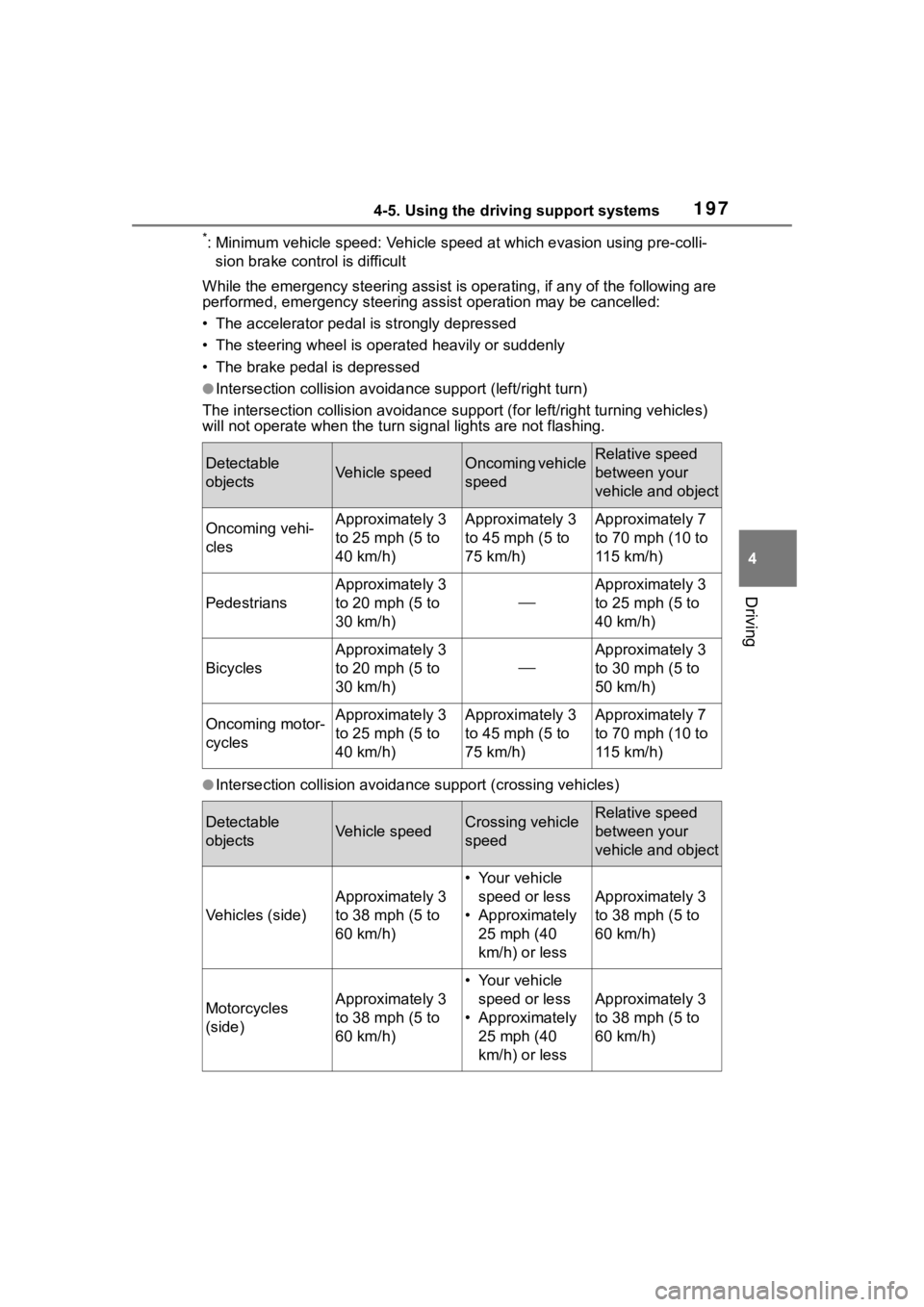
*: Minimum vehicle speed: Vehicle speed at which evasion using pr e-colli-
sion brake control is difficult
While the emergency ste ering assist is operating, if any of the following are
performed, emergency steering assist operation may be cancelled :
• The accelerator pedal is strongly depressed
• The steering wheel is ope rated heavily or suddenly
• The brake pedal is depressed
●Intersection collisio n avoidance support (left/right turn)
The intersection collision avoida nce support (for left/right turning vehicles)
will not operate when the turn signal light s are not flashing.
●Intersection collision avoidance support (crossing vehicles)
Detectable
objectsVehicle speedOncoming vehicle
speedRelative speed
between your
vehicle and object
Oncoming vehi-
clesApproximately 3
to 25 mph (5 to
40 km/h)Approximately 3
to 45 mph (5 to
75 km/h)Approximately 7
to 70 mph (10 to
115 km/h)
Pedestrians
Approximately 3
to 20 mph (5 to
30 km/h)
Approximately 3
to 25 mph (5 to
40 km/h)
Bicycles
Approximately 3
to 20 mph (5 to
30 km/h)
Approximately 3
to 30 mph (5 to
50 km/h)
Oncoming motor-
cyclesApproximately 3
to 25 mph (5 to
40 km/h)Approximately 3
to 45 mph (5 to
75 km/h)Approximately 7
to 70 mph (10 to
115 km/h)
Detectable
objectsVehicle speedCrossing vehicle
speedRelative speed
between your
vehicle and object
Vehicles (side)
Approximately 3
to 38 mph (5 to
60 km/h)
• Your vehicle
speed or less
• Approximately 25 mph (40
km/h) or less
Approximately 3
to 38 mph (5 to
60 km/h)
Motorcycles
(side)Approximately 3
to 38 mph (5 to
60 km/h)
• Your vehicle speed or less
• Approximately 25 mph (40
km/h) or less
Approximately 3
to 38 mph (5 to
60 km/h)
Page 211 of 468
2114-5. Using the driving support systems
4
Driving
PDA (Proactive driv-
ing assist)
When a detectable object
(P.212) is detected, the
proactive driving assist
operates the brakes and
steering wheel to help pre-
vent the vehicle from
approaching too close to
the object.
WARNING
■For safe use
Driving safely is solely the respon-
sibility of the driver.
●The proactive driving assist is
designed to provide some
assistance for regular braking
and steering operations, as well
as helping to prevent the vehicle
from approaching too close to a
detectable object. However, the
scope of this assistance is lim-
ited.
The driver should perform brake
and steering operations as neces-
sary. Read the following items
carefully. Do not overly rely on the
proactive driving assist and
always drive carefully.( P.213)
●The proactive driving assist is
not a system which reduces the
amount of attention necessary
for safe driving. Even if the sys-
tem is operating correctly, the
surrounding conditions as rec-
ognized by the driver and
detected by the system may dif-
fer. It is necessary for the driver
to pay attention, assess risks,
and ensure safety. Over-reli-
ance on this system to drive the
vehicle safely may lead to an
accident resulting in death or
serious injury.
●Proactive driving assist is not a
system which allows for inatten-
tive driving and is not a system
which assists in poor visibility
conditions. The driver is solely
responsible for paying attention
to their surroundings and driving
safely.
■When turning proactive driv-
ing assist off
●Situations in which the sensors
may not operate properly
: P. 1 8 8
●When it is necessary to disable
the system : P.184