instrument panel TOYOTA COROLLA HYBRID 2020 Owners Manual (in English)
[x] Cancel search | Manufacturer: TOYOTA, Model Year: 2020, Model line: COROLLA HYBRID, Model: TOYOTA COROLLA HYBRID 2020Pages: 556, PDF Size: 19.28 MB
Page 15 of 556
15Pictorial index
COROLLA HV_U
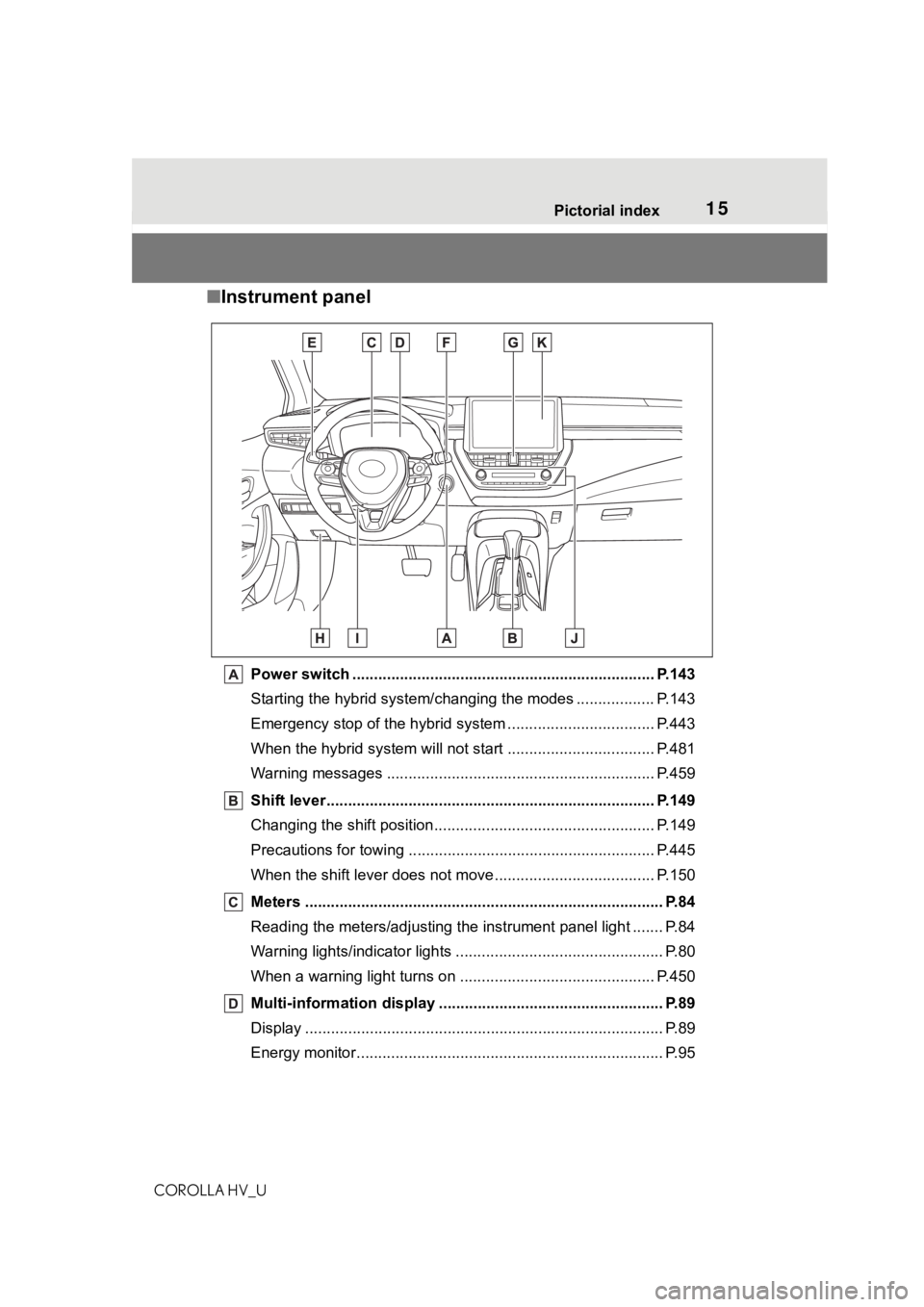
■ Instrument panel
Power switch ................................................... ................... P.143
Starting the hybrid system/changing the modes .................. P. 1 4 3
Emergency stop of the hybrid system ............................ ...... P.443
When the hybrid system will not start .......................... ........ P.481
Warning messages ............................................... ............... P.459
Shift lever.................................................... ........................ P.149
Changing the shift position.................................... ............... P.149
Precautions for towing .. ....................................... ................ P.445
When the shift lever does not move............................. ........ P.150
Meters ......................................................... .......................... P.84
Reading the meters/adjusting the instrument panel light ....... P .84
Warning lights/indicator lights ................................ ................ P.80
When a warning light turns on .................................. ........... P.450
Multi-information display . ................................................... P.89
Display ........................................................ ........................... P.89
Energy monitor................................................. ...................... P.95
Page 17 of 556
17Pictorial index
COROLLA HV_U
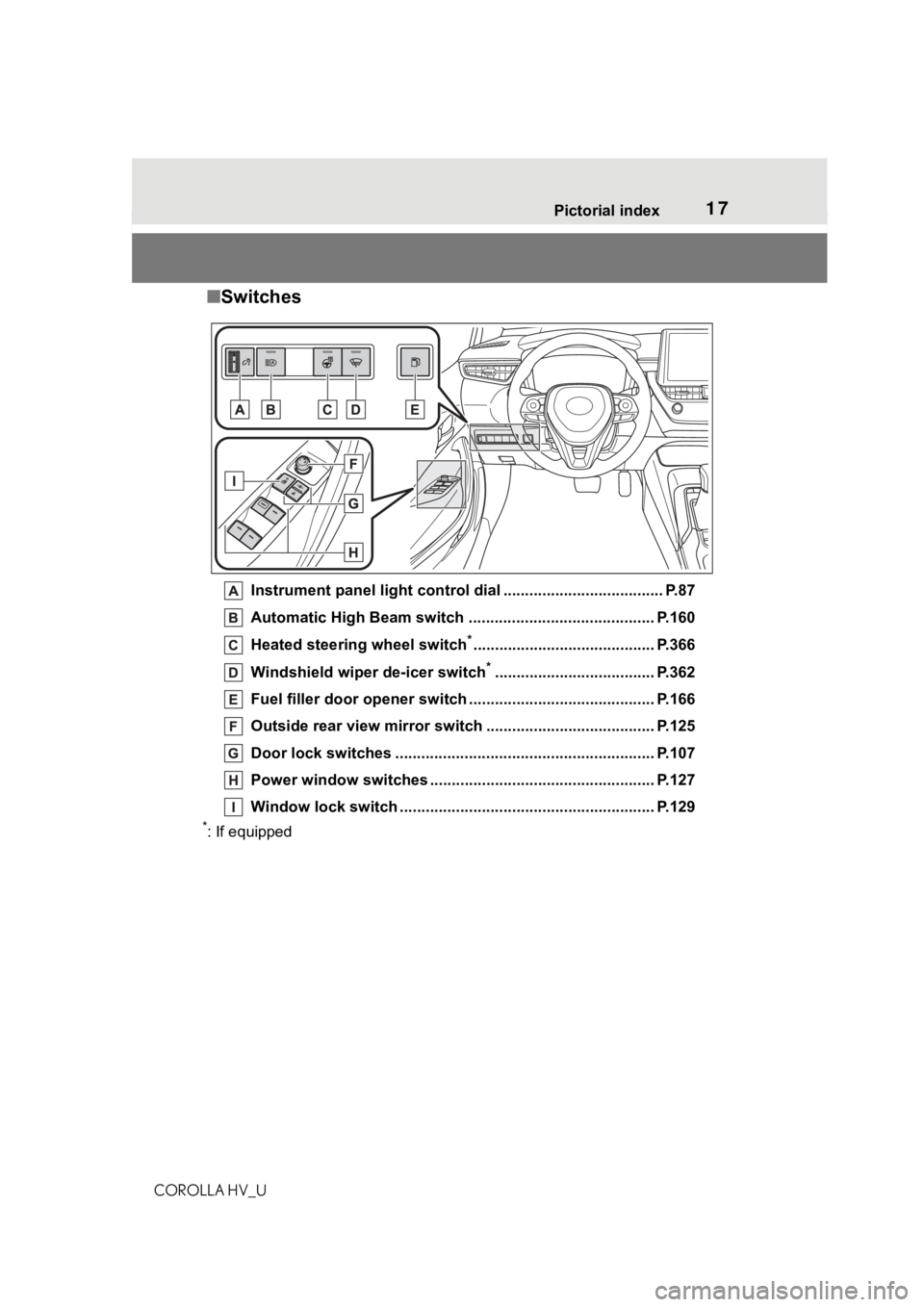
■ Switches
Instrument panel light cont rol dial ..................................... P.87
Automatic High Beam switch ..................................... ...... P.160
Heated steering wheel switch
*.......................................... P.366
Windshield wiper de-icer switch
*..................................... P.362
Fuel filler door opener swi tch ........................................... P.166
Outside rear view mirror s witch ....................................... P.125
Door lock switches ............................................................ P.107
Power window switches ....... ............................................. P.127
Window lock switch ............................................. .............. P.129
*: If equipped
Page 35 of 556
351-1. For safe use
COROLLA HV_U
1
For safety and security
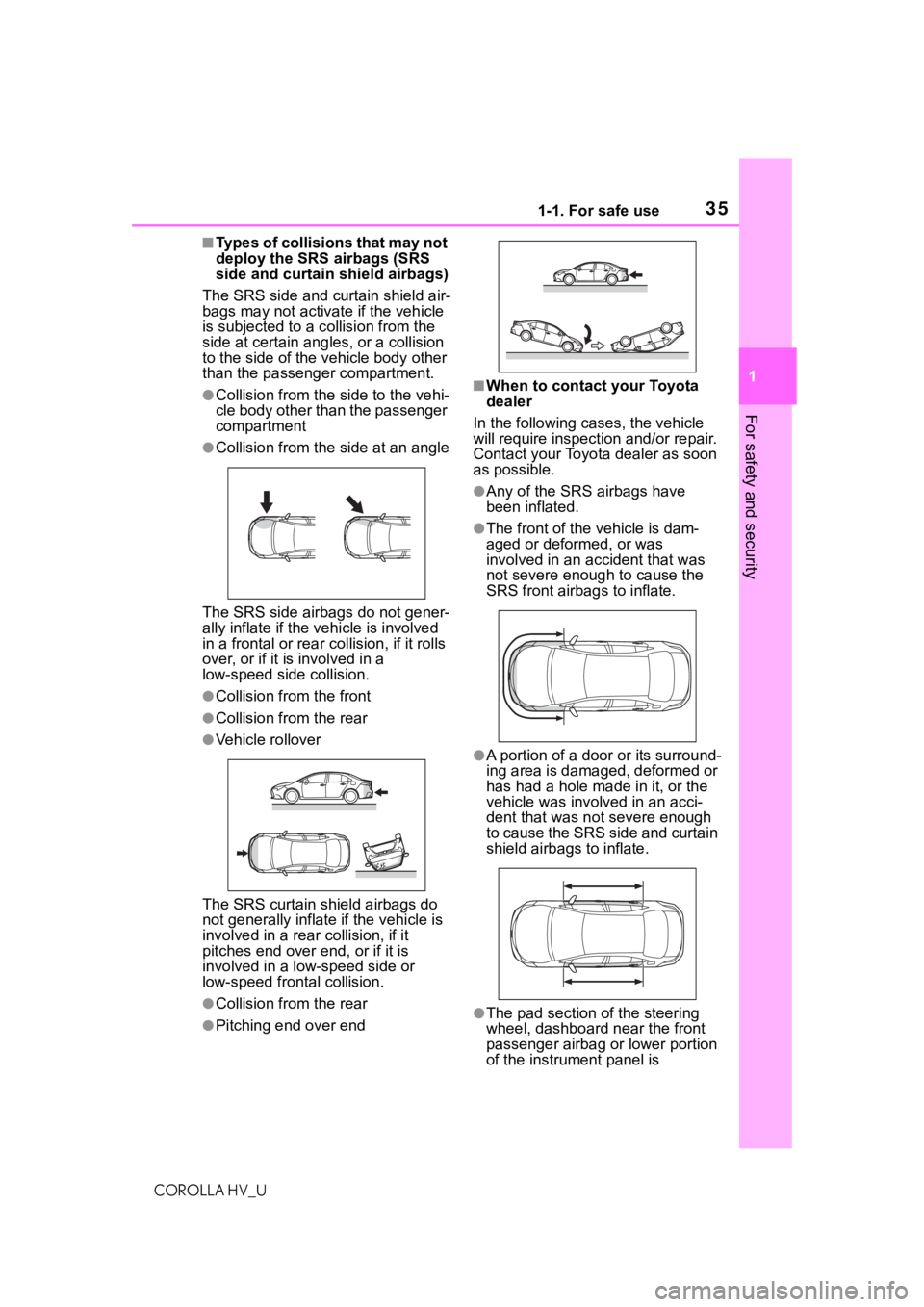
■Types of collisions that may not
deploy the SRS airbags (SRS
side and curtain shield airbags)
The SRS side and curtain shield air-
bags may not activate if the vehicle
is subjected to a c ollision from the
side at certain angl es, or a collision
to the side of the vehicle body other
than the passenger compartment.
●Collision from the s ide to the vehi-
cle body other than the passenger
compartment
●Collision from the s ide at an angle
The SRS side airbags do not gener-
ally inflate if the vehicle is involved
in a frontal or rear c ollision, if it rolls
over, or if it i s involved in a
low-speed side collision.
●Collision from the front
●Collision from the rear
●Vehicle rollover
The SRS curtain shield airbags do
not generally inflate if the vehicle is
involved in a rear collision, if it
pitches end over end, or if it is
involved in a low-speed side or
low-speed fron tal collision.
●Collision from the rear
●Pitching end over end
■When to contact your Toyota
dealer
In the following ca ses, the vehicle
will require inspecti on and/or repair.
Contact your Toyota dealer as soon
as possible.
●Any of the SRS airbags have
been inflated.
●The front of the vehicle is dam-
aged or deformed, or was
involved in an accident that was
not severe enough to cause the
SRS front airbags to inflate.
●A portion of a door or its surround-
ing area is damaged, deformed or
has had a hole made in it, or the
vehicle was involved in an acci-
dent that was not severe enough
to cause the SRS side and curtain
shield airbags to inflate.
●The pad section of the steering
wheel, dashboard near the front
passenger airbag or lower portion
of the instrument panel is
Page 38 of 556
381-1. For safe use
COROLLA HV_U
WA R N I N G
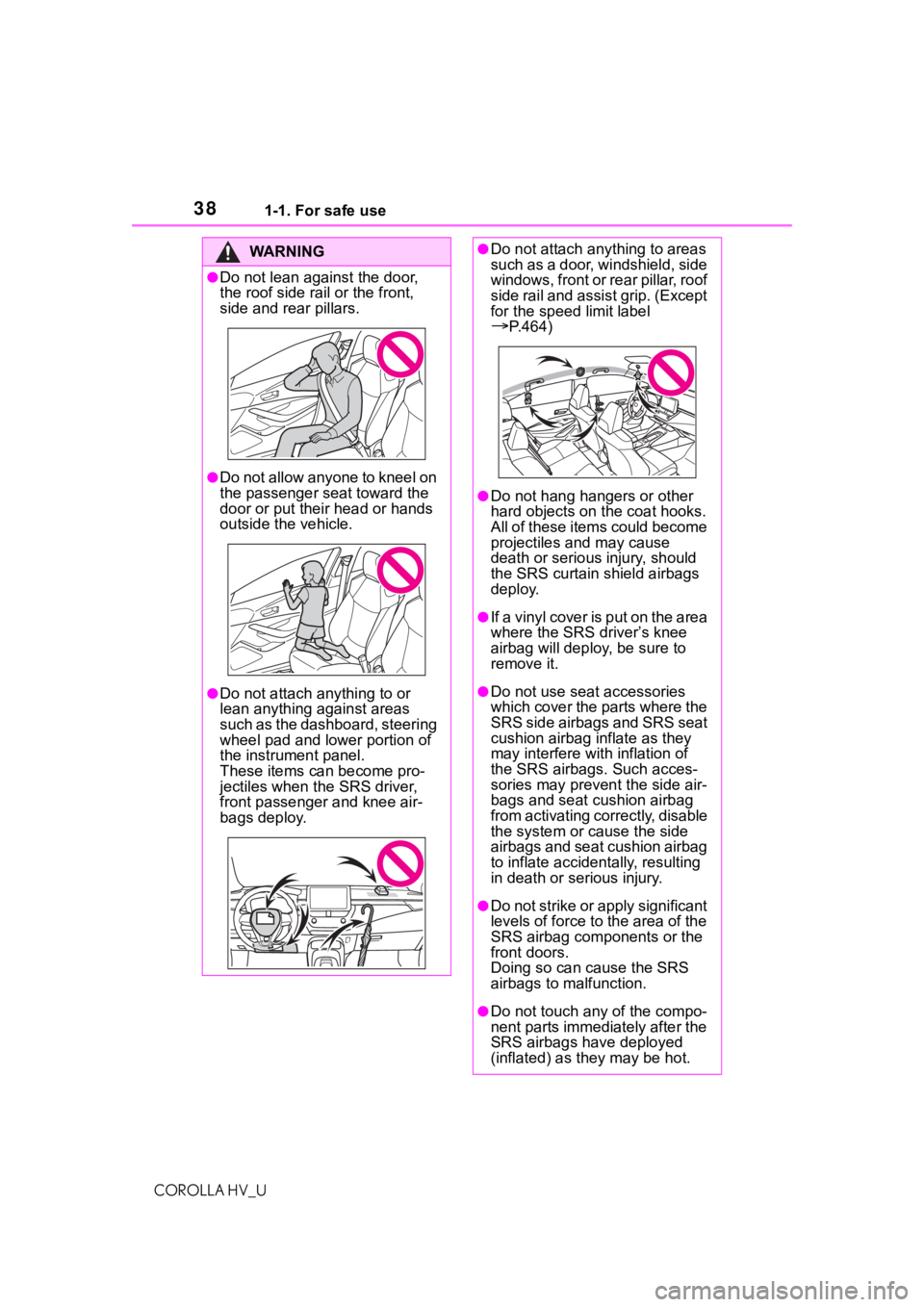
●Do not lean against the door,
the roof side rail or the front,
side and rear pillars.
●Do not allow anyone to kneel on
the passenger seat toward the
door or put their head or hands
outside the vehicle.
●Do not attach anything to or
lean anything against areas
such as the dashboard, steering
wheel pad and lower portion of
the instrument panel.
These items can become pro-
jectiles when the SRS driver,
front passenger and knee air-
bags deploy.
●Do not attach anything to areas
such as a door, windshield, side
windows, front or rear pillar, roof
side rail and assist grip. (Except
for the speed limit label
P.464)
●Do not hang hangers or other
hard objects on the coat hooks.
All of these items could become
projectiles and may cause
death or serious injury, should
the SRS curtain shield airbags
deploy.
●If a vinyl cover is put on the area
where the SRS driver’s knee
airbag will deploy , be sure to
remove it.
●Do not use sea t accessories
which cover the parts where the
SRS side airbags and SRS seat
cushion airbag inflate as they
may interfere with inflation of
the SRS airbags. Such acces-
sories may prevent the side air-
bags and seat cushion airbag
from activating correctly, disable
the system or cause the side
airbags and seat cushion airbag
to inflate accidentally, resulting
in death or se rious injury.
●Do not strike or apply significant
levels of force to the area of the
SRS airbag components or the
front doors.
Doing so can cause the SRS
airbags to malfunction.
●Do not touch any of the compo-
nent parts immediately after the
SRS airbags have deployed
(inflated) as they may be hot.
Page 39 of 556
391-1. For safe use
COROLLA HV_U
1
For safety and security
WA R N I N G
●If breathing becomes difficult
after the SRS airbags have
deployed, open a door or win-
dow to allow fresh air in, or
leave the vehicle if it is safe to
do so. Wash off any residue as
soon as possible to prevent skin
irritation.
●If the areas where the SRS air-
bags are stored, such as the
steering wheel pad and front
and rear pillar ga rnishes, are
damaged or cracked, have
them replaced by your Toyota
dealer.
●Do not place anything, such as
a cushion, on the front passen-
ger’s seat. Doing so will
disperse the passenger’s
weight, which prevents the sen-
sor from detecting the passen-
ger’s weight properly. As a
result, the SRS front airbags for
the front passenger may not
deploy in the e vent of a colli-
sion.
■Modification and disposal of
SRS airbag system compo-
nents
Do not dispose of your vehicle or
perform any of the following modi-
fications without consulting your
Toyota dealer. The SRS airbags
may malfunction or deploy
(inflate) accidentally, causing
death or serious injury.
●Installation, removal, disassem-
bly and repair of the SRS air-
bags
●Repairs, modifications, removal
or replacement of the steering
wheel, instrument panel, dash-
board, seats or seat upholstery,
front, side and rear pillars, roof
side rails, front door panels,
front door trims or front door
speakers
●Modifications to the front door
panel (such as making a hole in
it)
●Repairs or modifications of the
front fender, fro nt bumper, or
side of the occupant compart-
ment
●Installation of a grille guard (bull
bars, kangaroo bar, etc.), snow
plows, winches or roof luggage
carrier
●Modifications to the vehicle’s
suspension system
●Installation of electronic devices
such as mobile t wo-way radios
and CD players
●Modifications to your vehicle for
a person with a physical disabil-
ity
Page 80 of 556
802-1. Instrument cluster
COROLLA HV_U
2-1.Instrument cluster
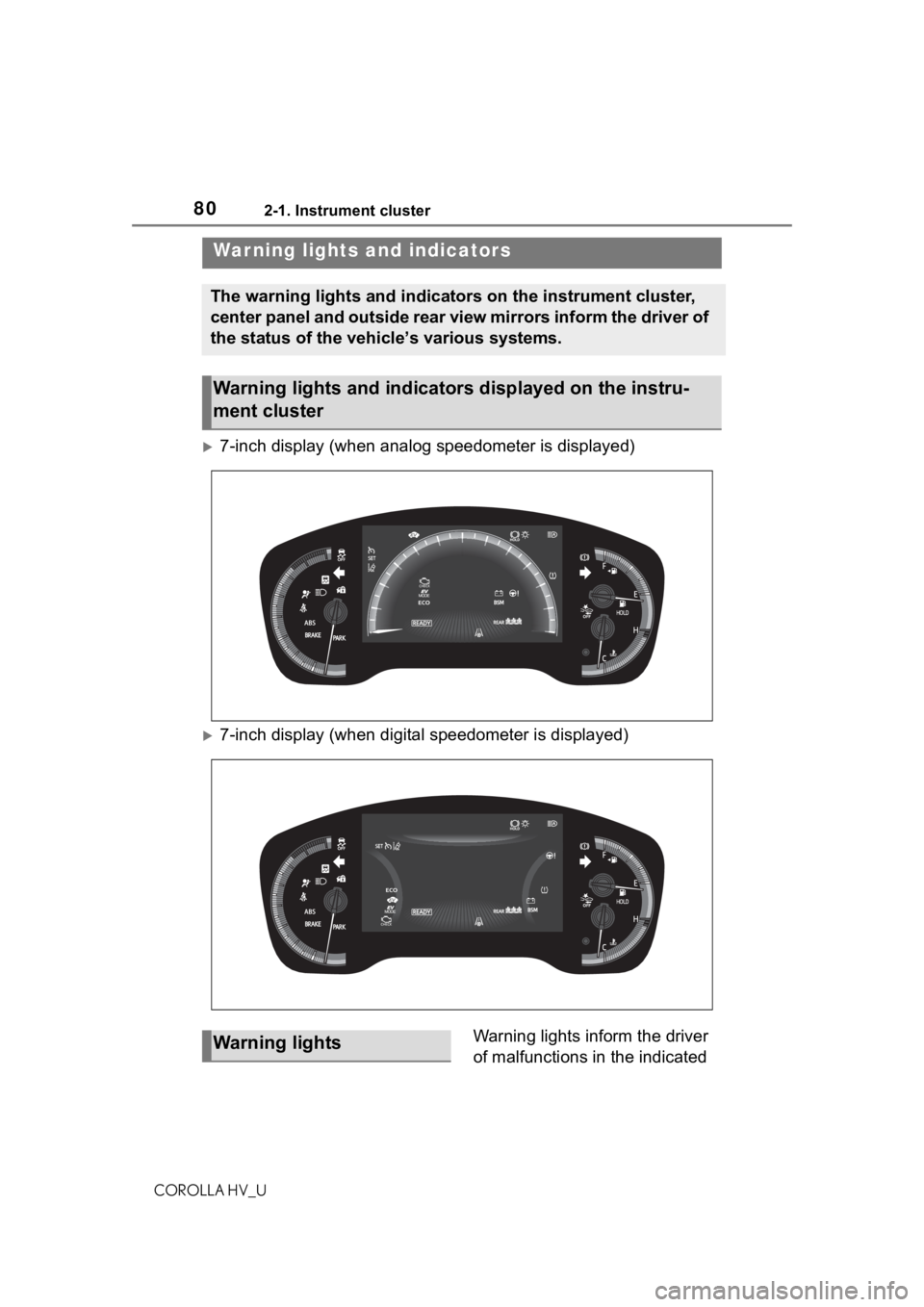
7-inch display (when analog speedometer is displayed)
7-inch display (when digital speedometer is displayed)Warning lights inform the driver
of malfunctions in the indicated
War ning lights and indicators
The warning lights and indicators on the instrument cluster,
center panel and outside rear view mirrors inform the driver of
the status of the vehicle’s various systems.
Warning lights and indicators displayed on the instru-
ment cluster
Warning lights
Page 83 of 556

832-1. Instrument cluster
COROLLA HV_U
2
Vehicle status information and indicators
*1: These lights come on when the power switch is turned to ON to
indicate that a system check is
being performed. They will turn
off after the hybrid system is
started, or after a few seconds.
There may be a malfunction in a
system if the lights do not come
on, or turn off. Have the vehicle
inspected by your Toyota dealer.
*2: This light comes on when the system is turned off.
*3: Depending on the operating con-dition, the color and illuminat-
ing/flashing state of the light
change.
*4: In order to confirm operation, the BSM outside rear view mirror
indicators illumina te in the follow-
ing situations:
• When the power switch is in
ON, the BSM function is
enabled on of the
multi-information display.
• When the BSM function is
enabled on of the
multi-information display, the
power switch is turned to ON.
If the system is functioning cor-
rectly, the BSM outside rear view
mirror indicators will turn off after a
few seconds.
If the BSM outside rear view mirror
indicators do not illuminate or do
not turn off, there may be a mal-
function in the system. If this occurs, have the vehicle
inspected by your Toyota dealer.
*5: This light illuminates on the out-
side rear view mirrors.
*6: This light illuminates on the multi-information display.
*7: When the outside temperature is approximately 37°F (3°C) or
lower, this indicator will flash for
approximately 10 seconds, then
stay on.
*8: This light illuminates on the cen-ter panel.
Eco drive mode indicator
(
P.219)
Power mode indicator
( P.219)
Page 87 of 556
872-1. Instrument cluster
COROLLA HV_U
2
Vehicle status information and indicators
different distances independently.
To reset, display the desired trip
meter and press and hold the dis-
play change button.
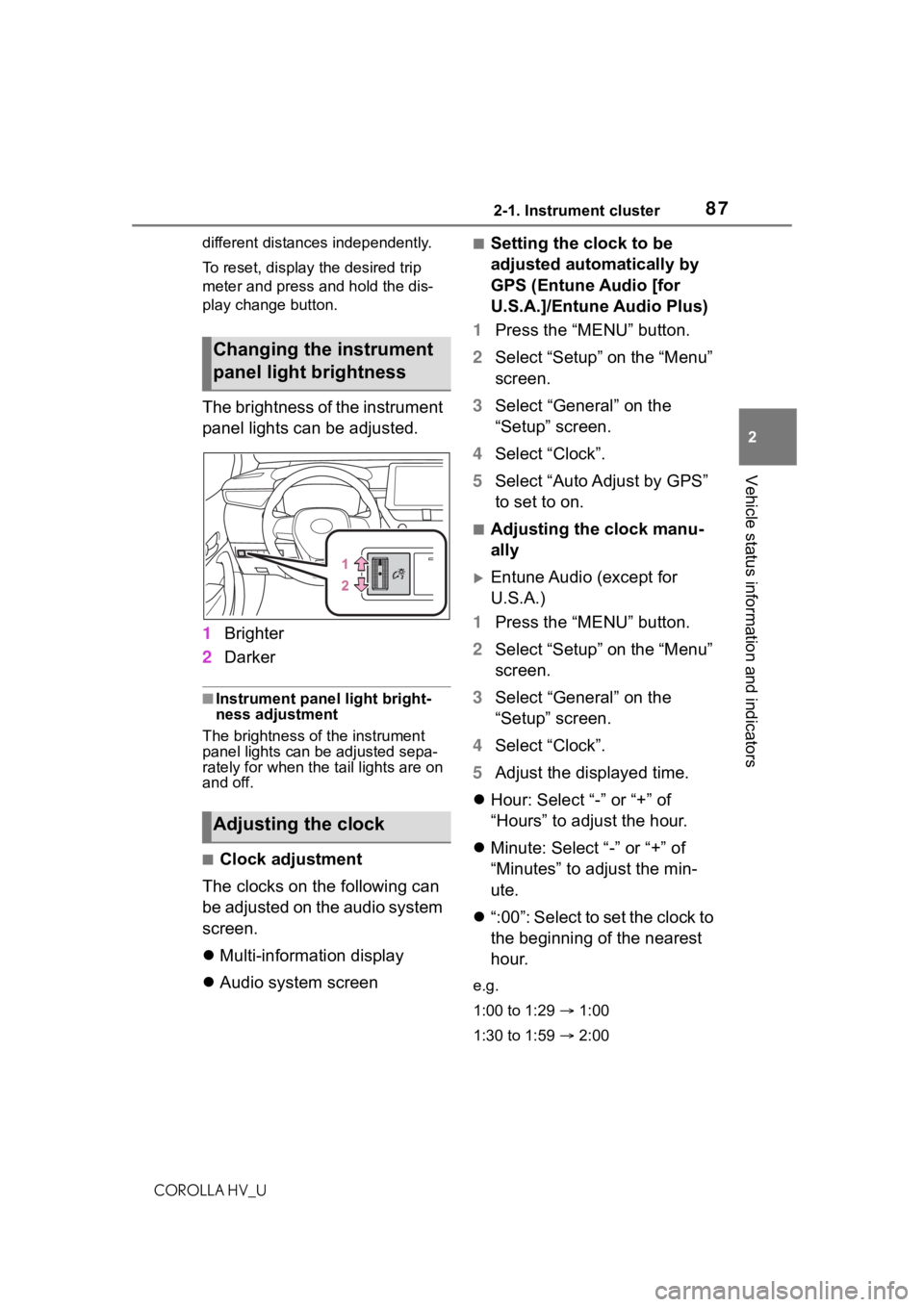
The brightness of the instrument
panel lights can be adjusted.
1 Brighter
2 Darker
■Instrument panel light bright-
ness adjustment
The brightness of the instrument
panel lights can be adjusted sepa-
rately for when the tail lights are on
and off.
■Clock adjustment
The clocks on the following can
be adjusted on the audio system
screen.
Multi-information display
Audio system screen
■Setting the clock to be
adjusted automatically by
GPS (Entune Audio [for
U.S.A.]/Entune Audio Plus)
1 Press the “MENU” button.
2 Select “Setup” on the “Menu”
screen.
3 Select “General” on the
“Setup” screen.
4 Select “Clock”.
5 Select “Auto Adjust by GPS”
to set to on.
■Adjusting the clock manu-
ally
Entune Audio (except for
U.S.A.)
1 Press the “MENU” button.
2 Select “Setup” on the “Menu”
screen.
3 Select “General” on the
“Setup” screen.
4 Select “Clock”.
5 Adjust the displayed time.
Hour: Select “-” or “+” of
“Hours” to adjust the hour.
Minute: Select “-” or “+” of
“Minutes” to adjust the min-
ute.
“:00”: Select to set the clock to
the beginning of the nearest
hour.
e.g.
1:00 to 1:29 1:00
1:30 to 1:59 2:00
Changing the instrument
panel light brightness
Adjusting the clock
Page 114 of 556

1143-2. Opening, closing and locking the doors
COROLLA HV_Urefer to P.484.
■Note for the entry function
●Even when the electronic key is
within the effective range (detec-
tion areas), the system may not
operate properly in the following
cases:
• The electronic key is too close to the window or outside door han-
dle, near the ground, or in a high
place when the doors are locked
or unlocked.
• The electronic key is near the ground or in a high place, or too
close to the center of the rear
bumper when the trunk is opened.
• The electronic key is on the instru- ment panel, rear package tray or
floor, or in the door pockets or
glove box when the hybrid system
is started or po wer switch modes
are changed.
●Do not leave the electronic key on
top of the instrument panel or near
the door pockets when exiting the
vehicle. Depending on the radio
wave reception conditions, it may
be detected by the antenna out-
side the cabin and the door will
become lockable from the outside,
possibly trapping the electronic
key inside the vehicle.
●As long as the electronic key is
within the effective range, the
doors may be locked or unlocked
by anyone. However, only the
doors detecting the electronic key
can be used to unl ock the vehicle.
●Even if the electronic key is not
inside the vehicle, it may be possi-
ble to start the hybrid system if the
electronic key is near the window.
●The doors may unlock or lock if a
large amount of water splashes on
the door handle, such as in the
rain or in a car wash when the
electronic key is within the effec-
tive range. (The doors will auto-
matically be locked after
approximately 60 seconds if the
doors are not opened and closed.)
●If the wireless remote control is
used to lock the doors when the
electronic key is near the vehicle,
there is a possib ility that the door
may not be unlocked by the entry
function. (Use the wireless remote
control to unlock the doors.)
●Touching the door lock or unlock
sensor while wearing gloves may
prevent lock or unlock operation.
●When the lock operation is per-
formed using the lock sensor, rec-
ognition signals will be shown up
to two consecutive times. After
this, no recognition signals will be
given.
●If the door handle becomes wet
while the electronic key is within
the effective range, the door may
lock and unlock repeatedly. In that
case, follow the following correc-
tion procedures to wash the vehi-
cle:
• Place the electronic key in a loca-
tion 6 ft. (2 m) or more away from
the vehicle. (Take care to ensure
that the key is not stolen.)
• Set the electronic key to bat- tery-saving mode to disable the
smart key system. ( P.113)
●If the electronic key is inside the
vehicle and a door handle
becomes wet during a car wash, a
message may be shown on the
multi-information display and a
buzzer will sound outside the vehi-
cle. To turn off the alarm, lock all
the doors.
●The lock sensor may not work
properly if it comes into contact
with ice, snow, m ud, etc. Clean
the lock sensor and attempt to
operate it again.
●A sudden handle operation or a
handle operation immediately
after entering the effective range
may prevent the doors from being
unlocked. Touch the door unlock
sensor and check that the doors
are unlocked befo re pulling the
door handle again.
Page 136 of 556
1364-1. Before driving
COROLLA HV_U
WA R N I N G
●In order to prevent accidents
due to the vehicle rolling away,
always keep depressing the
brake pedal while stopped with
the “READY” indicator is illumi-
nated, and appl y the parking
brake as necessary.
●If the vehicle is stopped on an
incline, in order to prevent acci-
dents caused by the vehicle roll-
ing forward or backward, always
depress the brake pedal and
securely apply the parking
brake as needed.
●Avoid revving or racing the
engine.
Running the engine at high
speed while the vehicle is
stopped may cause the exhaust
system to overheat, which could
result in a fire if combustible
material is nearby.
■When the vehicle is parked
●Do not leave glasses, cigarette
lighters, spray cans, or soft
drink cans in the vehicle when it
is in the sun.
Doing so may result in the fol-
lowing:
• Gas may leak from a cigarette lighter or spray can, and may
lead to a fire.
• The temperature inside the vehicle may cause the plastic
lenses and plastic material of
glasses to deform or crack.
• Soft drink cans may fracture, causing the contents to spray
over the interior of the vehicle,
and may also caus e a short cir-
cuit in the vehicle’s electrical
components.
●Do not leave cigarette lighters in
the vehicle. If a cigarette lighter
is in a place such as the glove
box or on the floor, it may be lit
accidentally when luggage is
loaded or the se at is adjusted,
causing a fire.
●Do not attach adhesive discs to
the windshield or windows. Do
not place containers such as air
fresheners on the instrument
panel or dashboard. Adhesive
discs or containers may act as
lenses, causing a fire in the
vehicle.
●Do not leave a door or window
open if the curved glass is
coated with a metallized film
such as a silver-colored one.
Reflected sunlight may cause
the glass to act a s a lens, caus-
ing a fire.
●Always apply the parking brake,
shift the shift lever to P, stop the
hybrid system and lock the vehi-
cle.
Do not leave the vehicle unat-
tended while the “READY” indi-
cator is illuminated.
If the vehicle is parked with the
shift lever in P but the parking
brake is not set, the vehicle may
start to move, possibly leading
to an accident.
●Do not touch the exhaust pipes
while the “READY” indicator is
illuminated or immediately after
turning the hybr id system off.
Doing so may cause burns.