ESP TOYOTA COROLLA HYBRID 2021 (in English) User Guide
[x] Cancel search | Manufacturer: TOYOTA, Model Year: 2021, Model line: COROLLA HYBRID, Model: TOYOTA COROLLA HYBRID 2021Pages: 584, PDF Size: 19.59 MB
Page 78 of 584
781-3. Emergency assistance
COROLLA HV_U
Red indicator light (except at
vehicle start-up) = System
malfunction (contact your Toy-
ota dealer)
No indicator light (off) =
Safety Connect service not
active
■Automatic Collision Notifi-
cation
In case of either airbag deploy-
ment or severe rear-end colli-
sion, the system is designed to
automatically call the response
center. The responding agent
receives the vehicle’s location
and attempts to speak with the
vehicle occupants to assess the
level of emergency. If the occu-
pants are unable to communi-
cate, the agent automatically
treats the call as an emergency,
contacts the nearest emer-
gency services provider to
describe the situation, and
requests that assistance be sent
to the location.
■Stolen Vehicle Location
If your vehicle is stolen, Safety
Connect can work with local
authorities to assist them in
locating and recovering the
vehicle. After filing a police
report, call the Customer Experi-
ence Center at 1-800-331-4331
in the United States,
1-877-855-8377 in Puerto Rico or 1- 888-869-6828 in Canada,
and follow the prompts for
Safety Connect to initiate this
service.
In addition to assisting law
enforcement with recovery of a
stolen vehicle, Safety-Con-
nect-equipped vehicle location
data may, under certain circum-
stances, be shared with third
parties to locate your vehicle.
Further information is available
at Toyota.com in the United
States, Toyotapr.com in Puerto
Rico and Toyota.ca in Canada.
■Emergency Assistance But-
ton (“SOS”)
In the event of an emergency on
the road, push the “SOS” button
to reach the Safety Connect
response center. The answer-
ing agent will determine your
vehicle’s location, assess the
emergency, and dispatch the
necessary assistance required.
If you accidentally press the “SOS”
button, tell the response-center
agent that you are not experiencing
an emergency.
■Enhanced Roadside Assis-
tance
Enhanced Roadside Assistance
adds GPS data to the already
included warranty-based Toyota
roadside service.
Subscribers can press the
“SOS” button to reach a Safety
Connect response-center agent,
who can help with a wide range
Safety Connect services
Page 100 of 584
1002-1. Instrument cluster
COROLLA HV_Uspeed that is displayed may differ
even when vehicle operation and
driving conditions are the same.
■Outside temperature display
●In the following si
tuations, the cor-
rect outside tempe rature may not
be displayed, or the display may
take longer than normal to
change:
• When stopped, or driving at low speeds (less than 16 mph [25
km/h])
• When the outside temperature has changed su ddenly (at the
entrance/exit of a garage, tunnel,
etc.)
●When “--” or “E” is displayed, the
system may be malfunctioning.
Take your vehicle to your Toyota
dealer.
■Liquid crystal display
P. 1 0 3
■Customization
The gauges and met ers can be cus-
tomized in of the multi-informa-
tion display. ( P.108)
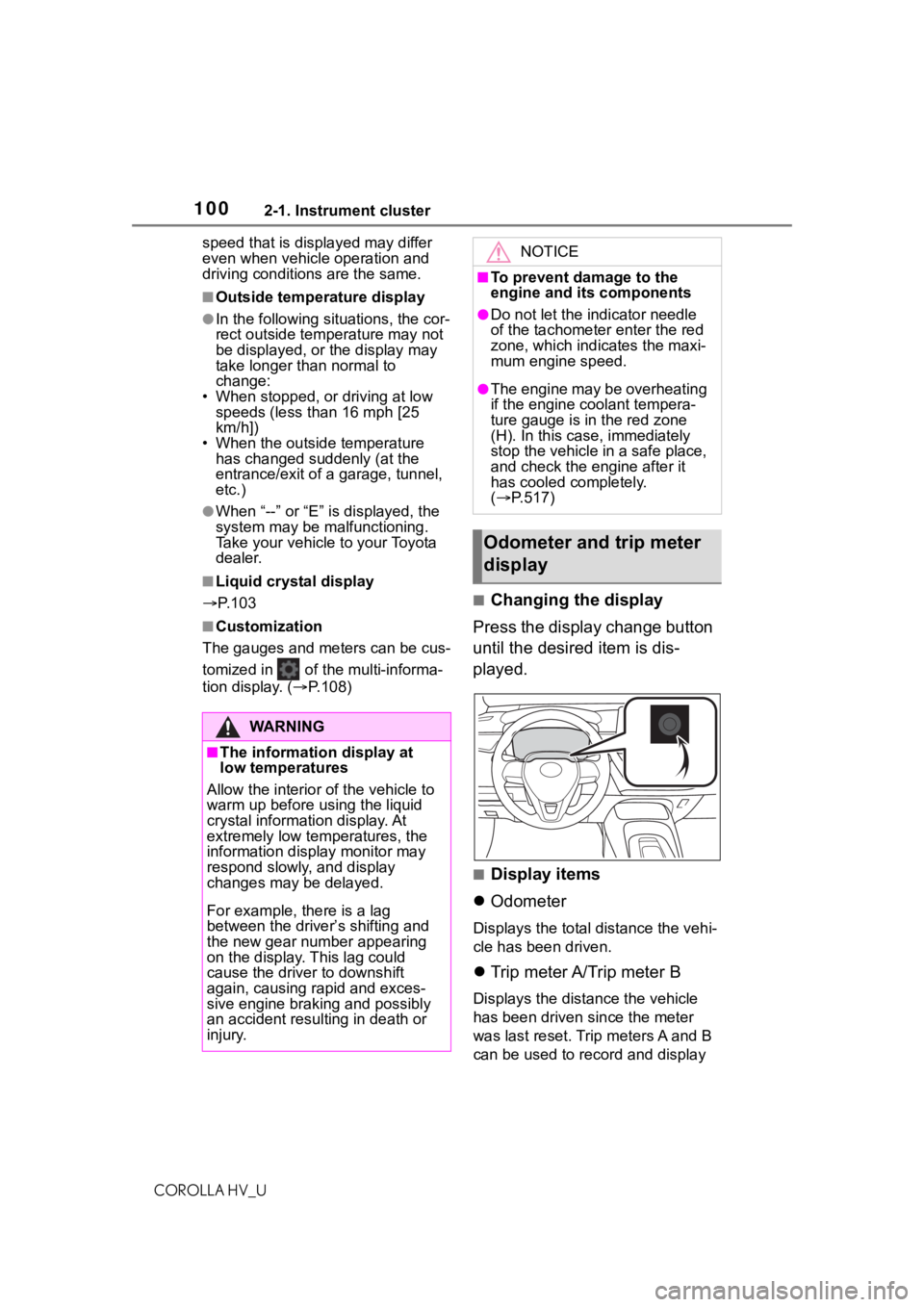
■Changing the display
Press the display change button
until the desired item is dis-
played.
■Display items
Odometer
Displays the total distance the vehi-
cle has been driven.
Trip meter A/Trip meter B
Displays the distance the vehicle
has been driven since the meter
was last reset. Trip meters A and B
can be used to record and display
WA R N I N G
■The information display at
low temperatures
Allow the interior of the vehicle to
warm up before u sing the liquid
crystal informat ion display. At
extremely low temperatures, the
information display monitor may
respond slowly, and display
changes may be delayed.
For example, there is a lag
between the driver’s shifting and
the new gear number appearing
on the display. This lag could
cause the driver to downshift
again, causing rapid and exces-
sive engine braking and possibly
an accident resulting in death or
injury.
NOTICE
■To prevent damage to the
engine and its components
●Do not let the indicator needle
of the tachometer enter the red
zone, which indicates the maxi-
mum engine speed.
●The engine may be overheating
if the engine coolant tempera-
ture gauge is in the red zone
(H). In this case, immediately
stop the vehicle in a safe place,
and check the engine after it
has cooled completely.
( P.517)
Odometer and trip meter
display
Page 121 of 584
1213-2. Opening, closing and locking the doors
COROLLA HV_U
3
Before driving
tem or wireless remote control. Lock
or unlock the doors using the
mechanical key. ( P.511)
■Customization
Some functions can be customized.
( P.544)
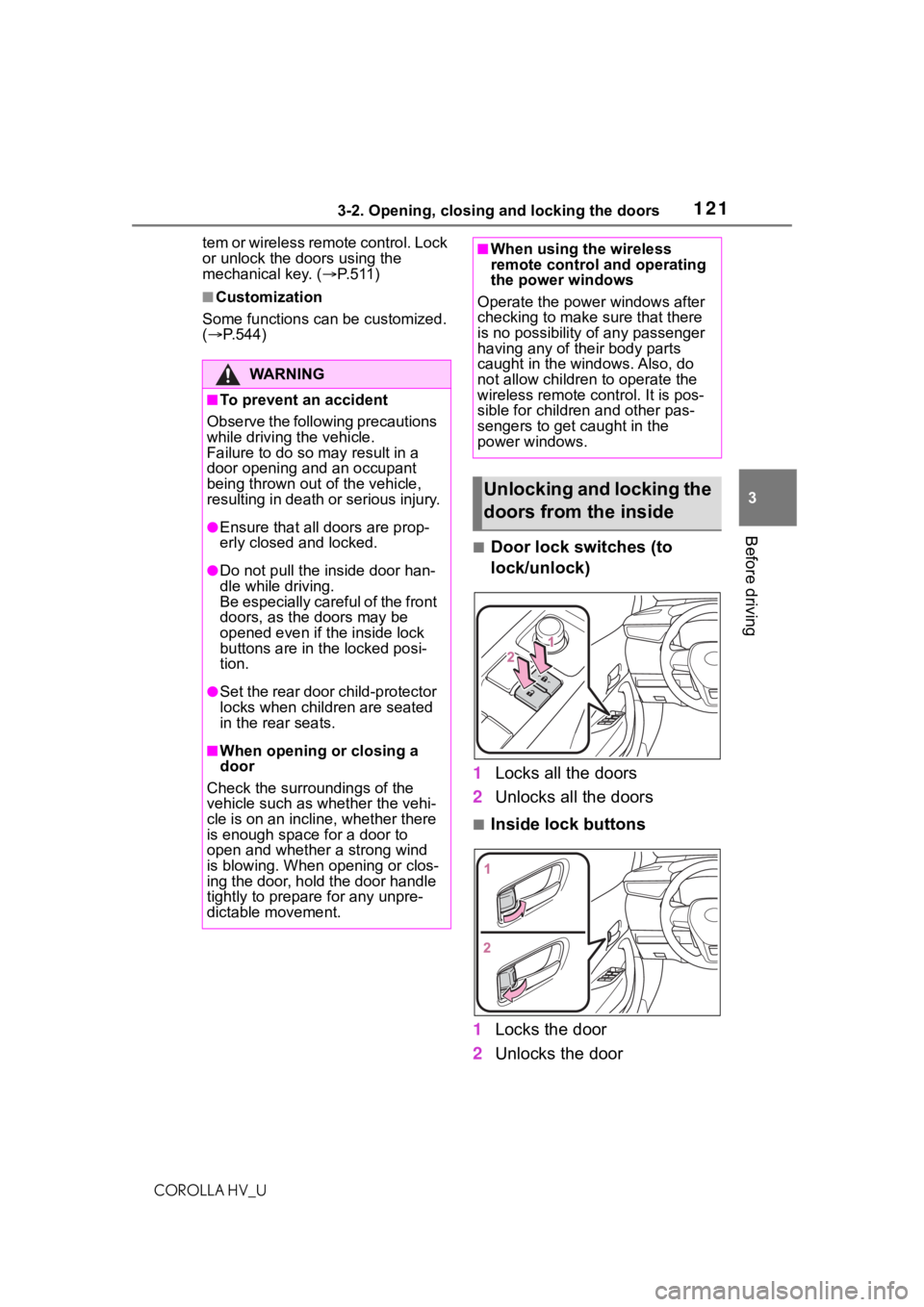
■Door lock switches (to
lock/unlock)
1 Locks all the doors
2 Unlocks all the doors
■Inside lock buttons
1 Locks the door
2 Unlocks the door
WA R N I N G
■To prevent an accident
Observe the following precautions
while driving t he vehicle.
Failure to do so m ay result in a
door opening and an occupant
being thrown out of the vehicle,
resulting in death or serious injury.
●Ensure that all doors are prop-
erly closed and locked.
●Do not pull the inside door han-
dle while driving.
Be especially careful of the front
doors, as the doors may be
opened even if the inside lock
buttons are in the locked posi-
tion.
●Set the rear door child-protector
locks when children are seated
in the rear seats.
■When opening or closing a
door
Check the surroundings of the
vehicle such as whether the vehi-
cle is on an incline, whether there
is enough space for a door to
open and whether a strong wind
is blowing. When opening or clos-
ing the door, hold the door handle
tightly to prepare for any unpre-
dictable movement.
■When using the wireless
remote control and operating
the power windows
Operate the power windows after
checking to make sure that there
is no possibility of any passenger
having any of their body parts
caught in the windows. Also, do
not allow children to operate the
wireless remote control. It is pos-
sible for children and other pas-
sengers to get caught in the
power windows.
Unlocking and locking the
doors from the inside
Page 136 of 584
1363-3. Adjusting the seats
COROLLA HV_U
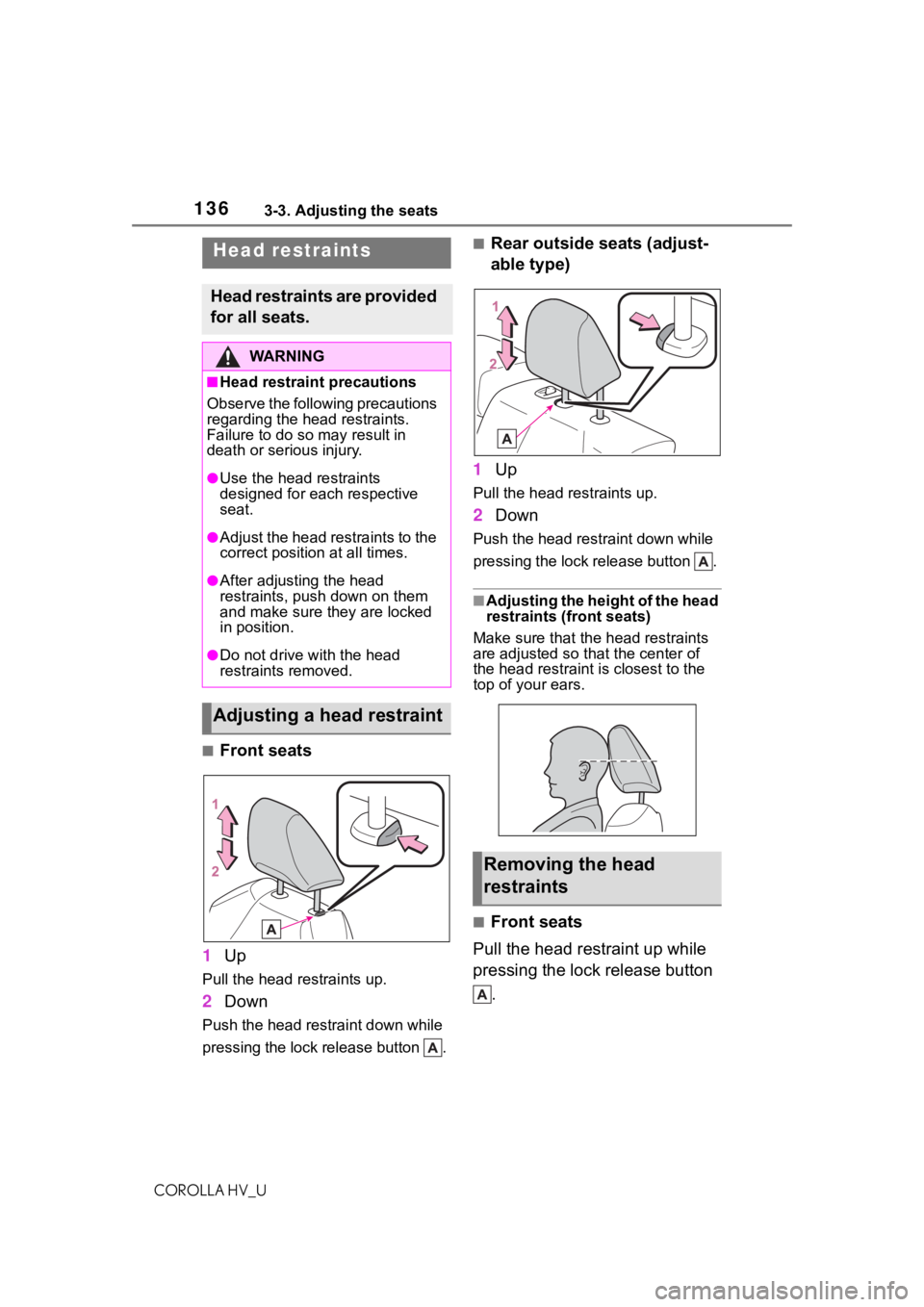
■Front seats
1 Up
Pull the head restraints up.
2Down
Push the head restraint down while
pressing the lock release button .
■Rear outside seats (adjust-
able type)
1 Up
Pull the head restraints up.
2Down
Push the head restraint down while
pressing the lock release button .
■Adjusting the height of the head
restraints (front seats)
Make sure that the head restraints
are adjusted so that the center of
the head restraint i s closest to the
top of your ears.
■Front seats
Pull the head restraint up while
pressing the lock release button .
Head restraints
Head restraints are provided
for all seats.
WA R N I N G
■Head restraint precautions
Observe the following precautions
regarding the head restraints.
Failure to do so m ay result in
death or serious injury.
●Use the head restraints
designed for each respective
seat.
●Adjust the head restraints to the
correct position at all times.
●After adjusting the head
restraints, push down on them
and make sure they are locked
in position.
●Do not drive with the head
restraints removed.
Adjusting a head restraint
Removing the head
restraints
Page 139 of 584
1393-4. Adjusting the steering wheel and mirrors
COROLLA HV_U
3
Before driving
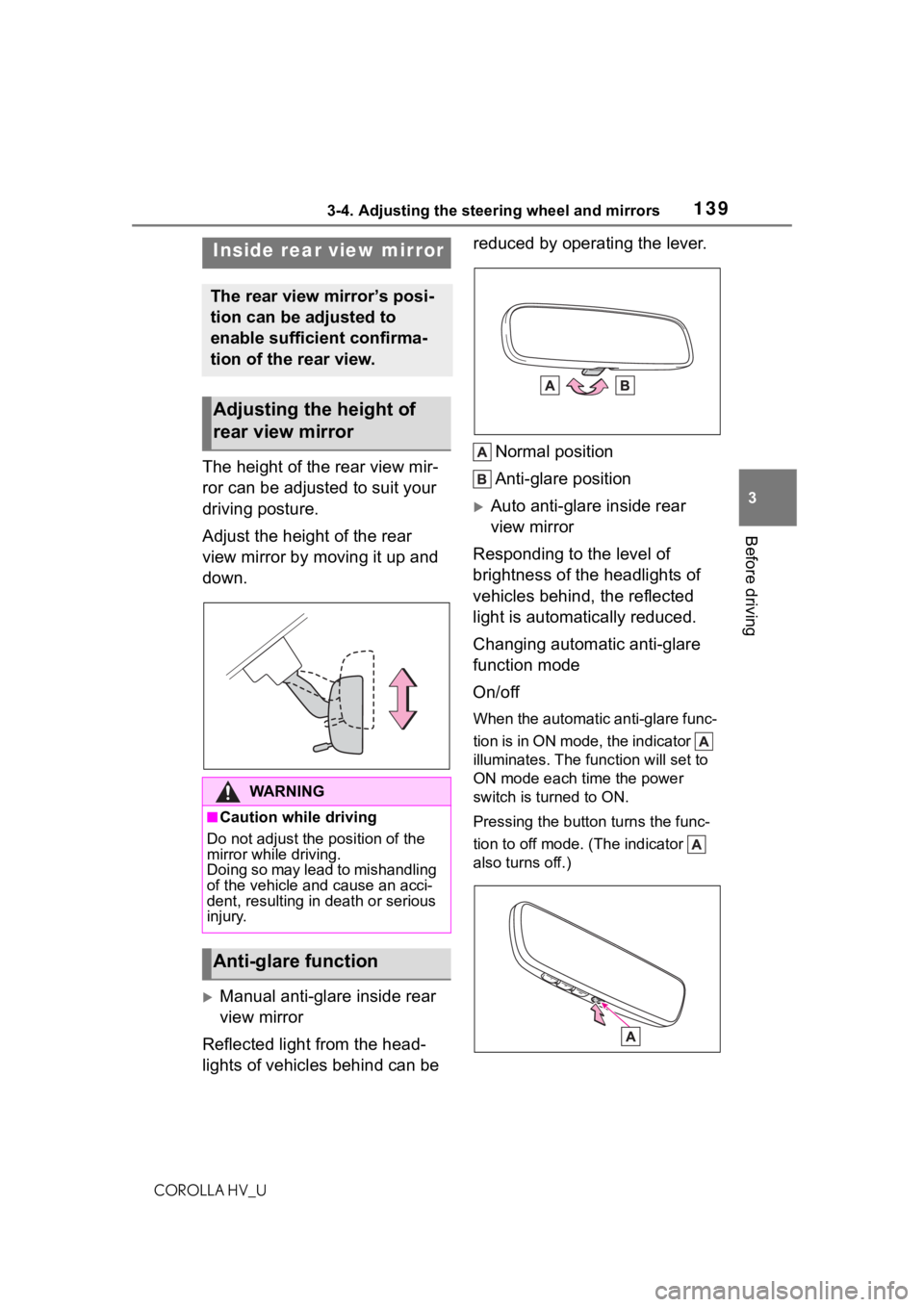
The height of the rear view mir-
ror can be adjusted to suit your
driving posture.
Adjust the height of the rear
view mirror by moving it up and
down.
Manual anti-glare inside rear
view mirror
Reflected light from the head-
lights of vehicles behind can be reduced by operating the lever.
Normal position
Anti-glare position
Auto anti-glare inside rear
view mirror
Responding to the level of
brightness of the headlights of
vehicles behind, the reflected
light is automatically reduced.
Changing automatic anti-glare
function mode
On/off
When the automatic anti-glare func-
tion is in ON mode, the indicator
illuminates. The func tion will set to
ON mode each time the power
switch is turned to ON.
Pressing the button turns the func-
tion to off mode. (The indicator
also turns off.)
Inside rear view mirror
The rear view mirror’s posi-
tion can be adjusted to
enable sufficient confirma-
tion of the rear view.
Adjusting the height of
rear view mirror
WA R N I N G
■Caution while driving
Do not adjust the position of the
mirror while driving.
Doing so may lead to mishandling
of the vehicle and cause an acci-
dent, resulting in death or serious
injury.
Anti-glare function
Page 143 of 584
1433-5. Opening and closing the windows
COROLLA HV_U
3
Before driving
5 Release the power window
switch for a m oment, resume
pushing the switch in the
one-touch opening direction, and
hold it there for a pproximately 4
seconds or more.
6 Pull and hold the power window
switch in the one-touch closing
direction again. After the door
window is completely closed,
continue holding the switch for a
further 1 second or more.
If you release the switch while the
window is moving, start again from
the beginning.
If the window reverses and cannot
be fully closed or opened, have the
vehicle inspected by your Toyota
dealer.
■Door lock linked window opera-
tion
●The power windows can be
opened and closed using the
mechanical key.
* ( P.512)
●The power windows can be
opened using the wireless remote
control.
* ( P. 1 1 9 )
*: These settings must be custom-
ized at your Toyota dealer.
■Customization
Some functions can be customized.
( P.544)
WA R N I N G
Observe the following precau-
tions. Failure to do so may result
in death or serious injury.
■Closing the windows
●The driver is responsible for all
the power window operations,
including the operation for the
passengers. In order to prevent
accidental operation, especially
by a child, do not let a child
operate the power windows. It is
possible for children and other
passengers to have body parts
caught in the power window.
Also, when ridin g with a child, it
is recommended to use the win-
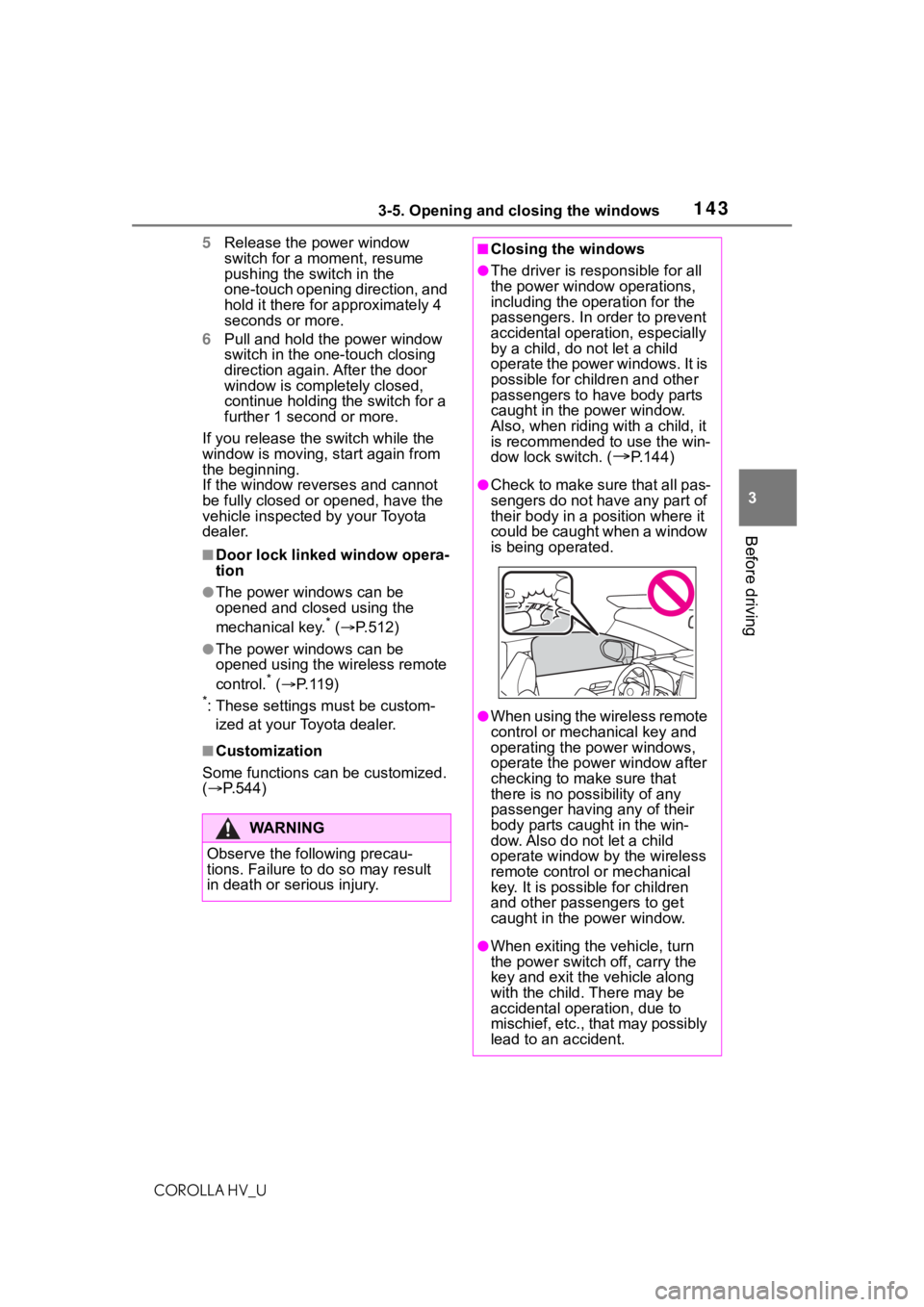
dow lock switch. (
P.144)
●Check to make sure that all pas-
sengers do not have any part of
their body in a pos ition where it
could be caught when a window
is being operated.
●When using the wireless remote
control or mechanical key and
operating the power windows,
operate the power window after
checking to make sure that
there is no poss ibility of any
passenger having any of their
body parts caug ht in the win-
dow. Also do not let a child
operate window by the wireless
remote control or mechanical
key. It is possib le for children
and other passengers to get
caught in the power window.
●When exiting the vehicle, turn
the power switch off, carry the
key and exit the vehicle along
with the child. There may be
accidental operation, due to
mischief, etc., that may possibly
lead to an accident.
Page 146 of 584
1464-1. Before driving
COROLLA HV_U
4-1.Before driving
■Starting the hybrid system
P. 1 5 7
■Driving
1 With the brake pedal
depressed, shift the shift
lever to D. ( P.164)
2 If the parking brake is in man-
ual mode, release the park-
ing brake. ( P.167)
3 Gradually release the brake
pedal and gently depress the
accelerator pedal to acceler-
ate the vehicle.
■Stopping
1 With the shift lever in D,
depress the brake pedal.
2 If necessary, set the parking
brake.
If the vehicle is to be stopped for an
extended period of time, shift the
shift lever to P. ( P.164)
■Parking the vehicle
1 With the shift lever in D,
depress the brake pedal to
stop the vehicle completely.
2 Set the parking brake
( P.167), and shift the shift
lever to P. ( P.164)
Check the parking brake indicator is illuminated.
3
Press the power switch to
stop the hybrid system.
4 Slowly release the brake
pedal.
5 Lock the door, making sure
that you have the electronic
key on your person.
If parking on a hill, block the wheels
as needed.
■Starting off on a steep
uphill
1 Make sure that the parking
brake is set and shift the shift
lever to D.
Hill-start assist cont rol will operate.
( P.240)
2 Gently depress the accelera-
tor pedal.
3 Release the parking brake.
■For fuel-efficient driving
Keep in mind that hybrid vehicles
are similar to conventional vehicles,
and it is necessary to refrain from
activities such as sudden accelera-
tion. ( P.245)
■Driving in the rain
●Drive carefully whe n it is raining,
because visibility will be reduced,
the windows may become
fogged-up, and the road will be
slippery.
●Drive carefully whe n it starts to
rain, because the road surface will
be especially slippery.
●Refrain from hig h speeds when
driving on an expressway in the
rain, because there may be a
layer of water between the tires
and the road surface, preventing
the steering and brakes from
operating properly.
Driving the vehicle
The following procedures
should be observed to
ensure safe driving:
Driving procedure
Page 148 of 584
1484-1. Before driving
COROLLA HV_U
WA R N I N G
■When starting the vehicle
Always keep your foot on the
brake pedal while stopped with
the “READY” indi cator is illumi-
nated. This prevents the vehicle
from creeping.
■When driving the vehicle
●Do not drive if y ou are unfamil-
iar with the location of the brake
and accelerator pedals to avoid
depressing the wrong pedal.
• Accidentally depressing the accelerator pedal instead of the
brake pedal will result in sudden
acceleration that may lead to an
accident.
• When backing up, you may twist your body around, leading to a
difficulty in operating the pedals.
Make sure to operate the pedals
properly.
• Make sure to keep a correct driving posture even when mov-
ing the vehicle only slightly. This
allows you to depress the brake
and accelerator pedals properly.
• Depress the brake pedal using your right foot. Depressing the
brake pedal using your left foot
may delay respon se in an emer-
gency, resulting in an accident.
●The driver should pay extra
attention to pedestrians when
the vehicle is p owered only by
the electric motor (traction
motor). As there is no engine
noise, the pedestrians may mis-
judge the vehicle’s movement.
Even with the vehicle proximity
notification system activate,
drive with care as pedestrians in
the vicinity may s till not notice
the vehicle if t he surrounding
area is noisy.
●Do not drive the vehicle over or
stop the vehicle near flammable
materials.
The exhaust system and
exhaust gases can be
extremely hot. These hot parts
may cause a fire i f there is any
flammable material nearby.
●During normal driving, do not
turn off the hybrid system. Turn-
ing the hybrid s ystem off while
driving will not cause loss of
steering or braking control, how-
ever, power assist to the steer-
ing will be lost. This will make it
more difficult to steer smoothly,
so you should pull over and stop
the vehicle as soon as it is safe
to do so.
In the event of a n emergency,
such as if it becomes impossible
to stop the vehicle in the normal
way:
P. 4 7 1
●Use engine braking (shift posi-
tion B) to maintain a safe speed
when driving down a steep hill.
Using the brakes continuously
may cause the brakes to over-
heat and lose effectiveness.
(
P.164)
●Do not adjust the positions of
the steering wheel, the seat, or
the inside or outside rear view
mirrors while driving.
Doing so may result in a loss of
vehicle control.
●Always check that all passen-
gers’ arms, heads or other parts
of their body are not outside the
vehicle.
Page 183 of 584
1834-5. Using the driving support systems
COROLLA HV_U
4
Driving
4-5.Using the driving support systems
■PCS (Pre-Collision System)
P. 1 8 9
■LTA (Lane Tracing Assist)
P. 1 9 7
■AHB (Automatic High
Beam)
P. 1 7 5
■RSA (Road Sign Assist)*
P. 2 1 8
*: If equipped
■Dynamic radar cruise con-
trol with full-speed range
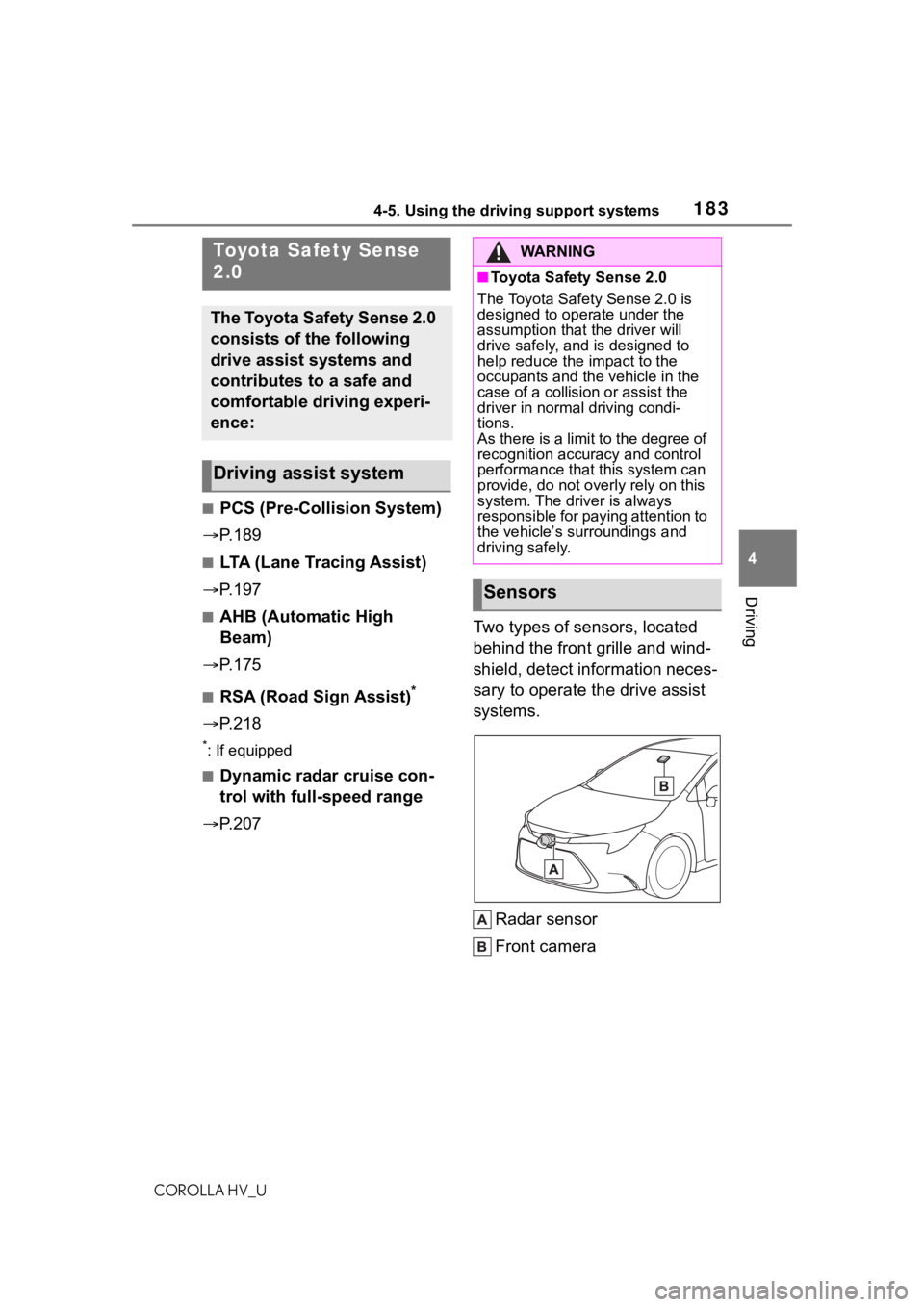
P. 2 0 7 Two types of sensors, located
behind the front grille and wind-
shield, detect information neces-
sary to operate the drive assist
systems.
Radar sensor
Front camera
Toyota Safety Sense
2.0
The Toyota Safety Sense 2.0
consists of the following
drive assist systems and
contributes to a safe and
comfortable driving experi-
ence:
Driving assist system
WA R N I N G
■Toyota Safety Sense 2.0
The Toyota Safety Sense 2.0 is
designed to operate under the
assumption that the driver will
drive safely, and is designed to
help reduce the impact to the
occupants and the vehicle in the
case of a collision or assist the
driver in normal driving condi-
tions.
As there is a limit to the degree of
recognition accuracy and control
performance that this system can
provide, do not overly rely on this
system. The driver is always
responsible for paying attention to
the vehicle’s su rroundings and
driving safely.
Sensors
Page 190 of 584
1904-5. Using the driving support systems
COROLLA HV_U
WA R N I N G
■Limitations of the pre-colli-
sion system
●The driver is solely responsible
for safe driving. Always drive
safely, taking care to observe
your surroundings.
Do not use the pre-collision sys-
tem instead of normal braking
operations under any circum-
stances. This system will not
prevent collisions or lessen col-
lision damage or injury in every
situation. Do not overly rely on
this system. Failure to do so
may lead to an accident, result-
ing in death or serious injury.
●Although this system is
designed to help avoid a colli-
sion or help reduce the impact
of the collision, its effectiveness
may change according to vari-
ous conditions, therefore the
system may not always be able
to achieve the same level of
performance.
Read the following conditions
carefully. Do not overly rely on
this system and always drive
carefully.
• Conditions under which the sys- tem may operate even if there is
no possibility of a collision:
P. 1 9 3
• Conditions under which the sys- tem may not operate properly:
P. 1 9 4
●Do not attempt to test the oper-
ation of the pre-collision system
yourself.
Depending on the objects used
for testing (dummies, card-
board objects imitating detect-
able objects, etc.), the system
may not operate properly, possi-
bly leading to an accident.
■Pre-collision braking
●When the pre-collision braking
function is operating, a large
amount of braking force will be
applied.
●If the vehicle is stopped by the
operation of the pre-collision
braking function, the pre-colli-
sion braking function operation
will be canceled after approxi-
mately 2 seconds. Depress the
brake pedal as necessary.
●The pre-collision braking func-
tion may not operate if certain
operations are performed by the
driver. If the accelerator pedal is
being depressed strongly or the
steering wheel is being turned,
the system may d etermine that
the driver is taking evasive
action and possibly prevent the
pre-collision braking function
from operating.
●In some situations, while the
pre-collision brak ing function is
operating, operation of the func-
tion may be canceled if the
accelerator pedal is depressed
strongly or the steering wheel is
turned and the system deter-
mines that the driver is taking
evasive action.
●If the brake pedal is being
depressed, the system may
determine that t he driver is tak-
ing evasive action and possibly
delay the operation timing of the
pre-collision braking function.
■When to disable the pre-colli-
sion system
In the following situations, disable
the system, as it m ay not operate
properly, possibly leading to an
accident resulting in death or seri-
ous injury:
●When the vehicle is being towed