window TOYOTA COROLLA HYBRID 2021 (in English) Owner's Manual
[x] Cancel search | Manufacturer: TOYOTA, Model Year: 2021, Model line: COROLLA HYBRID, Model: TOYOTA COROLLA HYBRID 2021Pages: 584, PDF Size: 19.59 MB
Page 150 of 584
1504-1. Before driving
COROLLA HV_U
WA R N I N G
●In order to prevent accidents
due to the vehicle rolling away,
always keep depressing the
brake pedal while stopped with
the “READY” indicator is illumi-
nated, and appl y the parking
brake as necessary.
●If the vehicle is stopped on an
incline, in order to prevent acci-
dents caused by the vehicle roll-
ing forward or backward, always
depress the brake pedal and
securely apply the parking
brake as needed.
●Avoid revving or racing the
engine.
Running the engine at high
speed while the vehicle is
stopped may cause the exhaust
system to overheat, which could
result in a fire if combustible
material is nearby.
■When the vehicle is parked
●Do not leave glasses, cigarette
lighters, spray cans, or soft
drink cans in the vehicle when it
is in the sun.
Doing so may result in the fol-
lowing:
• Gas may leak from a cigarette lighter or spray can, and may
lead to a fire.
• The temperature inside the vehicle may cause the plastic
lenses and plastic material of
glasses to deform or crack.
• Soft drink cans may fracture, causing the contents to spray
over the interior of the vehicle,
and may also caus e a short cir-
cuit in the vehicle’s electrical
components.
●Do not leave cigarette lighters in
the vehicle. If a cigarette lighter
is in a place such as the glove
box or on the floor, it may be lit
accidentally when luggage is
loaded or the se at is adjusted,
causing a fire.
●Do not attach adhesive discs to
the windshield or windows. Do
not place containers such as air
fresheners on the instrument
panel or dashboard. Adhesive
discs or containers may act as
lenses, causing a fire in the
vehicle.
●Do not leave a door or window
open if the curved glass is
coated with a metallized film
such as a silver-colored one.
Reflected sunlight may cause
the glass to act a s a lens, caus-
ing a fire.
●Always apply the parking brake,
shift the shift lever to P, stop the
hybrid system and lock the vehi-
cle.
Do not leave the vehicle unat-
tended while the “READY” indi-
cator is illuminated.
If the vehicle is parked with the
shift lever in P but the parking
brake is not set, the vehicle may
start to move, possibly leading
to an accident.
●Do not touch the exhaust pipes
while the “READY” indicator is
illuminated or immediately after
turning the hybr id system off.
Doing so may cause burns.
Page 180 of 584
1804-4. Refueling
COROLLA HV_U
4-4.Refueling
Turn the power switch off and
ensure that all the doors and
windows are closed.
Confirm the type of fuel.
■Fuel types
P. 5 3 1
■Fuel tank opening for unleaded
gasoline
To help prevent incorrect fueling,
your vehicle has a fuel tank opening
that only acco mmodates the spe-
cial nozzle on unleaded fuel pumps.
Opening the fuel tank
cap
The fuel tank of your vehicle
has a special structure,
which requires a reduction
in fuel tank pressure before
refueling. After the opener
switch has been pressed, it
will take several seconds
until the vehicle is ready for
refueling.
Before refueling the vehi-
cle
WA R N I N G
■When refueling the vehicle
Observe the following precautions
while refueling the vehicle. Failure
to do so may result in death or
serious injury.
●After exiting the vehicle and
before opening the fuel door,
touch an unpainted metal sur-
face to discharge any static
electricity. It is important to dis-
charge static electricity before
refueling because sparks result-
ing from static electricity can
cause fuel vapors to ignite while
refueling.
●Always hold the grips on the
fuel tank cap and turn it slowly
to remove it.
A whooshing sound may be
heard when the f uel tank cap is
loosened. Wait until the sound
cannot be heard before fully
removing the cap. In hot
weather, pressurized fuel may
spray out the filler neck and
cause injury.
●Do not allow anyone that has
not discharged static electricity
from their body to come close to
an open fuel tank.
●Do not inhale vaporized fuel.
Fuel contains substances that
are harmful if inhaled.
●Do not smoke while refueling
the vehicle.
Doing so may cause the fuel to
ignite and cause a fire.
●Do not return to the vehicle or
touch any person or object that
is statically charged.
This may cause static electricity
to build up, resulting in a possi-
ble ignition hazard.
■When refueling
Observe the following precautions
to prevent fuel overflowing from
the fuel tank:
●Securely insert the fuel nozzle
into the fuel filler neck.
●Stop filling the tank after the fuel
nozzle automatically clicks off.
Page 238 of 584
2384-5. Using the driving support systems
COROLLA HV_U
WA R N I N G
●The camera uses a special lens.
The distances between objects
and pedestrians that appear in
the image displayed on the
screen will differ from the actual
distances. (P.233)
NOTICE
■How to use the camera
●The rear view monitor system
may not operate properly in the
following cases.
• If the back of the vehicle is hit, the position and mounting angle
of the camera may change.
• As the camera has a water proof construction, do not
detach, disassemble or modify
it. This may cause incorrect
operation.
• When cleaning the camera lens, flush the camera with a large
quantity of water and wipe it
with a soft and wet cloth.
Strongly rubbing the camera
lens may cause the camera lens
to be scratched and unable to
transmit a clear image.
• Do not allow organic solvent, car wax, window cleaner or
glass coating to adhere to the
camera. If this happens, wipe it
off as soon as possible.
• If the temperature changes rap- idly, such as when hot water is
poured on the vehicle in cold
weather, the system may not
operate normally.
• When washing the vehicle, do not apply intensive bursts of
water to the camera or camera
area. Doing so may result in the
camera malfunctioning.
●Do not expose the camera to
strong impact as this could
cause a malfunction. If this hap-
pens, have the vehicle
inspected by your Toyota dealer
as soon as possible.
Page 248 of 584
2484-6. Driving tips
COROLLA HV_U
to the driving conditions:
Do not try to forcibly open a
window or move a wiper that
is frozen. Pour warm water
over the frozen area to melt
the ice. Wipe away the water
immediately to prevent it from
freezing.
To ensure proper operation of
the climate control system
fan, remove any snow that
has accumulated on the air
inlet vents in front of the wind-
shield.
Check for and remove any
excess ice or snow that may
have accumulated on the
exterior lights, vehicle’s roof,
chassis, around the tires or on
the brakes.
Remove any snow or mud
from the bottom of your shoes
before getting in the vehicle.
Accelerate the vehicle slowly,
keep a safe distance between
you and the vehicle ahead, and
drive at a reduced speed suit-
able to road conditions.
Park the vehicle and shift the
shift lever to P without setting
the parking brake. The park-
ing brake may freeze up, pre-
venting it from being released. If the vehicle is parked without
setting the parking brake,
make sure to block the
wheels.
Failure to do so may be dan-
gerous because it may cause
the vehicle to move unexpect-
edly, possibly leading to an
accident.
If the vehicle is parked without
setting the parking brake,
confirm that the shift lever
cannot be moved out of P
*.
*: The shift lever will be locked if it is
attempted to be sh ifted from P to
any other position without
depressing the brake pedal. If the
shift lever can be shifted from P,
there may be a problem with the
shift lock system. Have the vehi-
cle inspected by your Toyota
dealer immediately.
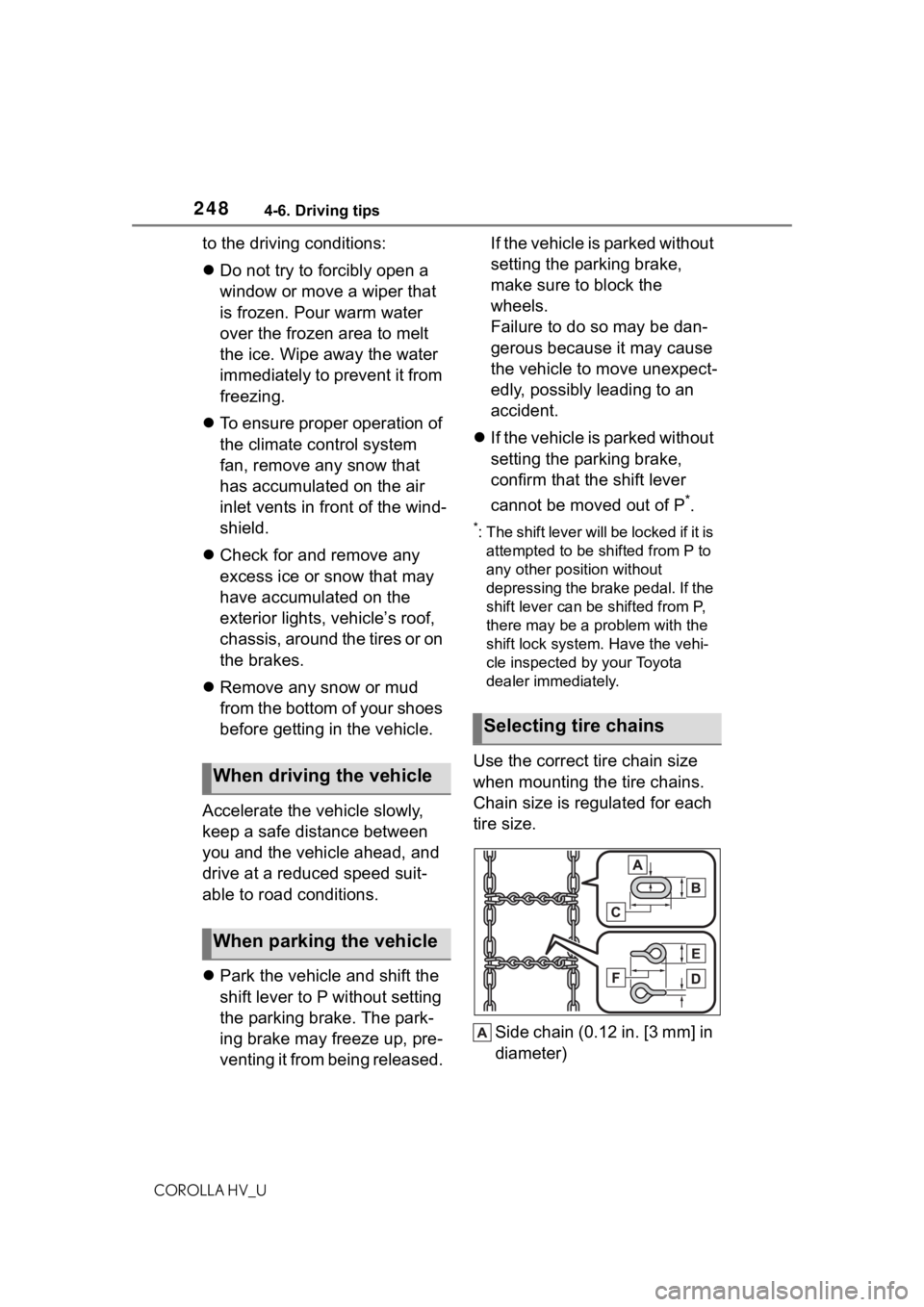
Use the correct tire chain size
when mounting the tire chains.
Chain size is regulated for each
tire size.
Side chain (0.12 in. [3 mm] in
diameter)When driving the vehicle
When parking the vehicle
Selecting tire chains
Page 325 of 584
3255-10. Tips for operating the audio/visual system
COROLLA HV_U
5
Audio
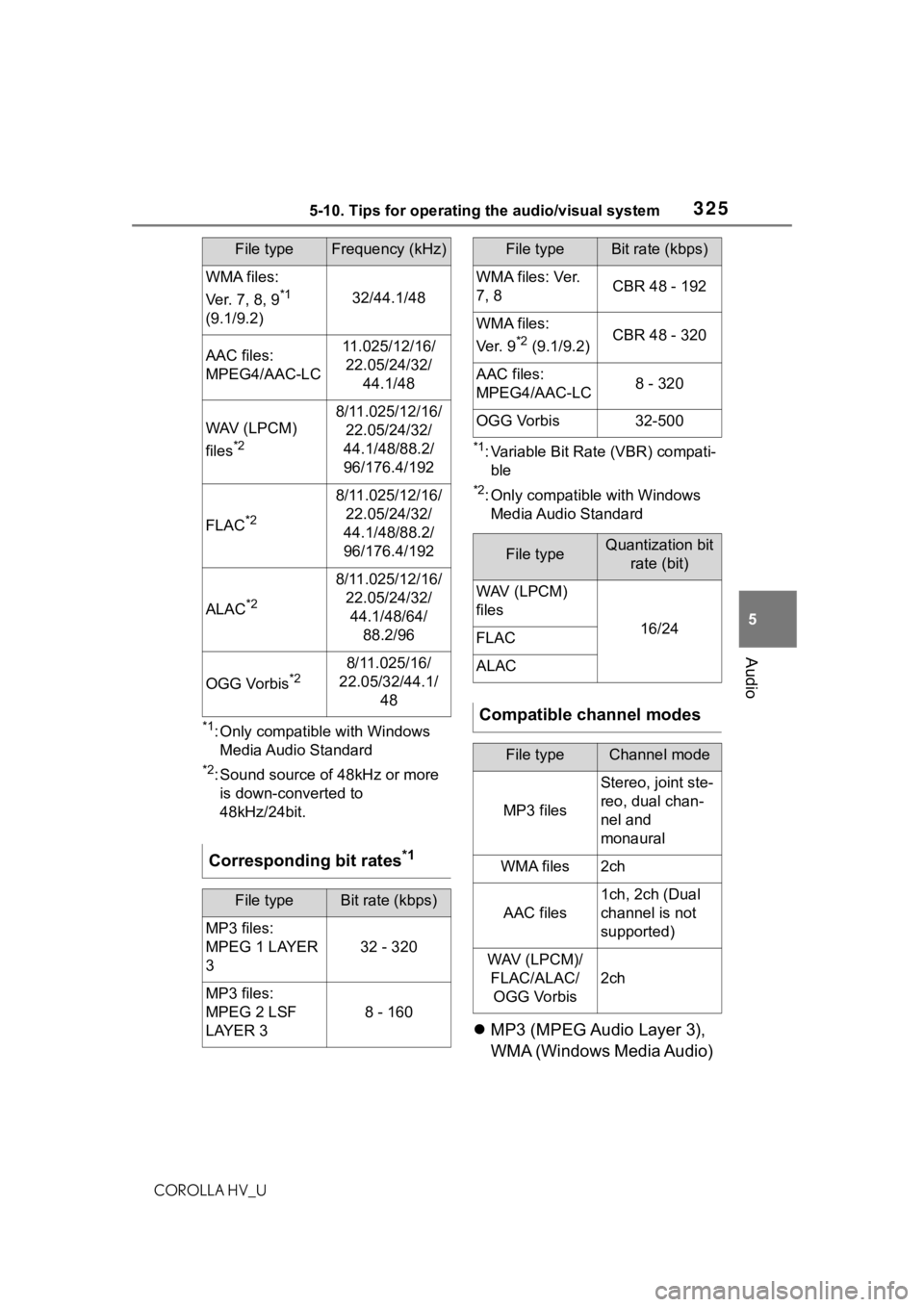
*1: Only compatible with Windows Media Audio Standard
*2: Sound source of 48kHz or more is down-converted to
48kHz/24bit.
*1: Variable Bit Rate (VBR) compati-ble
*2: Only compatible with Windows Media Audio Standard
MP3 (MPEG Audio Layer 3),
WMA (Windows Media Audio)
WMA files:
Ver. 7, 8, 9
*1
(9.1/9.2)32/44.1/48
AAC files:
MPEG4/AAC-LC11.025/12/16/ 22.05/24/32/ 44.1/48
WAV (LPCM)
files
*2
8/11.025/12/16/22.05/24/32/
44.1/48/88.2/
96/176.4/192
FLAC*2
8/11.025/12/16/ 22.05/24/32/
44.1/48/88.2/
96/176.4/192
ALAC*2
8/11.025/12/16/ 22.05/24/32/44.1/48/64/ 88.2/96
OGG Vorbis*28/11.025/16/
22.05/32/44.1/ 48
Corresponding bit rates*1
File typeBit rate (kbps)
MP3 files:
MPEG 1 LAYER
3
32 - 320
MP3 files:
MPEG 2 LSF
LAYER 3
8 - 160
File typeFrequency (kHz)
WMA files: Ver.
7, 8CBR 48 - 192
WMA files:
Ve r. 9
*2 (9.1/9.2)CBR 48 - 320
AAC files:
MPEG4/AAC-LC8 - 320
OGG Vorbis32-500
File typeQuantization bit rate (bit)
WAV (LPCM)
files
16/24FLAC
ALAC
Compatible channel modes
File typeChannel mode
MP3 files
Stereo, joint ste-
reo, dual chan-
nel and
monaural
WMA files2ch
AAC files
1ch, 2ch (Dual
channel is not
supported)
WAV (LPCM)/FLAC/ALAC/OGG Vorbis
2ch
File typeBit rate (kbps)
Page 328 of 584
3285-10. Tips for operating the audio/visual system
COROLLA HV_U
■ID3 tag
This is a method of embedding track-related information in an
MP3 file. This embedded infor-
mation can include the track
number, track title, the artist’s
name, the album title, the music
genre, the year of production,
comments, cover art and other
data. The contents can be freely
edited using software with ID3
tag editing functions. Although
the tags are restricted to a num-
ber of characters, the informa-
tion can be viewed when the
track is played back.
■WMA tag
WMA files can contain a WMA
tag that is used in the same way
as an ID3 tag. WMA tags carry
information such as track title
and artist name.
■MP3
MP3 is an audio compression
standard determined by a work-
ing group (MPEG) of the ISO
(International Standard Organi-
zation). MP3 compresses audio
data to about 1/10 the size of
that on conventional discs.
■WMA
WMA (Windows Media Audio)
is an audio compression for-
mat developed by Microsoft
®.
It compresses files into a size
smaller than that of MP3 files.
The decoding formats for
WMA files are Ver. 7, 8 and 9.
This product includes technol-
ogy owned by Microsoft Cor-
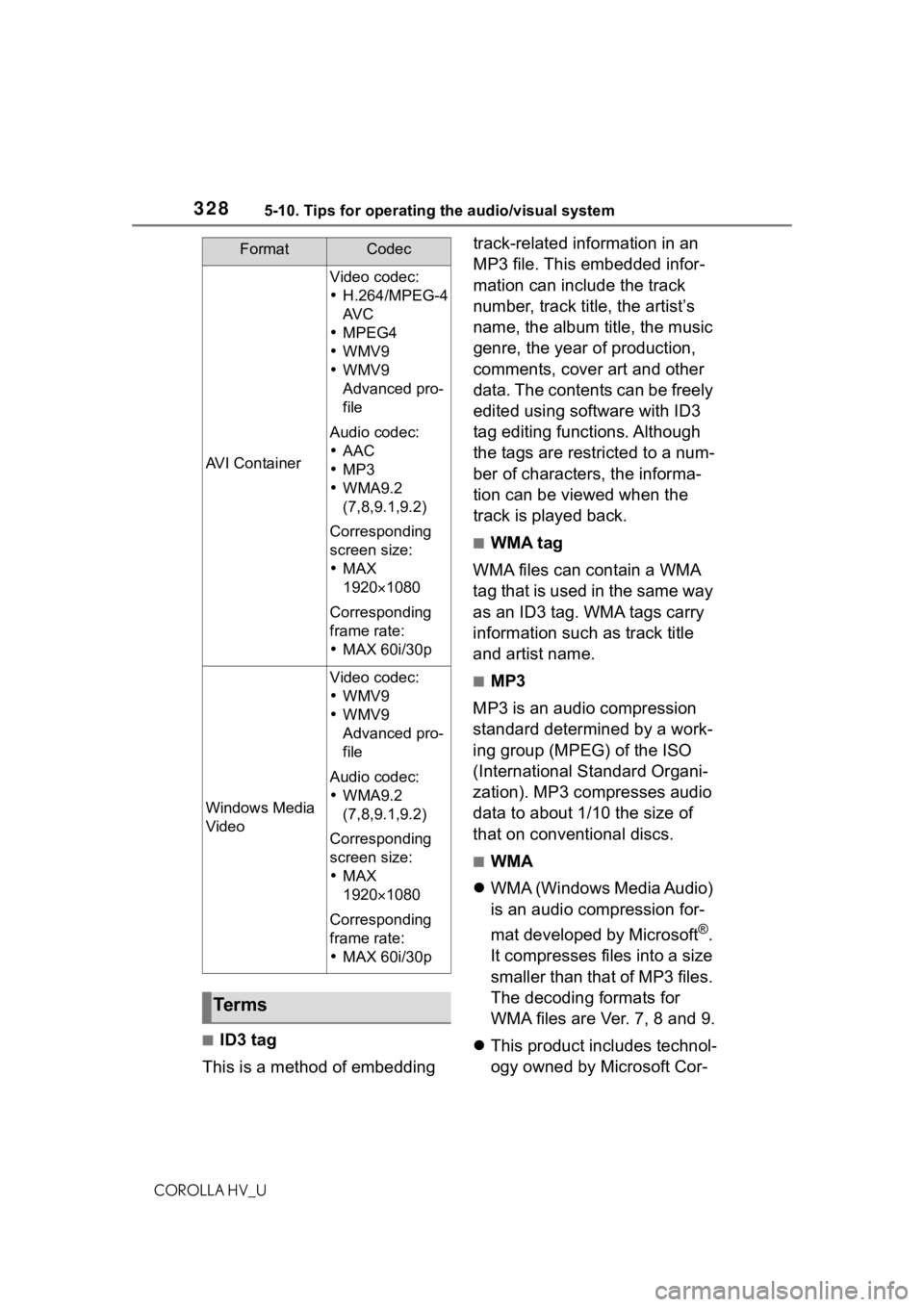
AVI Container
Video codec:
H.264/MPEG-4
AV C
MPEG4
WMV9
WMV9
Advanced pro-
file
Audio codec:
AAC
MP3
WMA9.2
(7,8,9.1,9.2)
Corresponding
screen size:
MAX
19201080
Corresponding
frame rate:
MAX 60i/30p
Windows Media
Video
Video codec:
WMV9
WMV9
Advanced pro-
file
Audio codec:
WMA9.2
(7,8,9.1,9.2)
Corresponding
screen size:
MAX
19201080
Corresponding
frame rate:
MAX 60i/30p
Te r m s
FormatCodec
Page 334 of 584
3345-11. Voice command system operation
COROLLA HV_U
5-11.Voice command system operation
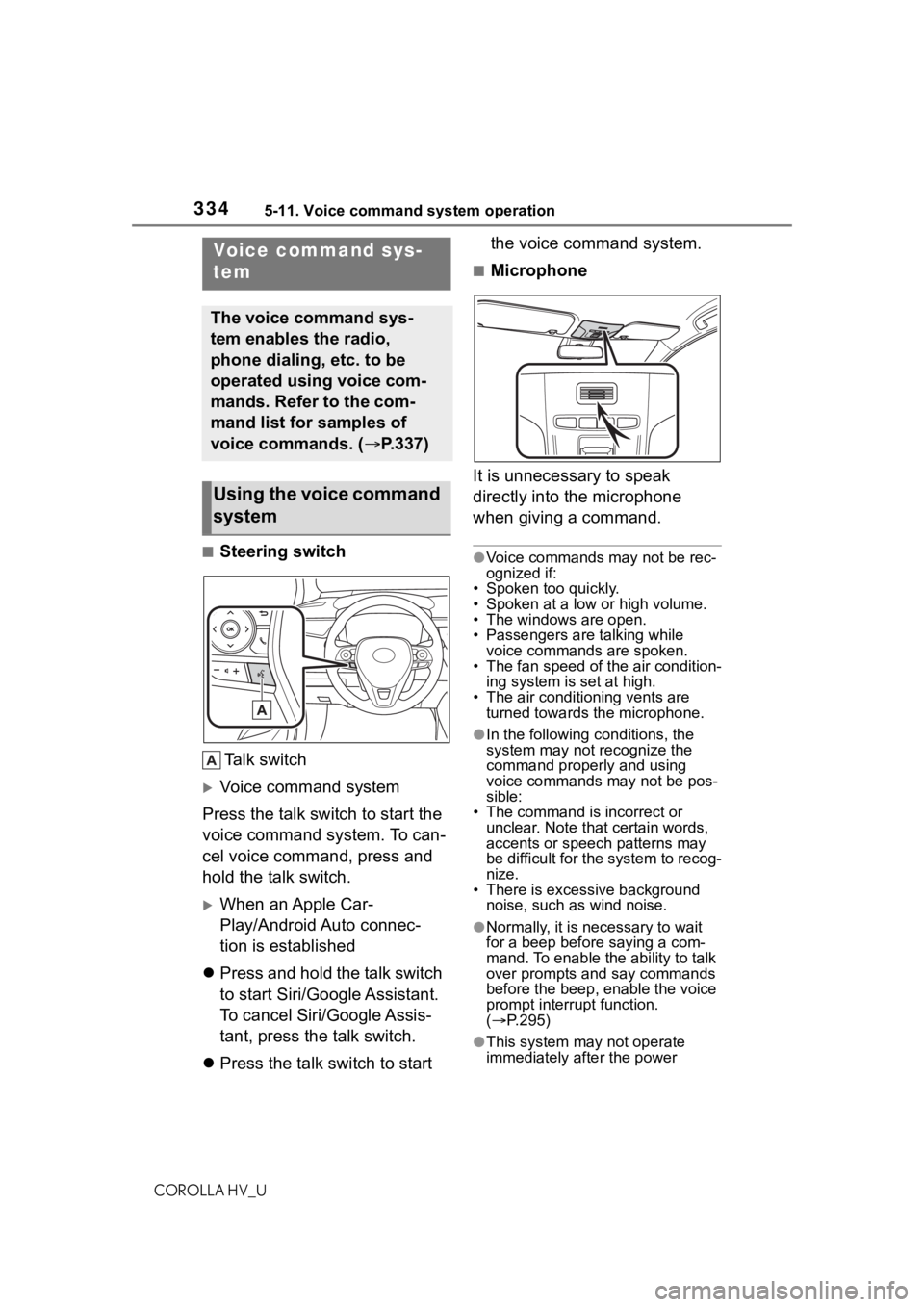
■Steering switchTa l k s w i t c h
Voice command system
Press the talk switch to start the
voice command system. To can-
cel voice command, press and
hold the talk switch.
When an Apple Car-
Play/Android Auto connec-
tion is established
Press and hold the talk switch
to start Siri/Google Assistant.
To cancel Siri/Google Assis-
tant, press the talk switch.
Press the talk switch to start the voice command system.
■Microphone
It is unnecessary to speak
directly into the microphone
when giving a command.
●Voice commands may not be rec-
ognized if:
• Spoken too quickly.
• Spoken at a low or high volume.
• The windows are open.
• Passengers are talking while voice commands are spoken.
• The fan speed of the air condition-
ing system is set at high.
• The air conditioning vents are turned towards the microphone.
●In the following c onditions, the
system may not recognize the
command properly and using
voice commands may not be pos-
sible:
• The command is incorrect or unclear. Note that certain words,
accents or speech patterns may
be difficult for the system to recog-
nize.
• There is excessive background
noise, such as wind noise.
●Normally, it is necessary to wait
for a beep before saying a com-
mand. To enable th e ability to talk
over prompts and say commands
before the beep, enable the voice
prompt interrupt function.
( P.295)
●This system may not operate
immediately after the power
Voice command sys-
tem
The voice command sys-
tem enables the radio,
phone dialing, etc. to be
operated using voice com-
mands. Refer to the com-
mand list for samples of
voice commands. ( P.337)
Using the voice command
system
Page 341 of 584
3415-12. Mobile Assistant operation
COROLLA HV_U
5
Audio
5-12.Mobile Assistant operation
●While a phone call is active, the
Mobile Assistant cannot be used.
●If using the navig ation feature of
the cellular phone, ensure the
active audio source is Bluetooth
®
audio or iPod in order to hear turn
by turn direction prompts.
●Wait for the listening beeps before
using the Mobile Assistant.
●The Mobile Assistant may not rec-
ognize commands in the following
situations:
• Spoken too quickly.
• Spoken at a low or high volume. • The windows are open.
• Passengers are talking while the
Mobile Assistant is being used.
• The fan speed of the air condition- ing system is set at high.
• The air conditioning vents are
turned toward the microphone.
Mobile Assist supports the Siri
Eyes Free Mode and Google
App. The available features and
functions may vary based on the
iOS/Android version installed on
the connected device.
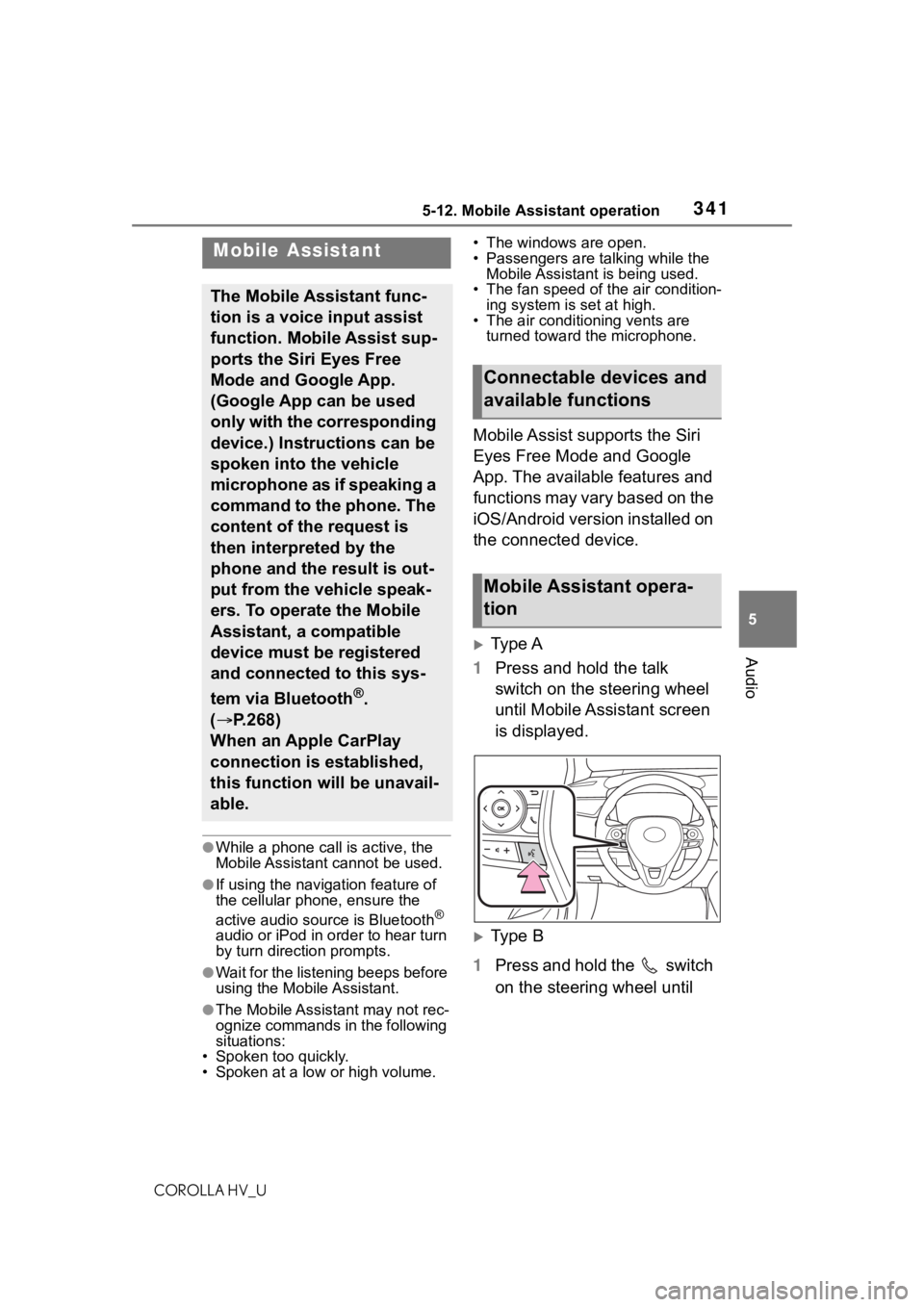
Type A
1 Press and hold the talk
switch on the steering wheel
until Mobile Assistant screen
is displayed.
Type B
1 Press and hold the switch
on the steering wheel until
Mobile Assistant
The Mobile Assistant func-
tion is a voice input assist
function. Mobile Assist sup-
ports the Siri Eyes Free
Mode and Google App.
(Google App can be used
only with the corresponding
device.) Instructions can be
spoken into the vehicle
microphone as if speaking a
command to the phone. The
content of the request is
then interpreted by the
phone and the result is out-
put from the vehicle speak-
ers. To operate the Mobile
Assistant, a compatible
device must be registered
and connected to this sys-
tem via Bluetooth
®.
( P.268)
When an Apple CarPlay
connection is established,
this function will be unavail-
able.
Connectable devices and
available functions
Mobile Assistant opera-
tion
Page 346 of 584
3465-13. Phone operation (Hands-free system for cellular phones)
COROLLA HV_U
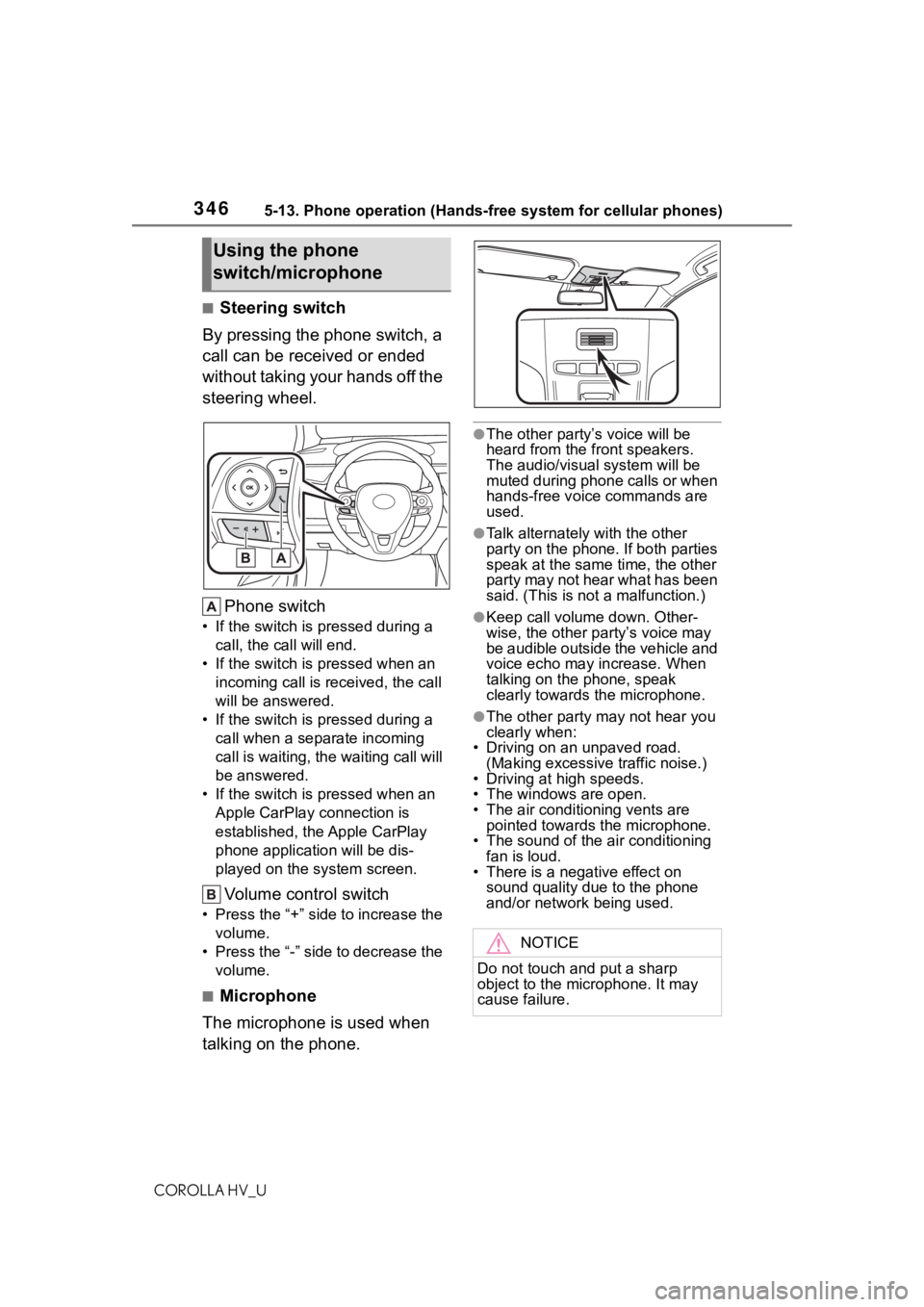
■Steering switch
By pressing the phone switch, a
call can be received or ended
without taking your hands off the
steering wheel.
Phone switch
• If the switch is pressed during a call, the call will end.
• If the switch is pressed when an incoming call is r eceived, the call
will be answered.
• If the switch is pressed during a call when a separate incoming
call is waiting, the waiting call will
be answered.
• If the switch is pressed when an Apple CarPlay connection is
established, the Apple CarPlay
phone application will be dis-
played on the system screen.
Volume control switch
• Press the “+” side to increase the volume.
• Press the “-” side to decrease the volume.
■Microphone
The microphone is used when
talking on the phone.
●The other party’s voice will be
heard from the front speakers.
The audio/vis ual system will be
muted during phone calls or when
hands-free voice commands are
used.
●Talk alternately with the other
party on the phone. If both parties
speak at the same time, the other
party may not hear what has been
said. (This is not a malfunction.)
●Keep call volume down. Other-
wise, the other party’s voice may
be audible outside the vehicle and
voice echo may increase. When
talking on the phone, speak
clearly towards the microphone.
●The other party may not hear you
clearly when:
• Driving on an unpaved road.
(Making excessive traffic noise.)
• Driving at high speeds.
• The windows are open.
• The air conditioning vents are pointed towards the microphone.
• The sound of the air conditioning
fan is loud.
• There is a negative effect on sound quality due to the phone
and/or network being used.
Using the phone
switch/microphone
NOTICE
Do not touch and put a sharp
object to the microphone. It may
cause failure.
Page 386 of 584
3866-1. Using the air conditioning system and defogger
COROLLA HV_U
6-1.Using the air conditioning system and defogger
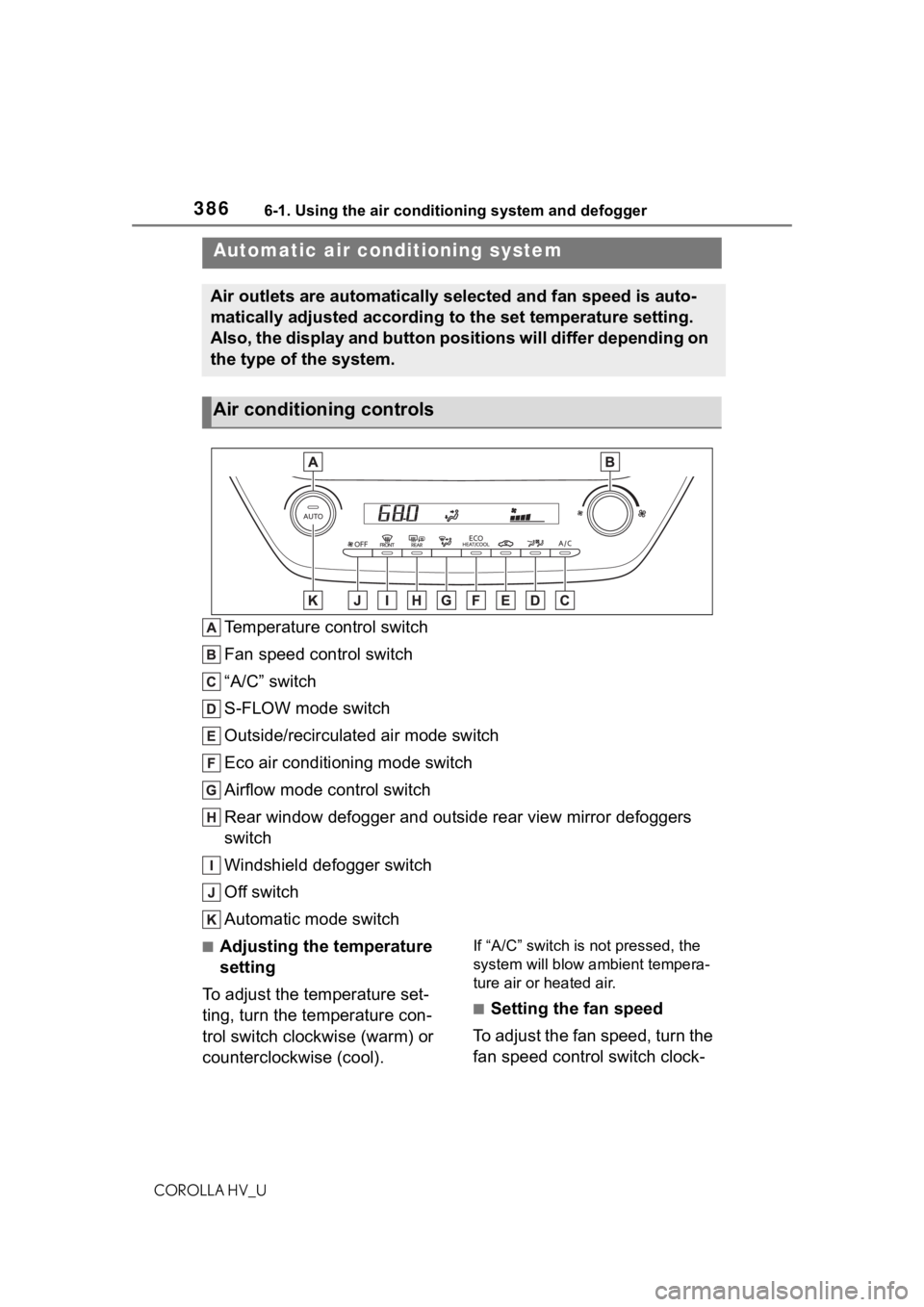
Temperature control switch
Fan speed control switch
“A/C” switch
S-FLOW mode switch
Outside/recirculated air mode switch
Eco air conditioning mode switch
Airflow mode control switch
Rear window defogger and outside rear view mirror defoggers
switch
Windshield defogger switch
Off switch
Automatic mode switch
■Adjusting the temperature
setting
To adjust the temperature set-
ting, turn the temperature con-
trol switch clockwise (warm) or
counterclockwise (cool).If “A/C” switch is not pressed, the
system will blow ambient tempera-
ture air or heated air.
■Setting the fan speed
To adjust the fan speed, turn the
fan speed control switch clock-
Automatic air conditioning system
Air outlets are automatically selected and fan speed is auto-
matically adjusted according to the set temperature setting.
Also, the display and button positions will differ depending on
the type of the system.
Air conditioning controls