park assist TOYOTA COROLLA HYBRID 2021 Owners Manual (in English)
[x] Cancel search | Manufacturer: TOYOTA, Model Year: 2021, Model line: COROLLA HYBRID, Model: TOYOTA COROLLA HYBRID 2021Pages: 584, PDF Size: 19.59 MB
Page 2 of 584
2
COROLLA HV_UTABLE OF CONTENTS
For your information ........................
6
Reading this manual ...................... 11
How to search ................................ 12
Pictorial index ................................ 13
1-1. For safe use Before driving ........................ 24
For safe driving ..................... 25
Seat belts .............................. 27
SRS airbags .......................... 31
Front passenger occupant clas- sification system.................. 41
Exhaust gas precautions....... 46
1-2. Child safety Riding with children ............... 47
Child restraint systems .......... 48
1-3. Emergency assistance Safety Connect ..................... 73
1-4. Hybrid system Hybrid system features ......... 80
Hybrid system precautions .... 83
1-5. Theft deterrent system Immobilizer system ............... 88
Alarm ..................................... 90
2-1. Instrument cluster Warning lights and indicators............................................ 94
Gauges and meters .............. 98
Multi-information display .... 103
Energy monitor/consumption screen .............................. 1093-1. Key information
Keys ................................... 116
3-2. Opening, closing and locking the doors
Doors ................................. 119
Trunk .................................. 123
Smart key system .............. 125
3-3. Adjusting the seats Front seats ......................... 133
Rear seats.......................... 134
Head restraints................... 136
3-4. Adjusting the steering wheel and mirrors
Steering wheel ................... 138
Inside rear view mirror ....... 139
Outside rear view mirrors ... 140
3-5. Opening and closing the win- dows
Power windows .................. 142
4-1. Before driving Driving the vehicle.............. 146
Cargo and luggage ............ 152
Vehicle load limits .............. 155
Trailer towing...................... 155
Dinghy towing .................... 156
4-2. Driving procedures Power (ignition) switch ....... 157
EV drive mode ................... 162
Hybrid transmission ........... 164
Turn signal lever................. 166
Parking brake ..................... 16
7
Brake Hold
......................... 170
1For safety and security
2Vehicle status information
and indicators
3Before driving
4Driving
Page 127 of 584
1273-2. Opening, closing and locking the doors
COROLLA HV_U
3
Before driving
been used for 5 days or longer.
●If the smart key system has not
been used for 14 days or longer,
the doors cann ot be unlocked
from any door except the driver’s
door. In this case, hold the driver’s
door handle, or use the wireless
remote control or mechanical key
to unlock the doors.
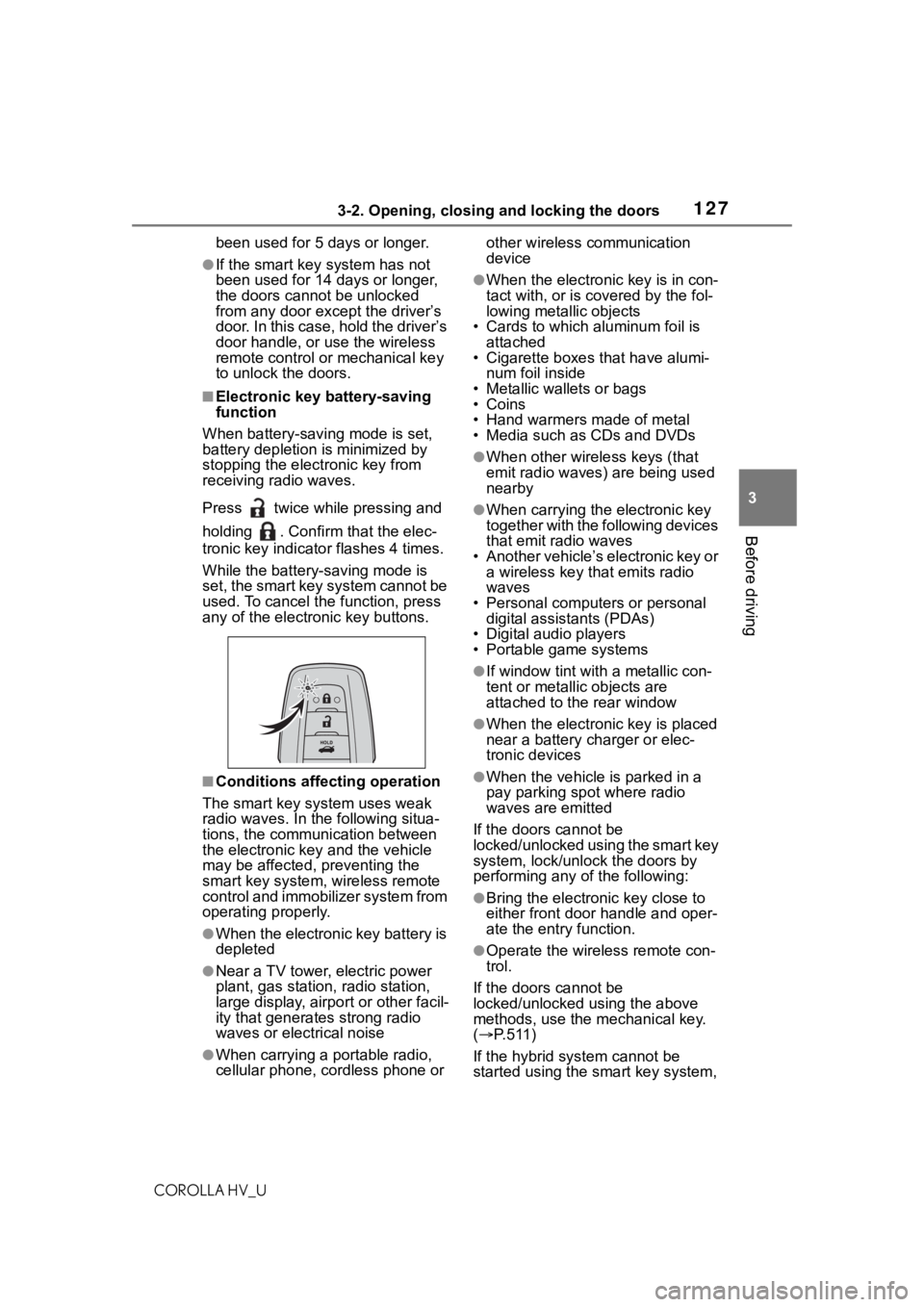
■Electronic key battery-saving
function
When battery-savi ng mode is set,
battery depletion is minimized by
stopping the electronic key from
receiving radio waves.
Press twice while pressing and
holding . Confirm that the elec-
tronic key indicator flashes 4 times.
While the battery-saving mode is
set, the smart key system cannot be
used. To cancel the function, press
any of the electronic key buttons.
■Conditions affecting operation
The smart key system uses weak
radio waves. In the following situa-
tions, the communication between
the electronic key and the vehicle
may be affected, preventing the
smart key system, wireless remote
control and immobilizer system from
operating properly.
●When the electronic key battery is
depleted
●Near a TV tower, electric power
plant, gas station , radio station,
large display, airpo rt or other facil-
ity that generates strong radio
waves or electrical noise
●When carrying a portable radio,
cellular phone, cordless phone or other wireless communication
device
●When the electronic key is in con-
tact with, or is c
overed by the fol-
lowing metallic objects
• Cards to which aluminum foil is
attached
• Cigarette boxes that have alumi-
num foil inside
• Metallic wallets or bags
•Coins
• Hand warmers made of metal
• Media such as CDs and DVDs
●When other wirel ess keys (that
emit radio waves) are being used
nearby
●When carrying the electronic key
together with the following devices
that emit radio waves
• Another vehicle’s electronic key or a wireless key that emits radio
waves
• Personal computers or personal digital assistants (PDAs)
• Digital audio players
• Portable game systems
●If window tint wit h a metallic con-
tent or metallic objects are
attached to the rear window
●When the electronic key is placed
near a battery charger or elec-
tronic devices
●When the vehicle is parked in a
pay parking spot where radio
waves are emitted
If the doors cannot be
locked/unlocked using the smart key
system, lock/unlock the doors by
performing any of the following:
●Bring the electronic key close to
either front door handle and oper-
ate the entry function.
●Operate the wireless remote con-
trol.
If the doors cannot be
locked/unlocked using the above
methods, use the mechanical key.
( P. 5 1 1 )
If the hybrid system cannot be
started using the smart key system,
Page 145 of 584
145
COROLLA HV_U
4
4
Driving
Driving
.4-1. Before drivingDriving the vehicle....... 146
Cargo and luggage ..... 152
Vehicle load limits ....... 155
Trailer towing............... 155
Dinghy towing ............. 156
4-2. Driving procedures Power (ignition) switch.................................. 157
EV drive mode ............ 162
Hybrid transmission .... 164
Turn signal lever.......... 166
Parking brake .............. 167
Brake Hold .................. 170
4-3. Operating the lights and wipers
Headlight switch .......... 173
Automatic High Beam . 175
Windshield wipers and washer....................... 178
4-4. Refueling Opening the fuel tank cap.................................. 180
4-5. Using the driving support
systems
Toyota Safety Sense 2.0 .................................. 183
PCS (Pre-Collision System) .................................. 189
LTA (Lane Tracing Assist) .................................. 197Dynamic radar cruise con-
trol with full-speed range.................................. 207
RSA (Road Sign Assist) .................................. 218
BSM (Blind Spot Monitor) .................................. 221
RCTA (Rear Cross Traffic Alert) function ............ 226
Rear view monitor system .................................. 231
Driving mode select switch .................................. 239
Driving assist systems .................................. 240
4-6. Driving tips Hybrid vehicle driving tips.................................. 245
Winter driving tips........ 247
Page 146 of 584
1464-1. Before driving
COROLLA HV_U
4-1.Before driving
■Starting the hybrid system
P. 1 5 7
■Driving
1 With the brake pedal
depressed, shift the shift
lever to D. ( P.164)
2 If the parking brake is in man-
ual mode, release the park-
ing brake. ( P.167)
3 Gradually release the brake
pedal and gently depress the
accelerator pedal to acceler-
ate the vehicle.
■Stopping
1 With the shift lever in D,
depress the brake pedal.
2 If necessary, set the parking
brake.
If the vehicle is to be stopped for an
extended period of time, shift the
shift lever to P. ( P.164)
■Parking the vehicle
1 With the shift lever in D,
depress the brake pedal to
stop the vehicle completely.
2 Set the parking brake
( P.167), and shift the shift
lever to P. ( P.164)
Check the parking brake indicator is illuminated.
3
Press the power switch to
stop the hybrid system.
4 Slowly release the brake
pedal.
5 Lock the door, making sure
that you have the electronic
key on your person.
If parking on a hill, block the wheels
as needed.
■Starting off on a steep
uphill
1 Make sure that the parking
brake is set and shift the shift
lever to D.
Hill-start assist cont rol will operate.
( P.240)
2 Gently depress the accelera-
tor pedal.
3 Release the parking brake.
■For fuel-efficient driving
Keep in mind that hybrid vehicles
are similar to conventional vehicles,
and it is necessary to refrain from
activities such as sudden accelera-
tion. ( P.245)
■Driving in the rain
●Drive carefully whe n it is raining,
because visibility will be reduced,
the windows may become
fogged-up, and the road will be
slippery.
●Drive carefully whe n it starts to
rain, because the road surface will
be especially slippery.
●Refrain from hig h speeds when
driving on an expressway in the
rain, because there may be a
layer of water between the tires
and the road surface, preventing
the steering and brakes from
operating properly.
Driving the vehicle
The following procedures
should be observed to
ensure safe driving:
Driving procedure
Page 159 of 584
1594-2. Driving procedures
COROLLA HV_U
4
Driving
1 Stop the vehicle completely.
2 Set the parking brake
( P.167), and shift the shift
lever to P.
Check the parking brake indicator
is illuminated.
3 Press the power switch.
The hybrid system will stop, and the
meter display will be extinguished.
4Release the brake pedal and
check that “ACCESSORY” or
“IGNITION ON” is not shown
on the multi-information dis-
play.
■Automatic hybrid system shut
off feature
●The vehicle is equipped with a
feature that automatically shuts off
the hybrid system when the shift
lever is in P with the hybrid system
operating for an extended period.
●The hybrid system will automati- cally shut off after approximately 1
hour if it has been left running
while the shift lever is in P.
●The timer for the automatic hybrid
system shut off feature will reset if
the brake pedal is depressed or if
the shift lever is in a position other
than P.
●After the vehicle
is parked, if the
door is locked with the door lock
switch ( P.121) from the inside or
the mechanical key ( P. 5 1 1 ) f r o m
the outside, the automatic hybrid
system shut off feature will be dis-
abled. The timer for the automatic
hybrid syste m shut off feature will
be re-enabled if the driver’s door
is opened.
NOTICE
■When starting the hybrid sys-
tem
If the hybrid system becomes diffi-
cult to start, have your vehicle
checked by your Toyota dealer
immediately.
■Symptoms indicating a mal-
function with the power
switch
If the power switch seems to be
operating somewh at differently
than usual, such as the switch
sticking slightly, there may be a
malfunction. Contact your Toyota
dealer immediately.
Stopping the hybrid sys-
temWA R N I N G
■Stopping the hybrid system
in an emergency
●If you want to stop the hybrid
system in an emergency while
driving the vehicle, press and
hold the power s witch for more
than 2 seconds, or press it
briefly 3 times or more in suc-
cession. (
P.471)
However, do not touch the
power switch while driving
except in an emergency. Turn-
ing the hybrid s ystem off while
driving will not cause loss of
steering or braking control, how-
ever, power assist to the steer-
ing will be lost. This will make it
more difficult to steer smoothly,
so you should pull over and stop
the vehicle as soon as it is safe
to do so.
●If the power switch is operated
while the vehicle is running, a
warning message will be shown
on the multi-information display
and a buzzer sounds.
Page 228 of 584
2284-5. Using the driving support systems
COROLLA HV_U
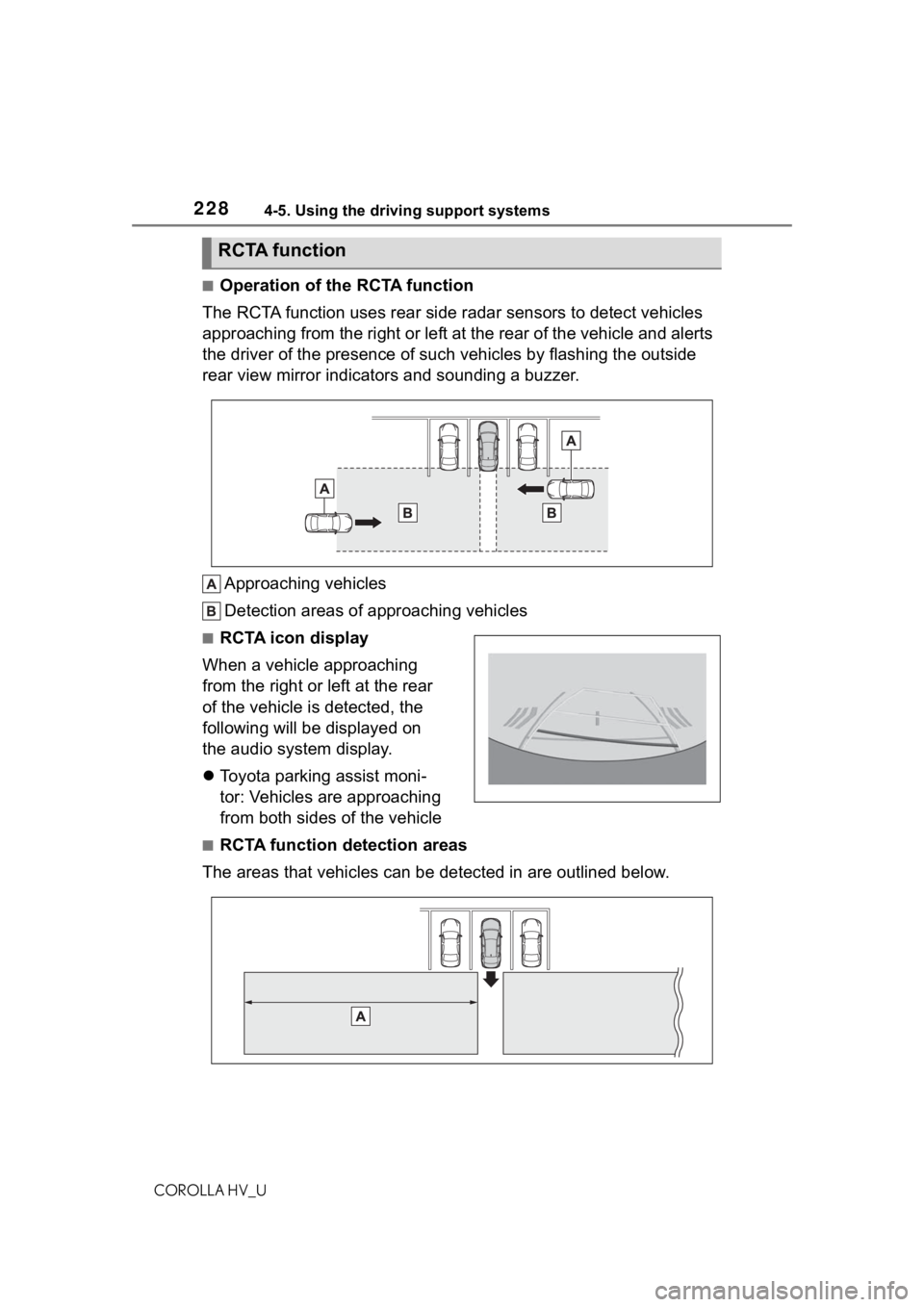
■Operation of the RCTA function
The RCTA function uses rear side radar sensors to detect vehicles
approaching from the right or left at the rear of the vehicle a nd alerts
the driver of the presence of such vehicles by flashing the out side
rear view mirror indicators and sounding a buzzer.
Approaching vehicles
Detection areas of approaching vehicles
■RCTA icon display
When a vehicle approaching
from the right or left at the rear
of the vehicle is detected, the
following will be displayed on
the audio system display.
Toyota parking assist moni-
tor: Vehicles are approaching
from both sides of the vehicle
■RCTA function detection areas
The areas that vehicles can be detected in are outlined below.
RCTA function
Page 231 of 584
2314-5. Using the driving support systems
COROLLA HV_U
4
Driving
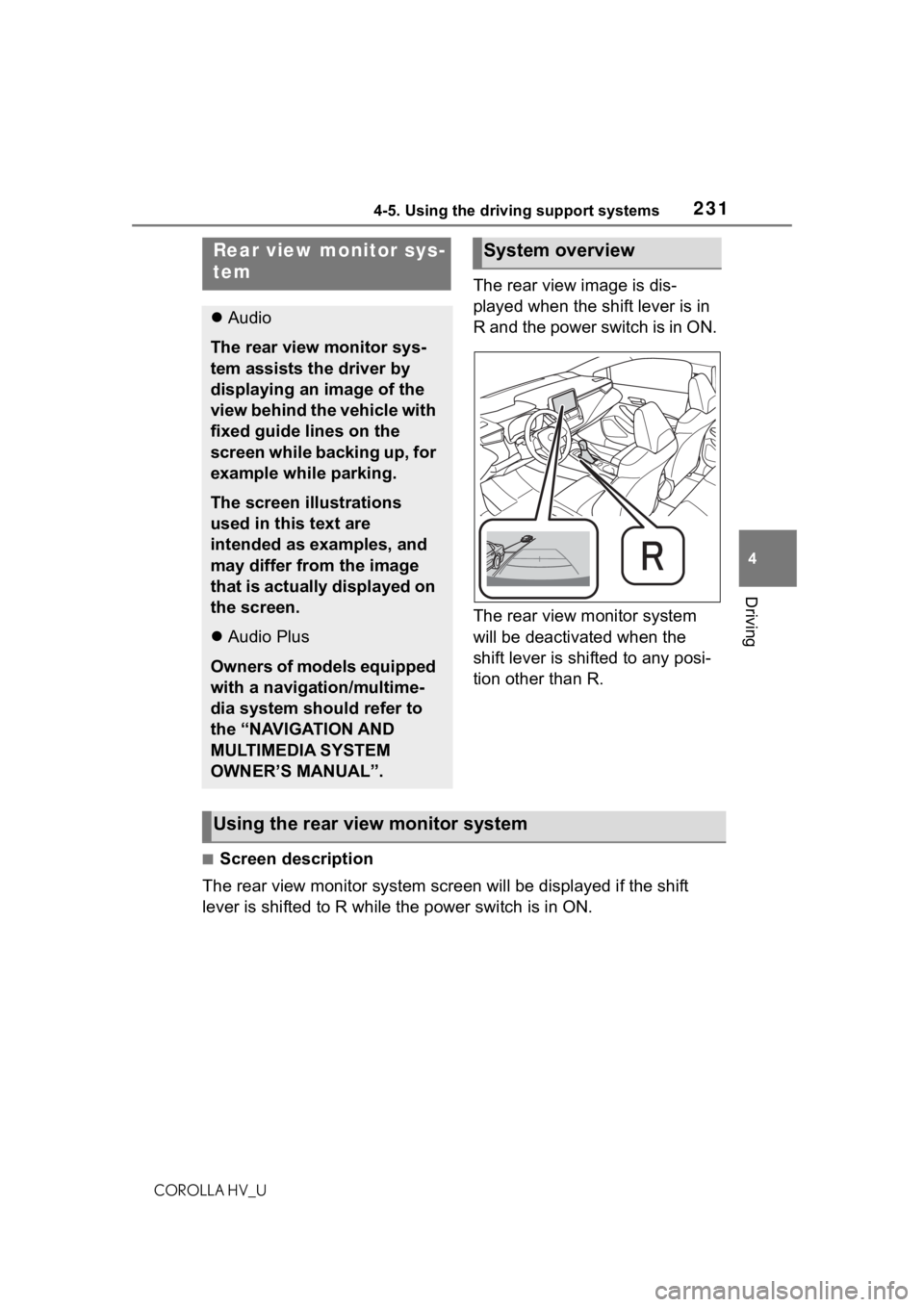
The rear view image is dis-
played when the shift lever is in
R and the power switch is in ON.
The rear view monitor system
will be deactivated when the
shift lever is shifted to any posi-
tion other than R.
■Screen description
The rear view monitor system scr een will be displayed if the shift
lever is shifted to R while the power switch is in ON.
Rear view monitor sys-
tem
Audio
The rear view monitor sys-
tem assists the driver by
displaying an image of the
view behind the vehicle with
fixed guide lines on the
screen while backing up, for
example while parking.
The screen illustrations
used in this text are
intended as examples, and
may differ from the image
that is actually displayed on
the screen.
Audio Plus
Owners of models equipped
with a navigation/multime-
dia system should refer to
the “NAVIGATION AND
MULTIMEDIA SYSTEM
OWNER’S MANUAL”.
System overview
Using the rear view monitor system
Page 237 of 584
2374-5. Using the driving support systems
COROLLA HV_U
4
Driving
The fixed guide lines
are very far out of
alignment
The camera position is
out of alignment.Have the vehicle
inspected by your Toy-
ota dealer.
The vehicle is tilted
(there is a heavy load
on the vehicle, tire
pressure is low due to
a tire puncture, etc.)
The vehicle is used on
an incline.If this happens due to
these causes, it does
not indicate a malfunc-
tion.
Back up while visually
checking the vehicle’s
surroundings.
SymptomLikely causeSolution
WA R N I N G
■When using the rear view
monitor system
The rear view monitor system is a
supplemental device intended to
assist the driver when backing up.
When backing up, be sure to visu-
ally check all around the vehicle
both directly and using the mirrors
before proceeding. Observe the
following precautions to avoid an
accident that could result in death
or serious injuries.
●Never depend on t he rear view
monitor system entirely when
backing up. The image and the
position of the guide lines dis-
played on the screen may differ
from the actual state. Use cau-
tion, just as you would when
backing up any vehicle.
●Be sure to back up slowly,
depressing the brake pedal to
control vehicle speed.
●The instructions given are only
guide lines. When and how
much to turn the steering wheel
will vary according to traffic con-
ditions, road surface condi-
tions, vehicle condition, etc.
when parking. It is necessary to
be fully aware o f this before
using the rear view monitor sys-
tem.
●When parking, be sure to check
that the parking space will
accommodate your vehicle
before maneuvering into it.
●Do not use the rear view moni-
tor system in t he following
cases:
• On icy or slick road surfaces, or in snow
• When using tire chains or emer- gency tires
• When the trunk is not closed completely
• On roads that are not flat or straight, such as curves or
slopes
●In low temperatures, the screen
may darken or the image may
become faint. The image could
distort when the vehicle is mov-
ing, or you may become unable
to see the image on the screen.
Be sure to visually check all
around the vehicle both directly
and using the mirrors before
proceeding.
●If the tire sizes are changed, the
position of the fixed guide lines
displayed on the screen may
change.
Page 242 of 584

2424-5. Using the driving support systems
COROLLA HV_U
●The vehicle is stopped
●The accelerator pedal is not
depressed
●The parking brake is not engaged
■Automatic system cancelation
of hill-start assist control
The hill-start assis t control will turn
off in any of the following situations:
●The shift lever is shifted to P or N.
●The accelerator pedal is
depressed
●The parking brake is engaged
●2 seconds at maximum elapsed
after the brake pedal is released
■Sounds and vibrations caused
by the ABS, brake assist, VSC,
TRAC and hill-start assist con-
trol systems
●A sound may be heard from the
engine compartment when the
brake pedal is dep ressed repeat-
edly, when the hybrid system is
started or just after the vehicle
begins to move. This sound does
not indicate that a malfunction has
occurred in any of these systems.
●Any of the following conditions
may occur when t he above sys-
tems are operating.
None of these indicates that a
malfunction has occurred.
• Vibrations may be felt through the
vehicle body and steering.
• A motor sound may be heard also after the vehicle comes to a stop.
■ECB operating sound
ECB operating sound may be heard
in the following cases, but it does
not indicate that a malfunction has
occurred.
●Operating sound heard from the
engine compartment when the
brake pedal is operated.
●Motor sound of the brake system
heard from the front part of the
vehicle when the driver’s door is
opened.
●Operating sound heard from the
engine compartment when one or
two minutes passed after the stop
of the hybrid system.
■Active Cornering Assist opera-
tion sounds and vibrations
When the Active Cornering Assist is
operated, operation sounds and
vibrations may be generated from
the brake system, but this is not a
malfunction.
■EPS operation sound
When the steering wheel is oper-
ated, a motor sound (whirring
sound) may be heard. This does not
indicate a malfunction.
■Automatic reactivation of TRAC
and VSC systems
After turning th e TRAC and VSC
systems off, the systems will be
automatically re-enabled in the fol-
lowing situations:
●When the power switch is turned
off
●If only the TRAC sy stem is turned
off, the TRAC will turn on when
vehicle speed increases
If both the TRAC and VSC sys-
tems are turned o ff, automatic
re-enabling will not occur when
vehicle speed increases.
■Operating conditions of Active
Cornering Assist
The system operates when the fol-
lowing occurs.
●TRAC/VSC can operate
●The driver is attempting to accel-
erate while turning
●The system detects that the vehi-
cle is drifting to the outer side
●The brake pedal is released
■Reduced effectiveness of the
EPS system
The effectiveness of the EPS sys-
tem is reduced to prevent the sys-
tem from overheating when there is
frequent steering input over an
Page 244 of 584
2444-5. Using the driving support systems
COROLLA HV_U
WA R N I N G
■Hill-start assist control does
not operate effectively when
●Do not overly rely on hill-start
assist control. Hill-start assist
control may not operate effec-
tively on steep inclines and
roads covered with ice.
●Unlike the parking brake,
hill-start assist control is not
intended to hold the vehicle sta-
tionary for an extended period
of time. Do not attempt to use
hill-start assist control to hold
the vehicle on an incline, as
doing so may lead to an acci-
dent.
■When the TRAC/ABS/VSC is
activated
The slip indicator light flashes.
Always drive carefully. Reckless
driving may cause an accident.
Exercise particular care when the
indicator light flashes.
■W h e n t h e T R A C / V S C s y s t e m s
are turned off
Be especially careful and drive at
a speed appropriate to the road
conditions. As these are the sys-
tems to help ensure vehicle stabil-
ity and driving force, do not turn
the TRAC/VSC systems off
unless necessary.
■Replacing tires
Make sure that all tires are of the
specified size, brand, tread pat-
tern and total load capacity. In
addition, make sure that the tires
are inflated to the recommended
tire inflation pressure level.
The ABS, TRAC and VSC sys-
tems will not f unction correctly if
different tires are installed on the
vehicle.
Contact your Toyota dealer for fur-
ther information when replacing
tires or wheels.
■Handling of tires and the sus-
pension
Using tires with any kind of prob-
lem or modifying the suspension
will affect the driving assist sys-
tems, and may cause a system to
malfunction.
■Secondary Collision Brake
Do not rely sole ly upon the Sec-
ondary Collision Brake. This sys-
tem is designed to help reduce
the possibility of further damage
due to a secondary collision, how-
ever, that effect changes accord-
ing to various conditions. Overly
relying on the system may result
in death or serious injury.