cruise control TOYOTA HIGHLANDER 2008 XU40 / 2.G Owners Manual
[x] Cancel search | Manufacturer: TOYOTA, Model Year: 2008, Model line: HIGHLANDER, Model: TOYOTA HIGHLANDER 2008 XU40 / 2.GPages: 577, PDF Size: 11.46 MB
Page 3 of 577

1
2
3
4
5
6
7
3
2-3. Operating the lights and wipers .............................. 192
Headlight switch .................. 192
Fog light switch ................... 196
Windshield wipers and washer .............................. 197
Rear window wiper and washer .............................. 199
2-4. Using other driving systems ........................... 200
Cruise control ...................... 200
Rear view monitor system (vehicles with
multi-information
display) ............................. 203
Downhill Assist Control system
(4WD models only) ........... 207
Driving assist systems ........ 209
2-5. Driving information ........... 214 Off-road precautions ........... 214
Cargo and luggage ............. 219
Vehicle load limits ............... 223
Winter driving tips ............... 224
Trailer towing ...................... 228
Dinghy towing ..................... 238 3-1. Using the air
conditioning system
and defogger .................. 242
Front manual air conditioning system.......... 242
Front automatic air conditioning system.......... 247
Rear manual air conditioning system.......... 255
Rear automatic air conditioning system.......... 258
Rear window and outside rear view mirror
defoggers ......................... 261
Windshield wiper de-icer .............................. 263
Using the steering wheel climate remote control
switches ........................... 264
3-2. Using the audio system ............................. 265
Audio system (without navigation system) ........... 265
Using the radio ................... 268
Using the CD player ........... 274
Playing back MP3 and WMA discs ....................... 281
Optimal use of the audio system .............................. 288
Using the AUX adapter....... 291
Using the steering wheel audio switches.................. 293
3Interior features
Page 18 of 577
18
B
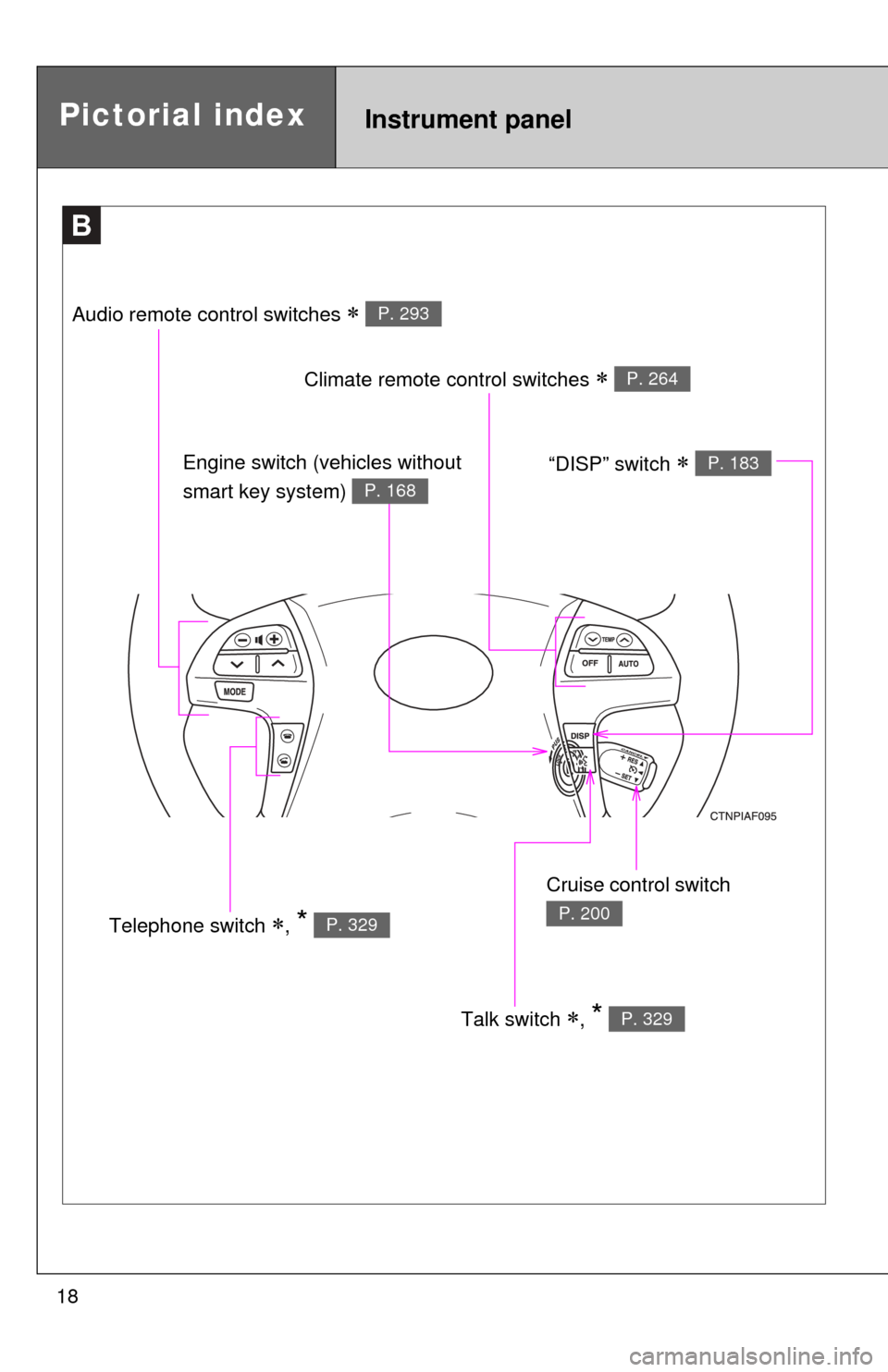
Talk switch , * P. 329
Pictorial indexInstrument panel
Audio remote control switches P. 293
Climate remote control switches P. 264
Cruise control switch
P. 200Telephone switch , * P. 329
Engine switch (vehicles without
smart key system)
P. 168
“DISP” switch P. 183
Page 24 of 577

24
For your information
Main Owners Manual
Please note that this manual covers all models and all equipment, including
options. Therefore, you may find some explanations for equipment not
installed on your vehicle.
All specifications provided in this manual are current at the time of printing.
However, because of the Toyota policy of continual product improvement, we
reserve the right to make changes at any time without notice.
Depending on specifications, the vehicle shown in the illustrations may differ
from your vehicle in terms of equipment.
Accessories, spare parts and modification of your Toyota
A wide variety of non-genuine spare parts and accessories for Toyota
vehicles are currently available on the market. You should know that these
parts are not covered by Toyota warranty and that Toyota is not responsible
for their performance, repair, or replacement, or for any damage they may
cause to, or adverse effect they may have on, your Toyota vehicle.
This vehicle should not be modified with non-genuine Toyota products.
Modification with non-genuine Toyota products may affect performance,
safety or durability, and may even violate governmental regulations. In
addition, damage or performance problems resulting from the modification
may not be covered under warranty.
Installation of a mobile two-way radio system
As the installation of a mobile two-way radio system in your vehicle may
affect electronic systems such as the multi-port fuel injection system/sequen-
tial multi-port fuel injection system, cruise control system, anti-lock brake
system, SRS airbag system or seat belt pretensioner system, be sure to
check with your Toyota dealer for precautionary measures or special instruc-
tions regarding installation.
Page 155 of 577
When driving2
155
2-1. Driving procedures ........ 156Driving the vehicle............ 156
Engine (ignition) switch (vehicles with smart
key system).................... 164
Engine (ignition) switch (vehicles without smart
key system).................... 168
Automatic Transmission... 171
Turn signal lever .............. 175
Parking brake ................... 176
2-2. Instrument cluster.......... 177 Gauges and meters ......... 177
Indicators and warning lights .............................. 179
Multi-information display............................ 183
2-3. Operating the lights and wipers ........................... 192
Headlight switch ............... 192
Fog light switch ................ 196
Windshield wipers and washer ........................... 197
Rear window wiper and washer ........................... 199 2-4. Using other driving
systems ........................ 200
Cruise control ................... 200
Rear view monitor system (vehicles with
multi-information
display) .......................... 203
Downhill Assist Control system
(4WD models only) ........ 207
Driving assist systems ..... 209
2-5. Driving information ........ 214 Off-road precautions ........ 214
Cargo and luggage .......... 219
Vehicle load limits ............ 223
Winter driving tips ............ 224
Trailer towing ................... 228
Dinghy towing .................. 238
Page 173 of 577
173
2-1. Driving procedures
2
When driving
■
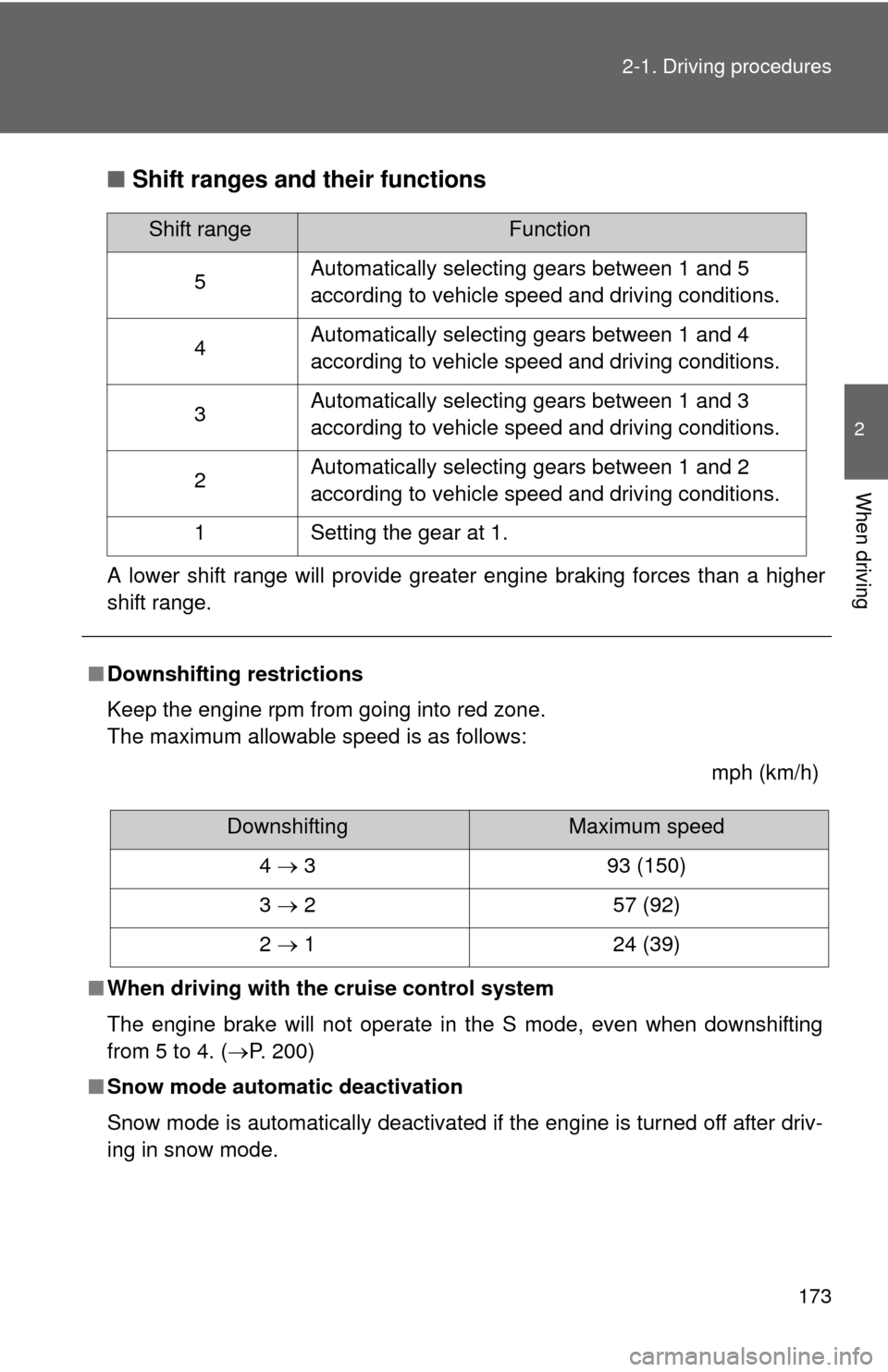
Shift ranges and their functions
A lower shift range will provide greater engine braking forces than a higher
shift range.
■Downshifting restrictions
Keep the engine rpm from going into red zone.
The maximum allowable speed is as follows:
mph (km/h)
■ When driving with the cruise control system
The engine brake will not operate in the S mode, even when downshifting
from 5 to 4. ( P. 200)
■ Snow mode automatic deactivation
Snow mode is automatically deactivated if the engine is turned off after driv-
ing in snow mode.
Shift rangeFunction
5 Automatically selecting gears between 1 and 5
according to vehicle speed and driving conditions.
4 Automatically selecting gears between 1 and 4
according to vehicle speed and driving conditions.
3 Automatically selecting gears between 1 and 3
according to vehicle speed and driving conditions.
2 Automatically selecting gears between 1 and 2
according to vehicle speed and driving conditions.
1 Setting the gear at 1.
DownshiftingMaximum speed
4 3 93 (150)
3 2 57 (92)
2 1 24 (39)
Page 181 of 577
181
2-2. Instrument cluster
2
When driving
■
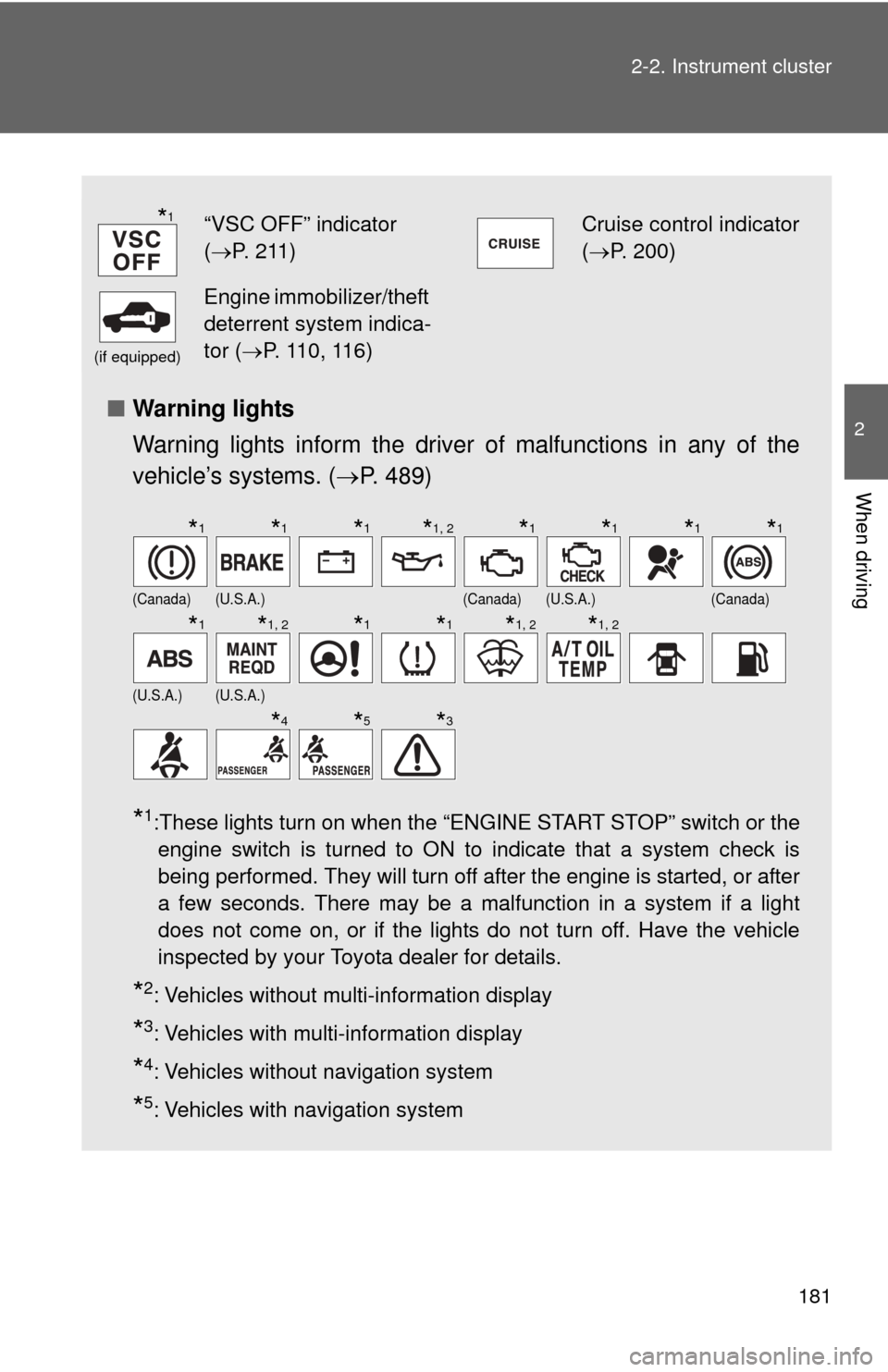
Warning lights
Warning lights inform the driver of malfunctions in any of the
vehicle’s systems. ( P. 489)
*1:These lights turn on when the “ENGINE START STOP” switch or the
engine switch is turned to ON to indicate that a system check is
being performed. They will turn off after the engine is started, or after
a few seconds. There may be a malfunction in a system if a light
does not come on, or if the lights do not turn off. Have the vehicle
inspected by your Toyota dealer for details.
*2: Vehicles without multi-information display
*3: Vehicles with multi-information display
*4: Vehicles without navigation system
*5: Vehicles with navigation system
“VSC OFF” indicator
( P. 211)Cruise control indicator
( P. 200)
(if equipped)
Engine immobilizer/theft
deterrent system indica-
tor ( P. 110, 116)
(Canada)(U.S.A.)(Canada)(U.S.A.)(Canada)
(U.S.A.)(U.S.A.)
*1
*1*1*1*1, 2*1*1*1*1
*1*1, 2*1*1*1, 2*1, 2
*4*5*3
Page 200 of 577
200
2-4. Using other driving systems
Cruise control
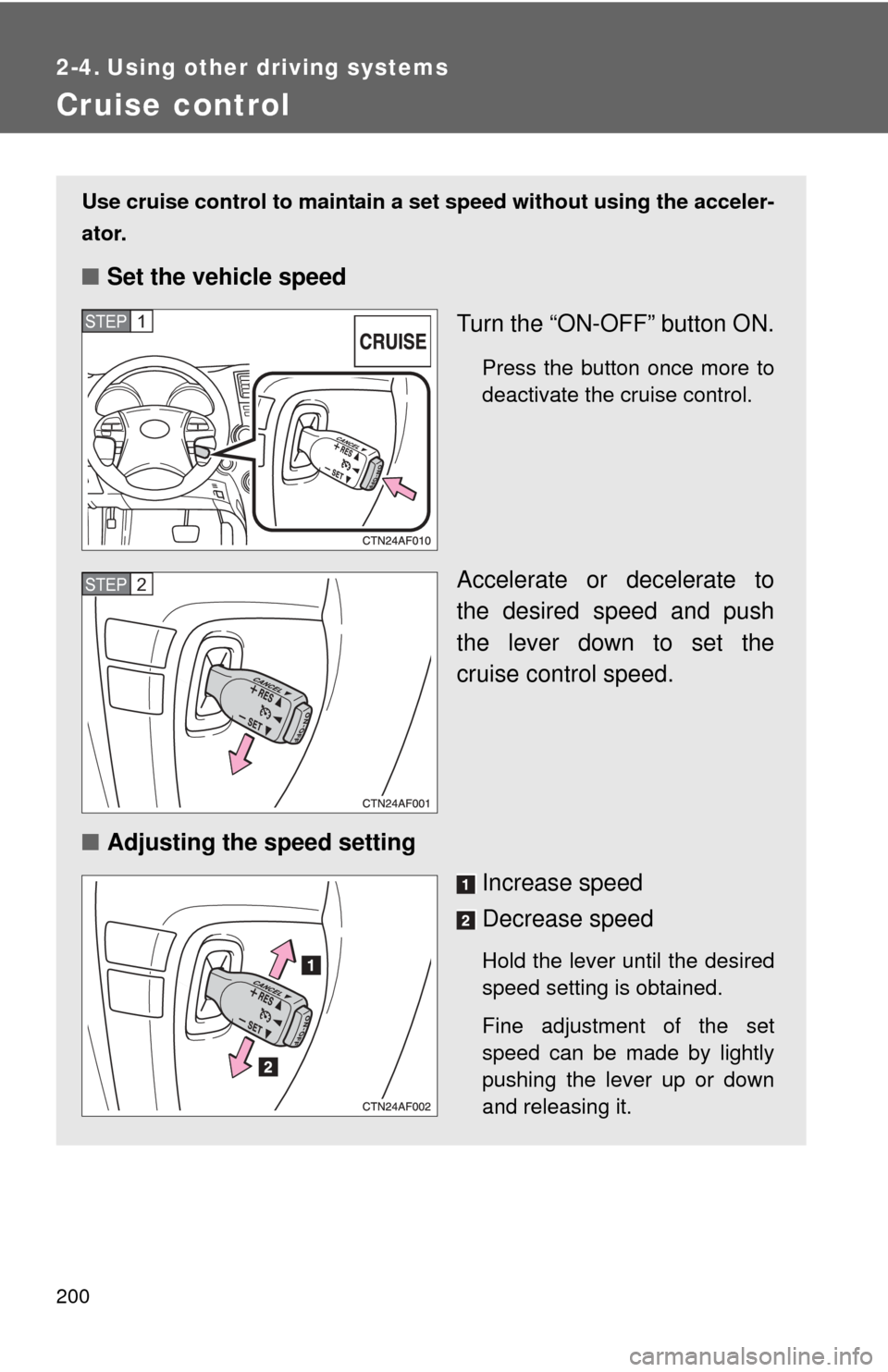
Use cruise control to maintain a set speed without using the acceler-
ator.
■ Set the vehicle speed
Turn the “ON-OFF” button ON.
Press the button once more to
deactivate the cruise control.
Accelerate or decelerate to
the desired speed and push
the lever down to set the
cruise control speed.
■ Adjusting the speed setting
Increase speed
Decrease speed
Hold the lever until the desired
speed setting is obtained.
Fine adjustment of the set
speed can be made by lightly
pushing the lever up or down
and releasing it.
STEP1
STEP2
Page 201 of 577
201
2-4. Using other
driving systems
2
When driving
■Cruise control can be set when
●The shift lever is in D, 4 or 5 range of S.
● Vehicle speed is above approximately 25 mph (40 km/h). Within the limits
of the engine’s capabilities, cruising speed can be maintained up or down
grades.
■ Accelerating
The vehicle can be accelerated normally.
■ Automatic cruise control cancellation
The set speed is automatically cancelled in any of the following situations.
●Actual vehicle speed falls more than 10 mph (16 km/h) below the preset
vehicle speed.
At this time, the memorized set speed is not retained.
● Actual vehicle speed is below 25 mph (40 km/h).
● VSC is activated.
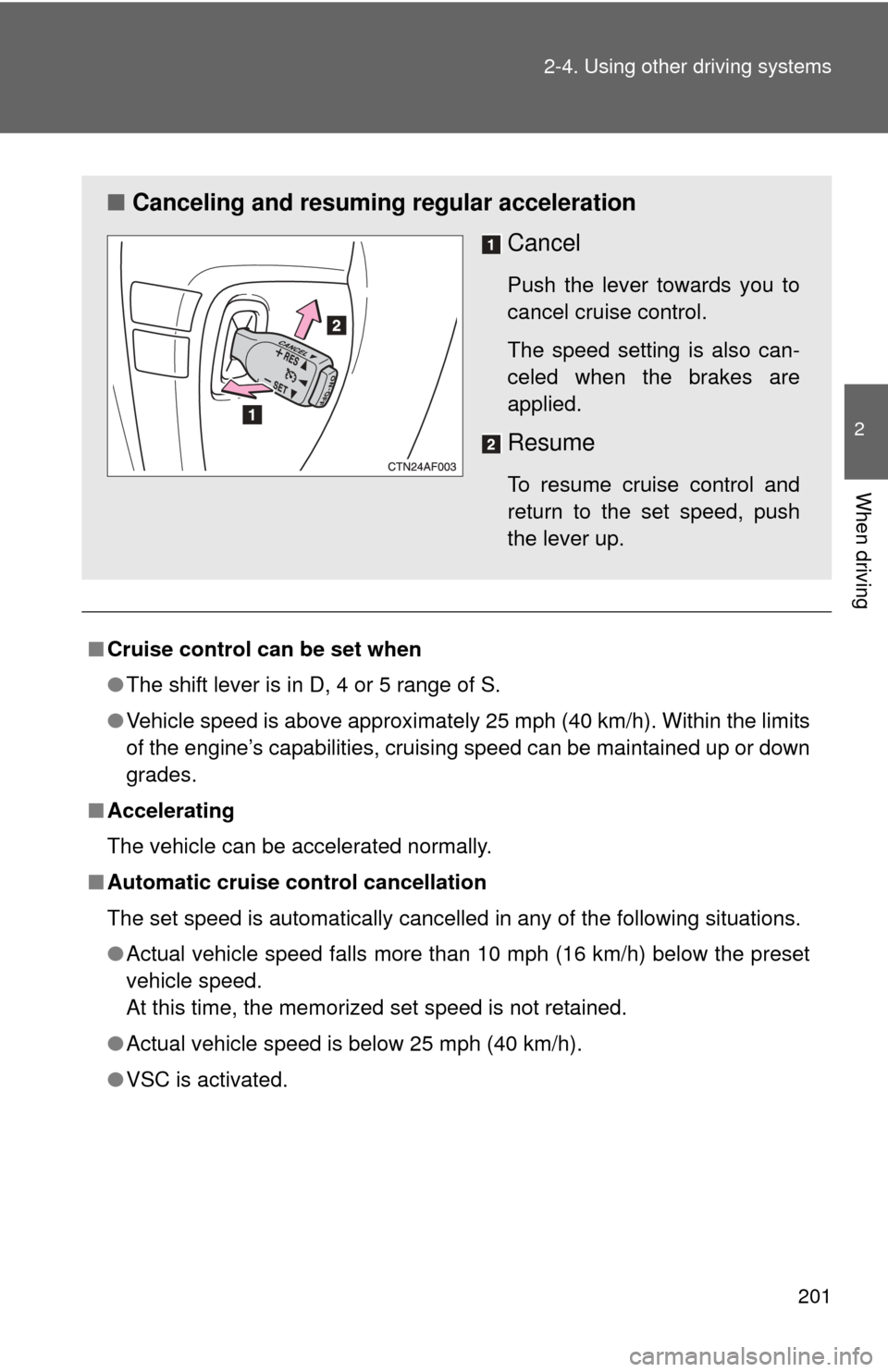
■ Canceling and resuming regular acceleration
Cancel
Push the lever towards you to
cancel cruise control.
The speed setting is also can-
celed when the brakes are
applied.
Resume
To resume cruise control and
return to the set speed, push
the lever up.
Page 202 of 577
202 2-4. Using other driving systems
■If the cruise control indicator light flashes
Turn the “ON-OFF” button off once, and then reactivate the system.
If the cruise control speed cannot be set or if the cruise control cancels
immediately after being activated, there may be a malfunction in the cruise
control system. Contact your Toyota dealer and have your Toyota inspected.
CAUTION
■To avoid operating the cruise control by mistake
Keep the “ON-OFF” button off when not in use.
■ Situations unsuitable for cruise control
Do not use cruise control in any of the following situations.
Doing so may result in control of the vehicle being lost and could cause seri-
ous or fatal accident.
●In heavy traffic
● On roads with sharp bends
● On winding roads
● On slippery roads, such as those covered with rain, ice or snow
● On steep hills
Page 237 of 577
236 2-5. Driving information
CAUTION
■Trailer towing precautions
●Follow all the instructions described in this section. Failure to do so could
cause an accident resulting in death or serious injury.
● Exceeding the towing capacity, GVWR or GAWR can cause an accident
resulting in death or serious personal injuries.
■ To avoid accident or injury
●Do not exceed 45 mph (72 km/h) or the posted towing speed limit, which-
ever is lower. As instability (swaying) of the towing vehicle-trailer combina-
tion increases as speed increases, exceeding 45 mph (72 km/h) may
cause loss of control.
● Do not exceed the trailer hitch assembly weight, gross vehicle weight,
gross axle weight and trailer tongue load capacities.
● Never load more weight in the back than in the front of the trailer. About
60% of the load should be in the front half of the trailer, and the remaining
40% in the rear.
● Do not use cruise control when you are towing.
● Slow down and downshift before descending steep or long downhill
grades. Do not make sudden downshifts.
● Avoid holding the brake pedal down too long or applying the brakes too
frequently. This could cause the brakes to overheat and result in reduced
braking efficiency.
● Do not tow the vehicle with the compact spare tire installed.
■ Hitches
●If you wish to install a trailer hitch, contact your Toyota dealer.
● Use only a hitch that conforms to the gross trailer weight requirement.
● The towing capacity of 5000 lb can only be guaranteed when using a gen-
uine Toyota hitch assembly or equivalent.
● Follow the directions supplied by the hitch manufacturer.
● Lubricate the hitch ball with a light coat of grease.
● Remove the trailer hitch whenever you are not towing a trailer. After
removing the hitch, seal any mounting hole in the vehicle body to prevent
entry of any substances into the vehicle.