door lock TOYOTA HIGHLANDER 2020 (in English) Workshop Manual
[x] Cancel search | Manufacturer: TOYOTA, Model Year: 2020, Model line: HIGHLANDER, Model: TOYOTA HIGHLANDER 2020Pages: 560, PDF Size: 14.42 MB
Page 398 of 560
3986-2. Maintenance
HIGHLANDER_U
The OBD system determines
that a problem exists some-
where in the emission control
system. Your vehicle may not
pass the I/M test and may need
to be repaired. Contact your
Toyota dealer to service the
vehicle.
When the battery is discon-
nected or discharged
Readiness codes that are set
during ordinary driving are erased.
Also, depending on your driving
habits, the readiness codes may
not be completely set.
When the fuel tank cap is
loose
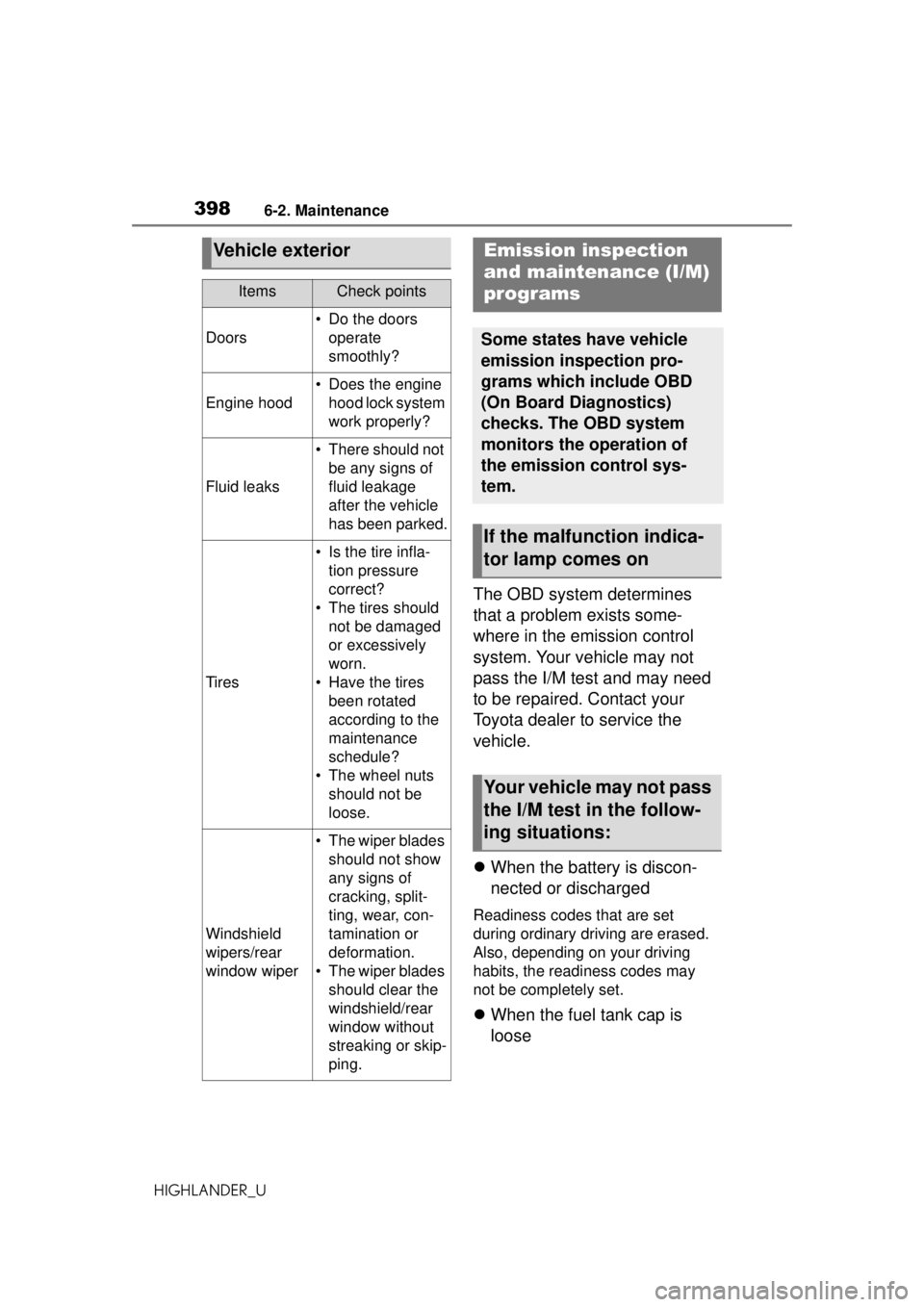
Vehicle exterior
ItemsCheck points
Doors
• Do the doors
operate
smoothly?
Engine hood
• Does the engine hood lock system
work properly?
Fluid leaks
• There should not be any signs of
fluid leakage
after the vehicle
has been parked.
Tires
• Is the tire infla-tion pressure
correct?
• The tires should not be damaged
or excessively
worn.
• Have the tires been rotated
according to the
maintenance
schedule?
• The wheel nuts should not be
loose.
Windshield
wipers/rear
window wiper
• The wiper blades should not show
any signs of
cracking, split-
ting, wear, con-
tamination or
deformation.
• The wiper blades should clear the
windshield/rear
window without
streaking or skip-
ping.
Emission inspection
and maintenance (I/M)
programs
Some states have vehicle
emission inspection pro-
grams which include OBD
(On Board Diagnostics)
checks. The OBD system
monitors the operation of
the emission control sys-
tem.
If the malfunction indica-
tor lamp comes on
Your vehicle may not pass
the I/M test in the follow-
ing situations:
Page 409 of 560
4096-3. Do-it-yourself maintenance
HIGHLANDER_U
6
Maintenance and care
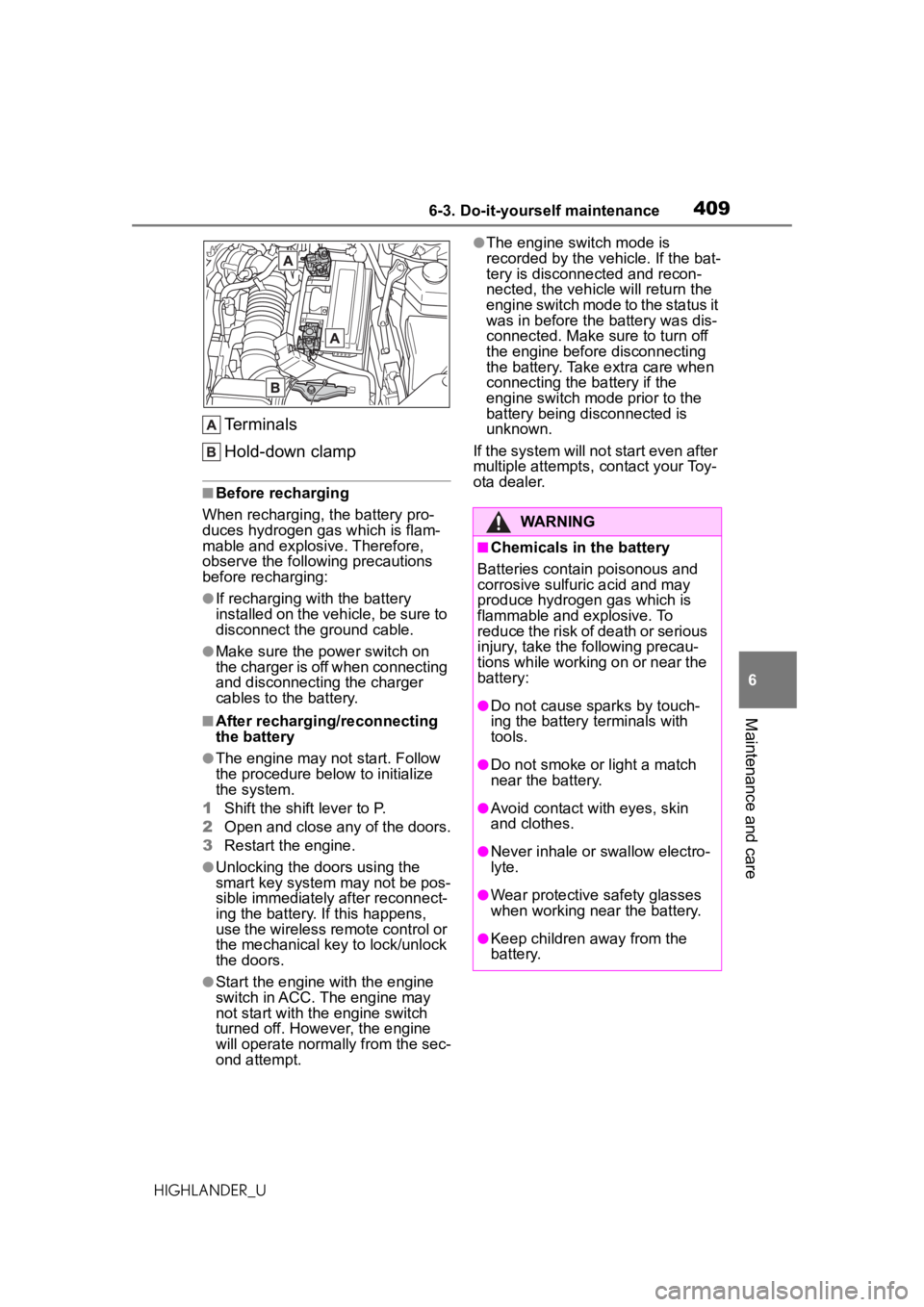
Terminals
Hold-down clamp
■Before recharging
When recharging, the battery pro-
duces hydrogen gas which is flam-
mable and explosive. Therefore,
observe the following precautions
before recharging:
●If recharging with the battery
installed on the vehicle, be sure to
disconnect the ground cable.
●Make sure the power switch on
the charger is off when connecting
and disconnecting the charger
cables to the battery.
■After recharging/reconnecting
the battery
●The engine may not start. Follow
the procedure below to initialize
the system.
1 Shift the shift lever to P.
2 Open and close any of the doors.
3 Restart the engine.
●Unlocking the doors using the
smart key system may not be pos-
sible immediately after reconnect-
ing the battery. If this happens,
use the wireless remote control or
the mechanical key to lock/unlock
the doors.
●Start the engine with the engine
switch in ACC. The engine may
not start with the engine switch
turned off. However, the engine
will operate normally from the sec-
ond attempt.
●The engine switch mode is
recorded by the vehicle. If the bat-
tery is disconnected and recon-
nected, the vehicle will return the
engine switch mode to the status it
was in before the battery was dis-
connected. Make sure to turn off
the engine before disconnecting
the battery. Take extra care when
connecting the battery if the
engine switch mo de prior to the
battery being disconnected is
unknown.
If the system will no t start even after
multiple attempts, contact your Toy-
ota dealer.
WARNING
■Chemicals in the battery
Batteries contain poisonous and
corrosive sulfuric acid and may
produce hydrogen gas which is
flammable and explosive. To
reduce the risk of death or serious
injury, take the following precau-
tions while working on or near the
battery:
●Do not cause sparks by touch-
ing the battery terminals with
tools.
●Do not smoke or light a match
near the battery.
●Avoid contact with eyes, skin
and clothes.
●Never inhale or swallow electro-
lyte.
●Wear protective safety glasses
when working near the battery.
●Keep children away from the
battery.
Page 435 of 560
4356-3. Do-it-yourself maintenance
HIGHLANDER_U
6
Maintenance and care
base and light unit.
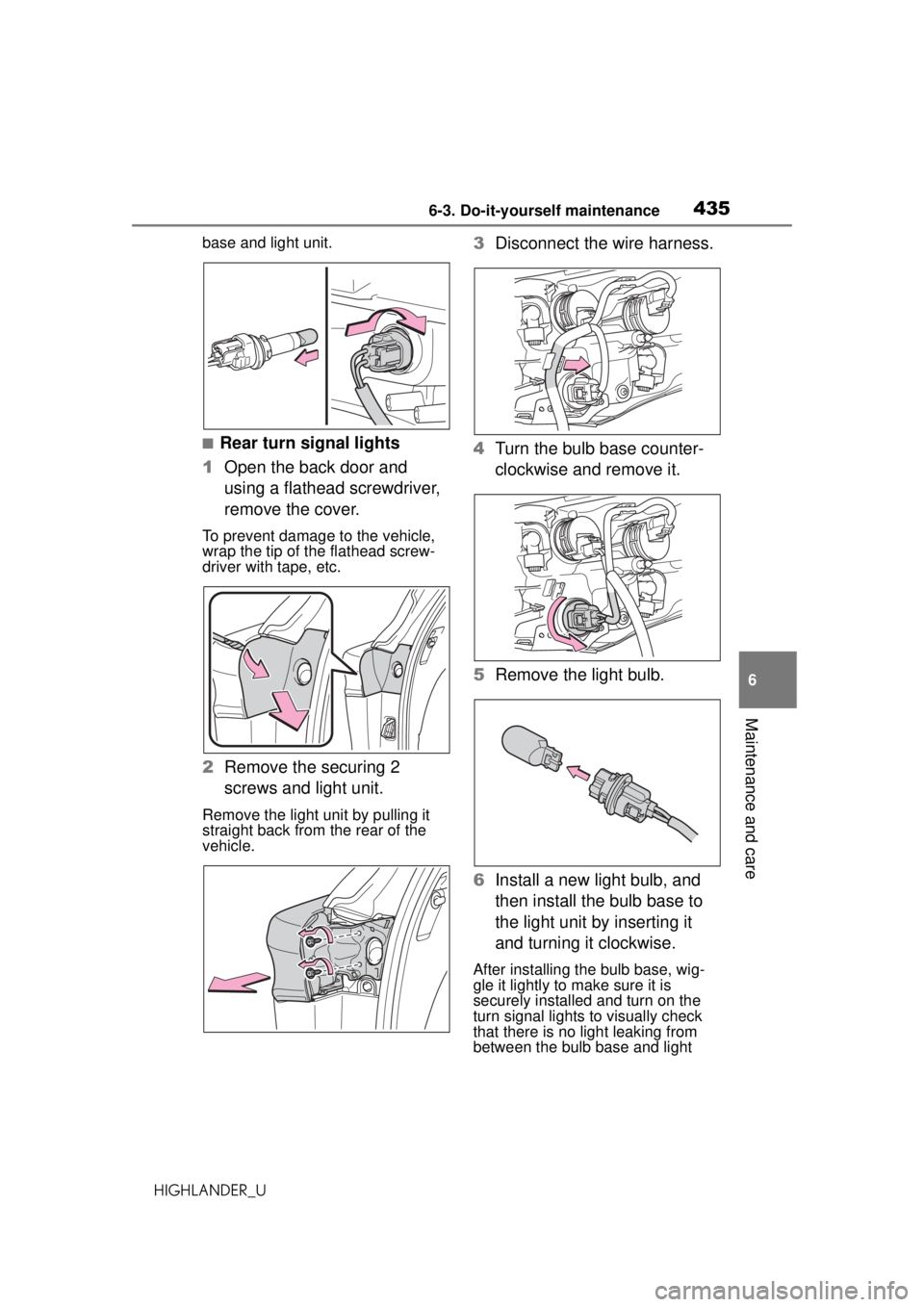
■Rear turn signal lights
1 Open the back door and
using a flathead screwdriver,
remove the cover.
To prevent damage to the vehicle,
wrap the tip of the flathead screw-
driver with tape, etc.
2Remove the securing 2
screws and light unit.
Remove the light unit by pulling it
straight back from the rear of the
vehicle.
3Disconnect the wire harness.
4 Turn the bulb base counter-
clockwise and remove it.
5 Remove the light bulb.
6 Install a new light bulb, and
then install the bulb base to
the light unit by inserting it
and turning it clockwise.
After installing the bulb base, wig-
gle it lightly to make sure it is
securely installed and turn on the
turn signal lights to visually check
that there is no light leaking from
between the bulb base and light
Page 436 of 560
4366-3. Do-it-yourself maintenance
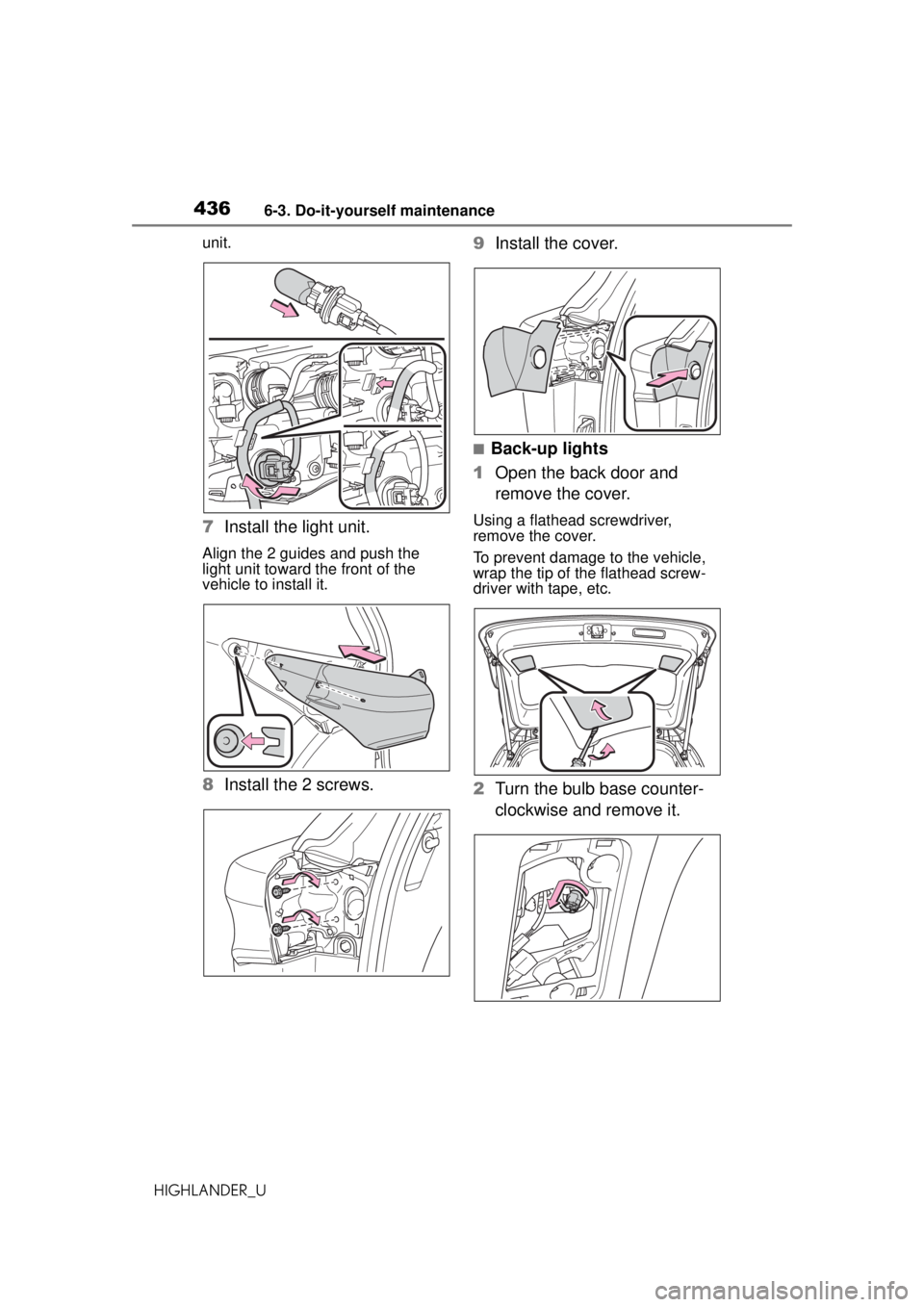
HIGHLANDER_Uunit.
7
Install the light unit.
Align the 2 guides and push the
light unit toward the front of the
vehicle to install it.
8Install the 2 screws. 9
Install the cover.
■Back-up lights
1 Open the back door and
remove the cover.
Using a flathead screwdriver,
remove the cover.
To prevent damage to the vehicle,
wrap the tip of the flathead screw-
driver with tape, etc.
2Turn the bulb base counter-
clockwise and remove it.
Page 481 of 560
4817-2. Steps to take in an emergency
HIGHLANDER_U
7
When trouble arises
■When the electronic key does
not work properly
●Make sure that the smart key sys-
tem has not been deactivated in
the customization setting. If it is
off, turn the function on. (Custom-
izable features: P.515)
●Check if battery-saving mode is
set. If it is set, cancel the function.
( P.132)
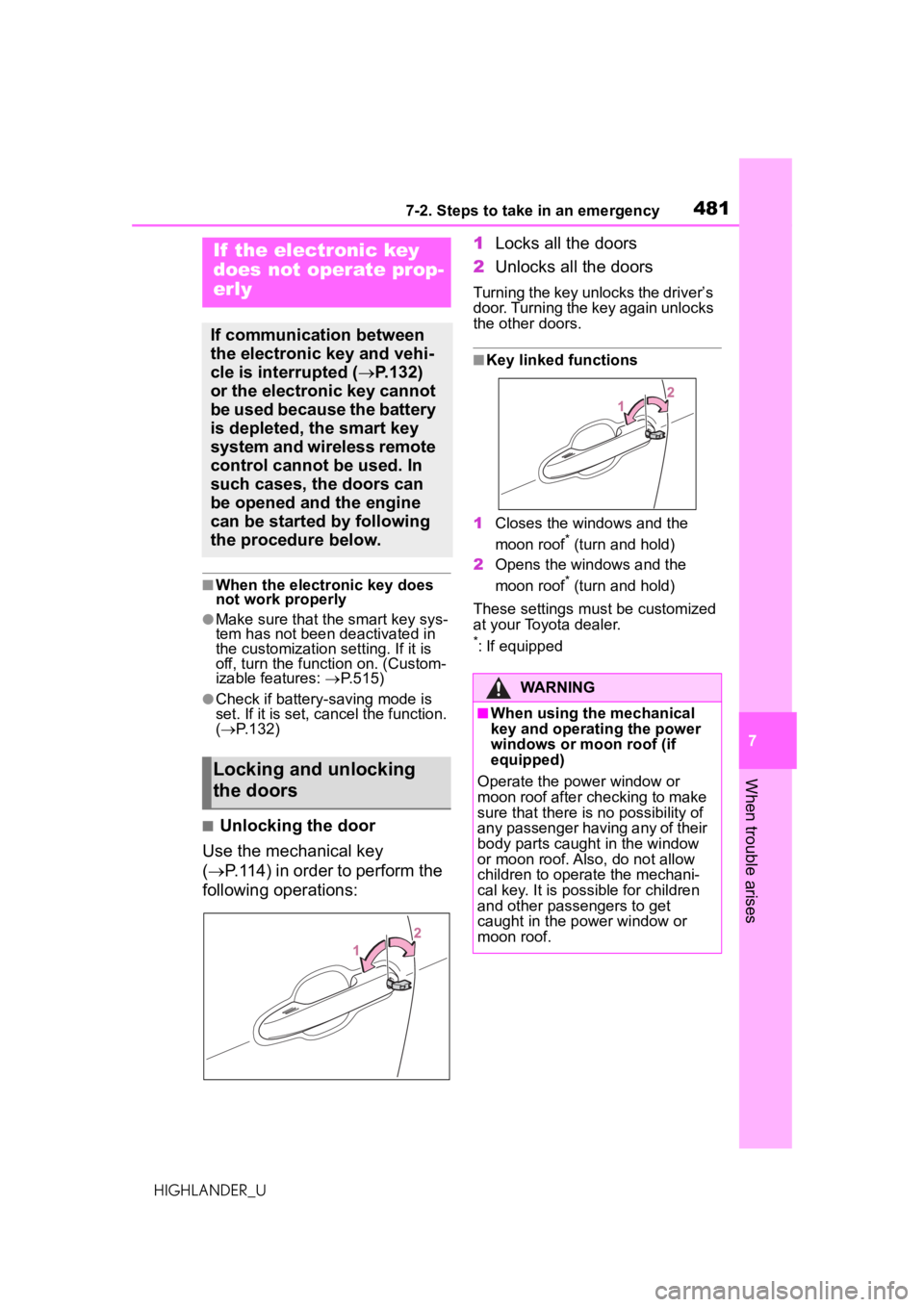
■Unlocking the door
Use the mechanical key
( P.114) in order to perform the
following operations: 1
Locks all the doors
2 Unlocks all the doors
Turning the key unlocks the driver’s
door. Turning the key again unlocks
the other doors.
■Key linked functions
1 Closes the windows and the
moon roof
* (turn and hold)
2 Opens the windows and the
moon roof
* (turn and hold)
These settings must be customized
at your Toyota dealer.
*: If equipped
If the electronic key
does not operate prop-
erly
If communication between
the electronic key and vehi-
cle is interrupted ( P.132)
or the electronic key cannot
be used because the battery
is depleted, the smart key
system and wireless remote
control cannot be used. In
such cases, the doors can
be opened and the engine
can be started by following
the procedure below.
Locking and unlocking
the doors
WARNING
■When using the mechanical
key and operating the power
windows or moon roof (if
equipped)
Operate the power window or
moon roof after ch ecking to make
sure that there is no possibility of
any passenger having any of their
body parts caught in the window
or moon roof. Also, do not allow
children to operate the mechani-
cal key. It is possible for children
and other passengers to get
caught in the power window or
moon roof.
Page 483 of 560
4837-2. Steps to take in an emergency
HIGHLANDER_U
7
When trouble arises
If you have a set of jumper (or
booster) cables and a second
vehicle with a 12-volt battery,
you can jump start your vehicle
by following the steps below.
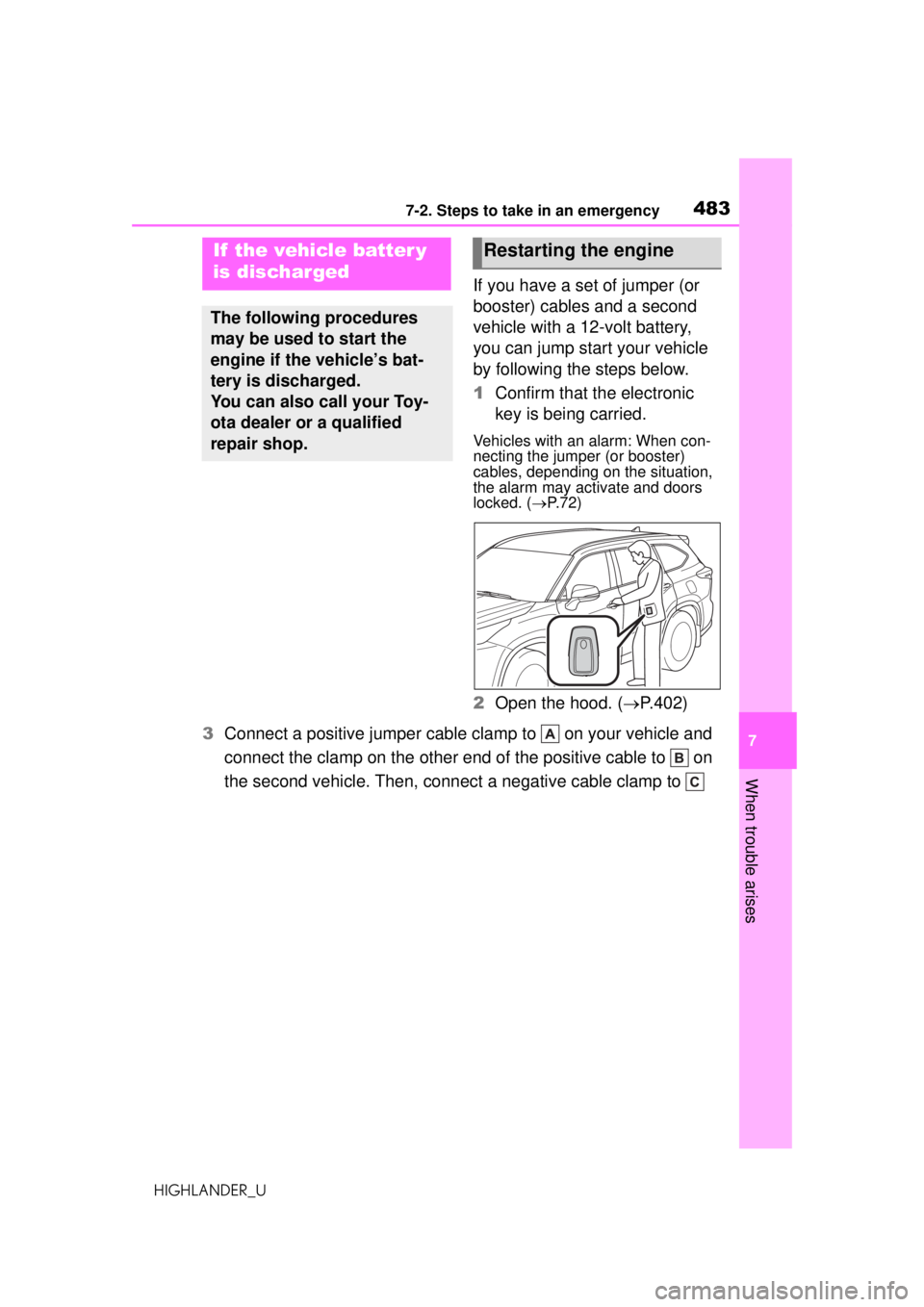
1 Confirm that the electronic
key is being carried.
Vehicles with an alarm: When con-
necting the jumper (or booster)
cables, depending on the situation,
the alarm may activate and doors
locked. ( P. 7 2 )
2 Open the hood. ( P.402)
3 Connect a positive jumper cable cl amp to on your vehicle and
connect the clamp on the other end of the positive cable to on
the second vehicle. Then, connec t a negative cable clamp to
If the vehicle batter y
is discharged
The following procedures
may be used to start the
engine if the vehicle’s bat-
tery is discharged.
You can also call your Toy-
ota dealer or a qualified
repair shop.
Restarting the engine
Page 485 of 560
4857-2. Steps to take in an emergency
HIGHLANDER_U
7
When trouble arises
traffic.
■When the battery is removed or
discharged
●Information stored in the ECU is
cleared. When the battery is
depleted, have the vehicle
inspected at your Toyota dealer.
●Some systems may require initial-
ization. ( P.527)
■When removing the battery ter-
minals
When the battery terminals are
removed, the information stored in
the ECU is cleared. Before remov-
ing the battery terminals, contact
your Toyota dealer.
■Charging the battery
The electricity stored in the battery
will discharge gradually even when
the vehicle is not in use, due to nat-
ural discharge and the draining
effects of certain electrical appli-
ances. If the vehicle is left for a long
time, the battery may discharge,
and the engine may be unable to
start. (The battery recharges auto-
matically during driving.)
■After jump starting the vehicle
(Vehicles with Stop & Start sys-
tem)
Be sure to disable the Stop & Start
system so that the battery can be
charged. ( P.265)
■When recharging or replacing
the battery
●In some cases, it may not be pos-
sible to unlock the doors using the
smart key system when the bat-
tery is discharged. Use the wire-
less remote control or the
mechanical key to lock or unlock
the doors.
●The engine may not start on the
first attempt after the battery has
recharged but w ill start normally
after the second a ttempt. This is
not a malfunction.
●The engine switch mode is memo- rized by the vehicle. When the
battery is reconnected, the system
will return to the
mode it was in
before the battery was dis-
charged. Before disconnecting the
battery, turn the engine switch off.
If you are unsure what mode the
engine switch was in before the
battery discharged, be especially
careful when reconnecting the
battery.
●Vehicles with power back door:
The power back door must be ini-
tialized. ( P.126)
●Vehicles with Stop & Start system:
For a while after the battery termi-
nals have been disconnected and
reconnected, for a while after the
battery has been replaced, the
Stop & Start system may not auto-
matically stop the engine for
approximately 5 to 60 minutes.
■When replacing the battery
●Use a Central Degassing type bat-
tery (European Regulations).
●Vehicles with Stop & Start system:
Use a genuine battery specifically
designed for use with the Stop &
Start system or a battery with
equivalent specifications to a gen-
uine battery. If an unsupported
battery is used, Stop & Start sys-
tem functions may be restricted to
protect the battery.
Also, battery performance may
decrease and the engine may not
be able to restart. Contact your
Toyota dealer for details.
●Vehicles without Stop & Start sys-
tem: Use a battery that the case
size is same as the previous one
(LN3), 20 hour rate capacity
(20HR) is equivalent (70Ah) or
greater, and performance rating
(CCA) is equivalent (603A) or
greater.
Vehicles with Stop & Start system:
Use a battery that the case size is
same as the previous one (LN3), 20
hour rate capacity (20HR) is equiva-
Page 518 of 560
5188-2. Customization
HIGHLANDER_U
■Head-up Display*(P.101)
*: If equipped
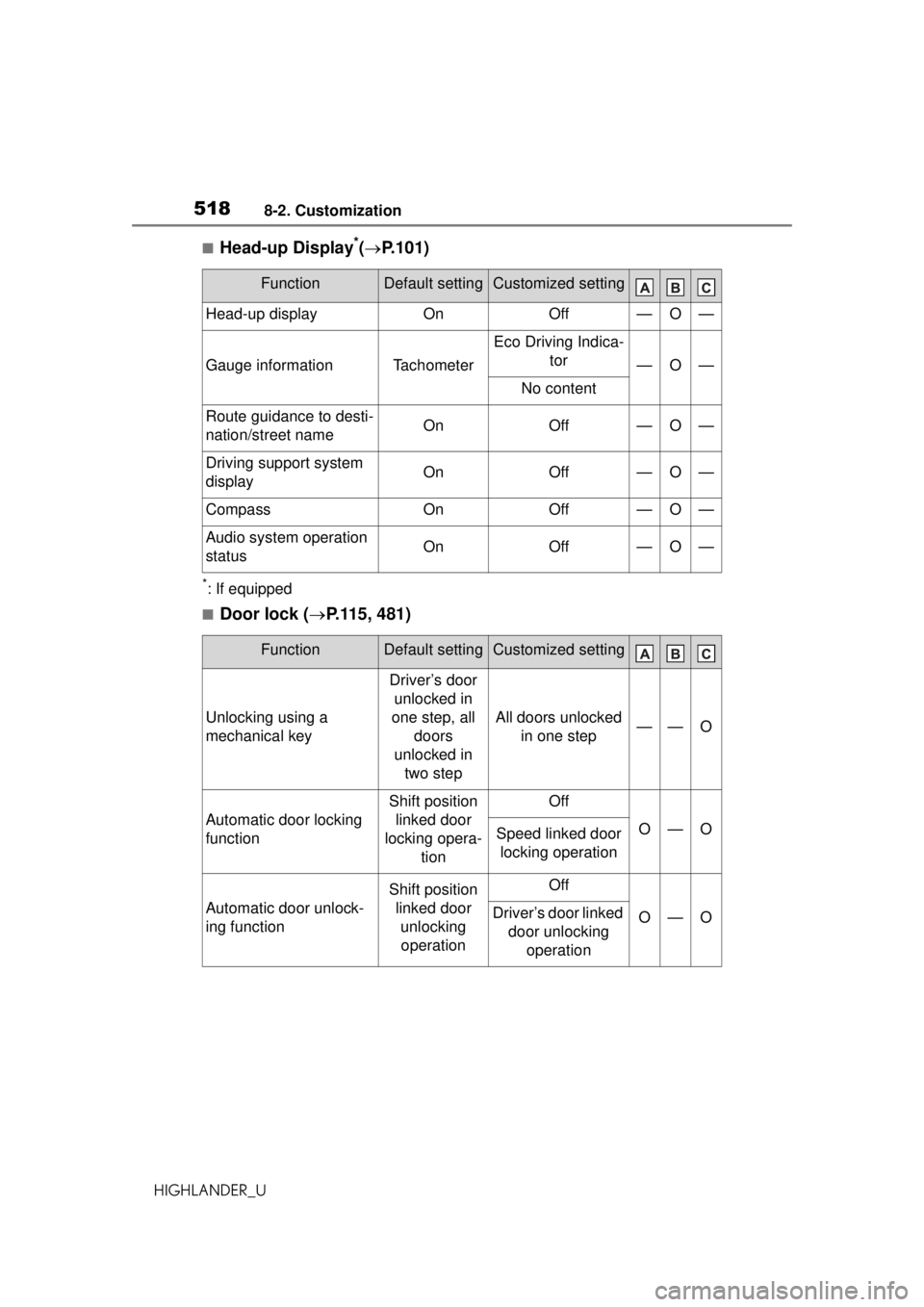
■Door lock ( P.115, 481)
FunctionDefault settingCustomized setting
Head-up displayOnOff—O—
Gauge informationTachometer
Eco Driving Indica-
tor
—O—
No content
Route guidance to desti-
nation/street nameOnOff—O—
Driving support system
displayOnOff—O—
CompassOnOff—O—
Audio system operation
statusOnOff—O—
FunctionDefault settingCustomized setting
Unlocking using a
mechanical key
Driver’s door unlocked in
one step, all doors
unlocked in two step
All doors unlocked in one step——O
Automatic door locking
function
Shift position linked door
locking opera- tionOff
O—OSpeed linked door locking operation
Automatic door unlock-
ing function
Shift position linked door unlocking operationOff
O—ODriver’s door linked door unlocking operation
Page 519 of 560
5198-2. Customization
HIGHLANDER_U
8
Vehicle specifications
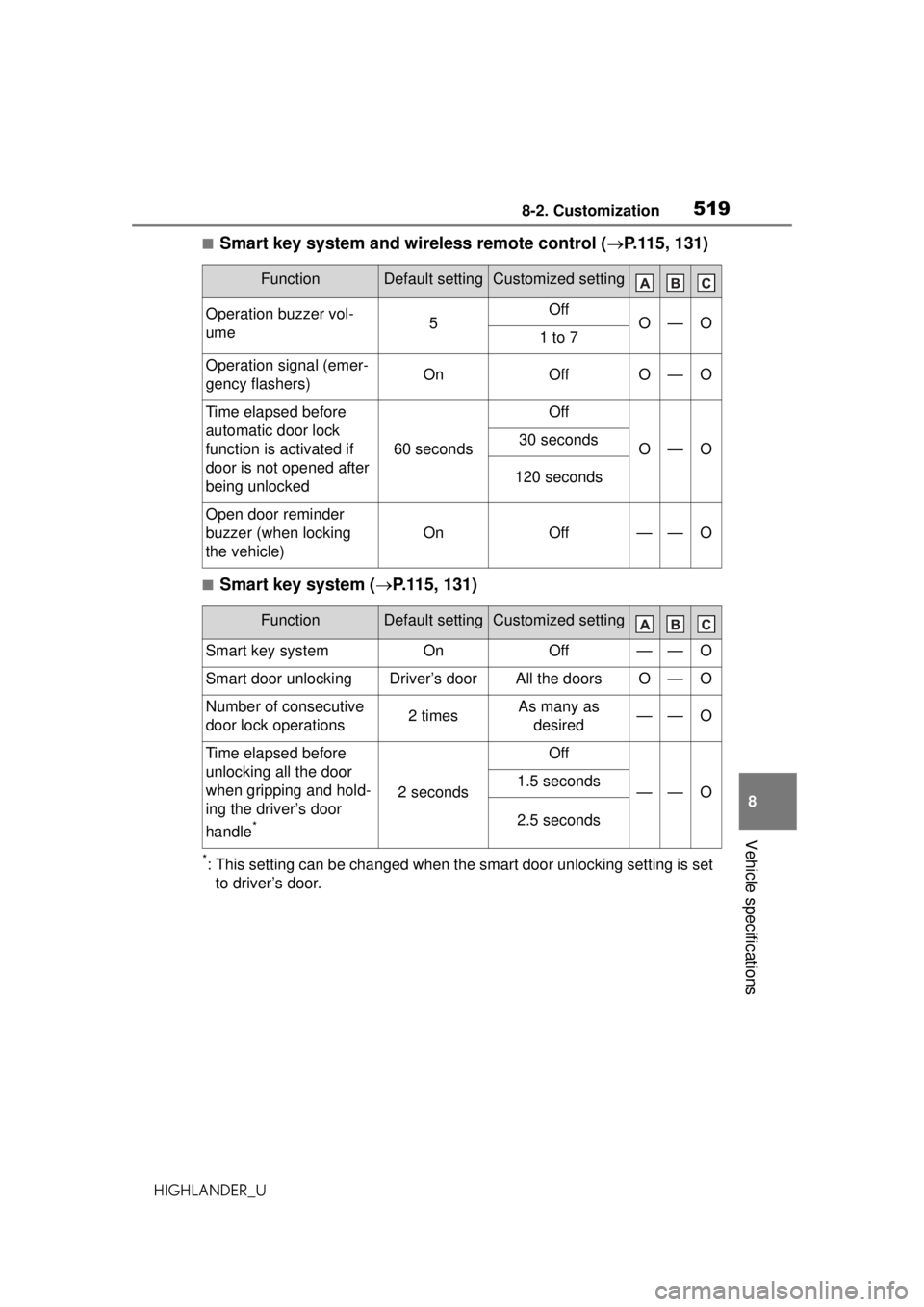
■Smart key system and wireless remote control ( P.115, 131)
■Smart key system ( P.115, 131)
*: This setting can be changed when the smart door unlocking setting is set
to driver’s door.
FunctionDefault settingCustomized setting
Operation buzzer vol-
ume5OffO—O1 to 7
Operation signal (emer-
gency flashers)OnOffO—O
Time elapsed before
automatic door lock
function is activated if
door is not opened after
being unlocked
60 seconds
Off
O—O30 seconds
120 seconds
Open door reminder
buzzer (when locking
the vehicle)
OnOff——O
FunctionDefault settingCustomized setting
Smart key systemOnOff——O
Smart door unlockingDriver’s doorAll the doorsO—O
Number of consecutive
door lock operations2 timesAs many as desired——O
Time elapsed before
unlocking all the door
when gripping and hold-
ing the driver’s door
handle
*
2 seconds
Off
——O1.5 seconds
2.5 seconds
Page 520 of 560

5208-2. Customization
HIGHLANDER_U
■Wireless remote control (P. 113 , 11 5, 11 9 )
■Power back door*1 ( P.119)
FunctionDefault settingCustomized setting
Wireless remote controlOnOff——O
Unlocking operation
Driver’s door
unlocked in
one step, all doors
unlocked in two step
All doors unlocked in one stepO—O
Theft deterrent panic
modeOnOff——O
Locking operation when
door openedOnOffO—O
FunctionDefault settingCustomized setting
Power back doorOnOff—O—
Kick sensor*1OnOff—O—
Power back door open-
ing position5
1 to 4
—O—
User setting*2
Buzzer volumeLevel 3Level 1—O—Level 2
Opening/closing of the
back door using the
power back door switch
on the instrument panel
Press and holdOne short press——O
Opening/closing of the
power back door using
the switch of the
wireless remote control
Press and hold
One short press
——OPush twice
Off