fog light TOYOTA HIGHLANDER HYBRID 2019 Owners Manual (in English)
[x] Cancel search | Manufacturer: TOYOTA, Model Year: 2019, Model line: HIGHLANDER HYBRID, Model: TOYOTA HIGHLANDER HYBRID 2019Pages: 716, PDF Size: 14.31 MB
Page 3 of 716

3
1
9 8 6 5
4
3
2
HIGHLANDER_HV_U
10
7
4-1. Before drivingDriving the vehicle ............. 198
Cargo and luggage............ 208
Vehicle load limits ............. 213
Trailer towing..................... 214
Dinghy towing.................... 230
4-2. Driving procedures Power (ignition) switch ...... 231
EV drive mode................... 237
Hybrid transmission........... 239
Turn signal lever................ 245
Parking brake .................... 246
4-3. Operating the lights and wipers
Headlight switch ................ 247
Automatic High Beam ....... 251
Fog light switch ................. 255
Windshield wipers and washer ..................... 256
Rear window wiper and washer ..................... 260
4-4. Refueling Opening the fuel tank cap .......................... 262 4-5. Using the driving
support systems
Toyota Safety Sense P ...... 267
PCS (Pre-Collision System)..... 274
LDA (Lane Departure Alert with steering
control) ............................ 288
Dynamic radar cruise control.............................. 298
Rear view monitor system ............................. 311
BSM (Blind Spot Monitor)......... 320
• BSM function ................. 325
• RCTA function ............... 329
Driving assist systems ....... 335
4-6. Driving tips Hybrid vehicle driving tips ....................... 341
Winter driving tips .............. 344
Utility vehicle precautions ...................... 348
4Driving
Page 5 of 716

5
1
9 8 6 5
4
3
2
HIGHLANDER_HV_U
10
7
5-10. Bluetooth®
Bluetooth®......................... 429
5-11. Using the voice command system
Voice command system .... 433
6-1. Using the air conditioning system
and defogger
Front automatic air conditioning system ........ 440
Rear automatic air conditioning system ........ 447
Heated steering wheel/ seat heaters/
seat ventilators ................ 450
6-2. Using the interior lights Interior lights list ................ 453
• Interior lights ................. 454
• Personal lights .............. 454
6-3. Using the storage features
List of storage features...... 455
• Glove box...................... 456
• Console box .................. 456
• Bottle holders ................ 457
• Cup holders .................. 458
• Auxiliary boxes .............. 460
• Open tray ...................... 461
Luggage compartment features ........................... 462 6-4. Using the other
interior features
Other interior features........ 467
• Sun visors ..................... 467
• Vanity mirrors ................ 467
• Conversation mirror ....... 468
• Clock ............................. 468
• Outside temperature display ........................... 469
• Power outlets ................ 470
• USB charging ports ....... 472
• Rear sunshades ............ 474
• Armrest.......................... 475
• Coat hooks .................... 476
• Assist grips .................... 476
• Side table ...................... 477
Garage door opener .......... 478
Compass ........................... 485
6Interior features
Page 17 of 716
17Pictorial index
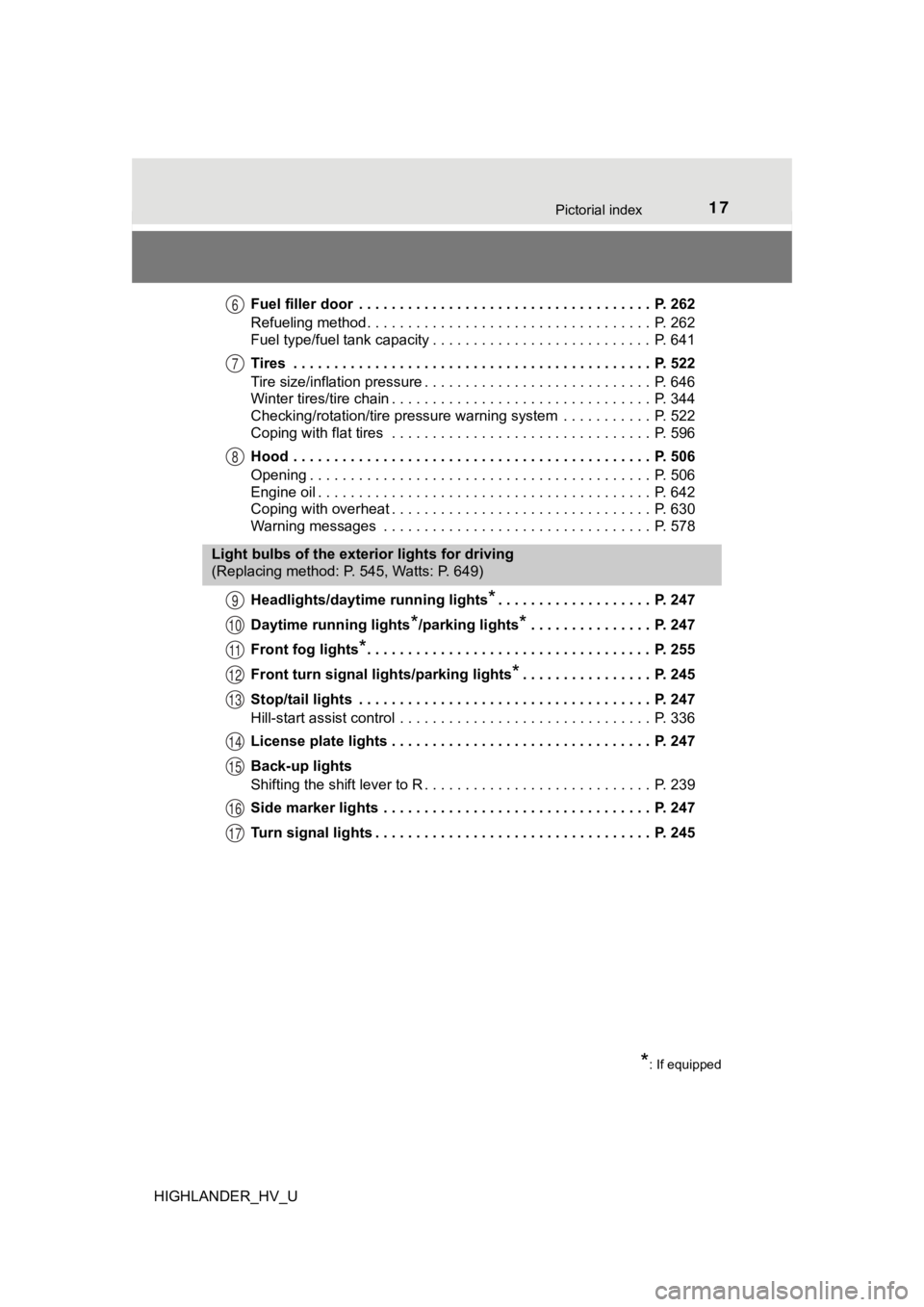
HIGHLANDER_HV_UFuel filler door . . . . . . . . . . . . . . . . . . . . . . . . . . . . . . . . . . . . P. 262
Refueling method . . . . . . . . . . . . . . . . . . . . . . . . . . . . . . . . . . . P. 262
Fuel type/fuel tank capacity . . . . . . . . . . . . . . . . . . . . . . . . . . . P. 641
Tires . . . . . . . . . . . . . . . . . . . . . . . . . . . . . . . . . . . . . . . . . . . . P. 522
Tire size/inflation pressure . . . . . . . . . . . . . . . . . .
. . . . . . . . . . P. 646
Winter tires/tire chain . . . . . . . . . . . . . . . . . . . . . . . . . . . . . . . . P. 344
Checking/rotation/tire pressure warning system . . . . . . . . . . . P. 522
Coping with flat tires . . . . . . . . . . . . . . . . . . . . . . . . . . . . . . . . P. 596
Hood . . . . . . . . . . . . . . . . . . . . . . . . . . . . . . . . . . . . . . . . . . . . P. 506
Opening . . . . . . . . . . . . . . . . . . . . . . . . . . . . . . . . . . . . . . . . . . P. 506
Engine oil . . . . . . . . . . . . . . . . . . . . . . . . . . . . . . . . . . . . . . . . . P. 642
Coping with overheat . . . . . . . . . . . . . . . . . . . . . . . . . . . . . . . . P. 630
Warning messages . . . . . . . . . . . . . . . . . . . . . . . . . . . . . . . . . P. 578
Headlights/daytime running lights
*. . . . . . . . . . . . . . . . . . . P. 247
Daytime running lights
*/parking lights*. . . . . . . . . . . . . . . P. 247
Front fog lights
*. . . . . . . . . . . . . . . . . . . . . . . . . . . . . . . . . . . P. 255
Front turn signal lig hts/parking lights
*. . . . . . . . . . . . . . . . P. 245
Stop/tail lights . . . . . . . . . . . . . . . . . . . . . . . . . . . . . . . . . . . . P. 247
Hill-start assist control . . . . . . . . . . . . . . . . . . . . . . . . . . . . . . . P. 336
License plate lights . . . . . . . . . . . . . . . . . . . . . . . . . . . . . . . . P. 247
Back-up lights
Shifting the shift lever to R . . . . . . . . . . . . . . . . . . . . . . . . . . . . P. 239
Side marker lights . . . . . . . . . . . . . . . . . . . . . . . . . . . . . . . . . P. 247
Turn signal lights . . . . . . . . . . . . . . . . . . . . . . . . . . . . . . . . . . P. 245
6
7
8
Light bulbs of the exterior lights for driving
(Replacing method: P. 545, Watts: P. 649)
*: If equipped
9
10
11
12
13
14
15
16
17
Page 19 of 716

19Pictorial index
HIGHLANDER_HV_UParking brake . . . . . . . . . . . . . . . . . . . . . . . . . . . . . . . . . . . . . P. 246
Applying/releasing . . . . . . . . . . . . . . . . . . . . . . . . . . . . . . . . . . P. 246
Precautions for winter season . . . . . . . . . . . . . . . . . . . . . . . . . P. 345
Warning buzzer/message . . . . . . . . . . . . . . . . . . . . . . . . . . . . P. 576
Turn signal lever . . . . . . . . . . . . . . . . . . . . . . . . . . . . . . . . . . P. 245
Headlight switch . . . . . . . . . . . . . . . . . . . . . . . . . . . . . . . . . . P. 247
Headlights/tail lights/daytime running lights . . . . . . . . .
. . . . . . P. 247
Front fog lights
*1 . . . . . . . . . . . . . . . . . . . . . . . . . . . . . . . . . . . P. 255
Wiper and washer switch . . . . . . . . . . . . . . . . . . . . . . . P. 256, 260
Usage . . . . . . . . . . . . . . . . . . . . . . . . . . . . . . . . . . . . . . . P. 256, 260
Adding washer fluid . . . . . . . . . . . . . . . . . . . . . . . . . . . . . . . . . P. 516
Warning messages . . . . . . . . . . . . . . . . . . . . . . . . . . . . . . . . . P. 586
Emergency flasher switch . . . . . . . . . . . . . . . . . . . . . . . . . . P. 560
Hood lock release lever. . . . . . . . . . . . . . . . . . . . . . . . . . . . . P. 506
Tilt and telescopic steering lock release lever . . . . . . . . . . P. 177
Adjustment . . . . . . . . . . . . . . . . . . . . . . . . . . . . . . . . . . . . . . . . P. 177
Automatic air conditioning system . . . . . . . . . . . . . . . . . . . P. 440
Usage . . . . . . . . . . . . . . . . . . . . . . . . . . . . . . . . . . . . . . . . . . . P. 440
Rear window defogger . . . . . . . . . . . . . . . . . . . . . . . . . . . . . . . P. 442
Entune Audio
*1 . . . . . . . . . . . . . . . . . . . . . . . . . . . . . . . . . . . P. 355
Entune Audio Plus
*1, 2
Entune Premium Audio*1, 2
Clock . . . . . . . . . . . . . . . . . . . . . . . . . . . . . . . . . . . . . . . . . . . . P. 468
Power back door main switch
*1. . . . . . . . . . . . . . . . . . . . . . P. 139
Fuel filler door opener switch . . . . . . . . . . . . . . . . . . . . . . . . P. 264
*1: If equipped
*2: For vehicles with Entune Premium Audio or Entune Audio Plus, refer to
“NAVIGATION AND MULTIMEDIA SYSTEM OWNER’S MANUAL”.
4
5
6
7
8
9
10
11
12
13
14
Page 107 of 716
1072. Instrument cluster
2
Instrument cluster
HIGHLANDER_HV_U
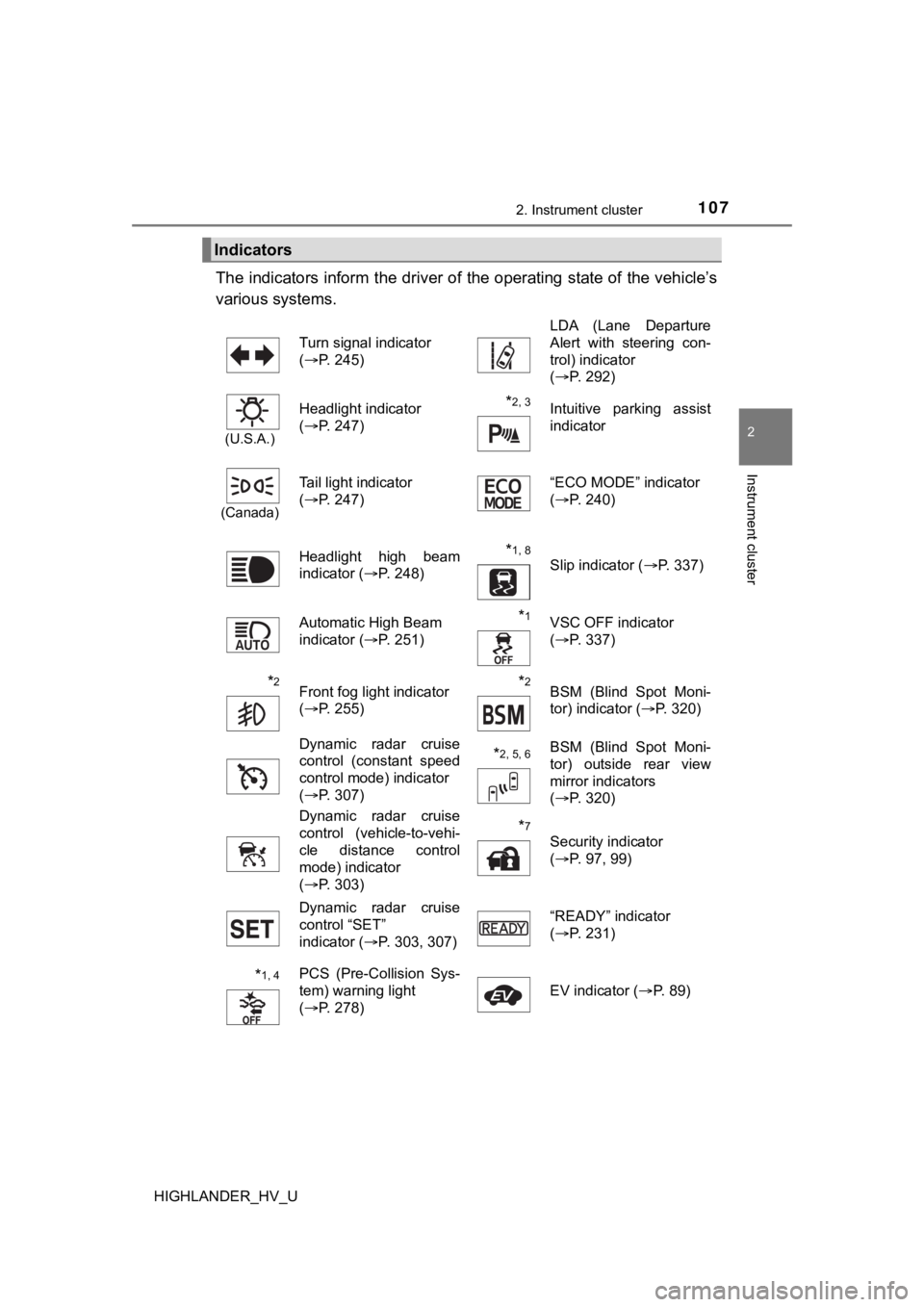
The indicators inform the driver of the operating state of the vehicle’s
various systems.
Indicators
Turn signal indicator
( P. 245) LDA (Lane Departure
Alert with steering con-
trol) indicator
(
P. 292)
(U.S.A.)
Headlight indicator
(P. 247)*2, 3 Intuitive parking assist
indicator
(Canada)
Tail light indicator
(P. 247) “ECO MODE” indicator
(
P. 240)
Headlight high beam
indicator ( P. 248)
*1, 8 Slip indicator ( P. 337)
Automatic High Beam
indicator ( P. 251)
*1VSC OFF indicator
(P. 337)
*2Front fog light indicator
(P. 255)*2BSM (Blind Spot Moni-
tor) indicator ( P. 320)
Dynamic radar cruise
control (constant speed
control mode) indicator
( P. 307)
*2, 5, 6BSM (Blind Spot Moni-
tor) outside rear view
mirror indicators
(P. 320)
Dynamic radar cruise
control (vehicle-to-vehi-
cle distance control
mode) indicator
( P. 303)
*7
Security indicator
(P. 97, 99)
Dynamic radar cruise
control “SET”
indicator ( P. 303, 307) “READY” indicator
(
P. 231)
*1, 4PCS (Pre-Collision Sys-
tem) warning light
(P. 278) EV indicator (
P. 89)
Page 197 of 716

197
4Driving
HIGHLANDER_HV_U4-1. Before driving
Driving the vehicle ............. 198
Cargo and luggage ........... 208
Vehicle load limits ............. 213
Trailer towing..................... 214
Dinghy towing ................... 230
4-2. Driving procedures Power (ignition) switch ...... 231
EV drive mode .................. 237
Hybrid transmission........... 239
Turn signal lever................ 245
Parking brake .................... 246
4-3. Operating the lights and wipers
Headlight switch ................ 247
Automatic High Beam ....... 251
Fog light switch ................. 255
Windshield wipers and washer ..................... 256
Rear window wiper and washer ..................... 260
4-4. Refueling Opening the fuel tank cap .......................... 262 4-5. Using the driving
support systems
Toyota Safety Sense P ..... 267
PCS (Pre-Collision System) .... 274
LDA (Lane Departure Alert with steering
control) ............................ 288
Dynamic radar cruise control ............................. 298
Rear view monitor system ............................ 311
BSM (Blind Spot Monitor) ........ 320
• BSM function ................ 325
• RCTA function .............. 329
Driving assist systems ...... 335
4-6. Driving tips Hybrid vehicle driving tips ....................... 341
Winter driving tips ............. 344
Utility vehicle precautions ..................... 348
Page 253 of 716

2534-3. Operating the lights and wipers
4
Driving
HIGHLANDER_HV_U■
Camera sensor detection information
●The high beams may not be automatically turned off in the follo wing situa-
tions:
• When a vehicle suddenly appears from around a curve
• When the vehicle is cut in front of by another vehicle
• When vehicles ahead cannot be detected due to repeated curves, road
dividers or roadside trees
• When vehicles ahead appear in a faraway lane on a wide road
• When the lights of vehicles ahead are not on
● The high beams may be turned off if a vehicle ahead that is usi ng fog lights
without its headlights turned on is detected.
● House lights, street lights, traffic signals, and illuminated billboards or signs
and other reflective objects may cause the high beams to change to the low
beams, or the low beams to remain on.
● The following factors may affect the amount of time taken for t he high
beams to turn on or off:
• The brightness of the headlights, fog lights, and tail lights of vehicles
ahead
• The movement and direction of vehicles ahead
• When a vehicle ahead only has operational lights on one side
• When a vehicle ahead is a two-wheeled vehicle
• The condition of the road (gradient, curve, condition of the r oad surface,
etc.)
• The number of passengers and amount of luggage in the vehicle
● The high beams may turn on or off unexpectedly.
● Bicycles or similar vehicles may not be detected.
● In the following situations the system may not be able to correctly detect the
surrounding brightness level. This may cause the low beams to r emain on
or the high beams to flash or dazzle pedestrians or vehicles ah ead. In such
a case, it is necessary to manually switch between the high and low beams.
• When driving in inclement weather (heavy rain, snow, fog, sand storms,
etc.)
• When the windshield is obscured by fog, mist, ice, dirt, etc.
• When the windshield is cracked or damaged
• When the camera sensor is deformed or dirty
• When the temperature of the camera sensor is extremely high
• When the surrounding brightness level is equal to that of head lights, tail
lights or fog lights
• When headlights or tail lights of vehicles ahead are turned off, dirty, changing color, or not aimed properly
• When the vehicle is hit by water, snow, dust, etc. from a prec eding vehi-
cle
• When driving through an area of intermittently changing brightness and
darkness
• When frequently and repeatedly driving ascending/descending roads, or roads with rough, bumpy or uneven surfaces (such as stone-paved
roads, gravel roads, etc.)
Page 255 of 716
2554-3. Operating the lights and wipers
4
Driving
HIGHLANDER_HV_U
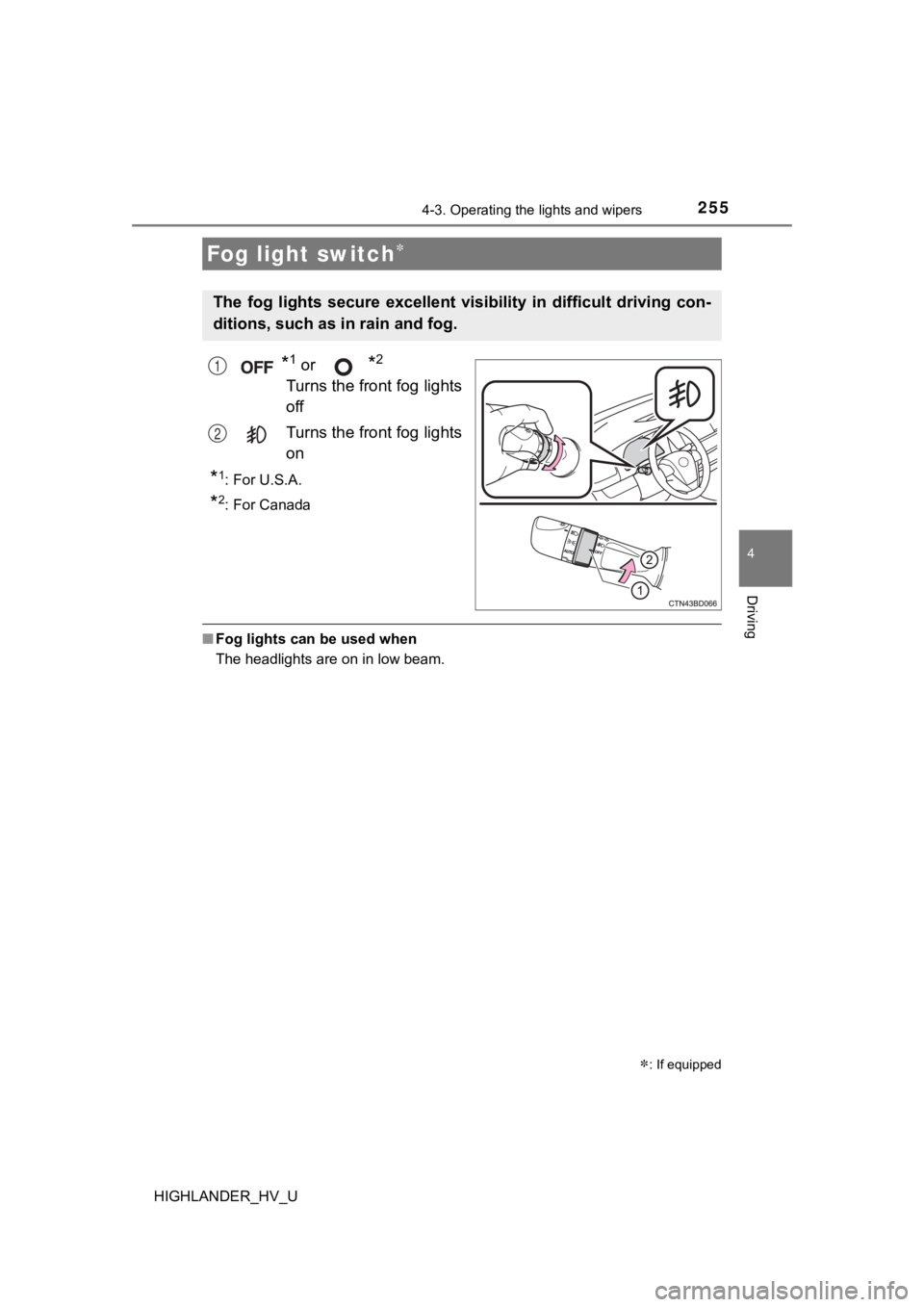
*1 or *2
Turns the front fog lights
off
Turns the front fog lights
on
*1: For U.S.A.
*2: For Canada
■Fog lights can be used when
The headlights are on in low beam.
Fog light switch
: If equipped
The fog lights secure excellent visibility in difficult driving con-
ditions, such as in rain and fog.
1
2
Page 270 of 716
2704-5. Using the driving support systems
HIGHLANDER_HV_U
WARNING
■To avoid malfunction of the camera sensor
Observe the following precautions.
Otherwise, the camera sensor may not operate properly, possibly leading to
an accident resulting in death or serious injury.
● Keep the windshield clean at all times.
• If the windshield is dirty or covered with an oily film, water droplets,
snow, etc., clear the windshield.
• If a glass coating agent is applied to the windshield, it will still be neces-
sary to use the windshield wipers to remove water droplets, etc . from
the area of the windshield in front of the camera sensor.
• If the inner side of the windshield where the camera sensor is installed
is dirty, contact your Toyota dealer.
● If the part of the windshield in front of the camera sensor is fogged up or
covered with condensation or ice, use the windshield defogger t o remove
the fog, condensation or ice. ( P. 442)
● If water droplets cannot be properly removed from the area of t he wind-
shield in front of the camera sensor by the windshield wipers, replace the
wiper insert or wiper blade.
If the wiper inserts or wiper b lades need to be replaced, conta ct your
Toyota dealer.
● Do not attach window tinting to the windshield.
● Replace the windshield if it is damaged or cracked.
If the windshield needs to be replaced, contact your Toyota dea ler.
● Do not get the camera sensor wet.
● Do not allow bright lights to shine into the camera sensor.
● Do not dirty or damage the camera sensor.
When cleaning the inside of the windshield, do not allow glass cleaner to
contact the lens. Also, do not touch the lens.
If the lens is dirty or damaged, contact your Toyota dealer.
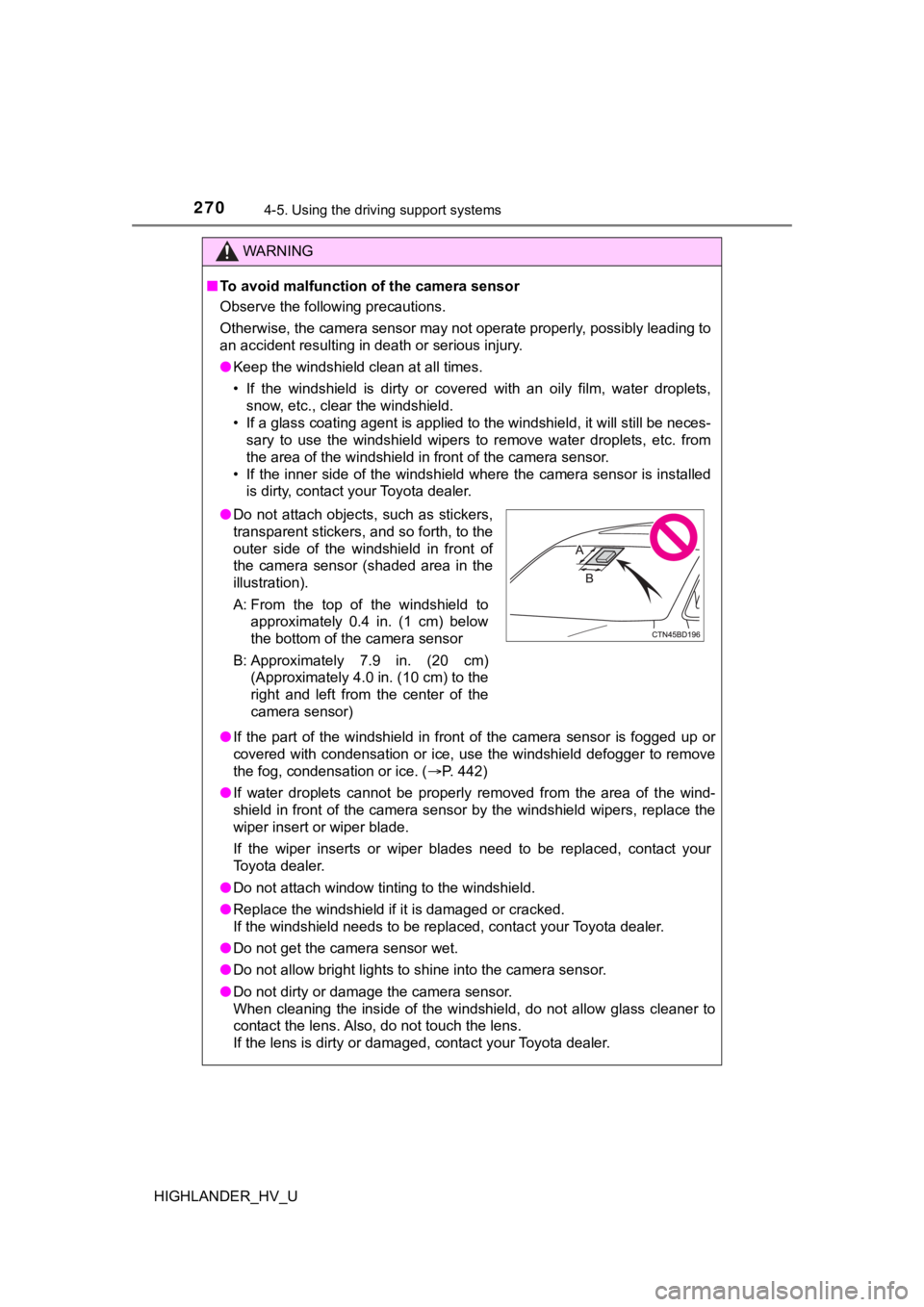
● Do not attach objects, such as stickers,
transparent stickers, and so forth, to the
outer side of the windshield in front of
the camera sensor (shaded area in the
illustration).
A: From the top of the windshield to
approximately 0.4 in. (1 cm) below
the bottom of the camera sensor
B: Approximately 7.9 in. (20 cm) (Approximately 4.0 in. (10 cm) to the
right and left from the center of the
camera sensor)
Page 285 of 716
2854-5. Using the driving support systems
4
Driving
HIGHLANDER_HV_U• When driving in inclement weather such as heavy rain, fog, snow or a
sandstorm
• When the vehicle is hit by water, snow, dust, etc. from a vehicle ahead
• When driving through steam or smoke
• When driving in a place where the surrounding brightness changes sud- denly, such as at the entrance or exit of a tunnel
• When a very bright light, such as the sun or the headlights of oncoming
traffic, shines directly into the camera sensor
• When the surrounding area is dim, such as at dawn or dusk, or while at
night or in a tunnel
• After the hybrid system has started the vehicle has not been d riven for a
certain amount of time
• While making a left/right turn and for a few seconds after mak ing a left/
right turn
• While driving on a curve and for a few seconds after driving o n a curve
• If your vehicle is skidding
• If the wheels are misaligned
• If a wiper blade is blocking the camera sensor
• The vehicle is wobbling.
• The vehicle is being driven at extremely high speeds.
• When driving on a hill
• If the radar sensor or camera sensor is misaligned
● In some situations such as the following, sufficient braking fo rce may not be
obtained, preventing the system from performing properly:
• If the braking functions cannot operate to their full extent, such as when
the brake parts are extremely cold, extremely hot, or wet
• If the vehicle is not properly maintained (brakes or tires are excessively
worn, improper tire inflation pressure, etc.)
• When the vehicle is being driven on a gravel road or other sli ppery sur-
face
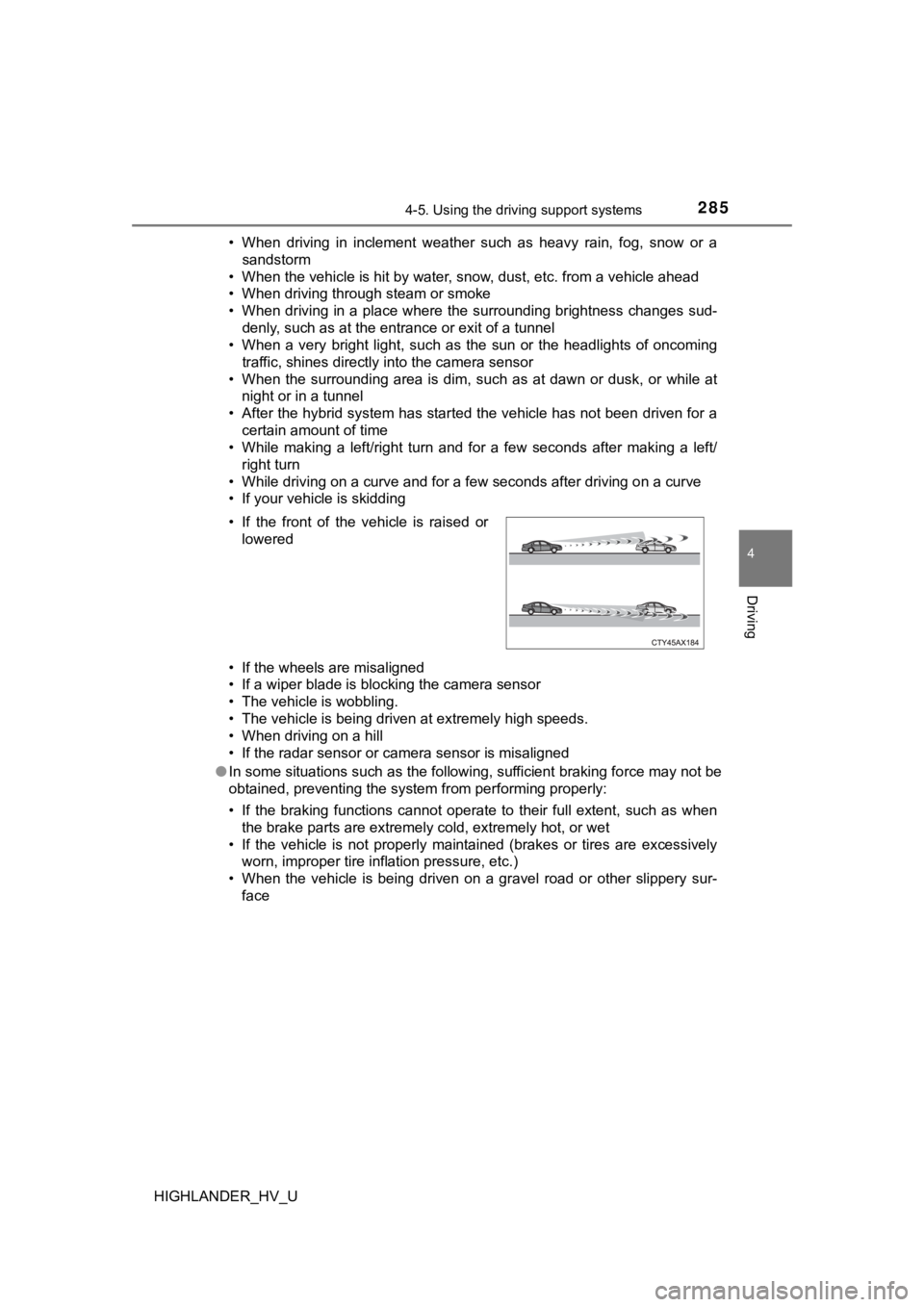
• If the front of the vehicle is raised or
lowered