ECO mode TOYOTA HILUX 2015 (in English) User Guide
[x] Cancel search | Manufacturer: TOYOTA, Model Year: 2015, Model line: HILUX, Model: TOYOTA HILUX 2015Pages: 540, PDF Size: 34.99 MB
Page 266 of 540
2665-1. Using the air conditioning system and defogger
HILUX_OM_OM0K219E_(EE)■
Ventilation and air conditioning odors
●To let fresh air in, set the air conditioning system to the outside air mode.
● During use, various odors from inside and outside the vehicle may enter into
and accumulate in the air conditioning system. This may then cause odor to
be emitted from the vents.
● To reduce potential odors from occurring:
It is recommended that the air conditioning system be set to outside air
mode prior to turning the vehicle off.
■ Air conditioning filter
→ P. 404
CAUTION
■To prevent the windshield from fogging up
Do not use during cool air operation in extremely humid weather.
The difference between the temperature of the outside air and that of the
windshield can cause the outer surface of the windshield to fog up, blocking
your vision.
NOTICE
■To prevent battery discharge
Do not leave the air conditioning syst em on longer than necessary when the
engine is off.
HILUX_OM_OM0K219E_(EE).book Page 266 Wednesday, May 14, 2014 3:06 PM
Page 278 of 540
2785-2. Using the audio system
HILUX_OM_OM0K219E_(EE)
■Display
Depending on the contents recorded, the characters may not be displayed
properly or may not be displayed at all.
■ Error messages
“ERROR”:
This indicates a problem either in the CD or inside the player.
“CD CHECK”:
The CD may be dirty, damaged or inserted upside-down.
“WAIT”:
Operation has stopped due to a high temperature inside the player. Wait for a
while and then press the “MODE” button. If the CD still cannot be played
back, contact any authorized Toyota deal er or repairer, or another duly quali-
fied and equipped professional.
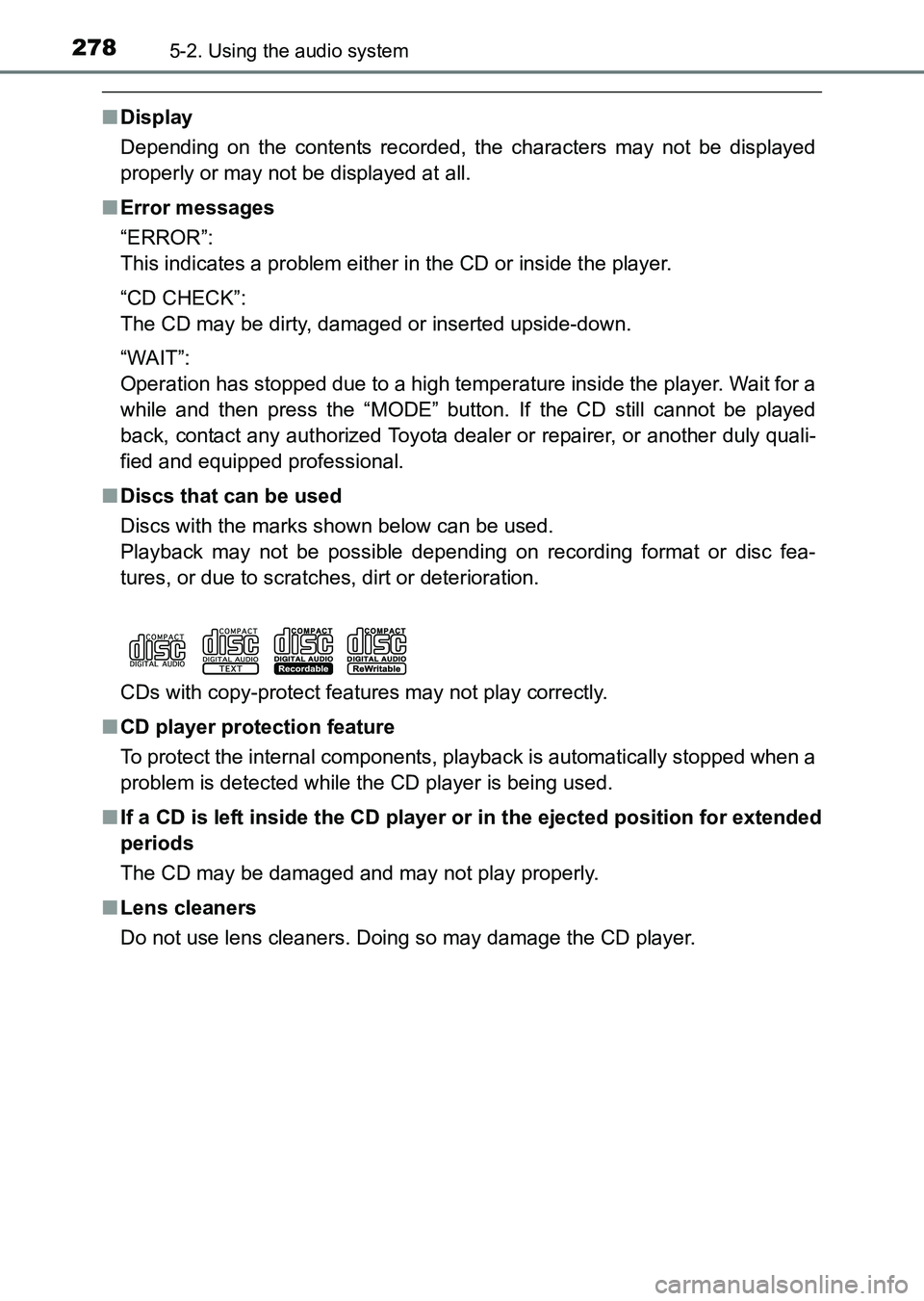
■ Discs that can be used
Discs with the marks shown below can be used.
Playback may not be possible depending on recording format or disc fea-
tures, or due to scratches, dirt or deterioration.
CDs with copy-protect features may not play correctly.
■ CD player protection feature
To protect the internal components, playback is automatically stopped when a
problem is detected while the CD player is being used.
■ If a CD is left inside the CD player or in the ejected position for extended
periods
The CD may be damaged and may not play properly.
■ Lens cleaners
Do not use lens cleaners. Doing so may damage the CD player.
HILUX_OM_OM0K219E_(EE).book Page 278 Wednesday, May 14, 2014 3:06 PM
Page 284 of 540
2845-2. Using the audio system
HILUX_OM_OM0K219E_(EE)■
MP3 and WMA files
MP3 (MPEG Audio LAYER3) is a standard audio compression format.
Files can be compressed to approximately 1/10 of their original size by using
MP3 compression.
WMA (Windows Media Audio) is a Mi crosoft audio compression format.
This format compresses audio data to a size smaller than that of the MP3 for-
mat.
There is a limit to the MP3 and WMA file standards and to the media/formats
recorded by them that can be used.
● MP3 file compatibility
• Compatible standards
MP3 (MPEG1 LAYER3, MPEG2 LSF LAYER3)
• Compatible sampling frequencies MPEG1 LAYER3: 32, 44.1, 48 (kHz)
MPEG2 LSF LAYER3: 16, 22.05, 24 (kHz)
• Compatible bit rates (compatible with VBR) MPEG1 LAYER3: 32—320 (kbps)
• MPEG2 LSF LAYER3: 8—160 (kbps)
• Compatible channel modes: stereo, joint stereo, dual channel and mon- aural
● WMA file compatibility
• Compatible standards
WMA Ver. 7, 8, 9
• Compatible sampling frequencies 32, 44.1, 48 (kHz)
• Compatible bit rates (only compatible with 2-channel playback) Ver. 7, 8: CBR 48—192 (kbps)
Ver. 9: CBR 48—320 (kbps)
HILUX_OM_OM0K219E_(EE).book Page 284 Wednesday, May 14, 2014 3:06 PM
Page 285 of 540
2855-2. Using the audio system
5
Interior features
HILUX_OM_OM0K219E_(EE)●
Compatible media
Media that can be used for MP3 and WMA playback are CD-Rs and CD-
RWs.
Playback in some instances may not be possible, depending on the status
of the CD-R or CD-RW. Playback may not be possible or the audio may
jump if the disc is scratched or marked with fingerprints.
● Compatible disc formats
The following disc formats can be used.
•Disc formats:
CD-ROM Mode 1 and Mode 2
CD-ROM XA Mode 2, Form 1 and Form 2
• File formats: ISO9660 Level 1, Level 2, (Romeo, Joliet)
MP3 and WMA files written in any format other than those listed above
may not play correctly, and their file names and folder names may not be
displayed correctly.
Items related to standards and limitations are as follows.
• Maximum directory hierarchy: 8 levels
• Maximum length of folder names/file names: 32 characters
• Maximum number of folders: 192 (including the root)
• Maximum number of files per disc: 255
● File names
The only files that can be recognized as MP3/WMA and played are those
with the extension .mp3 or .wma.
● Multi-sessions
As the audio system is compatible with multi-sessions, it is possible to play
discs that contain MP3 and WMA files. However, only the first session can
be played.
● ID3 and WMA tags
ID3 tags can be added to MP3 files, making it possible to record the track
title and artist name, etc.
The system is compatible with ID3 Ver. 1.0, 1.1, and Ver. 2.2, 2.3 ID3 tags.
(The number of characters is based on ID3 Ver. 1.0 and 1.1.)
WMA tags can be added to WMA files, making it possible to record the
track title and artist name in the same way as with ID3 tags.
HILUX_OM_OM0K219E_(EE).book Page 285 Wednesday, May 14, 2014 3:06 PM
Page 289 of 540
2895-2. Using the audio system
5
Interior features
HILUX_OM_OM0K219E_(EE)■
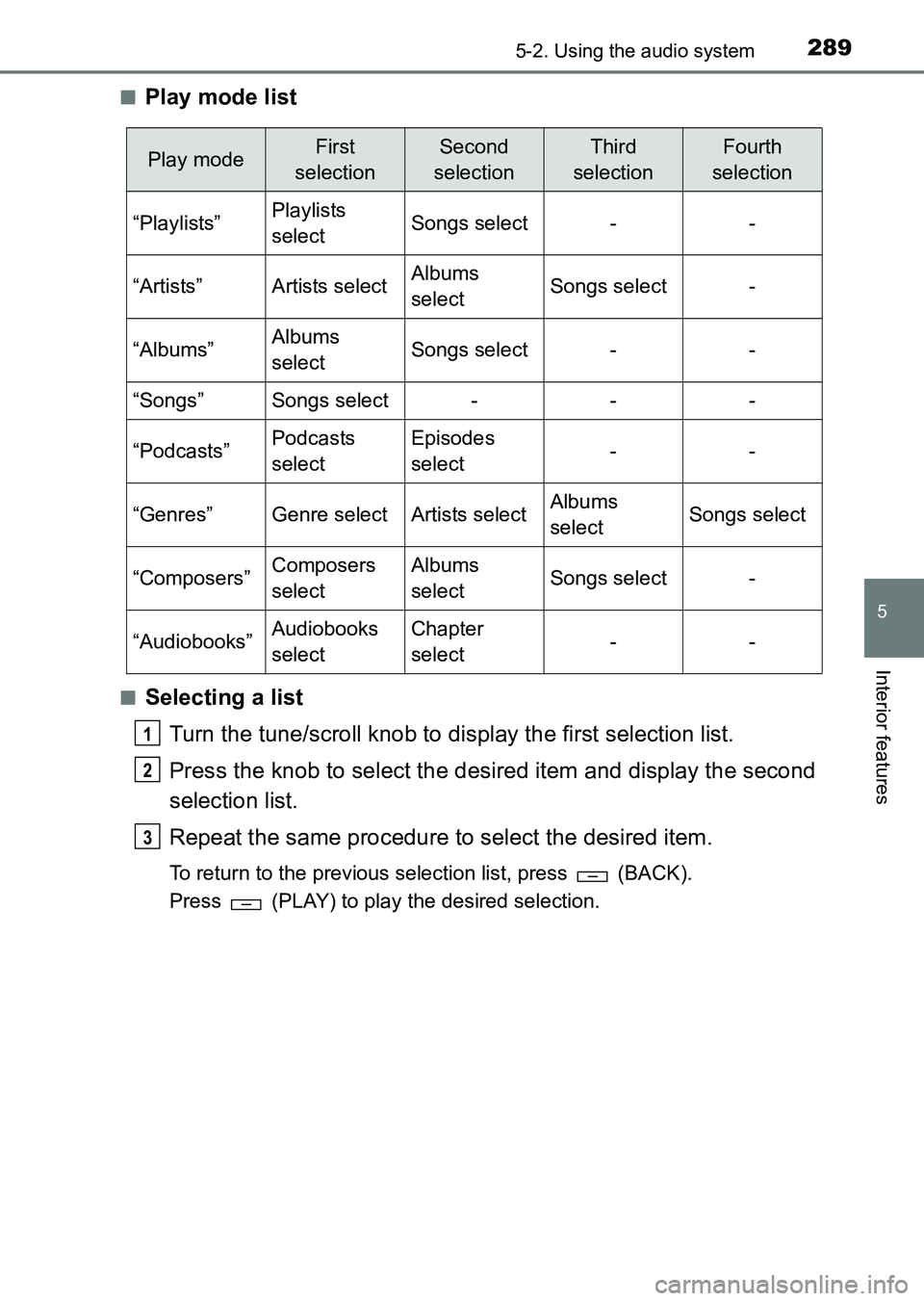
Play mode list
■Selecting a list
Turn the tune/scroll knob to display the first selection list.
Press the knob to select the desired item and display the second
selection list.
Repeat the same procedure to select the desired item.
To return to the previous selection list, press (BACK).
Press (PLAY) to play the desired selection.
Play modeFirst
selectionSecond
selectionThird
selectionFourth
selection
“Playlists”Playlists
selectSongs select--
“Artists”Artists selectAlbums
selectSongs select-
“Albums”Albums
selectSongs select--
“Songs”Songs select---
“Podcasts”Podcasts
selectEpisodes
select--
“Genres”Genre selectArtists selectAlbums
selectSongs select
“Composers”Composers
selectAlbums
selectSongs select-
“Audiobooks”Audiobooks
selectChapter
select--
1
2
3
HILUX_OM_OM0K219E_(EE).book Page 289 Wednesday, May 14, 2014 3:06 PM
Page 291 of 540
2915-2. Using the audio system
5
Interior features
HILUX_OM_OM0K219E_(EE)
Press the (TEXT) display or hide the album title.
If there are continuing texts, is displayed.
Press and hold (TEXT) to display the remaining texts.
■About iPod
●“Made for iPod” and “Made for iPhone” mean that an electronic accessory
has been designed to connect specifically to iPod, or iPhone, respectively,
and has been certified by the developer to meet Apple performance stan-
dards.
● Apple is not responsible for the operation of this device or its compliance
with safety and regulatory standards. Please note that the use of this acces-
sory with iPod or iPhone may affect wireless performance.
● iPhone, iPod, iPod classic, iPod nano, iPod shuffle, and iPod touch are
trademarks of Apple Inc., registered in the U.S. and other countries.
■ iPod functions
●When an iPod is connected and the audio source is changed to iPod mode,
the iPod will resume play from the same point in which it was last used.
● Depending on the iPod that is connected to the system, certain functions
may not be available. Disconnecting the device and reconnecting it once
again may resolve some malfunctions.
● While connected to the system, the iPod cannot be operated with its own
controls. It is necessary to use the controls of the vehicle’s audio system
instead.
Switching the display
HILUX_OM_OM0K219E_(EE).book Page 291 Wednesday, May 14, 2014 3:06 PM
Page 300 of 540
3005-2. Using the audio system
HILUX_OM_OM0K219E_(EE)●
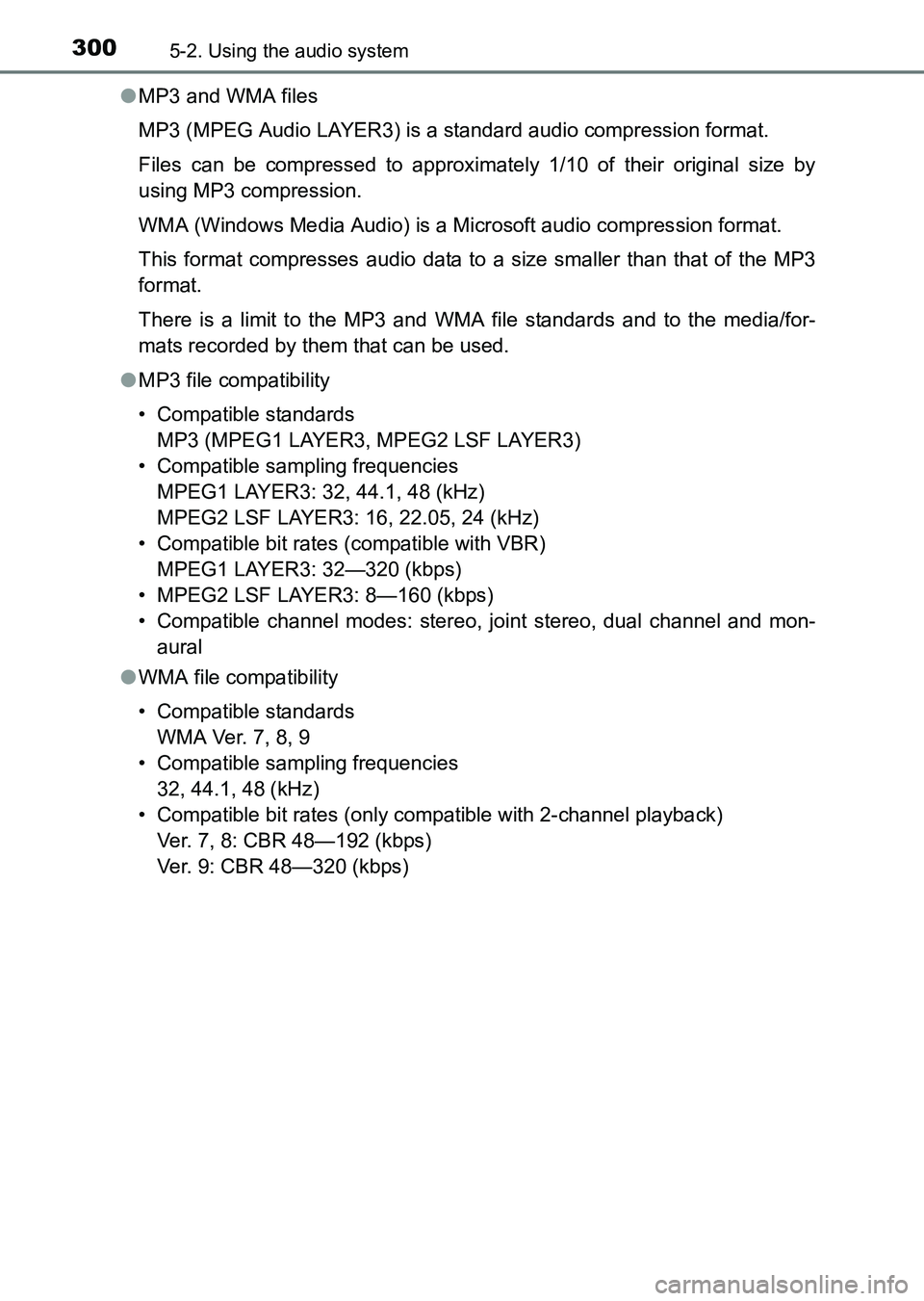
MP3 and WMA files
MP3 (MPEG Audio LAYER3) is a standard audio compression format.
Files can be compressed to approximately 1/10 of their original size by
using MP3 compression.
WMA (Windows Media Audio) is a Mi crosoft audio compression format.
This format compresses audio data to a size smaller than that of the MP3
format.
There is a limit to the MP3 and WMA file standards and to the media/for-
mats recorded by them that can be used.
● MP3 file compatibility
• Compatible standards
MP3 (MPEG1 LAYER3, MPEG2 LSF LAYER3)
• Compatible sampling frequencies MPEG1 LAYER3: 32, 44.1, 48 (kHz)
MPEG2 LSF LAYER3: 16, 22.05, 24 (kHz)
• Compatible bit rates (compatible with VBR) MPEG1 LAYER3: 32—320 (kbps)
• MPEG2 LSF LAYER3: 8—160 (kbps)
• Compatible channel modes: stereo, joint stereo, dual channel and mon- aural
● WMA file compatibility
• Compatible standards
WMA Ver. 7, 8, 9
• Compatible sampling frequencies 32, 44.1, 48 (kHz)
• Compatible bit rates (only compatible with 2-channel playback) Ver. 7, 8: CBR 48—192 (kbps)
Ver. 9: CBR 48—320 (kbps)
HILUX_OM_OM0K219E_(EE).book Page 300 Wednesday, May 14, 2014 3:06 PM
Page 301 of 540
3015-2. Using the audio system
5
Interior features
HILUX_OM_OM0K219E_(EE)●
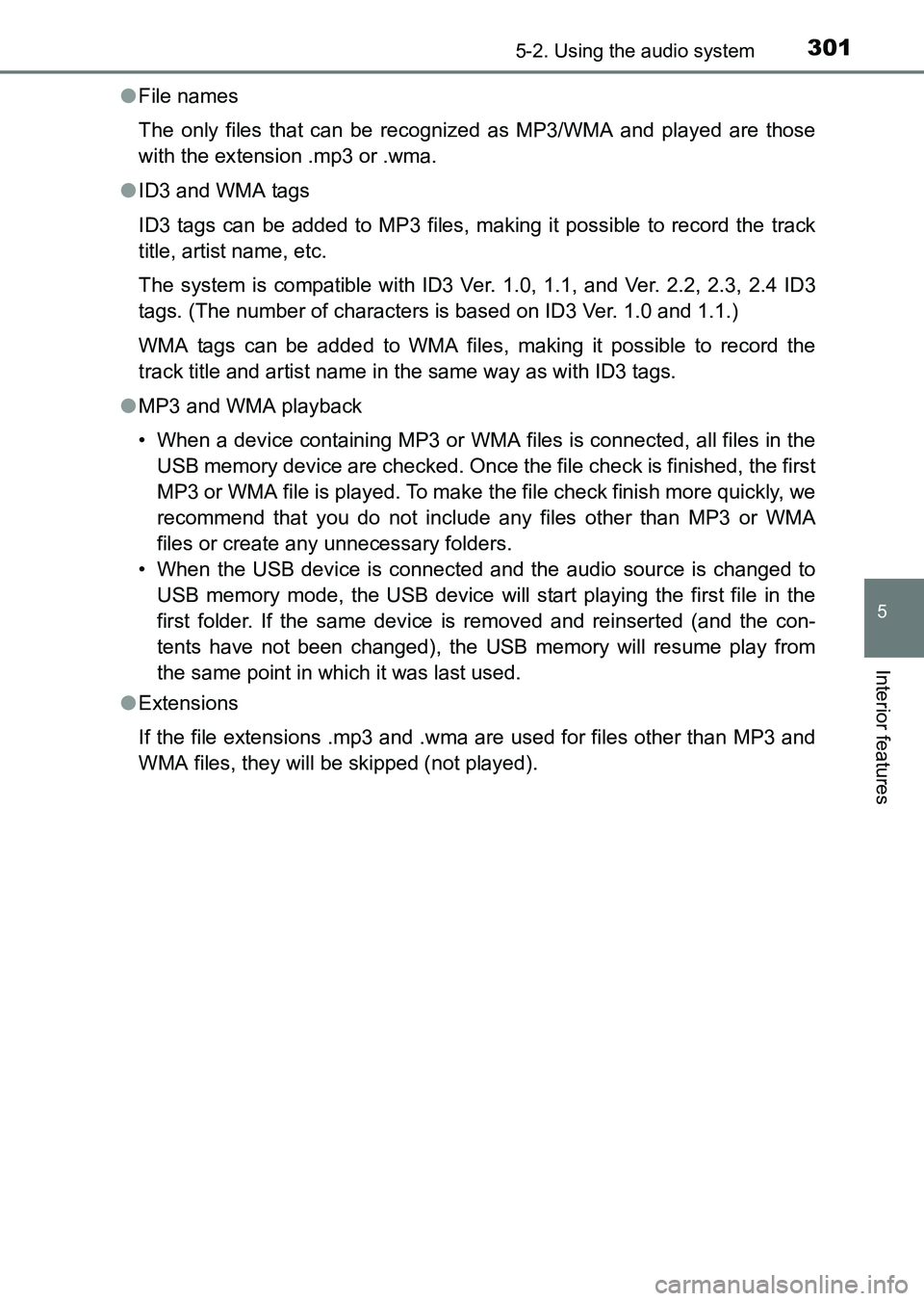
File names
The only files that can be recognized as MP3/WMA and played are those
with the extension .mp3 or .wma.
● ID3 and WMA tags
ID3 tags can be added to MP3 files, making it possible to record the track
title, artist name, etc.
The system is compatible with ID3 Ver. 1.0, 1.1, and Ver. 2.2, 2.3, 2.4 ID3
tags. (The number of characters is based on ID3 Ver. 1.0 and 1.1.)
WMA tags can be added to WMA files, making it possible to record the
track title and artist name in the same way as with ID3 tags.
● MP3 and WMA playback
• When a device containing MP3 or WMA files is connected, all files in the
USB memory device are checked. Once the file check is finished, the first
MP3 or WMA file is played. To make the file check finish more quickly, we
recommend that you do not include any files other than MP3 or WMA
files or create any unnecessary folders.
• When the USB device is connected and the audio source is changed to USB memory mode, the USB device will start playing the first file in the
first folder. If the same device is removed and reinserted (and the con-
tents have not been changed), the USB memory will resume play from
the same point in which it was last used.
● Extensions
If the file extensions .mp3 and .wma are used for files other than MP3 and
WMA files, they will be skipped (not played).
HILUX_OM_OM0K219E_(EE).book Page 301 Wednesday, May 14, 2014 3:06 PM
Page 308 of 540
3085-2. Using the audio system
HILUX_OM_OM0K219E_(EE)■
When transferring ownership of the vehicle
Be sure to initialize the system to prevent personal data from being improp-
erly accessed. ( →P. 330)
■ About Bluetooth
®
■Compatible models
●Bluetooth
® specifications:
Ver. 1.1, or higher (Recommended: Ver. 2.1 + EDR or higher)
● Following Profiles:
• A2DP (Advanced Audio Distribution Profile) Ver. 1.0 or higher (recom-
mended: Ver. 1.2 or higher)
• AVRCP (Audio/Video Remote Control Profile) Ver. 1.0 or higher (recom- mended: Ver. 1.3 or higher)
Portable players must correspond to the above specifications in order to be
connected to the Bluetooth
® audio/phone. However, please note that some
functions may be limited depending on the type of portable player.
● Cellular phone
• HFP (Hands Free Profile) Ver. 1.0 or higher (Recommended: Ver. 1.5)
• OPP (Object Push Profile) Ver. 1.1
• PBAP (Phone Book Access Profile) Ver. 1.0
■ Certification
The latest “DECLARATION of CONFORMITY”(DoC) is available at the
following:
DoC address: FUJITSU TEN LIMITED
2-28, Gosho-dori 1-chome, Hyogo-ku, Kobe, 652-8510, Japan Bluetooth is a registered trademark of
Bluetooth SIG, Inc.
HILUX_OM_OM0K219E_(EE).book Page 308 Wednesday, May 14, 2014 3:06 PM
Page 385 of 540
3856-3. Do-it-yourself maintenance
6
Maintenance and care
HILUX_OM_OM0K219E_(EE)
■Engine oil consumption
A certain amount of engine oil will be consumed while driving. In the following
situations, oil consumption may increase, and engine oil may need to be
refilled in between oil maintenance intervals.
●When the engine is new, for example directly after purchasing the vehicle or
after replacing the engine
● If low quality oil or oil of an inappropriate viscosity is used
● When driving at high engine speeds or with a heavy load, when towing, or
when driving while accelerating or decelerating frequently
● When leaving the engine idling for a long time, or when driving frequently
through heavy traffic
■ After changing the engine oil (diesel engine except for KUN25L-PRMDH
model
*)
The engine oil maintenance data should be reset. Perform the following pro-
cedures:
Switch the display to the trip meter A ( →P. 102) when the engine switch is
in the “ON” position.
Turn the engine switch to the “LOCK” position.
While pressing the odometer/trip meter display change button ( →P. 102),
turn the engine switch to the “ON” position (do not start the engine because
reset mode will be canceled). Continue to press and hold the button for
more than one second after the trip meter displays “000000”.
*: The model code is indicated on the manufacturer’s label or plate. (→ P. 494)
1
2
3
HILUX_OM_OM0K219E_(EE).book Page 385 Wednesday, May 14, 2014 3:06 PM