light TOYOTA HILUX 2023 Owners Manual
[x] Cancel search | Manufacturer: TOYOTA, Model Year: 2023, Model line: HILUX, Model: TOYOTA HILUX 2023Pages: 810, PDF Size: 131.54 MB
Page 345 of 810
3434-5. Using the driving support systems
4
Driving
HILUX_OM_OM0K789E_(EE)
■Locking the rear differential
The following systems do not operate w hen the rear differential is locked.
It is normal operation for the ABS warning light, VSC OFF indicator (if
equipped) and “TRC OFF” indicator (if equipped) to be on or for “TRC turned
off” to be displayed on the multi-information display (if equipped) at this time.
•ABS
• Brake assist (if equipped)
• VSC (if equipped)
• TRC/A-TRC (if equipped)
• Trailer Sway Control (if equipped)
• Hill-start assist control (if equipped)
• Downhill assist control (if equipped)
■ Unlocking the rear differential
If the rear differential lock indicator still flashes even after unlocking the rear
differential, check the safety of the surrounding area and slightly turn the
steering wheel in either direction while the vehicle is in motion.
■ Automatic system cancelation of the rear differential lock system
The rear differential lock is also unlocked in any of the following situations:
● The front-wheel drive control switch is turned to H2 or H4 (4WD models)
● The engine switch is turned to the “ACC” or “LOCK” position (vehicles with-
out smart entry & start system) or A CCESSORY or off (vehicles with smart
entry & start system)
■ After unlocking the rear differential
Check that the indicator goes off.
WARNING
■ To avoid an accident
Failure to observe the following precautions may result in an accident.
● Do not use the rear differential lock system except when wheel spinning
occurs in a ditch or on a slippery or rugged surface. Large steering effort
and careful cornering control will be required.
● Do not lock the rear differential until the wheels have stopped spinning.
Otherwise, the vehicle may move in an unexpected direction when the dif-
ferential lock is engaged, resulting in an accident. This may also lead to
possible damage to rear differential lock component parts.
● Do not drive over 8 km/h (5 mph) when the differential is locked.
● Do not keep driving with the rear differential lock switch on.
Page 346 of 810
3444-5. Using the driving support systems
HILUX_OM_OM0K789E_(EE)
Stop & Star t system
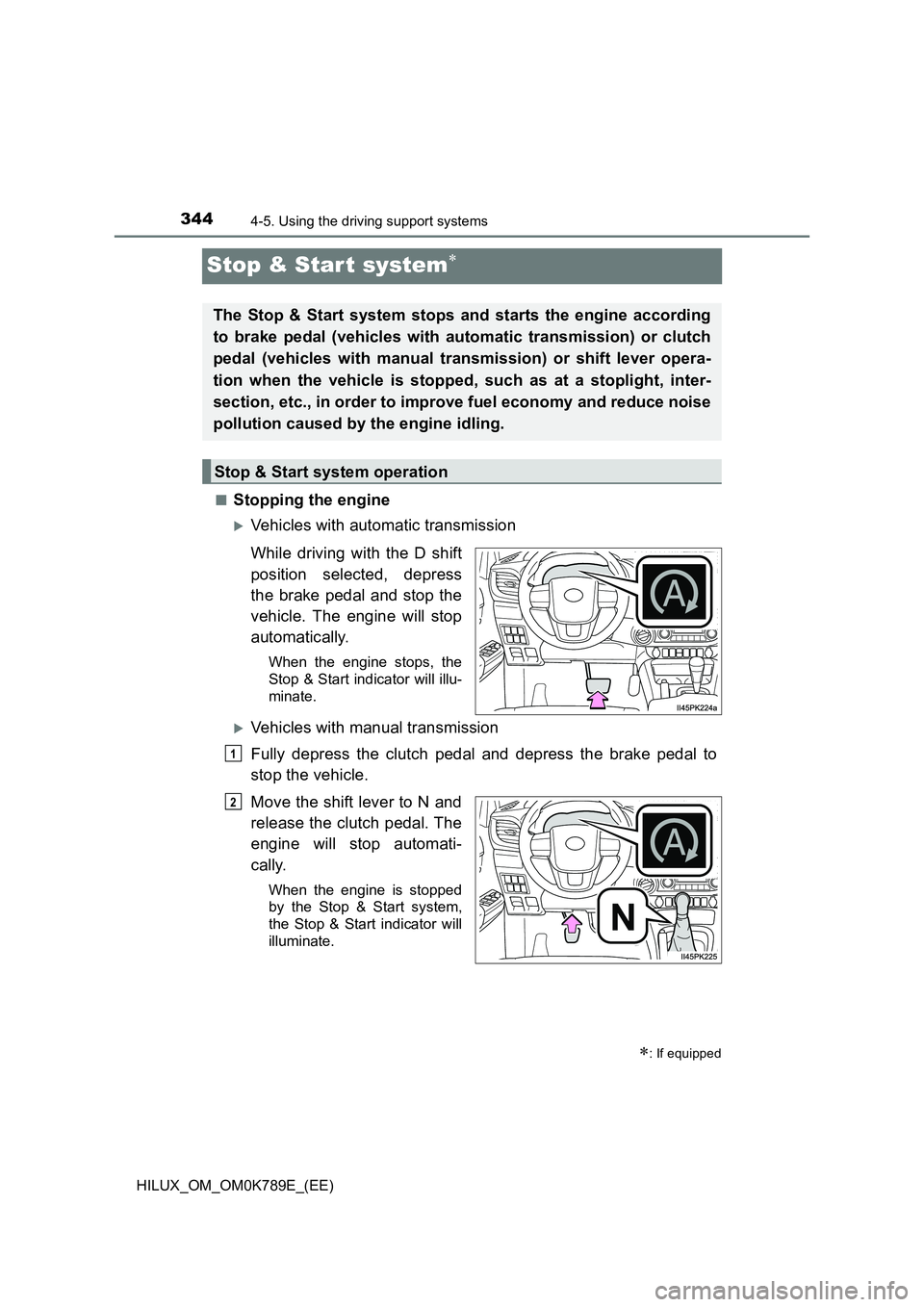
■Stopping the engine
Vehicles with automatic transmission
While driving with the D shift
position selected, depress
the brake pedal and stop the
vehicle. The engine will stop
automatically.
When the engine stops, the
Stop & Start indicator will illu-
minate.
Vehicles with manual transmission
Fully depress the clutch pedal and depress the brake pedal to
stop the vehicle.
Move the shift lever to N and
release the clutch pedal. The
engine will stop automati-
cally.
When the engine is stopped
by the Stop & Start system,
the Stop & Start indicator will
illuminate.
: If equipped
The Stop & Start system stops and starts the engine according
to brake pedal (vehicles with automatic transmission) or clutch
pedal (vehicles with manual transmission) or shift lever opera-
tion when the vehicle is stopped, such as at a stoplight, inter-
section, etc., in order to improve fuel economy and reduce noise
pollution caused by the engine idling.
Stop & Start system operation
1
N
2
Page 355 of 810
3534-5. Using the driving support systems
4
Driving
HILUX_OM_OM0K789E_(EE)
WARNING
■When the Stop & Start system is operating
Make sure to disable the Stop & Start system while the vehicle is in a poorly
ventilated area.
If not disabled, the engine may be automatically restarted unexpectedly,
causing exhaust gases to collect and enter the vehicle, possibly resulting in
death or a serious health hazard.
● Do not leave the vehicle while the engine is stopped by the Stop & Start
system (while the Stop & Start indicator is on).
An accident may occur due to the automatic engine start function.
● Depress the brake pedal and apply the parking brake when necessary,
while the engine is stopped by the Stop & Start system (while the Stop &
Start indicator is on).
■ Off-road driving precaution
When driving off-road, such as driving through water, press the Stop & Start
cancel switch to disable the Stop & Start system. Failure to do so may
cause the engine to be unable to restart.
NOTICE
■ To ensure the system operates correctly
If any of the following situations occur, the Stop & Start system may not
operate correctly. Have your vehicle inspected by any authorized Toyota
retailer or Toyota authorized repairer, or any reliable repairer.
● While the driver’s seat belt is fastened, the driver’s and front passenger’s
seat belt reminder light flashes.
● Even though the driver’s seat belt is not fastened, the driver’s and front
passenger’s seat belt reminder light does not illuminate.
● Even though the driver’s door is closed, the open door warning light is illu-
minated or the interior light is illuminated when the interior light switch is in
the door position.
● Even though the driver’s door is open, the open door warning light does
not illuminate or the interior light does not illuminate when the interior light
switch is in the door position.
■ If the engine stalls (vehicles with manual transmission)
If the Stop & Start system is enabled and the clutch pedal is depressed
quickly, the engine may restart.
Page 358 of 810
3564-5. Using the driving support systems
HILUX_OM_OM0K789E_(EE)
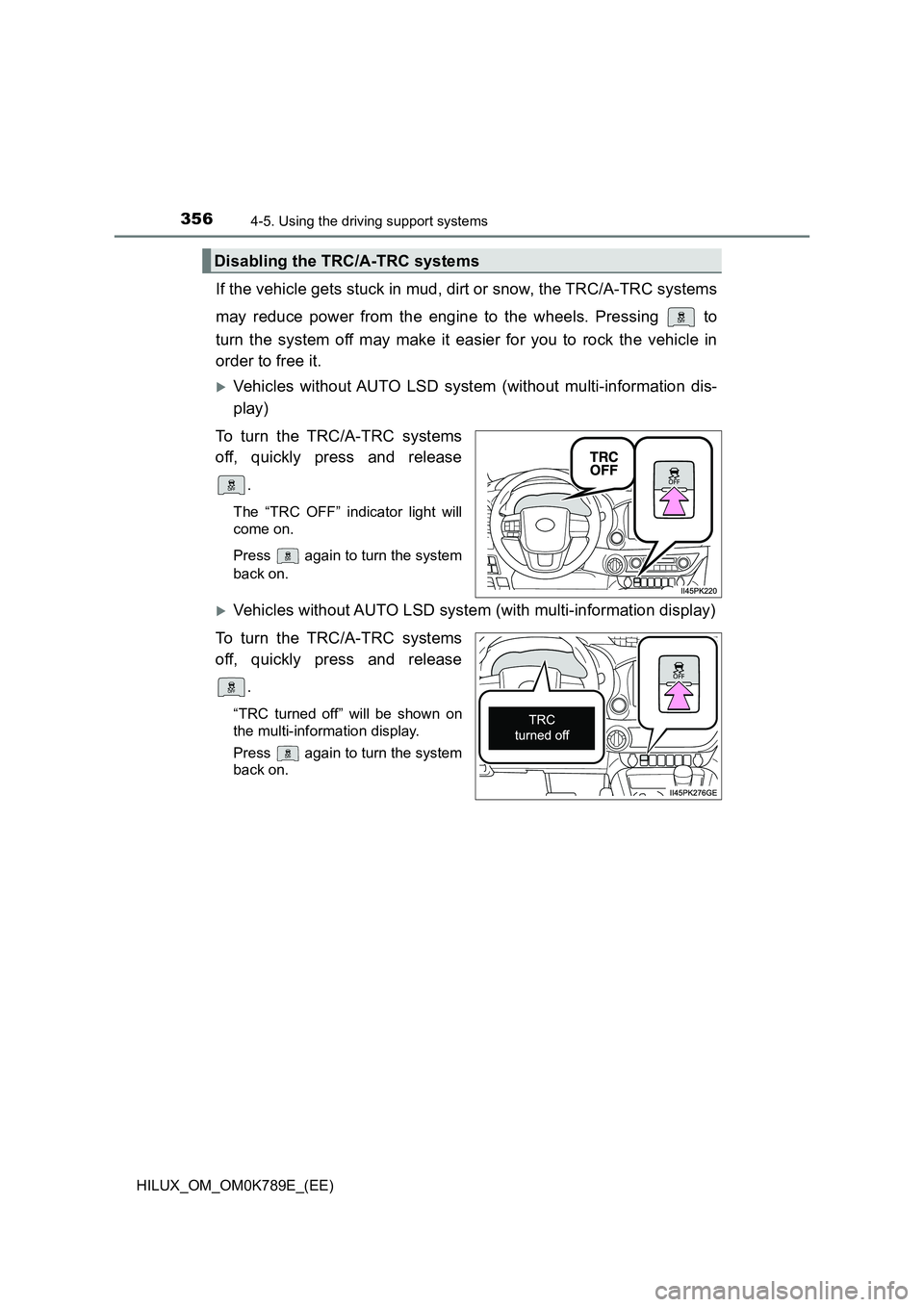
If the vehicle gets stuck in mud, dirt or snow, the TRC/A-TRC systems
may reduce power from the engine to the wheels. Pressing to
turn the system off may make it easier for you to rock the vehicle in
order to free it.
Vehicles without AUTO LSD system (without multi-information dis-
play)
To turn the TRC/A-TRC systems
off, quickly press and release
.
The “TRC OFF” indicator light will
come on.
Press again to turn the system
back on.
Vehicles without AUTO LSD system (with multi-information display)
To turn the TRC/A-TRC systems
off, quickly press and release
.
“TRC turned off” will be shown on
the multi-information display.
Press again to turn the system
back on.
Disabling the TRC/A-TRC systems
Page 359 of 810
3574-5. Using the driving support systems
4
Driving
HILUX_OM_OM0K789E_(EE)
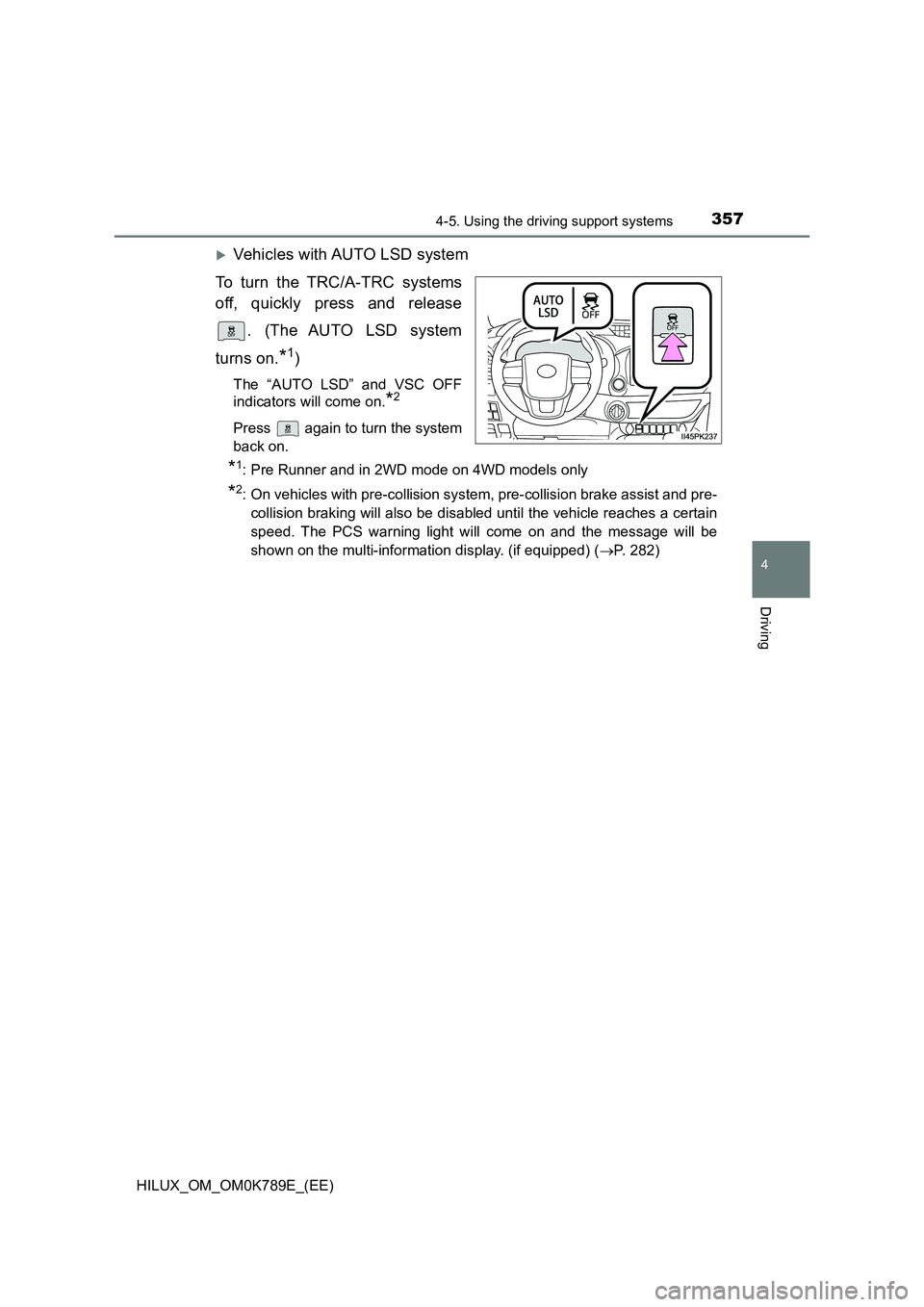
Vehicles with AUTO LSD system
To turn the TRC/A-TRC systems
off, quickly press and release
. (The AUTO LSD system
turns on.*1)
The “AUTO LSD” and VSC OFF
indicators will come on.*2
Press again to turn the system
back on.
*1: Pre Runner and in 2WD mode on 4WD models only
*2: On vehicles with pre-collision system, pre-collision brake assist and pre-
collision braking will also be disabled until the vehicle reaches a certain
speed. The PCS warning light will come on and the message will be
shown on the multi-information display. (if equipped) ( P. 282)
Page 360 of 810
3584-5. Using the driving support systems
HILUX_OM_OM0K789E_(EE)
■Turning off TRC, A-TRC, VSC and Trailer Sway Control systems
Vehicles without multi-information display
To turn the TRC, A-TRC, VSC and Trailer Sway Control systems off, press
and hold for more than 3 seconds while the vehicle is stopped.
The “TRC OFF” indicator light and VSC OFF indicator light will come on.*
Press again to turn the system back on.
Vehicles with multi-information display
To turn the TRC, A-TRC, VSC and Trailer Sway Control systems off, press
and hold for more than 3 seconds while the vehicle is stopped.
The VSC OFF indicator light will come on and the “TRC turned off” will be
shown on the multi-information display.*
Press again to turn the system back on.
*: On vehicles with pre-collision system, pre-collision brake assist and pre-
collision braking will also be disabled. The PCS warning light will come on
and the message will be shown on the multi-information display. ( P. 282)
■ When “TRC OFF” indicator light comes on or the message is displayed
on the multi-information display sh owing that TRC/A-TRC has been dis-
abled even if has not been pressed
TRC, A-TRC and downhill assist control is temporary deactivated. If the indi-
cator light continues to remain on or the information continues to show, con-
tact any authorized Toyota retailer or Toyota authorized repairer, or any
reliable repairer.
■ Sounds and vibrations caused by the ABS, brake assist, VSC, Trailer
Sway Control, TRC, A-TRC and the hill-start assist control systems
● A sound may be heard from the engine compartment when the brake pedal
is depressed repeatedly, when the engine is started or just after the vehicle
begins to move. This sound does not indicate that a malfunction has
occurred in any of these systems.
● Any of the following conditions may occur when the above systems are
operating. None of these indicates that a malfunction has occurred.
• Vibrations may be felt through the vehicle body and steering.
• A motor sound may be heard also after the vehicle comes to a stop.
• The brake pedal may pulsate slightly after the ABS is activated.
• The brake pedal may move down slightly after the ABS is activated.
Page 365 of 810
363
4
4-5. Using the driving support systems
Driving
HILUX_OM_OM0K789E_(EE)
Downhill assist control system
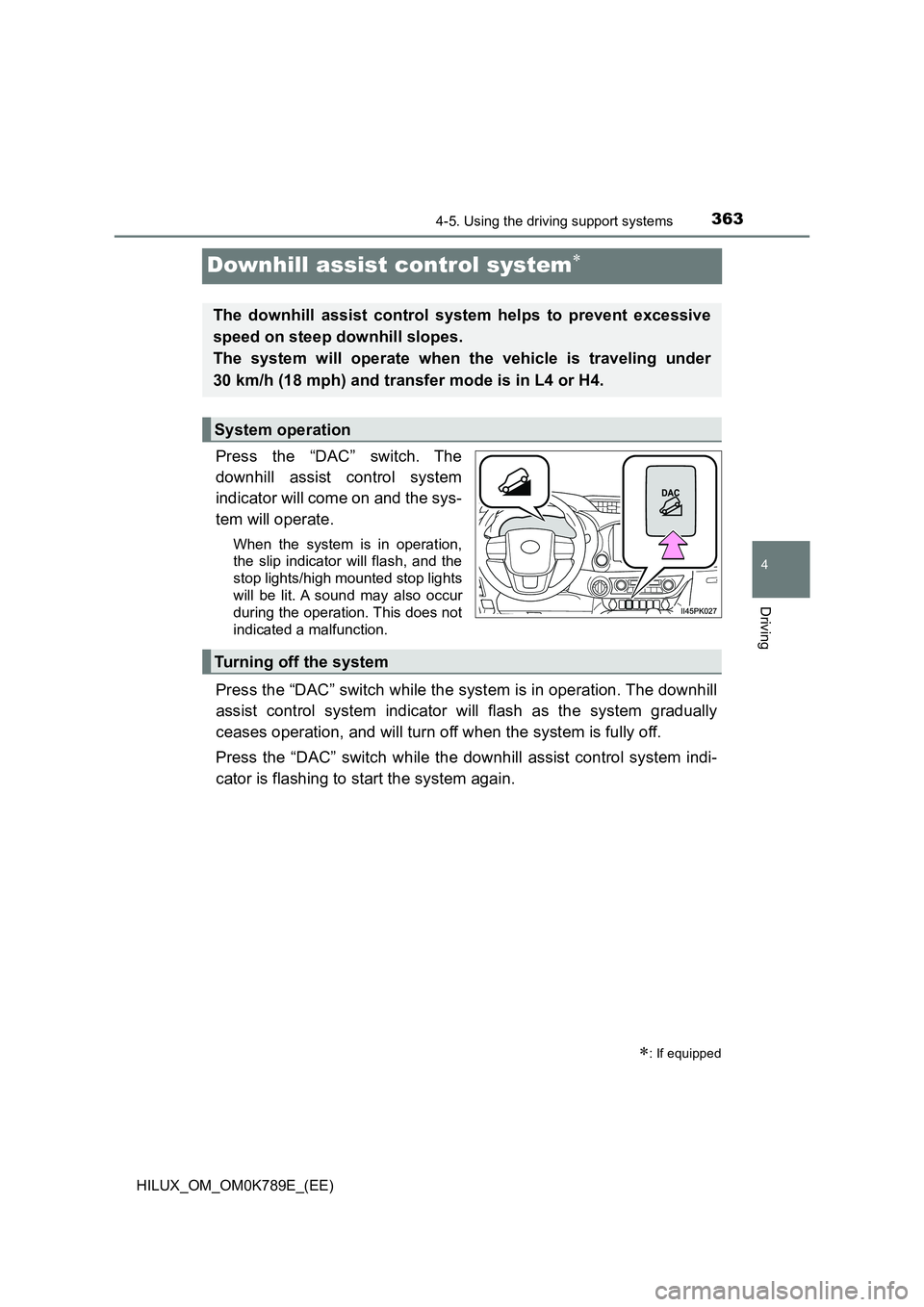
Press the “DAC” switch. The
downhill assist control system
indicator will come on and the sys-
tem will operate.
When the system is in operation,
the slip indicator will flash, and the
stop lights/high mounted stop lights
will be lit. A sound may also occur
during the operation. This does not
indicated a malfunction.
Press the “DAC” switch while the system is in operation. The downhill
assist control system indicator will flash as the system gradually
ceases operation, and will turn off when the system is fully off.
Press the “DAC” switch while the downhill assist control system indi-
cator is flashing to start the system again.
: If equipped
The downhill assist control system helps to prevent excessive
speed on steep downhill slopes.
The system will operate when the vehicle is traveling under
30 km/h (18 mph) and transfer mode is in L4 or H4.
System operation
Turning off the system
Page 368 of 810
3664-5. Using the driving support systems
HILUX_OM_OM0K789E_(EE)
AUTO LSD
The system can be used on Pre Runner and in 2WD mode on 4WD
models.
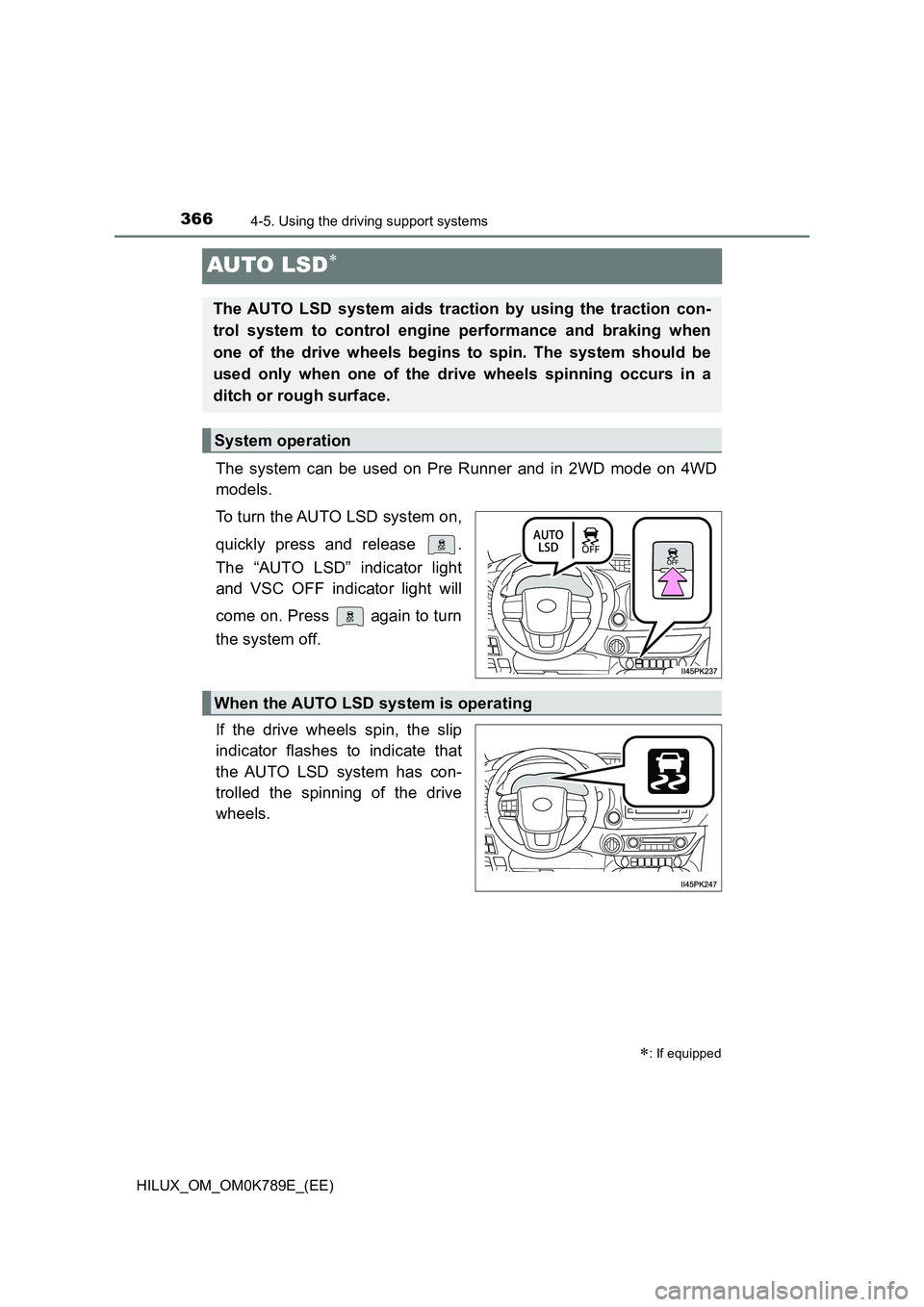
To turn the AUTO LSD system on,
quickly press and release .
The “AUTO LSD” indicator light
and VSC OFF indicator light will
come on. Press again to turn
the system off.
If the drive wheels spin, the slip
indicator flashes to indicate that
the AUTO LSD system has con-
trolled the spinning of the drive
wheels.
: If equipped
The AUTO LSD system aids traction by using the traction con-
trol system to control engine performance and braking when
one of the drive wheels begins to spin. The system should be
used only when one of the drive wheels spinning occurs in a
ditch or rough surface.
System operation
When the AUTO LSD system is operating
Page 375 of 810
373
4
4-6. Driving tips
Driving
HILUX_OM_OM0K789E_(EE)
Winter driving tips
●Use fluids that are appropriate to the prevailing outside tempera-
tures.
• Engine oil
• Engine coolant
• Washer fluid
● Have a service technician inspect the condition of the battery.
● Have the vehicle fitted with four snow tires or purchase a set of tire
chains for the rear tires.
Ensure that all tires are the same size and brand, and that chains match
the size of the tires.
Perform the following according to the driving conditions:
● Do not try to forcibly open a window or move a wiper that is frozen.
Pour warm water over the frozen area to melt the ice. Wipe away
the water immediately to prevent it from freezing.
● To ensure proper operation of the climate control system fan,
remove any snow that has accumulated on the air inlet vents in
front of the windshield.
● Check for and remove any excess ice or snow that may have accu-
mulated on the exterior lights, vehicle’s roof, chassis, around the
tires or on the brakes.
● Remove any snow or mud from the bottom of your shoes before
getting in the vehicle.
Carry out the necessary preparations and inspections before
driving the vehicle in winter. Always drive the vehicle in a man-
ner appropriate to the prevailing weather conditions.
Preparation for winter
Before driving the vehicle
Page 384 of 810
3825-2. Using the audio system
HILUX_OM_OM0K789E_(EE)
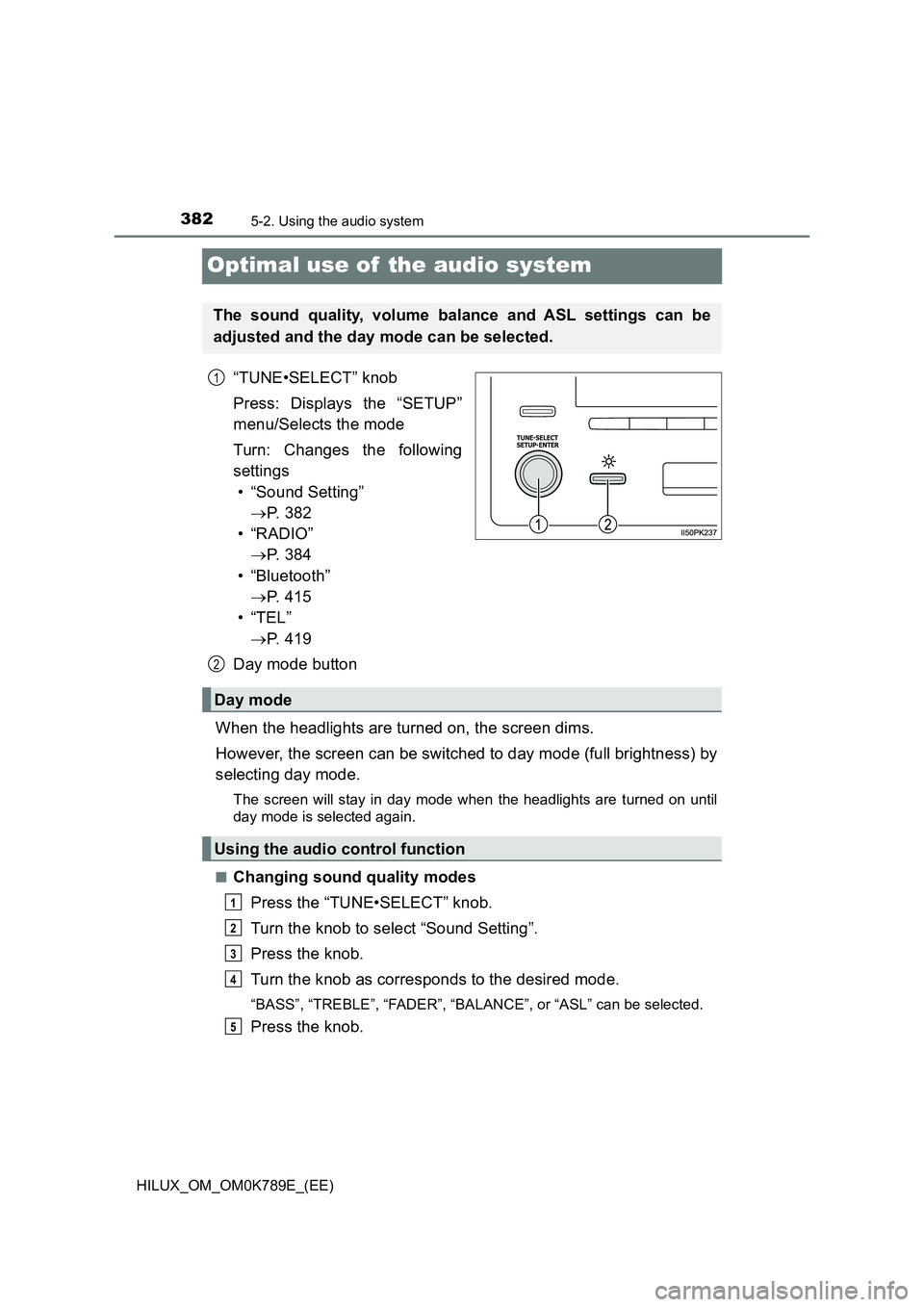
Optimal use of the audio system
“TUNE•SELECT” knob
Press: Displays the “SETUP”
menu/Selects the mode
Turn: Changes the following
settings
• “Sound Setting”
P. 3 8 2
• “RADIO”
P. 3 8 4
• “Bluetooth”
P. 4 1 5
•“TEL”
P. 4 1 9
Day mode button
When the headlights are turned on, the screen dims.
However, the screen can be switched to day mode (full brightness) by
selecting day mode.
The screen will stay in day mode when the headlights are turned on until
day mode is selected again.
■Changing sound quality modes
Press the “TUNE•SELECT” knob.
Turn the knob to select “Sound Setting”.
Press the knob.
Turn the knob as corresponds to the desired mode.
“BASS”, “TREBLE”, “FADER”, “BAL ANCE”, or “ASL” can be selected.
Press the knob.
The sound quality, volume balance and ASL settings can be
adjusted and the day mode can be selected.
1
2
Day mode
Using the audio control function
1
2
3
4
5