light TOYOTA HILUX 2023 Manual Online
[x] Cancel search | Manufacturer: TOYOTA, Model Year: 2023, Model line: HILUX, Model: TOYOTA HILUX 2023Pages: 810, PDF Size: 131.54 MB
Page 256 of 810
2544-3. Operating the lights and wipers
HILUX_OM_OM0K789E_(EE)
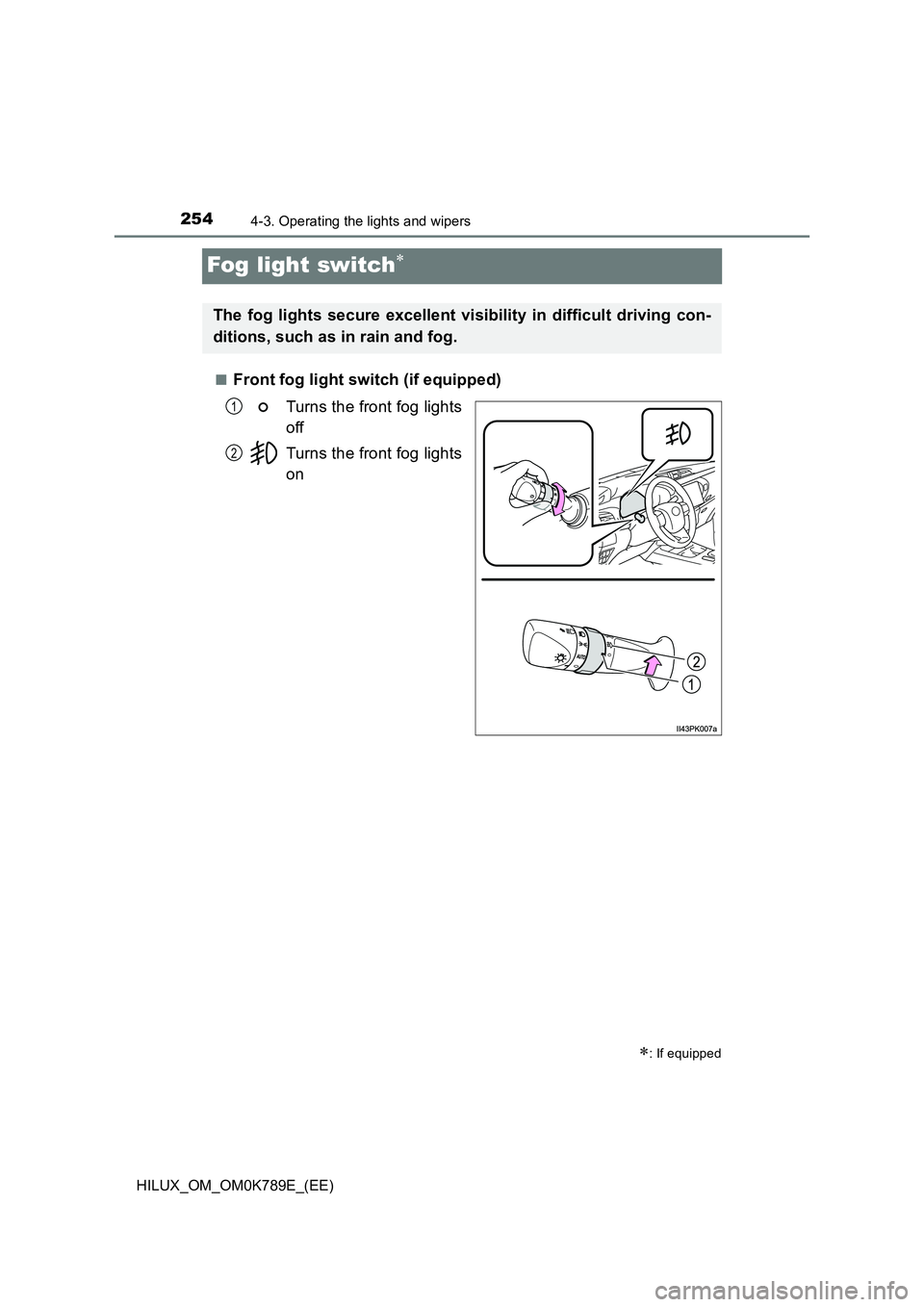
Fog light switch
■Front fog light switch (if equipped)
Turns the front fog lights
off
Turns the front fog lights
on
: If equipped
The fog lights secure excellent visibility in difficult driving con-
ditions, such as in rain and fog.
1
2
Page 257 of 810
2554-3. Operating the lights and wipers
4
Driving
HILUX_OM_OM0K789E_(EE)
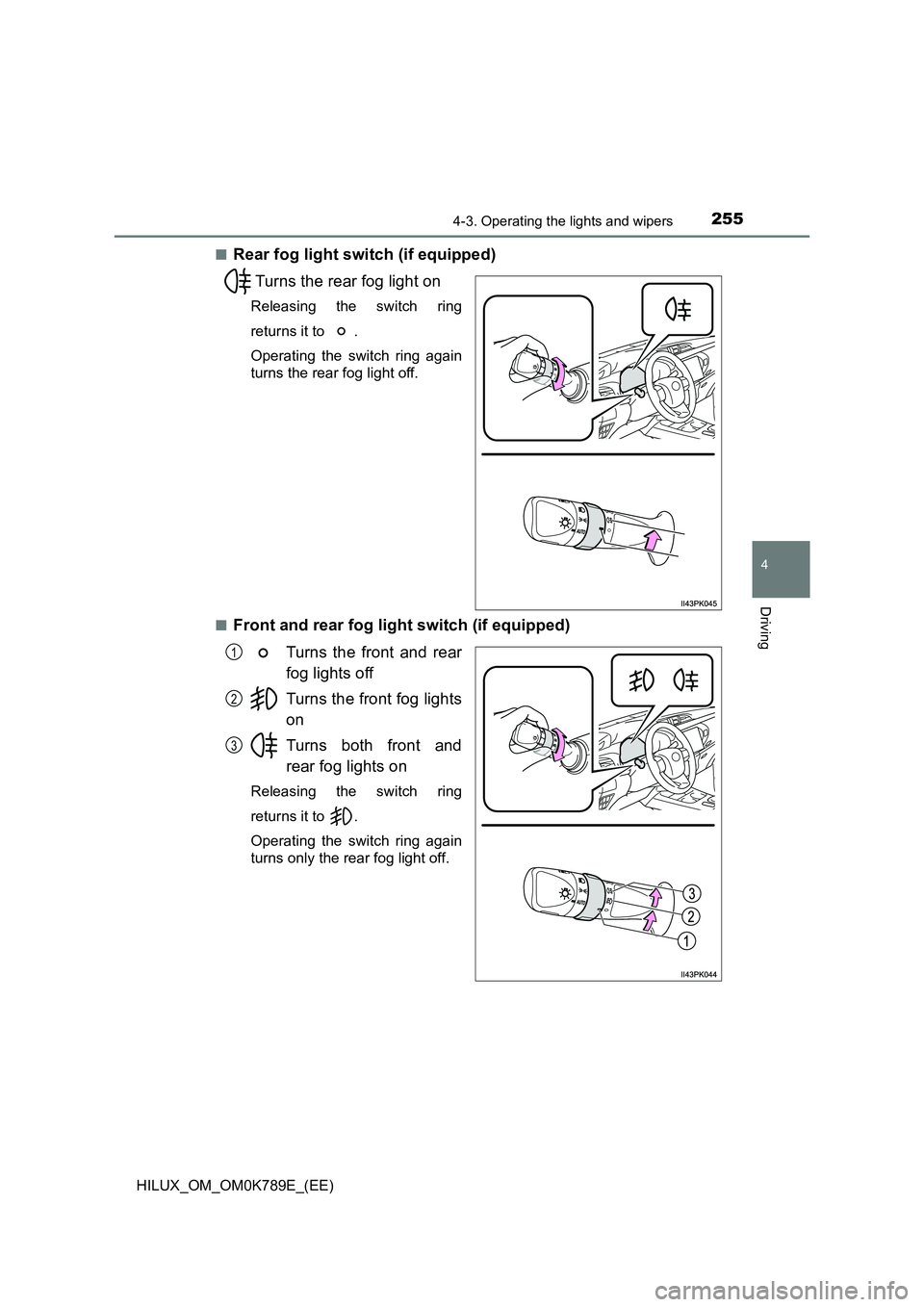
■Rear fog light switch (if equipped)
Turns the rear fog light on
Releasing the switch ring
returns it to .
Operating the switch ring again
turns the rear fog light off.
■Front and rear fog light switch (if equipped)
Turns the front and rear
fog lights off
Turns the front fog lights
on
Turns both front and
rear fog lights on
Releasing the switch ring
returns it to .
Operating the switch ring again
turns only the rear fog light off.
1
2
3
Page 258 of 810

2564-3. Operating the lights and wipers
HILUX_OM_OM0K789E_(EE)
■Fog lights can be used when
Vehicles with front and rear fog lights
Front fog lights: The headlights or front position lights are turned on.
Rear fog light: The front fog lights are turned on.
Vehicles with rear fog light only
The headlights are turned on.
Page 259 of 810
257
4
4-3. Operating the lights and wipers
Driving
HILUX_OM_OM0K789E_(EE)
Windshield wipers and washer
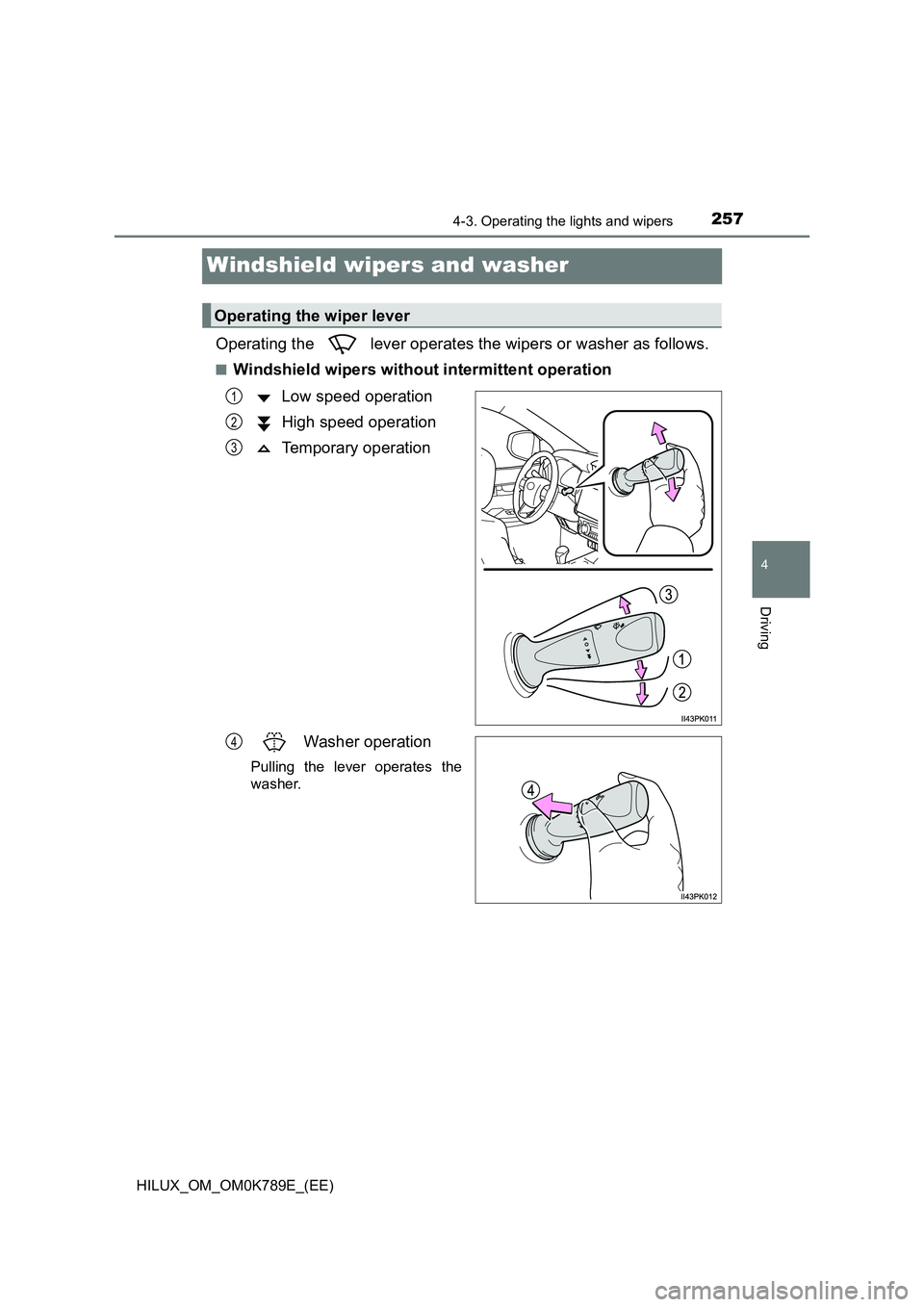
Operating the lever operates the wipers or washer as follows.
■Windshield wipers without intermittent operation
Low speed operation
High speed operation
Temporary operation
Washer operation
Pulling the lever operates the
washer.
Operating the wiper lever
1
2
3
4
Page 260 of 810
2584-3. Operating the lights and wipers
HILUX_OM_OM0K789E_(EE)
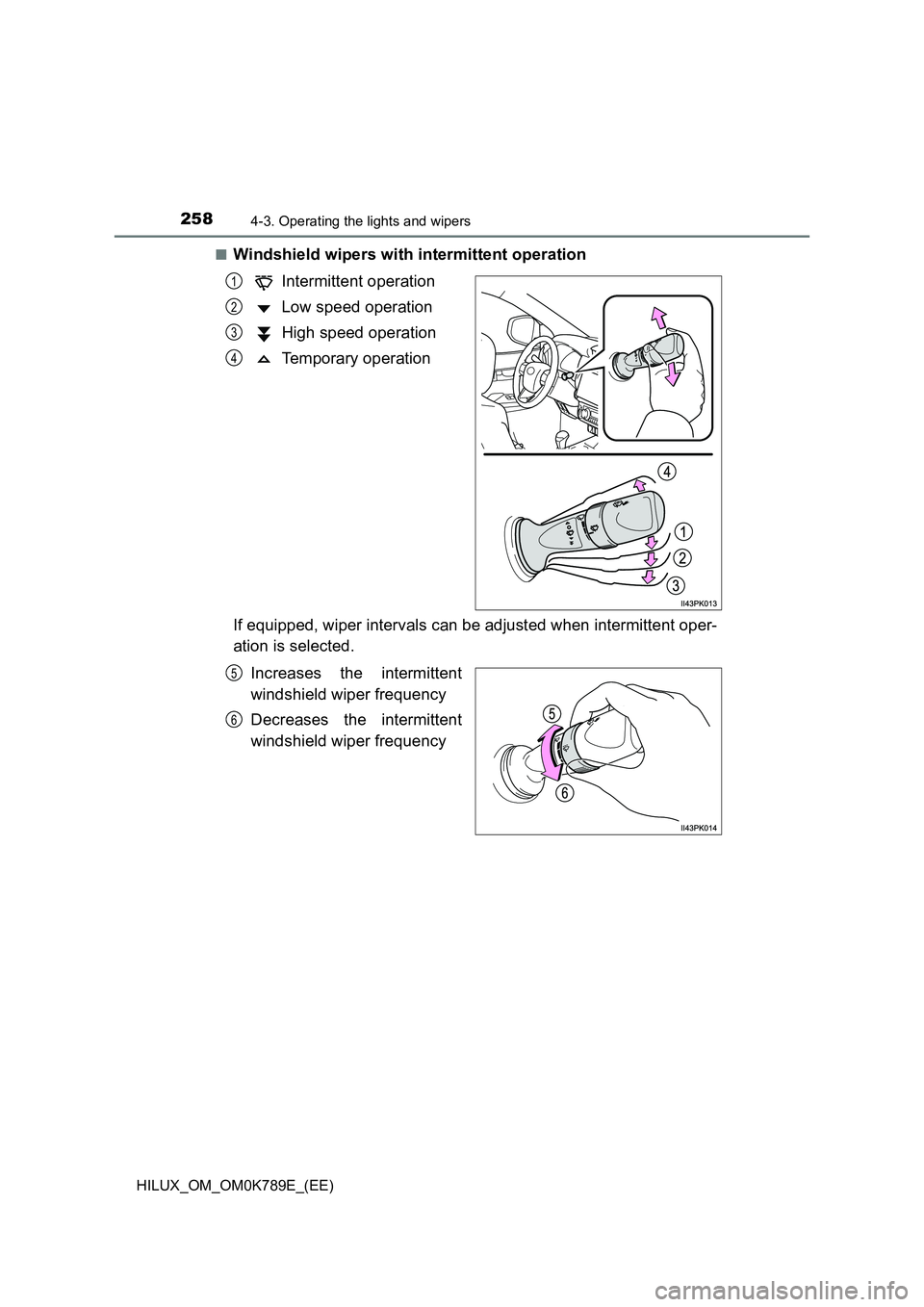
■Windshield wipers with intermittent operation
Intermittent operation
Low speed operation
High speed operation
Temporary operation
If equipped, wiper intervals can be adjusted when intermittent oper-
ation is selected.
Increases the intermittent
windshield wiper frequency
Decreases the intermittent
windshield wiper frequency
1
2
3
4
5
6
Page 261 of 810
2594-3. Operating the lights and wipers
4
Driving
HILUX_OM_OM0K789E_(EE)
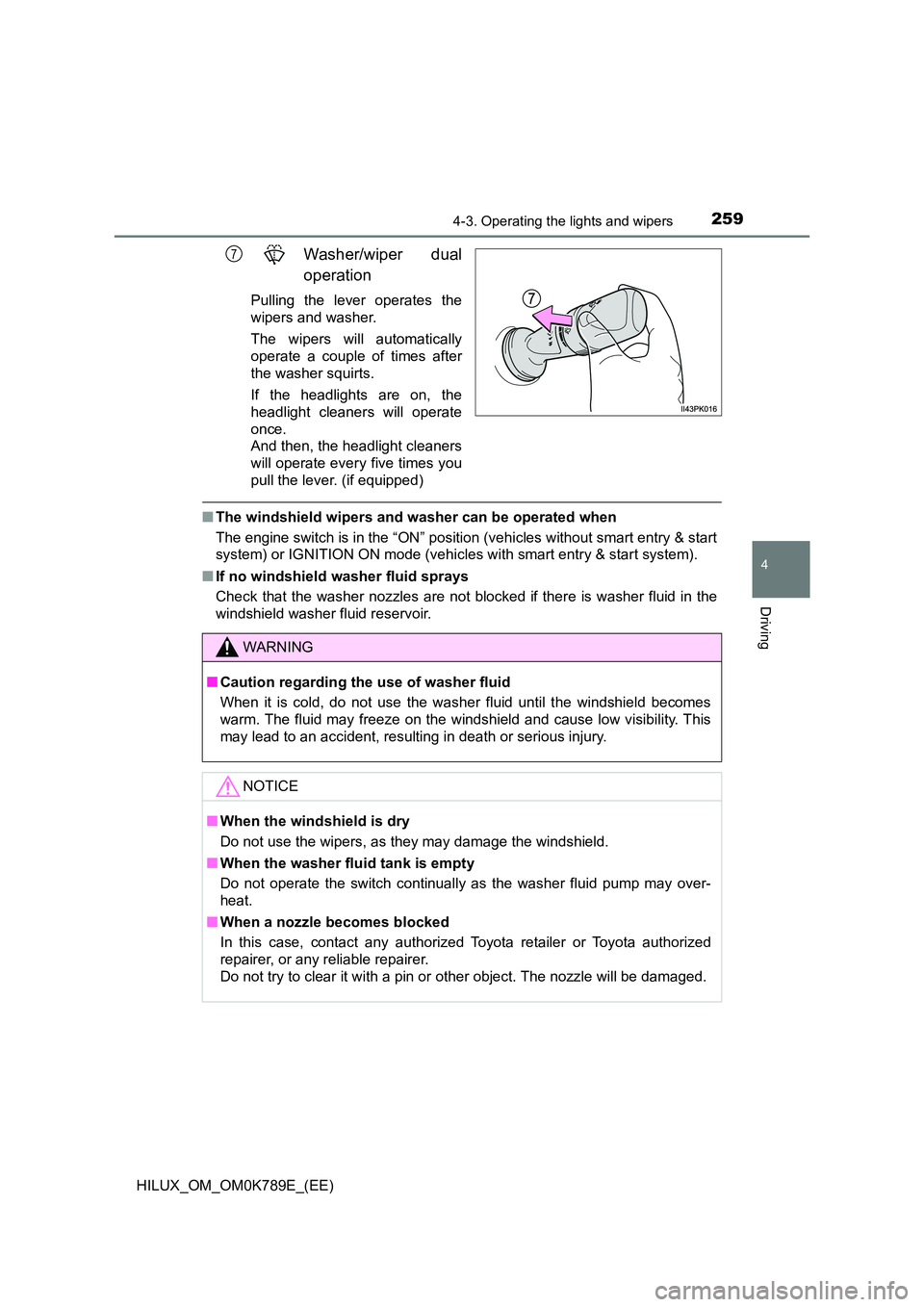
Washer/wiper dual
operation
Pulling the lever operates the
wipers and washer.
The wipers will automatically
operate a couple of times after
the washer squirts.
If the headlights are on, the
headlight cleaners will operate
once.
And then, the headlight cleaners
will operate every five times you
pull the lever. (if equipped)
■ The windshield wipers and washer can be operated when
The engine switch is in the “ON” position (vehicles without smart entry & start
system) or IGNITION ON mode (vehicles with smart entry & start system).
■ If no windshield washer fluid sprays
Check that the washer nozzles are not blocked if there is washer fluid in the
windshield washer fluid reservoir.
7
WARNING
■ Caution regarding the use of washer fluid
When it is cold, do not use the washer fluid until the windshield becomes
warm. The fluid may freeze on the windshield and cause low visibility. This
may lead to an accident, resulting in death or serious injury.
NOTICE
■ When the windshield is dry
Do not use the wipers, as they may damage the windshield.
■ When the washer fluid tank is empty
Do not operate the switch continually as the washer fluid pump may over-
heat.
■ When a nozzle becomes blocked
In this case, contact any authorized Toyota retailer or Toyota authorized
repairer, or any reliable repairer.
Do not try to clear it with a pin or other object. The nozzle will be damaged.
Page 265 of 810
2634-4. Refueling
4
Driving
HILUX_OM_OM0K789E_(EE)
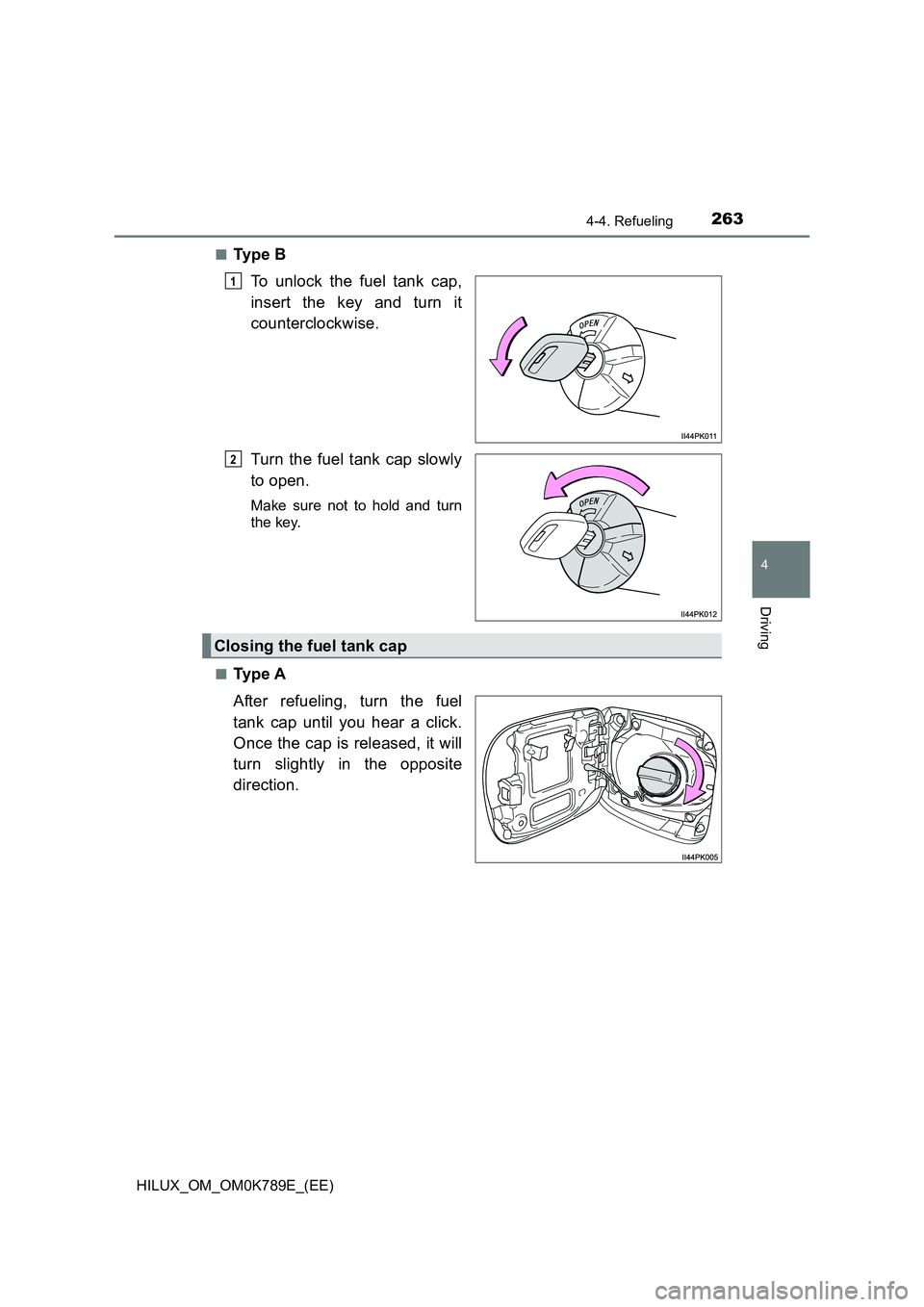
■Ty p e B
To unlock the fuel tank cap,
insert the key and turn it
counterclockwise.
Turn the fuel tank cap slowly
to open.
Make sure not to hold and turn
the key.
■Ty p e A
After refueling, turn the fuel
tank cap until you hear a click.
Once the cap is released, it will
turn slightly in the opposite
direction.
1
2
Closing the fuel tank cap
Page 271 of 810
2694-5. Using the driving support systems
4
Driving
HILUX_OM_OM0K789E_(EE)
WARNING
●Replace the windshield if it is damaged or cracked.
After replacing the windshield, the front camera must be recalibrated. Con-
tact any authorized Toyota retailer or Toyota authorized repairer, or any
reliable repairer for details.
● Do not allow liquids to contact the front camera.
● Do not allow bright lights to shine into the front camera.
● Do not dirty or damage the front camera.
When cleaning the inside of the windshi eld, do not allow glass cleaner to
contact the lens of the front camera. Also, do not touch the lens.
If the lens is dirty or damaged, contact any authorized Toyota retailer or
Toyota authorized repairer, or any reliable repairer.
● Do not subject the front camera to a strong impact.
● Do not change the installation position or direction of the front camera or
remove it.
● Do not disassemble the front camera.
● Do not modify any components of the vehicle around the front camera
(inside rear view mirror, etc.) or ceiling.
● Do not attach any accessories to the hood, front grille or front bumper that
may obstruct the front camera. Contact any authorized Toyota retailer or
Toyota authorized repairer, or any reliable repairer for details.
● If a surfboard or other long object is to be mounted on the roof, make sure
that it will not obstruct the front camera.
● Do not modify the headlights or other lights.
Page 272 of 810
2704-5. Using the driving support systems
HILUX_OM_OM0K789E_(EE)
■If a warning message is displayed on the multi-information display
A system may be temporarily unavailable or there may be a malfunction in
the system.
● In the following situations, perform the actions specified in the table. When
the normal operating conditions are detected, the message will disappear
and the system will become operational.
If the message does not disappear, contact any authorized Toyota retailer
or Toyota authorized repairer, or any reliable repairer.
SituationActions
When the area around a cam-
era is covered with dirt, mois-
ture (fogged up, covered with
condensation, ice, etc.), or
other foreign matter
Using the wiper and A/C function,
remove the dirt and other attached mat-
ter. ( P. 435, 443)
When the temperature around
the front camera is outside of
the operational range, such as
when the vehicle is in the sun or
in an extremely cold environ-
ment
If the front camera is hot, such as after
the vehicle had been parked in the sun,
use the air conditioning system to
decrease the temperature around the
front camera.
If a sunshade was used when the vehi-
cle was parked, depending on its type,
the sunlight reflected from the surface
of the sunshade may cause the tem-
perature of the front camera to become
excessively high.
If the front camera is cold, such after the
vehicle is parked in an extremely cold
environment, use the air conditioning
system to increase the temperature
around the front camera.
The area in front of the front
camera is obstructed, such as
when the hood is open or a
sticker is attached to the part of
the windshield in front of the
front camera.
Close the hood, remove the sticker, etc.
to clear the obstruction.
When “Pre-Collision System
Unavailable” is displayed.
Check whether there is attached materi-
als on the radar sens or and radar sensor
cover, and if there is, remove it.
Page 273 of 810
2714-5. Using the driving support systems
4
Driving
HILUX_OM_OM0K789E_(EE)
● In the following situations, if the situation has changed (or the vehicle has
been driven for some time) and the normal operating conditions are
detected, the message will disappear and the system will become opera-
tional.
If the message does not disappear, contact any authorized Toyota retailer
or Toyota authorized repairer, or any reliable repairer.
• When the temperature around the radar sensor is outside of the opera-
tional range, such as when the vehicle is in the sun or in an extremely
cold environment
• When the front camera cannot detect objects in front of the vehicle, such
as when driving in the dark, snow, or fog, or when bright lights are shining
into the front camera
• Depending on the conditions in the vicinity of the vehicle, the radar may
judge the surrounding environment can not be properly recognized. In
that case, “Pre-Collision System Unavailable” is displayed.