light TOYOTA HILUX 2023 Owner's Guide
[x] Cancel search | Manufacturer: TOYOTA, Model Year: 2023, Model line: HILUX, Model: TOYOTA HILUX 2023Pages: 810, PDF Size: 131.54 MB
Page 112 of 810
1101-3. Emergency assistance
HILUX_OM_OM0K789E_(EE)
When the engine switch is turned to the “ON” position (vehicles with-
out smart entry & start system) or IGNITION ON mode (vehicles with
smart entry & start system), the red indicator light will illuminate for 10
seconds and then the green indicator light will illuminate, indicating
that the system is enabled. The indicator lights indicate the following:
● If the green indicator light illuminates and stays on, the system is
enabled.
● If the green indicator light flashes twice per second, an automatic or
manual Emergency Call is being made.
● If no indicator lights illuminate, the system is not enabled.
● If the red indicator light illuminates at any time other than immedi-
ately after the engine switch is turned to the “ON” position (vehicles
without smart entry & start system) or IGNITION ON mode (vehi-
cles with smart entry & start system), the system may be malfunc-
tioning or the backup battery may be depleted. The backup battery
has lifespan of at least 3 years. Contact any authorized Toyota
retailer or Toyota authorized repairer, or any reliable repairer.
● If the red indicator light blinks for approximately 30 seconds during
an Emergency Call, the call has been disconnected or the cellular
network signal is weak.
A test mode is provided for to check the performance of the Emer-
gency Call system. To test the device, contact any authorized Toyota
retailer or Toyota authorized repairer, or any reliable repairer.
Indicator lights
Device test mode
Page 113 of 810
1111-3. Emergency assistance
1
HILUX_OM_OM0K789E_(EE)
For safety and security
WARNING
■When the Emergency Call may not be made
● It may not be possible to make Emergency Calls in any of the following sit-
uations. In such cases, report to emergency services provider (112 system
etc.) by other means such as nearby public phones.
• Even when the vehicle is in the cellular phone service area, it may be
difficult to connect to the ERA-GLONASS/EVAK control center if the
reception is poor or the line is busy. In such cases, even though the sys-
tem attempts to connect to the ERA-GLONASS/EVAK control center,
you may not be able to connect to the ERA-GLONASS/EVAK control
center to make Emergency Calls and contact emergency services.
• When the vehicle is out of the cellular phone service area, the Emer-
gency Calls cannot be made.
• When any related equipment (such as the “SOS” button panel, indicator
lights, microphone, speaker, DCM, antenna, or any wires connecting
the equipment) is malfunctioning, damaged or broken, the Emergency
Call cannot be made.
• During an Emergency Call, the system makes repeated attempts to
connect to the ERA-GLONASS/EVAK control center. However, if it can-
not connect to the ERA-GLONASS/EVAK control center due to poor
radio wave reception, the system may not be able to connect to the cel-
lular network and the call may finish without connecting. The red indica-
tor light will blink for approximately 30 seconds to indicate this
disconnection.
• This device may not function if a shock is applied to it.
● If the battery’s voltage decreases or there is a disconnection, the system
may not be able to connect to the ERA-GLONASS/EVAK control center.
■ When the Emergency Call system is replaced with a new one
The Emergency Call system should be registered. Contact any authorized
Toyota retailer or Toyota authorized repairer, or any reliable repairer.
Page 115 of 810
113
1
1-4. Theft deterrent system
HILUX_OM_OM0K789E_(EE)
For safety and security
Engine immobilizer system
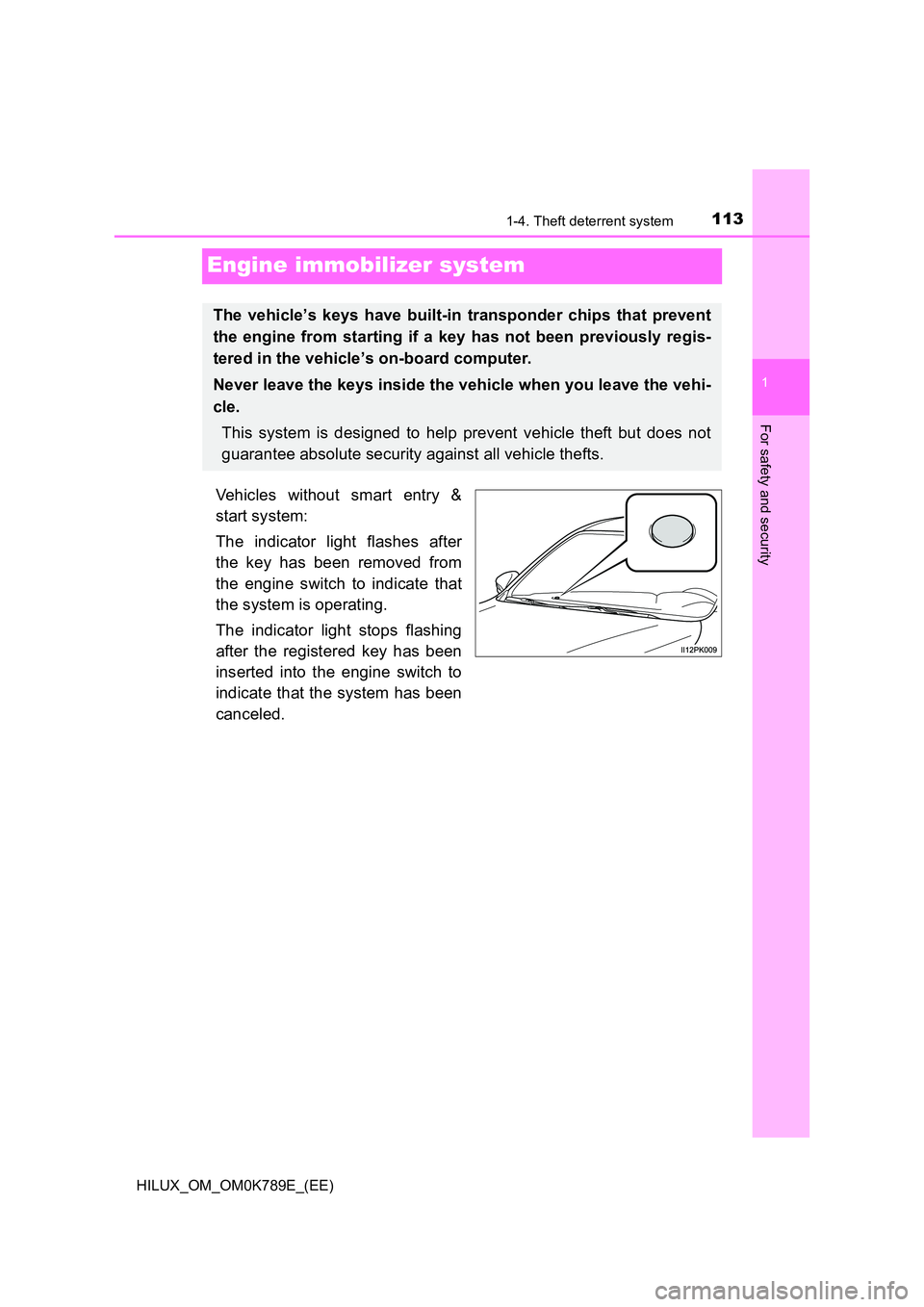
Vehicles without smart entry &
start system:
The indicator light flashes after
the key has been removed from
the engine switch to indicate that
the system is operating.
The indicator light stops flashing
after the registered key has been
inserted into the engine switch to
indicate that the system has been
canceled.
The vehicle’s keys have built-in transponder chips that prevent
the engine from starting if a key has not been previously regis-
tered in the vehicle’s on-board computer.
Never leave the keys inside the vehicle when you leave the vehi-
cle.
This system is designed to help prevent vehicle theft but does not
guarantee absolute security against all vehicle thefts.
Page 116 of 810
1141-4. Theft deterrent system
HILUX_OM_OM0K789E_(EE)
Vehicles with smart entry & start system:
The indicator light flashes after the engine switch has been turned off
to indicate that the system is operating.
The indicator light stops flashing after the engine switch has been
turned to ACCESSORY or IGNITION ON mode to indicate that the
system has been canceled.
■ System maintenance
The vehicle has a maintenance-free type engine immobilizer system.
■ Conditions that may cause the system to malfunction
● If the grip portion of the key is in contact with a metallic object
● If the key is in close proximity to or touching a key to the security system
(key with a built-in transponder chip) of another vehicle
NOTICE
■ To ensure the system operates correctly
Do not modify or remove the system. If modified or removed, the proper
operation of the system cannot be guaranteed.
Page 117 of 810
115
1
1-4. Theft deterrent system
HILUX_OM_OM0K789E_(EE)
For safety and security
Alar m
The alarm uses light and sound to give an alert when an intrusion is
detected.
The alarm is triggered in the following situations when the alarm is
set:
Models for model code destination Blank* (except for Kazakhstan,
Kyrgyzstan and Russia)
● A locked door is opened in any way other than using the entry func-
tion (vehicles with smart entry & start system), wireless remote con-
trol or mechanical key.
● The hood is opened.
Models for model code destination Blank (for Kazakhstan, Kyrgyz-
stan and Russia) and W*
● A locked door is opened in any way other than using the entry func-
tion (vehicles with smart entry & start system) or wireless remote
control.
● The hood is opened.
*: See “Checking your vehicle’s model” if you are not sure of which model
your vehicle is. ( P. 1 2 )
: If equipped
The alarm
Page 118 of 810
1161-4. Theft deterrent system
HILUX_OM_OM0K789E_(EE)
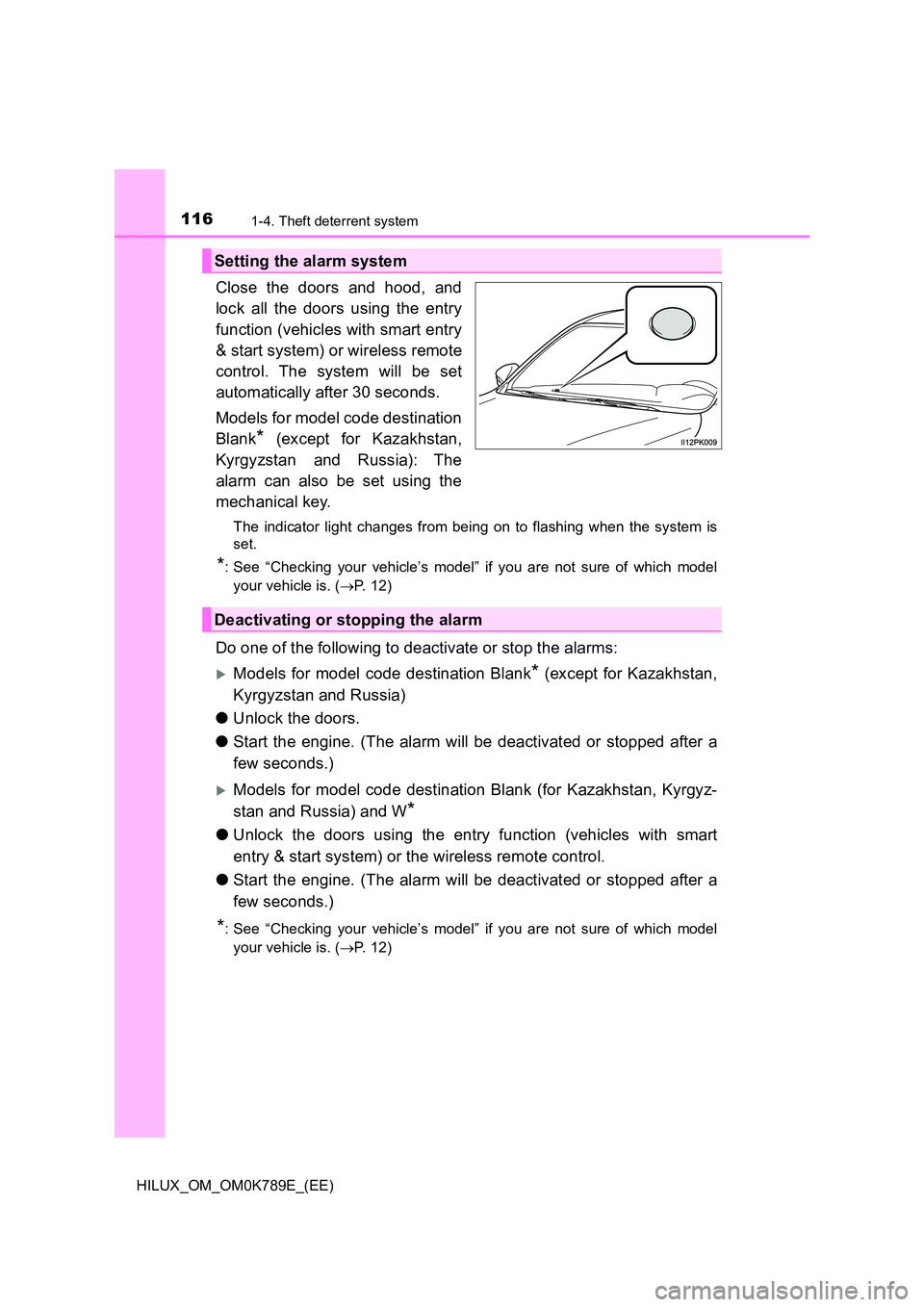
Close the doors and hood, and
lock all the doors using the entry
function (vehicles with smart entry
& start system) or wireless remote
control. The system will be set
automatically after 30 seconds.
Models for model code destination
Blank* (except for Kazakhstan,
Kyrgyzstan and Russia): The
alarm can also be set using the
mechanical key.
The indicator light changes from being on to flashing when the system is
set.
*: See “Checking your vehicle’s model” if you are not sure of which model
your vehicle is. ( P. 1 2 )
Do one of the following to deactivate or stop the alarms:
Models for model code destination Blank* (except for Kazakhstan,
Kyrgyzstan and Russia)
● Unlock the doors.
● Start the engine. (The alarm will be deactivated or stopped after a
few seconds.)
Models for model code destination Blank (for Kazakhstan, Kyrgyz-
stan and Russia) and W*
● Unlock the doors using the entry function (vehicles with smart
entry & start system) or the wireless remote control.
● Start the engine. (The alarm will be deactivated or stopped after a
few seconds.)
*: See “Checking your vehicle’s model” if you are not sure of which model
your vehicle is. ( P. 1 2 )
Setting the alarm system
Deactivating or stopping the alarm
Page 121 of 810
119
2Instrument cluster
HILUX_OM_OM0K789E_(EE)
2. Instrument cluster
Warning lights
and indicators .................. 120
Gauges and meters ........... 128
Multi-information display .... 133
Fuel consumption
information ....................... 142
Page 122 of 810
1202. Instrument cluster
HILUX_OM_OM0K789E_(EE)
War ning lights and indicators
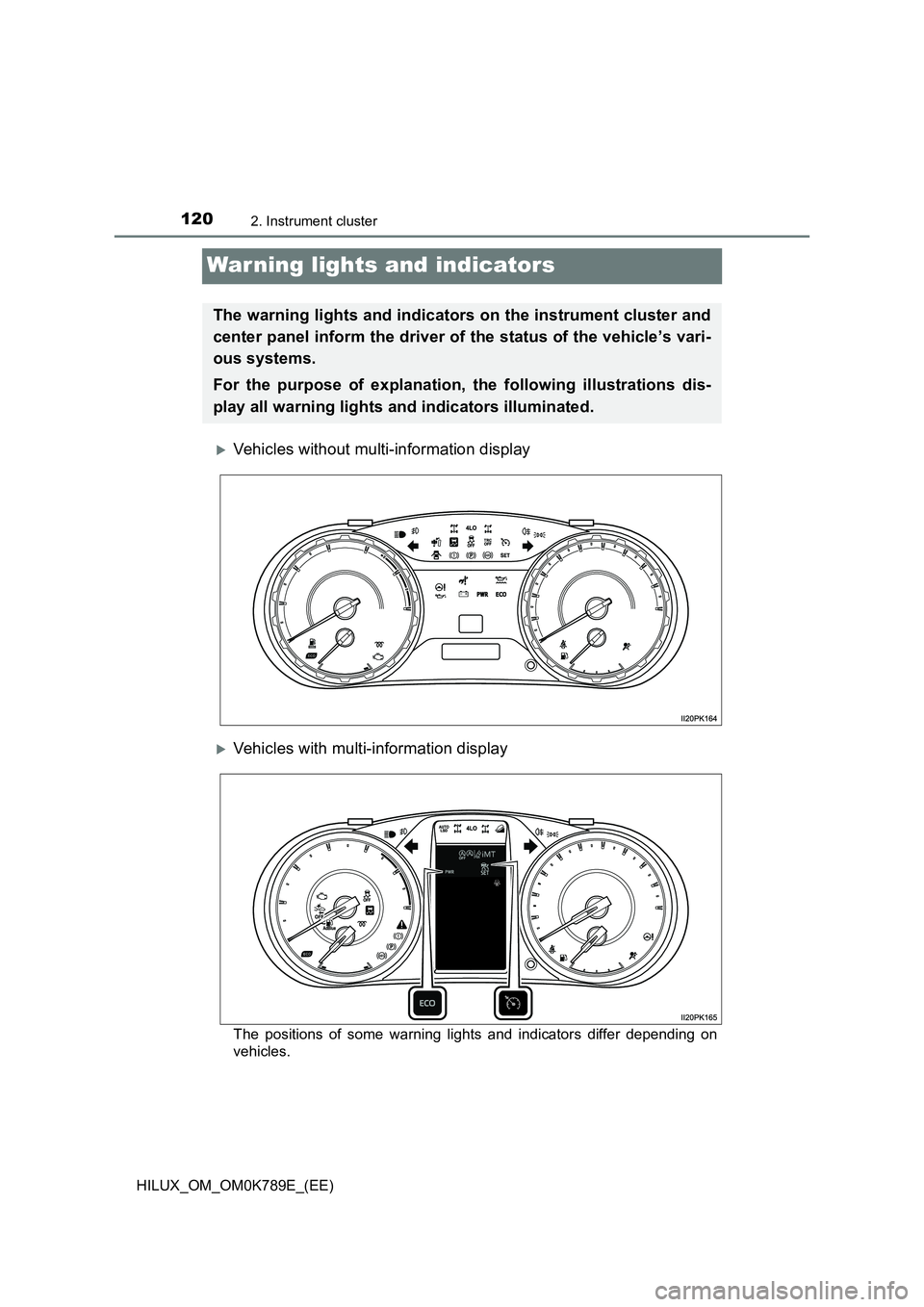
Vehicles without multi-information display
Vehicles with multi-information display
The positions of some warning lights and indicators differ depending on
vehicles.
The warning lights and indicators on the instrument cluster and
center panel inform the driver of the status of the vehicle’s vari-
ous systems.
For the purpose of explanation, the following illustrations dis-
play all warning lights and indicators illuminated.
Page 123 of 810
1212. Instrument cluster
2
Instrument cluster
HILUX_OM_OM0K789E_(EE)
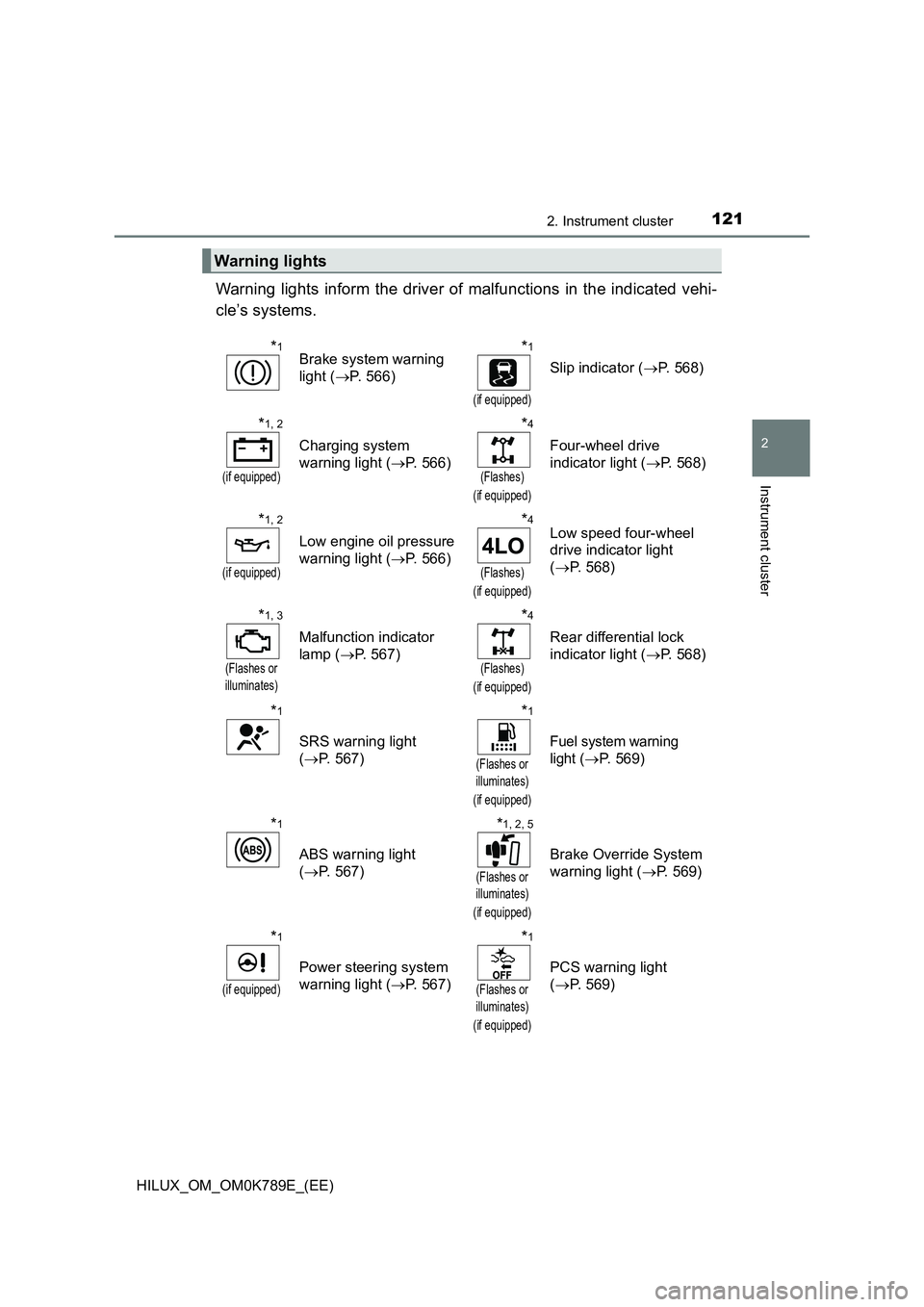
Warning lights inform the driver of malfunctions in the indicated vehi-
cle’s systems.
Warning lights
*1Brake system warning
light ( P. 566)
*1
(if equipped)
Slip indicator (P. 568)
*1, 2
(if equipped)
Charging system
warning light ( P. 566)
*4
(Flashes)
(if equipped)
Four-wheel drive
indicator light ( P. 568)
*1, 2
(if equipped)
Low engine oil pressure
warning light ( P. 566)
*4
(Flashes)
(if equipped)
Low speed four-wheel
drive indicator light
( P. 568)
*1, 3
(Flashes or
illuminates)
Malfunction indicator
lamp ( P. 567)
*4
(Flashes)
(if equipped)
Rear differential lock
indicator light ( P. 568)
*1
SRS warning light
( P. 567)
*1
(Flashes or
illuminates)
(if equipped)
Fuel system warning
light ( P. 569)
*1
ABS warning light
( P. 567)
*1, 2, 5
(Flashes or
illuminates)
(if equipped)
Brake Override System
warning light ( P. 569)
*1
(if equipped)
Power steering system
warning light ( P. 567)
*1
(Flashes or
illuminates)
(if equipped)
PCS warning light
( P. 569)
Page 124 of 810
1222. Instrument cluster
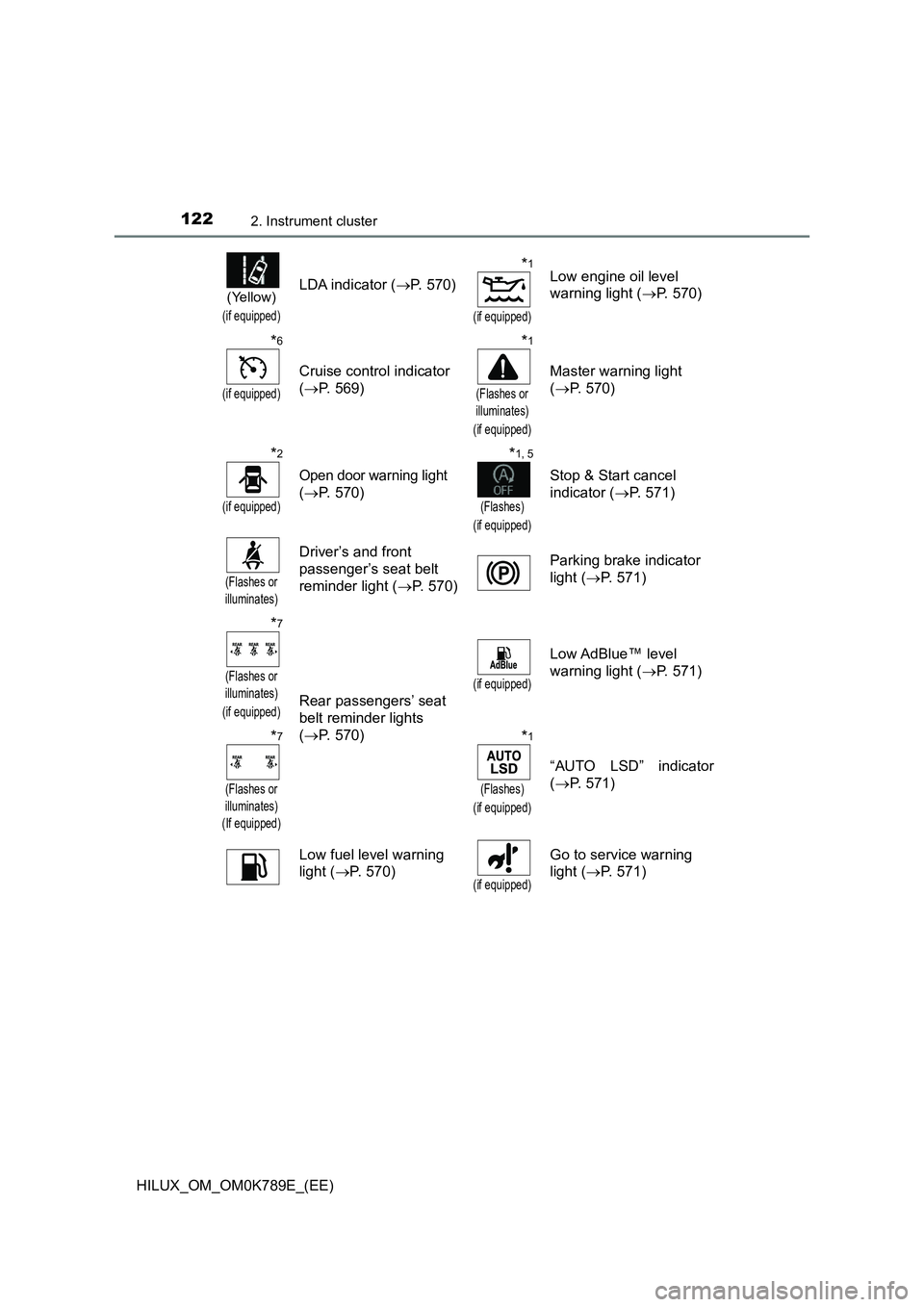
HILUX_OM_OM0K789E_(EE)
(Yellow)
(if equipped)
LDA indicator (P. 570)
*1
(if equipped)
Low engine oil level
warning light ( P. 570)
*6
(if equipped)
Cruise control indicator
( P. 569)
*1
(Flashes or
illuminates)
(if equipped)
Master warning light
( P. 570)
*2
(if equipped)
Open door warning light
( P. 570)
*1, 5
(Flashes)
(if equipped)
Stop & Start cancel
indicator ( P. 571)
(Flashes or
illuminates)
Driver’s and front
passenger’s seat belt
reminder light ( P. 570)
Parking brake indicator
light ( P. 571)
*7
(Flashes or
illuminates)
(if equipped)Rear passengers’ seat
belt reminder lights
( P. 570)
(if equipped)
Low AdBlue™ level
warning light ( P. 571)
*7
(Flashes or
illuminates)
(If equipped)
*1
(Flashes)
(if equipped)
“AUTO LSD” indicator
( P. 571)
Low fuel level warning
light ( P. 570)(if equipped)
Go to service warning
light ( P. 571)