light TOYOTA HILUX 2023 Service Manual
[x] Cancel search | Manufacturer: TOYOTA, Model Year: 2023, Model line: HILUX, Model: TOYOTA HILUX 2023Pages: 810, PDF Size: 131.54 MB
Page 125 of 810
1232. Instrument cluster
2
Instrument cluster
HILUX_OM_OM0K789E_(EE)
*1: These lights turn on when the engine switch is turned to the “ON” position
(vehicles without smart entry & start system) or IGNITION ON mode (vehi-
cles with smart entry & start system) to indicate that a system check is
being performed. They will turn off after the engine is started, or after a few
seconds. There may be a malfunction in a system if a light does not come
on, or if the lights do not turn off. Have the vehicle inspected by any autho-
rized Toyota retailer or Toyota authorized repairer, or any reliable repairer.
*2: Vehicles with multi-information display: a indicator is displayed on the
multi-information display.
*3: The light turns on or flashes to indicate a malfunction.
*4: The light flashes rapidly to indicate a malfunction.
*5: The light flashes to indicate a malfunction.
*6: The light turns to yellow to indicate a malfunction. (vehicles without multi-
information display)
*7: The lights illuminate on the center panel.
Page 126 of 810
1242. Instrument cluster
HILUX_OM_OM0K789E_(EE)
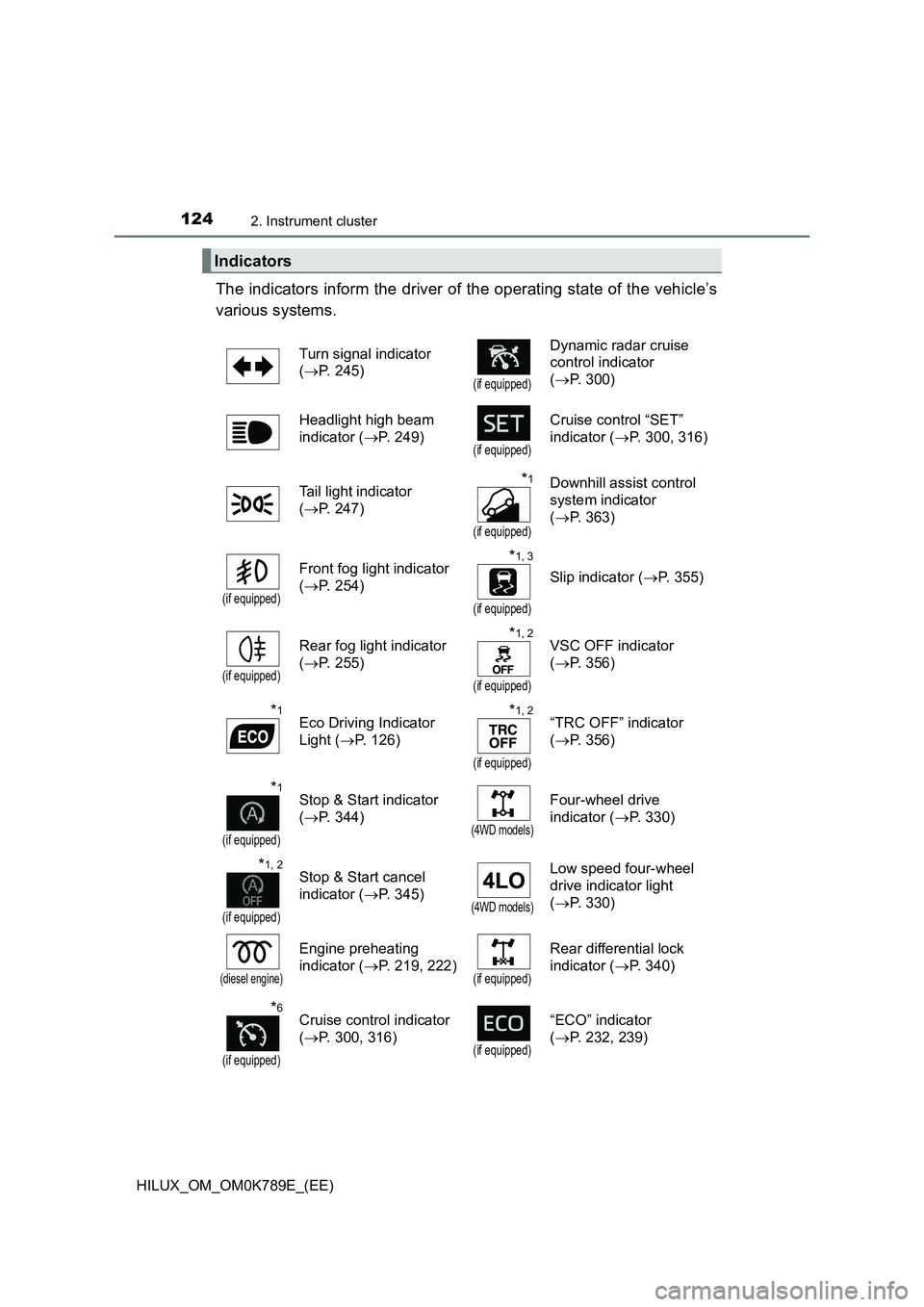
The indicators inform the driver of the operating state of the vehicle’s
various systems.
Indicators
Turn signal indicator
( P. 245)(if equipped)
Dynamic radar cruise
control indicator
( P. 300)
Headlight high beam
indicator ( P. 249)(if equipped)
Cruise control “SET”
indicator ( P. 300, 316)
Tail light indicator
( P. 247)
*1
(if equipped)
Downhill assist control
system indicator
( P. 363)
(if equipped)
Front fog light indicator
( P. 254)
*1, 3
(if equipped)
Slip indicator (P. 355)
(if equipped)
Rear fog light indicator
( P. 255)
*1, 2
(if equipped)
VSC OFF indicator
( P. 356)
*1Eco Driving Indicator
Light ( P. 126)
*1, 2
(if equipped)
“TRC OFF” indicator
( P. 356)
*1
(if equipped)
Stop & Start indicator
( P. 344)(4WD models)
Four-wheel drive
indicator ( P. 330)
*1, 2
(if equipped)
Stop & Start cancel
indicator ( P. 345)(4WD models)
Low speed four-wheel
drive indicator light
( P. 330)
(diesel engine)
Engine preheating
indicator ( P. 219, 222)(if equipped)
Rear differential lock
indicator ( P. 340)
*6
(if equipped)
Cruise control indicator
( P. 300, 316)(if equipped)
“ECO” indicator
( P. 232, 239)
Page 127 of 810
1252. Instrument cluster
2
Instrument cluster
HILUX_OM_OM0K789E_(EE)
*1: These lights turn on when the engine switch is turned to the “ON” position
(vehicles without smart entry & start system) or IGNITION ON mode (vehi-
cles with smart entry & start system) to indicate that a system check is
being performed. They will turn off after the engine is started, or after a few
seconds. There may be a malfunction in a system if a light does not come
on, or if the lights do not turn off. Have the vehicle inspected by any autho-
rized Toyota retailer or Toyota authorized repairer, or any reliable repairer.
*2: The light turns on when the system is turned off.
*3: The light flashes to indicate that the system is operating.
*4: Depending on the operating condition, the color and illuminating/flashing
state of the light change.
*5: The light illuminates on the center panel.
*6: The light turns to green.
(if equipped)
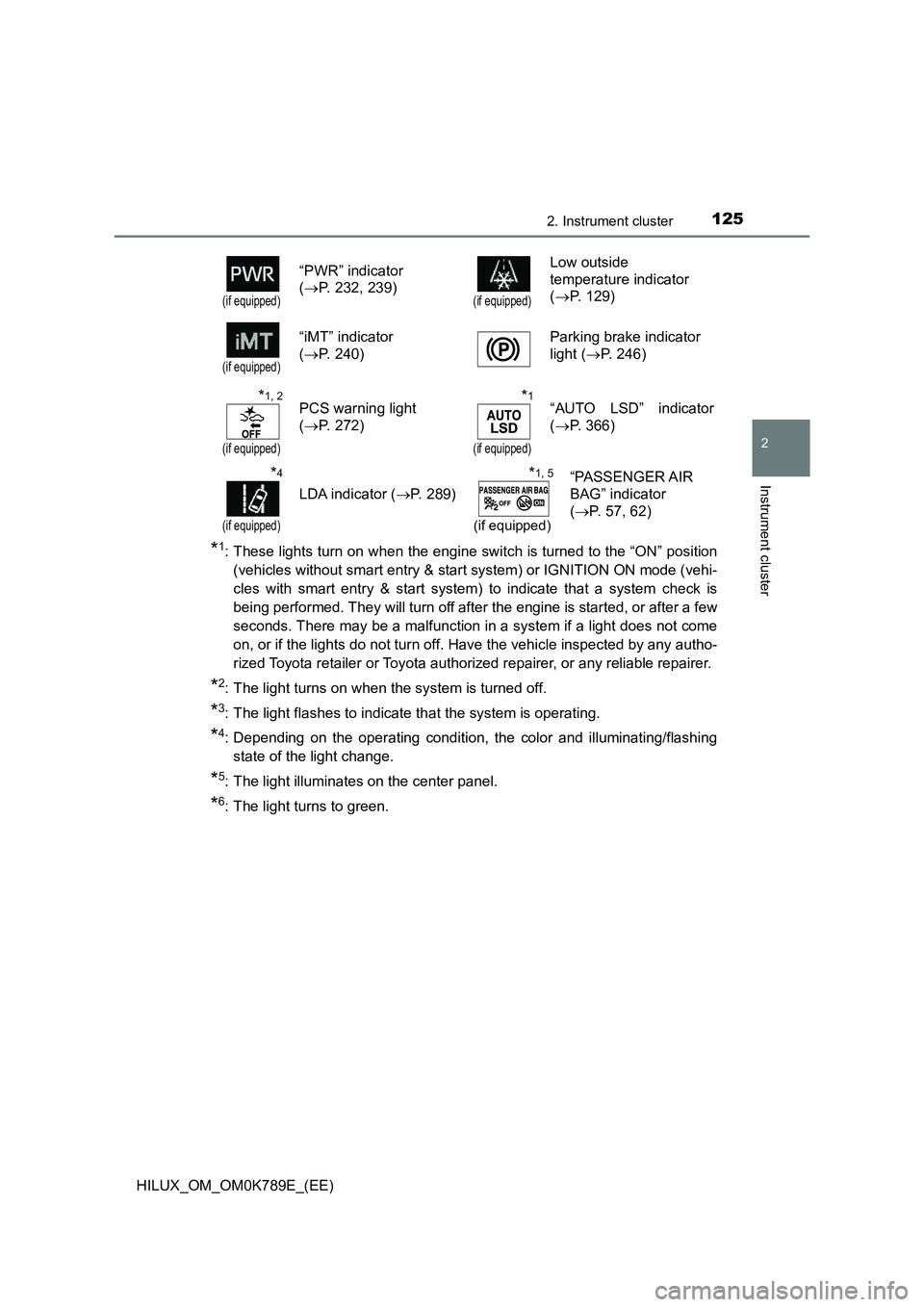
“PWR” indicator
( P. 232, 239)(if equipped)
Low outside
temperature indicator
( P. 129)
(if equipped)
“iMT” indicator
( P. 240)
Parking brake indicator
light ( P. 246)
*1, 2
(if equipped)
PCS warning light
( P. 272)
*1
(if equipped)
“AUTO LSD” indicator
( P. 366)
*4
(if equipped)
LDA indicator (P. 289)
*1, 5
(if equipped)
“PASSENGER AIR
BAG” indicator
( P. 57, 62)
Page 128 of 810
1262. Instrument cluster
HILUX_OM_OM0K789E_(EE)
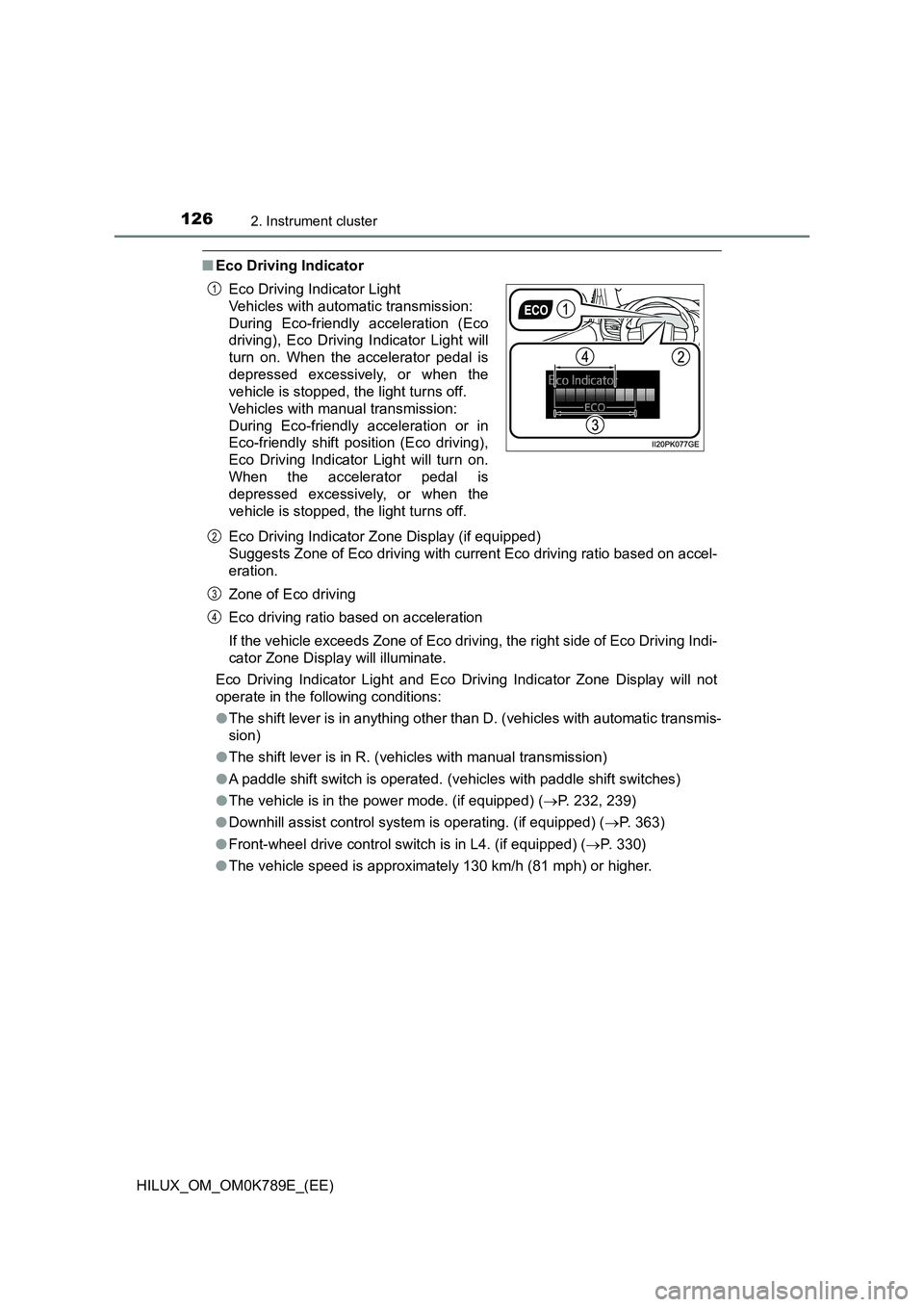
■Eco Driving Indicator
Eco Driving Indicator Zone Display (if equipped)
Suggests Zone of Eco driving with current Eco driving ratio based on accel-
eration.
Zone of Eco driving
Eco driving ratio based on acceleration
If the vehicle exceeds Zone of Eco driving, the right side of Eco Driving Indi-
cator Zone Display will illuminate.
Eco Driving Indicator Light and Eco Driving Indicator Zone Display will not
operate in the following conditions:
● The shift lever is in anything other than D. (vehicles with automatic transmis-
sion)
● The shift lever is in R. (vehicles with manual transmission)
● A paddle shift switch is operated. (vehicles with paddle shift switches)
● The vehicle is in the power mode. (if equipped) (P. 232, 239)
● Downhill assist control system is operating. (if equipped) (P. 363)
● Front-wheel drive control switch is in L4. (if equipped) (P. 330)
● The vehicle speed is approximately 130 km/h (81 mph) or higher.
Eco Driving Indicator Light
Vehicles with automatic transmission:
During Eco-friendly acceleration (Eco
driving), Eco Driving Indicator Light will
turn on. When the accelerator pedal is
depressed excessively, or when the
vehicle is stopped, the light turns off.
Vehicles with manual transmission:
During Eco-friendly acceleration or in
Eco-friendly shift position (Eco driving),
Eco Driving Indicator Light will turn on.
When the accelerator pedal is
depressed excessively, or when the
vehicle is stopped, the light turns off.
1
2
3
4
Page 129 of 810
1272. Instrument cluster
2
Instrument cluster
HILUX_OM_OM0K789E_(EE)
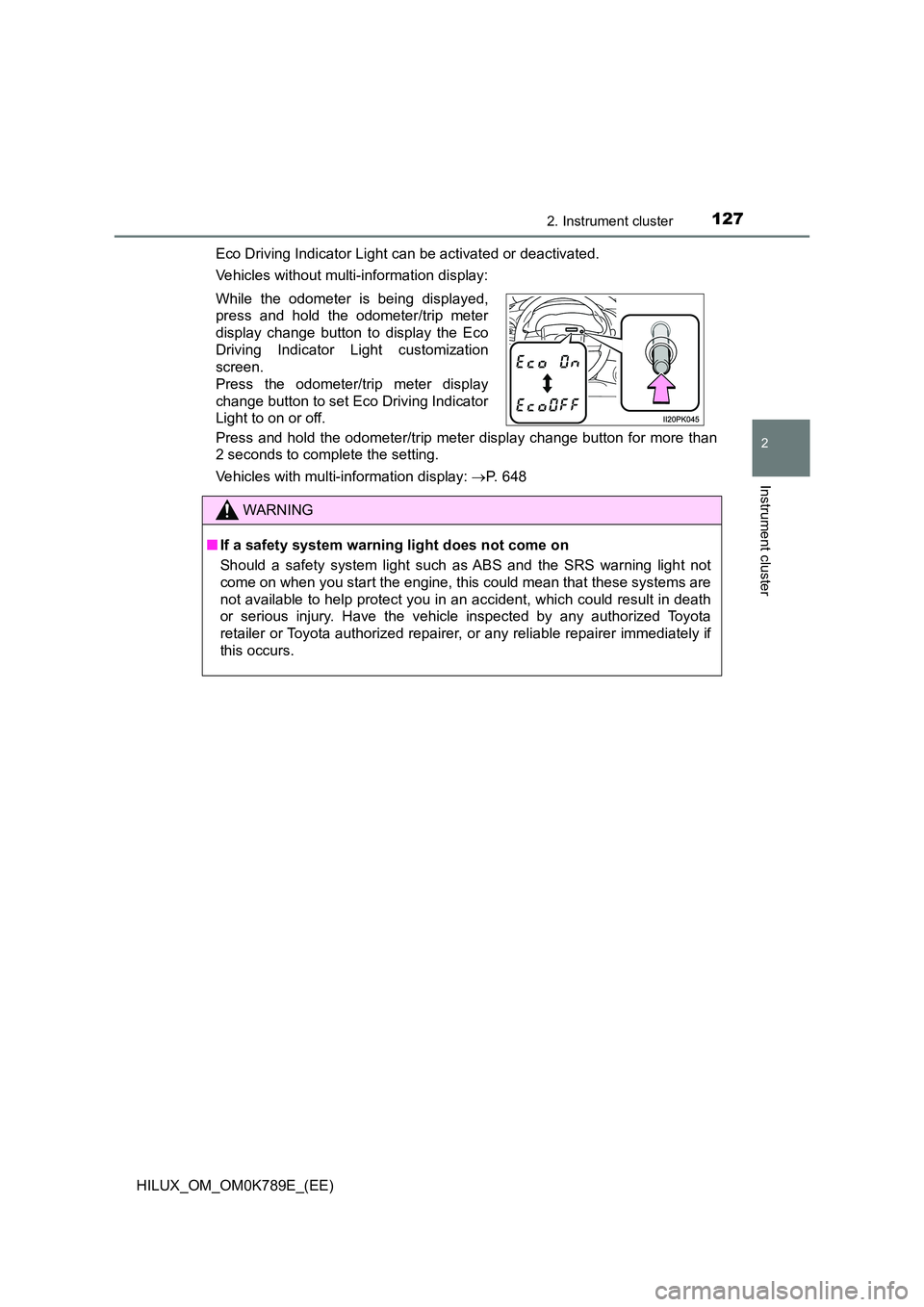
Eco Driving Indicator Light can be activated or deactivated.
Vehicles without multi-information display:
Press and hold the odometer/trip meter display change button for more than
2 seconds to complete the setting.
Vehicles with multi-information display: P. 648
While the odometer is being displayed,
press and hold the odometer/trip meter
display change button to display the Eco
Driving Indicator Light customization
screen.
Press the odometer/trip meter display
change button to set Eco Driving Indicator
Light to on or off.
WARNING
■ If a safety system warning light does not come on
Should a safety system light such as ABS and the SRS warning light not
come on when you start the engine, this could mean that these systems are
not available to help protect you in an accident, which could result in death
or serious injury. Have the vehicle inspected by any authorized Toyota
retailer or Toyota authorized repairer, or any reliable repairer immediately if
this occurs.
Page 132 of 810
1302. Instrument cluster
HILUX_OM_OM0K789E_(EE)
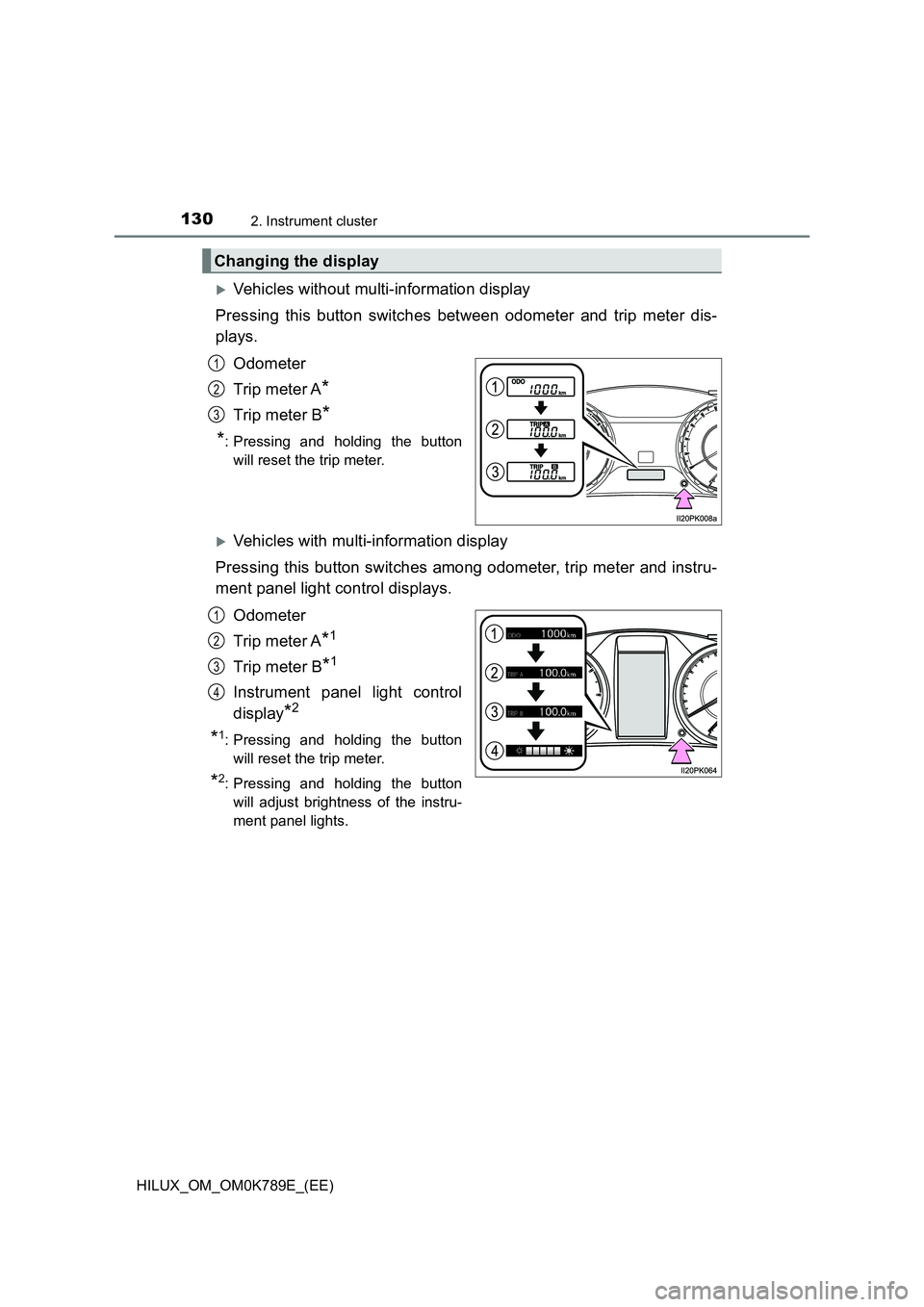
Vehicles without multi-information display
Pressing this button switches between odometer and trip meter dis-
plays.
Odometer
Trip meter A*
Trip meter B*
*: Pressing and holding the button
will reset the trip meter.
Vehicles with multi-information display
Pressing this button switches among odometer, trip meter and instru-
ment panel light control displays.
Odometer
Trip meter A*1
Trip meter B*1
Instrument panel light control
display*2
*1: Pressing and holding the button
will reset the trip meter.
*2: Pressing and holding the button
will adjust brightness of the instru-
ment panel lights.
Changing the display
1
2
3
1
2
3
4
Page 133 of 810
1312. Instrument cluster
2
Instrument cluster
HILUX_OM_OM0K789E_(EE)
■The meters illuminate when
The engine switch is in the “ON” position (vehicles without smart entry & start
system) or IGNITION ON mode (vehicles with smart entry & start system).
■ The brightness of the instrument panel lights (vehicles with multi-infor-
mation display)
The instrument panel brightness levels when the tail lights are on and off can
be adjusted individually.
When the headlight switch is turned to on, the brightness will be reduced
slightly unless the instrument panel brightness level is set to the brightest set-
ting.
■ When disconnecting and reconnecting battery terminals
The trip meter data will be reset.
■ Outside temperature display
In the following situations, the correct outside temperature may not be dis-
played, or the display may take longer than normal to change:
● When the vehicle is stopped, or moving at low speeds (less than 25 km/h
[15 mph])
● When the outside temperature has changed suddenly (at the entrance/exit
of a garage, tunnel, etc.)
■ When “--” is displayed
The system may be malfunctioning. Take your vehicle to any authorized
Toyota retailer or Toyota authorized repairer, or any reliable repairer.
Page 140 of 810
1382. Instrument cluster
HILUX_OM_OM0K789E_(EE)
■DRCC(RSA) (if equipped) ( P. 3 1 1 )
Select to enable/disable the Dynamic Radar Cruise Control with
Road Sign Assist.
■Vehicle Setting
Idling stop (if equipped)
Select to change the idling stop time (engine stop time via the
Stop & Start system) when the air conditioning system is on.
■Meter Customization
● Language
Select to change the language on the display.
● Units
Select to change the unit for measure of the fuel consumption.
● Eco Driving Indicator Light
Select to activate/deactivate the Eco Driving Indicator Light.
(P. 126)
● switch settings
You can register 1 screen as the top screen. To register, press
and hold while the desired screen is displayed.
● Drive information 1 and 2
Select to select up to 2 items that will be displayed on a drive
information screen, up to 2 drive information screens can be set.
● Pop-up display (if equipped)
Select to set the pop-up displays, which may appear in some sit-
uations, on/off.
● Accent color (if equipped)
Select to change the accent colors on the screen, such as the
cursor color.
Page 143 of 810
1412. Instrument cluster
2
Instrument cluster
HILUX_OM_OM0K789E_(EE)
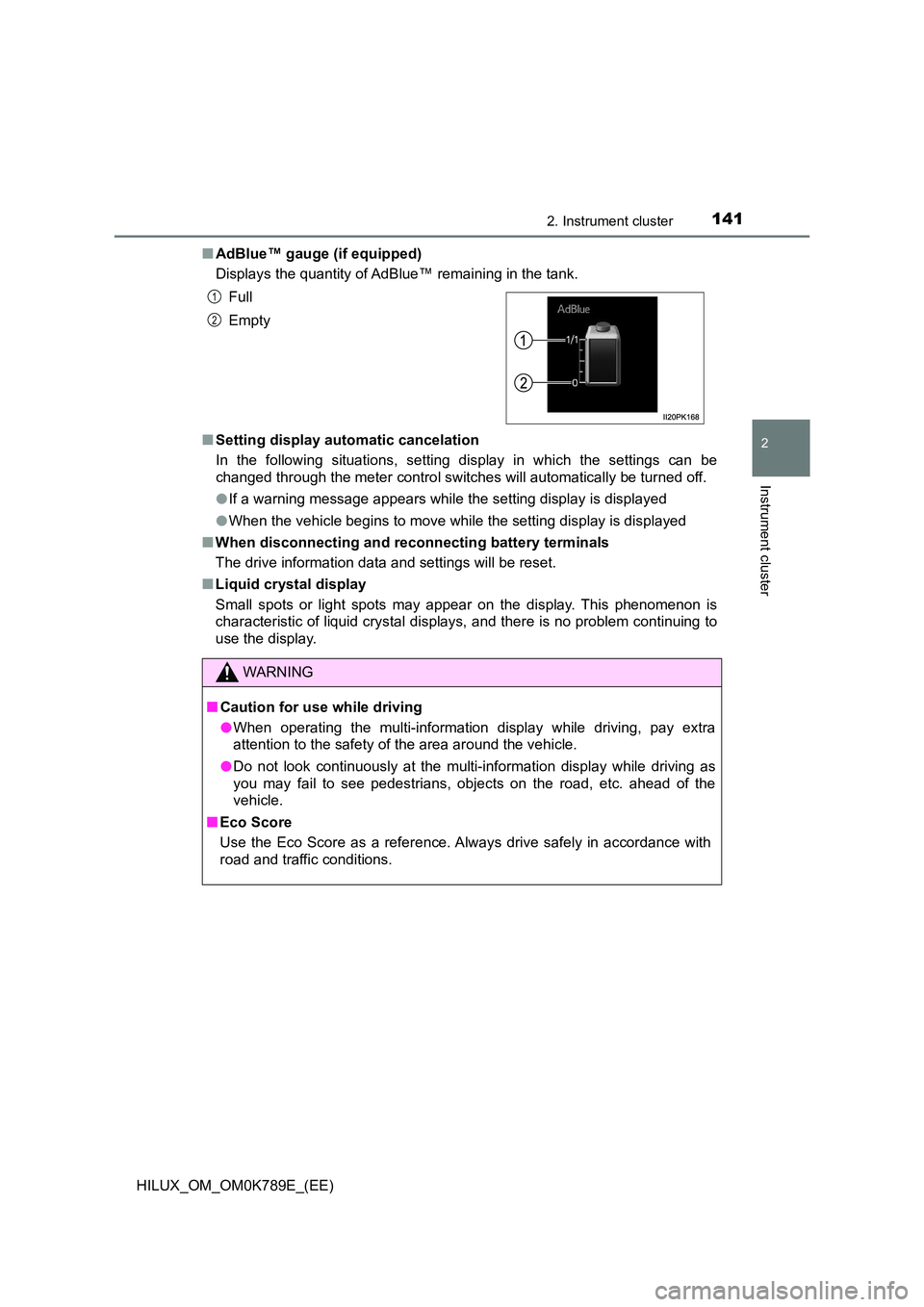
■ AdBlue™ gauge (if equipped)
Displays the quantity of AdBlue™ remaining in the tank.
■ Setting display automatic cancelation
In the following situations, setting display in which the settings can be
changed through the meter control switches will automatically be turned off.
● If a warning message appears while the setting display is displayed
● When the vehicle begins to move while the setting display is displayed
■ When disconnecting and reconnecting battery terminals
The drive information data and settings will be reset.
■ Liquid crystal display
Small spots or light spots may appear on the display. This phenomenon is
characteristic of liquid crystal displays, and there is no problem continuing to
use the display.
Full
Empty
WARNING
■ Caution for use while driving
● When operating the multi-information display while driving, pay extra
attention to the safety of the area around the vehicle.
● Do not look continuously at the multi-information display while driving as
you may fail to see pedestrians, objects on the road, etc. ahead of the
vehicle.
■ Eco Score
Use the Eco Score as a reference. Always drive safely in accordance with
road and traffic conditions.
1
2
Page 145 of 810
1432. Instrument cluster
2
Instrument cluster
HILUX_OM_OM0K789E_(EE)
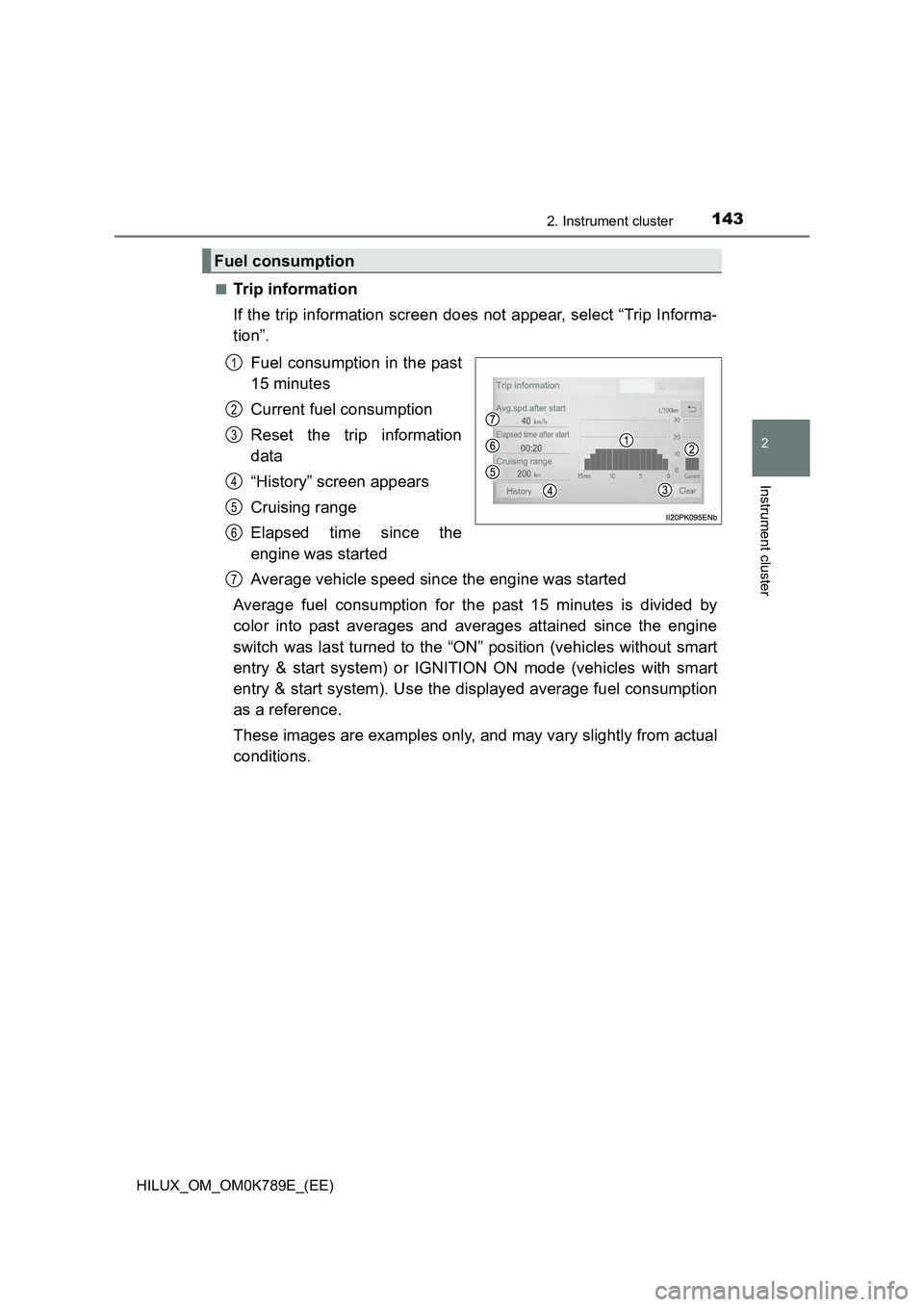
■Trip information
If the trip information screen does not appear, select “Trip Informa-
tion”.
Fuel consumption in the past
15 minutes
Current fuel consumption
Reset the trip information
data
“History” screen appears
Cruising range
Elapsed time since the
engine was started
Average vehicle speed since the engine was started
Average fuel consumption for the past 15 minutes is divided by
color into past averages and averages attained since the engine
switch was last turned to the “ON” position (vehicles without smart
entry & start system) or IGNITION ON mode (vehicles with smart
entry & start system). Use the displayed average fuel consumption
as a reference.
These images are examples only, and may vary slightly from actual
conditions.
Fuel consumption
1
2
3
4
5
6
7