CD player TOYOTA iQ EV 2013 Accessories, Audio & Navigation (in English)
[x] Cancel search | Manufacturer: TOYOTA, Model Year: 2013, Model line: iQ EV, Model: TOYOTA iQ EV 2013Pages: 321, PDF Size: 6.88 MB
Page 7 of 321

7
1
2
3
4
5
6
iQ_EV NAVI OM74061U
1. PHONE OPERATION .................... 130
QUICK REFERENCE .......................... 130
PHONE (HANDS-FREE SYSTEM
FOR CELLULAR PHONE) ................ 132
REGISTER A Bluetooth
® PHONE ....... 136
CALL ON THE Bluetooth® PHONE ..... 140
RECEIVE ON THE Bluetooth®
PHONE ............................................. 145
TALK ON THE Bluetooth
® PHONE ..... 146
Bluetooth® PHONE MESSAGE
FUNCTION........................................ 149
2. SETUP ........................................... 152
PHONE SETTINGS ............................. 152
Bluetooth® SETTINGS ........................ 174
1. AUDIO/VIDEO SYSTEM OPERATION ................................ 188
QUICK REFERENCE .......................... 188
SOME BASICS .................................... 190
RADIO OPERATION ........................... 196
HD Radio™ TECHNOLOGY
INFORMATION ................................. 199
RADIO OPERATION (XM Satellite Radio BROADCAST) ... 203
DVD PLAYER OPERATION................ 209
USB MEMORY OPERATION .............. 230
iPod OPERATION ............................... 235
Bluetooth
® AUDIO OPERATION ......... 239
AUDIO/VIDEO REMOTE CONTROLS (STEERING SWITCHES) ................. 248
AUDIO/VIDEO SYSTEM OPERATING HINTS ......................... 250
2. SETUP ........................................... 260
AUDIO SETTINGS .............................. 260
1. INFORMATION DISPLAY ............. 264
ENERGY MONITOR ............................ 264
MAP DATABASE VERSION AND COVERAGE AREA ........................... 266
RANGE MAP ....................................... 268
2. XM FUNCTION-O VERVIEW ......... 270
XM SERVICES .................................... 270
3. XM FUNCTION OPERATION ....... 271
XM Sports ............................................ 271
XM Stocks ............................................ 274
XM Fuel Prices..................................... 277
XM NavWeather™ ............................... 280
XM NavTraffic
®.................................... 283
4. SETUP ........................................... 286
XM SETTINGS..................................... 286
ALPHABETICAL INDEX .................... 288
4PHONE
5AUDIO/VIDEO SYSTEM
6INFORMATION
INDEX
Page 129 of 321
4
129
1
2
3
4
5
6
iQ_EV NAVI OM74061U
1. QUICK REFERENCE ................... 130
2. PHONE (HANDS-FREE SYSTEM
FOR CELLULAR PHONE) ........ 132
USING THE MICROPHONE ............... 133
USING THE
STEERING SWITCHES .................... 134
ABOUT THE PHONEBOOK IN THIS SYSTEM.............................. 134
WHEN SELLING OR DISPOSING OF THE VEHICLE........ 134
3. REGISTER A Bluetooth®
PHONE....................................... 136
CONNECTING
A Bluetooth® PHONE........................ 137
RECONNECTING THE Bluetooth
® PHONE ................... 139
4. CALL ON THE Bluetooth®
PHONE........................................140
BY DIAL ............................................... 140
BY PHONEBOOK................................ 140
BY SPEED DIAL.................................. 142
BY CALL HISTORY ............................. 142
CALLING USING AN SMS/MMS
MESSAGE ........................................ 143
BY POI CALL....................................... 144
5. RECEIVE ON THE Bluetooth®
PHONE....................................... 145 6. TALK ON THE Bluetooth
®
PHONE ...................................... 146
WHEN YOU SELECT “0-9”.................. 146
INCOMING CALL WAITING ................ 148
7. Bluetooth® PHONE MESSAGE
FUNCTION ...... ....................... ... 149
CHECKING MESSAGES ..................... 149
REPLYING (QUICK REPLY) ............... 150
NEW MESSAGE NOTIFICATION ....... 151
1. PHONE SETTINGS ..................... 152
PHONE SOUND SETTINGS ............... 152
PHONEBOOK ...................................... 154
MESSAGE SETTINGS ........................ 167
PHONE DISPLAY SETTINGS ............. 171
2. Bluetooth® SETTINGS ............... 174
REGISTERED DEVICES ..................... 174
SELECTING A Bluetooth® PHONE ..... 178
SELECTING PORTABLE PLAYER ..... 180
DETAILED Bluetooth
® SETTINGS ...... 181
*: Point of Interest
1PHONE OPERATION
2SETUP
PHONE
Page 175 of 321
175
2. SETUP
4
PHONE
iQ_EV NAVI OM74061U
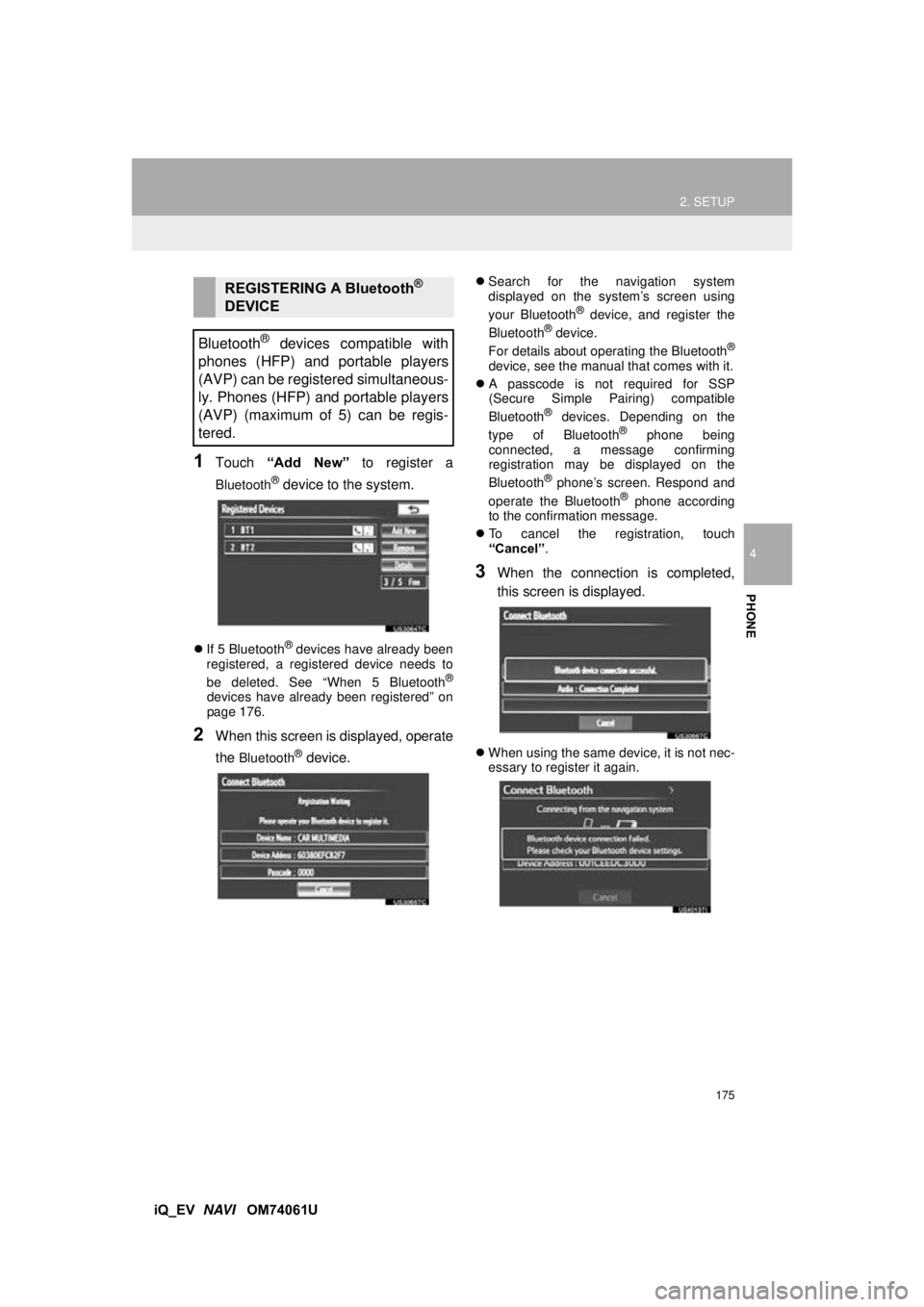
1Touch “Add New” to register a
Bluetooth® device to the system.
If 5 Bluetooth® devices have already been
registered, a registered device needs to
be deleted. See “When 5 Bluetooth
®
devices have already been registered” on
page 176.
2When this screen is displayed, operate
the
Bluetooth® device.
Search for the navigation system
displayed on the system’s screen using
your Bluetooth
® device, and register the
Bluetooth® device.
For details about operating the Bluetooth®
device, see the manual that comes with it.
A passcode is not required for SSP
(Secure Simple Pairing) compatible
Bluetooth
® devices. Depending on the
type of Bluetooth® phone being
connected, a message confirming
registration may be displayed on the
Bluetooth
® phone’s screen. Respond and
operate the Bluetooth® phone according
to the confirmation message.
To cancel the registration, touch
“Cancel” .
3When the connection is completed,
this screen is displayed.
When using the same device, it is not nec-
essary to register it again.
REGISTERING A Bluetooth®
DEVICE
Bluetooth
® devices compatible with
phones (HFP) and portable players
(AVP) can be registered simultaneous-
ly. Phones (HFP) and portable players
(AVP) (maximum of 5) can be regis-
tered.
Page 177 of 321
177
2. SETUP
4
PHONE
iQ_EV NAVI OM74061U
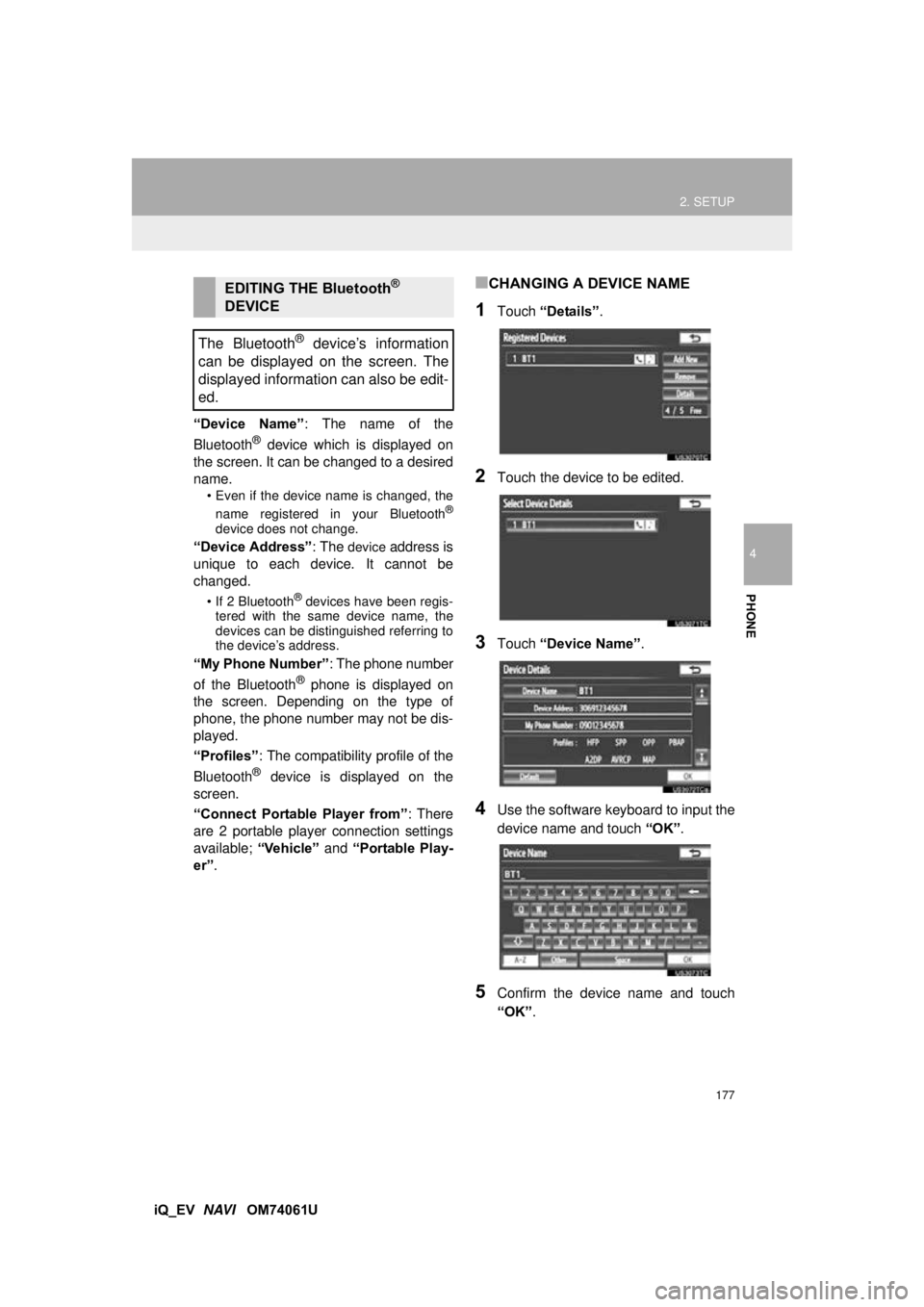
“Device Name”
: The name of the
Bluetooth
® device which is displayed on
the screen. It can be changed to a desired
name.
• Even if the device name is changed, the
name registered in your Bluetooth®
device does not change.
“Device Address” : The device address is
unique to each device. It cannot be
changed.
• If 2 Bluetooth® devices have been regis-
tered with the same device name, the
devices can be distinguished referring to
the device’s address.
“My Phone Number” : The phone number
of the Bluetooth® phone is displayed on
the screen. Depending on the type of
phone, the phone number may not be dis-
played.
“Profiles” : The compatibility profile of the
Bluetooth
® device is displayed on the
screen.
“Connect Portable Player from” : There
are 2 portable player connection settings
available; “Vehicle” and “Portable Play-
er” .
■CHANGING A DEVICE NAME
1Touch “Details” .
2Touch the device to be edited.
3Touch “Device Name” .
4Use the software keyboard to input the
device name and touch “OK”.
5Confirm the device name and touch
“OK” .
EDITING THE Bluetooth®
DEVICE
The Bluetooth
® device’s information
can be displayed on the screen. The
displayed information can also be edit-
ed.
Page 178 of 321
178
2. SETUP
iQ_EV NAVI OM74061U
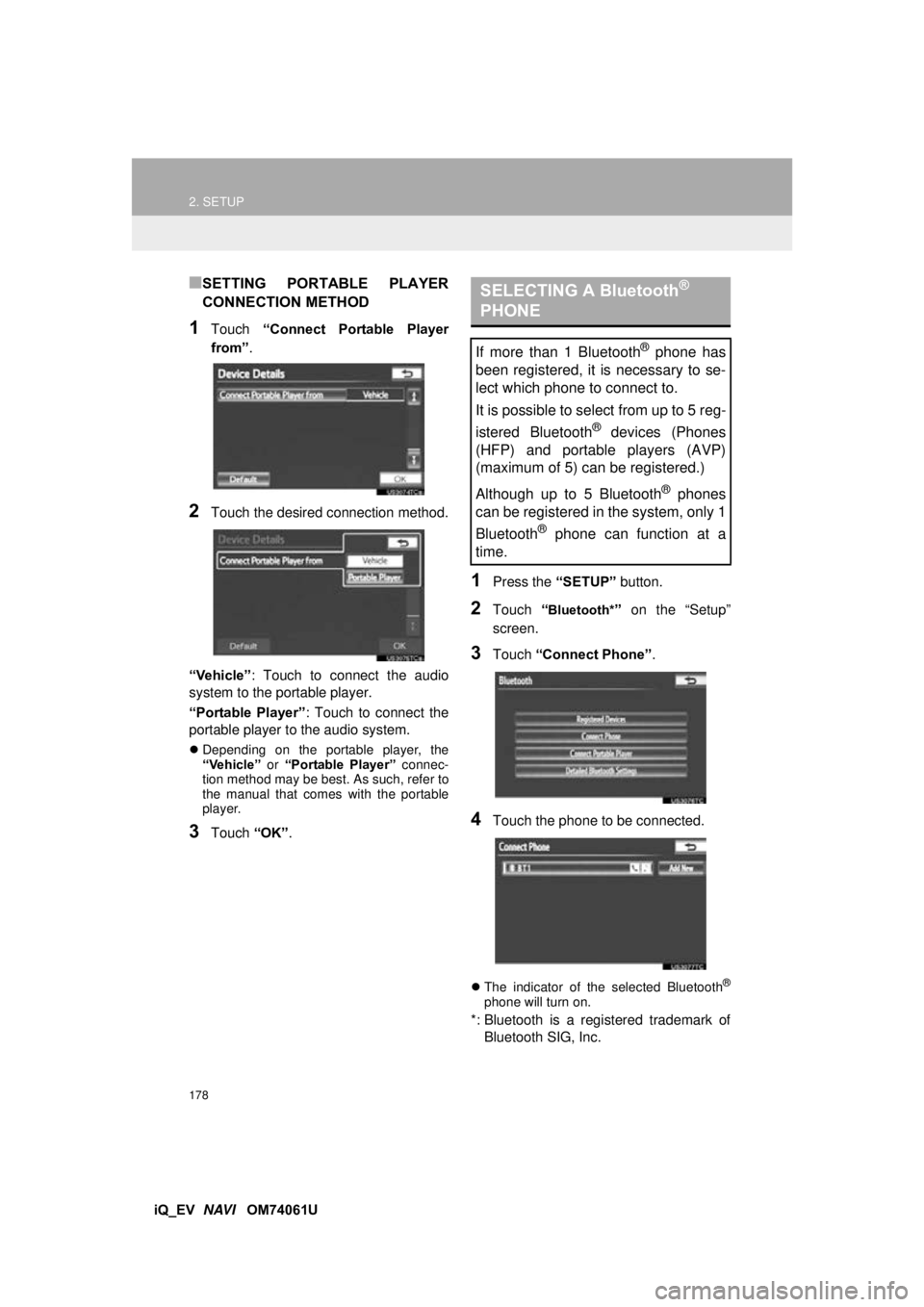
■SETTING PORTABLE PLAYER
CONNECTION METHOD
1Touch “Connect Portable Player
from” .
2Touch the desired connection method.
“Vehicle” : Touch to connect the audio
system to the portable player.
“Portable Player” : Touch to connect the
portable player to the audio system.
Depending on the portable player, the
“Vehicle” or “Portable Player” connec-
tion method may be best. As such, refer to
the manual that comes with the portable
player.
3Touch “OK”.
1Press the “SETUP” button.
2Touch “Bluetooth*” on the “Setup”
screen.
3Touch “Connect Phone” .
4Touch the phone to be connected.
The indicator of the selected Bluetooth®
phone will turn on.
*: Bluetooth is a registered trademark of
Bluetooth SIG, Inc.
SELECTING A Bluetooth®
PHONE
If more than 1 Bluetooth® phone has
been registered, it is necessary to se-
lect which phone to connect to.
It is possible to select from up to 5 reg-
istered Bluetooth
® devices (Phones
(HFP) and portable players (AVP)
(maximum of 5) can be registered.)
Although up to 5 Bluetooth
® phones
can be registered in the system, only 1
Bluetooth
® phone can function at a
time.
Page 180 of 321
180
2. SETUP
iQ_EV NAVI OM74061U
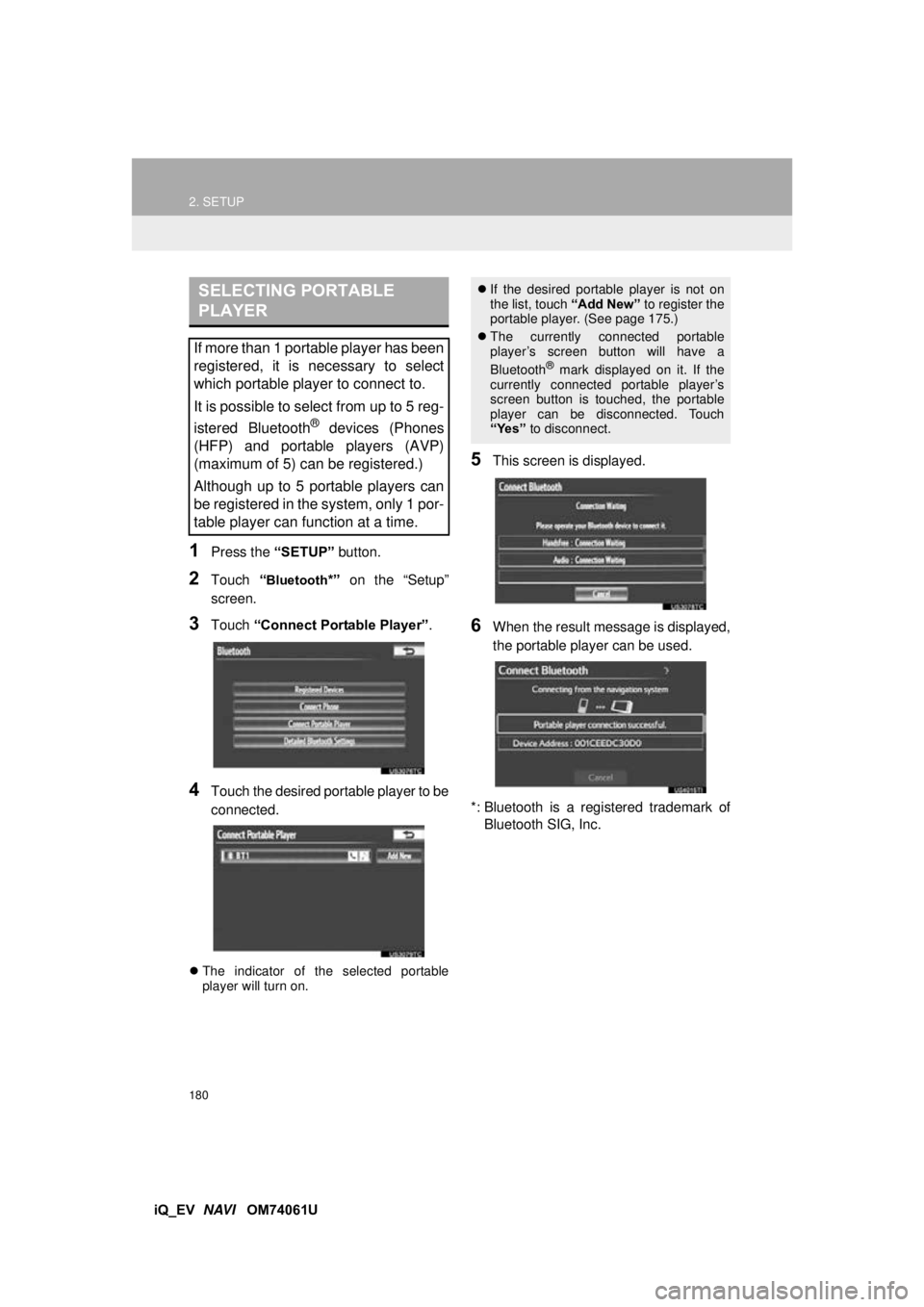
1Press the “SETUP” button.
2Touch “Bluetooth*” on the “Setup”
screen.
3Touch “Connect Portable Player” .
4Touch the desired portable player to be
connected.
The indicator of the selected portable
player will turn on.
5This screen is displayed.
6When the result message is displayed,
the portable player can be used.
*: Bluetooth is a registered trademark of Bluetooth SIG, Inc.
SELECTING PORTABLE
PLAYER
If more than 1 portable player has been
registered, it is necessary to select
which portable player to connect to.
It is possible to select from up to 5 reg-
istered Bluetooth
® devices (Phones
(HFP) and portable players (AVP)
(maximum of 5) can be registered.)
Although up to 5 portable players can
be registered in the system, only 1 por-
table player can function at a time.
If the desired portable player is not on
the list, touch “Add New” to register the
portable player. (See page 175.)
The currently connected portable
player’s screen button will have a
Bluetooth
® mark displayed on it. If the
currently connected portable player’s
screen button is touched, the portable
player can be disconnected. Touch
“Yes” to disconnect.
Page 183 of 321
183
2. SETUP
4
PHONE
iQ_EV NAVI OM74061U
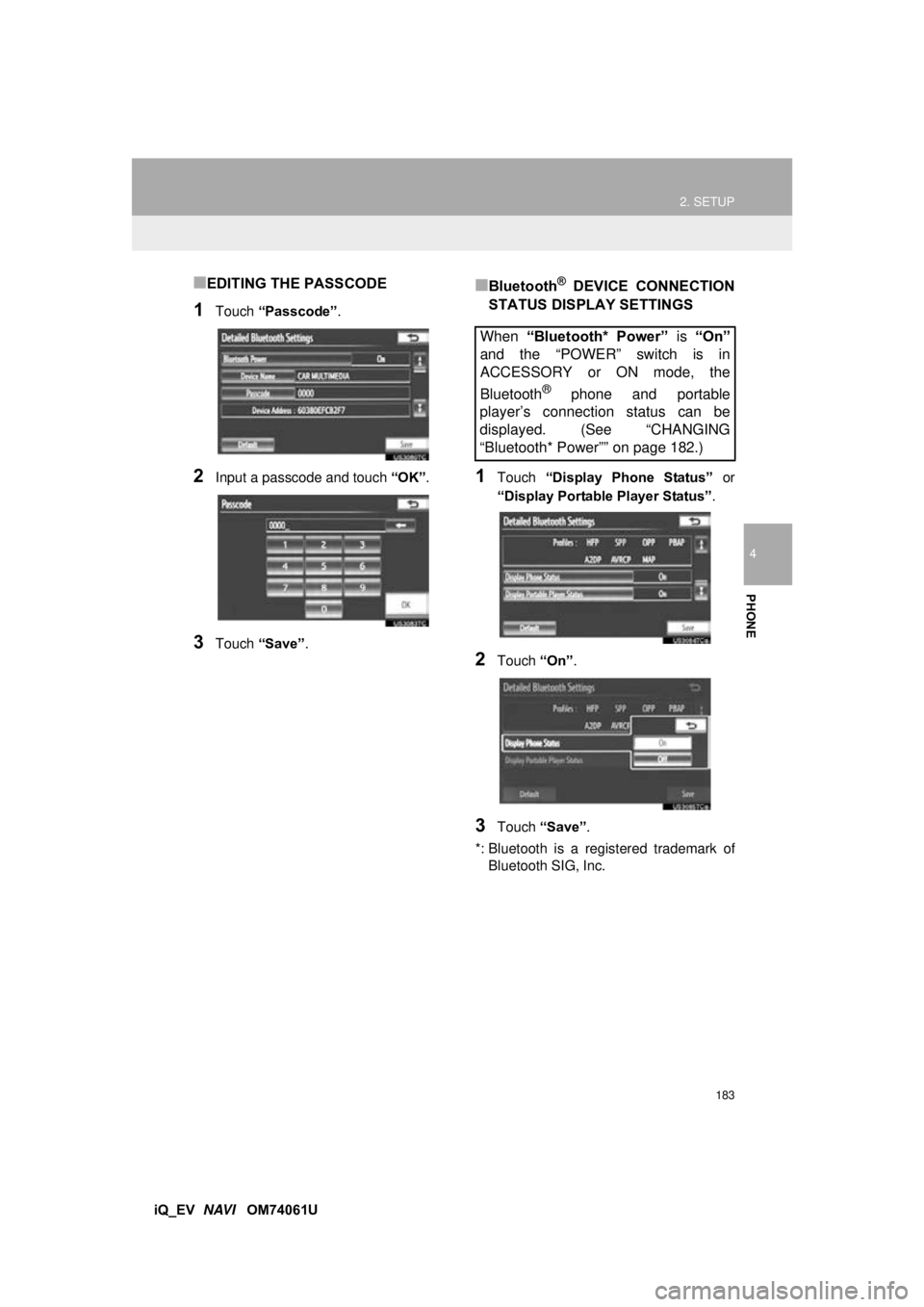
■EDITING THE PASSCODE
1Touch “Passcode” .
2Input a passcode and touch “OK”.
3Touch “Save” .
■Bluetooth® DEVICE CONNECTION
STATUS DISPLAY SETTINGS
1Touch “Display Phone Status” or
“Display Portable Player Status” .
2Touch “On”.
3Touch “Save” .
*: Bluetooth is a regi stered trademark of
Bluetooth SIG, Inc.
When “Bluetooth* Power” is “On”
and the “POWER” switch is in
ACCESSORY or ON mode, the
Bluetooth
® phone and portable
player’s connection status can be
displayed. (See “CHANGING
“Bluetooth* Power”” on page 182.)
Page 186 of 321
186
iQ_EV NAVI OM74061U 1. QUICK REFERENCE .................. 188
2. SOME BASICS ............................ 190
AUDIO SPLIT SCREEN DISPLAY ....... 191
TURNING THE SYSTEM ON AND
OFF.................................................... 191
SWITCHING BETWEEN FUNCTIONS ................... 191
DSP CONTROL ................................... 192
TONE AND BALANCE ......................... 192
SELECTING SCREEN SIZE ................ 193
DVD PLAYER....................................... 194
AUX PORT ........................................... 194
USB PORT ........................................... 195
3. RADIO OPERATION ... ................ 196
LISTENING TO THE RADIO ................ 196
PRESETTING A STATION .................. 196
SELECTING A STATION ..................... 197
RADIO BROADCAST
DATA SYSTEM ................................. 197
TRAFFIC ANNOUNCEMENT .............. 198
4. HD Radio™ TECHNOLOGY INFORMATION ......................... 199
USING HD Radio™ TECHNOLOGY.... 199
AVAILABLE HD Radio™
TECHNOLOGY.................................. 200
TROUBLESHOOTING GUIDE ............. 201
1AUDIO/VIDEO SYSTEM
OPERATION
5
AUDIO/VIDEO SYSTEM
Page 187 of 321
5
187
1
2
3
4
5
6
iQ_EV NAVI OM74061U
5. RADIO OPERATION (XM Satellite
Radio BROADCAST) ................ 203
HOW TO SUBSCRIBE TO AN XM
Satellite Radio ................................... 203
DISPLAYING THE RADIO ID .............. 204
LISTENING TO SATELLITE RADIO ... 204
CHANNEL CATEGORY ...................... 205
PRESETTING A CHANNEL ................ 205
SELECTING A CHANNEL................... 205
DISPLAYING THE TITLE AND NAME .................... 206
IF THE SATELLITE RADIO TUNER MALFUNCTIONS .............................. 207
6. DVD PLAYER OPERATION ........ 209
INSERTING A DISC ............................ 209
EJECTING A DISC .............................. 209
PLAYING A DISC ................................ 210
PLAYING AN AUDIO DISC ................. 211
PLAYING AN MP3/WMA DISC ........... 213
OPERATING A DVD DISC .................. 216
PLAYING A DVD DISC ....................... 217
DVD OPTIONS .................................... 218
IF THE PLAYER MALFUNCTIONS..... 227
DVD PLAYER AND DVD VIDEO DISC INFORMATION ................................. 227
7. USB MEMORY OPERATION ...... 230
CONNECTING A USB MEMORY ....... 230
PLAYING A USB MEMORY ................ 231
8. iPod OPERATION ....................... 235
CONNECTING iPod ............................. 235
PLAYING iPod ..................................... 236
9. Bluetooth® AUDIO
OPERATION ............................. 239
CONNECTING A Bluetooth® AUDIO
PLAYER ............................................ 242
PLAYING Bluetooth
® AUDIO ............... 243
10. AUDIO/VIDEO REMOTE CONTROLS (STEERING
SWITCHES)............................... 248
11. AUDIO/VIDEO SYSTEM OPERATING HINTS.................. 250
RADIO RECEPTION ............................ 250
iPod ...................................................... 251
USB MEMORY .................................... 252
CARING FOR YOUR DVD PLAYER
AND DISC ......................................... 252
MP3/WMA FILES ................................. 254
CD-R AND CD-RW DISCS .................. 256
TERMS ................................................ 256
1. AUDIO SETTINGS ...................... 260
HD Radio™ SYSTEM SETTINGS ....... 260
iPod SETTINGS ................................... 261
2SETUP
AUDIO/VIDEO SYSTEM
Page 190 of 321

190
1. AUDIO/VIDEO SYSTEM OPERATION
iQ_EV NAVI OM74061U
2. SOME BASICS
This section describes some of the ba-
sic features of the audio/video system.
Some information may not pertain to
your system.
Your audio/video system works when
the “POWER” switch is turned to AC-
CESSORY or ON mode.
CAUTION
●For vehicles sold in U.S.A. and Canada:
Part 15 of the FCC Rules
FCC Warning: Changes or modifications
in construction not expressly approved
by the party responsible for compliance
could void the user’s authority to operate
the equipment. Radio frequency
exposure. This device is approved for
Mobile Application only and, to comply
with applicable FCC radio frequency
exposure regulations, must be used with
a distance of at least 7.9 in. (20 cm)
between the antenna and the body of
any person at all time during use.
CAUTION
●Laser products
Do not take this unit apart or attempt to
make any changes yourself. This is an
intricate unit that uses a laser pickup to
retrieve information from the surface of
compact discs. The laser is carefully
shielded so that its rays remain inside
the cabinet. Therefore, never try to dis-
assemble the player or alter any of its
parts since you may be exposed to laser
rays and dangerous voltages.
NOTICE
●To prevent the 12-volt battery from being
discharged, do not leave the audio/video
system on longer than necessary when
the EV system is not operating.