key TOYOTA iQ EV 2013 Owners Manual (in English)
[x] Cancel search | Manufacturer: TOYOTA, Model Year: 2013, Model line: iQ EV, Model: TOYOTA iQ EV 2013Pages: 444, PDF Size: 7.34 MB
Page 2 of 444

TABLE OF CONTENTS2
For your information....................... 6
Reading this manual .................... 10
How to search .............................. 11
Pictorial index .............................. 12
1-1. For safe useBefore driving ...................... 22
For safety drive ................... 24
Seat belts ............................ 26
SRS airbags ........................ 32
Front passenger occupant classification system ......... 45
Safety information for children ........................ 51
Child restraint systems ........ 52
Installing child restraints ...... 57
1-2. Theft deterrent system Immobilizer system ............. 66
Theft prevention labels ........ 68
2-1. Electric vehicle Electric vehicle’s day ........... 70
Characteristics of the EV (Electric Vehicle)
system............................... 72
EV (Electric Vehicle) system precautions ........... 79
2-2. Charging Charging equipment ............ 84
Power sources that can be used ............................. 88
Charge methods.................. 91 2-3. Driving the EV
(Electric Vehicle)
EV (Electric Vehicle)
driving tips ........................... 94
3. Instrument cluster Warning lights and indicators .................. 100
Gauges and meters ........... 105
Multi-information display .... 108
4-1. Key information Keys................................... 118
4-2. Opening, closing and locking the doors
Smart key system .............. 120
Wireless remote control ..... 130
Side doors ......................... 132
Back door .......................... 134
4-3. Adjusting the seats Front seats......................... 138
Rear seats ......................... 140
4-4. Adjusting the steering wheel and mirrors
Steering wheel ................... 143
Inside rear view mirror ....... 144
Outside rear view mirrors ............................. 145
4-5. Opening, closing the windows
Power windows.................. 147
1For safety and security
2EV system
3Instrument cluster
4Operation of
each component
Page 4 of 444

TABLE OF CONTENTS4
7-1. Maintenance and careCleaning and protecting the vehicle exterior .......... 248
Cleaning and protecting the vehicle interior ........... 251
7-2. Maintenance Maintenance requirements ................... 254
General maintenance ........ 256
7-3. Do-it-yourself maintenance Do-it-yourself service precautions ..................... 260
Inspecting the charging cable ............................... 262
Hood.................................. 264
Positioning a floor jack ...... 266
Replacing the tire .............. 269
Motor compartment ........... 277
Tires .................................. 285
Tire inflation pressure........ 292
Wheels .............................. 295
Air conditioning filter .......... 297
Electronic key battery ........ 299
Checking and replacing fuses ............................... 301
Light bulbs ......................... 311 8-1. Essential information
Emergency flashers ........... 328
If your vehicle has to be stopped in an
emergency....................... 329
8-2. Steps to take in an emergency
If your vehicle needs to be towed ...................... 330
If you think something is wrong ......... 334
If a warning light turns on or a warning buzzer
sounds ............................. 335
If a warning message is displayed...................... 344
If you have a flat tire .......... 359
If the EV system will not start ................................. 375
If charging cannot be done ........................... 377
If the shift lever cannot be shifted from P ............. 383
If the electronic key does not operate properly ........ 384
If the 12-volt battery is discharged ................... 386
If your vehicle overheats.... 390
If the vehicle becomes stuck ................................ 393
7Maintenance and care8When trouble arises
Page 9 of 444

9
The SRS airbag and seat belt pretensioner devices in your Scion contain
explosive chemicals. If the vehicle is scrapped with the airbags and seat belt
pretensioners left as they are, this may cause an accident such as fire. Be
sure to have the systems of the SRS airbag and seat belt pretensioner
removed and disposed of by a qualified service shop or by your Scion dealer
before you scrap your vehicle.
Special handling may apply,
See www.dtsc.ca.gov/hazardouswaste/perchlorate.
Your vehicle has components that may contain perchlorate. These compo-
nents may include airbag, seat belt pretensioners, and wireless remote con-
trol batteries.
Scrapping of your Scion
Perchlorate Material
CAUTION
■General precautions while driving
Driving under the influence: Never drive your vehicle when under the influ-
ence of alcohol or drugs that have impaired your ability to operate your vehi-
cle. Alcohol and certain drugs delay reaction time, impair judgment and
reduce coordination, which could lead to an accident that could result in
death or serious injury.
Defensive driving: Always drive defensively. Anticipate mistakes that other
drivers or pedestrians might make and be ready to avoid accidents.
Driver distraction: Always give your full attention to driving. Anything that
distracts the driver, such as adjusting controls, talking on a cellular phone or
reading can result in a collision with resulting death or serious injury to you,
your occupants or others.
■ General precaution regard ing children’s safety
Never leave children unattended in the vehicle, and never allow children to
have or use the key.
Children may be able to start the vehicle or shift the vehicle into neutral.
There is also a danger that children may injure themselves by playing with
the cigarette lighter, the windows, or other features of the vehicle. In addi-
tion, heat build-up or extremely cold temperatures inside the vehicle can be
fatal to children.
Page 12 of 444
12Pictorial index
Pictorial index
■Exterior
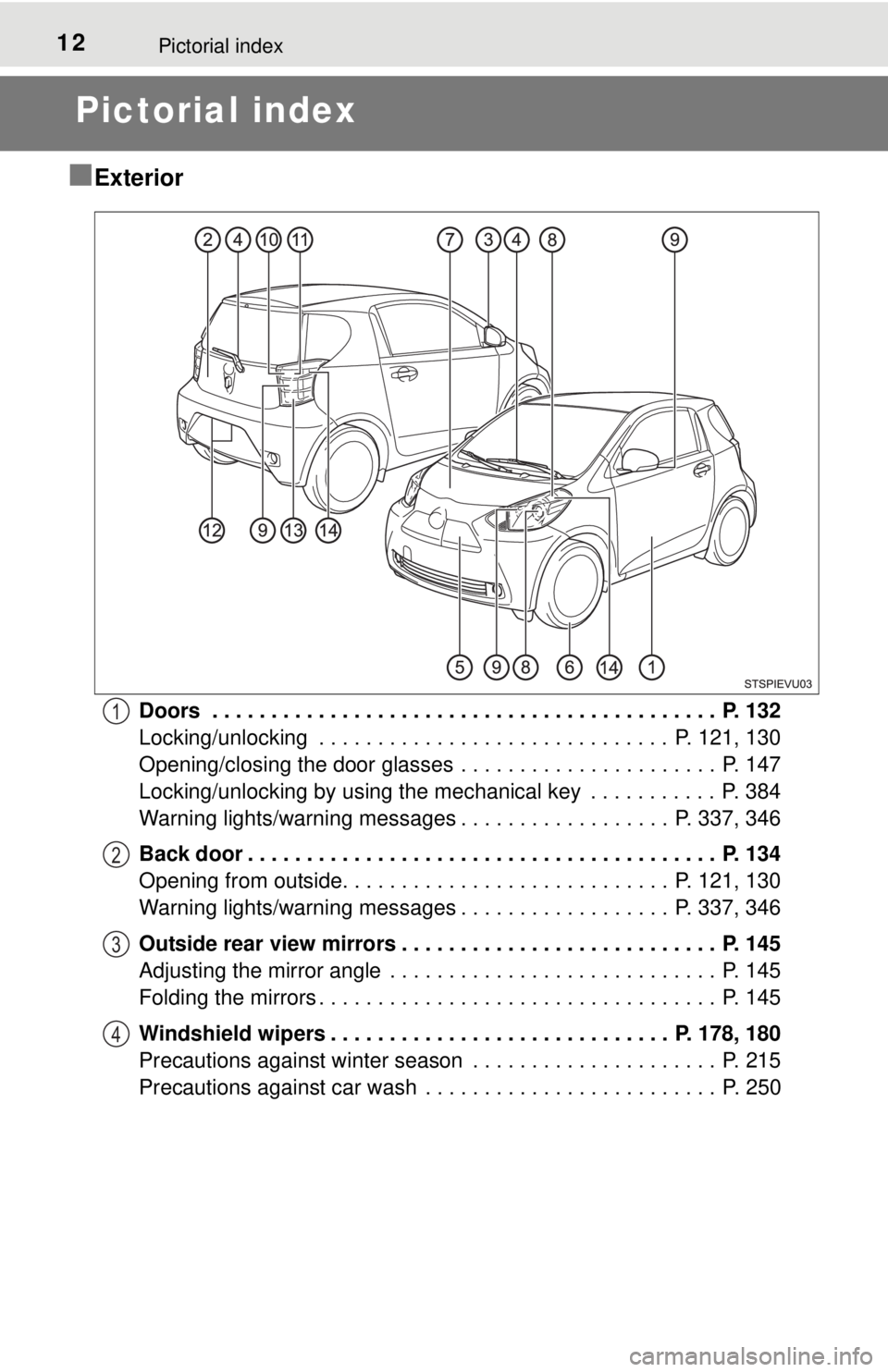
Doors . . . . . . . . . . . . . . . . . . . . . . . . . . . . . . . . . . . . . . . . . . . P. 132
Locking/unlocking . . . . . . . . . . . . . . . . . . . . . . . . . . . . . . P. 121, 130
Opening/closing the door glasses . . . . . . . . . . . . . . . . . . . . . . P. 147
Locking/unlocking by using the mechanical key . . . . . . . . . . . P. 384
Warning lights/warning messages . . . . . . . . . . . . . . . . . . P. 337, 346
Back door . . . . . . . . . . . . . . . . . . . . . . . . . . . . . . . . . . . . . . . . P. 134
Opening from outside. . . . . . . . . . . . . . . . . . . . . . . . . . . . P. 121, 130
Warning lights/warning messages . . . . . . . . . . . . . . . . . . P. 337, 346
Outside rear view mirrors . . . . . . . . . . . . . . . . . . . . . . . . . . . P. 145
Adjusting the mirror angle . . . . . . . . . . . . . . . . . . . . . . . . . . . . P. 145
Folding the mirrors . . . . . . . . . . . . . . . . . . . . . . . . . . . . . . . . . . P. 145
Windshield wipers . . . . . . . . . . . . . . . . . . . . . . . . . . . . . P. 178, 180
Precautions against winter season . . . . . . . . . . . . . . . . . . . . . P. 215
Precautions against car wash . . . . . . . . . . . . . . . . . . . . . . . . . P. 2501
2
3
4
Page 51 of 444
511-1. For safe use
1
For safety and security
Safety infor mation for children
●It is recommended that children sit in the rear seats to avoid acci-
dental contact with the shift lever, wiper switch etc.
● Use the window lock switch to avoid children opening the door
while driving or operating the power window accidentally.
● Do not let small children operate equipment which may catch or
pinch body parts, such as the power window, hood, back door,
seats etc.
Observe the following precautions when children are in the vehi-
cle.
Use a child restraint system appropriate for the child, until the
child becomes large enough to pr operly wear the vehicle’s seat
belt.
CAUTION
Never leave children unattended in the vehicle, and never allow children to
have or use the key.
Children may be able to start the vehicle or shift the vehicle into neutral.
There is also a danger that children may injure themselves by playing with
the windows or other features of the vehicle. In addition, heat build-up or
extremely cold temperatures inside the vehicle can be fatal to children.
Page 66 of 444
661-2. Theft deterrent system
Immobilizer system
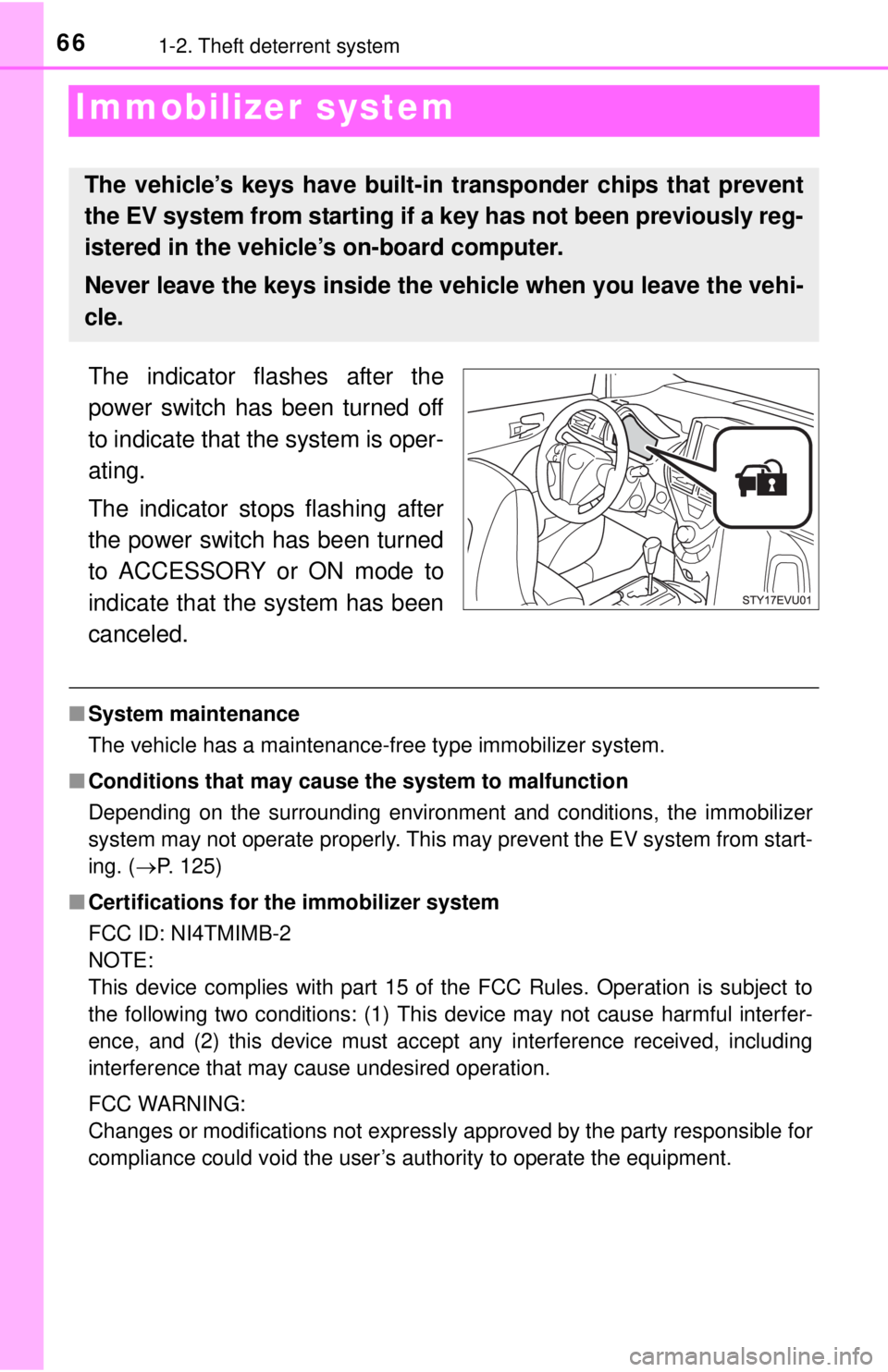
The indicator flashes after the
power switch has been turned off
to indicate that the system is oper-
ating.
The indicator stops flashing after
the power switch has been turned
to ACCESSORY or ON mode to
indicate that the system has been
canceled.
■System maintenance
The vehicle has a maintenance-free type immobilizer system.
■ Conditions that may cause the system to malfunction
Depending on the surrounding environment and conditions, the immobilizer
system may not operate properly. This may prevent the EV system from start-
ing. ( P. 125)
■ Certifications for th e immobilizer system
FCC ID: NI4TMIMB-2
NOTE:
This device complies with part 15 of the FCC Rules. Operation is subject to
the following two conditions: (1) This device may not cause harmful interfer-
ence, and (2) this device must accept any interference received, including
interference that may cause undesired operation.
FCC WARNING:
Changes or modifications not expressly approved by the party responsible for
compliance could void the user’s authority to operate the equipment.
The vehicle’s keys have built-in transponder chips that prevent
the EV system from starting if a key has not been previously reg-
istered in the vehicle’s on-board computer.
Never leave the keys inside the vehicle when you leave the vehi-
cle.
Page 117 of 444

117
4
Operation of
each component
4-1. Key information
Keys .................................. 118
4-2. Opening, closing and locking the doors
Smart key system ............. 120
Wireless remote control .... 130
Side doors ......................... 132
Back door .......................... 134
4-3. Adjusting the seats Front seats ........................ 138
Rear seats......................... 140
4-4. Adjusting the steering wheel and mirrors
Steering wheel .................. 143
Inside rear view mirror ...... 144
Outside rear view mirrors ............................. 145
4-5. Opening, closing the windows
Power windows ................. 147
Page 118 of 444
1184-1. Key information
Keys
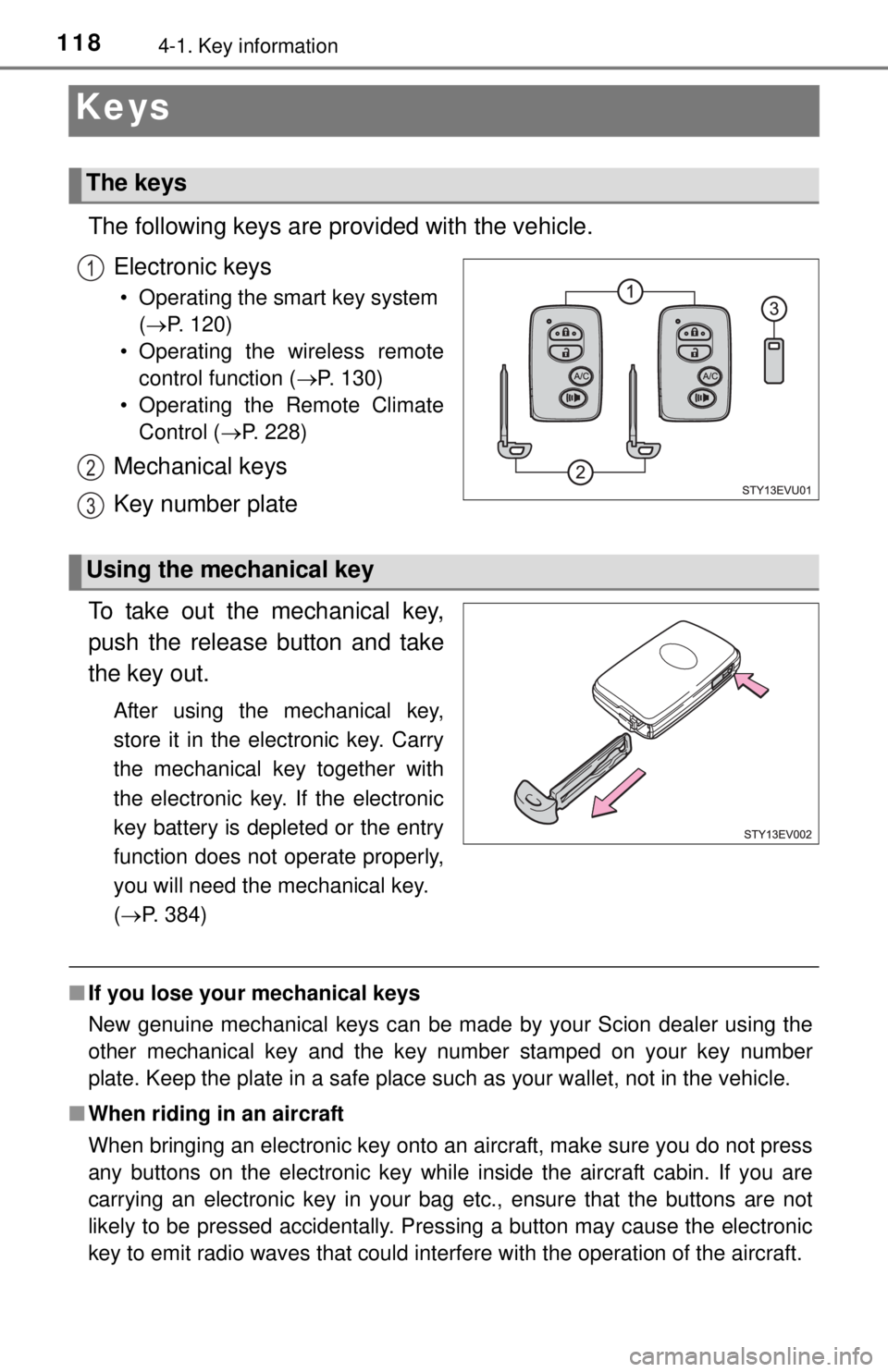
The following keys are provided with the vehicle.Electronic keys
• Operating the smart key system (P. 120)
• Operating the wireless remote control function ( P. 130)
• Operating the Remote Climate Control ( P. 228)
Mechanical keys
Key number plate
To take out the mechanical key,
push the release button and take
the key out.
After using the mechanical key,
store it in the electronic key. Carry
the mechanical key together with
the electronic key. If the electronic
key battery is depleted or the entry
function does not operate properly,
you will need the mechanical key.
( P. 384)
■ If you lose your mechanical keys
New genuine mechanical keys can be made by your Scion dealer using the
other mechanical key and the key number stamped on your key number
plate. Keep the plate in a safe place such as your wallet, not in the vehicle.
■ When riding in an aircraft
When bringing an electronic key onto an aircraft, make sure you do not press
any buttons on the electronic key while inside the aircraft cabin. If you are
carrying an electronic key in your bag etc., ensure that the buttons are not
likely to be pressed accidentally. Pressing a button may cause the electronic
key to emit radio waves that could interfere with the operation of the aircraft.
The keys
1
2
3
Using the mechanical key
Page 119 of 444
1194-1. Key information
4
Operation of each component
NOTICE
■To prevent key damage
● Do not drop the keys, subject them to strong shocks or bend them.
● Do not expose the keys to high temperatures for long periods of time.
● Do not get the keys wet or wash them in an ultrasonic washer etc.
● Do not attach metallic or magnetic materials to the keys or place the keys
close to such materials.
● Do not disassemble the keys.
● Do not attach a sticker or anything else to the surface of the electronic key.
● Do not place the keys near objects that produce magnetic fields, such as
TVs, audio systems and induction cooker s, or medical electrical equip-
ment, such as low-frequency therapy equipment.
■ Carrying the electronic key on your person
Carry the electronic key 3.9 in. (10 cm) or more away from electric appli-
ances that are turned on. Radio waves emitted from electric appliances
within 3.9 in. (10 cm) of the electronic key may interfere with the key, caus-
ing the key to not function properly.
■ In case of a smart key system malfunction or other key-related prob-
lems
Take your vehicle with all the electronic keys provided with your vehicle to
your Scion dealer.
■ When an electronic key is lost
If the electronic key remains lost, the risk of vehicle theft increases signifi-
cantly. Visit your Scion dealer immediately with all remaining electronic keys
that was provided with your vehicle.
Page 120 of 444
1204-2. Opening, closing and locking the doors
Smar t key system
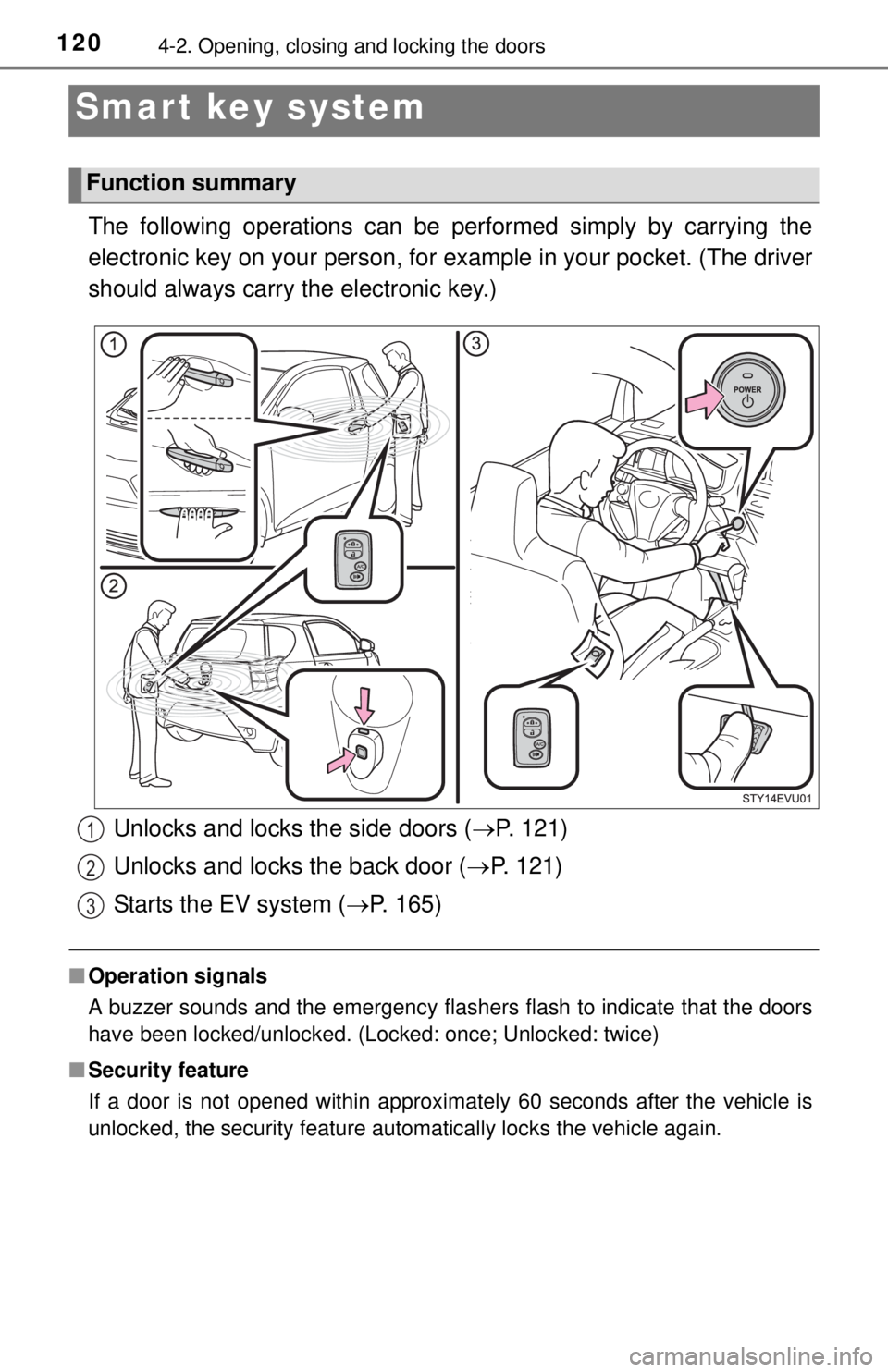
The following operations can be performed simply by carrying the
electronic key on your person, for example in your pocket. (The driver
should always carry the electronic key.)
■ Operation signals
A buzzer sounds and the emergency flashers flash to indicate that the doors
have been locked/unlocked. (Locked: once; Unlocked: twice)
■ Security feature
If a door is not opened within approximately 60 seconds after the vehicle is
unlocked, the security feature automatically locks the vehicle again.
Function summary
Unlocks and locks the side doors ( P. 121)
Unlocks and locks the back door ( P. 121)
Starts the EV system ( P. 165)1
2
3