key TOYOTA iQ EV 2013 (in English) Owner's Manual
[x] Cancel search | Manufacturer: TOYOTA, Model Year: 2013, Model line: iQ EV, Model: TOYOTA iQ EV 2013Pages: 444, PDF Size: 7.34 MB
Page 150 of 444
1505-1. Before driving
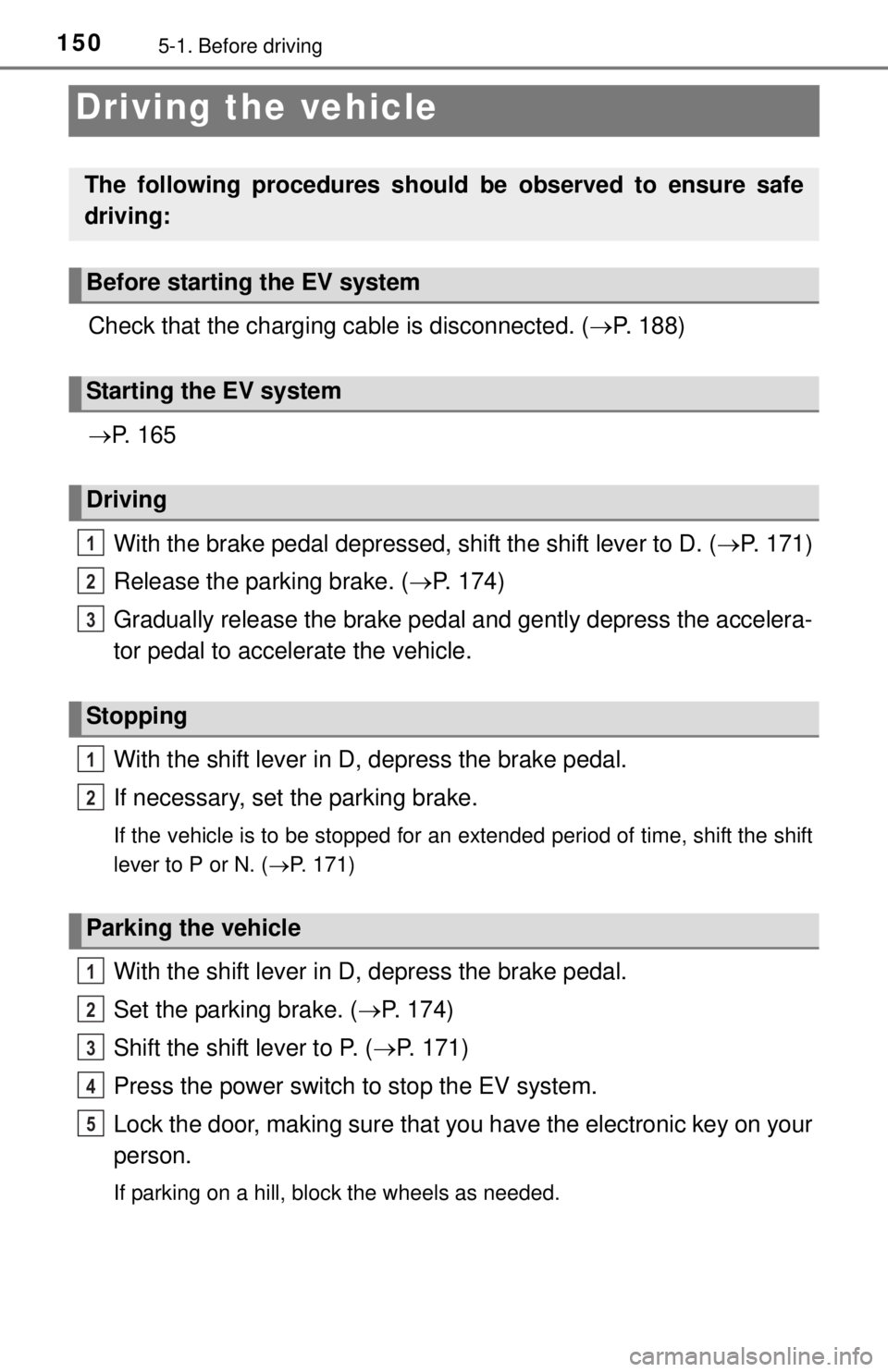
Driving the vehicle
Check that the charging cable is disconnected. (P. 188)
P. 1 6 5
With the brake pedal depressed, shift the shift lever to D. ( P. 171)
Release the parking brake. ( P. 174)
Gradually release the brake pedal and gently depress the accelera-
tor pedal to accelerate the vehicle.
With the shift lever in D, depress the brake pedal.
If necessary, set the parking brake.
If the vehicle is to be stopped for an extended period of time, shift the shift
lever to P or N. ( P. 171)
With the shift lever in D, depress the brake pedal.
Set the parking brake. ( P. 174)
Shift the shift lever to P. ( P. 171)
Press the power switch to stop the EV system.
Lock the door, making sure that you have the electronic key on your
person.
If parking on a hill, block the wheels as needed.
The following procedures should be observed to ensure safe
driving:
Before starting the EV system
Starting the EV system
Driving
Stopping
Parking the vehicle
1
2
3
1
2
1
2
3
4
5
Page 165 of 444
1655-2. Driving procedures
5
Driving
Power (ignition) switch
Check that the charging cable is disconnected. (P. 188)
Check that the parking brake is set.
Check that the shift lever is set in P.
Firmly depress the brake pedal.
The power switch indicator will turn green. If the indicator does not turn
green, the EV system cannot be started.
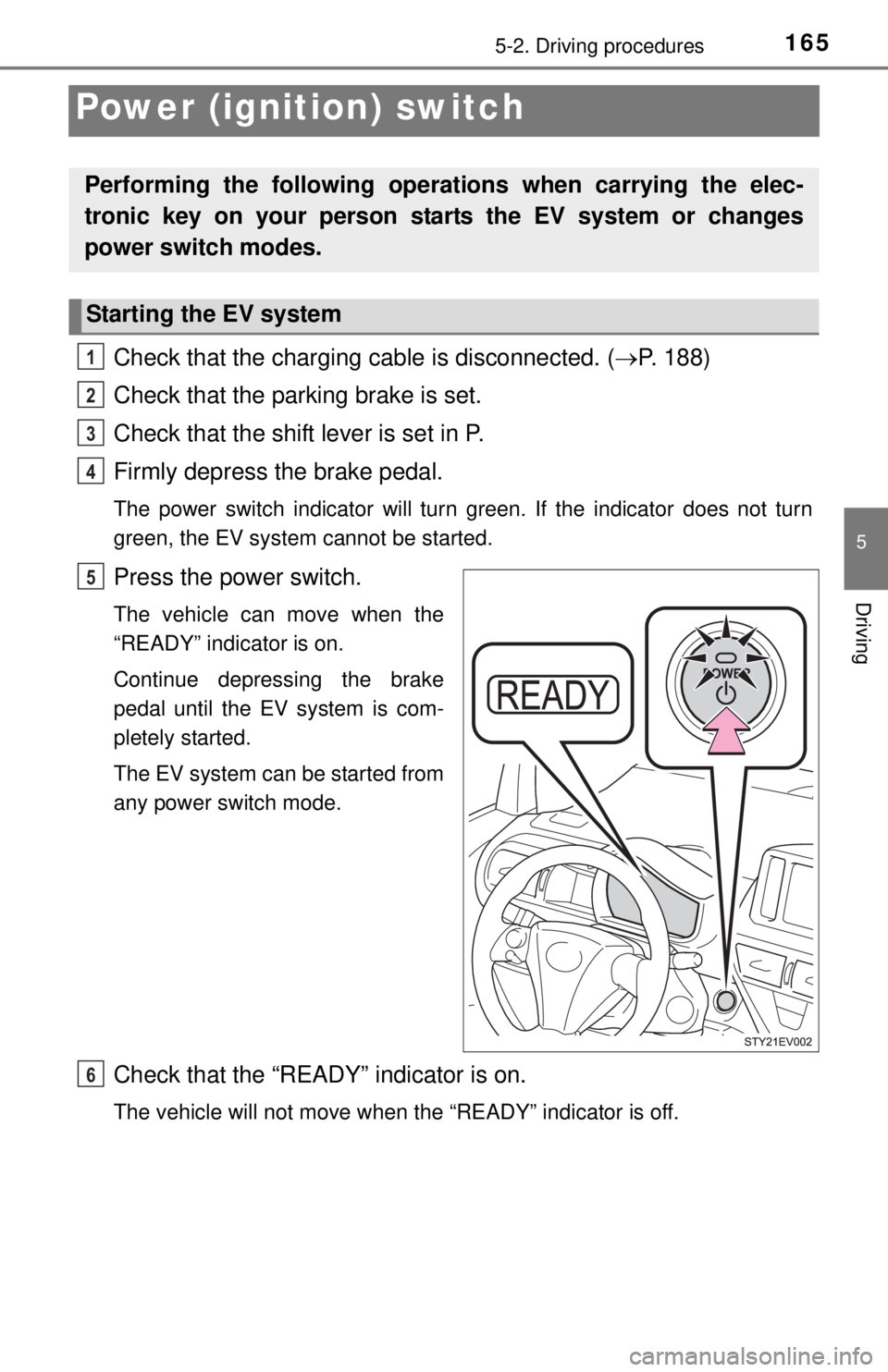
Press the power switch.
The vehicle can move when the
“READY” indicator is on.
Continue depressing the brake
pedal until the EV system is com-
pletely started.
The EV system can be started from
any power switch mode.
Check that the “READY” indicator is on.
The vehicle will not move when the “READY” indicator is off.
Performing the following operati ons when carrying the elec-
tronic key on your person starts the EV system or changes
power switch modes.
Starting the EV system
1
2
3
4
5
6
Page 167 of 444
1675-2. Driving procedures
5
Driving
If the EV system is stopped with the shift lever in a position other than
P, the power switch will not be turned off but instead be turned to
ACCESSORY mode. Perform the following procedure to turn the
switch off:Check that the parking brake is set.
Shift the shift lever to P.
Check that the power switch indicator is illu minated amber and then
press the power switch once.
Check that the power switch indicator goes out.
■ Auto power off function
If the vehicle is left in ACCESSORY mode for more than 20 minutes or ON
mode (the EV system is not operation) for more than an hour with the shift
lever in P, the power switch will automatically turn off. Furthermore, when the
mode is turned to ON mode while charging, the power switch will automati-
cally turn off after approximately 2 minutes have elapsed.
However, this function cannot entirely prevent 12-volt battery from discharge.
Do not leave the vehicle with the power switch in ACCESSORY or ON mode
for long periods of time when the EV system is not operating.
■ Sounds and vibrations speci fic to an electric vehicle
P. 7 7
■ Electronic key battery depletion
P. 128
■ When the ambient temperature is lo w, such as during winter driving con-
ditions
● When the temperature of the battery for driving power is low, a warning
message is displayed on the multi-information display and the output of the
electric motor will be restricted. ( P. 348)
● The “READY” indicator may flash for a long time when the EV system is
starting. Driving will become possible onc e the “READY” indicator has illumi-
nated. Wait until the “READY” indicator has illuminated.
■ Conditions affecting operation
P. 125
■ Notes for the entry function
P. 126
When stopping the EV system with the shift lever in a position
other than P
1
2
3
4
Page 168 of 444
1685-2. Driving procedures
■If the EV system does not start
●The charging cable may be attached to the vehicle. ( P. 188)
● The immobilizer system may not have been deactivated. ( P. 66)
Contact your Scion dealer.
● Check that the shift lever is securely set in P. The EV system may not start if
the shift lever is displaced out of P. “SHIFT TO P POSITION WHEN
STARTING” will be displayed on the multi-information display.
● The steering lock may not have been deactivated.
■ Steering lock
After turning the power switch off and opening and closing the doors, the
steering wheel will be locked due to the steering lock function. Operating the
power switch again automatically cancels the steering lock.
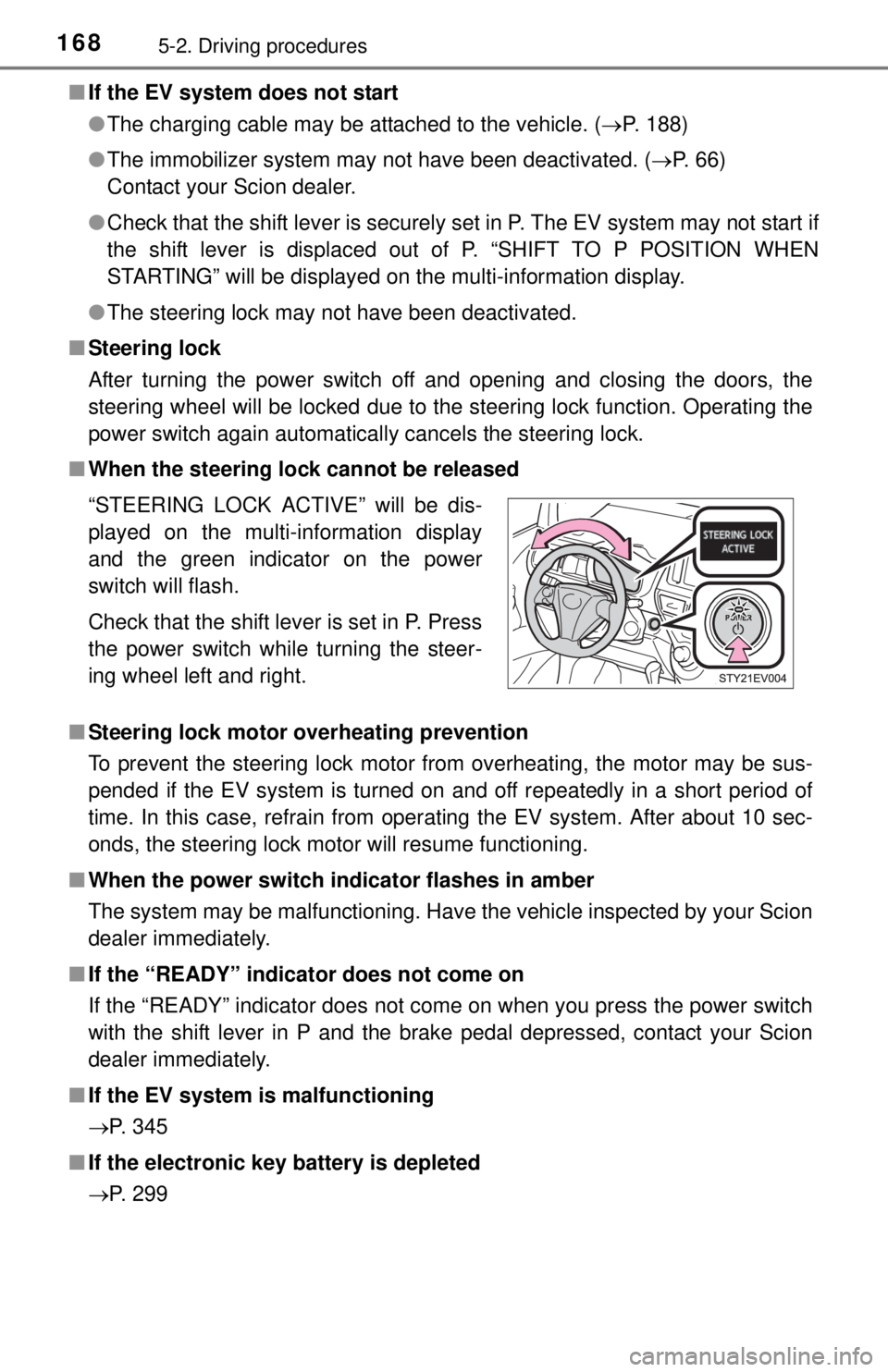
■ When the steering lock cannot be released
■ Steering lock motor overheating prevention
To prevent the steering lock motor from overheating, the motor may be sus-
pended if the EV system is turned on and off repeatedly in a short period of
time. In this case, refrain from operating the EV system. After about 10 sec-
onds, the steering lock motor will resume functioning.
■ When the power switch in dicator flashes in amber
The system may be malfunctioning. Have the vehicle inspected by your Scion
dealer immediately.
■ If the “READY” indicator does not come on
If the “READY” indicator does not come on when you press the power switch
with the shift lever in P and the brake pedal depressed, contact your Scion
dealer immediately.
■ If the EV system is malfunctioning
P. 345
■ If the electronic key battery is depleted
P. 299 “STEERING LOCK ACTIVE” will be dis-
played on the multi-information display
and the green indicator on the power
switch will flash.
Check that the shift lever is set in P. Press
the power switch while turning the steer-
ing wheel left and right.
Page 169 of 444

1695-2. Driving procedures
5
Driving
■Operation of the power switch
●When operating the power switch, one short, firm press is enough. If the
switch is pressed improperly, the EV system may not start or the power
switch mode may not change. It is not necessary to press and hold the
switch.
● If attempting to restart the EV system immediately after turning the power
switch off, the EV system may not start in some cases. After turning the
power switch off, please wait a few seconds before restarting the EV sys-
tem.
■ If the smart key system has been deactivated in a customized setting
P. 384
CAUTION
■When starting the EV system
Always start the EV system while sitting in the driver’s seat. Do not depress
the accelerator pedal while starting the EV system under any circum-
stances.
Doing so may cause an accident resulting in death or serious injury.
■ Caution while driving
If EV system failure occurs while the vehicle is moving, do not lock or open
the doors until the vehicle reaches a safe and complete stop. Activation of
the steering lock in this circumstance may lead to an accident, resulting in
death or serious injury.
■ Stopping the EV system in an emergency
If you want to stop the EV system in an emergency while driving the vehicle,
press and hold the power switch for more than 2 seconds, or press it briefly
3 times or more in succession. ( P. 329)
However, do not touch the power switch while driving except in an emer-
gency. Turning the EV system off while driving will not cause loss of steering
or braking control, but the power assist to these systems will be lost. This
will make it more difficult to steer and brake, so you should pull over and
stop the vehicle as soon as it is safe to do so.
Page 230 of 444

2306-1. Using the air conditioning system and defogger
■Conditions affecting operation
P. 125
■ When using the Remo te Climate Control
A charging message will be displayed on the multi-information display. Differ-
ent messages will be displayed depending on when the Remote Climate Con-
trol was started (after charging or during charging). ( P. 355)
■ While the Remote Climate Control is operating
●Depending on the operating condition of the Remote Climate Control, the
electric fan may spin and an operating noise may be heard. However, this
does not indicate a malfunction.
● The Remote Climate Control may stop operating temporarily if other fea-
tures that use electricity (for example, the seat heater, lights, windshield wip-
ers) are in operation or if the charge level of the 12-volt battery becomes
low.
■ Electronic key battery depletion
P. 128
■ When the electronic key battery is fully depleted
P. 299
■ Automatic cancelation of the charging timer function
P. 208
■ Customization that can be configured at Scion dealer
Setting (e.g. Operation using the on the wireless remote control) can
be changed.
(Customizable features: P. 414)
Page 235 of 444
2356-2. Using the interior lights
6
Interior features
■Illuminated entry system
The light automatically turn on/off according to power switch mode, the pres-
ence of the electronic key, whether the doors are locked/unlocked, and
whether the doors are opened/closed.
■ To prevent 12-volt battery discharge
If the interior light remains on when the door is not fully closed and the interior
light switch is in the position, the light will go off automatically after 20
minutes.
■ Customization
Setting (e.g. the time elapsed before light turn off) can be changed.
(Customizable features: P. 414)
NOTICE
■To prevent 12-volt battery discharge
Do not leave the light on longer than necessary when the EV system is off.
Page 247 of 444

247
7Maintenance and care
7-1. Maintenance and careCleaning and protecting the vehicle exterior .......... 248
Cleaning and protecting the vehicle interior ........... 251
7-2. Maintenance Maintenance requirements ................... 254
General maintenance ........ 256 7-3. Do-it-yourself maintenance
Do-it-yourself service precautions ..................... 260
Inspecting the charging cable ............................... 262
Hood ................................. 264
Positioning a floor jack ...... 266
Replacing the tire .............. 269
Motor compartment ........... 277
Tires .................................. 285
Tire inflation pressure ....... 292
Wheels .............................. 295
Air conditioning filter.......... 297
Electronic key battery........ 299
Checking and replacing fuses ............................... 301
Light bulbs......................... 311
Page 248 of 444
2487-1. Maintenance and care
Cleaning and protecting the vehicle
exterior
● Working from top to bottom, liber ally apply water to the vehicle
body, wheel wells and underside of the vehicle to remove any dirt
and dust.
● Wash the vehicle body using a sponge or soft cloth, such as a car
wash mitt.
● For hard-to-remove marks, use car wash soap and rinse thoroughly
with water.
● Wipe away any water.
● Wax the vehicle when the wate rproof coating deteriorates.
If water does not bead on a clean surface, apply wax when the vehicle
body is cool.
■Before car washes
Check that the charging inlet caps and recharge inlet door on your vehicle are
closed properly.
■ Automatic car washes
●Fold the mirrors and remove the antenna before washing the vehicle. Start
washing from the front of the vehicle. Make sure to re-install the antenna
and extend the mirrors before driving.
● Brushes used in automatic car washes may scratch the vehicle surface and
harm your vehicle’s paint.
■ High pressure car washes
Do not allow the nozzles of the car wash to come within close proximity of the
windows.
■ When using a car wash
If the door handle becomes wet while the electronic key is within the ef\
fective
range, the door may lock and unlock repeatedly. Place the key in a position 6
ft. (2 m) or more separate from the vehicle while the vehicle is being washed.
(Take care to ensure that the key is not stolen.)
Perform the following to protect the vehicle and maintain it in
prime condition:
Page 282 of 444

2827-3. Do-it-yourself maintenance
■After recharging/reconnecting the 12-volt battery
●Unlocking the doors using the smart key system may not be possible imme-
diately after reconnecting the 12-volt battery. If this happens, use the wire-
less remote control or the mechanical key to lock/unlock the doors.
● Start the EV system with the power switch in ACCESSORY mode. The EV
system may not start with the power switch turned off. However, the EV sys-
tem will operate normally from the second attempt.
● The power switch mode is recorded by the vehicle. If the 12-volt battery is
reconnected, the vehicle will return the power switch mode to the status it
was in before the 12-volt battery was disconnected. Make sure to turn the
power switch off before disconnect the 12-volt battery. Take extra care when
connecting the 12-volt battery if the power switch mode prior to discharge is
unknown.
If the system will not start even after multiple attempts at all methods above,
contact your Scion dealer.
CAUTION
■ Chemicals in the 12-volt battery
The 12-volt battery contains poisonous and corrosive sulfuric acid and may
produce hydrogen gas which is flammable and explosive. To reduce the risk
of death or serious injury, take the following precautions while working on or
near the 12-volt battery:
● Do not cause sparks by touching the 12-volt battery terminals with tools.
● Do not smoke or light a match near the 12-volt battery.
● Avoid contact with eyes, skin and clothes.
● Never inhale or swallow electrolyte.
● Wear protective safety glasses when working near the 12-volt battery.
● Keep children away from the 12-volt battery.
■ Where to safely charge the 12-volt battery
Always charge the 12-volt battery in an open area. Do not charge the
12-volt battery in a garage or closed room where there is insufficient ventila-
tion.
■ How to recharge th e 12-volt battery
Only perform a slow charge (5 A or less). The 12-volt battery may explode if
charged at a quicker rate.