clock reset TOYOTA iQ EV 2013 Owners Manual (in English)
[x] Cancel search | Manufacturer: TOYOTA, Model Year: 2013, Model line: iQ EV, Model: TOYOTA iQ EV 2013Pages: 444, PDF Size: 7.34 MB
Page 105 of 444
1053. Instrument cluster
3
Instrument cluster
Gauges and meters
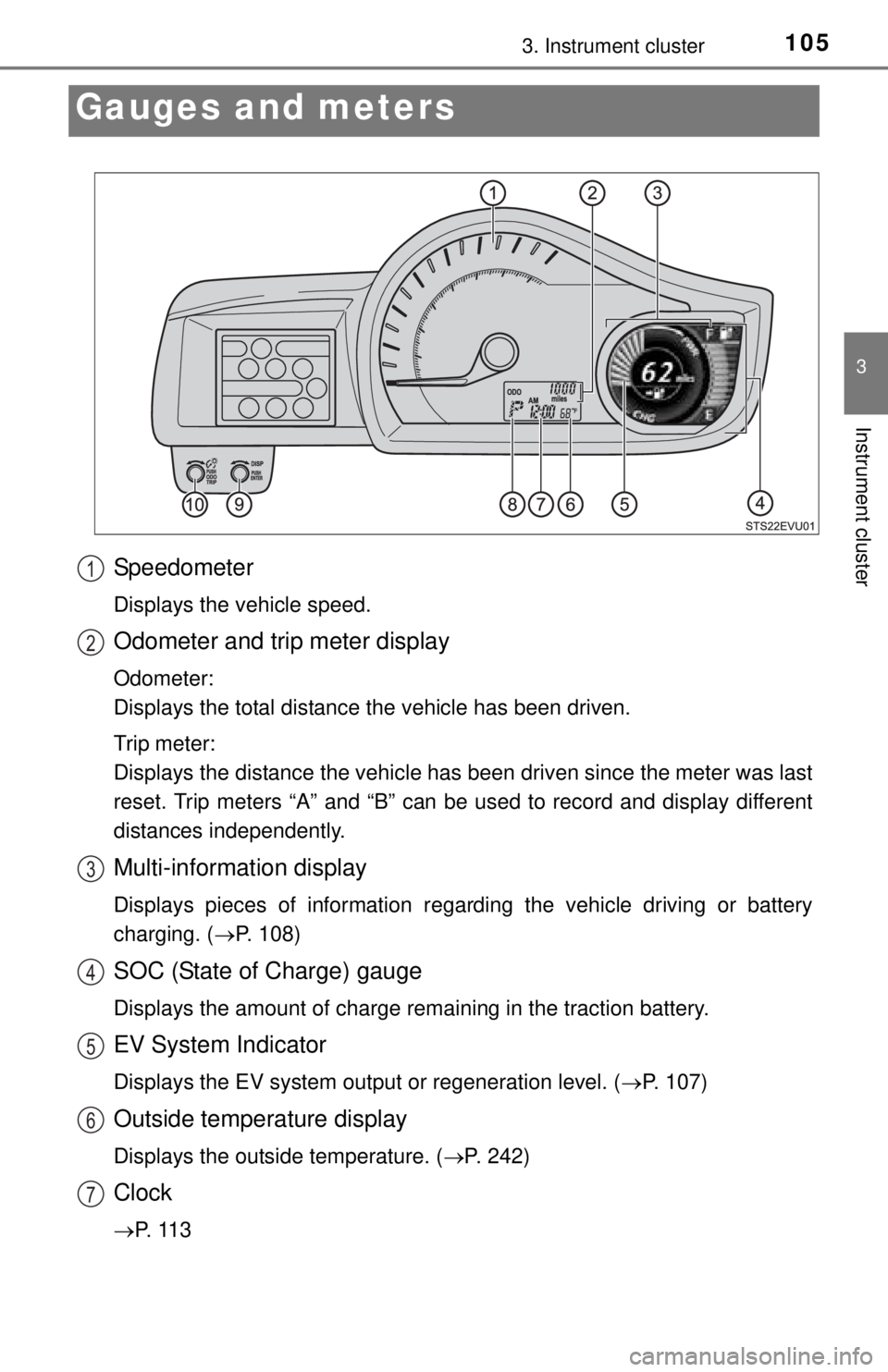
Speedometer
Displays the vehicle speed.
Odometer and trip meter display
Odometer:
Displays the total distance the vehicle has been driven.
Trip meter:
Displays the distance the vehicle has been driven since the meter was last
reset. Trip meters “A” and “B” can be used to record and display different
distances independently.
Multi-information display
Displays pieces of information regarding the vehicle driving or battery
charging. ( P. 108)
SOC (State of Charge) gauge
Displays the amount of charge remaining in the traction battery.
EV System Indicator
Displays the EV system output or regeneration level. ( P. 107)
Outside temperature display
Displays the outside temperature. (P. 242)
Clock
P. 1 1 3
1
2
3
4
5
6
7
Page 111 of 444

1113. Instrument cluster
3
Instrument cluster
Average vehicle speed/Elapsed time
Displays average vehicle speed and elapsed time.
Average vehicle speed: Displays the average vehicle speed
when the function is reset.
Elapsed time: Displays the elaps ed time since it was last reset.
• The function can be reset by pressing the “DISP” knob for longer than
1 second when the average vehicle speed/elapsed time is displayed.
Traction battery information
The battery temperature, motor regenerative performance and
motor output performance are displayed. ( P. 1 1 5 )
Screen settings
The meter settings can be changed. • Eco Driving Indicator Light settings
Eco Driving Indicator Light can be activated or deactivated.
• Clock settings
The clock can be adjusted.
• Ambient Light settings
The speedometer illumination color can be changed or turned off.
The light color will change in sync with the EV system indicator.
Timer charging set (start/finish) time
A timer charging start or finish time will be displayed.
A timer charging set time will be displayed only when the timer charging
has been scheduled. Timer charging set time will not be displayed when
the charging timer function has not been scheduled.
6
7
8
9
Page 116 of 444
1163. Instrument cluster
●Clock
● Instrument panel brightness levels (light intensity will become the maximum
level both when the tail lights are turned on and off)
*: Estimated driving ranges are calculated based on the previous power con-
sumption, which is leaned by the computer. When the 12-volt battery is dis-
connected, the previous power consumption averages will be reset. This
will result in different estimated driving ranges prior to the battery discon-
nection.
■ Adjusting to a full hour
The minute values will be rounded to the nearest hour. So, minute values
from “:00” to “:29” are rounded down, and values from “:30” to “:59” are
rounded up
*.
*: e.g.
1:00 to 1:29 1:00
1:30 to 1:59 2:00
■ Liquid crystal display
Small spots or light spots may appear on the display. This phenomenon is
characteristic of liquid crystal displays, and there is no problem continuing to
use the display.
NOTICE
■During setting up the display
To prevent 12-volt battery discharge, ensure that the EV system is operating
while setting up the display features.
■ The multi-information disp lay at low temperatures
Allow the interior of the vehicle to warm up before using the liquid crystal
information display. At extremely low temperatures, the information display
monitor may respond slowly, and display changes may be delayed.