sensor TOYOTA iQ EV 2013 Owners Manual (in English)
[x] Cancel search | Manufacturer: TOYOTA, Model Year: 2013, Model line: iQ EV, Model: TOYOTA iQ EV 2013Pages: 444, PDF Size: 7.34 MB
Page 30 of 444
301-1. For safe use
CAUTION
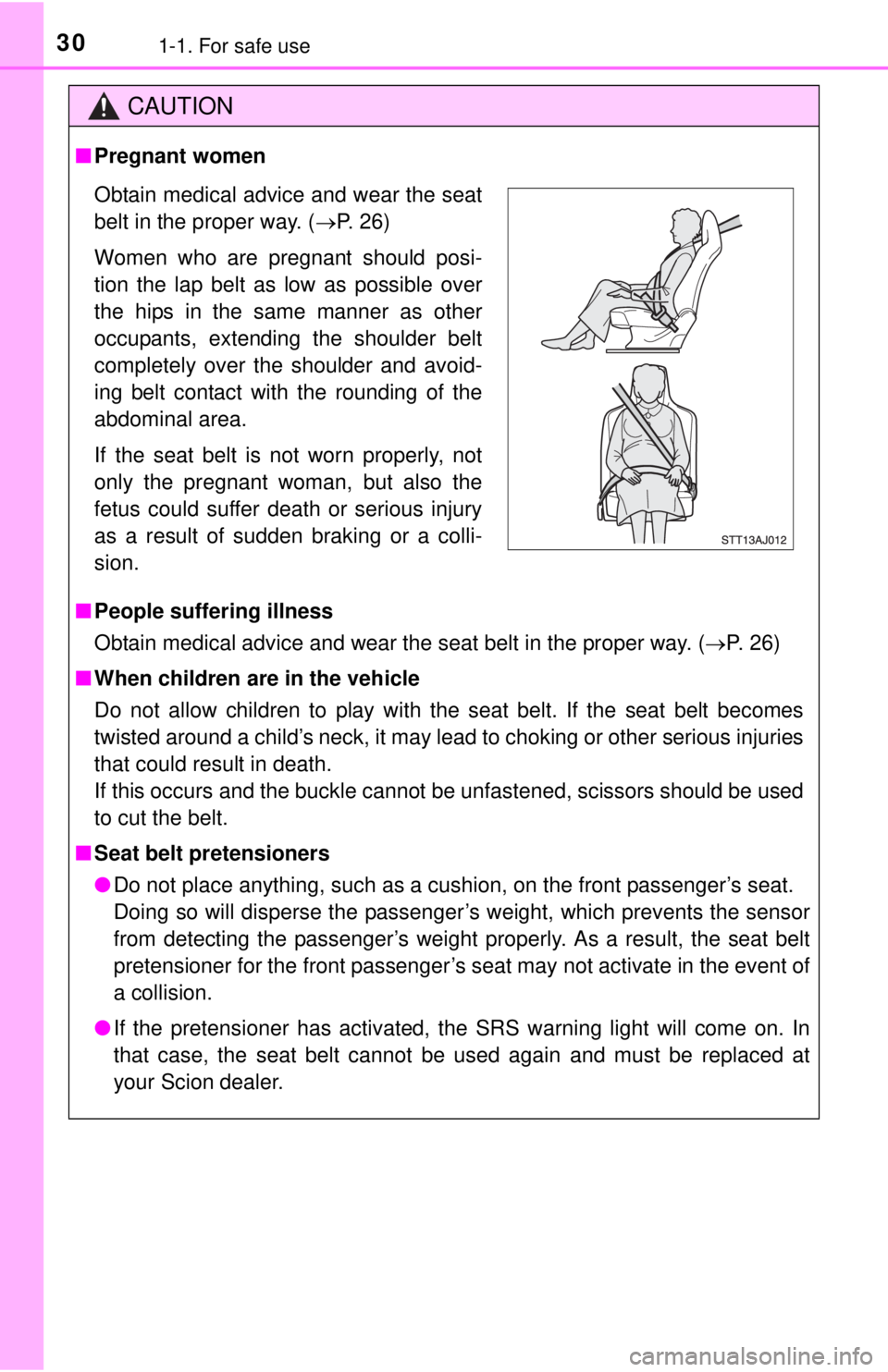
■Pregnant women
■ People suffering illness
Obtain medical advice and wear the seat belt in the proper way. ( P. 26)
■ When children are in the vehicle
Do not allow children to play with the seat belt. If the seat belt becomes
twisted around a child’s neck, it may lead to choking or other serious injuries
that could result in death.
If this occurs and the buckle cannot be unfastened, scissors should be used
to cut the belt.
■ Seat belt pretensioners
● Do not place anything, such as a cushion, on the front passenger’s seat.
Doing so will disperse the passenger’s weight, which prevents the sensor
from detecting the passenger’s weight properly. As a result, the seat belt
pretensioner for the front passenger’s seat may not activate in the event of
a collision.
● If the pretensioner has activated, the SRS warning light will come on. In
that case, the seat belt cannot be used again and must be replaced at
your Scion dealer.
Obtain medical advice and wear the seat
belt in the proper way. ( P. 26)
Women who are pregnant should posi-
tion the lap belt as low as possible over
the hips in the same manner as other
occupants, extending the shoulder belt
completely over the shoulder and avoid-
ing belt contact with the rounding of the
abdominal area.
If the seat belt is not worn properly, not
only the pregnant woman, but also the
fetus could suffer death or serious injury
as a result of sudden braking or a colli-
sion.
Page 34 of 444
341-1. For safe use
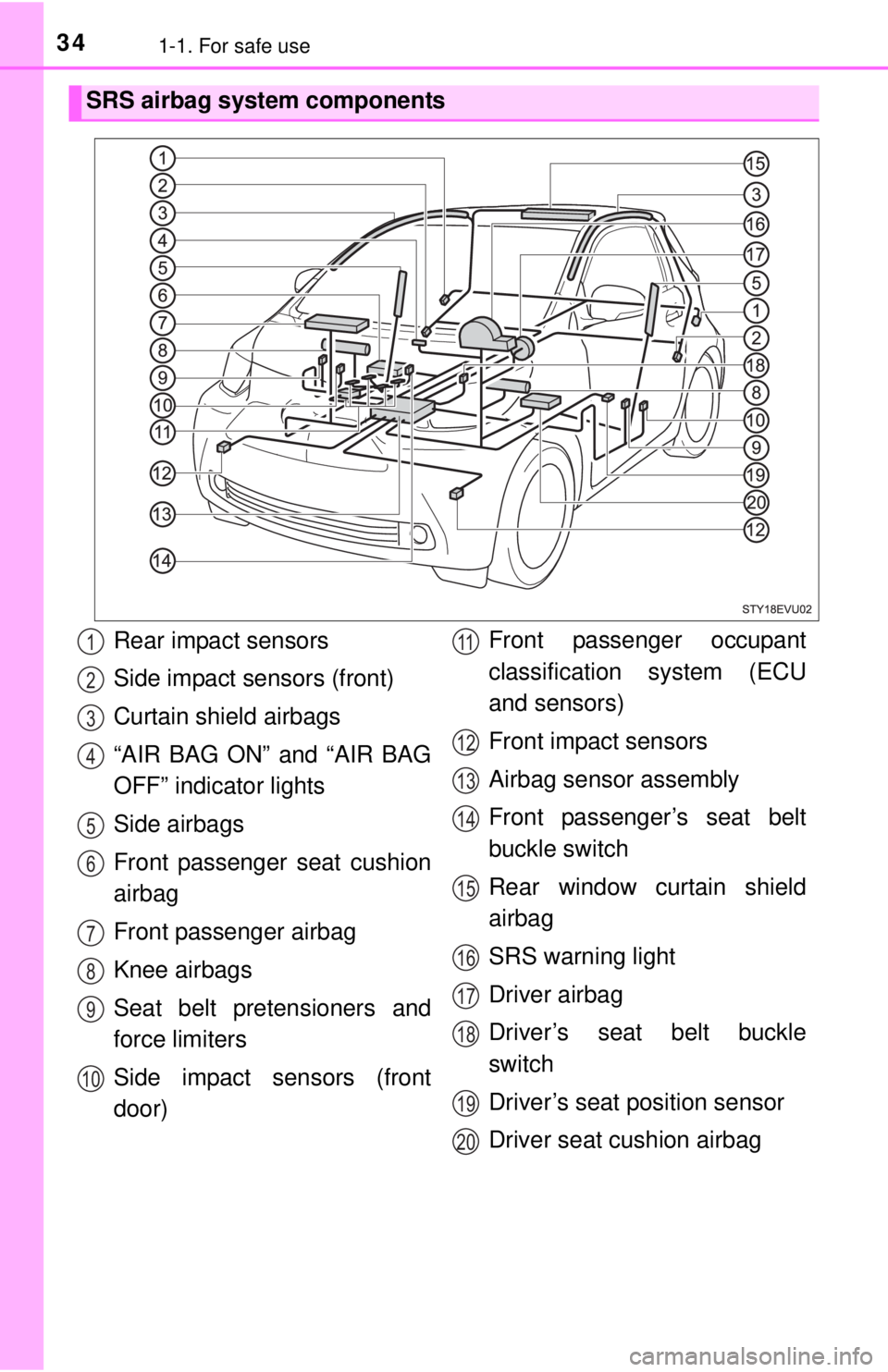
SRS airbag system components
Rear impact sensors
Side impact sensors (front)
Curtain shield airbags
“AIR BAG ON” and “AIR BAG
OFF” indicator lights
Side airbags
Front passenger seat cushion
airbag
Front passenger airbag
Knee airbags
Seat belt pretensioners and
force limiters
Side impact sensors (front
door)Front passenger occupant
classification system (ECU
and sensors)
Front impact sensors
Airbag sensor assembly
Front passenger’s seat belt
buckle switch
Rear window curtain shield
airbag
SRS warning light
Driver airbag
Driver’s seat belt buckle
switch
Driver’s seat position sensor
Driver seat cushion airbag1
2
3
4
5
6
7
8
9
10
11
12
13
14
15
16
17
18
19
20
Page 35 of 444

351-1. For safe use
1
For safety and security
Your vehicle is equipped with ADVANCED AIRBAGS designed based
on the US motor vehicle safety standards (FMVSS208). The airbag
sensor assembly (ECU) controls airbag deployment based on infor-
mation obtained from the sensors et c. shown in the system compo-
nents diagram above. This informat ion includes crash severity and
occupant information. As the airbags deploy, a chemical reaction in
the inflators quickly fills the airbag s with non-toxic gas to help restrain
the motion of the occupants.
CAUTION
■ SRS airbag precautions
Observe the following precautions regarding the SRS airbags.
Failure to do so may cause death or serious injury.
● The driver and all passengers in the vehicle must wear their seat belts
properly.
The SRS airbags are supplemental devices to be used with the seat belts.
● The SRS driver airbag deploys with considerable force, and can cause
death or serious injury especially if the driver is very close to the airbag.
The National Highway Traffic Safety Administration (NHTSA) advises:
Since the risk zone for the driver’s airbag is the first 2 - 3 in. (50 - 75 mm)
of inflation, placing yourself 10 in. (250 mm) from your driver airbag pro-
vides you with a clear margin of safety. This distance is measured from
the center of the steering wheel to your breastbone. If you sit less than 10
in. (250 mm) away now, you can change your driving position in several
ways:
• Move your seat to the rear as far as you can while still reaching the ped- als comfortably.
• Slightly recline the back of the seat. Although vehicle designs vary, many drivers can achieve the 10 in. (250
mm) distance, even with the driver seat all the way forward, simply by
reclining the back of the seat somewhat. If reclining the back of your
seat makes it hard to see the road, raise yourself by using a firm, non-
slippery cushion, or raise the seat if your vehicle has that feature.
• If your steering wheel is adjustable, tilt it downward. This points the air- bag toward your chest instead of your head and neck.
The seat should be adjusted as recommended by NHTSA above, while
still maintaining control of the foot pedals, steering wheel, and your view
of the instrument panel controls.
Page 38 of 444

381-1. For safe use
CAUTION
■SRS airbag precautions
● If a vinyl cover is put on the area where the SRS knee airbags will deploy,
be sure to remove it.
● Do not use seat accessories which cover the parts where the SRS side
airbags and SRS seat cushion airbags inflate as they may interfere with
inflation of the SRS airbags. Such accessories may prevent the SRS side
airbags and SRS seat cushion airbags from activating correctly, disable
the system or cause the SRS side airbags and SRS seat cushion airbags
to inflate accidentally, resulting in death or serious injury.
● Do not strike or apply significant levels of force to the area of the SRS air-
bag components.
Doing so can cause the SRS airbags to malfunction.
● Do not touch any of the component parts immediately after the SRS air-
bags have deployed (inflated) as they may be hot.
● If breathing becomes difficult after the SRS airbags have deployed, open a
door or window to allow fresh air in, or leave the vehicle if it is safe to do
so. Wash off any residue as soon as possible to prevent skin irritation.
● If the areas where the SRS airbags are stored, such as the steering wheel
pad, front and rear pillar, roof side rail garnishes and rear roof headlining
are damaged or cracked, have them replaced by your Scion dealer.
● Do not place anything, such as a cushion, on the front passenger’s seat.
Doing so will disperse the passenger’s weight, which prevents the sensor
from detecting the passenger’s weight properly. As a result, the SRS front
airbags for the front passenger may not deploy in the event of a collision.
●Do not attach anything to areas such as
a door, windshield glass, side and back
door glass, front and rear pillar, roof
side rail, rear roof headlining or assist
grip. (Except for the speed limit label
P. 365)
Page 80 of 444
802-1. Electric vehicle
When a certain level of impact is detected by the impact sensor, the
emergency shut off system turns off the EV system and blocks off the
high voltage current. If the emergency shut off system activates, your
vehicle will not restart. To restart the EV system, contact your Scion
dealer.
A message is automatically displayed when a malfunction occurs in
the EV system or an improper operation is attempted.
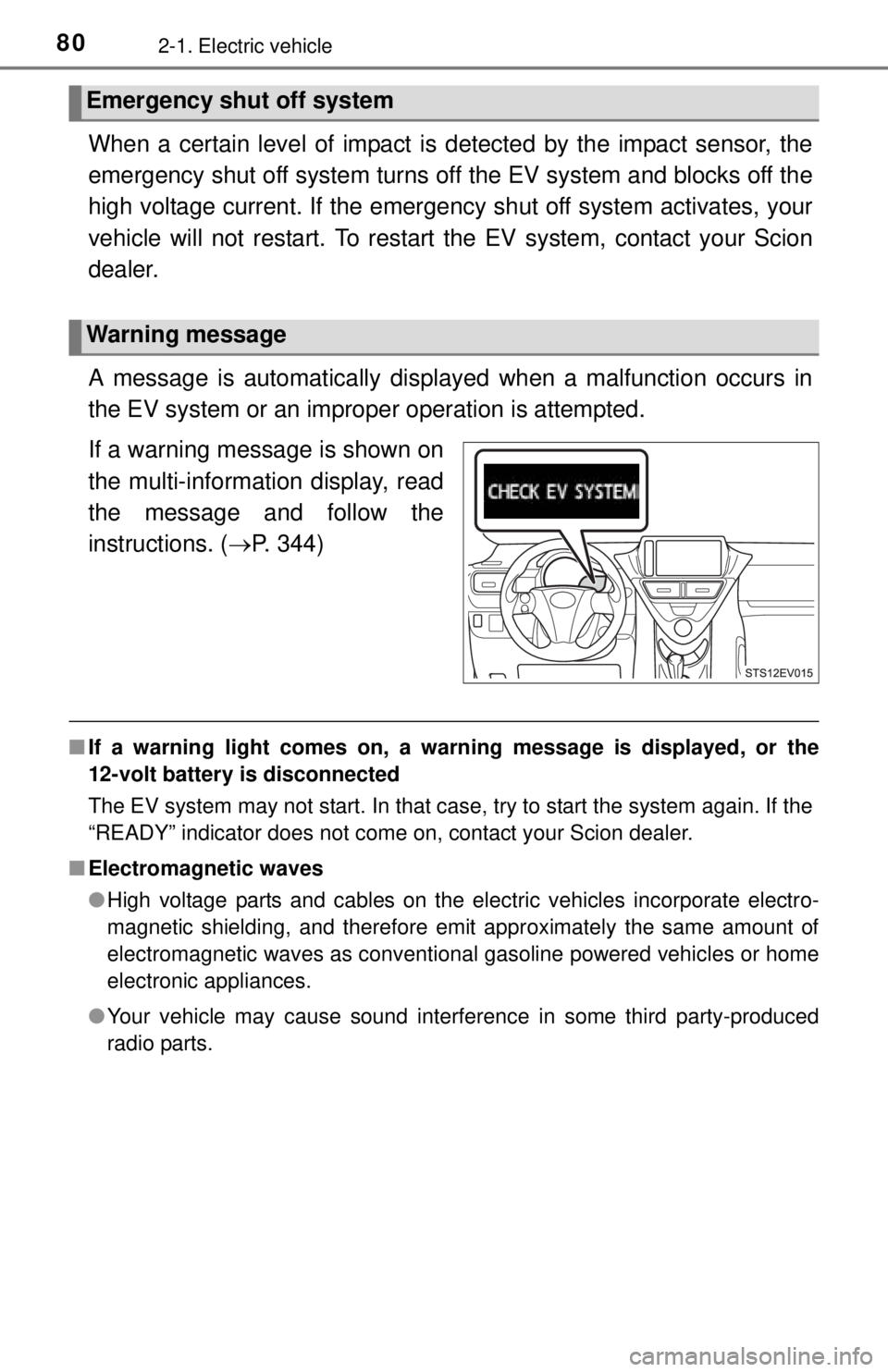
If a warning message is shown on
the multi-information display, read
the message and follow the
instructions. ( P. 344)
■If a warning light comes on, a wa rning message is displayed, or the
12-volt battery is disconnected
The EV system may not start. In that case, try to start the system again. If the
“READY” indicator does not come on, contact your Scion dealer.
■ Electromagnetic waves
●High voltage parts and cables on the electric vehicles incorporate electro-
magnetic shielding, and therefore emit approximately the same amount of
electromagnetic waves as conventional gasoline powered vehicles or home
electronic appliances.
● Your vehicle may cause sound interference in some third party-produced
radio parts.
Emergency shut off system
Warning message
Page 121 of 444
1214-2. Opening, closing and locking the doors
4
Operation of each component
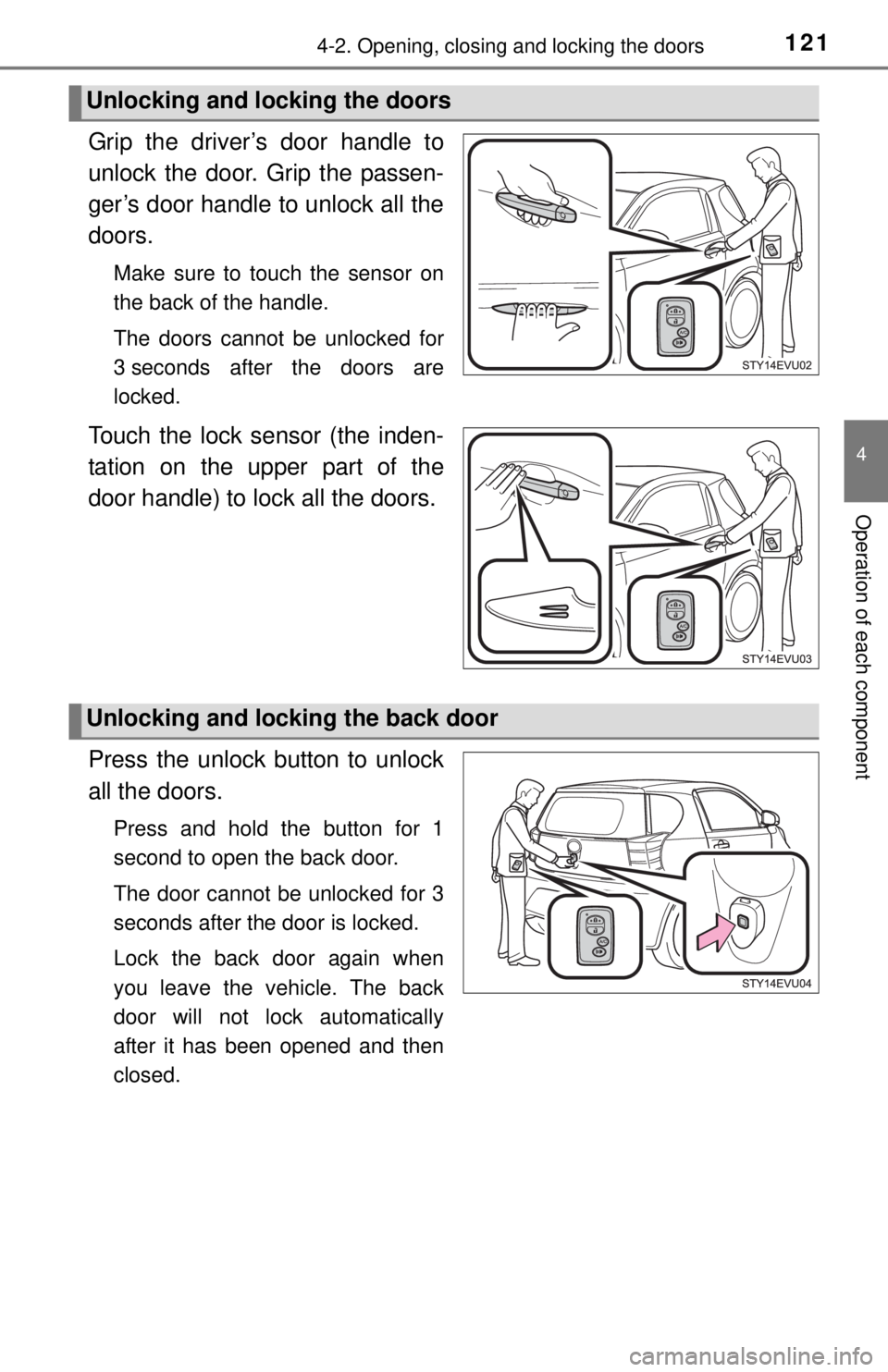
Grip the driver’s door handle to
unlock the door. Grip the passen-
ger’s door handle to unlock all the
doors.
Make sure to touch the sensor on
the back of the handle.
The doors cannot be unlocked for
3 seconds after the doors are
locked.
Touch the lock sensor (the inden-
tation on the upper part of the
door handle) to lock all the doors.
Press the unlock button to unlock
all the doors.
Press and hold the button for 1
second to open the back door.
The door cannot be unlocked for 3
seconds after the door is locked.
Lock the back door again when
you leave the vehicle. The back
door will not lock automatically
after it has been opened and then
closed.
Unlocking and locking the doors
Unlocking and locking the back door
Page 123 of 444
1234-2. Opening, closing and locking the doors
4
Operation of each component
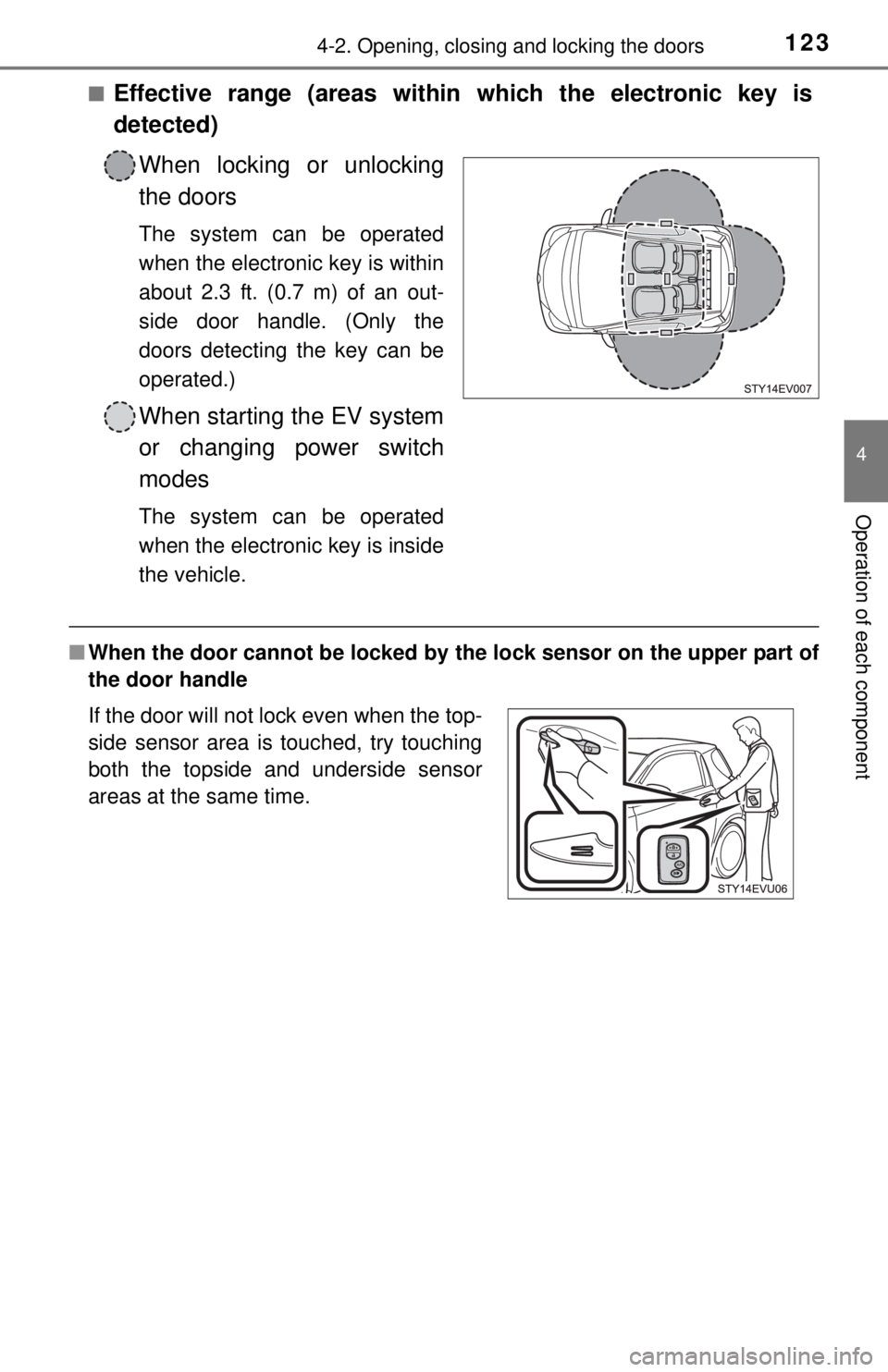
■Effective range (areas within which the electronic key is
detected)When locking or unlocking
the doors
The system can be operated
when the electronic key is within
about 2.3 ft. (0.7 m) of an out-
side door handle. (Only the
doors detecting the key can be
operated.)
When starting the EV system
or changing power switch
modes
The system can be operated
when the electronic key is inside
the vehicle.
■When the door cannot be locked by the lock sensor on the upper part of
the door handle
If the door will not lock even when the top-
side sensor area is touched, try touching
both the topside and underside sensor
areas at the same time.
Page 127 of 444

1274-2. Opening, closing and locking the doors
4
Operation of each component
■Note for locking the doors
●Touching the door lock sensor while wearing gloves may delay or prevent
lock operation. Remove the gloves and touch the lock sensor again.
● When the lock operation is performed using the lock sensor, recognition sig-
nals will be shown up to two consecutive times. After this, no recognition
signals will be given.
● If the door handle becomes wet while the electronic key is within the effec-
tive range, the door may lock and unlock repeatedly. Place the key in a posi-
tion 6 ft. (2 m) or more separate from the vehicle while the vehicle is being
washed. (Take care to ensure that the key is not stolen.)
● If the electronic key is inside the vehicle and a door handle becomes wet
during a car wash, a message may be shown on the multi-information dis-
play and a buzzer will sound outside the vehicle. To turn off the alarm, lock
all the doors.
● The lock sensor may not work properly if it comes into contact with ice,
snow, mud, etc. Clean the lock sensor and attempt to operate it again, or
use the lock sensor on the lower part of the door handle.
● Fingernails may scrape against the door during operation of the door han-
dle. Be careful not to injure fingernails or damage the surface of the door.
■ Note for the unlocking function
●A sudden approach to the effective range or door handle may prevent the
doors from being unlocked. In this case, return the door handle to the origi-
nal position and check that the doors unlock before pulling the door handle
again.
● Gripping the door handle when wearing a glove may not unlock the door.
Remove the gloves and touch the sensor on the back of the door handle
again.
● If there is another electronic key in the detection area, it may take slightly
longer to unlock the doors after the door handle is gripped.
Page 177 of 444
1775-3. Operating the lights and wipers
5
Driving
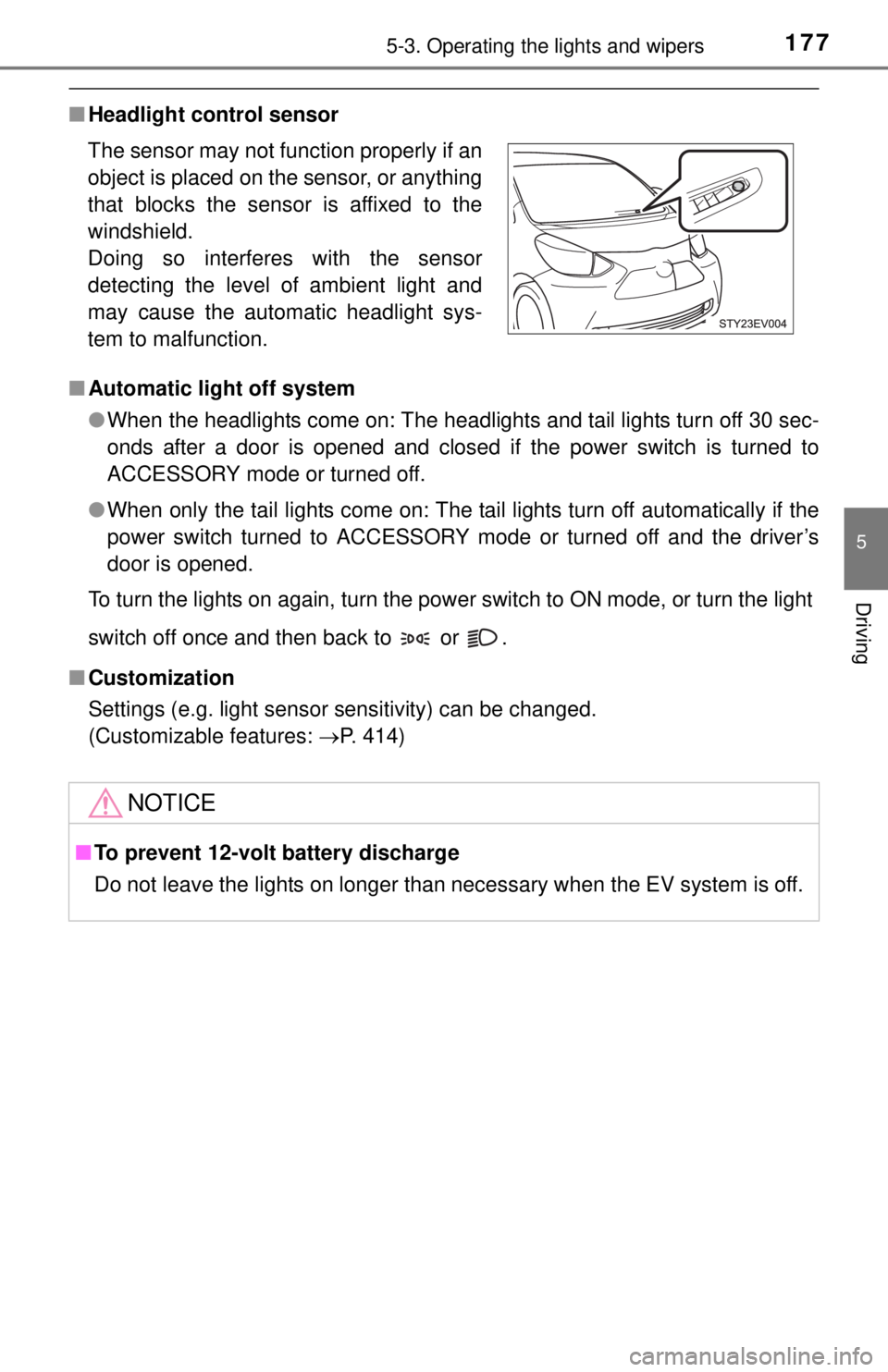
■Headlight control sensor
■ Automatic light off system
●When the headlights come on: The headlights and tail lights turn off 30 sec-
onds after a door is opened and closed if the power switch is turned to
ACCESSORY mode or turned off.
● When only the tail lights come on: The tail lights turn off automatically if the
power switch turned to ACCESSORY mode or turned off and the driver’s
door is opened.
To turn the lights on again, turn the power switch to ON mode, or turn the light
switch off once and then back to or .
■ Customization
Settings (e.g. light sensor sensitivity) can be changed.
(Customizable features: P. 414)
The sensor may not function properly if an
object is placed on the sensor, or anything
that blocks the sensor is affixed to the
windshield.
Doing so interferes with the sensor
detecting the level of ambient light and
may cause the automatic headlight sys-
tem to malfunction.
NOTICE
■
To prevent 12-volt battery discharge
Do not leave the lights on longer than necessary when the EV system is off.
Page 226 of 444
2266-1. Using the air conditioning system and defogger
■Windshield fog detection function
When in automatic mode, the humidity sensor (P. 227) detects fog on the
front windshield and automatically controls the air conditioner, as follows, to
prevent fog.
● The fan speed changes.
● When introducing outside air, in the case of the air outlets (feet), the
ratio of outside air introduced changes.
● In case of the air outlets at (feet), it alternates (upper body and
feet).
■ Outside/recirculated air mode
●The windows may fog up if the recirculated air mode is used.
● When driving on dusty roads such as tunnels or in heavy traffic, set the out-
side/recirculated air mode button to the recirculated air mode. This is effec-
tive in preventing outside air from entering the vehicle interior. During
cooling operation, setting the recirculated air mode will also cool the vehicle
interior effectively.
● Outside/recirculated air mode may automatically switch depending on the
temperature setting or the inside temperature.
■ When the outside temperature exceeds 75°F (24°C) and the air condition-
ing system is on
●In order to reduce the air conditioning power consumption, the air condition-
ing system may switch to recirculated air mode automatically. This may also
reduce traction battery power consumption.
● Recirculated air mode is selected as a default mode when the power switch
is turned to ON mode.
● It is possible to switch to outside air mode at any time by pressing .
■ When the outside temperature is low
●The dehumidification function may not operate even when is pressed.
● When the windshield is defrosted (defogged), it may take a longer time than
that of conventional vehicles.
■ Air conditioning odors
●During use, various odors from inside and outside the vehicle may enter into
and accumulate in the air conditioning system. This may then cause odor to
be emitted from the vents.