set clock TOYOTA iQ EV 2013 Owners Manual (in English)
[x] Cancel search | Manufacturer: TOYOTA, Model Year: 2013, Model line: iQ EV, Model: TOYOTA iQ EV 2013Pages: 444, PDF Size: 7.34 MB
Page 105 of 444
1053. Instrument cluster
3
Instrument cluster
Gauges and meters
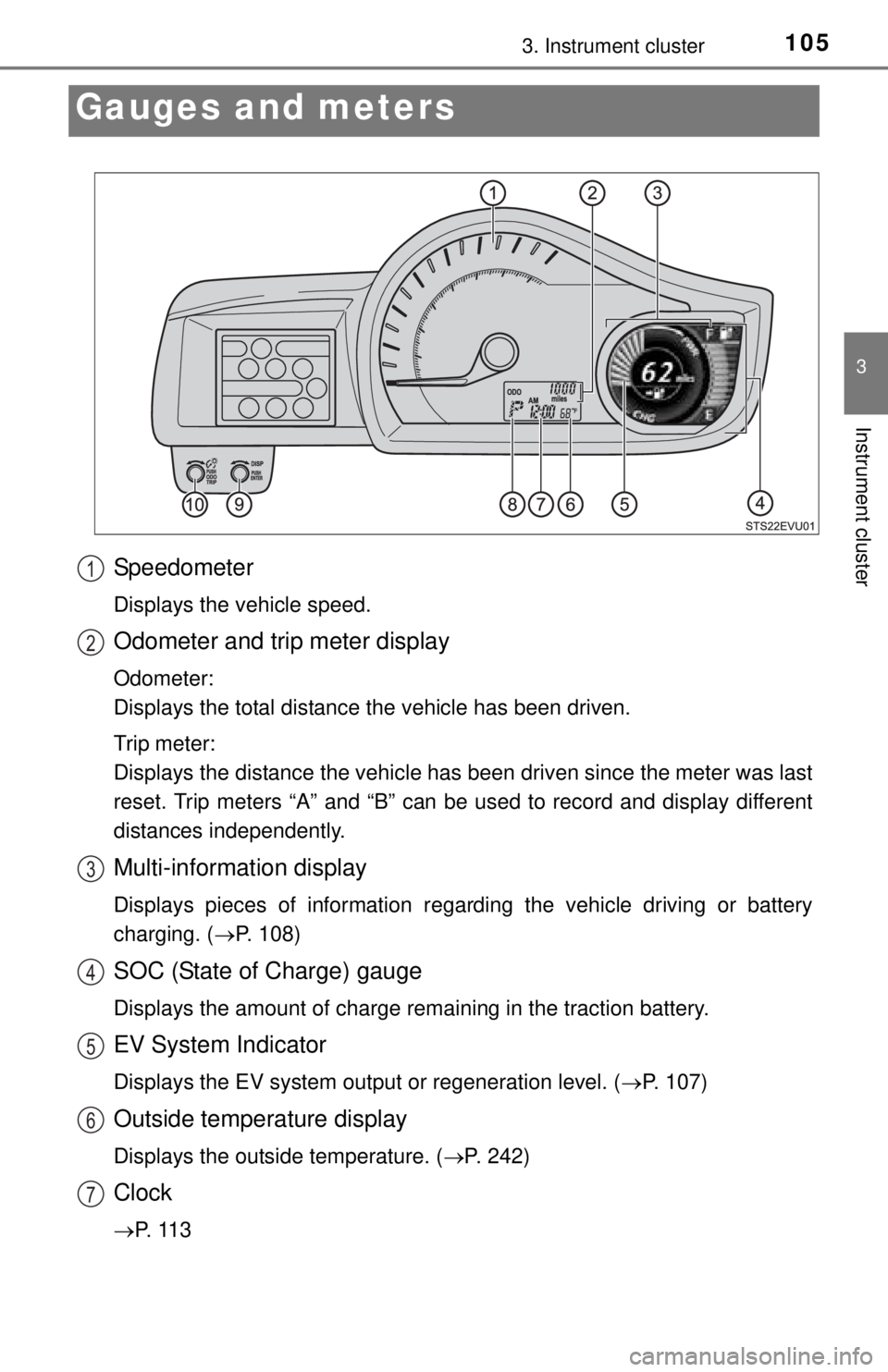
Speedometer
Displays the vehicle speed.
Odometer and trip meter display
Odometer:
Displays the total distance the vehicle has been driven.
Trip meter:
Displays the distance the vehicle has been driven since the meter was last
reset. Trip meters “A” and “B” can be used to record and display different
distances independently.
Multi-information display
Displays pieces of information regarding the vehicle driving or battery
charging. ( P. 108)
SOC (State of Charge) gauge
Displays the amount of charge remaining in the traction battery.
EV System Indicator
Displays the EV system output or regeneration level. ( P. 107)
Outside temperature display
Displays the outside temperature. (P. 242)
Clock
P. 1 1 3
1
2
3
4
5
6
7
Page 108 of 444
1083. Instrument cluster
Multi-infor mation display
The multi-information display shows the following pieces of informa-
tion.
●EV system information
Information such as operating con-
ditions of the EV system and status
of the traction battery are dis-
played.
●Screen settings
Clock and the display screen can
be set or customized.
●Charging information
Time until charging is complete:
P. 186, 198, 205
Charging timer function:
P. 202
●Warning messages ( P. 344)
Automatically displayed when a
malfunction occurs in one of the
vehicle’s systems.
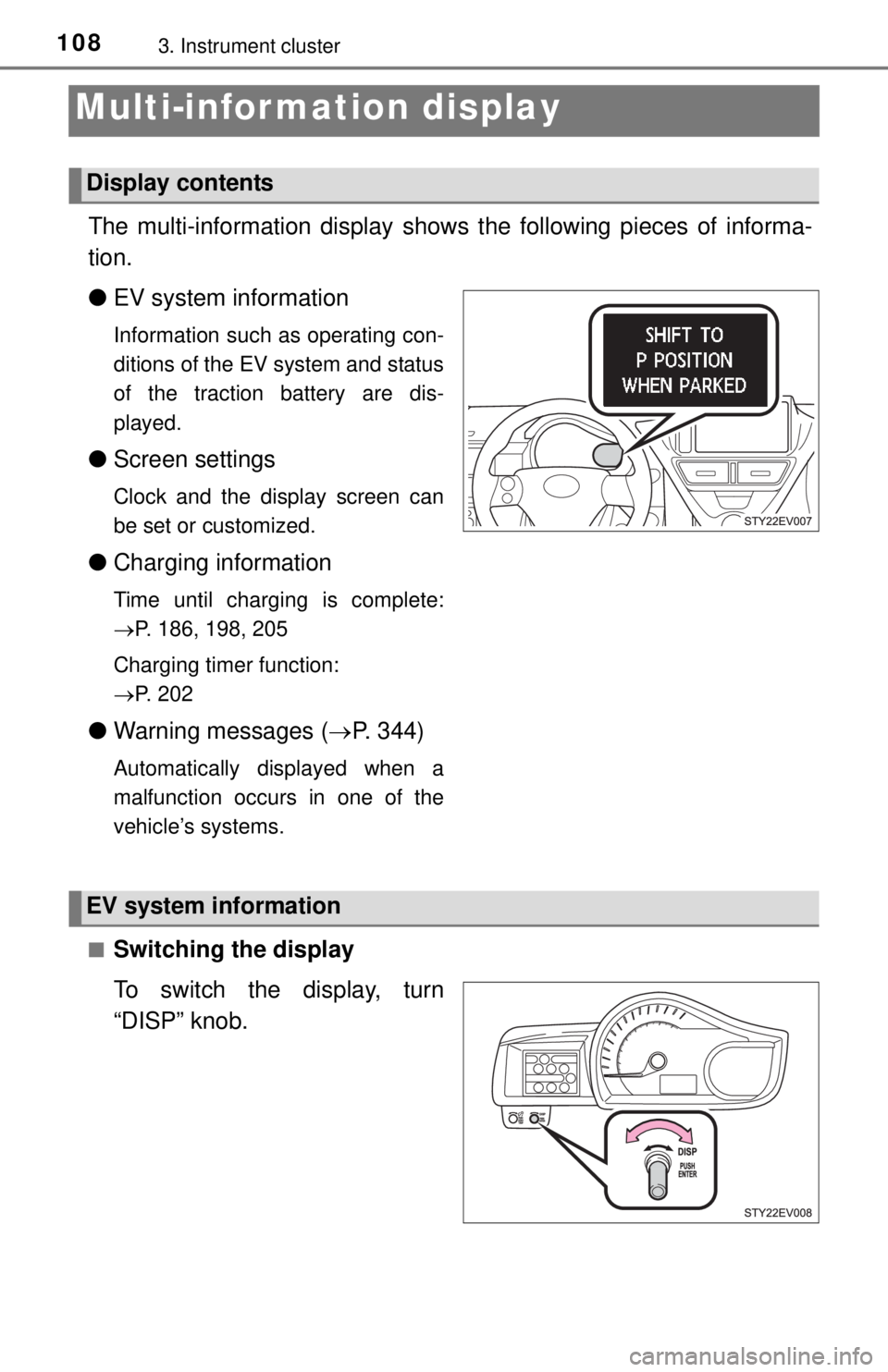
■
Switching the display
To switch the display, turn
“DISP” knob.
Display contents
EV system information
Page 111 of 444

1113. Instrument cluster
3
Instrument cluster
Average vehicle speed/Elapsed time
Displays average vehicle speed and elapsed time.
Average vehicle speed: Displays the average vehicle speed
when the function is reset.
Elapsed time: Displays the elaps ed time since it was last reset.
• The function can be reset by pressing the “DISP” knob for longer than
1 second when the average vehicle speed/elapsed time is displayed.
Traction battery information
The battery temperature, motor regenerative performance and
motor output performance are displayed. ( P. 1 1 5 )
Screen settings
The meter settings can be changed. • Eco Driving Indicator Light settings
Eco Driving Indicator Light can be activated or deactivated.
• Clock settings
The clock can be adjusted.
• Ambient Light settings
The speedometer illumination color can be changed or turned off.
The light color will change in sync with the EV system indicator.
Timer charging set (start/finish) time
A timer charging start or finish time will be displayed.
A timer charging set time will be displayed only when the timer charging
has been scheduled. Timer charging set time will not be displayed when
the charging timer function has not been scheduled.
6
7
8
9
Page 113 of 444
1133. Instrument cluster
3
Instrument cluster
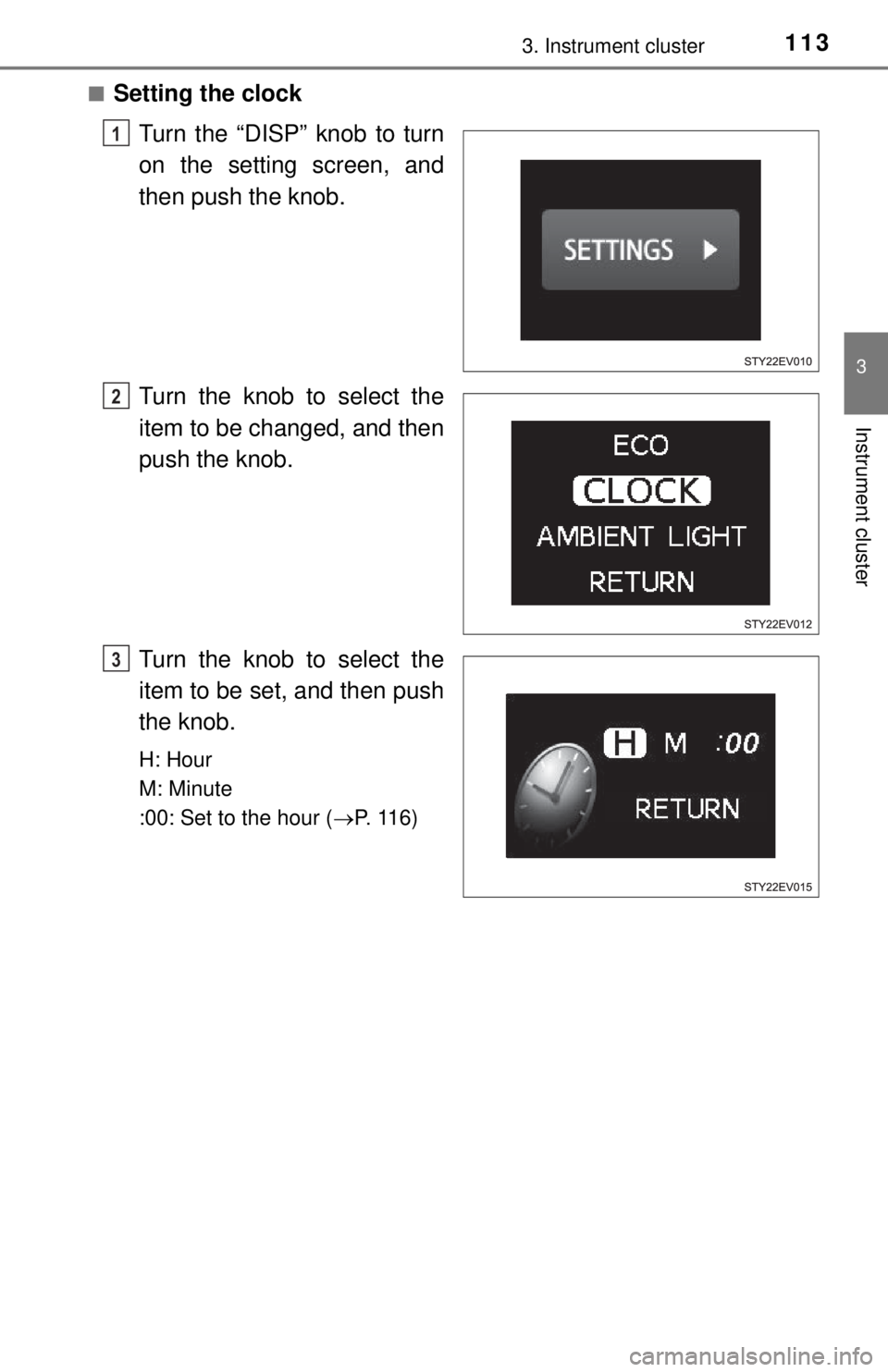
■Setting the clockTurn the “DISP” knob to turn
on the setting screen, and
then push the knob.
Turn the knob to select the
item to be changed, and then
push the knob.
Turn the knob to select the
item to be set, and then push
the knob.
H: Hour
M: Minute
:00: Set to the hour ( P. 116)
1
2
3
Page 116 of 444
1163. Instrument cluster
●Clock
● Instrument panel brightness levels (light intensity will become the maximum
level both when the tail lights are turned on and off)
*: Estimated driving ranges are calculated based on the previous power con-
sumption, which is leaned by the computer. When the 12-volt battery is dis-
connected, the previous power consumption averages will be reset. This
will result in different estimated driving ranges prior to the battery discon-
nection.
■ Adjusting to a full hour
The minute values will be rounded to the nearest hour. So, minute values
from “:00” to “:29” are rounded down, and values from “:30” to “:59” are
rounded up
*.
*: e.g.
1:00 to 1:29 1:00
1:30 to 1:59 2:00
■ Liquid crystal display
Small spots or light spots may appear on the display. This phenomenon is
characteristic of liquid crystal displays, and there is no problem continuing to
use the display.
NOTICE
■During setting up the display
To prevent 12-volt battery discharge, ensure that the EV system is operating
while setting up the display features.
■ The multi-information disp lay at low temperatures
Allow the interior of the vehicle to warm up before using the liquid crystal
information display. At extremely low temperatures, the information display
monitor may respond slowly, and display changes may be delayed.
Page 221 of 444
2216-1. Using the air conditioning system and defogger
6
Interior features
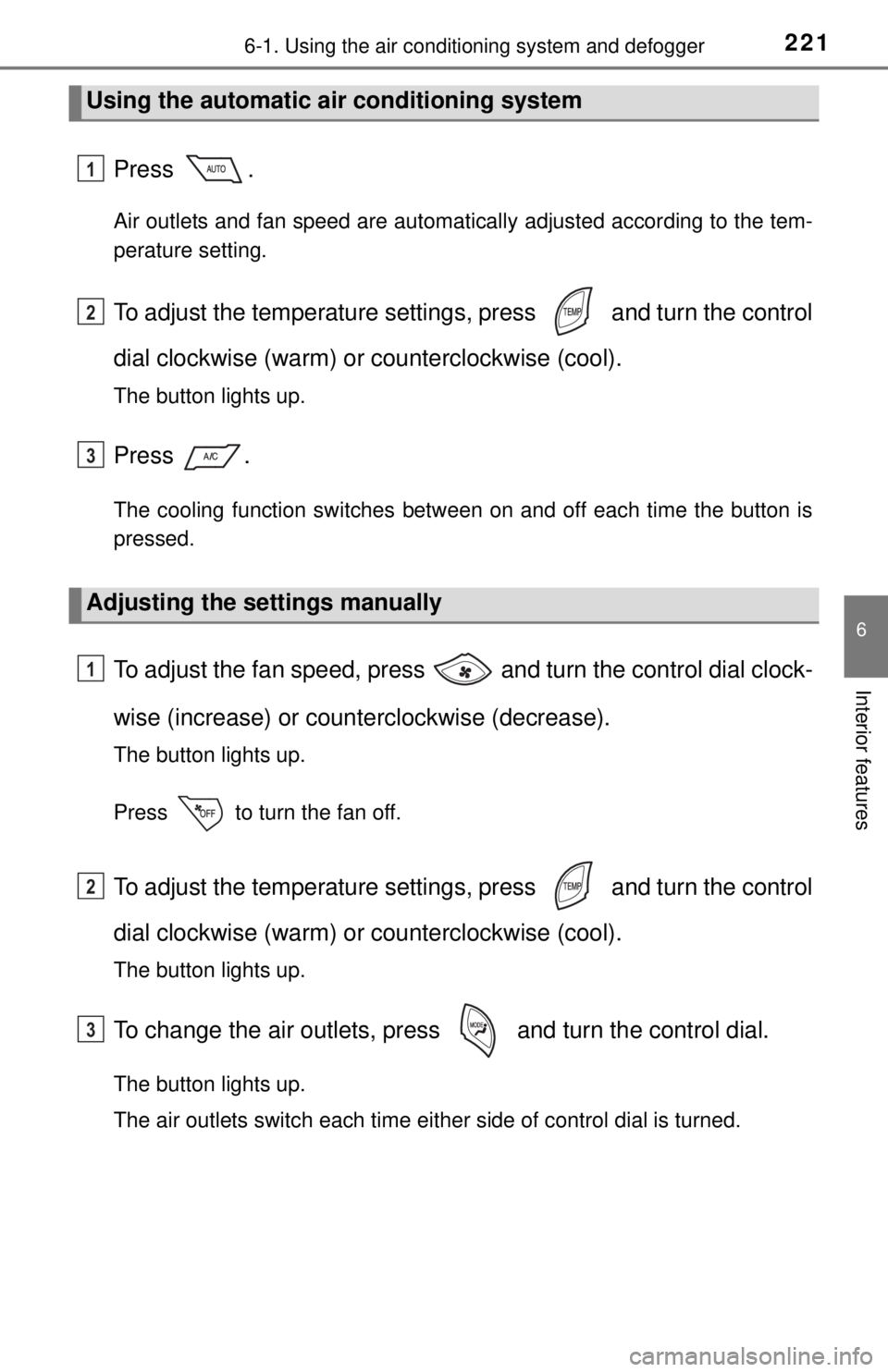
Press .
Air outlets and fan speed are automatically adjusted according to the tem-
perature setting.
To adjust the temperature setting s, press and turn the control
dial clockwise (warm) or counterclockwise (cool).
The button lights up.
Press .
The cooling function switches between on and off each time the button is
pressed.
To adjust the fan speed, press and turn the control dial clock-
wise (increase) or coun terclockwise (decrease).
The button lights up.
Press to turn the fan off.
To adjust the temperature setting s, press and turn the control
dial clockwise (warm) or counterclockwise (cool).
The button lights up.
To change the air outlets, pres s and turn the control dial.
The button lights up.
The air outlets switch each time either side of control dial is turned.
Using the automatic air conditioning system
Adjusting the settings manually
1
2
3
1
2
3