start stop button TOYOTA iQ EV 2013 Owners Manual (in English)
[x] Cancel search | Manufacturer: TOYOTA, Model Year: 2013, Model line: iQ EV, Model: TOYOTA iQ EV 2013Pages: 36, PDF Size: 5.59 MB
Page 13 of 36
OVERVIEWELECTRIC VEHICLE SYSTEM FEATURES/OPERATIONS
SAFETY AND EMERGENCY FEATURES
11
Charging connector
Latch release button
CCID (Charging Circuit Interrupting Device)
Plug
Power indicator
Error warning indicator
Test button
Reset button
The charging cable included with the vehicle is designed to be connected only
to an AC 120V power source.Charging indicator
Charging inlet light
Normal charging inlet
Charging inlet cap
Quick charging inlet (if equipped)
Normal charging cable
Recharge inlet door (charging port lid)
Charging
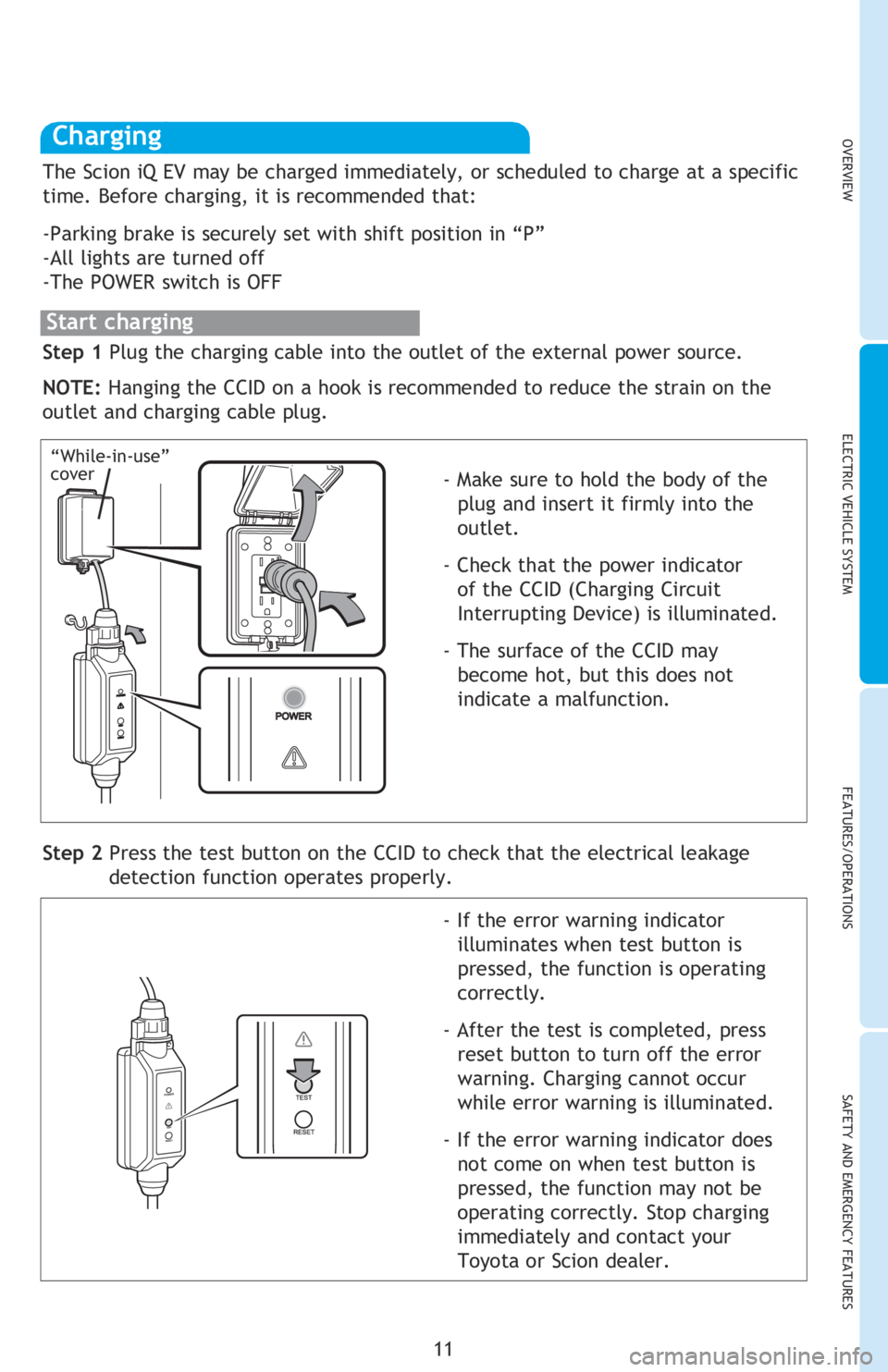
Step 1 Plug the charging cable into the outlet of the external power source.
NOTE: Hanging the CCID on a hook is recommended to reduce the strain on the
outlet and charging cable plug.
- Make sure to hold the body of the
plug and insert it firmly into the
outlet.
- Check that the power indicator of the CCID (Charging Circuit
Interrupting Device) is illuminated.
- The surface of the CCID may become hot, but this does not
indicate a malfunction.
Step 2 Press the test button on the CCID to check that the electrical leakage detection function operates properly.
- If the error warning indicator illuminates when test button is
pressed, the function is operating
correctly.
- After the test is completed, press reset button to turn off the error
warning. Charging cannot occur
while error warning is illuminated.
- If the error warning indicator does not come on when test button is
pressed, the function may not be
operating correctly. Stop charging
immediately and contact your
Toyota or Scion dealer.
“While-in-use”
cover
The Scion iQ EV may be charged immediately, or scheduled to charge at a specific
time. Before charging, it is recommended that:
-Parking brake is securely set with shift position in “P”
-All lights are turned off
-The POWER switch is OFF
Start charging
2013Scion-iQ-EV.indd 111/14/13 6:48 PM
Page 16 of 36
14
ELECTRIC VEHICLE SYSTEM
Use of the charging timer can suppress deterioration of the hybrid battery
(traction battery) and off-peak electricity can be used effectively.
Setting the charging timer
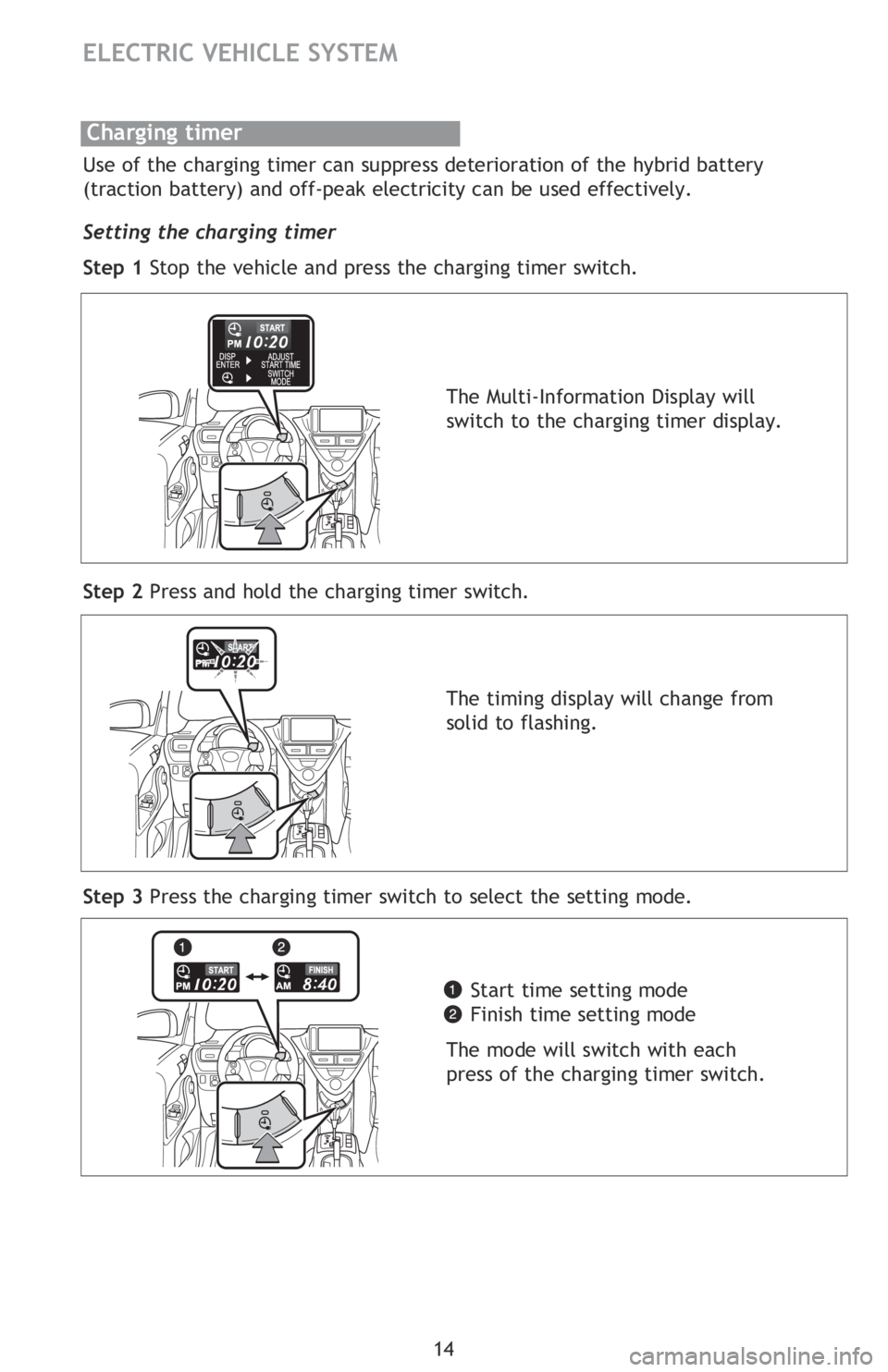
Step 1 Stop the vehicle and press the charging timer switch.
Step 2 Press and hold the charging timer switch.
Step 3 Press the charging timer switch to select the setting mode.
Charging timer
The Multi-Information Display will
switch to the charging timer display.
The timing display will change from
solid to flashing.Start time setting mode
Finish time setting mode
The mode will switch with each
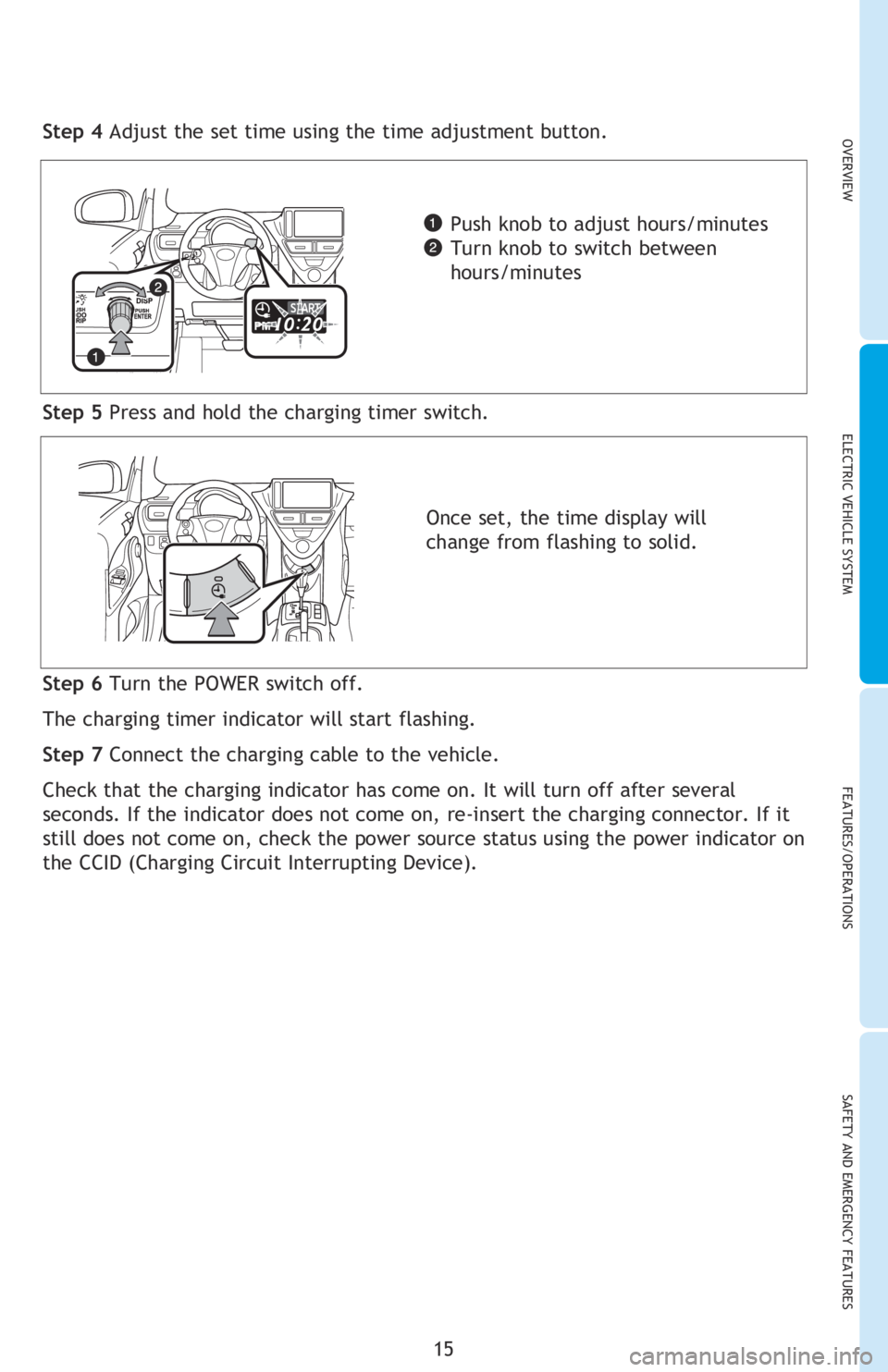
press of the charging timer switch.Step 5 Press and hold the charging timer switch.
Step 4 Adjust the set time using the time adjustment button.
Step 6 Turn the POWER switch off.
The charging timer indicator will start flashing.
Step 7 Connect the charging cable to the vehicle.
Check that the charging indicator has come on. It will turn off after several
seconds. If the indicator does not come on, re-insert the charging connector. If it
still does not come on, check the power source status using the power indicator on
the CCID (Charging Circuit Interrupting Device).
2013Scion-iQ-EV.indd 141/14/13 6:49 PM
Page 17 of 36
OVERVIEWELECTRIC VEHICLE SYSTEM FEATURES/OPERATIONS
SAFETY AND EMERGENCY FEATURES
15
Use of the charging timer can suppress deterioration of the hybrid battery
(traction battery) and off-peak electricity can be used effectively.
Setting the charging timer
Step 1 Stop the vehicle and press the charging timer switch.
Step 2 Press and hold the charging timer switch.
Step 3 Press the charging timer switch to select the setting mode.
Step 5 Press and hold the charging timer switch.
Step 4 Adjust the set time using the time adjustment button.
Push knob to adjust hours/minutes
Turn knob to switch between
hours/minutes
Once set, the time display will
change from flashing to solid.
Step 6 Turn the POWER switch off.
The charging timer indicator will start flashing.
Step 7 Connect the charging cable to the vehicle.
Check that the charging indicator has come on. It will turn off after several
seconds. If the indicator does not come on, re-insert the charging connector. If it
still does not come on, check the power source status using the power indicator on
the CCID (Charging Circuit Interrupting Device).
2013Scion-iQ-EV.indd 151/14/13 6:49 PM