mirror TOYOTA LAND CRUISER 2012 Service Manual
[x] Cancel search | Manufacturer: TOYOTA, Model Year: 2012, Model line: LAND CRUISER, Model: TOYOTA LAND CRUISER 2012Pages: 692, PDF Size: 29.3 MB
Page 105 of 692
105 1-3. Adjustable components (seats, mirrors, steering wheel)
1
Before driving
L/C200_EE (OM60G38E)
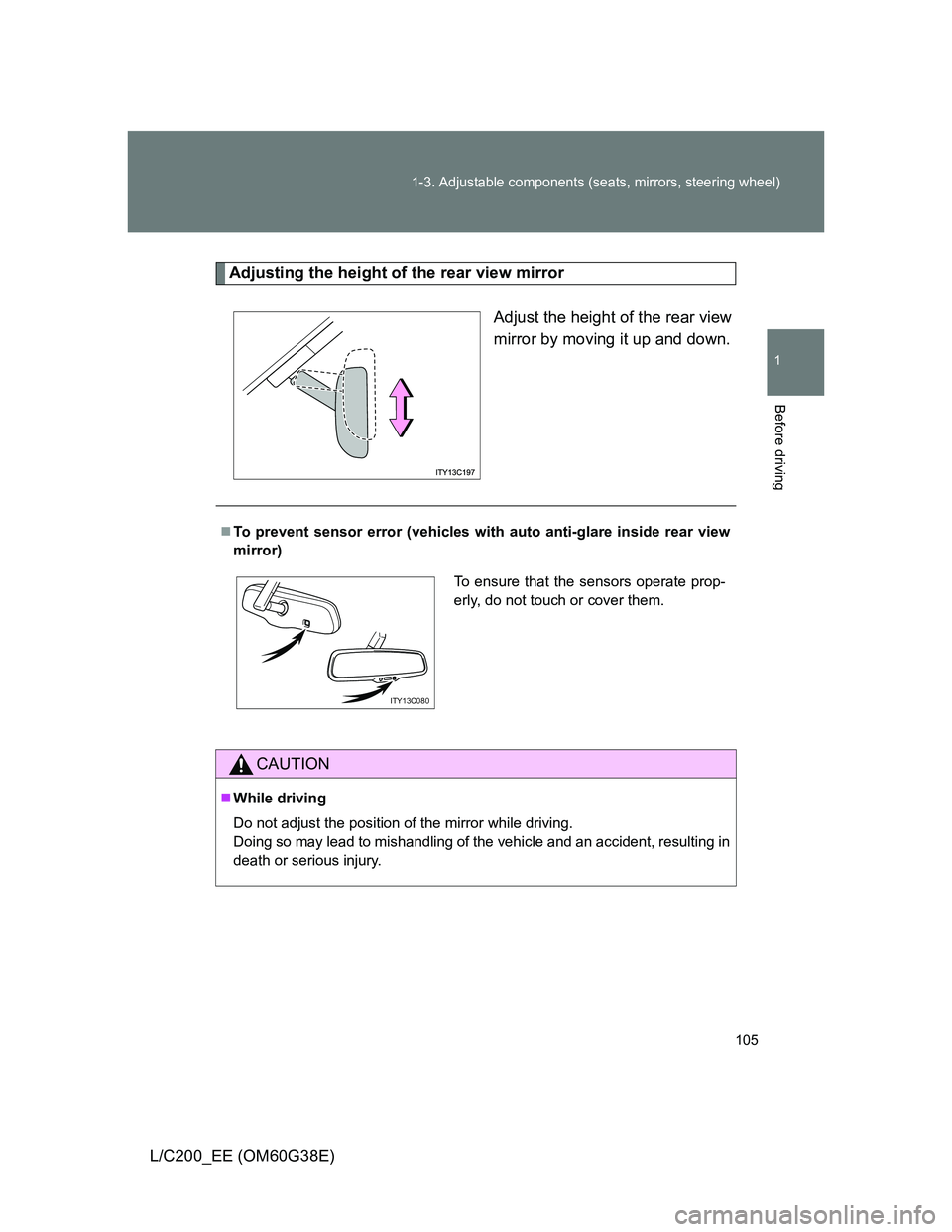
Adjusting the height of the rear view mirror
Adjust the height of the rear view
mirror by moving it up and down.
To prevent sensor error (vehicles with auto anti-glare inside rear view
mirror)
CAUTION
While driving
Do not adjust the position of the mirror while driving.
Doing so may lead to mishandling of the vehicle and an accident, resulting in
death or serious injury.
To ensure that the sensors operate prop-
erly, do not touch or cover them.
ITY13C080
Page 106 of 692
106
1-3. Adjustable components (seats, mirrors, steering wheel)
L/C200_EE (OM60G38E)
Outside rear view mirrors
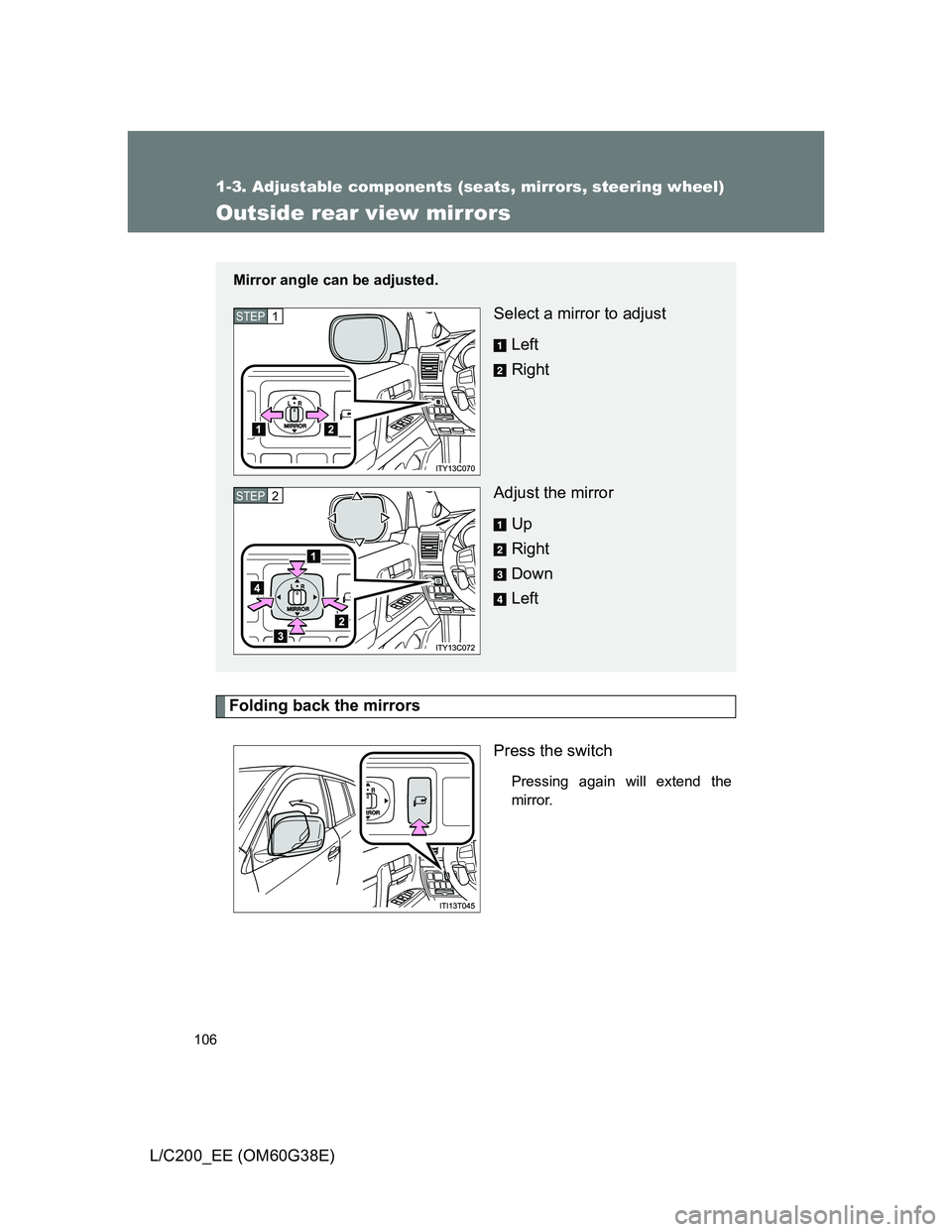
Folding back the mirrors
Press the switch
Pressing again will extend the
mirror.
Mirror angle can be adjusted.
Select a mirror to adjust
Left
Right
Adjust the mirror
Up
Right
Down
LeftSTEP1
STEP2
Page 107 of 692
107 1-3. Adjustable components (seats, mirrors, steering wheel)
1
Before driving
L/C200_EE (OM60G38E)
Mirror angle can be adjusted when
The “ENGINE START STOP” switch is in ACCESSORY or IGNITION ON
mode.
When the mirrors are fogged up (vehicles with outside rear view mirror
defoggers)
The outside rear view mirrors can be cleared using the mirror heaters. Turn
on the rear window defogger to turn on the outside rear view mirror heaters.
(P. 356)
Auto anti-glare function (if equipped)
When the anti-glare inside rear view mirror is set to auto mode, the outside
rear view mirrors will activate in conjunction with the anti-glare inside rear
view mirror to reduce reflected light. (P. 104)
Linked mirror function when reversing
When the mirror select switch is in the “L” or “R” position, the outside rear
view mirrors will automatically angle downwards when the vehicle is revers-
ing in order to give a better view of the ground. To disable this function, move
the mirror select switch to the neutral position (between “L” and “R”).
Automatic adjustment of the mirror angle (if equipped)
A desired mirror face angle can be entered to memory and recalled automat-
ically by the driving position memory. (P. 86)
Page 108 of 692
108 1-3. Adjustable components (seats, mirrors, steering wheel)
L/C200_EE (OM60G38E)
CAUTION
When driving the vehicle
Observe the following precautions while driving.
Failing to do so may result in loss of control of the vehicle and cause an acci-
dent, resulting in death or serious injury.
Do not adjust the mirrors while driving.
Do not drive with the mirrors folded back.
Both the driver and passenger side mirrors must be extended and properly
adjusted before driving.
When a mirror is moving
To avoid personal injury and mirror malfunction, be careful not to get your
hand caught by the moving mirror.
When the mirror defoggers are operating (vehicles with outside rear
view mirror defoggers)
Do not touch the rear view mirror surfaces, as they can become very hot and
burn you.
NOTICE
If ice should jam the mirror
Do not operate the control or scrape the mirror face. Use a spray de-icer to
free the mirror.
Page 184 of 692
184 2-1. Driving procedures
L/C200_EE (OM60G38E)
CAUTION
When stopped on an inclined surface, use the brake pedal and parking
brake to prevent the vehicle from rolling backward or forward and causing
an accident.
Do not adjust the position of the steering wheel, the seat, or the inside or
outside rear view mirrors while driving.
Doing so may result in a loss of vehicle control that can cause accidents
that may result in death or serious injury.
Always check that all passengers’ arms, heads or other parts of their bod-
ies are not outside the vehicle, as this may result in death or serious injury.
Vehicles with the 4-Wheel AHC & AVS: When crossing rivers, turn off
height control after putting the vehicle height in high mode, and drive at
30 km/h (18 mph) or less. Otherwise the vehicle height may change due to
the automatic leveling function, resulting in an accident. (P. 248)
When driving on slippery road surfaces
Sudden braking, acceleration and steering may cause tire slippage and
reduce your ability to control the vehicle, resulting in an accident.
Sudden acceleration, engine braking due to shift changing, or changes in
engine speed could cause the vehicle to skid, resulting in an accident
After driving through a puddle, lightly depress the brake pedal to make
sure that the brakes are functioning properly. Wet brake pads may prevent
the brakes from functioning properly. If the brakes on only one side are wet
and not functioning properly, steering control may be affected, resulting in
an accident.
When shifting the shift lever
Be careful not to shift the shift lever with the accelerator pedal depressed.
This may lead to unexpected rapid acceleration of the vehicle that may
cause an accident and result in death or serious injury.
If you hear a squealing or scraping noise (brake pad wear indicators)
Have your Toyota dealer check and replace the brake pads as soon as pos-
sible.
Rotor damage may result if the pads are not replaced when needed.
It is dangerous to drive the vehicle when the wear limits of the brake pads
and/or those of the rotors are exceeded.
Page 284 of 692
284 2-4. Using other driving systems
L/C200_EE (OM60G38E)Minimum projected turning cir-
cle (blue)
Displays the smallest turning cir-
cle projected by the system if the
steering wheel is turned to full
lock. Displayed when the steering
wheel is turned to the right (left-
hand drive vehicles) or left (right-
hand drive vehicles) (further than
90° from straight ahead).
Vehicle width line (blue)
Indicates the width of the vehicle
including the outside rear view
mirror.
Rear wheel contact point
Shows the position of the vehi-
cle’s rear tire.
Automatic display mode
Switches the projected course
mode
Page 285 of 692
285 2-4. Using other driving systems
2
When driving
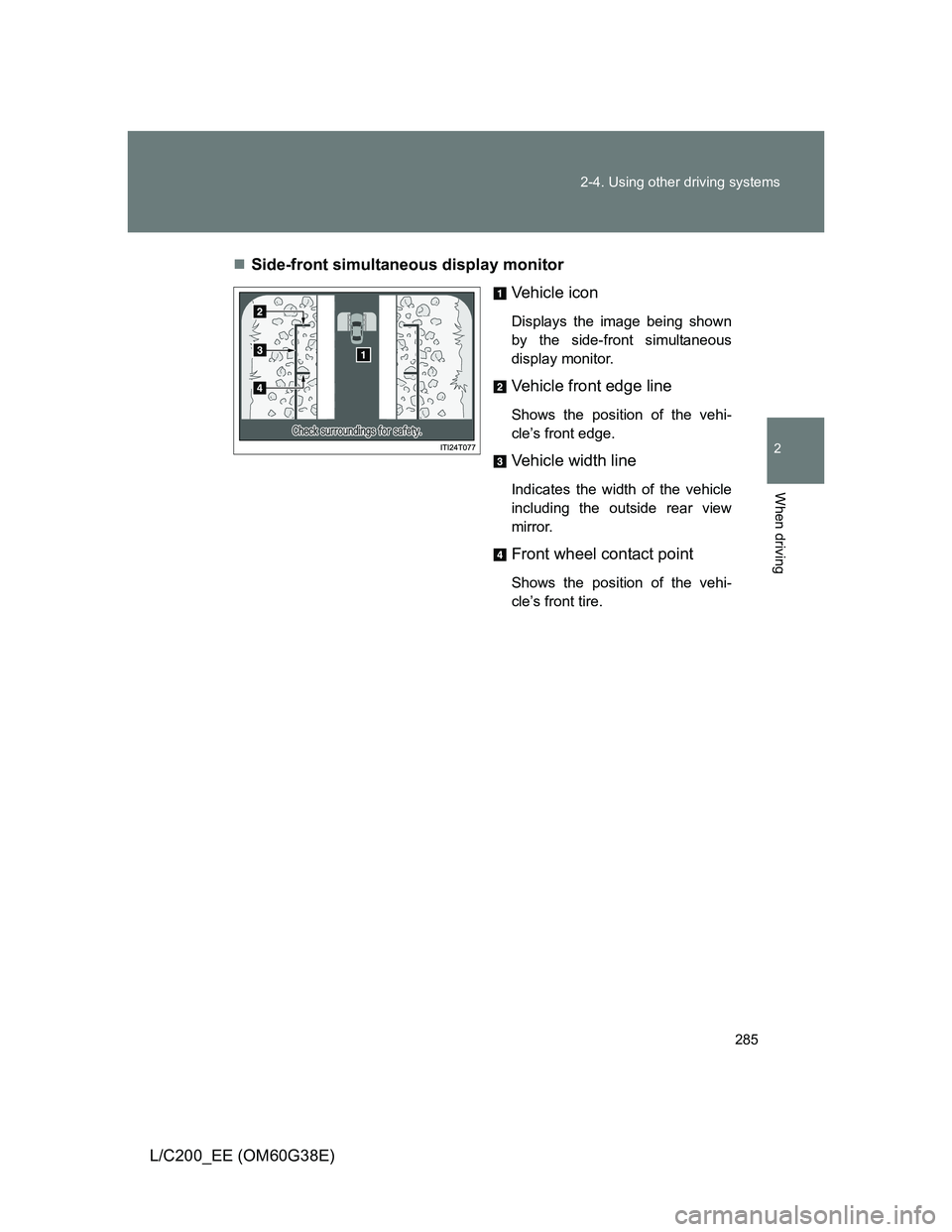
L/C200_EE (OM60G38E)Side-front simultaneous display monitor
Vehicle icon
Displays the image being shown
by the side-front simultaneous
display monitor.
Vehicle front edge line
Shows the position of the vehi-
cle’s front edge.
Vehicle width line
Indicates the width of the vehicle
including the outside rear view
mirror.
Front wheel contact point
Shows the position of the vehi-
cle’s front tire.
Page 286 of 692
286 2-4. Using other driving systems
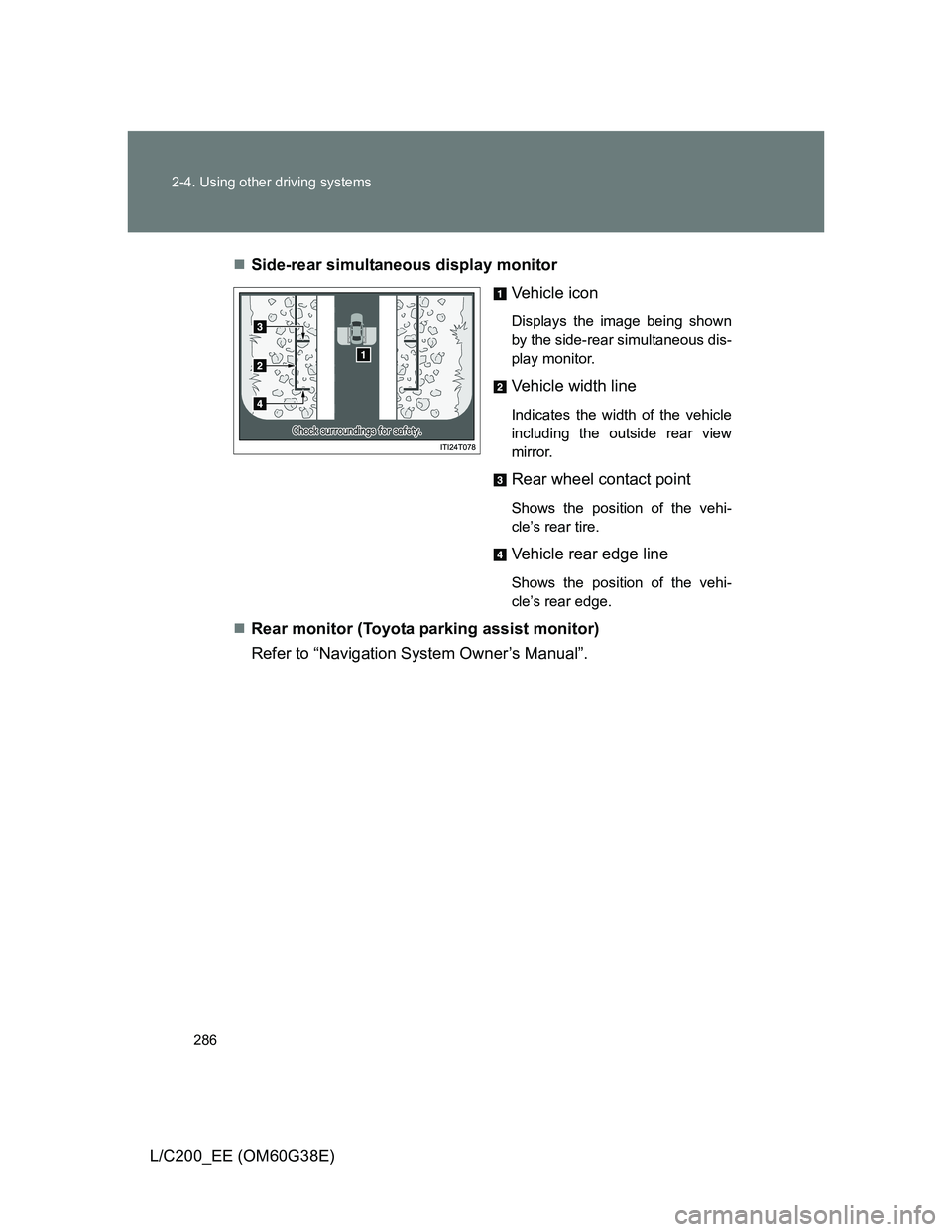
L/C200_EE (OM60G38E)Side-rear simultaneous display monitor
Vehicle icon
Displays the image being shown
by the side-rear simultaneous dis-
play monitor.
Vehicle width line
Indicates the width of the vehicle
including the outside rear view
mirror.
Rear wheel contact point
Shows the position of the vehi-
cle’s rear tire.
Vehicle rear edge line
Shows the position of the vehi-
cle’s rear edge.
Rear monitor (Toyota parking assist monitor)
Refer to “Navigation System Owner’s Manual”.
Page 291 of 692
291 2-4. Using other driving systems
2
When driving
L/C200_EE (OM60G38E)
The Multi-terrain Monitor can be operated when
Normal display mode
The vehicle speed is less than approximately 12 km/h (7 mph).
Automatic display mode
When automatic display mode is selected
When the shift lever is shifted to “D”, “S” or “N”
When the shift lever is in “D”, “S” or “N” and the vehicle speed is below
approximately 10 km/h (6 mph)
Automatic system cancellation
In the following situations, the image is canceled automatically.
When the vehicle speed exceeds approximately 12 km/h (7 mph).
After the vehicle speed exceeds approximately 12 km/h (7 mph), the
image will continue to be displayed for a short time.
If the vehicle speed returns to below 12 km/h (7 mph) before the image
extinguishes, the image will continue to be displayed.
When “MAP” or another switch outside the screen has been pressed
Interruption screens
An interruption screen is displayed when an obstacle is within the detection
range of the Toyota parking assist-sensor. (P. 237)
When the door mirrors are folded.
The screen will be turned off temporarily while the door mirrors are folding,
and the screen will return to normal once folding has been completed.
Page 298 of 692
298 2-4. Using other driving systems
L/C200_EE (OM60G38E)
CAUTION
When using the Multi-terrain Monitor system
Observe the following precautions to avoid an accident that could result in
death or serious injuries:
Never depend solely on the monitor system.
Always check visually and with the mirrors to confirm your intended path is
clear.
Depicted distances between objects and flat surfaces differ from actual
distances.
Do not use the system if the hood or doors are open.
Conditions which may affect the Multi-terrain Monitor system
If the front or the rear of the vehicle or the outside rear view mirror has
been hit, the camera’s position and mounting angle may have changed.
Have the vehicle inspected by any authorized Toyota dealer or repairer, or
another duly qualified and equipped professional.
As the camera has a water proof construction, do not detach, disassemble
or modify it. This may cause incorrect operation.
Rapid temperature changes, such as when hot water is poured on the
vehicle in cold weather, may cause the system to function abnormally.
If the camera lens is dirty, it cannot transmit a clear image. Rinse with
water and wipe with a soft cloth. If the camera lens is extremely dirty, wash
with a mild cleanser and rinse.
Do not strongly rub the camera lens. If the camera lens is scratched, it
cannot transmit a clear image.
Do not allow organic solvent, car wax, window cleaner or glass coat to
adhere to the camera. If this happens, wipe it off as soon as possible.
The displayed image may be darker and moving images may be slightly
distorted when the system is cold.
Situations unsuitable for Multi-terrain Monitor
• On icy or slick road surfaces, or in snow
• When using tire chains