remove TOYOTA MIRAI 2019 (in English) Owner's Guide
[x] Cancel search | Manufacturer: TOYOTA, Model Year: 2019, Model line: MIRAI, Model: TOYOTA MIRAI 2019Pages: 528, PDF Size: 11.84 MB
Page 281 of 528
2815-5. Using the driving support systems
5
Driving
MIRAI_OM_USA_OM62054U(18MY)_O
M62048U(19MY)■
Situations when the system may operate even though there is no possi-
bility of a collision
In the following situations, the system may operate even though there is no
possibility of a collision.
● Environmental influence
• The vehicle is driven toward a banner or flag, a low-hanging branch or a
boom barrier (such as those used at railroad crossings, toll gates and
parking lots).
• There is an obstacle on the shoulder of the road (when the veh icle is
driven in a narrow tunnel, on a narrow bridge or on a narrow road)
• The vehicle is being parallel parked
• There is a rut or hole in the surface of the road
• When the vehicle is driven on a metal cover (grating), such as those used
for drainage ditches
• The vehicle is driven on a steep slope
• The sensor is covered by water on a flooded road
● Influence from the weather
• Ice, snow, dirt, etc., has adhered to the sensor (if removed, the system
returns to normal)
• Heavy rain or water strikes the vehicle
• In severe weather such as fog, snow or a sand storm
● Influence from other sonic waves
• An ultrasonic wave source is nearby, such as the horn or parki ng assist
system of another vehicle, a vehicle detector, a motorcycle eng ine or the
air brake of a large vehicle
• Electronic components (such as a backlit license plate (especially fluo-
rescent types), fog lights, a fender pole or a wireless antenna ) are
installed near the sensors
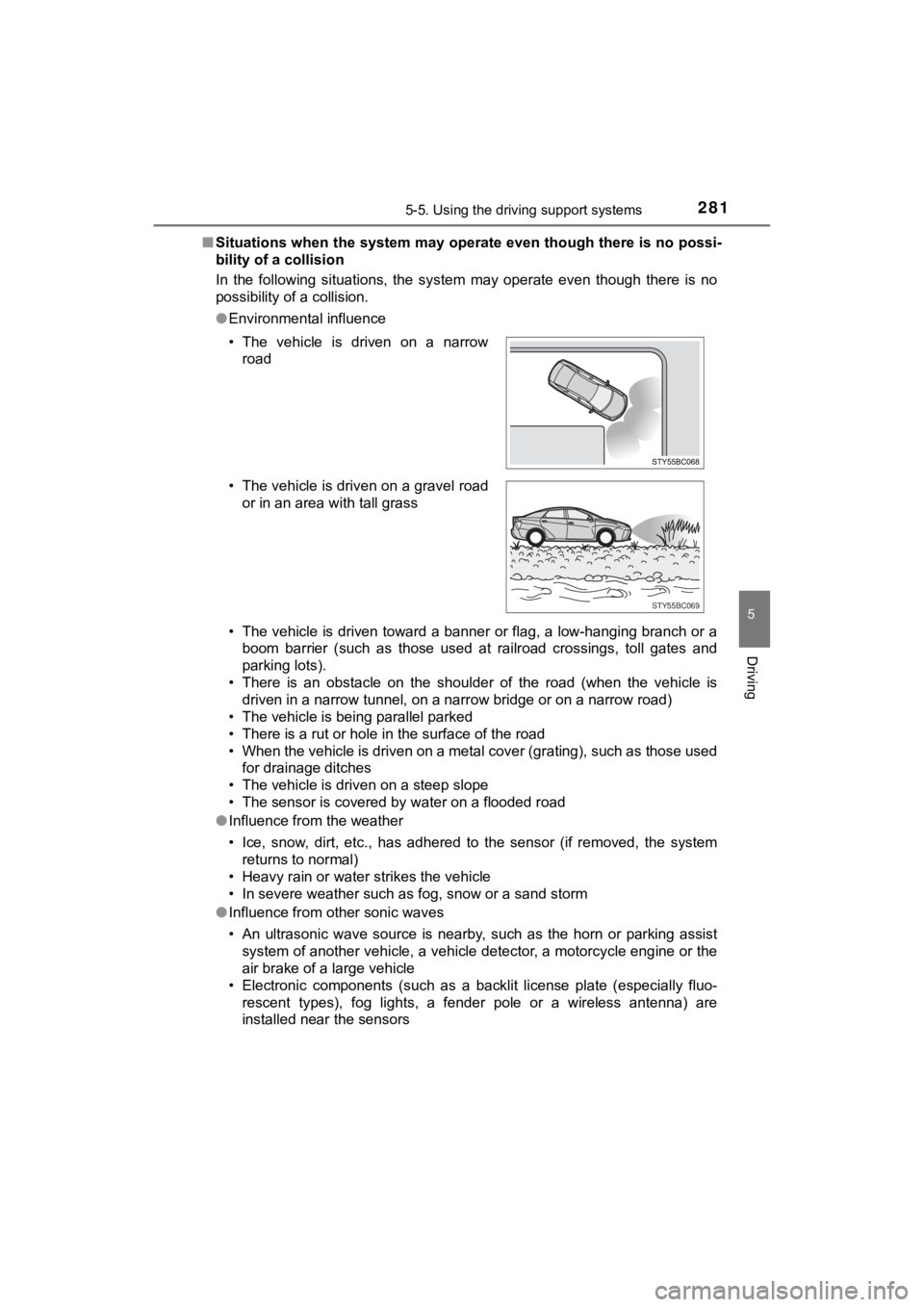
• The vehicle is driven on a narrow
road
• The vehicle is driven on a gravel road or in an area with tall grass
STY55BC069
Page 282 of 528
2825-5. Using the driving support systems
MIRAI_OM_USA_OM62054U(18MY)_O
M62048U(19MY)●
Changes in the vehicle
• The vehicle is tilted a large amount
• The height of the vehicle has drastically changed due to the c arried load
(the nose tilts up or down)
• The direction of the sensor has deviated due to a collision or other impact
■ In the unlikely event that the Parking Support Br ake function (for static
objects) mistakenly operates at a crossing or elsewhere
Even in the unlikely event that the Parking Support Brake funct ion (for static
objects) mistakenly operates at a crossing or elsewhere, brake control is can-
celed after approximately 2 seconds, allowing you to proceed fo rward and
leave the area. Furthermore, brake control is also canceled whe n the brake
pedal is depressed. Depressing the accelerator pedal again allows you to
proceed forward and leave the area.
■ Situations in which the syst em may not operate normally
In the following situations, the system may not operate normall y.
● Environmental influence
• There is an obstacle that cannot be detected between the vehic le and
another obstacle that can be detected
• An obstacle such as another vehicle, a motorcycle, a bicycle o r a pedes-
trian cuts in front of the vehicle or jumps out from the side.
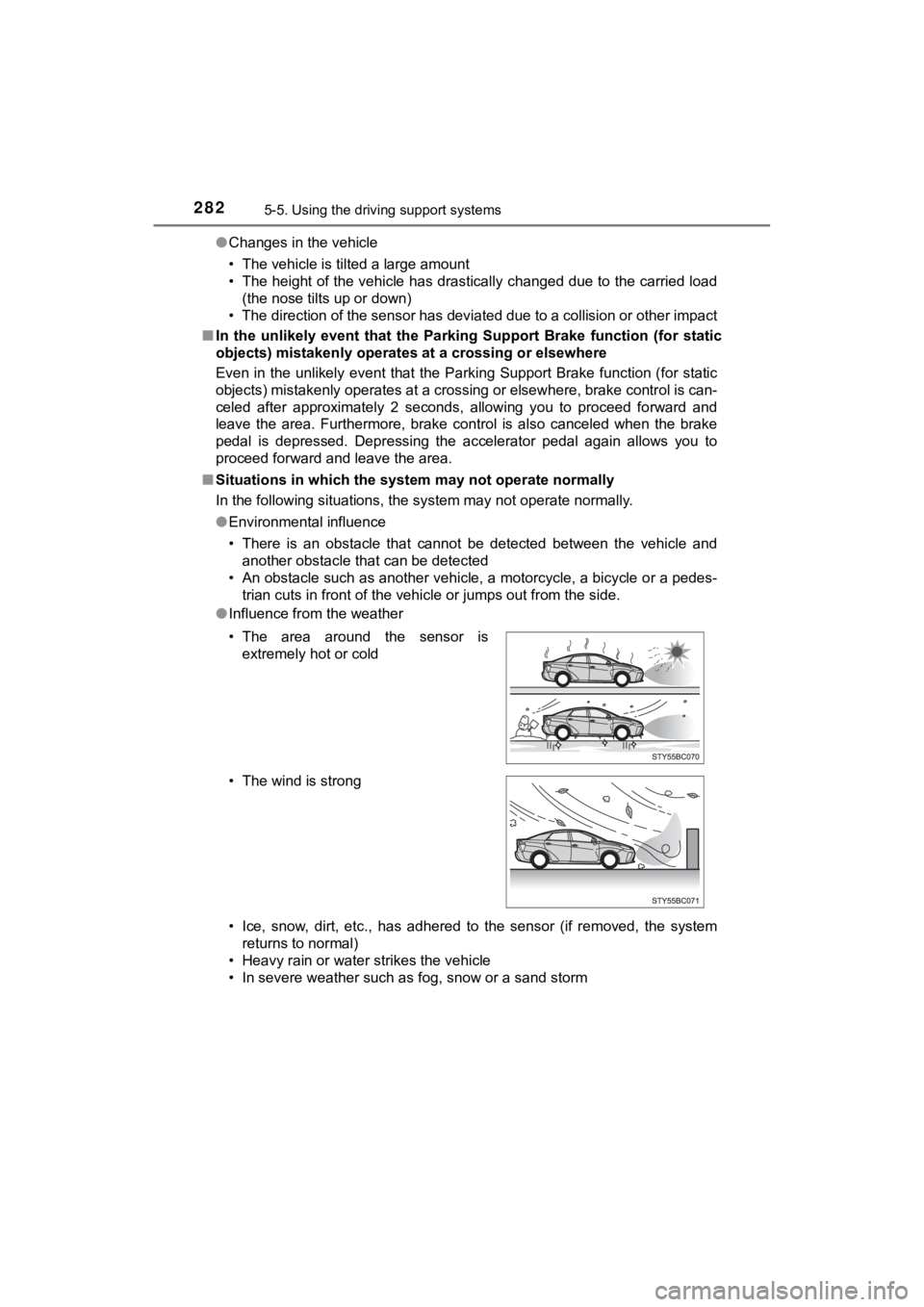
● Influence from the weather
• Ice, snow, dirt, etc., has adhered to the sensor (if removed, the system
returns to normal)
• Heavy rain or water strikes the vehicle
• In severe weather such as fog, snow or a sand storm • The area around the sensor is extremely hot or cold
• The wind is strong
Page 283 of 528

2835-5. Using the driving support systems
5
Driving
MIRAI_OM_USA_OM62054U(18MY)_O
M62048U(19MY)●
Influence from other sonic waves
• An ultrasonic wave source is nearby, such as the horn or parki ng assist
system of another vehicle, a vehicle detector, a motorcycle eng ine or the
air brake of a large vehicle
• Electronic components (such as a backlit license plate [especi ally fluores-
cent types], fog lights, a fender pole or a wireless antenna) a re installed
near the sensors
● Changes in the vehicle
• The vehicle is tilted a large amount
• The height of the vehicle has drastically changed due to the c arried load
(the nose tilts up or down)
• The direction of the sensor has deviated due to a collision or other impact
■ When removing and instal ling the 12-volt battery
The system needs to be initialized.
The system can be initialized by driving the vehicle straight a head for 5 sec-
onds or more at a speed of approximately 22 mph (35 km/h) or hi gher.
■ When “PKSB Unavailable” is displayed on the multi-information display
and the PKSB OFF indicator flashes
●Ice, snow, dirt, etc., may have adhered to the sensor. If this occurs, remove
the ice, snow, dirt, etc., from the sensor to return the system to normal.
Also, a warning message may be displayed at low temperatures du e to ice
forming on the sensor, and the sensor may not detect obstacles. Once the
ice melts, the system will return to normal.
● If this message is shown even after removing dirt from the sensor, or shown
when the sensor was not dirty to begin with, have the vehicle i nspected at
your Toyota dealer.
● System initialization may not have been performed after removal and instal-
lation of the 12-volt battery. Perform system initialization.
■ When “PKSB Malfunction Visit Your Dealer” is displayed on the m ulti-
information display, the PKSB OFF indicator flashes and the buz zer
sounds
The system may not be operating properly. Have the vehicle inspected at
your Toyota dealer.
Page 301 of 528
3015-6. Driving tips
5
Driving
MIRAI_OM_USA_OM62054U(18MY)_O
M62048U(19MY)
Winter driving tips
●Use washer fluid that are appropr iate to the prevailing outside tem-
peratures.
● Have a service technician inspect the condition of the 12-volt bat-
tery.
● Have the vehicle fitted with four snow tires or purchase a set of tire
chains for the front tires.
Ensure that all tires are the specified size and brand, and tha t chains
match the size of the tires.
Perform the following according to the driving conditions:
● Do not try to forcibly open a window or move a wiper that is fr ozen.
Pour warm water over the frozen area to melt the ice. Wipe away
the water immediately to p revent it from freezing.
● To ensure proper operation of the climate control system fan,
remove any snow that has accumulated on the air inlet vents in
front of the windshield.
● Check for and remove any excess ic e or snow that may have accu-
mulated on the exterior lights, vehicle’s roof, chassis, around the
tires or on the brakes.
● Remove any snow or mud from the bottom of your shoes before
getting in the vehicle.
Carry out the necessary preparations and inspections before
driving the vehicle in winter. Always drive the vehicle in a ma n-
ner appropriate to the prevailing weather conditions.
Preparation for winter
Before driving the vehicle
Page 302 of 528
3025-6. Driving tips
MIRAI_OM_USA_OM62054U(18MY)_O
M62048U(19MY)
Accelerate the vehicle slowly, keep a safe distance between you and
the vehicle ahead, and drive at a reduced speed suitable to roa d con-
ditions.
Park the vehicle and shift the shift position to P without sett ing the
parking brake. The parking brake may freeze up, preventing it f rom
being released. If the vehicle is parked without setting the pa rking
brake, make sure t o block the wheels.
Failure to do so may be dangerous because it may cause the vehi cle
to move unexpectedly, possi bly leading to an accident.
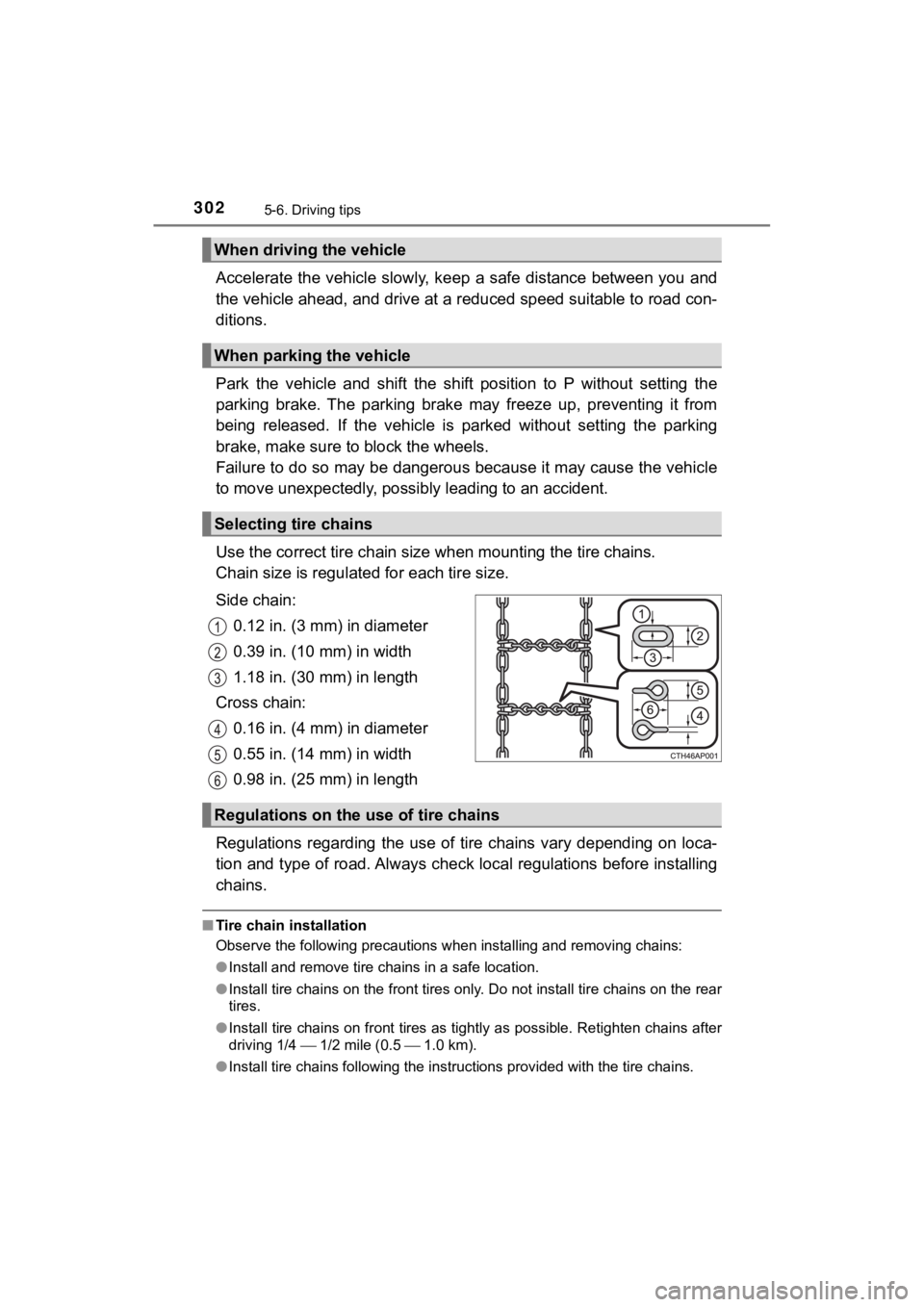
Use the correct tire chain size when mount ing the tire chains.
Chain size is regulate d for each tire size.
Side chain: 0.12 in. (3 mm) in diameter
0.39 in. (10 mm) in width
1.18 in. (30 mm) in length
Cross chain: 0.16 in. (4 mm) in diameter
0.55 in. (14 mm) in width
0.98 in. (25 mm) in length
Regulations regarding the use of tire chains vary depending on loca-
tion and type of road. Always chec k local regulations before installing
chains.
■ Tire chain installation
Observe the following precautions when installing and removing chains:
● Install and remove tire chains in a safe location.
● Install tire chains on the front tires only. Do not install tir e chains on the rear
tires.
● Install tire chains on front tires as tightly as possible. Reti ghten chains after
driving 1/4 1/2 mile (0.5 1.0 km).
● Install tire chains following the instructions provided with th e tire chains.
When driving the vehicle
When parking the vehicle
Selecting tire chains
Regulations on the use of tire chains
Page 309 of 528
3096-1. Using the air conditioning system and defogger
6
Interior features
MIRAI_OM_USA_OM62054U(18MY)_O
M62048U(19MY)■
Defogging the windshield
Defoggers are used to defog the windshield and front side win-
dows.
Press .
Set the outside/recirculated air mode button to the outside air
mode if
the recirculated air mode is used. (It may switch automatically .)
To defog the windshield and the side windows early, turn the ai r flow and
temperature up.
To return to the previous mode, press again when the windshield
is defogged.
■
Defogging the rear window and outside rear view mirrors
Defoggers are used to defog the rear window, and to remove rain -
drops, dew and frost from the outside rear view mirrors.
Press .
The indicator comes on when the defogging the rear window and o ut-
side rear view mirrors is on.
The defoggers will automatically turn off after a period of tim e.
■
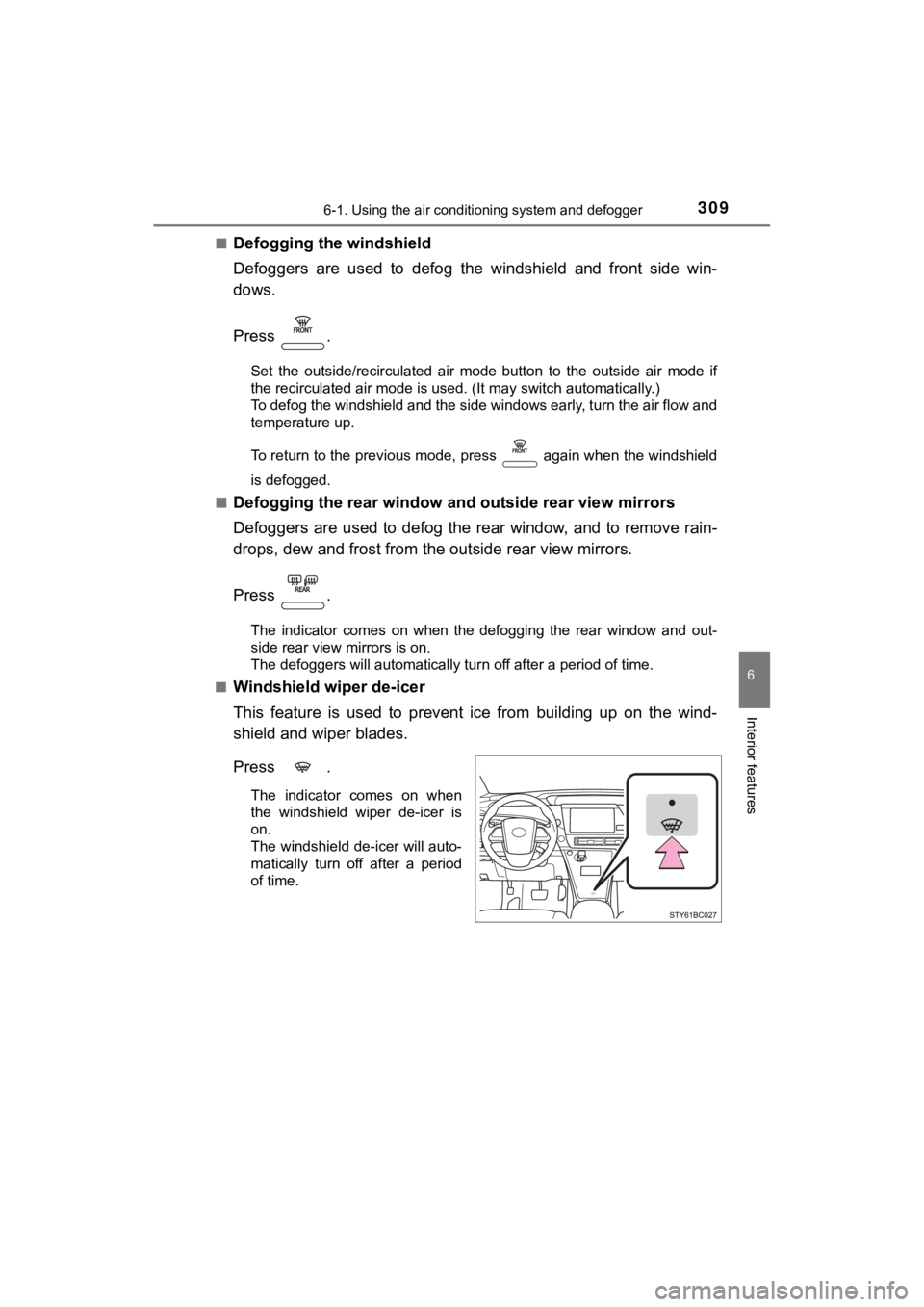
Windshield wiper de-icer
This feature is used to prevent ice from building up on the win d-
shield and wiper blades.
Press .
The indicator comes on when
the windshield wiper de-icer is
on.
The windshield de-icer will auto-
matically turn off after a period
of time.
Page 336 of 528
3366-4. Other interior features
MIRAI_OM_USA_OM62054U(18MY)_O
M62048U(19MY)■
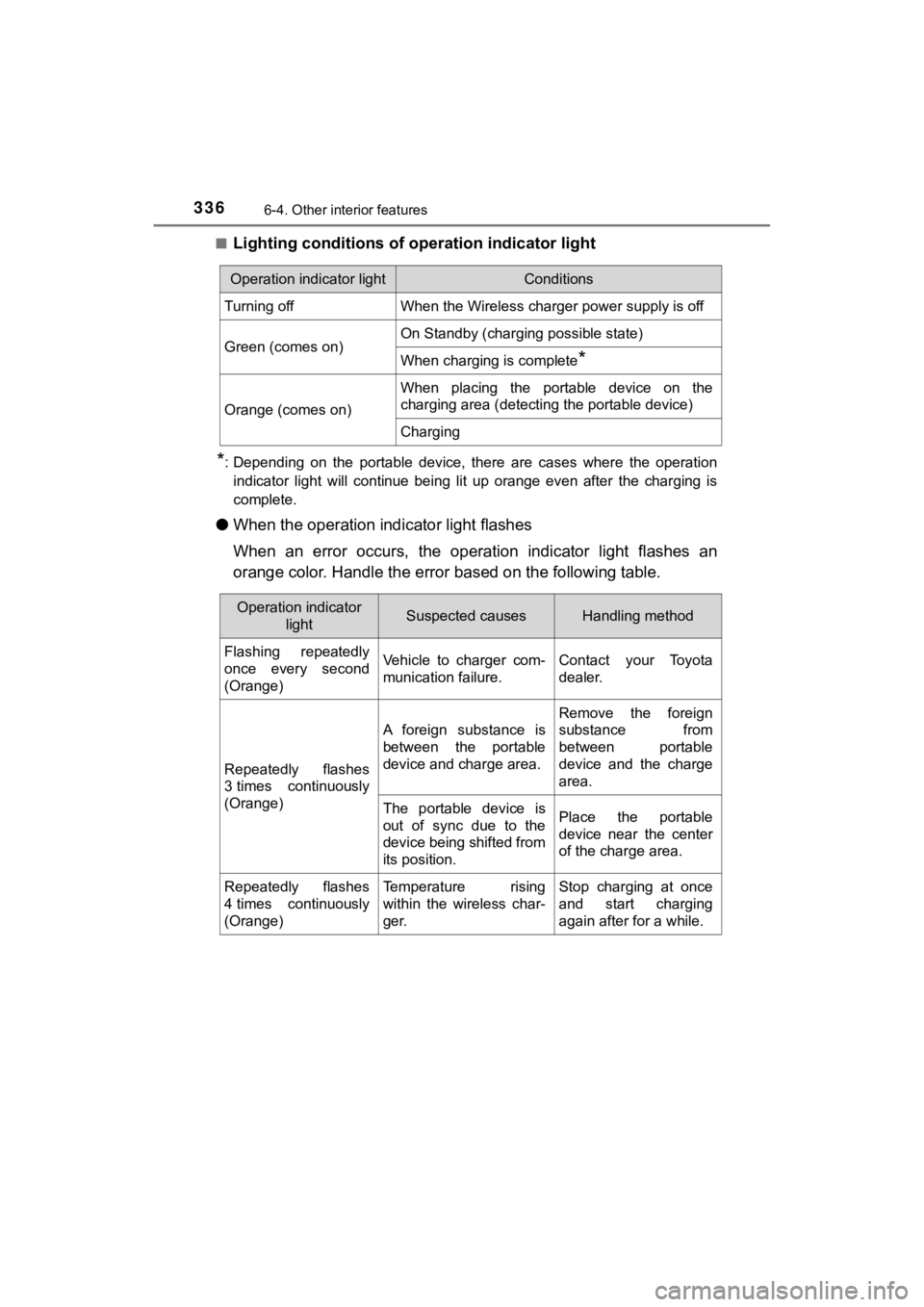
Lighting conditions of ope
ration indicator light
*: Depending on the portable device, there are cases where the op eration
indicator light will continue being lit up orange even after the charging is
complete.
● When the operation indi cator light flashes
When an error occurs, the operat ion indicator light flashes an
orange color. Handle the error based on the following table.
Operation indicator lightConditions
Turning offWhen the Wireless charger power supply is off
Green (comes on)On Standby (charging possible state)
When charging is complete*
Orange (comes on)
When placing the portable device on the
charging area (detecting the portable device)
Charging
Operation indicator
lightSuspected causesHandling method
Flashing repeatedly
once every second
(Orange)Vehicle to charger com-
munication failure.Contact your Toyota
dealer.
Repeatedly flashes
3 times continuously
(Orange)
A foreign substance is
between the portable
device and charge area.
Remove the foreign
substance from
between portable
device and the charge
area.
The portable device is
out of sync due to the
device being shifted from
its position.Place the portable
device near the center
of the charge area.
Repeatedly flashes
4 times continuously
(Orange)Temperature rising
within the wireless char-
ger.Stop charging at once
and start charging
again after for a while.
Page 337 of 528

3376-4. Other interior features
6
Interior features
MIRAI_OM_USA_OM62054U(18MY)_O
M62048U(19MY)
■The wireless charger can be operated when
The power switch is in ACCESSORY or ON mode.
■ Usable portable devices
Qi standard wireless charge standard can be used on compatible devices.
However, not all Qi standard devices and compatibility are guar anteed.
Starting with mobile phones and smart phones, it is aimed for l ow power elec-
trically supplied portable devices of no more than 5 W.
■ When covers and accessories are attached to portable devices
Do not charge in situations where cover and accessories not able to handle
Qi are attached to the portable device. Depending on the type o f cover and
accessory, it may not be possible to charge. When charging is not performed
even with the portable device placed on the charge area, remove the cover
and accessories.
■ While charging, noise enters the AM radio
Turn off the wireless charger and confirm that the noise has decreased. If the
noise decreases, continuously pushing the power supply switch o f the wire-
less charger for 2 seconds, the frequency of the charger can be changed and
the noise can be reduced.
Also, on that occasion, the operation indicator light will flas h orange 2 times.
■ Important points of the wireless charger
●If the electronic key cannot be detected within the vehicle int erior, charging
cannot be done. When the door is opened and closed, charging ma y be
temporarily suspended.
● When charging, the wireless charging device and portable device will get
warmer, however this is not a malfunction.
When a portable device gets warm while charging, charging may s top due
to the protection function on the portable device side. In this case, when the
temperature of the portable device drops significantly, charge again.
■ Operation sounds
When the power supply is turned on, while searching for the portable device a
sound will be produced, however this is not a malfunction.
■ Cleaning
P. 357
Page 352 of 528
3527-1. Maintenance and care
MIRAI_OM_USA_OM62054U(18MY)_O
M62048U(19MY)
Cleaning and protecting the vehicle
exterior
● Working from top to bottom, liberally apply water to the vehicl e
body, wheel wells and underside of the vehicle to remove any di rt
and dust.
● Wash the vehicle body using a sponge or soft cloth, such as a
chamois.
● For hard-to-remove marks, use car wash soap and rinse thoroughl y
with water.
● Wipe away any water.
● Wax the vehicle when the wate rproof coating deteriorates.
If water does not bead on a clean surface, apply wax when the vehicle
body is cool.
■Automatic car washes
●Fold the mirrors before washing the vehicle. Start washing from the front of
the vehicle. Make sure to extend the mirrors before driving.
● Brushes used in automatic car washes may scratch the vehicle su rface and
harm your vehicle’s paint.
■ High pressure car washes
●As water may enter the cabin, do not bring the nozzle tip near the gaps
around the doors or perimeter of the windows, or spray these areas continu-
ously.
● Turn the power switch off.
Perform the following to protect the vehicle and maintain it in
prime condition:
Page 353 of 528

3537-1. Maintenance and care
MIRAI_OM_USA_OM62054U(18MY)_O
M62048U(19MY)
7
Maintenance and care
■When using a car wash
If the door handle becomes wet while the electronic key is within the effective
range, the door may lock and unlock repeatedly. In that case, f ollow the fol-
lowing correction procedures to wash the vehicle:
● Place the key in a position 6 ft. (2 m) or more separate from t he vehicle
while the vehicle is being washed. (Take care to ensure that th e key is not
stolen.)
● Set the electronic key to battery-saving mode to disable the sm art key sys-
tem. ( P. 145)
■ Aluminum wheels
●Remove any dirt immediately by using a neutral detergent.
● Wash detergent off with water immediately after use.
● To protect the paint from damage, make sure to observe the following pre-
cautions.
• Do not use acidic, alkaline or abrasive detergent
• Do not use hard brushes
• Do not use detergent on the wheels when they are hot, such as after driv-
ing or parking in hot weather
■ Bumpers
Do not scrub with abrasive cleaners.
■ Front side windows water-repellent coating
●The following precautions can extend the effectiveness of the water-repel-
lent coating.
• Remove any dirt, etc., from the front side windows regularly.
• Do not allow dirt and dust to accumulate on the windows for a long
period.
Clean the windows with a soft, damp cloth as soon as possible.
• Do not use wax or glass cleaners that contain abrasives when c leaning
the windows.
• Do not use any metallic objects to remove condensation build u p.
● When the water-repellent performance has become insufficient, t he coating
can be repaired. Contact your Toyota dealer.
■ Restoration work for rain clearin g effect of the rain clearing mirror
The rain clearing effect on the mirror surface will gradually r ecover after expo-
sure to sunlight ( P. 165). However, if you want to restore the effect immedi-
ately, conduct the following procedures:
Apply water to the mirror surface to wash the dirt away from it .
Remove the dirt by using a clean, soft and wet cloth.
Clean the mirror surface with glass cleaner or detergent. When detergent is
used, rinse the mirror surface with a lot of water.
Wipe water on the mirror surface by using a clean and soft clot h, etc.
Park your vehicle outdoors to expose the mirror surface to sunl ight for
about 5 hours. (The restoration time differs depending on the amount and
type of dirt.)
1
2
3
4
5