warning TOYOTA MIRAI 2022 Owners Manual
[x] Cancel search | Manufacturer: TOYOTA, Model Year: 2022, Model line: MIRAI, Model: TOYOTA MIRAI 2022Pages: 556, PDF Size: 17.34 MB
Page 174 of 556
1745-2. Driving procedures
Owners Manual_USA_M62084_enperforming the proper procedures
for starting the vehicle, contact your
Toyota dealer immediately.
■If the fuel cell system is mal-
functioning
P. 4 5 1
■Electronic key battery
P. 4 2 3
■Operation of the power switch
●If the switch is not pressed shortly
and firmly, the power switch mode
may not change or the fuel cell
system may not start.
●If attempting to restart the fuel cell
system immediately after turning
the power switch off, the fuel cell
system may not start in some
cases. After turn ing the power
switch off, please wait a few sec-
onds before restarting the fuel cell
system.
■Customization
If the smart key system has been
deactivated in a customized setting,
refer to P.468.1 Stop the vehicle completely.
2 Set the parking brake.
( P.183)
3 Press the P position switch.
( P.178)
Check that the shif t position indica-
tor shows P and the parking brake
indicator is illuminated.
4 Press the power switch.
The fuel cell system will stop, and
the meter disp lay will be extin-
guished (the shift position indicator
will be extinguished a few seconds
after the meter display).
5 Release the brake pedal and
check that “ACCESSORY” or
“IGNITION ON” is not shown
on the meter.
■Stopping the fuel cell system in
cold temperatures
●When the power switch is pressed
and the fuel cell system is stopped
WARNING
■When starting the fuel cell
system
Always start the fuel cell system
while sitting in the driver’s seat.
Do not depress the accelerator
pedal while starting the fuel cell
system under any circumstances.
Doing so may cause an accident
resulting in death or serious injury.
■Caution while driving
If fuel cell system failure occurs
while the vehicle is moving, do not
lock or open the doors until the
vehicle reaches a safe and com-
plete stop. The steering lock func-
tion will activate and this may lead
to an accident, resulting in death
or serious injury.
NOTICE
■When starting the fuel cell
system
If the fuel cell system becomes
difficult to start, have your vehicle
checked by your Toyota dealer
immediately.
■Symptoms indicating a mal-
function with the power
switch
If the power switch seems to be
operating somewhat differently
than usual, such as the switch
sticking slightly, there may be a
malfunction. Contact your Toyota
dealer immediately.
Stopping the fuel cell sys-
tem
Page 176 of 556
1765-2. Driving procedures
Owners Manual_USA_M62084_en
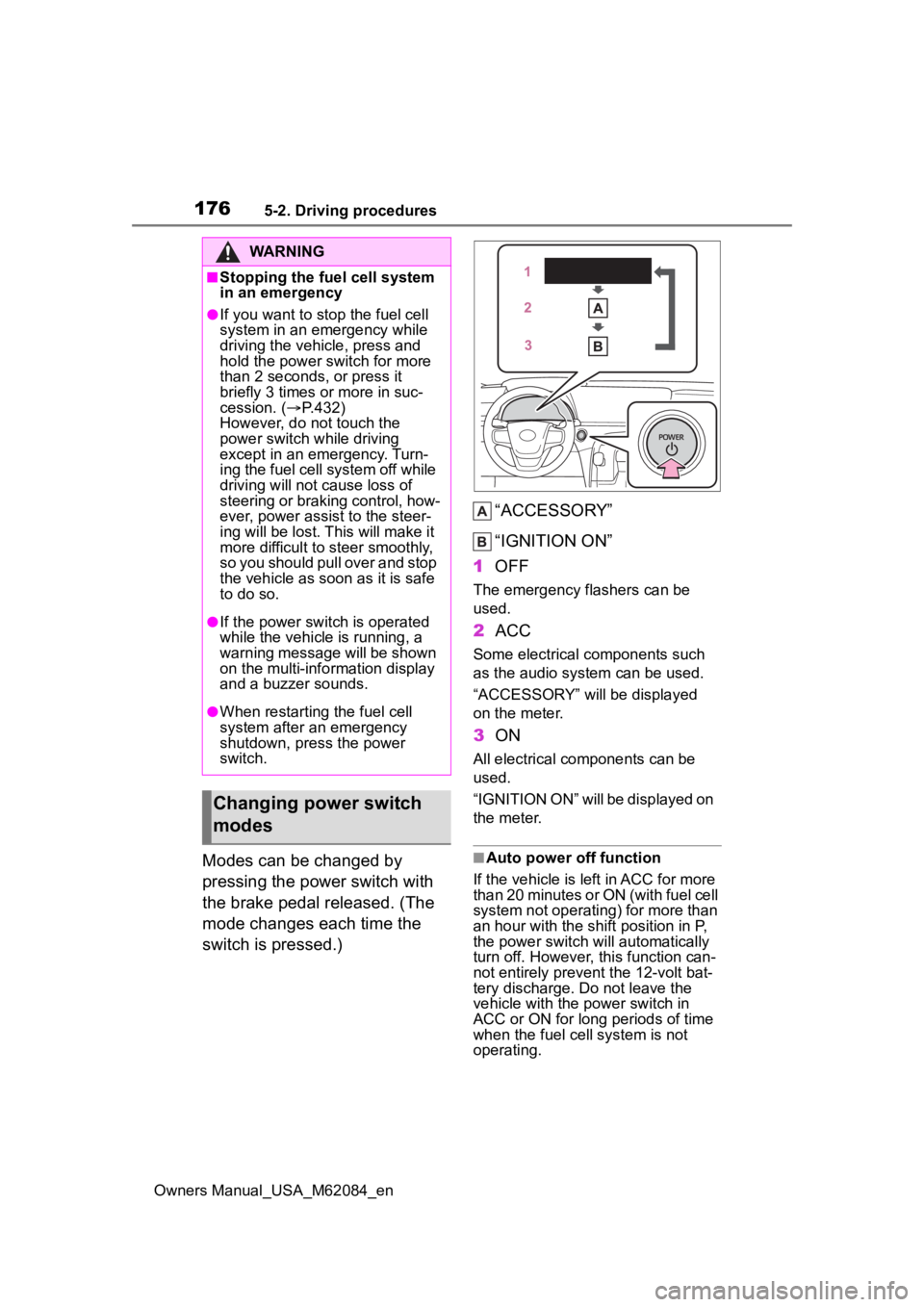
Modes can be changed by
pressing the power switch with
the brake pedal released. (The
mode changes each time the
switch is pressed.)“ACCESSORY”
“IGNITION ON”
1 OFF
The emergency flashers can be
used.
2ACC
Some electrical components such
as the audio sys tem can be used.
“ACCESSORY” will be displayed
on the meter.
3 ON
All electrical components can be
used.
“IGNITION ON” will be displayed on
the meter.
■Auto power off function
If the vehicle is left in ACC for more
than 20 minutes or ON (with fuel cell
system not operating) for more than
an hour with the s hift position in P,
the power switch will automatically
turn off. However, this function can-
not entirely prevent the 12-volt bat-
tery discharge. Do not leave the
vehicle with the power switch in
ACC or ON for long periods of time
when the fuel cell system is not
operating.
WARNING
■Stopping the fuel cell system
in an emergency
●If you want to stop the fuel cell
system in an emergency while
driving the vehicle, press and
hold the power switch for more
than 2 seconds, or press it
briefly 3 times or more in suc-
cession. ( P.432)
However, do not touch the
power switch while driving
except in an emergency. Turn-
ing the fuel cell system off while
driving will not cause loss of
steering or braking control, how-
ever, power assist to the steer-
ing will be lost. This will make it
more difficult to steer smoothly,
so you should pull over and stop
the vehicle as soon as it is safe
to do so.
●If the power switch is operated
while the vehicle is running, a
warning message will be shown
on the multi-info rmation display
and a buzzer sounds.
●When restarting the fuel cell
system after an emergency
shutdown, press the power
switch.
Changing power switch
modes
Page 178 of 556
1785-2. Driving procedures
Owners Manual_USA_M62084_en
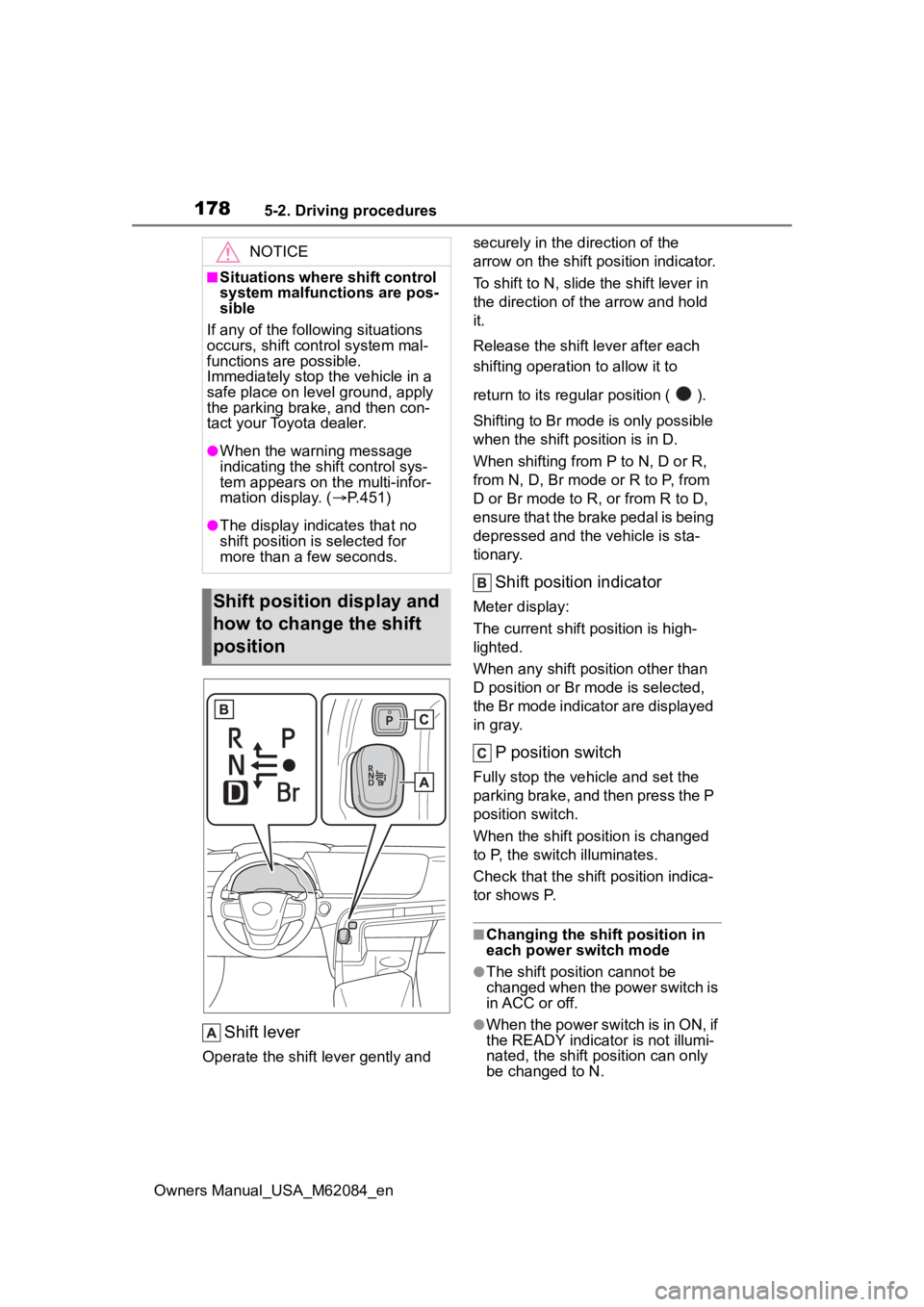
Shift lever
Operate the shift lever gently and securely in the direction of the
arrow on the shift position indicator.
To shift to N, slide the shift lever in
the direction of the arrow and hold
it.
Release the shift
lever after each
shifting operati on to allow it to
return to its regu lar position ( ).
Shifting to Br mode is only possible
when the shift position is in D.
When shifting from P to N, D or R,
from N, D, Br mode o r R to P, from
D or Br mode to R, or from R to D,
ensure that the brake pedal is being
depressed and the vehicle is sta-
tionary.
Shift position indicator
Meter display:
The current shift position is high-
lighted.
When any shift position other than
D position or Br mode is selected,
the Br mode indicator are displayed
in gray.
P position switch
Fully stop the vehicle and set the
parking brake, and then press the P
position switch.
When the shift position is changed
to P, the switch illuminates.
Check that the shif t position indica-
tor shows P.
■Changing the shift position in
each power switch mode
●The shift position cannot be
changed when the power switch is
in ACC or off.
●When the power switch is in ON, if
the READY indicator is not illumi-
nated, the shift position can only
be changed to N.
NOTICE
■Situations where shift control
system malfunctions are pos-
sible
If any of the following situations
occurs, shift cont rol system mal-
functions are possible.
Immediately stop the vehicle in a
safe place on level ground, apply
the parking brake, and then con-
tact your Toyota dealer.
●When the warning message
indicating the shift control sys-
tem appears on the multi-infor-
mation display. ( P.451)
●The display indicates that no
shift position is selected for
more than a few seconds.
Shift position display and
how to change the shift
position
Page 179 of 556

1795-2. Driving procedures
Owners Manual_USA_M62084_en
5
Driving
●When the READY indicator is illu-
minated, the shift position can be
changed from P to D, N, or R.
●When the READY indicator is
flashing, the shift position cannot
be changed from P to any other
position, even if the shift lever is
operated. Operate the shift lever
again after the READY indicator
changes from flashing to illumi-
nated.
■Shifting the shift position from
P to other positions
●While depressing the brake pedal
firmly, operate the shift lever. If the
shift lever is o perated without
depressing the brake pedal, the
buzzer will sound an d the shifting
operation will be disabled.
●When selecting the shift position,
make sure that the shift position
has been changed to the desired
position by checking the shift posi-
tion indicator provided on the
instrument cluster.
●The shift position cannot be
changed from P to Br mode
directly.
■The shift position cannot be
changed when
In the following situations, a buzzer
will sound to inform you that the shift
position cannot be changed. Use
the appropriate operation to attempt
to change the shif t position again.
●When attempting to change the
shift position from P with the brake
pedal not depressed
●When attempting to change the
shift position from P with the
accelerator pedal depressed
●When attempting to change the
shift position from N while stopped
or driving at an extremely low
speed with the b rake pedal not
depressed
●When attempting to change the
shift position fro m N while stopped
or driving at an extremely low speed with the accelerator pedal
depressed
●When attempting to change the
shift position fr
om P or N to Br
mode
●When the P position switch is
pressed while driving
When driving at an extremely low
speed, the shift position may
change to P.
■The shift position automatically
changes to N when
In the following situations, a buzzer
will sound to inform you that the shift
position has bee n changed to N.
Use the appropriate operation to
attempt to change th e shift position
again.
●When attempting to change the
shift position to R while the vehicle
is moving forward
When driving at a low speed, the
shift position may change to R.
●When attempting to change the
shift position to D while the vehicle
is moving backward
When driving at a low speed, the
shift position may change to D.
●When attempting to change the
shift position fr om R to Br mode
■I f t h e N s h i f t p o s i t i o n i s s e l e c t e d
while driving
If the shift lever is moved to N while
driving above a ce rtain speed, the
shift position will change to N with-
out holding the shif t lever in the N
position. In this s ituation, a buzzer
will sound and a message will be
displayed on the multi-information
display to inform you that the shift
position has bee n changed to N.
■Reverse warning buzzer
When shifting into R, a buzzer will
sound to inform the driver that the
shift position is in R.
Page 180 of 556
1805-2. Driving procedures
Owners Manual_USA_M62084_en
■Automatic P position selection
function
In the following situations, the shift
position is automatically changed to
P.
●When pressing the power switch
with the vehicle stopped while the
power switch is in ON and the shift
position is in a position other than
P (after the shift position has
changed to P, the power switch
will turn off)
*
●If the driver’s door is opened and
all of the followin g conditions are
met, while the shift position is in a
position other than P
• The power switch is in ON.
• The driver is not wearing the seat belt.
• The brake pedal is not depressed.
To start off the vehicle after the shift
position is changed to P, operate the
shift lever again.
●When the vehicle is stopped after
the fuel cell system has been
stopped in an emergency while
driving
●When voltage of the 12-volt bat-
tery drops while the shift position
is in a position other than P
*: When the power switch is pressed
while driving at extremely slow
speeds, such as immediately
before stopping the vehicle, the
shift position may automatically
change to P. Make sure that the
vehicle is completely stopped
before pressing the power switch.
■If the shift position cannot be
shifted from P
There is a possibility that the 12-volt
battery is discharged. Check the 12-
volt battery in this situation.
( P.471)
■Customization
Some functions can be customized.
( P.498)
WARNING
■For the shift lever
●Do not remove th e shift lever
knob or use anything but a gen-
uine TOYOTA shift lever knob.
Also, do not hang anything on
the shift lever. Doing so could
prevent the shi ft lever from
returning to position, causing
unexpected accidents to occur
when the vehicle is in motion.
●In order to prevent the shift
position from accidentally being
changed, do not touch the shift
lever when not using them.
■P position switch
●Do not press the P position
switch while the vehicle is mov-
ing.
If the P position switch is
pressed when d riving at very
low speeds (for example,
directly before stopping the
vehicle), the vehicle may stop
suddenly when the shift position
switches to P, wh ich could lead
to an accident.
●In order to prevent the shift
position from accidentally being
changed, do not touch the P
position switch when not using
them.
NOTICE
■Notes regardin g shift lever
and P position switch opera-
tion
Avoid repeatedly operating the
shift lever and P position switch in
quick succession. The system
protection functi on may activate
and it will not be temporarily pos-
sible to shift the shift position
other than P. If this happens,
please wait for a while before
attempting to change the shift
position again.
Page 185 of 556
1855-2. Driving procedures
Owners Manual_USA_M62084_en
5
Driving
■Parking brake automatic
release function
●When the shift position is shifted
from P, the parking brake will be
released in automatic mode.
●When all of the following condi-
tions are met in manual mode, the
parking brake can be released by
depressing the accelerator pedal.
• The driver’s door is closed
• The driver is wearing the seat belt
• The shift position is in D or R
■If “Parking Brake Temporarily
Unavailable” i s displayed on
the multi-information display
If the parking brake is operated
repeatedly over a short period of
time, the system may restrict opera-
tion to prevent overheating. If this
happens, refrain from operating the
parking brake. Nor mal operation will
return after about 1 minute.
■If “Parking Brake Unavailable”
is displayed on the multi-infor-
mation display
Operate the parking brake switch. If
the message does not disappear
after operating the switch several
times, the system may be malfunc-
tioning. Have the vehicle inspected
by your Toyota dealer.
■Parking brake operation sound
When the parking brake operates, a
motor sound (whirring sound) may
be heard. This does not indicate a
malfunction.
■Parking brake operation
●Depending on the power switch
mode, the parking brake indicator
light will turn on and stay on as
described below:
ON: Comes on until the parking
brake is released.
Not in ON: Stays on for approxi-
mately 15 seconds.
●When the power switch is turned
off with the parking brake set, the
parking brake indicator light will
stay on for about 15 seconds. This does not indicate a malfunction.
■When the parking brake switch
malfunctions
Automatic mode (automatic brake
setting and releas ing) will be turned
on automatically.
■Parking the vehicle
P.161
■Parking brake engaged warning
buzzer
A buzzer will sound if the vehicle is
driven with the parking brake
engaged. “Parking Brake ON” is dis-
played on the multi-information dis-
play. (with the vehicle reached a
speed of 3 mph [5 km/h])
■If the parking brake indicator
flashes
P.447
■Usage in winter time
P.320
WARNING
■When parking the vehicle
Do not leave a child in the vehicle
alone. The parking brake may be
released unintentionally and there
is the danger of the vehicle mov-
ing that may lead to an accident
resulting in death o r serious injury.
NOTICE
■When parking the vehicle
Before you leave the vehicle, set
the parking brake, shift the shift
position to P and make sure that
the vehicle does not move.
■When the system malfunc-
tions
Stop the vehicle in a safe place
and check the warning messages.
Page 187 of 556
1875-2. Driving procedures
Owners Manual_USA_M62084_en
5
Driving
belt.
●The parking brake is engaged.
If any of the conditions above are
detected when the brake hold sys-
tem is enabled, the system will turn
off and the brake hold standby indi-
cator light will go of f. In addition, if
any of the conditions are detected
while the system is holding the
brake, a warning buzzer will sound
and a message will be shown on the
multi-information display. The park-
ing brake will then be set automati-
cally.
■Brake hold function
●If the brake pedal is left released
for a period of about 3 minutes
after the system has started hold-
ing the brake, the parking brake
will be set automatically. In this
case, a warning buzzer sounds
and a message is shown on the
multi-informat ion display.
●To turn the system off while the
system is holding the brake, firmly
depress the brake pedal and
press the button again.
●The brake hold function may not
hold the vehicle when the vehicle
is on a steep inclin e. In this situa-
tion, it may be necessary for the
driver to apply the brakes. A warn-
ing buzzer will sound and the
multi-informatio n display will
inform the driver of this situation. If
a warning message is shown on
the multi-information display, read
the message and follow the
instructions.
■When the parking brake is set
automatically while the system
is holding the brakes
Perform any of the following opera-
tions to release the parking brake.
●Depress the accelerator pedal.
(The parking brake will not be
released automatic ally if the seat
belt is not fastened.)
●Operate the parking brake switch
with the brake pedal depressed. Make sure that the parking brake
indicator light goes off. (
P.183)
■When an inspection at your
Toyota dealer is necessary
When the brake hold standby indi-
cator (green) does not illuminate
even when the brake hold switch is
pressed with the brake hold system
operating conditions met, the sys-
tem may be malf unctioning. Have
the vehicle inspected at your Toyota
dealer.
■If “Brake Hold Malfunction
Press Brake to Deactivate Visit
Your Dealer” or “Brake Hold
Malfunction Visit Your Dealer”
is displayed on the multi-infor-
mation display
The system may be malfunctioning.
Have the vehicle inspected by your
Toyota dealer.
■Warning messages and buzzers
Warning messages and buzzers are
used to indicate a system malfunc-
tion or to inform the driver of the
need for caution. If a warning mes-
sage is shown on the multi-informa-
tion display, read the message and
follow the instructions.
■If the brake hold operated indi-
cator flashes
P.446
WARNING
■When the vehicle is on a
steep incline
When using the br ake hold sys-
tem on a steep inc line exercise
caution. The brake hold function
may not hold the vehicle in such a
situation.
Page 188 of 556
1885-2. Driving procedures
Owners Manual_USA_M62084_en
*: If equipped
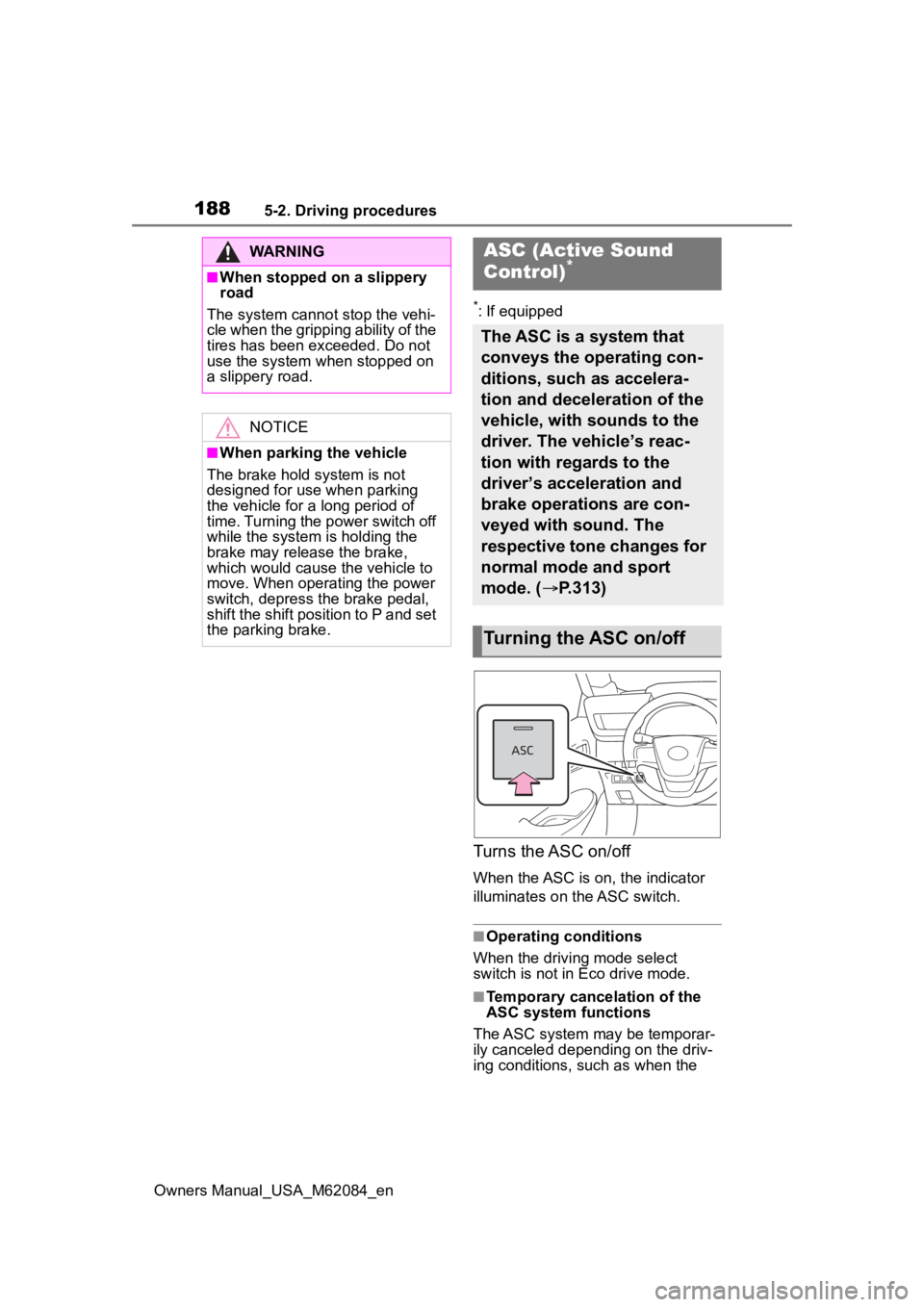
Turns the ASC on/off
When the ASC is on, the indicator
illuminates on the ASC switch.
■Operating conditions
When the driving mode select
switch is not in Eco drive mode.
■Temporary cancelation of the
ASC system functions
The ASC system may be temporar-
ily canceled depending on the driv-
ing conditions, such as when the
WARNING
■When stopped on a slippery
road
The system cannot stop the vehi-
cle when the gripping ability of the
tires has been exceeded. Do not
use the system when stopped on
a slippery road.
NOTICE
■When parking the vehicle
The brake hold s ystem is not
designed for use when parking
the vehicle for a long period of
time. Turning the power switch off
while the system i s holding the
brake may release the brake,
which would cause the vehicle to
move. When operating the power
switch, depress the brake pedal,
shift the shift position to P and set
the parking brake.
ASC (Active Sound
Control)*
The ASC is a system that
conveys the operating con-
ditions, such as accelera-
tion and deceleration of the
vehicle, with sounds to the
driver. The vehicle’s reac-
tion with regards to the
driver’s acceleration and
brake operations are con-
veyed with sound. The
respective tone changes for
normal mode and sport
mode. ( P.313)
Turning the ASC on/off
Page 193 of 556
1935-3. Operating the lights and wipers
Owners Manual_USA_M62084_en
5
Driving
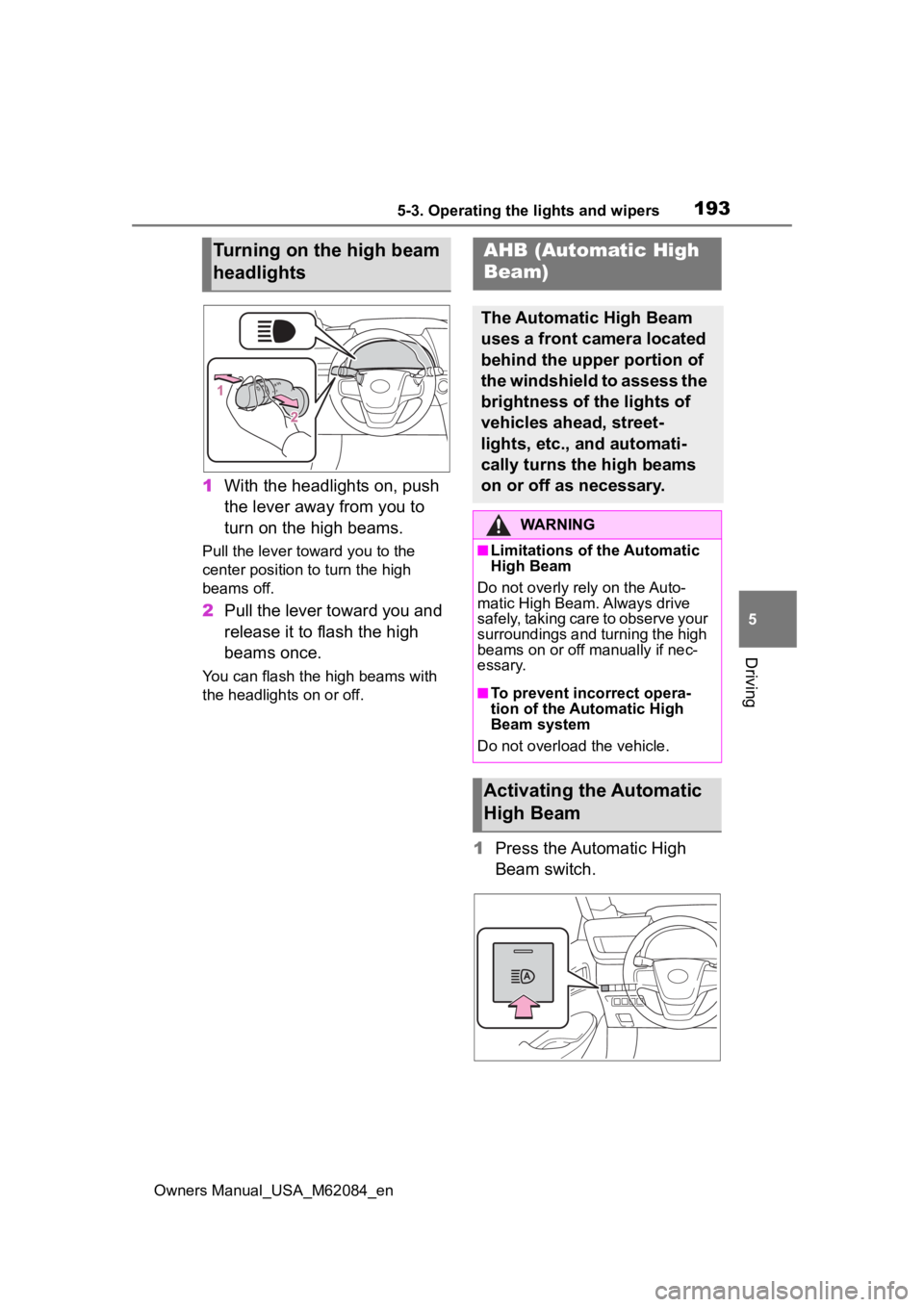
1 With the headlights on, push
the lever away from you to
turn on the high beams.
Pull the lever toward you to the
center position to turn the high
beams off.
2Pull the lever toward you and
release it to flash the high
beams once.
You can flash the high beams with
the headlights on or off.
1Press the Automatic High
Beam switch.
Turning on the high beam
headlightsAHB (Automatic High
Beam)
The Automatic High Beam
uses a front camera located
behind the upper portion of
the windshield to assess the
brightness of the lights of
vehicles ahead, street-
lights, etc., and automati-
cally turns the high beams
on or off as necessary.
WARNING
■Limitations of the Automatic
High Beam
Do not overly rely on the Auto-
matic High Beam. Always drive
safely, taking care to observe your
surroundings and turning the high
beams on or off manually if nec-
essary.
■To prevent inc orrect opera-
tion of the Automatic High
Beam system
Do not overload the vehicle.
Activating the Automatic
High Beam
Page 200 of 556
2005-3. Operating the lights and wipers
Owners Manual_USA_M62084_en
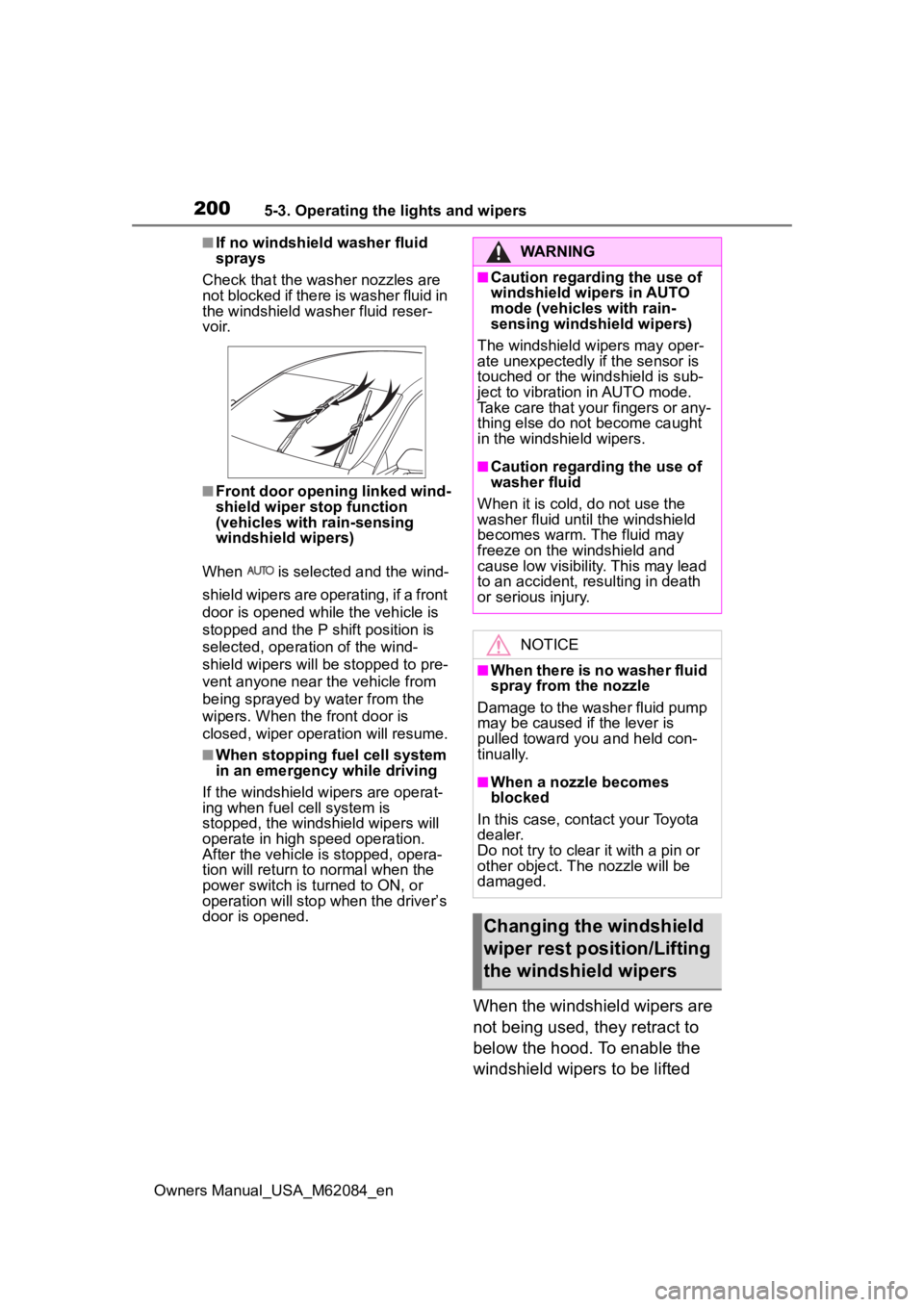
■If no windshield washer fluid
sprays
Check that the wash er nozzles are
not blocked if there is washer fluid in
the windshield washer fluid reser-
v oi r.
■Front door opening linked wind-
shield wiper stop function
(vehicles with rain-sensing
windshield wipers)
When is selected and the wind-
shield wipers are operating, if a front
door is opened while the vehicle is
stopped and the P shift position is
selected, operation of the wind-
shield wipers will be stopped to pre-
vent anyone near the vehicle from
being sprayed by water from the
wipers. When the front door is
closed, wiper operation will resume.
■When stopping fuel cell system
in an emergency while driving
If the windshield wipers are operat-
ing when fuel cell system is
stopped, the windshield wipers will
operate in high speed operation.
After the vehicle is stopped, opera-
tion will return to normal when the
power switch is turned to ON, or
operation will stop w hen the driver’s
door is opened.
When the windshield wipers are
not being used, they retract to
below the hood. To enable the
windshield wipers to be lifted
WARNING
■Caution regarding the use of
windshield wipers in AUTO
mode (vehicles with rain-
sensing windshield wipers)
The windshield wipers may oper-
ate unexpectedly if the sensor is
touched or the windshield is sub-
ject to vibration in AUTO mode.
Take care that your fingers or any-
thing else do not become caught
in the windshield wipers.
■Caution regarding the use of
washer fluid
When it is cold, do not use the
washer fluid unt il the windshield
becomes warm. The fluid may
freeze on the windshield and
cause low visibility. This may lead
to an accident, resulting in death
or serious injury.
NOTICE
■When there is no washer fluid
spray from the nozzle
Damage to the washer fluid pump
may be caused if the lever is
pulled toward you and held con-
tinually.
■When a nozzle becomes
blocked
In this case, contact your Toyota
dealer.
Do not try to clear it with a pin or
other object. The nozzle will be
damaged.
Changing the windshield
wiper rest position/Lifting
the windshield wipers