warning TOYOTA MIRAI 2022 Owners Manual
[x] Cancel search | Manufacturer: TOYOTA, Model Year: 2022, Model line: MIRAI, Model: TOYOTA MIRAI 2022Pages: 556, PDF Size: 17.34 MB
Page 249 of 556
2495-5. Using the driving support systems
Owners Manual_USA_M62084_en
5
Driving
*: If equipped
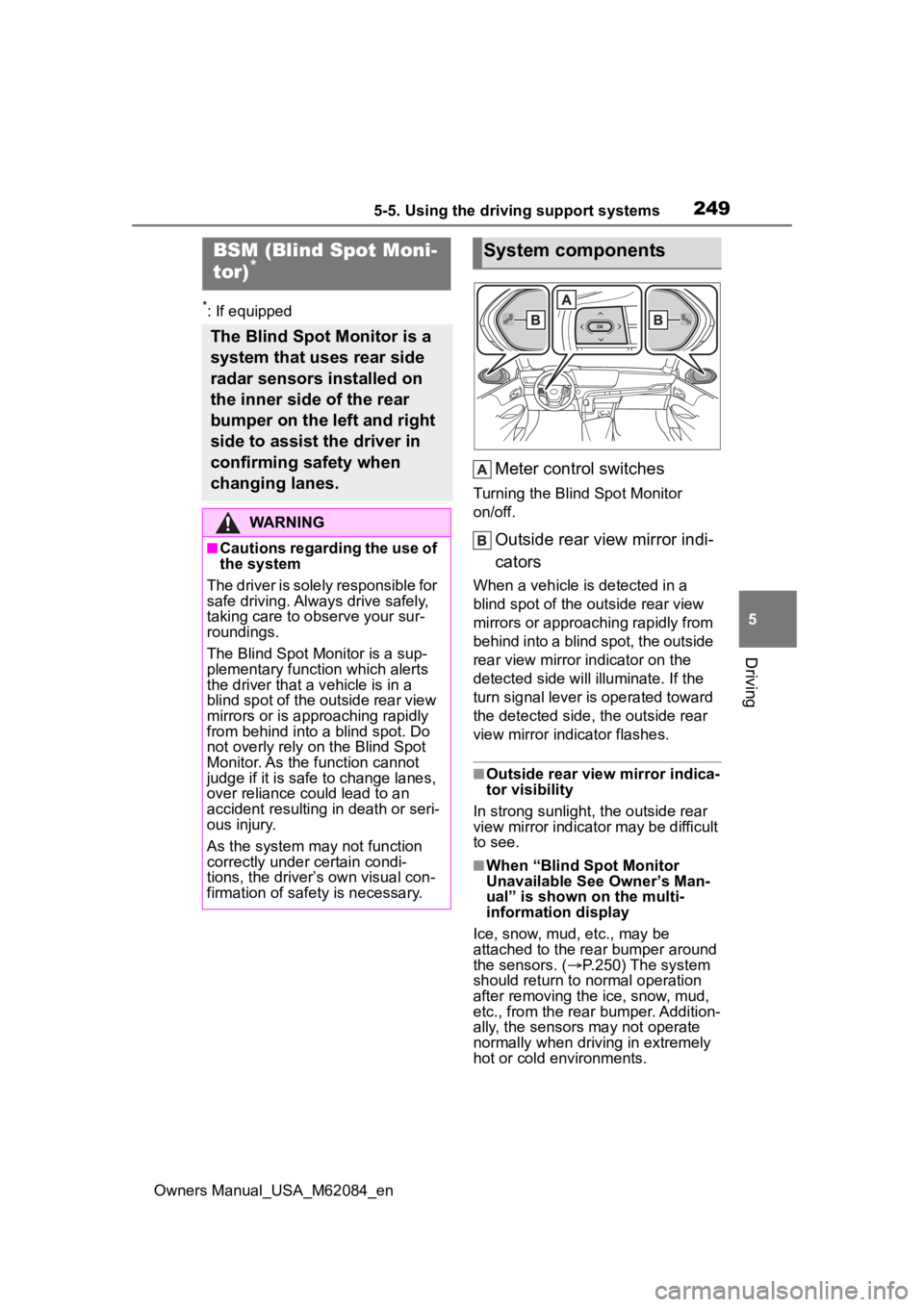
Meter control switches
Turning the Blind Spot Monitor
on/off.
Outside rear view mirror indi-
cators
When a vehicle is detected in a
blind spot of the outside rear view
mirrors or approaching rapidly from
behind into a blind spot, the outside
rear view mirror indicator on the
detected side will illuminate. If the
turn signal lever is operated toward
the detected side, the outside rear
view mirror indicator flashes.
■Outside rear vie w mirror indica-
tor visibility
In strong sunlight, the outside rear
view mirror indicator may be difficult
to see.
■When “Blind Spot Monitor
Unavailable See Owner’s Man-
ual” is shown on the multi-
information display
Ice, snow, mud, etc., may be
attached to the rear bumper around
the sensors. ( P.250) The system
should return to normal operation
after removing the ice, snow, mud,
etc., from the rear bumper. Addition-
ally, the sensors may not operate
normally when drivin g in extremely
hot or cold environments.
BSM (Blind Spot Moni-
tor)*
The Blind Spot Monitor is a
system that uses rear side
radar sensors installed on
the inner side of the rear
bumper on the left and right
side to assist the driver in
confirming safety when
changing lanes.
WARNING
■Cautions regarding the use of
the system
The driver is solely responsible for
safe driving. Always drive safely,
taking care to o bserve your sur-
roundings.
The Blind Spot Monitor is a sup-
plementary function which alerts
the driver that a v ehicle is in a
blind spot of the outside rear view
mirrors or is approaching rapidly
from behind into a blind spot. Do
not overly rely on the Blind Spot
Monitor. As the function cannot
judge if it is safe to change lanes,
over reliance could lead to an
accident resulting in death or seri-
ous injury.
As the system may not function
correctly under certain condi-
tions, the driver’s own visual con-
firmation of safety is necessary.
System components
Page 250 of 556
2505-5. Using the driving support systems
Owners Manual_USA_M62084_en
■When “Blind Spot Monitor Mal-
function Visit Your Dealer” is
shown on the multi-information
display
There may be a sensor malfunction
of misaligned. Have the vehicle
inspected by your Toyota dealer.
■Customization
Some functions can be customized.
( P.498)
■Certification
P. 5 4 8
WARNING
■To ensure the system can
operate properly
Blind Spot Monitor sensors are
installed behind the left and right
sides of the rear bumper respec-
tively. Observe the following to
ensure the Blind Spot Monitor can
operate correctly.
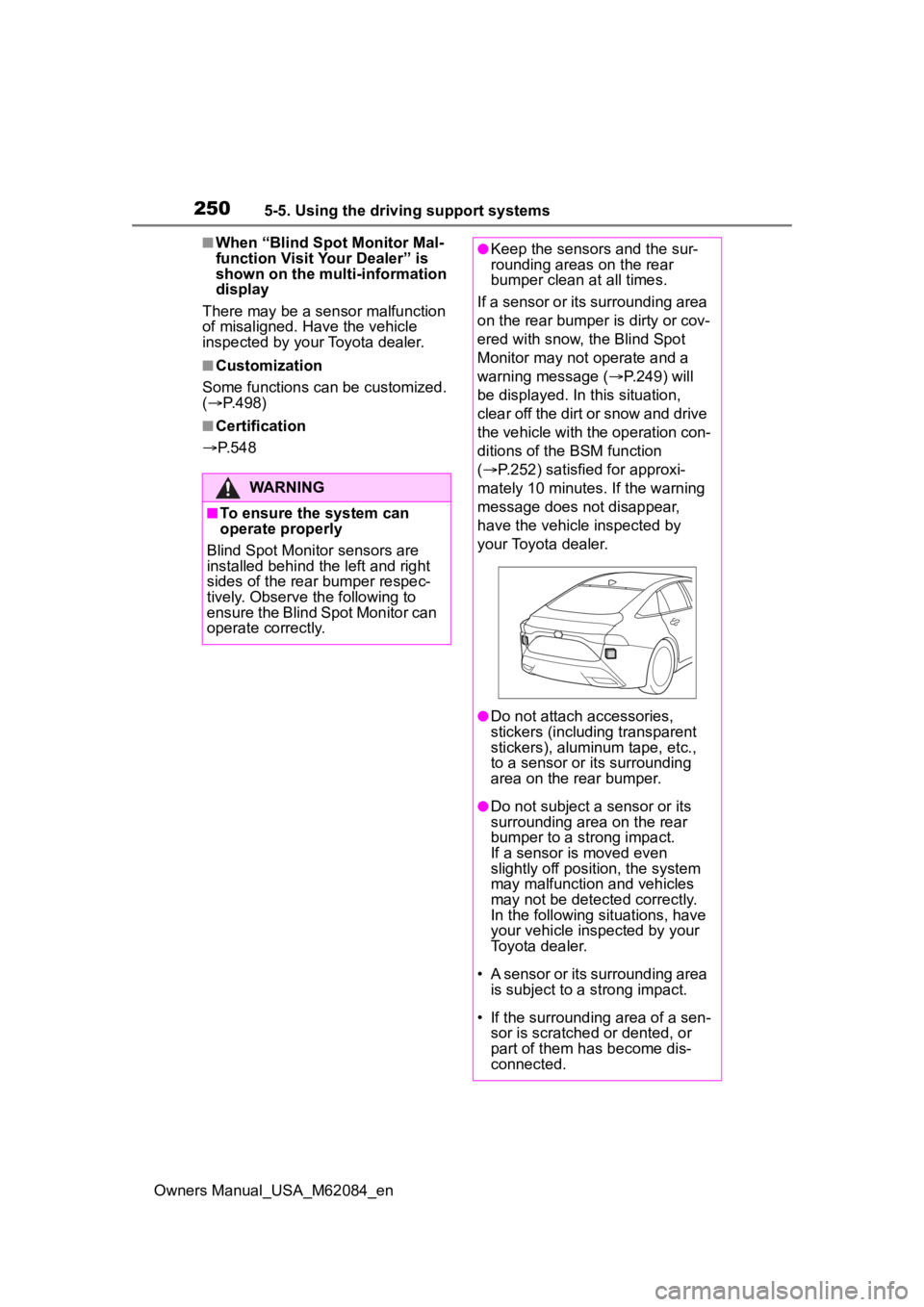
●Keep the sensors and the sur-
rounding areas on the rear
bumper clean at all times.
If a sensor or its surrounding area
on the rear bumper is dirty or cov-
ered with snow, the Blind Spot
Monitor may not operate and a
warning message ( P.249) will
be displayed. In this situation,
clear off the dirt or snow and drive
the vehicle with the operation con-
ditions of the BSM function
( P.252) satisfied for approxi-
mately 10 minutes. If the warning
message does not disappear,
have the vehicle inspected by
your Toyota dealer.
●Do not attach a ccessories,
stickers (including transparent
stickers), aluminum tape, etc.,
to a sensor or its surrounding
area on the rear bumper.
●Do not subject a sensor or its
surrounding area on the rear
bumper to a strong impact.
If a sensor is moved even
slightly off position, the system
may malfunction and vehicles
may not be detected correctly.
In the following si tuations, have
your vehicle inspected by your
Toyota dealer.
• A sensor or its surrounding area is subject to a strong impact.
• If the surrounding area of a sen- sor is scratched or dented, or
part of them h as become dis-
connected.
Page 251 of 556
2515-5. Using the driving support systems
Owners Manual_USA_M62084_en
5
Driving
Use the meter control switches
to turn on/off the function.
( P.100)
1 Press or to select .
2 Press or to select “
BSM” and then press .
When the BSM function is disabled,
the BSM OFF indicator illuminates.
(Each time the power switch is
turned off then ch anged to ON, the
Blind Spot Monitor will be enabled
automatically.)
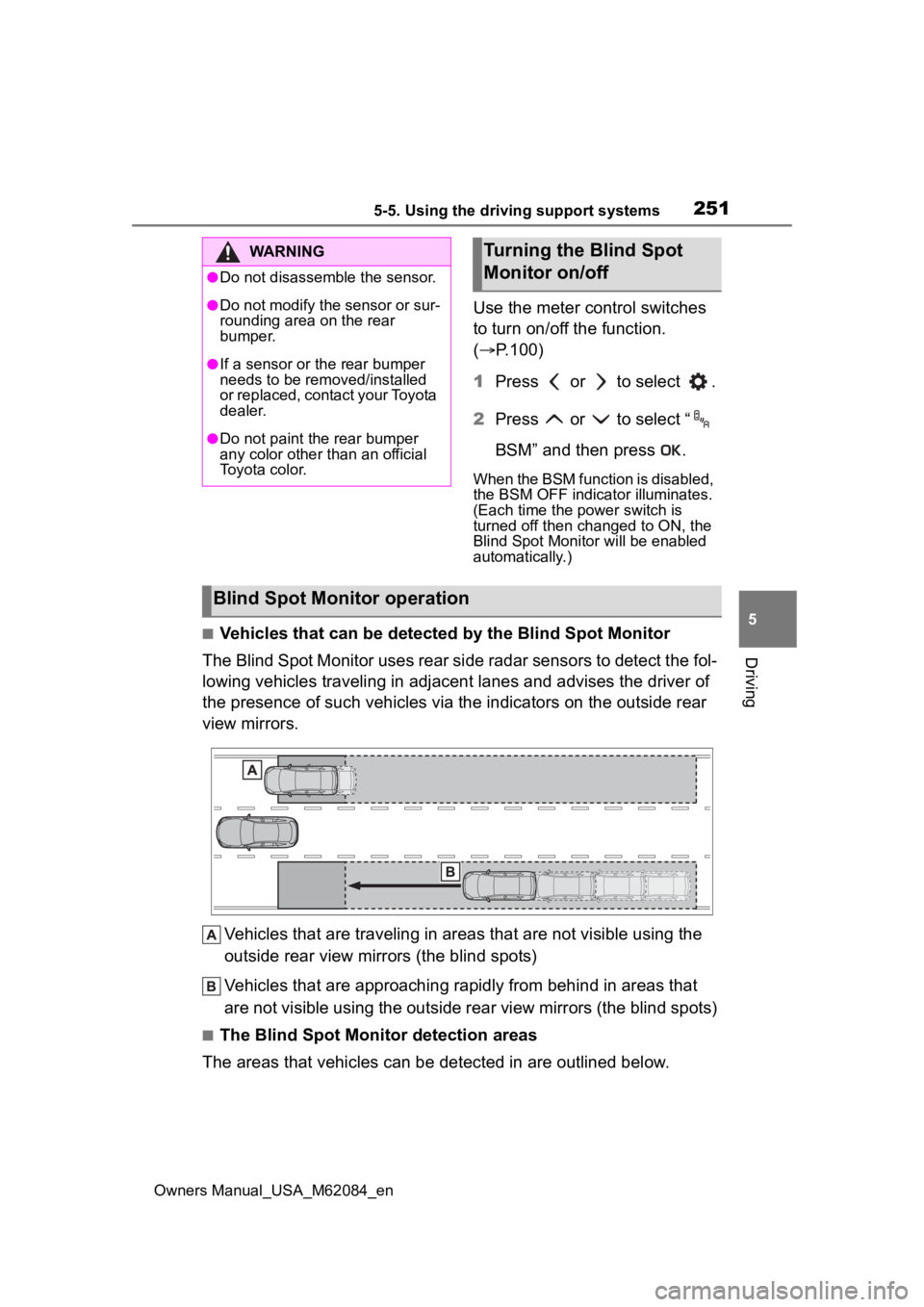
■Vehicles that can be detected by the Blind Spot Monitor
The Blind Spot Monitor uses rear side radar sensors to detect the fol-
lowing vehicles traveling in adjacent lanes and advises the driver of
the presence of such vehicles via the indicators on the outside rear
view mirrors.
Vehicles that are traveling in areas that are not visible using the
outside rear view mirrors (the blind spots)
Vehicles that are approaching r apidly from behind in areas that
are not visible using the outside rear view mirrors (the blind spots)
■The Blind Spot Monitor detection areas
The areas that vehicles can be detected in are outlined below.
WARNING
●Do not disassemble the sensor.
●Do not modify the sensor or sur-
rounding area on the rear
bumper.
●If a sensor or th e rear bumper
needs to be removed/installed
or replaced, contact your Toyota
dealer.
●Do not paint the rear bumper
any color other than an official
Toyota color.
Turning the Blind Spot
Monitor on/off
Blind Spot Monitor operation
Page 255 of 556
2555-5. Using the driving support systems
Owners Manual_USA_M62084_en
5
Driving
Use the meter control switches
to enable/disable the intuitive
parking assist. ( P.100)
1 Press or to select .
2 Press or to select
and then press .
When the intuitive parking assist
function is disabled, the intuitive
parking assist OFF indicator
( P.94) illuminates.
To re-enable the system when it
was disabled, select on the
multi-information display, select and then On. If disabled using
this method, the system will not be
re-enabled by turning the power
switch off and then to ON.
Turning intuitive parking
assist on/off
WARNING
■Cautions regarding the use of
the system
There is a limit to the degree of
recognition accuracy and control
performance that this system can
provide, do not ov erly rely on this
system. The driver is always
responsible for paying attention to
the vehicle’ surroundings and
driving safely.
■To ensure the system can
operate properly
Observe the following precau-
tions.
Failing to do so may result in the
vehicle being unable to be driven
safely and possibly cause an acci-
dent.
●Do not damage the sensors,
and always keep them clean.
●Do not attach a sticker or install
an electronic component, such
as a backlit licen se plate (espe-
cially fluorescent type), fog
lights, fender po le or wireless
antenna near a radar sensor.
●Do not subject the surrounding
area of the sensor to a strong
impact. If subjected to an
impact, have the vehicle
inspected by your Toyota
dealer. If the front or rear
bumper needs to be
emoved/installed or replaced,
contact your Toyota dealer.
●Do not modify, disassemble or
paint the sensors.
●Do not attach a license plate
cover.
●Keep your tires properly
inflated.
■When to disable the function
In the following situations, disable
the function as it may operate
even though there is no possibility
of a collision.
●Failing to observe the warnings
above.
●A non-genuine Toyota suspen-
sion (lowered suspension, etc.)
is installed.
■Notes when washing the vehi-
cle
Do not apply intensive bursts of
water or steam to the sensor
area.
Doing so may result in the sensor
malfunctioning.
Page 256 of 556
2565-5. Using the driving support systems
Owners Manual_USA_M62084_en
■The system can be operated
when
●The power switch is in ON.
●Intuitive parking assist function is
on.
●The vehicle speed is less than
about 6 mph (10 km/h).
●A shift position other than P is
selected.
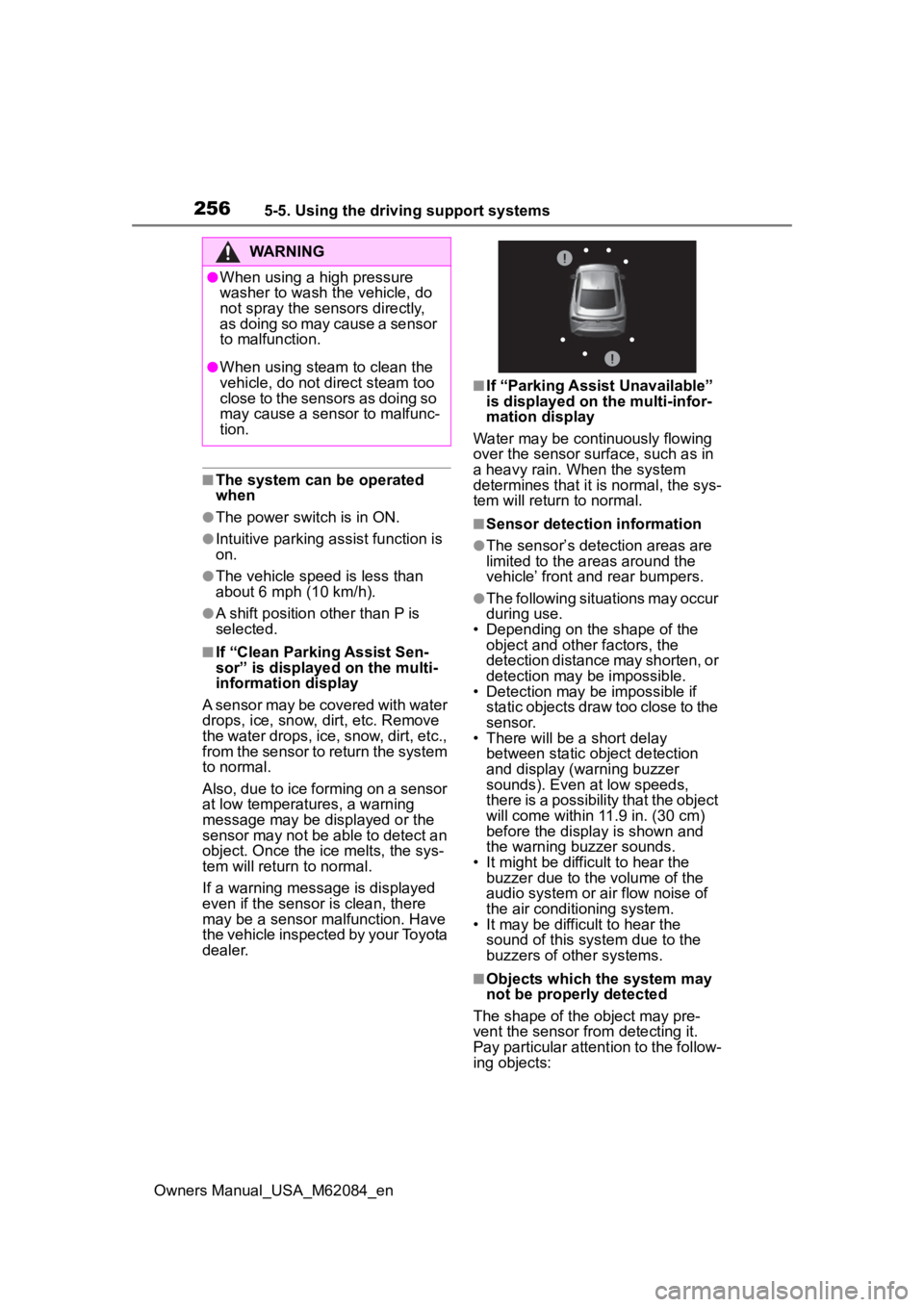
■If “Clean Parking Assist Sen-
sor” is displayed on the multi-
information display
A sensor may be covered with water
drops, ice, snow, d irt, etc. Remove
the water drops, ice, snow, dirt, etc.,
from the sensor to return the system
to normal.
Also, due to ice forming on a sensor
at low temperatures, a warning
message may be displayed or the
sensor may not be able to detect an
object. Once the ice melts, the sys-
tem will return to normal.
If a warning message is displayed
even if the sensor is clean, there
may be a sensor malfunction. Have
the vehicle inspected by your Toyota
dealer.
■If “Parking Assist Unavailable”
is displayed on the multi-infor-
mation display
Water may be continuously flowing
over the sensor surface, such as in
a heavy rain. When the system
determines that it is normal, the sys-
tem will return to normal.
■Sensor detection information
●The sensor’s detection areas are
limited to the areas around the
vehicle’ front and rear bumpers.
●The following situations may occur
during use.
• Depending on the shape of the object and other factors, the
detection distance may shorten, or
detection may be impossible.
• Detection may be impossible if
static objects draw too close to the
sensor.
• There will be a short delay
between static object detection
and display (warning buzzer
sounds). Even at low speeds,
there is a possibility that the object
will come within 11.9 in. (30 cm)
before the display is shown and
the warning buzzer sounds.
• It might be diffic ult to hear the
buzzer due to the volume of the
audio system or air flow noise of
the air conditioning system.
• It may be diffi cult to hear the
sound of this sys tem due to the
buzzers of other systems.
■Objects which the system may
not be properly detected
The shape of the object may pre-
vent the sensor from detecting it.
Pay particular attent ion to the follow-
ing objects:
WARNING
●When using a high pressure
washer to wash the vehicle, do
not spray the sensors directly,
as doing so may cause a sensor
to malfunction.
●When using steam to clean the
vehicle, do not direct steam too
close to the sensors as doing so
may cause a sens or to malfunc-
tion.
Page 261 of 556
2615-5. Using the driving support systems
Owners Manual_USA_M62084_en
5
Driving
the nearest object.
Even when the sensors are
operating, the buzzer will be
muted in some situations.
(automatic buzzer mute func-
tion)
■Adjusting the buzzer vol-
ume
The buzzer volume can be
adjusted on the multi-informa-
tion display.
Use the meter control switches
to change settings. ( P.100)
1 Press or of the meter
control switch to select .
2 Press or of the meter
control switch to select
and then press and hold .
3 Select the volume and then
press .
Each time the switch is pressed,
the volume lev el will change
between 1, 2, and 3.
■Muting a buzzer
A mute button will be displayed
on the multi-information display
when an object is detected. To
mute the buzzer, press .
The buzzers for the intuitive
parking assist and RCTA func-
tion (if equipped) will be muted
simultaneously. Mute will be canceled automati-
cally in the following situations:
When the shift position is
changed.
When the vehicle speed
exceeds a certain speed.
When there is a malfunction
in a sensor or the system is
temporarily unavailable.
When the operating function
is disabled manually.
When the power switch is
turned off.
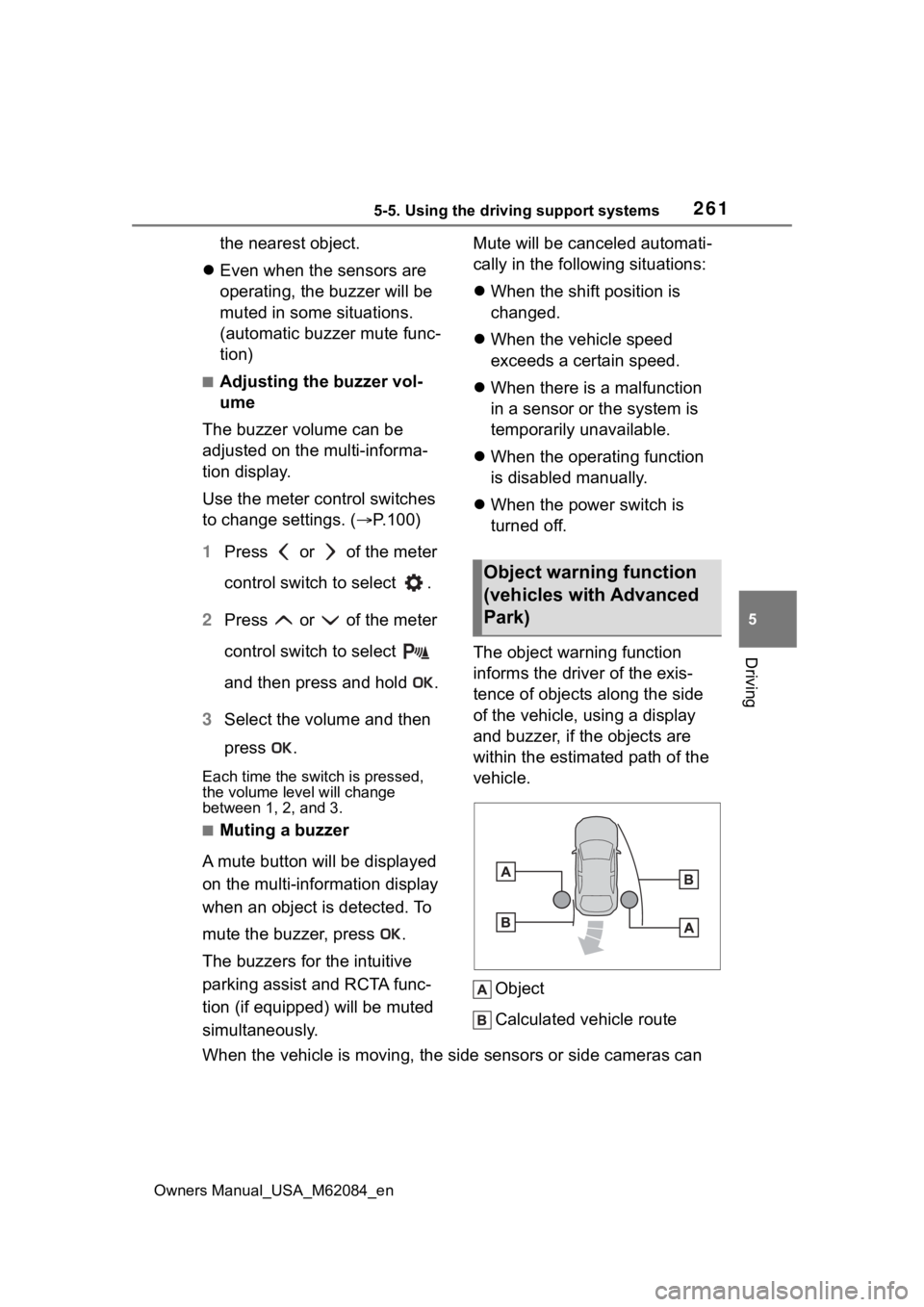
The object warning function
informs the driver of the exis-
tence of objects along the side
of the vehicle, using a display
and buzzer, if the objects are
within the estimated path of the
vehicle.
Object
Calculated vehicle route
When the vehicle is moving, the side sensors or side cameras ca n
Object warning function
(vehicles with Advanced
Park)
Page 262 of 556
2625-5. Using the driving support systems
Owners Manual_USA_M62084_en
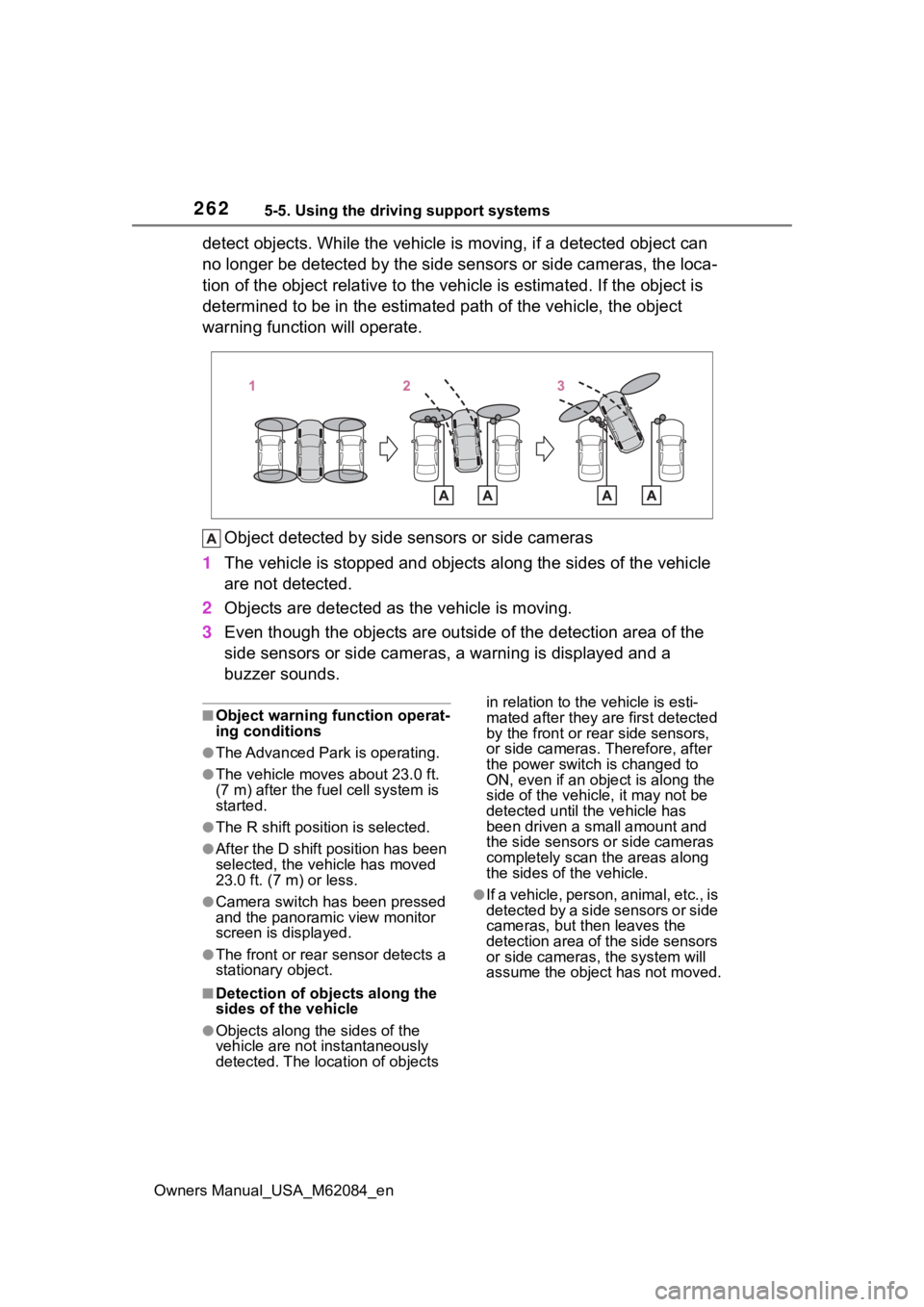
detect objects. While the vehicle is moving, if a detected object can
no longer be detected by the side sensors or side cameras, the loca-
tion of the object relative to the vehicle is estimated. If the object is
determined to be in the estimated path of the vehicle, the obje ct
warning function will operate.
Object detected by side sensors or side cameras
1 The vehicle is stopped and objects along the sides of the vehic le
are not detected.
2 Objects are detected as the vehicle is moving.
3 Even though the objects are out side of the detection area of the
side sensors or side cameras, a warning is displayed and a
buzzer sounds.
■Object warning function operat-
ing conditions
●The Advanced Park is operating.
●The vehicle moves about 23.0 ft.
(7 m) after the fuel cell system is
started.
●The R shift position is selected.
●After the D shift position has been
selected, the vehicle has moved
23.0 ft. (7 m) or less.
●Camera switch has been pressed
and the panoramic view monitor
screen is displayed.
●The front or rear s ensor detects a
stationary object.
■Detection of objects along the
sides of the vehicle
●Objects along the sides of the
vehicle are not instantaneously
detected. The location of objects in relation to the
vehicle is esti-
mated after they are first detected
by the front or rear side sensors,
or side cameras. Therefore, after
the power switch is changed to
ON, even if an object is along the
side of the vehicle, it may not be
detected until the vehicle has
been driven a small amount and
the side sensors o r side cameras
completely scan the areas along
the sides of the vehicle.
●If a vehicle, person, animal, etc., is
detected by a side sensors or side
cameras, but then leaves the
detection area of the side sensors
or side cameras, the system will
assume the object has not moved.
Page 263 of 556
2635-5. Using the driving support systems
Owners Manual_USA_M62084_en
5
Driving
*: If equipped
WARNING
■Object warning function
In situations such as the following,
the function may n ot operate cor-
rectly, possibly leading to an acci-
dent. Proceed carefully.
●When starting off shortly after
the power switch is turned to
ON and a small vehicle or other
object which cannot be detected
by a front side sensor is next to
the vehicle.
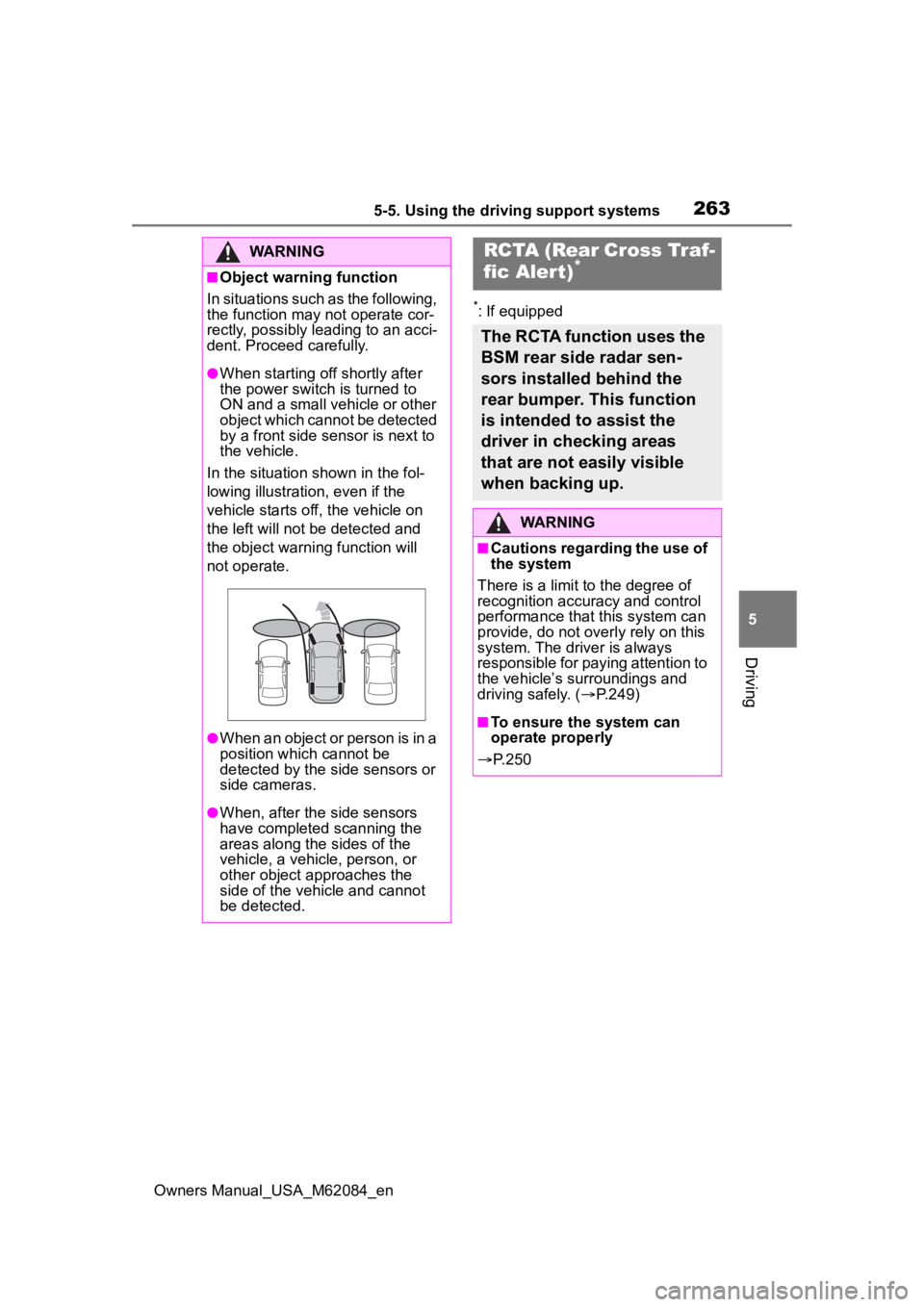
In the situation shown in the fol-
lowing illustration, even if the
vehicle starts off, the vehicle on
the left will not be detected and
the object warni ng function will
not operate.
●When an object or person is in a
position which cannot be
detected by the side sensors or
side cameras.
●When, after the side sensors
have completed scanning the
areas along the sides of the
vehicle, a vehicle, person, or
other object approaches the
side of the vehic le and cannot
be detected.
RCTA (Rear Cross Traf-
fic Alert)*
The RCTA function uses the
BSM rear side radar sen-
sors installed behind the
rear bumper. This function
is intended to assist the
driver in checking areas
that are not easily visible
when backing up.
WARNING
■Cautions regarding the use of
the system
There is a limit t o the degree of
recognition accuracy and control
performance that this system can
provide, do not overly rely on this
system. The driver is always
responsible for paying attention to
the vehicle’s su rroundings and
driving safely. ( P.249)
■To ensure the system can
operate properly
P. 2 5 0
Page 269 of 556
2695-5. Using the driving support systems
Owners Manual_USA_M62084_en
5
Driving
*: If equipped
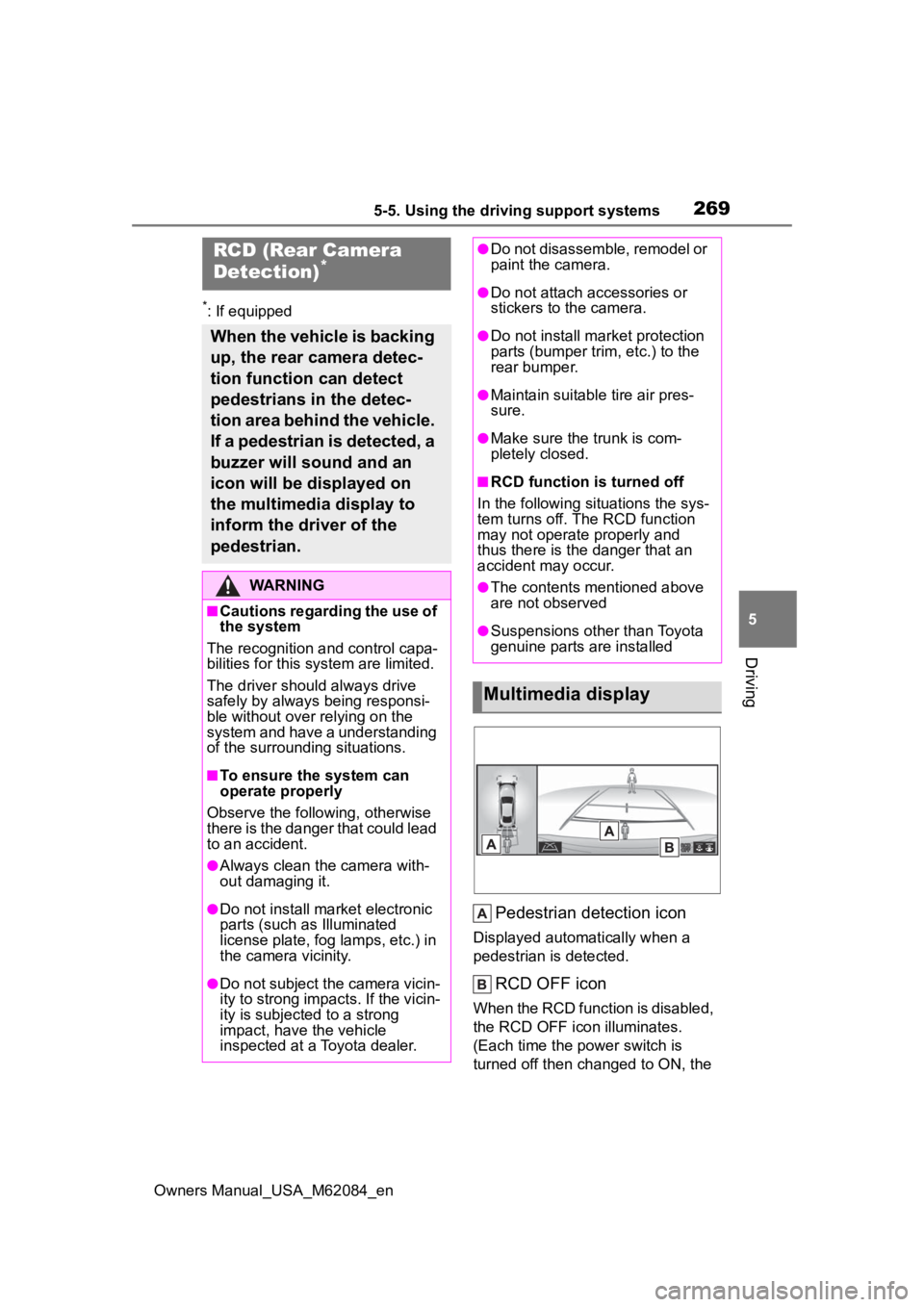
Pedestrian detection icon
Displayed automatically when a
pedestrian is detected.
RCD OFF icon
When the RCD function is disabled,
the RCD OFF icon illuminates.
(Each time the power switch is
turned off then ch anged to ON, the
RCD (Rear Camera
Detection)*
When the vehicle is backing
up, the rear camera detec-
tion function can detect
pedestrians in the detec-
tion area behind the vehicle.
If a pedestrian is detected, a
buzzer will sound and an
icon will be displayed on
the multimedia display to
inform the driver of the
pedestrian.
WARNING
■Cautions regarding the use of
the system
The recognition and control capa-
bilities for this system are limited.
The driver shoul d always drive
safely by always being responsi-
ble without over relying on the
system and have a understanding
of the surrounding situations.
■To ensure the system can
operate properly
Observe the follo wing, otherwise
there is the danger that could lead
to an accident.
●Always clean the camera with-
out damaging it.
●Do not install market electronic
parts (such as Illuminated
license plate, fog lamps, etc.) in
the camera vicinity.
●Do not subject the camera vicin-
ity to strong impacts. If the vicin-
ity is subjected to a strong
impact, have the vehicle
inspected at a Toyota dealer.
●Do not disassemble, remodel or
paint the camera.
●Do not attach accessories or
stickers to the camera.
●Do not install market protection
parts (bumper tr im, etc.) to the
rear bumper.
●Maintain suitable tire air pres-
sure.
●Make sure the trunk is com-
pletely closed.
■RCD function i s turned off
In the following situations the sys-
tem turns off. The RCD function
may not operate properly and
thus there is the danger that an
accident may occur.
●The contents mentioned above
are not observed
●Suspensions other than Toyota
genuine parts are installed
Multimedia display
Page 273 of 556
2735-5. Using the driving support systems
Owners Manual_USA_M62084_en
5
Driving
*: If equipped
■Parking Support Brake
function (static objects)
P.278
■Parking Support Brake
function (rear-crossing
vehicles)
P.280
■Parking Support Brake
function (rear pedestrians)
P.282PKSB (Parking Sup-
por t Brake)*
The Parking Support Brake
system consists of the fol-
lowing functions that oper-
ate when driving at a low
speed or backing up, such
as when parking. When the
system determines that the
probability of a collision
with a detected object or
pedestrian is high, a warn-
ing operates to urge the
driver to take evasive
action. If the system deter-
mines that the possibility of
a collision with a detected
object or pedestrian is
extremely high, the brakes
are automatically applied to
help avoid the collision or
help reduce the impact of
the collision.
PKSB (Parking Support
Brake) system
WARNING
■Cautions regarding the use of
the system
Do not overly rely on the system,
as doing so may lead to an acci-
dent.
Always drive while checking the
safety of the surroundings of the
vehicle.
Depending on the vehicle and
road conditions, weather, etc., the
system may n ot operate.
The detection cap abilities of sen-
sors and radars are limited.
Always drive while checking the
safety of the surroundings of the
vehicle.
●The driver is solely responsible
for safe driving. Always drive
carefully, taking care to observe
your surroundings. The Parking
Support Brake system is
designed to provide support to
lessen the severity of collisions.
However, it may not operate in
some situations.
●The Parking Support Brake sys-
tem is not designed to stop the
vehicle completely. Additionally,
even if the system has stopped
the vehicle, it is necessary to
depress the brake pedal imme-
diately as brake control will be
canceled after approximately 2
seconds.
●It is extremely dangerous to
check the system operations by
intentionally driving the vehicle
into the direction of a wall, etc.
Never attempt such actions.