light TOYOTA MIRAI 2022 Owners Manual
[x] Cancel search | Manufacturer: TOYOTA, Model Year: 2022, Model line: MIRAI, Model: TOYOTA MIRAI 2022Pages: 556, PDF Size: 17.34 MB
Page 347 of 556
3476-2. Using the interior lights
Owners Manual_USA_M62084_en
6
Interior features
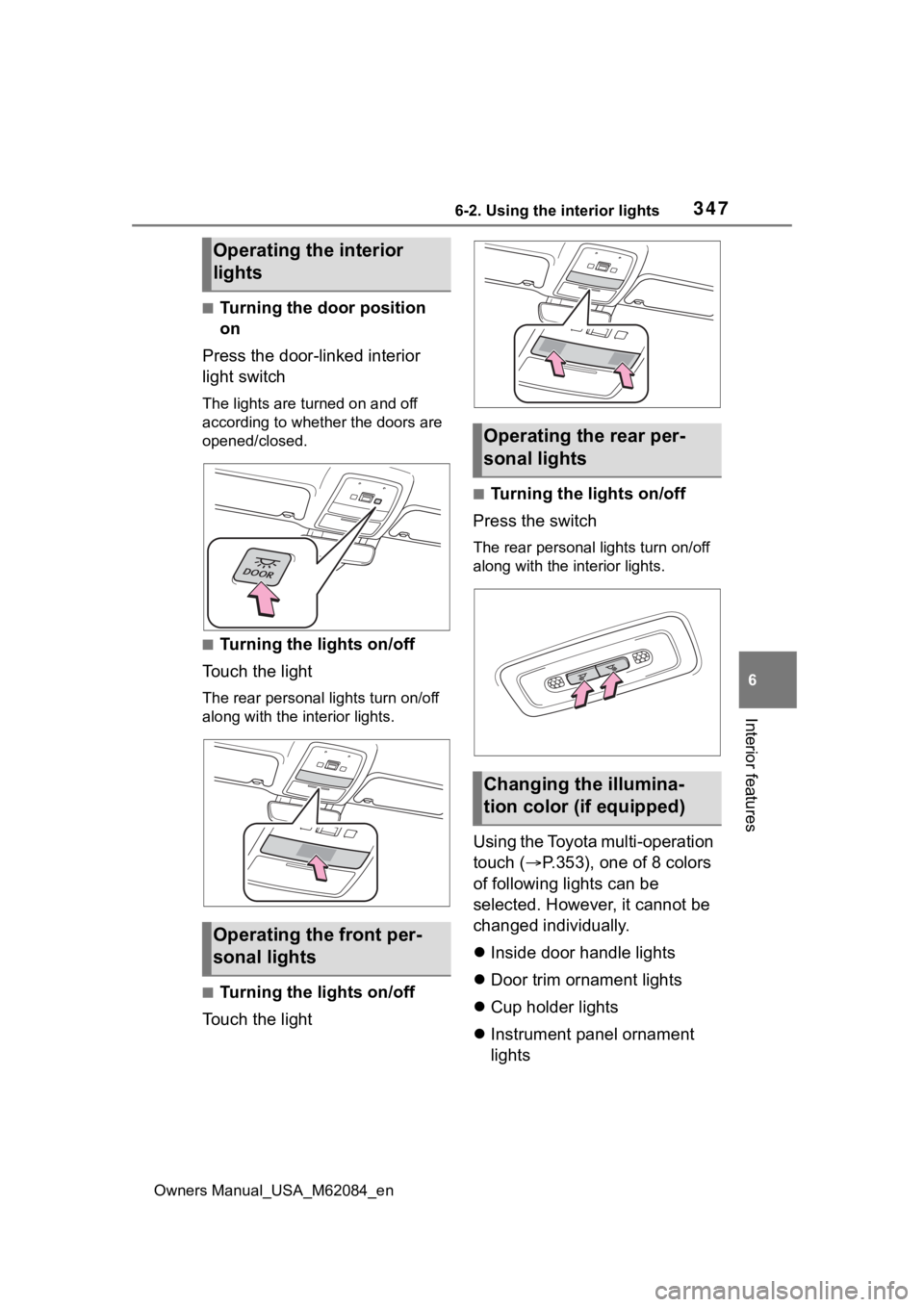
■Turning the door position
on
Press the door-linked interior
light switch
The lights are turned on and off
according to whether the doors are
opened/closed.
■Turning the lights on/off
Touch the light
The rear personal lights turn on/off
along with the in terior lights.
■Turning the lights on/off
Touch the light
■Turning the lights on/off
Press the switch
The rear personal lights turn on/off
along with the interior lights.
Using the Toyota multi-operation
touch ( P.353), one of 8 colors
of following lights can be
selected. However, it cannot be
changed individually.
Inside door handle lights
Door trim ornament lights
Cup holder lights
Instrument panel ornament
lights
Operating the interior
lights
Operating the front per-
sonal lights
Operating the rear per-
sonal lights
Changing the illumina-
tion color (if equipped)
Page 348 of 556
3486-2. Using the interior lights
Owners Manual_USA_M62084_en
1Select .
2 Select “Illumination Color”.
3 Select the desired color.
■Illuminated entry system
The lights automatically turn on/off
according to the power switch
mode, the presence of the elec-
tronic key, whether the doors are
locked/unlocked, and whether the
doors are open/closed.
■To prevent the 12-volt battery
from being discharged
If the interior lights remain on when
the power switch is turned off, the
lights will go off automatically after
20 minutes.
■When the interior lights or front
personal lights do not respond
as normal
●When water, dirt, etc., have
adhered to the lens surface
●When operated with a wet hand
●When wearing gloves, etc.
■The interior lights may turn on
automatically when
If any of the SRS airbags deploy
(inflate) or in the event of a strong
rear impact, the interior lights will
turn on automatically.
The interior lights will turn off auto-
matically after approximately 20min-
utes.
The interior lights can be turned off
manually. However, in order to help
prevent further collisions, it is rec-
ommended that they be left on until
safety can be ensured.
(The interior lights may not turn on
automatically depending on the
force of the impact and conditions of
the collision.)
■Customization
Some functions can be customized.
( P.498)
NOTICE
■To prevent 12-volt battery dis-
charge
Do not leave the lights on longer
than necessary when the fuel cell
system is off.
■Removing light lenses
Never remove the lens for the
interior lights and front personal
lights. Otherwise, the lights will be
damaged. If a lens needs to be
removed, contact your Toyota
dealer.
Page 349 of 556
3496-3. Using the storage features
Owners Manual_USA_M62084_en
6
Interior features
6-3.Using the storage features
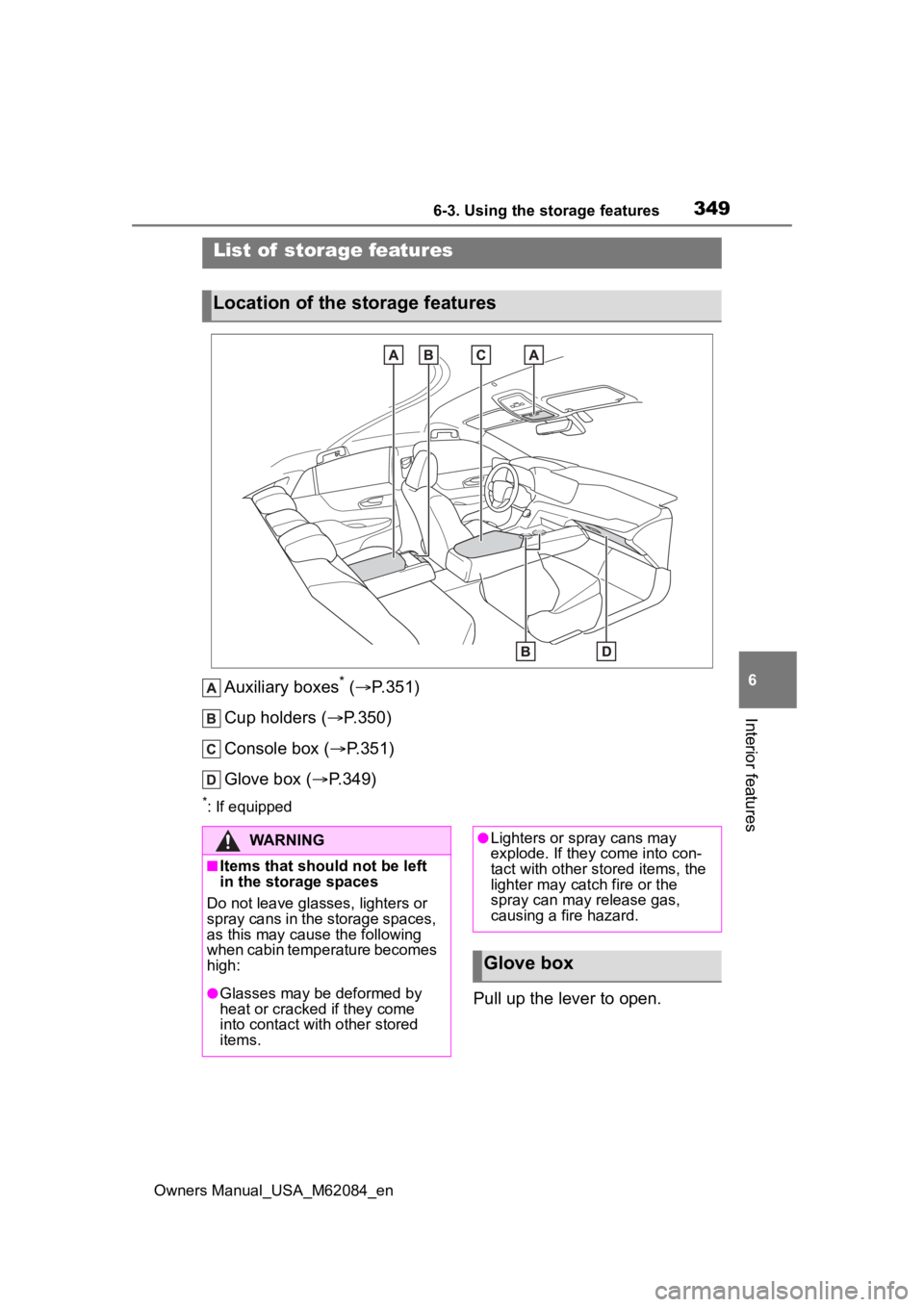
Auxiliary boxes* ( P.351)
Cup holders ( P.350)
Console box ( P.351)
Glove box ( P.349)
*: If equipped
Pull up the lever to open.
List of storage features
Location of the storage features
WARNING
■Items that should not be left
in the storage spaces
Do not leave glasses, lighters or
spray cans in the storage spaces,
as this may cau se the following
when cabin temperature becomes
high:
●Glasses may be deformed by
heat or cracked if they come
into contact with other stored
items.
●Lighters or spray cans may
explode. If they come into con-
tact with other stored items, the
lighter may catch fire or the
spray can may release gas,
causing a fire hazard.
Glove box
Page 350 of 556
3506-3. Using the storage features
Owners Manual_USA_M62084_en
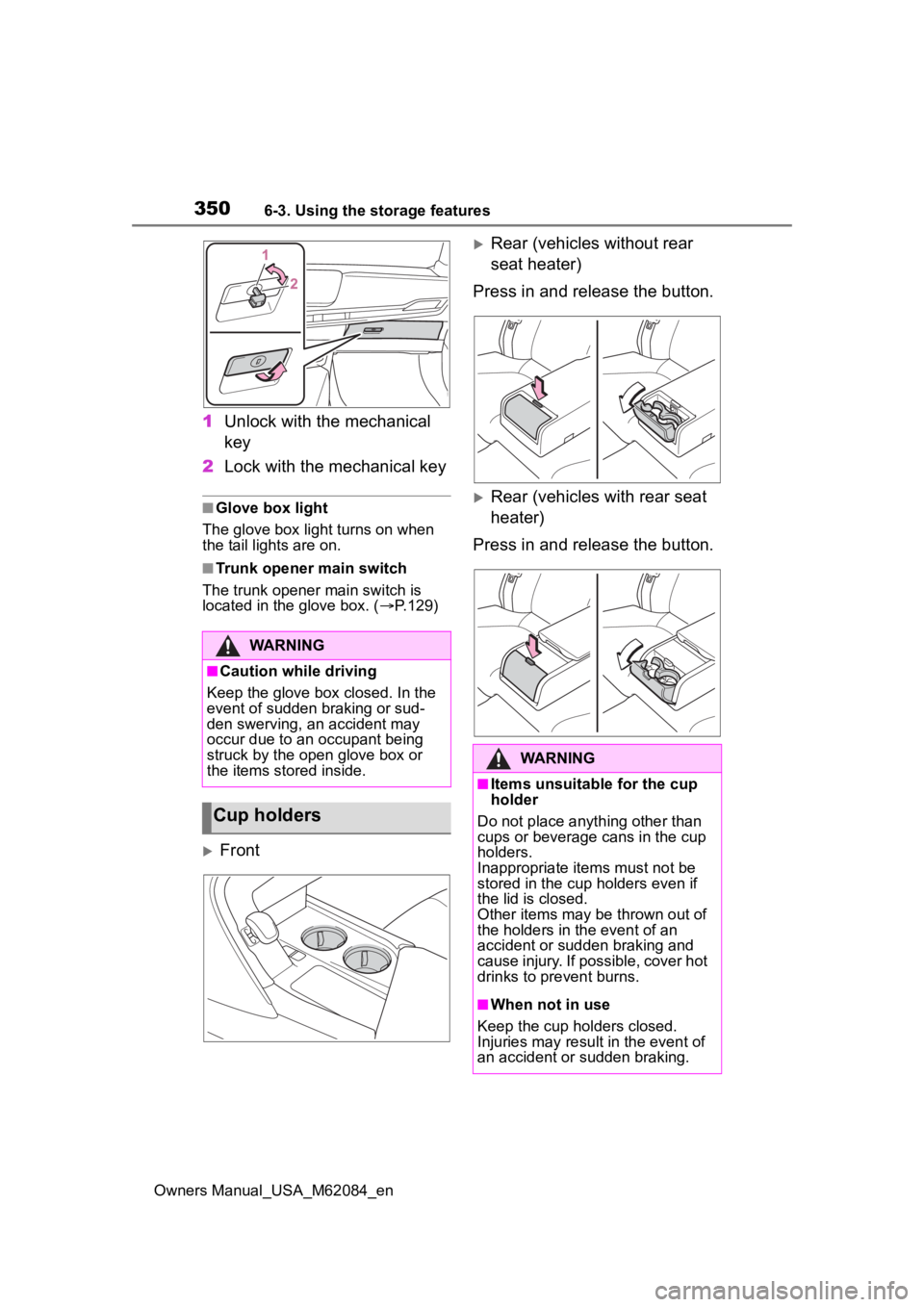
1Unlock with the mechanical
key
2 Lock with the mechanical key
■Glove box light
The glove box light turns on when
the tail lights are on.
■Trunk opener main switch
The trunk opener main switch is
located in the glove box. ( P.129)
Front
Rear (vehicles without rear
seat heater)
Press in and release the button.
Rear (vehicles with rear seat
heater)
Press in and release the button.
WARNING
■Caution while driving
Keep the glove box closed. In the
event of sudden braking or sud-
den swerving, an accident may
occur due to an occupant being
struck by the open glove box or
the items stored inside.
Cup holders
WARNING
■Items unsuitable for the cup
holder
Do not place anyth ing other than
cups or beverage cans in the cup
holders.
Inappropriate items must not be
stored in the cup holders even if
the lid is closed.
Other items may be thrown out of
the holders in the event of an
accident or sudden braking and
cause injury. If possible, cover hot
drinks to pre vent burns.
■When not in use
Keep the cup holders closed.
Injuries may resul t in the event of
an accident or sudden braking.
Page 354 of 556
3546-4. Using the other interior features
Owners Manual_USA_M62084_en
■Moving screens on the Toy-
ota multi-operation touch
Selecting or to change its
displayed position of the side
display to the left or right side of
the screen.
The screen position can also be
changed by perform a left or
right flick operation on a screen.
■Displaying a screen in full
screen
Selecting or on the
energy monitor/consumption
screen or vehicle information
screen will display that screen in
full screen.
Select or to return to the
split-screen display.
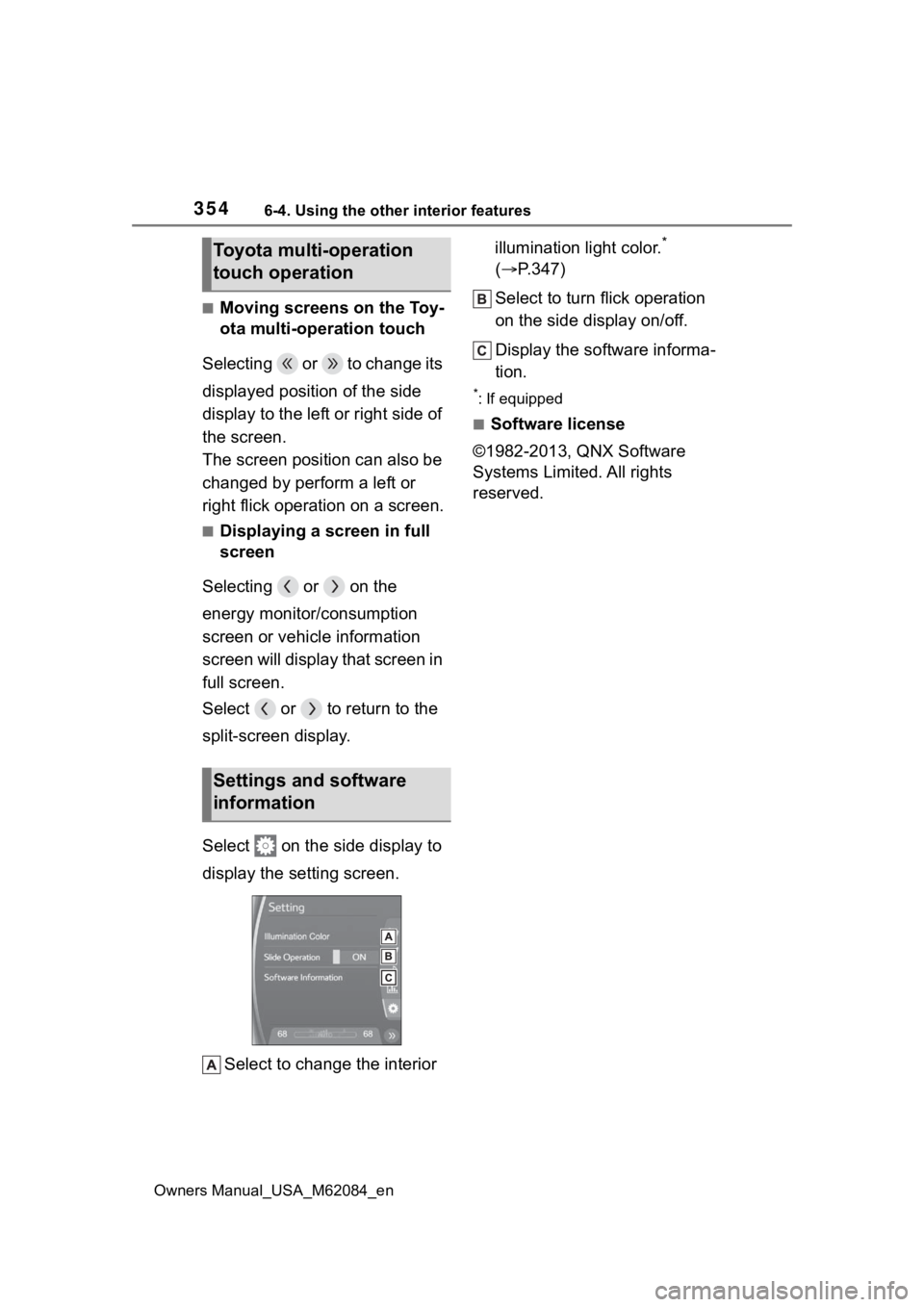
Select on the side display to
display the setting screen.
Select to change the interior illumination light color.
*
( P.347)
Select to turn flick operation
on the side display on/off.
Display the software informa-
tion.
*: If equipped
■Software license
©1982-2013, QNX Software
Systems Limited. All rights
reserved.
Toyota multi-operation
touch operation
Settings and software
information
Page 355 of 556
3556-4. Using the other interior features
Owners Manual_USA_M62084_en
6
Interior features
*: If equipped
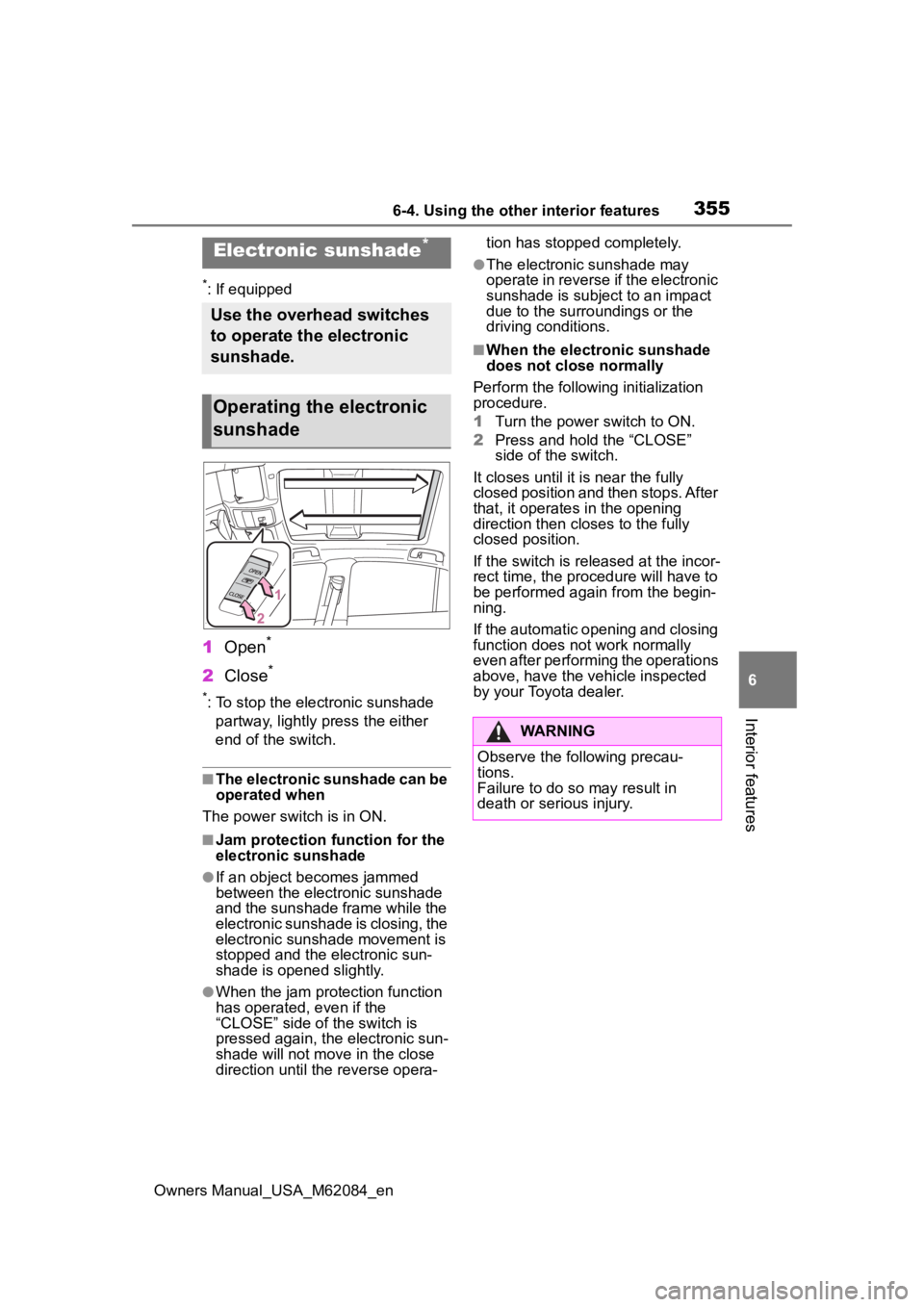
1 Open*
2Close*
*: To stop the electronic sunshade
partway, lightly p ress the either
end of the switch.
■The electronic sunshade can be
operated when
The power swit ch is in ON.
■Jam protection function for the
electronic sunshade
●If an object becomes jammed
between the electronic sunshade
and the sunshade frame while the
electronic sunshade is closing, the
electronic sunshade movement is
stopped and the electronic sun-
shade is opened slightly.
●When the jam protection function
has operated, even if the
“CLOSE” side of the switch is
pressed again, the electronic sun-
shade will not m ove in the close
direction until the reverse opera- tion has stopped completely.
●The electronic sunshade may
operate in reverse if the electronic
sunshade is subject to an impact
due to the surro
undings or the
driving conditions.
■When the electronic sunshade
does not close normally
Perform the following initialization
procedure.
1 Turn the power switch to ON.
2 Press and hold the “CLOSE”
side of the switch.
It closes until it is near the fully
closed position and then stops. After
that, it operates in the opening
direction then closes to the fully
closed position.
If the switch is released at the incor-
rect time, the proc edure will have to
be performed again from the begin-
ning.
If the automatic opening and closing
function does not work normally
even after performing the operations
above, have the vehicle inspected
by your Toyota dealer.
Electronic sunshade*
Use the overhead switches
to operate the electronic
sunshade.
Operating the electronic
sunshade
WARNING
Observe the following precau-
tions.
Failure to do so may result in
death or serious injury.
Page 356 of 556
3566-4. Using the other interior features
Owners Manual_USA_M62084_en
The USB charging ports are
used to supply 2.1 A of electric-
ity at 5 V to external devices.
The USB charging ports are for
charging only. They are not
designed for data transfer or
other purposes.
Depending on the external
device, it may not charge prop-
erly. Refer to the manual
included with the device before
using a USB charging port.
■Using the USB charging
ports
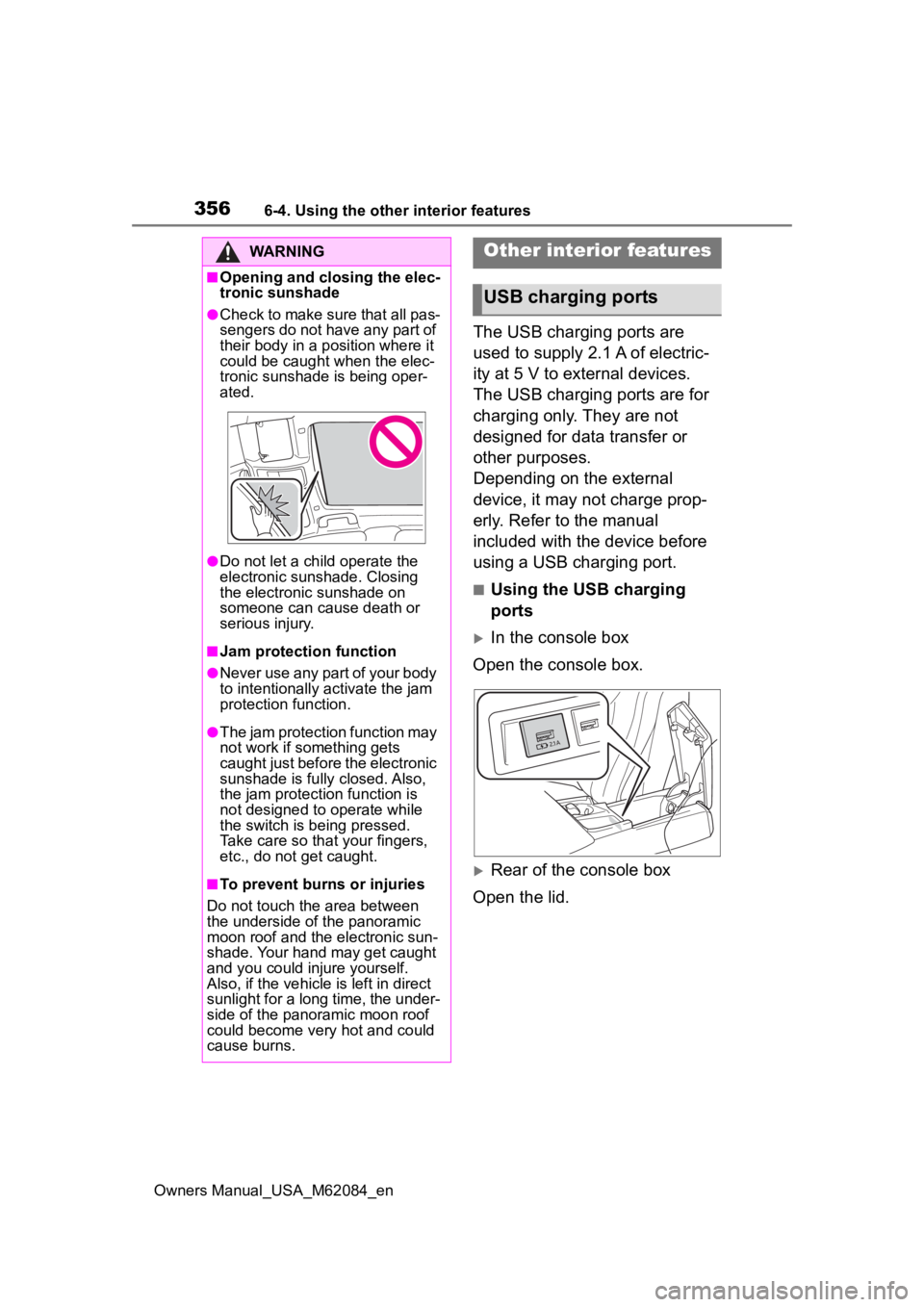
In the console box
Open the console box.
Rear of the console box
Open the lid.
WARNING
■Opening and closing the elec-
tronic sunshade
●Check to make sure that all pas-
sengers do not have any part of
their body in a position where it
could be caught when the elec-
tronic sunshade is being oper-
ated.
●Do not let a child operate the
electronic sunshade. Closing
the electronic sunshade on
someone can cause death or
serious injury.
■Jam protection function
●Never use any part of your body
to intentionally a ctivate the jam
protection function.
●The jam protection function may
not work if something gets
caught just before the electronic
sunshade is fully closed. Also,
the jam protecti on function is
not designed to operate while
the switch is being pressed.
Take care so that your fingers,
etc., do not get caught.
■To prevent burns or injuries
Do not touch the area between
the underside of the panoramic
moon roof and the electronic sun-
shade. Your hand may get caught
and you could injure yourself.
Also, if the vehicle is left in direct
sunlight for a long time, the under-
side of the panoramic moon roof
could become very hot and could
cause burns.
Other interior features
USB charging ports
Page 358 of 556
3586-4. Using the other interior features
Owners Manual_USA_M62084_en
■The “Qi” symbol
The “Qi” symbol is a trademark
of the Wireless Power Consor-
tium.
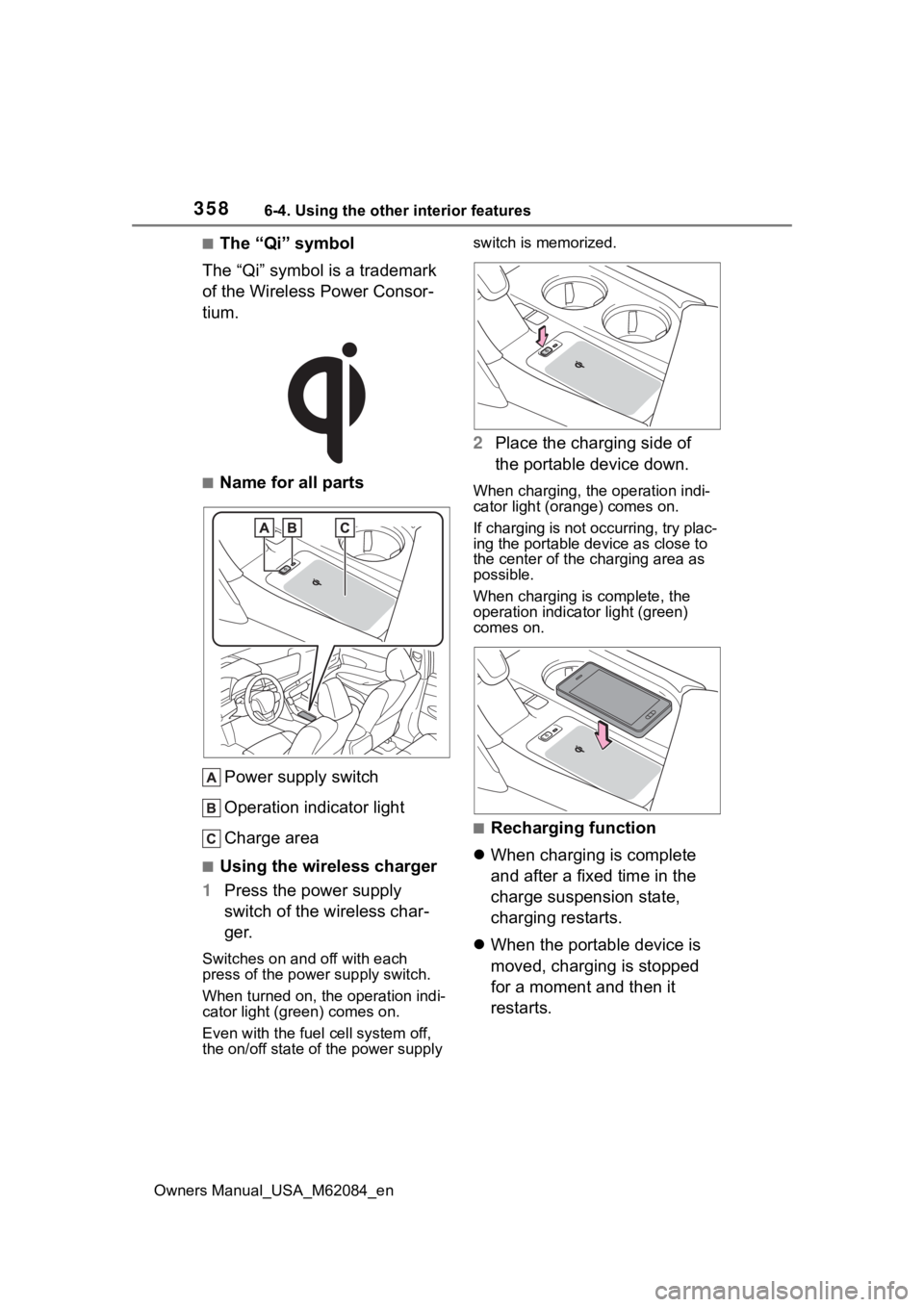
■Name for all parts
Power supply switch
Operation indicator light
Charge area
■Using the wireless charger
1 Press the power supply
switch of the wireless char-
ger.
Switches on and off with each
press of the power supply switch.
When turned on, the operation indi-
cator light (green) comes on.
Even with the fuel cell system off,
the on/off state of the power supply switch is memorized.
2
Place the charging side of
the portable device down.
When charging, the operation indi-
cator light (orange) comes on.
If charging is not occurring, try plac-
ing the portable device as close to
the center of the charging area as
possible.
When charging is complete, the
operation indicator light (green)
comes on.
■Recharging function
When charging is complete
and after a fixed time in the
charge suspension state,
charging restarts.
When the portable device is
moved, charging is stopped
for a moment and then it
restarts.
Page 359 of 556
3596-4. Using the other interior features
Owners Manual_USA_M62084_en
6
Interior features
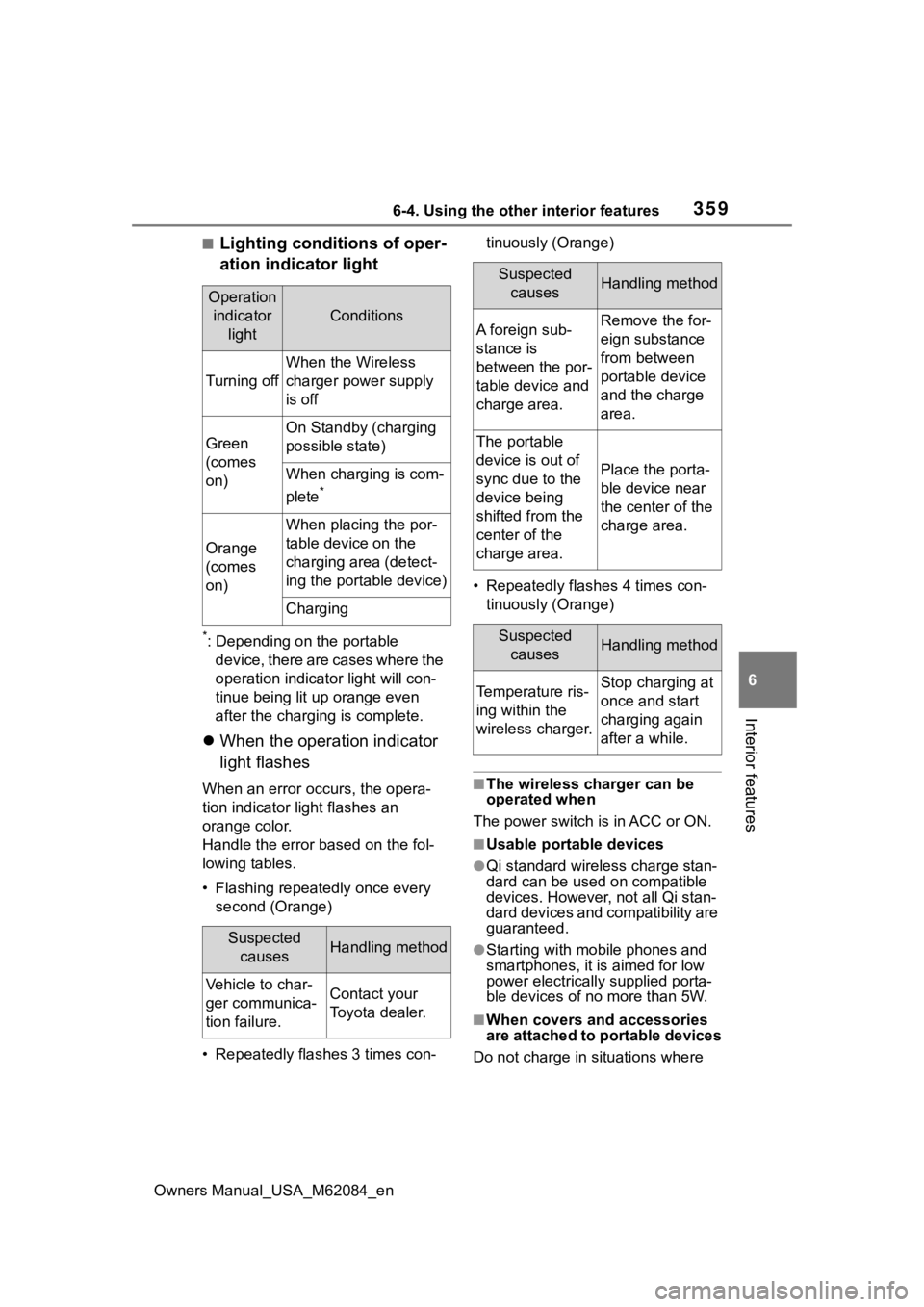
■Lighting conditions of oper-
ation indicator light
*: Depending on the portable device, there are cases where the
operation indicator light will con-
tinue being lit up orange even
after the charging is complete.
When the operation indicator
light flashes
When an error occurs, the opera-
tion indicator light flashes an
orange color.
Handle the error based on the fol-
lowing tables.
• Flashing repeatedly once every
second (Orange)
• Repeatedly flashes 3 times con- tinuously (Orange)
• Repeatedly flashes 4 times con- tinuously (Orange)■The wireless charger can be
operated when
The power switch is in ACC or ON.
■Usable portable devices
●Qi standard wirel ess charge stan-
dard can be used on compatible
devices. However, not all Qi stan-
dard devices and compatibility are
guaranteed.
●Starting with mobile phones and
smartphones, it is aimed for low
power electrically supplied porta-
ble devices of no more than 5W.
■When covers and accessories
are attached to portable devices
Do not charge in situations where
Operation indicator light
Conditions
Turning off
When the Wireless
charger power supply
is off
Green
(comes
on)
On Standby (charging
possible state)
When charging is com-
plete
*
Orange
(comes
on)
When placing the por-
table device on the
charging area (detect-
ing the portable device)
Charging
Suspected causesHandling method
Vehicle to char-
ger communica-
tion failure.Contact your
Toyota dealer.
Suspected causesHandling method
A foreign sub-
stance is
between the por-
table device and
charge area.Remove the for-
eign substance
from between
portable device
and the charge
area.
The portable
device is out of
sync due to the
device being
shifted from the
center of the
charge area.
Place the porta-
ble device near
the center of the
charge area.
Suspected causesHandling method
Temperature ris-
ing within the
wireless charger.Stop charging at
once and start
charging again
after a while.
Page 360 of 556
3606-4. Using the other interior features
Owners Manual_USA_M62084_encover and accessories not able to
handle Qi are attached to the porta-
ble device. Depending on the type
of cover and accessory, it may not
be possible to charge. When
charging is not performed even with
the portable devic
e placed on the
charge area, remove the cover and
accessories.
■While charging, noise enters
the AM radio
Turn off the wireless charger and
confirm that the noise has
decreased. If the noise decreases,
continuously pushing the power
supply switch of the wireless char-
ger for 2 seconds, the frequency of
the charger can be changed and the
noise can be reduced. Also, on that
occasion, the operation indicator
light will flash orange 2 times.
■Important points of the wire-
less charger
●If the electronic key cannot be
detected within the vehicle inte-
rior, charging cannot be done.
When the door is opened and
closed, charging may be tempo-
rarily suspended.
●When charging, the wireless
charging device and portable
device will get warmer, however
this is not a malfunction.
When a portable device gets
warm while charging, charging
may stop due to the protection
function on the portable device
side. In this case, when the tem-
perature of the portable device
drops significantly, charge again.
■Operation sounds
When the power su pply is turned
on, while searching for the portable
device a sound will be produced,
however this is not a malfunction.
■Certification
P. 5 5 0
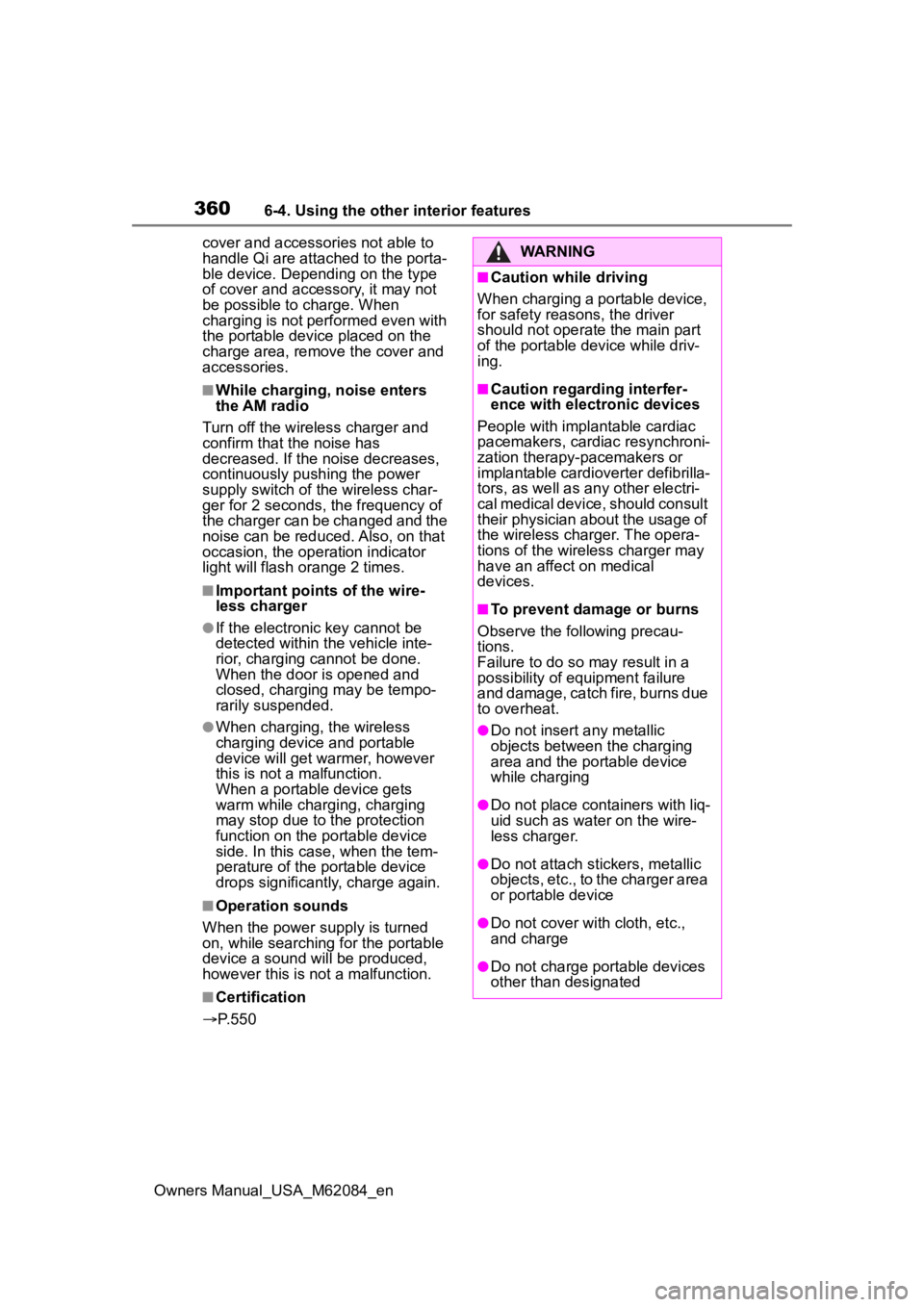
WARNING
■Caution while driving
When charging a portable device,
for safety reasons, the driver
should not operate the main part
of the portable device while driv-
ing.
■Caution regarding interfer-
ence with electronic devices
People with implantable cardiac
pacemakers, cardiac resynchroni-
zation therapy-pacemakers or
implantable cardioverter def ibrilla-
tors, as well as any other electri-
cal medical device, should consult
their physician about the usage of
the wireless charger. The opera-
tions of the wireless charger may
have an affect on medical
devices.
■To prevent damage or burns
Observe the following precau-
tions.
Failure to do so may result in a
possibility of equipment failure
and damage, catch fire, burns due
to overheat.
●Do not insert any metallic
objects between the charging
area and the portable device
while charging
●Do not place containers with liq-
uid such as water on the wire-
less charger.
●Do not attach sti ckers, metallic
objects, etc., to the charger area
or portable device
●Do not cover wit h cloth, etc.,
and charge
●Do not charge portable devices
other than designated