light TOYOTA MIRAI 2022 Owners Manual
[x] Cancel search | Manufacturer: TOYOTA, Model Year: 2022, Model line: MIRAI, Model: TOYOTA MIRAI 2022Pages: 556, PDF Size: 17.34 MB
Page 363 of 556
3636-4. Using the other interior features
Owners Manual_USA_M62084_en
6
Interior features
■The power outlet can be used
when
The power switch i s in ACC or ON.
■When stopping the fuel cell sys-
tem
Disconnect electrical devices with
charging functions, such as mobile
battery packs. If such devices are
left connected, the fuel cell system
may not stop normally.
Please use as a power supply
for electronic devices that use
less than 120 VAC (power con-
sumption of 1500 W).
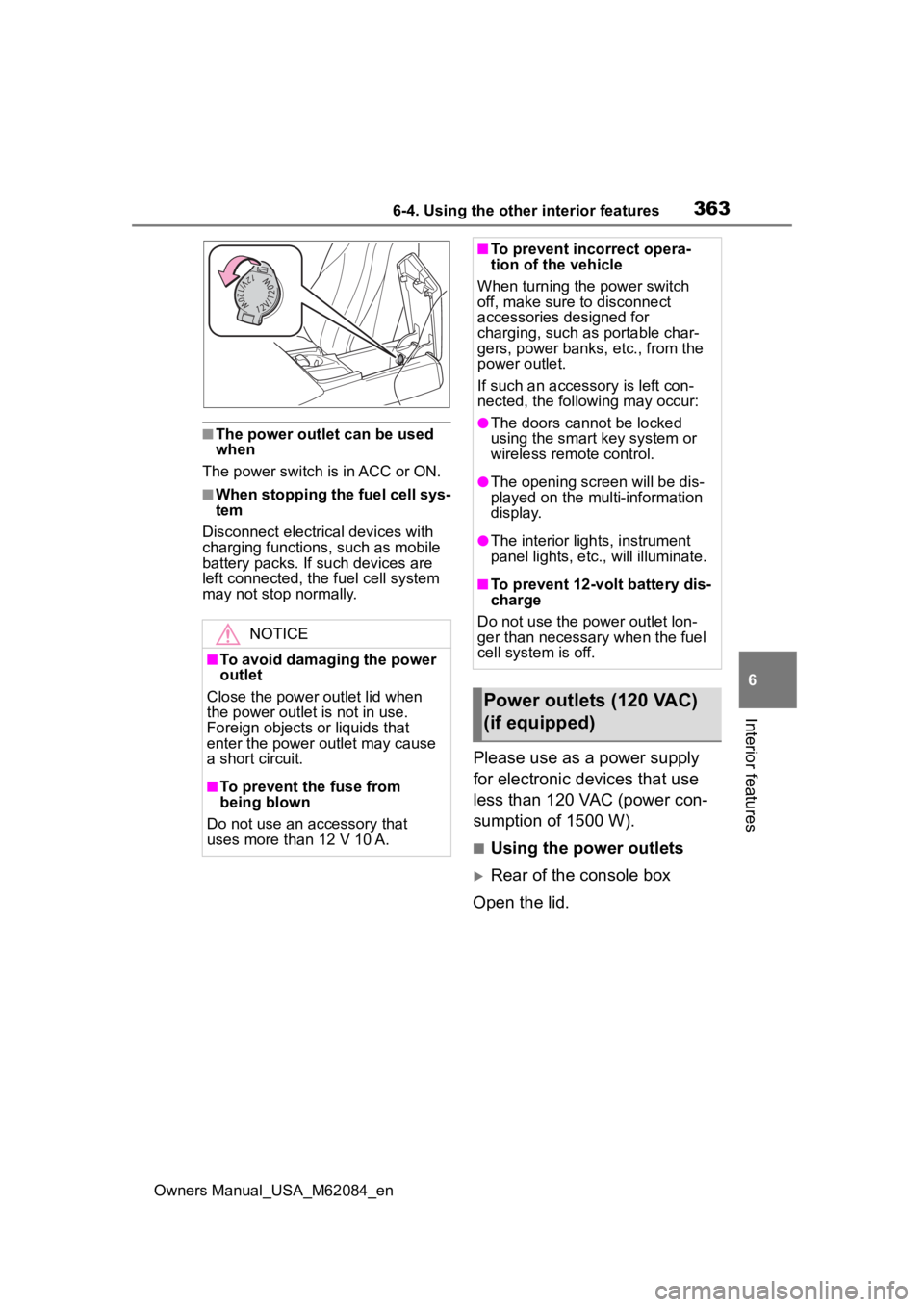
■Using the power outlets
Rear of the console box
Open the lid.
NOTICE
■To avoid damaging the power
outlet
Close the power outlet lid when
the power outlet is not in use.
Foreign objects or liquids that
enter the power outlet may cause
a short circuit.
■To prevent the fuse from
being blown
Do not use an accessory that
uses more than 12 V 10 A.
■To prevent inc orrect opera-
tion of the vehicle
When turning the power switch
off, make sure to disconnect
accessories designed for
charging, such as portable char-
gers, power banks, etc., from the
power outlet.
If such an accesso ry is left con-
nected, the following may occur:
●The doors cannot be locked
using the smart key system or
wireless remote control.
●The opening screen will be dis-
played on the multi-information
display.
●The interior lights, instrument
panel lights, etc., will illuminate.
■To prevent 12-volt battery dis-
charge
Do not use the p ower outlet lon-
ger than necessary when the fuel
cell system is off.
Power outlets (120 VAC)
(if equipped)
Page 369 of 556
3696-4. Using the other interior features
Owners Manual_USA_M62084_en
6
Interior features
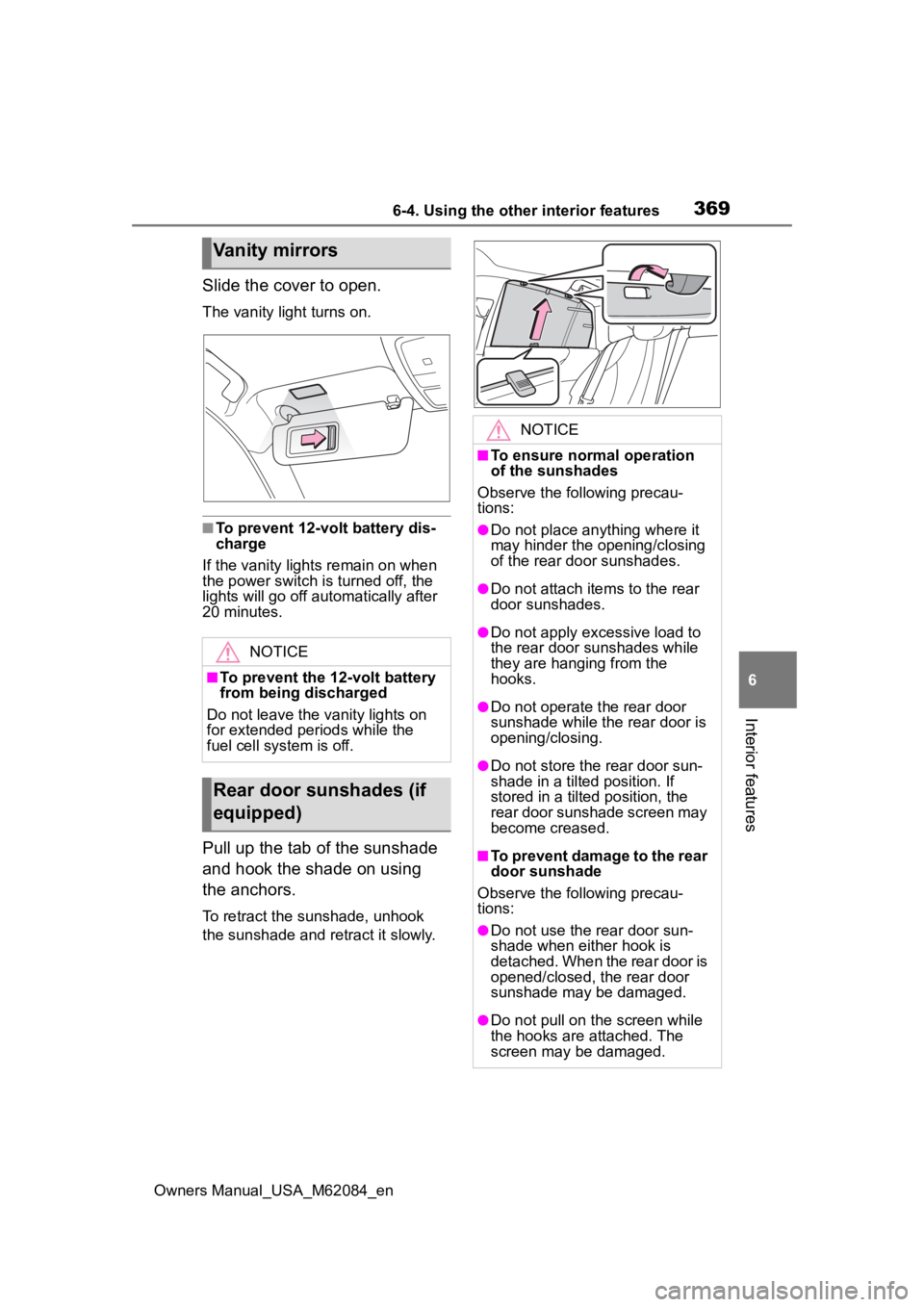
Slide the cover to open.
The vanity light turns on.
■To prevent 12-volt battery dis-
charge
If the vanity light s remain on when
the power switch is turned off, the
lights will go off automatically after
20 minutes.
Pull up the tab of the sunshade
and hook the shade on using
the anchors.
To retract the sunshade, unhook
the sunshade and re tract it slowly.
Vanity mirrors
NOTICE
■To prevent the 12-volt battery
from being discharged
Do not leave the vanity lights on
for extended periods while the
fuel cell system is off.
Rear door sunshades (if
equipped)
NOTICE
■To ensure normal operation
of the sunshades
Observe the following precau-
tions:
●Do not place anything where it
may hinder the opening/closing
of the rear door sunshades.
●Do not attach ite ms to the rear
door sunshades.
●Do not apply excessive load to
the rear door sunshades while
they are hanging from the
hooks.
●Do not operate t he rear door
sunshade while the rear door is
opening/closing.
●Do not store the rear door sun-
shade in a tilted position. If
stored in a tilted position, the
rear door sunshade screen may
become creased.
■To prevent damage to the rear
door sunshade
Observe the following precau-
tions:
●Do not use the rear door sun-
shade when either hook is
detached. When the rear door is
opened/closed, the rear door
sunshade may be damaged.
●Do not pull on t he screen while
the hooks are attached. The
screen may be damaged.
Page 371 of 556
3716-4. Using the other interior features
Owners Manual_USA_M62084_en
6
Interior features
*: If equipped
■HomeLink® programming pro-
cedure
The programming procedures can
also be found at the following URL.
Website: www.homelink.com/toyota
For support, contact customer sup-
port at the following.
Help Line: 1-800-355-3515
The HomeLink® wireless control
system in your vehicle has 3
buttons which can be pro-
grammed to operate 3 different
devices. Refer to the program-
ming methods on the following
pages to determine the method
which is appropriate for the
device.
WARNING
■When the rear sunshade is
being extended or retracted
Do not place fi ngers or other
objects in the shade mechanism
or in the opening as injury may
result.
NOTICE
■To ensure normal operation
of the rear sunshade
Observe the following precau-
tions:
●Do not place exce ssive load on
the motor or other components.
●Do not place objects where they
may hinder opening and closing
operations.
●Do not attach items to the rear
sunshade.
●Keep the opening clean and
clear of obstructions.
●Do not operate the rear sun-
shade continuously for long
periods of time.
Garage door opener*
The garage door opener can
be programmed using the
HomeLink
® to operate
garage doors, gates, entry
doors, door locks, home
lighting systems, security
systems, and other devices.
System components
Page 372 of 556
3726-4. Using the other interior features
Owners Manual_USA_M62084_en
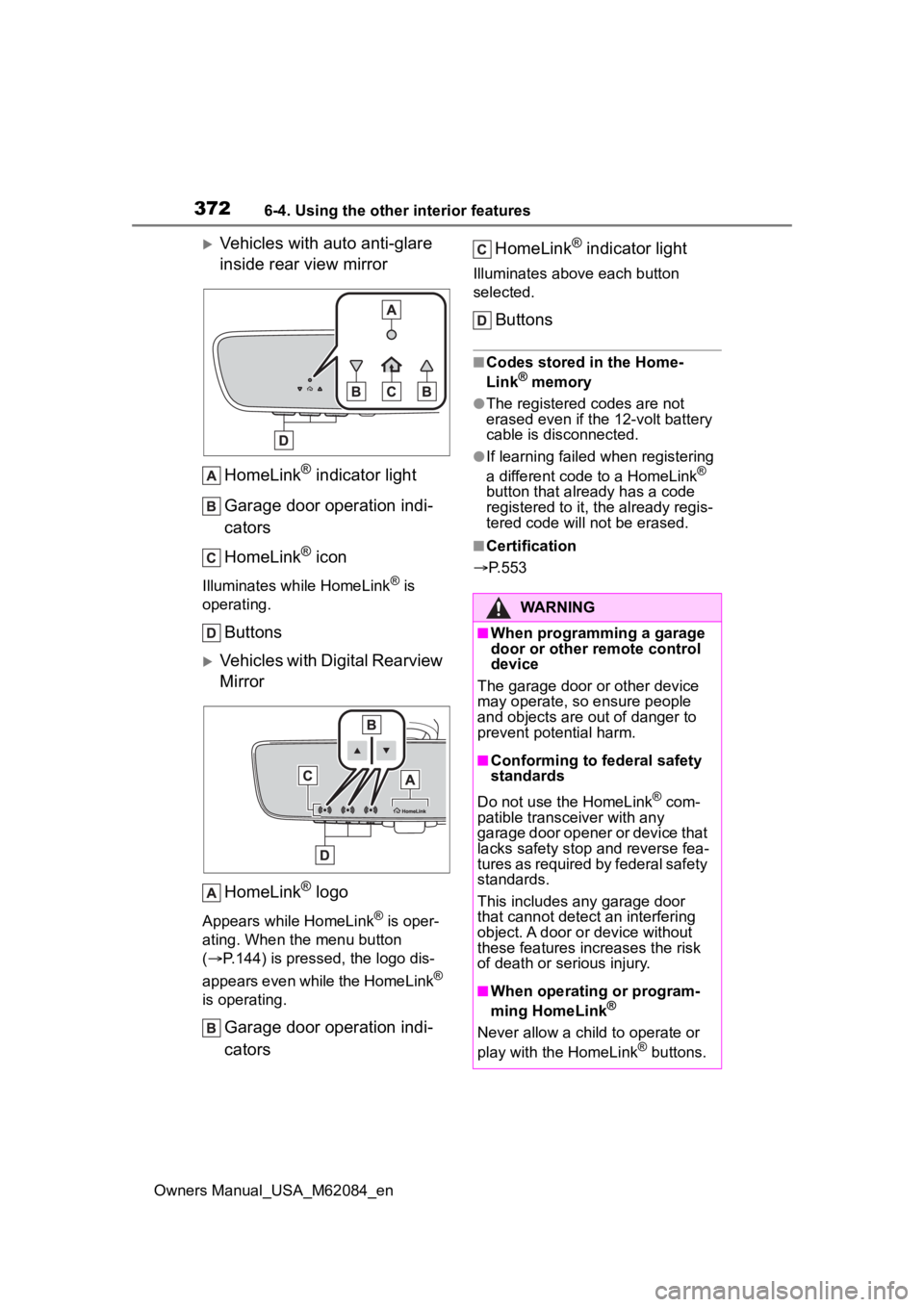
Vehicles with auto anti-glare
inside rear view mirrorHomeLink
® indicator light
Garage door operation indi-
cators
HomeLink
® icon
Illuminates while HomeLink® is
operating.
Buttons
Vehicles with Digital Rearview
Mirror
HomeLink
® logo
Appears while HomeLink® is oper-
ating. When the menu button
( P.144) is pressed, the logo dis-
appears even while the HomeLink
®
is operating.
Garage door operation indi-
cators HomeLink
® indicator light
Illuminates above each button
selected.
Buttons
■Codes stored in the Home-
Link® memory
●The registered codes are not
erased even if the 12-volt battery
cable is disconnected.
●If learning failed when registering
a different code to a HomeLink®
button that already has a code
registered to it, the already regis-
tered code will not be erased.
■Certification
P.553
WARNING
■When programming a garage
door or other remote control
device
The garage door or other device
may operate, so ensure people
and objects are out of danger to
prevent potential harm.
■Conforming to federal safety
standards
Do not use the HomeLink
® com-
patible transce iver with any
garage door opener or device that
lacks safety stop and reverse fea-
tures as required by federal safety
standards.
This includes any garage door
that cannot detect an interfering
object. A door or device without
these features increases the risk
of death or serious injury.
■When operating or program-
ming HomeLink®
Never allow a child to operate or
play with the HomeLink® buttons.
Page 373 of 556
3736-4. Using the other interior features
Owners Manual_USA_M62084_en
6
Interior features
■Before programming Home-
Link
®
During programming, it is pos-
sible that garage doors,
gates, or other devices may
operate. For this reason,
make sure that people and
objects are clear of the
garage door or other devices
to prevent injury or other
potential harm.
It is recommended that a new
battery be placed in the
remote control transmitter for
more accurate programming.
Garage door opener motors
manufactured after 1995 may
be equipped with rolling code
protection. If this is the case,
you may need a stepladder or
other sturdy, safe device to
reach the “Learn” or “Smart”
button on the garage door
opener motor.
■Programming HomeLink®
Steps 1 through 3 must be per-
formed within 60 seconds, oth-
erwise the indicator light will
stop flashing and programming
will not be successfully com-
pleted.
1 Press and release the Home-
Link
® button you want to pro-
gram and check that the HomeLink
® indicator light
flashes (orange).
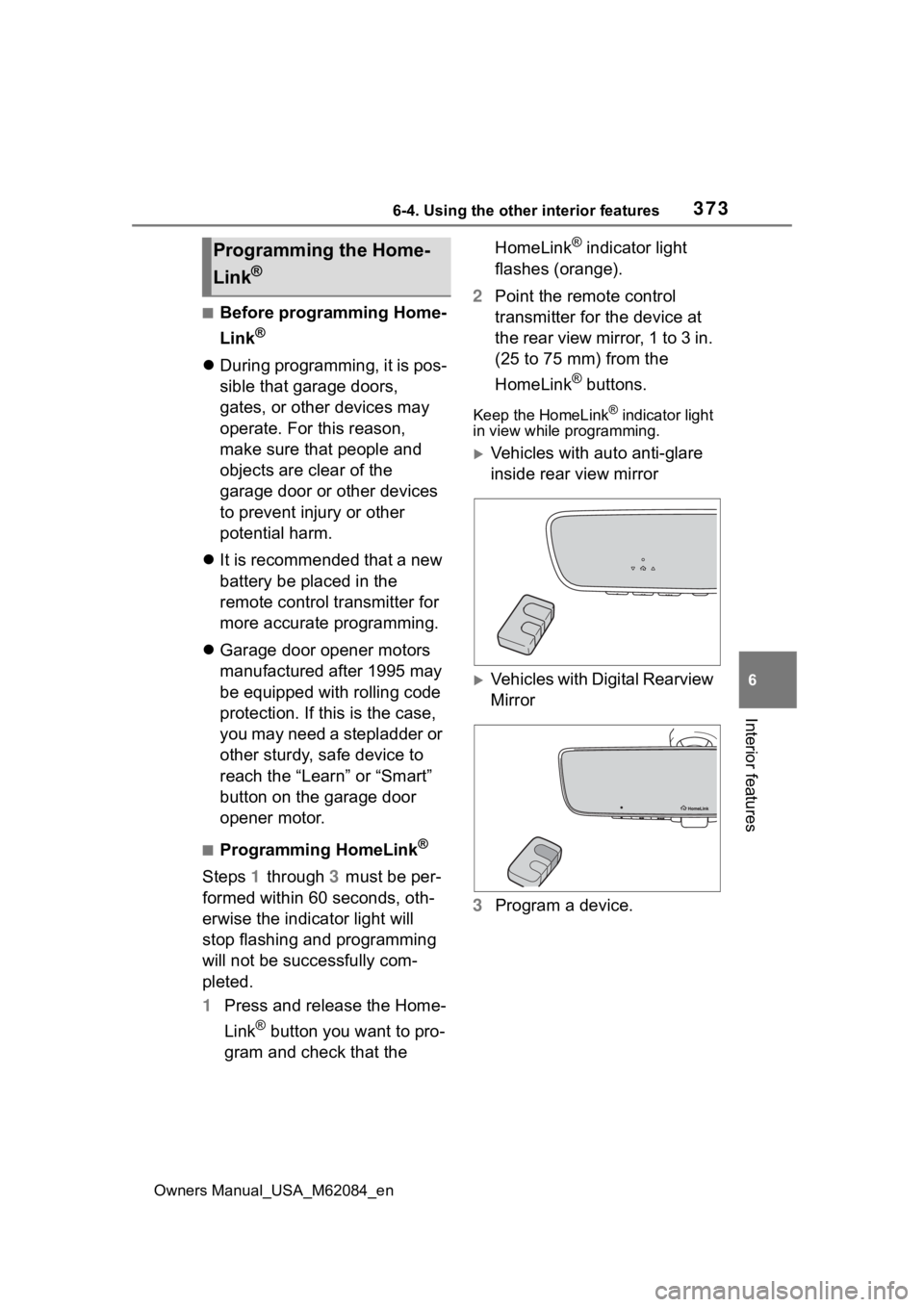
2 Point the remote control
transmitter for the device at
the rear view mirror, 1 to 3 in.
(25 to 75 mm) from the
HomeLink
® buttons.
Keep the HomeLink® indicator light
in view while programming.
Vehicles with auto anti-glare
inside rear view mirror
Vehicles with Digital Rearview
Mirror
3 Program a device.
Programming the Home-
Link
®
Page 374 of 556
3746-4. Using the other interior features
Owners Manual_USA_M62084_en
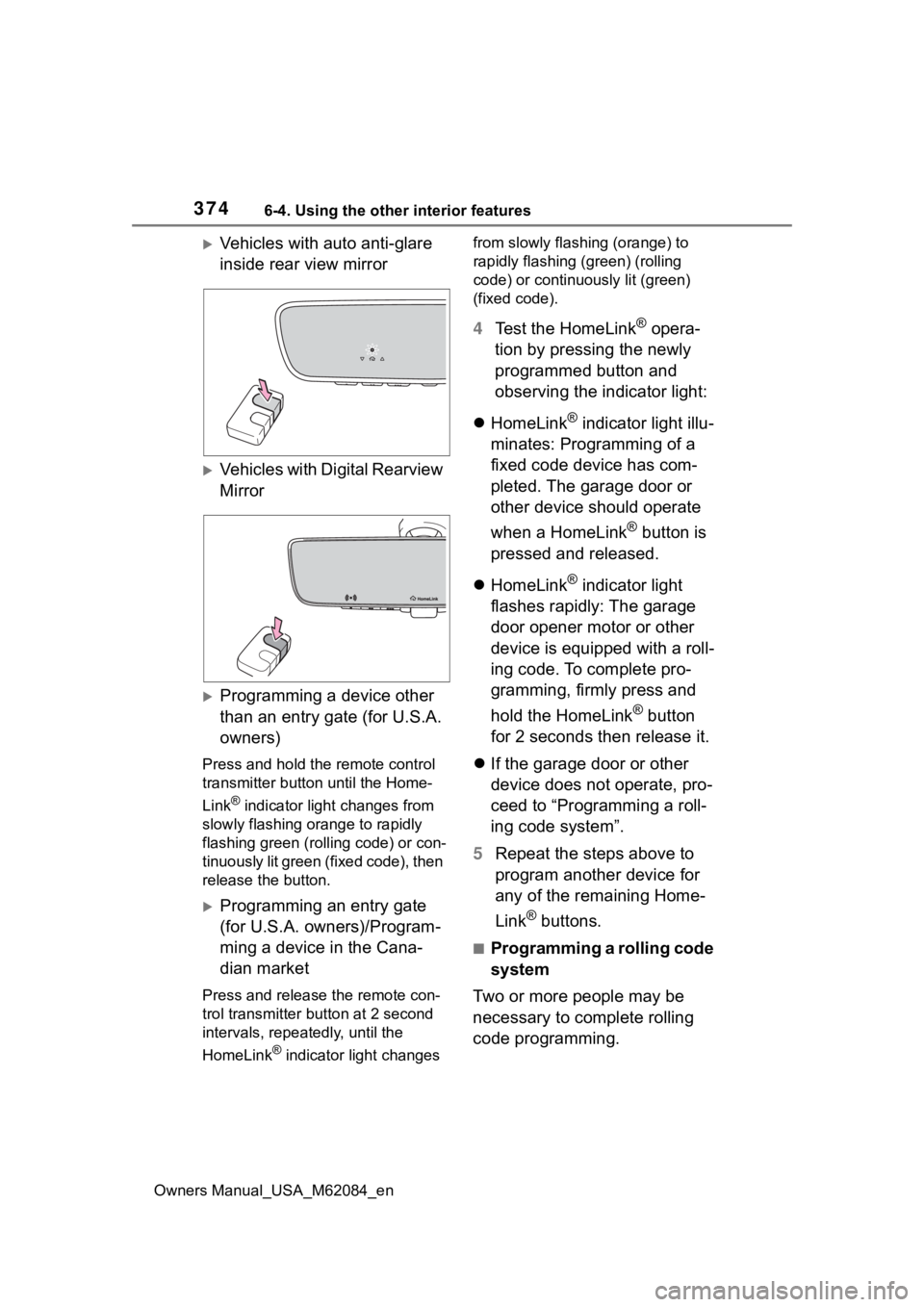
Vehicles with auto anti-glare
inside rear view mirror
Vehicles with Digital Rearview
Mirror
Programming a device other
than an entry gate (for U.S.A.
owners)
Press and hold the remote control
transmitter button until the Home-
Link
® indicator light changes from
slowly flashing orange to rapidly
flashing green (ro lling code) or con-
tinuously lit green (fixed code), then
release the button.
Programming an entry gate
(for U.S.A. owners)/Program-
ming a device in the Cana-
dian market
Press and release the remote con-
trol transmitter button at 2 second
intervals, repeatedly, until the
HomeLink
® indicator light changes from slowly flashing (orange) to
rapidly flashing (green) (rolling
code) or continuously lit (green)
(fixed code).
4
Test the HomeLink® opera-
tion by pressing the newly
programmed button and
observing the indicator light:
HomeLink
® indicator light illu-
minates: Programming of a
fixed code device has com-
pleted. The garage door or
other device should operate
when a HomeLink
® button is
pressed and released.
HomeLink
® indicator light
flashes rapidly: The garage
door opener motor or other
device is equipped with a roll-
ing code. To complete pro-
gramming, firmly press and
hold the HomeLink
® button
for 2 seconds then release it.
If the garage door or other
device does not operate, pro-
ceed to “Programming a roll-
ing code system”.
5 Repeat the steps above to
program another device for
any of the remaining Home-
Link
® buttons.
■Programming a rolling code
system
Two or more people may be
necessary to complete rolling
code programming.
Page 376 of 556
3766-4. Using the other interior features
Owners Manual_USA_M62084_en
compatibility, refer to
www.homelink.com.)
1Within 5 seconds after pro-
gramming the garage door
opener has been completed,
if the garage door opener
motor is trained to Home-
Link
®, both garage door
operation indicators will flash
rapidly (green) and the light
on the garage door opener
motor will blink twice, indicat-
ing that 2-way communica-
tion is enabled.
If the indicators do not flash, per-
form 2 and 3 within the first 10
presses of the HomeLink
® button
after programming has been com-
pleted.
2 Press a programmed Home-
Link
® button to operate a
garage door.
3 Within 1 minute of pressing
the HomeLink
® button, after
the garage door operation
has stopped, press the
“Learn” or “Smart” button on
the garage door opener
motor. Within 5 seconds of
the establishment of 2-way
communication with the
garage door opener, both
garage door operation indica-
tors in the vehicle will flash
rapidly (green) and the light
on the garage door opener
motor will blink twice, indicat-
ing that 2-way communica-
tion is enabled.
■Reprogramming a single
HomeLink
® button
When the following procedure is
performed, buttons which
already have devices registered
to them can be overwritten:
1 Press and hold the desired
HomeLink
® button.
2 When the HomeLink
® indica-
tor starts flashing orange,
release the HomeLink
® but-
ton and perform “Program-
ming HomeLink
®” 1 (it takes
20 seconds for the Home-
Link
® indicator to start flash-
ing).
■Before programming
●Install a new battery in the trans-
mitter.
●The battery side of the transmitter
must be pointed away from the
HomeLink
® buttons.
Press the appropriate Home-
Link
® button. The HomeLink®
indicator light should turn on.
The status of the opening and
closing of a garage door is
shown by the indicators.
Operating HomeLink®
Page 377 of 556
3776-4. Using the other interior features
Owners Manual_USA_M62084_en
6
Interior features
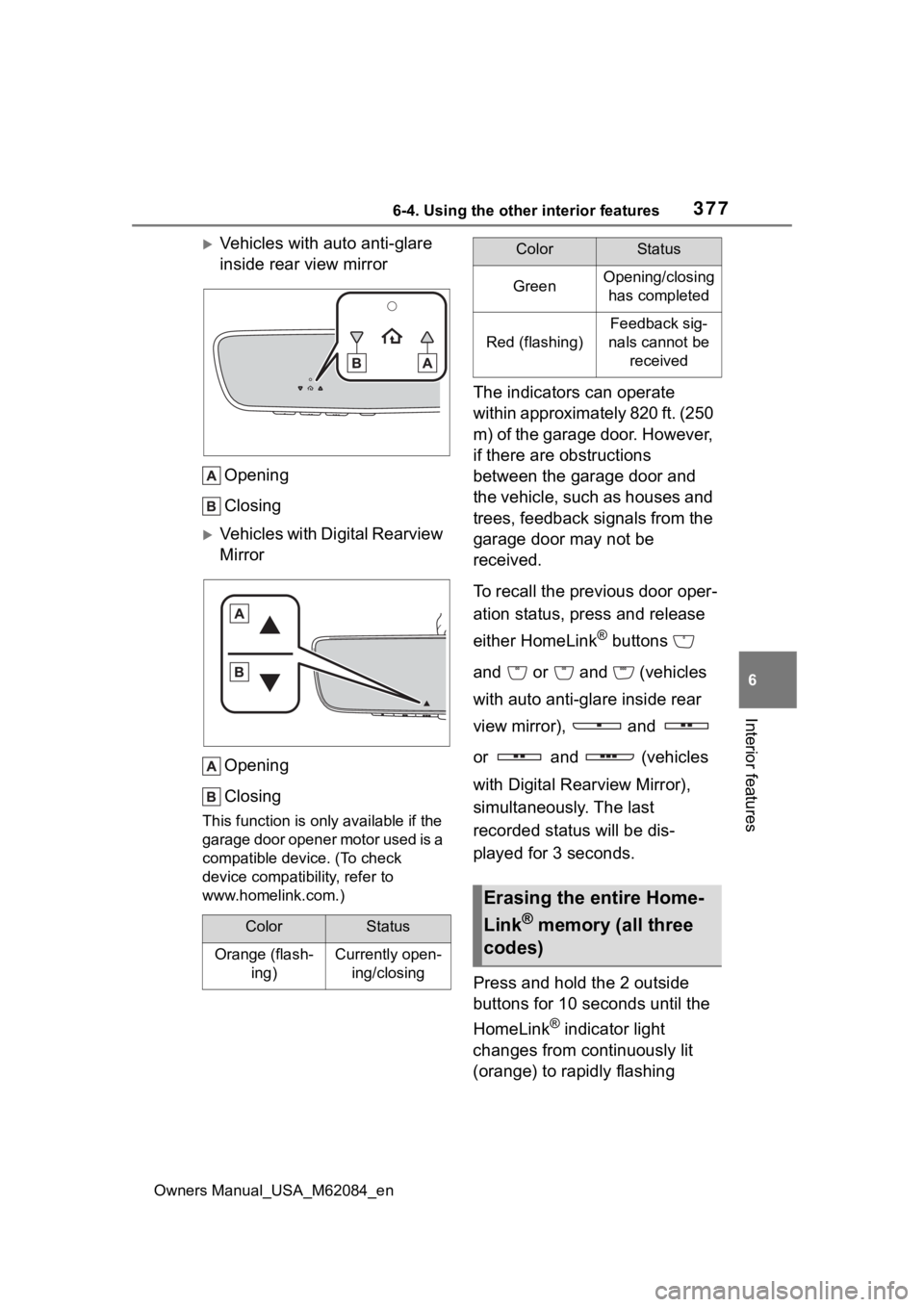
Vehicles with auto anti-glare
inside rear view mirror Opening
Closing
Vehicles with Digital Rearview
MirrorOpening
Closing
This function is onl y available if the
garage door opener motor used is a
compatible device. (To check
device compatib ility, refer to
www.homelink.com.)
The indicators can operate
within approximately 820 ft. (250
m) of the garage door. However,
if there are obstructions
between the garage door and
the vehicle, such as houses and
trees, feedback signals from the
garage door may not be
received.
To recall the previous door oper-
ation status, press and release
either HomeLink
® buttons
and or and (vehicles
with auto anti-glare inside rear
view mirror), and
or and (vehicles
with Digital Rearview Mirror),
simultaneously. The last
recorded status will be dis-
played for 3 seconds.
Press and hold the 2 outside
buttons for 10 seconds until the
HomeLink
® indicator light
changes from continuously lit
(orange) to rapidly flashing
ColorStatus
Orange (flash- ing)Currently open-ing/closing
GreenOpening/closing has completed
Red (flashing)
Feedback sig-
nals cannot be received
Erasing the entire Home-
Link
® memory (all three
codes)
ColorStatus
Page 379 of 556
379
Owners Manual_USA_M62084_en
7
7
Maintenance and care
Maintenance and care
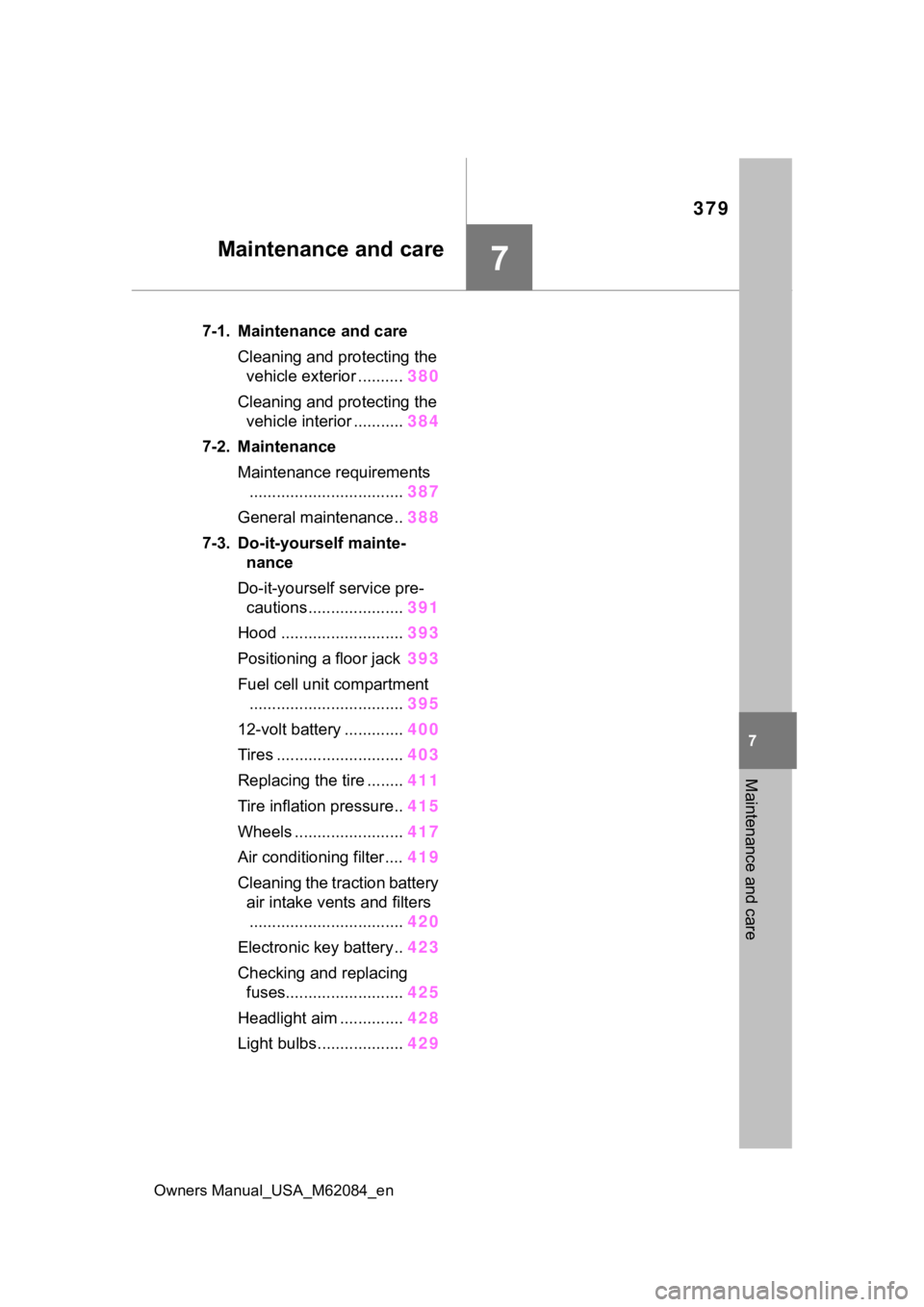
7-1. Maintenance and careCleaning and protecting the vehicle exterior .......... 380
Cleaning and protecting the vehicle interior ........... 384
7-2. Maintenance Maintenance requirements.................................. 387
General maintenance.. 388
7-3. Do-it-yourself mainte- nance
Do-it-yourself service pre- cautions ..................... 391
Hood ........................... 393
Positioning a floor jack 393
Fuel cell unit compartment .................................. 395
12-volt battery ............. 400
Tires ............................ 403
Replacing the tire ........ 411
Tire inflation pressure.. 415
Wheels ......... ...............417
Air conditioning filter .... 419
Cleaning the traction battery air intake vents and filters.................................. 420
Electronic key battery.. 423
Checking and replacing fuses.......................... 425
Headlight aim .............. 428
Light bulbs................... 429
Page 383 of 556
3837-1. Maintenance and care
Owners Manual_USA_M62084_en
7
Maintenance and care
NOTICE
■Cleaning the exterior lights
●Wash carefully. Do not use
organic substances or scrub
with a hard brush.
This may damage the surfaces
of the lights.
●Do not apply wax to the sur-
faces of the lights.
Wax may cause damage to the
lenses.
■When washing the car
Do not remove the vehicle recep-
tacle cap and directly pour water
over the vehicle receptacle. If
water enters the vehicle recepta-
cle, damage may occur.
■When using an automatic car
wash
Set the wiper switch to the off
position.
If the wiper switch is in “AUTO”,
the wipers may operate and the
wiper blades may be damaged.
■When using a high pressure
car wash
●When washing the vehicle, do
not spray the came ra or its sur-
rounding area directly with a
high pressure washer. Shock
applied from high pressure
water may cause the device to
not operate normally.
●Do not spray water directly on
the radar sensor which is
equipped behind the emblem.
Otherwise it may cause the
device to be damaged.
●Do not bring the nozzle tip close
to boots (rubber or resin manu-
factured cover), connectors or
the following parts. The parts
may be damaged if they come
into contact with high-pressure
water.
• Fuel cell stack
• Traction related parts
• Steering parts
• Suspension parts
• Brake parts
●Keep the cleaning nozzle at
least 11.9 in. (30 cm) away from
the vehicle body. Otherwise
resin section, s uch as moldings
and bumpers, may be deformed
and damaged.
Also, do not continuously hold the
nozzle in the same place.
●Do not spray the lower part of
the windshield continuously.
If water enters the air conditioning
system intake located near the
lower part of the windshield, the
air conditioning system may not
operate correctly.
●Do not wash the underside of
the vehicle using a high pres-
sure car washer.