warning TOYOTA MIRAI 2023 Owners Manual
[x] Cancel search | Manufacturer: TOYOTA, Model Year: 2023, Model line: MIRAI, Model: TOYOTA MIRAI 2023Pages: 572, PDF Size: 17.71 MB
Page 177 of 572
1775-1. Before driving
Owners Manual_USA_M62064_en
5
Driving
WARNING
■Things that must not be car-
ried in the trunk
The following things may cause a
fire if loaded in the trunk:
●Receptacles co ntaining gaso-
line
●Aerosol cans
■Storage precautions
Observe the following precau-
tions.
Failure to do so m ay prevent the
pedals from being depressed
properly, may block the driver’s
vision, or may result in items hit-
ting the driver or passengers, pos-
sibly causing an accident.
●Stow cargo and luggage in the
trunk whenever possible.
●Do not place cargo or luggage
in or on the following locations.
• At the feet of the driver
• On the front passenger or rear seats (when stacking items)
• On the package tray
• On the instrument panel
• On the dashboard
●Secure all items in the occupant
compartment.
■Capacity and distribution
●Do not exceed the maximum
axle weight rating or the total
vehicle weight rating.
●Even if the tota l load of occu-
pant’s weight and the cargo
load is less than the total load
capacity, do not apply the load
unevenly. Improper loading may
cause deteriorat ion of steering
or braking control which may
cause death or serious injury.
NOTICE
■Roof film (vehicles with elec-
tronic sunshade)
Do not attach a roof carrier on the
roof film. It may damage the film
surface.
Page 178 of 572
1785-1. Before driving
Owners Manual_USA_M62064_en
■Total load capacity and seating
capacity
These details are also described on
the tire and loading information
label. ( P.428)
Vehicle load limits
Vehicle load limits include
total load capacity, seating
capacity, towing capacity
and cargo capacity.
Total load capacity (vehicle
capacity weight): P.496
Total load capacity means the
combined weight of occu-
pants, cargo and luggage.
Seating capacity: P.496
Seating capacity means the
maximum number of occu-
pants whose estimated aver-
age weight is 150 lb. (68 kg)
per person.
TWR (Trailer Weight Rat-
ing)
Toyota does not recommend
towing a trailer with your vehi-
cle.
Cargo capacity
Cargo capacity may increase
or decrease depending on the
weight and the number of
occupants.
WARNING
■Overloading the vehicle
Do not overload the vehicle.
It may not only cause damage to
the tires, but also degrade steer-
ing and braking ability, resulting in
an accident.
Page 182 of 572
1825-2. Driving procedures
Owners Manual_USA_M62064_en
1Stop the vehicle completely.
2 Set the parking brake.
( P.191)
3 Press the P position switch.
( P.185)
Check that the shift position indica-
tor shows P and the parking brake
indicator is illuminated.
4Press the power switch.
The fuel cell system will stop, and
the meter displa y will be extin-
guished (the shift position indicator will be extinguished
a few seconds
after the meter display).
5 Release the brake pedal and
check that “ACCESSORY” or
“IGNITION ON” is not shown
on the meter.
■Stopping the fuel cell system in
cold temperatures
●When the power switch is pressed
and the fuel cell system is stopped
during cold temperatures, the time
for water purge from the tailpipe
may be longer than usual to pre-
vent liquid in the fuel cell stack
from freezing.
●If the “FCV System Purge in Prog-
ress Purge will St op Automati-
cally” is displayed in the multi-
information display, however it is
no problem to exit the vehicle.
●The water purge time may also be
long if the system is stopped
before fuel cell system warm-up is
completed.
●It is normal to hear hissing and
other sounds during purge.
( P. 7 7 )
●It is not a problem to do refueling
operations while the system is
purging.
The purging process is carried out
automatically afte r several min-
utes and a white mist may be
emitted, however this is not a mal-
function.
■Parking the vehic le during cold
weather
●Water may automatically purge
from the tailpipe, even when the
fuel cell system is off, in order to
prevent liquid in the fuel cell stack,
hydrogen pipelines, etc., from
freezing. Also, water vapor may
be purged, but this is not malfunc-
tion.
●It is normal to hear hissing and
other sounds during purge.
WARNING
■When starting the fuel cell
system
Always start the fuel cell system
while sitting in the driver’s seat.
Do not depress the accelerator
pedal while starting the fuel cell
system under any circumstances.
Doing so may cause an accident
resulting in death or serious injury.
NOTICE
■When starting the fuel cell
system
If the fuel cell system becomes
difficult to start, have your vehicle
checked by your Toyota dealer
immediately.
■Symptoms indicating a mal-
function with the power
switch
If the power switch seems to be
operating somewh at differently
than usual, such as the switch
sticking slightly, there may be a
malfunction. Contact your Toyota
dealer immediately.
Stopping the fuel cell sys-
tem
Page 183 of 572
1835-2. Driving procedures
Owners Manual_USA_M62064_en
5
Driving
( P. 7 7 )
■Automatic fuel cell system shut
off feature
●The vehicle is equipped with a
feature that automatically shuts off
the fuel cell system when the shift
position is in P with the fuel cell
system operating for an extended
period.
●The fuel cell system will automati-
cally shut off after approximately 1
hour if it has been left running
while the shift position is in P.
●The timer for the automatic fuel
cell system shut off feature will
reset if the brake pedal is
depressed or if the shift position is
in a position other than P.
●After the vehicle is parked, if the
door is locked with the door lock
switch ( P.130) from the inside or
the mechanical key from the out-
side, the automat ic fuel cell sys-
tem shut off feature will be
disabled. The tim er for the auto-
matic fuel cell system shut off fea-
ture will be re- enabled if the
driver’s door is opened.
■When the shift c ontrol system
malfunctions
When attempting to turn the power
switch off while there is a malfunc-
tion in the shift control system, the
power switch mode may change to
ACC. In this cas e, ACC may be
turned off by applying the parking
brake and pressing the power
switch again.
If there is a malfunction in the sys-
tem, have the vehicle inspected by
your Toyota dealer immediately.
■Automatic P position selection
function
P. 1 8 7
■Water release (H2O switch)
P. 1 9 6
Modes can be changed by
pressing the power switch with
the brake pedal released. (The
mode changes each time the
switch is pressed.)
WARNING
■Stopping the fuel cell system
in an emergency
●If you want to stop the fuel cell
system in an emergency while
driving the vehicle, press and
hold the power s witch for more
than 2 seconds, or press it
briefly 3 times or more in suc-
cession. ( P.446)
However, do not touch the
power switch while driving
except in an emergency. Turn-
ing the fuel cell system off while
driving will not cause loss of
steering or braking control, how-
ever, power assist to the steer-
ing will be lost. This will make it
more difficult to steer smoothly,
so you should pull over and stop
the vehicle as soon as it is safe
to do so.
●If the power switch is operated
while the vehicle is running, a
warning message will be shown
on the multi-information display
and a buzzer sounds.
●When restarting the fuel cell
system after an emergency
shutdown, press the power
switch.
Changing power switch
modes
Page 185 of 572
1855-2. Driving procedures
Owners Manual_USA_M62064_en
5
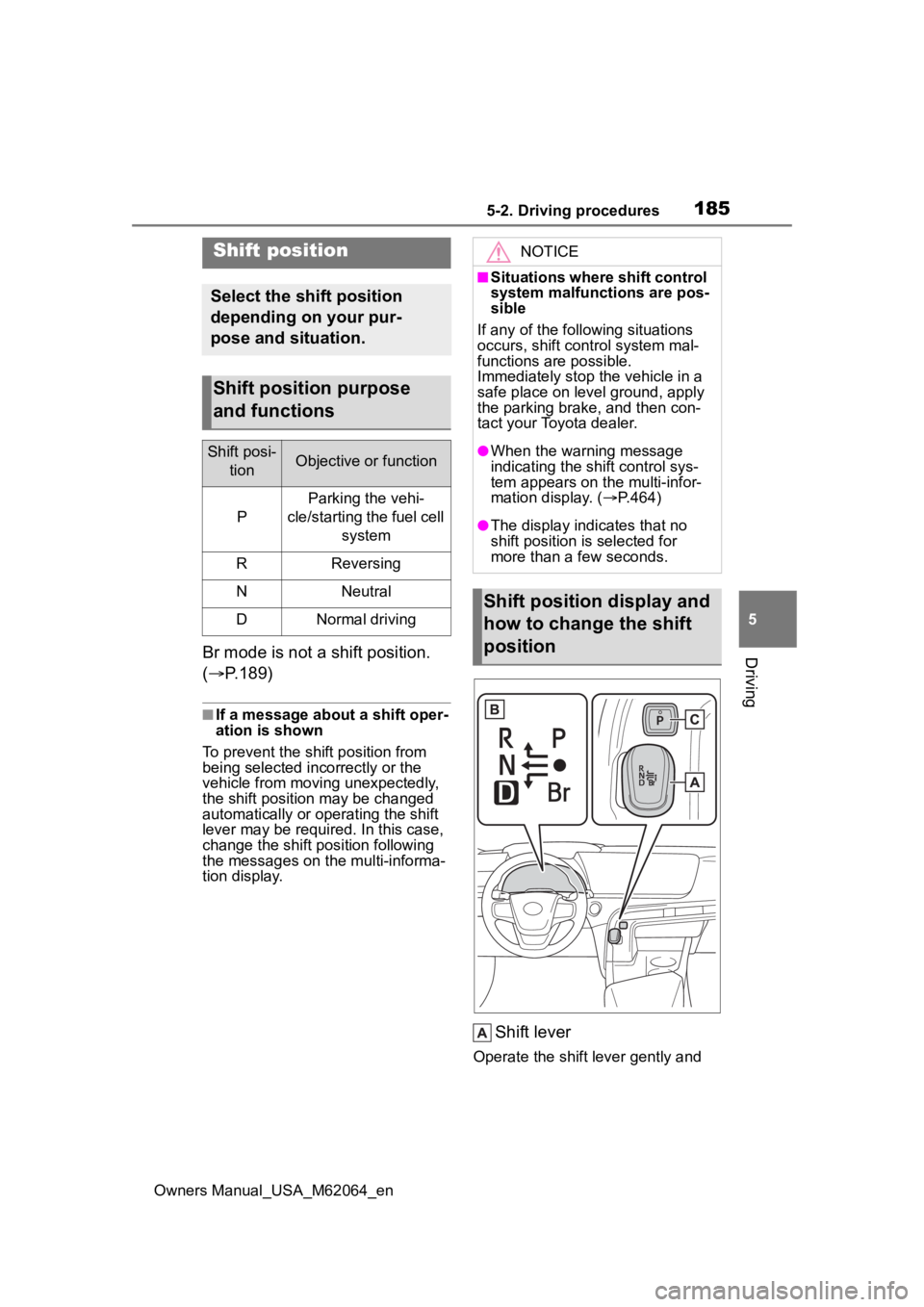
DrivingBr mode is not a shift position.
( P.189)
■If a message about a shift oper-
ation is shown
To prevent the shift position from
being selected inco rrectly or the
vehicle from moving unexpectedly,
the shift position may be changed
automatically or operating the shift
lever may be requi red. In this case,
change the shift position following
the messages on the multi-informa-
tion display.
Shift lever
Operate the shift lever gently and
Shift position
Select the shift position
depending on your pur-
pose and situation.
Shift position purpose
and functions
Shift posi-
tionObjective or function
P
Parking the vehi-
cle/starting the fuel cell system
RReversing
NNeutral
DNormal driving
NOTICE
■Situations where shift control
system malfunctions are pos-
sible
If any of the follo wing situations
occurs, shift control system mal-
functions are possible.
Immediately stop t he vehicle in a
safe place on level ground, apply
the parking brake, and then con-
tact your Toyota dealer.
●When the warning message
indicating the shift control sys-
tem appears on the multi-infor-
mation display. ( P.464)
●The display indicates that no
shift position is selected for
more than a few seconds.
Shift position display and
how to change the shift
position
Page 188 of 572
1885-2. Driving procedures
Owners Manual_USA_M62064_en
By performing the following
operation, the shift position
can be held in N until the shift
position switches to P without
activating the automatic P
position selection function.
1 Operate the shift lever and
change the shift position to N
when the fuel cell system is
operating.
2 Return the shift lever to its
regular position ( ).
3 Operate the shift lever to N
and hold it there until the
buzzer sounds.
4 Press the power switch within
5 seconds after the buzzer
sounds.
The fuel cell system stops with the
shift position in N.*
Make sure to check that the buzzer
sounds and “Holding N Push P
Switch When Done” is displayed on
the multi-information display.
In order to shift to a position
other than N, first press the P
position switch to change the
WARNING
■For the shift lever
●Do not remove the shift lever
knob or use anything but a gen-
uine TOYOTA shift lever knob.
Also, do not hang anything on
the shift lever. Doing so could
prevent the shift lever from
returning to position, causing
unexpected accidents to occur
when the vehicle is in motion.
●In order to prevent the shift
position from accidentally being
changed, do not touch the shift
lever when not using them.
■P position switch
●Do not press the P position
switch while the vehicle is mov-
ing.
If the P position switch is
pressed when driving at very
low speeds (for example,
directly before stopping the
vehicle), the vehicle may stop
suddenly when the shift position
switches to P, which could lead
to an accident.
●In order to prevent the shift
position from accidentally being
changed, do not touch the P
position switch when not using
them.
NOTICE
■Notes regarding shift lever
and P position switch opera-
tion
Avoid repeatedly operating the
shift lever and P position switch in
quick succession. The system
protection function may activate
and it will not be temporarily pos-
sible to shift the shift position
other than P. If this happens,
please wait for a while before
attempting to c hange the shift
position again.
■When exiting the vehicle
(driver’s seat only)
Check that the shi ft position indi-
cator shows P and that the park-
ing brake indicator is illuminated
before opening the door and exit-
ing the vehicle.
Keeping the shift position
in N without activating the
automatic P position
selection function
Page 193 of 572
1935-2. Driving procedures
Owners Manual_USA_M62064_en
5
Driving
does not indicate a malfunction.
■When the parking brake switch
malfunctions
Automatic mode (automatic brake
setting and releas ing) will be turned
on automatically.
■Parking the vehicle
P. 1 6 9
■Parking brake engaged warning
buzzer
A buzzer will sound if the vehicle is
driven with the parking brake
engaged. “Parking Brake ON” is dis-
played on the multi-information dis-
play. (with the vehicle reached a
speed of 3 mph [5 km/h])
■If the parking brake indicator
flashes
P. 4 5 9
■Usage in winter time
P. 3 2 7
WARNING
■When parking the vehicle
Do not leave a child in the vehicle
alone. The parking brake may be
released unintentionally and there
is the danger of the vehicle mov-
ing that may lead to an accident
resulting in death or serious injury.
NOTICE
■When parking the vehicle
Before you leave the vehicle, set
the parking brake, shift the shift
position to P and make sure that
the vehicle does not move.
■When the system malfunc-
tions
Stop the vehicle in a safe place
and check the warning messages.
■When the parking brake can-
not be released due to a mal-
function
Driving the vehicle with the park-
ing brake set will lead to brake
components overheating, which
may affect braking performance
and increase brake wear.
Have the vehicle inspected by
your Toyota dealer immediately if
this occurs.
Page 194 of 572
1945-2. Driving procedures
Owners Manual_USA_M62064_en
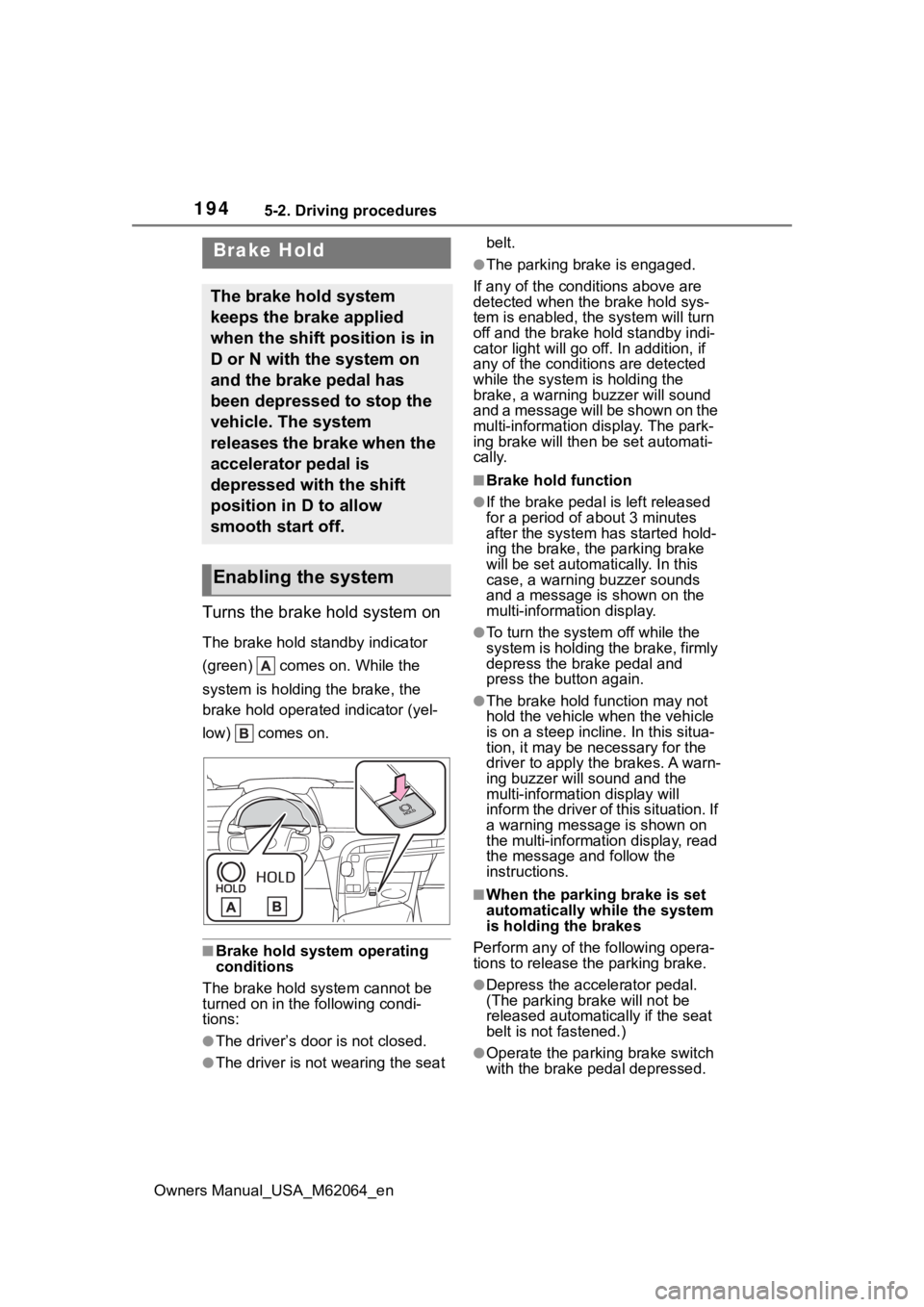
Turns the brake hold system on
The brake hold standby indicator
(green) comes on. While the
system is holding the brake, the
brake hold operated indicator (yel-
low) comes on.
■Brake hold system operating
conditions
The brake hold system cannot be
turned on in the following condi-
tions:
●The driver’s doo r is not closed.
●The driver is not wearing the seat belt.
●The parking brake is engaged.
If any of the cond itions above are
detected when the brake hold sys-
tem is enabled, the system will turn
off and the brake hold standby indi-
cator light will go off. In addition, if
any of the conditions are detected
while the system is holding the
brake, a warning buzzer will sound
and a message will be shown on the
multi-information display. The park-
ing brake will then be set automati-
cally.
■Brake hold function
●If the brake pedal is left released
for a period of about 3 minutes
after the system has started hold-
ing the brake, the parking brake
will be set automatically. In this
case, a warning buzzer sounds
and a message is shown on the
multi-information display.
●To turn the system off while the
system is holding the brake, firmly
depress the brake pedal and
press the button again.
●The brake hold function may not
hold the vehicle when the vehicle
is on a steep incline. In this situa-
tion, it may be ne cessary for the
driver to apply the brakes. A warn-
ing buzzer will sound and the
multi-information display will
inform the driver of this situation. If
a warning message is shown on
the multi-information display, read
the message and follow the
instructions.
■When the parking brake is set
automatically while the system
is holding the brakes
Perform any of the following opera-
tions to release the parking brake.
●Depress the accelerator pedal.
(The parking brake will not be
released automatically if the seat
belt is not fastened.)
●Operate the parkin g brake switch
with the brake pedal depressed.
Brake Hold
The brake hold system
keeps the brake applied
when the shift position is in
D or N with the system on
and the brake pedal has
been depressed to stop the
vehicle. The system
releases the brake when the
accelerator pedal is
depressed with the shift
position in D to allow
smooth start off.
Enabling the system
Page 195 of 572
1955-2. Driving procedures
Owners Manual_USA_M62064_en
5
Driving
Make sure that the parking brake
indicator light goes off. ( P.191)
■When an inspection at your
Toyota dealer is necessary
When the brake hold standby indi-
cator (green) does not illuminate
even when the brake hold switch is
pressed with the brake hold system
operating conditions met, the sys-
tem may be malfunctioning. Have
the vehicle inspected at your Toyota
dealer.
■If “Brake Hold Malfunction
Press Brake to Deactivate Visit
Your Dealer” or “Brake Hold
Malfunction Visit Your Dealer”
is displayed on the multi-infor-
mation display
The system may be malfunctioning.
Have the vehicle inspected by your
Toyota dealer.
■Warning messages and buzzers
Warning messages and buzzers are
used to indicate a system malfunc-
tion or to inform the driver of the
need for caution. If a warning mes-
sage is shown on the multi-informa-
tion display, read the message and
follow the instructions.
■If the brake hold operated indi-
cator flashes
P. 4 5 9
WARNING
■When the vehicle is on a
steep incline
When using the brake hold sys-
tem on a steep incline exercise
caution. The brake hold function
may not hold the vehicle in such a
situation.
■When stopped on a slippery
road
The system cannot stop the vehi-
cle when the gripping ability of the
tires has been exceeded. Do not
use the system w hen stopped on
a slippery road.
NOTICE
■When parking the vehicle
The brake hold system is not
designed for use when parking
the vehicle for a long period of
time. Turning the power switch off
while the system is holding the
brake may release the brake,
which would cause the vehicle to
move. When operating the power
switch, depress the brake pedal,
shift the shift position to P and set
the parking brake.
Page 200 of 572
2005-3. Operating the lights and wipers
Owners Manual_USA_M62064_en
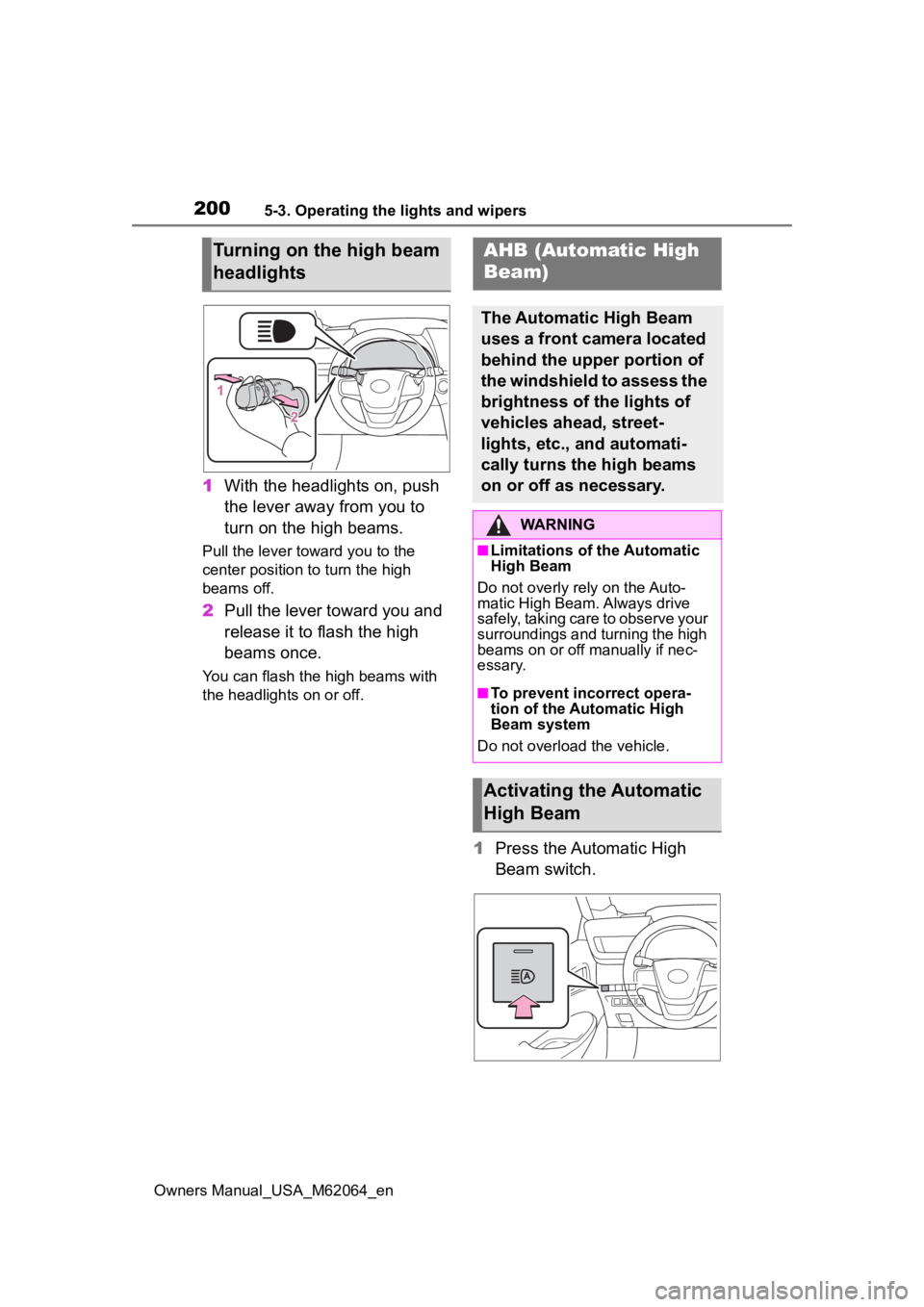
1With the headlights on, push
the lever away from you to
turn on the high beams.
Pull the lever toward you to the
center position to turn the high
beams off.
2Pull the lever toward you and
release it to flash the high
beams once.
You can flash the high beams with
the headlights on or off.
1Press the Automatic High
Beam switch.
Turning on the high beam
headlightsAHB (Automatic High
Beam)
The Automatic High Beam
uses a front camera located
behind the upper portion of
the windshield to assess the
brightness of the lights of
vehicles ahead, street-
lights, etc., and automati-
cally turns the high beams
on or off as necessary.
WARNING
■Limitations of the Automatic
High Beam
Do not overly rely on the Auto-
matic High Beam. Always drive
safely, taking care to observe your
surroundings and turning the high
beams on or off manually if nec-
essary.
■To prevent inc orrect opera-
tion of the Automatic High
Beam system
Do not overload the vehicle.
Activating the Automatic
High Beam