warning TOYOTA MIRAI 2023 Workshop Manual
[x] Cancel search | Manufacturer: TOYOTA, Model Year: 2023, Model line: MIRAI, Model: TOYOTA MIRAI 2023Pages: 572, PDF Size: 17.71 MB
Page 94 of 572
943-1. Instrument cluster
Owners Manual_USA_M62064_en
3-1.Instrument cluster
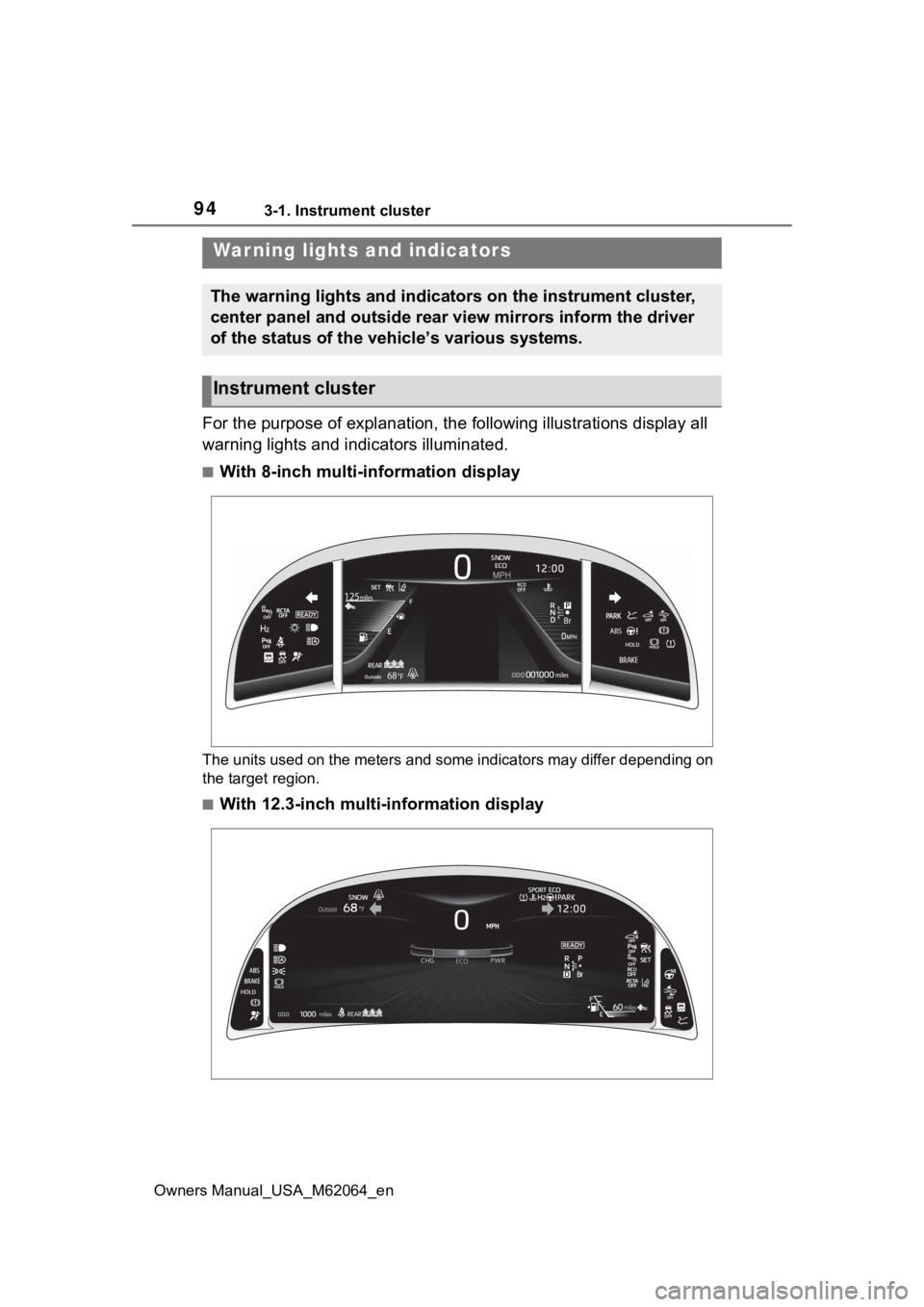
For the purpose of explanation, the following illustrations display all
warning lights and indicators illuminated.
■With 8-inch multi-information display
The units used on the meters and some indicators may differ dep ending on
the target region.
■With 12.3-inch multi-information display
War ning lights and indicators
The warning lights and indicators on the instrument cluster,
center panel and outside rear view mirrors inform the driver
of the status of the vehicle’s various systems.
Instrument cluster
Page 95 of 572
953-1. Instrument cluster
Owners Manual_USA_M62064_en
3
Vehicle status information and indicators
The units used on the meters and some indicators may differ dep ending on
the target region.
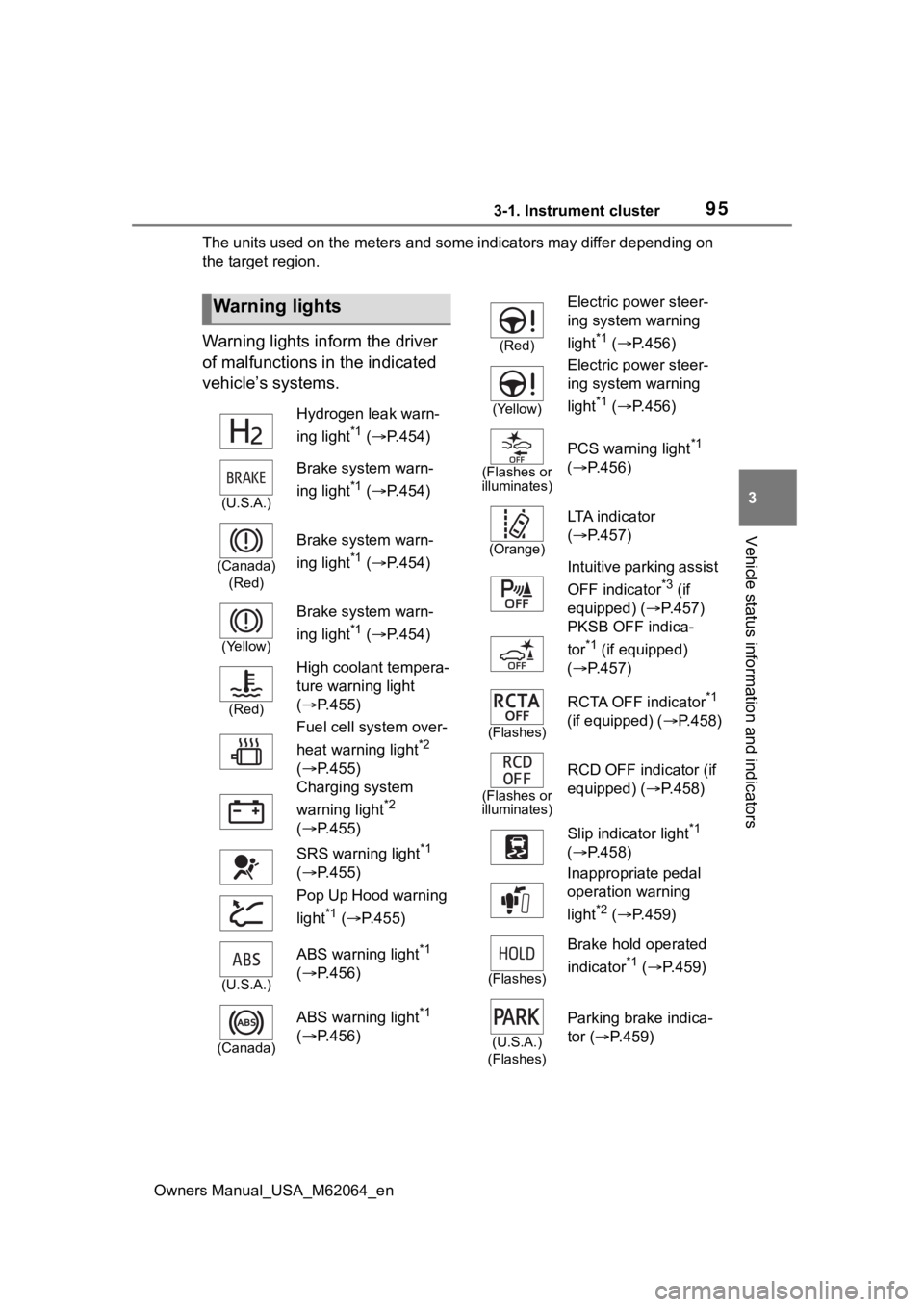
Warning lights inform the driver
of malfunctions in the indicated
vehicle’s systems.
Warning lights
Hydrogen leak warn-
ing light
*1 ( P.454)
(U.S.A.)
Brake system warn-
ing light
*1 ( P.454)
(Canada)
(Red)
Brake system warn-
ing light
*1 ( P.454)
(Yellow)
Brake system warn-
ing light
*1 ( P.454)
(Red)
High coolant tempera-
ture warning light
( P.455)
Fuel cell system over-
heat warning light
*2
( P.455)
Charging system
warning light
*2
( P.455)
SRS warning light
*1
( P.455)
Pop Up Hood warning
light
*1 ( P.455)
(U.S.A.)
ABS warning light*1
( P.456)
(Canada)
ABS warning light*1
( P.456)
(Red)
Electric power steer-
ing system warning
light
*1 ( P.456)
(Yellow)
Electric power steer-
ing system warning
light
*1 ( P.456)
(Flashes or
illuminates)
PCS warning light*1
( P.456)
(Orange)
LTA i n d i c a t o r
( P.457)
Intuitive parking assist
OFF indicator
*3 (if
equipped) ( P.457)
PKSB OFF indica-
tor
*1 (if equipped)
( P.457)
(Flashes)
RCTA OFF indicator*1
(if equipped) ( P.458)
(Flashes or
illuminates)
RCD OFF indicator (if
equipped) ( P.458)
Slip indicator light
*1
( P.458)
Inappropriate pedal
operation warning
light
*2 ( P.459)
(Flashes)
Brake hold operated
indicator
*1 ( P.459)
(U.S.A.)
(Flashes)
Parking brake indica-
tor ( P.459)
Page 96 of 572
963-1. Instrument cluster
Owners Manual_USA_M62064_en
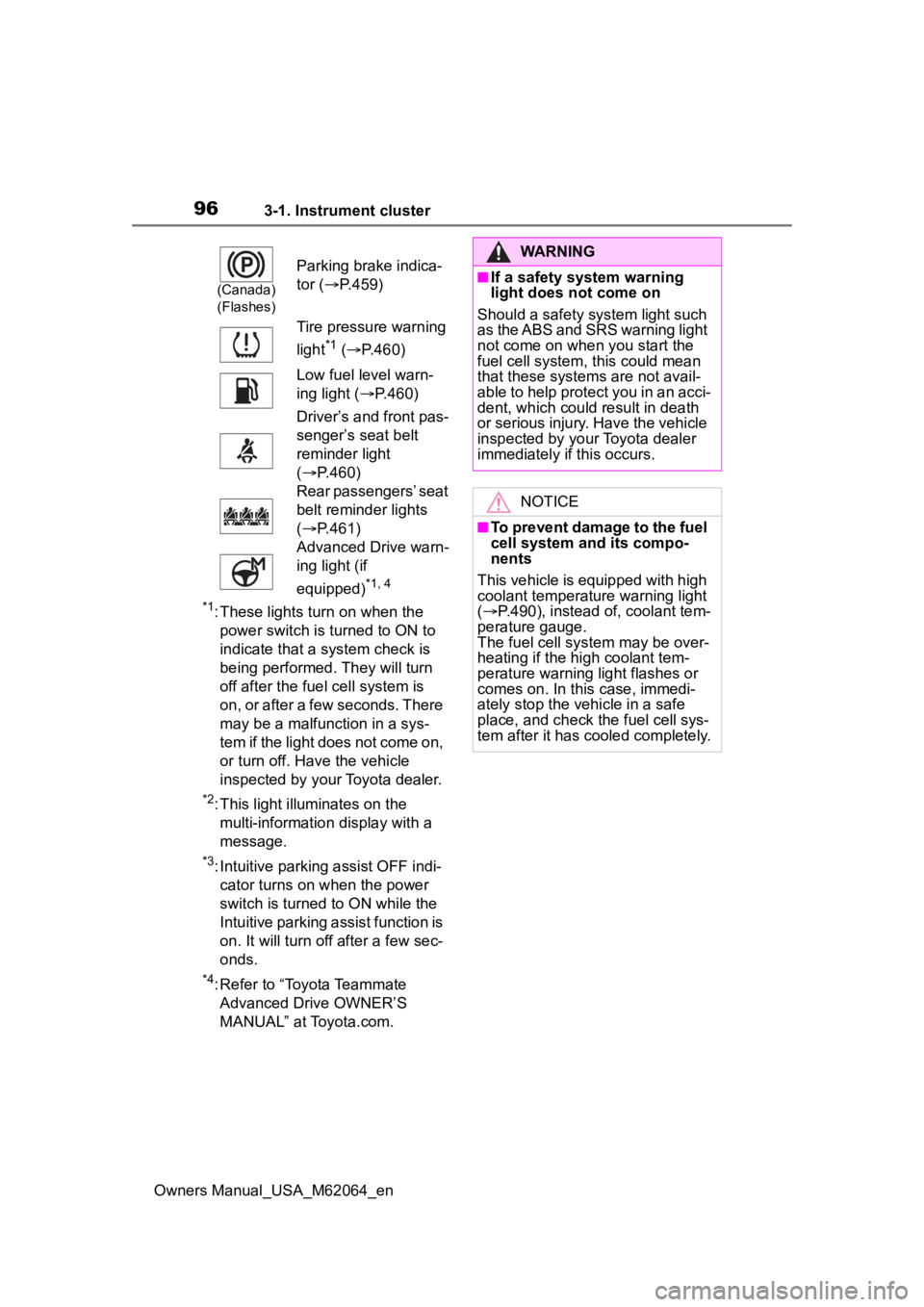
*1: These lights turn on when the power switch is turned to ON to
indicate that a system check is
being performed. They will turn
off after the fuel cell system is
on, or after a few seconds. There
may be a malfunction in a sys-
tem if the light does not come on,
or turn off. Have the vehicle
inspected by your Toyota dealer.
*2: This light illuminates on the multi-informatio n display with a
message.
*3: Intuitive parking assist OFF indi- cator turns on when the power
switch is turned to ON while the
Intuitive parking assist function is
on. It will turn off after a few sec-
onds.
*4: Refer to “Toyota Teammate Advanced Drive OWNER’S
MANUAL” at Toyota.com.
(Canada)
(Flashes)
Parking brake indica-
tor ( P.459)
Tire pressure warning
light
*1 ( P.460)
Low fuel level warn-
ing light ( P.460)
Driver’s and front pas-
senger’s seat belt
reminder light
( P.460)
Rear passengers’ seat
belt reminder lights
( P.461)
Advanced Drive warn-
ing light (if
equipped)
*1, 4
WARNING
■If a safety system warning
light does not come on
Should a safety system light such
as the ABS and SRS warning light
not come on when you start the
fuel cell system, this could mean
that these system s are not avail-
able to help protect you in an acci-
dent, which could result in death
or serious injury. Have the vehicle
inspected by you r Toyota dealer
immediately if this occurs.
NOTICE
■To prevent damage to the fuel
cell system and its compo-
nents
This vehicle is equipped with high
coolant temperature warning light
( P.490), instead of, coolant tem-
perature gauge.
The fuel cell sys tem may be over-
heating if the high coolant tem-
perature warning light flashes or
comes on. In this case, immedi-
ately stop the vehicle in a safe
place, and check the fuel cell sys-
tem after it has cooled completely.
Page 97 of 572
973-1. Instrument cluster
Owners Manual_USA_M62064_en
3
Vehicle status information and indicators
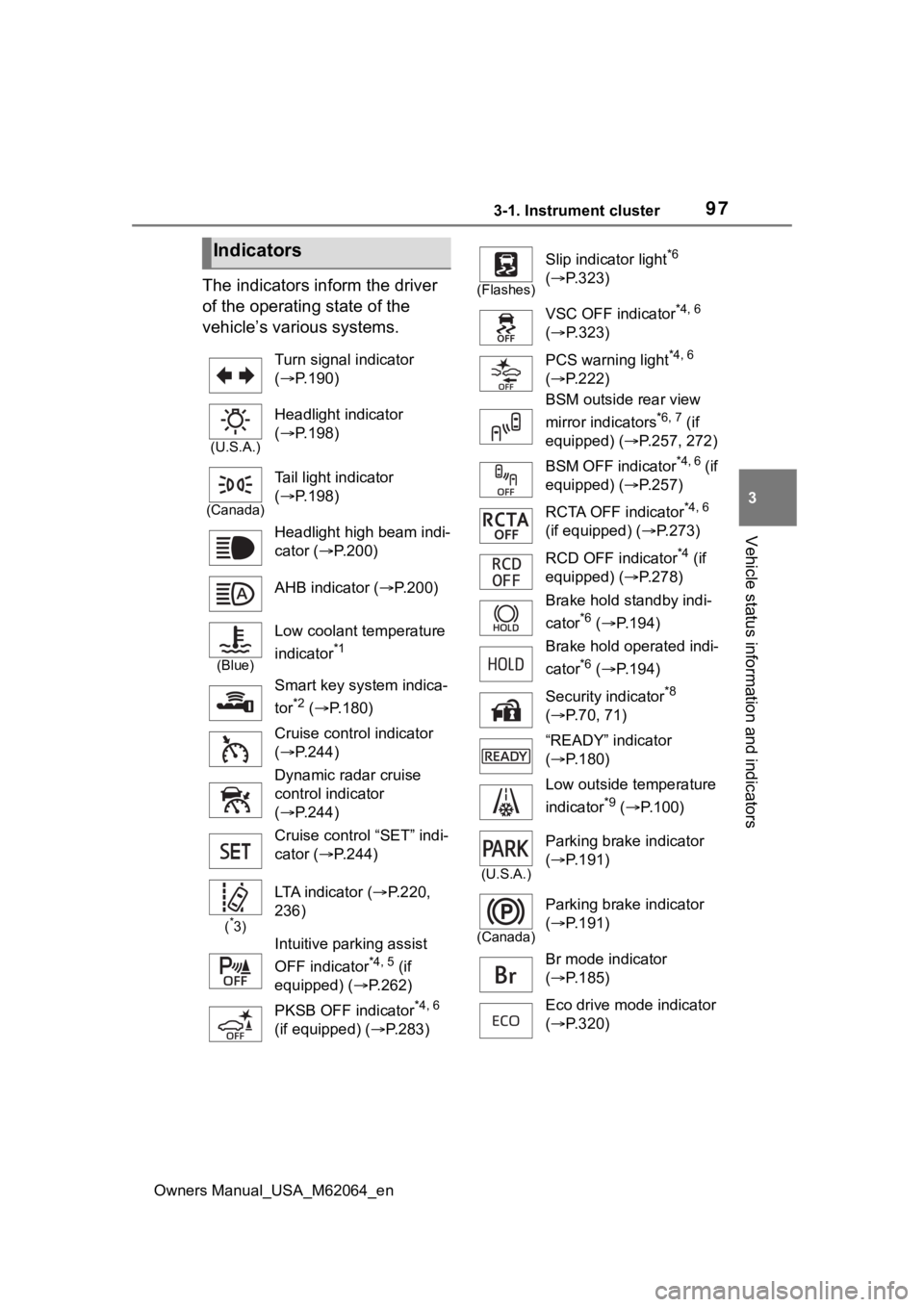
The indicators inform the driver
of the operating state of the
vehicle’s various systems.
Indicators
Turn signal indicator
( P.190)
(U.S.A.)
Headlight indicator
( P.198)
(Canada)
Tail light indicator
( P.198)
Headlight high beam indi-
cator ( P.200)
AHB indicator ( P.200)
(Blue)
Low coolant temperature
indicator
*1
Smart key system indica-
tor
*2 ( P.180)
Cruise control indicator
( P.244)
Dynamic radar cruise
control indicator
( P.244)
Cruise control “SET” indi-
cator ( P.244)
(*3)
LTA indicator ( P.220,
236)
Intuitive parking assist
OFF indicator
*4, 5 (if
equipped) ( P.262)
PKSB OFF indicator
*4, 6
(if equipped) ( P.283)
(Flashes)
Slip indicator light*6
( P.323)
VSC OFF indicator
*4, 6
( P.323)
PCS warning light
*4, 6
( P.222)
BSM outside rear view
mirror indicators
*6, 7 (if
equipped) ( P.257, 272)
BSM OFF indicator
*4, 6 (if
equipped) ( P.257)
RCTA OFF indicator
*4, 6
(if equipped) ( P.273)
RCD OFF indicator
*4 (if
equipped) ( P.278)
Brake hold standby indi-
cator
*6 ( P.194)
Brake hold operated indi-
cator
*6 ( P.194)
Security indicator
*8
( P.70, 71)
“READY” indicator
( P.180)
Low outside temperature
indicator
*9 ( P.100)
(U.S.A.)
Parking brake indicator
( P.191)
(Canada)
Parking brake indicator
( P.191)
Br mode indicator
( P.185)
Eco drive mode indicator
( P.320)
Page 99 of 572
993-1. Instrument cluster
Owners Manual_USA_M62064_en
3
Vehicle status information and indicators
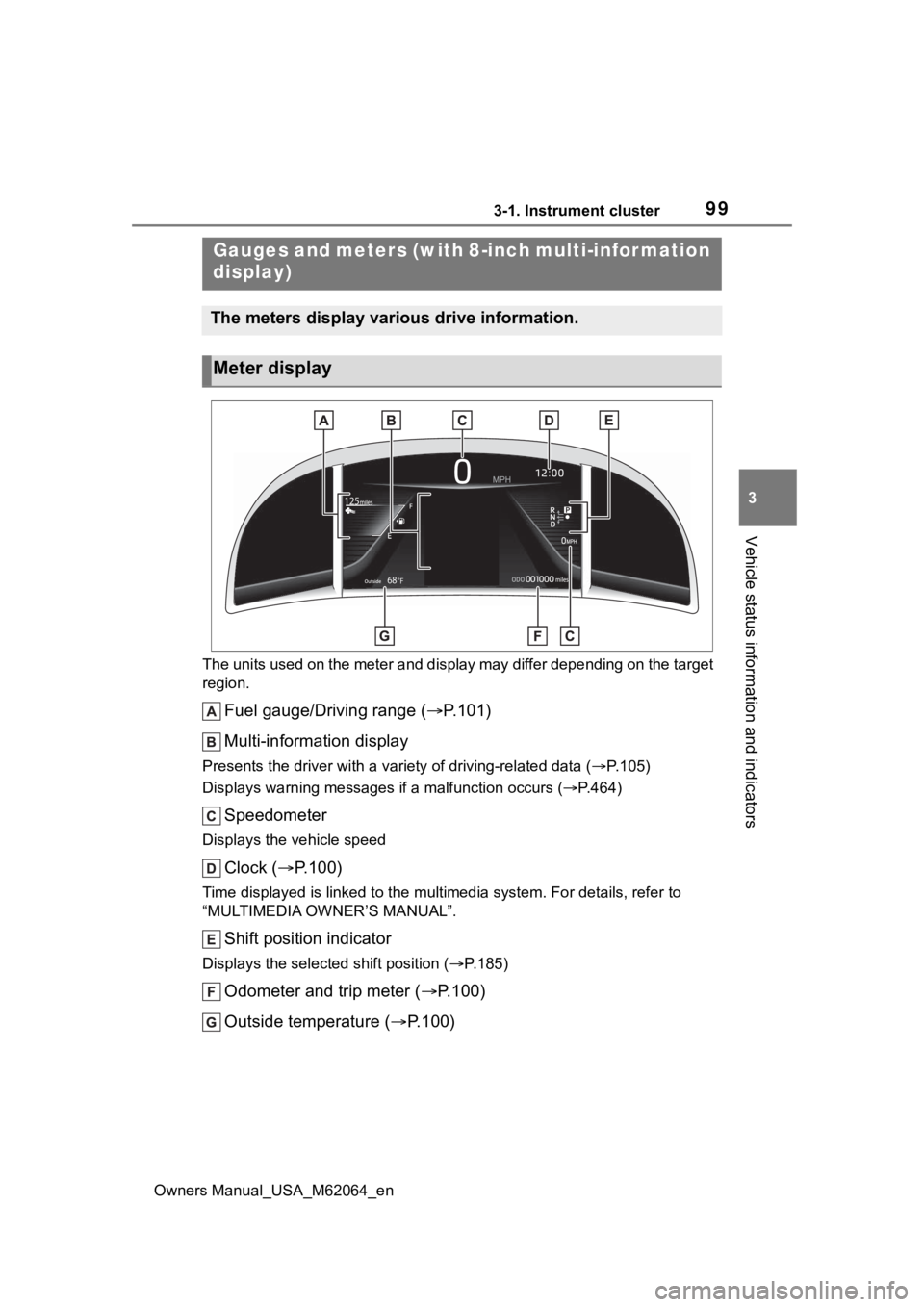
The units used on the meter and display may differ depending on the target
region.
Fuel gauge/Driving range ( P.101)
Multi-information display
Presents the driver with a variety of driving-related data ( P.105)
Displays warning messages if a malfunction occurs (P.464)
Speedometer
Displays the vehicle speed
Clock ( P.100)
Time displayed is linked to the multimedia system. For details, refer to
“MULTIMEDIA OWNER’S MANUAL”.
Shift position indicator
Displays the selected shift position ( P.185)
Odometer and trip meter ( P.100)
Outside temperature ( P.100)
Gauges and meters (with 8-inch multi-infor mation
display)
The meters display various drive information.
Meter display
Page 101 of 572
1013-1. Instrument cluster
Owners Manual_USA_M62064_en
3
Vehicle status information and indicators
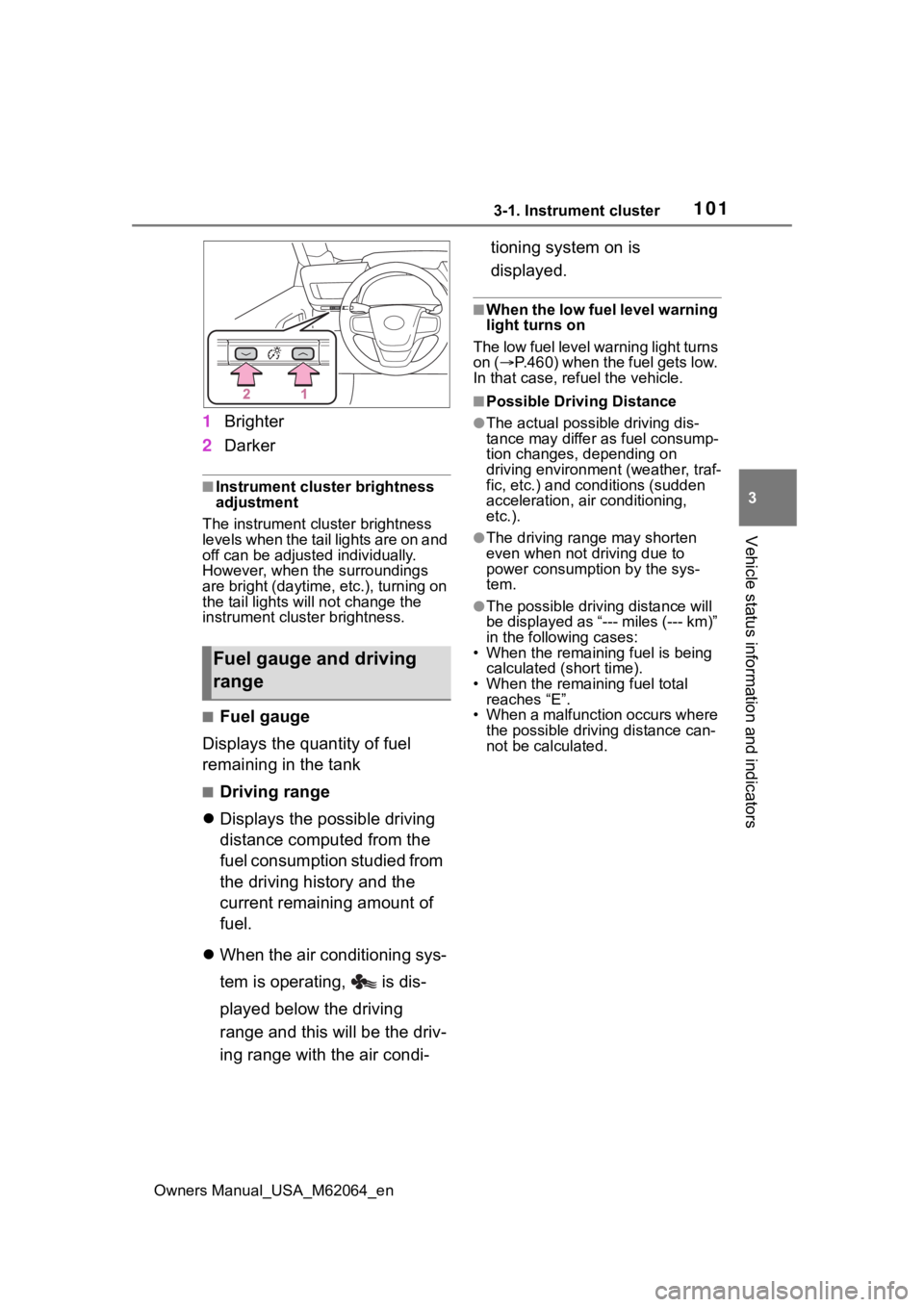
1 Brighter
2 Darker
■Instrument cluster brightness
adjustment
The instrument cluster brightness
levels when the tail lights are on and
off can be adjusted individually.
However, when the surroundings
are bright (daytime, etc.), turning on
the tail lights will not chan ge the
instrument cluster brightness.
■Fuel gauge
Displays the quantity of fuel
remaining in the tank
■Driving range
Displays the possible driving
distance computed from the
fuel consumption studied from
the driving history and the
current remaining amount of
fuel.
When the air conditioning sys-
tem is operating, is dis-
played below the driving
range and this will be the driv-
ing range with the air condi- tioning system on is
displayed.
■When the low fuel level warning
light turns on
The low fuel level warning light turns
on ( P.460) when the fuel gets low.
In that case, refuel the vehicle.
■Possible Drivi ng Distance
●The actual possible driving dis-
tance may differ as fuel consump-
tion changes, depending on
driving environment (weather, traf-
fic, etc.) and conditions (sudden
acceleration, air conditioning,
etc.).
●The driving range may shorten
even when not driving due to
power consumption by the sys-
tem.
●The possible driving distance will
be displayed as “--- miles (--- km)”
in the following cases:
• When the remaining fuel is being calculated (short time).
• When the remaining fuel total
reaches “E”.
• When a malfunction occurs where the possible driving distance can-
not be calculated.
Fuel gauge and driving
range
Page 102 of 572
1023-1. Instrument cluster
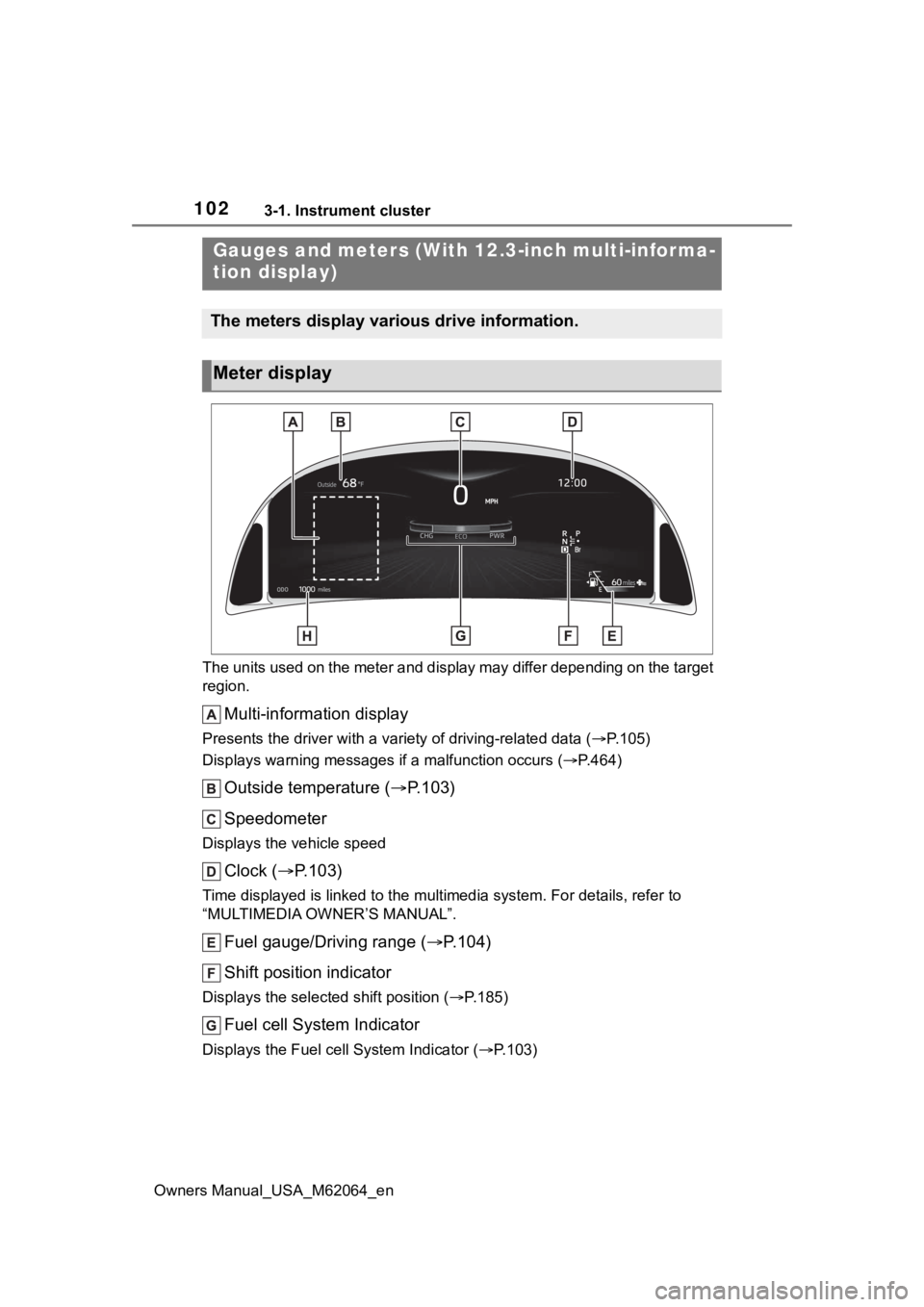
Owners Manual_USA_M62064_enThe units used on the meter and display may differ depending on
the target
region.
Multi-information display
Presents the driver with a variety of driving-related data ( P.105)
Displays warning messages if a malfunction occurs (P.464)
Outside temperature ( P.103)
Speedometer
Displays the vehicle speed
Clock ( P.103)
Time displayed is linked to the multimedia system. For details, refer to
“MULTIMEDIA OWNER’S MANUAL”.
Fuel gauge/Driving range ( P.104)
Shift position indicator
Displays the selected shift position ( P.185)
Fuel cell System Indicator
Displays the Fuel cell System Indicator ( P.103)
Gauges and meters (With 12.3-inch multi-informa-
tion display)
The meters display various drive information.
Meter display
Page 105 of 572
1053-1. Instrument cluster
Owners Manual_USA_M62064_en
3
Vehicle status information and indicators
When the air conditioning sys-
tem is operating, is dis-
played next to the driving
range and this will be the driv-
ing range with the air condi-
tioning system on is
displayed.
■When the low fuel level warning
light turns on
The low fuel level warning light turns
on ( P.460) when the fuel gets low.
In that case, refuel the vehicle.
■Possible Driving Distance
●The actual possible driving dis-
tance may differ as fuel consump-
tion changes, depending on
driving environment (weather, traf-
fic, etc.) and cond itions (sudden
acceleration, air conditioning,
etc.).
●The driving range may shorten
even when not driving due to
power consumption by the sys-
tem.
●The possible driv ing distance will
be displayed as “--- miles (--- km)”
in the following cases:
• When the remaining fuel is being calculated (short time).
• When the remaining fuel total reaches “E”.
• When a malfunction occurs where
the possible drivi ng distance can-
not be calculated.
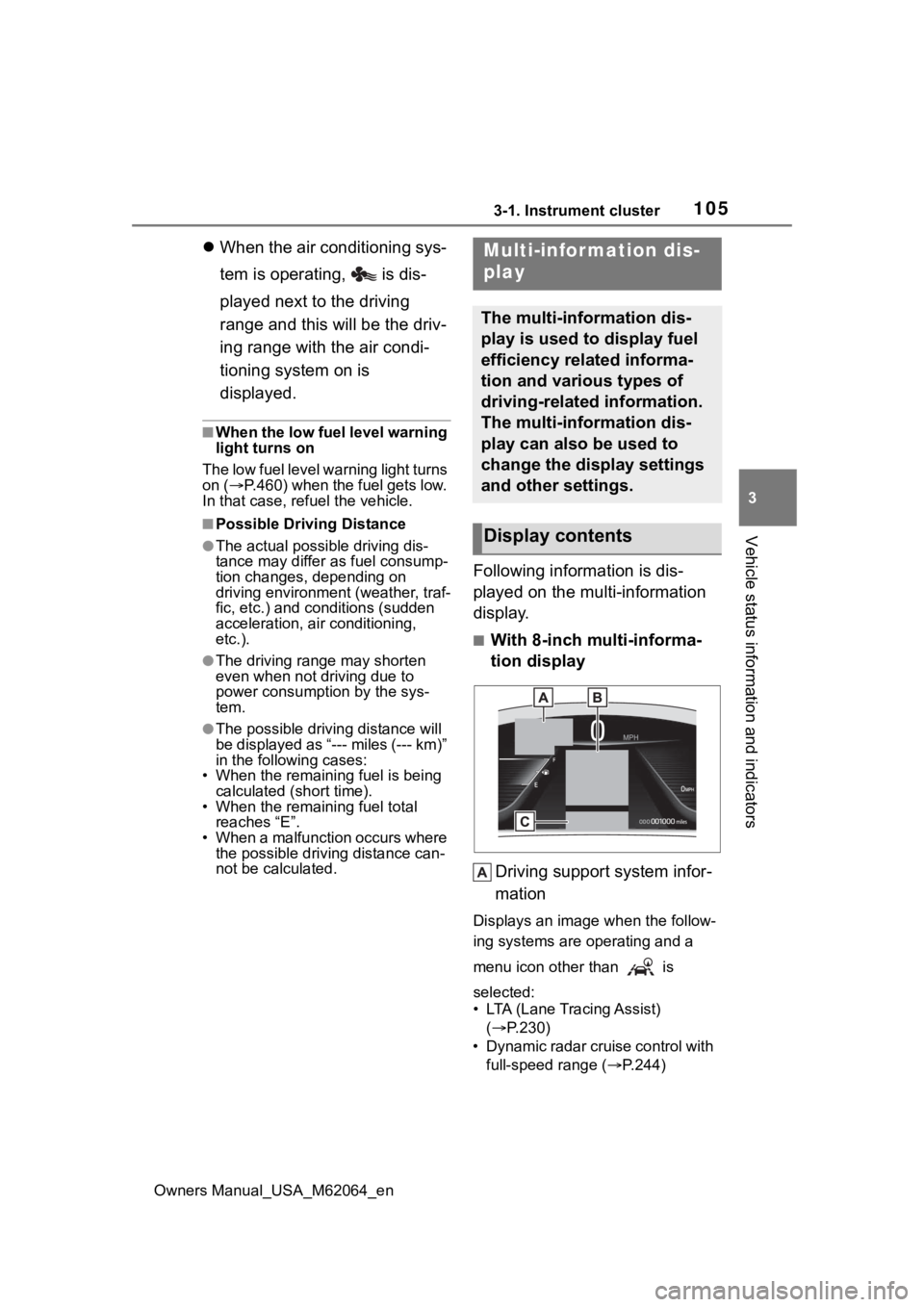
Following information is dis-
played on the multi-information
display.
■With 8-inch multi-informa-
tion display
Driving support system infor-
mation
Displays an image when the follow-
ing systems are operating and a
menu icon other than is
selected:
• LTA (Lane Tracing Assist) ( P.230)
• Dynamic radar cruise control with full-speed range ( P.244)
Multi-infor mation dis-
play
The multi-information dis-
play is used to display fuel
efficiency related informa-
tion and various types of
driving-related information.
The multi-information dis-
play can also be used to
change the display settings
and other settings.
Display contents
Page 106 of 572
1063-1. Instrument cluster
Owners Manual_USA_M62064_en• RSA (Road Sign Assist) (if
equipped) ( P.241)
Information display area
A variety of information can be dis-
played by selecting a menu icon.
Additionally, warning or sugges-
tion/advice pop- up displays will be
displayed in some situations.
Menu icons ( P.107)
■With 12.3-inch multi-infor-
mation display
By selecting menu icons
( P.107) on the multi-informa-
tion display, a variety of driving-
related information can be dis-
played. The multi-information
display can also be used to
change display settings and
other vehicle settings. Warning
or suggestion/advice pop-up
displays are also displayed in
certain situations.
■The multi-information display is
displayed when
The power swit ch is in ON.
■When changing driving mode
Background color of the multi-infor-
mation display is changed following
the selected driving mode. ( P.320,
321)
■Liquid crystal display
Small spots or light spots may
appear on the display. This phenom-
enon is characteristic of liquid crys-
tal displays, and there is no problem
continuing to use the display.
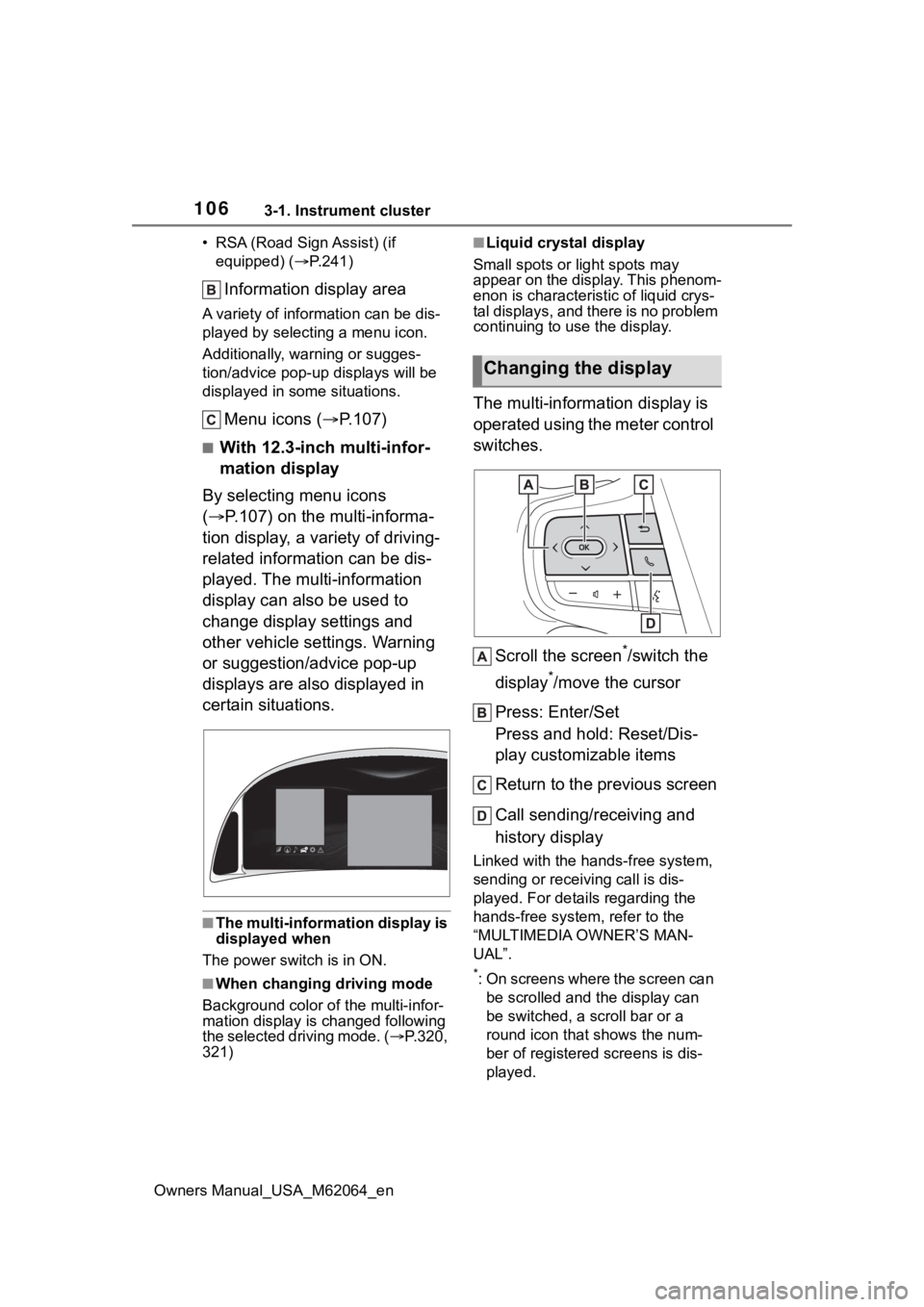
The multi-information display is
operated using the meter control
switches.
Scroll the screen
*/switch the
display
*/move the cursor
Press: Enter/Set
Press and hold: Reset/Dis-
play customizable items
Return to the previous screen
Call sending/receiving and
history display
Linked with the hands-free system,
sending or receiving call is dis-
played. For details regarding the
hands-free system, refer to the
“MULTIMEDIA OWNER’S MAN-
UAL”.
*: On screens where the screen can be scrolled and the display can
be switched, a scroll bar or a
round icon that shows the num-
ber of registered screens is dis-
played.
Changing the display
Page 107 of 572
1073-1. Instrument cluster
Owners Manual_USA_M62064_en
3
Vehicle status information and indicatorsInformation related to each icon
can be displayed by selecting
the icon with the meter control
switches.
Some of the information may be
displayed automatically depending
on the situation.
*1: Vehicles with 8-inch multi-infor- mation display
*2: Vehicles with 12.3-inch multi-information display
Select to display fuel consump-
tion data in various forms.
■Fuel Economy
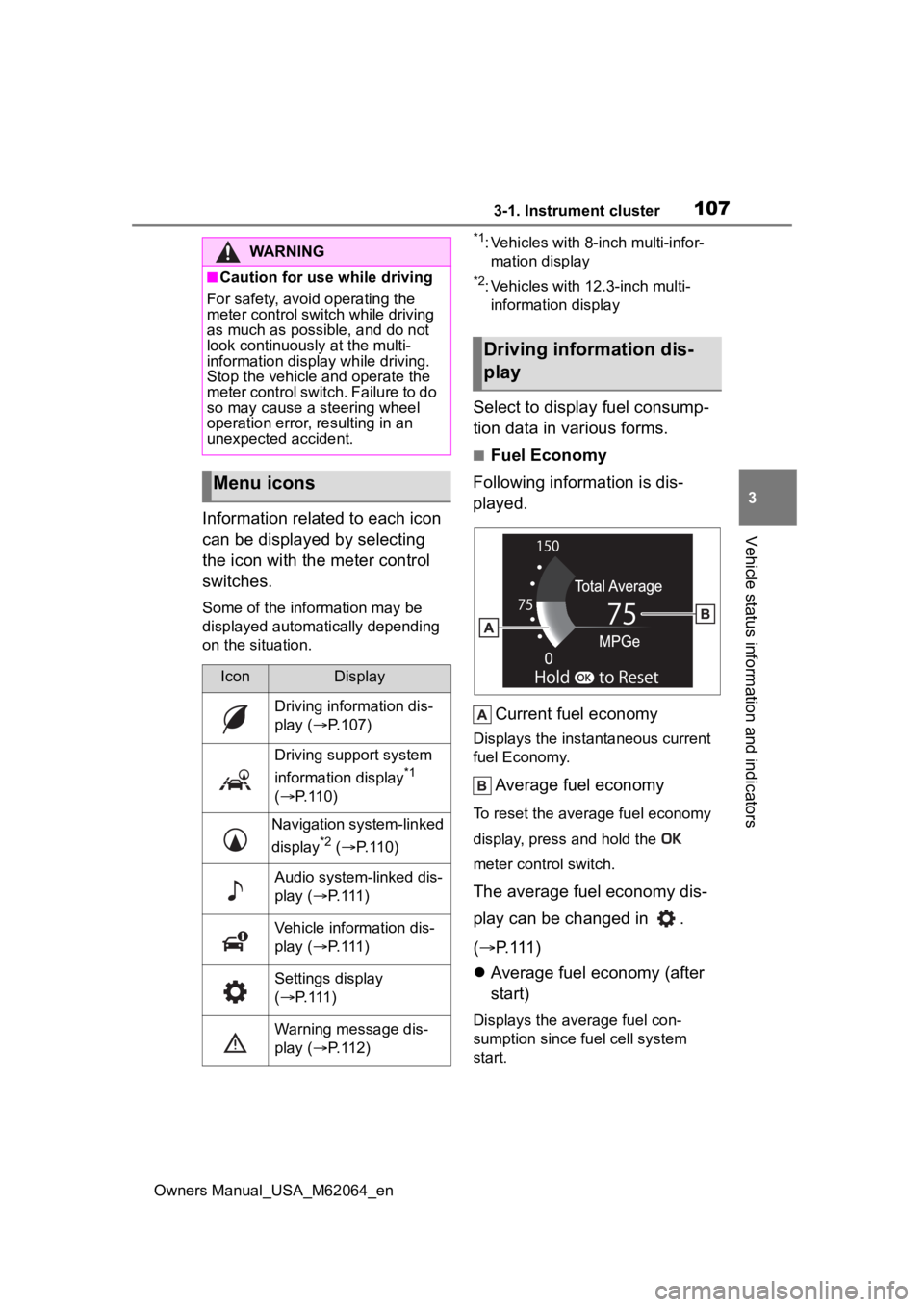
Following information is dis-
played.
Current fuel economy
Displays the instantaneous current
fuel Economy.
Average fuel economy
To reset the average fuel economy
display, press and hold the
meter control switch.
The average fuel economy dis-
play can be changed in .
( P.111)
Average fuel economy (after
start)
Displays the average fuel con-
sumption since fuel cell system
start.
WARNING
■Caution for use while driving
For safety, avoid operating the
meter control swit ch while driving
as much as possible, and do not
look continuously at the multi-
information display while driving.
Stop the vehicle and operate the
meter control switch. Failure to do
so may cause a steering wheel
operation error, resulting in an
unexpected accident.
Menu icons
IconDisplay
Driving information dis-
play ( P.107)
Driving support system
information display
*1
( P. 1 1 0 )
Navigation system-linked
display
*2 ( P. 1 1 0 )
Audio system-linked dis-
play ( P. 1 1 1 )
Vehicle information dis-
play ( P. 1 1 1 )
Settings display
( P. 1 1 1 )
Warning message dis-
play ( P. 1 1 2 )
Driving information dis-
play