warning TOYOTA MIRAI 2023 Owners Manual
[x] Cancel search | Manufacturer: TOYOTA, Model Year: 2023, Model line: MIRAI, Model: TOYOTA MIRAI 2023Pages: 572, PDF Size: 17.71 MB
Page 354 of 572
3546-1. Using the air conditioning system and defogger
Owners Manual_USA_M62064_en
WARNING
■To prevent overheating and
minor burn injuries
Observe the following precautions
when using the seat heaters.
●Do not cover the seat with a
blanket or cushion when using
the seat heater.
●Do not use seat heater more
than necessary.
Page 358 of 572
3586-3. Using the storage features
Owners Manual_USA_M62064_en
6-3.Using the storage features
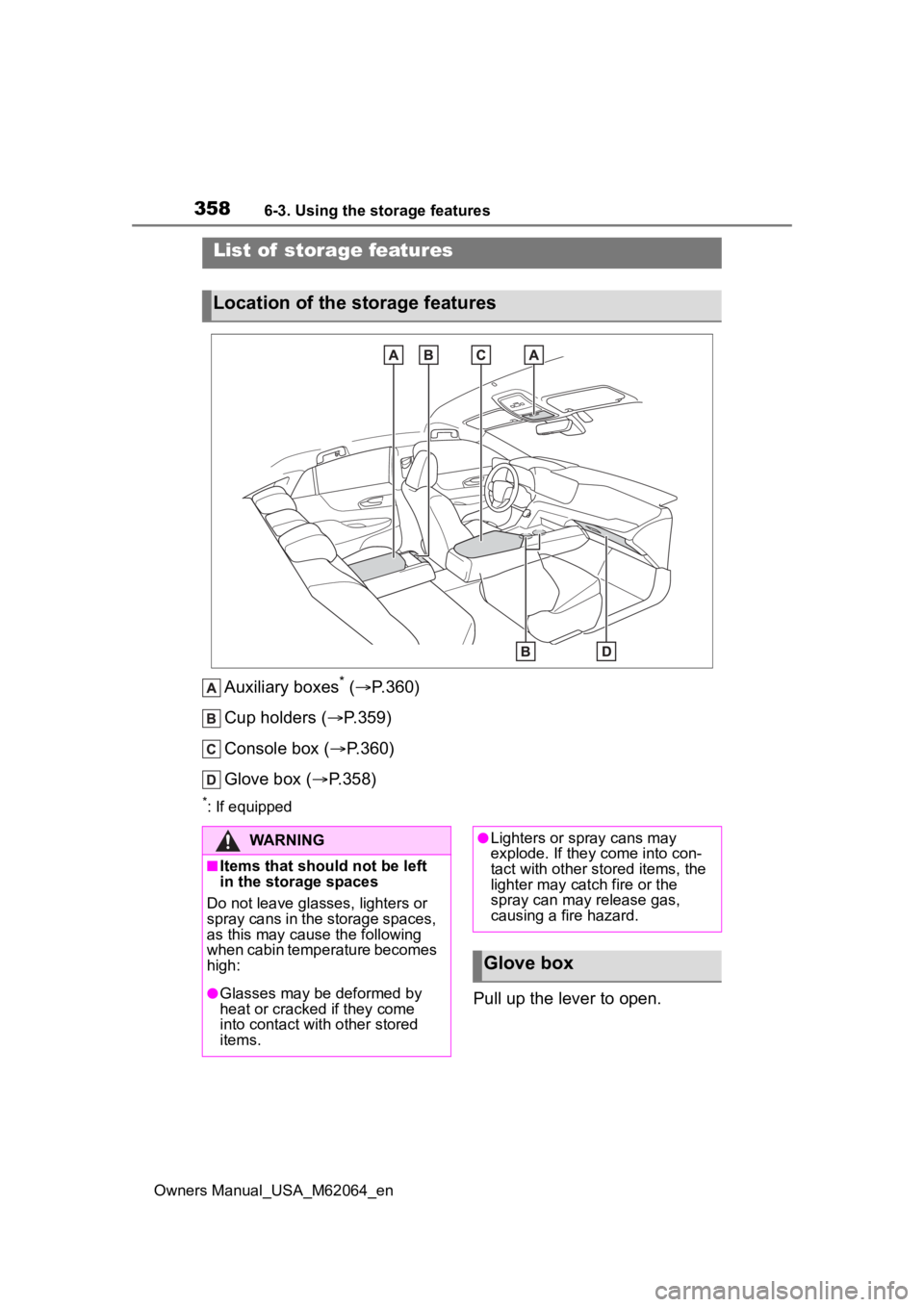
Auxiliary boxes* ( P.360)
Cup holders ( P.359)
Console box ( P.360)
Glove box ( P.358)
*: If equipped
Pull up the lever to open.
List of storage features
Location of the storage features
WARNING
■Items that should not be left
in the storage spaces
Do not leave glasses, lighters or
spray cans in the storage spaces,
as this may cau se the following
when cabin temperature becomes
high:
●Glasses may be deformed by
heat or cracked if they come
into contact with other stored
items.
●Lighters or spray cans may
explode. If they come into con-
tact with other stored items, the
lighter may catch fire or the
spray can may release gas,
causing a fire hazard.
Glove box
Page 359 of 572
3596-3. Using the storage features
Owners Manual_USA_M62064_en
6
Interior features
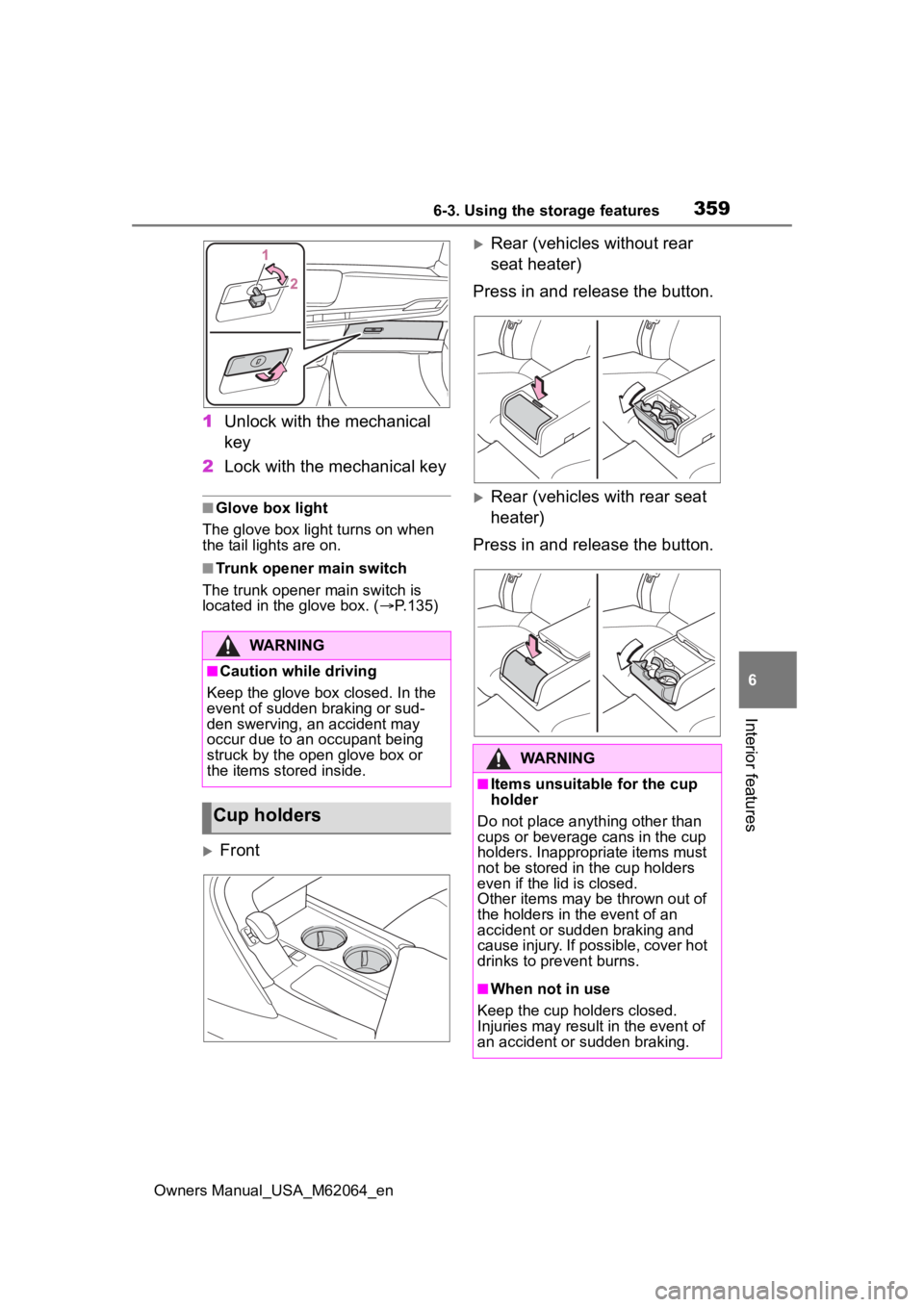
1 Unlock with the mechanical
key
2 Lock with the mechanical key
■Glove box light
The glove box light turns on when
the tail lights are on.
■Trunk opener main switch
The trunk opener main switch is
located in the glove box. ( P.135)
Front
Rear (vehicles without rear
seat heater)
Press in and release the button.
Rear (vehicles with rear seat
heater)
Press in and release the button.
WARNING
■Caution while driving
Keep the glove box closed. In the
event of sudden braking or sud-
den swerving, an accident may
occur due to an occupant being
struck by the open glove box or
the items stored inside.
Cup holders
WARNING
■Items unsuitable for the cup
holder
Do not place anyth ing other than
cups or beverage cans in the cup
holders. Inappropriate items must
not be stored in the cup holders
even if the lid is closed.
Other items may be thrown out of
the holders in the event of an
accident or sudden braking and
cause injury. If possible, cover hot
drinks to pre vent burns.
■When not in use
Keep the cup holders closed.
Injuries may resul t in the event of
an accident or sudden braking.
Page 360 of 572
3606-3. Using the storage features
Owners Manual_USA_M62064_en
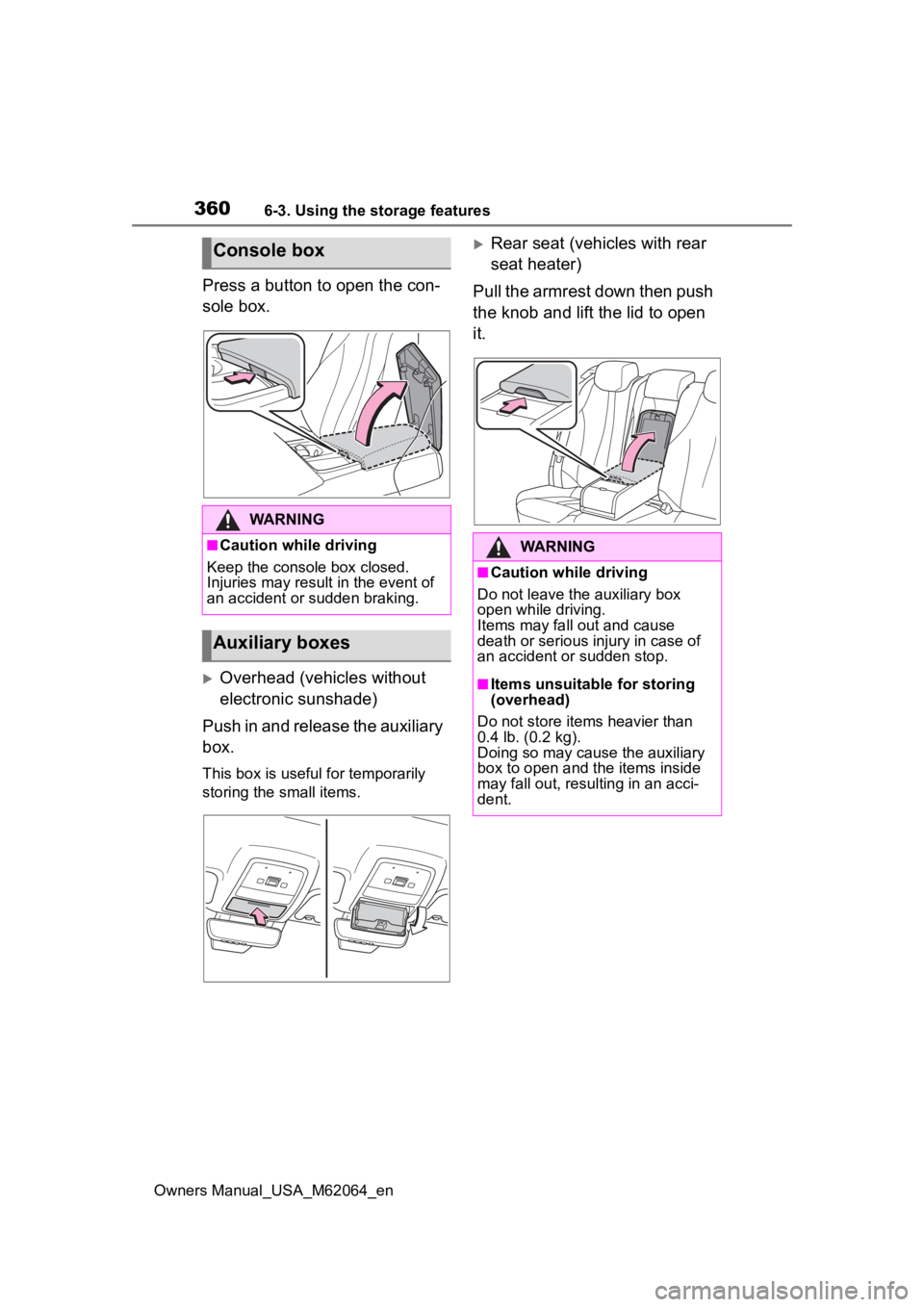
Press a button to open the con-
sole box.
Overhead (vehicles without
electronic sunshade)
Push in and release the auxiliary
box.
This box is useful for temporarily
storing the small items.
Rear seat (vehicles with rear
seat heater)
Pull the armrest down then push
the knob and lift the lid to open
it.Console box
WARNING
■Caution while driving
Keep the console box closed.
Injuries may result in the event of
an accident or sudden braking.
Auxiliary boxes
WARNING
■Caution while driving
Do not leave the auxiliary box
open while driving.
Items may fall out and cause
death or serious injury in case of
an accident or sudden stop.
■Items unsuitable for storing
(overhead)
Do not store items heavier than
0.4 lb. (0.2 kg).
Doing so may cause the auxiliary
box to open and the items inside
may fall out, resulting in an acci-
dent.
Page 361 of 572
3616-3. Using the storage features
Owners Manual_USA_M62064_en
6
Interior features
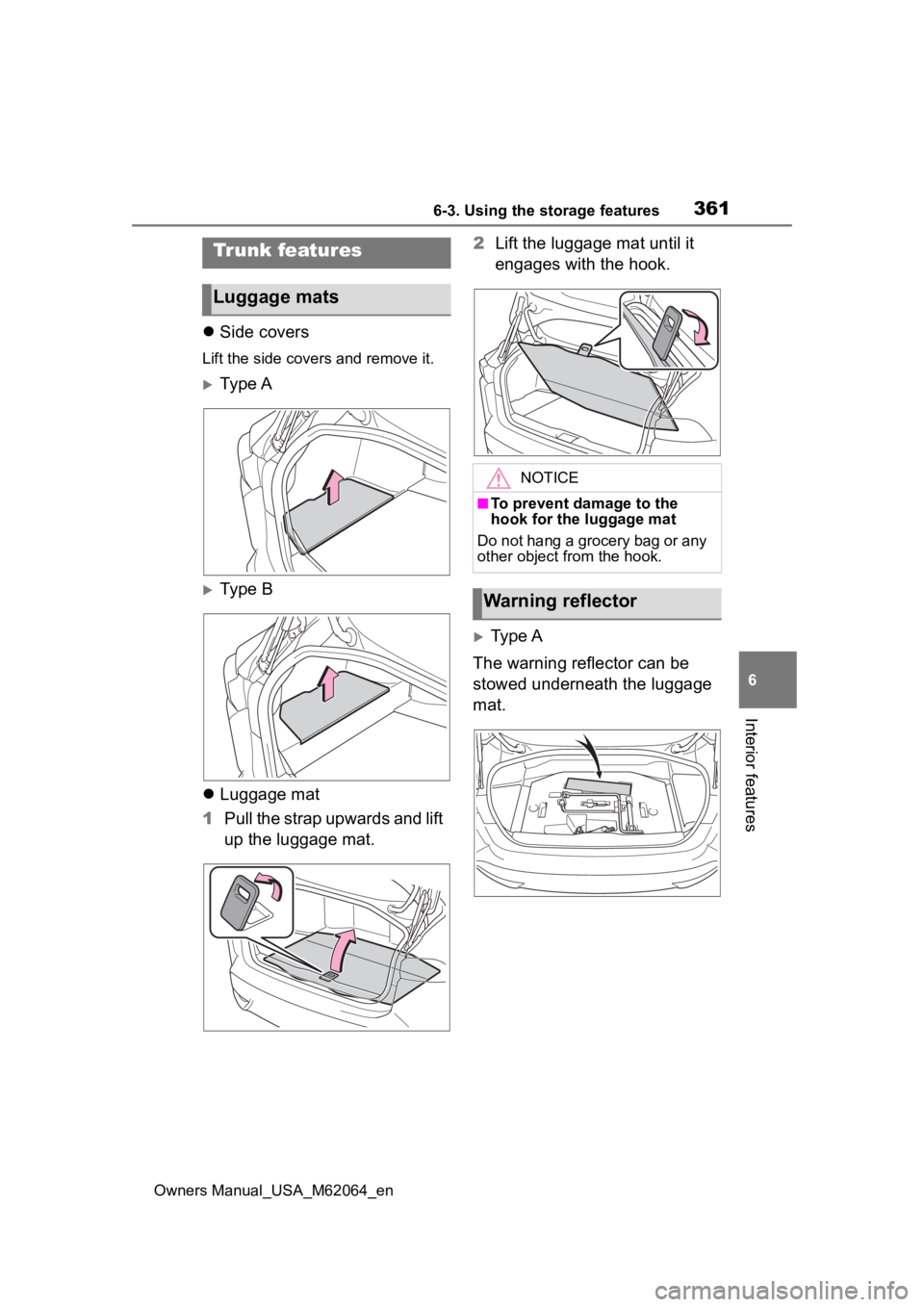
Side covers
Lift the side covers and remove it.
Ty p e A
Type B
Luggage mat
1 Pull the strap upwards and lift
up the luggage mat. 2
Lift the luggage mat until it
engages with the hook.
Type A
The warning reflector can be
stowed underneath the luggage
mat.
Trunk features
Luggage mats
NOTICE
■To prevent damage to the
hook for the luggage mat
Do not hang a grocery bag or any
other object from the hook.
Warning reflector
Page 362 of 572
3626-3. Using the storage features
Owners Manual_USA_M62064_en
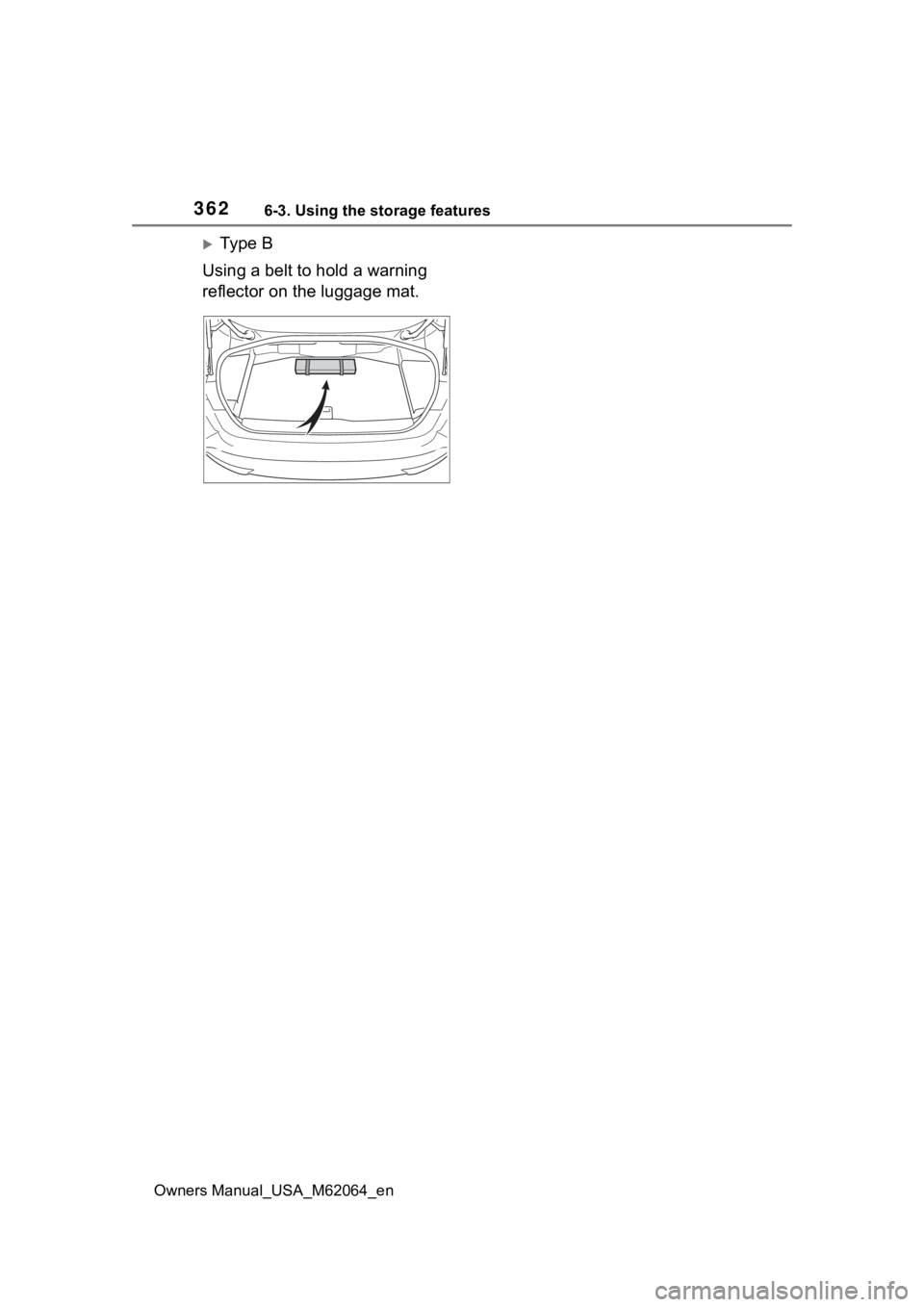
Ty p e B
Using a belt to hold a warning
reflector on the luggage mat.
Page 363 of 572
3636-4. Using the other interior features
Owners Manual_USA_M62064_en
6
Interior features
6-4.Using the other interior features
*: If equipped
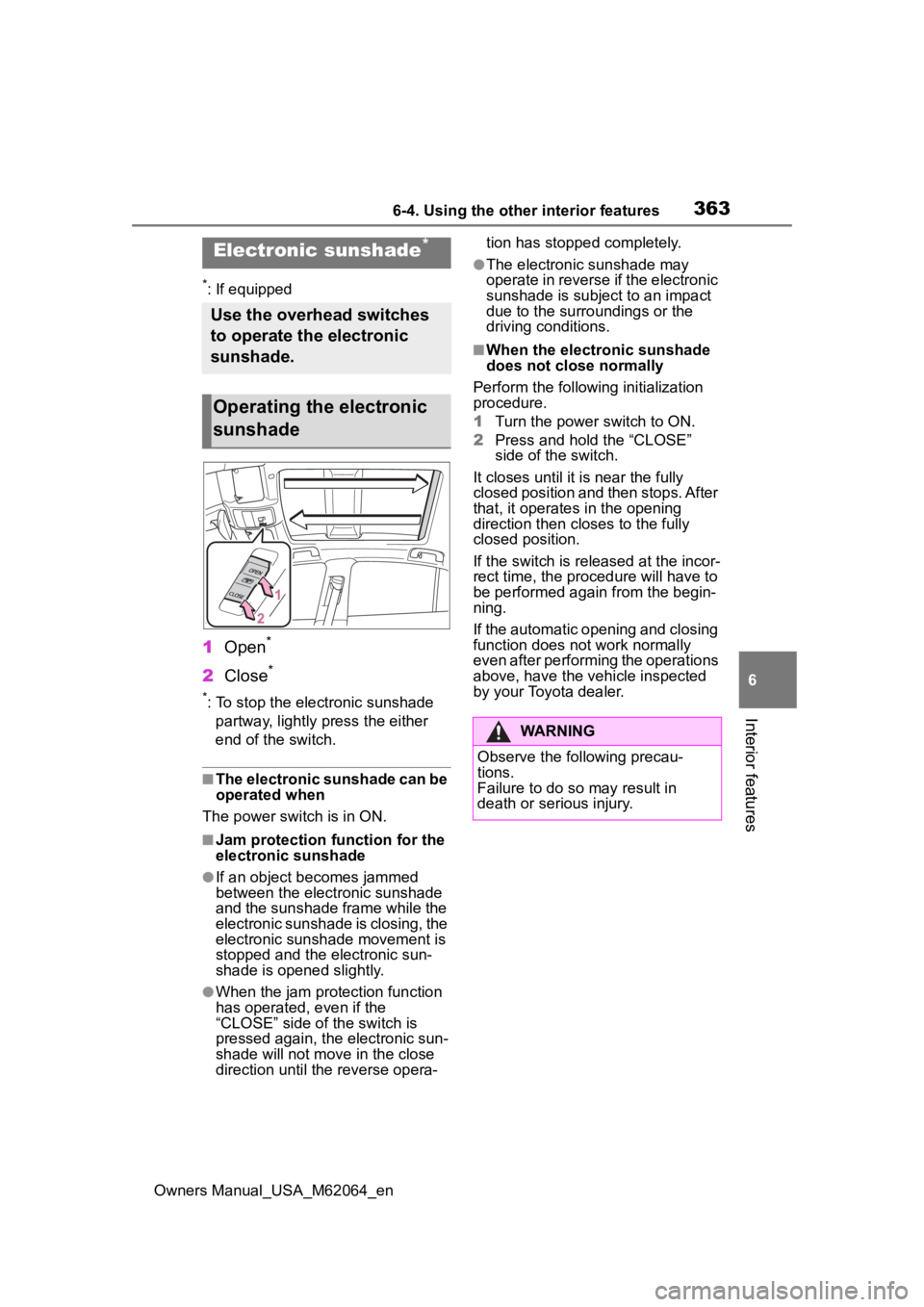
1 Open*
2Close*
*: To stop the electronic sunshade
partway, lightly p ress the either
end of the switch.
■The electronic sunshade can be
operated when
The power swit ch is in ON.
■Jam protection function for the
electronic sunshade
●If an object becomes jammed
between the electronic sunshade
and the sunshade frame while the
electronic sunshade is closing, the
electronic sunshade movement is
stopped and the electronic sun-
shade is opened slightly.
●When the jam protection function
has operated, even if the
“CLOSE” side of the switch is
pressed again, the electronic sun-
shade will not m ove in the close
direction until the reverse opera- tion has stopped completely.
●The electronic sunshade may
operate in reverse if the electronic
sunshade is subject to an impact
due to the surro
undings or the
driving conditions.
■When the electronic sunshade
does not close normally
Perform the following initialization
procedure.
1 Turn the power switch to ON.
2 Press and hold the “CLOSE”
side of the switch.
It closes until it is near the fully
closed position and then stops. After
that, it operates in the opening
direction then closes to the fully
closed position.
If the switch is released at the incor-
rect time, the proc edure will have to
be performed again from the begin-
ning.
If the automatic opening and closing
function does not work normally
even after performing the operations
above, have the vehicle inspected
by your Toyota dealer.
Electronic sunshade*
Use the overhead switches
to operate the electronic
sunshade.
Operating the electronic
sunshade
WARNING
Observe the following precau-
tions.
Failure to do so may result in
death or serious injury.
Page 364 of 572
3646-4. Using the other interior features
Owners Manual_USA_M62064_en
The USB Type-C charging ports
are used to supply 3 A of elec-
tricity at 5 V to external devices.
The USB Type-C charging ports
are for charging only. They are
not designed for data transfer or
other purposes.
Depending on the external
device, it may not charge prop-
erly. Refer to the manual
included with the device before
using a USB charging port.
Refer to “MULTIMEDIA
OWNER’S MANUAL” for USB
Type-A information.
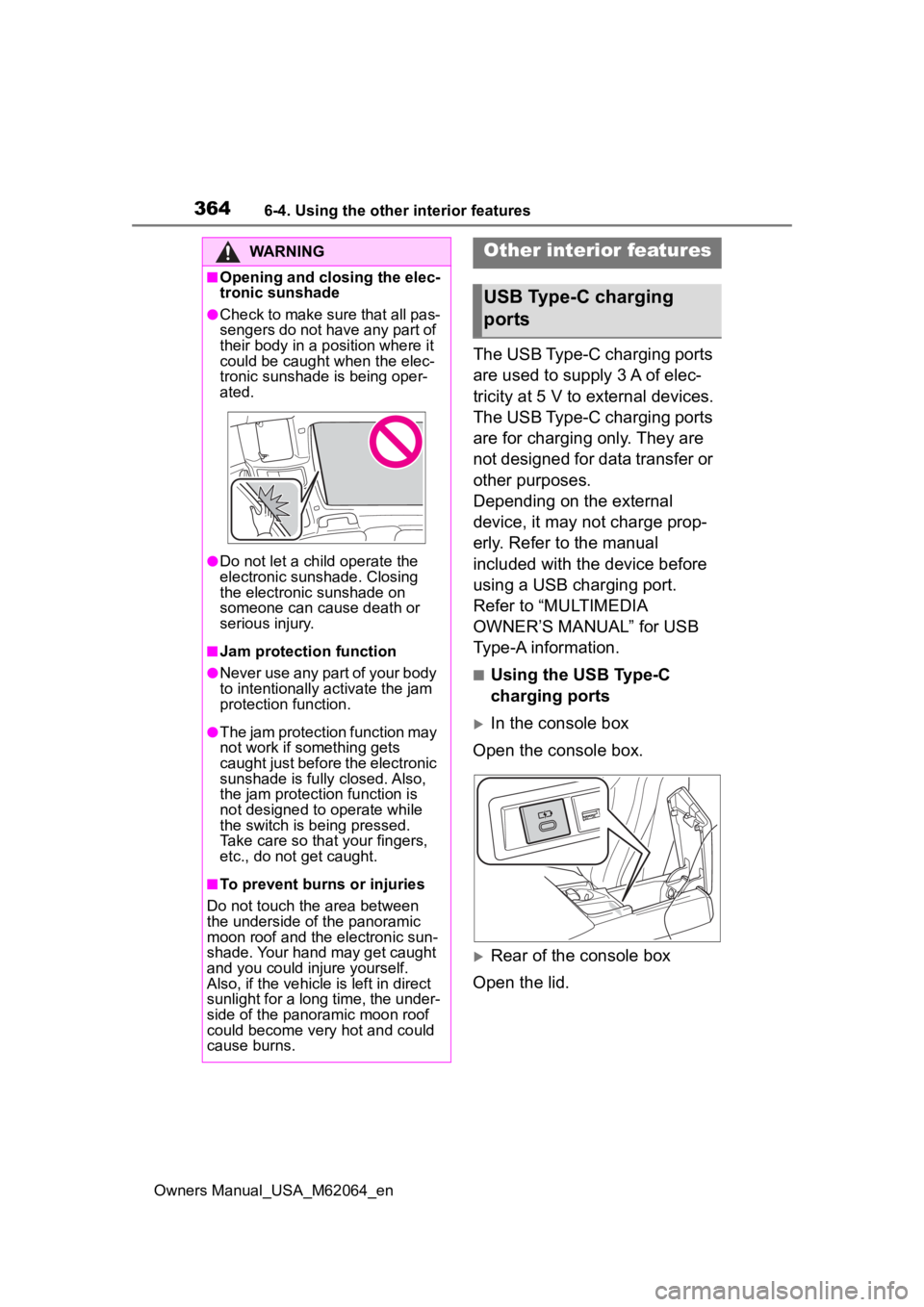
■Using the USB Type-C
charging ports
In the console box
Open the console box.
Rear of the console box
Open the lid.
WARNING
■Opening and closing the elec-
tronic sunshade
●Check to make sure that all pas-
sengers do not have any part of
their body in a position where it
could be caught when the elec-
tronic sunshade is being oper-
ated.
●Do not let a child operate the
electronic sunshade. Closing
the electronic sunshade on
someone can cause death or
serious injury.
■Jam protection function
●Never use any part of your body
to intentionally a ctivate the jam
protection function.
●The jam protection function may
not work if something gets
caught just before the electronic
sunshade is fully closed. Also,
the jam protecti on function is
not designed to operate while
the switch is being pressed.
Take care so that your fingers,
etc., do not get caught.
■To prevent burns or injuries
Do not touch the area between
the underside of the panoramic
moon roof and the electronic sun-
shade. Your hand may get caught
and you could injure yourself.
Also, if the vehicle is left in direct
sunlight for a long time, the under-
side of the panoramic moon roof
could become very hot and could
cause burns.
Other interior features
USB Type-C charging
ports
Page 369 of 572
3696-4. Using the other interior features
Owners Manual_USA_M62064_en
6
Interior features
remove the cover and accessories.
■While charging, noise enters
the AM radio
Turn off the wireless charger and
confirm that the noise has
decreased. If the noise decreases,
continuously pushing the power
supply switch of the wireless char-
ger for 2 seconds, the frequency of
the charger can be changed and the
noise can be reduced. Also, on that
occasion, the operation indicator
light will flash orange 2 times.
■Important points of the wire-
less charger
When charging, the wireless
charging device and portable device
will get warmer, however this is not
a malfunction.
When a portable device gets warm
while charging, charging may stop
due to the protection function on the
portable device side. In this case,
when the temperature of the porta-
ble device drops significantly,
charge again.
■Operation sounds
Operation sounds may be heard
when the power switch is pressed to
change to ACC or ON, or when a
portable device is being detected.
This does not indicate a malfunc-
tion.
■Certification
P. 5 6 6
WARNING
■Caution while driving
When charging a portable device,
for safety reasons, the driver
should not operate the main part
of the portable device while driv-
ing.
■Precautions for when driving
Do not charge sma ll, lightweight
portable devices, such as wireless
earbuds, while driving. Light-
weight devices may fly off of the
charging tray, possibly leading to
an accident.
■Caution regarding interfer-
ence with electronic devices
People with implantable cardiac
pacemakers, cardiac resynchroni-
zation therapy-pacemakers or
implantable cardioverter def ibrilla-
tors, as well as any other electri-
cal medical device, should consult
their physician about the usage of
the wireless charger. The opera-
tions of the wireless charger may
have an affect on medical
devices.
■To prevent damage or burns
Observe the following precau-
tions.
Failure to do so may result in a
possibility of equipment failure
and damage, catch fire, burns due
to overheat.
●Do not insert any metallic
objects between the charging
area and the portable device
while charging
●Do not place containers with liq-
uid such as water on the wire-
less charger.
●Do not attach sti ckers, metallic
objects, etc., to the charger area
or portable device
●Do not hit or apply a strong
force
●Do not attempt to dismantle for
disassembly or modifications
●Do not charge portable devices
other than designated
Page 370 of 572
3706-4. Using the other interior features
Owners Manual_USA_M62064_en
WARNING
●Do not allow magnetic objects
to come near the wireless char-
ger
●Do not perform charging if the
charging area is dirty
●Do not cover with cloth, etc.,
and charge
NOTICE
■Conditions in which the func-
tion may not operate cor-
rectly
In the following conditions, it may
not operate correctly
●The portable device is fully
charged
●When a portable device is being
charged by a wired connection
●There is foreign matter between
the charge area and portable
device
●When the temperature near the
charging tray is 95°F (35°C) or
more due to being in direct sun-
light, etc.
●The temperature of the portable
device gets higher from
charging
●The charging surface of the por-
table device is facing up
●When a portable device is larger
than the charging tray
●The small portable device such
as foldable type is placed in an
area misaligned from the
charge area
●The camera lens protrudes 0.12
in. (3 mm) or more from the sur-
face of the portable device
●Near a TV tower, electric power
plant, gas station, radio station,
large display, a irport or other
facility that gen erates strong
radio waves or electrical noise
●The electronic key is not inside
the vehicle
●When any of the following
objects are caug ht between the
device and charging surface,
resulting in a gap of 0.08 in. (2
mm) or more between the
charging surface of a portable
device and the charging area:
• Thick cases or covers
• Thick decorations
• A case or cover with convex shape around the camera lens
• Accessories, such as finger rings, straps, etc.
●When the portable device is in
contact with, or is covered by
the following metallic objects
• Cards to which aluminum foil is attached
• Cigarette boxes that have alu- minum foil inside
• Metallic wallets or bags
• Coins
• Hand warmers made of metal
• Media such as CDs and DVDs
• Metallic decorations
• Metallic cases or covers
• A case which has magnet in it on the charging side of the por-
table device
●When other wireless keys (that
emit radio waves) are being
used nearby