warning TOYOTA MIRAI 2023 Owners Manual
[x] Cancel search | Manufacturer: TOYOTA, Model Year: 2023, Model line: MIRAI, Model: TOYOTA MIRAI 2023Pages: 572, PDF Size: 17.71 MB
Page 419 of 572
4197-3. Do-it-yourself maintenance
Owners Manual_USA_M62064_en
7
Maintenance and care
■Situations in which the tire
pressure warning system may
not operate properly
●In the following cases, the tire
pressure warning system may not
operate properly.
• If non-genuine Toyota wheels are used.
• If a tire has been replaced with a tire that is not an OE (Original
Equipment) tire.
• If a tire has been replaced with a tire that is not of the specified size.
• If tire chains, etc. are installed.
• If a window tint that affects the
radio wave signals is installed.
• If there is a lot of snow or ice on
the vehicle, particularly around the
wheels or wheel housings.
• If the tire inflation pressure is
much higher than the specified
level.
• If wheels not equipped with tire
pressure warning valves and
transmitter are used.
• If the ID code on the tire pressure
warning valves and transmitters is
not registered in the tire pressure
warning computer.
●Performance may be affected in
the following situations.
• When driving near a TV tower, electric power plant, gas station,
radio station, large display, airport
or other facility that generates
strong radio waves or electrical
noise
• When carrying a portable radio, cellular phone, cordless phone or
other wireless communication
device
If tire position information is not cor-
rectly displayed due to the radio
wave conditions, the display may be
corrected by changing the location
of the vehicle as the radio wave
conditions may change.
●When the vehicle is stopped, the
time taken for the warning to start
or turn off may be longer.
●When the inflation pressure of a
tire drops rapidly, for example when a tire has burst, the warning
may not operate.
■Warning performance of the tire
pressure warning system
The warning of the tire pressure
warning system w ill change in
accordance the conditions under
which it was initia lized. For this rea-
son, the system may give a warning
even if the tire pressure does not
reach a low enough level, or if the
pressure is higher than the pressure
that was adjusted to when the sys-
tem was initialized.
■Tire pressure warning system
certification
P.569
When replacing the tires or
wheels, the tire pressure warn-
ing valves and transmitters must
be installed to the wheels which
will be installed to the vehicle.
When new tire pressure warning
valves and transmitters are
installed, new ID codes must be
registered in the tire pressure
warning computer and the tire
pressure warning system must
be initialized. ( P.422)
■Replacing tires and wheels
If the ID codes of the tire pressure
warning valves and transmitters are
not registered, the tire pressure
warning system will not work prop-
erly. In this case, after driving for
about 10 minutes, the tire pressure
warning light will blink for approxi-
mately 1 minute and then illuminate
to indicate a system malfunction.
Installing tire pressure
warning valves and trans-
mitters
Page 420 of 572
4207-3. Do-it-yourself maintenance
Owners Manual_USA_M62064_en
■The tire pressure warning
system must be initialized
in the following circum-
stances:
When the tire inflation pres-
sure is changed such as
when changing traveling
speed or load weight.
When the tire inflation pres-
sure is changed such as
when the tire size is changed.
When rotating the tires.
After performing the transmit-
ter ID code registration proce-
dure. ( P.422) When the tire pressure warning
system is initialized, the current
tire inflation pressure is set as
the benchmark pressure.
■How to initialize the tire
pressure warning system
1 Park the vehicle in a safe
place, turn the power switch
off and wait 20 minutes or
more.
Initialization cannot be performed
while the vehicle is moving.
2Adjust the tire inflation pres-
sure to the specified cold tire
inflation pressure level.
Make sure to adjust the tire pres-
sure to the specifie d cold tire infla-
tion pressure level. The tire
pressure warning system will oper-
ate based on this pressure level.
3Start the fuel cell system.
4 Press or of the meter
control switch to select .
5 Press or to select
“Vehicle Settings” and then
press and hold .
6 Press or to select
“TPWS” and then press .
7 Press or to select “Set
Pressure”. Then press and
hold until the tire pressure
warning light starts blinking.
A message is displayed on the
multi-information di splay. Also, “--”
is displayed for inflation pressure of
NOTICE
■Repairing or replacing tires,
wheels, tire pressure warn-
ing valves, transmitters and
tire valve caps
●When removing or fitting the
wheels, tires or the tire pressure
warning valves and transmit-
ters, contact your Toyota dealer
as the tire pr essure warning
valves and transmitters may be
damaged if not handled cor-
rectly.
●Make sure to install the tire
valve caps. If the tire valve caps
are not installed, water could
enter the tire pressure warning
valves, corrode the valve, and
cause sticking and air leaks.
●When replacing ti re valve caps,
do not use tire valve caps other
than those specified. The cap
may become stuck.
Initializing the tire pres-
sure warning system
Page 421 of 572
4217-3. Do-it-yourself maintenance
Owners Manual_USA_M62064_en
7
Maintenance and care
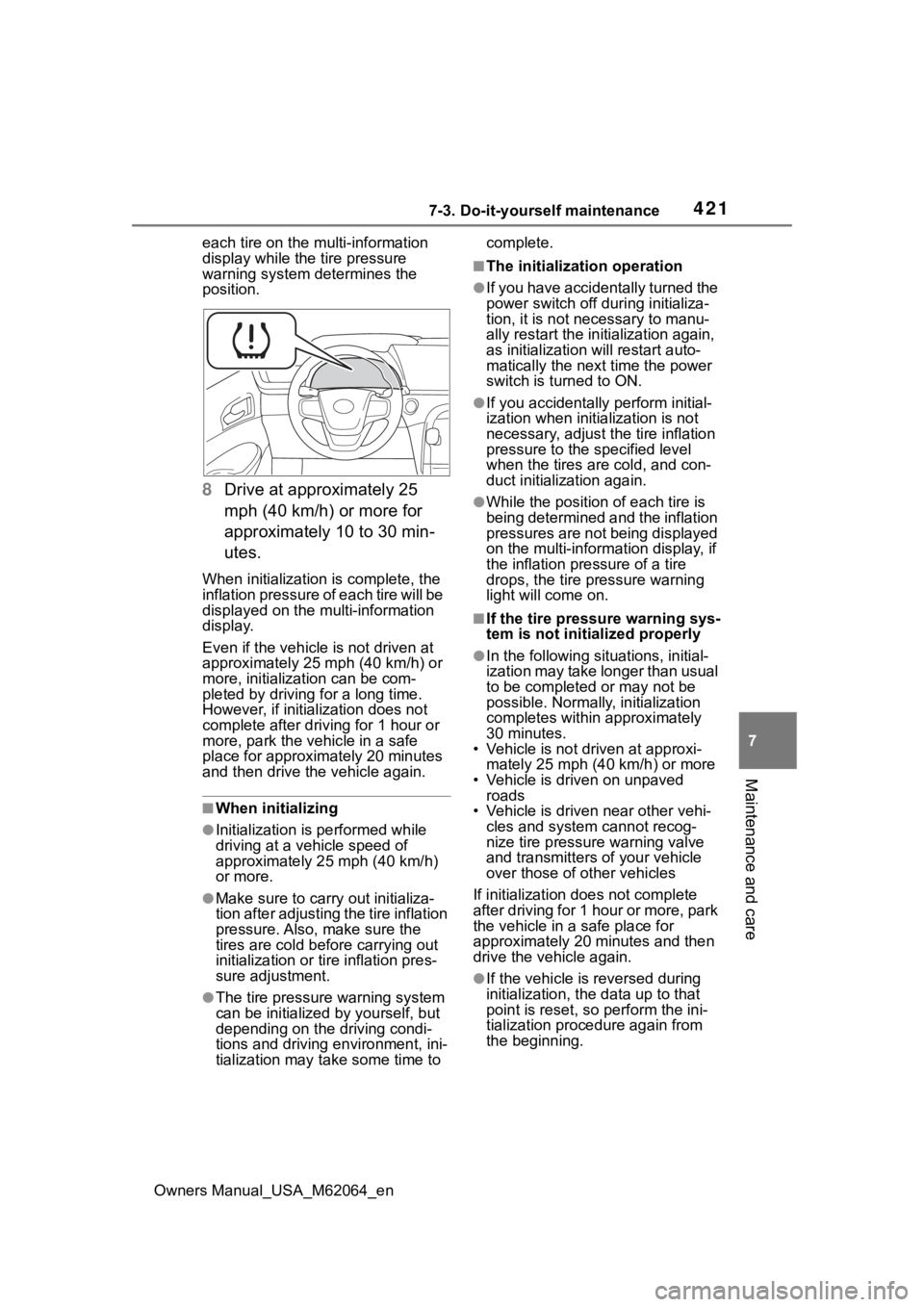
each tire on the multi-information
display while the tire pressure
warning system determines the
position.
8 Drive at approximately 25
mph (40 km/h) or more for
approximately 10 to 30 min-
utes.
When initialization is complete, the
inflation pressure of each tire will be
displayed on the multi-information
display.
Even if the vehicle is not driven at
approximately 25 mph (40 km/h) or
more, initializat ion can be com-
pleted by driving for a long time.
However, if initia lization does not
complete after driving for 1 hour or
more, park the vehicle in a safe
place for approximately 20 minutes
and then drive th e vehicle again.
■When initializing
●Initialization is performed while
driving at a vehicle speed of
approximately 25 mph (40 km/h)
or more.
●Make sure to carry out initializa-
tion after adjusting the tire inflation
pressure. Also, make sure the
tires are cold before carrying out
initialization or tir e inflation pres-
sure adjustment.
●The tire pressure warning system
can be initialized by yourself, but
depending on the driving condi-
tions and driving environment, ini-
tialization may take some time to complete.
■The initialization operation
●If you have accidentally turned the
power switch off during initializa-
tion, it is not necessary to manu-
ally restart the initialization again,
as initialization will restart auto-
matically the next time the power
switch is turned to ON.
●If you accidentally perform initial-
ization when initia
lization is not
necessary, adjust the tire inflation
pressure to the s pecified level
when the tires are cold, and con-
duct initialization again.
●While the position of each tire is
being determined and the inflation
pressures are not being displayed
on the multi-information display, if
the inflation pressure of a tire
drops, the tire pressure warning
light will come on.
■If the tire pressure warning sys-
tem is not initia lized properly
●In the following situations, initial-
ization may take longer than usual
to be completed or may not be
possible. Normally, initialization
completes within approximately
30 minutes.
• Vehicle is not dr iven at approxi-
mately 25 mph (40 km/h) or more
• Vehicle is driven on unpaved roads
• Vehicle is driven near other vehi-
cles and system cannot recog-
nize tire pressure warning valve
and transmitters o f your vehicle
over those of other vehicles
If initialization does not complete
after driving for 1 hour or more, park
the vehicle in a safe place for
approximately 20 minutes and then
drive the vehicle again.
●If the vehicle is reversed during
initialization, the data up to that
point is reset, so p erform the ini-
tialization procedure again from
the beginning.
Page 422 of 572
4227-3. Do-it-yourself maintenance
Owners Manual_USA_M62064_en
●In the following situations, initial-
ization will not be started or was
not completed properly and the
system will not operate properly.
Perform the initialization proce-
dure again.
• If, when attempting to start initial- ization, the tire pressure warning
light does not blink 3 times.
• If, when the vehicle has been driven for about 20 minutes after
performing initialization, the tire
pressure warning light blinks for
approximately 1 minute and then
illuminates.
If initialization cannot be completed
after performing the above proce-
dure, contact your Toyota dealer.
Every tire pressure warning
valve and transmitter has a
unique ID code. When replacing
a tire pressure warning valve
and transmitter, it is necessary
to register the ID codes.
When registering the ID codes,
perform the following procedure.
1 When registering the ID
codes, perform the following
procedure.Park the vehicle in
a safe place and turn the power switch off, wait for
approximately 15 minutes or
more and perform the proce-
dure.
2 Start the fuel cell system.
( P.180)
3 Press or of the meter
control switch to select .
4 Press or to select
“Vehicle Settings” and then
press and hold .
5 Press or to select
“TPWS” and then press .
6 Press or to select
“Change Wheel”. Then press
and hold until the tire
pressure warning light blinks
slowly 3 times.
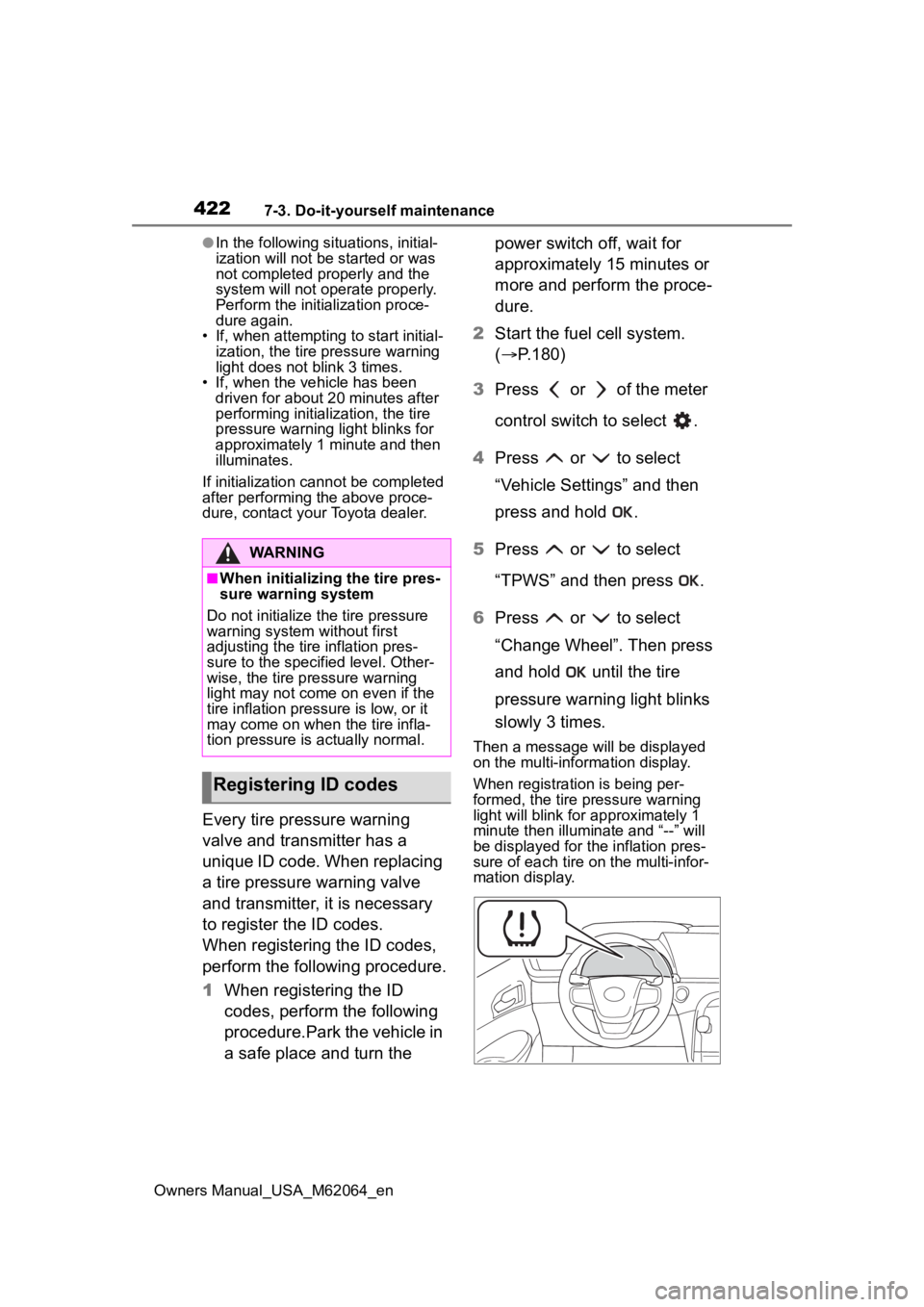
Then a message will be displayed
on the multi-information display.
When registration is being per-
formed, the tire pressure warning
light will blink for approximately 1
minute then illuminate and “--” will
be displayed for the inflation pres-
sure of each tire on the multi-infor-
mation display.
WARNING
■When initializing the tire pres-
sure warning system
Do not initialize the tire pressure
warning system without first
adjusting the tire inflation pres-
sure to the specified level. Other-
wise, the tire pressure warning
light may not come on even if the
tire inflation press ure is low, or it
may come on when the tire infla-
tion pressure is actually normal.
Registering ID codes
Page 423 of 572

4237-3. Do-it-yourself maintenance
Owners Manual_USA_M62064_en
7
Maintenance and care
7 Drive at 25 mph (40 km/h) or
more for approximately 10 to
30 minutes.
Registration is complete when the
tire pressure warning light turns off
and the inflation pressure of each
tire is displayed on the multi-infor-
mation display.
Even if the vehicle is not driven at
approximately 25 mph (40 km/h) or
more, registration can be com-
pleted by driving for a long time.
However, if regist ration does not
complete after driving for 1 hour or
more, perform the procedure again
from the beginning.
8 Initialize the tire pressure
warning system. ( P.420)
■When registering ID codes
●ID code registration is performed
while driving at a vehicle speed of
approximately 25 mph (40 km/h)
or more.
●Before performin g ID code regis-
tration, make sure that no wheels
with tire pressur e warning valve
and transmitters installed are near
the vehicle.
●Make sure to initialize the tire
pressure warning system after
registering the ID codes. If the
system is initializ ed before regis-
tering the ID codes, the initialized
values will be invalid.
●ID codes can be registered by
yourself, but depending on the
driving conditions and driving
environment, registration may
take some time to complete.
■Canceling ID code registration
●To cancel ID code registration
after it has been started, turn the
power switch off before driving the
vehicle.
If the vehicle is driven after ID
code registration is started, to
cancel registration, perform the ID code registration start procedure
again and turn the power switch
off before driving.
●If ID code registration has been
canceled, the tire pressure warn-
ing light will blin
k for approxi-
mately 1 minute when the power
switch is turned to ON and then
illuminate. The tire pressure warn-
ing system will be operational
when the tire pressure warning
light turns off.
●If the warning lig ht does not turn
off even after several minutes
have elapsed, ID code registration
may not have been canceled cor-
rectly. To cancel registration, per-
form the ID code registration start
procedure again and then turn the
power switch off before driving.
■If ID codes are not registered
properly
●In the following situations, ID code
registration may take longer than
usual to be completed or may not
be possible. Normally, registration
completes within approximately
30 minutes.
• Vehicle is not parked for approxi- mately 20 minutes or more before
driving
• Vehicle is not dr iven at approxi-
mately 25 mph (40 km/h) or more
• Vehicle is driven on unpaved
roads
• Vehicle is driven near other vehi-
cles and system cannot recog-
nize tire pressure warning valves
and transmitters o f your vehicle
over those of other vehicles
• Wheel with tire p ressure warning
valve and transmitter installed is
inside or near the vehicle
If registration does not complete
after driving for 1 hour or more, per-
form the ID code registration proce-
dure again from the beginning.
●If the vehicle is reversed during
registration, the data up to that
point is reset, so p erform the reg-
istration procedure again from the
Page 424 of 572
4247-3. Do-it-yourself maintenance
Owners Manual_USA_M62064_enbeginning.
●In the following situations, ID code
registration will not be started or
was not completed properly and
the system will no
t operate prop-
erly. Perform the ID code registra-
tion procedure again.
• If, when attempting to start ID
code registration, the tire pressure
warning light does not blink slowly
3 times.
• If, when the vehicle has been driven for about 20 minutes after
performing ID co de registration,
the tire pressur e warning light
blinks for approxi mately 1 minute
and then illu minates.
●If ID code registration cannot be
completed after performing the
above procedure, contact your
Toyota dealer.
Stop the vehicle in a safe
place on a hard, flat surface.
Set the parking brake.
Shift the shift position to P.
Stop the fuel cell system.
■Jack and tools
As your vehicle is not installed spare
tire, the following t ools for replacing
a tire are not included with your
vehicle. They can be purchased at
your Toyota dealer.
●Wheel nut wrench
●Jack
●Jack handle
Replacing the tire
When raising your vehicle
with a jack, position the jack
correctly.
Improper placement may
damage your vehicle or
cause injury.
If necessary tire replace-
ment seems difficult to per-
form, contact your Toyota
dealer.
Before jacking up the
vehicle
Page 425 of 572
4257-3. Do-it-yourself maintenance
Owners Manual_USA_M62064_en
7
Maintenance and care
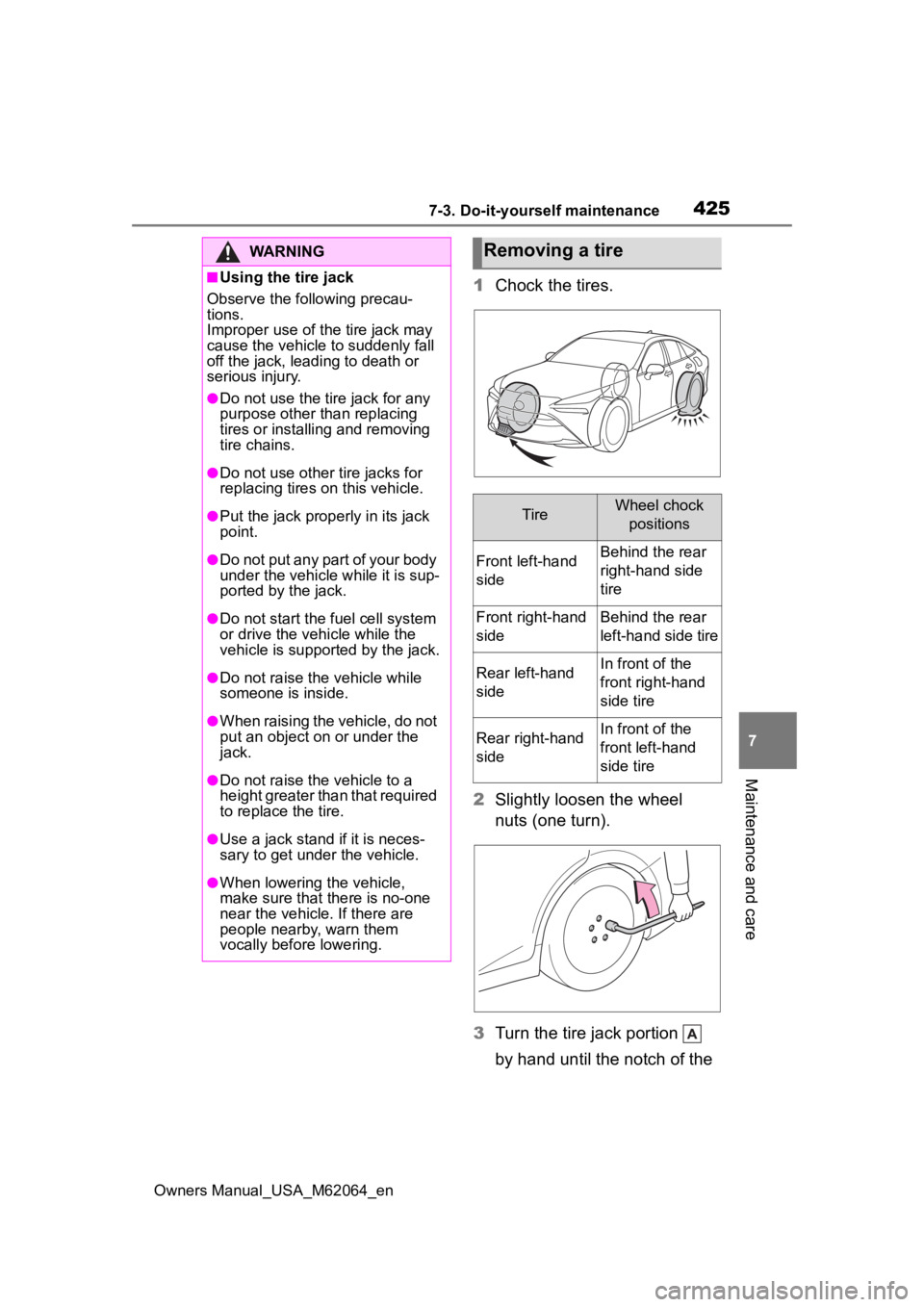
1 Chock the tires.
2 Slightly loosen the wheel
nuts (one turn).
3 Turn the tire jack portion
by hand until the notch of the
WARNING
■Using the tire jack
Observe the following precau-
tions.
Improper use of the tire jack may
cause the vehicle to suddenly fall
off the jack, leading to death or
serious injury.
●Do not use the tire jack for any
purpose other than replacing
tires or installing and removing
tire chains.
●Do not use other tire jacks for
replacing tires on this vehicle.
●Put the jack prope rly in its jack
point.
●Do not put any part of your body
under the vehicle while it is sup-
ported by the jack.
●Do not start the fuel cell system
or drive the vehicle while the
vehicle is suppor ted by the jack.
●Do not raise the vehicle while
someone is inside.
●When raising the vehicle, do not
put an object on or under the
jack.
●Do not raise the vehicle to a
height greater than that required
to replace the tire.
●Use a jack stand if it is neces-
sary to get under the vehicle.
●When lowering the vehicle,
make sure that there is no-one
near the vehicle. If there are
people nearby, warn them
vocally before lowering.
Removing a tire
TireWheel chock
positions
Front left-hand
sideBehind the rear
right-hand side
tire
Front right-hand
sideBehind the rear
left-hand side tire
Rear left-hand
sideIn front of the
front right-hand
side tire
Rear right-hand
sideIn front of the
front left-hand
side tire
Page 426 of 572
4267-3. Do-it-yourself maintenance
Owners Manual_USA_M62064_en
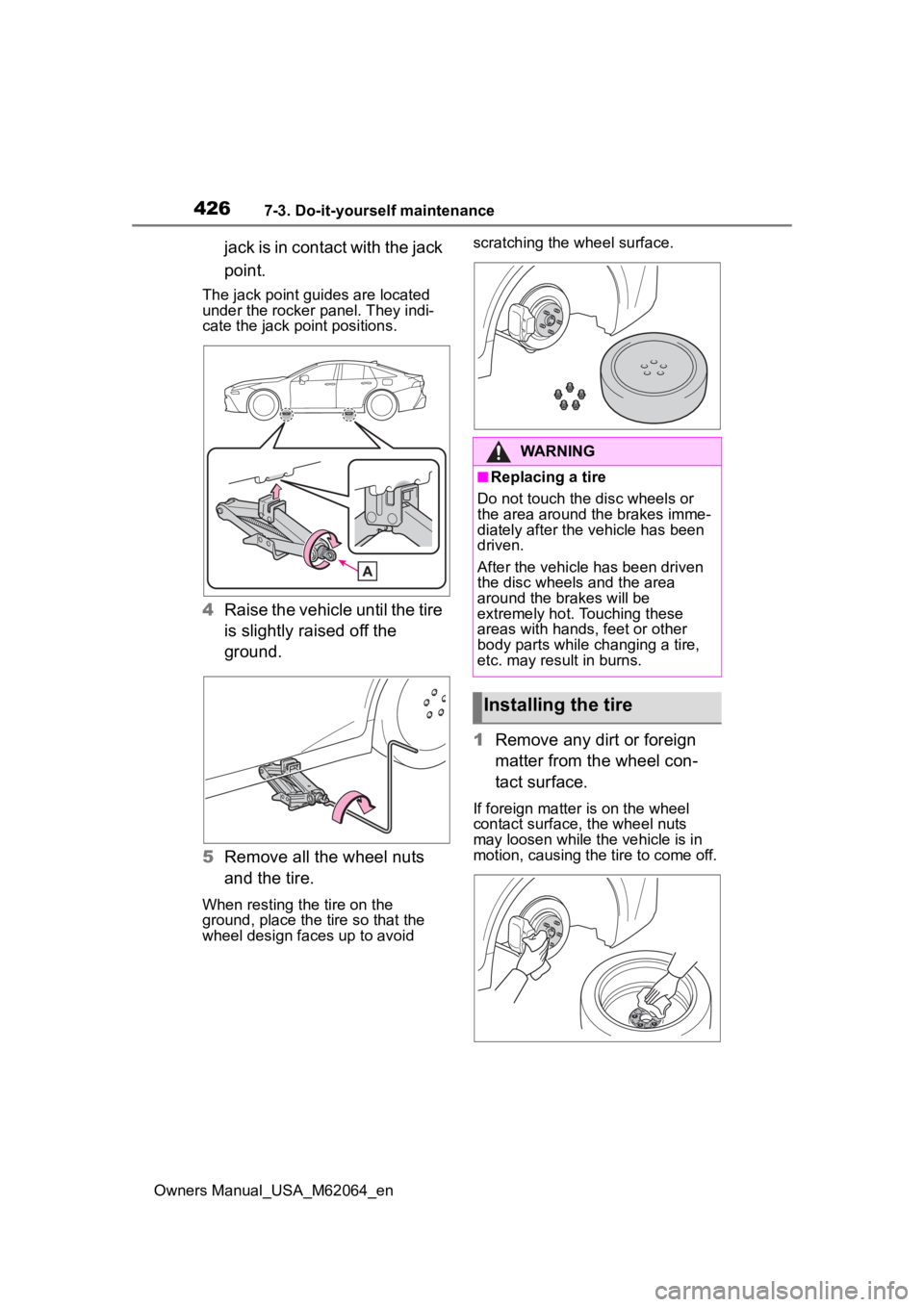
jack is in contact with the jack
point.
The jack point guides are located
under the rocker panel. They indi-
cate the jack point positions.
4Raise the vehicle until the tire
is slightly raised off the
ground.
5 Remove all the wheel nuts
and the tire.
When resting the tire on the
ground, place the tire so that the
wheel design faces up to avoid scratching the wheel surface.
1
Remove any dirt or foreign
matter from the wheel con-
tact surface.
If foreign matter is on the wheel
contact surface, the wheel nuts
may loosen while the vehicle is in
motion, causing the tire to come off.
WARNING
■Replacing a tire
Do not touch the disc wheels or
the area around the brakes imme-
diately after the vehicle has been
driven.
After the vehicle has been driven
the disc wheels and the area
around the br akes will be
extremely hot. Touching these
areas with hands, feet or other
body parts while changing a tire,
etc. may result in burns.
Installing the tire
Page 427 of 572
4277-3. Do-it-yourself maintenance
Owners Manual_USA_M62064_en
7
Maintenance and care
2 Install the tire and loosely
tighten each wheel nut by
hand by approximately the
same amount.
Turn the wheel nuts until the wash-
ers come into contact with the disc
wheel.
Washer
Disc wheel
3 Lower the vehicle.
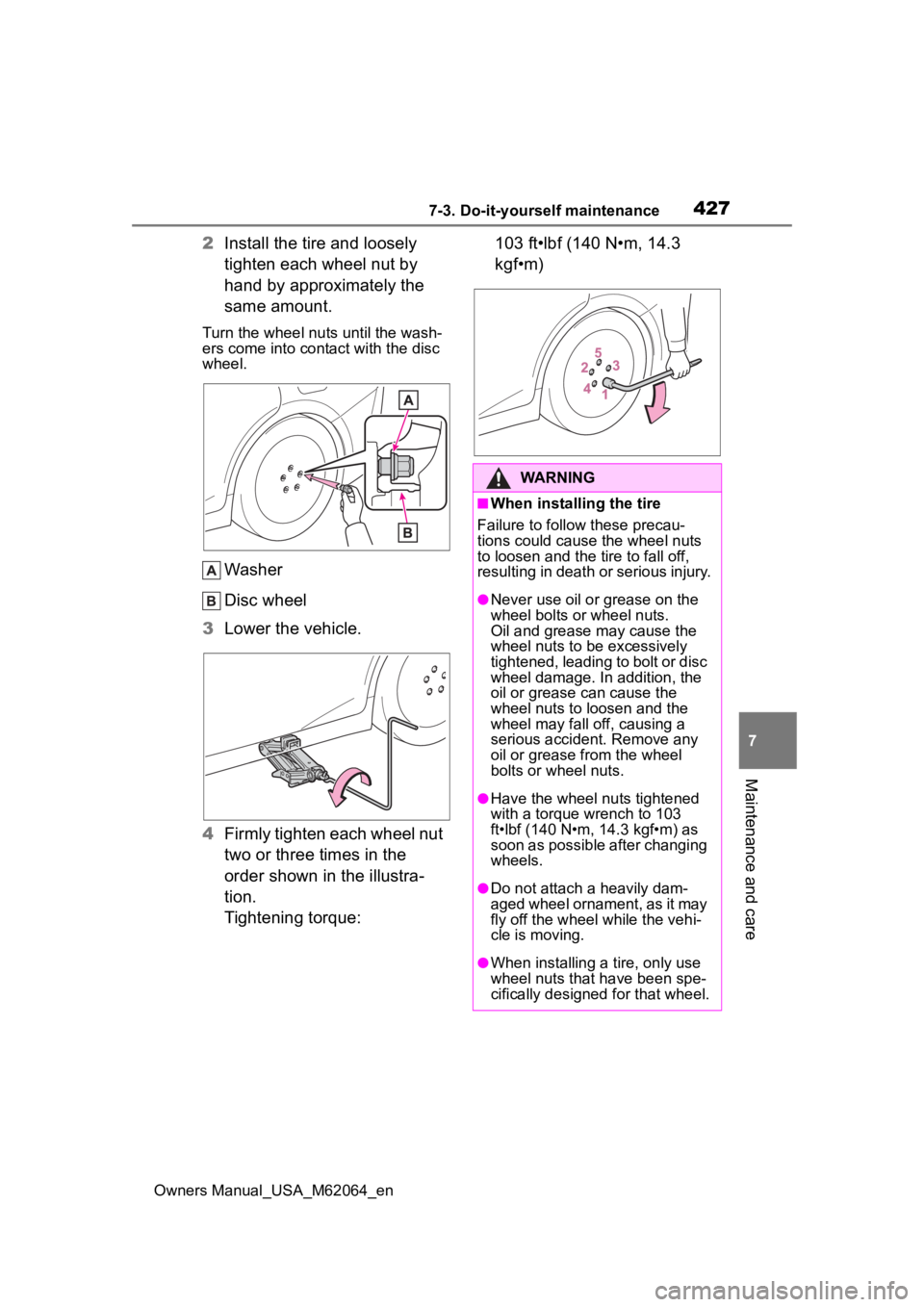
4 Firmly tighten each wheel nut
two or three times in the
order shown in the illustra-
tion.
Tightening torque: 103 ft•lbf (140 N•m, 14.3
kgf•m)
WARNING
■When installing the tire
Failure to follow these precau-
tions could cause the wheel nuts
to loosen and the tire to fall off,
resulting in death o r serious injury.
●Never use oil or grease on the
wheel bolts or wheel nuts.
Oil and grease may cause the
wheel nuts to be excessively
tightened, leading to bolt or disc
wheel damage. In addition, the
oil or grease can cause the
wheel nuts to loosen and the
wheel may fall off, causing a
serious accident. Remove any
oil or grease from the wheel
bolts or wheel nuts.
●Have the wheel nuts tightened
with a torque wrench to 103
ft•lbf (140 N•m, 14.3 kgf•m) as
soon as possible after changing
wheels.
●Do not attach a heavily dam-
aged wheel ornament, as it may
fly off the wheel while the vehi-
cle is moving.
●When installing a tire, only use
wheel nuts that have been spe-
cifically designed for that wheel.
Page 428 of 572
4287-3. Do-it-yourself maintenance
Owners Manual_USA_M62064_en
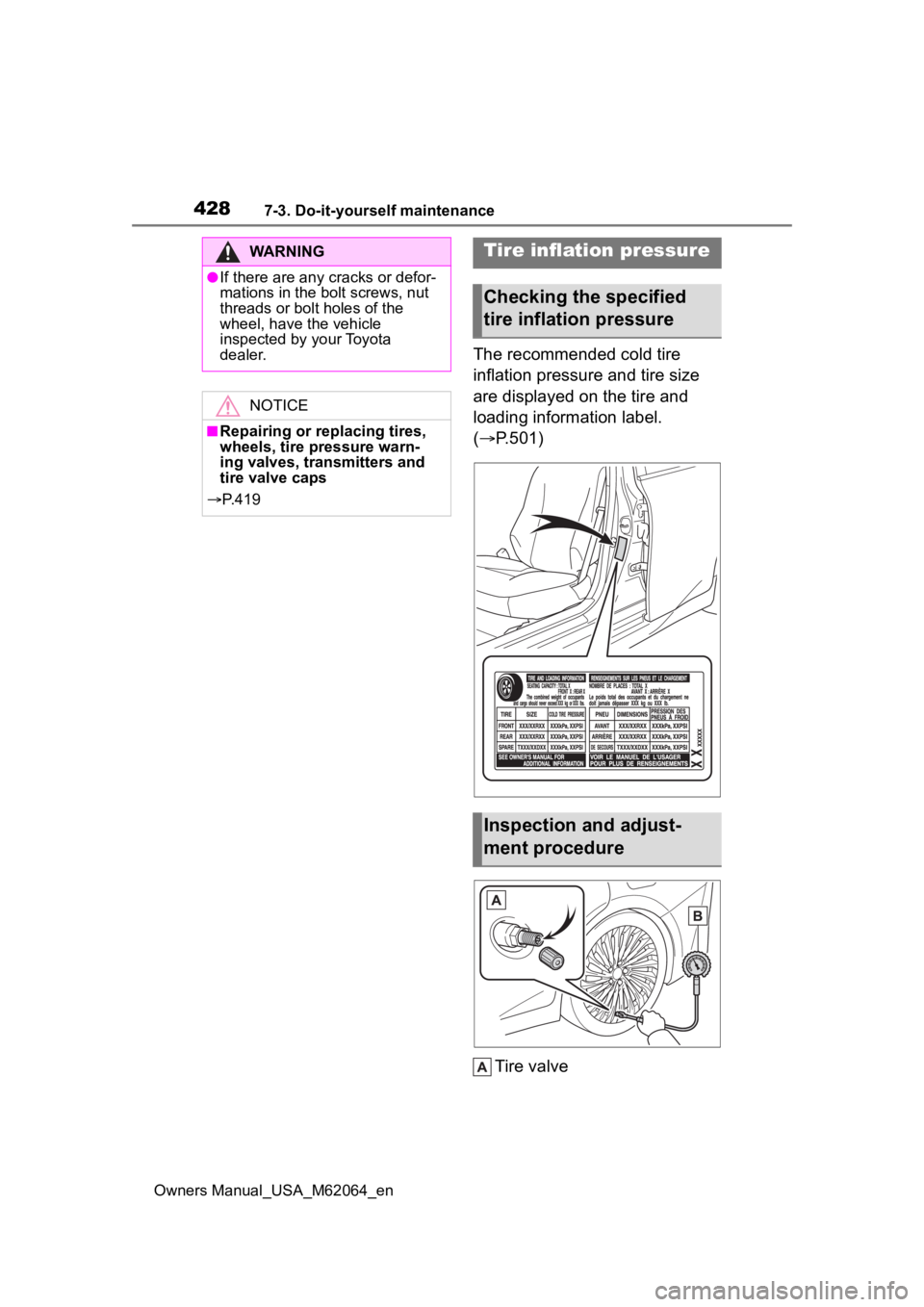
The recommended cold tire
inflation pressure and tire size
are displayed on the tire and
loading information label.
(P.501)
Tire valve
WARNING
●If there are any cracks or defor-
mations in the bolt screws, nut
threads or bolt holes of the
wheel, have the vehicle
inspected by your Toyota
dealer.
NOTICE
■Repairing or replacing tires,
wheels, tire pressure warn-
ing valves, transmitters and
tire valve caps
P. 4 1 9
Tire inflation pressure
Checking the specified
tire inflation pressure
Inspection and adjust-
ment procedure