buttons TOYOTA MIRAI 2023 User Guide
[x] Cancel search | Manufacturer: TOYOTA, Model Year: 2023, Model line: MIRAI, Model: TOYOTA MIRAI 2023Pages: 572, PDF Size: 17.71 MB
Page 312 of 572
3125-5. Using the driving support systems
Owners Manual_USA_M62064_en
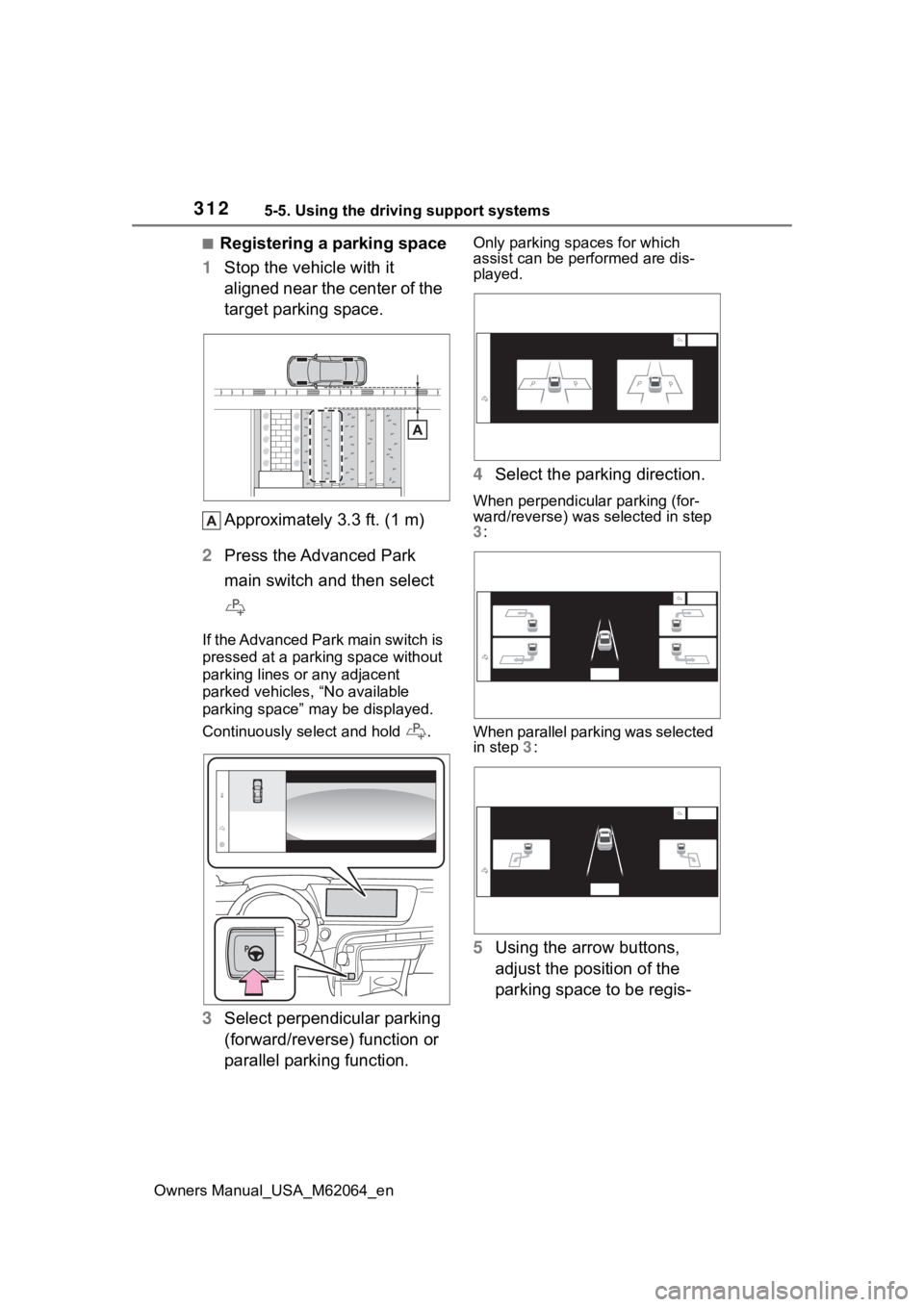
■Registering a parking space
1 Stop the vehicle with it
aligned near the center of the
target parking space.
Approximately 3.3 ft. (1 m)
2 Press the Advanced Park
main switch and then select
If the Advanced Park main switch is
pressed at a par king space without
parking lines or any adjacent
parked vehicles, “No available
parking space” may be displayed.
Continuously select and hold .
3 Select perpendicular parking
(forward/reverse) function or
parallel parking function.
Only parking spaces for which
assist can be performed are dis-
played.
4Select the parking direction.
When perpendicular parking (for-
ward/reverse) was selected in step
3 :
When parallel parking was selected
in step 3:
5 Using the arrow buttons,
adjust the position of the
parking space to be regis-
Page 382 of 572
3826-4. Using the other interior features
Owners Manual_USA_M62064_en
*: If equipped
■HomeLink® programming pro-
cedure
The programming procedures can
also be found at the following URL.
Website: www.homelink.com/toyota
For support, contact customer sup-
port at the following.
Help Line: 1-800-355-3515
The HomeLink® wireless control
system in your vehicle has 3
buttons which can be pro-
grammed to operate 3 different
devices. Refer to the program-
ming methods on the following
pages to determine the method
which is appropriate for the
device.
NOTICE
■To ensure normal operation
of the rear sunshade
Observe the following precau-
tions:
●Do not place exce ssive load on
the motor or other components.
●Do not place objects where they
may hinder opening and closing
operations.
●Do not attach items to the rear
sunshade.
●Keep the opening clean and
clear of obstructions.
●Do not operate the rear sun-
shade continuously for long
periods of time.
Garage door opener*
The garage door opener can
be programmed using the
HomeLink
® to operate
garage doors, gates, entry
doors, door locks, home
lighting systems, security
systems, and other devices.
System components
Page 383 of 572
3836-4. Using the other interior features
Owners Manual_USA_M62064_en
6
Interior features
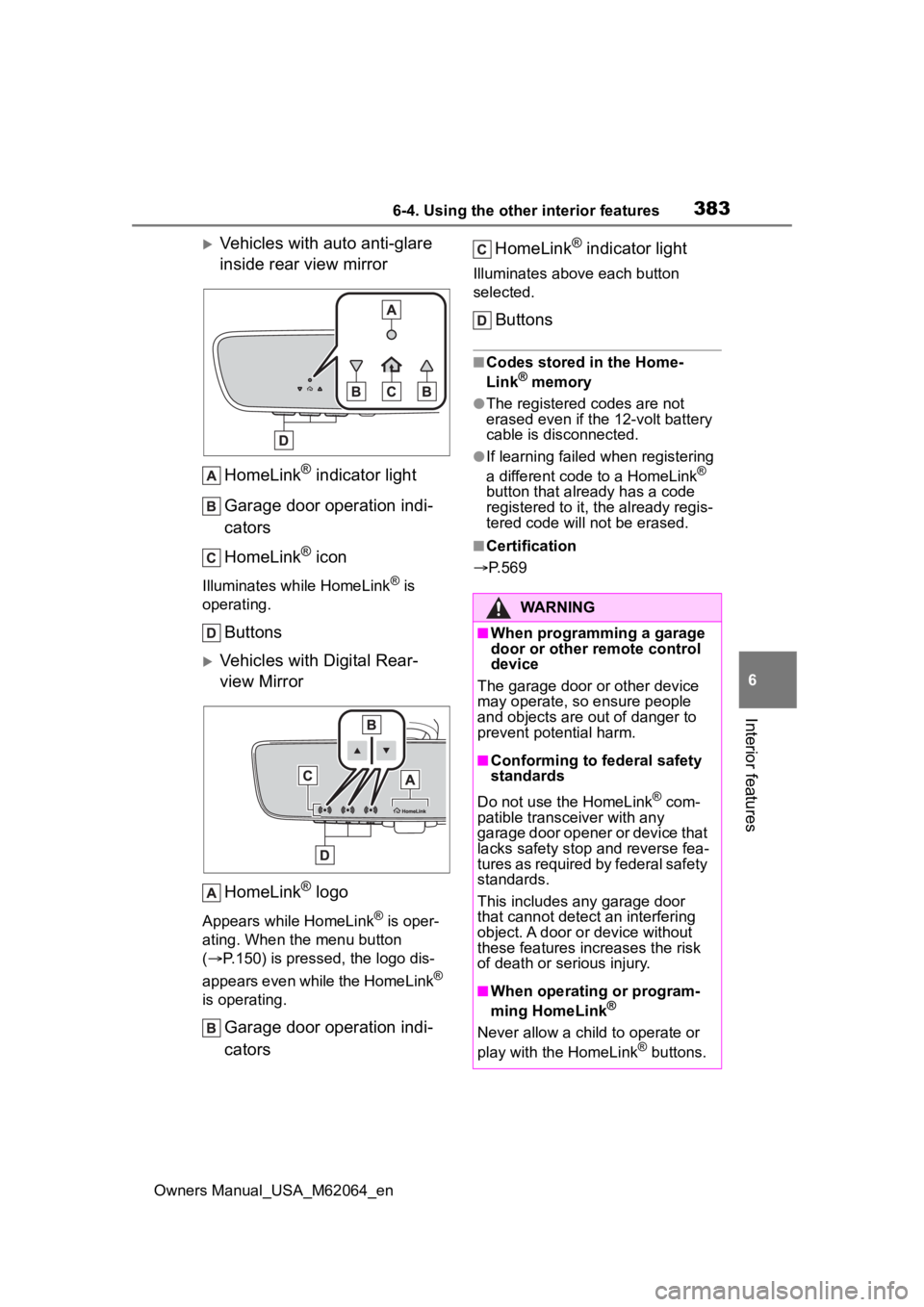
Vehicles with auto anti-glare
inside rear view mirror HomeLink
® indicator light
Garage door operation indi-
cators
HomeLink
® icon
Illuminates while HomeLink® is
operating.
Buttons
Vehicles with Digital Rear-
view Mirror
HomeLink
® logo
Appears while HomeLink® is oper-
ating. When the menu button
( P.150) is pressed, the logo dis-
appears even while the HomeLink
®
is operating.
Garage door operation indi-
cators HomeLink
® indicator light
Illuminates above each button
selected.
Buttons
■Codes stored in the Home-
Link® memory
●The registered codes are not
erased even if the 12-volt battery
cable is disconnected.
●If learning failed when registering
a different code to a HomeLink®
button that already has a code
registered to it, the already regis-
tered code will not be erased.
■Certification
P.569
WARNING
■When programming a garage
door or other remote control
device
The garage door or other device
may operate, so ensure people
and objects are out of danger to
prevent potential harm.
■Conforming to federal safety
standards
Do not use the HomeLink
® com-
patible transce iver with any
garage door opener or device that
lacks safety stop and reverse fea-
tures as required by federal safety
standards.
This includes any garage door
that cannot detect an interfering
object. A door or device without
these features increases the risk
of death or serious injury.
■When operating or program-
ming HomeLink®
Never allow a child to operate or
play with the HomeLink® buttons.
Page 384 of 572
3846-4. Using the other interior features
Owners Manual_USA_M62064_en
■Before programming Home-
Link
®
During programming, it is pos-
sible that garage doors,
gates, or other devices may
operate. For this reason,
make sure that people and
objects are clear of the
garage door or other devices
to prevent injury or other
potential harm.
It is recommended that a new
battery be placed in the
remote control transmitter for
more accurate programming.
Garage door opener motors
manufactured after 1995 may
be equipped with rolling code
protection. If this is the case,
you may need a stepladder or
other sturdy, safe device to
reach the “Learn” or “Smart”
button on the garage door
opener motor.
■Programming HomeLink®
Steps 1 through 3 must be per-
formed within 60 seconds, oth-
erwise the indicator light will
stop flashing and programming
will not be successfully com-
pleted.
1 Press and release the Home-
Link
® button you want to pro-
gram and check that the HomeLink
® indicator light
flashes (orange).
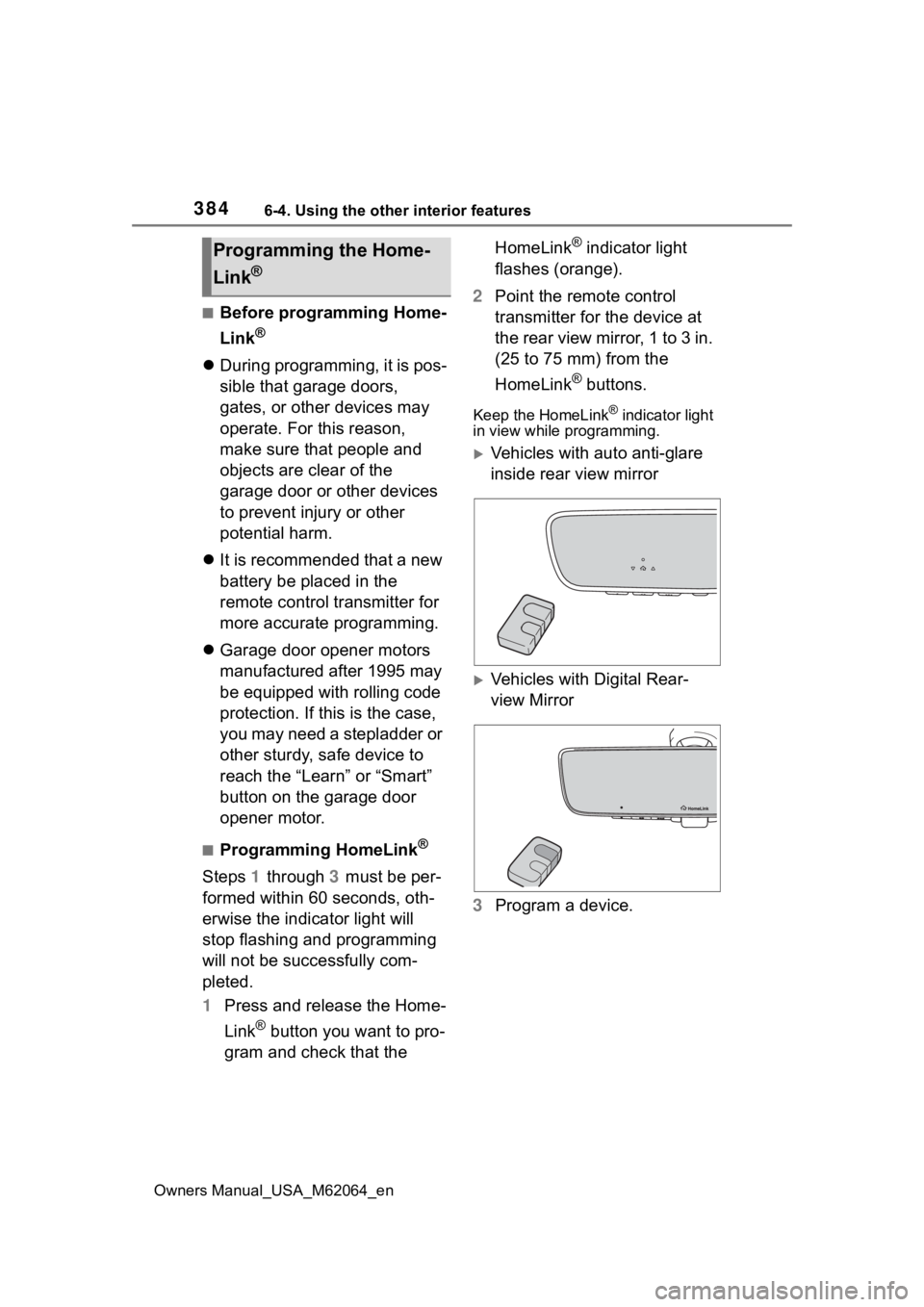
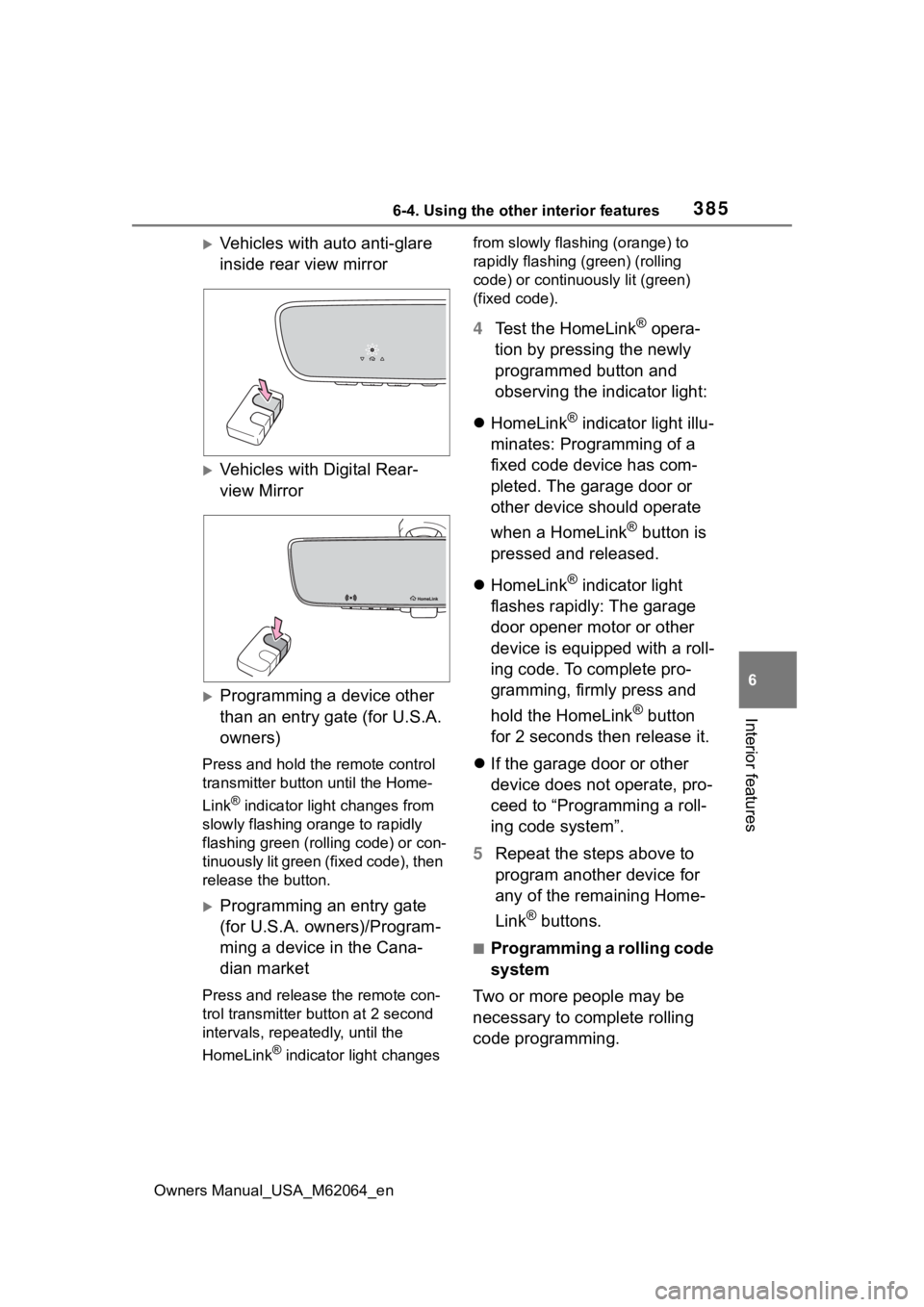
2 Point the remote control
transmitter for the device at
the rear view mirror, 1 to 3 in.
(25 to 75 mm) from the
HomeLink
® buttons.
Keep the HomeLink® indicator light
in view while programming.
Vehicles with auto anti-glare
inside rear view mirror
Vehicles with Digital Rear-
view Mirror
3 Program a device.
Programming the Home-
Link
®
Page 385 of 572
3856-4. Using the other interior features
Owners Manual_USA_M62064_en
6
Interior features
Vehicles with auto anti-glare
inside rear view mirror
Vehicles with Digital Rear-
view Mirror
Programming a device other
than an entry gate (for U.S.A.
owners)
Press and hold the remote control
transmitter button until the Home-
Link
® indicator light changes from
slowly flashing orange to rapidly
flashing green (ro lling code) or con-
tinuously lit green (fixed code), then
release the button.
Programming an entry gate
(for U.S.A. owners)/Program-
ming a device in the Cana-
dian market
Press and release the remote con-
trol transmitter button at 2 second
intervals, repeatedly, until the
HomeLink
® indicator light changes from slowly flashing (orange) to
rapidly flashing (green) (rolling
code) or continuously lit (green)
(fixed code).
4
Test the HomeLink® opera-
tion by pressing the newly
programmed button and
observing the indicator light:
HomeLink
® indicator light illu-
minates: Programming of a
fixed code device has com-
pleted. The garage door or
other device should operate
when a HomeLink
® button is
pressed and released.
HomeLink
® indicator light
flashes rapidly: The garage
door opener motor or other
device is equipped with a roll-
ing code. To complete pro-
gramming, firmly press and
hold the HomeLink
® button
for 2 seconds then release it.
If the garage door or other
device does not operate, pro-
ceed to “Programming a roll-
ing code system”.
5 Repeat the steps above to
program another device for
any of the remaining Home-
Link
® buttons.
■Programming a rolling code
system
Two or more people may be
necessary to complete rolling
code programming.
Page 387 of 572
3876-4. Using the other interior features
Owners Manual_USA_M62064_en
6
Interior features
compatibility, refer to
www.homelink.com.)
1 Within 5 seconds after pro-
gramming the garage door
opener has been completed,
if the garage door opener
motor is trained to Home-
Link
®, both garage door
operation indicators will flash
rapidly (green) and the light
on the garage door opener
motor will blink twice, indicat-
ing that 2-way communica-
tion is enabled.
If the indicators do not flash, per-
form 2 and 3 within the first 10
presses of the HomeLink
® button
after programming has been com-
pleted.
2 Press a programmed Home-
Link
® button to operate a
garage door.
3 Within 1 minute of pressing
the HomeLink
® button, after
the garage door operation
has stopped, press the
“Learn” or “Smart” button on
the garage door opener
motor. Within 5 seconds of
the establishment of 2-way
communication with the
garage door opener, both
garage door operation indica-
tors in the vehicle will flash
rapidly (green) and the light
on the garage door opener
motor will blink twice, indicat-
ing that 2-way communica-
tion is enabled.
■Reprogramming a single
HomeLink
® button
When the following procedure is
performed, buttons which
already have devices registered
to them can be overwritten:
1 Press and hold the desired
HomeLink
® button.
2 When the HomeLink
® indica-
tor starts flashing orange,
release the HomeLink
® but-
ton and perform “Program-
ming HomeLink
®” 1 (it takes
20 seconds for the Home-
Link
® indicator to start flash-
ing).
■Before programming
●Install a new battery in the trans-
mitter.
●The battery side of the transmitter
must be pointed away from the
HomeLink
® buttons.
Press the appropriate Home-
Link
® button. The HomeLink®
indicator light should turn on.
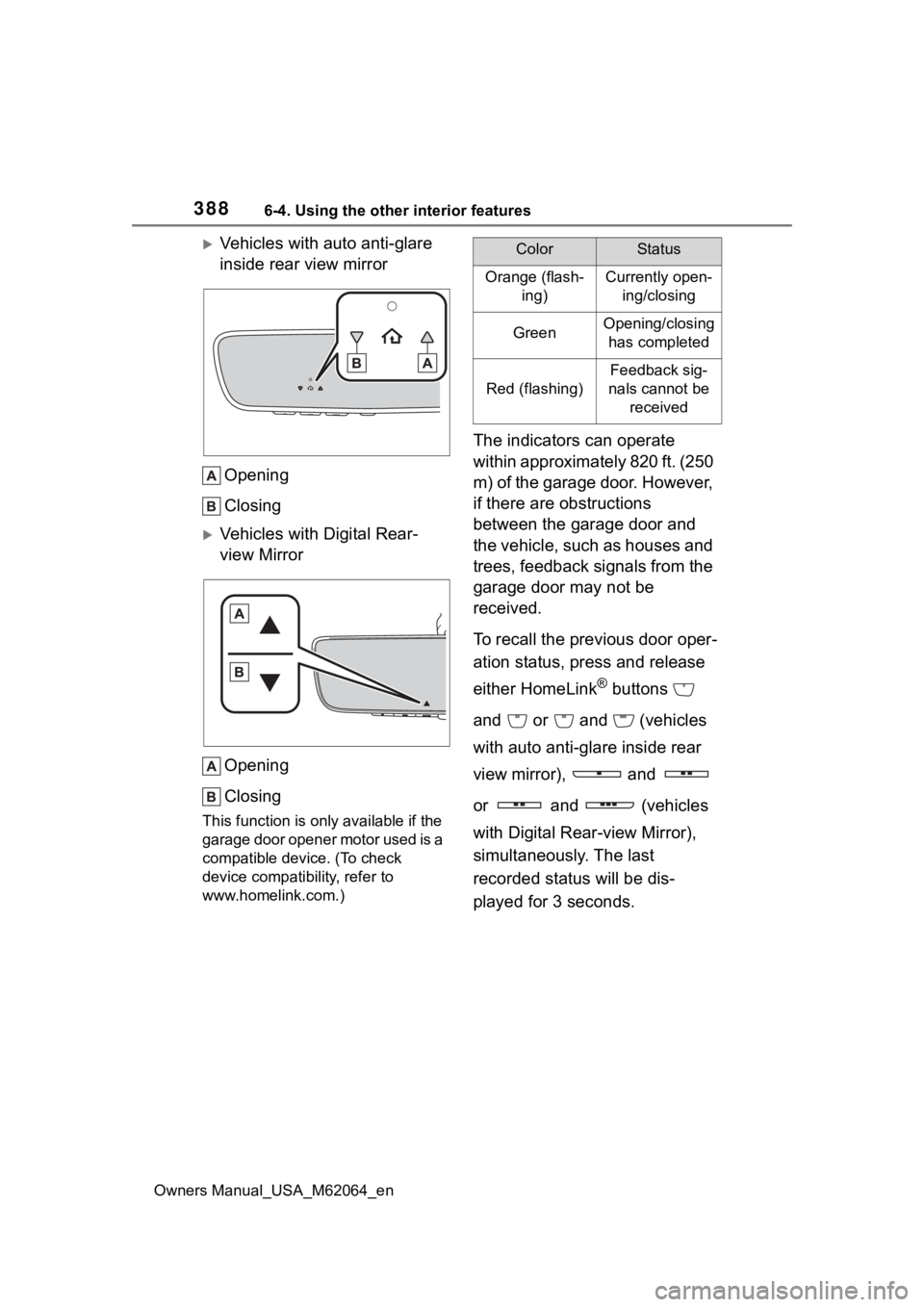
The status of the opening and
closing of a garage door is
shown by the indicators.
Operating HomeLink®
Page 388 of 572
3886-4. Using the other interior features
Owners Manual_USA_M62064_en
Vehicles with auto anti-glare
inside rear view mirrorOpening
Closing
Vehicles with Digital Rear-
view MirrorOpening
Closing
This function is onl y available if the
garage door opener motor used is a
compatible device. (To check
device compatib ility, refer to
www.homelink.com.)
The indicators can operate
within approximately 820 ft. (250
m) of the garage door. However,
if there are obstructions
between the garage door and
the vehicle, such as houses and
trees, feedback signals from the
garage door may not be
received.
To recall the previous door oper-
ation status, press and release
either HomeLink
® buttons
and or and (vehicles
with auto anti-glare inside rear
view mirror), and
or and (vehicles
with Digital Rear-view Mirror),
simultaneously. The last
recorded status will be dis-
played for 3 seconds.
ColorStatus
Orange (flash- ing)Currently open-ing/closing
GreenOpening/closing has completed
Red (flashing)
Feedback sig-
nals cannot be received
Page 389 of 572
3896-4. Using the other interior features
Owners Manual_USA_M62064_en
6
Interior features
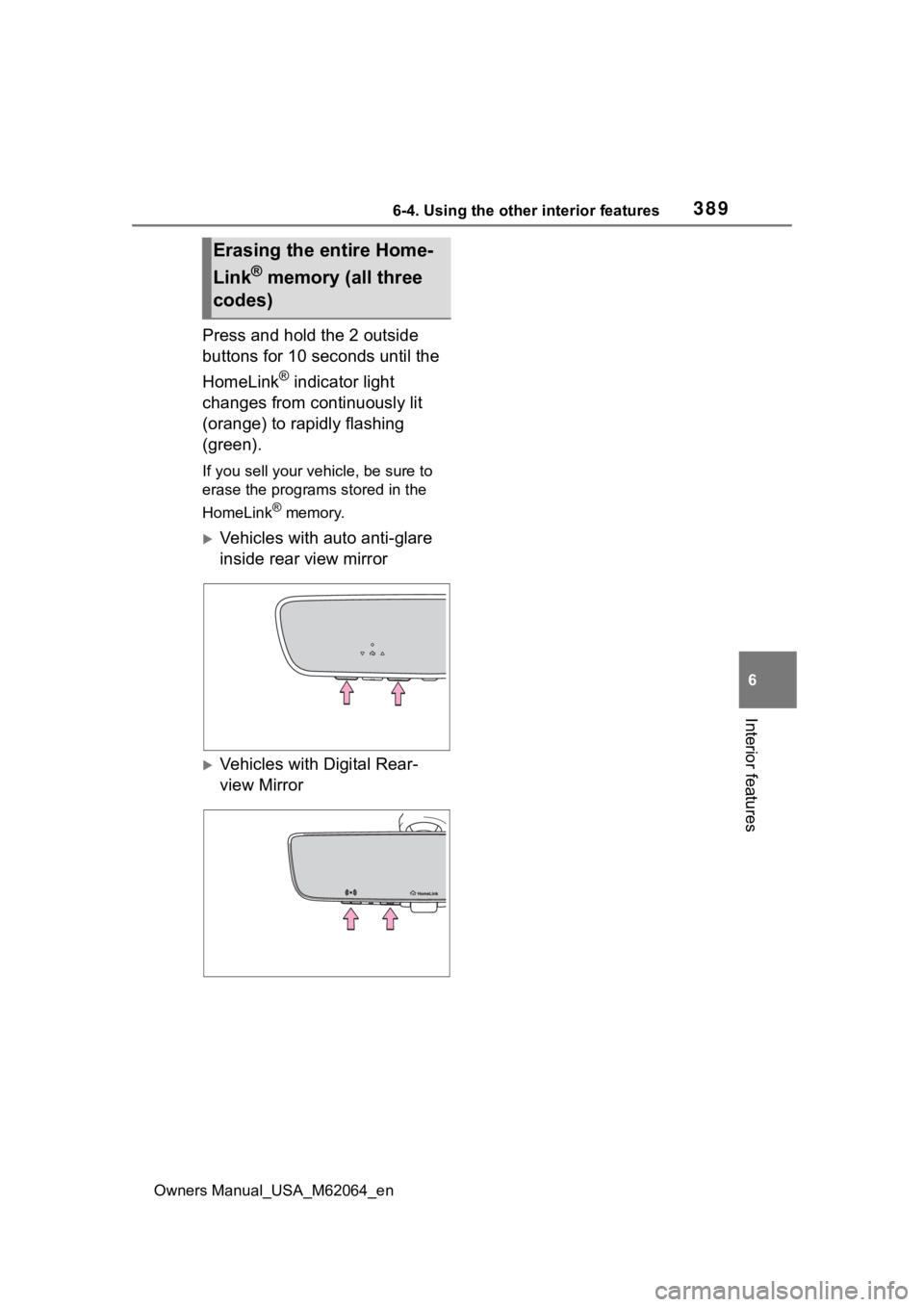
Press and hold the 2 outside
buttons for 10 seconds until the
HomeLink
® indicator light
changes from continuously lit
(orange) to rapidly flashing
(green).
If you sell your vehicle, be sure to
erase the programs stored in the
HomeLink
® memory.
Vehicles with auto anti-glare
inside rear view mirror
Vehicles with Digital Rear-
view Mirror
Erasing the entire Home-
Link
® memory (all three
codes)