stop start TOYOTA MIRAI 2023 User Guide
[x] Cancel search | Manufacturer: TOYOTA, Model Year: 2023, Model line: MIRAI, Model: TOYOTA MIRAI 2023Pages: 572, PDF Size: 17.71 MB
Page 107 of 572
1073-1. Instrument cluster
Owners Manual_USA_M62064_en
3
Vehicle status information and indicatorsInformation related to each icon
can be displayed by selecting
the icon with the meter control
switches.
Some of the information may be
displayed automatically depending
on the situation.
*1: Vehicles with 8-inch multi-infor- mation display
*2: Vehicles with 12.3-inch multi-information display
Select to display fuel consump-
tion data in various forms.
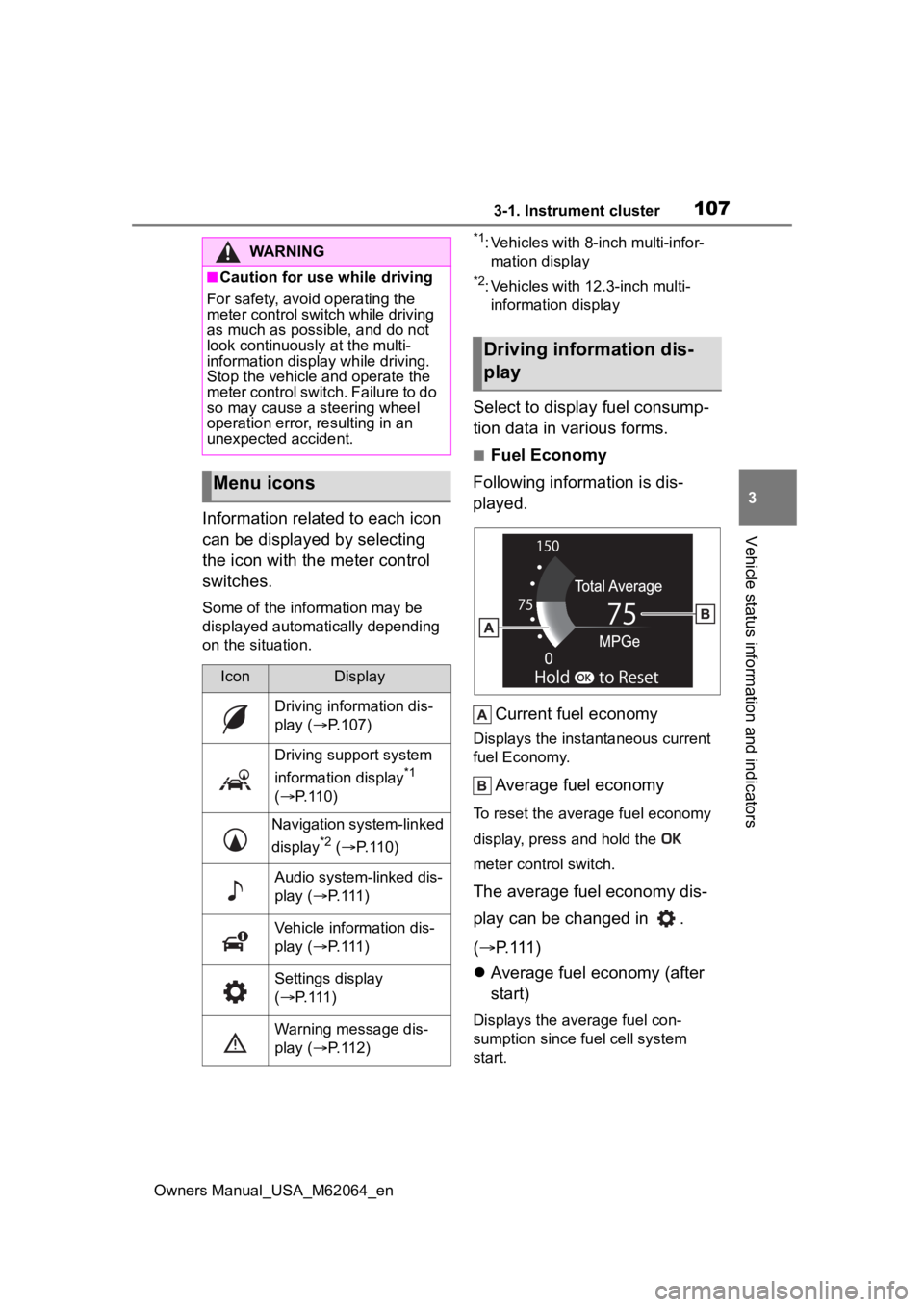
■Fuel Economy
Following information is dis-
played.
Current fuel economy
Displays the instantaneous current
fuel Economy.
Average fuel economy
To reset the average fuel economy
display, press and hold the
meter control switch.
The average fuel economy dis-
play can be changed in .
( P.111)
Average fuel economy (after
start)
Displays the average fuel con-
sumption since fuel cell system
start.
WARNING
■Caution for use while driving
For safety, avoid operating the
meter control swit ch while driving
as much as possible, and do not
look continuously at the multi-
information display while driving.
Stop the vehicle and operate the
meter control switch. Failure to do
so may cause a steering wheel
operation error, resulting in an
unexpected accident.
Menu icons
IconDisplay
Driving information dis-
play ( P.107)
Driving support system
information display
*1
( P. 1 1 0 )
Navigation system-linked
display
*2 ( P. 1 1 0 )
Audio system-linked dis-
play ( P. 1 1 1 )
Vehicle information dis-
play ( P. 1 1 1 )
Settings display
( P. 1 1 1 )
Warning message dis-
play ( P. 1 1 2 )
Driving information dis-
play
Page 109 of 572
1093-1. Instrument cluster
Owners Manual_USA_M62064_en
3
Vehicle status information and indicators
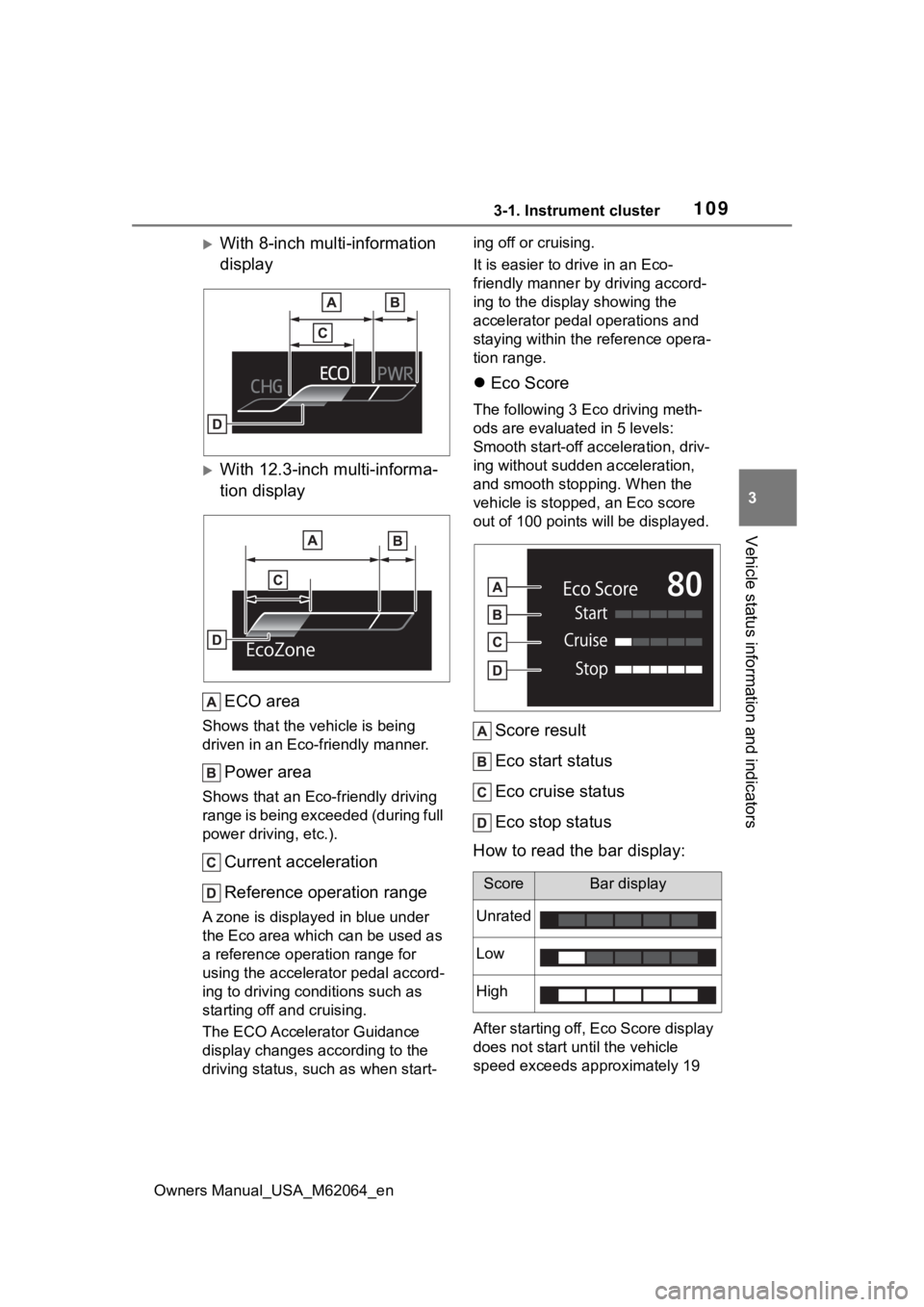
With 8-inch multi-information
display
With 12.3-inch multi-informa-
tion display ECO area
Shows that the vehicle is being
driven in an Eco-friendly manner.
Power area
Shows that an Eco-friendly driving
range is being exceeded (during full
power driving, etc.).
Current acceleration
Reference operation range
A zone is displayed in blue under
the Eco area which can be used as
a reference operation range for
using the accelerator pedal accord-
ing to driving conditions such as
starting off and cruising.
The ECO Accelerator Guidance
display changes according to the
driving status, such as when start- ing off or cruising.
It is easier to drive in an Eco-
friendly manner by driving accord-
ing to the display showing the
accelerator pedal operations and
staying within the reference opera-
tion range.
Eco Score
The following 3 Ec o driving meth-
ods are evaluated in 5 levels:
Smooth start-off acceleration, driv-
ing without sudden acceleration,
and smooth stopping. When the
vehicle is stopped, an Eco score
out of 100 points will be displayed.
Score result
Eco start status
Eco cruise status
Eco stop status
How to read the bar display:
After starting off, Eco Score display
does not start until the vehicle
speed exceeds approximately 19
ScoreBar display
Unrated
Low
High
Page 110 of 572
1103-1. Instrument cluster
Owners Manual_USA_M62064_enmph (30km/h).
The Eco Score is reset each time
the vehicle starts off to start a new
evaluation.
When the fuel cell system stops,
the current total score result is dis-
played.
*
*
: The score result is displayed only when “Eco Score” is selected for
“Trip Summary”. ( P. 1 1 1 )
■ECO Accelerator Guidance/Eco
Score will not operate when
The ECO Accelerator Guidance/Eco
Score will not opera te in the follow-
ing situations:
●The Fuel cell System Indicator is
not operating.
●The vehicle is being driven using
the dynamic radar cruise control
with full-speed range.
■Driving support system
information display
Select to display the operational
status of the following systems:
LTA (Lane Tracing Assist)
*
( P.230)
Dynamic radar cruise control
with full-speed range
*
( P.244)
*: Vehicles with Toyota Teammate
Advanced Drive, re fer to “Toyota
Teammate Advanced Drive
OWNER’S MANUAL”.
■Navigation system-linked
display (if equipped)
Select to display the following
navigation system-linked infor-
mation.
Route guidance
Compass display (north-up
display/heading-up display)
Select to display the following
navigation system-linked infor-
mation.
Route guidance
Compass display (north-up
display/heading-up display)
Select to enable selection of an
audio source or track on the dis-
play.
■Drive information
2 items that are selected using
the “Drive Info Items” setting
(average speed, distance and
total time) can be displayed ver-
tically.
The displayed information
Driving support system
information display
Navigation system-linked
display (Vehicles with
12.3-inch multi-informa-
tion display)
Audio system-linked dis-
play
Vehicle information dis-
play
Page 111 of 572
1113-1. Instrument cluster
Owners Manual_USA_M62064_en
3
Vehicle status information and indicators
changes according to the “Drive
Info Type” setting (since the sys-
tem was started or between
resets). ( P. 1 1 1 )
Use the displayed information as a
reference only.
Following items will be displayed.
“Trip”
• “Average Speed”: Displays the
average vehicle speed since fuel
cell system start
*
• “Distance”: Displ ays the distance
driven since fuel cell system start
*
• “Total Time”: Displays the elapsed time since fuel cell system start
*
*
: These items are reset each time the fuel cell system stops.
“Total”
• “Average Speed”: Displays the
average vehicle speed since the
display was reset
*
• “Distance”: Displ ays the distance
driven since the display was
reset
*
• “Total Time”: Displays the elapsed
time since the display was reset
*
*
: To reset, display the desired item
and press and hold .
■Energy monitor
P. 1 1 9
■Tire inflation pressure
Displays inflation pressure of
each tire.
■Meter display settings that
can be changed
Language
Select to change the language on
the multi-information display.
Units
Select to change the units of mea-
sure displayed.
(Driving information dis-
play settings)
Select to set up t he following items.
• Fuel cell system
Select to enable/disable the ECO
Accelerator Guidance (P.108).
• Fuel Economy
Select to change the display on
Fuel Economy ( P.107).
Settings display
Page 140 of 572
1404-2. Opening, closing and locking the doors and trunk
Owners Manual_USA_M62064_ening on the location of the key (the
inside edge of the
trunk), condi-
tions (inside a met al bag, close to
metallic objects) and the radio
waves in the surrounding area.
( P.134)
■If the smart key system does
not operate properly
●Locking and unlocking the doors
and trunk: P. 4 8 3
●Starting the fuel cell system:
P. 4 8 4
■Customization
Some functions can be customized.
( P.512)
■If the smart key system has
been deactivated in a custom-
ized setting
●Locking and unlocking the doors
and opening the trunk:
Use the wireless remote control or
mechanical key. ( P.127, 134,
483)
●Starting the fuel cell system and
changing power switch modes:
P. 4 8 4
●Stopping the fuel cell system:
P. 1 8 2
■Certification
P. 5 6 0
WARNING
■Caution regarding interfer-
ence with electronic devices
●People with implantable car-
diac pacemakers, cardiac
resynchronization therapy-
pacemakers or implantable car-
dioverter defibrillators should
keep away from the smart key
system antennas. ( P.136)
The radio waves may affect the
operation of such devices. If
necessary, the entry function
can be disabled. Ask your Toy-
ota dealer for details, such as
the frequency of radio waves
and timing of the emitted radio
waves. Then, consult your doc-
tor to see if you should disable
the entry function.
●Users of any electrical medical
device other than implantable
cardiac pacemakers, cardiac
resynchronization therapy-
pacemakers or implantable car-
dioverter defibrillators should
consult the manufacturer of the
device for information about its
operation under the influence of
radio waves.
Radio waves could have unex-
pected effects on the operation
of such medical devices.
Ask your Toyota dealer for details
on disabling the entry function.
Page 169 of 572
1695-1. Before driving
Owners Manual_USA_M62064_en
5
Driving
5-1.Before driving
■Starting the fuel cell system
P. 1 8 0
■Driving
1 With the brake pedal
depressed, shift the shift
position to D.
Check that the shift position indica-
tor shows D.
2If the parking brake is set,
release the parking brake.
( P.191)
3 Gradually release the brake
pedal and gently depress the
accelerator pedal to acceler-
ate the vehicle.
■Stopping
1 Depress the brake pedal.
2 If necessary, set the parking
brake.
If the vehicle is to be stopped for an
extended period of time, shift the
shift position to P. ( P.185)
■Parking the vehicle
1 Depress the brake pedal to
stop the vehicle completely.
2 If the parking brake is
released, set the parking
brake. ( P.191) 3
Shift the shift position to P.
( P.185)
Check that the shif t position indica-
tor shows P and the parking brake
indicator is illuminated.
4 Press the power switch to
stop the fuel cell system.
5 Slowly release the brake
pedal.
6 Lock the door, making sure
that you have the electronic
key on your person.
If parking on a hill, block the wheels
as needed.
■Starting off on a steep
uphill
1 Firmly depress the brake
pedal and shift the shift posi-
tion to D.
The hill-start assist control will be
activated.
2Set the parking brake.
( P.191)
3 Release the brake pedal and
gently depress the accelera-
tor pedal to accelerate the
vehicle.
4 Release the parking brake.
( P.191)
■For fuel-efficient driving
Keep in mind that fuel cell electric
vehicles are simila r to conventional
vehicles, and it is necessary to
refrain from activities such as sud-
den acceleration. ( P. 9 1 )
■Driving in the rain
●Drive carefully whe n it is raining,
because visibility will be reduced,
the windows may become fogged-
Driving the vehicle
The following procedures
should be observed to
ensure safe driving:
Driving procedure
Page 170 of 572
1705-1. Before driving
Owners Manual_USA_M62064_enup, and the
road will be slippery.
●Drive carefully whe n it starts to
rain, because the road surface will
be especially slippery.
●Refrain from high speeds when
driving on an expressway in the
rain, because there may be a
layer of water between the tires
and the road surface, preventing
the steering and brakes from
operating properly.
■ECO Accelerator Guidance
( P.108)
Eco-friendly driving may be
achieved more easily by staying
within the zone of Eco acceleration.
Also, by staying w ithin the zone of
Eco acceleration, i t will be easier to
obtain a good Eco score.
●When starting off:
Gradually depress the accelerator
pedal to stay withi n the zone of Eco
acceleration and accelerate to the
desired speed. By refraining from
excessive acceleration, a good eco
start score will be obtained.
●When driving:
After accelerating to the desired
speed, release the accelerator
pedal and drive at a stable speed
while staying within the zone of Eco
acceleration. By staying within the
zone of Eco acceleration, a good
eco cruise score will be obtained.
●When stopping:
By starting to release the accelera-
tor pedal early before decelerating,
a good eco stop score will be
obtained.
■Restraining the fuel cell system
output (Brake Override System)
●When the accelerator and brake
pedals are depressed at the same
time, the fuel cell system output
may be restrained.
●A warning message is displayed
on the multi-information display
while the system is operating.
■Breaking in your new Toyota
To extend the life of the vehicle,
observing the following precautions
is recommended:
●For the first 186 miles (300 km):
Avoid sudden stops.
●For the first 621 miles (1000 km):
• Do not drive at extremely high speeds.
• Avoid sudden acceleration.
• Do not drive continuously in low
gears.
• Do not drive at a constant speed
for extended periods.
■Drum-in-disc type parking
brake system
Your vehicle has a drum-in-disc type
parking brake system. This type of
brake system needs bedding-down
of the brake shoes periodically or
whenever the par king brake shoes
and/or drum are replaced. Have
your Toyota dealer perform the bed-
ding down operation.
■Operating your v ehicle in a for-
eign country
Comply with the relevant vehicle
registration laws and confirm the
availability of the correct fuel.
( P.497)
WARNING
Observe the following precau-
tions.
Failure to do so may result in
death or serious injury.
■When starting the vehicle
Always keep your foot on the
brake pedal while stopped with
the “READY” indica tor is illumi-
nated. This prevents the vehicle
from creeping.
Page 173 of 572
1735-1. Before driving
Owners Manual_USA_M62064_en
5
Driving
WARNING
●If the vehicle is stopped on an
incline, in order to prevent acci-
dents caused by the vehicle roll-
ing forward or backward, always
depress the brake pedal and
securely apply the parking
brake as needed.
■When the vehicle is parked
●Do not leave glasses, cigarette
lighters, spray cans, or soft
drink cans in the vehicle when it
is in the sun.
Doing so may result in the fol-
lowing:
• Gas may leak from a cigarette lighter or spray can, and may
lead to a fire.
• The temperature inside the vehicle may cause the plastic
lenses and plastic material of
glasses to deform or crack.
• Soft drink cans may fracture, causing the contents to spray
over the interior of the vehicle,
and may also caus e a short cir-
cuit in the vehicle’s electrical
components.
●Do not leave cigarette lighters in
the vehicle. If a cigarette lighter
is in a place such as the glove
box or on the floor, it may be lit
accidentally when luggage is
loaded or the seat is adjusted,
causing a fire.
●Do not attach adhesive discs to
the windshield or windows. Do
not place containers such as air
fresheners on the instrument
panel or dashboard. Adhesive
discs or containers may act as
lenses, causing a fire in the
vehicle.
●Do not leave a door or window
open if the curved glass is
coated with a metallized film
such as a silver-colored one.
Reflected sunlight may cause
the glass to act a s a lens, caus-
ing a fire.
●Always apply the parking brake,
shift the shift position to P, stop
the fuel cell system and lock the
vehicle.
Do not leave the vehicle unat-
tended while the “READY” indi-
cator is illuminated.
If the vehicle is parked with the
shift position in P but the park-
ing brake is not set, the vehicle
may start to move, possibly
leading to an accident.
■When taking a nap in the vehi-
cle
Always turn the fuel cell system
off. Otherwise, if you accidentally
move the shift lever or depress
the accelerator pedal, causing the
vehicle to unintentionally move,
which can lead to an accident,
resulting in death o r serious injury.
■When braking
●When the brakes are wet, drive
more cautiously.
Braking distance increases
when the brakes are wet, and
this may cause one side of the
vehicle to brake d ifferently than
the other side. Also, the parking
brake may not securely hold the
vehicle.
●If the electronically controlled
brake system does not operate,
do not follow other vehicles
closely and avoid hills or sharp
turns that require braking.
In this case, braking is still pos-
sible, but the brake pedal
should be depressed more
firmly than usual. Also, the brak-
ing distance will increase. Have
your brakes fixed immediately.
Page 181 of 572

1815-2. Driving procedures
Owners Manual_USA_M62064_en
5
Driving
Shutdown Due to Freezing Stop in
a Safe Place See Owner’s Man-
ual” may be displayed in the multi-
information display.
The fuel cell system is frozen and
cannot be started. Contact your Toy-
ota dealer.
●The power output will be tempo-
rarily limited until the fuel cell sys-
tem reaches full operating
temperature.
●When the traction battery is
extremely cold (below approxi-
mately -22˚F [-3 0˚C]) under the
influence of outsi de temperature,
it may not be poss ible to start the
fuel cell system. In this case, try to
start the fuel ce ll system again
after the temperat ure of the trac-
tion battery increases due to the
outside temperature increase etc.
■If the fuel cell system does not
start
●The immobilizer system may not
have been deactivated. ( P. 7 0 )
Contact your Toyota dealer.
●If a message related to start-up is
shown on the multi-information
display, read the message and fol-
low the instructions.
●Check that the fuel door is closed.
When the fuel doo r is open, the
fuel cell system cannot be started.
Close the fuel door before starting
the system. ( P.212)
■Sounds and vibrations specific
to a fuel cell electric vehicle
P. 7 7
■If the 12-volt battery is dis-
charged
The fuel cell system cannot be
started using the smart key system.
Refer to P.485to res tart the fuel cell
system.
■Electronic key battery depletion
P. 1 2 4
■Conditions affecting operation
P.138
■Notes for the entry function
P.138
■If “Smart Key System Malfunc-
tion See Owner’s Manual” is
displayed on the multi-informa-
tion display
The system may be malfunctioning.
Have the vehicle inspected by your
Toyota dealer immediately.
■If the “READY” indicator does
not come on
In the event that the “READY” indi-
cator does not come on even after
performing the proper procedures
for starting the vehicle, contact your
Toyota dealer immediately.
■If the fuel cell system is mal-
functioning
P.464
■Electronic key battery
P.436
■Operation of the power switch
●If the switch is not pressed shortly
and firmly, the power switch mode
may not change or the fuel cell
system may not start.
●If attempting to restart the fuel cell
system immediately after turning
the power switch off, the fuel cell
system may not start in some
cases. After turning the power
switch off, please wait a few sec-
onds before restarting the fuel cell
system.
■Customization
If the smart key system has been
deactivated in a customized setting,
refer to P.482.
Page 182 of 572
1825-2. Driving procedures
Owners Manual_USA_M62064_en
1Stop the vehicle completely.
2 Set the parking brake.
( P.191)
3 Press the P position switch.
( P.185)
Check that the shift position indica-
tor shows P and the parking brake
indicator is illuminated.
4Press the power switch.
The fuel cell system will stop, and
the meter displa y will be extin-
guished (the shift position indicator will be extinguished
a few seconds
after the meter display).
5 Release the brake pedal and
check that “ACCESSORY” or
“IGNITION ON” is not shown
on the meter.
■Stopping the fuel cell system in
cold temperatures
●When the power switch is pressed
and the fuel cell system is stopped
during cold temperatures, the time
for water purge from the tailpipe
may be longer than usual to pre-
vent liquid in the fuel cell stack
from freezing.
●If the “FCV System Purge in Prog-
ress Purge will St op Automati-
cally” is displayed in the multi-
information display, however it is
no problem to exit the vehicle.
●The water purge time may also be
long if the system is stopped
before fuel cell system warm-up is
completed.
●It is normal to hear hissing and
other sounds during purge.
( P. 7 7 )
●It is not a problem to do refueling
operations while the system is
purging.
The purging process is carried out
automatically afte r several min-
utes and a white mist may be
emitted, however this is not a mal-
function.
■Parking the vehic le during cold
weather
●Water may automatically purge
from the tailpipe, even when the
fuel cell system is off, in order to
prevent liquid in the fuel cell stack,
hydrogen pipelines, etc., from
freezing. Also, water vapor may
be purged, but this is not malfunc-
tion.
●It is normal to hear hissing and
other sounds during purge.
WARNING
■When starting the fuel cell
system
Always start the fuel cell system
while sitting in the driver’s seat.
Do not depress the accelerator
pedal while starting the fuel cell
system under any circumstances.
Doing so may cause an accident
resulting in death or serious injury.
NOTICE
■When starting the fuel cell
system
If the fuel cell system becomes
difficult to start, have your vehicle
checked by your Toyota dealer
immediately.
■Symptoms indicating a mal-
function with the power
switch
If the power switch seems to be
operating somewh at differently
than usual, such as the switch
sticking slightly, there may be a
malfunction. Contact your Toyota
dealer immediately.
Stopping the fuel cell sys-
tem