trunk TOYOTA MIRAI 2023 Service Manual
[x] Cancel search | Manufacturer: TOYOTA, Model Year: 2023, Model line: MIRAI, Model: TOYOTA MIRAI 2023Pages: 572, PDF Size: 17.71 MB
Page 375 of 572
3756-4. Using the other interior features
Owners Manual_USA_M62064_en
6
Interior features
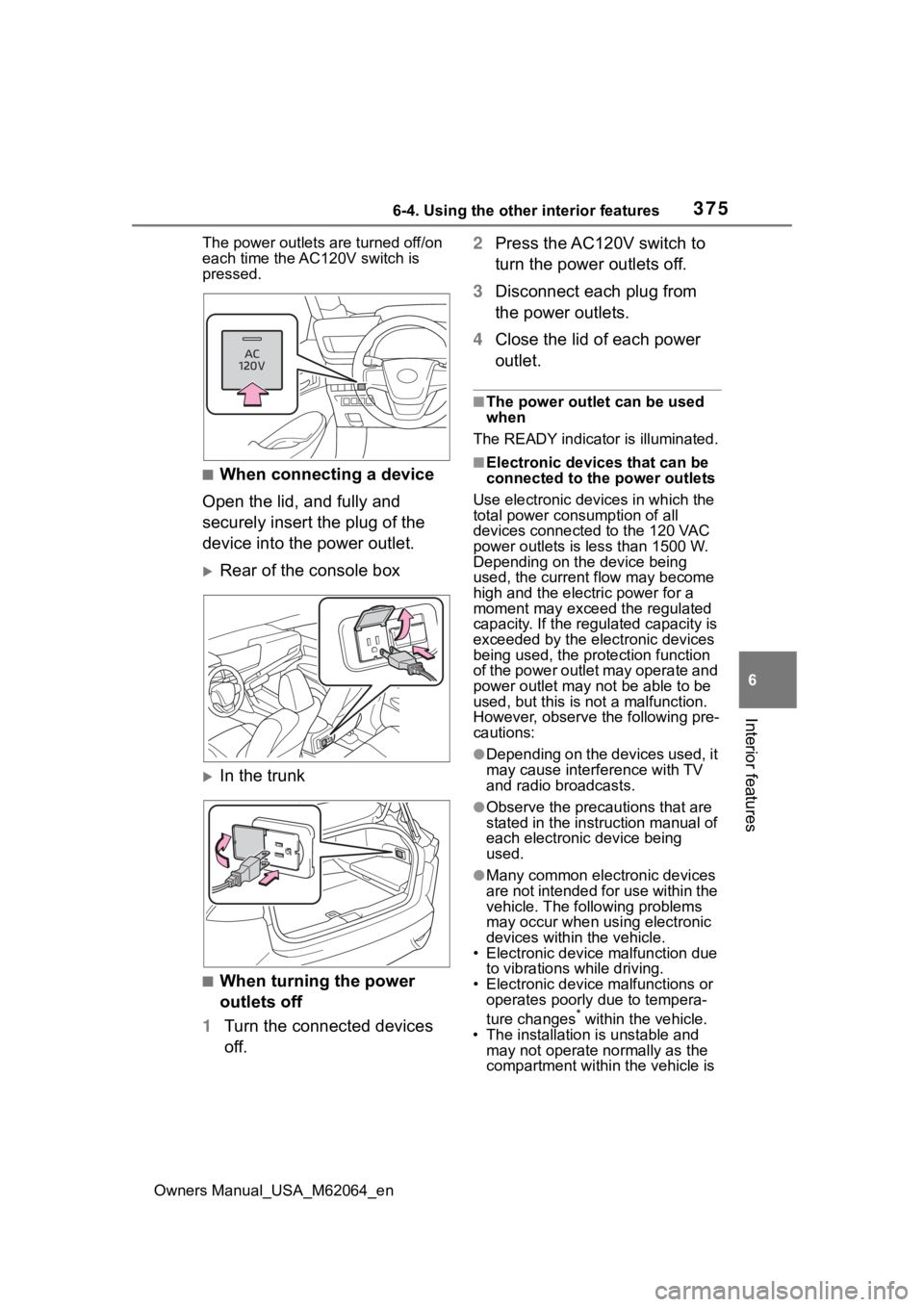
The power outlets are turned off/on
each time the AC120V switch is
pressed.
■When connecting a device
Open the lid, and fully and
securely insert the plug of the
device into the power outlet.
Rear of the console box
In the trunk
■When turning the power
outlets off
1 Turn the connected devices
off. 2
Press the AC120V switch to
turn the power outlets off.
3 Disconnect each plug from
the power outlets.
4 Close the lid of each power
outlet.
■The power outlet can be used
when
The READY indicator is illuminated.
■Electronic devices that can be
connected to the power outlets
Use electronic devices in which the
total power consumption of all
devices connected to the 120 VAC
power outlets is l ess than 1500 W.
Depending on the device being
used, the current flow may become
high and the elect ric power for a
moment may exceed the regulated
capacity. If the regulated capacity is
exceeded by the electronic devices
being used, the protection function
of the power outlet may operate and
power outlet may not be able to be
used, but this is not a malfunction.
However, observe t he following pre-
cautions:
●Depending on the devices used, it
may cause interference with TV
and radio broadcasts.
●Observe the precau tions that are
stated in the instruction manual of
each electronic device being
used.
●Many common electronic devices
are not intended for use within the
vehicle. The following problems
may occur when using electronic
devices within the vehicle.
• Electronic device malfunction due
to vibrations while driving.
• Electronic device malfunctions or operates poorly due to tempera-
ture changes
* within the vehicle.
• The installation i s unstable and
may not operate normally as the
compartment within the vehicle is
Page 397 of 572
3977-1. Maintenance and care
Owners Manual_USA_M62064_en
7
Maintenance and care
■When cleaning the carpeted
portions of the glove box, con-
sole box, etc.
If a strong adhesive tape is used,
there is a possibility that the surface
of the carpet could be damaged.
■Front side windows with IR pro-
tective coating (vehicles with IR
protective coating)
The front side windows have IR pro-
tective coating. T o prevent any dam-
age to the IR prote ctive coating,
observe the following:
●If the windows are dirty, gently
wipe them with a cloth soaked in
water or lukewarm water as soon
as possible.
●If the windows are very dirty, do
not open and close them repeat-
edly.
WARNING
■Water in the vehicle
●Do not splash or spill liquid in
the vehicle, such as on the floor,
in the traction battery air vents,
and in the trunk. ( P. 9 0 )
Doing so may cause the traction
battery, electrical components,
etc. to malfunction or catch fire.
●Do not get any of the SRS com-
ponents or wiring in the vehicle
interior wet. ( P.34)
An electrical malfunction may
cause the airbags to deploy or
not function properly, resulting
in death or serious injury.
■Cleaning the interior (espe-
cially instrument panel)
Do not use polish wax or polish
cleaner. The instrument panel
may reflect off the windshield,
obstructing the dr iver’s view and
leading to an accident, resulting in
death or serious injury.
NOTICE
■Cleaning detergents
●Do not use the following types
of detergent, as they may dis-
color the vehicle interior or
cause streaks or damage to
painted surfaces:
• Areas other than the seats and steering wheel: Organic sub-
stances such as benzene or
gasoline, alkaline or acidic solu-
tions, dye, and bleach
• Seats: Alkaline or acidic solu- tions, such as th inner, benzene,
and alcohol
• Steering wheel: Organic sub- stances, such as thinner, and
cleaner that contains alcohol
●Do not use polish wax or polish
cleaner. The instrument panel’s
or other interior part’s painted
surface may be damaged.
■Preventing damage to leather
surfaces
Observe the following precautions
to avoid damage to and deteriora-
tion of leather surfaces:
●Remove any dust or dirt from
leather surfaces immediately.
●Do not expose the vehicle to
direct sunlight for extended peri-
ods of time. Park the vehicle in
the shade, especially during
summer.
●Do not place items made of
vinyl, plastic, or containing wax
on the upholstery, as they may
stick to the leather surface if the
vehicle interior heats up signifi-
cantly.
Page 403 of 572
4037-2. Maintenance
Owners Manual_USA_M62064_en
7
Maintenance and care
Parking brake
• Does the park- ing brake oper-
ate normally?
• When parked on a slope and the
parking brake is
on, is the vehicle
securely
stopped?
Seat belts
• Do the seat belts operate
smoothly?
• The seat belts should not be
damaged.
Seats
• Do the seat con-trols operate
properly?
Steering wheel
• Does the steer-ing wheel rotate
smoothly?
• Does the steer- ing wheel have
the correct
amount of free
play?
• There should not be any strange
sounds coming
from the steer-
ing wheel.
ItemsCheck pointsVehicle exterior
ItemsCheck points
Doors/trunk
• Do the doors/trunk oper-
ate smoothly?
Hood
• Does the hood lock system work
properly?
Fluid leaks
• There should not be any signs of
fluid leakage
after the vehicle
has been parked.
Tires
• Is the tire infla-tion pressure
correct?
• The tires should not be damaged
or excessively
worn.
• Have the tires been rotated
according to the
maintenance
schedule?
• The wheel nuts should not be
loose.
Windshield
wipers
• The wiper blades should not show
any signs of
cracking, split-
ting, wear, con-
tamination or
deformation.
• The wiper blades should clear the
windshield with-
out streaking or
skipping.
Page 413 of 572
4137-3. Do-it-yourself maintenance
Owners Manual_USA_M62064_en
7
Maintenance and care
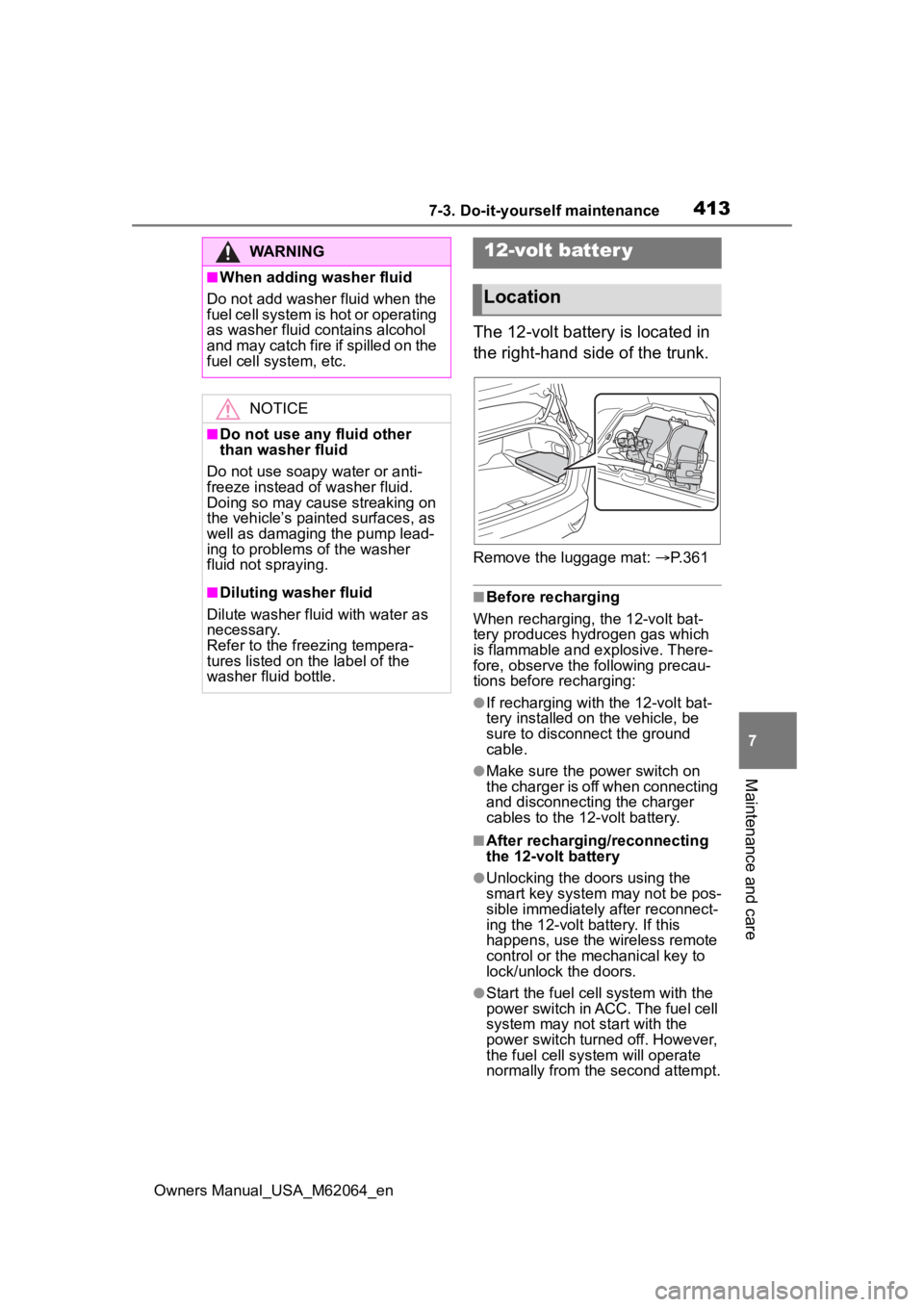
The 12-volt battery is located in
the right-hand side of the trunk.
Remove the luggage mat: P. 3 6 1
■Before recharging
When recharging, the 12-volt bat-
tery produces hydrogen gas which
is flammable and explosive. There-
fore, observe the following precau-
tions before recharging:
●If recharging with the 12-volt bat-
tery installed on the vehicle, be
sure to disconnect the ground
cable.
●Make sure the power switch on
the charger is off when connecting
and disconnecting the charger
cables to the 12-volt battery.
■After recharging/reconnecting
the 12-volt battery
●Unlocking the doors using the
smart key system may not be pos-
sible immediately after reconnect-
ing the 12-volt battery. If this
happens, use the wireless remote
control or the mechanical key to
lock/unlock the doors.
●Start the fuel cell system with the
power switch in ACC. The fuel cell
system may not start with the
power switch turned off. However,
the fuel cell system will operate
normally from the second attempt.
WARNING
■When adding washer fluid
Do not add washer fluid when the
fuel cell system is hot or operating
as washer fluid contains alcohol
and may catch fire if spilled on the
fuel cell system, etc.
NOTICE
■Do not use any fluid other
than washer fluid
Do not use soapy water or anti-
freeze instead of washer fluid.
Doing so may cause streaking on
the vehicle’s painted surfaces, as
well as damaging the pump lead-
ing to problems of the washer
fluid not spraying.
■Diluting washer fluid
Dilute washer fluid with water as
necessary.
Refer to the freezing tempera-
tures listed on the label of the
washer fluid bottle.
12-volt batter y
Location
Page 440 of 572
4407-3. Do-it-yourself maintenance
Owners Manual_USA_M62064_en
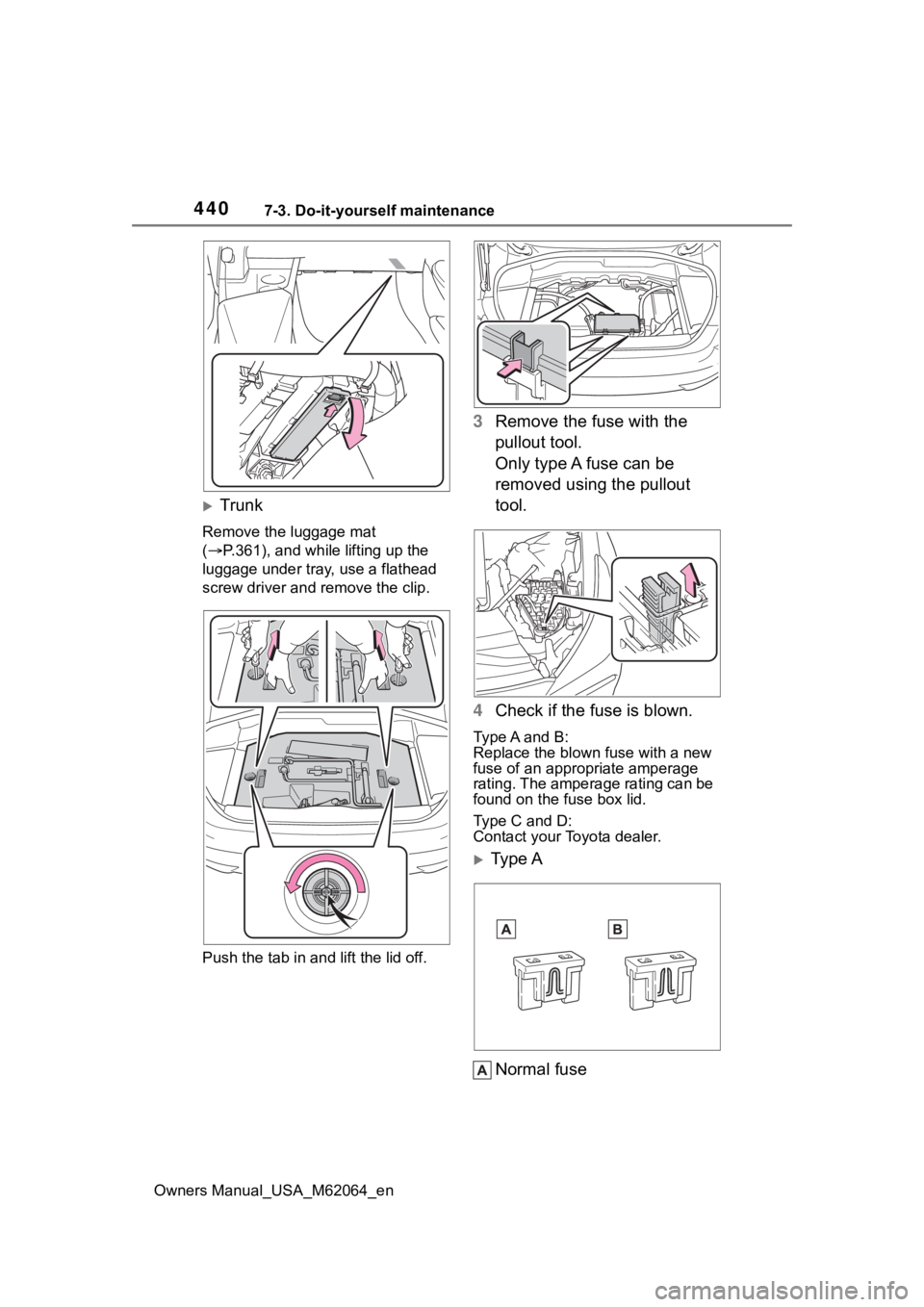
Trunk
Remove the luggage mat
( P.361), and while lifting up the
luggage under tray, use a flathead
screw driver and r emove the clip.
Push the tab in and lift the lid off.
3 Remove the fuse with the
pullout tool.
Only type A fuse can be
removed using the pullout
tool.
4 Check if the fuse is blown.
Type A and B:
Replace the blown fuse with a new
fuse of an appropriate amperage
rating. The amperage rating can be
found on the fuse box lid.
Type C and D:
Contact your Toyota dealer.
Type A
Normal fuse
Page 482 of 572
4828-2. Steps to take in an emergency
Owners Manual_USA_M62064_en
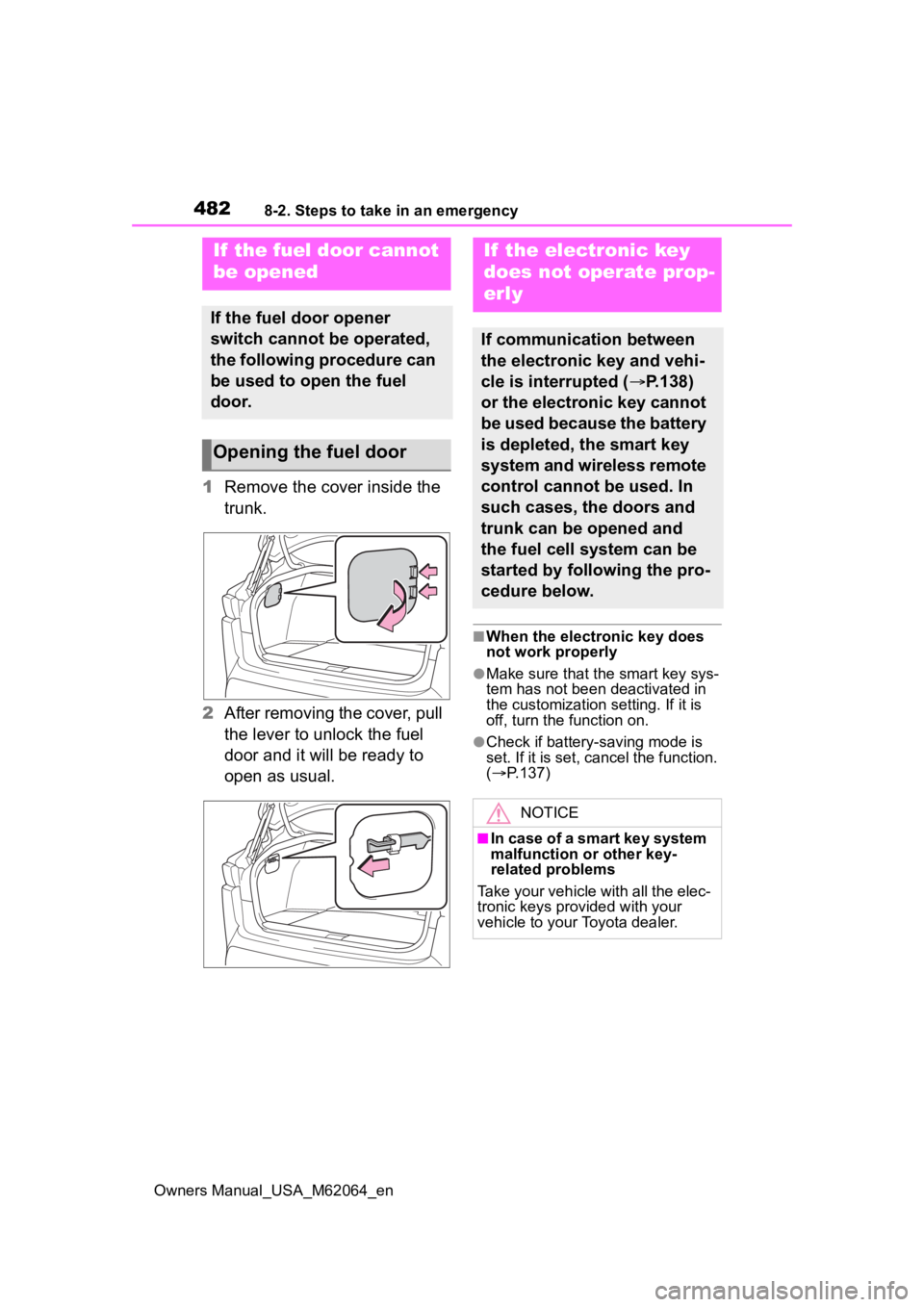
1Remove the cover inside the
trunk.
2 After removing the cover, pull
the lever to unlock the fuel
door and it will be ready to
open as usual.
■When the electronic key does
not work properly
●Make sure that the smart key sys-
tem has not been deactivated in
the customization setting. If it is
off, turn the function on.
●Check if battery-saving mode is
set. If it is set, cancel the function.
( P.137)
If the fuel door cannot
be opened
If the fuel door opener
switch cannot be operated,
the following procedure can
be used to open the fuel
door.
Opening the fuel door
If the electronic key
does not operate prop-
erly
If communication between
the electronic key and vehi-
cle is interrupted ( P.138)
or the electronic key cannot
be used because the battery
is depleted, the smart key
system and wireless remote
control cannot be used. In
such cases, the doors and
trunk can be opened and
the fuel cell system can be
started by following the pro-
cedure below.
NOTICE
■In case of a smart key system
malfunction or other key-
related problems
Take your vehicle with all the elec-
tronic keys provided with your
vehicle to your Toyota dealer.
Page 483 of 572
4838-2. Steps to take in an emergency
Owners Manual_USA_M62064_en
8
When trouble arises
■Locking and unlocking the
door
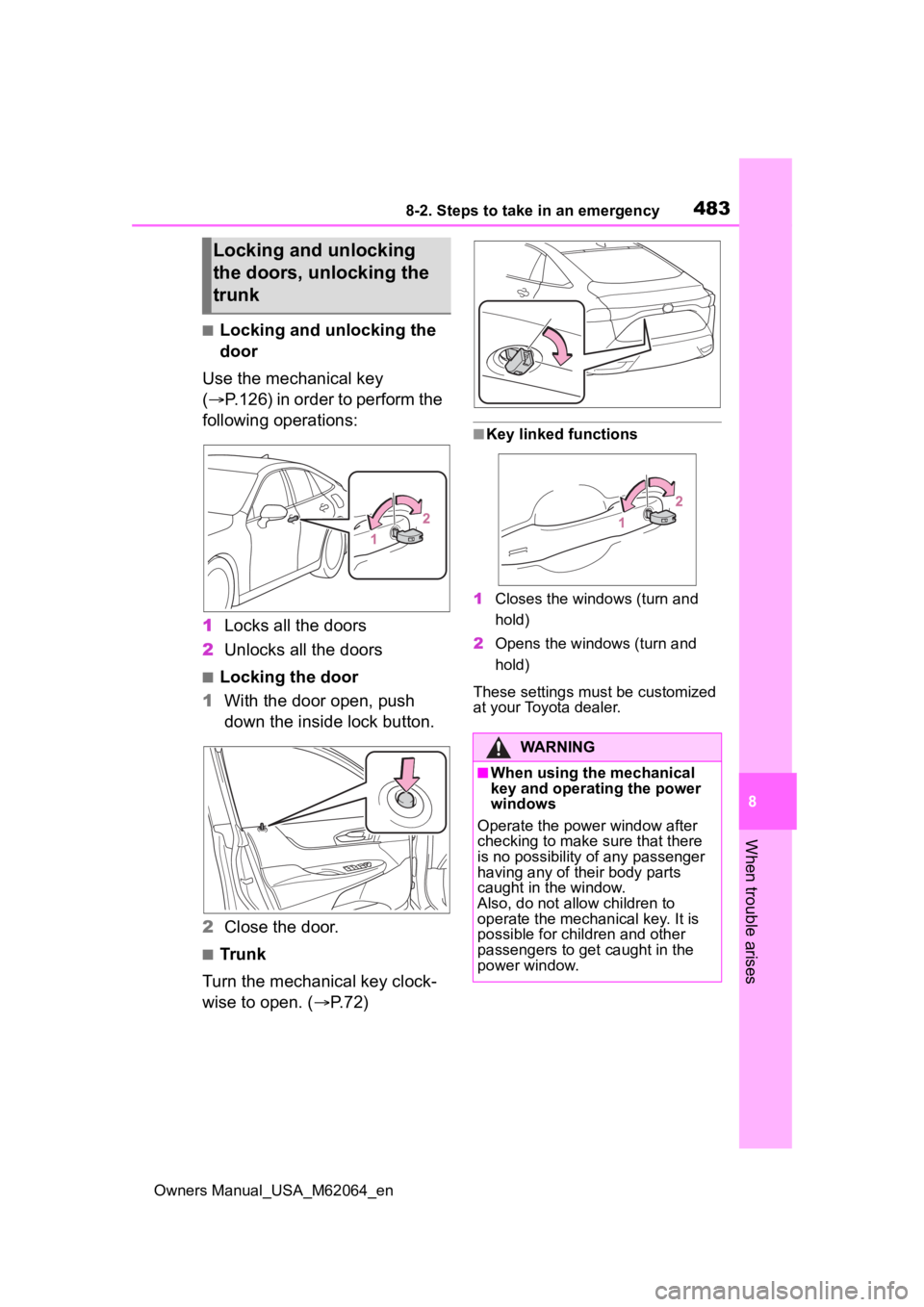
Use the mechanical key
( P.126) in order to perform the
following operations:
1 Locks all the doors
2 Unlocks all the doors
■Locking the door
1 With the door open, push
down the inside lock button.
2 Close the door.
■Trunk
Turn the mechanical key clock-
wise to open. ( P.72)
■Key linked functions
1 Closes the windows (turn and
hold)
2 Opens the windows (turn and
hold)
These settings mus t be customized
at your Toyota dealer.
Locking and unlocking
the doors, unlocking the
trunk
WARNING
■When using the mechanical
key and operating the power
windows
Operate the power window after
checking to make sure that there
is no possibility of any passenger
having any of their body parts
caught in the window.
Also, do not allo w children to
operate the mechanical key. It is
possible for children and other
passengers to get caught in the
power window.
Page 513 of 572
5139-2. Customization
Owners Manual_USA_M62064_en
9
Vehicle specifications
Some function settings are changed simultaneously with other func-
tions being customized. Contact y our Toyota dealer for further
details.
Settings that can be changed using the multimedia system
Settings that can be changed using the multi-information displ ay
Settings that can be changed by your Toyota dealer
Definition of symbols: O = Av ailable, — = Not available
■Seat belts (P.29)
*: Vehicles with Active Assist for seat belts
■Alarm ( P.71)
*: The default setting varies according to country.
Customizable features
FunctionDefault settingCustomized
setting
Retraction of front seat belts
when vehicle speed reaches
approximately 12 mph (20
km/)
*
OnOff——O
Retraction of front seat belt
when corresponding front
door is opened or seat belt is
released
*
OnOff——O
FunctionDefault settingCustomized setting
Deactivates the alarm when
the doors or trunk are
unlocked using the mechani-
cal key
On*Off——O
Page 515 of 572
5159-2. Customization
Owners Manual_USA_M62064_en
9
Vehicle specifications
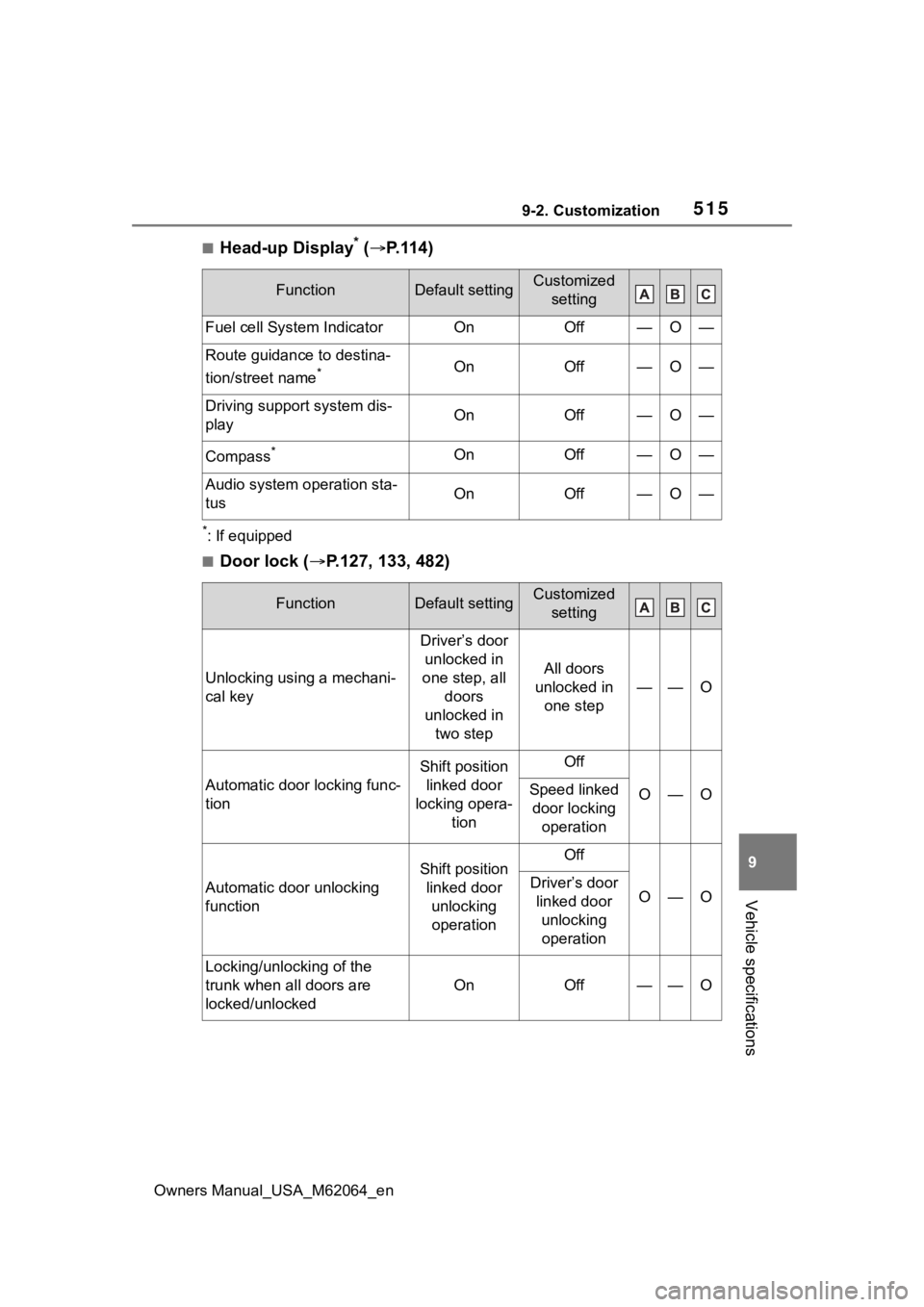
■Head-up Display* ( P.114)
*: If equipped
■Door lock ( P.127, 133, 482)
FunctionDefault settingCustomized
setting
Fuel cell System IndicatorOnOff—O—
Route guidance to destina-
tion/street name
*OnOff—O—
Driving support system dis-
playOnOff—O—
Compass*OnOff—O—
Audio system operation sta-
tusOnOff—O—
FunctionDefault settingCustomized setting
Unlocking using a mechani-
cal key
Driver’s door unlocked in
one step, all doors
unlocked in two step
All doors
unlocked in one step
——O
Automatic door locking func-
tion
Shift position linked door
locking opera- tionOff
O—OSpeed linked door locking operation
Automatic door unlocking
function
Shift position linked door unlocking operationOff
O—ODriver’s door linked door unlocking operation
Locking/unlocking of the
trunk when all doors are
locked/unlocked
OnOff——O
Page 517 of 572
5179-2. Customization
Owners Manual_USA_M62064_en
9
Vehicle specifications
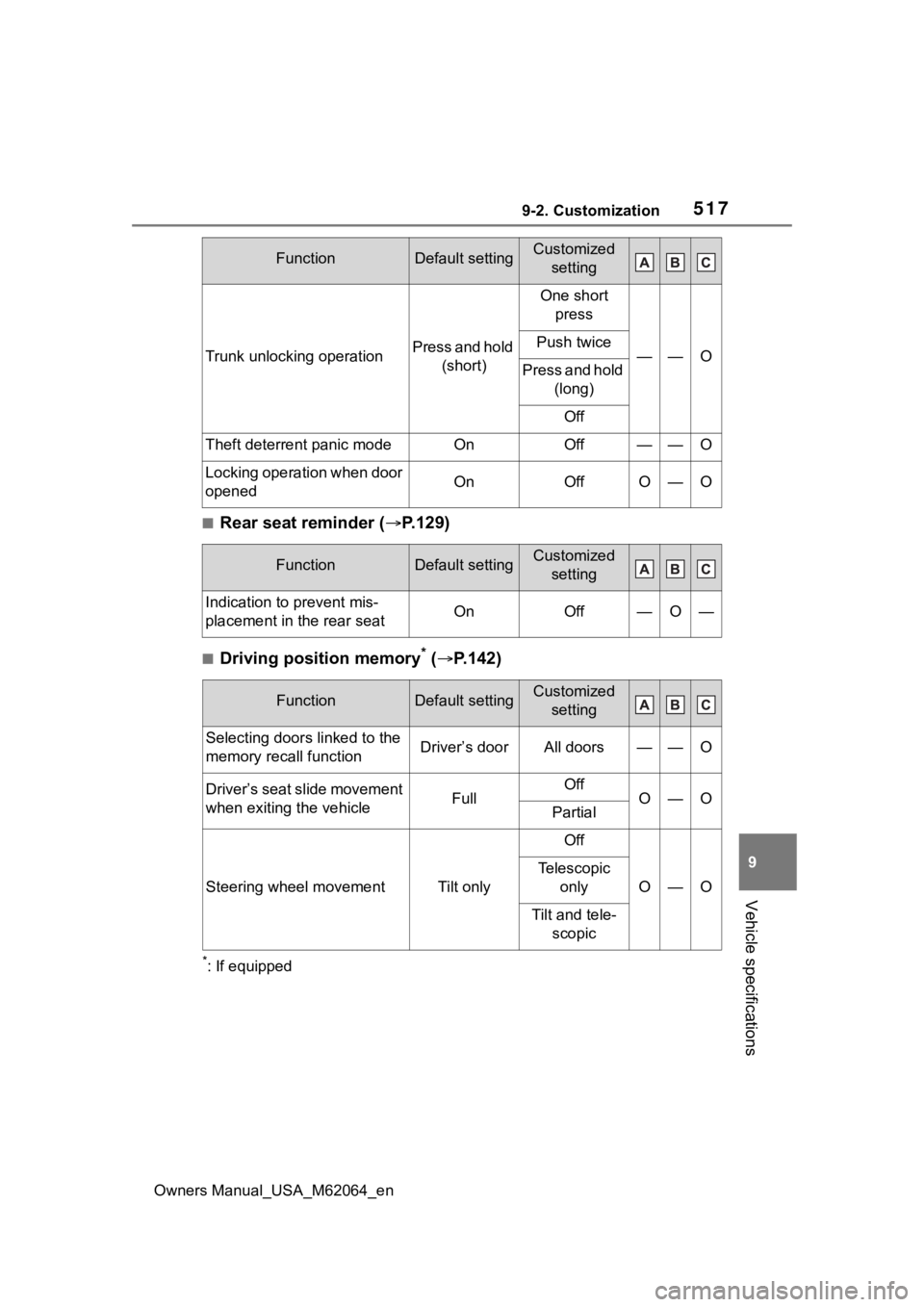
■Rear seat reminder ( P.129)
■Driving position memory* ( P.142)
*: If equipped
Trunk unlocking operationPress and hold
(short)
One short press
——OPush twice
Press and hold (long)
Off
Theft deterrent panic modeOnOff——O
Locking operation when door
openedOnOffO—O
FunctionDefault settingCustomized setting
Indication to prevent mis-
placement in the rear seatOnOff—O—
FunctionDefault settingCustomized setting
Selecting door s linked to the
memory recall functionDriver’s doorAll doors——O
Driver’s seat slide movement
when exiting the vehicleFullOffO—OPartial
Steering wheel movementTilt only
Off
O—O
Telescopic only
Tilt and tele-scopic
FunctionDefault settingCustomized setting