ev mode TOYOTA PRIUS 2013 3.G Owner's Manual
[x] Cancel search | Manufacturer: TOYOTA, Model Year: 2013, Model line: PRIUS, Model: TOYOTA PRIUS 2013 3.GPages: 640, PDF Size: 11.67 MB
Page 138 of 640
138
PRIUS_OM_OM47791U_(U)
1-7. Theft deterrent system
Immobilizer system
■System maintenance
The vehicle has a maintenance-free type immobilizer system.
■ Conditions affecting operation
Depending on the surrounding environment and conditions, the immobilizer
system may not operate properly. This may prevent the hybrid system from
starting. ( P. 74)
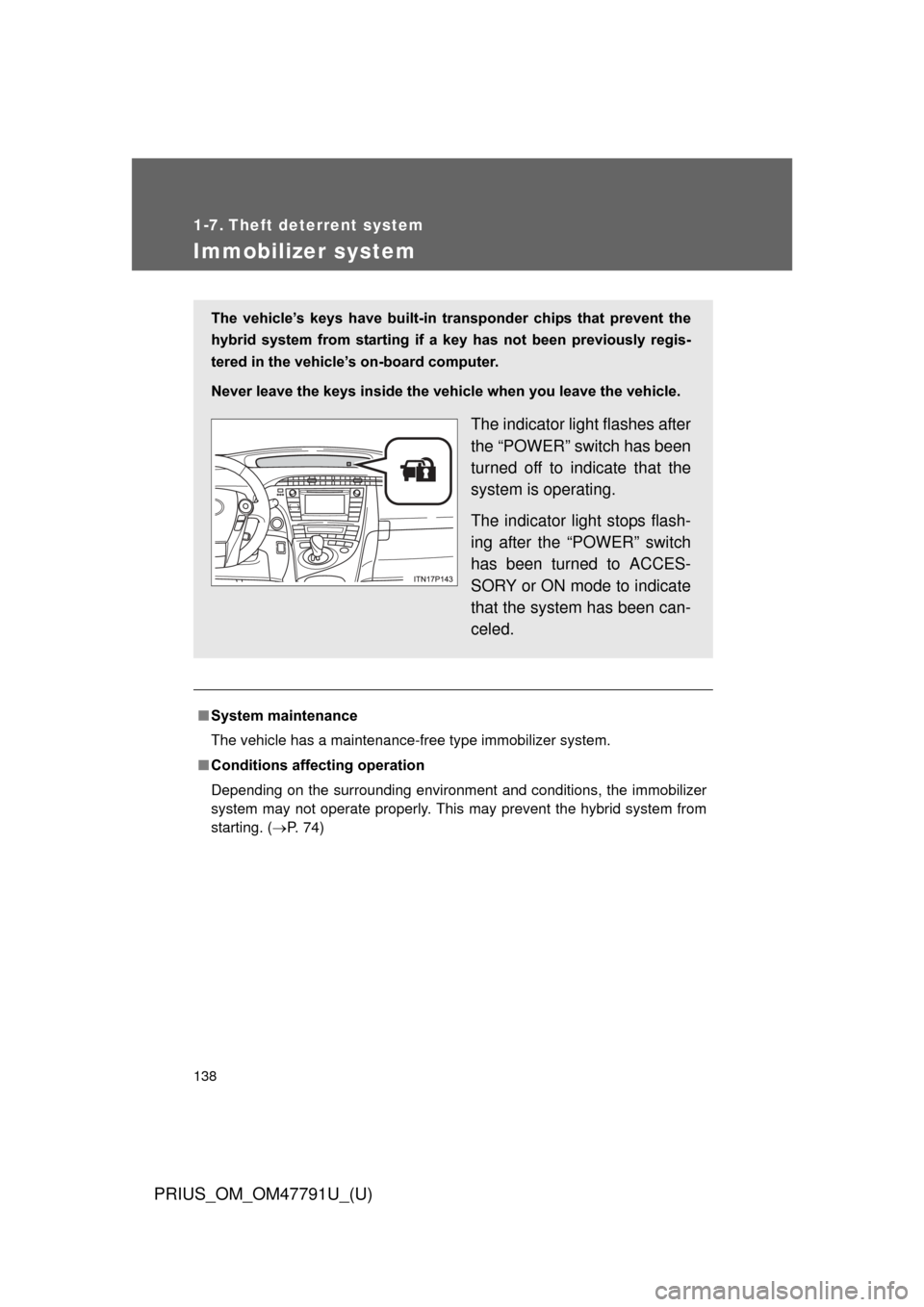
The vehicle’s keys have built-in tr ansponder chips that prevent the
hybrid system from starting if a key has not been previously regis-
tered in the vehicle’s on-board computer.
Never leave the keys inside the vehicle when you leave the vehicle.
The indicator light flashes after
the “POWER” switch has been
turned off to indicate that the
system is operating.
The indicator light stops flash-
ing after the “POWER” switch
has been turned to ACCES-
SORY or ON mode to indicate
that the system has been can-
celed.
Page 170 of 640
170 1-8. Safety information
PRIUS_OM_OM47791U_(U)
Installing child restraints using a seat belt (child restraint lock
function belt)
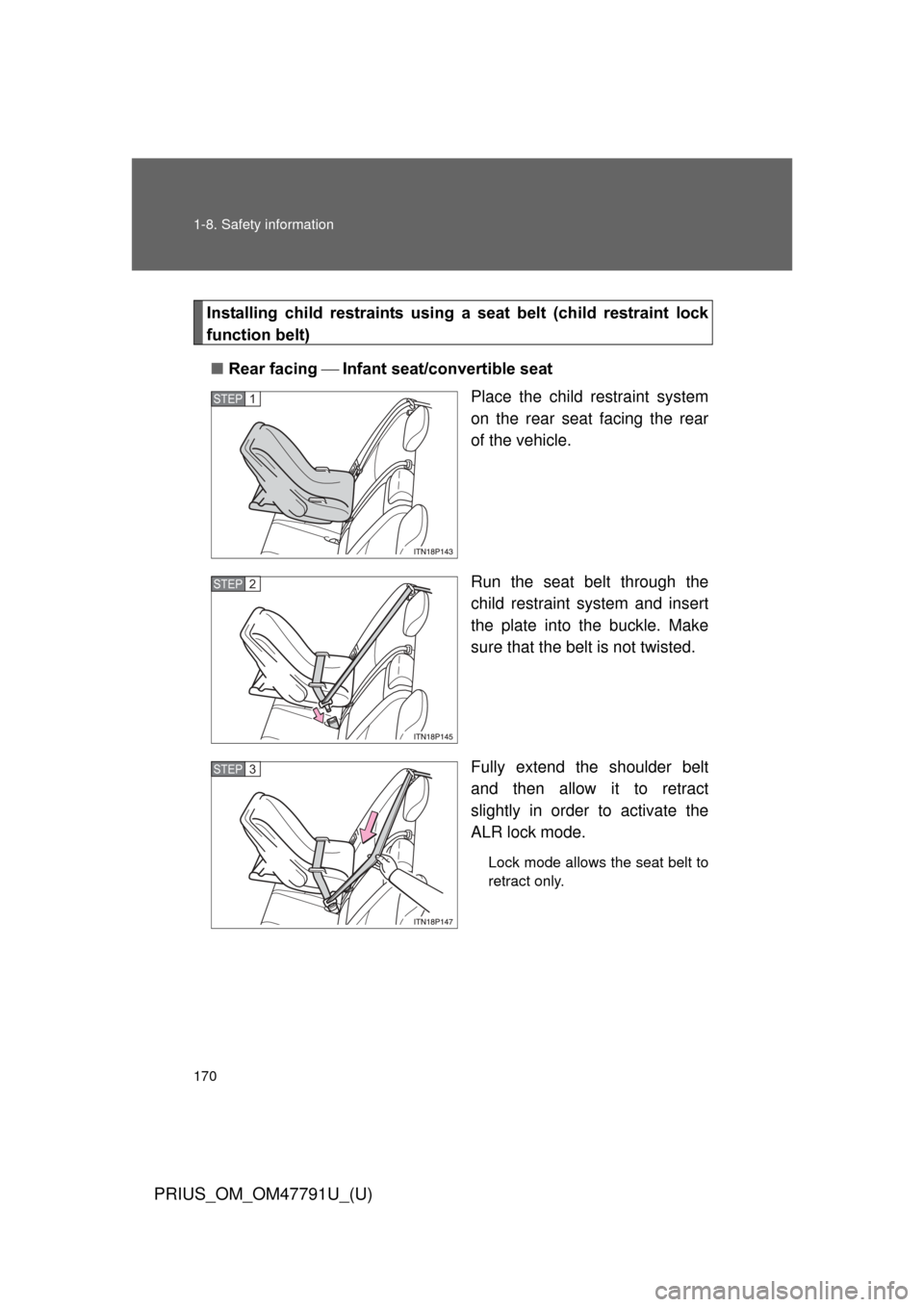
■ Rear facing Infant seat/convertible seat
Place the child restraint system
on the rear seat facing the rear
of the vehicle.
Run the seat belt through the
child restraint system and insert
the plate into the buckle. Make
sure that the belt is not twisted.
Fully extend the shoulder belt
and then allow it to retract
slightly in order to activate the
ALR lock mode.
Lock mode allows the seat belt to
retract only.
STEP 1
STEP 2
STEP 3
Page 172 of 640
172 1-8. Safety information
PRIUS_OM_OM47791U_(U)
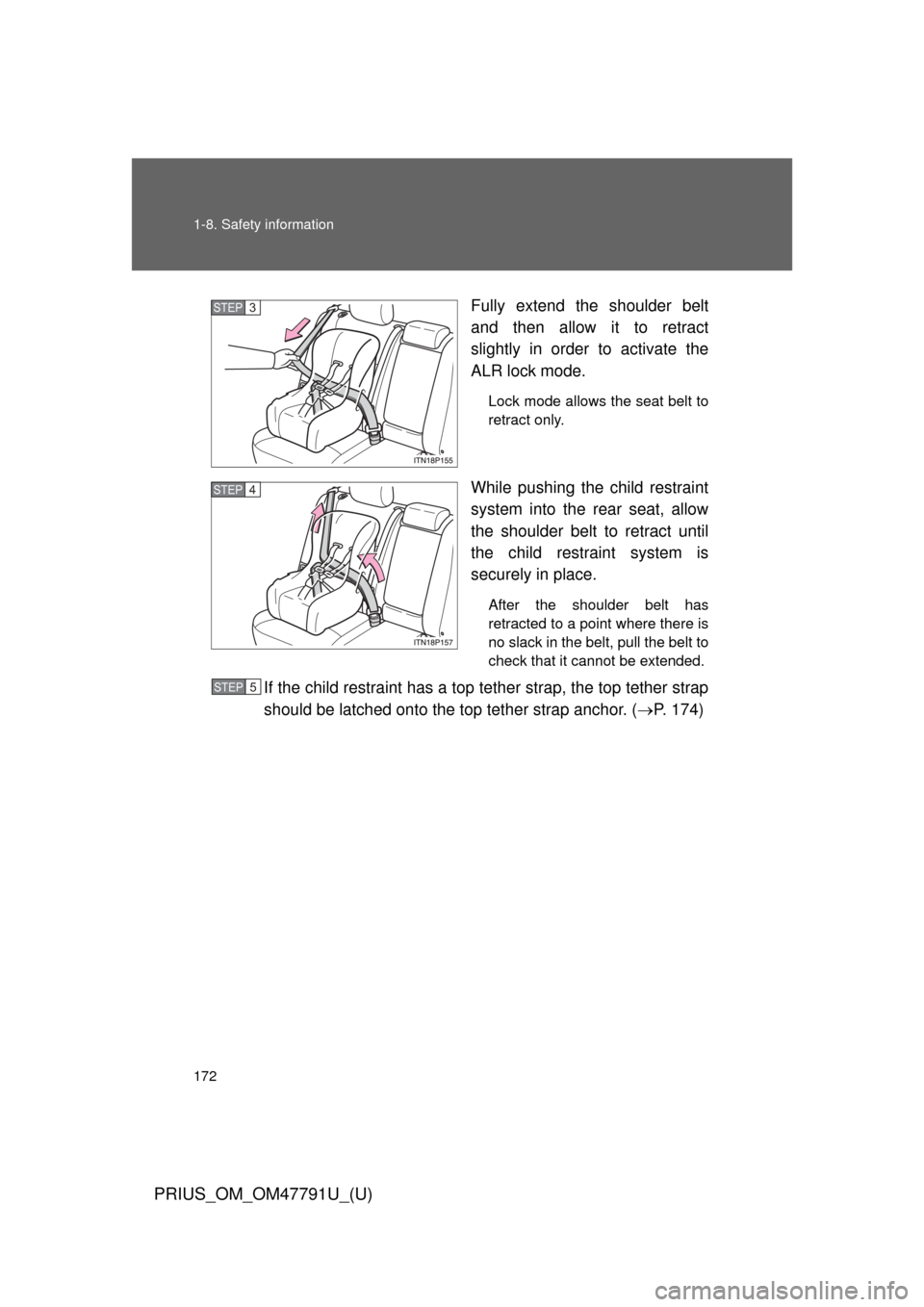
Fully extend the shoulder belt
and then allow it to retract
slightly in order to activate the
ALR lock mode.
Lock mode allows the seat belt to
retract only.
While pushing the child restraint
system into the rear seat, allow
the shoulder belt to retract until
the child restraint system is
securely in place.
After the shoulder belt has
retracted to a point where there is
no slack in the belt, pull the belt to
check that it cannot be extended.
If the child restraint has a top tether strap, the top tether strap
should be latched onto the top tether strap anchor. ( P. 174)
STEP 3
STEP 4
STEP 5
Page 177 of 640
177
1-8. Safety information
1
Before driving
PRIUS_OM_OM47791U_(U)
■
Laws and regulations pertaining to anchors
The LATCH system conforms to FMVSS225 or CMVSS210.2.
Child restraint systems conforming to FMVSS213 or CMVSS213 specifica-
tions can be used.
This vehicle is designed to conform to the SAE J1819.
CAUTION
■When installing a booster seat
To prevent the belt from going into ALR lock mode, do not fully extend the
shoulder belt. ALR mode causes the belt to tighten only. This could cause
injury or discomfort to the child. (P. 113)
■ When installing a child restraint system
Follow the directions given in the child restraint system installation manual
and fix the child restraint system securely in place.
If the child restraint system is not correctly fixed in place, the child or other
passengers may be seriously injured or even killed in the event of sudden
braking, sudden swerving or an accident.
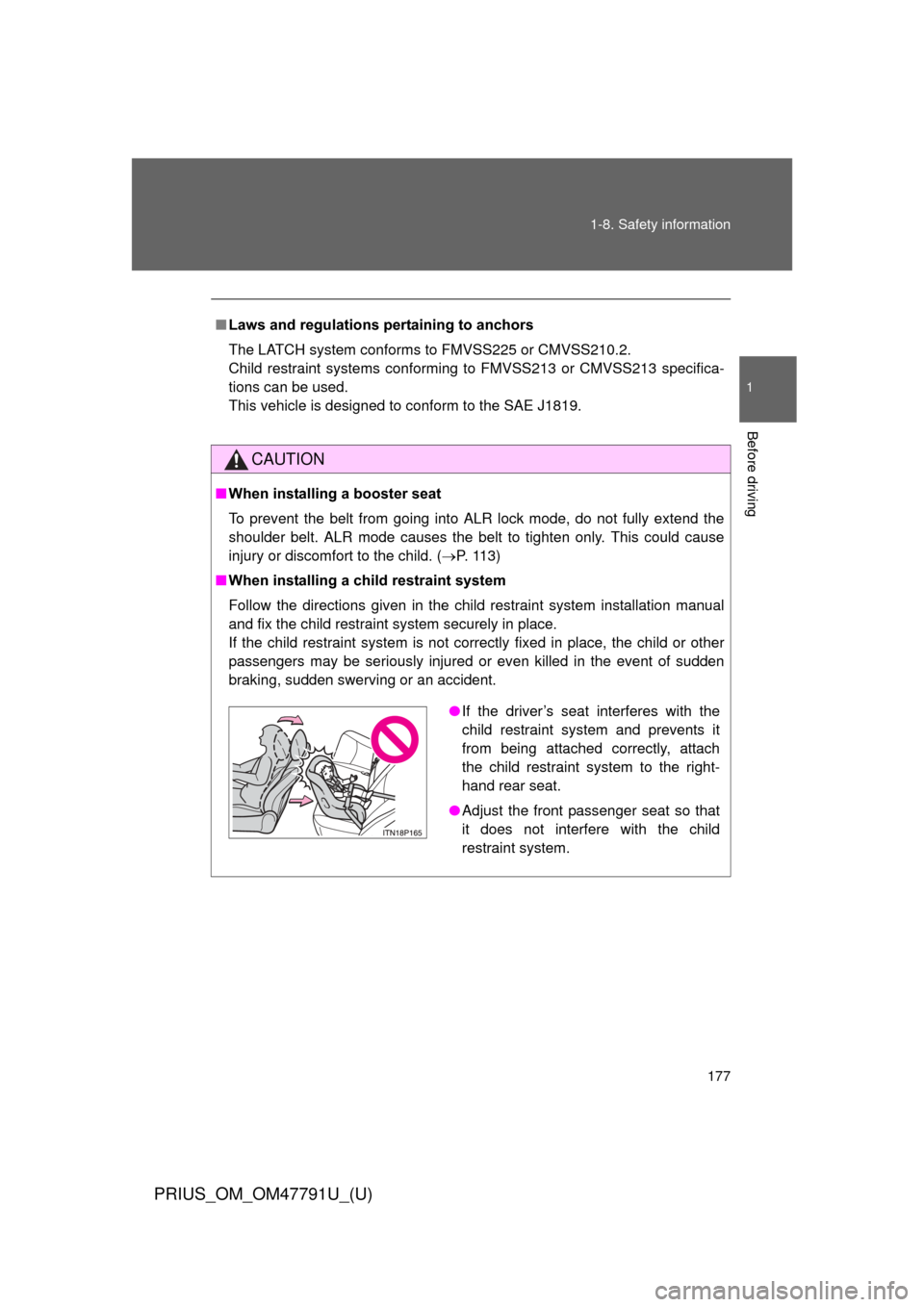
●If the driver’s seat interferes with the
child restraint system and prevents it
from being attached correctly, attach
the child restraint system to the right-
hand rear seat.
● Adjust the front passenger seat so that
it does not interfere with the child
restraint system.
Page 181 of 640
When driving2
181
PRIUS_OM_OM47791U_(U)
2-1. Driving proceduresDriving the vehicle............ 182
Power (ignition) switch ..... 194
EV drive mode ................. 201
Hybrid transmission ......... 204
Turn signal lever .............. 213
Parking brake ................... 214
Horn ................................. 215
2-2. Instrument cluster Gauges and meters ......... 216
Indicators and warning lights .............................. 221
Multi-information display............................ 225
Head-up display ............... 245 2-3. Operating the lights
and windshield wipers
Headlight switch ............... 252
Fog light switch ................ 258
Windshield wipers and washer .................... 260
Rear window wiper and washer .................... 264
Headlight cleaner switch ............................. 267
2-4. Using other driving systems Cruise control ................... 268
Dynamic radar cruise control ............................ 272
LKA (Lane-Keeping Assist) ............................ 289
Driving assist systems ..... 300
Hill-start assist control ...... 305
PCS (Pre-Collision System) .......................... 307
2-5. Driving information Cargo and luggage .......... 315
Vehicle load limits ............ 320
Winter driving tips ............ 321
Trailer towing ................... 326
Dinghy towing .................. 327
Page 194 of 640
194
2-1. Driving procedures
PRIUS_OM_OM47791U_(U)
Power (ignition) switch
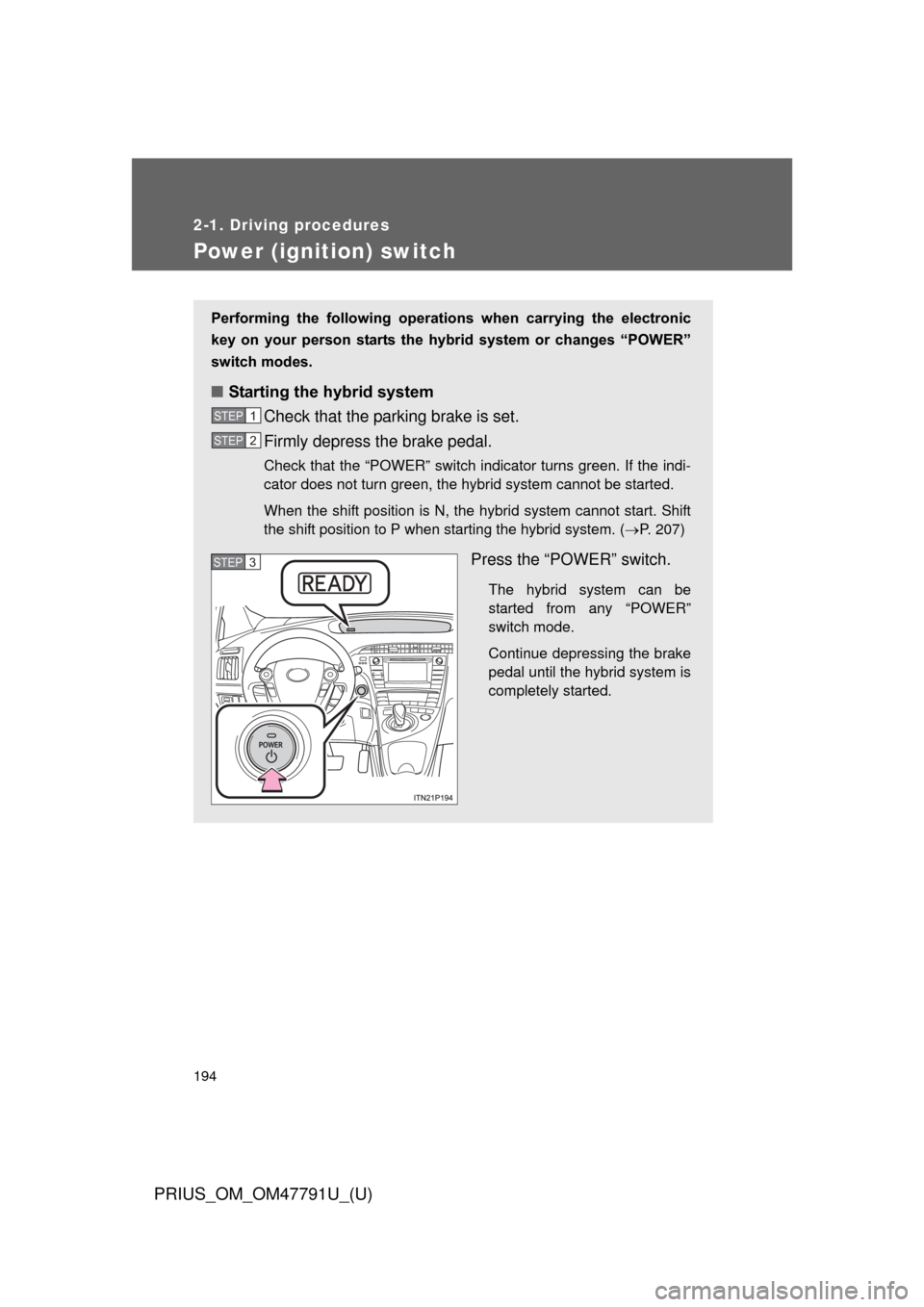
Performing the following operations when carrying the electronic
key on your person starts the hybr id system or changes “POWER”
switch modes.
■ Starting the hybrid system
Check that the parking brake is set.
Firmly depress the brake pedal.
Check that the “POWER” switch indicator turns green. If the indi-
cator does not turn green, the hybrid system cannot be started.
When the shift position is N, the hybrid system cannot start. Shift
the shift position to P when starting the hybrid system. ( P. 207)
Press the “POWER” switch.
The hybrid system can be
started from any “POWER”
switch mode.
Continue depressing the brake
pedal until the hybrid system is
completely started.
STEP 1
STEP 2
STEP 3
Page 196 of 640
196 2-1. Driving procedures
PRIUS_OM_OM47791U_(U)
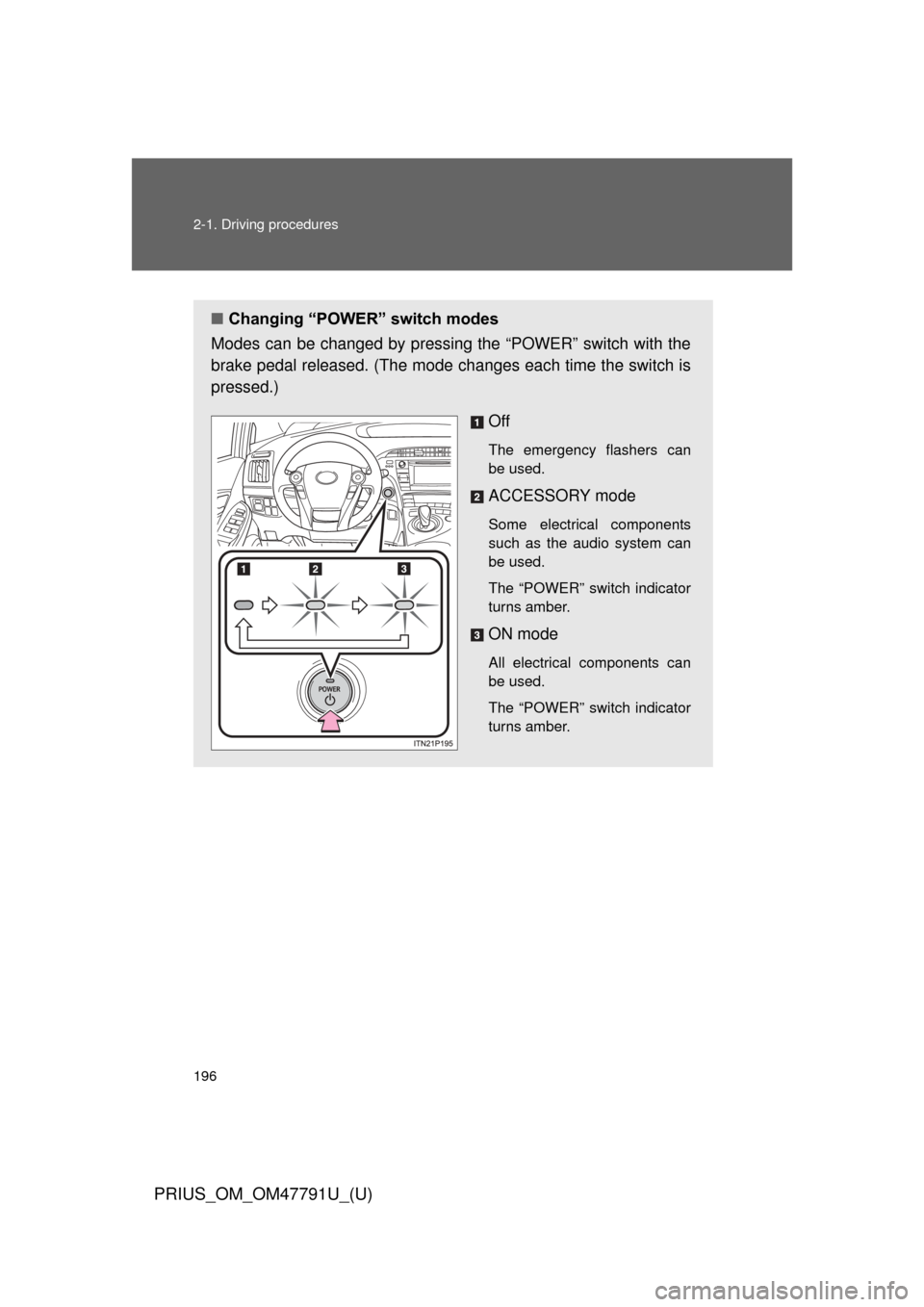
■Changing “POWER” switch modes
Modes can be changed by pressing the “POWER” switch with the
brake pedal released. (The mode changes each time the switch is
pressed.)
Off
The emergency flashers can
be used.
ACCESSORY mode
Some electrical components
such as the audio system can
be used.
The “POWER” switch indicator
turns amber.
ON mode
All electrical components can
be used.
The “POWER” switch indicator
turns amber.
Page 197 of 640
197
2-1. Driving procedures
PRIUS_OM_OM47791U_(U)
2
When driving
■
Auto power off function
If the vehicle is left in ACCESSORY mode for more than 20 minutes or ON
mode (the hybrid system is not operating) for more than an hour with the
shift position in P, the “POWER” switch will automatically turn off. However,
this function cannot entirely prevent the 12-volt battery from discharging. Do
not leave the vehicle with the “POWER” switch in ACCESSORY or ON mode
for long periods of time when the hybrid system is not operating.
■ Sounds and vibrations specific to a hybrid vehicle
P. 3 6
■ Electronic key battery depletion
P. 7 8
■ When the ambient temperature is low, such as during winter driving
conditions
The “READY” indicator may flash for a long time when the hybrid system\
is
starting. Driving will become possible once the “READY” indicator has illumi-
nated. Wait until the “READY” indicator has illuminated.
■ Conditions aff ecting operation
P. 7 4
■ Notes for the entry function
P. 7 5
■ If the hybrid system does not start
The immobilizer system may not have been deactivated. ( P. 138)
Contact your Toyota dealer.
Page 198 of 640

198 2-1. Driving procedures
PRIUS_OM_OM47791U_(U)
■When the “POWER” switch in dicator flashes in amber
The system may be malfunctioning. Have the vehicle inspected by your
Toyota dealer immediately.
■ If the “READY” indicator does not come on
If the “READY” indicator does not come on when you press the “POWER”
switch with the shift position in P and the brake pedal depressed, contact
your Toyota dealer immediately.
■ If the hybrid system is malfunctioning
P. 501
■ If the electronic key battery is depleted
P. 460
■ Operation of the “POWER” switch
● When operating the “POWER” switch, one short, firm press is enough. If
the switch is pressed improperly, the hybrid system may not start or the
“POWER” switch mode may not change. It is not necessary to press and
hold the switch.
● If attempting to restart the hybrid system immediately after turning the
“POWER” switch off, the hybrid system may not start in some cases.
After turning the “POWER” switch off, please wait a few seconds before
restarting the hybrid system.
■ Automatically P position selection function
P. 209
Page 200 of 640

200 2-1. Driving procedures
PRIUS_OM_OM47791U_(U)
NOTICE
■To prevent 12-volt battery discharge
● Do not leave the “POWER” switch in ACCESSORY or ON mode for long
periods of time without the hybrid system on.
● If the hybrid system is off, but the indicator on the “POWER” switch is illu-
minated, this indicates that the “POWER” switch is still turned on. When
exiting the vehicle, always check that the “POWER” switch is off.
■ Symptoms indicating a malfunct ion with the “POWER” switch
If the “POWER” switch seems to be operating somewhat differently than
usual, such as the switch sticking slightly, there may be a malfunction. Con-
tact your Toyota dealer immediately.