TOYOTA PRIUS 2013 3.G Service Manual
PRIUS 2013 3.G
TOYOTA
TOYOTA
https://www.carmanualsonline.info/img/14/6602/w960_6602-0.png
TOYOTA PRIUS 2013 3.G Service Manual
Page 223 of 640
223
2-2. Instrument cluster
PRIUS_OM_OM47791U_(U)
2
When driving*1: These lights turn on when the “POWER” switch is turned to the ON
mode to indicate that a system check is being performed. They will
turn off after the hybrid system is on, or after a few seconds. There
may be a malfunction in a system if a light does not come on, or if the
lights do not turn off. Have the vehicle inspected by your Toyota dealer.
*2: The light flashes to indicate that the system is operating.
*3: The light comes on when the system is turned off. The light flashesfaster than usual to indicate that the system is operating.
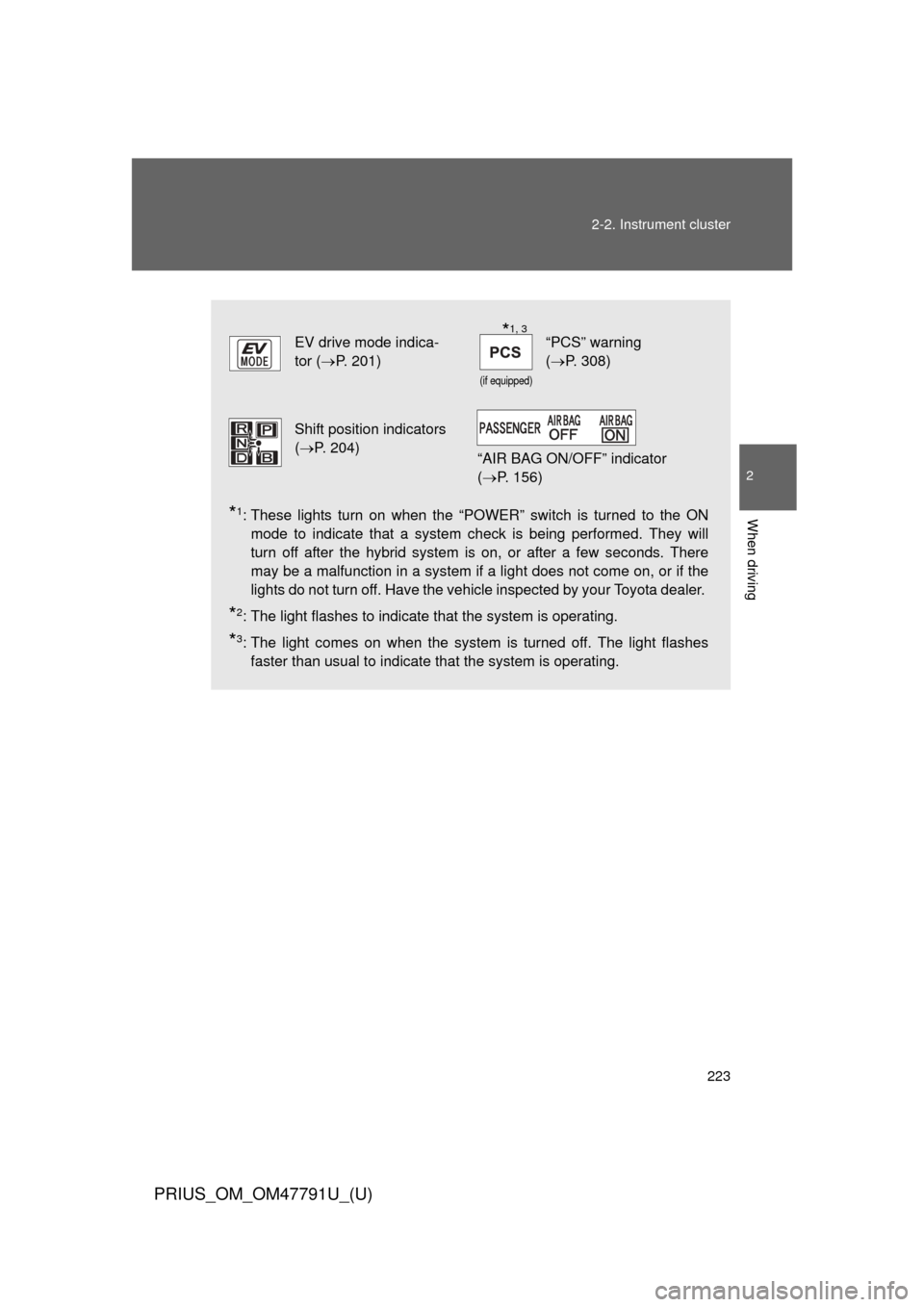
EV drive mode indica-
tor ( P. 201)
(if equipped)
“PCS” warning
(P. 308)
Shift position indicators
(P. 204)
“AIR BAG ON/OFF” indicator
(P. 156)
*1, 3
Page 224 of 640
224 2-2. Instrument cluster
PRIUS_OM_OM47791U_(U)
CAUTION
■If a safety system warning light does not come on
Should a safety system light such as the ABS and SRS airbag warning light
not come on when you start the hybrid system, this could mean that these
systems are not available to help protect you in an accident, which could
result in death or serious injury. Have the vehicle inspected by your Toyota
dealer immediately if this occurs.
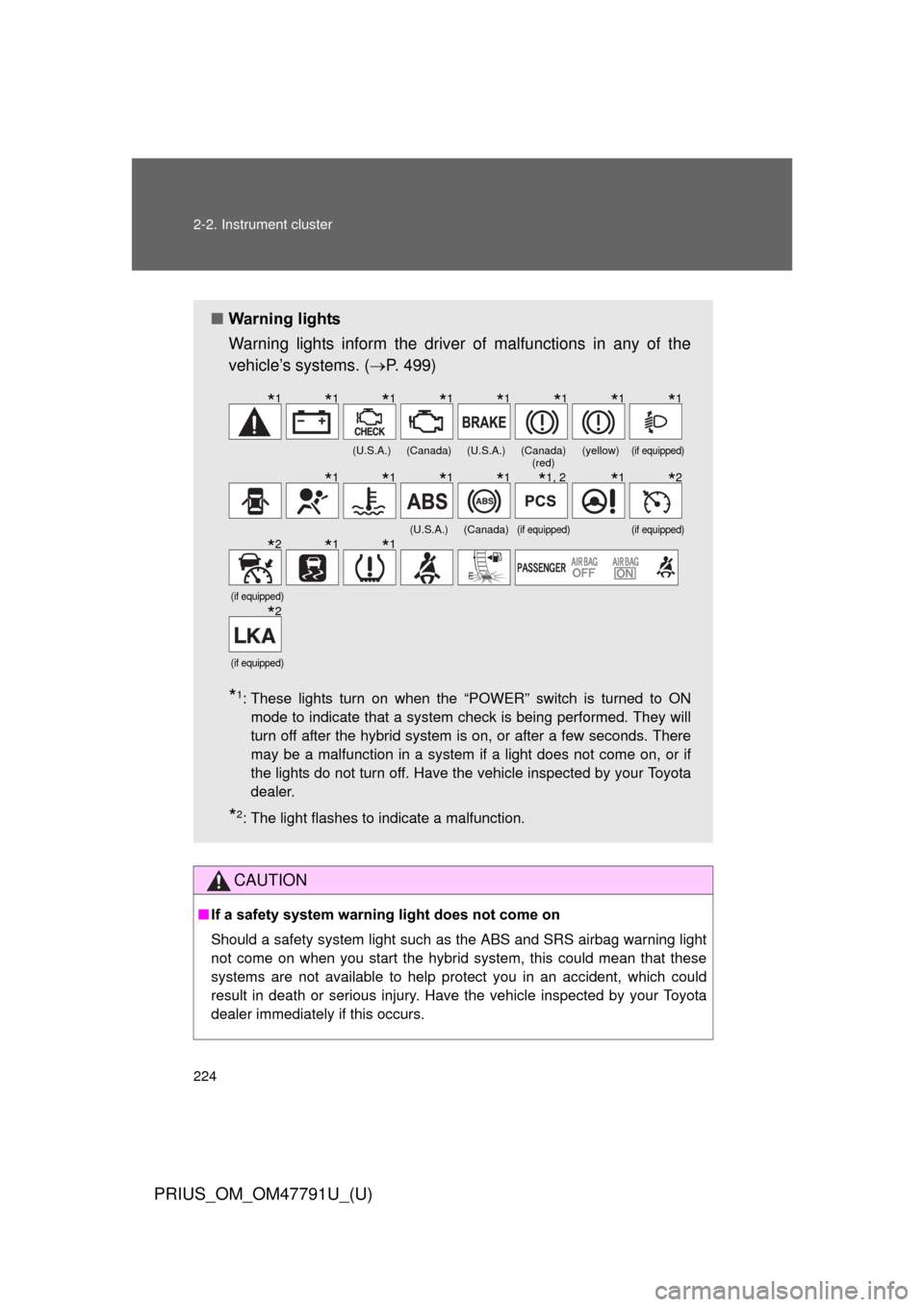
■ Warning lights
Warning lights inform the driver of malfunctions in any of the
vehicle’s systems. ( P. 499)
*1: These lights turn on when the “POWER” switch is turned to ON
mode to indicate that a system check is being performed. They will
turn off after the hybrid system is on, or after a few seconds. There
may be a malfunction in a system if a light does not come on, or if
the lights do not turn off. Have the vehicle inspected by your Toyota
dealer.
*2: The light flashes to indicate a malfunction.
(U.S.A.)(Canada)(U.S.A.)(Canada) (red)(yellow)(if equipped)
(U.S.A.)(Canada)(if equipped)(if equipped)
(if equipped)
(if equipped)
*1*1*1*1*1*1*1*1
*1*1*1*1*1, 2*1*2
*2*1*1
*2
Page 233 of 640
233
2-2. Instrument cluster
PRIUS_OM_OM47791U_(U)
2
When driving
■
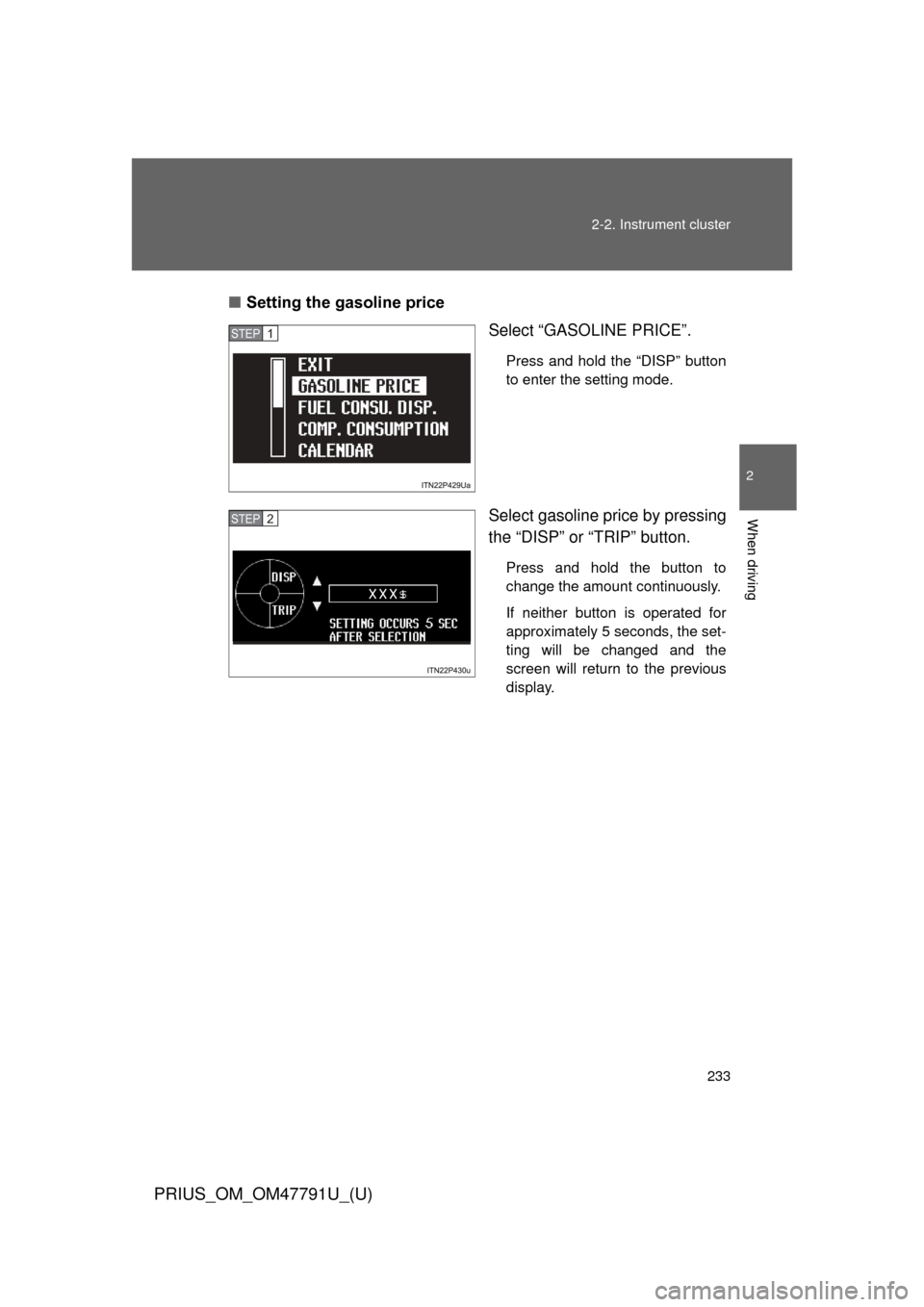
Setting the gasoline price
Select “GASOLINE PRICE”.
Press and hold the “DISP” button
to enter the setting mode.
Select gasoline price by pressing
the “DISP” or “TRIP” button.
Press and hold the button to
change the amount continuously.
If neither button is operated for
approximately 5 seconds, the set-
ting will be changed and the
screen will return to the previous
display.
STEP 1
STEP 2
Page 234 of 640
234 2-2. Instrument cluster
PRIUS_OM_OM47791U_(U)
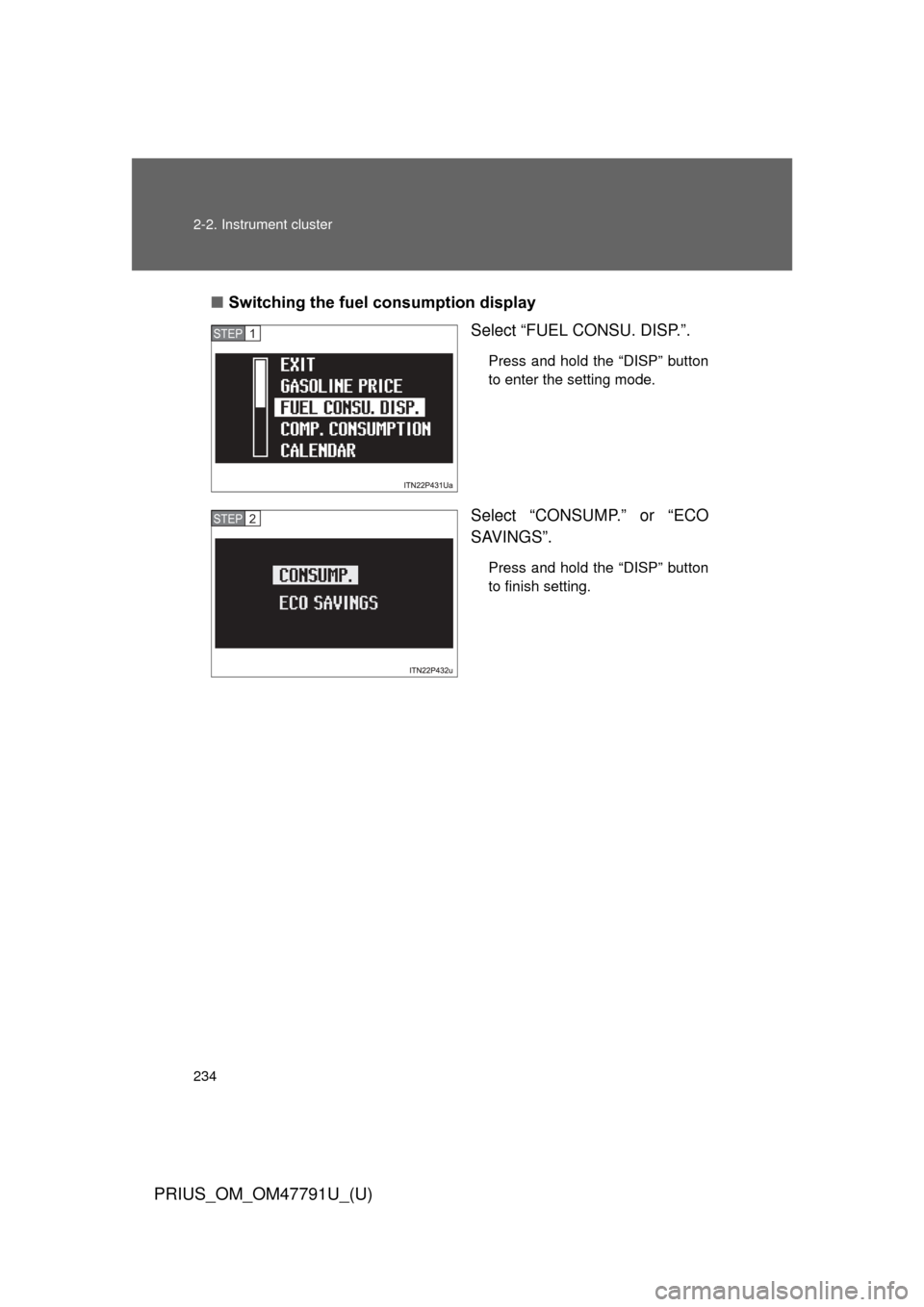
■Switching the fuel consumption display
Select “FUEL CONSU. DISP.”.
Press and hold the “DISP” button
to enter the setting mode.
Select “CONSUMP.” or “ECO
SAVINGS”.
Press and hold the “DISP” button
to finish setting.
STEP 1
STEP 2
Page 235 of 640
235
2-2. Instrument cluster
PRIUS_OM_OM47791U_(U)
2
When driving
■
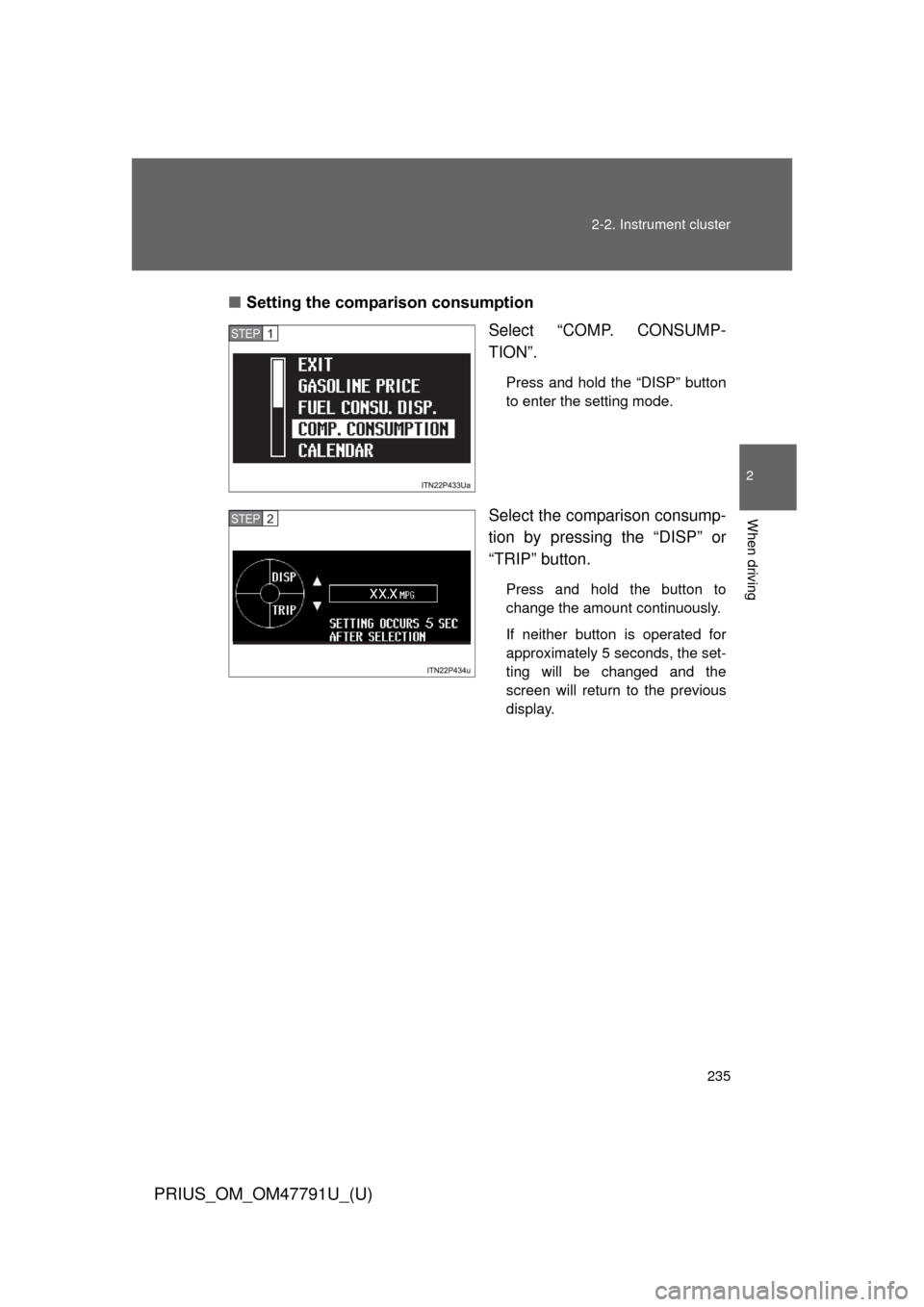
Setting the comparison consumption
Select “COMP. CONSUMP-
TION”.
Press and hold the “DISP” button
to enter the setting mode.
Select the comparison consump-
tion by pressing the “DISP” or
“TRIP” button.
Press and hold the button to
change the amount continuously.
If neither button is operated for
approximately 5 seconds, the set-
ting will be changed and the
screen will return to the previous
display.
STEP 1
STEP 2
Page 236 of 640
236 2-2. Instrument cluster
PRIUS_OM_OM47791U_(U)
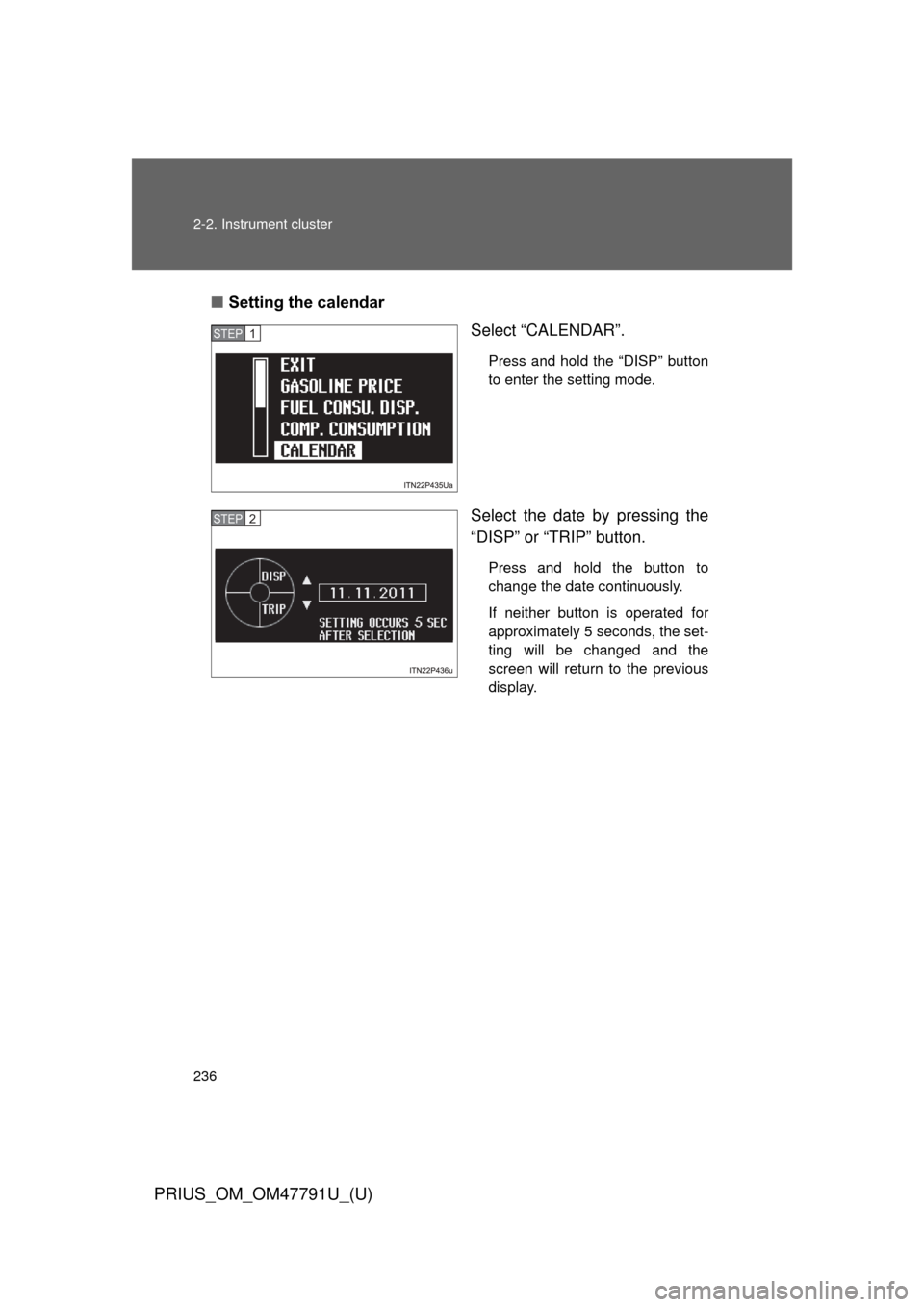
■Setting the calendar
Select “CALENDAR”.
Press and hold the “DISP” button
to enter the setting mode.
Select the date by pressing the
“DISP” or “TRIP” button.
Press and hold the button to
change the date continuously.
If neither button is operated for
approximately 5 seconds, the set-
ting will be changed and the
screen will return to the previous
display.
STEP 1
STEP 2
Page 237 of 640
237
2-2. Instrument cluster
PRIUS_OM_OM47791U_(U)
2
When driving
■
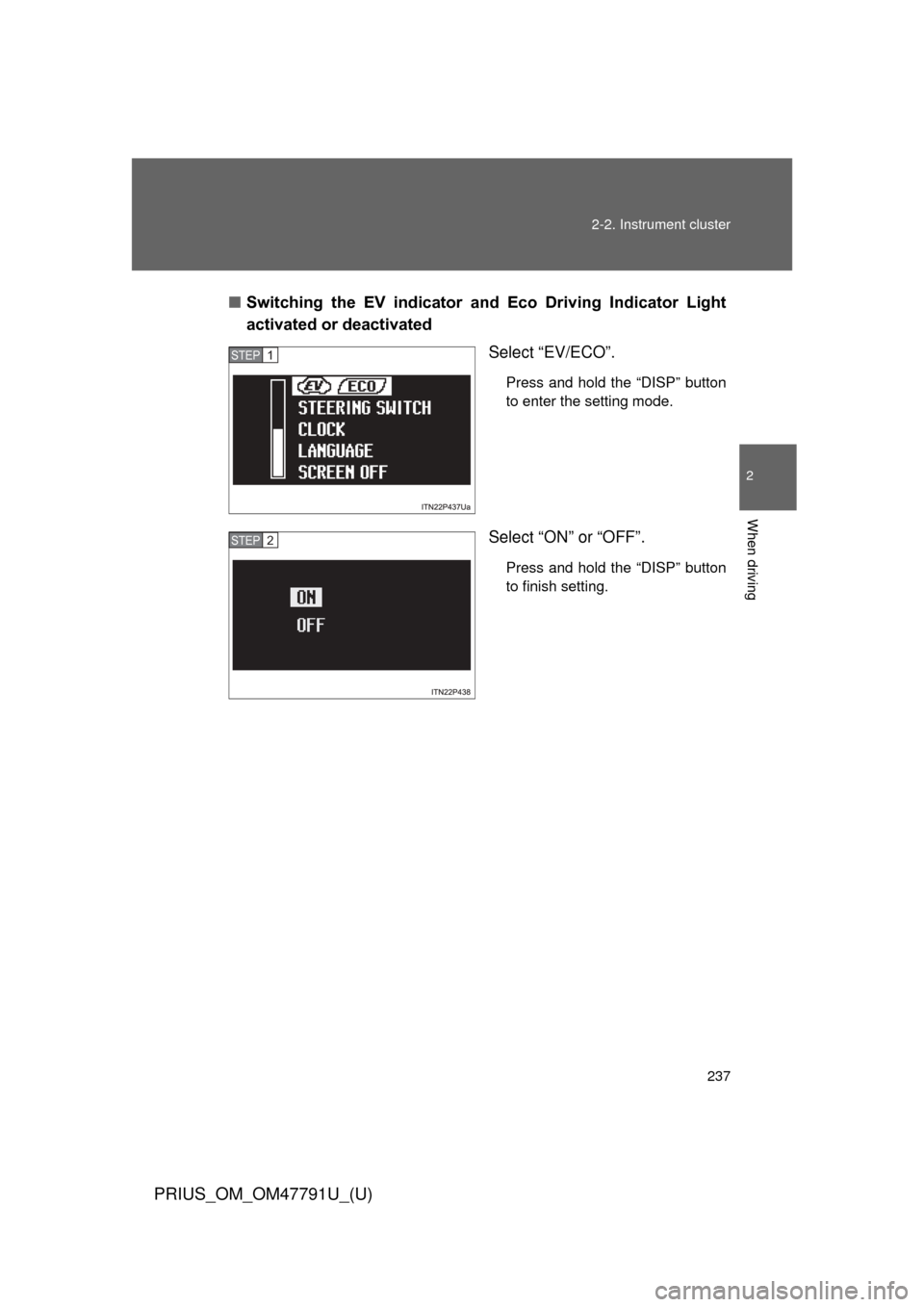
Switching the EV indicator and Eco Driving Indicator Light
activated or deactivated
Select “EV/ECO”.
Press and hold the “DISP” button
to enter the setting mode.
Select “ON” or “OFF”.
Press and hold the “DISP” button
to finish setting.
STEP 1
STEP 2
Page 238 of 640
238 2-2. Instrument cluster
PRIUS_OM_OM47791U_(U)
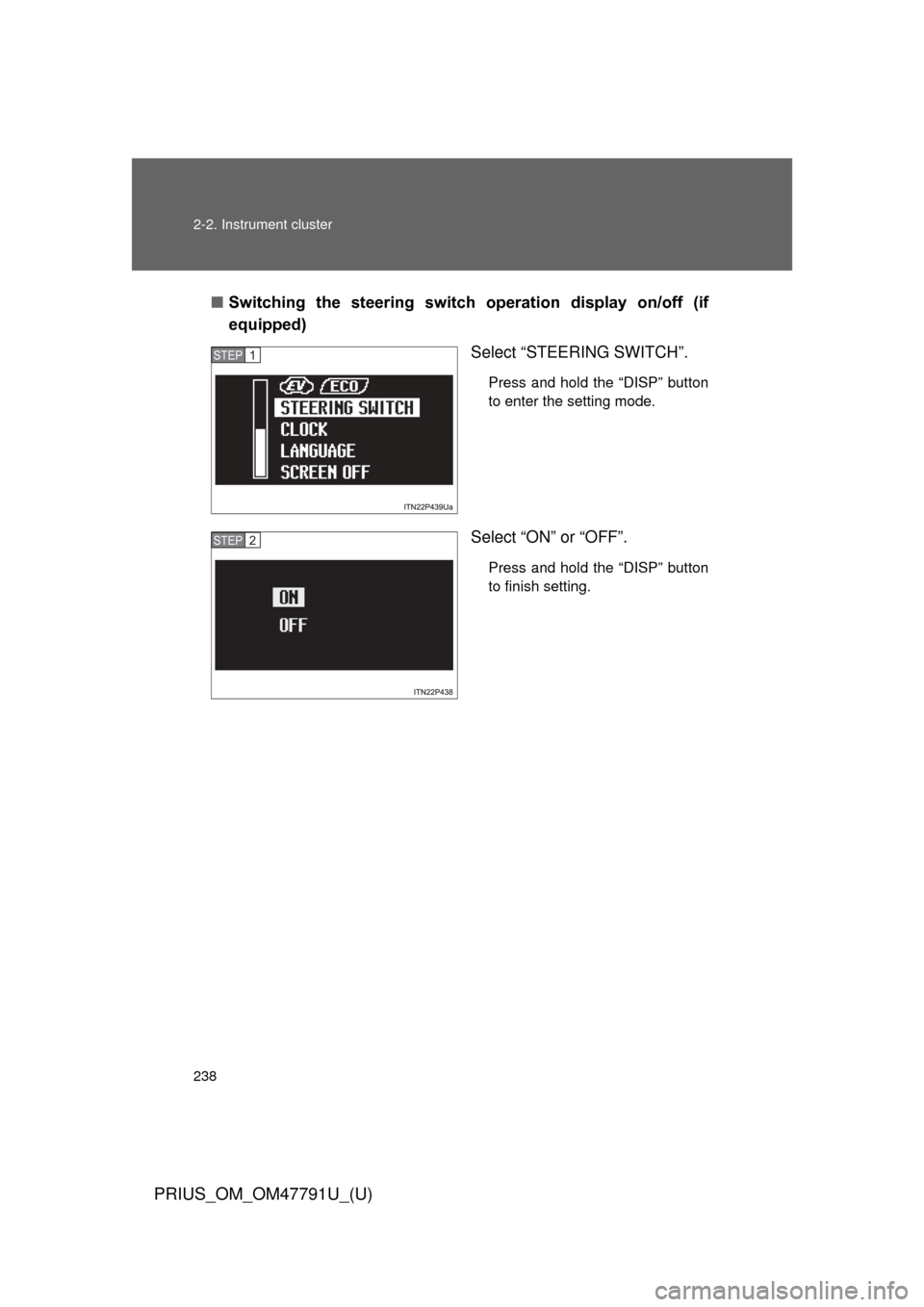
■Switching the steering switch operation display on/off (if
equipped)
Select “STEERING SWITCH”.
Press and hold the “DISP” button
to enter the setting mode.
Select “ON” or “OFF”.
Press and hold the “DISP” button
to finish setting.
STEP 1
STEP 2
Page 239 of 640
239
2-2. Instrument cluster
PRIUS_OM_OM47791U_(U)
2
When driving
■
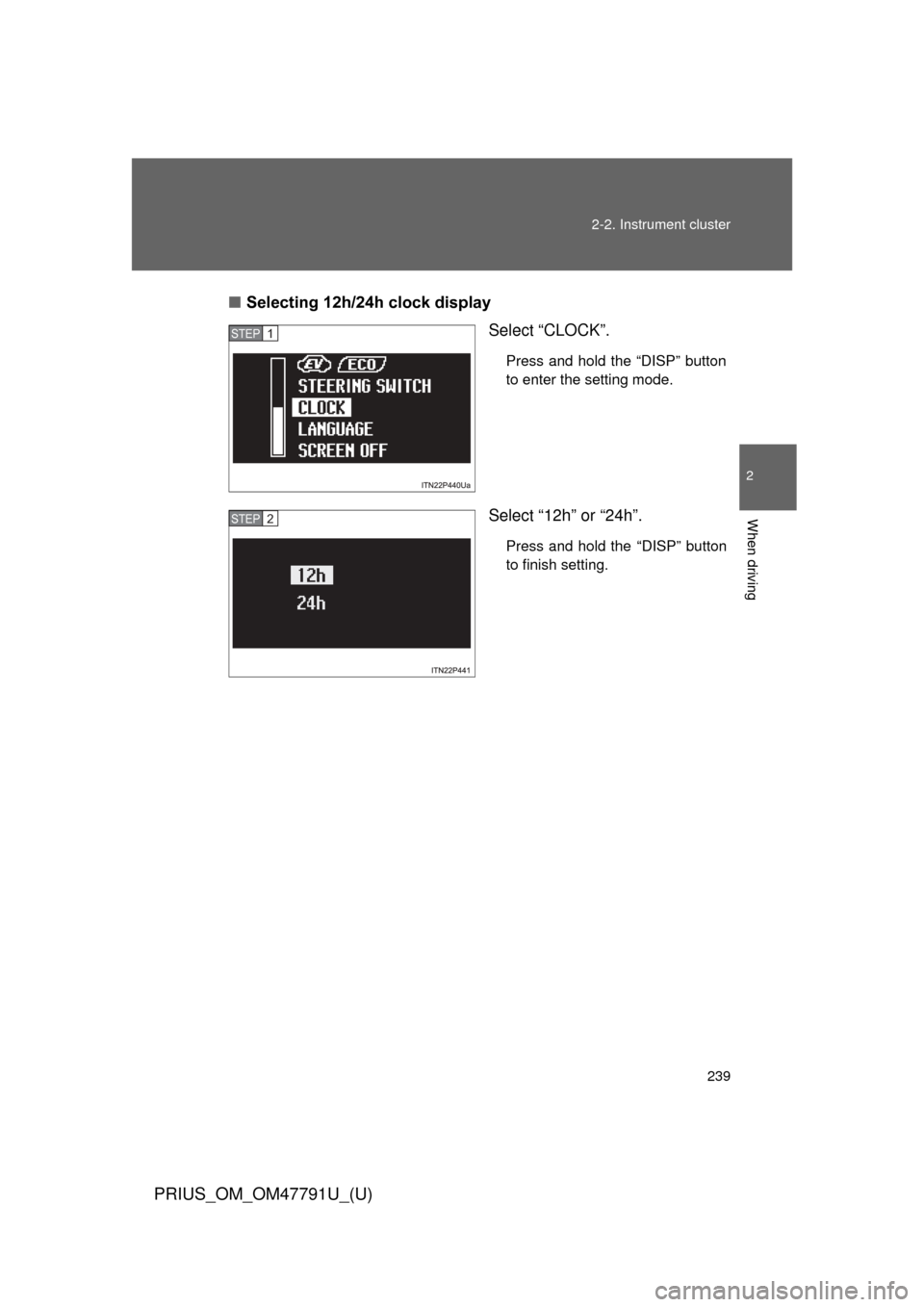
Selecting 12h/24h clock display
Select “CLOCK”.
Press and hold the “DISP” button
to enter the setting mode.
Select “12h” or “24h”.
Press and hold the “DISP” button
to finish setting.
STEP 1
STEP 2
Page 240 of 640
240 2-2. Instrument cluster
PRIUS_OM_OM47791U_(U)
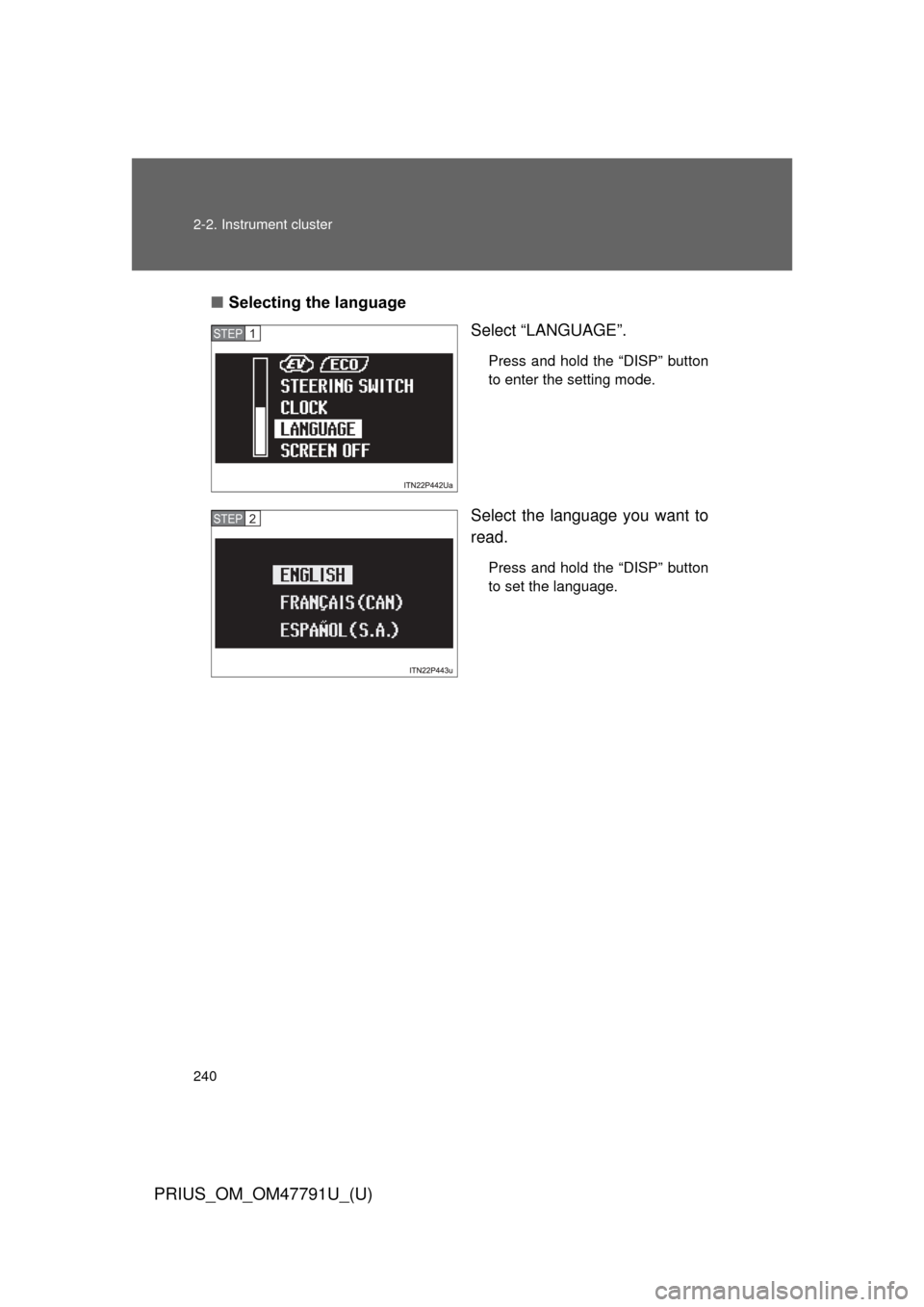
■Selecting the language
Select “LANGUAGE”.
Press and hold the “DISP” button
to enter the setting mode.
Select the language you want to
read.
Press and hold the “DISP” button
to set the language.
STEP 1
STEP 2