display TOYOTA PRIUS C 2020 Owner's Manual
[x] Cancel search | Manufacturer: TOYOTA, Model Year: 2020, Model line: PRIUS C, Model: TOYOTA PRIUS C 2020Pages: 600, PDF Size: 12.02 MB
Page 111 of 600
1112. Instrument cluster
2
Instrument cluster
PRIUS c_U
WARNING
■Eco score
Eco score should be used as a guide only. Always drive safely i n accor-
dance with road and traffic conditions.
■ The information display at low temperatures
Allow the interior of the vehicle to warm up before using the liquid crystal
information display. At extremely low temperatures, the display monitor may
respond slowly, and display changes may be delayed.
For example, there is a lag between the driver’s shifting and t he new gear
number appearing on the display. This lag could cause the drive r to down-
shift again, causing rapid and excessive engine braking and pos sibly an
accident resulting in death or injury.
■ Cautions during setting up the display
As the hybrid system needs to be running during setting up the display,
ensure that the vehicle is parked in a place with adequate vent ilation. In a
closed area such as a garage, exhaust gases including harmful c arbon
monoxide (CO) may collect and enter the vehicle. This may lead to death or
a serious health hazard.
NOTICE
■ During setting up the display
To prevent 12-volt battery discharge, ensure that the hybrid sy stem is oper-
ating while setting up the display features.
Page 112 of 600
1122. Instrument cluster
PRIUS c_U
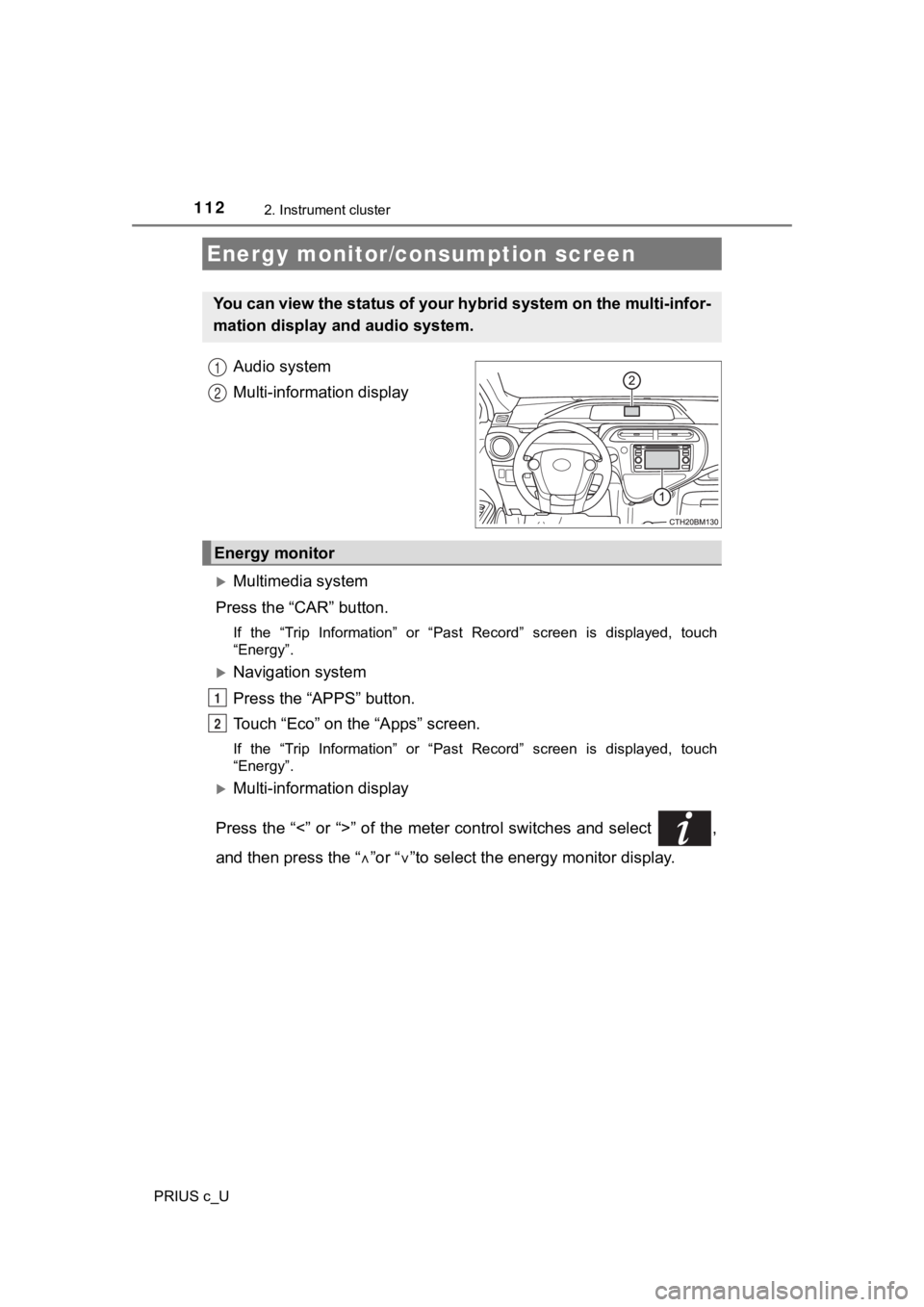
Audio system
Multi-information display
Multimedia system
Press the “CAR” button.
If the “Trip Information” or “Past Record” screen is displayed, touch
“Energy”.
Navigation system
Press the “APPS” button.
Touch “Eco” on the “Apps” screen.
If the “Trip Information” or “Past Record” screen is displayed, touch
“Energy”.
Multi-information display
Press the “<” or “>” of the meter control switches and select ,
and then press the “ ”or “ ”to select the energy monitor display.
Energy monitor/consumption screen
You can view the status of your hybrid system on the multi-info r-
mation display and audio system.
1
2
Energy monitor
1
2
Page 113 of 600
1132. Instrument cluster
2
Instrument cluster
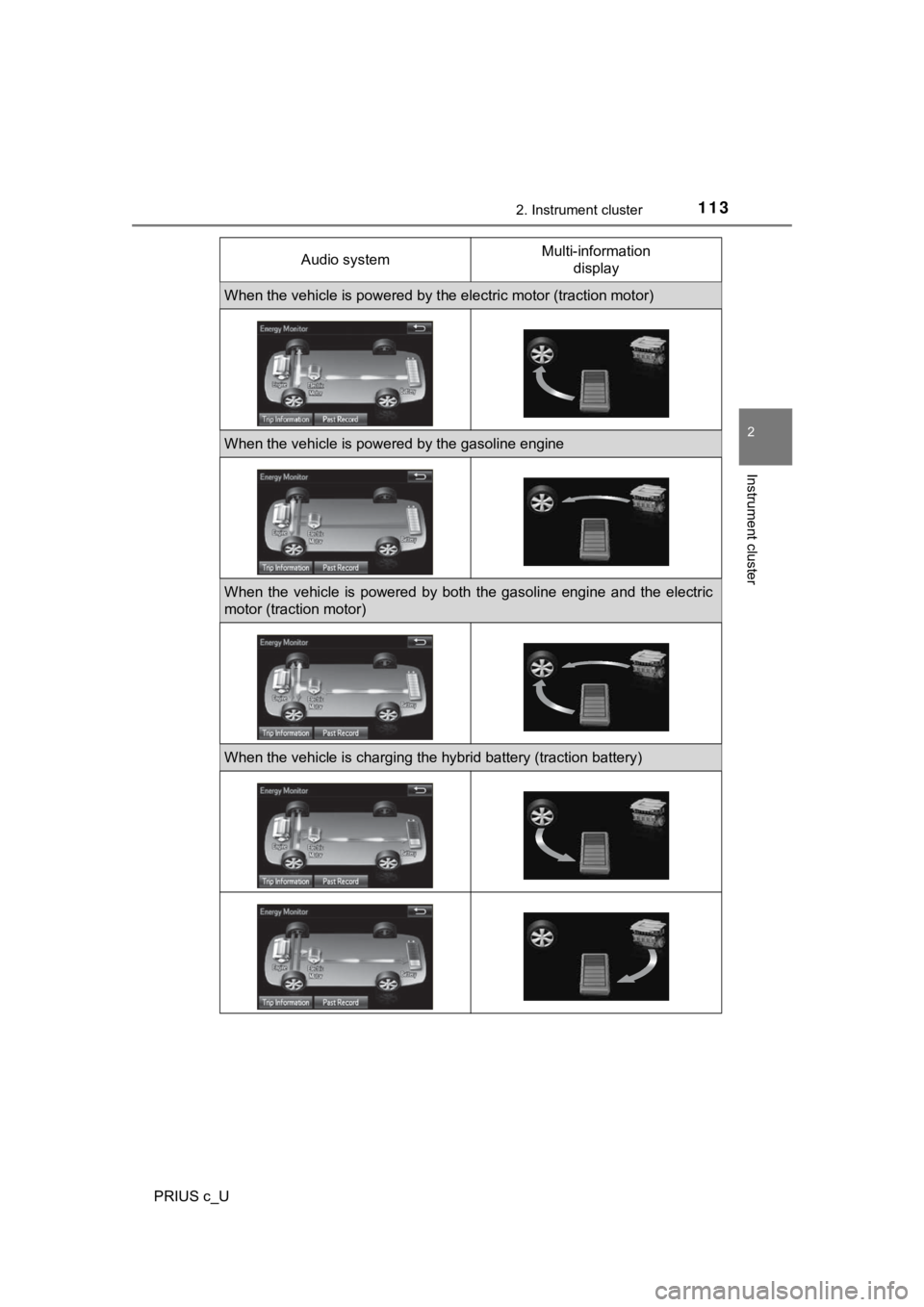
PRIUS c_UAudio system
Multi-information
display
When the vehicle is powered by t he electric motor (traction motor)
When the vehicle is powered by the gasoline engine
When the vehicle is powered by both the gasoline engine and the electric
motor (traction motor)
When the vehicle is charging the hybrid battery (traction batte ry)
Page 114 of 600
1142. Instrument cluster
PRIUS c_U
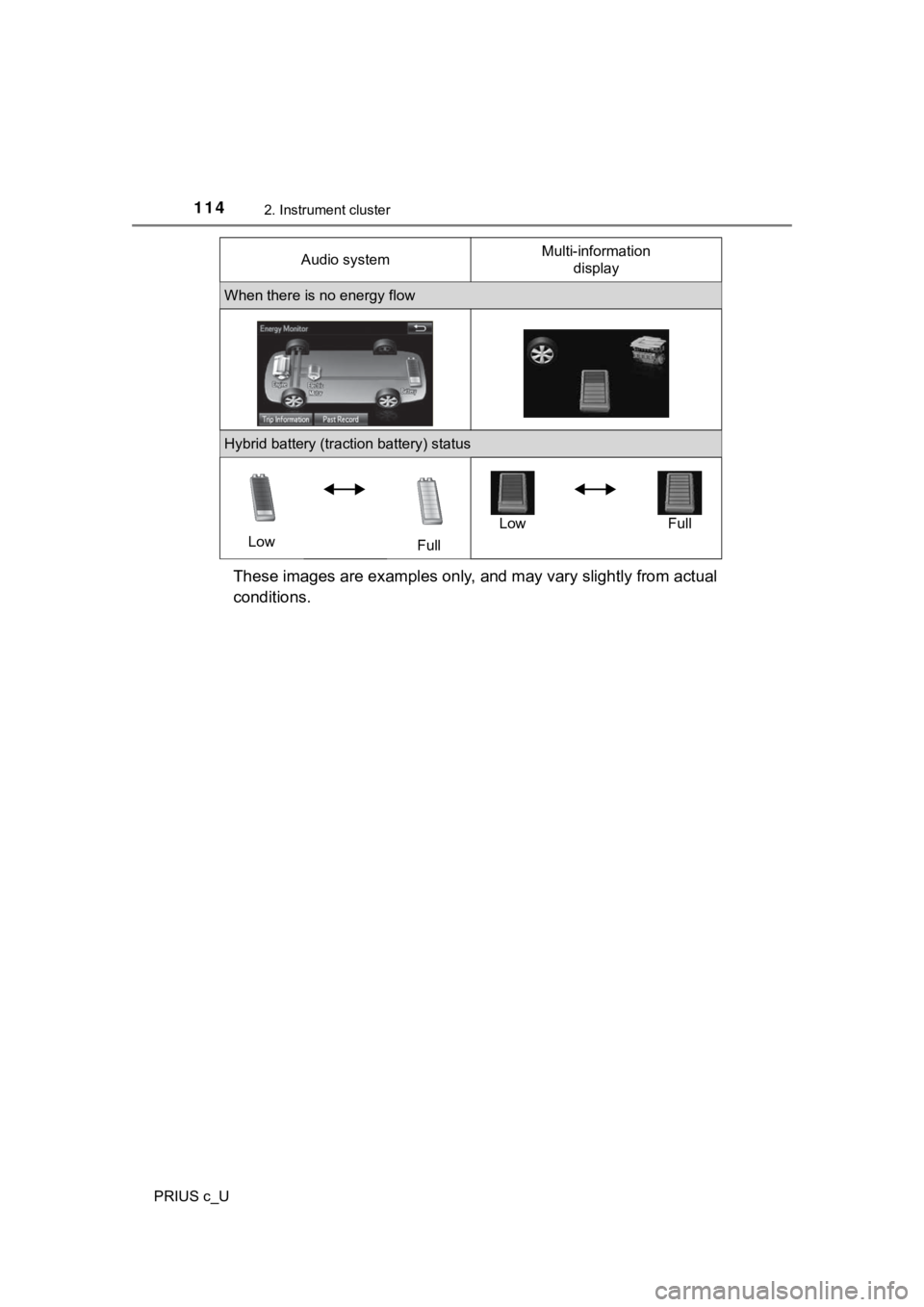
These images are examples only, and may vary slightly from actual
conditions.
When there is no energy flow
Hybrid battery (traction battery) status
Low FullLow Full
Audio system
Multi-information
display
Page 115 of 600
1152. Instrument cluster
2
Instrument cluster
PRIUS c_U■
Trip information
Multimedia system
Press the “CAR” button. ( P. 112)
If the “Energy Monitor” or “Past Record” screen is displayed, touch “Trip
Information”.
Navigation system
Press the “APPS” button. ( P. 1 1 2 )
Touch “Eco” on the “Apps” screen.
If the “Energy Monitor” or “Past Record” screen is displayed, touch “Trip
Information”.
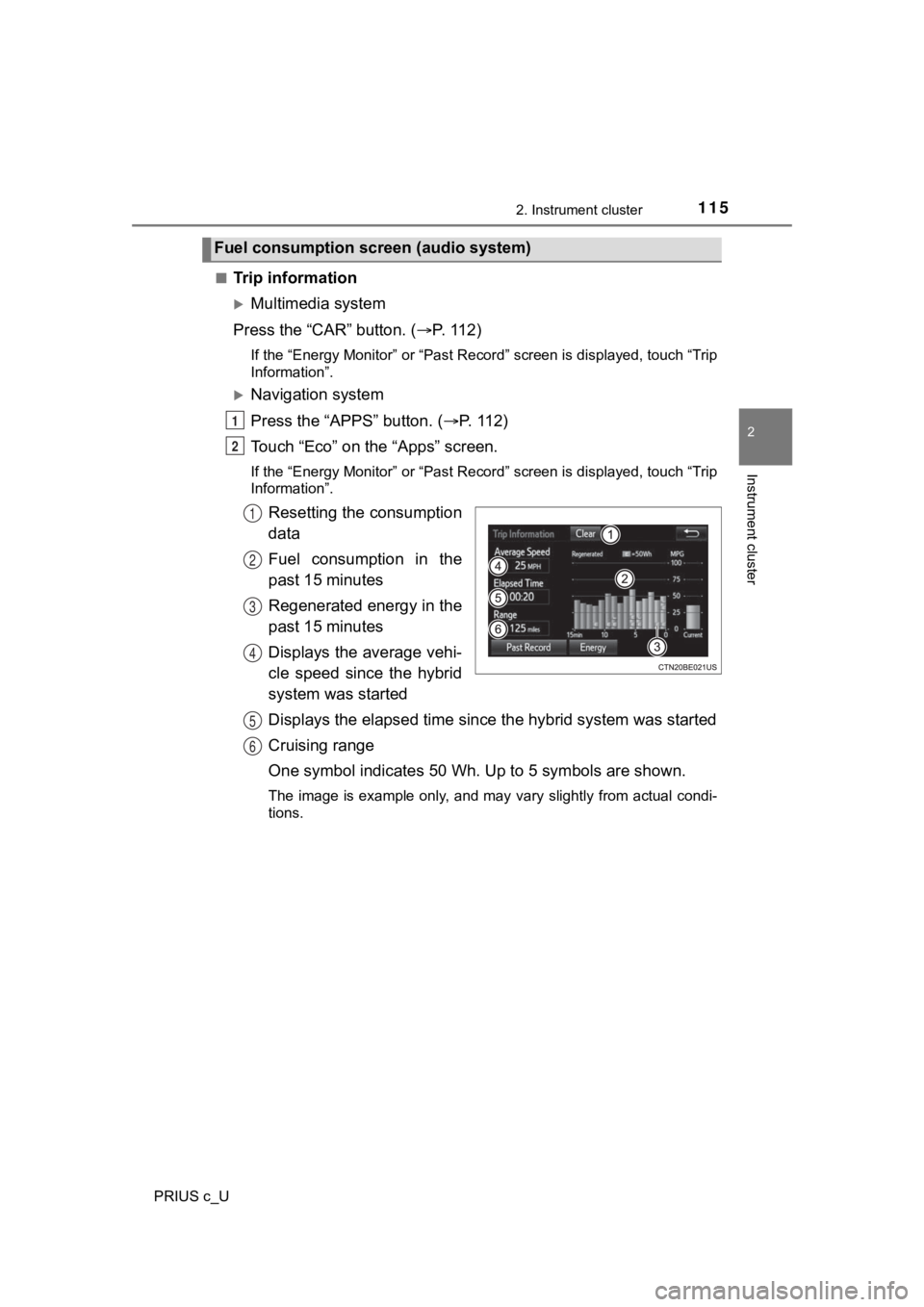
Resetting the consumption
data
Fuel consumption in the
past 15 minutes
Regenerated energy in the
past 15 minutes
Displays the average vehi-
cle speed since the hybrid
system was started
Displays the elapsed time since the hybrid system was started
Cruising range
One symbol indicates 50 Wh. Up to 5 symbols are shown.
The image is example only, and may vary slightly from actual co ndi-
tions.
Fuel consumption screen (audio system)
1
2
1
2
3
4
5
6
Page 116 of 600
1162. Instrument cluster
PRIUS c_U■
Past record
Multimedia system
Press the “CAR” button. ( P. 112)
If the “Energy Monitor” or “Trip Information” screen is display ed, touch
“Past Record”.
Navigation system
Press the “APPS” button. ( P. 1 1 2 )
Touch “Eco” on the “Apps” screen.
If the “Energy Monitor” or “Trip Information” screen is display ed, touch
“Past Record”.
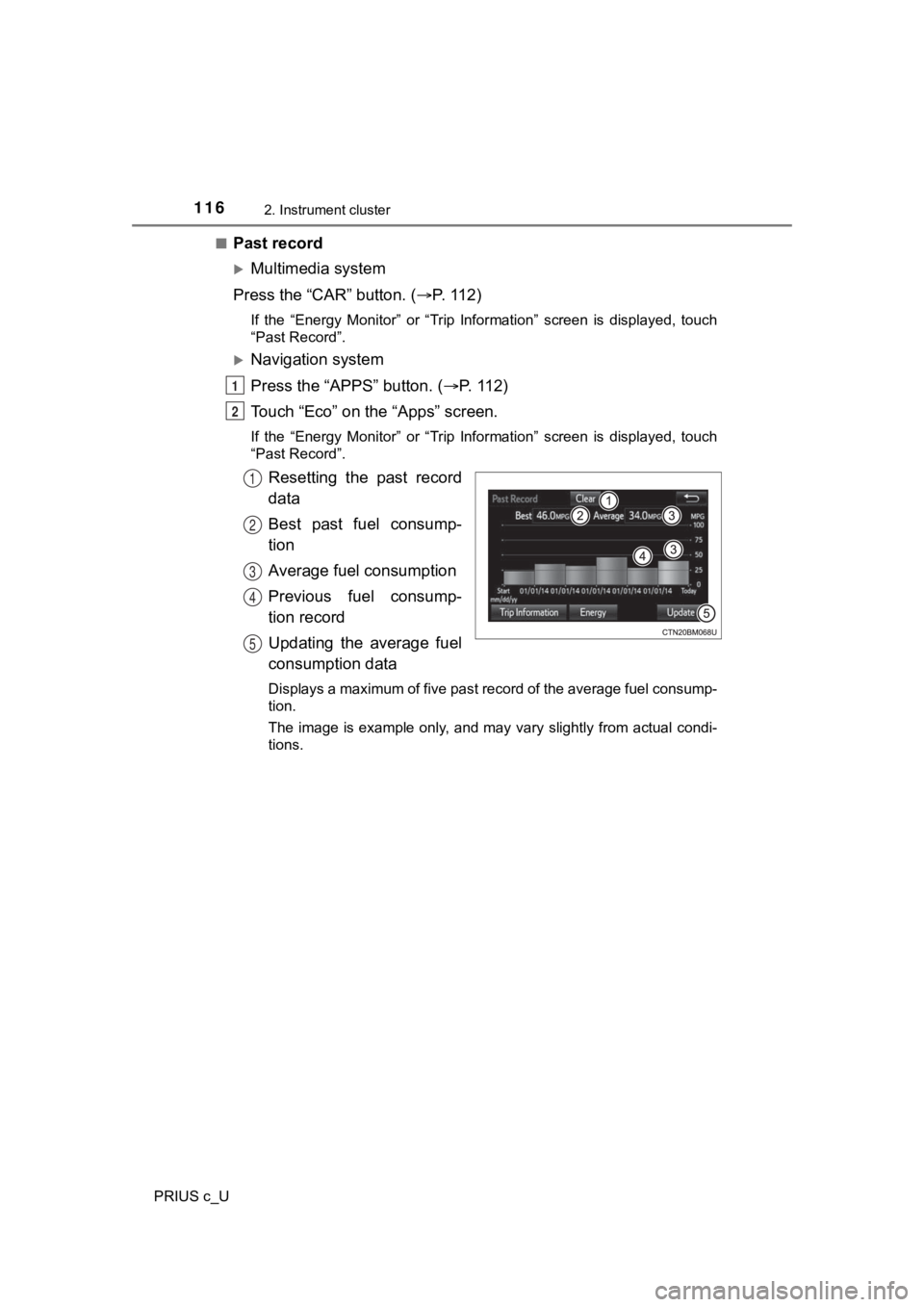
Resetting the past record
data
Best past fuel consump-
tion
Average fuel consumption
Previous fuel consump-
tion record
Updating the average fuel
consumption data
Displays a maximum of five past record of the average fuel cons ump-
tion.
The image is example only, and may vary slightly from actual co ndi-
tions.
1
2
1
2
3
4
5
Page 117 of 600

1172. Instrument cluster
2
Instrument cluster
PRIUS c_U
P. 1 0 5
■Remaining hybrid battery (traction battery) charge display
The charge amount of the hybrid battery (traction battery) is a utomatically
controlled by the hybrid system. For this reason, even if electricity is recov-
ered via the regenerative braking, or electricity is generated via the gasoline
engine, the displayed hybrid battery (traction battery) charge amount may not
reach the highest level (level 8). However, this does not indic ate a malfunc-
tion.
■ Resetting the consumption data (audio system)
Selecting “Clear” on the “Trip Information” screen will reset t he fuel consump-
tion and the regenerated energy for the past 15 minutes. Select ing “Clear” on
the “Past Record” screen will reset the past records and best past fuel con-
sumption. Selecting “Yes” on the following screen will confirm resetting of all
the data.
■ Updating the past record data (audio system)
Selecting “Update” on the “Past Record” screen will update the past record
data.
Fuel consumption screen (Multi-information display)
Page 142 of 600
1423-2. Opening, closing and locking the doors
PRIUS c_U■
Alarms and warning indicators
A combination of exterior and interior alarms as well as warnin g messages
shown on the multi-information display is used to prevent theft of the vehicle
and accidents resulting from erroneous operation. Take appropriate mea-
sures in response to any warning message on the multi-information display.
( P. 489)
The following table describes circumstances and correction procedures when
only alarms are sounded.
■ Battery-saving function
The battery-saving function will be activated in order to preve nt the electronic
key battery and the 12-volt battery from being discharged while the vehicle is
not in operation for a long time.
● In the following situations, the smart key system may take some time to
unlock the doors.
• The electronic key has been left in an area of approximately 6 ft. (2 m) of
the outside of the vehicle for 10 minutes or longer.
• The smart key system has not been used for 5 days or longer.
● If the smart key system has not been used for 14 days or longer , the doors
cannot be unlocked at any of the doors except the driver’s door . In this case,
take hold of the driver’s door handle, or use the wireless remote control or
the mechanical key, to unlock the doors.
■ Electronic key battery-saving function
When battery-saving mode is set, battery depletion is minimized by stopping
the electronic key from receiving radio waves.
AlarmSituationCorrection procedure
Exterior alarm
sounds once for 5
seconds An attempt was made to
lock the vehicle while a door
was open. Close all of the doors
and lock the doors
again.
Interior alarm
sounds continu-
ously The power switch was
turned to ACCESSORY
mode while the driver's door
was open (or the driver's
door was opened when the
power switch was in
ACCESSORY mode.) Turn the power switch
off and close the
driver’s door.
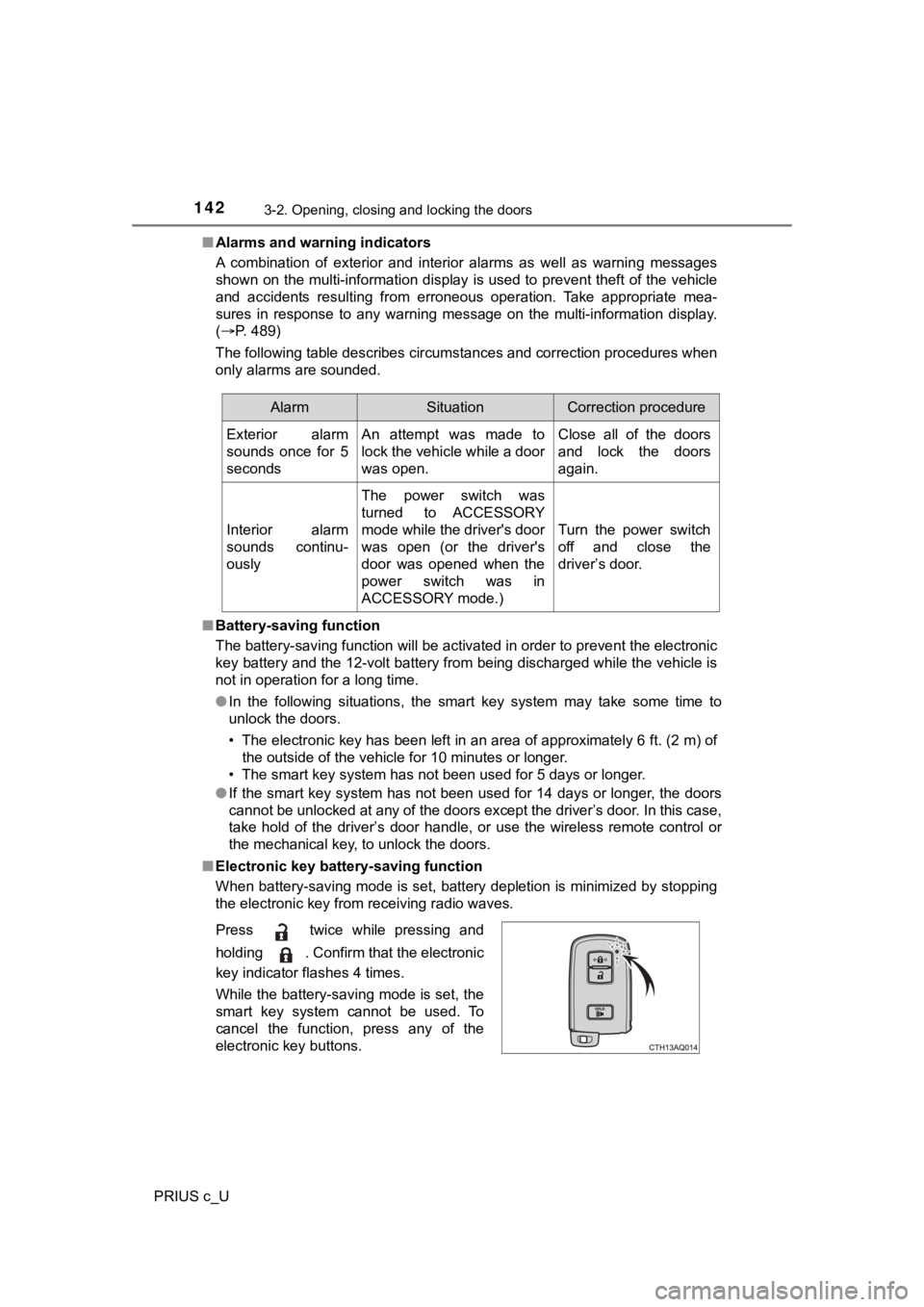
Press twice while pressing and
holding . Confirm that the electronic
key indicator flashes 4 times.
While the battery-saving mode is set, the
smart key system cannot be used. To
cancel the function, press any of the
electronic key buttons.
Page 168 of 600

1683-5. Opening and closing the windows
PRIUS c_U■
Sunshade
The sunshade can be opened and closed manually. However, the su nshade
will open automatically when the moon roof is opened.
■ When the moon roof does not close normally
Perform the following procedure:
●If the moon roof closes but then re-opens slightly
Stop the vehicle.
Press and hold the “CLOSE” switch.
*1
The moon roof will close, re-open and pause for approximately 1 0 sec-
onds.
*2 Then it will close again, tilt up and pause for approximately 1 sec-
ond. Finally, it will tilt down, open and close.
Check to make sure that the moon roof is completely closed and then
release the switch.
● If the moon roof tilts down but then tilts back up
Stop the vehicle.
Press and hold the “TILT” switch
*1 until the moon roof moves into the tilt up
position and stops.
Release the “TILT” switch once and then press and hold the “TIL T” switch
again.
*1
The moon roof will pause for approximately 10 seconds in the ti lt up posi-
tion.
*2 Then it will adjust slightly and pause for approximately 1 sec ond.
Finally, it will tilt down, open and close.
Check to make sure that the moon roof is completely closed and then
release the switch.
*1: If the switch is released at the incorrect time, the procedure will have to be
performed again from the beginning.
*2: If the switch is released after the above mentioned 10 second pause, auto-matic operation will be disabled. In that case, press and hold the “CLOSE”
or “TILT” switch, and the moon roof will tilt up and pause for approximately
1 second. Then it will tilt down, open and close. Check to make sure that
the moon roof is completely closed and then release the switch.
If the moon roof does not fully close even after performing the above proce-
dure correctly, have the vehicle inspected by your Toyota deale r.
■ Moon roof open reminder function
The buzzer sounds and a message is shown on the multi-informati on display
in the instrument cluster when the power switch is turned off a nd the driver's
door is opened with the moon roof open.
1
2
3
1
2
3
4
Page 173 of 600
1734-1. Before driving
4
Driving
PRIUS c_U
Make sure that the parking brake is set and shift the shift lever to D.
Gently depress the accelerator pedal.
Release the parking brake.
■ When starting off on a uphill
The hill-start assist control will activate. ( P. 265)
■ For fuel-efficient driving
Keep in mind that hybrid vehicles are similar to conventional vehicles, and it
is necessary to refrain from activities such as sudden accelera tion. (P. 271)
■ Driving in the rain
●Drive carefully when it is raining, because visibility will be reduced, the win-
dows may become fogged-up, and the road will be slippery.
● Drive carefully when it starts to rain, because the road surface will be espe-
cially slippery.
● Refrain from high speeds when driving on an expressway in the r ain,
because there may be a layer of water between the tires and the road sur-
face, preventing the steering and brakes from operating properl y.
■ Restraining the hybrid system o utput (Brake Override System)
● When the accelerator and brake pedals are depressed at the same time, the
hybrid system output may be restrained.
● A warning message is displayed on the multi-information display while the
system is operating. ( P. 497)
■ Restraining sudden start (Drive-Start Control)
● When the following unusual operation is performed, the hybrid s ystem out-
put may be restrained.
• When the shift lever is shifted (from R to D, D to R, N to R, P to D, or P to
R) with the accelerator pedal depressed, a warning message appears on
the multi-information display. (D includes B position) ( P. 497)
• When the accelerator pedal is depressed too much while the veh icle is in
reverse.
● While Drive-Start Control is being activated, your vehicle may have trouble
escaping from the mud or fresh snow. In such a case, deactivate TRAC
( P. 266) to cancel Drive-Start Control so that the vehicle may b ecome able
to escape from the mud or fresh snow.
Starting off on a steep uphill
1
2
3