air conditioning TOYOTA PRIUS PRIME 2021 (in English) User Guide
[x] Cancel search | Manufacturer: TOYOTA, Model Year: 2021, Model line: PRIUS PRIME, Model: TOYOTA PRIUS PRIME 2021Pages: 808, PDF Size: 74.05 MB
Page 114 of 808
114
PRIUS PRIME_OM_OM47D71U_(U)
2-2. Charging
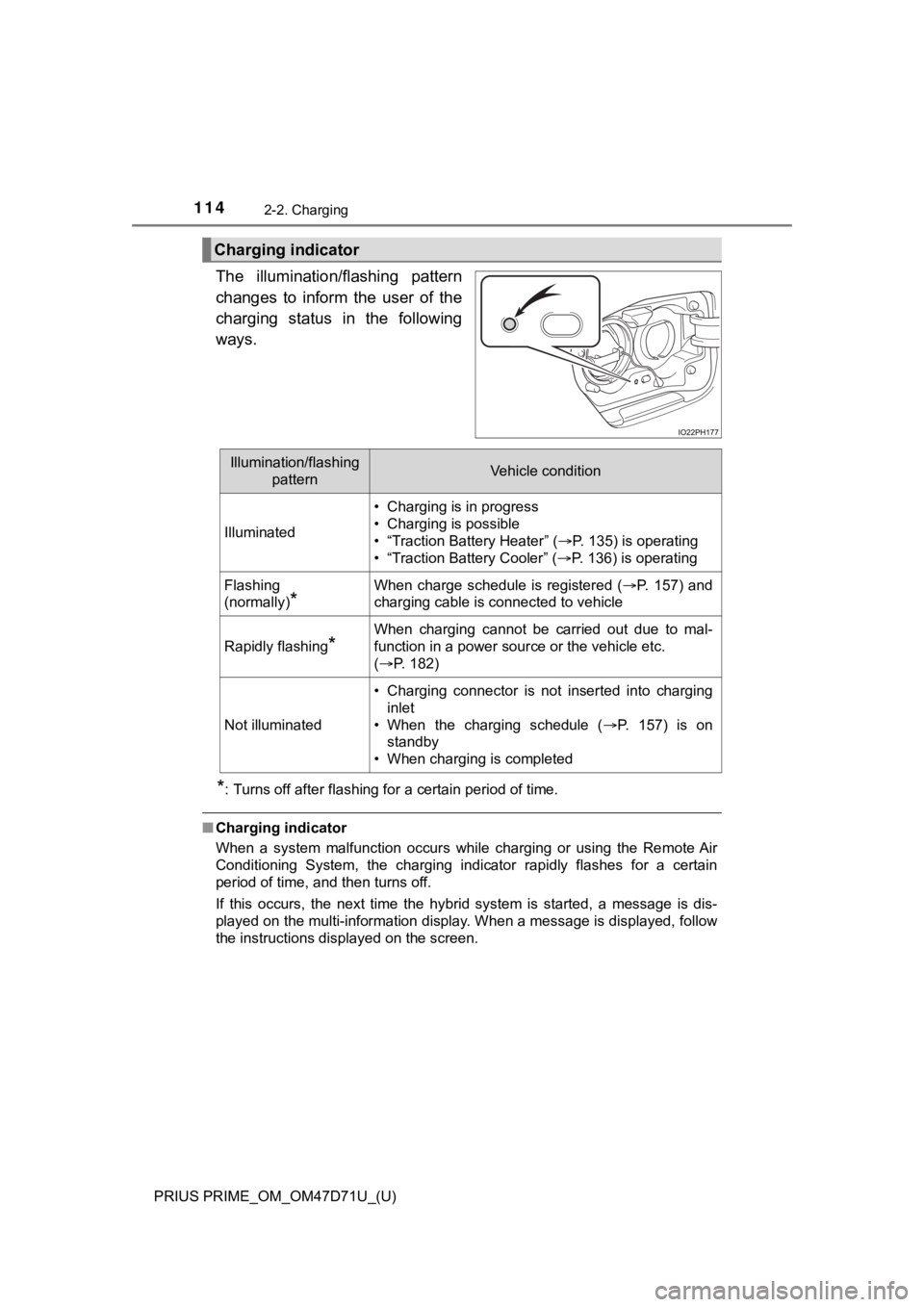
The illumination/flashing pattern
changes to inform the user of the
charging status in the following
ways.
*: Turns off after flashing for a certain period of time.
■Charging indicator
When a system malfunction occurs while charging or using the Remote Air
Conditioning System, the charging indicator rapidly flashes for a certain
period of time, and then turns off.
If this occurs, the next time the hybrid system is started, a message is dis-
played on the multi-information display. When a message is displayed, follow
the instructions displayed on the screen.
Charging indicator
Illumination/flashing
patternVehicle condition
Illuminated
• Charging is in progress
• Charging is possible
• “Traction Battery Heater” (P. 135) is operating
• “Traction Battery Cooler” (P. 136) is operating
Flashing
(normally)
*
When charge schedule is registered (P. 157) and
charging cable is connected to vehicle
Rapidly flashing*
When charging cannot be carried out due to mal-
function in a power source or the vehicle etc.
(P. 182)
Not illuminated
• Charging connector is not inserted into charging
inlet
• When the charging schedule (P. 157) is on
standby
• When charging is completed
Page 136 of 808
136
PRIUS PRIME_OM_OM47D71U_(U)
2-2. Charging
■Hybrid battery (traction battery) warming control (Alaska and
Canada only)
This control operates after the charging cable remains connected to
the vehicle for 3 days and “Traction Battery Heater” automatically
stops. It automatically insulates the hybrid battery (traction battery)
in extremely low temperatures.
●This control stops 31 days after the charging cable is connected,
even if it is still connected to the vehicle.
●When this control operates, charging schedule settings are
ignored and charging starts.
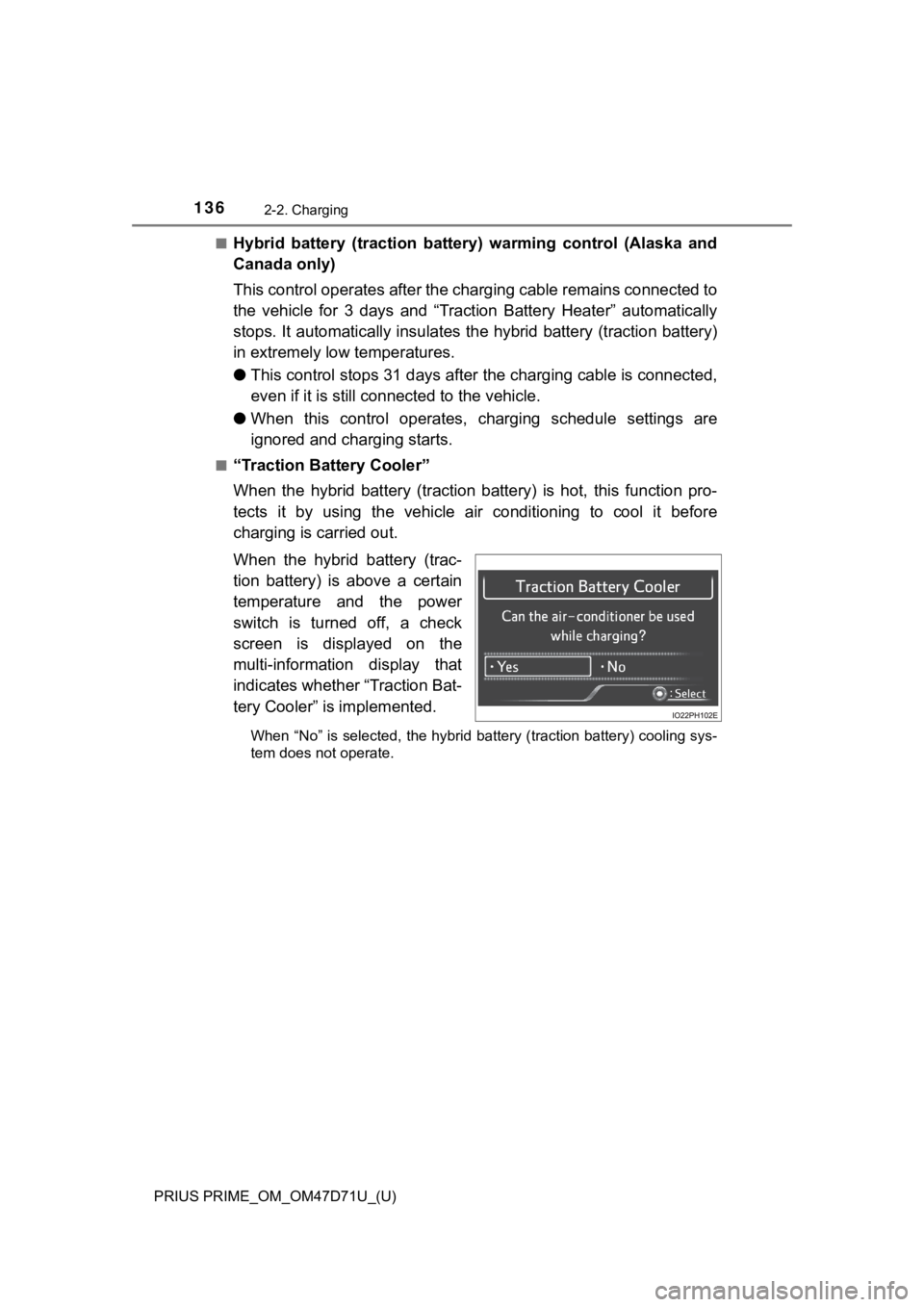
■“Traction Battery Cooler”
When the hybrid battery (traction battery) is hot, this function pro-
tects it by using the vehicle air conditioning to cool it before
charging is carried out.
When the hybrid battery (trac-
tion battery) is above a certain
temperature and the power
switch is turned off, a check
screen is displayed on the
multi-information display that
indicates whether “Traction Bat-
tery Cooler” is implemented.
When “No” is selected, the hybrid battery (traction battery) cooling sys-
tem does not operate.
Page 138 of 808

138
PRIUS PRIME_OM_OM47D71U_(U)
2-2. Charging
■“Traction Battery Cooler”
●When the hybrid battery (traction battery) is above a certain temperature
and the power switch is turned off, a check screen is displayed on the multi-
information display that indicates whether “Traction Battery Cooler” is imple-
mented. Approximately 5 minutes after selecting “Yes” on this screen, sys-
tem operation becomes possible.
●When charging starts, “Traction Battery Cooler” only operates if the hybrid
battery (traction battery) temperature is hot.
●The charging indicator is illuminated while “Traction Battery Cooler” is on
standby or operating.
●“Traction Battery Cooler” is implemented for a maximum of approximately
30 minutes. However, when the “Departure” time is set (P. 157) and there
is not sufficient time between the current time and the time that charging will
complete, “Traction Battery Cooler” operation time may become shorter.
●When there is a small amount of remaining charge in the hybrid battery
(traction battery), even if the hybrid battery (traction battery) is hot, “Traction
Battery Cooler” may not be implemented.
●When the following operations are performed while “Traction Battery Cooler”
is operating, the hybrid battery (traction battery) cooling operation stops.
• A door is opened
• The hood is opened
• The power switch is turned to any mode other than off
• The shift position is changed to any position other than P
• The Remote Air Conditioning System is operated (P. 5 3 5 )
• “Charge Now” is implemented (P. 1 5 8 )
• The amount of remaining charge in the hybrid battery (traction battery) is
below a certain amount
●When the power switch is turned off, a check screen is displayed on the
multi-information display that indicates whether “Traction Battery Cooler” is
implemented. This check screen can be turned on and off in the “Meter Cus-
tomize” settings on the multi-information display (P. 248). However, when
the check screen is set to “Off”, “Traction Battery Cooler” is no longer oper-
ates.
●“Traction Battery Cooler” uses the power of the hybrid battery (traction bat-
tery) and external power source.
• While “Traction Battery Cooler” is operating, the amount of the remaining
charge of the hybrid battery (traction battery) increases and decreases in
a certain range, and does not increase as in normal charging.
• The operation of “Traction Battery Cooler” is recognized as charging by a
charger. The charger that calculates the fee according to charging time
causes a charging fee.
Page 139 of 808
139
PRIUS PRIME_OM_OM47D71U_(U)
2-2. Charging
2
Plug-in hybrid system
Charging tips
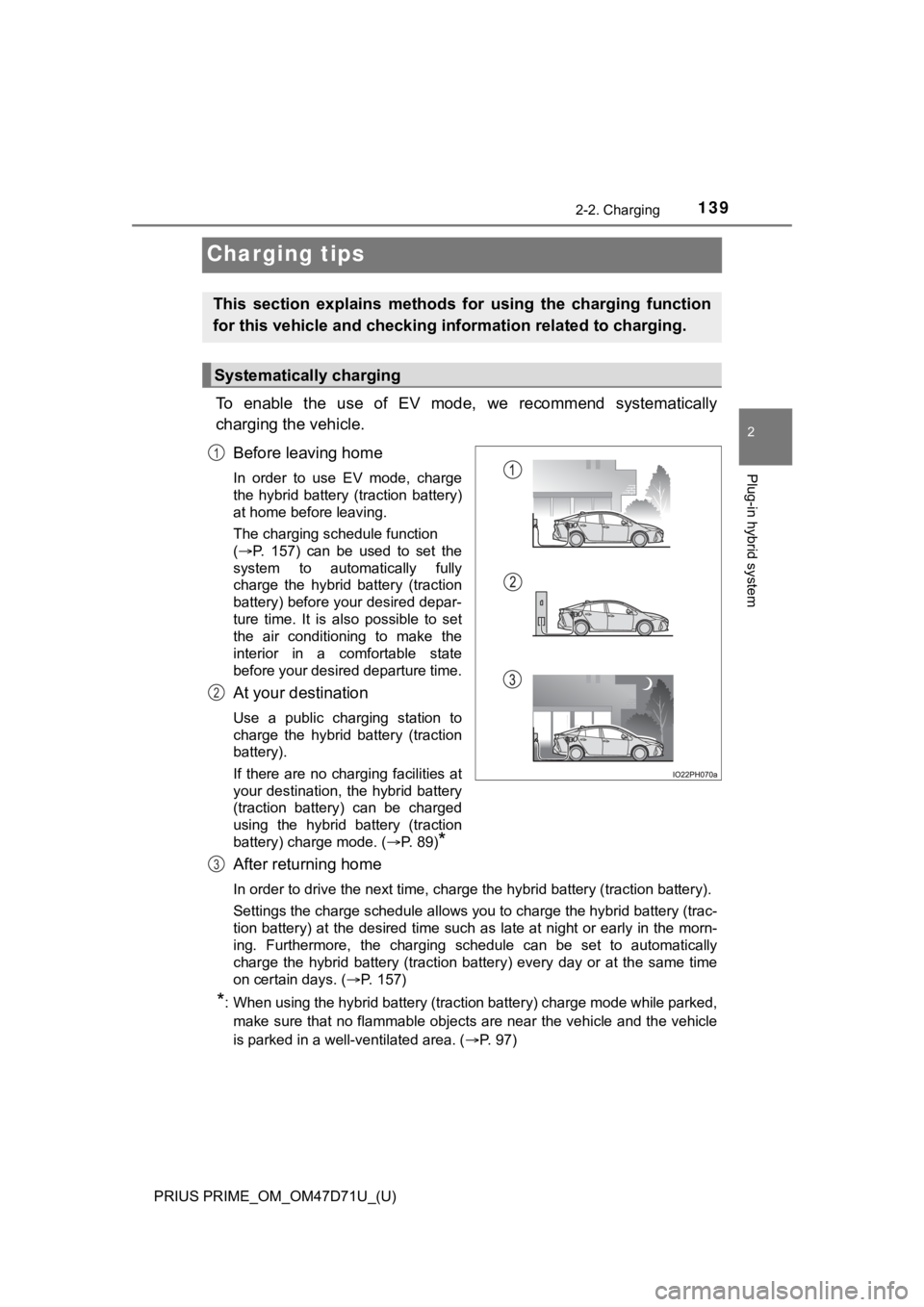
To enable the use of EV mode, we recommend systematically
charging the vehicle.
Before leaving home
In order to use EV mode, charge
the hybrid battery (traction battery)
at home before leaving.
The charging schedule function
(P. 157) can be used to set the
system to automatically fully
charge the hybrid battery (traction
battery) before your desired depar-
ture time. It is also possible to set
the air conditioning to make the
interior in a comfortable state
before your desired departure time.
At your destination
Use a public charging station to
charge the hybrid battery (traction
battery).
If there are no charging facilities at
your destination, the hybrid battery
(traction battery) can be charged
using the hybrid battery (traction
battery) charge mode. (P. 89)
*
After returning home
In order to drive the next time, charge the hybrid battery (traction battery).
Settings the charge schedule allows you to charge the hybrid battery (trac-
tion battery) at the desired time such as late at night or early in the morn-
ing. Furthermore, the charging schedule can be set to automatically
charge the hybrid battery (traction battery) every day or at the same time
on certain days. (P. 157)
*: When using the hybrid battery (traction battery) charge mode while parked,
make sure that no flammable objects are near the vehicle and the vehicle
is parked in a well-ventilated area. (P. 97)
This section explains methods for using the charging function
for this vehicle and checking information related to charging.
Systematically charging
1
2
3
Page 157 of 808
157
PRIUS PRIME_OM_OM47D71U_(U)
2-2. Charging
2
Plug-in hybrid system
Using the charging schedule function
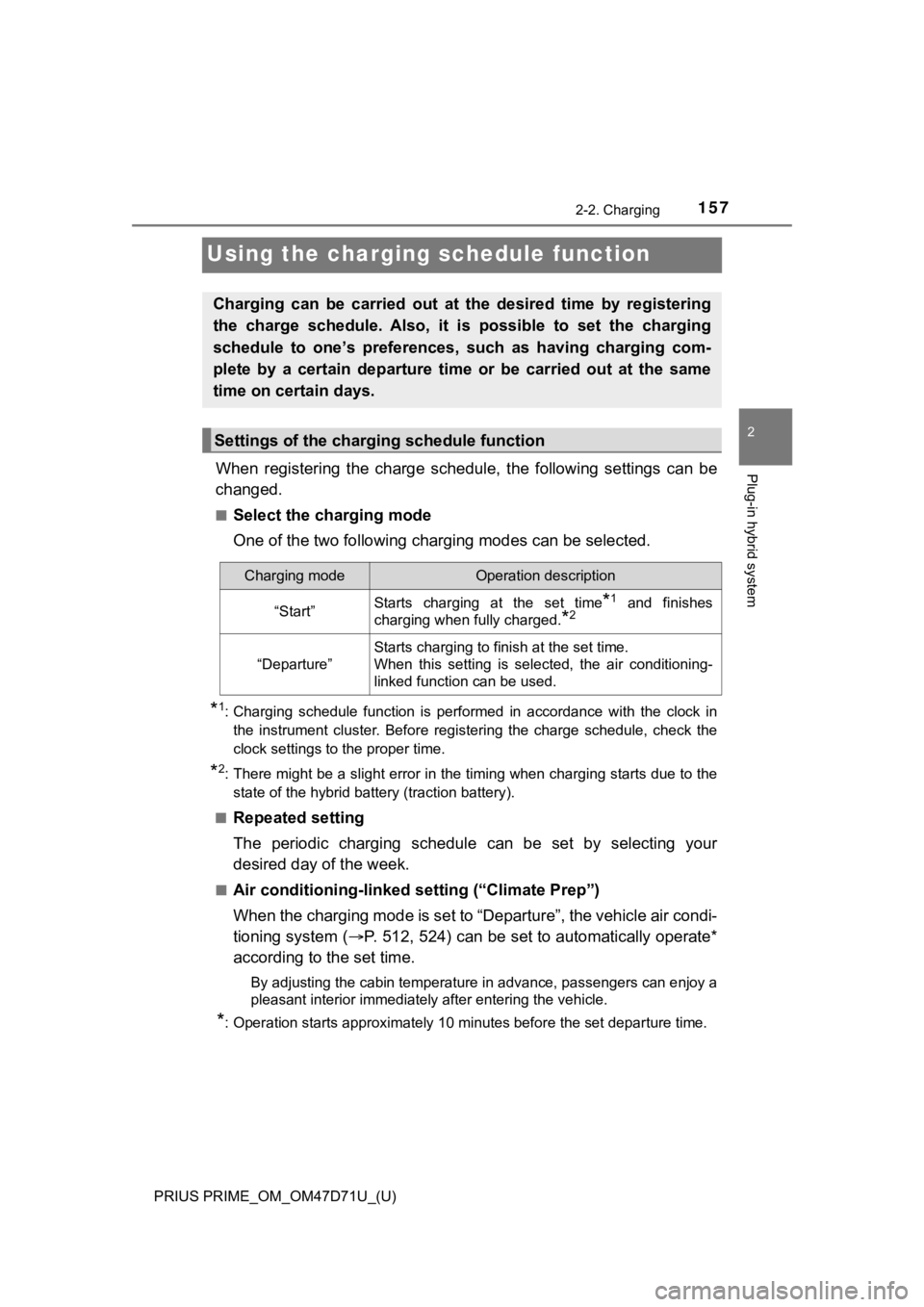
When registering the charge schedule, the following settings can be
changed.
■Select the charging mode
One of the two following charging modes can be selected.
*1: Charging schedule function is performed in accordance with the clock in
the instrument cluster. Before registering the charge schedule, check the
clock settings to the proper time.
*2: There might be a slight error in the timing when charging starts due to the
state of the hybrid battery (traction battery).
■
Repeated setting
The periodic charging schedule can be set by selecting your
desired day of the week.
■Air conditioning-linked setting (“Climate Prep”)
When the charging mode is set to “Departure”, the vehicle air condi-
tioning system (P. 512, 524) can be set to automatically operate*
according to the set time.
By adjusting the cabin temperature in advance, passengers can enjoy a
pleasant interior immediately after entering the vehicle.
*: Operation starts approximately 10 minutes before the set departure time.
Charging can be carried out at the desired time by registering
the charge schedule. Also, it is possible to set the charging
schedule to one’s preferences, such as having charging com-
plete by a certain departure time or be carried out at the same
time on certain days.
Settings of the charging schedule function
Charging modeOperation description
“Start”Starts charging at the set time*1 and finishes
charging when fully charged.
*2
“Departure”
Starts charging to finish at the set time.
When this setting is selected, the air conditioning-
linked function can be used.
Page 159 of 808
PRIUS PRIME_OM_OM47D71U_(U)
1592-2. Charging
2
Plug-in hybrid system
■Charging schedule
●The charge schedule cannot be set while driving.
●A maximum of 15 charge schedules can be registered.
■To make sure that the charging schedule function operates correctly
Check the following items.
●Adjust the clock to the correct time (P. 197)
●The calendar is set to the correct date (P. 199)
●Check that the power switch is turned off
●After registering the charge schedule, connect the charging cable
The charging start time is determined based on the charge schedule at the
time that the charging cable was connected.
●After connecting the charging cable, check that the charging indicator
flashes (P. 114)
●Do not use an outlet that has a power cut off function (including a timer func-
tion)
Use an outlet that constantly supplies electricity. For outlets where the
power is cut off due to a timer function, etc., charging may not be carried
out according to plan if the power is cut off during the set time.
■When the charging cable remains connected to the vehicle
Even if multiple consecutive charge schedules are registered, the next
charge will not be carried out according to the charging schedule until the
charging cable is removed and reconnected after charging completes. Also,
when the hybrid battery (traction battery) is fully charged, charging according
to the charging schedule will not be carried out.
■“Climate Prep”
●When the air conditioning-linked setting is turned on, the air conditioning
operates until the set departure time. Therefore, the air conditioning will con-
sume electricity and charging may not complete by the set departure time.
●If the hybrid battery (traction battery) is fully charged, charging will not be
carried out, even if the charge schedule is set. However, if “Climate Prep” is
turned on, the air conditioning will operate only once when it nears the time
set in “Departure”. If this occurs, the air conditioning will consume electricity
and the remaining charge of the hybrid battery (traction battery) when
departing may be decreased.
●When the doors are unlocked, the air conditioning system does not operate.
■Smartphone-linked operation (vehicles with 11.6-inch display)
After applying to Entune App Suite, it is possible to use the smartphone appli-
cation to change charging schedule settings.
For details about Entune App Suite, refer to http://www.toyota.com/entune/.
Page 160 of 808

160
PRIUS PRIME_OM_OM47D71U_(U)
2-2. Charging
■When charging schedules are ignored
When the following operations are performed while the charging schedule is
on standby, charging schedule is temporarily canceled and charging is
started.
●When the Remote Air Conditioning System (P. 535) is operated
●When turning “Charge Now” on (P. 166, 175)
●When an operation that temporarily cancels charging using the charging
schedule is performed (P. 149)
■Effects of outside temperature
When the charging mode is set to “Departure”, charging schedule may be
ignored due to the outside temperature and charging may start.
■“Traction Battery Cooler” (P. 136)
When charging is carried out using the charging schedule, the hybrid battery
(traction battery) cooling function may operate according to the temperature
of the hybrid battery (traction battery).
●When the charging mode is set to “Start”, cooling starts at the set charging
start time.
●When the charging mode is set to “Departure”, cooling starts approximately
30 minutes before the charging start time. However, if there is no time to fin-
ish charging by the charging schedule, the hybrid battery (traction battery)
cooling time may be shortened and “Traction Battery Cooler” may not oper-
ate.
Page 163 of 808
PRIUS PRIME_OM_OM47D71U_(U)
1632-2. Charging
2
Plug-in hybrid system
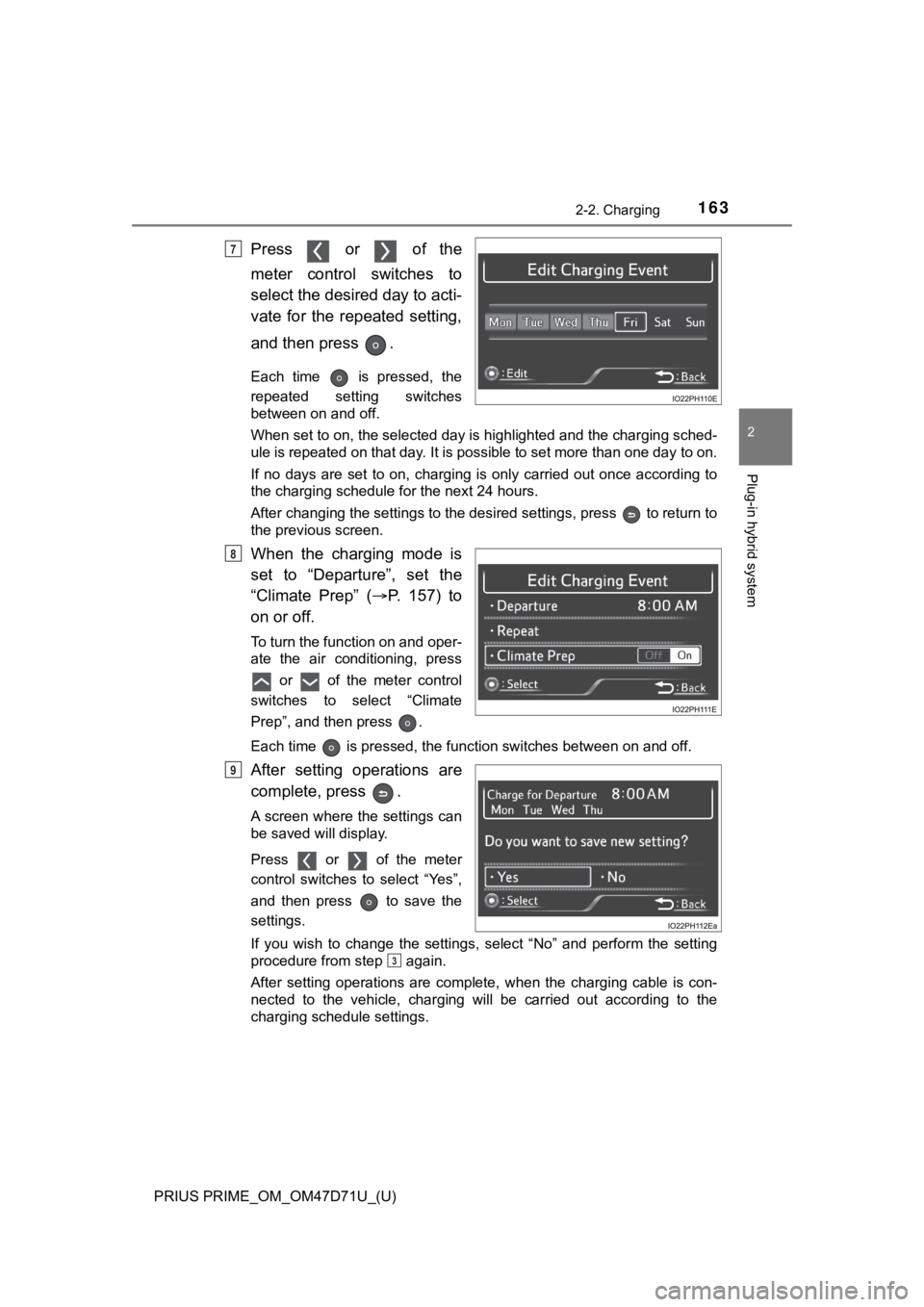
Press or of the
meter control switches to
select the desired day to acti-
vate for the repeated setting,
and then press .
Each time is pressed, the
repeated setting switches
between on and off.
When set to on, the selected day is highlighted and the charging sched-
ule is repeated on that day. It is possible to set more than one day to on.
If no days are set to on, charging is only carried out once according to
the charging schedule for the next 24 hours.
After changing the settings to the desired settings, press to return to
the previous screen.
When the charging mode is
set to “Departure”, set the
“Climate Prep” (P. 1 5 7 ) t o
on or off.
To turn the function on and oper-
ate the air conditioning, press
or of the meter control
switches to select “Climate
Prep”, and then press .
Each time is pressed, the function switches between on and off.
After setting operations are
complete, press .
A screen where the settings can
be saved will display.
Press or of the meter
control switches to select “Yes”,
and then press to save the
settings.
If you wish to change the settings, select “No” and perform the setting
procedure from step again.
After setting operations are complete, when the charging cable is con-
nected to the vehicle, charging will be carried out according to the
charging schedule settings.
7
8
9
3
Page 173 of 808
PRIUS PRIME_OM_OM47D71U_(U)
1732-2. Charging
2
Plug-in hybrid system
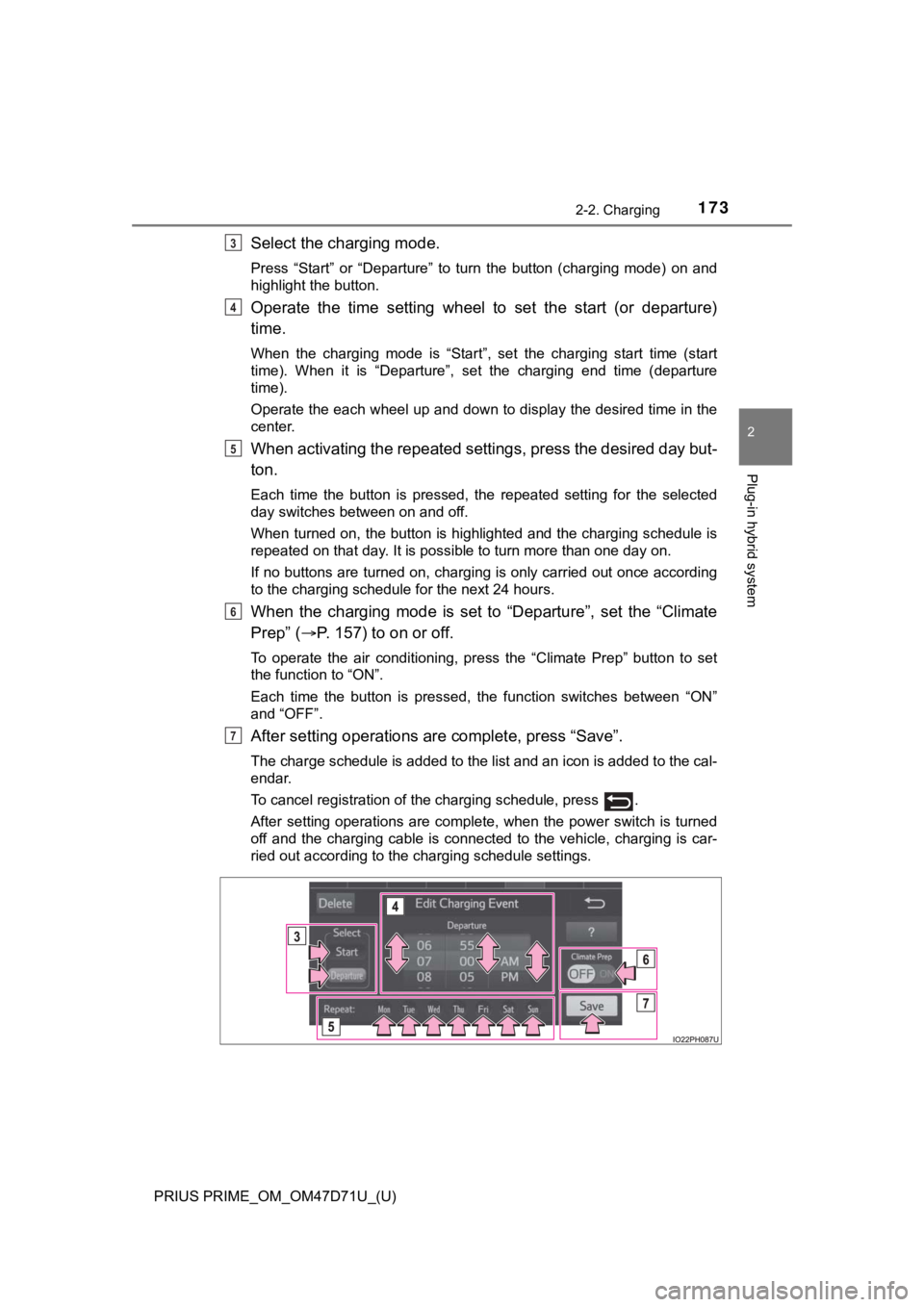
Select the charging mode.
Press “Start” or “Departure” to turn the button (charging mode) on and
highlight the button.
Operate the time setting wheel to set the start (or departure)
time.
When the charging mode is “Start”, set the charging start time (start
time). When it is “Departure”, set the charging end time (departure
time).
Operate the each wheel up and down to display the desired time in the
center.
When activating the repeated settings, press the desired day but-
ton.
Each time the button is pressed, the repeated setting for the selected
day switches between on and off.
When turned on, the button is highlighted and the charging schedule is
repeated on that day. It is possible to turn more than one day on.
If no buttons are turned on, charging is only carried out once according
to the charging schedule for the next 24 hours.
When the charging mode is set to “Departure”, set the “Climate
Prep” (P. 157) to on or off.
To operate the air conditioning, press the “Climate Prep” button to set
the function to “ON”.
Each time the button is pressed, the function switches between “ON”
and “OFF”.
After setting operations are complete, press “Save”.
The charge schedule is added to the list and an icon is added to the cal-
endar.
To cancel registration of the charging schedule, press .
After setting operations are complete, when the power switch is turned
off and the charging cable is connected to the vehicle, charging is car-
ried out according to the charging schedule settings.
3
4
5
6
7
Page 177 of 808
PRIUS PRIME_OM_OM47D71U_(U)
1772-2. Charging
2
Plug-in hybrid system
■Changing “Next Charging Event”*
*
: When “Charge Now” is turned on etc., the registered “Next Charging
Event” cannot be changed.
Display the “Charge Schedule” screen. (P. 1 7 0 )
“Next Charging Event” is displayed on the “Charge Schedule” screen
with an orange icon.
To change “Next Charging Event”, press the orange .*
The settings screen will display on the bottom of the screen.
*: Icons are displayed differently according to the type of charging mode.
(P. 172)
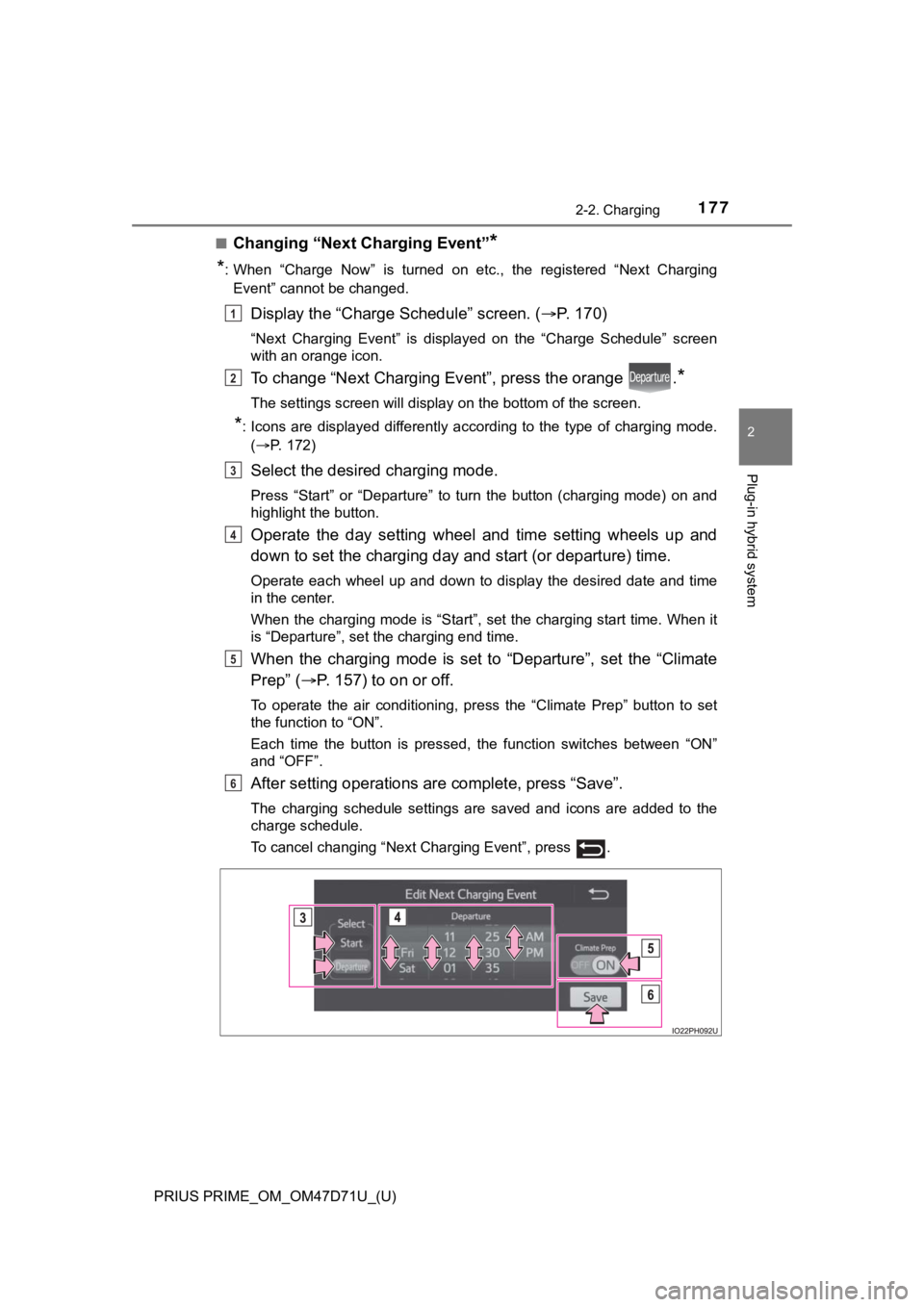
Select the desired charging mode.
Press “Start” or “Departure” to turn the button (charging mode) on and
highlight the button.
Operate the day setting wheel and time setting wheels up and
down to set the charging day and start (or departure) time.
Operate each wheel up and down to display the desired date and time
in the center.
When the charging mode is “Start”, set the charging start time. When it
is “Departure”, set the charging end time.
When the charging mode is set to “Departure”, set the “Climate
Prep” (P. 157) to on or off.
To operate the air conditioning, press the “Climate Prep” button to set
the function to “ON”.
Each time the button is pressed, the function switches between “ON”
and “OFF”.
After setting operations are complete, press “Save”.
The charging schedule settings are saved and icons are added to the
charge schedule.
To cancel changing “Next Charging Event”, press .
1
2
3
4
5
6