Power TOYOTA PRIUS PRIME 2023 Owners Manual
[x] Cancel search | Manufacturer: TOYOTA, Model Year: 2023, Model line: PRIUS PRIME, Model: TOYOTA PRIUS PRIME 2023Pages: 680, PDF Size: 14.97 MB
Page 229 of 680
2294-5. Opening, closing the windows
4
Before driving
This function can be used to
prevent children from acciden-
tally opening or closing a pas-
senger window.
Press the switch.
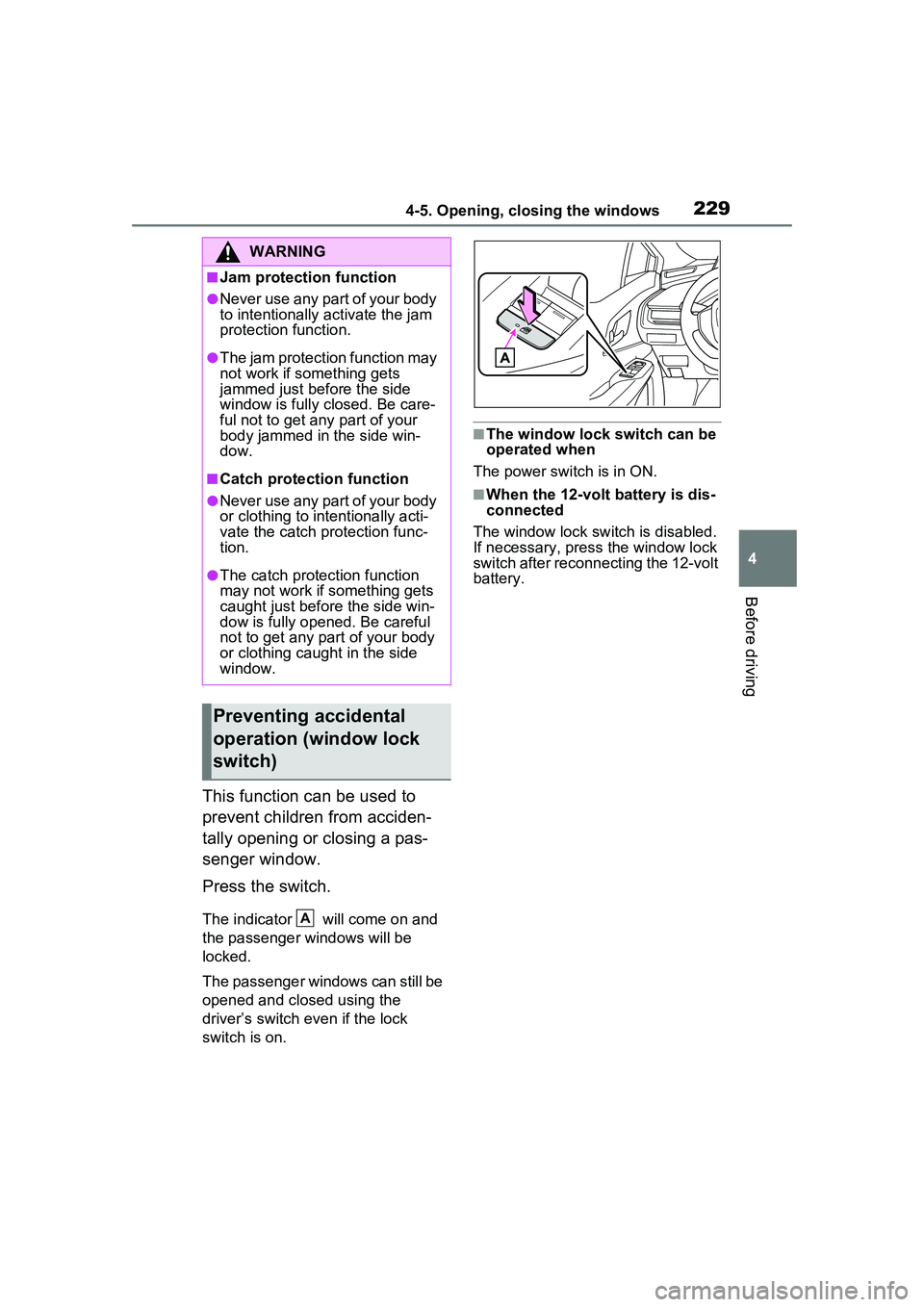
The indicator will come on and
the passenger windows will be
locked.
The passenger windows can still be
opened and closed using the
driver’s switch even if the lock
switch is on.
■The window lock switch can be
operated when
The power switch is in ON.
■When the 12-volt battery is dis-
connected
The window lock switch is disabled.
If necessary, press the window lock
switch after reconnecting the 12-volt
battery.
WARNING
■Jam protection function
●Never use any part of your body
to intentionally activate the jam
protection function.
●The jam protection function may
not work if something gets
jammed just before the side
window is fully closed. Be care-
ful not to get any part of your
body jammed in the side win-
dow.
■Catch protection function
●Never use any part of your body
or clothing to intentionally acti-
vate the catch protection func-
tion.
●The catch protection function
may not work if something gets
caught just before the side win-
dow is fully opened. Be careful
not to get any part of your body
or clothing caught in the side
window.
Preventing accidental
operation (window lock
switch)
A
Page 230 of 680
2304-6. Favorite settings
4-6.Favorite settings
*: If equipped
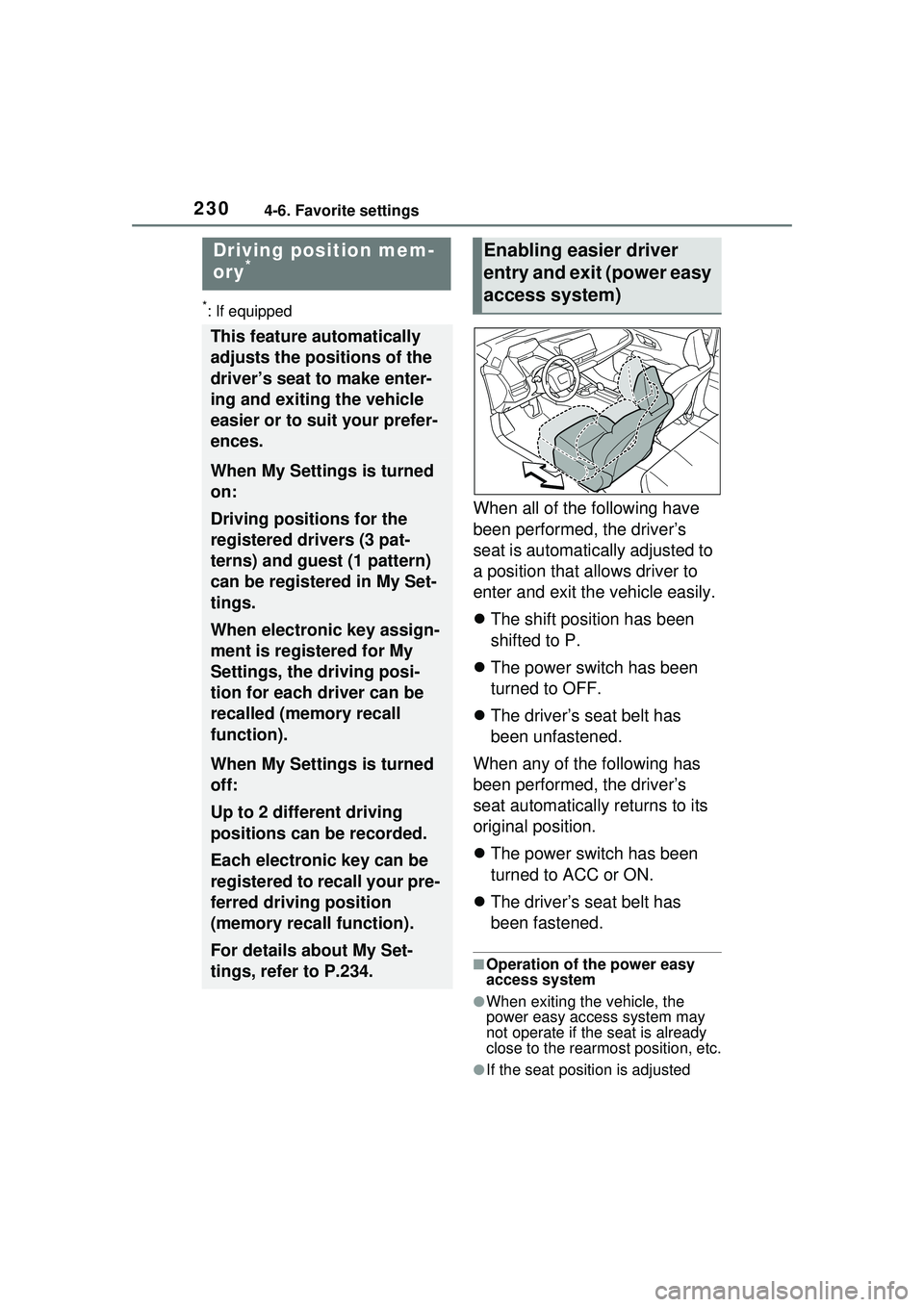
When all of the following have
been performed, the driver’s
seat is automatically adjusted to
a position that allows driver to
enter and exit the vehicle easily.
The shift position has been
shifted to P.
The power switch has been
turned to OFF.
The driver’s seat belt has
been unfastened.
When any of the following has
been performed, the driver’s
seat automatically returns to its
original position.
The power switch has been
turned to ACC or ON.
The driver’s seat belt has
been fastened.
■Operation of the power easy
access system
●When exiting the vehicle, the
power easy ac cess system may
not operate if the seat is already
close to the rearmost position, etc.
●If the seat position is adjusted
Driving position mem-
ory*
This feature automatically
adjusts the positions of the
driver’s seat to make enter-
ing and exiting the vehicle
easier or to suit your prefer-
ences.
When My Settings is turned
on:
Driving positions for the
registered drivers (3 pat-
terns) and guest (1 pattern)
can be registered in My Set-
tings.
When electronic key assign-
ment is registered for My
Settings, the driving posi-
tion for each driver can be
recalled (memory recall
function).
When My Settings is turned
off:
Up to 2 different driving
positions can be recorded.
Each electronic key can be
registered to recall your pre-
ferred driving position
(memory recall function).
For details about My Set-
tings, refer to P.234.
Enabling easier driver
entry and exit (power easy
access system)
Page 231 of 680
2314-6. Favorite settings
4
Before driving
during power easy access system
operation, the automatic operation
will stop. (The seat will change to
manual operation.)
●If the seat position is adjusted
during or after the power easy
access system operation when
the driver is exiting the vehicle, the
power easy access system will not
operate when entering the vehi-
cle.
■Jam protection function
If a person or object interferes while
the seat is moving automatically, the
operation will stop.
■Customization
The seat movement amount set-
tings of the powe r easy access sys-
tem can be customized.
(Customizable features: P.618)
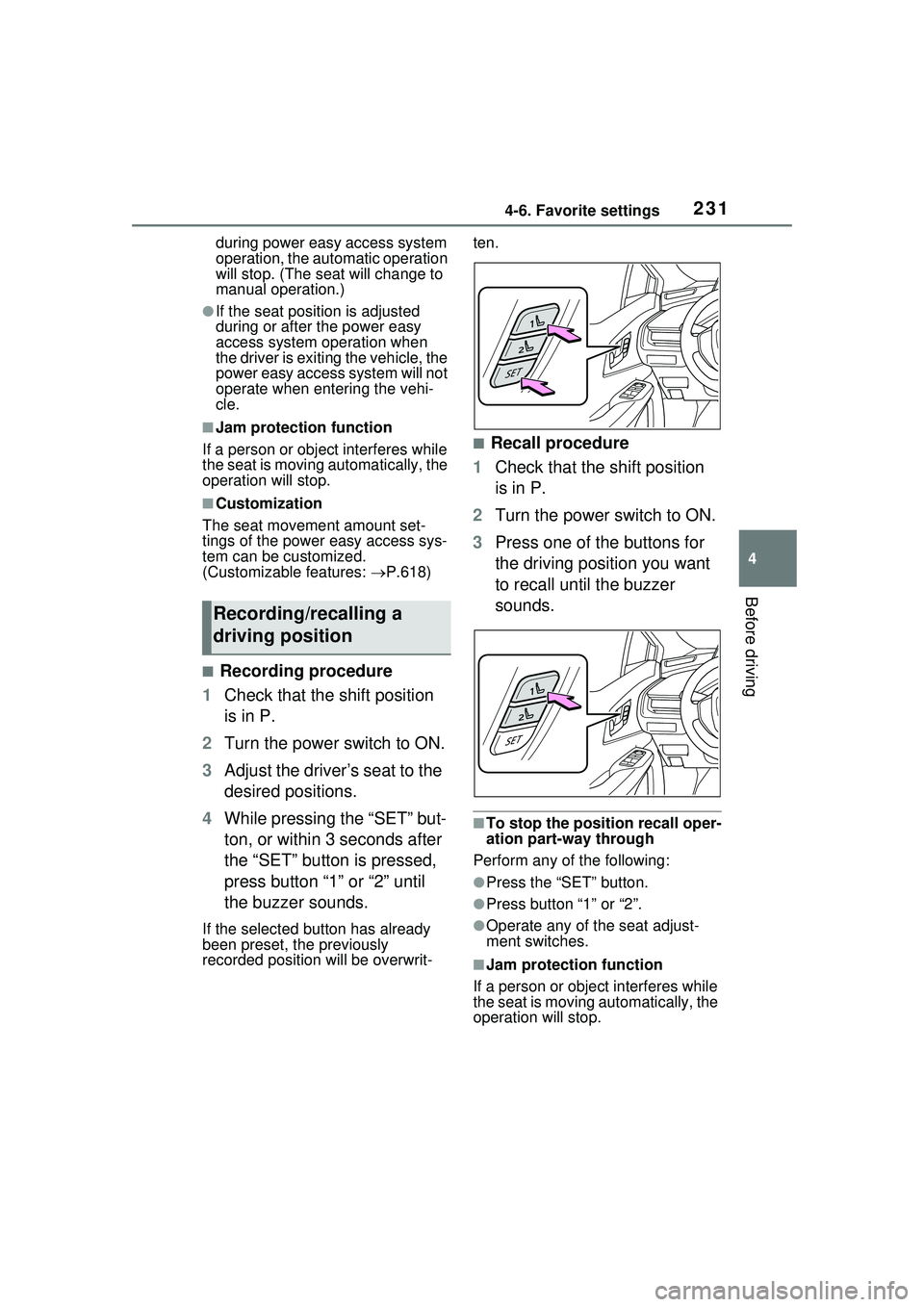
■Recording procedure
1 Check that the shift position
is in P.
2 Turn the power switch to ON.
3 Adjust the driver’s seat to the
desired positions.
4 While pressing the “SET” but-
ton, or within 3 seconds after
the “SET” button is pressed,
press button “1” or “2” until
the buzzer sounds.
If the selected button has already
been preset, the previously
recorded position will be overwrit- ten.
■Recall procedure
1 Check that the shift position
is in P.
2 Turn the power switch to ON.
3 Press one of the buttons for
the driving position you want
to recall until the buzzer
sounds.
■To stop the position recall oper-
ation part-way through
Perform any of the following:
●Press the “SET” button.
●Press button “1” or “2”.
●Operate any of the seat adjust-
ment switches.
■Jam protection function
If a person or object interferes while
the seat is moving automatically, the
operation will stop.
Recording/recalling a
driving position
Page 232 of 680
2324-6. Favorite settings
■Using the voice control system
(if equipped)
The following operations can be
performed using the voice control
system:
●Driving position registration
●Recalling the drivin g position (can
be operated only when the shift
position is in P)
For details regarding the voice con-
trol system, refer to the “MULTIME-
DIA OWNER’S MANUAL”.
■Seat positions that can be
memorized ( P.209)
The adjusted positions other than
the position adjusted by lumbar sup-
port switch can be recorded.
■Operating the driving position
memory after turning the power
switch to OFF
Recorded seat positions can be
activated up to 180 seconds after
the driver’s door is opened and
another 60 seconds after it is closed
again.
■In order to correctly use the
driving position memory func-
tion
If a seat position is already in the
furthest possible position and the
seat is operated in the same direc-
tion, the recorded position may be
slightly different when it is recalled.
■When recalling the driving posi-
tion
Take care when recalling the driving
position so that the head restraint
does not touch the ceiling.
■When the recorded seat posi-
tion cannot be recalled
The seat position may not be
recalled in some situations when the
seat position is recorded in a certain
range. For details, contact your
Toyota dealer.
■When My Settings is turned
off
Registering procedure
Record your driving position to
button “1” or “2” before perform-
ing the following:
Carry only the electronic key
you want to register, and then
close the driver’s door.
If 2 or more electronic keys are
in the vehicle, the driving posi-
tion cannot be recorded prop-
erly.
1 Check that the shift position
is in P.
2 Turn the power switch to ON.
3 Recall the driving position
that you want to record.
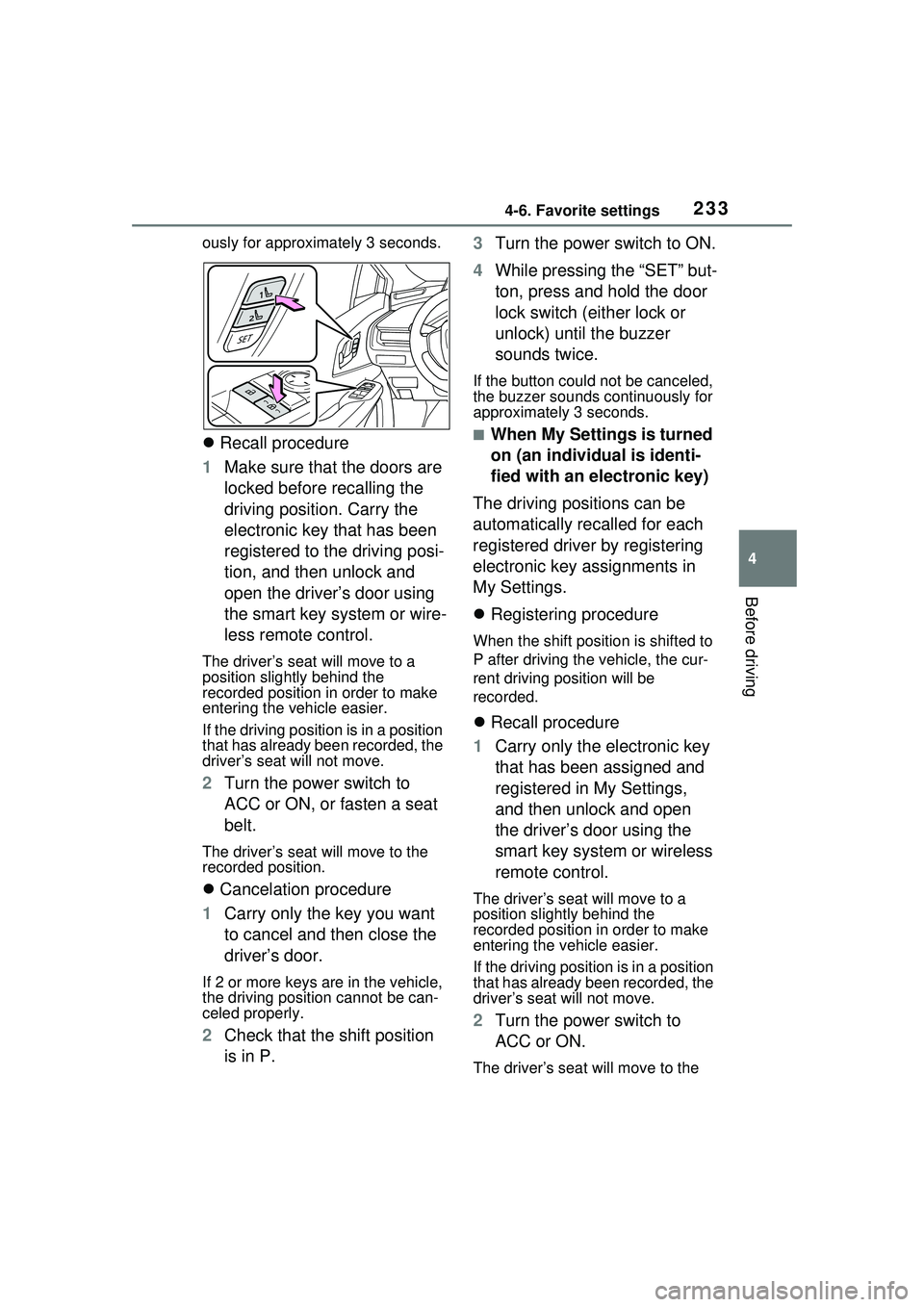
4 While pressing the recalled
button, press and hold the
door lock switch (either lock
or unlock) until the buzzer
sounds.
If the button could not be regis-
tered, the buzzer sounds continu-
WARNING
■Seat adjustment caution
Take care during seat adjustment
so that the seat does not strike
the rear passenger or squeeze
your body against the steering
wheel.
Registering/recalling/can-
celing a driving position
to an electronic key
(memory recall function)
Page 233 of 680
2334-6. Favorite settings
4
Before driving
ously for approximately 3 seconds.
Recall procedure
1 Make sure that the doors are
locked before recalling the
driving position. Carry the
electronic key that has been
registered to the driving posi-
tion, and then unlock and
open the driver’s door using
the smart key system or wire-
less remote control.
The driver’s seat will move to a
position slightly behind the
recorded position in order to make
entering the vehicle easier.
If the driving position is in a position
that has already been recorded, the
driver’s seat will not move.
2 Turn the power switch to
ACC or ON, or fasten a seat
belt.
The driver’s seat will move to the
recorded position.
Cancelation procedure
1 Carry only the key you want
to cancel and then close the
driver’s door.
If 2 or more keys are in the vehicle,
the driving position cannot be can-
celed properly.
2Check that the shift position
is in P. 3
Turn the power switch to ON.
4 While pressing the “SET” but-
ton, press and hold the door
lock switch (either lock or
unlock) until the buzzer
sounds twice.
If the button could not be canceled,
the buzzer sounds continuously for
approximately 3 seconds.
■When My Settings is turned
on (an individual is identi-
fied with an electronic key)
The driving positions can be
automatically recalled for each
registered driver by registering
electronic key assignments in
My Settings.
Registering procedure
When the shift position is shifted to
P after driving the vehicle, the cur-
rent driving position will be
recorded.
Recall procedure
1 Carry only the electronic key
that has been assigned and
registered in My Settings,
and then unlock and open
the driver’s door using the
smart key system or wireless
remote control.
The driver’s seat will move to a
position slightly behind the
recorded position in order to make
entering the vehicle easier.
If the driving position is in a position
that has already been recorded, the
driver’s seat will not move.
2Turn the power switch to
ACC or ON.
The driver’s seat will move to the
Page 235 of 680
2354-6. Favorite settings
4
Before driving
Digital Key (if equipped)
An individual is identified when the
smart key system detects their Digi-
tal Key. ( P.183)
Bluetooth® devices
An individual can be identified if the
same Bluetooth
® device that was
used as a hands-free phone the
last time the vehicle was entered is
connected to the audio system.
If an individual is identified by
detecting an electronic key, identifi-
cation by Bluetooth
® device will not
be performed.
Bluetooth
® is a registered trade-
mark of Bluetooth SIG, Inc.
When an individual is identified
from an authentication device,
settings for the following func-
tions are recalled.
Driving position (memory
recall function) (if equipped)
After an individual is identified, the
driving position that was set when
driving was last completed is
recalled when either of the follow-
ing operations is performed.
• Identification using electronic key:
The door is unlocked and opened
using the smart key system or
wireless remote control.
• Identification using Digital Key (if equipped): The door is unlocked
and opened using the smart key
system.
Refer to P.231 for information on
driving position registration and recall.
Multimedia settings*
When an individual is identified, the
multimedia system settings used
when the power switch was last
turned off are recalled.
Vehicle settings* (items that
can be set on the multi-infor-
mation display and Multime-
dia Display)
When an individual is identified, the
vehicle settings used when the
power switch was last turned off are
recalled.
*: Some settings are excluded
Recalled functions
Page 237 of 680
237
5
5
Driving
Driving
5-1. Before drivingDriving the vehicle....... 239
Cargo and luggage ..... 246
Vehicle load limits ....... 249
Trailer towing .............. 250
Dinghy towing ............. 250
5-2. Driving procedures Power (ignition) switch 251
Transmission............... 256
Turn signal lever ......... 262
Parking brake .............. 263
Brake Hold .................. 266
5-3. Operating the lights and wipers
Headlight switch .......... 269
AHB (Automatic High Beam)........................ 272
Windshield wipers and washer....................... 275
5-4. Refueling Opening the fuel tank cap.................................. 279
5-5. Using the driving support systems
Toyota Safety Sense 3.0/Traffic Jam Assist soft-
ware update .............. 282
Toyota Safety Sense 3.0 .................................. 284
Driver monitor ............. 292PCS (Pre-Collision System)
.................................. 293
LTA (Lane Tracing Assist) .................................. 305
LCA (Lane Change Assist) .................................. 310
LDA (Lane Departure Alert) .................................. 313
PDA (Proactive driving assist) ........................ 320
FCTA (Front Cross Traffic Alert) .......................... 326
RSA (Road Sign Assist) .................................. 329
Dynamic radar cruise con- trol ............................. 331
Cruise control .............. 342
Emergency Driving Stop System ...................... 345
Traffic Jam Assist ........ 348
BSM (Blind Spot Monitor) .................................. 354
Safe Exit Assist ........... 359
Intuitive parking assist . 363
RCTA (Rear Cross Traffic Alert) function ............ 373
RCD (Rear Camera Detec- tion) function .............. 378
PKSB (Parking Support Brake) ........................ 382
Page 239 of 680
2395-1. Before driving
5
Driving
5-1.Before driving
■Starting the hybrid system
P.251
■Driving
1 With the brake pedal
depressed, shift the shift
position to D.
Check that the shift position indica-
tor shows D.
2If the parking brake is set,
release the parking brake.
( P.263)
If the parking brake is in automatic
mode, the parking brake will be
released automatically. ( P.264)
3 Gradually release the brake
pedal and gently depress the
accelerator pedal to acceler-
ate the vehicle.
■Stopping
1 Depress the brake pedal.
2 If necessary, set the parking
brake.
If the vehicle is to be stopped for an
extended period of time, shift the
shift position to P. ( P.257)
■Parking the vehicle
1 Depress the brake pedal to
stop the vehicle completely. 2
If the parking brake is
released, set the parking
brake. ( P.263)
3 Shift the shift position to P.
( P.257)
Check that the shift position indica-
tor shows P and the parking brake
indicator is illuminated.
4Press the power switch to
stop the hybrid system.
5 Slowly release the brake
pedal.
6 Lock the door, making sure
that you have the electronic
key on your person.
If parking on a hill, block the wheels
as needed.
■Starting off on a steep
uphill
1 Firmly depress the brake
pedal and shift the shift posi-
tion to D.
The hill-start assi st control will be
activated.
2 Set the parking brake.
( P.263)
3 Release the brake pedal and
gently depress the accelera-
tor pedal to accelerate the
vehicle.
4 Release the parking brake.
( P.263)
■For electricity-saving and fuel-
efficient driving
Understand the system characteris-
tics of the vehicl e to use the func-
tions of the hybrid system. Also,
keep in mind that Plug-in Hybrid
Electric Vehicles are similar to con-
Driving the vehicle
The following procedures
should be observed to
ensure safe driving:
Driving procedure
Page 241 of 680
2415-1. Before driving
5
Driving
WARNING
■When driving the vehicle
●Do not drive if you are unfamil-
iar with the location of the brake
and accelerator pedals to avoid
depressing the wrong pedal.
• Accidentally depressing the accelerator pedal instead of the
brake pedal will result in sudden
acceleration that may lead to an
accident.
• When backing up, you may twist your body around, leading to a
difficulty in operating the pedals.
Make sure to operate the pedals
properly.
• Make sure to keep a correct driving posture even when mov-
ing the vehicle only slightly. This
allows you to depress the brake
and accelerator pedals properly.
• Depress the brake pedal using your right foot. Depressing the
brake pedal using your left foot
may delay response in an emer-
gency, resulting in an accident.
●The driver should pay extra
attention to pedestrians when
the vehicle is powered only by
the electric motor (traction
motor). As there is no engine
noise, the pedestrians may mis-
judge the vehicle’s movement.
Even if the Acoustic Vehicle
Alerting System is operating,
drive with care as pedestrians in
the vicinity may still not notice
the vehicle if the surrounding
area is noisy.
●Do not drive the vehicle over or
stop the vehicle near flammable
materials such as leaves, paper
or rags.
The exhaust system and
exhaust gases can be
extremely hot. These hot parts
may cause a fire if there is any
flammable material nearby.
●During normal driving, do not
turn off the hybrid system. Turn-
ing the hybrid s ystem off while
driving will not cause loss of
steering or braking control.
However, power assist for the
steering wheel may be lost mak-
ing it difficult to steer smoothly
before stopping the vehicle
depending on the remaining
charge in the 12-volt battery or
usage conditions. In this situa-
tion, you should pull over and
stop the vehicle as soon as it is
safe to do so.
In the event of an emergency,
such as if it be comes impossible
to stop the vehicle in the normal
way: P.547
●Use engine braking (downshift)
to maintain a safe speed when
driving down a steep hill.
Using the brakes continuously
may cause the brakes to over-
heat and lose effectiveness.
( P.256)
●Do not adjust the position of the
steering wheel, the seat, inside
rear view mirror (if equipped),
Digital Rear-view Mirror (if
equipped) or outside rear view
mirrors while driving.
Doing so may resu lt in a loss of
vehicle control.
●Always check that all passen-
gers’ arms, head or other parts
of their body are not outside the
vehicle.
Page 244 of 680
2445-1. Before driving
WARNING
●Always apply the parking brake,
shift the shift position to P, stop
the hybrid system and lock the
vehicle.
Do not leave the vehicle unat-
tended while the “READY” indi-
cator is illuminated.
If the vehicle is parked with the
shift position in P but the park-
ing brake is not set, the vehicle
may start to move, possibly
leading to an accident.
●Do not touch the exhaust pipes
while the “READY” indicator is
illuminated or immediately after
turning the hybrid system off.
Doing so may cause burns.
■When taking a nap in the
vehicle
Always turn the hybrid system off.
Otherwise, if you accidentally shift
the shift position or depress the
accelerator pedal, this could
cause an accident or fire due to
hybrid system overheating. Addi-
tionally, if the vehicle is parked in
a poorly ventilated area, exhaust
gases may collect and enter the
vehicle, leading to death or a seri-
ous health hazard.
■When braking
●When the brakes are wet, drive
more cautiously.
Braking distance increases
when the brakes are wet, and
this may cause one side of the
vehicle to brake differently than
the other side. Also, the parking
brake may not securely hold the
vehicle.
●If the electronically controlled
brake system does not operate,
do not follow other vehicles
closely and avoid hills or sharp
turns that require braking.
In this case, braking is still pos-
sible, but the brake pedal
should be depressed more
firmly than usual. Also, the brak-
ing distance will increase. Have
your brakes fixed immediately.
●The brake system consists of 2
or more individual hydraulic sys-
tems; if one of the systems fails,
the other(s) will still operate. In
this case, the brake pedal
should be depressed more
firmly than usual and the brak-
ing distance will increase. Have
your brakes fixed immediately.
NOTICE
■When driving the vehicle
●Do not depress the accelerator
and brake pedals at the same
time during driving, as this may
restrain the hybrid system out-
put.
●Do not use the accelerator
pedal or depress the accelera-
tor and brake pedals at the
same time to hold the vehicle on
a hill.
■Avoiding damage to vehicle
parts
●Do not turn the steering wheel
fully in either direction and hold
it there for an extended period
of time.
Doing so may damage the
power steering.
●When driving over bumps in the
road, drive as slowly as possible
to avoid damaging the wheels,
underside of the vehicle, etc.