light TOYOTA PRIUS PRIME 2023 Owners Manual
[x] Cancel search | Manufacturer: TOYOTA, Model Year: 2023, Model line: PRIUS PRIME, Model: TOYOTA PRIUS PRIME 2023Pages: 680, PDF Size: 14.97 MB
Page 464 of 680
4646-4. Using the other interior features
placed outside the charge area
●The vehicle is in an area where
strong electrical waves or noise
are emitted, such as near a televi-
sion tower, power plant, gasoline
station, broadcasting station, large
display, airport, etc.
●The electronic key is not inside the
vehicle
●Any of the following objects that is
0.08 in. (2 mm) or thicker is stuck
or installed between the charging
side of the smartphone and the
charge area.
• Thick cases or covers
• A case or cover attached with an
uneven or tilted surface, so that
the charging side is not flat
• Thick decorations
• Accessories, such as finger rings, straps, etc.
●When there is a gap between the
charging side of the smartphone
and the charge area due to a pro-
trusion such as a camera on the
charging side of the smartphone.
●When the smartphone is in con-
tact with, or is covered by any of
the following metallic objects:
• A card that has metal on it, such as aluminum foil, etc.
• A pack of cigarettes that includes aluminum foil
• A wallet or bag that is made of
metal
• Coins
• A heating pad
• CDs, DVDs or other media
• A metal accessory
• A case or cover made of metal
• A flip type case with a magnet on the charging side of the smart-
phone
●Electric wave type wireless
remote controls are being used
nearby
●2 or more smartphones are placed
on the wireless charger at the
same time
●When using a smartphone model
with an internal charging coil that is not located near the center of
the smartphone
If charging is abnormal or the opera-
tion indicator light continues to flash
for any other reason, the wireless
charger may be malfunctioning.
Contact your Toyota dealer.
■If the smartphone OS has been
updated
If the smartphone OS has been
updated to a newer version, its
charging specifications may have
changed significantly. For details,
check the information on the manu-
facturer’s website.
■Trademark information
iPhone is a trademark of Apple Inc.,
registered in the U.S. and other
countries.
WARNING
■Caution while driving
When charging a smartphone, for
safety reasons, the driver should
not operate the main part of the
smartphone while driving.
■Caution regarding interfer-
ence with electronic devices
People with implantable cardiac
pacemakers, cardiac resynchroni-
zation therapy-pacemakers or
implantable cardio verters, as well
as any other electrical medical
device, should consult their physi-
cian about the usage of the wire-
less charger.
■To prevent malfunctions or
burns
Observe the following precau-
tions. Failure to do so may result
in a equipment failure and dam-
age, catch fire, burns due to over-
heat or electric shock.
●This product is specialized for
use with smartphones and can-
not charge other devices.
Page 467 of 680
4676-4. Using the other interior features
6
Interior features
WARNING
■Opening and closing the sun-
shade
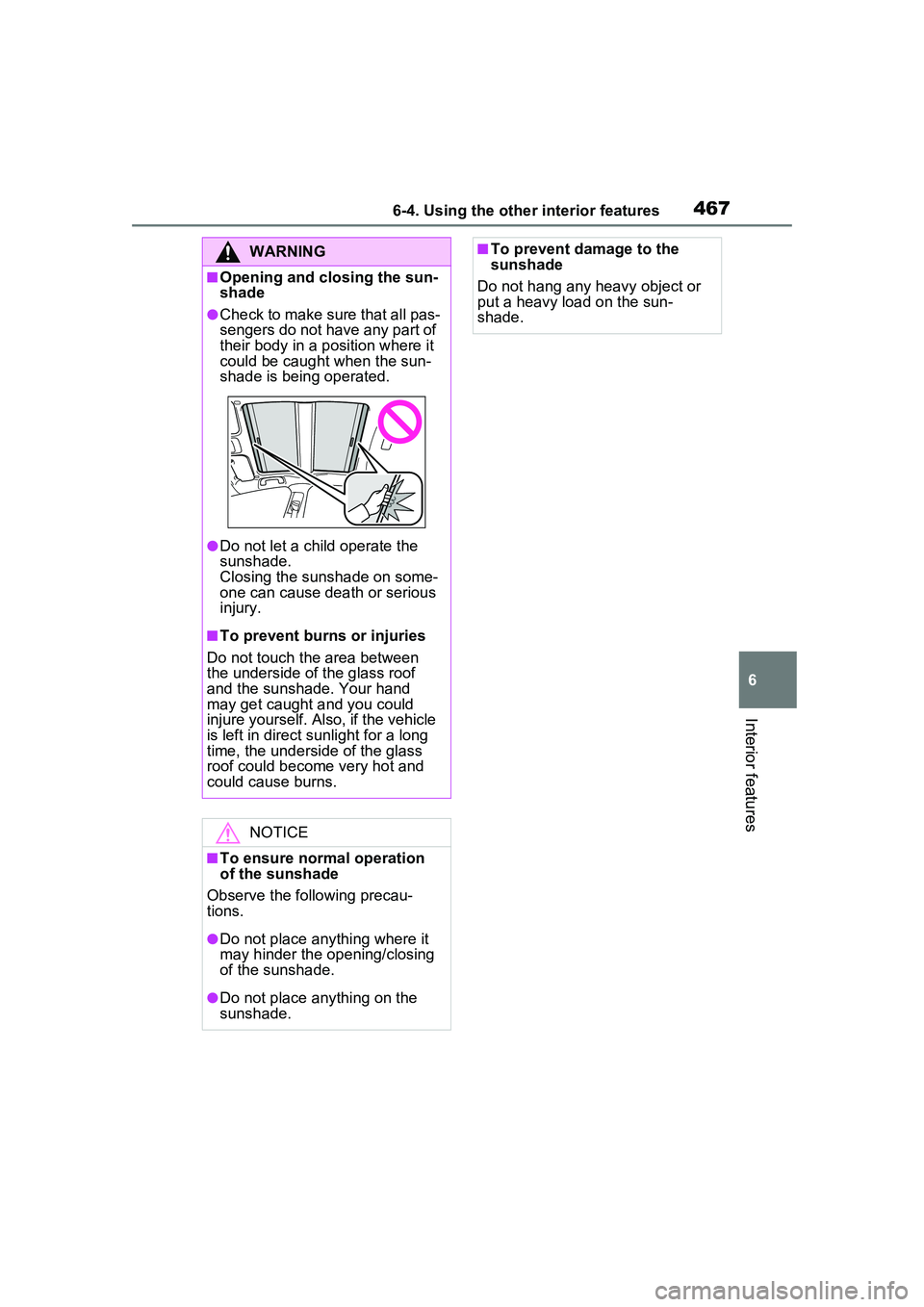
●Check to make sure that all pas-
sengers do not have any part of
their body in a position where it
could be caught when the sun-
shade is being operated.
●Do not let a child operate the
sunshade.
Closing the sunshade on some-
one can cause death or serious
injury.
■To prevent burns or injuries
Do not touch the area between
the underside of the glass roof
and the sunshade. Your hand
may get caught and you could
injure yourself. Also, if the vehicle
is left in direct sunlight for a long
time, the underside of the glass
roof could become very hot and
could cause burns.
NOTICE
■To ensure normal operation
of the sunshade
Observe the following precau-
tions.
●Do not place anything where it
may hinder the opening/closing
of the sunshade.
●Do not place anything on the
sunshade.
■To prevent damage to the
sunshade
Do not hang any heavy object or
put a heavy load on the sun-
shade.
Page 469 of 680
4696-4. Using the other interior features
6
Interior features
after checking the regulations of the
applicable local government.
■When the power outlets are
used while the vehicle is parked
or stopped
●The doors cannot be
locked/unlocked using the smart
key system.
●The doors cannot be
locked/unlocked using an elec-
tronic key. The doors can only be
locked/unlocked using a mechani-
cal key.
●When a door is opened/closed, a
buzzer may sound or “Key Not
Detected Check Key Location”
may be displayed on the multi-
information display. Check that an
electronic key is carried with you.
●When the vehicle’s surroundings
become dark while supplying
power, the headlights etc. turn on
automatically. For the U.S.A.,
refer to P.269 for information
about turning off the lights.
WARNING
■For safe use
Observe the following precau-
tions. Failure to do so may lead to
an accident, resulting in death or
serious injury.
●Do not allow children or other
people not used to the opera-
tion to perform the power supply
by themselves.
●Do not disconnect the plug of a
device while your hands are wet
or insert a pin or other object
into the power outlet. Also, if a
liquid or snow is on the power
outlet, dry the outlet before
using it.
●Do not attempt to modify, disas-
semble or repair a power outlet.
For information on repairs, con-
tact your Toyota dealer.
●Keep the power outlets free of
dust and foreign matter. Also,
make sure to clean the power
outlets periodically.
●Hold the plug body to plug in/out
of a power outlet. Do not touch
the plug blades. Do not pull on a
cord for unplugging, as other-
wise the plug or cord may be
damaged.
●Stop the use immediately if
abnormal heat is observed on a
cord or power outlet. To prevent
the cord or power outlet from
becoming hot, observe the fol-
lowing precautions:
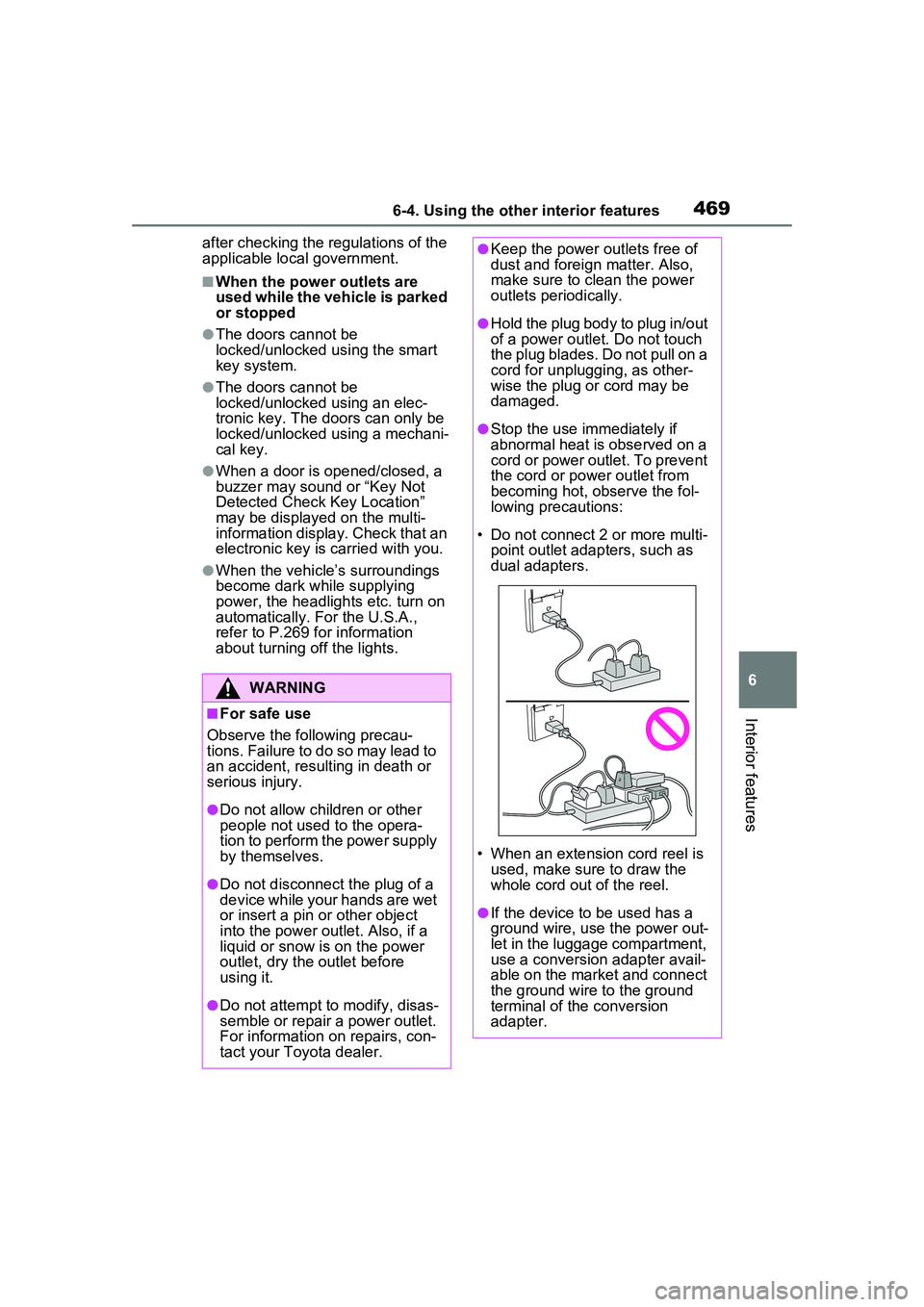
• Do not connect 2 or more multi- point outlet adapters, such as
dual adapters.
• When an extension cord reel is used, make sure to draw the
whole cord out of the reel.
●If the device to be used has a
ground wire, use the power out-
let in the luggage compartment,
use a conversion adapter avail-
able on the market and connect
the ground wire to the ground
terminal of the conversion
adapter.
Page 470 of 680
4706-4. Using the other interior features
WARNING
●If the plug of a device fits
loosely in a power outlet, even
though it is fully inserted,
replace the power outlet. For
information on replacement,
contact your Toyota dealer.
■Devices to be connected
●Make sure to read any instruc-
tion manual which came with a
device and observe any warn-
ings on the device.
●Do not connect a device to a
power outlet if the device is mal-
functioning or its plug is dam-
aged.
●Otherwise, the device may be
further malfunctioning, espe-
cially when the outside tem-
perature is high or low.
●Devices requiring to be installed
on a level place may not oper-
ate properly.
●Do not use devices, other than
waterproof devices, in a place
where water, such as rain, is
splashed over or where it is
humid.
●Do not use a device that has
been or likely to have been
merged in water or absorbed
water within.
●Do not connect a medical
device, as depending on the
vehicle condition, the power
supply function may be tempo-
rarily stopped.
■When the power outlets are
used while the vehicle is
parked or stopped
●The power outlets are designed
to be connected to electric
devices, such as lighting
devices. Do not use them as a
generator that supplies power to
a house, etc. Also, when they
are to be used on an emer-
gency power supply device for
homes, such as an exclusive
device having connection to an
external power source, or a
device whose power supply cir-
cuit for external power source is
separate from electric wiring of
power companies, consult with
the manufacturer or a retailer of
the device.
●When using a power outlet,
make sure to securely engage
the parking brake and shift the
shift position to P. Otherwise,
the vehicle may move, possibly
leading to an accident.
●When using a power outlet, do
not move away from the vehicle.
●Do not perform power supply
during weather when lightning
may occur. Stop supplying
power if lightning is observed
during power supply.
●Do not use the power outlets if
the vehicle has a vehicle cover
installed.
●Do not use a power outlet when
the vehicle is parked on a
slanted place or a slope. When
a power outlet is being used, do
not move the vehicle or cause it
to be inclined.
●Observe the following precau-
tions when a connected cord is
to be brought outside the vehi-
cle:
Page 477 of 680
4776-4. Using the other interior features
6
Interior features
*: If equipped
■HomeLink® programming pro-
cedure
The programming procedures can
also be found at the following URL.
Website: www.hom elink.com/toyota
For support, contact customer sup-
port at the following.
Help Line: 1-800-355-3515
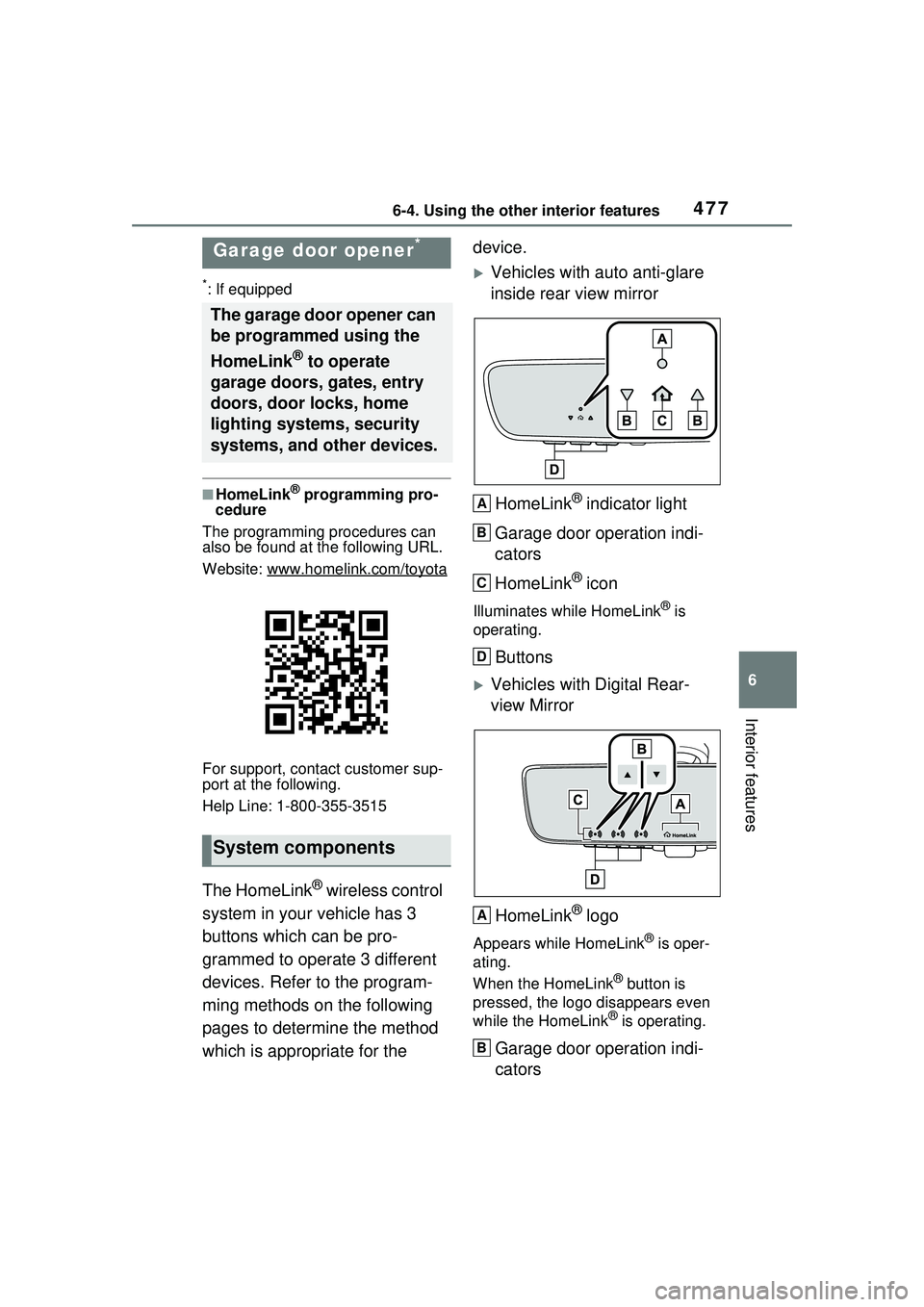
The HomeLink® wireless control
system in your vehicle has 3
buttons which can be pro-
grammed to operate 3 different
devices. Refer to the program-
ming methods on the following
pages to determine the method
which is appropriate for the device.
Vehicles with auto anti-glare
inside rear view mirror
HomeLink
® indicator light
Garage door operation indi-
cators
HomeLink
® icon
Illuminates while HomeLink® is
operating.
Buttons
Vehicles with Digital Rear-
view Mirror
HomeLink
® logo
Appears while HomeLink® is oper-
ating.
When the HomeLink
® button is
pressed, the logo disappears even
while the HomeLink
® is operating.
Garage door operation indi-
cators
Garage door opener*
The garage door opener can
be programmed using the
HomeLink
® to operate
garage doors, gates, entry
doors, door locks, home
lighting systems, security
systems, and other devices.
System components
A
B
C
D
A
B
Page 478 of 680
4786-4. Using the other interior features
HomeLink® indicator light
Illuminates above each button
selected.
Buttons
■Codes stored in the HomeLink®
memory
●The registered codes are not
erased even if the 12-volt battery
cable is disconnected.
●If learning failed when registering
a different code to a HomeLink®
button that already has a code
registered to it, the already regis-
tered code will not be erased.
■Before programming
HomeLink
®
During programming, it is pos-
sible that garage doors,
gates, or other devices may
operate. For this reason,
make sure that people and
objects are clear of the
garage door or other devices
to prevent injury or other
potential harm.
It is recommended that a new
battery be placed in the
remote control transmitter for
more accurate programming.
Garage door opener motors
manufactured after 1995 may
be equipped with rolling code
protection. If this is the case,
you may need a stepladder or
other sturdy, safe device to
reach the “Learn” or “Smart”
button on the garage door
opener motor.
■Programming HomeLink®
Steps 2 through 4 must be per-
formed within 60 seconds, oth-
erwise the HomeLink
® indicator
light will stop flashing and pro-
gramming will not be success-
fully completed.
1 Vehicles with Digital Rear-
view Mirror: Press the
HomeLink
® button or menu
button
WARNING
■When programming a garage
door or other remote control
device
The garage door or other device
may operate, so ensure people
and objects are out of danger to
prevent potential harm.
■Conforming to federal safety
standards
Do not use the HomeLink
® com-
patible transceiver with any
garage door opener or device that
lacks safety stop and reverse fea-
tures as required by federal safety
standards.
This includes any garage door
that cannot detect an interfering
object. A door or device without
these features increases the risk
of death or serious injury.
■When operating or program-
ming HomeLink®
Never allow a child to operate or
play with the HomeLink® buttons.
C
D
Programming HomeLink®
Page 479 of 680
4796-4. Using the other interior features
6
Interior features
When the HomeLink® button is
pressed: Homelink® Training Tuto-
rial will be displayed to assist you
programming the HomeLink
®.
When Homelink
® Training Tutorial
is displayed, follow the instructions
displayed.
When the menu button is pressed:
Press the menu button and
select the “Set Up >”. Homelink
®
Training Tutorial will be displayed
to assist you programming the
HomeLink
®.
When Homelink
® Training Tutorial
is displayed, follow the instructions
displayed.
2 Press and release the
HomeLink
® button you want
to program and check that
the HomeLink
® indicator light
flashes (orange).
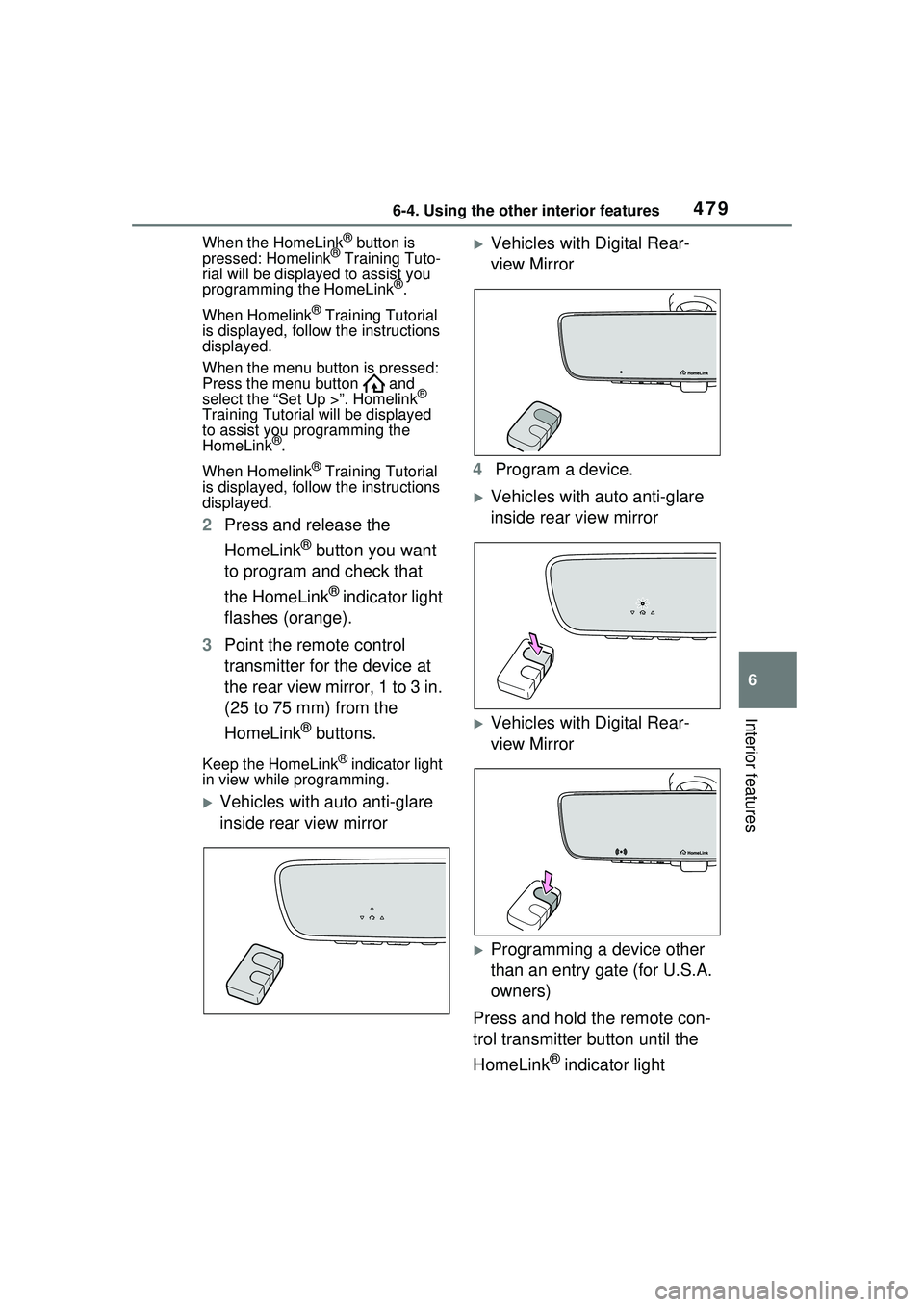
3 Point the remote control
transmitter for the device at
the rear view mirror, 1 to 3 in.
(25 to 75 mm) from the
HomeLink
® buttons.
Keep the HomeLink® indicator light
in view while programming.
Vehicles with auto anti-glare
inside rear view mirror
Vehicles with Digital Rear-
view Mirror
4 Program a device.
Vehicles with auto anti-glare
inside rear view mirror
Vehicles with Digital Rear-
view Mirror
Programming a device other
than an entry gate (for U.S.A.
owners)
Press and hold the remote con-
trol transmitter button until the
HomeLink
® indicator light
Page 480 of 680
4806-4. Using the other interior features
changes from slowly flashing
orange to rapidly flashing green
(rolling code) or continuously lit
green (fixed code), then release
the button.
Programming an entry gate
(for U.S.A. owners)/Program-
ming a device in the Cana-
dian market
Press and release the remote
control transmitter button at 2
second intervals, repeatedly,
until the HomeLink
® indicator
light changes from slowly flash-
ing (orange) to rapidly flashing
(green) (rolling code) or continu-
ously lit (green) (fixed code).
5 Test the HomeLink
® opera-
tion by pressing the newly
programmed button and
observing the HomeLink
®
indicator light:
HomeLink
® indicator light illu-
minates: Programming of a
fixed code device has com-
pleted. The garage door or
other device should operate
when a HomeLink
® button is
pressed and released.
HomeLink
® indicator light
flashes rapidly: The garage
door opener motor or other
device is equipped with a roll-
ing code. To complete pro-
gramming, firmly press and
hold the HomeLink
® button
for 2 seconds then release it.
If the garage door or other device does not operate, pro-
ceed to “Programming a roll-
ing code system”.
6 Repeat the steps above to
program another device for
any of the remaining
HomeLink
® buttons.
■Programming a rolling code
system
Two or more people may be
needed to complete rolling code
programming.
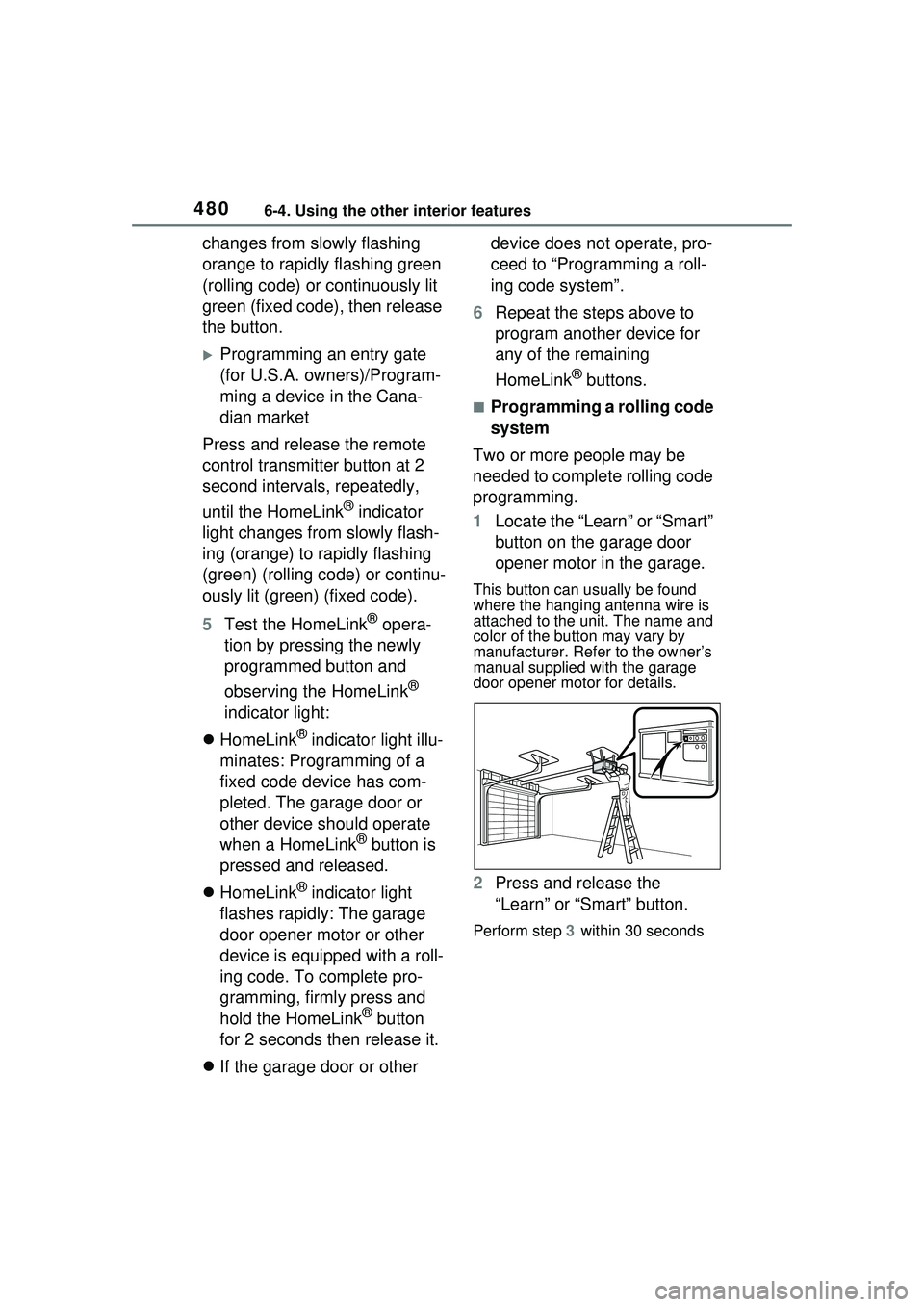
1 Locate the “Learn” or “Smart”
button on the garage door
opener motor in the garage.
This button can usually be found
where the hanging antenna wire is
attached to the unit. The name and
color of the button may vary by
manufacturer. Refe r to the owner’s
manual supplied with the garage
door opener motor for details.
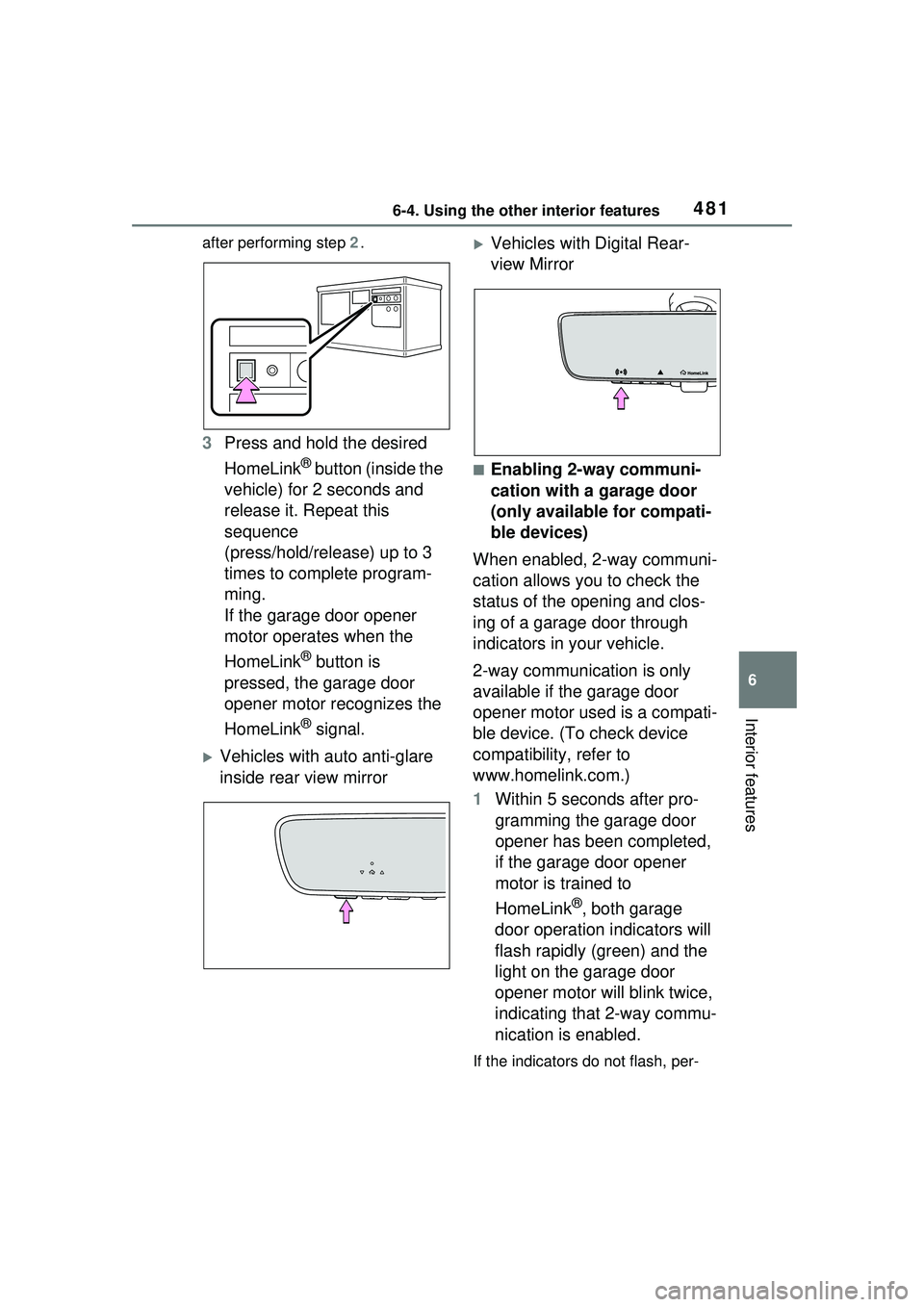
2 Press and release the
“Learn” or “Smart” button.
Perform step 3 within 30 seconds
Page 481 of 680
4816-4. Using the other interior features
6
Interior features
after performing step 2.
3 Press and hold the desired
HomeLink
® button (inside the
vehicle) for 2 seconds and
release it. Repeat this
sequence
(press/hold/release) up to 3
times to complete program-
ming.
If the garage door opener
motor operates when the
HomeLink
® button is
pressed, the garage door
opener motor recognizes the
HomeLink
® signal.
Vehicles with auto anti-glare
inside rear view mirror
Vehicles with Digital Rear-
view Mirror
■Enabling 2-way communi-
cation with a garage door
(only available for compati-
ble devices)
When enabled, 2-way communi-
cation allows you to check the
status of the opening and clos-
ing of a garage door through
indicators in your vehicle.
2-way communication is only
available if the garage door
opener motor used is a compati-
ble device. (To check device
compatibility, refer to
www.homelink.com.)
1 Within 5 seconds after pro-
gramming the garage door
opener has been completed,
if the garage door opener
motor is trained to
HomeLink
®, both garage
door operation indicators will
flash rapidly (green) and the
light on the garage door
opener motor will blink twice,
indicating that 2-way commu-
nication is enabled.
If the indicators do not flash, per-
Page 482 of 680
4826-4. Using the other interior features
form steps 2 and 3 within the first
10 presses of the HomeLink® but-
ton after programming has been
completed.
2 Press a programmed
HomeLink
® button to oper-
ate a garage door.
3 Within 1 minute of pressing
the HomeLink
® button, after
the garage door operation
has stopped, press the
“Learn” or “Smart” button on
the garage door opener
motor. Within 5 seconds of
the establishment of 2-way
communication with the
garage door opener, both
garage door operation indica-
tors in the vehicle will flash
rapidly (green) and the light
on the garage door opener
motor will blink twice, indicat-
ing that 2-way communica-
tion is enabled.
■Reprogramming a single
HomeLink
® button
When the following procedure is
performed, buttons which
already have devices registered
to them can be overwritten:
1 Press and hold the desired
HomeLink
® button.
2 When the HomeLink
® indica-
tor starts flashing (orange),
release the HomeLink
® but-
ton and perform “Program-
ming HomeLink
®” step 1 (it
takes 20 seconds for the HomeLink
® indicator to start
flashing).
■Before programming
●Install a new battery in the trans-
mitter.
●The battery side of the transmitter
must be pointed away from the
HomeLink
® buttons.
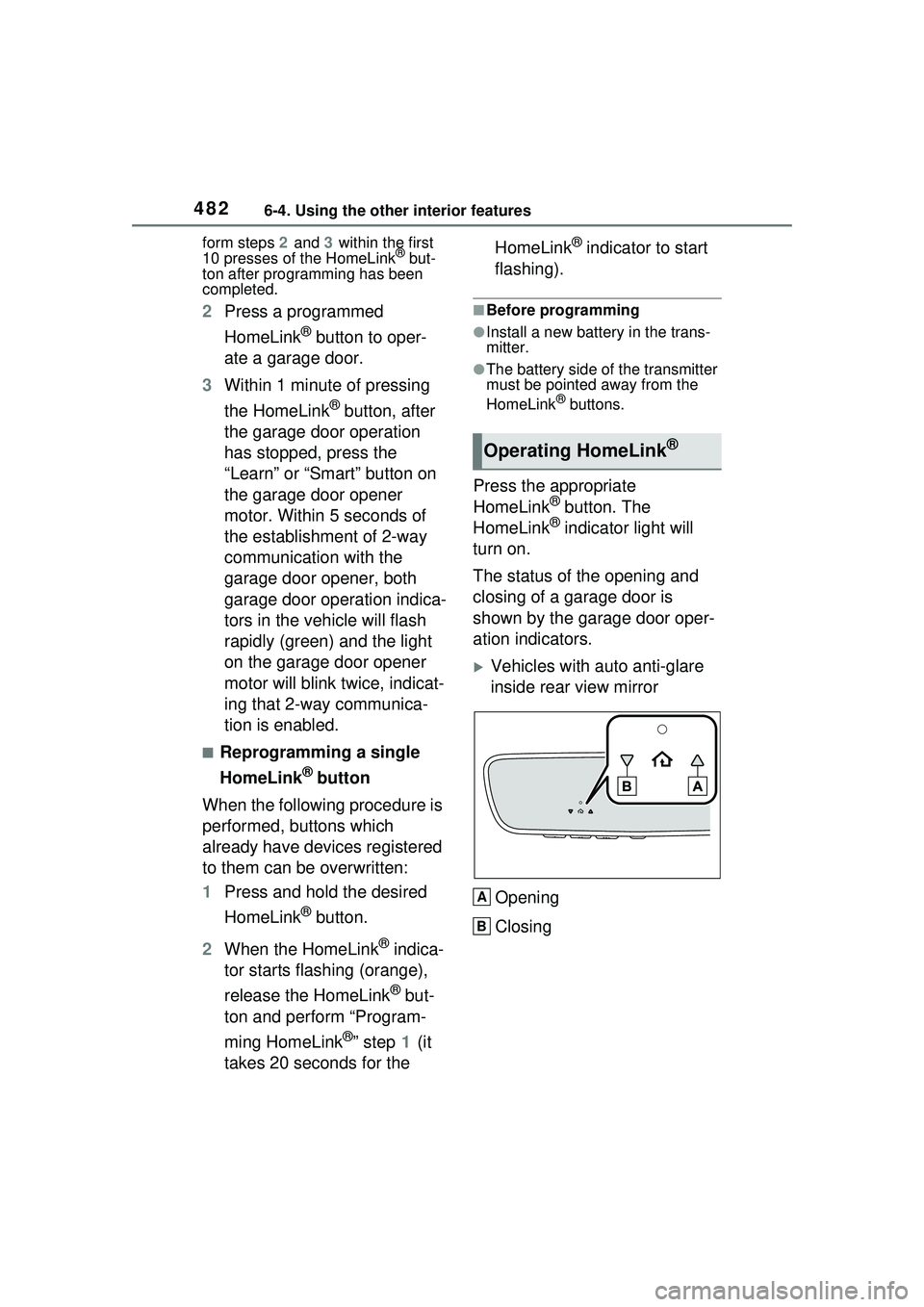
Press the appropriate
HomeLink® button. The
HomeLink® indicator light will
turn on.
The status of the opening and
closing of a garage door is
shown by the garage door oper-
ation indicators.
Vehicles with auto anti-glare
inside rear view mirror
Opening
Closing
Operating HomeLink®
A
B