light TOYOTA PRIUS PRIME 2023 Owners Manual
[x] Cancel search | Manufacturer: TOYOTA, Model Year: 2023, Model line: PRIUS PRIME, Model: TOYOTA PRIUS PRIME 2023Pages: 680, PDF Size: 14.97 MB
Page 300 of 680
3005-5. Using the driving support systems
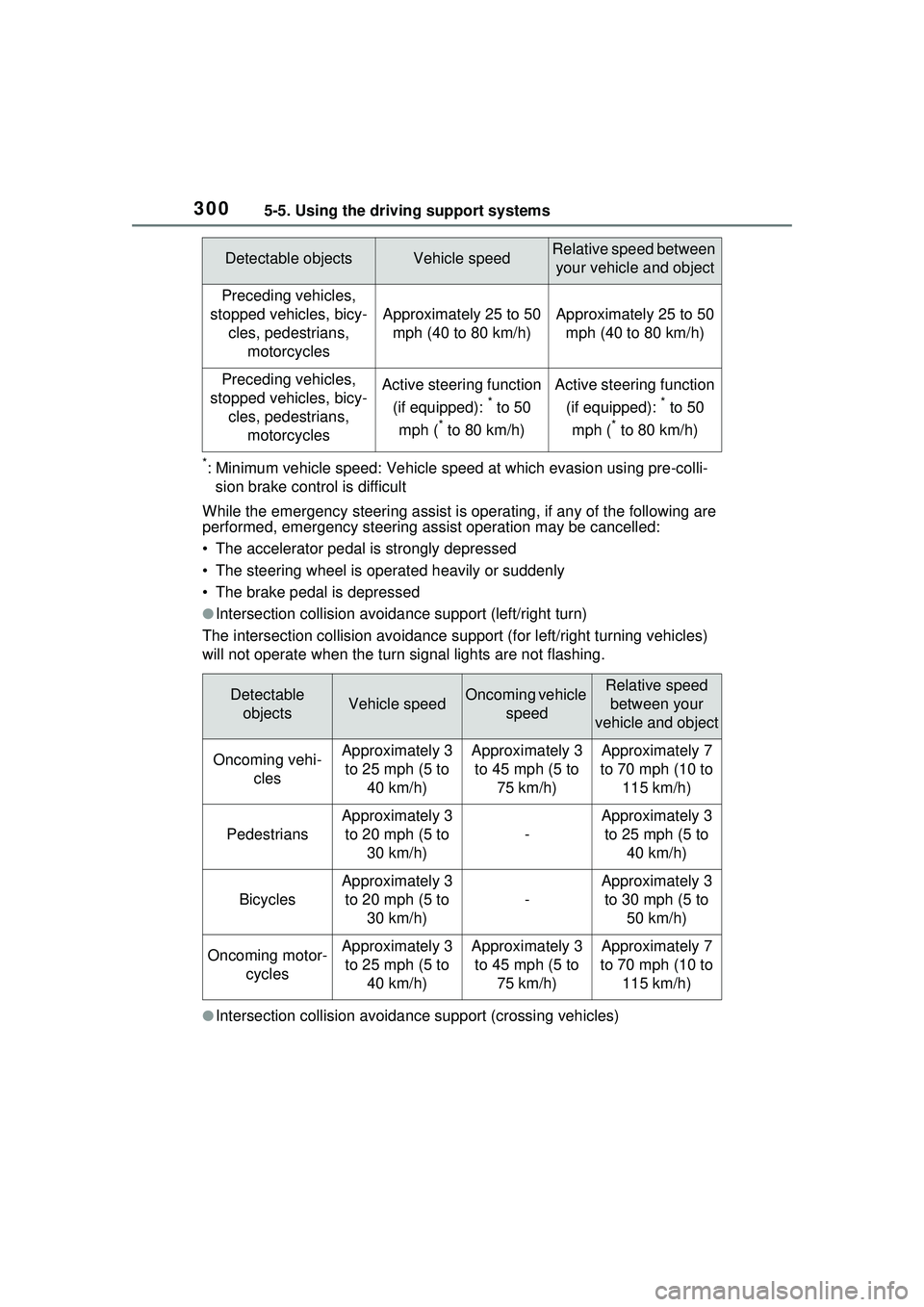
*: Minimum vehicle speed: Vehicle speed at which evasion using pre-colli-
sion brake control is difficult
While the emergency steering assist is operating, if any of the following are
performed, emergency steering assist operation may be cancelled:
• The accelerator pedal is strongly depressed
• The steering wheel is operated heavily or suddenly
• The brake pedal is depressed
●Intersection collisio n avoidance support (left/right turn)
The intersection collision av oidance support (for left/right turning vehicles)
will not operate when the turn signal lights are not flashing.
●Intersection collisio n avoidance support (crossing vehicles)
Detectable objectsVehicle speedRelative speed between
your vehicle and object
Preceding vehicles,
stopped vehicles, bicy- cles, pedestrians, motorcycles
Approximately 25 to 50 mph (40 to 80 km/h)Approximately 25 to 50 mph (40 to 80 km/h)
Preceding vehicles,
stopped vehicles, bicy- cles, pedestrians, motorcyclesActive steering function
(if equipped):
* to 50
mph (
* to 80 km/h)
Active steering function
(if equipped):
* to 50
mph (
* to 80 km/h)
Detectable objectsVehicle speedOncoming vehicle speedRelative speed between your
vehicle and object
Oncoming vehi- clesApproximately 3 to 25 mph (5 to 40 km/h)Approximately 3 to 45 mph (5 to 75 km/h)Approximately 7
to 70 mph (10 to 115 km/h)
Pedestrians
Approximately 3 to 20 mph (5 to 30 km/h)
-
Approximately 3 to 25 mph (5 to 40 km/h)
Bicycles
Approximately 3 to 20 mph (5 to 30 km/h)
-
Approximately 3 to 30 mph (5 to 50 km/h)
Oncoming motor- cyclesApproximately 3 to 25 mph (5 to 40 km/h)Approximately 3 to 45 mph (5 to 75 km/h)Approximately 7
to 70 mph (10 to 115 km/h)
Page 301 of 680
3015-5. Using the driving support systems
5
Driving
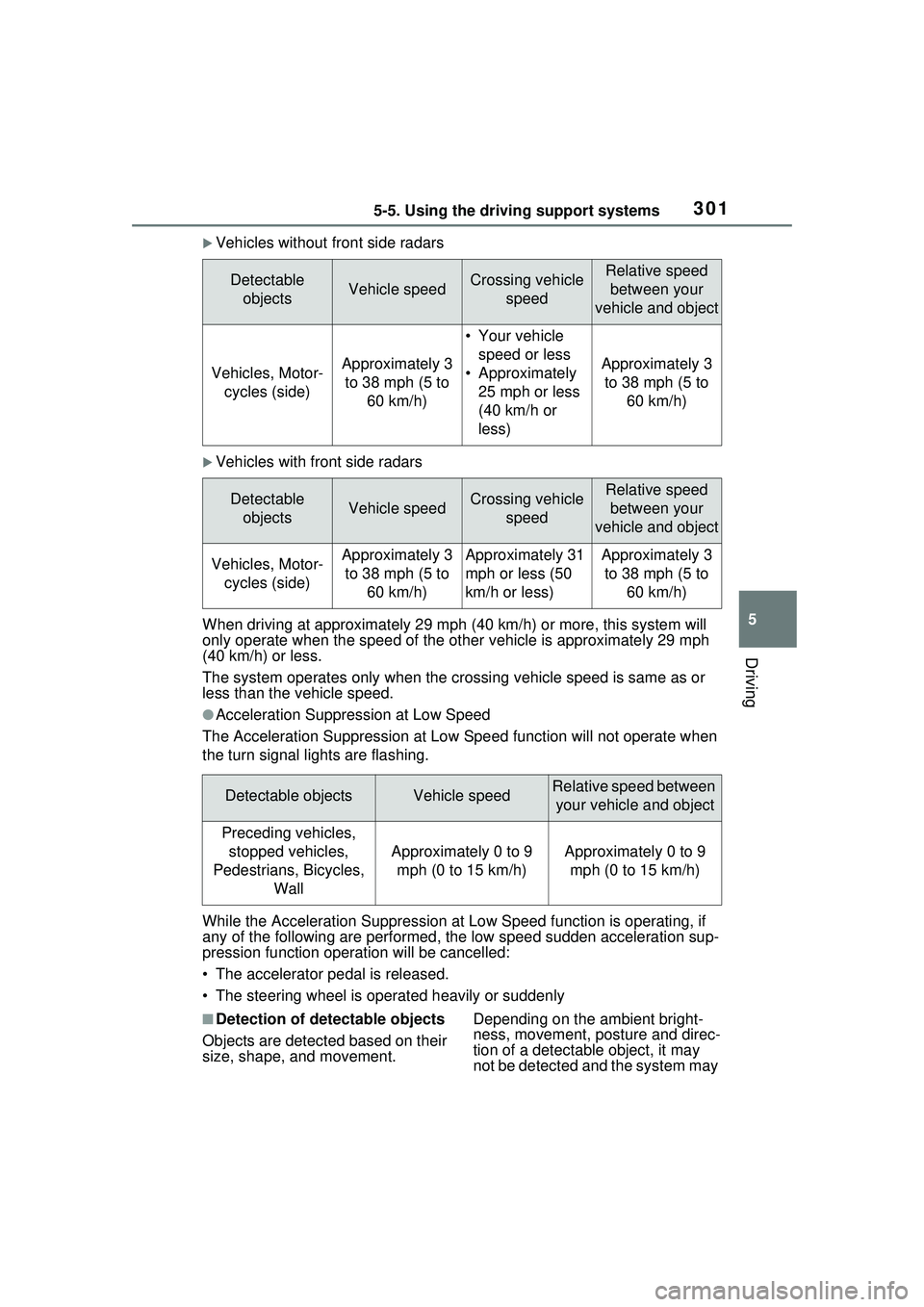
Vehicles without front side radars
Vehicles with front side radars
When driving at approximately 29 m ph (40 km/h) or more, this system will
only operate when the speed of the ot her vehicle is approximately 29 mph
(40 km/h) or less.
The system operates only when the crossing vehicle speed is same as or
less than the vehicle speed.
●Acceleration Suppression at Low Speed
The Acceleration Suppression at Low Speed function will not operate when
the turn signal lights are flashing.
While the Acceleration Suppression at Low Speed function is operating, if
any of the following are performed, the low speed sudden acceleration sup-
pression function operation will be cancelled:
• The accelerator pedal is released.
• The steering wheel is operated heavily or suddenly
■Detection of detectable objects
Objects are detected based on their
size, shape, and movement. Depending on the ambient bright-
ness, movement, posture and direc-
tion of a detectable object, it may
not be detected and the system may
Detectable
objectsVehicle speedCrossing vehicle speedRelative speed between your
vehicle and object
Vehicles, Motor- cycles (side)Approximately 3 to 38 mph (5 to 60 km/h)
• Your vehicle speed or less
• Approximately 25 mph or less
(40 km/h or
less)
Approximately 3 to 38 mph (5 to 60 km/h)
Detectable objectsVehicle speedCrossing vehicle speedRelative speed between your
vehicle and object
Vehicles, Motor- cycles (side)Approximately 3 to 38 mph (5 to 60 km/h)Approximately 31
mph or less (50
km/h or less)Approximately 3 to 38 mph (5 to 60 km/h)
Detectable objectsVehicle speedRelative speed between your vehicle and object
Preceding vehicles, stopped vehicles,
Pedestrians, Bicycles, Wall
Approximately 0 to 9 mph (0 to 15 km/h)Approximately 0 to 9 mph (0 to 15 km/h)
Page 303 of 680
3035-5. Using the driving support systems
5
Driving
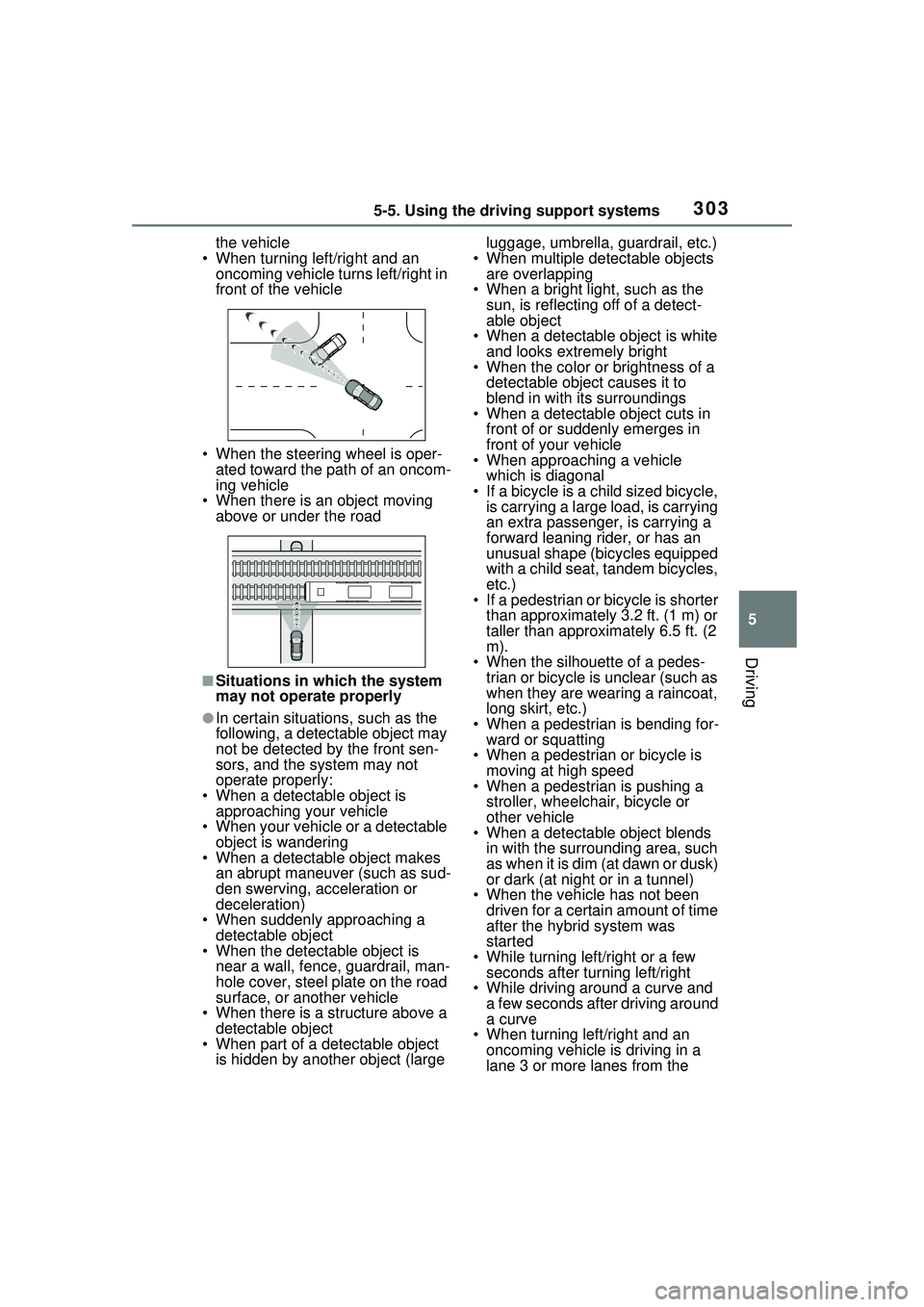
the vehicle
• When turning left/right and an oncoming vehicle turns left/right in
front of the vehicle
• When the steering wheel is oper- ated toward the path of an oncom-
ing vehicle
• When there is an object moving
above or under the road
■Situations in which the system
may not operate properly
●In certain situations, such as the
following, a detectable object may
not be detected by the front sen-
sors, and the system may not
operate properly:
• When a detectable object is approaching your vehicle
• When your vehicle or a detectable object is wandering
• When a detectable object makes
an abrupt maneuver (such as sud-
den swerving, acceleration or
deceleration)
• When suddenly approaching a detectable object
• When the detectable object is
near a wall, fence, guardrail, man-
hole cover, steel plate on the road
surface, or another vehicle
• When there is a structure above a
detectable object
• When part of a detectable object is hidden by another object (large luggage, umbrella, guardrail, etc.)
• When multiple detectable objects are overlapping
• When a bright light, such as the sun, is reflecting off of a detect-
able object
• When a detectable object is white and looks extremely bright
• When the color or brightness of a
detectable object causes it to
blend in with its surroundings
• When a detectable object cuts in
front of or suddenly emerges in
front of your vehicle
• When approaching a vehicle
which is diagonal
• If a bicycle is a child sized bicycle, is carrying a large load, is carrying
an extra passenger, is carrying a
forward leaning rider, or has an
unusual shape (bicycles equipped
with a child seat, tandem bicycles,
etc.)
• If a pedestrian or bicycle is shorter
than approximately 3.2 ft. (1 m) or
taller than approximately 6.5 ft. (2
m).
• When the silhouette of a pedes- trian or bicycle is unclear (such as
when they are wearing a raincoat,
long skirt, etc.)
• When a pedestrian is bending for- ward or squatting
• When a pedestrian or bicycle is moving at high speed
• When a pedestrian is pushing a
stroller, wheelchair, bicycle or
other vehicle
• When a detectable object blends
in with the surrounding area, such
as when it is dim (at dawn or dusk)
or dark (at night or in a tunnel)
• When the vehicle has not been driven for a certain amount of time
after the hybrid system was
started
• While turning left/right or a few seconds after turning left/right
• While driving around a curve and
a few seconds after driving around
a curve
• When turning left/right and an
oncoming vehicle is driving in a
lane 3 or more lanes from the
Page 304 of 680
3045-5. Using the driving support systems
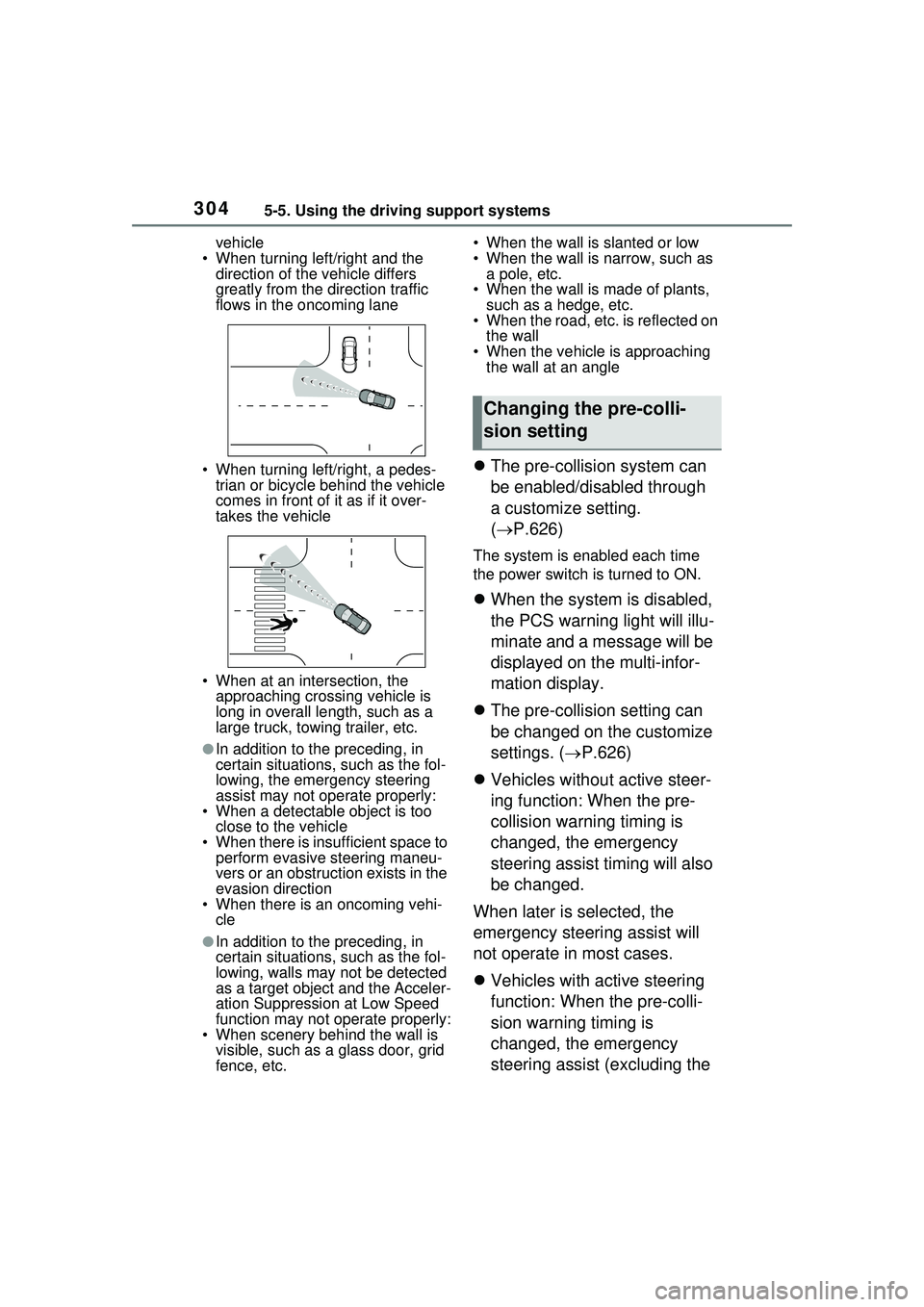
vehicle
• When turning left/right and the direction of the vehicle differs
greatly from the direction traffic
flows in the oncoming lane
• When turning left/right, a pedes- trian or bicycle behind the vehicle
comes in front of it as if it over-
takes the vehicle
• When at an intersection, the approaching crossing vehicle is
long in overall le ngth, such as a
large truck, towing trailer, etc.
●In addition to the preceding, in
certain situations, such as the fol-
lowing, the emergency steering
assist may not operate properly:
• When a detectable object is too
close to the vehicle
• When there is insufficient space to perform evasive steering maneu-
vers or an obstruction exists in the
evasion direction
• When there is an oncoming vehi-
cle
●In addition to the preceding, in
certain situations, such as the fol-
lowing, walls may not be detected
as a target object and the Acceler-
ation Suppression at Low Speed
function may not operate properly:
• When scenery behind the wall is visible, such as a glass door, grid
fence, etc. • When the wall is slanted or low
• When the wall is narrow, such as
a pole, etc.
• When the wall is made of plants, such as a hedge, etc.
• When the road, etc. is reflected on
the wall
• When the vehicle is approaching the wall at an angle
The pre-collision system can
be enabled/disabled through
a customize setting.
( P.626)
The system is enabled each time
the power switch is turned to ON.
When the system is disabled,
the PCS warning light will illu-
minate and a message will be
displayed on the multi-infor-
mation display.
The pre-collision setting can
be changed on the customize
settings. ( P.626)
Vehicles without active steer-
ing function: When the pre-
collision warning timing is
changed, the emergency
steering assist timing will also
be changed.
When later is selected, the
emergency steering assist will
not operate in most cases.
Vehicles with active steering
function: When the pre-colli-
sion warning timing is
changed, the emergency
steering assist (excluding the
Changing the pre-colli-
sion setting
Page 311 of 680
3115-5. Using the driving support systems
5
Driving
●The hands off steering wheel
warning (P.307) is not operat-
ing.
■Cancelation of functions
In the following situations, opera-
tion of the LCA may be canceled
with the display and buzzer:
●When the operating conditions
( P.307) are no longer met
●When the system can no longer
detect lane lines
●When the turn signal lever is oper-
ated to the second position
( P.311)
●When the turn signal lever is oper-
ated in the opposite direction of
the lane change
●When the system detects opera-
tion of the steering wheel, brake
pedal or accelerator pedal by the
driver
If the system detects that a vehicle
is quickly approaching in the lane
toward which the turn signal is oper-
ated a buzzer will sound and a mes-
sage will be displayed to alert the
driver. At the same time the steering
wheel may be slightly operated to
help keep the vehicle away from the
approaching vehicle.
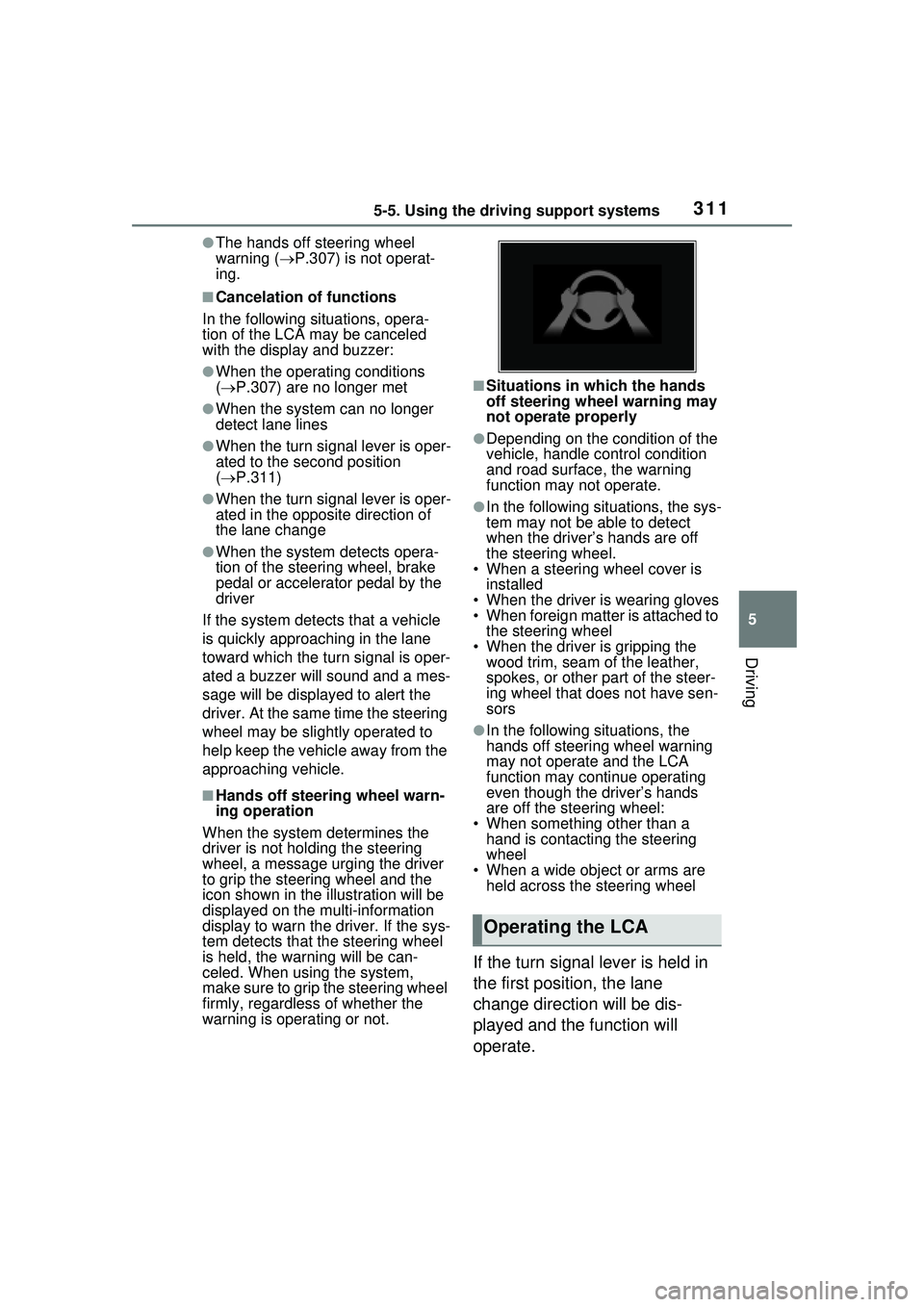
■Hands off steering wheel warn-
ing operation
When the system de termines the
driver is not holding the steering
wheel, a message urging the driver
to grip the steering wheel and the
icon shown in the illustration will be
displayed on the multi-information
display to warn the driver. If the sys-
tem detects that the steering wheel
is held, the warning will be can-
celed. When using the system,
make sure to grip the steering wheel
firmly, regardless of whether the
warning is operating or not.
■Situations in which the hands
off steering wheel warning may
not operate properly
●Depending on the condition of the
vehicle, handle control condition
and road surface, the warning
function may not operate.
●In the following situations, the sys-
tem may not be able to detect
when the driver’s hands are off
the steering wheel.
• When a steering wheel cover is installed
• When the driver is wearing gloves
• When foreign matter is attached to the steering wheel
• When the driver is gripping the wood trim, seam of the leather,
spokes, or other part of the steer-
ing wheel that does not have sen-
sors
●In the following situations, the
hands off steering wheel warning
may not operate and the LCA
function may continue operating
even though the driver’s hands
are off the steering wheel:
• When something other than a hand is contacting the steering
wheel
• When a wide object or arms are held across the steering wheel
If the turn signal lever is held in
the first position, the lane
change direction will be dis-
played and the function will
operate.
Operating the LCA
Page 313 of 680
3135-5. Using the driving support systems
5
Driving
The LDA system warns the
driver if the vehicle may deviate
from the current lane or course
*,
and also can slightly operate the
steering wheel to help avoid
deviation from the lane or
course
*.
The front camera is used to
detect lane lines or a course
*.
*: Boundary between the asphalt and grass, soil, et c., or structures,
such as a curb, guardrail, etc.
■Lane departure alert func-
tion
When the system determines
that the vehicle might depart
from its lane or course
*, a warn-
ing is displayed on a display,
and either a warning buzzer will
sound or the steering wheel will
vibrate to alert the driver.
Check the area around your vehicle
and carefully operate the steering
wheel to move the vehicle back to
the center of the lane or course
*.
Vehicles with BSM: If the system
determines that the vehicle may
collide with a vehicle in an adjacent
lane, the lane de parture alert will
operate even if the turn signals are
operating.
*: Boundary between the asphalt and grass, soil, et c., or structures, such as a curb, guardrail, etc.
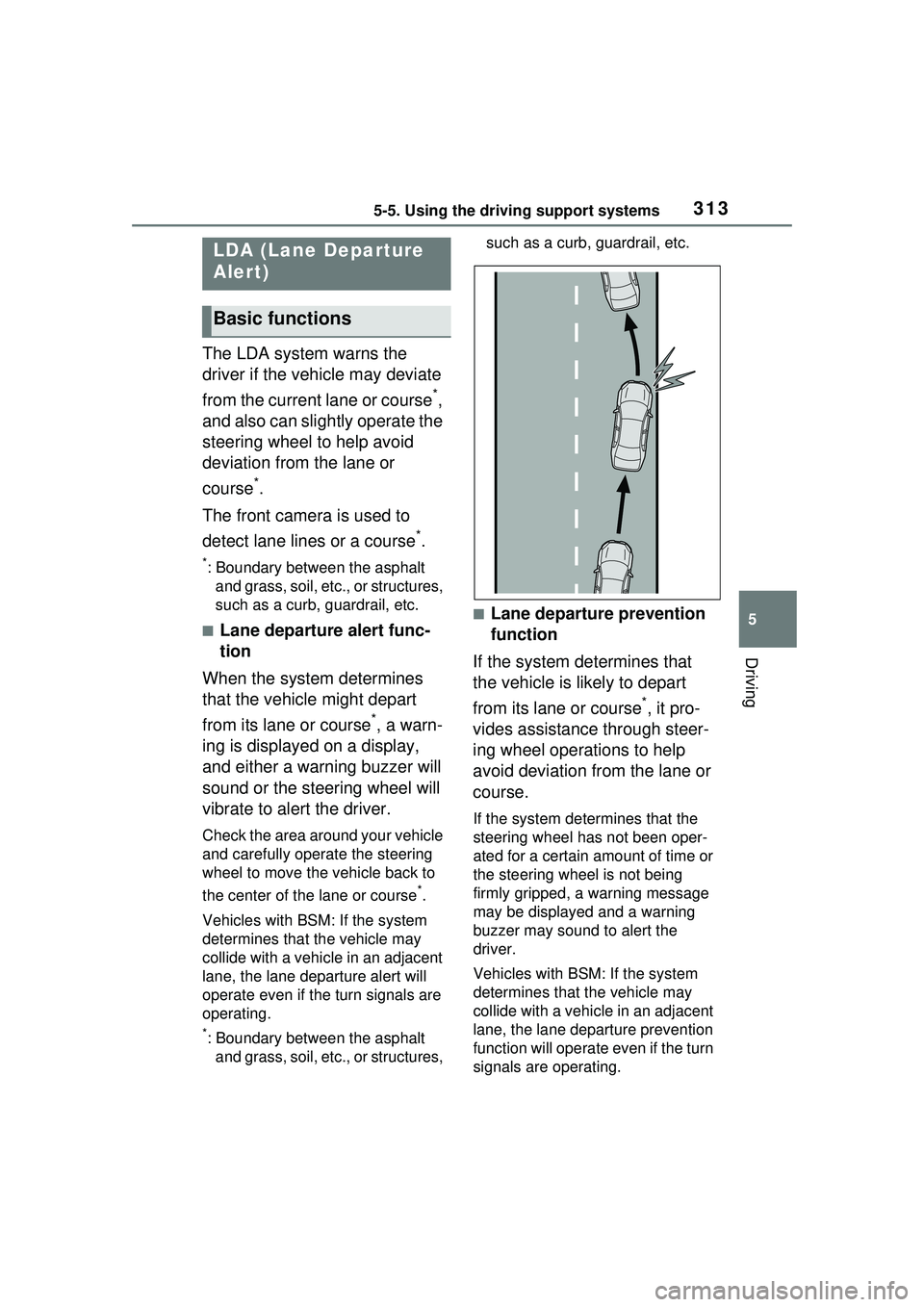
■Lane departure prevention
function
If the system determines that
the vehicle is likely to depart
from its lane or course
*, it pro-
vides assistance through steer-
ing wheel operations to help
avoid deviation from the lane or
course.
If the system determines that the
steering wheel has not been oper-
ated for a certain amount of time or
the steering wheel is not being
firmly gripped, a warning message
may be displayed and a warning
buzzer may sound to alert the
driver.
Vehicles with BSM: If the system
determines that the vehicle may
collide with a vehicle in an adjacent
lane, the lane departure prevention
function will operate even if the turn
signals are operating.
LDA (Lane Departure
Alert)
Basic functions
Page 323 of 680
3235-5. Using the driving support systems
5
Driving
rounding conditions
●In the following situations, system
operation may be canceled:
• When the brake control or output restriction control of a driving sup-
port system operates (For exam-
ple: PCS, drive-start control)
• When the system determines that
a detected object has moved
away from the vehicle
• When lane lines can no longer be
detected
• When the brake pedal has been depressed
• When the accelerator pedal has been depressed
• When the steering wheel has
been operated with more than a
certain amount of force
• When the turn signal lever is oper-
ated to the left/right turn position
WARNING
■Situations in which the sys-
tem may not operate properly
●Situations in which the lane may
not be detected: P.291
●When a detectable object stops
immediately before entering the
path of the vehicle
●When passing extremely close
to a detectable object behind a
guardrail, fence, etc.
●When changing lanes while
overtaking a detectable object
●When passing a detectable
object that is changing lanes or
turning left/right
●When there are objects (guard-
rails, power poles, trees, walls,
fences, poles, traffic cones,
mailboxes, etc.) in the surround-
ing area
●When there are patterns or a
painting ahead of the vehicle
that may be mistaken for a
detectable object
●When passing through a place
with a low structure above the
road (tunnel with a low ceiling,
traffic sign, signboard, etc.)
●When driving on snowy, icy, or
rutted roads
●When a detectable object is
approaching your vehicle
●When your vehicle or a detect-
able object is wandering
●When the movement of a
detectable object changes
(change in direction, sudden
acceleration or deceleration,
etc.)
●When suddenly approaching a
detectable object
●When a preceding vehicle or
motorcycle is not directly in front
of your vehicle
●When there is a structure above
a detectable object
●When part of a detectable
object is hidden by another
object (large luggage, umbrella,
guardrail, etc.)
●When multiple detectable
objects are overlapping
●When a bright light, such as the
sun or headlights of another
vehicle, is reflecting off of the
detectable object
●When the detectable object is
white and looks extremely bright
●When the color or brightness of
the detectable object causes it
to blend in with its surroundings
●When a detectable object cuts
in front of or emerges from
beside a vehicle
Page 327 of 680
3275-5. Using the driving support systems
5
Driving
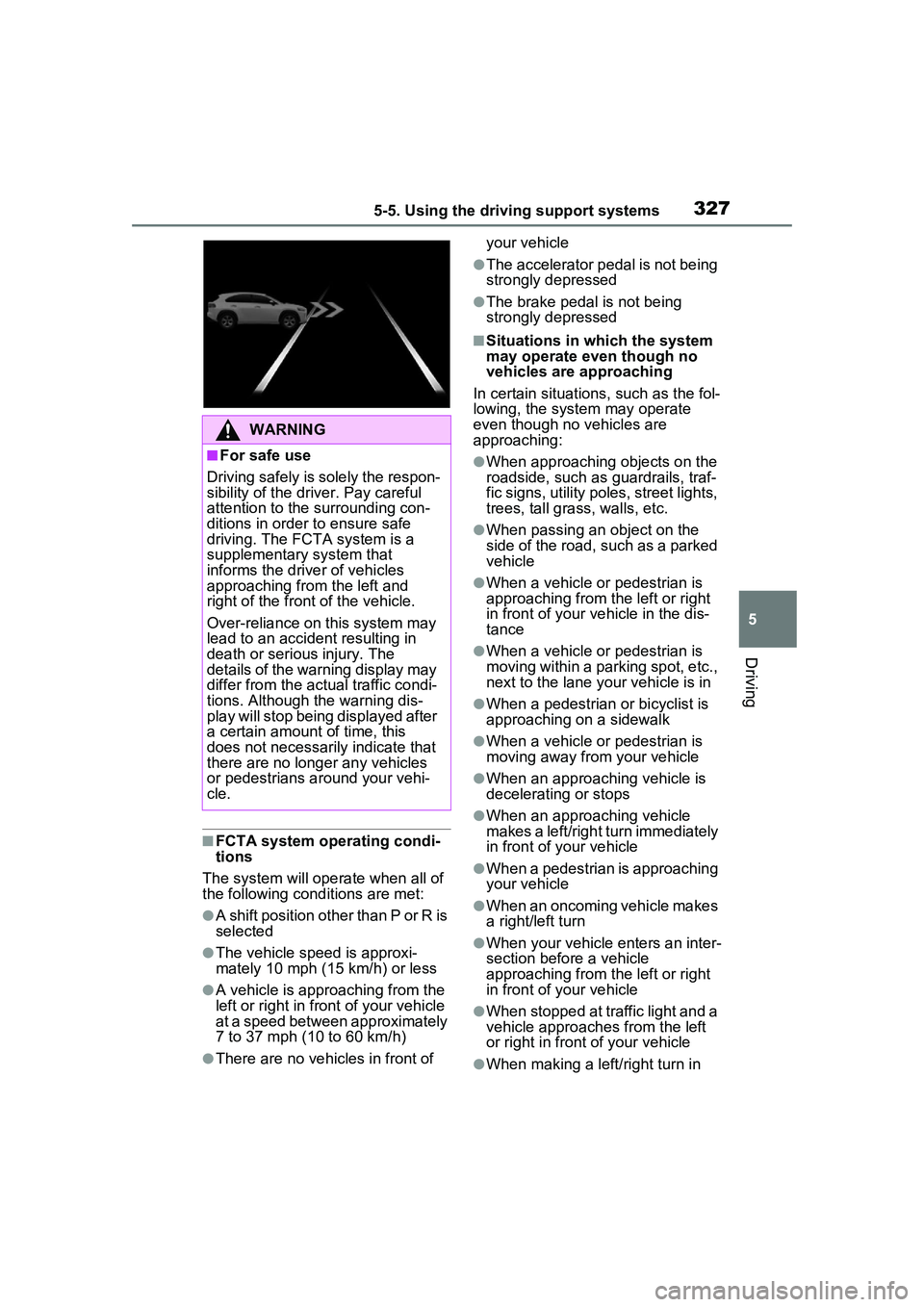
■FCTA system operating condi-
tions
The system will operate when all of
the following conditions are met:
●A shift position other than P or R is
selected
●The vehicle speed is approxi-
mately 10 mph (15 km/h) or less
●A vehicle is approaching from the
left or right in front of your vehicle
at a speed between approximately
7 to 37 mph (10 to 60 km/h)
●There are no vehicles in front of your vehicle
●The accelerator pedal is not being
strongly depressed
●The brake pedal is not being
strongly depressed
■Situations in which the system
may operate even though no
vehicles are approaching
In certain situations, such as the fol-
lowing, the system may operate
even though no vehicles are
approaching:
●When approaching objects on the
roadside, such as guardrails, traf-
fic signs, utility poles, street lights,
trees, tall grass, walls, etc.
●When passing an object on the
side of the road, such as a parked
vehicle
●When a vehicle or pedestrian is
approaching from the left or right
in front of your vehicle in the dis-
tance
●When a vehicle or pedestrian is
moving within a parking spot, etc.,
next to the lane your vehicle is in
●When a pedestrian or bicyclist is
approaching on a sidewalk
●When a vehicle or pedestrian is
moving away from your vehicle
●When an approaching vehicle is
decelerating or stops
●When an approaching vehicle
makes a left/right turn immediately
in front of your vehicle
●When a pedestrian is approaching
your vehicle
●When an oncoming vehicle makes
a right/left turn
●When your vehicle enters an inter-
section before a vehicle
approaching from the left or right
in front of your vehicle
●When stopped at traffic light and a
vehicle approaches from the left
or right in front of your vehicle
●When making a left/right turn in
WARNING
■For safe use
Driving safely is solely the respon-
sibility of the driver. Pay careful
attention to the surrounding con-
ditions in order to ensure safe
driving. The FCTA system is a
supplementary system that
informs the driver of vehicles
approaching from the left and
right of the front of the vehicle.
Over-reliance on this system may
lead to an accident resulting in
death or serious injury. The
details of the warning display may
differ from the actual traffic condi-
tions. Although the warning dis-
play will stop being displayed after
a certain amount of time, this
does not necessarily indicate that
there are no longer any vehicles
or pedestrians around your vehi-
cle.
Page 333 of 680
3335-5. Using the driving support systems
5
Driving
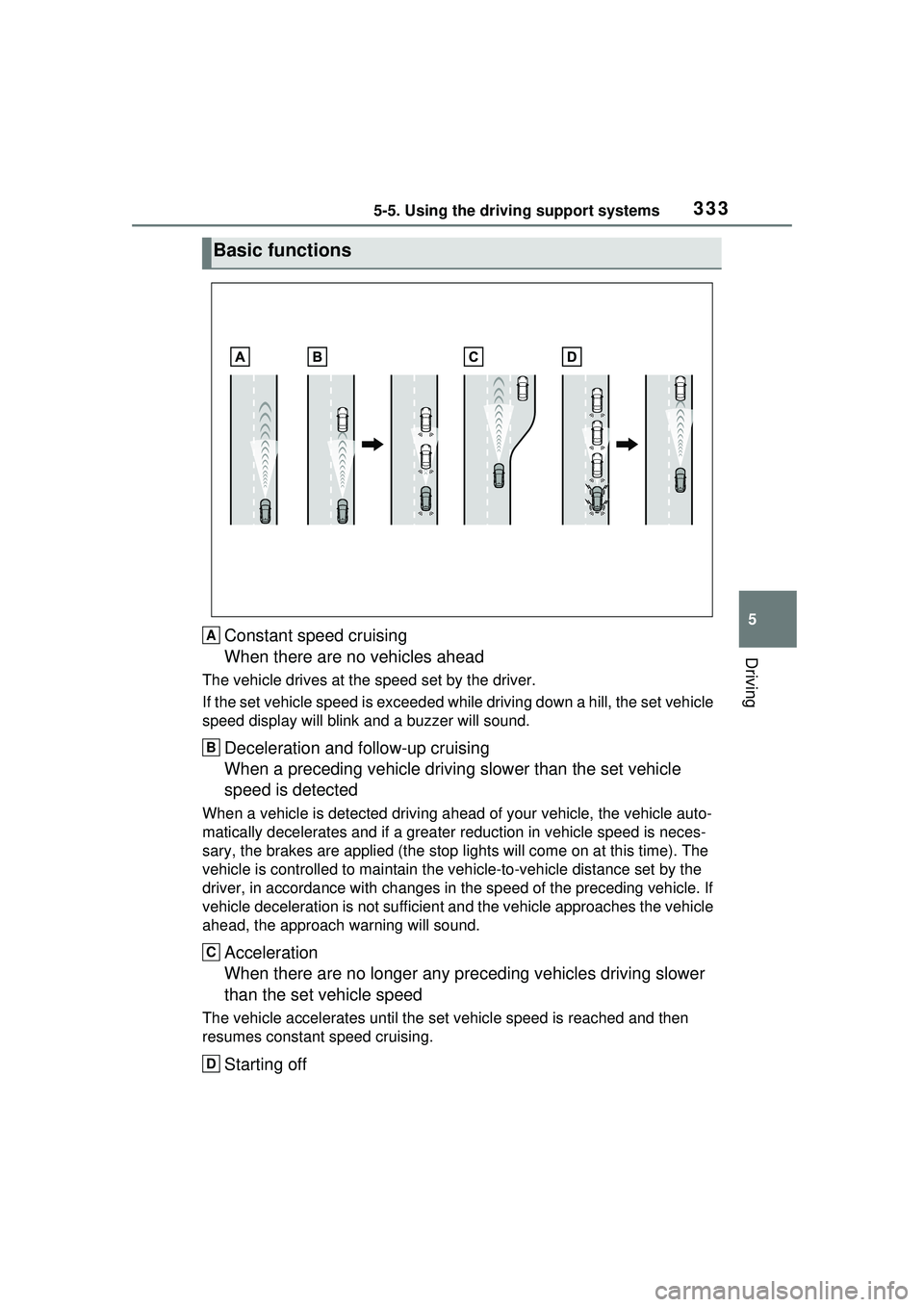
Constant speed cruising
When there are no vehicles ahead
The vehicle drives at the speed set by the driver.
If the set vehicle speed is exceeded while driving down a hill, the set vehicle
speed display will blink and a buzzer will sound.
Deceleration and follow-up cruising
When a preceding vehicle driving slower than the set vehicle
speed is detected
When a vehicle is detected driving ahead of your vehicle, the vehicle auto-
matically decelerates and if a greater reduction in vehicle speed is neces-
sary, the brakes are applied (the stop lights will come on at this time). The
vehicle is controlled to ma intain the vehicle-to-vehicle distance set by the
driver, in accordance with changes in the speed of the preceding vehicle. If
vehicle deceleration is not sufficient an d the vehicle approaches the vehicle
ahead, the ap proach warning will sound.
Acceleration
When there are no longer any pr eceding vehicles driving slower
than the set vehicle speed
The vehicle accelerates until the set vehicle speed is reached and then
resumes constant speed cruising.
Starting off
Basic functions
A
B
C
D
Page 347 of 680
3475-5. Using the driving support systems
5
Driving
formed within a certain amount
of time, the system will enter
warning phase 2.
Vehicles with a driver monitor
camera: Depending on the type
of detection of the driver’s unre-
sponsiveness, the system may
skip warning phase 1 and start
the control of warning phase 2.
After entering warning phase 2,
a buzzer will sound in short
intervals and a message will be
displayed to warn the driver, and
the vehicle will slowly deceler-
ate. If driving operations, such
as holding the steering wheel,
are not performed within a cer-
tain amount of time, the system
will determine that the driver is
not responsive and enter the
deceleration stop phase.
The audio system will be muted
until the driver becomes respon-
sive.
When the vehicle is decelerat-
ing, the brake lights may illumi-
nate, depending on the road
conditions, etc.
After entering the deceleration
stop phase, a buzzer will sound
continuously and a message will
be displayed to warn the driver,
and the vehicle will slowly decel-erate and stop. After the vehicle
stops, the system will enter the
stop and hold phase.
After the vehicle is stopped, the
parking brake will be applied
automatically. After entering the
stop and hold phase, the buzzer
will continue sounding continu-
ously and the emergency flash-
ers (hazard lights) will flash to
warn other drivers of the emer-
gency.
■Restricted functions after the
operation is canceled
After shifting to the deceleration
stop phase, the following functions
will not be available until the hybrid
system is re-started even though
the emergency driving stop system
is canceled:
●LTA
●LCA (if equipped)
●Traffic Jam Assist (if equipped)
Warning phase 2
Deceleration stop phase
Stop hold phase