light TOYOTA PRIUS PRIME 2023 Owners Manual
[x] Cancel search | Manufacturer: TOYOTA, Model Year: 2023, Model line: PRIUS PRIME, Model: TOYOTA PRIUS PRIME 2023Pages: 680, PDF Size: 14.97 MB
Page 412 of 680
4125-5. Using the driving support systems
When exiting from a parallel
parking space, if the system
determines that exit is possible
the parallel exiting function can
be used. Also, depending on the
surrounding environment, if it is
necessary to change the direc-
tion of travel of the vehicle, the
shift position can be changed by
assistance control.
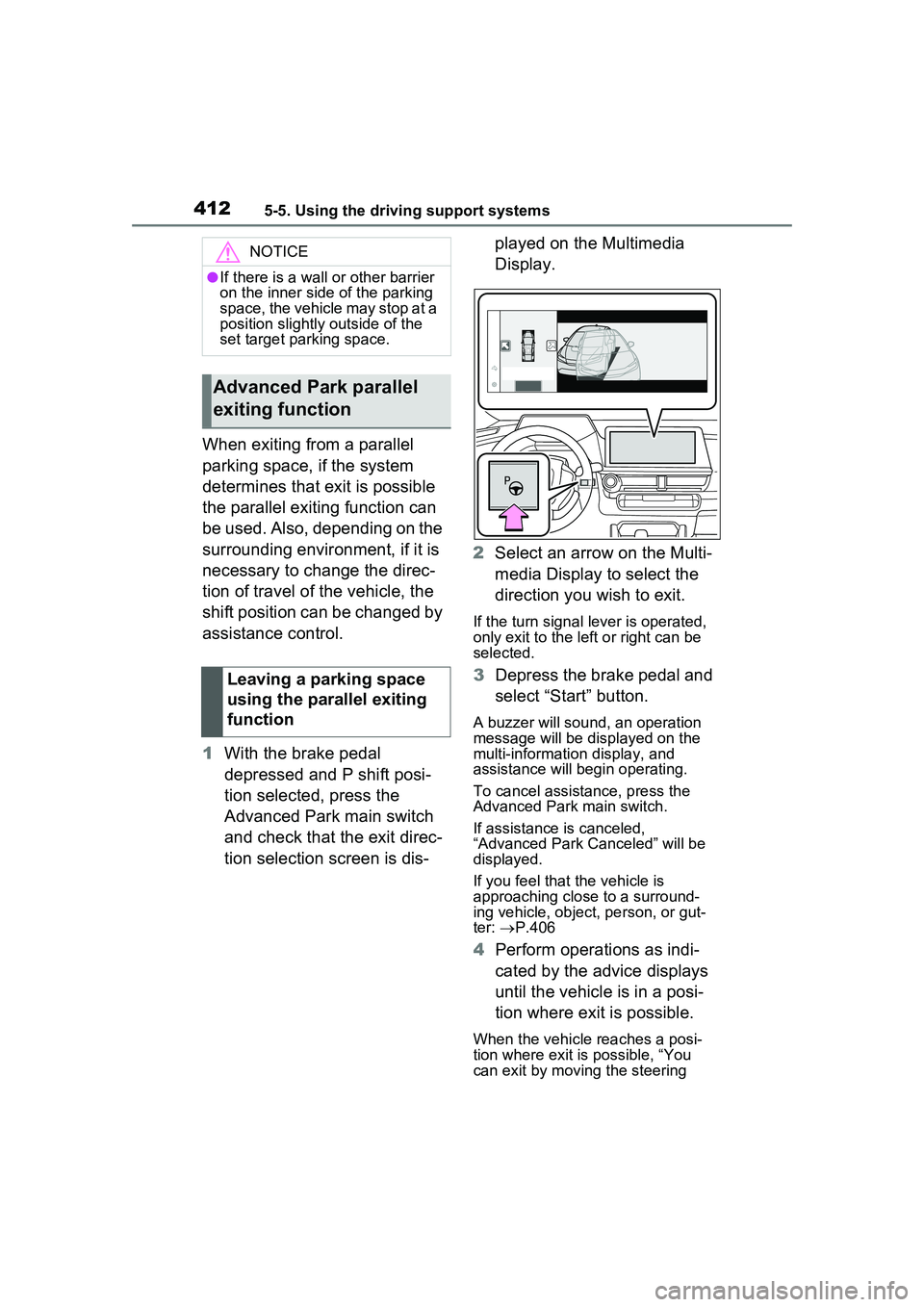
1With the brake pedal
depressed and P shift posi-
tion selected, press the
Advanced Park main switch
and check that the exit direc-
tion selection screen is dis- played on the Multimedia
Display.
2 Select an arrow on the Multi-
media Display to select the
direction you wish to exit.
If the turn signal lever is operated,
only exit to the left or right can be
selected.
3Depress the brake pedal and
select “Start” button.
A buzzer will sound, an operation
message will be displayed on the
multi-informatio n display, and
assistance will begin operating.
To cancel assistance, press the
Advanced Park main switch.
If assistance is canceled,
“Advanced Park Canceled” will be
displayed.
If you feel that the vehicle is
approaching close to a surround-
ing vehicle, object, person, or gut-
ter: P.406
4 Perform operations as indi-
cated by the advice displays
until the vehicle is in a posi-
tion where exit is possible.
When the vehicle reaches a posi-
tion where exit is possible, “You
can exit by moving the steering
NOTICE
●If there is a wall or other barrier
on the inner side of the parking
space, the vehicle may stop at a
position slightly outside of the
set target parking space.
Advanced Park parallel
exiting function
Leaving a parking space
using the parallel exiting
function
Page 418 of 680
4185-5. Using the driving support systems
NOTICE
●In situations such as the follow-
ing, it may not be possible for
the system to provide assis-
tance to a registered parking
spot:
• When the appearance of the parking space is affected by the
shadow of the vehicle or trees
• When an object is detected in the registered parking space
• When a pedestrian or passing vehicle is detected during assis-
tance
• When the position the vehicle is stopped when assistance is
started differs from the position
when registration was per-
formed
• When the registered parking space cannot be reached due to
the existence of parking blocks,
etc.
• When the road surface around the parking space has changed
(road surface has degraded or
been resurfaced)
• When the sunlight conditions differ from when registration
was performed (due to weather
or time of day)
• When the sun is shining directly into a camera, such as in the
early morning or evening
• When the color or brightness of the road surface is uneven
• When a light is temporarily shined on the parking space
(lights of another vehicle, secu-
rity light, etc.)
• When the road surface around the parking space has the same
repeating pattern
• When there is a low protrusion on the road surface near the
parking space
• When the parking space is on a slope
• When a camera has been splashed by hot or cold water
and the lens has fogged up
• When a camera lens is dirty or covered with water droplets
• When accessories which obstruct the view of the camera
are installed
If assistance is ended during
registration, perform registration
again.
●When registering a parking
space to the memory function, if
the road surface cannot be
detected “No available parking
space to register” will be dis-
played.
●When using the memory func-
tion, make sure to stop immedi-
ately in front of the stop
position. Otherwise the parking
space may not be able to be
detected correctly or assis-
tance may not be provided to
the point that the vehicle is fully
parked.
●Do not use the memory function
if a camera has been subjected
to a strong impact or images of
the panoramic view monitor are
misaligned.
●If a camera has been replaced,
as the installation angle of the
camera will have c hanged, it will
be necessary to reregister park-
ing spaces of the memory func-
tion.
Page 425 of 680
4255-5. Using the driving support systems
5
Driving
wheel.
■The Secondary Collision
Brake
When the SRS airbag sensor
detects a collision and the sys-
tem operates, the brakes and
brake lights are automatically
controlled to reduce the vehicle
speed and help reduce the pos-
sibility of further damage due to
a secondary collision.
■When the TRAC/VSC/ABS sys-
tems are operating
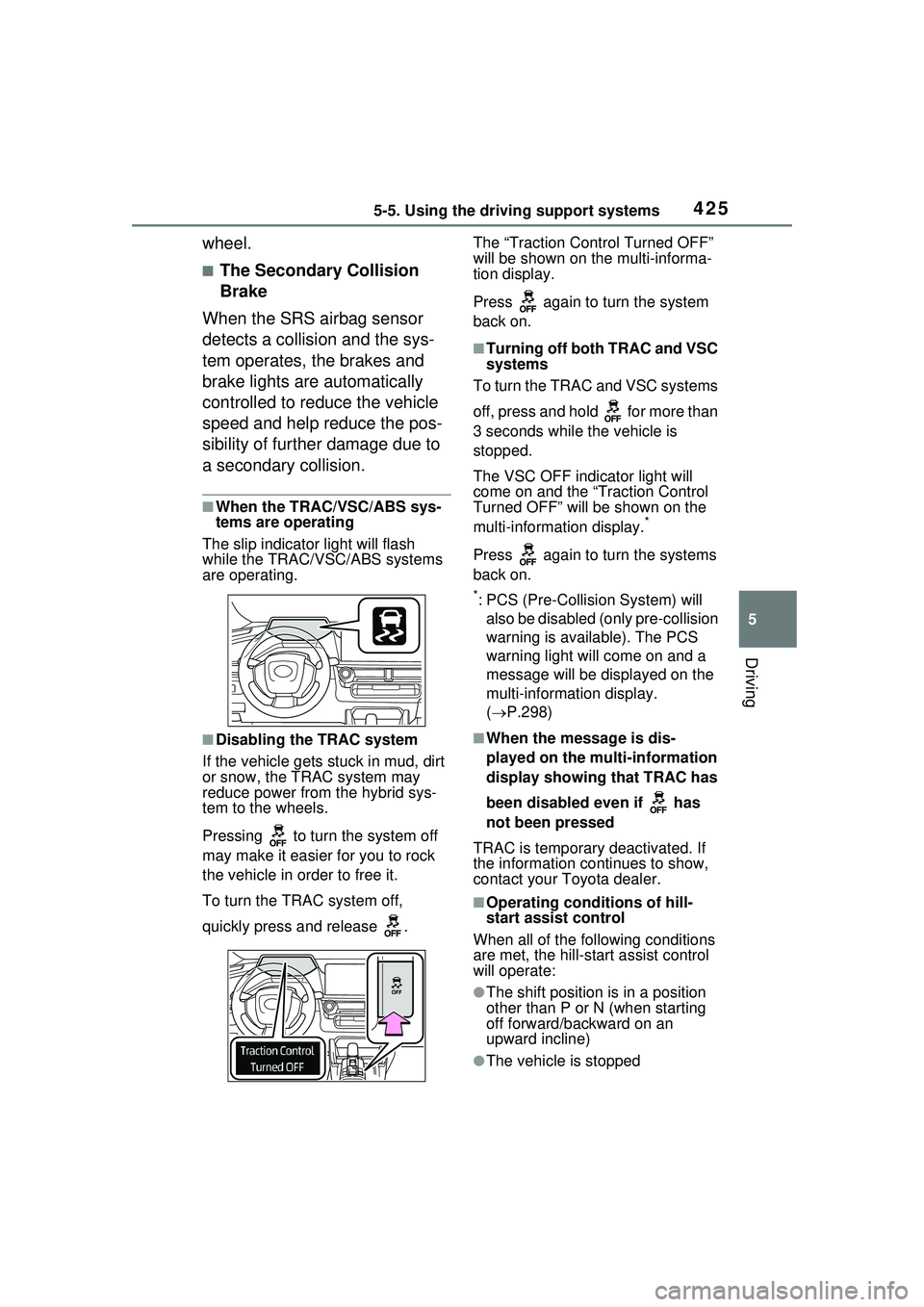
The slip indicator light will flash
while the TRAC/VSC/ABS systems
are operating.
■Disabling the TRAC system
If the vehicle gets stuck in mud, dirt
or snow, the TRAC system may
reduce power from the hybrid sys-
tem to the wheels.
Pressing to turn the system off
may make it easier for you to rock
the vehicle in order to free it.
To turn the TRAC system off,
quickly press and release . The “Traction Control Turned OFF”
will be shown on the multi-informa-
tion display.
Press again to turn the system
back on.
■Turning off both TRAC and VSC
systems
To turn the TRAC and VSC systems
off, press and hold for more than
3 seconds while the vehicle is
stopped.
The VSC OFF indicator light will
come on and the “Traction Control
Turned OFF” will be shown on the
multi-informat ion display.
*
Press again to turn the systems
back on.
*: PCS (Pre-Collision System) will
also be disabled (only pre-collision
warning is available). The PCS
warning light will come on and a
message will be disp layed on the
multi-information display.
( P.298)
■When the message is dis-
played on the mu lti-information
display showing that TRAC has
been disabled even if has
not been pressed
TRAC is temporary deactivated. If
the information continues to show,
contact your Toyota dealer.
■Operating conditions of hill-
start assist control
When all of the following conditions
are met, the hill-start assist control
will operate:
●The shift position is in a position
other than P or N (when starting
off forward/backward on an
upward incline)
●The vehicle is stopped
Page 428 of 680
4285-5. Using the driving support systems
WARNING
■When the TRAC/ABS/VSC is
activated
The slip indicator light flashes.
Always drive care fully. Reckless
driving may cause an accident.
Exercise particular care when the
indicator light flashes.
■When the TRAC/VSC systems
are turned off
Be especially careful and drive at
a speed appropriate to the road
conditions. As these are the sys-
tems to help ensure vehicle stabil-
ity and driving force, do not turn
the TRAC/VSC systems off
unless necessary.
■Replacing tires
Make sure that all tires are of the
specified size, brand, tread pat-
tern and total load capacity. In
addition, make sure that the tires
are inflated to the recommended
tire inflation pressure level.
The ABS, TRAC and VSC sys-
tems will not function correctly if
different tires are installed on the
vehicle.
Contact your Toyota dealer for
further information when replacing
tires or wheels.
■Handling of tires and the sus-
pension
Using tires with any kind of prob-
lem or modifying the suspension
will affect the driv ing assist sys-
tems, and may cause a system to
malfunction.
■Secondary Collision Brake
Do not rely solely upon the Sec-
ondary Collision Brake. This sys-
tem is designed to help reduce
the possibility of further damage
due to a secondary collision, how-
ever, that effect changes accord-
ing to various conditions. Overly
relying on the system may result
in death or serious injury.
Page 430 of 680
4305-6. Driving tips
Perform the following according
to the driving conditions:
Do not try to forcibly open a
window or move a wiper that
is frozen. Pour warm water
over the frozen area to melt
the ice. Wipe away the water
immediately to prevent it from
freezing.
To ensure proper operation of
the climate control system
fan, remove any snow that
has accumulated on the air
inlet vents in front of the wind-
shield.
Check for and remove any
excess ice or snow that may
have accumulated on the
exterior lights, outside rear
view mirrors, windows, vehi-
cle’s roof, chassis, around the
tires or on the brakes.
Remove any snow or mud
from the bottom of your shoes
before getting in the vehicle. Accelerate the vehicle slowly,
keep a safe distance between
you and the vehicle ahead, and
drive at a reduced speed suit-
able to road conditions.
Turn automatic mode of the
parking brake off.
Otherwise, the parking brake
may freeze and not be able to
be released automatically.
Also, avoid using the following as
the parking brake may operate
automatically, even if automatic
mode is off.
• Brake hold system
Park the vehicle and shift the
shift position to P without set-
ting the parking brake. The
parking brake may freeze up,
preventing it from being
released. If the vehicle is
parked without setting the
parking brake, make sure to
block the wheels. Failure to
do so may be dangerous
because it may cause the
vehicle to move unexpect-
edly, possibly leading to an
accident.
When the parking brake is in
automatic mode, release the
parking brake after shifting
the shift position to P.
( P.264)
NOTICE
■Repairing or replacing snow
tires
Request repairs or replacement of
snow tires from your Toyota
dealer or legitimate tire retailers.
This is because the removal and
attachment of snow tires affects
the operation of the tire pressure
warning valves and transmitters.
Before driving the vehicle
When driving the vehicle
When parking the vehicle
Page 433 of 680
433
6
6
Interior features
Interior features
6-1. Using the air conditioning system and defogger
Automatic air conditioning system ....................... 434
Heated steering wheel/seat heaters/seat ventilators
.................................. 443
6-2. Using the interior lights Interior lights list .......... 446
6-3. Using the storage features List of storage features 450
Luggage compartment fea- tures .......................... 454
6-4. Using the other interior features
Other interior features . 456
Power outlet (1500 W) 468
When the power outlet (1500 W) cannot be used
properly ..................... 475
Garage door opener.... 477
Page 439 of 680
4396-1. Using the air conditioning system and defogger
6
Interior features
1Press the “AUTO” switch.
2 Adjust the temperature set-
ting.
3 To stop the operation, press
the “OFF” switch.
If the fan speed setting or air
flow modes are operated, the
automatic mode indicator goes
off. However, automatic mode
for functions other than that
operated is maintained.
■Using automatic mode
Fan speed is adjusted automati-
cally according to the temperature
setting and the ambient conditions.
Therefore, the fan may stop for a
while until warm or cool air is ready
to flow immediately after the auto-
matic mode switch is pressed.
Cool air may blow around the upper
body even when the heater is on
due to sunlight.
■Windshield fog detection func-
tion
When automatic mode is set, the
humidity sensor detects fog on the
windshield and controls the air con-
ditioning system to prevent fog.
WARNING
■Cautions for using “My Room
Mode”
Do not leave children, people who
need assistance, or pets inside
the vehicle. The system may turn
off automatically and the interior
temperature may become high or
low, resulting in heat stroke, dehy-
dration or hypothermia. Failure to
do so may result in death or seri-
ous injury.
■To prevent the windshield
from fogging up
Do not use the windshield defog-
ger switch during cool air opera-
tion in extremely humid weather.
The difference between the tem-
perature of the outside air and
that of the windshield can cause
the outer surface of the wind-
shield to fog up, blocking your
vision.
■When the outside rear view
mirror defoggers are operat-
ing (if equipped)
Do not touch the rear view mirror
surfaces when the outside rear
view mirror defoggers are on.
NOTICE
■To prevent 12-volt battery dis-
charge
Do not leave the air conditioning
system on longer than necessary
when the hybrid system is off.
■When repairing/replacing
parts of the air conditioning
system
Have repair/replacement per-
formed by your Toyota dealer.
When a part of the air condition-
ing system, such as the evapora-
tor, is to be replaced, it must be
replaced with a new one.
Using automatic mode
NOTICE
■Humidity sensor
In order to detect fog on the wind-
shield, a sensor which monitors
the temperature of the windshield,
the surround humidity, etc. is
installed.
Follow these points to avoid dam-
aging the sensor:
●Do not disassemble the sensor
Page 443 of 680
4436-1. Using the air conditioning system and defogger
6
Interior features
*: If equipped
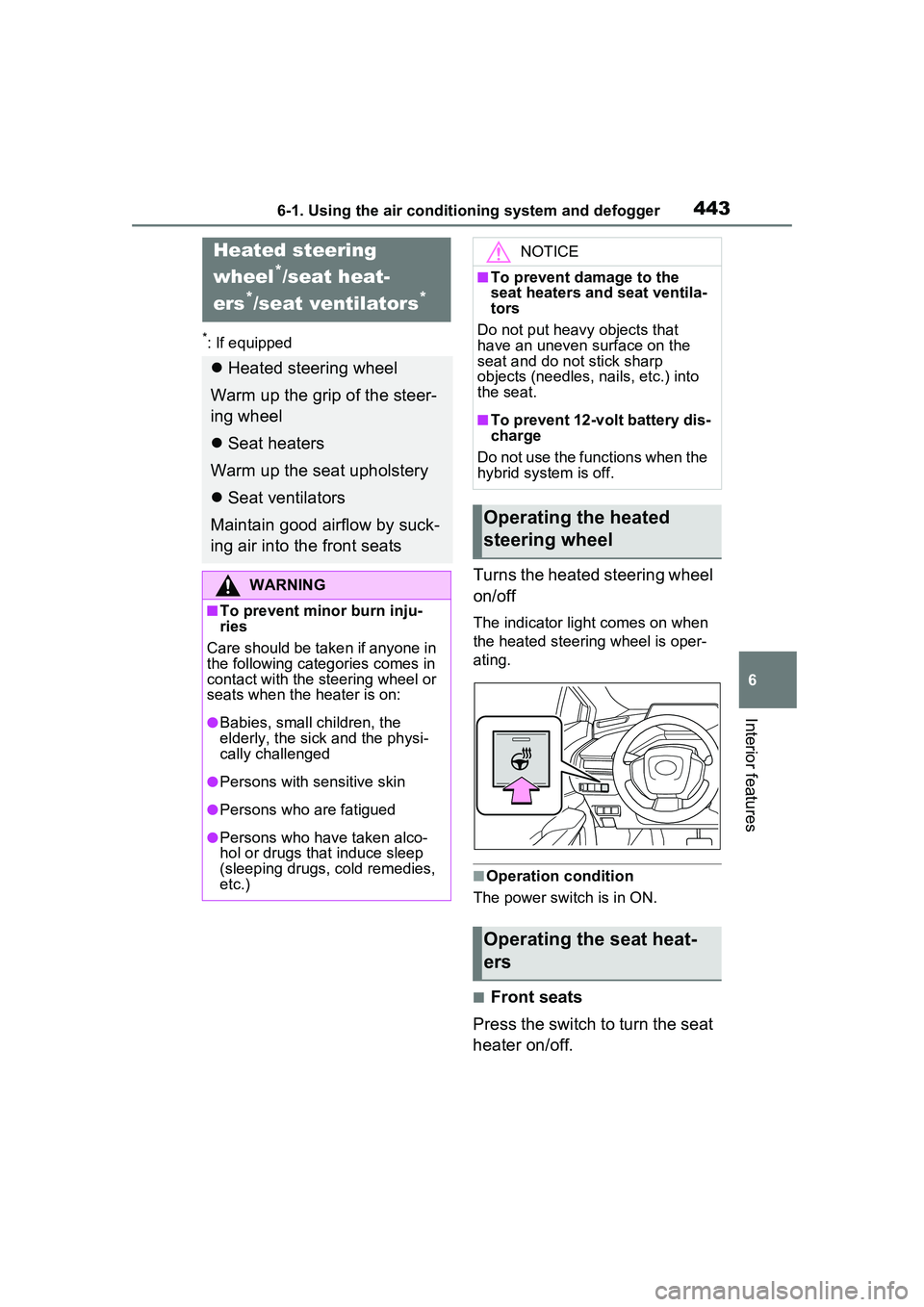
Turns the heated steering wheel
on/off
The indicator light comes on when
the heated steering wheel is oper-
ating.
■Operation condition
The power switch is in ON.
■Front seats
Press the switch to turn the seat
heater on/off.
Heated steering
wheel
*/seat heat-
ers
*/seat ventilators*
Heated steering wheel
Warm up the grip of the steer-
ing wheel
Seat heaters
Warm up the seat upholstery
Seat ventilators
Maintain good airflow by suck-
ing air into the front seats
WARNING
■To prevent minor burn inju-
ries
Care should be take n if anyone in
the following catego ries comes in
contact with the steering wheel or
seats when the heater is on:
●Babies, small children, the
elderly, the sick and the physi-
cally challenged
●Persons with sensitive skin
●Persons who are fatigued
●Persons who have taken alco-
hol or drugs that induce sleep
(sleeping drugs, cold remedies,
etc.)
NOTICE
■To prevent damage to the
seat heaters and seat ventila-
tors
Do not put heavy objects that
have an uneven surface on the
seat and do not stick sharp
objects (needles, nails, etc.) into
the seat.
■To prevent 12-volt battery dis-
charge
Do not use the functions when the
hybrid system is off.
Operating the heated
steering wheel
Operating the seat heat-
ers
Page 446 of 680
4466-2. Using the interior lights
6-2.Using the interior lights
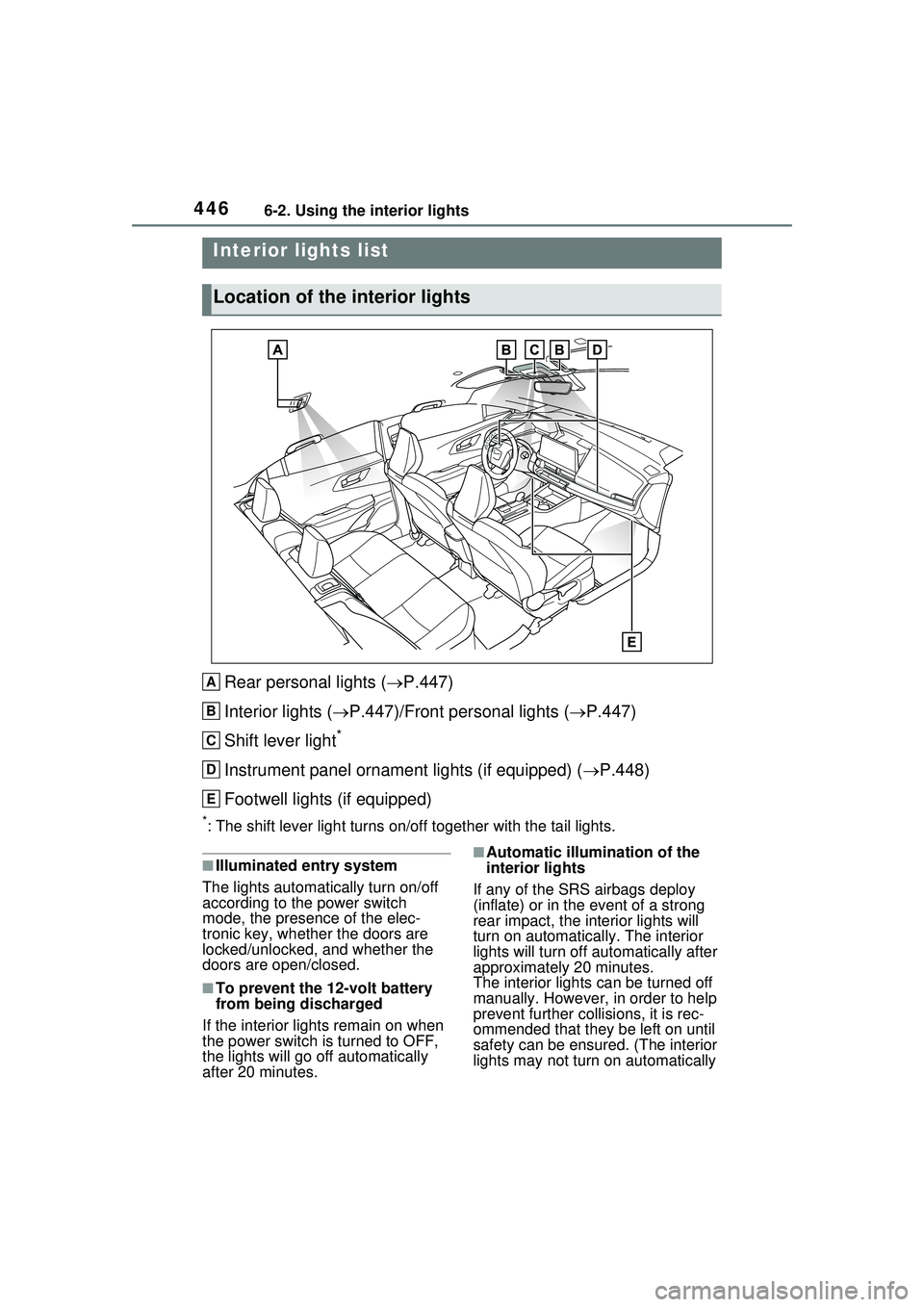
Rear personal lights (P.447)
Interior lights ( P.447)/Front personal lights ( P.447)
Shift lever light
*
Instrument panel ornament lights (if equipped) ( P.448)
Footwell lights (if equipped)
*: The shift lever light turns on/off together with the tail lights.
■Illuminated entry system
The lights automatically turn on/off
according to the power switch
mode, the presence of the elec-
tronic key, whether the doors are
locked/unlocked, and whether the
doors are open/closed.
■To prevent the 12-volt battery
from being discharged
If the interior light s remain on when
the power switch is turned to OFF,
the lights will go off automatically
after 20 minutes.
■Automatic illumina tion of the
interior lights
If any of the SRS airbags deploy
(inflate) or in the event of a strong
rear impact, the interior lights will
turn on automatically. The interior
lights will turn off au tomatically after
approximately 20 minutes.
The interior lights can be turned off
manually. However, in order to help
prevent further collisions, it is rec-
ommended that they be left on until
safety can be ensured. (The interior
lights may not turn on automatically
Interior lights list
Location of the interior lights
A
B
C
D
E
Page 447 of 680
4476-2. Using the interior lights
6
Interior features
depending on the force of the
impact and conditions of the colli-
sion.)
■Customization
Some functions can be customized.
(Customizable features: P.618)
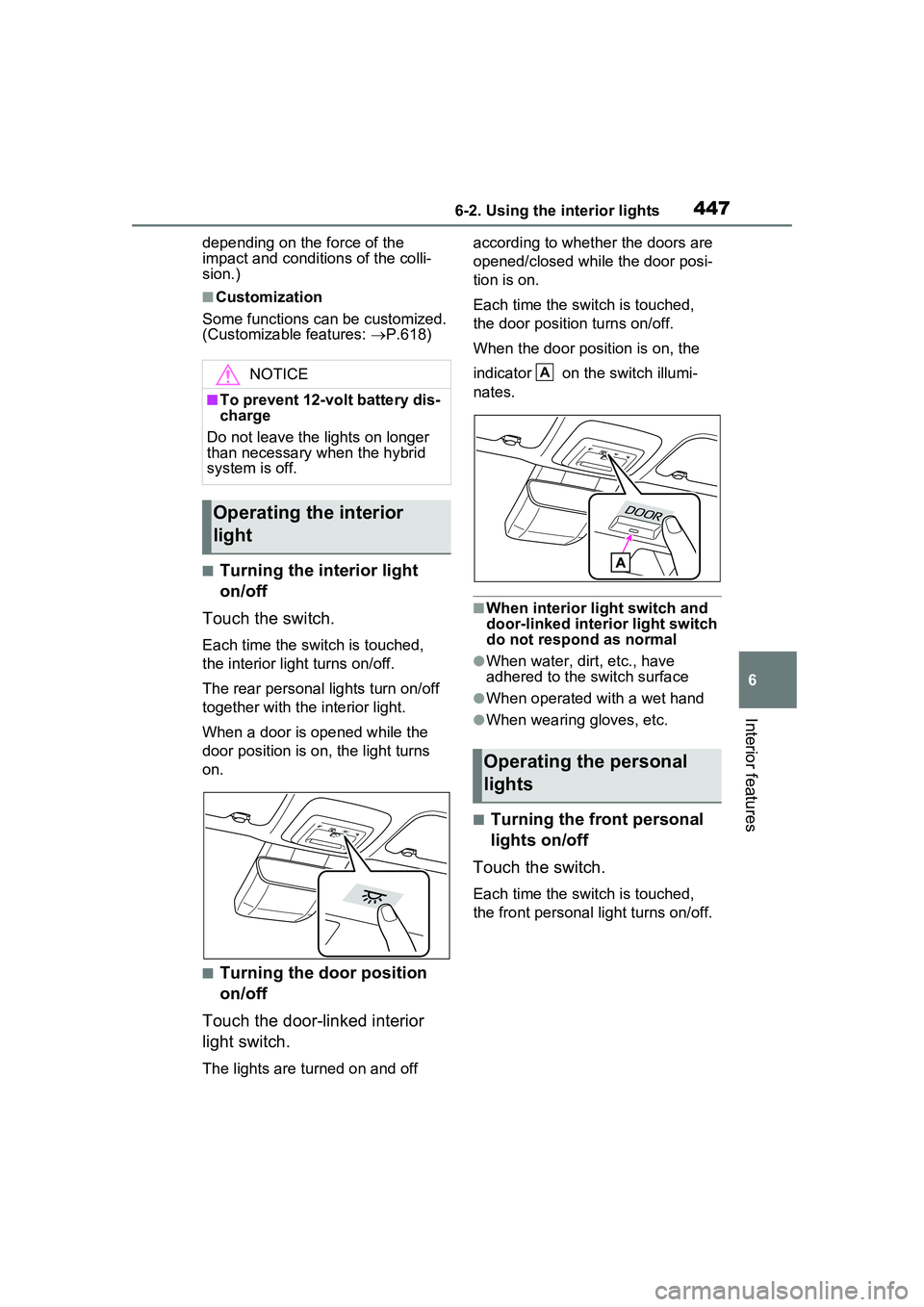
■Turning the interior light
on/off
Touch the switch.
Each time the switch is touched,
the interior light turns on/off.
The rear personal lights turn on/off
together with the interior light.
When a door is opened while the
door position is on, the light turns
on.
■Turning the door position
on/off
Touch the door-linked interior
light switch.
The lights are turned on and off according to whether the doors are
opened/closed while the door posi-
tion is on.
Each time the switch is touched,
the door position turns on/off.
When the door position is on, the
indicator on the switch illumi-
nates.
■When interior light switch and
door-linked interior light switch
do not respond as normal
●When water, dirt, etc., have
adhered to the switch surface
●When operated with a wet hand
●When wearing gloves, etc.
■Turning the front personal
lights on/off
Touch the switch.
Each time the switch is touched,
the front personal light turns on/off.
NOTICE
■To prevent 12-volt battery dis-
charge
Do not leave the lights on longer
than necessary when the hybrid
system is off.
Operating the interior
light
Operating the personal
lights
A