light TOYOTA PRIUS PRIME 2023 Owners Manual
[x] Cancel search | Manufacturer: TOYOTA, Model Year: 2023, Model line: PRIUS PRIME, Model: TOYOTA PRIUS PRIME 2023Pages: 680, PDF Size: 14.97 MB
Page 354 of 680
3545-5. Using the driving support systems
*: If equipped
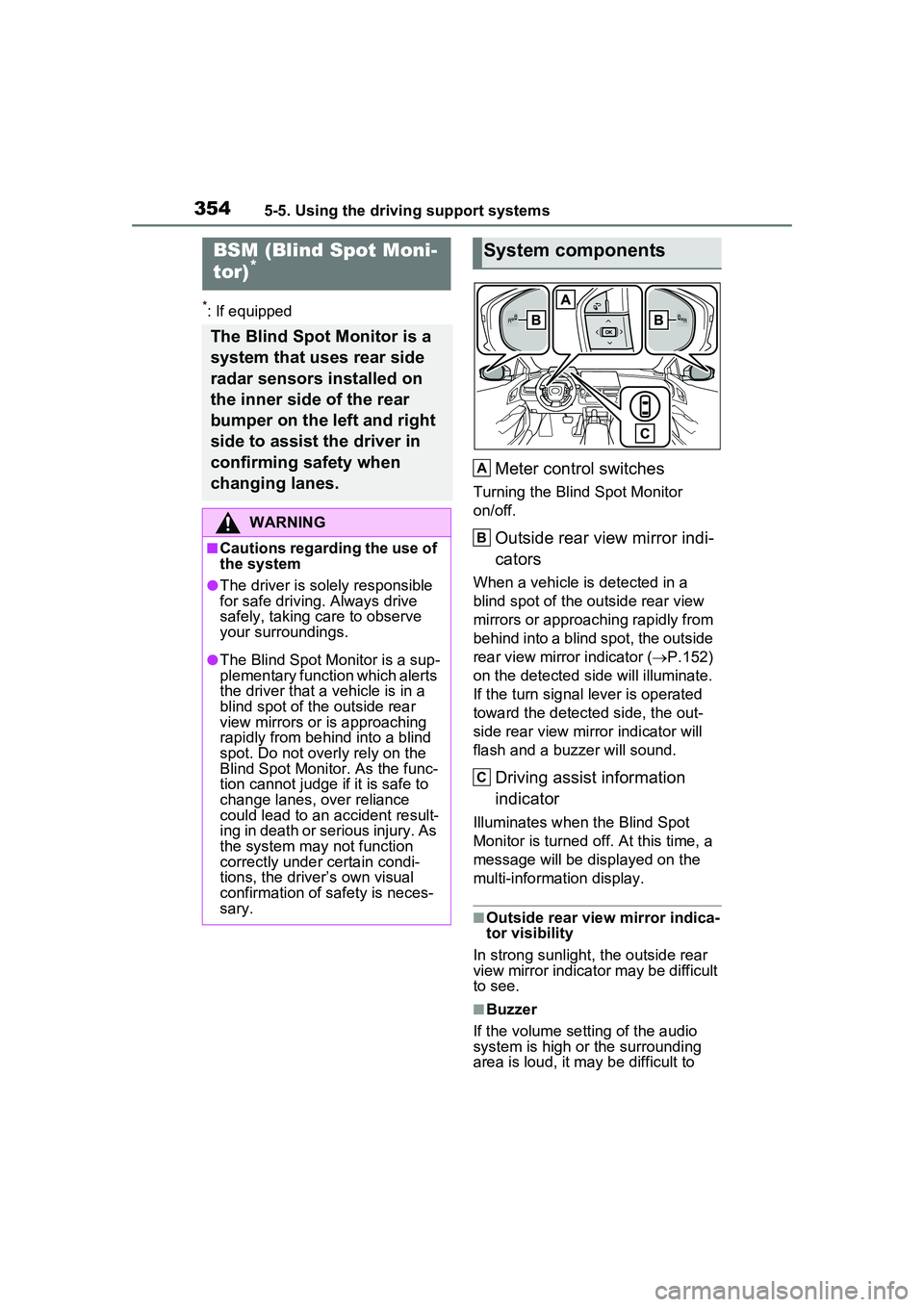
Meter control switches
Turning the Blind Spot Monitor
on/off.
Outside rear view mirror indi-
cators
When a vehicle is detected in a
blind spot of the outside rear view
mirrors or approaching rapidly from
behind into a blind spot, the outside
rear view mirror indicator (P.152)
on the detected side will illuminate.
If the turn signal lever is operated
toward the detected side, the out-
side rear view mirror indicator will
flash and a buzzer will sound.
Driving assist information
indicator
Illuminates when the Blind Spot
Monitor is turned off. At this time, a
message will be displayed on the
multi-informat ion display.
■Outside rear view mirror indica-
tor visibility
In strong sunlight, the outside rear
view mirror indicator may be difficult
to see.
■Buzzer
If the volume setting of the audio
system is high or the surrounding
area is loud, it may be difficult to
BSM (Blind Spot Moni-
tor)*
The Blind Spot Monitor is a
system that uses rear side
radar sensors installed on
the inner side of the rear
bumper on the left and right
side to assist the driver in
confirming safety when
changing lanes.
WARNING
■Cautions regarding the use of
the system
●The driver is solely responsible
for safe driving. Always drive
safely, taking care to observe
your surroundings.
●The Blind Spot Monitor is a sup-
plementary function which alerts
the driver that a vehicle is in a
blind spot of the outside rear
view mirrors or is approaching
rapidly from behind into a blind
spot. Do not overly rely on the
Blind Spot Monitor. As the func-
tion cannot judge if it is safe to
change lanes, over reliance
could lead to an accident result-
ing in death or serious injury. As
the system may not function
correctly under certain condi-
tions, the driver’s own visual
confirmation of safety is neces-
sary.
System components
A
B
C
Page 355 of 680
3555-5. Using the driving support systems
5
Driving
hear the buzzer.
■Customization
Some functions can be customized.
( P.618)
The Blind Spot Monitor can be
enabled/disabled through a cus-
tomize setting. ( P.618)
When the Blind Spot Monitor is
off, the driving assist information
indicator ( P.152) will illumi-
nate and a message will be dis-
played on the multi-information
WARNING
■To ensure the system can
operate properly
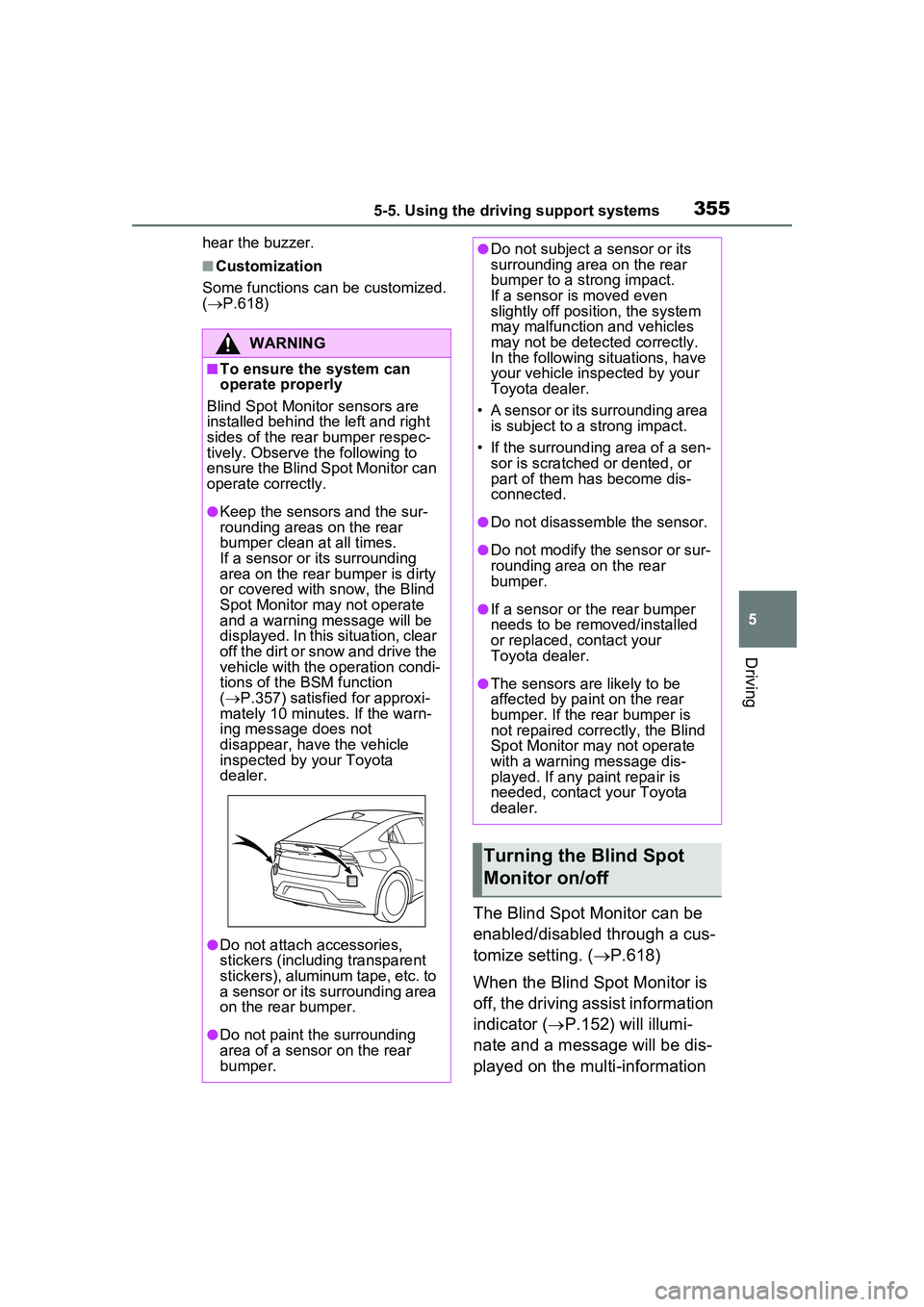
Blind Spot Monitor sensors are
installed behind the left and right
sides of the rear bumper respec-
tively. Observe the following to
ensure the Blind Spot Monitor can
operate correctly.
●Keep the sensors and the sur-
rounding areas on the rear
bumper clean at all times.
If a sensor or its surrounding
area on the rear bumper is dirty
or covered with snow, the Blind
Spot Monitor may not operate
and a warning message will be
displayed. In this situation, clear
off the dirt or snow and drive the
vehicle with the operation condi-
tions of the BSM function
( P.357) satisfied for approxi-
mately 10 minutes. If the warn-
ing message does not
disappear, have the vehicle
inspected by your Toyota
dealer.
●Do not attach accessories,
stickers (including transparent
stickers), aluminum tape, etc. to
a sensor or its surrounding area
on the rear bumper.
●Do not paint the surrounding
area of a sensor on the rear
bumper.
●Do not subject a sensor or its
surrounding area on the rear
bumper to a strong impact.
If a sensor is moved even
slightly off position, the system
may malfunction and vehicles
may not be detected correctly.
In the following si tuations, have
your vehicle inspected by your
Toyota dealer.
• A sensor or its surrounding area is subject to a strong impact.
• If the surrounding area of a sen- sor is scratched or dented, or
part of them has become dis-
connected.
●Do not disassemble the sensor.
●Do not modify the sensor or sur-
rounding area on the rear
bumper.
●If a sensor or the rear bumper
needs to be removed/installed
or replaced, contact your
Toyota dealer.
●The sensors are likely to be
affected by paint on the rear
bumper. If the rear bumper is
not repaired correctly, the Blind
Spot Monitor may not operate
with a warning message dis-
played. If any paint repair is
needed, contact your Toyota
dealer.
Turning the Blind Spot
Monitor on/off
Page 360 of 680
3605-5. Using the driving support systems
that the system has operated. After
the notification through voice guid-
ance is made, no more voice guid-
ance notifications will be made
again until the door is fully closed.
■Outside rear view mirror indica-
tor visibility
In strong sunlight, the outside rear
view mirror indicator may be difficult
to see.
■Buzzer
If the volume setting of the audio
system is high or the surrounding
area is loud, it may be difficult to
hear the buzzer.
■Voice notifications
In the following situations, voice
notifications will not be output:
●When it is estimated that no occu-
pants are on board*
●After opening a door and entering
the vehicle, until the hybrid system
is started
●When 3 minutes or more have
elapsed since the hybrid system
was stopped
●When the language setting of the
Multimedia Display has been set
to a language that does not sup-
port voice notifications
●When all of the doors have been
locked from outside the vehicle
●When a door remains open for 1
minute or more after the hybrid
system is stopped
●When the ACC mode ( P.618)
has been enabled through a cus- tomize setting on the Multimedia
Display and the hybrid system has
been stopped
●When the parking assist volume
setting on the Multimedia Display
has been set to off
*: For each seating position, judg-
ment is made based on the open-
ing and closing of a door, before
driving for ingress and after driv-
ing for egress.
■Customization
Some functions can be customized.
( P.618)
The safe exit assist system can
be enabled/disabled through a
customize setting. ( P.618)
When the safe exit assist is off,
the driving assist information
indicator will illuminate and a
message will be displayed on
the multi-information display.
Each time the power switch is
turned to ON, the safe exit
assist is enabled.
■Objects that can be detected by the safe exit assist
When the safe exit assist detects the following vehicles or bicycles
behind your vehicle using a rear si de radar sensor, the occupants of
the vehicle are informed through an outside rear view mirror indica-
WARNING
■To ensure the system can
operate properly
P.355
Turning the safe exit
assist system ON/OFF
Safe exit assist operation
Page 364 of 680
3645-5. Using the driving support systems
play depending on the position
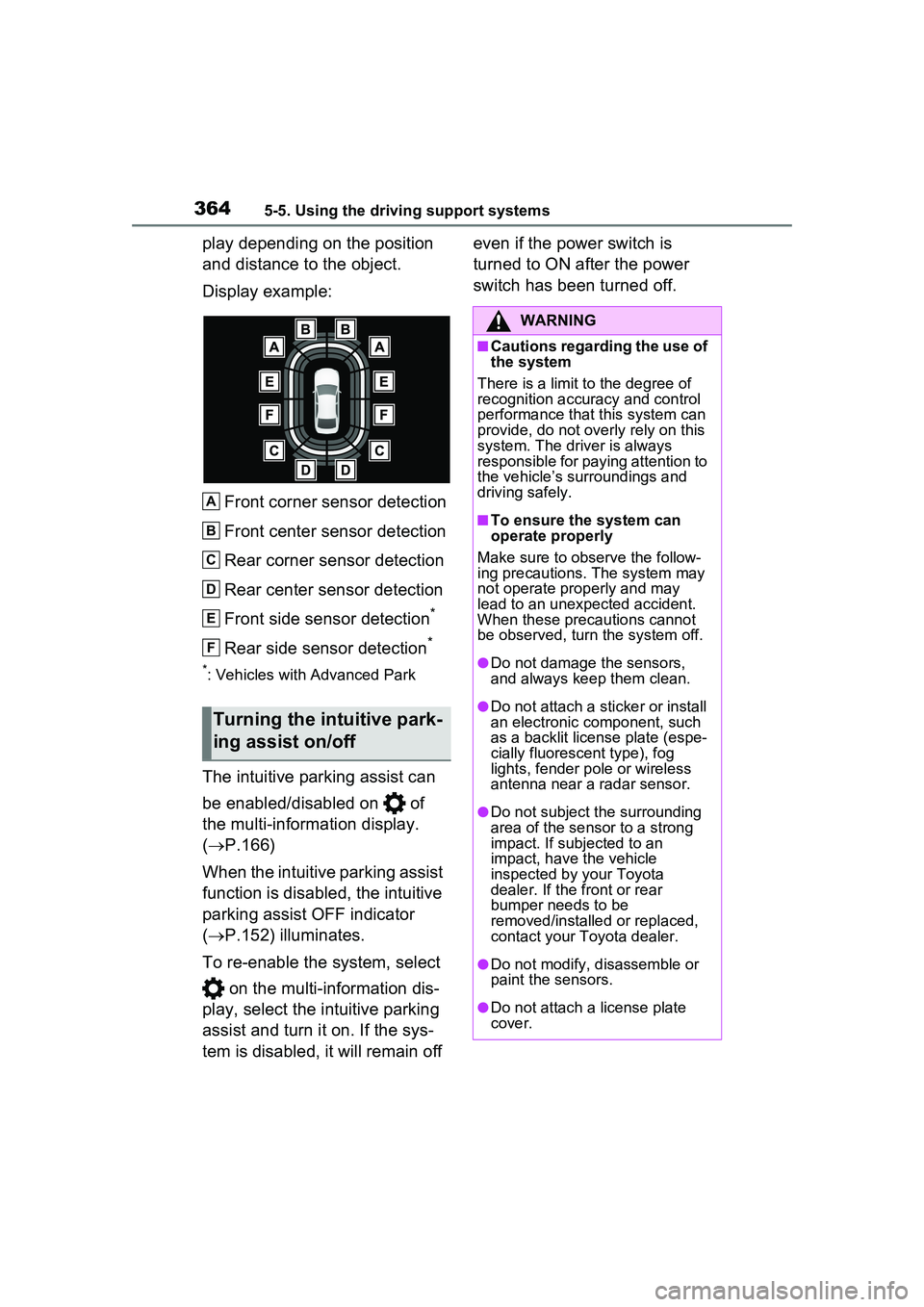
and distance to the object.
Display example:Front corner sensor detection
Front center sensor detection
Rear corner sensor detection
Rear center sensor detection
Front side sensor detection
*
Rear side sensor detection*
*: Vehicles with Advanced Park
The intuitive parking assist can
be enabled/disabled on of
the multi-information display.
( P.166)
When the intuitive parking assist
function is disabled, the intuitive
parking assist OFF indicator
( P.152) illuminates.
To re-enable the system, select on the multi-information dis-
play, select the intuitive parking
assist and turn it on. If the sys-
tem is disabled, it will remain off even if the power switch is
turned to ON after the power
switch has been turned off.
Turning the intuitive park-
ing assist on/off
A
B
C
D
E
F
WARNING
■Cautions regarding the use of
the system
There is a limit to the degree of
recognition accuracy and control
performance that this system can
provide, do not overly rely on this
system. The driver is always
responsible for paying attention to
the vehicle’s surroundings and
driving safely.
■To ensure the system can
operate properly
Make sure to observe the follow-
ing precautions. The system may
not operate properly and may
lead to an unexpected accident.
When these precautions cannot
be observed, turn the system off.
●Do not damage the sensors,
and always keep them clean.
●Do not attach a st icker or install
an electronic component, such
as a backlit license plate (espe-
cially fluorescent type), fog
lights, fender pole or wireless
antenna near a radar sensor.
●Do not subject the surrounding
area of the sensor to a strong
impact. If subjected to an
impact, have the vehicle
inspected by your Toyota
dealer. If the front or rear
bumper needs to be
removed/installed or replaced,
contact your Toyota dealer.
●Do not modify, disassemble or
paint the sensors.
●Do not attach a license plate
cover.
Page 374 of 680
3745-5. Using the driving support systems
will be displayed on the multi-infor-
mation display.
The RCTA can be enabled/dis-
abled through a customize set-
ting. (P.618)
When the RCTA function is off,
the driving assist information
indicator ( P.152) will illumi-
nate and a message will be dis-
played on the multi-information
display. Each time the power
switch is turned to ON, the
RCTA function is enabled.
■Outside rear view mirror indica-
tor visibility
In strong sunlight, the outside rear
view mirror indicator may be difficult
to see.
■Hearing the RCTA buzzer
The RCTA buzzer may be difficult to
hear over loud noises, such as if the
audio system volume is high.
■Rear side radar sensors
P.355
■Operation of the RCTA
function
The RCTA function uses rear
side radar sensors to detect
vehicles approaching from the
right or left at the rear of the
vehicle and alerts the driver of
the presence of such vehicles
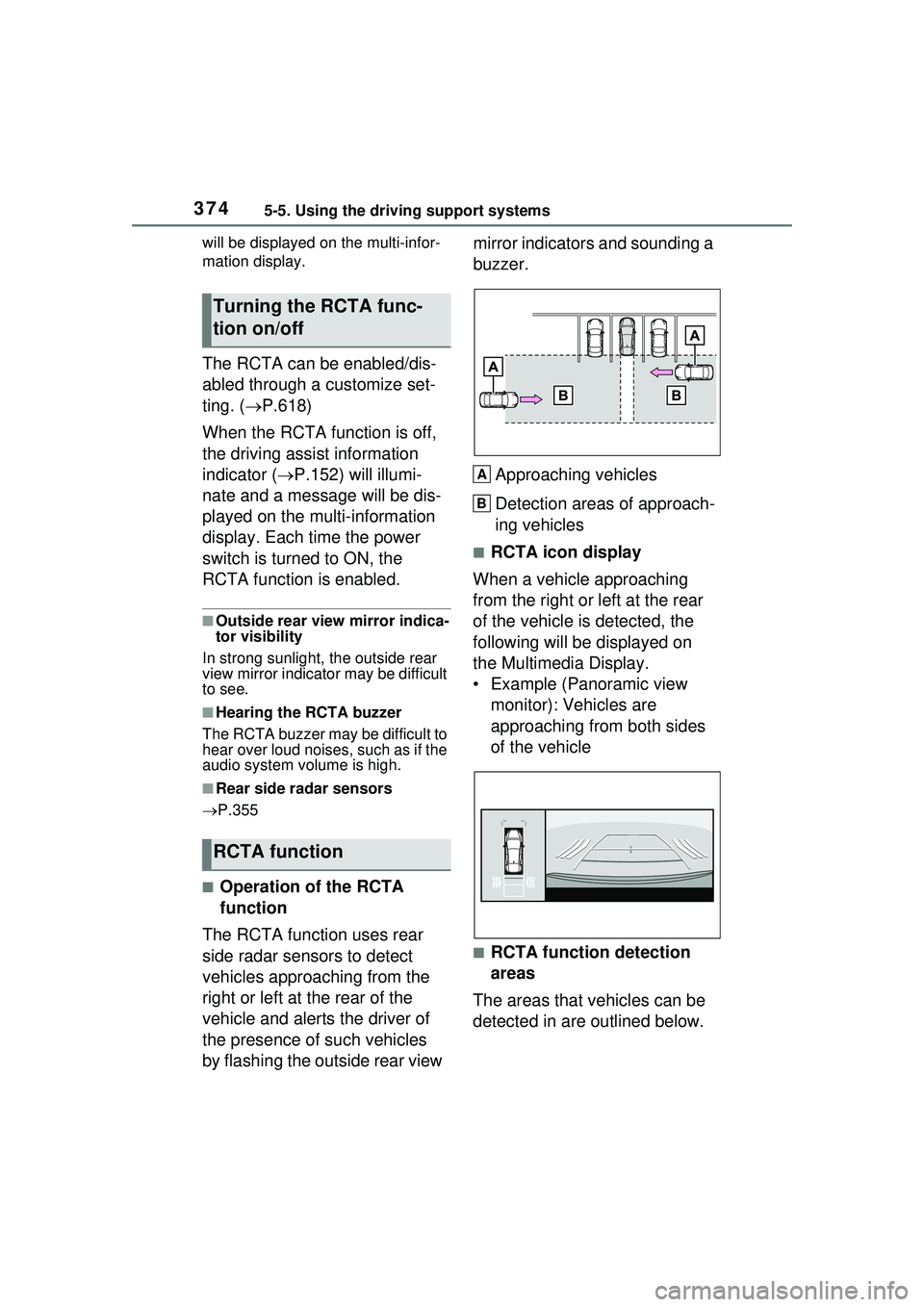
by flashing the outside rear view mirror indicators and sounding a
buzzer.
Approaching vehicles
Detection areas of approach-
ing vehicles
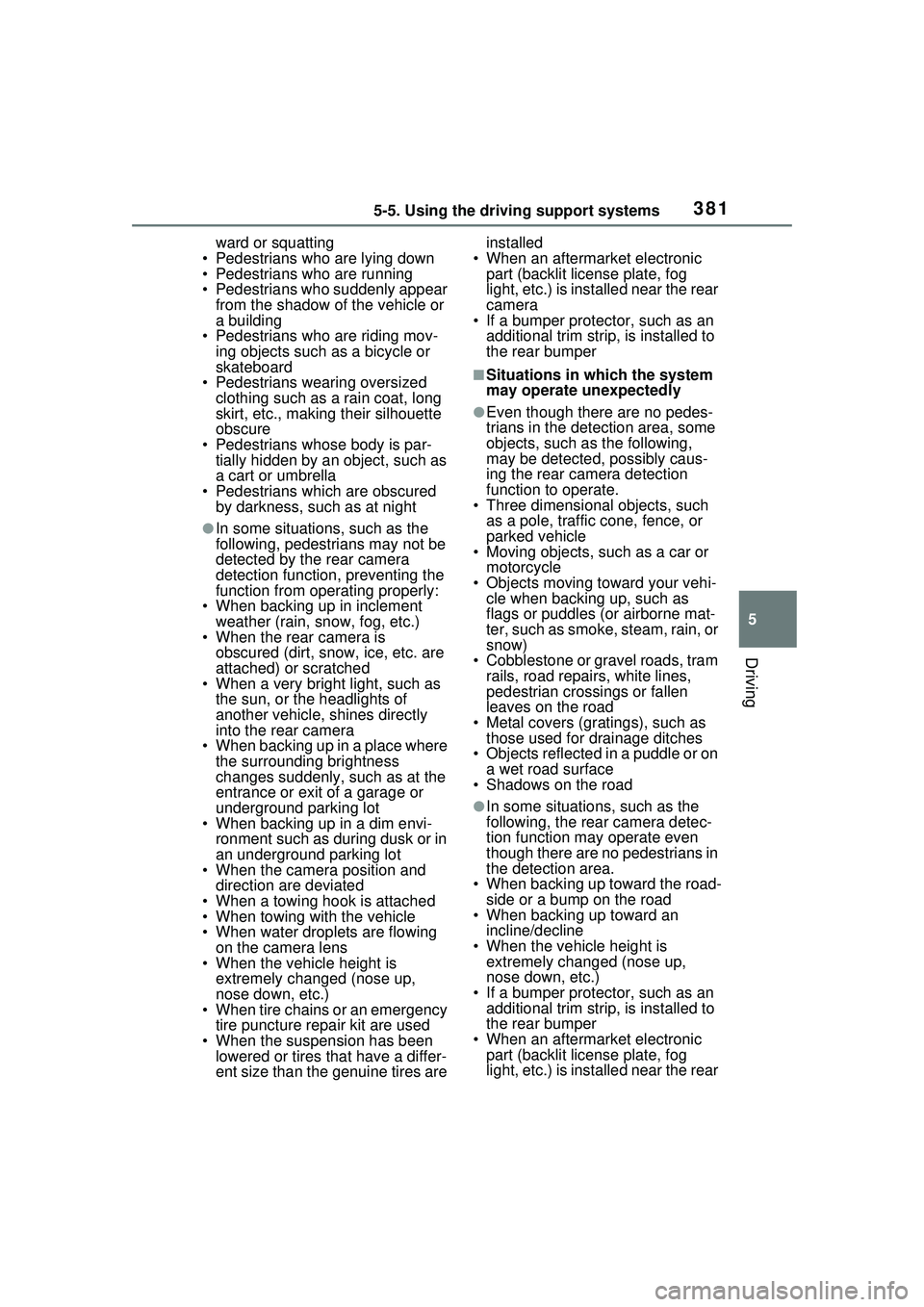
■RCTA icon display
When a vehicle approaching
from the right or left at the rear
of the vehicle is detected, the
following will be displayed on
the Multimedia Display.
• Example (Panoramic view monitor): Vehicles are
approaching from both sides
of the vehicle
■RCTA function detection
areas
The areas that vehicles can be
detected in are outlined below.
Turning the RCTA func-
tion on/off
RCTA function
A
B
Page 381 of 680
3815-5. Using the driving support systems
5
Driving
ward or squatting
• Pedestrians who are lying down
• Pedestrians who are running
• Pedestrians who suddenly appear from the shadow of the vehicle or
a building
• Pedestrians who are riding mov- ing objects such as a bicycle or
skateboard
• Pedestrians wearing oversized clothing such as a rain coat, long
skirt, etc., making their silhouette
obscure
• Pedestrians whose body is par- tially hidden by an object, such as
a cart or umbrella
• Pedestrians which are obscured by darkness, such as at night
●In some situations, such as the
following, pedestrians may not be
detected by the rear camera
detection function, preventing the
function from operating properly:
• When backing up in inclement weather (rain, snow, fog, etc.)
• When the rear camera is
obscured (dirt, snow, ice, etc. are
attached) or scratched
• When a very bright light, such as
the sun, or the headlights of
another vehicle, shines directly
into the rear camera
• When backing up in a place where the surrounding brightness
changes suddenly, such as at the
entrance or exit of a garage or
underground parking lot
• When backing up in a dim envi-
ronment such as during dusk or in
an underground parking lot
• When the camera position and
direction are deviated
• When a towing hook is attached
• When towing with the vehicle
• When water droplets are flowing on the camera lens
• When the vehicle height is extremely changed (nose up,
nose down, etc.)
• When tire chains or an emergency tire puncture repair kit are used
• When the suspension has been lowered or tires that have a differ-
ent size than the genuine tires are installed
• When an aftermarket electronic part (backlit license plate, fog
light, etc.) is insta lled near the rear
camera
• If a bumper protector, such as an
additional trim strip, is installed to
the rear bumper
■Situations in which the system
may operate unexpectedly
●Even though there are no pedes-
trians in the detection area, some
objects, such as the following,
may be detected, possibly caus-
ing the rear camera detection
function to operate.
• Three dimensional objects, such as a pole, traffic cone, fence, or
parked vehicle
• Moving objects, such as a car or motorcycle
• Objects moving toward your vehi- cle when backing up, such as
flags or puddles (or airborne mat-
ter, such as smoke, steam, rain, or
snow)
• Cobblestone or gravel roads, tram
rails, road repair s, white lines,
pedestrian crossings or fallen
leaves on the road
• Metal covers (gratings), such as those used for drainage ditches
• Objects reflected in a puddle or on
a wet road surface
• Shadows on the road
●In some situations, such as the
following, the rear camera detec-
tion function may operate even
though there are no pedestrians in
the detection area.
• When backing up toward the road-
side or a bump on the road
• When backing up toward an incline/decline
• When the vehicle height is extremely changed (nose up,
nose down, etc.)
• If a bumper protector, such as an
additional trim strip, is installed to
the rear bumper
• When an aftermarket electronic
part (backlit license plate, fog
light, etc.) is insta lled near the rear
Page 382 of 680
3825-5. Using the driving support systems
camera
• If the orientation of the rear cam- era has been changed due to a
collision or other impact, or
removal and installation
• If a towing eyelet is installed to the
rear of the vehicle
• When towing with the vehicle
• When water is flowing over the rear camera lens
• When the rear camera is obscured (dirt, snow, ice, etc. are
attached) or scratched
• If there is a flashing light in the detection area, such as the emer-
gency flashers of another vehicle
• When tire chains or an emergency tire puncture repair kit are used.
●Situations in which the rear cam-
era detection function may be diffi-
cult to notice
• The buzzer may be difficult to hear if the surrounding area is noisy or
the audio system volume is high.
• If the temperature in the cabin is extremely high or low, the Multi-
media Display may not operate
correctly.
*: If equipped
PKSB (Parking Sup-
port Brake)*
The PKSB (Parking Support
Brake) is a system that
issues warnings and auto-
matically performs braking
to help reduce collision
damage with operation tar-
gets that were detected
when traveling at a low
speed such as when park-
ing.
This system consists of the
following functions: a Park-
ing Support Brake function
(static objects to the front
and rear) that detects static
objects such as walls, a
Parking Support Brake
function (rear-crossing
vehicles)
* that detects vehi-
cles approaching from the
rear while backing up, a
Parking Support Brake
function (rear pedestrians)
*
that detects pedestrians
behind the vehicle, and a
Parking Support Brake
function (static objects
around the vehicle) (vehi-
cles with Advanced Park)
that detects static objects
around the vehicle.
*: If equipped
Page 395 of 680
3955-5. Using the driving support systems
5
Driving
■Detection area of the Parking
Support Brake function (rear
pedestrians)
The detection area of the Parking
Support Brake function (rear pedes-
trians) differs from the detection
area of the RCD function ( P.378).
Therefore, even if the RCD function
detects a pedestrian and provides
an alert, the Parking Support Brake
function (rear pedestrians) may not
start operating.
■Situations in which the system
may not operate properly
P.380
■Situations in which the system
may operate unexpectedly
P.381
*: If equipped
The Advanced Park is a system
which assists in a safe and
smooth parking or exiting from a
parking space by displaying the
blind spots around the vehicle
and the target parking spot
through a bird’s eye view, deliv-
ering operation guidance
through displays and buzzer
operation, and changing the
shift position, operating the
steering wheel, accelerator
pedal, and brake pedal.
Additionally, the panoramic view
monitor
* can display the area in
front, behind, and from above
the vehicle, helping confirm the
condition of the area around the
vehicle.
The turn signal lights will blink
automatically when the parking
assistance starts until the vehi-
cle reaches the target parking
spot, to notify people around the
vehicle that parking is being per-
formed.
Depending on the condition of
the road surface or the vehicle,
the distance between the vehi-
cle and a parking space, etc., it
may not be possible to assist in
parking in the target space.
Toyota Teammate
Advanced Park*
Function description
Page 398 of 680
3985-5. Using the driving support systems
WARNING
●Do not allow anyone to put their
hands outside of a window while
this system is operating.
■To ensure correct operation
of the Advanced Park
Observe the following precau-
tions. Failing to do so may result
in the vehicle being unable to be
driven safely and possibly cause
an accident.
●Do not use this system in situa-
tions such as the following:
• When in areas other than com- mon parking spaces
• When the surface of the parking space is sand or gravel and is
not clearly defined with parking
space lines
• When the parking space is not level, such as when on a slope
or has differences in height
• Mechanical parking system
• Parking lot with a device which raises to contact the bottom of
the vehicle
• When the road surface is fro- zen, slick, or covered with snow
• When it is extremely hot and the asphalt is melting
• When there are objects around the vehicle
• When there is an object between your vehicle and the
target parking spot or within the
target parking spot (within the
displayed blue box)
• When there is a gutter between your vehicle and the target park-
ing space or within the target
parking spot (within the dis-
played blue box)
• When there is a hole or gutter in the exit direction
• When in high pedestrian or vehicle traffic areas
• When the parking space is in a location that is difficult to park in
(too narrow for your vehicle,
etc.)
• When images are unclear due to dirt or snow attached to the
camera lens, light being shined
into the camera or shadows
• When tire chains or a compact spare tire is installed to the vehi-
cle
• When the doors or back door are not completely closed
• When an arm is held outside of a window
• In inclement weather such as heavy rain or snow
●Make sure to use only standard
sized tires, such as those that
were installed to the vehicle
when it was shipped from the
factory. Otherwise, Advanced
Park may not operate properly.
Also, when the tires have been
replaced, the displayed position
of the lines or box displayed on
the screen may become incor-
rect. When replacing the tires,
contact your Toyota dealer.
●In situations such as the follow-
ing, it may not be possible for
the system to provide assis-
tance to a registered parking
spot:
• When the tires are extremely worn or the tire inflation pres-
sure is low
• When carrying a heavy load
• When the vehicle is tilted due to the carried load
Page 399 of 680
3995-5. Using the driving support systems
5
Driving
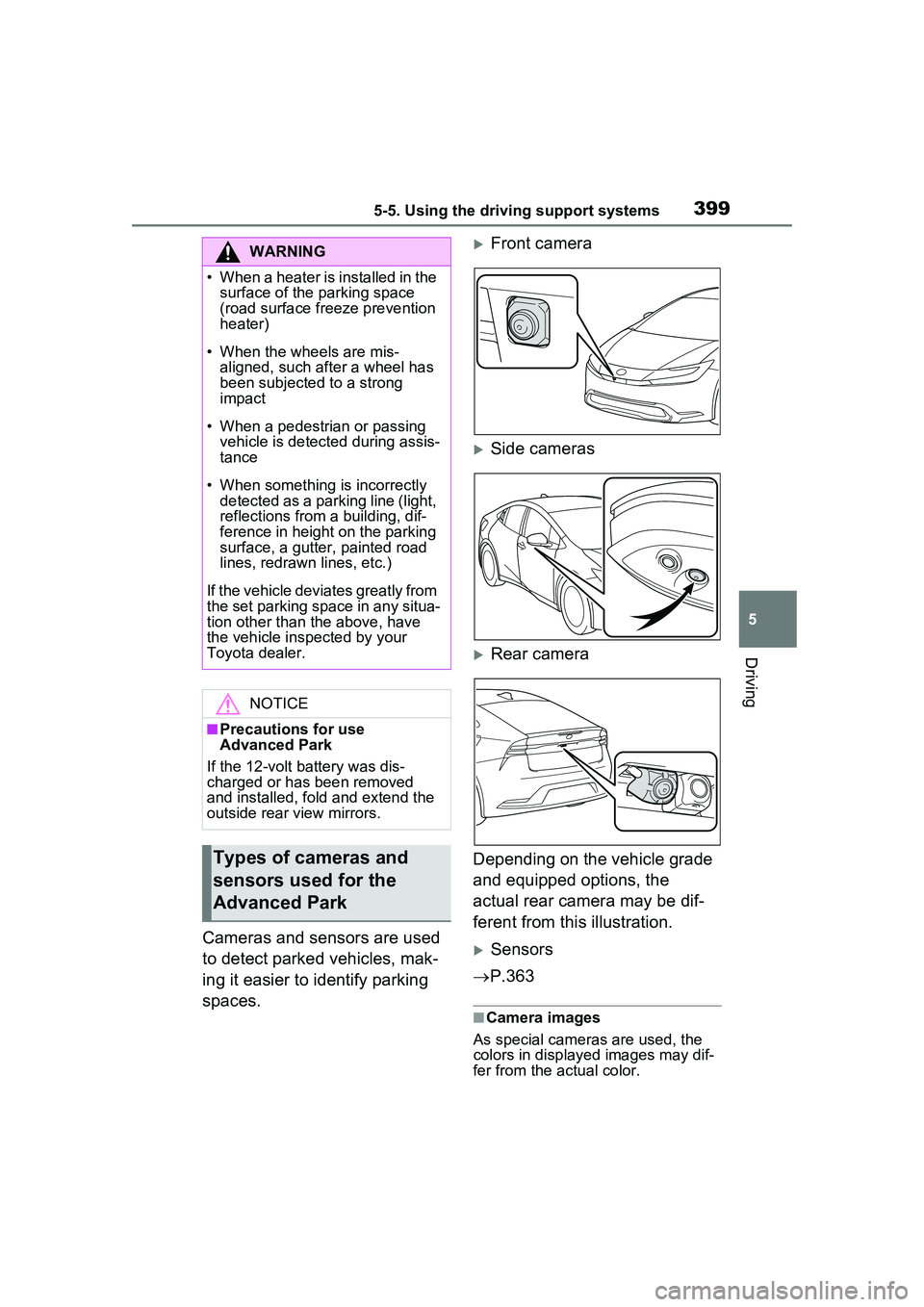
Cameras and sensors are used
to detect parked vehicles, mak-
ing it easier to identify parking
spaces.
Front camera
Side cameras
Rear camera
Depending on the vehicle grade
and equipped options, the
actual rear camera may be dif-
ferent from this illustration.
Sensors
P.363
■Camera images
As special cameras are used, the
colors in displa yed images may dif-
fer from the actual color.
WARNING
• When a heater is installed in the surface of the parking space
(road surface freeze prevention
heater)
• When the wheels are mis- aligned, such a fter a wheel has
been subjected to a strong
impact
• When a pedestrian or passing vehicle is detected during assis-
tance
• When something is incorrectly detected as a parking line (light,
reflections from a building, dif-
ference in height on the parking
surface, a gutter, painted road
lines, redrawn lines, etc.)
If the vehicle deviates greatly from
the set parking space in any situa-
tion other than the above, have
the vehicle inspected by your
Toyota dealer.
NOTICE
■Precautions for use
Advanced Park
If the 12-volt battery was dis-
charged or has been removed
and installed, fold and extend the
outside rear view mirrors.
Types of cameras and
sensors used for the
Advanced Park