warning TOYOTA PRIUS PRIME 2023 Owners Manual
[x] Cancel search | Manufacturer: TOYOTA, Model Year: 2023, Model line: PRIUS PRIME, Model: TOYOTA PRIUS PRIME 2023Pages: 680, PDF Size: 14.97 MB
Page 323 of 680
3235-5. Using the driving support systems
5
Driving
rounding conditions
●In the following situations, system
operation may be canceled:
• When the brake control or output restriction control of a driving sup-
port system operates (For exam-
ple: PCS, drive-start control)
• When the system determines that
a detected object has moved
away from the vehicle
• When lane lines can no longer be
detected
• When the brake pedal has been depressed
• When the accelerator pedal has been depressed
• When the steering wheel has
been operated with more than a
certain amount of force
• When the turn signal lever is oper-
ated to the left/right turn position
WARNING
■Situations in which the sys-
tem may not operate properly
●Situations in which the lane may
not be detected: P.291
●When a detectable object stops
immediately before entering the
path of the vehicle
●When passing extremely close
to a detectable object behind a
guardrail, fence, etc.
●When changing lanes while
overtaking a detectable object
●When passing a detectable
object that is changing lanes or
turning left/right
●When there are objects (guard-
rails, power poles, trees, walls,
fences, poles, traffic cones,
mailboxes, etc.) in the surround-
ing area
●When there are patterns or a
painting ahead of the vehicle
that may be mistaken for a
detectable object
●When passing through a place
with a low structure above the
road (tunnel with a low ceiling,
traffic sign, signboard, etc.)
●When driving on snowy, icy, or
rutted roads
●When a detectable object is
approaching your vehicle
●When your vehicle or a detect-
able object is wandering
●When the movement of a
detectable object changes
(change in direction, sudden
acceleration or deceleration,
etc.)
●When suddenly approaching a
detectable object
●When a preceding vehicle or
motorcycle is not directly in front
of your vehicle
●When there is a structure above
a detectable object
●When part of a detectable
object is hidden by another
object (large luggage, umbrella,
guardrail, etc.)
●When multiple detectable
objects are overlapping
●When a bright light, such as the
sun or headlights of another
vehicle, is reflecting off of the
detectable object
●When the detectable object is
white and looks extremely bright
●When the color or brightness of
the detectable object causes it
to blend in with its surroundings
●When a detectable object cuts
in front of or emerges from
beside a vehicle
Page 324 of 680
3245-5. Using the driving support systems
The proactive driving assist
can be enabled/disabled
through a customize setting.
( P.627)
The settings of the proactive
driving assist can be changed
through customize settings.
( P.627)
Depending on the situation, the following indicators or icons will be
displayed.
Some icons cannot be displayed unless the display is changed to
the driving safety support function information screen.
WARNING
●When approaching a vehicle
ahead which is perpendicular or
at an angle to the vehicle, or is
facing the vehicle
●If a parked vehicle is perpendic-
ular or at an angle to the vehicle
●When a bicycle is a child sized
bicycle, is carrying a large load,
is carrying an extra passenger,
or has an unusual shape (bicy-
cles equipped with a child seat,
tandem bicycles, etc.)
●When a pedestrian or bicyclist is
shorter than approximately 3.2
ft. (1 m) or taller than approxi-
mately 6.5 ft. (2 m)
●When the silhouette of a pedes-
trian or bicyclist is unclear (such
as when they are wearing a
raincoat, long skirt, etc.)
●When a pedestrian or bicyclist is
bending forward or squatting
●When a pedestrian or bicyclist is
moving at high speed
●When a pedestrian is pushing a
stroller, wheelchair, bicycle or
other vehicle
●When a detectable object
blends in with the surrounding
area, such as when it is dim (at
dawn or dusk) or dark (at night,
in a tunnel, etc.)
●When the lane width is 13.1 ft.
(4 m) or more
●When the lane width is 8.2 ft.
(2.5 m) or less
●When the vehicle has not been
driven for a certain amount of
time after the hybrid system was
started
●While turning left or right or a
few seconds after turning left or
right
●While changing lanes or a few
seconds after changing lanes
●When entering a curve, driving
around a curve and a few sec-
onds after driving around a
curve
Changing proactive driv-
ing assist settings
System operation display
Page 325 of 680
3255-5. Using the driving support systems
5
Driving
■Hands off steering wheel warn-
ing operation
In the following situations, a mes-
sage urging the driver to grip the
steering wheel and the icon shown
in the illustration will be displayed on
the display to warn the driver. If the system detects that the steering
wheel is held, the warning will be
canceled. When using the system,
make sure to grip the steering wheel
firmly, regardless of whether the
warning is operating or not.
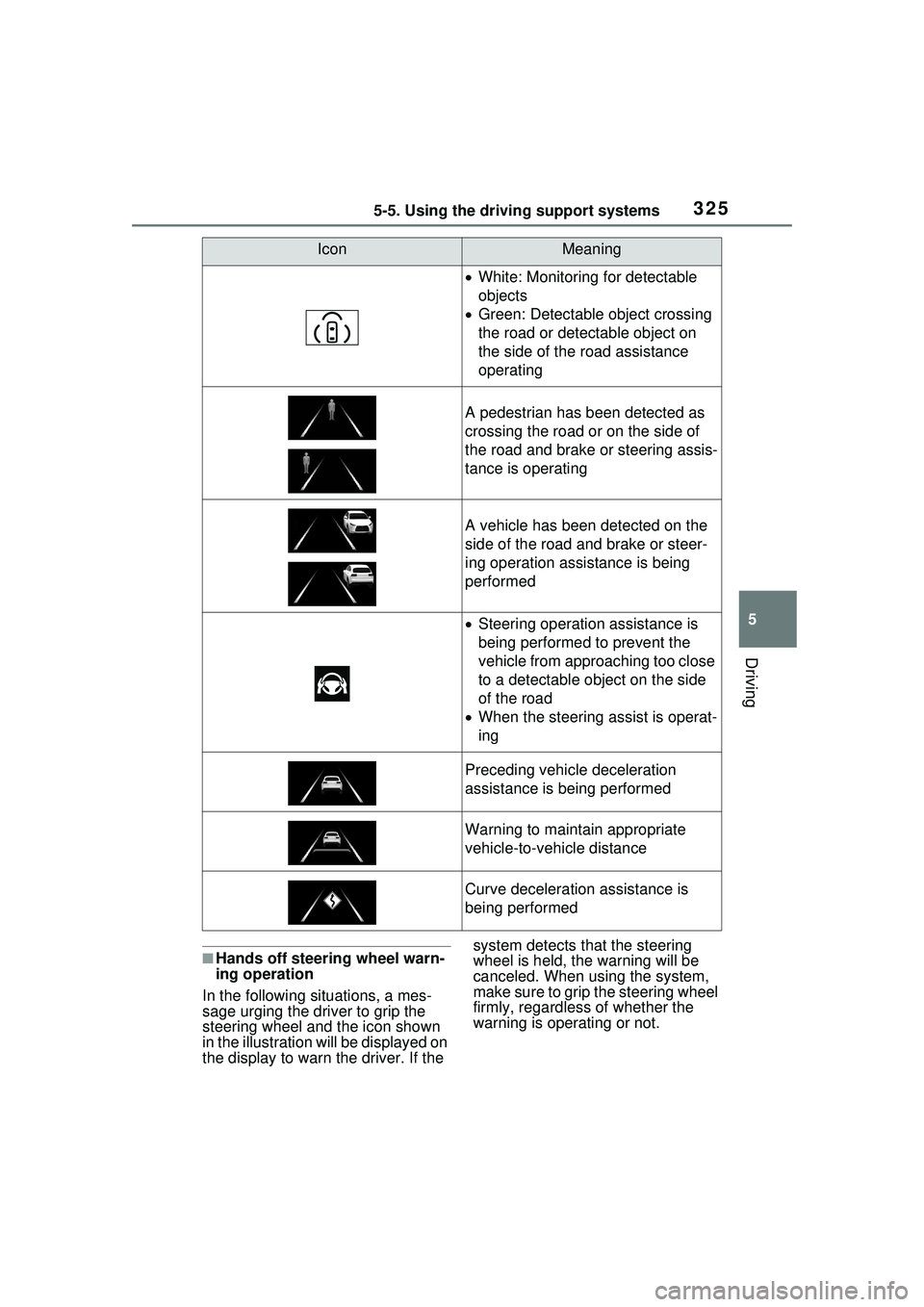
IconMeaning
White: Monitoring for detectable
objects
Green: Detectable object crossing
the road or detectable object on
the side of the road assistance
operating
A pedestrian has been detected as
crossing the road or on the side of
the road and brake or steering assis-
tance is operating
A vehicle has been detected on the
side of the road and brake or steer-
ing operation assistance is being
performed
Steering operation assistance is
being performed to prevent the
vehicle from approaching too close
to a detectable object on the side
of the road
When the steering assist is operat-
ing
Preceding vehicle deceleration
assistance is being performed
Warning to maintain appropriate
vehicle-to-vehicle distance
Curve deceleration assistance is
being performed
Page 326 of 680
3265-5. Using the driving support systems
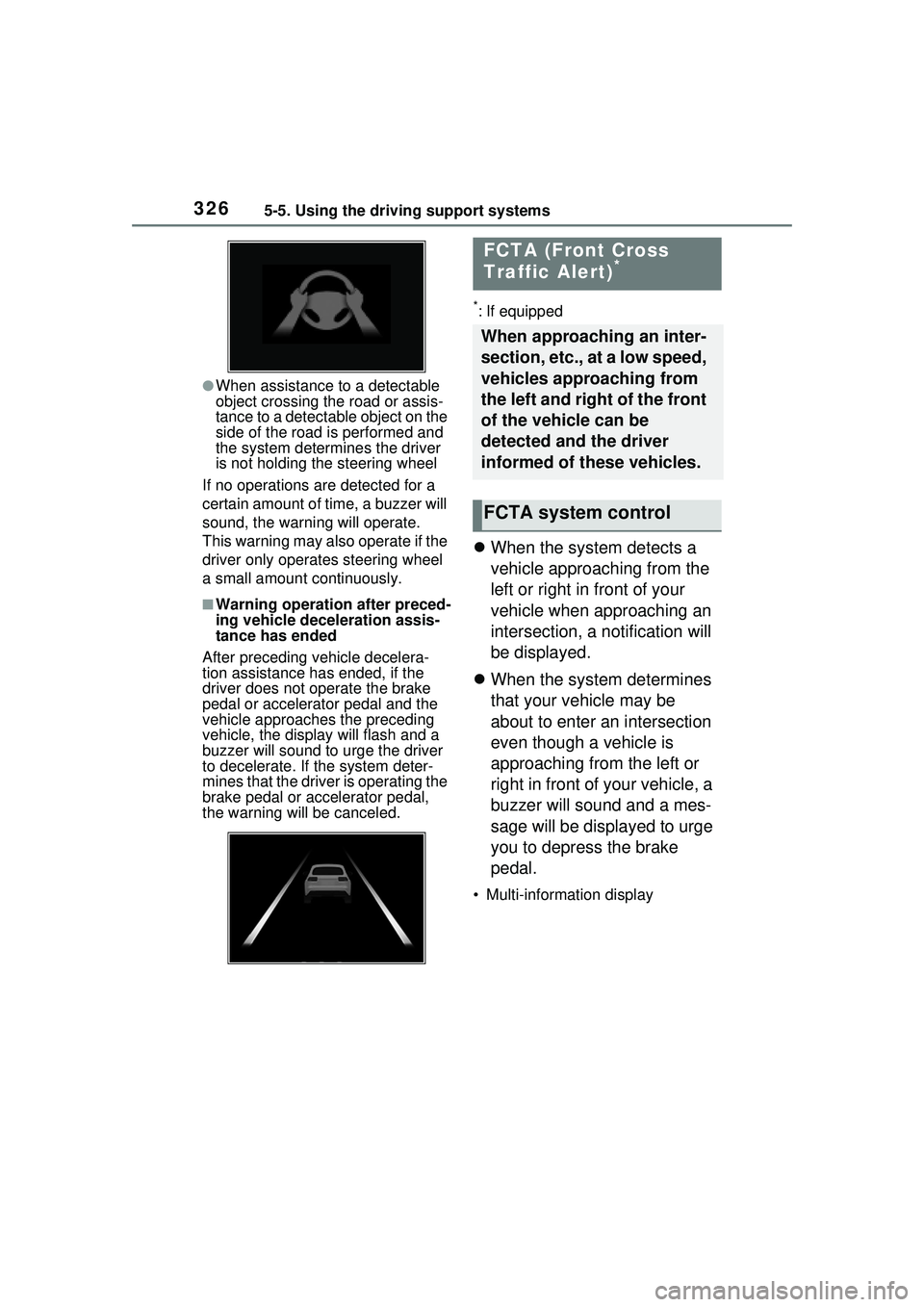
●When assistance to a detectable
object crossing the road or assis-
tance to a detectable object on the
side of the road is performed and
the system determines the driver
is not holding the steering wheel
If no operations are detected for a
certain amount of time, a buzzer will
sound, the warning will operate.
This warning may also operate if the
driver only operates steering wheel
a small amount continuously.
■Warning operation after preced-
ing vehicle deceleration assis-
tance has ended
After preceding vehicle decelera-
tion assistance has ended, if the
driver does not operate the brake
pedal or accelerator pedal and the
vehicle approaches the preceding
vehicle, the display will flash and a
buzzer will sound to urge the driver
to decelerate. If the system deter-
mines that the driver is operating the
brake pedal or accelerator pedal,
the warning will be canceled.
*: If equipped
When the system detects a
vehicle approaching from the
left or right in front of your
vehicle when approaching an
intersection, a notification will
be displayed.
When the system determines
that your vehicle may be
about to enter an intersection
even though a vehicle is
approaching from the left or
right in front of your vehicle, a
buzzer will sound and a mes-
sage will be displayed to urge
you to depress the brake
pedal.
• Multi-information display
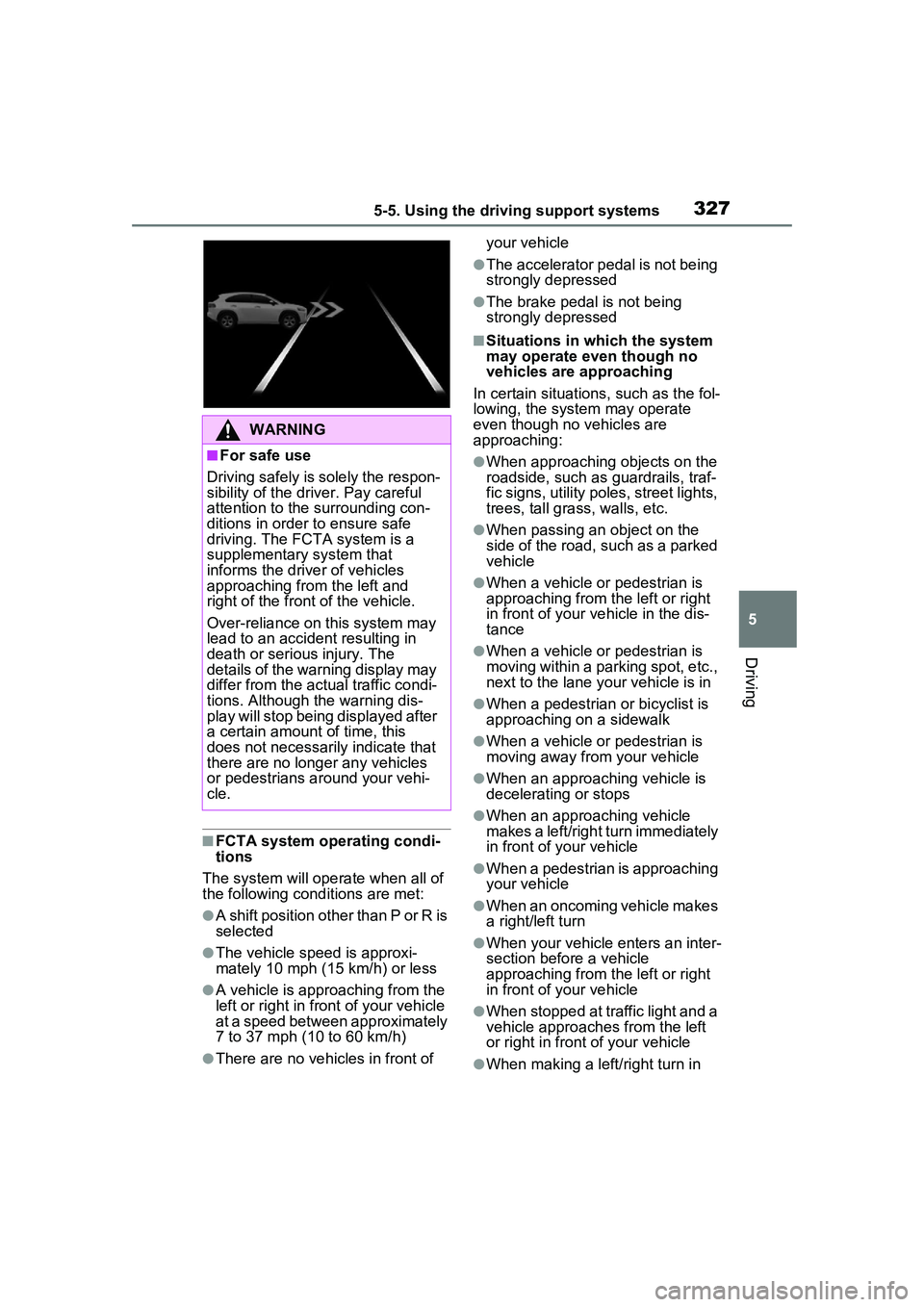
FCTA (Front Cross
Traffic Alert)*
When approaching an inter-
section, etc., at a low speed,
vehicles approaching from
the left and right of the front
of the vehicle can be
detected and the driver
informed of these vehicles.
FCTA system control
Page 327 of 680
3275-5. Using the driving support systems
5
Driving
■FCTA system operating condi-
tions
The system will operate when all of
the following conditions are met:
●A shift position other than P or R is
selected
●The vehicle speed is approxi-
mately 10 mph (15 km/h) or less
●A vehicle is approaching from the
left or right in front of your vehicle
at a speed between approximately
7 to 37 mph (10 to 60 km/h)
●There are no vehicles in front of your vehicle
●The accelerator pedal is not being
strongly depressed
●The brake pedal is not being
strongly depressed
■Situations in which the system
may operate even though no
vehicles are approaching
In certain situations, such as the fol-
lowing, the system may operate
even though no vehicles are
approaching:
●When approaching objects on the
roadside, such as guardrails, traf-
fic signs, utility poles, street lights,
trees, tall grass, walls, etc.
●When passing an object on the
side of the road, such as a parked
vehicle
●When a vehicle or pedestrian is
approaching from the left or right
in front of your vehicle in the dis-
tance
●When a vehicle or pedestrian is
moving within a parking spot, etc.,
next to the lane your vehicle is in
●When a pedestrian or bicyclist is
approaching on a sidewalk
●When a vehicle or pedestrian is
moving away from your vehicle
●When an approaching vehicle is
decelerating or stops
●When an approaching vehicle
makes a left/right turn immediately
in front of your vehicle
●When a pedestrian is approaching
your vehicle
●When an oncoming vehicle makes
a right/left turn
●When your vehicle enters an inter-
section before a vehicle
approaching from the left or right
in front of your vehicle
●When stopped at traffic light and a
vehicle approaches from the left
or right in front of your vehicle
●When making a left/right turn in
WARNING
■For safe use
Driving safely is solely the respon-
sibility of the driver. Pay careful
attention to the surrounding con-
ditions in order to ensure safe
driving. The FCTA system is a
supplementary system that
informs the driver of vehicles
approaching from the left and
right of the front of the vehicle.
Over-reliance on this system may
lead to an accident resulting in
death or serious injury. The
details of the warning display may
differ from the actual traffic condi-
tions. Although the warning dis-
play will stop being displayed after
a certain amount of time, this
does not necessarily indicate that
there are no longer any vehicles
or pedestrians around your vehi-
cle.
Page 329 of 680
3295-5. Using the driving support systems
5
Driving
*: If equipped
When the front camera detects a sign or information
of a sign is available from the
navigation system, the sign
will be displayed on the dis-
play.
Multiple signs can be dis-
played.
Depending on the specifications of
the vehicle, the number of dis-
played signs may be limited.
■Operating conditions of sign
display
Signs will be displayed when the fol-
lowing conditions are met:
●The system has detected a sign
In the following situations, a dis-
played sign may stop being dis-
played:
●When a new sign has not been
detected for a certain distance
●When the system determines that
the road being driven on has
changed, such as after a left or
right turn
■Situations in which the display
function may not operate prop-
erly
In the following situations, the RSA
system may not operate properly
and may not detect signs or may
display the incorrect sign. However,
this does not indicate a malfunction.
●When a sign is dirty, faded, tilted
or bent
●When the contrast of an electronic
sign is low
●When all or part of a sign is hidden
by a tree, utility pole, etc.
●When a sign is detected by the
front camera for a short amount of
time
●When the driving state (turning,
changing lanes, etc.) is judged
incorrectly
RSA (Road Sign
Assist)*
The RSA system detects
specific road signs using
the front camera and/or nav-
igation system (when speed
limit information is avail-
able) and warns the driver
via displays and buzzers.
WARNING
■For safe use
●Driving safely is solely the
responsibility of the driver. Pay
careful attention to the sur-
rounding conditions in order to
ensure safe driving.
●Do not rely solely upon the
RSA. The RSA assists the
driver by providing road sign
information, but it is not a
replacement for the driver’s own
vision and awareness. Driving
safely is solely the responsibility
of the driver. Pay careful atten-
tion to the surrounding condi-
tions in order to ensure safe
driving.
■Situations in which the RSA
should not be used
When it is necessary to disable
the system: P.284
■Situations in which the sys-
tem may not operate properly
●Situations in which the sensors
may not operate properly:
P.289
Display Function
Page 330 of 680
3305-5. Using the driving support systems
●When a sign is immediately after a
freeway junction or in an adjacent
lane just before merging
●When stickers are attached to the
rear of a preceding vehicle
●When a sign similar to a system
compatible sign is detected as a
system compatible sign
●When a speed limit sign for a
frontage road is within detection
range of the front camera
●When driving around a round-
about
●When a sign intended for trucks,
etc. is detected
●When the navigation system map
data is out of date
●When the navigation system can-
not be used
In this case, the speed limit signs
displayed on the multi-information
display and navigation system dis-
play may differ.
In the following situations, the
RSA system will output a warn-
ing to notify the driver.
If the vehicle speed exceeds
the speed warning threshold
of the speed limit sign dis-
played on the display, the
sign display will be empha-
sized and a buzzer will sound.
When the RSA system
detects a do not enter sign
and determines that the vehi-
cle has entered a no-entry
area, the do not enter sign
displayed on the display will
flash and a buzzer will sound.
■Operating conditions of the
notification functions
●Excess speed notification function
This function will operate when the
following condition is met:
• A speed limit road sign is recog- nized by the system.
●No entry notification function
This function will operate when all of
the following conditions are met:
• More than one no entry road signs are recognized by the system
simultaneously.
• The vehicle is passing between no
entry road signs recognized by the
system.
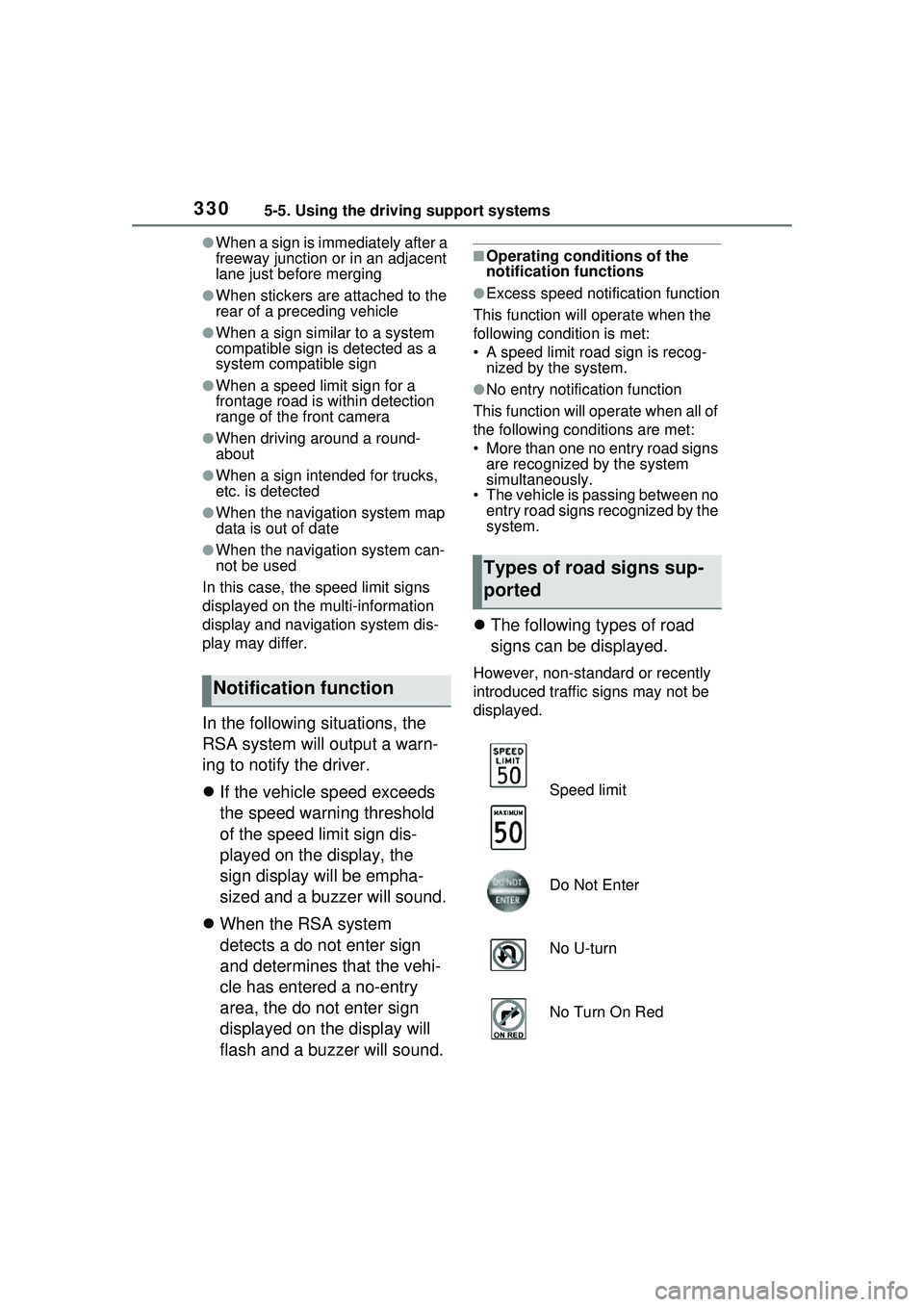
The following types of road
signs can be displayed.
However, non-standard or recently
introduced traffic signs may not be
displayed.
Notification function
Types of road signs sup-
ported
Speed limit
Do Not Enter
No U-turn
No Turn On Red
Page 331 of 680
3315-5. Using the driving support systems
5
Driving
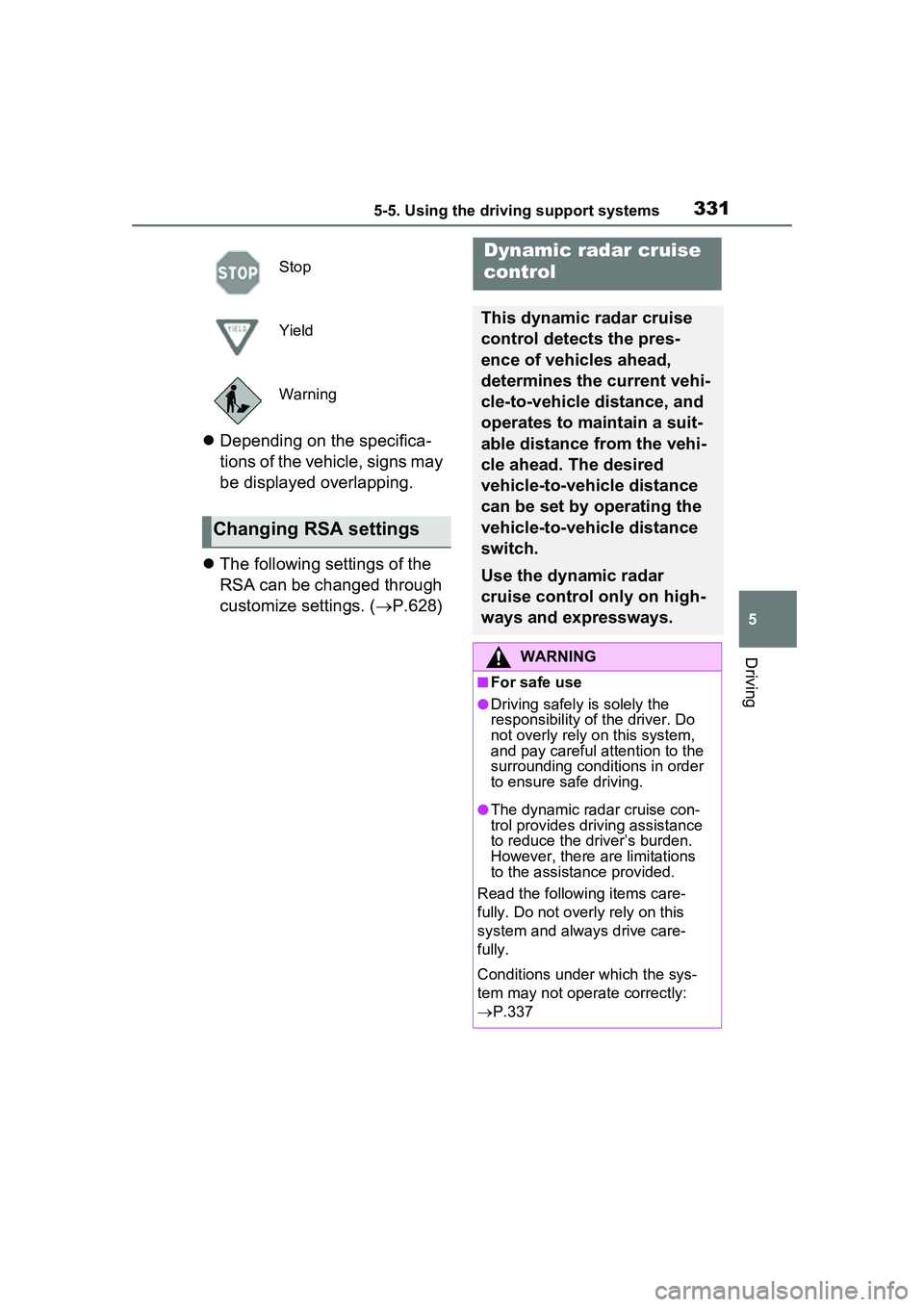
Depending on the specifica-
tions of the vehicle, signs may
be displayed overlapping.
The following settings of the
RSA can be changed through
customize settings. ( P.628)
Stop
Yield
Warning
Changing RSA settings
Dynamic radar cruise
control
This dynamic radar cruise
control detects the pres-
ence of vehicles ahead,
determines the current vehi-
cle-to-vehicle distance, and
operates to maintain a suit-
able distance from the vehi-
cle ahead. The desired
vehicle-to-vehicle distance
can be set by operating the
vehicle-to-vehicle distance
switch.
Use the dynamic radar
cruise control only on high-
ways and expressways.
WARNING
■For safe use
●Driving safely is solely the
responsibility of the driver. Do
not overly rely on this system,
and pay careful attention to the
surrounding conditions in order
to ensure safe driving.
●The dynamic radar cruise con-
trol provides driving assistance
to reduce the driver’s burden.
However, there are limitations
to the assistance provided.
Read the following items care-
fully. Do not overly rely on this
system and always drive care-
fully.
Conditions under which the sys-
tem may not operate correctly:
P.337
Page 332 of 680
3325-5. Using the driving support systems
WARNING
●Set the speed appropriately
according to the speed limit,
traffic flow, road conditions,
weather conditions, etc. The
driver is responsible for confirm-
ing the set speed.
●Even if the system is operating
correctly, the condition of a pre-
ceding vehicle as recognized by
the driver and detected by the
system may differ. Therefore, it
is necessary for the driver to
pay attention, assess risks, and
ensure safety. Over-reliance on
this system to drive the vehicle
safely may lead to an accident
resulting in death or serious
injury.
■Precautions for the driving
assist systems
Observe the following precau-
tions, as there are limitations to
the assistance provided by the
system. Over-reliance on this sys-
tem may lead to an accident
resulting in death or serious
injury.
●Details of support provided for
the driver’s vision
The dynamic radar cruise control
is only intended to help the driver
in determining the distance
between the driver’s own vehicle
and a designated preceding vehi-
cle. It is not a system which allows
for careless or i nattentive driving,
and is not a system which assists
in poor visibility conditions.
The driver must pay attention to
their surroundings, even when the
vehicle stops.
●Details of support provided for
the driver’s judgement
The dynamic radar cruise control
determines whether the distance
between the driver’s own vehicle
and a designated preceding vehi-
cle is within a set range. It is not
capable of making any other type
of judgement. Therefore, it is
absolutely necessary for the
driver to remain vigilant and to
determine whether or not there is
a possibility of danger.
●Details of support provided for
the driver’s operation
The dynamic radar cruise control
does not include functions which
will prevent or avoid collisions
with vehicles ahead of your vehi-
cle. Therefore, if there is ever any
possibility of danger, the driver
must take immediate and direct
control of the vehicle and act
appropriately in order to ensure
safety.
■Situations in which the
dynamic radar cruise control
should not be used
Do not use the dynamic radar
cruise control in the following situ-
ations. As the system will not be
able to provide appropriate con-
trol, using it may lead to an acci-
dent resulting in death or serious
injury.
●Roads where there are pedes-
trians, cyclists, etc.
●When driving on a highway or
expressway entrance or exit
●When the approach warning
sounds frequently
●Situations in which the sensors
may not operate properly:
P.289
●Situations in which the lane may
not be detected: P.291
Page 333 of 680
3335-5. Using the driving support systems
5
Driving
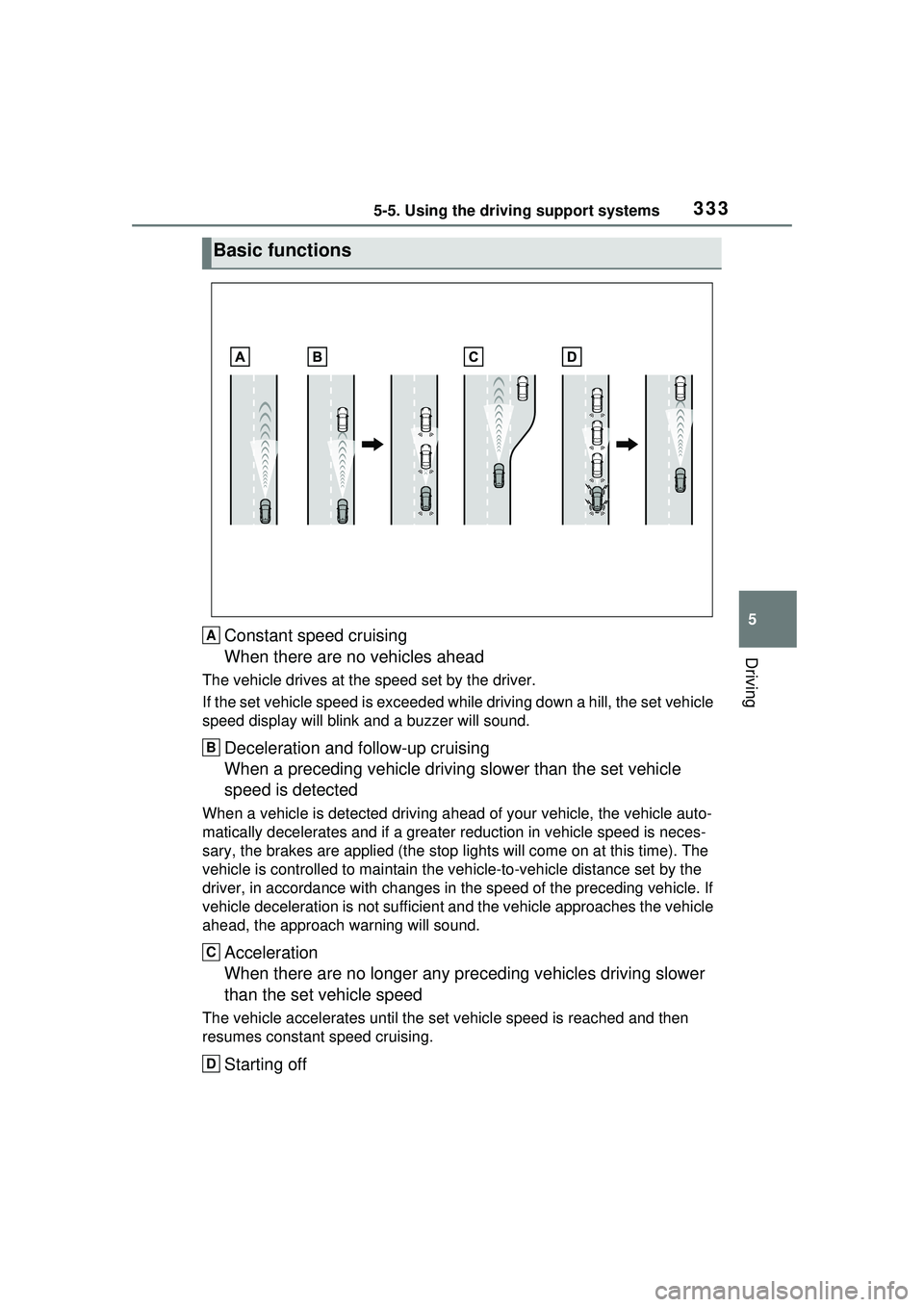
Constant speed cruising
When there are no vehicles ahead
The vehicle drives at the speed set by the driver.
If the set vehicle speed is exceeded while driving down a hill, the set vehicle
speed display will blink and a buzzer will sound.
Deceleration and follow-up cruising
When a preceding vehicle driving slower than the set vehicle
speed is detected
When a vehicle is detected driving ahead of your vehicle, the vehicle auto-
matically decelerates and if a greater reduction in vehicle speed is neces-
sary, the brakes are applied (the stop lights will come on at this time). The
vehicle is controlled to ma intain the vehicle-to-vehicle distance set by the
driver, in accordance with changes in the speed of the preceding vehicle. If
vehicle deceleration is not sufficient an d the vehicle approaches the vehicle
ahead, the ap proach warning will sound.
Acceleration
When there are no longer any pr eceding vehicles driving slower
than the set vehicle speed
The vehicle accelerates until the set vehicle speed is reached and then
resumes constant speed cruising.
Starting off
Basic functions
A
B
C
D