Camera TOYOTA PRIUS PRIME 2023 User Guide
[x] Cancel search | Manufacturer: TOYOTA, Model Year: 2023, Model line: PRIUS PRIME, Model: TOYOTA PRIUS PRIME 2023Pages: 680, PDF Size: 14.97 MB
Page 223 of 680
2234-4. Adjusting the steering wheel and mirrors
4
Before driving
SymptomLikely causeSolution
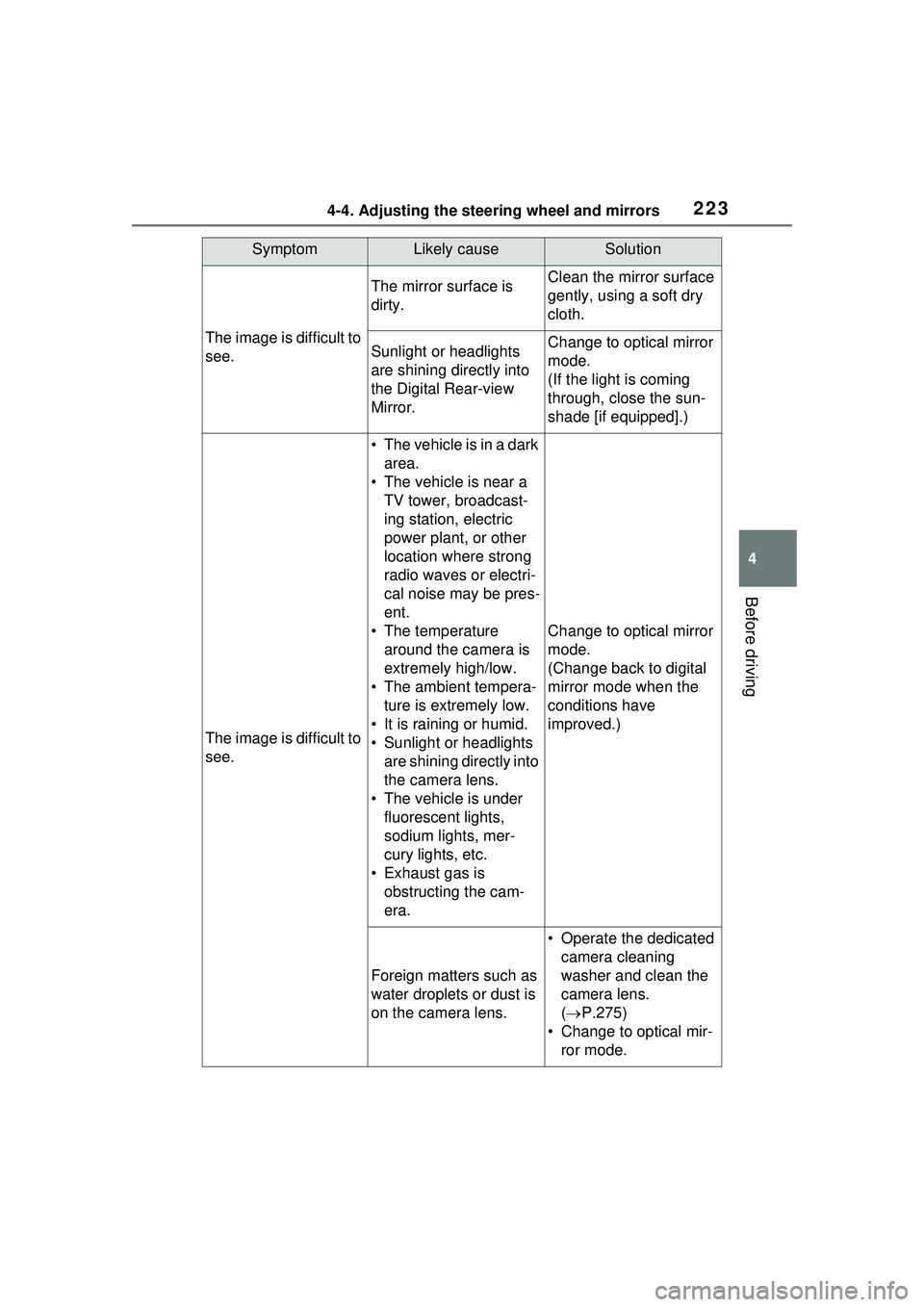
The image is difficult to
see.
The mirror surface is
dirty.Clean the mirror surface
gently, using a soft dry
cloth.
Sunlight or headlights
are shining directly into
the Digital Rear-view
Mirror.Change to optical mirror
mode.
(If the light is coming
through, close the sun-
shade [if equipped].)
The image is difficult to
see.
• The vehicle is in a dark area.
• The vehicle is near a TV tower, broadcast-
ing station, electric
power plant, or other
location where strong
radio waves or electri-
cal noise may be pres-
ent.
• The temperature around the camera is
extremely high/low.
• The ambient tempera- ture is extremely low.
• It is raining or humid.
• Sunlight or headlights are shining directly into
the camera lens.
• The vehicle is under fluorescent lights,
sodium lights, mer-
cury lights, etc.
• Exhaust gas is obstructing the cam-
era.
Change to optical mirror
mode.
(Change back to digital
mirror mode when the
conditions have
improved.)
Foreign matters such as
water droplets or dust is
on the camera lens.
• Operate the dedicated camera cleaning
washer and clean the
camera lens.
( P.275)
• Change to optical mir- ror mode.
Page 224 of 680
2244-4. Adjusting the steering wheel and mirrors
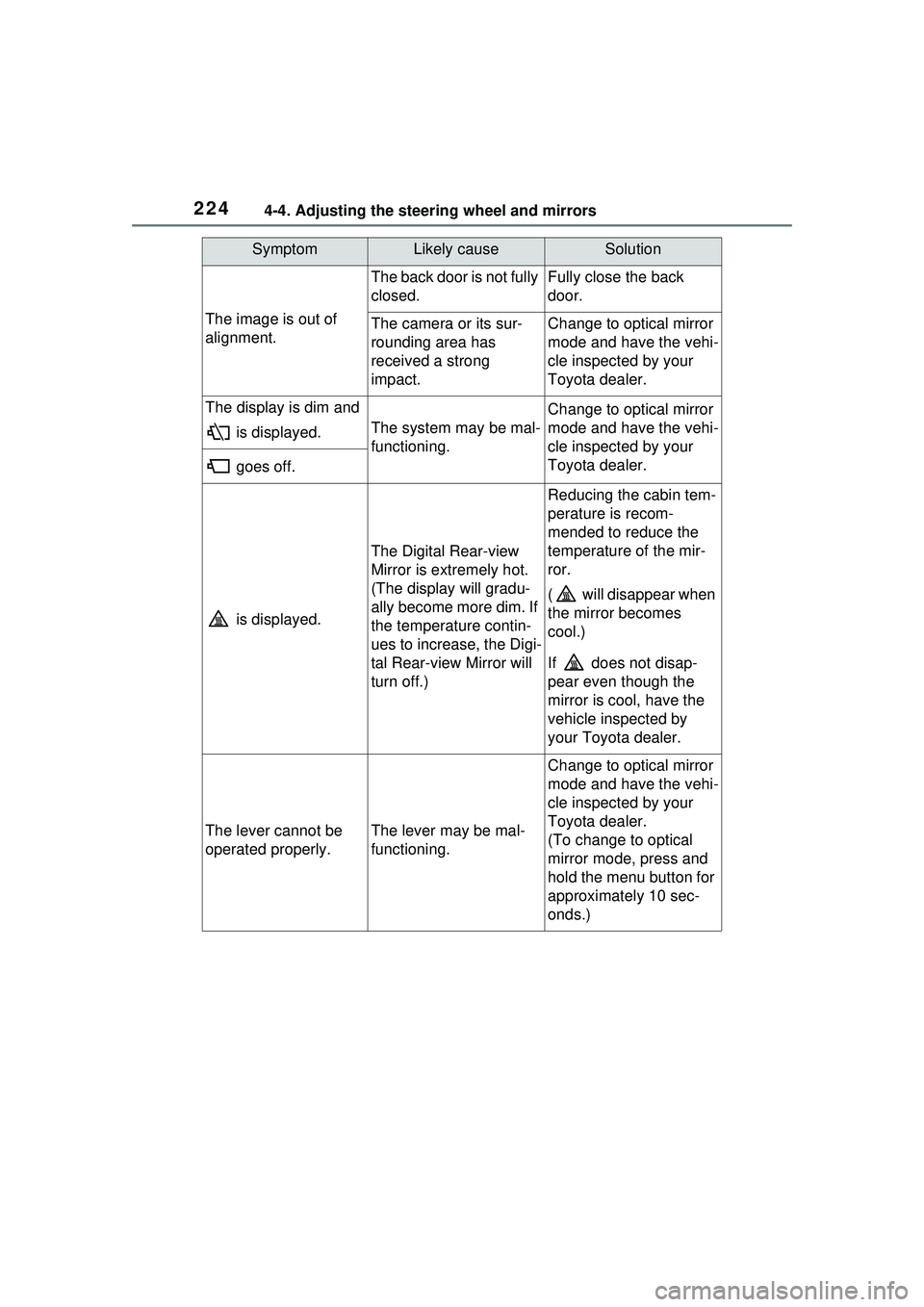
The image is out of
alignment.
The back door is not fully
closed.Fully close the back
door.
The camera or its sur-
rounding area has
received a strong
impact.Change to optical mirror
mode and have the vehi-
cle inspected by your
Toyota dealer.
The display is dim and is displayed.
The system may be mal-
functioning.
Change to optical mirror
mode and have the vehi-
cle inspected by your
Toyota dealer.
goes off.
is displayed.
The Digital Rear-view
Mirror is extremely hot.
(The display will gradu-
ally become more dim. If
the temperature contin-
ues to increase, the Digi-
tal Rear-view Mirror will
turn off.)
Reducing the cabin tem-
perature is recom-
mended to reduce the
temperature of the mir-
ror.
( will disappear when
the mirror becomes
cool.)
If does not disap-
pear even though the
mirror is cool, have the
vehicle inspected by
your Toyota dealer.
The lever cannot be
operated properly.The lever may be mal-
functioning.
Change to optical mirror
mode and have the vehi-
cle inspected by your
Toyota dealer.
(To change to optical
mirror mode, press and
hold the menu button for
approximately 10 sec-
onds.)
SymptomLikely causeSolution
Page 237 of 680
237
5
5
Driving
Driving
5-1. Before drivingDriving the vehicle....... 239
Cargo and luggage ..... 246
Vehicle load limits ....... 249
Trailer towing .............. 250
Dinghy towing ............. 250
5-2. Driving procedures Power (ignition) switch 251
Transmission............... 256
Turn signal lever ......... 262
Parking brake .............. 263
Brake Hold .................. 266
5-3. Operating the lights and wipers
Headlight switch .......... 269
AHB (Automatic High Beam)........................ 272
Windshield wipers and washer....................... 275
5-4. Refueling Opening the fuel tank cap.................................. 279
5-5. Using the driving support systems
Toyota Safety Sense 3.0/Traffic Jam Assist soft-
ware update .............. 282
Toyota Safety Sense 3.0 .................................. 284
Driver monitor ............. 292PCS (Pre-Collision System)
.................................. 293
LTA (Lane Tracing Assist) .................................. 305
LCA (Lane Change Assist) .................................. 310
LDA (Lane Departure Alert) .................................. 313
PDA (Proactive driving assist) ........................ 320
FCTA (Front Cross Traffic Alert) .......................... 326
RSA (Road Sign Assist) .................................. 329
Dynamic radar cruise con- trol ............................. 331
Cruise control .............. 342
Emergency Driving Stop System ...................... 345
Traffic Jam Assist ........ 348
BSM (Blind Spot Monitor) .................................. 354
Safe Exit Assist ........... 359
Intuitive parking assist . 363
RCTA (Rear Cross Traffic Alert) function ............ 373
RCD (Rear Camera Detec- tion) function .............. 378
PKSB (Parking Support Brake) ........................ 382
Page 272 of 680
2725-3. Operating the lights and wipers
Pull the lever toward you to the
center position to turn the high
beams off.
2Pull the lever toward you and
release it to flash the high
beams once.
You can flash the high beams with
the headlights on or off.
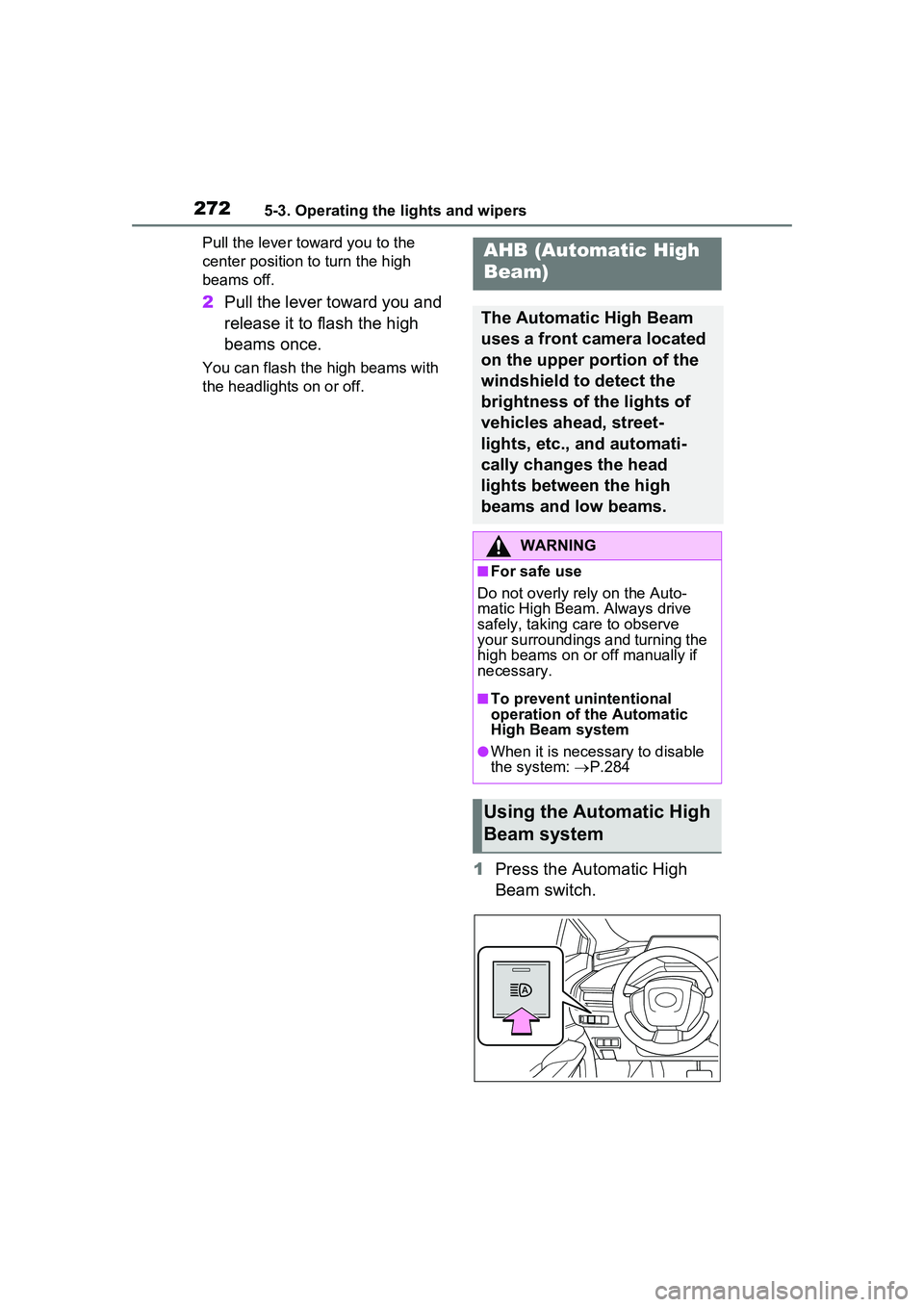
1Press the Automatic High
Beam switch.
AHB (Automatic High
Beam)
The Automatic High Beam
uses a front camera located
on the upper portion of the
windshield to detect the
brightness of the lights of
vehicles ahead, street-
lights, etc., and automati-
cally changes the head
lights between the high
beams and low beams.
WARNING
■For safe use
Do not overly rely on the Auto-
matic High Beam. Always drive
safely, taking care to observe
your surroundings and turning the
high beams on or off manually if
necessary.
■To prevent unintentional
operation of the Automatic
High Beam system
●When it is necessary to disable
the system: P.284
Using the Automatic High
Beam system
Page 273 of 680
2735-3. Operating the lights and wipers
5
Driving
2Turn the headlight switch to
the or position.
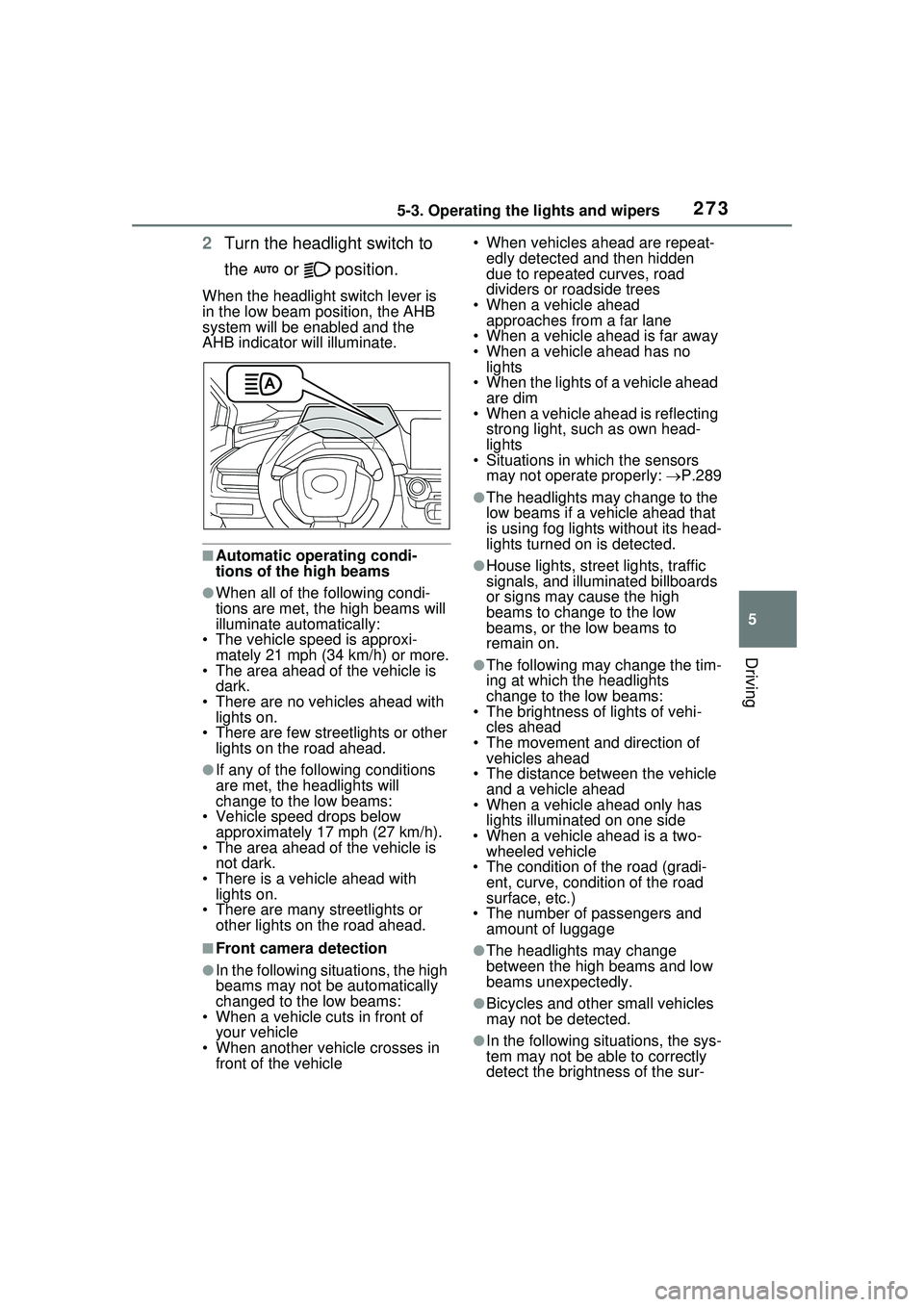
When the headlight switch lever is
in the low beam position, the AHB
system will be enabled and the
AHB indicator will illuminate.
■Automatic operating condi-
tions of the high beams
●When all of the following condi-
tions are met, the high beams will
illuminate automatically:
• The vehicle speed is approxi-
mately 21 mph (34 km/h) or more.
• The area ahead of the vehicle is dark.
• There are no vehicles ahead with lights on.
• There are few streetlights or other
lights on the road ahead.
●If any of the following conditions
are met, the headlights will
change to the low beams:
• Vehicle speed drops below
approximately 17 mph (27 km/h).
• The area ahead of the vehicle is not dark.
• There is a vehicle ahead with lights on.
• There are many streetlights or
other lights on the road ahead.
■Front camera detection
●In the following situations, the high
beams may not be automatically
changed to the low beams:
• When a vehicle cuts in front of your vehicle
• When another vehicle crosses in front of the vehicle • When vehicles ahead are repeat-
edly detected and then hidden
due to repeated curves, road
dividers or roadside trees
• When a vehicle ahead approaches from a far lane
• When a vehicle ahead is far away
• When a vehicle ahead has no lights
• When the lights of a vehicle ahead are dim
• When a vehicle ahead is reflecting
strong light, such as own head-
lights
• Situations in which the sensors
may not operate properly: P.289
●The headlights may change to the
low beams if a vehicle ahead that
is using fog lights without its head-
lights turned on is detected.
●House lights, street lights, traffic
signals, and illuminated billboards
or signs may cause the high
beams to change to the low
beams, or the low beams to
remain on.
●The following may change the tim-
ing at which the headlights
change to the low beams:
• The brightness of lights of vehi-
cles ahead
• The movement and direction of vehicles ahead
• The distance between the vehicle and a vehicle ahead
• When a vehicle ahead only has
lights illuminate d on one side
• When a vehicle ahead is a two- wheeled vehicle
• The condition of the road (gradi- ent, curve, condition of the road
surface, etc.)
• The number of passengers and amount of luggage
●The headlights may change
between the high beams and low
beams unexpectedly.
●Bicycles and other small vehicles
may not be detected.
●In the following situations, the sys-
tem may not be able to correctly
detect the brightness of the sur-
Page 274 of 680
2745-3. Operating the lights and wipers
roundings. This may cause the
low beams to remain on or the
high beams to flash or dazzle
pedestrians or vehicles ahead. In
such a case, it is necessary to
manually change between the
high beams and low beams.
• When there are lights similar to headlights or tail lights in the sur-
rounding area
• When headlights or tail lights of vehicles ahead are turned off,
dirty, changing color, or not aimed
properly
• When the headlights are repeat-
edly changing between the high
beams and low beams.
• When use of the high beams is
inappropriate or when the high
beams may be flashing or daz-
zling pedestrians or other drivers.
• When the vehicle is used in an area in which vehicles travel on
the opposite side of the road of
the country for which the vehicle
was designed, for example using
a vehicle designed for right-hand
traffic in a left-hand traffic area, or
vice versa
• When it is necessary to disable
the system: P.284
• Situations in which the sensors may not operate properly: P.289
■Temporarily reducing front
camera sensitivity
The sensitivity of the front camera
can be temporarily reduced.
1 Turn the power switch off with
the following conditions met.
●The headlight swit ch is in the
or position.
●The headlight switch lever is in the
low beam position.
●The automatic High Beam switch
is on.
2 Turn the power switch to ON.
3 Within 60 seconds after perform-
ing step 2, push the headlight
switch lever to the high beam
position then pull it to the original position quickly 10 times, then
leave the lever in its original
position.
4 If the sensitivity is changed, the
Automatic High Beam indicator
will blink 3 times.
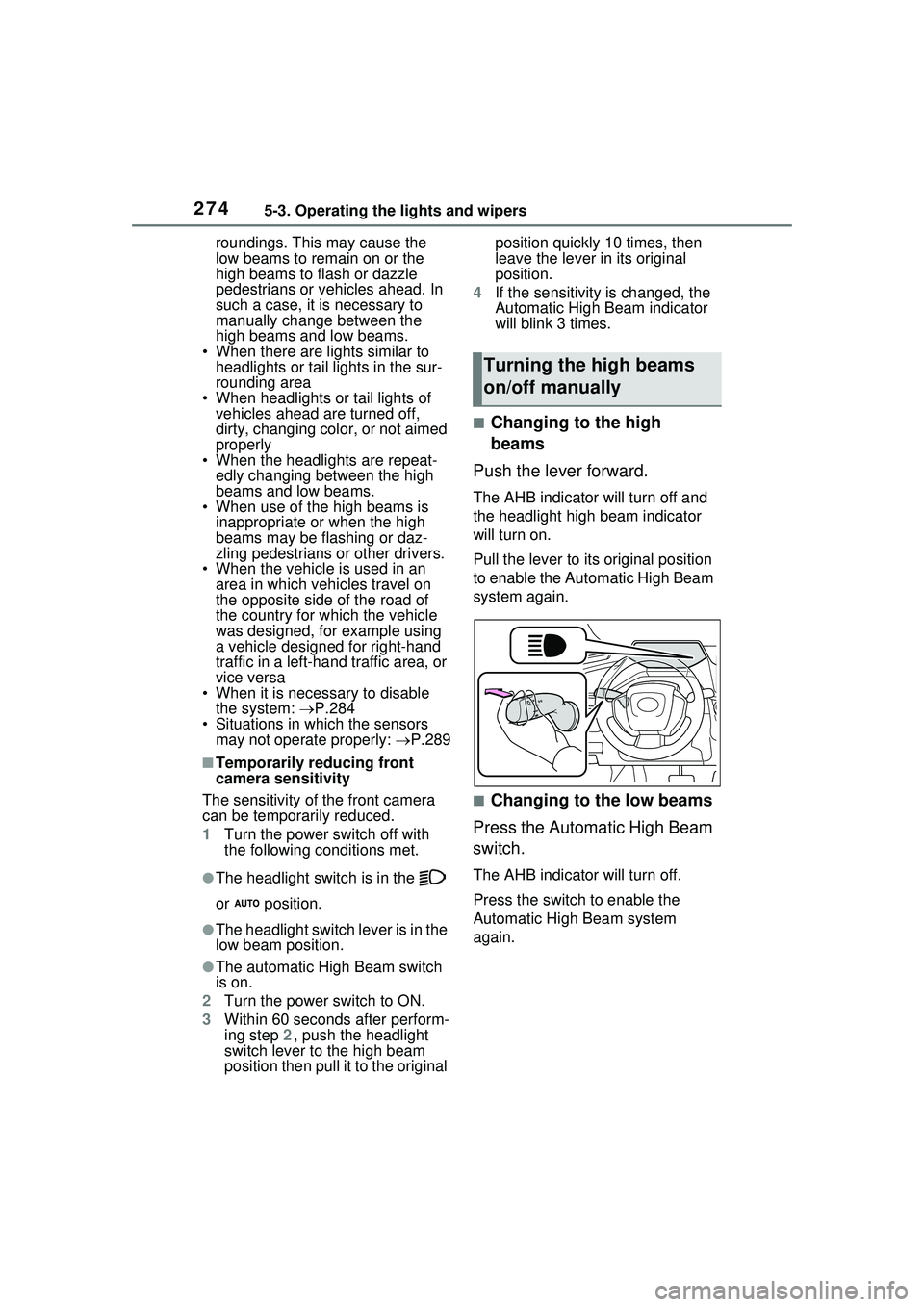
■Changing to the high
beams
Push the lever forward.
The AHB indicator will turn off and
the headlight high beam indicator
will turn on.
Pull the lever to its original position
to enable the Automatic High Beam
system again.
■Changing to the low beams
Press the Automatic High Beam
switch.
The AHB indicator will turn off.
Press the switch to enable the
Automatic High Beam system
again.
Turning the high beams
on/off manually
Page 276 of 680
2765-3. Operating the lights and wipers
5*1 or *2
Temporary operation
*1:For the U.S.A.
*2: For Canada
When is selected, the
wipers will operate automatically
when the sensor detects falling
rain. The system automatically
adjusts wiper timing in accor-
dance with rain volume and
vehicle speed.
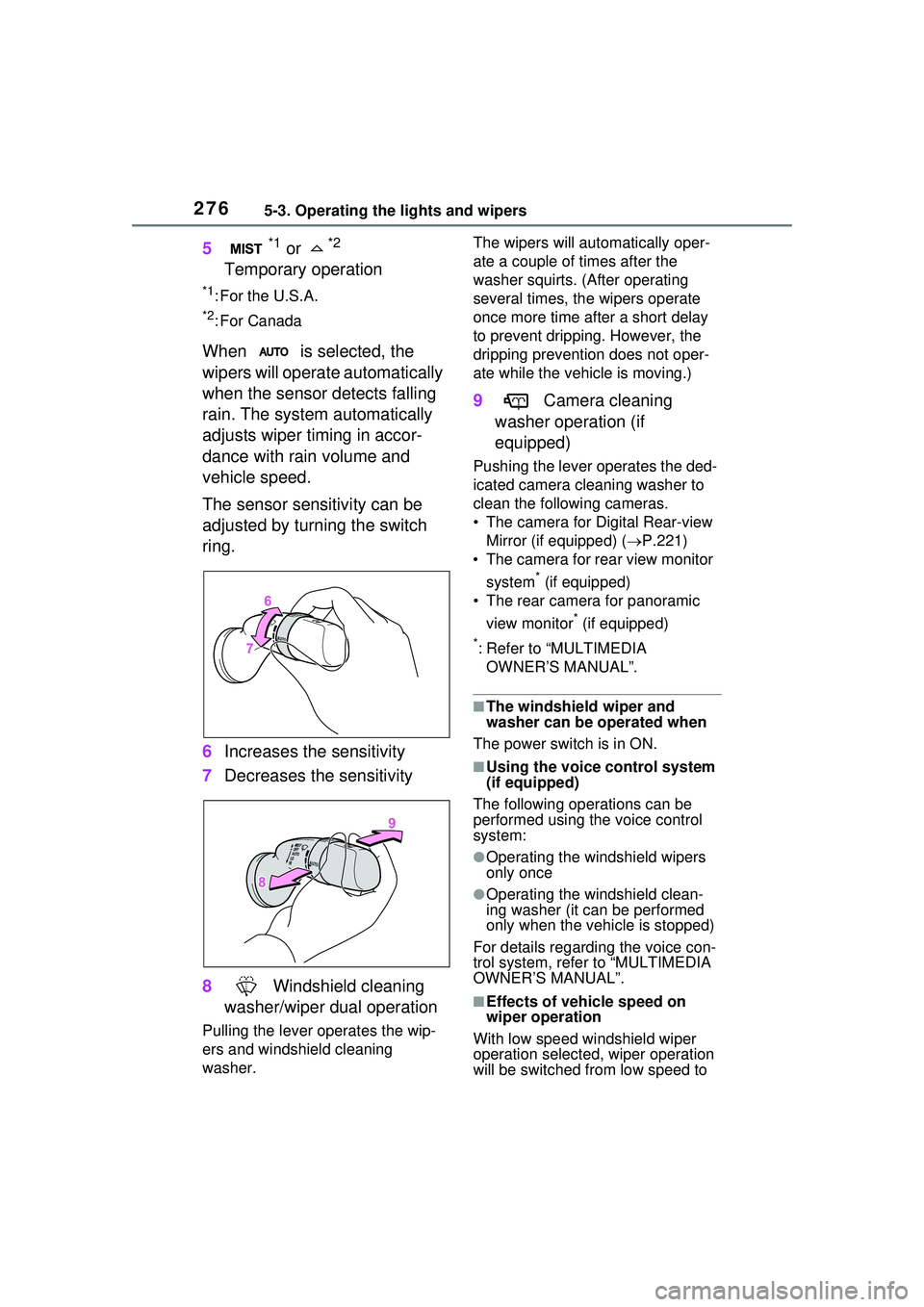
The sensor sensitivity can be
adjusted by turning the switch
ring.
6 Increases the sensitivity
7 Decreases the sensitivity
8 Windshield cleaning
washer/wiper dual operation
Pulling the lever operates the wip-
ers and windshield cleaning
washer. The wipers will automatically oper-
ate a couple of times after the
washer squirts. (After operating
several times, th
e wipers operate
once more time after a short delay
to prevent dripping. However, the
dripping prevention does not oper-
ate while the vehicle is moving.)
9 Camera cleaning
washer operation (if
equipped)
Pushing the lever operates the ded-
icated camera cleaning washer to
clean the following cameras.
• The camera for Digital Rear-view Mirror (if equipped) ( P.221)
• The camera for rear view monitor
system
* (if equipped)
• The rear camera for panoramic
view monitor
* (if equipped)
*: Refer to “MULTIMEDIA OWNER’S MANUAL”.
■The windshield wiper and
washer can be operated when
The power switch is in ON.
■Using the voice control system
(if equipped)
The following operations can be
performed using the voice control
system:
●Operating the windshield wipers
only once
●Operating the windshield clean-
ing washer (it can be performed
only when the vehicle is stopped)
For details regarding the voice con-
trol system, refe r to “MULTIMEDIA
OWNER’S MANUAL”.
■Effects of vehicle speed on
wiper operation
With low speed windshield wiper
operation selected, wiper operation
will be switched from low speed to
Page 286 of 680
2865-5. Using the driving support systems
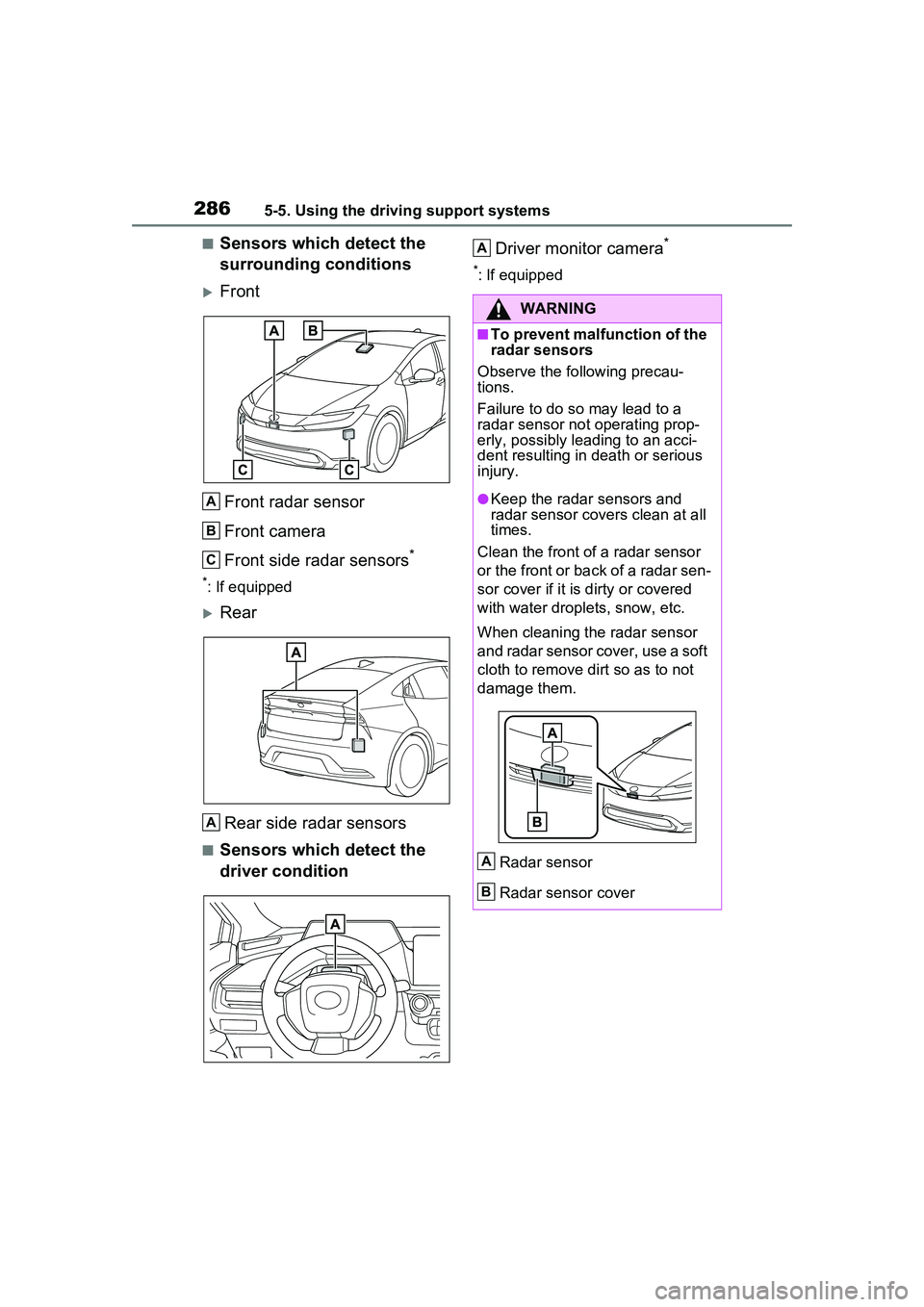
■Sensors which detect the
surrounding conditions
FrontFront radar sensor
Front camera
Front side radar sensors
*
*: If equipped
Rear
Rear side radar sensors
■Sensors which detect the
driver condition Driver monitor camera
*
*: If equipped
A
B
C
A
WARNING
■To prevent malfunction of the
radar sensors
Observe the following precau-
tions.
Failure to do so may lead to a
radar sensor not operating prop-
erly, possibly leading to an acci-
dent resulting in death or serious
injury.
●Keep the radar sensors and
radar sensor covers clean at all
times.
Clean the front of a radar sensor
or the front or back of a radar sen-
sor cover if it is dirty or covered
with water droplets, snow, etc.
When cleaning the radar sensor
and radar sensor cover, use a soft
cloth to remove dirt so as to not
damage them.
Radar sensor
Radar sensor cover
A
A
B
Page 287 of 680
2875-5. Using the driving support systems
5
Driving
WARNING
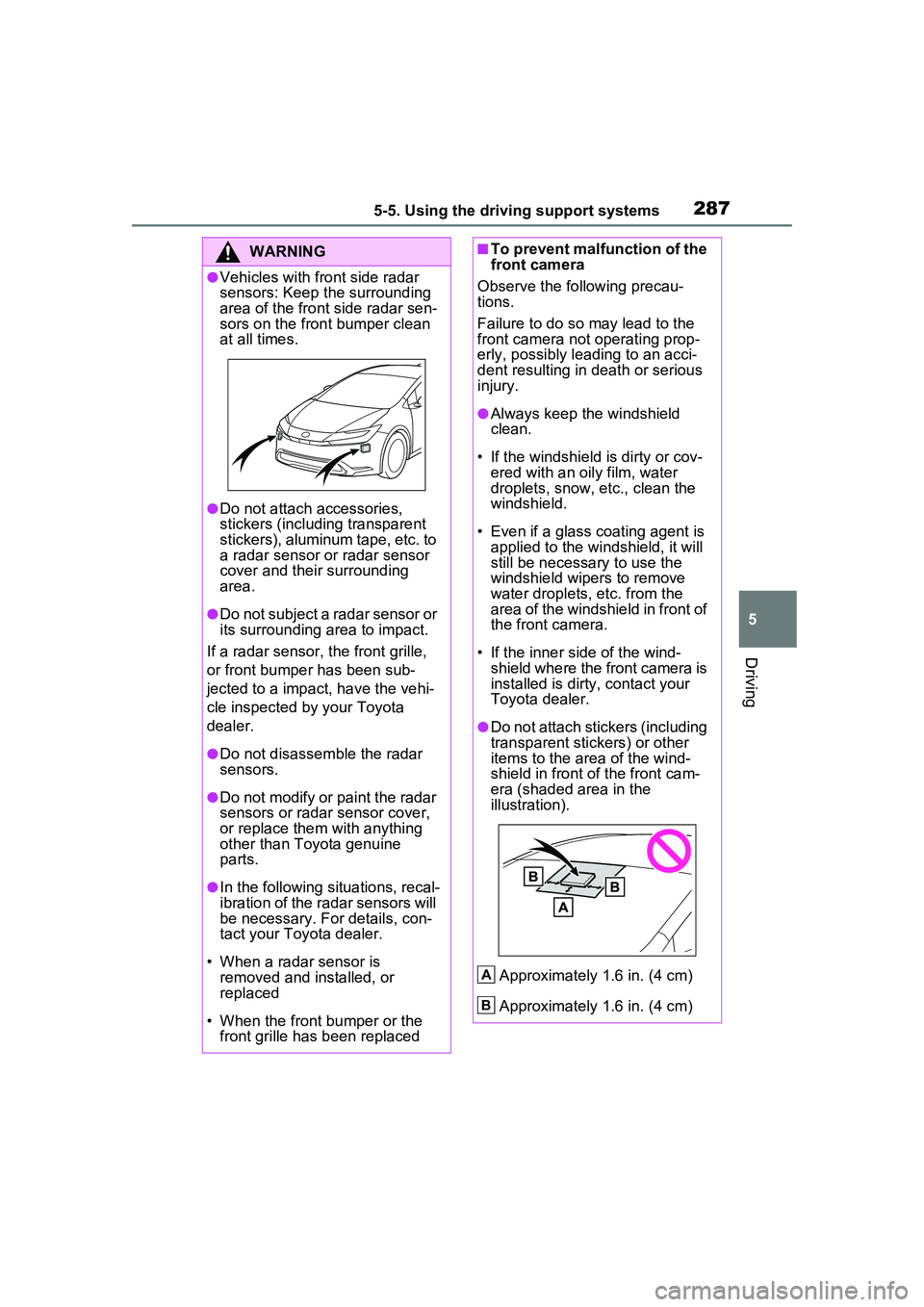
●Vehicles with front side radar
sensors: Keep the surrounding
area of the front side radar sen-
sors on the front bumper clean
at all times.
●Do not attach accessories,
stickers (including transparent
stickers), aluminum tape, etc. to
a radar sensor or radar sensor
cover and their surrounding
area.
●Do not subject a radar sensor or
its surrounding area to impact.
If a radar sensor, the front grille,
or front bumper has been sub-
jected to a impact, have the vehi-
cle inspected by your Toyota
dealer.
●Do not disassemble the radar
sensors.
●Do not modify or paint the radar
sensors or radar sensor cover,
or replace them with anything
other than Toyota genuine
parts.
●In the following situations, recal-
ibration of the radar sensors will
be necessary. For details, con-
tact your Toyota dealer.
• When a radar sensor is removed and installed, or
replaced
• When the front bumper or the front grille has been replaced
■To prevent malfunction of the
front camera
Observe the following precau-
tions.
Failure to do so may lead to the
front camera not operating prop-
erly, possibly leading to an acci-
dent resulting in death or serious
injury.
●Always keep the windshield
clean.
• If the windshield is dirty or cov- ered with an o ily film, water
droplets, snow, etc., clean the
windshield.
• Even if a glass coating agent is applied to the windshield, it will
still be necessary to use the
windshield wipers to remove
water droplets, etc. from the
area of the windshield in front of
the front camera.
• If the inner side of the wind- shield where the front camera is
installed is dirty, contact your
Toyota dealer.
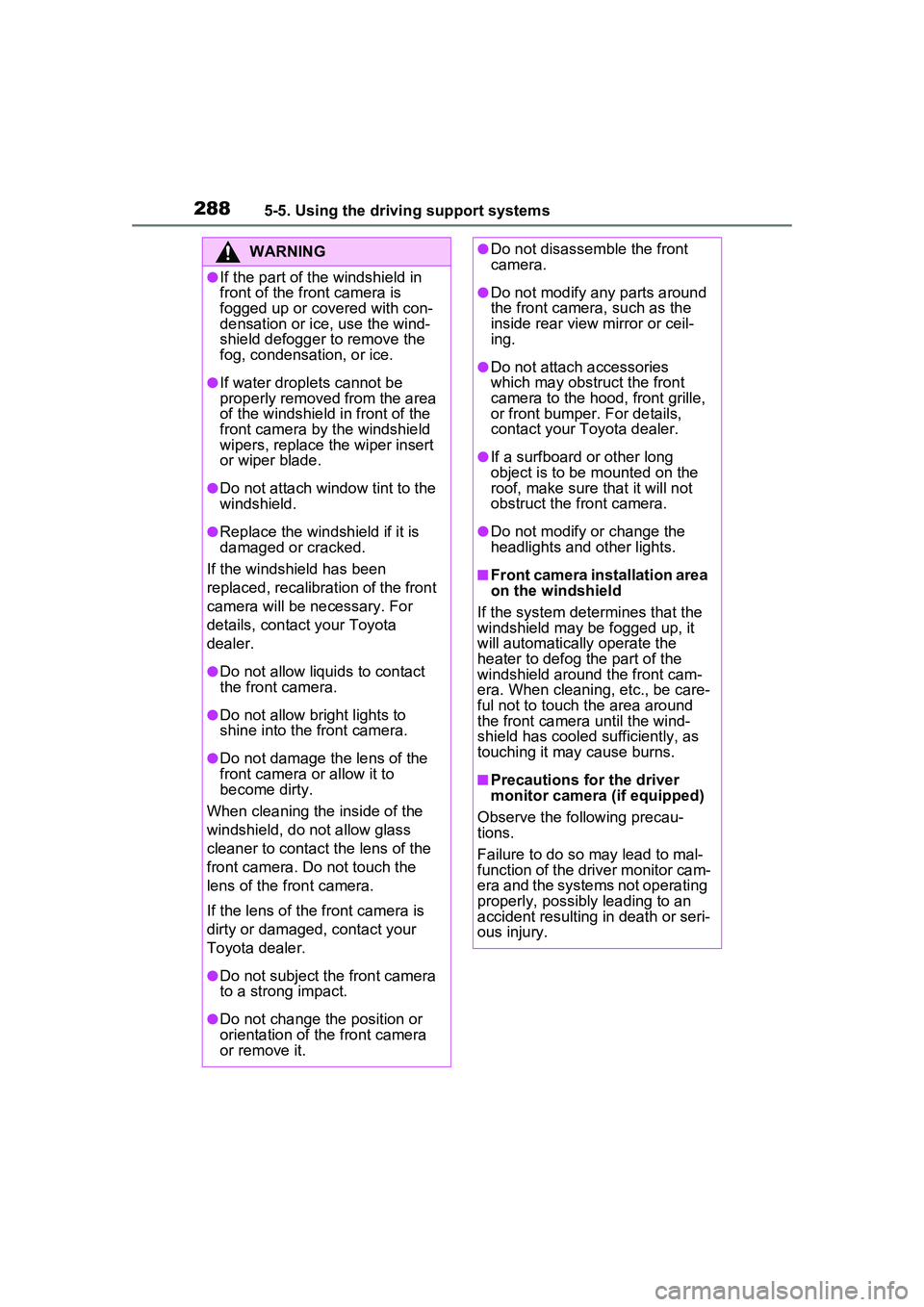
●Do not attach stickers (including
transparent stickers) or other
items to the area of the wind-
shield in front of the front cam-
era (shaded area in the
illustration).
Approximately 1.6 in. (4 cm)
Approximately 1.6 in. (4 cm)
A
B
Page 288 of 680
2885-5. Using the driving support systems
WARNING
●If the part of the windshield in
front of the front camera is
fogged up or covered with con-
densation or ice, use the wind-
shield defogger to remove the
fog, condensation, or ice.
●If water droplets cannot be
properly removed from the area
of the windshield in front of the
front camera by the windshield
wipers, replace the wiper insert
or wiper blade.
●Do not attach window tint to the
windshield.
●Replace the windshield if it is
damaged or cracked.
If the windshield has been
replaced, recalibration of the front
camera will be necessary. For
details, contact your Toyota
dealer.
●Do not allow liqui ds to contact
the front camera.
●Do not allow bright lights to
shine into the front camera.
●Do not damage the lens of the
front camera or allow it to
become dirty.
When cleaning the inside of the
windshield, do not allow glass
cleaner to contact the lens of the
front camera. Do not touch the
lens of the front camera.
If the lens of the front camera is
dirty or damaged, contact your
Toyota dealer.
●Do not subject the front camera
to a strong impact.
●Do not change the position or
orientation of the front camera
or remove it.
●Do not disassemble the front
camera.
●Do not modify any parts around
the front camera, such as the
inside rear view mirror or ceil-
ing.
●Do not attach accessories
which may obstruct the front
camera to the hood, front grille,
or front bumper. For details,
contact your Toyota dealer.
●If a surfboard or other long
object is to be mounted on the
roof, make sure that it will not
obstruct the front camera.
●Do not modify or change the
headlights and other lights.
■Front camera installation area
on the windshield
If the system determines that the
windshield may be fogged up, it
will automatically operate the
heater to defog the part of the
windshield around the front cam-
era. When cleaning, etc., be care-
ful not to touch the area around
the front camera until the wind-
shield has cooled sufficiently, as
touching it may cause burns.
■Precautions for the driver
monitor camera (if equipped)
Observe the following precau-
tions.
Failure to do so may lead to mal-
function of the driver monitor cam-
era and the systems not operating
properly, possibly leading to an
accident resulting in death or seri-
ous injury.