light TOYOTA PRIUS PRIME 2023 Owners Manual
[x] Cancel search | Manufacturer: TOYOTA, Model Year: 2023, Model line: PRIUS PRIME, Model: TOYOTA PRIUS PRIME 2023Pages: 680, PDF Size: 14.97 MB
Page 276 of 680
2765-3. Operating the lights and wipers
5*1 or *2
Temporary operation
*1:For the U.S.A.
*2: For Canada
When is selected, the
wipers will operate automatically
when the sensor detects falling
rain. The system automatically
adjusts wiper timing in accor-
dance with rain volume and
vehicle speed.
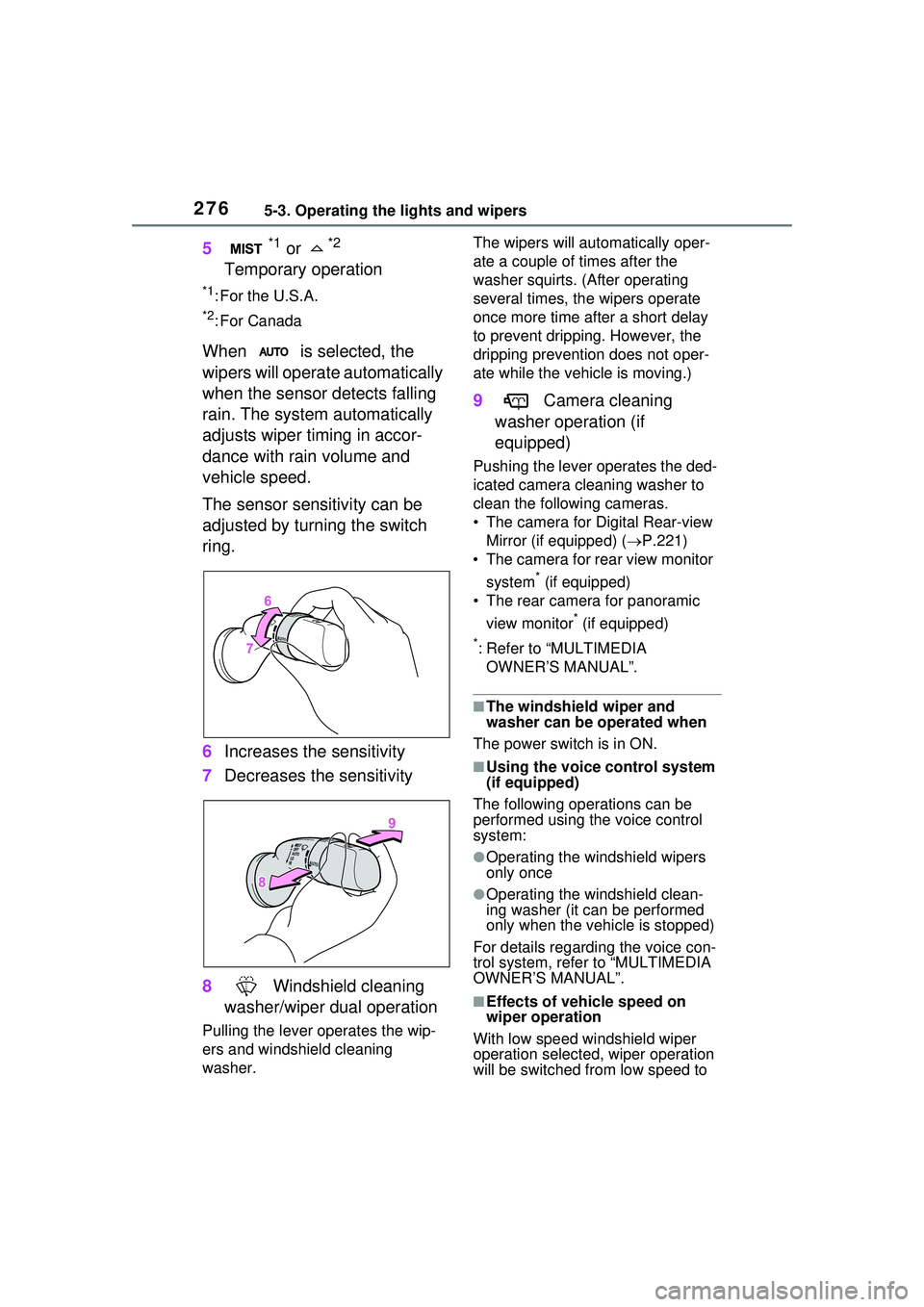
The sensor sensitivity can be
adjusted by turning the switch
ring.
6 Increases the sensitivity
7 Decreases the sensitivity
8 Windshield cleaning
washer/wiper dual operation
Pulling the lever operates the wip-
ers and windshield cleaning
washer. The wipers will automatically oper-
ate a couple of times after the
washer squirts. (After operating
several times, th
e wipers operate
once more time after a short delay
to prevent dripping. However, the
dripping prevention does not oper-
ate while the vehicle is moving.)
9 Camera cleaning
washer operation (if
equipped)
Pushing the lever operates the ded-
icated camera cleaning washer to
clean the following cameras.
• The camera for Digital Rear-view Mirror (if equipped) ( P.221)
• The camera for rear view monitor
system
* (if equipped)
• The rear camera for panoramic
view monitor
* (if equipped)
*: Refer to “MULTIMEDIA OWNER’S MANUAL”.
■The windshield wiper and
washer can be operated when
The power switch is in ON.
■Using the voice control system
(if equipped)
The following operations can be
performed using the voice control
system:
●Operating the windshield wipers
only once
●Operating the windshield clean-
ing washer (it can be performed
only when the vehicle is stopped)
For details regarding the voice con-
trol system, refe r to “MULTIMEDIA
OWNER’S MANUAL”.
■Effects of vehicle speed on
wiper operation
With low speed windshield wiper
operation selected, wiper operation
will be switched from low speed to
Page 277 of 680
2775-3. Operating the lights and wipers
5
Driving
intermittent wiper operation when
the vehicle is stationary. (However,
when the sensor sensitivity is
adjusted to the highest level, the
mode will not switch.)
■Raindrop sensor
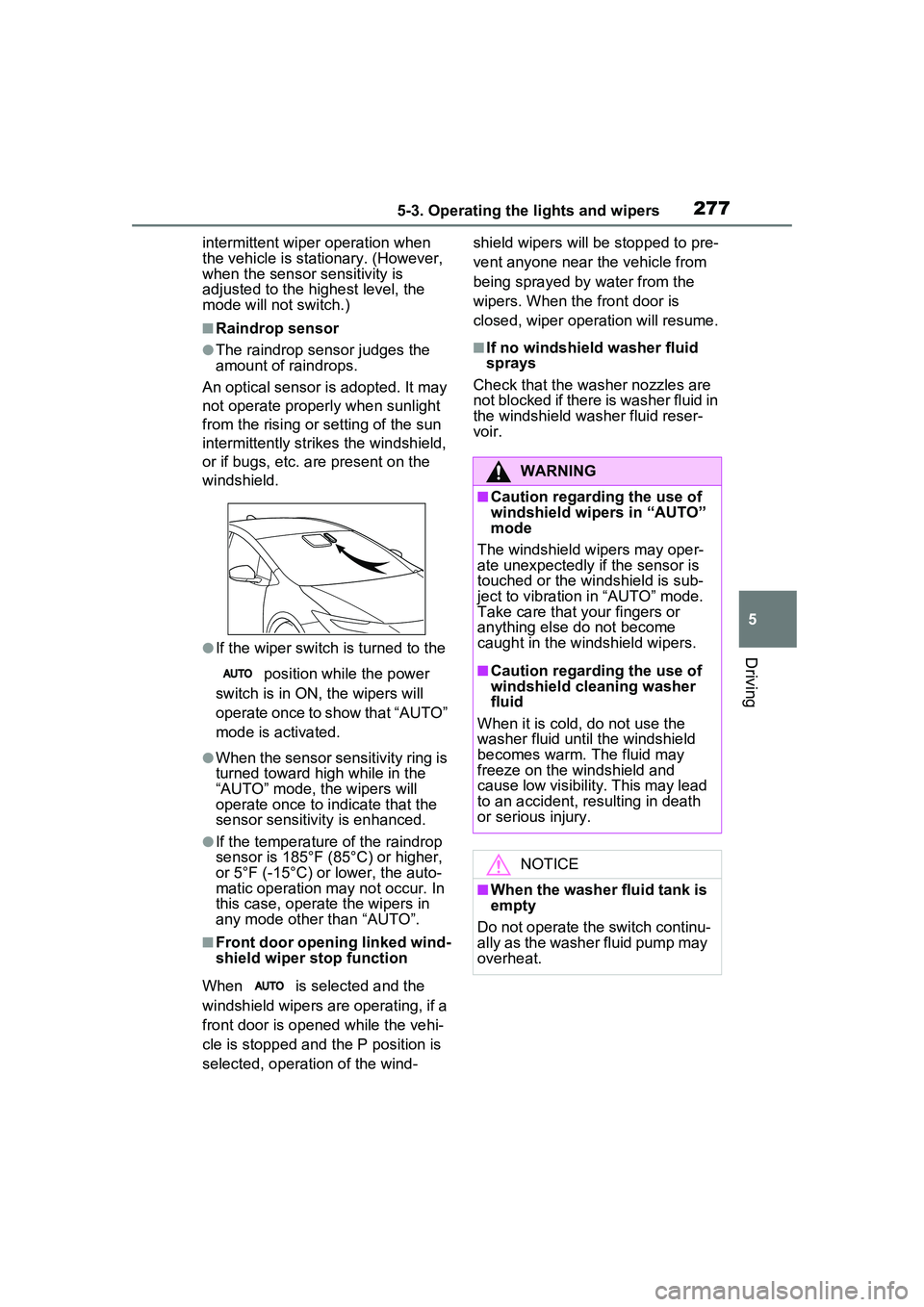
●The raindrop sensor judges the
amount of raindrops.
An optical sensor is adopted. It may
not operate properly when sunlight
from the rising or setting of the sun
intermittently strikes the windshield,
or if bugs, etc. are present on the
windshield.
●If the wiper switch is turned to the
position while the power
switch is in ON, the wipers will
operate once to show that “AUTO”
mode is activated.
●When the sensor sensitivity ring is
turned toward hi gh while in the
“AUTO” mode, the wipers will
operate once to indicate that the
sensor sensitivity is enhanced.
●If the temperature of the raindrop
sensor is 185°F (85°C) or higher,
or 5°F (-15°C) or lower, the auto-
matic operation may not occur. In
this case, operate the wipers in
any mode other than “AUTO”.
■Front door opening linked wind-
shield wiper stop function
When is selected and the
windshield wipers are operating, if a
front door is opened while the vehi-
cle is stopped and the P position is
selected, operation of the wind- shield wipers will be stopped to pre-
vent anyone near the vehicle from
being sprayed by water from the
wipers. When the front door is
closed, wiper operation will resume.
■If no windshield washer fluid
sprays
Check that the washer nozzles are
not blocked if there is washer fluid in
the windshield washer fluid reser-
voir.
WARNING
■Caution regarding the use of
windshield wipers in “AUTO”
mode
The windshield wipers may oper-
ate unexpectedly if the sensor is
touched or the windshield is sub-
ject to vibration in “AUTO” mode.
Take care that your fingers or
anything else do not become
caught in the windshield wipers.
■Caution regarding the use of
windshield cleaning washer
fluid
When it is cold, do not use the
washer fluid until the windshield
becomes warm. The fluid may
freeze on the windshield and
cause low visibility. This may lead
to an accident, resulting in death
or serious injury.
NOTICE
■When the washer fluid tank is
empty
Do not operate the switch continu-
ally as the washer fluid pump may
overheat.
Page 278 of 680
2785-3. Operating the lights and wipers
NOTICE
■When a nozzle becomes
blocked
In this case, contact your Toyota
dealer.
Do not try to clear it with a pin or
other object. The nozzle will be
damaged.
■To prevent 12-volt battery dis-
charge
Do not leave the wipers on longer
than necessary when the hybrid
system is off.
Page 280 of 680
2805-4. Refueling
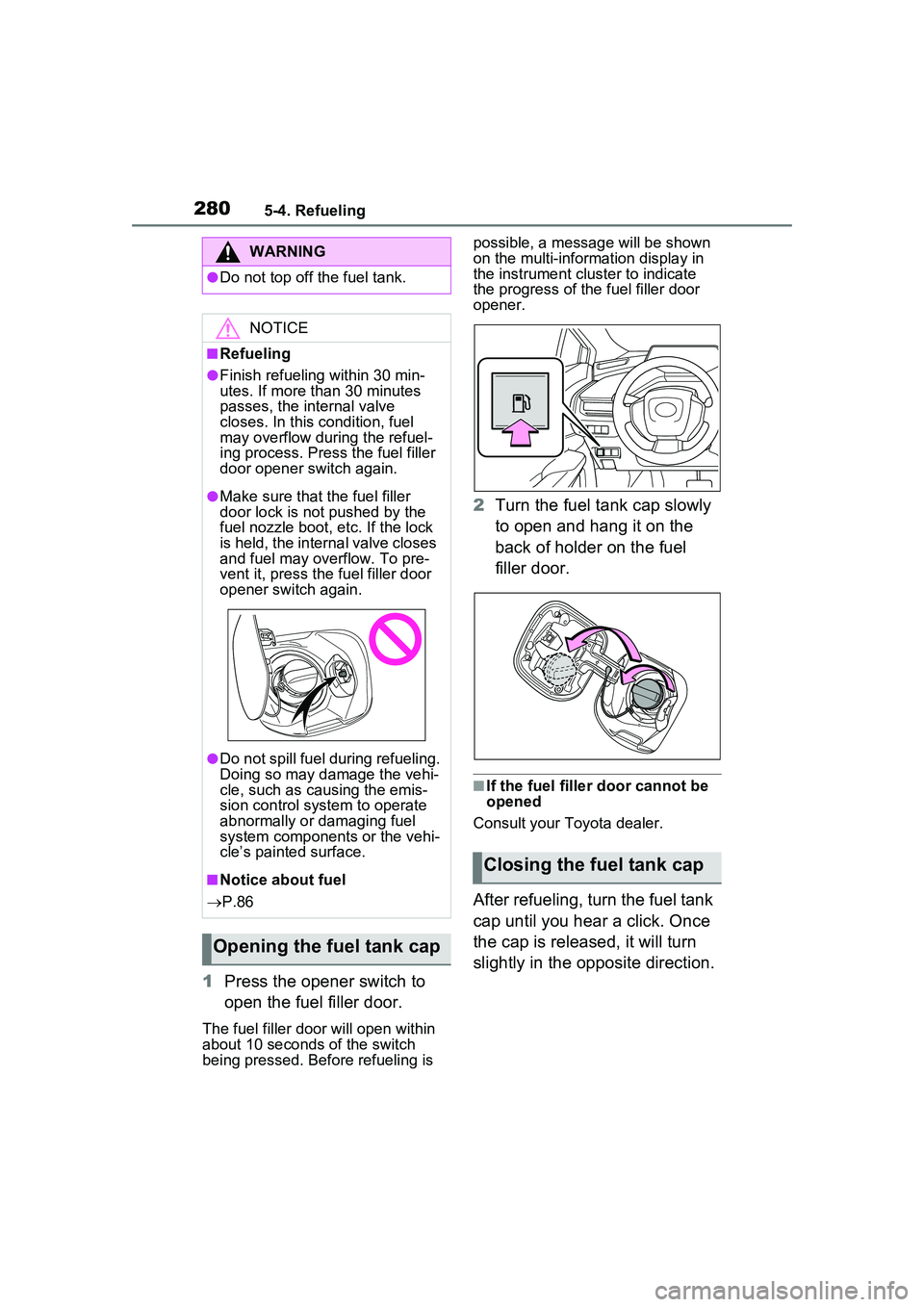
1Press the opener switch to
open the fuel filler door.
The fuel filler door will open within
about 10 seconds of the switch
being pressed. Before refueling is possible, a message will be shown
on the multi-information display in
the instrument clus
ter to indicate
the progress of the fuel filler door
opener.
2 Turn the fuel tank cap slowly
to open and hang it on the
back of holder on the fuel
filler door.
■If the fuel filler door cannot be
opened
Consult your Toyota dealer.
After refueling, turn the fuel tank
cap until you hear a click. Once
the cap is released, it will turn
slightly in the opposite direction.
WARNING
●Do not top off the fuel tank.
NOTICE
■Refueling
●Finish refueling within 30 min-
utes. If more than 30 minutes
passes, the internal valve
closes. In this condition, fuel
may overflow during the refuel-
ing process. Press the fuel filler
door opener switch again.
●Make sure that the fuel filler
door lock is not pushed by the
fuel nozzle boot, etc. If the lock
is held, the internal valve closes
and fuel may overflow. To pre-
vent it, press the fuel filler door
opener switch again.
●Do not spill fuel during refueling.
Doing so may damage the vehi-
cle, such as causing the emis-
sion control system to operate
abnormally or damaging fuel
system components or the vehi-
cle’s painted surface.
■Notice about fuel
P.86
Opening the fuel tank cap
Closing the fuel tank cap
Page 285 of 680
2855-5. Using the driving support systems
5
Driving
■AHB (Automatic High
Beam)
P.272
■PCS (Pre-Collision System)
P.293
■LTA (Lane Tracing Assist)
P.305
■LDA (Lane Departure Alert)
P.313
■LCA (Lane Change Assist)*
P.310
■FCTA (Front Cross Traffic
Alert)
*
P.326
■PDA (Proactive Driving
Assist)
P.320
■RSA (Road Sign Assist)*
P.329
■Dynamic radar cruise con-
trol
P.331
■Cruise control
P.342
■Emergency Driving Stop
System
P.345
■Traffic Jam Assist*
P.348
■Driver monitor*
P.292
*: If equipped
Various sensors are used to
obtain the necessary informa-
tion for system operation.
WARNING
●When using an automatic car
wash
●When a sensor is misaligned or
deformed due to a strong
impact being applied to the sen-
sor or the area around the sen-
sor
●When accessories which
obstruct a sensor or light are
temporarily installed to the vehi-
cle
●When a compact spare tire or
tire chains are installed to the
vehicle or an emergency tire
puncture repair kit has been
used
●When the tires are excessively
worn or the inflation pressure of
the tires is low
●When tires other than the manu-
facturer specified size are
installed
●When the vehicle cannot be
driven stably, due to a collision,
malfunction, etc.
Driving assist system
Sensors used by Toyota
Safety Sense 3.0
Page 288 of 680
2885-5. Using the driving support systems
WARNING
●If the part of the windshield in
front of the front camera is
fogged up or covered with con-
densation or ice, use the wind-
shield defogger to remove the
fog, condensation, or ice.
●If water droplets cannot be
properly removed from the area
of the windshield in front of the
front camera by the windshield
wipers, replace the wiper insert
or wiper blade.
●Do not attach window tint to the
windshield.
●Replace the windshield if it is
damaged or cracked.
If the windshield has been
replaced, recalibration of the front
camera will be necessary. For
details, contact your Toyota
dealer.
●Do not allow liqui ds to contact
the front camera.
●Do not allow bright lights to
shine into the front camera.
●Do not damage the lens of the
front camera or allow it to
become dirty.
When cleaning the inside of the
windshield, do not allow glass
cleaner to contact the lens of the
front camera. Do not touch the
lens of the front camera.
If the lens of the front camera is
dirty or damaged, contact your
Toyota dealer.
●Do not subject the front camera
to a strong impact.
●Do not change the position or
orientation of the front camera
or remove it.
●Do not disassemble the front
camera.
●Do not modify any parts around
the front camera, such as the
inside rear view mirror or ceil-
ing.
●Do not attach accessories
which may obstruct the front
camera to the hood, front grille,
or front bumper. For details,
contact your Toyota dealer.
●If a surfboard or other long
object is to be mounted on the
roof, make sure that it will not
obstruct the front camera.
●Do not modify or change the
headlights and other lights.
■Front camera installation area
on the windshield
If the system determines that the
windshield may be fogged up, it
will automatically operate the
heater to defog the part of the
windshield around the front cam-
era. When cleaning, etc., be care-
ful not to touch the area around
the front camera until the wind-
shield has cooled sufficiently, as
touching it may cause burns.
■Precautions for the driver
monitor camera (if equipped)
Observe the following precau-
tions.
Failure to do so may lead to mal-
function of the driver monitor cam-
era and the systems not operating
properly, possibly leading to an
accident resulting in death or seri-
ous injury.
Page 289 of 680
2895-5. Using the driving support systems
5
Driving
■Precautions for use
It is necessary to enter a connected
services contract, provided by
Toyota, to use these functions. For
details, contact your Toyota dealer.
●LCA (Lane Change Assist)
P.310
●Radar Cruise Control: Extended
resume time
P.331
●Traffic Jam Assist
P.348
■Situations in which the sensors
may not operate properly
●When the height or inclination of
the vehicle has been changed due
to modifications
●When the windshield is dirty,
fogged up, cracked or damaged
●When the ambient temperature is
high or low
●When mud, water, snow, dead
insects, foreign matter, etc., is
attached to the front of the sensor
●When in inclement weather such
as heavy rain, fog, snow, or a
sandstorm
●When water, snow, dust, etc. is
thrown up in front of the vehicle, or
when driving through mist or
smoke
●When the headlights are not illu-
minated while driving in the dark,
such as at night or when in a tun-
nel
●When the lens of a headlight is
dirty and illumination is weak
●When the headlights are mis-
aligned
●When a headlight is malfunction-
ing
●When the headlights of another
vehicle, sunlight, or reflected light
shines directly into the front cam-
era
●When the brightness of the sur-
rounding area changes suddenly
●When driving near a TV tower,
broadcasting station, electric
power plant, radar equipped vehi-
cles, etc., or other location where
WARNING
●Do not subject the driver moni-
tor camera or its surrounding
area to strong impact.
If subjected to a strong impact,
the driver monitor camera may
move out of alignment and the
driver may no longer be detected
correctly. In this case, have the
vehicle inspected by your Toyota
dealer.
●Do not disassemble or modify
the driver monitor camera.
●Do not attach accessories,
stickers (including transparent
stickers), etc. to the driver moni-
tor camera or its surrounding
area.
●Do not allow the driver monitor
camera or its surrounding area
to get wet.
●Do not cover the driver monitor
camera or place anything in
front of it.
●Keep the lens of the driver mon-
itor camera free from damage.
●Do not touch the lens of the
driver monitor came ra or allow it
to become dirty.
When there is dirt or fingerprints
on the camera lens, clean it with a
dry, soft cloth so as to not mark or
damage it.
●When cleaning the lens, do not
use detergents or organic sol-
vents that may damage plastic.
Page 291 of 680
2915-5. Using the driving support systems
5
Driving
such as tall grass, tree branches,
a curtain, etc.
●When driving in strong wind
■Situations in which the lane
may not be detected
●When the lane is extremely wide
or narrow
●Immediately after changing lanes
or passing through an intersection
●When driving in a temporary lane
or lane regulated by construction
●When there are structures, pat-
terns, shadows which are similar
to lane lines in the surrounding
●When there are multiple white
lines for a lane line
●When the lane lines are not clear
or driving on a wet road surface
●When a lane line is on a curb
●When driving on a bright, reflec-
tive road surface, such as con-
crete
■Situations in which some or all
of the functions of the system
cannot operate
●When a malfunction is detected in
this system or a related system,
such as the brakes, steering, etc.
●When the VSC, TRAC, or other
safety related syst em is operating
●When the VSC, TRAC, or other
safety related system is off
■Changes in brake operation
sound and pedal response
●When the brakes have been oper-
ated, brake operation sounds may
be heard and the brake pedal
response may change, but this
does not indicate a malfunction.
●When the system is operating, the
brake pedal may feel stiffer than
expected or sink. In either situa-
tion the brake pedal can be
depressed further. Further
depress the brake pedal as nec-
essary.
■Situations in which the driver
monitor may not operate prop-
erly (if equipped)
In situations such as the following,
the driver monitor camera may not
be able to detect the driver’s face,
and the function may not operate
properly.
●When the inside of the vehicle is
hot, such as after the vehicle has
been parked in the sun
●When a very bright light, such as
the sun or the headlights of follow-
ing vehicle, shines onto the driver
monitor camera
●When the brightness inside the
vehicle changes frequently due to
the shadows of surrounding struc-
tures, etc.
●When a very bright light, such as
the sun or the headlights of an
oncoming vehicle, is shining onto
the driver’s face
●When light, either inside or out-
side of the vehicle, is being
reflected from the lenses of eye-
glasses or sunglasses
●When there are multiple faces in
the detection range of the driver
monitor camera, such as when a
front or rear passenger is leaning
toward the driver’s seat
●When the driver’s face is outside
of the detection range of the driver
monitor camera, such as when
leaned forward or when their head
is outside of the window
●When the driver monitor camera is
being blocked by the steering
wheel, a hand holding the steering
wheel, an arm, etc.
●When the driver is wearing a hat
●When the driver is wearing an
eyepatch
●When the driver is wearing eye-
glasses or sunglasses that do not
easily transmit infrared rays
●When the driver is wearing con-
tact lenses
Page 292 of 680
2925-5. Using the driving support systems
●When the driver is wearing a face
mask
●When the driver is laughing or
their eyes are only slightly open
●When the driver’s eyes, nose,
mouth, or shape of their face is
blocked
●When the driver is wearing
makeup which makes it difficult to
detect their eyes, nose, mouth, or
shape of their face
●When the driver’s eyes are
blocked by the frame of eye-
glasses, sunglasses, hair, etc.
●When there is a device inside the
vehicle that radiates near infrared
rays, such as a non-genuine
driver monitoring system.
*: If equipped
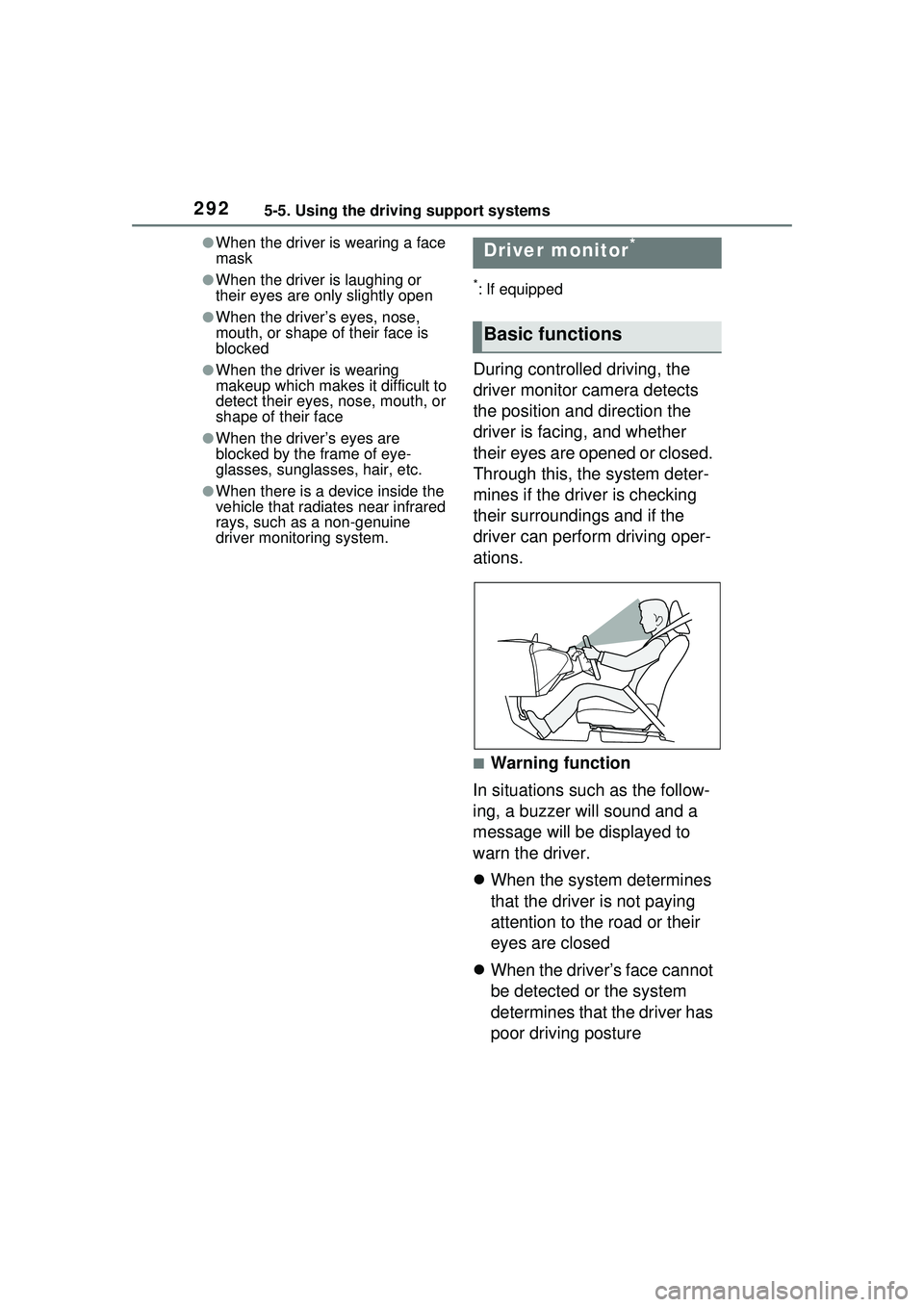
During controlled driving, the
driver monitor camera detects
the position and direction the
driver is facing, and whether
their eyes are opened or closed.
Through this, the system deter-
mines if the driver is checking
their surroundings and if the
driver can perform driving oper-
ations.
■Warning function
In situations such as the follow-
ing, a buzzer will sound and a
message will be displayed to
warn the driver.
When the system determines
that the driver is not paying
attention to the road or their
eyes are closed
When the driver’s face cannot
be detected or the system
determines that the driver has
poor driving posture
Driver monitor*
Basic functions
Page 299 of 680
2995-5. Using the driving support systems
5
Driving
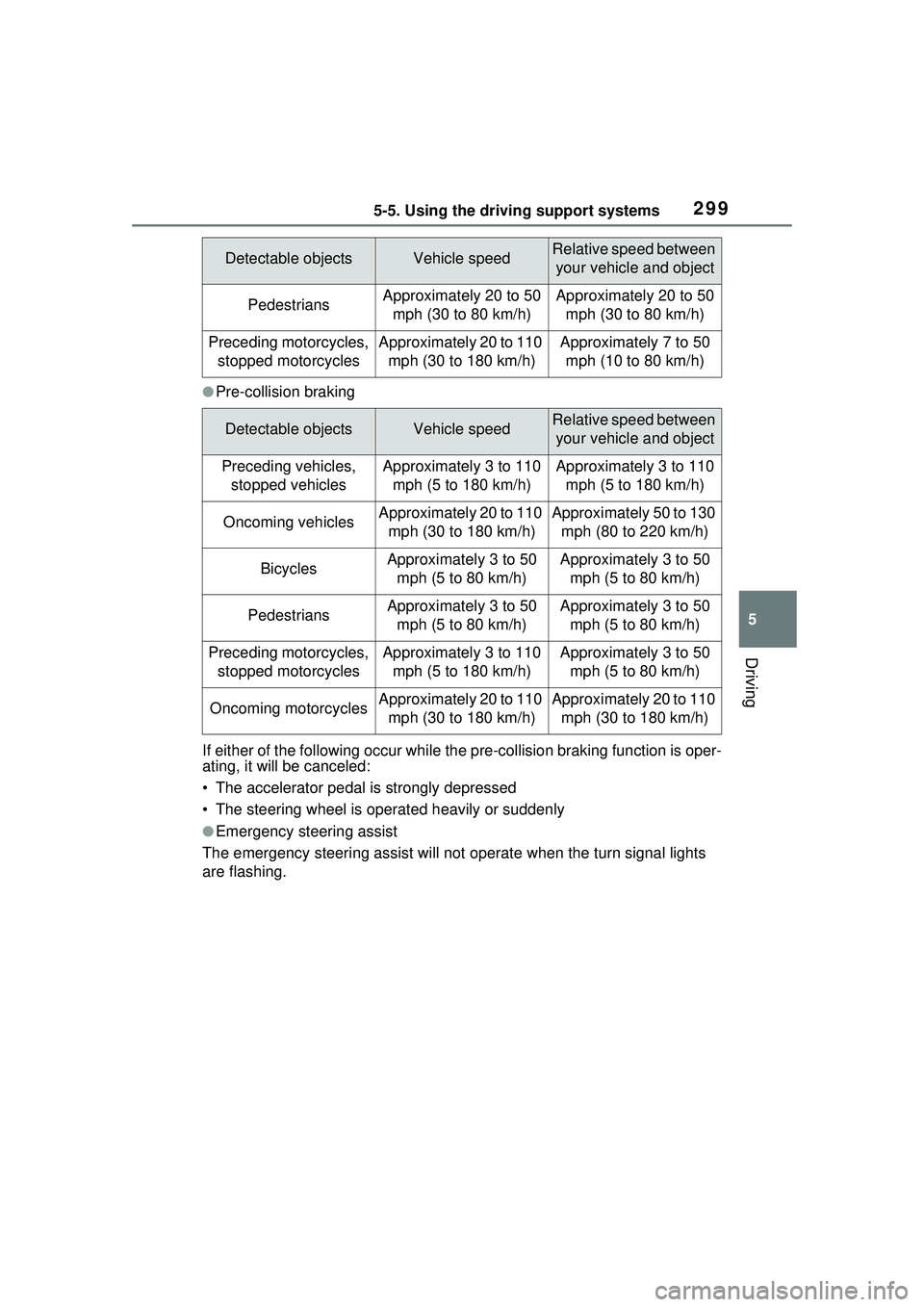
●Pre-collision braking
If either of the following occur while th e pre-collision braking function is oper-
ating, it will be canceled:
• The accelerator pedal is strongly depressed
• The steering wheel is operated heavily or suddenly
●Emergency steering assist
The emergency steering assist will not operate when the turn signal lights
are flashing.
PedestriansApproximately 20 to 50 mph (30 to 80 km/h)Approximately 20 to 50 mph (30 to 80 km/h)
Preceding motorcycles, stopped motorcyclesApproximately 20 to 110 mph (30 to 180 km/h)Approximately 7 to 50 mph (10 to 80 km/h)
Detectable objectsVehicle speedRelative speed between your vehicle and object
Preceding vehicles, stopped vehiclesApproximately 3 to 110 mph (5 to 180 km/h)Approximately 3 to 110 mph (5 to 180 km/h)
Oncoming vehiclesApproximately 20 to 110 mph (30 to 180 km/h)Approximately 50 to 130 mph (80 to 220 km/h)
BicyclesApproximately 3 to 50 mph (5 to 80 km/h)Approximately 3 to 50 mph (5 to 80 km/h)
PedestriansApproximately 3 to 50 mph (5 to 80 km/h)Approximately 3 to 50 mph (5 to 80 km/h)
Preceding motorcycles, stopped motorcyclesApproximately 3 to 110 mph (5 to 180 km/h)Approximately 3 to 50 mph (5 to 80 km/h)
Oncoming motorcyclesApproximately 20 to 110 mph (30 to 180 km/h)Approximately 20 to 110 mph (30 to 180 km/h)
Detectable objectsVehicle speedRelative speed between your vehicle and object