start TOYOTA PROACE 2018 Repair Manual
[x] Cancel search | Manufacturer: TOYOTA, Model Year: 2018, Model line: PROACE, Model: TOYOTA PROACE 2018Pages: 516, PDF Size: 90.91 MB
Page 205 of 516
205
Parking brake
F With your foot on the brake pedal, pull the parking brake lever up to immobilise your vehicle.
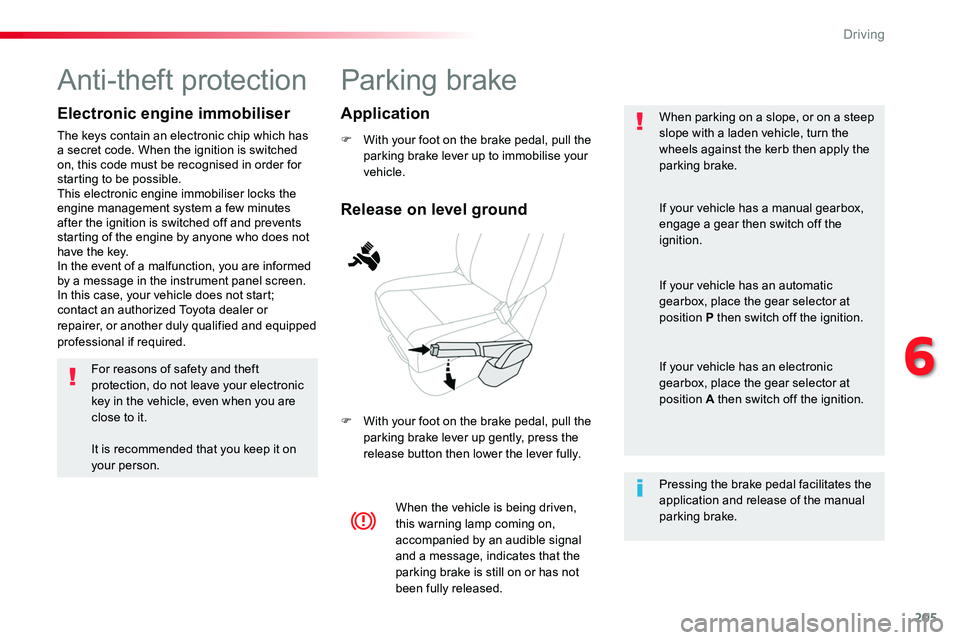
F With your foot on the brake pedal, pull the parking brake lever up gently, press the release button then lower the lever fully.
When parking on a slope, or on a steep slope with a laden vehicle, turn the wheels against the kerb then apply the parking brake.
When the vehicle is being driven, this warning lamp coming on, accompanied by an audible signal and a message, indicates that the parking brake is still on or has not
been fully released.
Pressing the brake pedal facilitates the application and release of the manual parking brake.
If your vehicle has a manual gearbox,
engage a gear then switch off the ignition.
If your vehicle has an automatic gearbox, place the gear selector at position P then switch off the ignition.
If your vehicle has an electronic gearbox, place the gear selector at position A then switch off the ignition.
Release on level ground
Application
Anti-theft protection
Electronic engine immobiliser
The keys contain an electronic chip which has a secret code. When the ignition is switched on, this code must be recognised in order for starting to be possible.This electronic engine immobiliser locks the engine management system a few minutes after the ignition is switched off and prevents starting of the engine by anyone who does not have the key.In the event of a malfunction, you are informed by a message in the instrument panel screen.In this case, your vehicle does not start; contact an authorized Toyota dealer or repairer, or another duly qualified and equipped professional if required.
For reasons of safety and theft protection, do not leave your electronic key in the vehicle, even when you are close to it.
It is recommended that you keep it on your person.
6
Driving
Page 206 of 516
206
Hill start assist control (HAC)
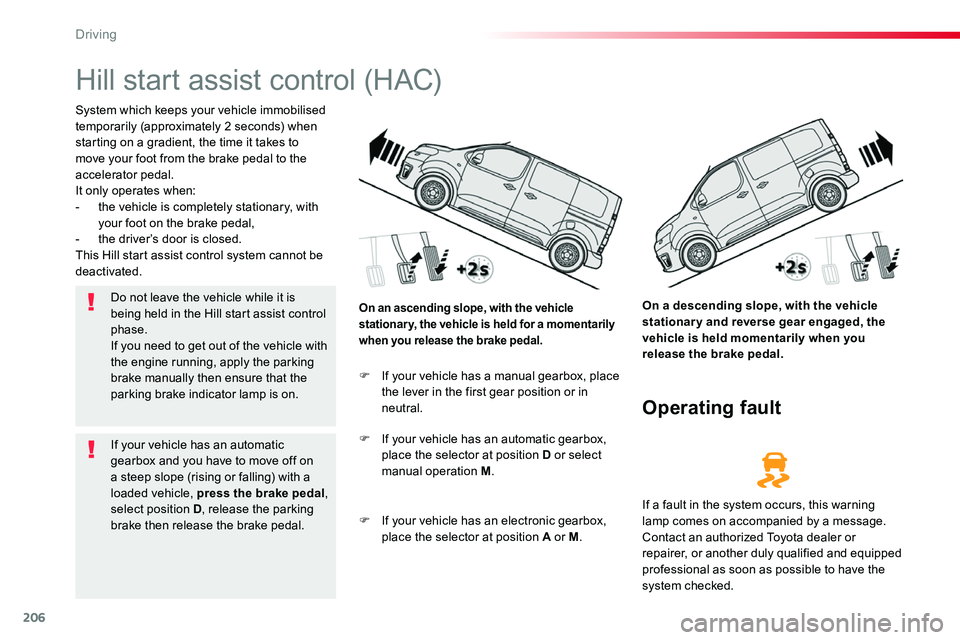
System which keeps your vehicle immobilised temporarily (approximately 2 seconds) when starting on a gradient, the time it takes to move your foot from the brake pedal to the accelerator pedal.It only operates when:- the vehicle is completely stationary, with your foot on the brake pedal,- the driver’s door is closed.This Hill start assist control system cannot be deactivated.
On a descending slope, with the vehicle stationary and reverse gear engaged, the vehicle is held momentarily when you release the brake pedal.
On an ascending slope, with the vehicle stationary, the vehicle is held for a momentarily when you release the brake pedal.
Operating fault
F If your vehicle has a manual gearbox, place the lever in the first gear position or in neutral.
F If your vehicle has an automatic gearbox, place the selector at position D or select manual operation M.
F If your vehicle has an electronic gearbox,
place the selector at position A or M.
If a fault in the system occurs, this warning lamp comes on accompanied by a message. Contact an authorized Toyota dealer or repairer, or another duly qualified and equipped professional as soon as possible to have the
system checked.
Do not leave the vehicle while it is being held in the Hill start assist control phase.If you need to get out of the vehicle with the engine running, apply the parking brake manually then ensure that the parking brake indicator lamp is on.
If your vehicle has an automatic gearbox and you have to move off on a steep slope (rising or falling) with a loaded vehicle, press the brake pedal, select position D, release the parking brake then release the brake pedal.
Driving
Page 207 of 516
207
Only engage reverse gear when the vehicle is stationary with the engine at idle.
As a safety precaution and to facilitate starting of the engine:- always select neutral,- press the clutch pedal.
6-speed manual gearbox
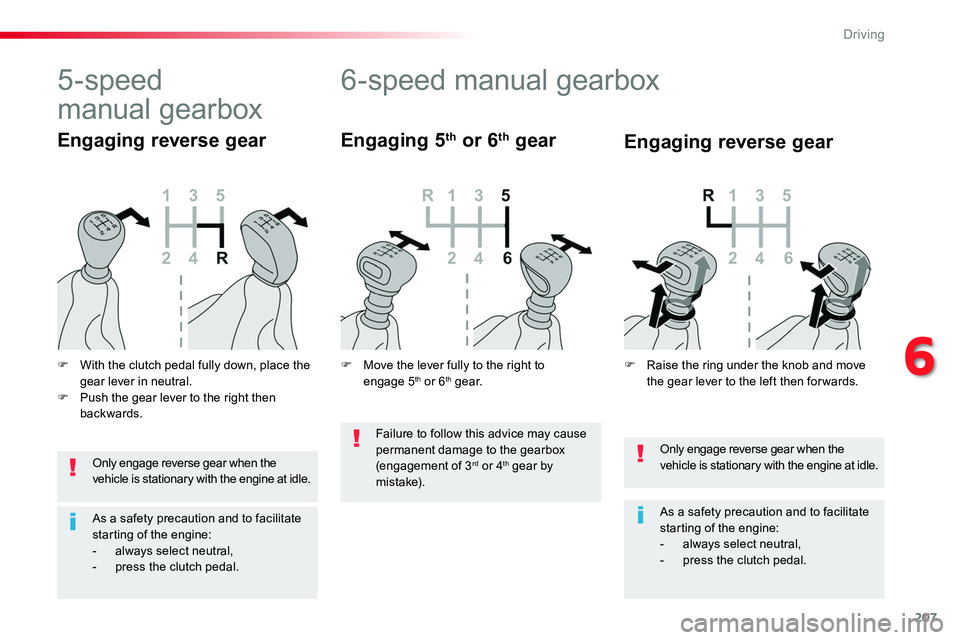
Engaging 5th or 6th gear
Only engage reverse gear when the vehicle is stationary with the engine at idle.
As a safety precaution and to facilitate starting of the engine:- always select neutral,- press the clutch pedal.
5-speed
manual gearbox
F With the clutch pedal fully down, place the gear lever in neutral.F Push the gear lever to the right then backwards.
Engaging reverse gearEngaging reverse gear
F Raise the ring under the knob and move the gear lever to the left then for wards.F Move the lever fully to the right to engage 5th or 6th g e a r.
Failure to follow this advice may cause permanent damage to the gearbox (engagement of 3rd or 4th gear by m i st a ke).
6
Driving
Page 208 of 516
208
Gear efficiency indicator
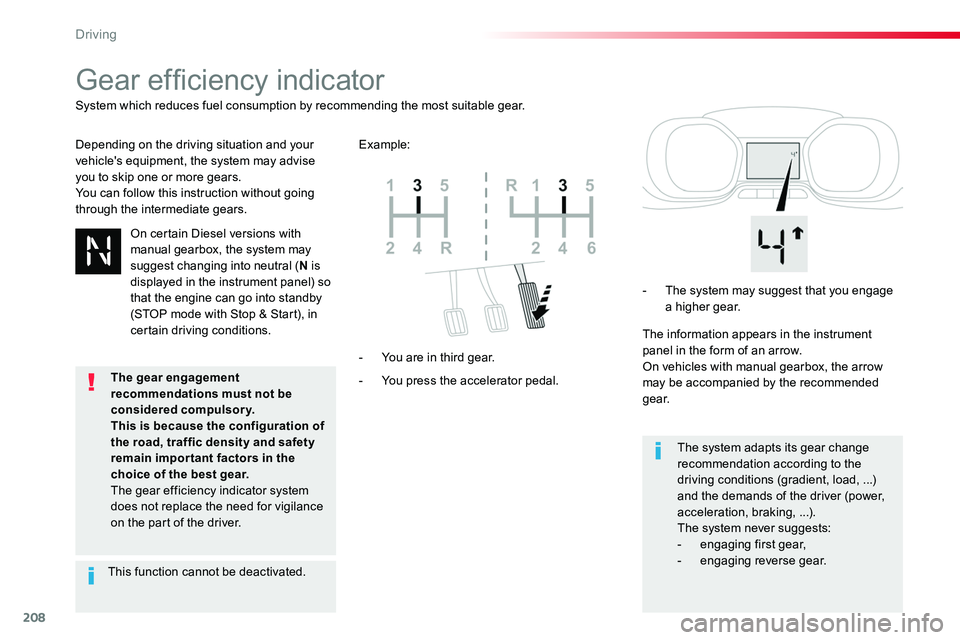
Depending on the driving situation and your vehicle's equipment, the system may advise you to skip one or more gears.You can follow this instruction without going through the intermediate gears.
- You press the accelerator pedal.
- You are in third gear.
- The system may suggest that you engage a higher gear.
The information appears in the instrument panel in the form of an arrow.On vehicles with manual gearbox, the arrow may be accompanied by the recommended g e a r.
The system adapts its gear change recommendation according to the driving conditions (gradient, load, ...) and the demands of the driver (power, acceleration, braking, ...).The system never suggests:
- engaging first gear,- engaging reverse gear.
System which reduces fuel consumption by recommending the most suitable gear.
Example:
On certain Diesel versions with manual gearbox, the system may suggest changing into neutral (N is displayed in the instrument panel) so that the engine can go into standby (STOP mode with Stop & Start), in certain driving conditions.
This function cannot be deactivated.
The gear engagement recommendations must not be considered compulsory.This is because the configuration of
the road, traffic density and safety remain impor tant factors in the choice of the best gear.The gear efficiency indicator system does not replace the need for vigilance on the part of the driver.
Driving
Page 209 of 516
209
Automatic gearbox
Six speed automatic gearbox which offers a choice between the comfort of automatic operation or manual gear changing.Two driving modes are offered:- automatic operation for electronic management of the gears by the gearbox,- manual operation for sequential changing of the gears by the driver.
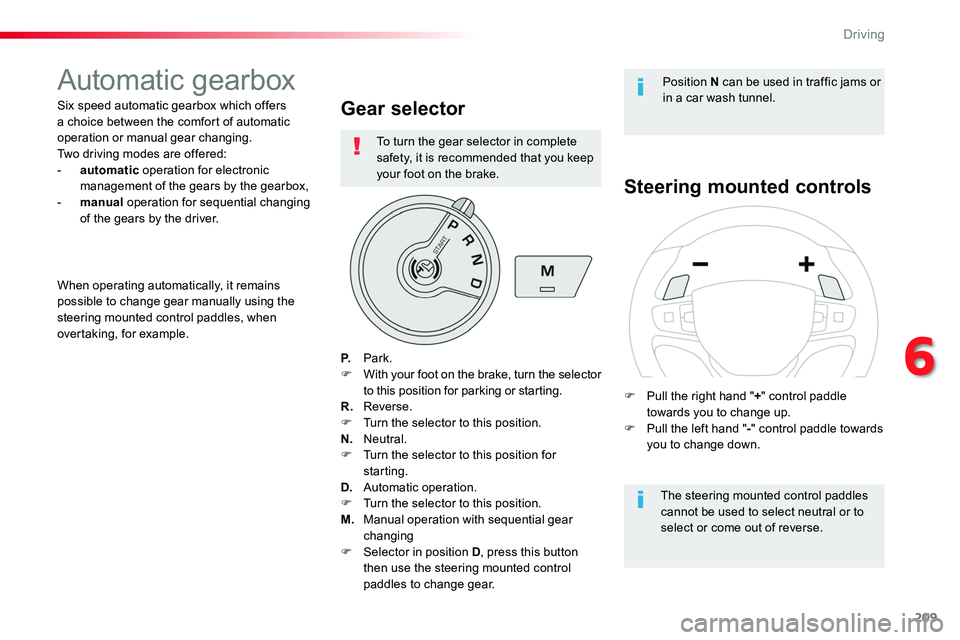
Gear selector
P. Park.F With your foot on the brake, turn the selector to this position for parking or starting.R. Reverse.F Turn the selector to this position.N. Neutral.F Turn the selector to this position for starting.D. Automatic operation.F Turn the selector to this position.
M. Manual operation with sequential gear changingF Selector in position D, press this button then use the steering mounted control paddles to change gear.
Steering mounted controls
The steering mounted control paddles cannot be used to select neutral or to select or come out of reverse.
When operating automatically, it remains possible to change gear manually using the steering mounted control paddles, when overtaking, for example.
Position N can be used in traffic jams or in a car wash tunnel.
F Pull the right hand "+" control paddle towards you to change up.F Pull the left hand "-" control paddle towards you to change down.
To turn the gear selector in complete safety, it is recommended that you keep your foot on the brake.
6
Driving
Page 210 of 516
210
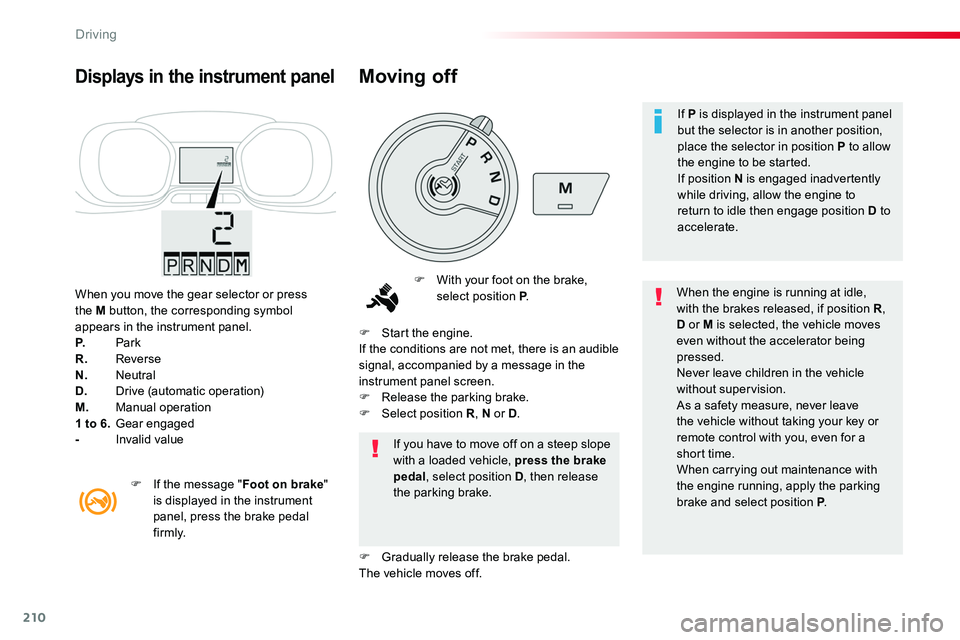
When you move the gear selector or press the M button, the corresponding symbol appears in the instrument panel.P. ParkR. ReverseN. NeutralD. Drive (automatic operation)M. Manual operation1 to 6. Gear engaged- Invalid value
Displays in the instrument panel
F With your foot on the brake, select position P.When the engine is running at idle, with the brakes released, if position R, D or M is selected, the vehicle moves even without the accelerator being pressed.Never leave children in the vehicle without supervision.As a safety measure, never leave the vehicle without taking your key or remote control with you, even for a short time.When carrying out maintenance with the engine running, apply the parking brake and select position P.
If you have to move off on a steep slope with a loaded vehicle, press the brake pedal, select position D, then release the parking brake.
F Start the engine.If the conditions are not met, there is an audible signal, accompanied by a message in the instrument panel screen.F Release the parking brake.F Select position R, N or D.
F Gradually release the brake pedal.The vehicle moves off.
F If the message "Foot on brake" is displayed in the instrument panel, press the brake pedal f i r m l y.
Moving off
If P is displayed in the instrument panel but the selector is in another position, place the selector in position P to allow the engine to be started.If position N is engaged inadvertently while driving, allow the engine to return to idle then engage position D to accelerate.
Driving
Page 214 of 516
214
Electronic gearbox
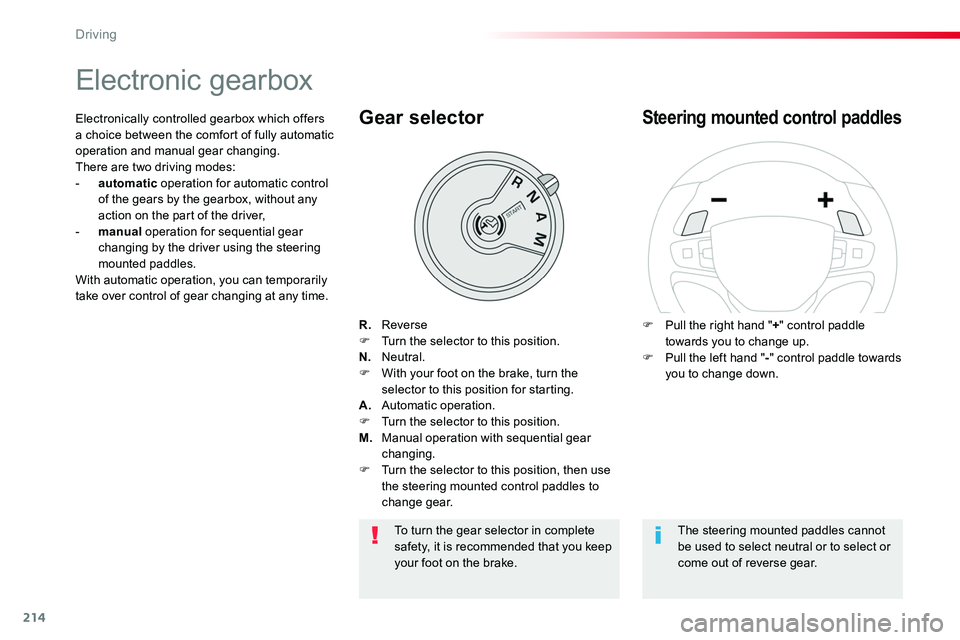
R. ReverseF Turn the selector to this position.N. Neutral.F With your foot on the brake, turn the selector to this position for starting.A. Automatic operation.F Turn the selector to this position.M. Manual operation with sequential gear changing.F Turn the selector to this position, then use the steering mounted control paddles to change gear.
Gear selector
F Pull the right hand "+" control paddle towards you to change up.F Pull the left hand "-" control paddle towards you to change down.
Steering mounted control paddlesElectronically controlled gearbox which offers a choice between the comfort of fully automatic operation and manual gear changing.There are two driving modes:- automatic operation for automatic control of the gears by the gearbox, without any action on the part of the driver,- manual operation for sequential gear changing by the driver using the steering mounted paddles.With automatic operation, you can temporarily take over control of gear changing at any time.
The steering mounted paddles cannot be used to select neutral or to select or come out of reverse gear.
To turn the gear selector in complete safety, it is recommended that you keep your foot on the brake.
Driving
Page 215 of 516
215
Automatic operation
F After starting the engine, select position A for automatic gear changes
The gearbox operates in auto-active mode, without any action on the part of the driver. It continuously selects the most suitable gear for:- the style of driving,- the profile of the road.
AUTO and the gear engaged are displayed in the instrument panel.
For optimum acceleration, for example when overtaking another
vehicle, press the accelerator pedal firmly past the point of resistance.
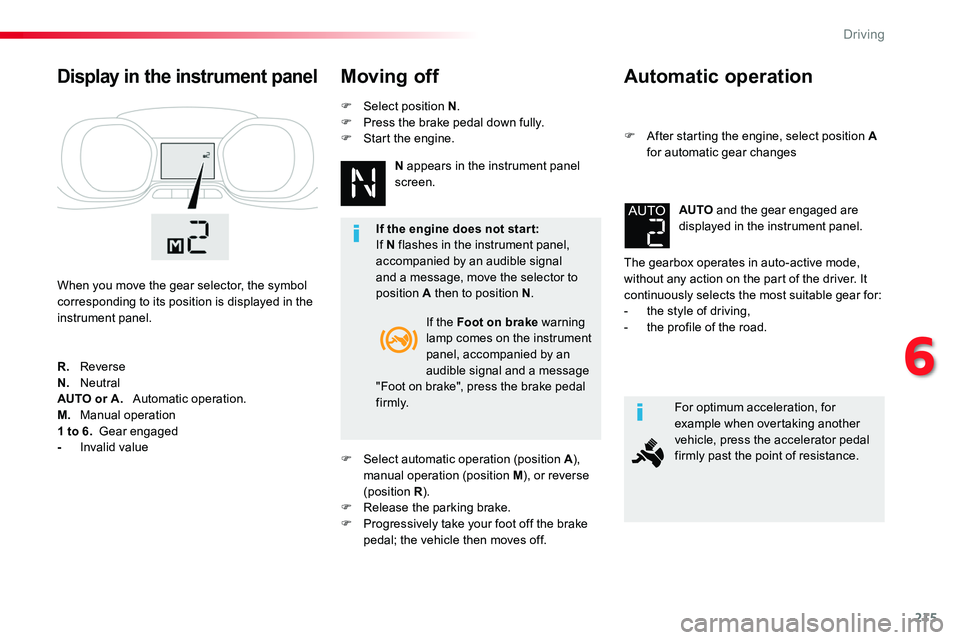
Display in the instrument panel
When you move the gear selector, the symbol corresponding to its position is displayed in the instrument panel.
Moving off
If the Foot on brake warning lamp comes on the instrument panel, accompanied by an audible signal and a message "Foot on brake", press the brake pedal f i r m l y.
R. ReverseN. NeutralAUTO or A. Automatic operation.M. Manual operation
1 to 6. Gear engaged- Invalid value
If the engine does not star t:If N flashes in the instrument panel, accompanied by an audible signal and a message, move the selector to position A then to position N.
F Select automatic operation (position A), manual operation (position M), or reverse (position R).F Release the parking brake.F Progressively take your foot off the brake
pedal; the vehicle then moves off.
N appears in the instrument panel screen.
F Select position N.F Press the brake pedal down fully.F Start the engine.
6
Driving
Page 216 of 516
216
Temporary manual control of gear changes
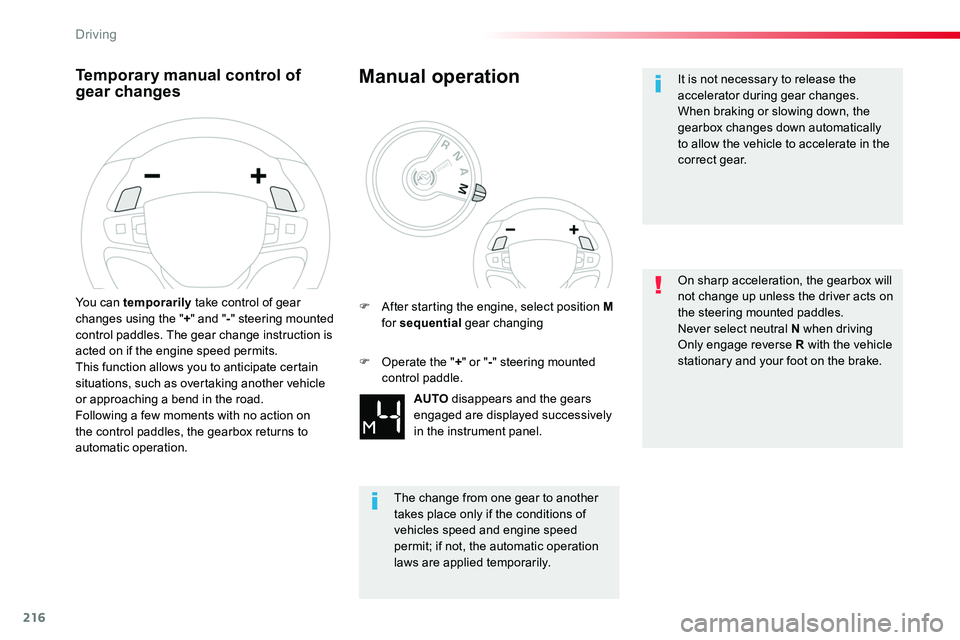
You can temporarily take control of gear changes using the "+" and "-" steering mounted control paddles. The gear change instruction is acted on if the engine speed permits.This function allows you to anticipate certain situations, such as overtaking another vehicle or approaching a bend in the road.Following a few moments with no action on the control paddles, the gearbox returns to automatic operation.
Manual operation
AUTO disappears and the gears engaged are displayed successively
in the instrument panel.
F After starting the engine, select position M for sequential gear changing
The change from one gear to another takes place only if the conditions of vehicles speed and engine speed
permit; if not, the automatic operation laws are applied temporarily.
F Operate the "+" or "-" steering mounted control paddle.
It is not necessary to release the accelerator during gear changes.When braking or slowing down, the gearbox changes down automatically to allow the vehicle to accelerate in the correct gear.
On sharp acceleration, the gearbox will not change up unless the driver acts on the steering mounted paddles.Never select neutral N when drivingOnly engage reverse R with the vehicle stationary and your foot on the brake.
Driving
Page 217 of 516
217
With the ignition on, the flashing of A or AUTO, accompanied by an audible signal and a message, indicates a malfunction of the gearbox.
Operating fault
Have it checked by an authorized Toyota dealer or repairer, or another duly qualified and equipped professional.
Stopping the vehicle
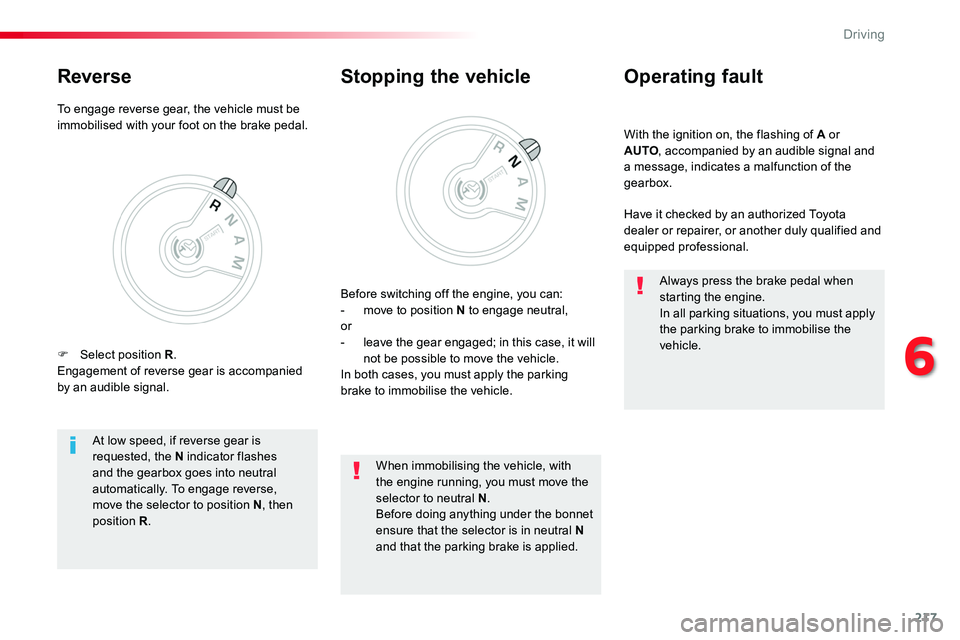
Before switching off the engine, you can:- move to position N to engage neutral,or- leave the gear engaged; in this case, it will not be possible to move the vehicle.In both cases, you must apply the parking brake to immobilise the vehicle.
At low speed, if reverse gear is requested, the N indicator flashes and the gearbox goes into neutral automatically. To engage reverse, move the selector to position N, then position R.
When immobilising the vehicle, with the engine running, you must move the selector to neutral N.Before doing anything under the bonnet ensure that the selector is in neutral N
and that the parking brake is applied.
Always press the brake pedal when starting the engine.In all parking situations, you must apply the parking brake to immobilise the vehicle.
To engage reverse gear, the vehicle must be immobilised with your foot on the brake pedal.
Reverse
F Select position R.Engagement of reverse gear is accompanied by an audible signal.
6
Driving