parking brake TOYOTA RAV4 2006 Service Owner's Guide
[x] Cancel search | Manufacturer: TOYOTA, Model Year: 2006, Model line: RAV4, Model: TOYOTA RAV4 2006Pages: 2000, PDF Size: 45.84 MB
Page 1474 of 2000
SUSPENSION – REAR TRAILING ARMSP–49
SP
INSTALLATION
HINT:
• Use the same procedures for the RH side and LH side.
• The procedures listed below are for the LH side.
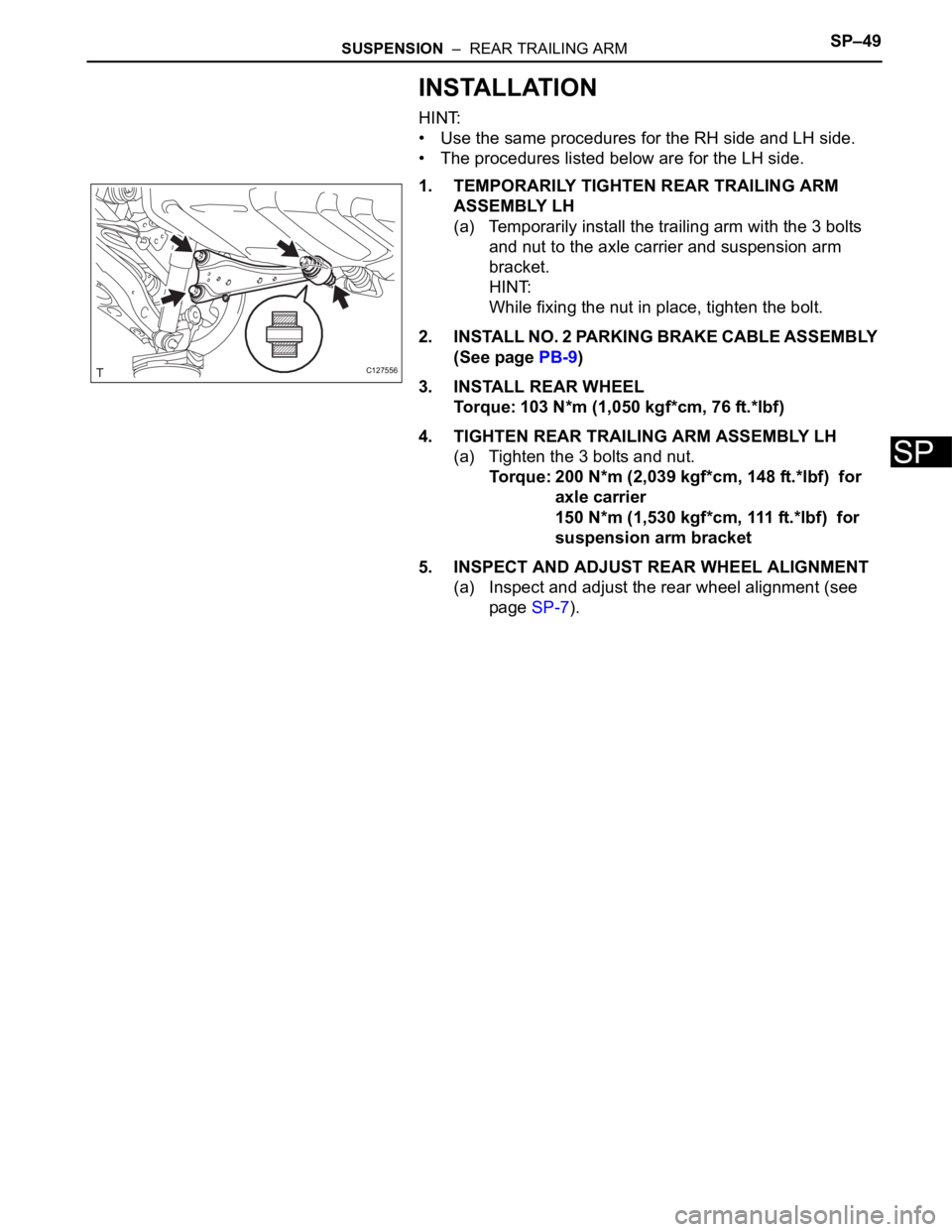
1. TEMPORARILY TIGHTEN REAR TRAILING ARM
ASSEMBLY LH
(a) Temporarily install the trailing arm with the 3 bolts
and nut to the axle carrier and suspension arm
bracket.
HINT:
While fixing the nut in place, tighten the bolt.
2. INSTALL NO. 2 PARKING BRAKE CABLE ASSEMBLY
(See page PB-9)
3. INSTALL REAR WHEEL
Torque: 103 N*m (1,050 kgf*cm, 76 ft.*lbf)
4. TIGHTEN REAR TRAILING ARM ASSEMBLY LH
(a) Tighten the 3 bolts and nut.
Torque: 200 N*m (2,039 kgf*cm, 148 ft.*lbf) for
axle carrier
150 N*m (1,530 kgf*cm, 111 ft.*lbf) for
suspension arm bracket
5. INSPECT AND ADJUST REAR WHEEL ALIGNMENT
(a) Inspect and adjust the rear wheel alignment (see
page SP-7).
C127556
Page 1517 of 2000
BC–14BRAKE CONTROL – VEHICLE STABILITY CONTROL SYSTEM
BC
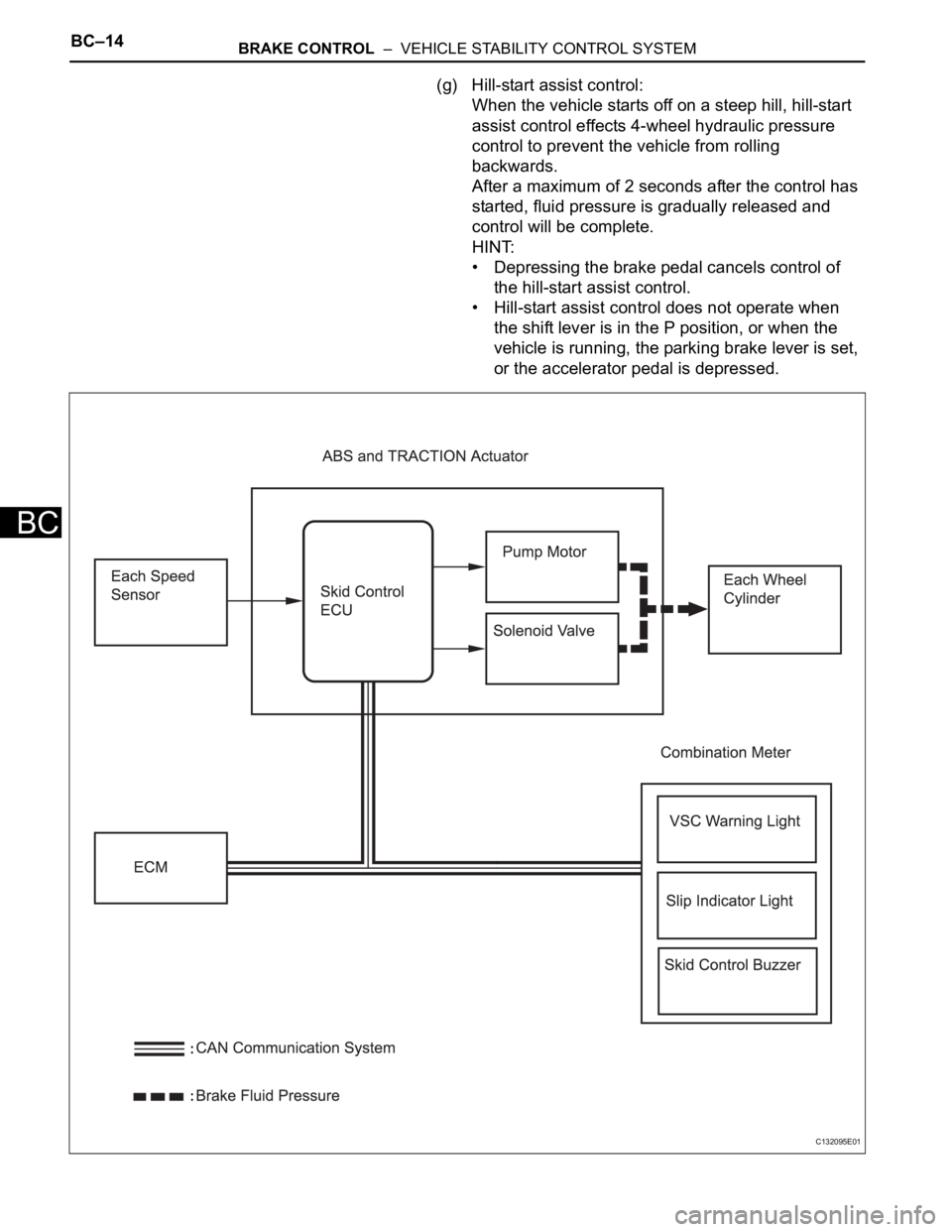
(g) Hill-start assist control:
When the vehicle starts off on a steep hill, hill-start
assist control effects 4-wheel hydraulic pressure
control to prevent the vehicle from rolling
backwards.
After a maximum of 2 seconds after the control has
started, fluid pressure is gradually released and
control will be complete.
HINT:
• Depressing the brake pedal cancels control of
the hill-start assist control.
• Hill-start assist control does not operate when
the shift lever is in the P position, or when the
vehicle is running, the parking brake lever is set,
or the accelerator pedal is depressed.
C132095E01
Page 1523 of 2000

BC–20BRAKE CONTROL – VEHICLE STABILITY CONTROL SYSTEM
BC
HINT:
*1: w/ Downhill assist control
*2: for 2WD w/ AUTO LSD
Steering Sensor • Detects the steering extent and direction and sends
signals to the skid control ECU via CAN communication
• Has a magnetic resistance element which detects the
rotation of the magnet housed in the detection gear in
order to detect the changes in magnetic resistance and
the steering amount and direction
Yaw Rate and Deceleration Sensor • Yaw rate sensor detects the vehicle's angular velocity
(yaw rate) in the vertical direction based on the extent
and direction of the deflection of the piezoelectric
ceramics
• Deceleration sensor measures the capacity of the
condenser that changes the distance between the
electrodes depending on G force, which occurs when
the vehicle is accelerated, and converts the measured
value into electrical signals
• Sends signals to the skid control ECU via CAN
communication
Master Cylinder Pressure Sensor • Detects the brake fluid pressure in the master cylinder
• Housed in the ABS and TRACTION actuator
ECM• Controls the engine output when TRC and VSC are
operating with the skid control ECU via CAN
communication
Downhill Assist Control switch*1 Allows the driver to turn downhill assist control ON and OFF
AUTO LSD switch*2 Allows the driver to turn AUTO LSD ON and OFF
Combination Meter ABS Warning Light • Illuminates to inform the driver that a malfunction in the
ABS has occurred
• Blinks to indicate DTCs that relate to the ABS
VSC Warning Light • Illuminates to inform the driver that a malfunction in the
VSC system has occurred
• Blinks to indicate DTCs that relate to the VSC
Brake Warning light • Illuminates to inform the driver that the parking brake is
ON when the system is normal, and when the brake
fluid has decreased
• Illuminates to inform the driver that a malfunction in the
EBD has occurred
Slip Indicator Light • Blinks to inform the driver that TRC, VSC, downhill
assist control and hill-start assist control are operating
• Illuminates to inform the driver that a malfunction has
occurred in the TRC or VSC system
AUTO LSD Indicator Light*2 Lights up to inform the driver when AUTO LSD operation is
possible
Downhill Assist Control Indicator
Light*1Lights up to inform the driver when downhill assist control
operation is possible
Skid Control Buzzer • Intermittently sounds to inform the driver that the VSC is
operating
• Housed in the combination meter Components Functions
Page 1530 of 2000
BRAKE CONTROL – VEHICLE STABILITY CONTROL SYSTEMBC–27
BC
3. PREFORM ZERO POINT CALIBRATION OF YAW
RATE AND DECELERATION SENSOR (When Using
Intelligent Tester)
NOTICE:
• While obtaining the zero point, do not vibrate the
vehicle by tilting, moving or shaking it and keep it
stationary. (Do not start the engine.)
• Perform this on a level surface (with an inclination
of less than 1
).
(a) Procedures for Test Mode.
(1) Check that the shift lever is in the P position and
apply the parking brake.
NOTICE:
DTCs C1210/36 and C1336/39 will be
recorded if the shift lever is not the P
position (see page BC-88).
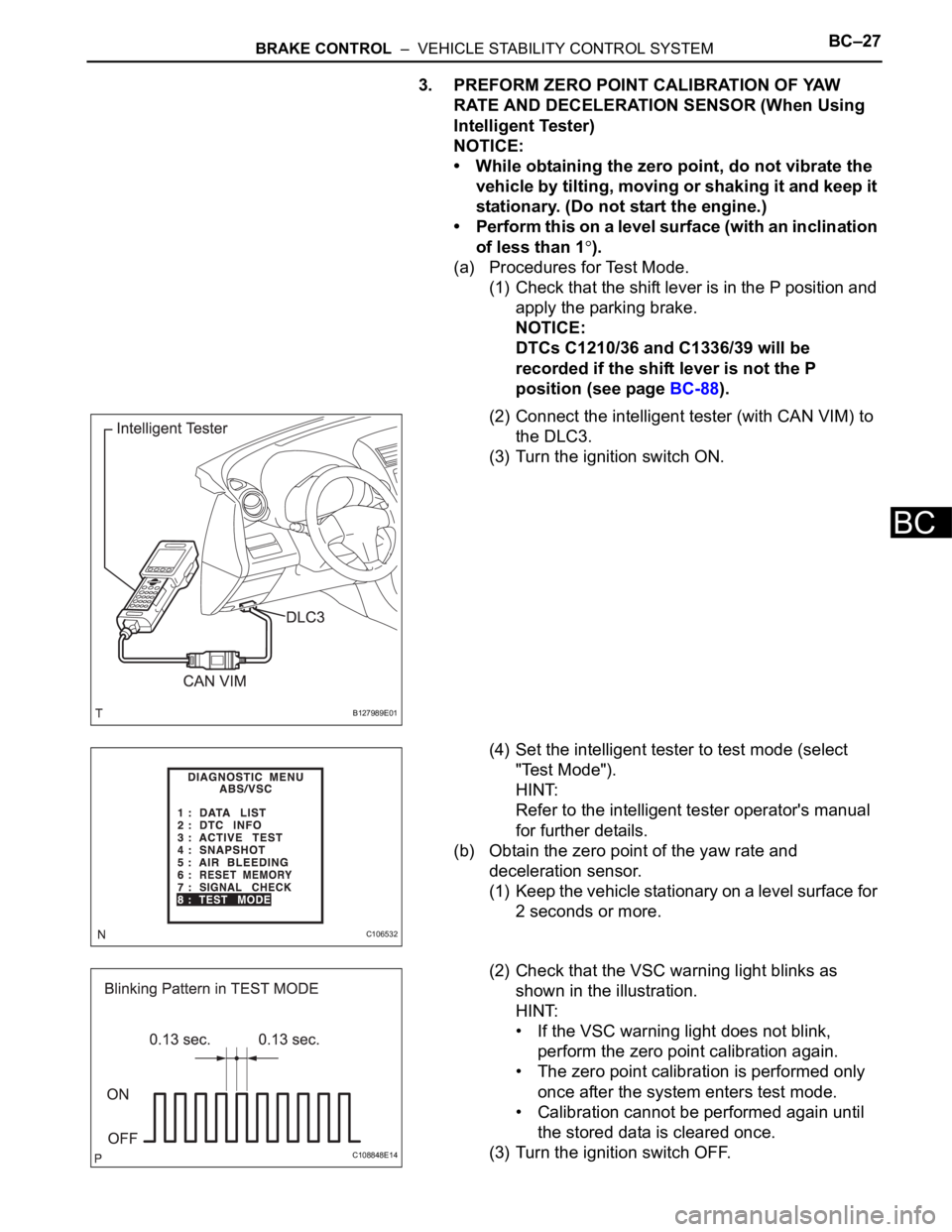
(2) Connect the intelligent tester (with CAN VIM) to
the DLC3.
(3) Turn the ignition switch ON.
(4) Set the intelligent tester to test mode (select
"Test Mode").
HINT:
Refer to the intelligent tester operator's manual
for further details.
(b) Obtain the zero point of the yaw rate and
deceleration sensor.
(1) Keep the vehicle stationary on a level surface for
2 seconds or more.
(2) Check that the VSC warning light blinks as
shown in the illustration.
HINT:
• If the VSC warning light does not blink,
perform the zero point calibration again.
• The zero point calibration is performed only
once after the system enters test mode.
• Calibration cannot be performed again until
the stored data is cleared once.
(3) Turn the ignition switch OFF.
B127989E01
C106532
C108848E14
Page 1531 of 2000
BC–28BRAKE CONTROL – VEHICLE STABILITY CONTROL SYSTEM
BC
4. CLEAR ZERO POINT CALIBRATION DATA (When not
Using Intelligent Tester)
(a) Clear the zero point calibration data.
(1) Turn the ignition switch ON.
(2) The warning light and indicator light come on for
3 seconds to indicate that the initial check is
completed.
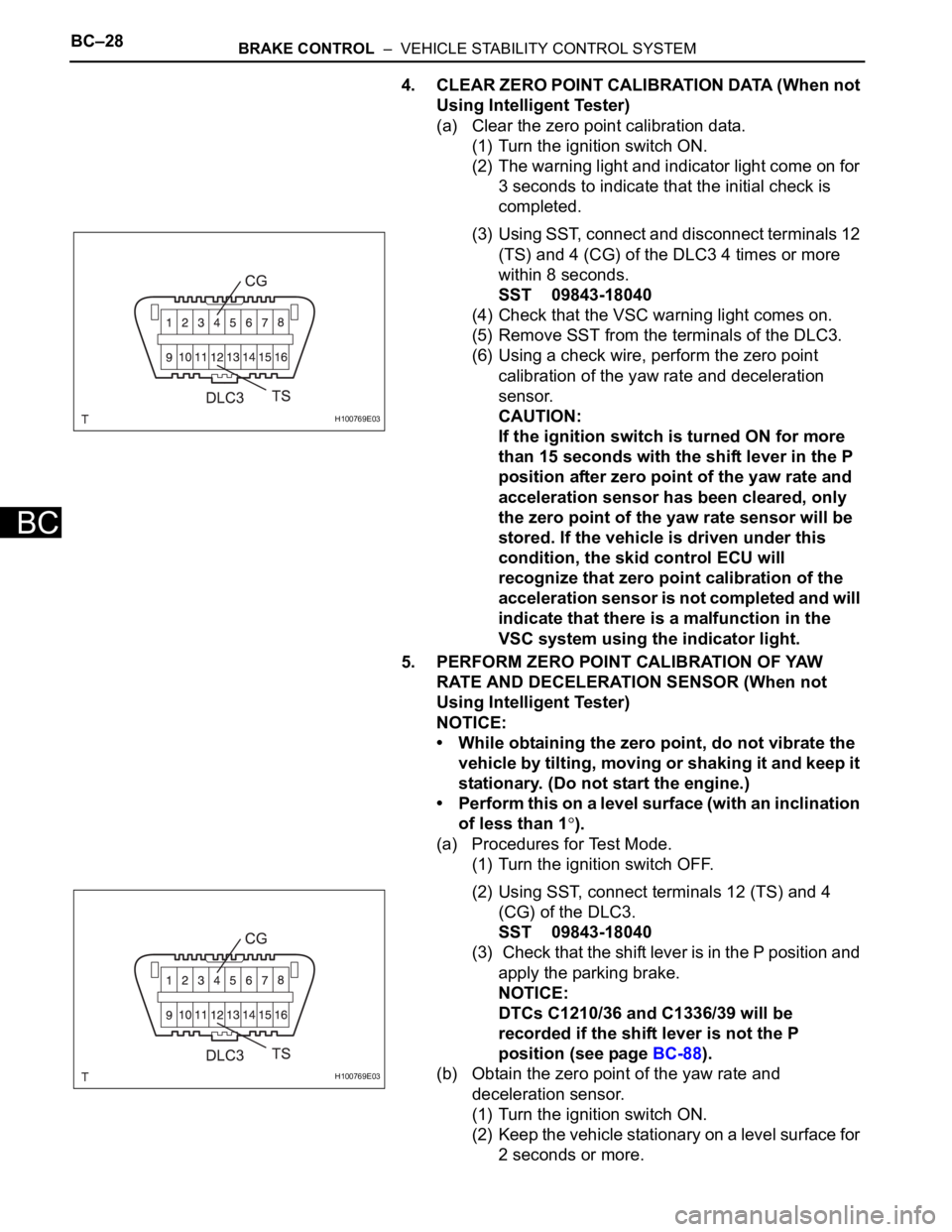
(3) Using SST, connect and disconnect terminals 12
(TS) and 4 (CG) of the DLC3 4 times or more
within 8 seconds.
SST 09843-18040
(4) Check that the VSC warning light comes on.
(5) Remove SST from the terminals of the DLC3.
(6) Using a check wire, perform the zero point
calibration of the yaw rate and deceleration
sensor.
CAUTION:
If the ignition switch is turned ON for more
than 15 seconds with the shift lever in the P
position after zero point of the yaw rate and
acceleration sensor has been cleared, only
the zero point of the yaw rate sensor will be
stored. If the vehicle is driven under this
condition, the skid control ECU will
recognize that zero point calibration of the
acceleration sensor is not completed and will
indicate that there is a malfunction in the
VSC system using the indicator light.
5. PERFORM ZERO POINT CALIBRATION OF YAW
RATE AND DECELERATION SENSOR (When not
Using Intelligent Tester)
NOTICE:
• While obtaining the zero point, do not vibrate the
vehicle by tilting, moving or shaking it and keep it
stationary. (Do not start the engine.)
• Perform this on a level surface (with an inclination
of less than 1
).
(a) Procedures for Test Mode.
(1) Turn the ignition switch OFF.
(2) Using SST, connect terminals 12 (TS) and 4
(CG) of the DLC3.
SST 09843-18040
(3) Check that the shift lever is in the P position and
apply the parking brake.
NOTICE:
DTCs C1210/36 and C1336/39 will be
recorded if the shift lever is not the P
position (see page BC-88).
(b) Obtain the zero point of the yaw rate and
deceleration sensor.
(1) Turn the ignition switch ON.
(2) Keep the vehicle stationary on a level surface for
2 seconds or more.
H100769E03
H100769E03
Page 1533 of 2000
BC–30BRAKE CONTROL – VEHICLE STABILITY CONTROL SYSTEM
BC
TEST MODE PROCEDURE
HINT:
• By switching the skid control ECU from normal mode to
test mode, abnormality detection sensitivity is enhanced
and troubleshooting can be conducted efficiently.
• Perform a sensor check in test mode after the speed
sensor or sensor rotor has been repaired or replaced.
• If the ignition switch is turned from ON to ACC or OFF
during test mode, DTCs related to the signal check
function will be erased.
• During test mode, the skid control ECU stores all DTCs
related to the signal check function, and the DTCs are
erased if normality is confirmed. Any remaining DTCs are
those indicating abnormalities that were found.
1. CHECK SENSOR SIGNAL BY TEST MODE (When
Using Intelligent Tester)
(a) Procedures for test mode:
(1) Turn the ignition switch OFF.
(2) Check that the steering wheel is in the centered
position.
(3) Check that the shift lever is in the P position and
apply the parking brake.
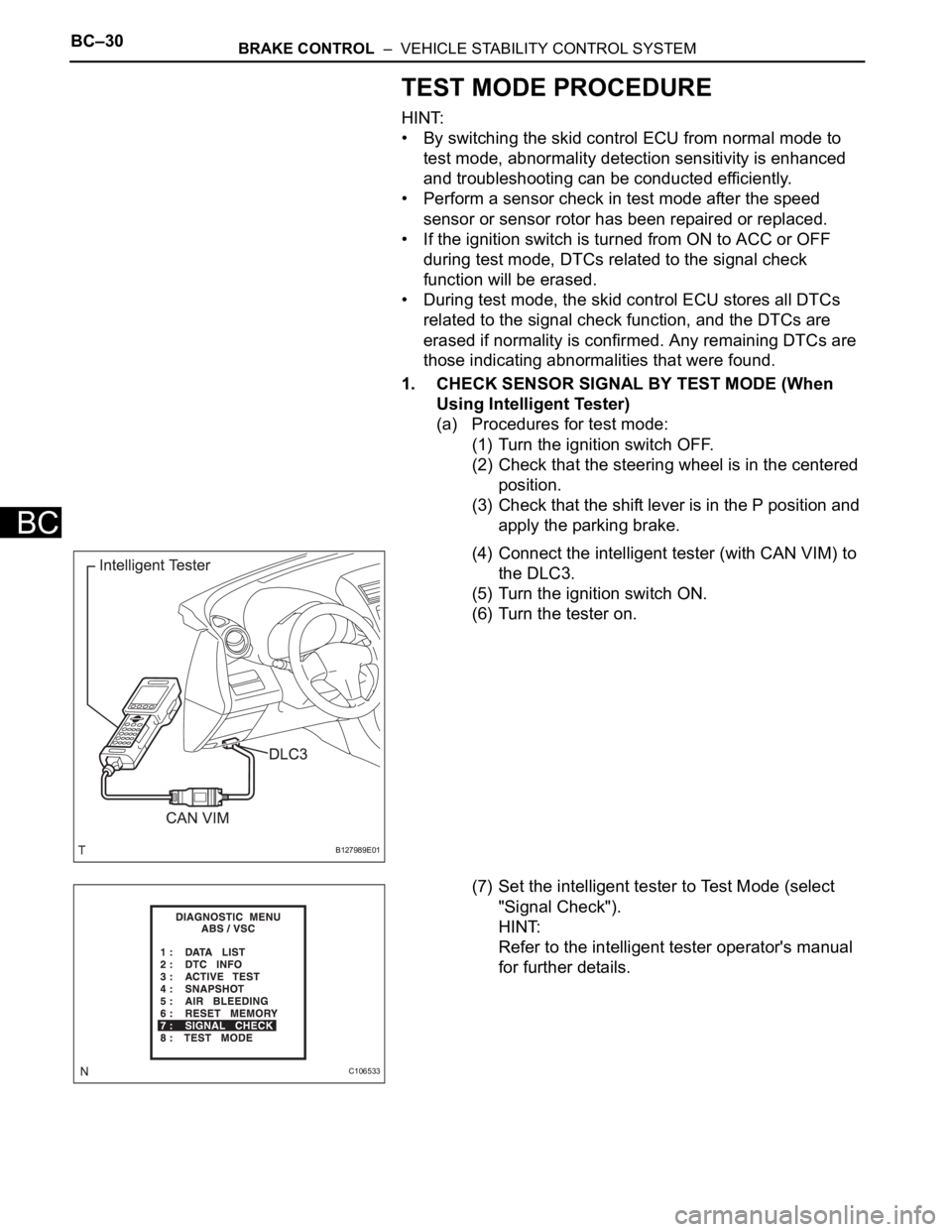
(4) Connect the intelligent tester (with CAN VIM) to
the DLC3.
(5) Turn the ignition switch ON.
(6) Turn the tester on.
(7) Set the intelligent tester to Test Mode (select
"Signal Check").
HINT:
Refer to the intelligent tester operator's manual
for further details.
B127989E01
C106533
Page 1536 of 2000
BRAKE CONTROL – VEHICLE STABILITY CONTROL SYSTEMBC–33
BC
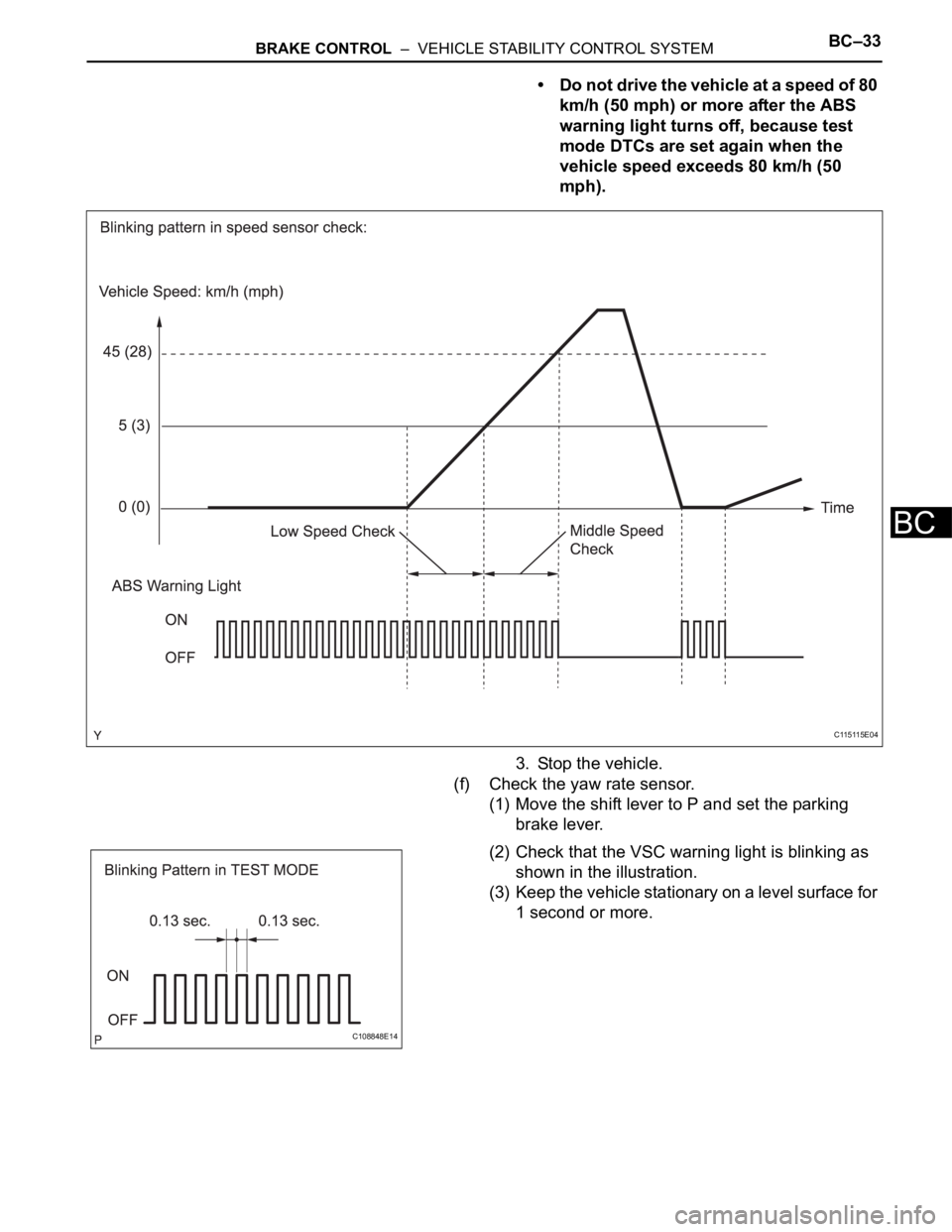
• Do not drive the vehicle at a speed of 80
km/h (50 mph) or more after the ABS
warning light turns off, because test
mode DTCs are set again when the
vehicle speed exceeds 80 km/h (50
mph).
3. Stop the vehicle.
(f) Check the yaw rate sensor.
(1) Move the shift lever to P and set the parking
brake lever.
(2) Check that the VSC warning light is blinking as
shown in the illustration.
(3) Keep the vehicle stationary on a level surface for
1 second or more.
C115115E04
C108848E14
Page 1537 of 2000
BC–34BRAKE CONTROL – VEHICLE STABILITY CONTROL SYSTEM
BC
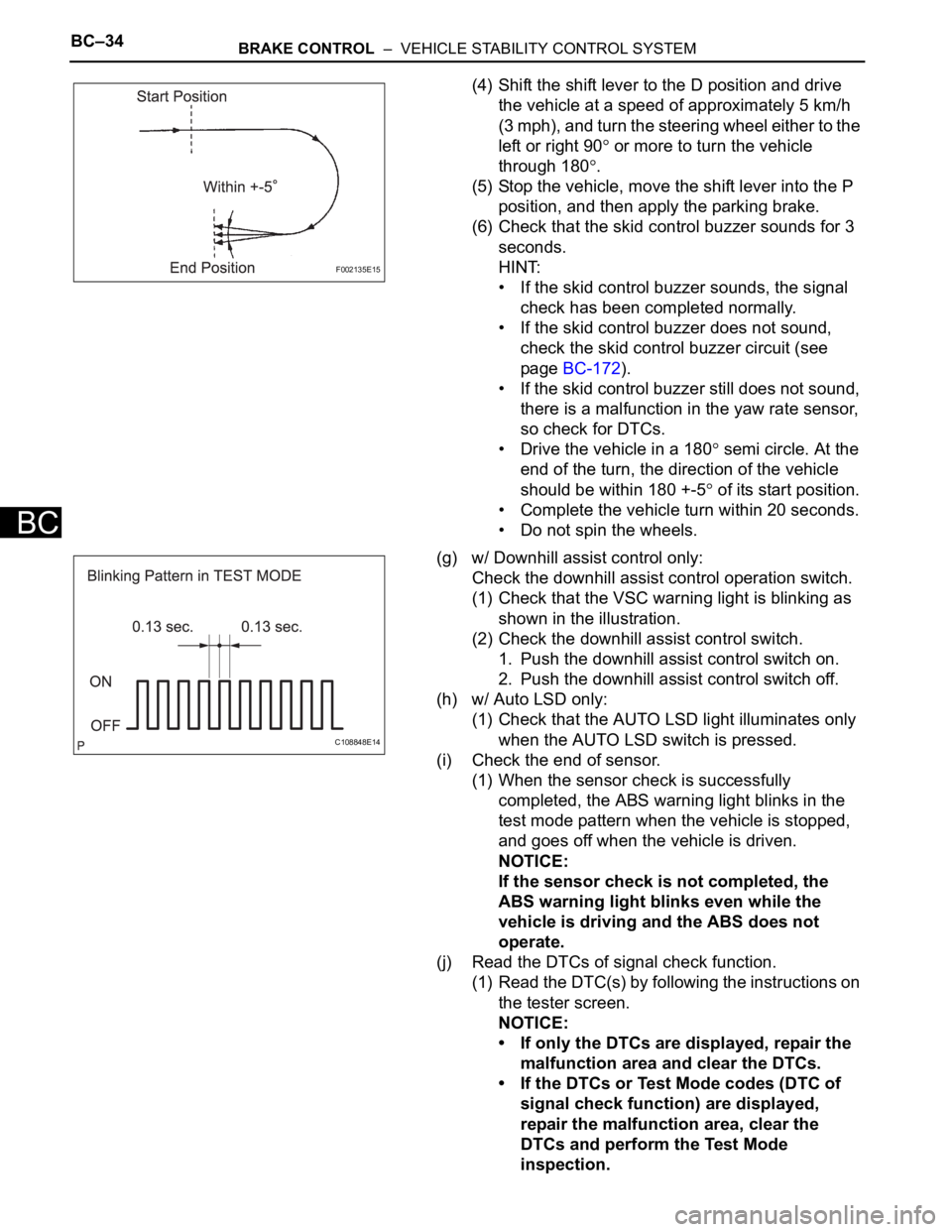
(4) Shift the shift lever to the D position and drive
the vehicle at a speed of approximately 5 km/h
(3 mph), and turn the steering wheel either to the
left or right 90
or more to turn the vehicle
through 180
.
(5) Stop the vehicle, move the shift lever into the P
position, and then apply the parking brake.
(6) Check that the skid control buzzer sounds for 3
seconds.
HINT:
• If the skid control buzzer sounds, the signal
check has been completed normally.
• If the skid control buzzer does not sound,
check the skid control buzzer circuit (see
page BC-172).
• If the skid control buzzer still does not sound,
there is a malfunction in the yaw rate sensor,
so check for DTCs.
• Drive the vehicle in a 180
semi circle. At the
end of the turn, the direction of the vehicle
should be within 180 +-5
of its start position.
• Complete the vehicle turn within 20 seconds.
• Do not spin the wheels.
(g) w/ Downhill assist control only:
Check the downhill assist control operation switch.
(1) Check that the VSC warning light is blinking as
shown in the illustration.
(2) Check the downhill assist control switch.
1. Push the downhill assist control switch on.
2. Push the downhill assist control switch off.
(h) w/ Auto LSD only:
(1) Check that the AUTO LSD light illuminates only
when the AUTO LSD switch is pressed.
(i) Check the end of sensor.
(1) When the sensor check is successfully
completed, the ABS warning light blinks in the
test mode pattern when the vehicle is stopped,
and goes off when the vehicle is driven.
NOTICE:
If the sensor check is not completed, the
ABS warning light blinks even while the
vehicle is driving and the ABS does not
operate.
(j) Read the DTCs of signal check function.
(1) Read the DTC(s) by following the instructions on
the tester screen.
NOTICE:
• If only the DTCs are displayed, repair the
malfunction area and clear the DTCs.
• If the DTCs or Test Mode codes (DTC of
signal check function) are displayed,
repair the malfunction area, clear the
DTCs and perform the Test Mode
inspection.
F002135E15
C108848E14
Page 1538 of 2000
BRAKE CONTROL – VEHICLE STABILITY CONTROL SYSTEMBC–35
BC
HINT:
See the list of the DTCs (refer to "DTC OF TEST
MODE FUNCTION (SIGNAL CHECK)" below).
2. CHECK SENSOR SIGNAL BY TEST MODE (When not
Using Intelligent Tester)
(a) Procedures for test mode:
(1) Turn the ignition switch OFF.
(2) Check that the steering wheel is in the centered
position.
(3) Check that the shift lever is in the P position and
apply the parking brake.
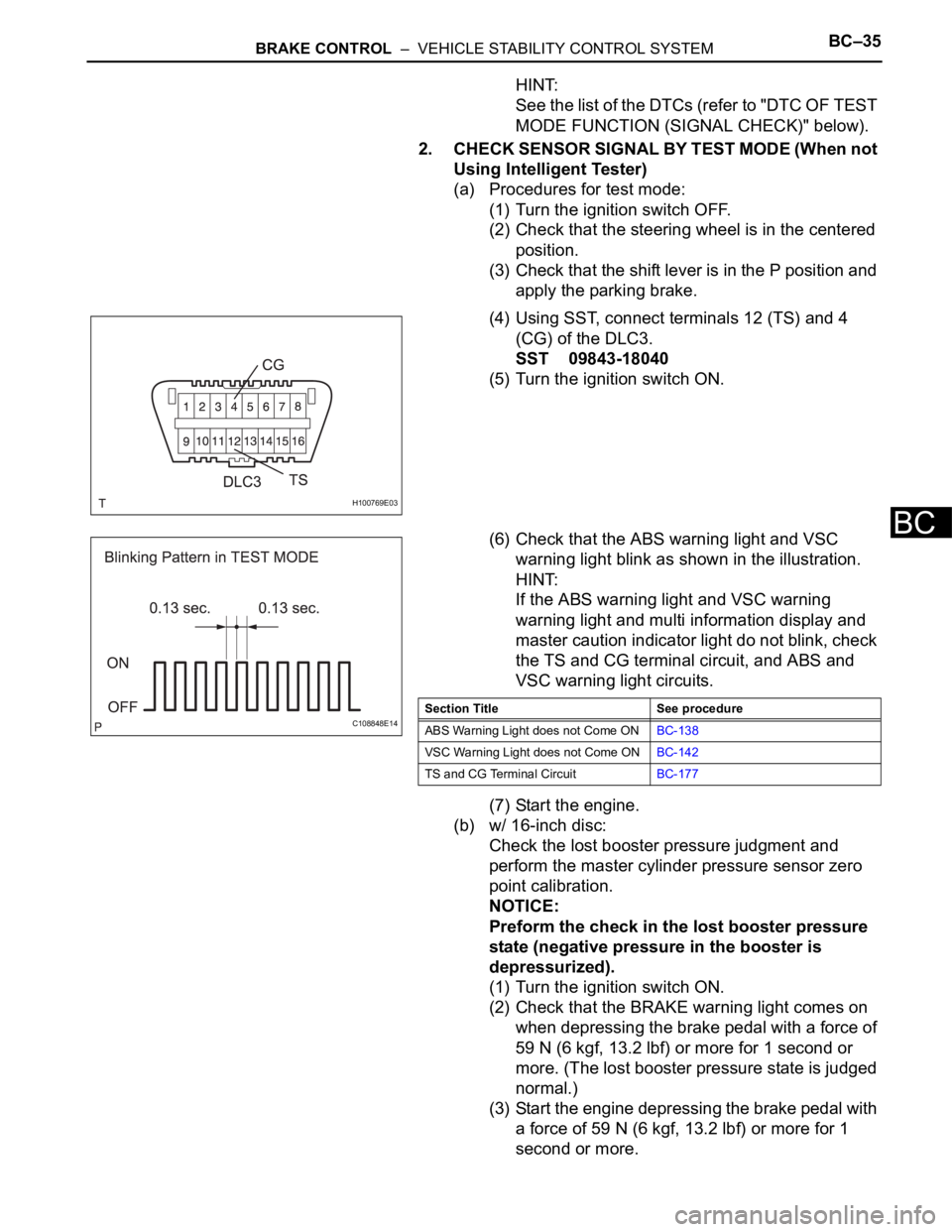
(4) Using SST, connect terminals 12 (TS) and 4
(CG) of the DLC3.
SST 09843-18040
(5) Turn the ignition switch ON.
(6) Check that the ABS warning light and VSC
warning light blink as shown in the illustration.
HINT:
If the ABS warning light and VSC warning
warning light and multi information display and
master caution indicator light do not blink, check
the TS and CG terminal circuit, and ABS and
VSC warning light circuits.
(7) Start the engine.
(b) w/ 16-inch disc:
Check the lost booster pressure judgment and
perform the master cylinder pressure sensor zero
point calibration.
NOTICE:
Preform the check in the lost booster pressure
state (negative pressure in the booster is
depressurized).
(1) Turn the ignition switch ON.
(2) Check that the BRAKE warning light comes on
when depressing the brake pedal with a force of
59 N (6 kgf, 13.2 lbf) or more for 1 second or
more. (The lost booster pressure state is judged
normal.)
(3) Start the engine depressing the brake pedal with
a force of 59 N (6 kgf, 13.2 lbf) or more for 1
second or more.
H100769E03
C108848E14Section Title See procedure
ABS Warning Light does not Come ONBC-138
VSC Warning Light does not Come ONBC-142
TS and CG Terminal CircuitBC-177
Page 1541 of 2000
BC–38BRAKE CONTROL – VEHICLE STABILITY CONTROL SYSTEM
BC
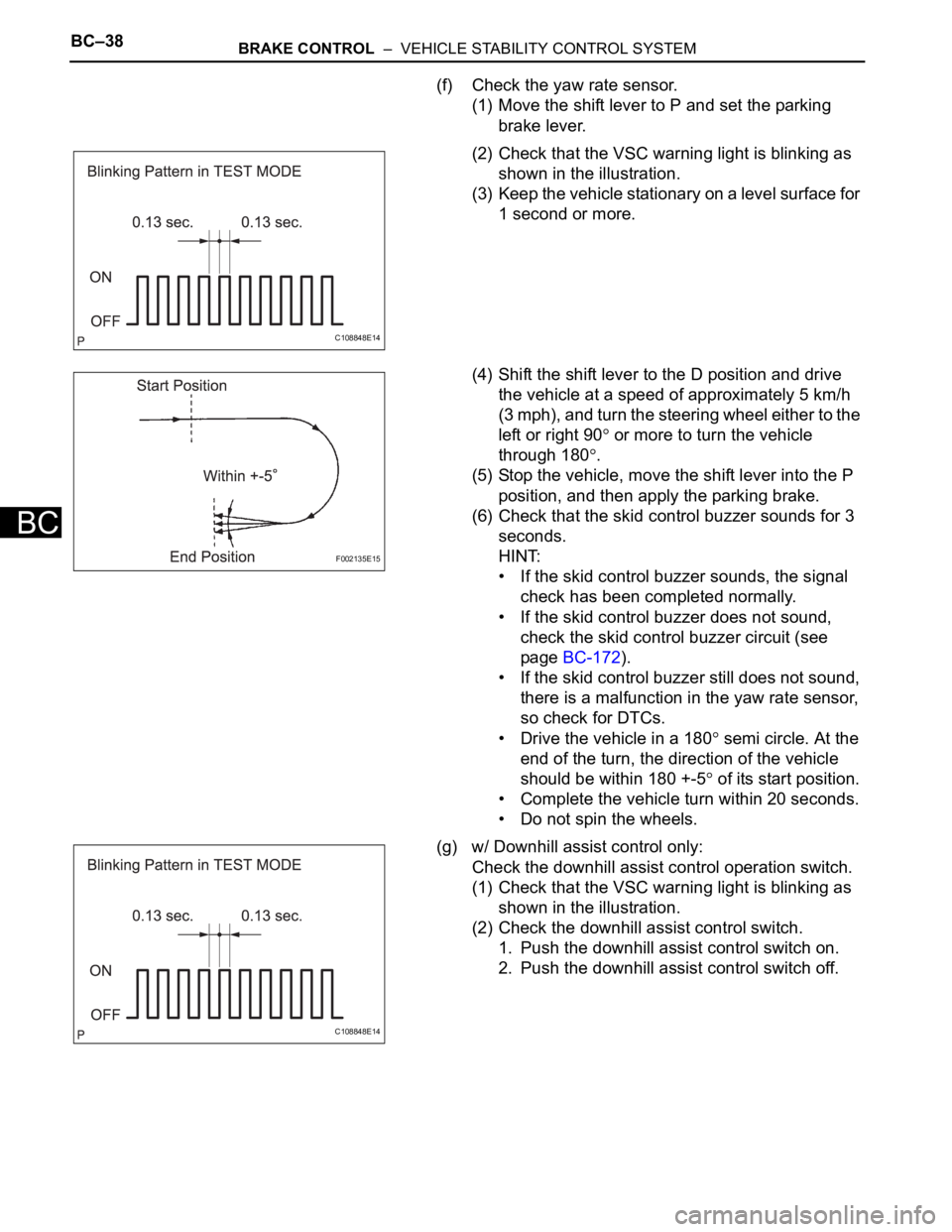
(f) Check the yaw rate sensor.
(1) Move the shift lever to P and set the parking
brake lever.
(2) Check that the VSC warning light is blinking as
shown in the illustration.
(3) Keep the vehicle stationary on a level surface for
1 second or more.
(4) Shift the shift lever to the D position and drive
the vehicle at a speed of approximately 5 km/h
(3 mph), and turn the steering wheel either to the
left or right 90
or more to turn the vehicle
through 180
.
(5) Stop the vehicle, move the shift lever into the P
position, and then apply the parking brake.
(6) Check that the skid control buzzer sounds for 3
seconds.
HINT:
• If the skid control buzzer sounds, the signal
check has been completed normally.
• If the skid control buzzer does not sound,
check the skid control buzzer circuit (see
page BC-172).
• If the skid control buzzer still does not sound,
there is a malfunction in the yaw rate sensor,
so check for DTCs.
• Drive the vehicle in a 180
semi circle. At the
end of the turn, the direction of the vehicle
should be within 180 +-5
of its start position.
• Complete the vehicle turn within 20 seconds.
• Do not spin the wheels.
(g) w/ Downhill assist control only:
Check the downhill assist control operation switch.
(1) Check that the VSC warning light is blinking as
shown in the illustration.
(2) Check the downhill assist control switch.
1. Push the downhill assist control switch on.
2. Push the downhill assist control switch off.
C108848E14
F002135E15
C108848E14