display TOYOTA RAV4 2006 Service Service Manual
[x] Cancel search | Manufacturer: TOYOTA, Model Year: 2006, Model line: RAV4, Model: TOYOTA RAV4 2006Pages: 2000, PDF Size: 45.84 MB
Page 1258 of 2000
AX–34U241E AUTOMATIC TRANSAXLE – AUTOMATIC TRANSAXLE SYSTEM
AX
4. FREEZE FRAME DATA
(a) Freeze frame data records the engine conditions
(fuel system, calculated load, engine coolant
temperature, fuel trim, engine speed, vehicle speed,
etc.) when a malfunction is detected. When
troubleshooting, freeze frame data can help
determine if the vehicle was running or stopped, if
the engine was warmed up or not, if the air-fuel ratio
was lean or rich, and other data from the time the
malfunction occurred.
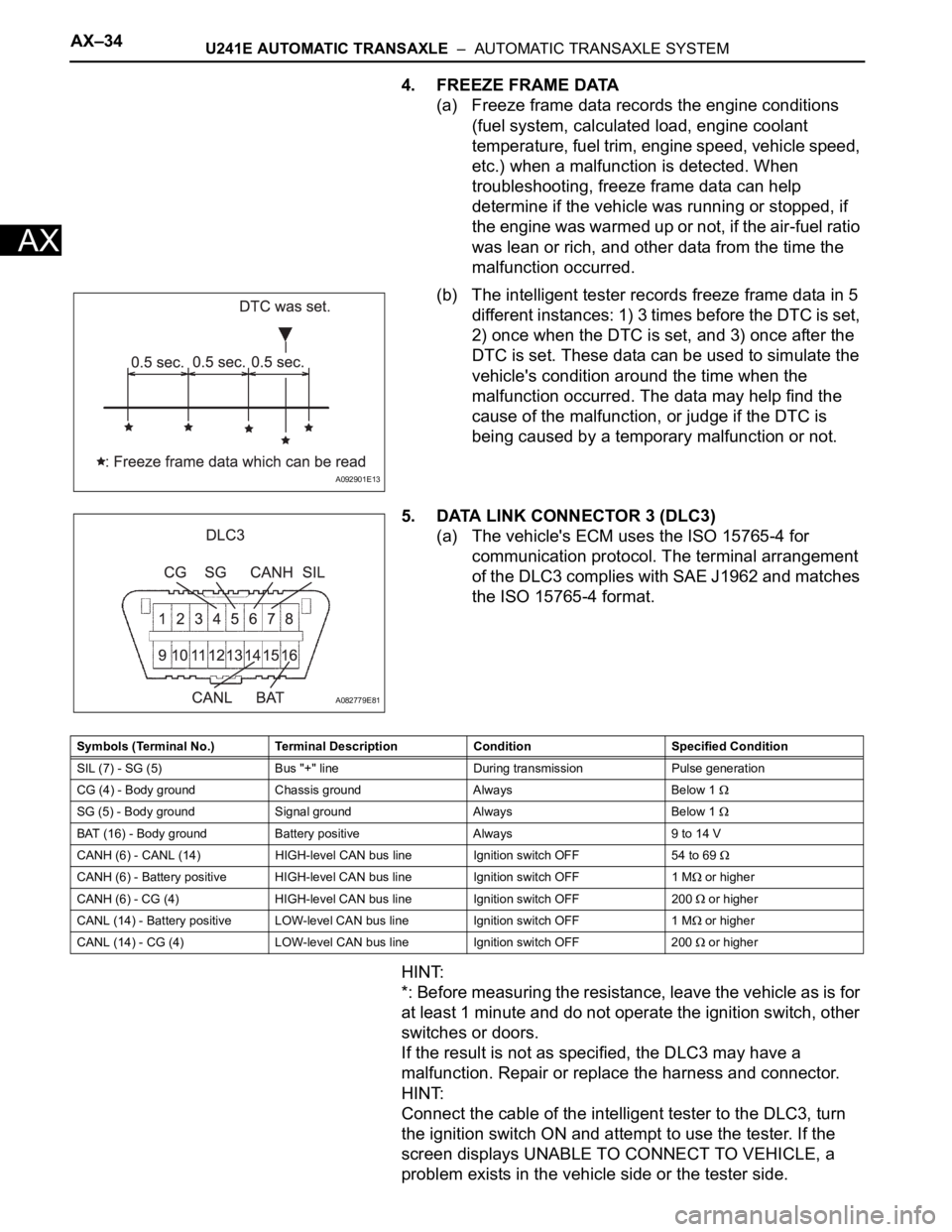
(b) The intelligent tester records freeze frame data in 5
different instances: 1) 3 times before the DTC is set,
2) once when the DTC is set, and 3) once after the
DTC is set. These data can be used to simulate the
vehicle's condition around the time when the
malfunction occurred. The data may help find the
cause of the malfunction, or judge if the DTC is
being caused by a temporary malfunction or not.
5. DATA LINK CONNECTOR 3 (DLC3)
(a) The vehicle's ECM uses the ISO 15765-4 for
communication protocol. The terminal arrangement
of the DLC3 complies with SAE J1962 and matches
the ISO 15765-4 format.
HINT:
*: Before measuring the resistance, leave the vehicle as is for
at least 1 minute and do not operate the ignition switch, other
switches or doors.
If the result is not as specified, the DLC3 may have a
malfunction. Repair or replace the harness and connector.
HINT:
Connect the cable of the intelligent tester to the DLC3, turn
the ignition switch ON and attempt to use the tester. If the
screen displays UNABLE TO CONNECT TO VEHICLE, a
problem exists in the vehicle side or the tester side.
A092901E13
A082779E81
Symbols (Terminal No.) Terminal Description Condition Specified Condition
SIL (7) - SG (5) Bus "+" line During transmission Pulse generation
CG (4) - Body ground Chassis ground Always Below 1
SG (5) - Body ground Signal ground Always Below 1
BAT (16) - Body ground Battery positive Always 9 to 14 V
CANH (6) - CANL (14) HIGH-level CAN bus line Ignition switch OFF 54 to 69
CANH (6) - Battery positive HIGH-level CAN bus line Ignition switch OFF 1 M or higher
CANH (6) - CG (4) HIGH-level CAN bus line Ignition switch OFF 200
or higher
CANL (14) - Battery positive LOW-level CAN bus line Ignition switch OFF 1 M
or higher
CANL (14) - CG (4) LOW-level CAN bus line Ignition switch OFF 200
or higher
Page 1259 of 2000
U241E AUTOMATIC TRANSAXLE – AUTOMATIC TRANSAXLE SYSTEMAX–35
AX
If communication is normal when the tester is connected to
another vehicle, inspect the DLC3 on the original vehicle.
If communication is still not possible when the tester is
connected to another vehicle, the problem is probably in the
tester itself. Consult the Service Department listed in the
tester's instruction manual.
6. CHECK MIL
(a) Check that the MIL illuminates when turning the
ignition switch ON.
If the MIL does not illuminate, there is a problem in
the MIL circuit (see page ES-386).
(b) When the engine is started, the MIL should turn off.
7. ALL READINESS
(a) For this vehicle, using the intelligent tester allows
readiness codes corresponding to all DTCs to be
read. When the diagnosis (normal or
malfunctioning) has been completed, readiness
codes are set. Enter the following menus:
ENHANCED OBD II / MONITOR STATUS.
DTC CHECK / CLEAR
1. CHECK DTC
(a) DTCs which are stored in the ECM can be displayed
with the intelligent tester.
The intelligent tester can display pending DTCs and
current DTCs. Some DTCs are not stored unless a
malfunction is detected in consecutive driving
cycles. When a malfunction is detected in only one
driving cycle, it is stored as a pending DTC.
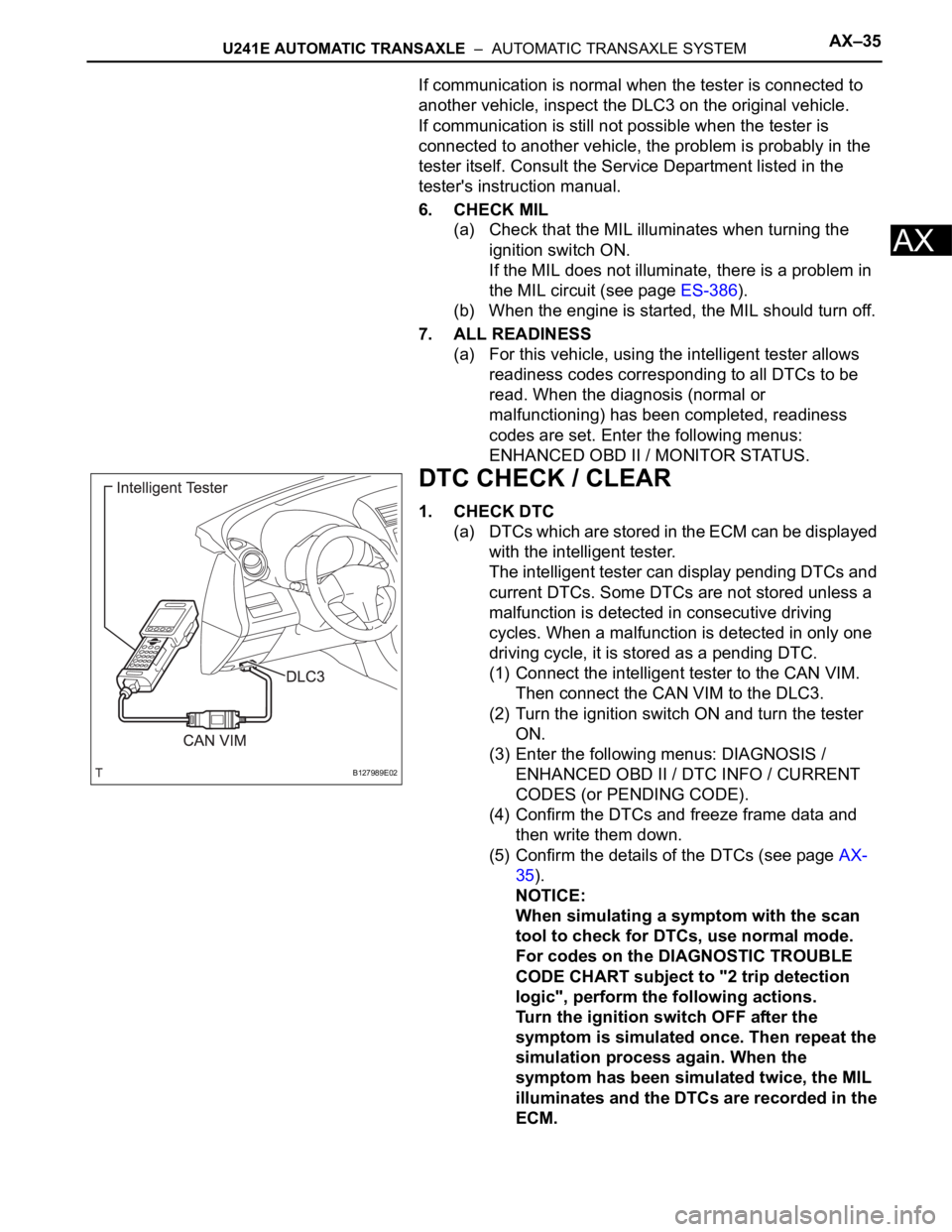
(1) Connect the intelligent tester to the CAN VIM.
Then connect the CAN VIM to the DLC3.
(2) Turn the ignition switch ON and turn the tester
ON.
(3) Enter the following menus: DIAGNOSIS /
ENHANCED OBD II / DTC INFO / CURRENT
CODES (or PENDING CODE).
(4) Confirm the DTCs and freeze frame data and
then write them down.
(5) Confirm the details of the DTCs (see page AX-
35).
NOTICE:
When simulating a symptom with the scan
tool to check for DTCs, use normal mode.
For codes on the DIAGNOSTIC TROUBLE
CODE CHART subject to "2 trip detection
logic", perform the following actions.
Turn the ignition switch OFF after the
symptom is simulated once. Then repeat the
simulation process again. When the
symptom has been simulated twice, the MIL
illuminates and the DTCs are recorded in the
ECM.
B127989E02
Page 1334 of 2000
TF–6GF1A TRANSFER – ACTIVE TORQUE CONTROL 4WD SYSTEM
TF
SYSTEM DESCRIPTION
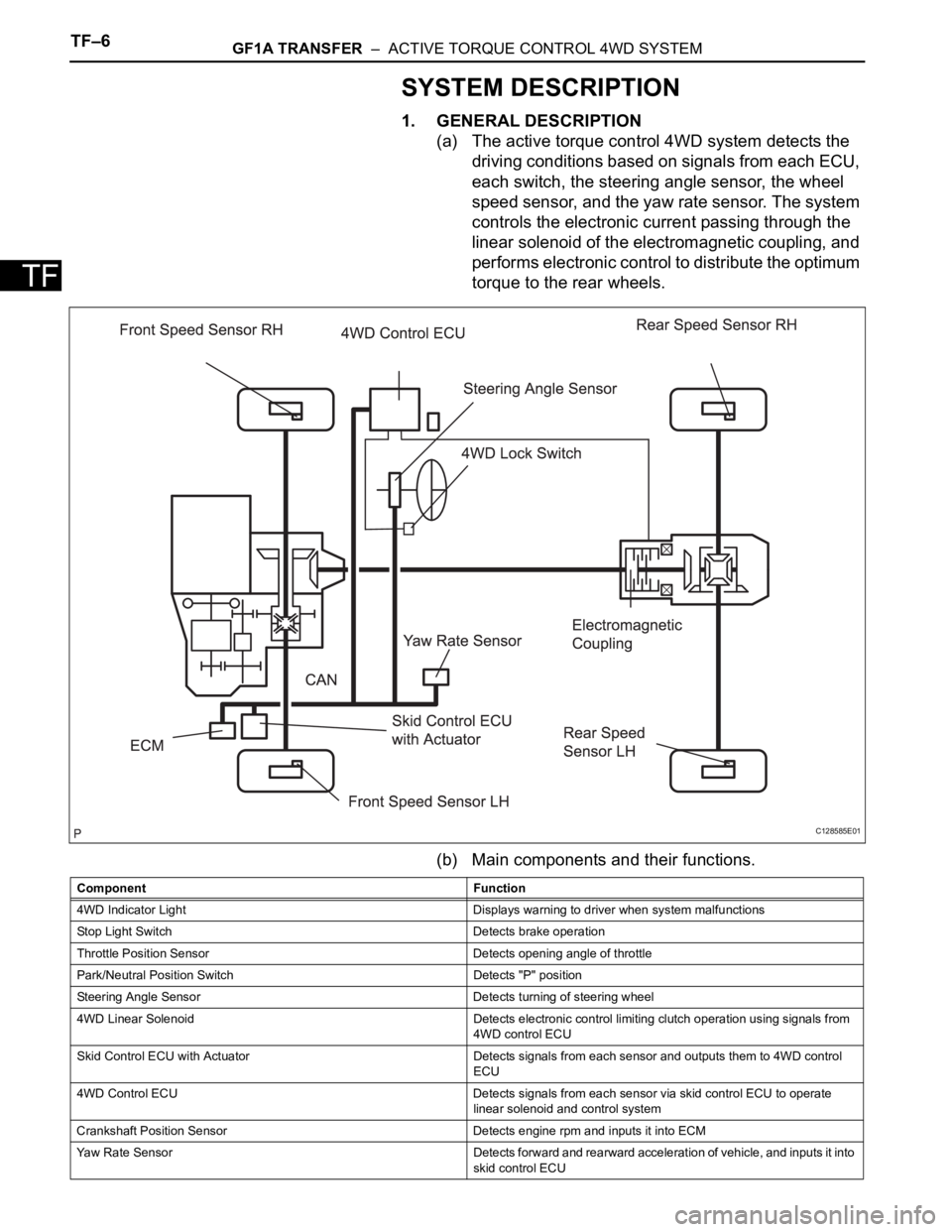
1. GENERAL DESCRIPTION
(a) The active torque control 4WD system detects the
driving conditions based on signals from each ECU,
each switch, the steering angle sensor, the wheel
speed sensor, and the yaw rate sensor. The system
controls the electronic current passing through the
linear solenoid of the electromagnetic coupling, and
performs electronic control to distribute the optimum
torque to the rear wheels.
(b) Main components and their functions.
C128585E01
Component Function
4WD Indicator Light Displays warning to driver when system malfunctions
Stop Light Switch Detects brake operation
Throttle Position Sensor Detects opening angle of throttle
Park/Neutral Position Switch Detects "P" position
Steering Angle Sensor Detects turning of steering wheel
4WD Linear Solenoid Detects electronic control limiting clutch operation using signals from
4WD control ECU
Skid Control ECU with Actuator Detects signals from each sensor and outputs them to 4WD control
ECU
4WD Control ECU Detects signals from each sensor via skid control ECU to operate
linear solenoid and control system
Crankshaft Position Sensor Detects engine rpm and inputs it into ECM
Yaw Rate Sensor Detects forward and rearward acceleration of vehicle, and inputs it into
skid control ECU
Page 1342 of 2000
TF–14GF1A TRANSFER – ACTIVE TORQUE CONTROL 4WD SYSTEM
TF
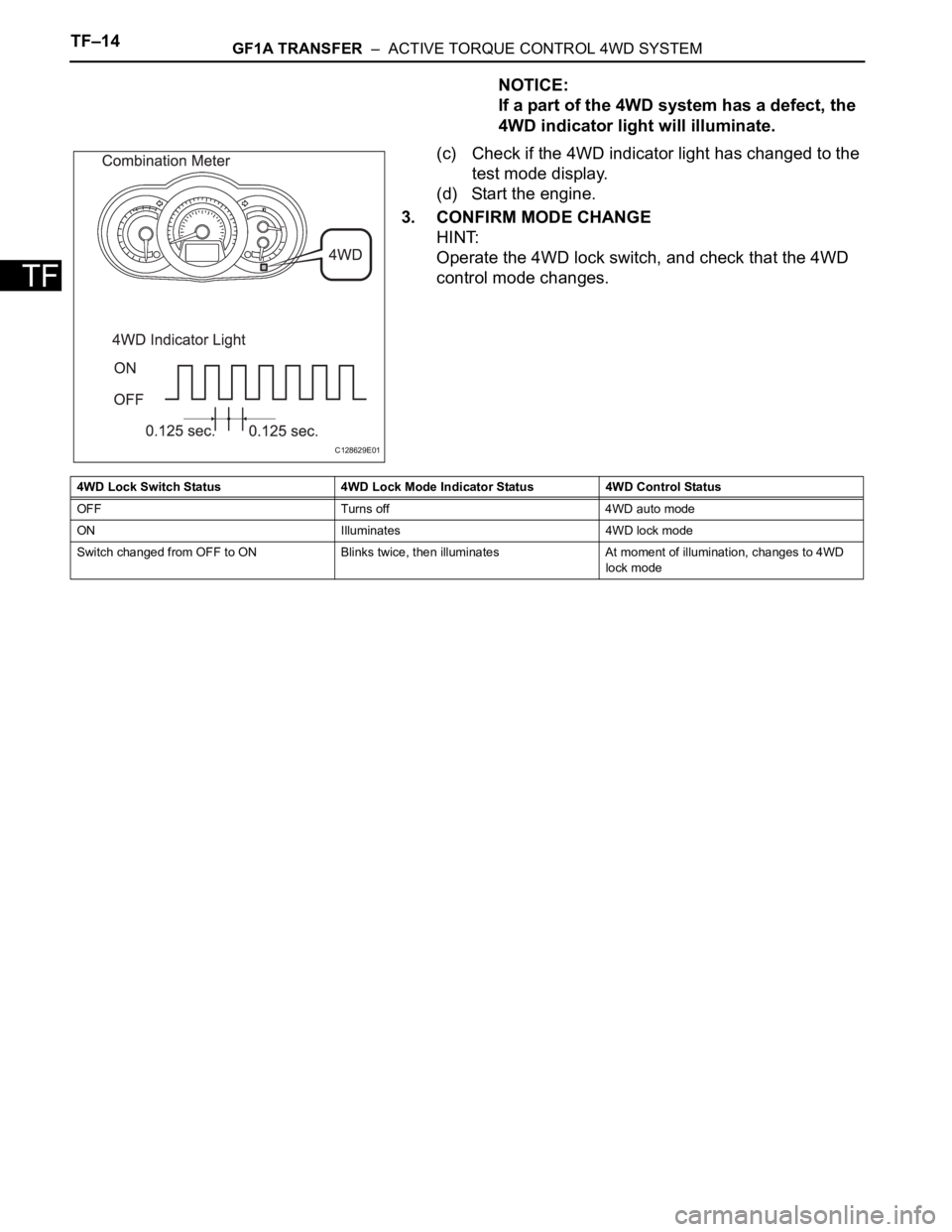
NOTICE:
If a part of the 4WD system has a defect, the
4WD indicator light will illuminate.
(c) Check if the 4WD indicator light has changed to the
test mode display.
(d) Start the engine.
3. CONFIRM MODE CHANGE
HINT:
Operate the 4WD lock switch, and check that the 4WD
control mode changes.
C128629E01
4WD Lock Switch Status 4WD Lock Mode Indicator Status 4WD Control Status
OFF Turns off 4WD auto mode
ON Illuminates 4WD lock mode
Switch changed from OFF to ON Blinks twice, then illuminates At moment of illumination, changes to 4WD
lock mode
Page 1345 of 2000
GF1A TRANSFER – ACTIVE TORQUE CONTROL 4WD SYSTEMTF–17
TF
DIAGNOSIS SYSTEM
1. DESCRIPTION
Active torque control 4WD system data can be read in
the Data Link Connector 3 (DLC3) of the vehicle. When
the system seems to be malfunctioning, use the
intelligent tester (with CAN VIM) to check for
malfunctions and perform repairs. Therefore when there
seems to be a problem with the active torque control
4WD, use the intelligent tester (with CAN VIM) or SST to
check and troubleshoot it.
SST 09843-18040
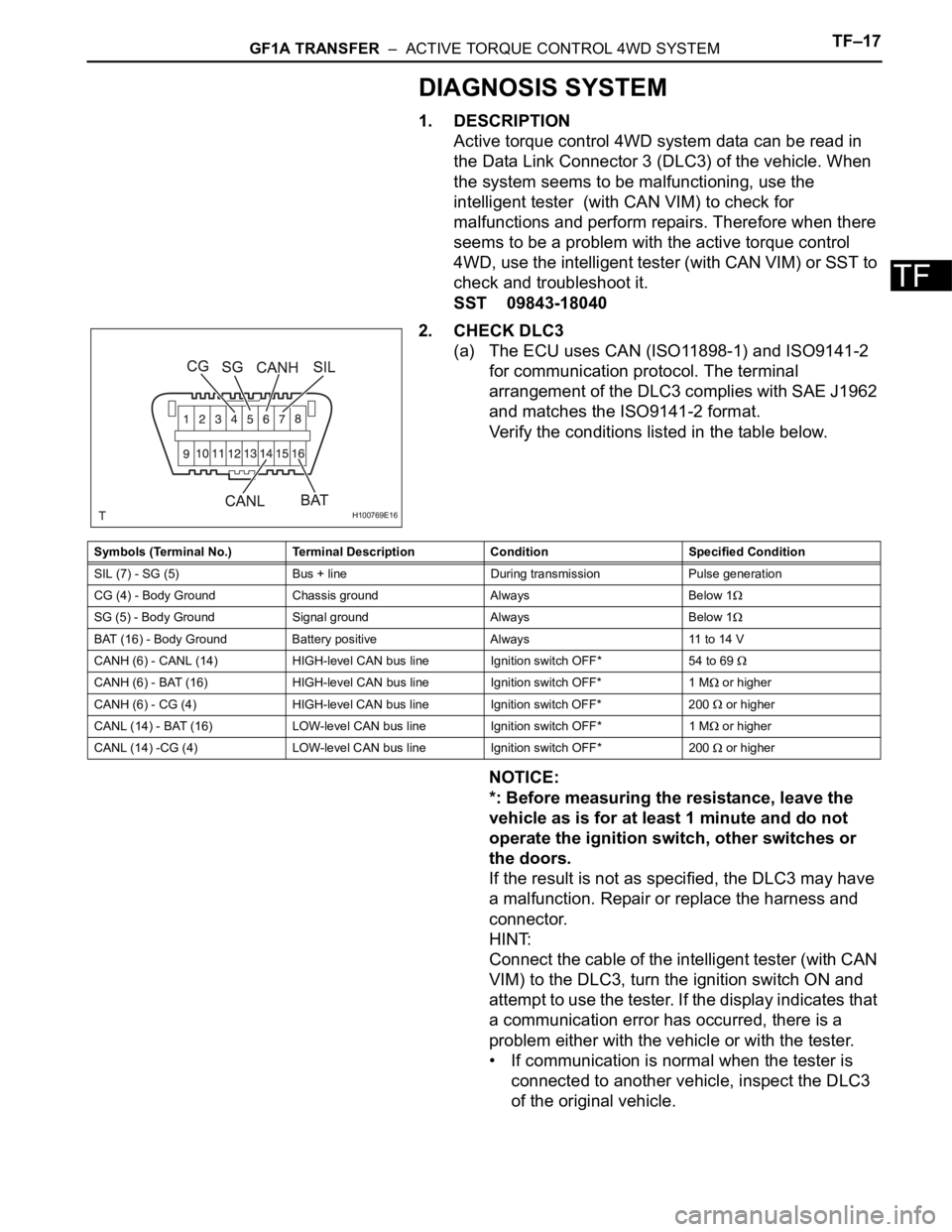
2. CHECK DLC3
(a) The ECU uses CAN (ISO11898-1) and ISO9141-2
for communication protocol. The terminal
arrangement of the DLC3 complies with SAE J1962
and matches the ISO9141-2 format.
Verify the conditions listed in the table below.
NOTICE:
*: Before measuring the resistance, leave the
vehicle as is for at least 1 minute and do not
operate the ignition switch, other switches or
the doors.
If the result is not as specified, the DLC3 may have
a malfunction. Repair or replace the harness and
connector.
HINT:
Connect the cable of the intelligent tester (with CAN
VIM) to the DLC3, turn the ignition switch ON and
attempt to use the tester. If the display indicates that
a communication error has occurred, there is a
problem either with the vehicle or with the tester.
• If communication is normal when the tester is
connected to another vehicle, inspect the DLC3
of the original vehicle.
H100769E16
Symbols (Terminal No.) Terminal Description Condition Specified Condition
SIL (7) - SG (5) Bus + line During transmission Pulse generation
CG (4) - Body Ground Chassis ground Always Below 1
SG (5) - Body Ground Signal ground Always Below 1
BAT (16) - Body Ground Battery positive Always 11 to 14 V
CANH (6) - CANL (14) HIGH-level CAN bus line Ignition switch OFF* 54 to 69
CANH (6) - BAT (16) HIGH-level CAN bus line Ignition switch OFF* 1 M or higher
CANH (6) - CG (4) HIGH-level CAN bus line Ignition switch OFF* 200
or higher
CANL (14) - BAT (16) LOW-level CAN bus line Ignition switch OFF* 1 M
or higher
CANL (14) -CG (4) LOW-level CAN bus line Ignition switch OFF* 200
or higher
Page 1347 of 2000
GF1A TRANSFER – ACTIVE TORQUE CONTROL 4WD SYSTEMTF–19
TF
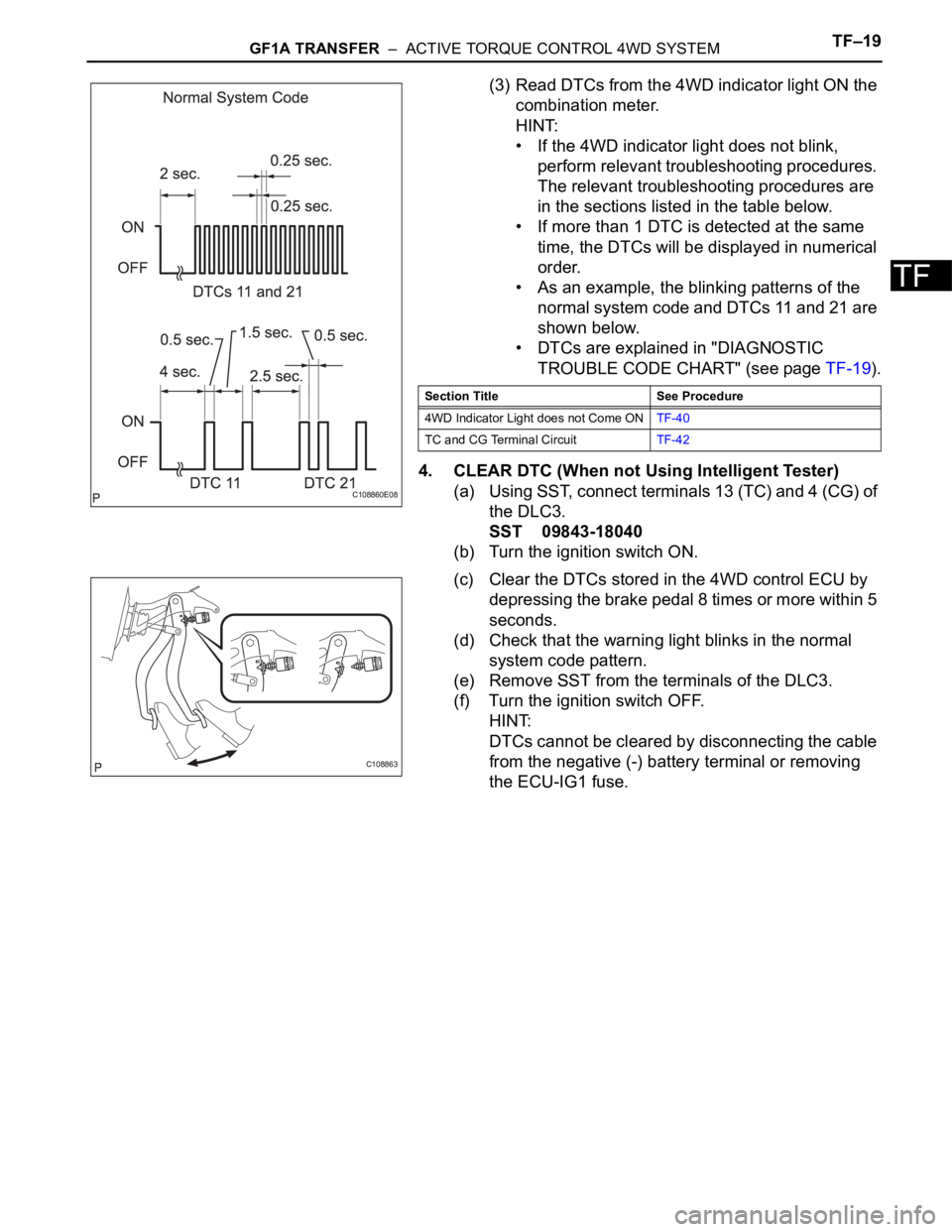
(3) Read DTCs from the 4WD indicator light ON the
combination meter.
HINT:
• If the 4WD indicator light does not blink,
perform relevant troubleshooting procedures.
The relevant troubleshooting procedures are
in the sections listed in the table below.
• If more than 1 DTC is detected at the same
time, the DTCs will be displayed in numerical
order.
• As an example, the blinking patterns of the
normal system code and DTCs 11 and 21 are
shown below.
• DTCs are explained in "DIAGNOSTIC
TROUBLE CODE CHART" (see page TF-19).
4. CLEAR DTC (When not Using Intelligent Tester)
(a) Using SST, connect terminals 13 (TC) and 4 (CG) of
the DLC3.
SST 09843-18040
(b) Turn the ignition switch ON.
(c) Clear the DTCs stored in the 4WD control ECU by
depressing the brake pedal 8 times or more within 5
seconds.
(d) Check that the warning light blinks in the normal
system code pattern.
(e) Remove SST from the terminals of the DLC3.
(f) Turn the ignition switch OFF.
HINT:
DTCs cannot be cleared by disconnecting the cable
from the negative (-) battery terminal or removing
the ECU-IG1 fuse.
C108860E08
Section Title See Procedure
4WD Indicator Light does not Come ONTF-40
TC and CG Terminal CircuitTF-42
C108863
Page 1349 of 2000

GF1A TRANSFER – ACTIVE TORQUE CONTROL 4WD SYSTEMTF–21
TF
DATA LIST / ACTIVE TEST
1. READ DATA LIST
HINT:
Using the intelligent tester's (with CAN VIM) DATA LIST
allows switch, sensor and other item values to be read
without removing any parts. Reading the DATA LIST
early in troubleshooting is one way to save time.
(a) Connect the intelligent tester (with CAN VIM) to the
DLC3.
(b) Turn the ignition switch ON.
(c) Read the DATA LIST according to the display on the
tester.
4WD control ECU
Item Measurement Item/Range
(Display)Normal Condition Diagnostic Note
4WD WARN LAMP 4WD indicator light /OFF or ON OFF: 4WD indicator light OFF
ON: 4WD indicator light ON-
SLIP INDI LAMP Slip indicator light /OFF or ON OFF: SLIP indicator light OFF
ON: SLIP indicator light ON-
STOP LAMP SW Stop light switch /OFF or ON OFF: Brake pedal released
ON: Brake pedal depressed-
STEERING ANGLE Steering angle value /
Min.: -3276.8 deg
Max.: 3276.7 degMin.: -3276.8 deg
Max.: 3276.7 deg-
FR WHEEL SPD FR wheel speed /
Min.: 0 km/h (0 mph)
Reading : Max.: 326.4 km/h
(202.8 mph)Actual wheel speed Almost no difference from the
speedometer
FL WHEEL SPD FL wheel speed /
Min.: 0 km/h (0 mph)
Reading : Max.: 326.4 km/h
(202.8 mph)Actual wheel speed Almost no difference from the
speedometer
RR WHEEL SPD RR wheel speed /
Min.: 0 km/h (0 mph)
Reading : Max.: 326.4 km/h
(202.8 mph)Actual wheel speed Almost no difference from the
speedometer
RLWHEEL SPD RL wheel speed /
Min.: 0 km/h (0 mph)
Reading : Max.: 326.4 km/h
(202.8 mph)Actual wheel speed Almost no difference from the
speedometer
AMBI TEMP Ambient temperature /
Min.: -128
C (198.4 F)
Max.: 127 C (260.6 F)Min.: -128 (198.4
F)
Max.: 127 (260.6
F)-
COOLANT TEMP Engine coolant temperature /
Min.: 0
C (32 F)
Max.: 127.5
C (261.5 F)Min.: 0
C (32 F)
Max.: 127.5 C (261.5 F)-
LOCK SW 4WD lock switch / OFF or ON OFF: 4WD lock switch off
ON: 4WD lock switch on-
SLC CUR SLC solenoid (4WD linear
solenoid) current /
Min.: 0 A
Max.: 3 AMin.: 0 A
Max.: 3 A-
Page 1350 of 2000

TF–22GF1A TRANSFER – ACTIVE TORQUE CONTROL 4WD SYSTEM
TF
2. PERFORM ACTIVE TEST
HINT:
Performing the intelligent tester's (with CAN VIM)
ACTIVE TEST allows switch and other items to be
operated without removing any parts. Performing the
ACTIVE TEST early in troubleshooting is one way to
save time. The DATA LIST can be displayed during the
ACTIVE TEST.
(a) Connect the intelligent tester (with CAM VIN) to the
DLC3.
(b) Turn the ignition switch ON.
(c) Perform the ACTIVE TEST according to the display
on the tester.
4WD control ECU
Skid control ECU
Item Test Details Diagnostic Note
4WD WARN LAMP 4WD indicator light ON / OFF
ON: 4WD indicator light ON
OFF: 4WD indicator light OFFObserve combination meter
LOCK LAMP 4WD lock light / ON / OFF
OFF: 4WD lock switch OFF
ON: 4WD lock switch ONObserve combination meter
Item Test Details Diagnostic Note
SLIP INDI LAMP SLIP indicator Light / ON / OFF
ON: SLIP indicator light ON
OFF: SLIP indicator light OFFObserve combination meter
Page 1485 of 2000

TIRE AND WHEEL – TIRE PRESSURE WARNING SYSTEMTW–13
TW
(b) Connect the intelligent tester (with CAN VIM ) to the
DLC3.
(c) Turn the ignition switch ON.
(d) Select "SIGNAL CHECK" mode on the intelligent
tester (with CAN VIM ) (see page TW-12).
(e) Confirm that the transmitter IDs and tire pressure
data for all the tires are displayed on the intelligent
tester screen.
NOTICE:
• It may take up to 1 minute to update the tire
pressure data.
• If the IDs have not been registered, DTC
C2171/71 is set in the tire pressure warning
ECU after approximately 60 minutes.
Page 1488 of 2000
TW–16TIRE AND WHEEL – TIRE PRESSURE WARNING SYSTEM
TW
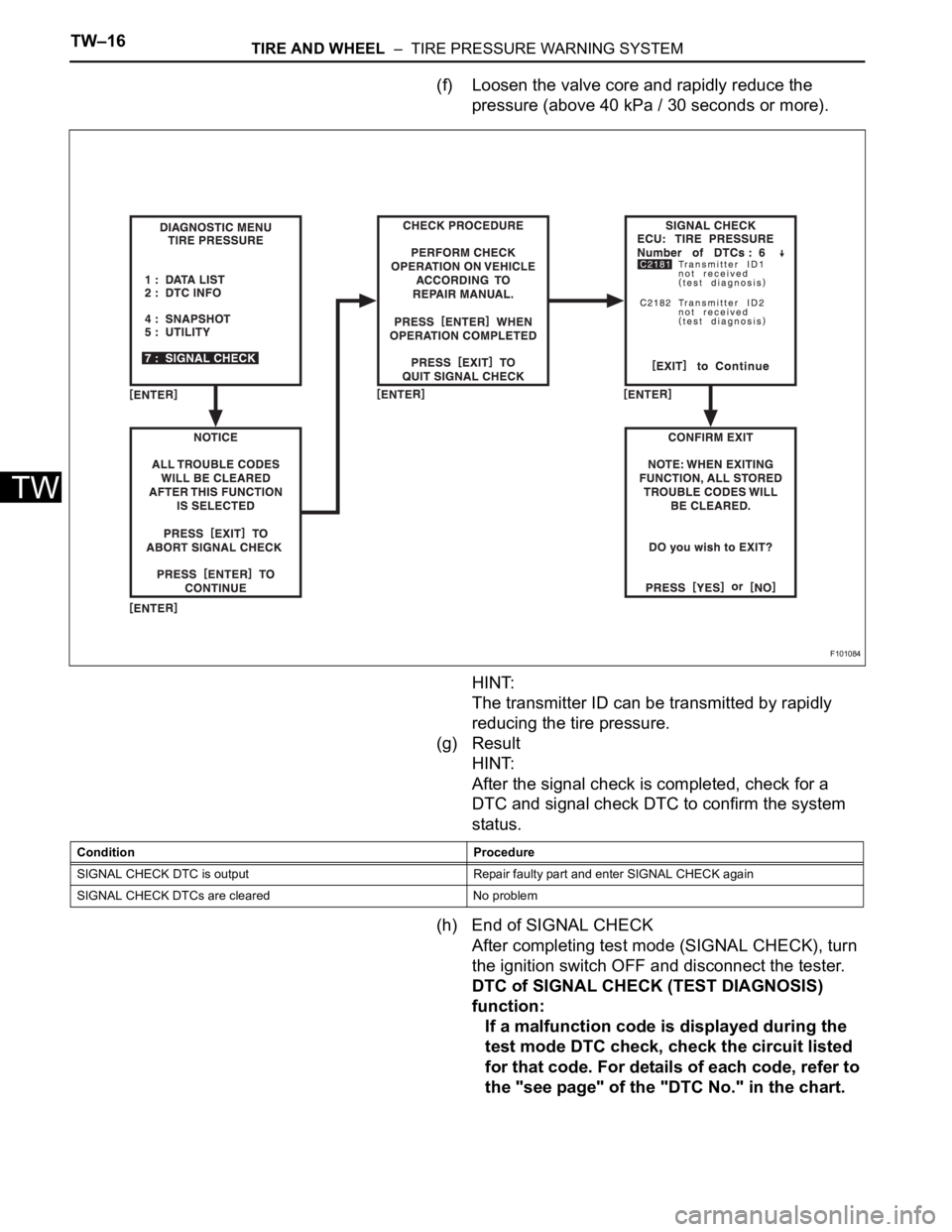
(f) Loosen the valve core and rapidly reduce the
pressure (above 40 kPa / 30 seconds or more).
HINT:
The transmitter ID can be transmitted by rapidly
reducing the tire pressure.
(g) Result
HINT:
After the signal check is completed, check for a
DTC and signal check DTC to confirm the system
status.
(h) End of SIGNAL CHECK
After completing test mode (SIGNAL CHECK), turn
the ignition switch OFF and disconnect the tester.
DTC of SIGNAL CHECK (TEST DIAGNOSIS)
function:
If a malfunction code is displayed during the
test mode DTC check, check the circuit listed
for that code. For details of each code, refer to
the "see page" of the "DTC No." in the chart.
F101084
Condition Procedure
SIGNAL CHECK DTC is output Repair faulty part and enter SIGNAL CHECK again
SIGNAL CHECK DTCs are cleared No problem