phone TOYOTA RAV4 2019 Accessories, Audio & Navigation (in English)
[x] Cancel search | Manufacturer: TOYOTA, Model Year: 2019, Model line: RAV4, Model: TOYOTA RAV4 2019Pages: 244, PDF Size: 6.8 MB
Page 117 of 244
117
4
4
Audio/visual system
Audio/visual system
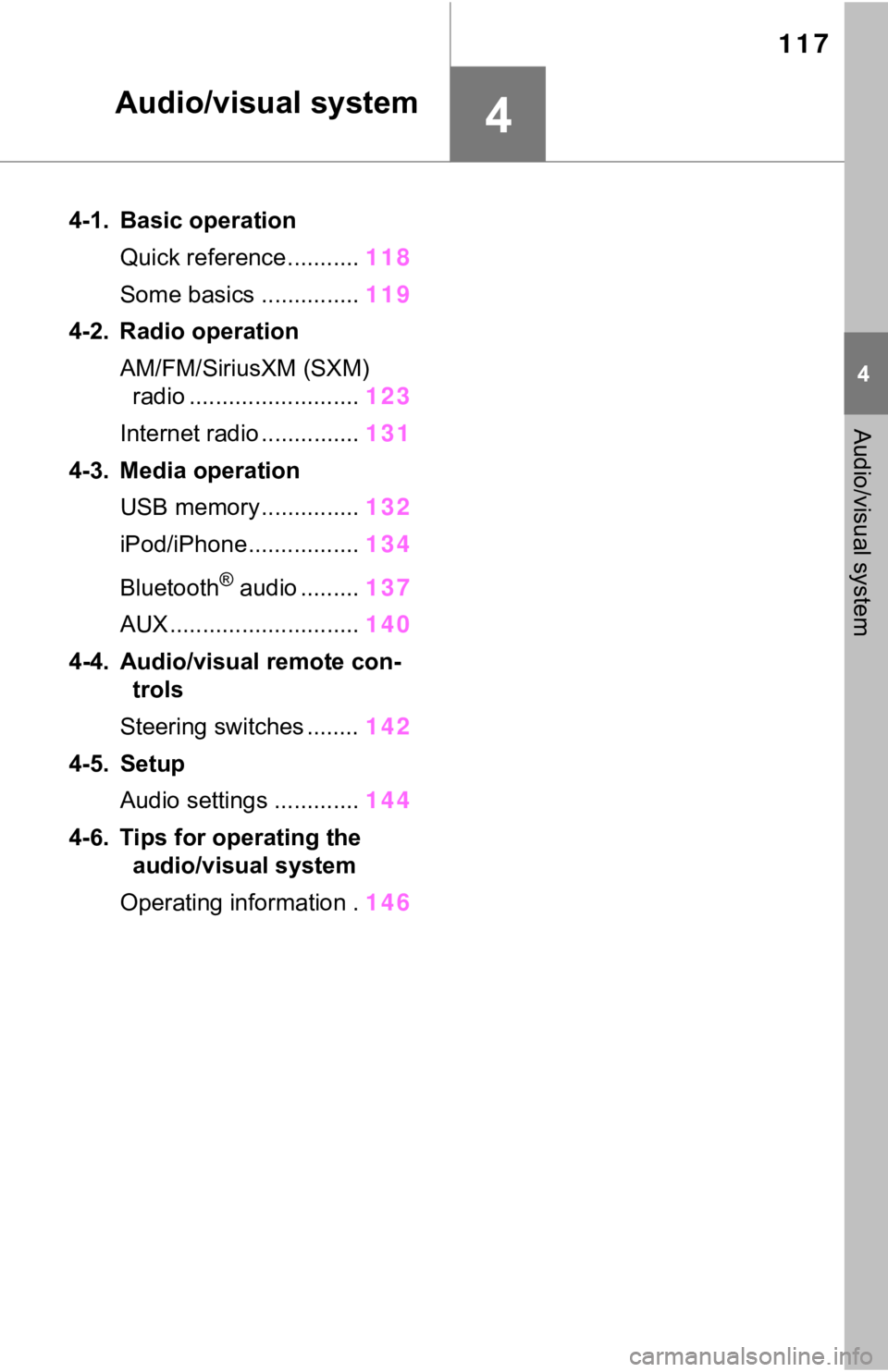
4-1. Basic operationQuick reference........... 118
Some basics ............... 119
4-2. Radio operation AM/FM/SiriusXM (SXM) radio .......................... 123
Internet radio ............... 131
4-3. Media operation USB memory............... 132
iPod/iPhone................. 134
Bluetooth
® audio ......... 137
AUX............................. 140
4-4. Audio/visual remote con- trols
Steering switches ........ 142
4-5. Setup Audio settings ............. 144
4-6. Tips for operating the audio/visual system
Operating information . 146
Page 118 of 244
1184-1. Basic operation
4-1.Basic operation
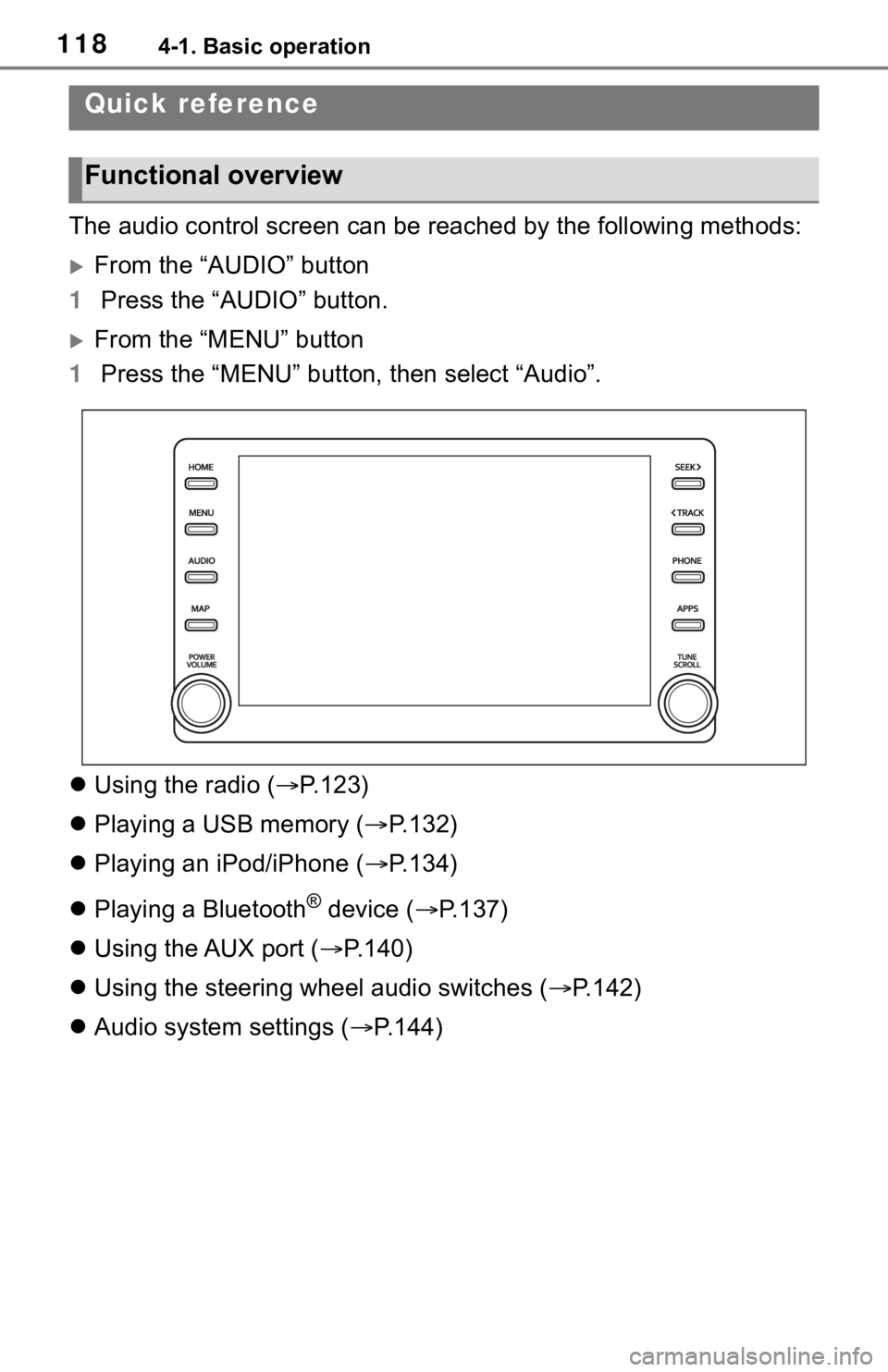
The audio control screen can be reached by the following methods:
From the “AUDIO” button
1 Press the “AUDIO” button.
From the “MENU” button
1 Press the “MENU” button, then select “Audio”.
Using the radio ( P.123)
Playing a USB memory ( P.132)
Playing an iPod/iPhone ( P.134)
Playing a Bluetooth
® device ( P.137)
Using the AUX port ( P.140)
Using the steering wheel audio switches ( P.142)
Audio system settings ( P.144)
Quick reference
Functional overview
Page 124 of 244
1244-2. Radio operation
pressing it.
●The radio automatically changes
to stereo reception when a stereo
broadcast is received.
●The radio automatically blends to
an HD Radio signal in AM or FM
where available.
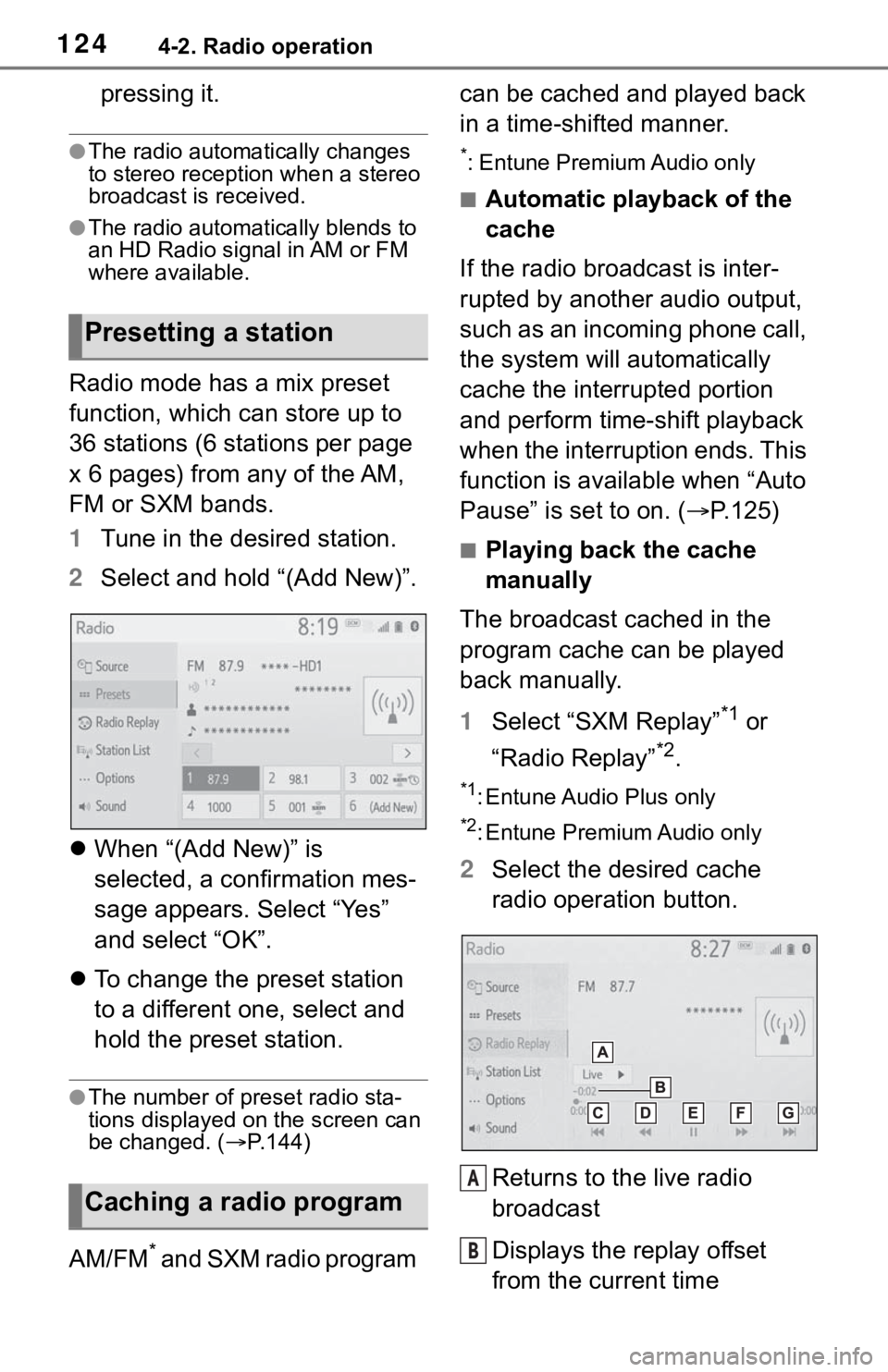
Radio mode has a mix preset
function, which can store up to
36 stations (6 stations per page
x 6 pages) from any of the AM,
FM or SXM bands.
1Tune in the desired station.
2 Select and hold “(Add New)”.
When “(Add New)” is
selected, a confirmation mes-
sage appears. Select “Yes”
and select “OK”.
To change the preset station
to a different one, select and
hold the preset station.
●The number of preset radio sta-
tions displayed on the screen can
be changed. ( P.144)
AM/FM* and SXM radio program can be cached and played back
in a time-shifted manner.
*: Entune Premium Audio only
■Automatic playback of the
cache
If the radio broadcast is inter-
rupted by another audio output,
such as an incoming phone call,
the system will automatically
cache the interrupted portion
and perform time-shift playback
when the interruption ends. This
function is available when “Auto
Pause” is set to on. ( P.125)
■Playing back the cache
manually
The broadcast cached in the
program cache can be played
back manually.
1 Select “SXM Replay”
*1 or
“Radio Replay”
*2.
*1: Entune Audio Plus only
*2: Entune Premium Audio only
2 Select the desired cache
radio operation button.
Returns to the live radio
broadcast
Displays the replay offset
from the current time
Presetting a station
Caching a radio program
A
B
Page 131 of 244
1314-2. Radio operation
4
Audio/visual system
*: This function is not made avail-able in some countries or areas.
1 Display the audio source
selection screen. ( P.119)
2 Select the desired application
screen button.
The internet radio application
screen is displayed.
Perform operations accord-
ing to the displayed applica-
tion screen.
For the instrument panel
operation method: P. 1 1 9
If a compatible phone is
already registered, it will be
connected automatically.
●Other applications can be acti-
vated while listening to internet
radio.
●Some parts of applications can be
adjusted using the switches on the
steering wheel.
●For additional info rmation, refer to
http://www.toyota.com/Entune/
or
call
1-800-331-4331 in the United States,
http://www.toyota.ca/entune
or call
1-888-869-6828 in Canada, and
http://www.toyotapr.com/entune
o r
call
1-877-855-8377 in Puerto Rico.
Internet radio*
One of Toyota Entune App
Suite Connect features is
the ability to listen to inter-
net radio. In order to use
this service, a compatible
phone and the system
needs to be set up. For
details: P.215
Listening to internet radio
Page 134 of 244
1344-3. Media operation
The iPod/iPhone operation
screen can be reached by the
following methods: P. 1 1 9
Connecting an iPod/iPhone
( P.120)
When the iPod/iPhone con-
nected to the system includes
video, the system can only out-
put the sound.
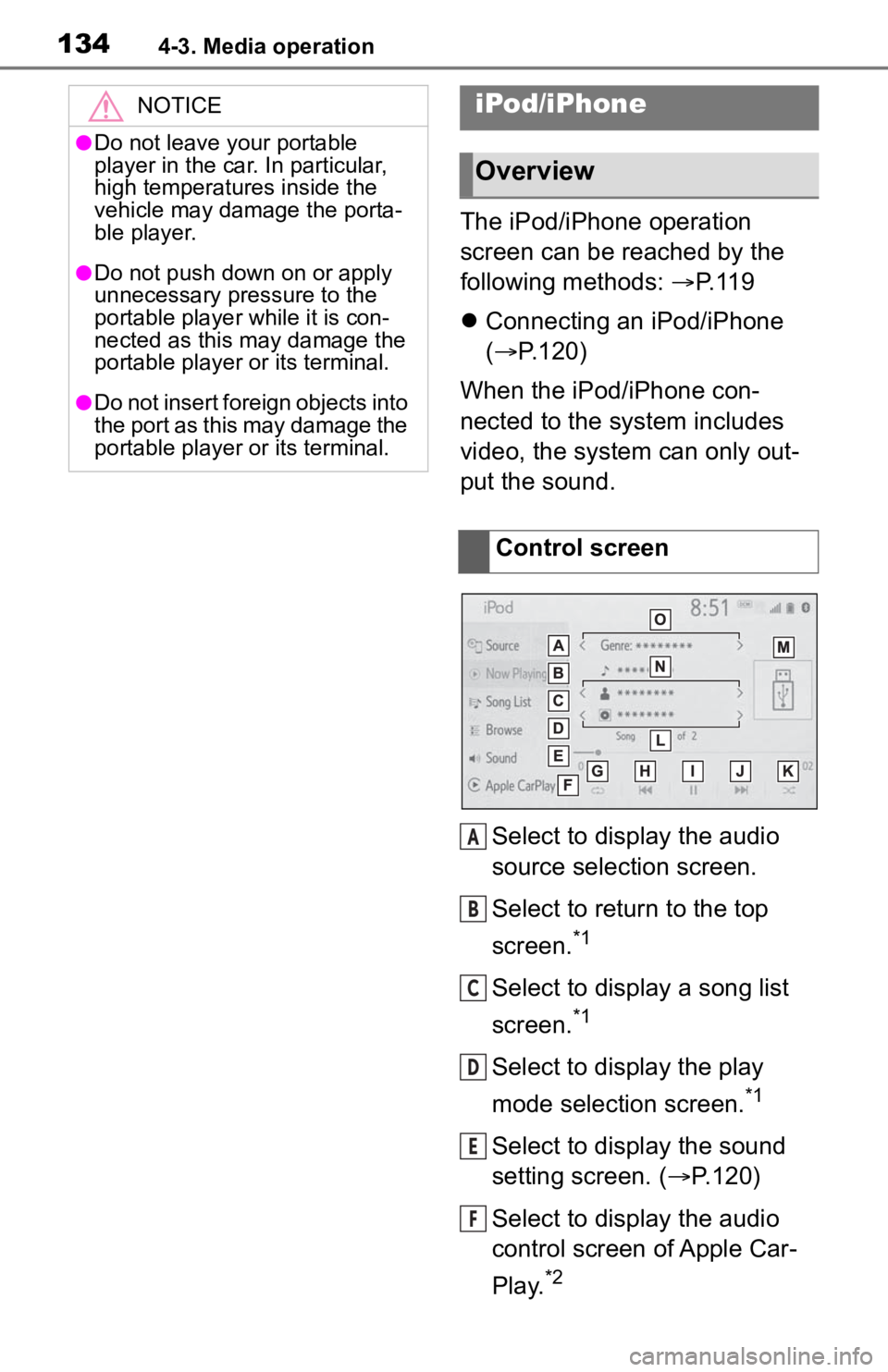
Select to display the audio
source selection screen.
Select to return to the top
screen.
*1
Select to display a song list
screen.
*1
Select to display the play
mode selection screen.
*1
Select to display the sound
setting screen. ( P.120)
Select to display the audio
control screen of Apple Car-
Play.
*2
NOTICE
●Do not leave your portable
player in the car. In particular,
high temperatures inside the
vehicle may damage the porta-
ble player.
●Do not push down on or apply
unnecessary pressure to the
portable player while it is con-
nected as this may damage the
portable player or its terminal.
●Do not insert foreign objects into
the port as this may damage the
portable player or its terminal.
iPod/iPhone
Overview
Control screen
A
B
C
D
E
F
Page 135 of 244
1354-3. Media operation
4
Audio/visual system
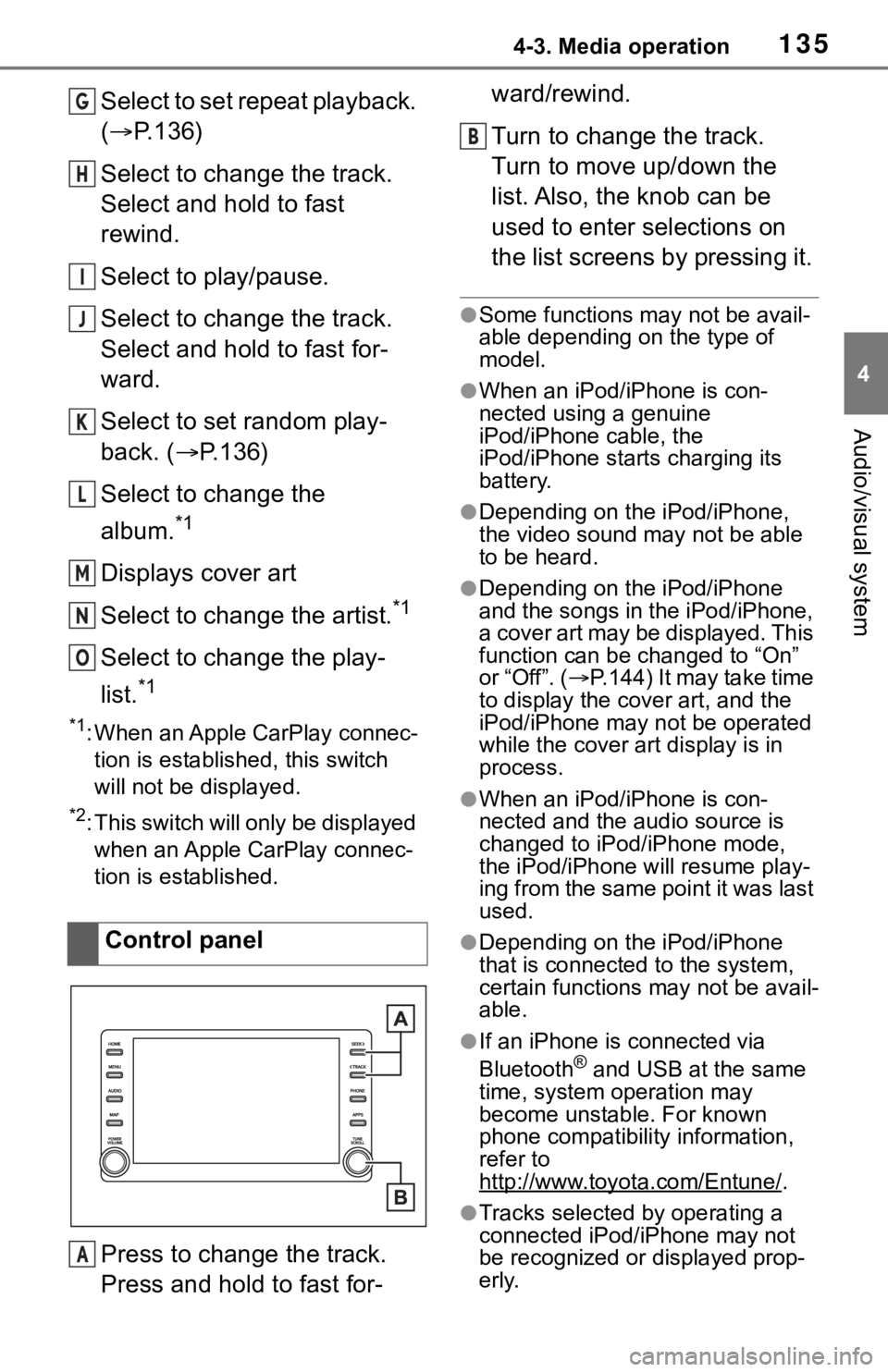
Select to set repeat playback.
(P.136)
Select to change the track.
Select and hold to fast
rewind.
Select to play/pause.
Select to change the track.
Select and hold to fast for-
ward.
Select to set random play-
back. ( P.136)
Select to change the
album.
*1
Displays cover art
Select to change the artist.
*1
Select to change the play-
list.
*1
*1: When an Apple CarPlay connec- tion is established, this switch
will not be displayed.
*2: This switch will only be displayed when an Apple CarPlay connec-
tion is established.
Press to change the track.
Press and hold to fast for- ward/rewind.
Turn to change the track.
Turn to move up/down the
list. Also, the knob can be
used to enter selections on
the list screens by pressing it.
●Some functions may not be avail-
able depending on the type of
model.
●When an iPod/iPhone is con-
nected using a genuine
iPod/iPhone cable, the
iPod/iPhone starts charging its
battery.
●Depending on the iPod/iPhone,
the video sound
may not be able
to be heard.
●Depending on the iPod/iPhone
and the songs in the iPod/iPhone,
a cover art may be displayed. This
function can be changed to “On”
or “Off”. ( P.144) It may take time
to display the cov er art, and the
iPod/iPhone may not be operated
while the cover art display is in
process.
●When an iPod/iPhone is con-
nected and the audio source is
changed to iPod/iPhone mode,
the iPod/iPhone will resume play-
ing from the same point it was last
used.
●Depending on the iPod/iPhone
that is connected to the system,
certain functions may not be avail-
able.
●If an iPhone is connected via
Bluetooth® and USB at the same
time, system operation may
become unstable. For known
phone compatibility information,
refer to
http://www.toyota.com/Entune/
.
●Tracks selected by operating a
connected iPod/iPhone may not
be recognized or displayed prop-
erly.
Control panel
G
H
I
J
K
L
M
N
O
A
B
Page 136 of 244
1364-3. Media operation
●The system may not function
properly if a conversion adapter is
used to connect a device.
The track currently being lis-
tened to can be repeated.
1Select .
●Each time is selected, the
mode changes as follows:
When shuffle is off (iPhone 5 or
later)
• track repeat album repeat off
When shuffle is off (iPhone 4s or
earlier)
• track repeat off
When shuffle is on
• track repeat off
Tracks or albums can be auto-
matically and randomly
selected.
1 Select .
●Each time is selected, the
mode changes as follows:
• shuffle (1 album shuffle) album
shuffle (all album shuffle) off
Repeating
Random order
WARNING
●Do not operate the player’s con-
trols or connect the iPod/iPhone
while driving.
NOTICE
●Do not leave your portable
player in the car. In particular,
high temperatures inside the
vehicle may damage the porta-
ble player.
●Do not push down on or apply
unnecessary pressure to the
portable player while it is con-
nected as this may damage the
portable player or its terminal.
●Do not insert foreign objects into
the port as this may damage the
portable player or its terminal.
Page 138 of 244
1384-3. Media operation
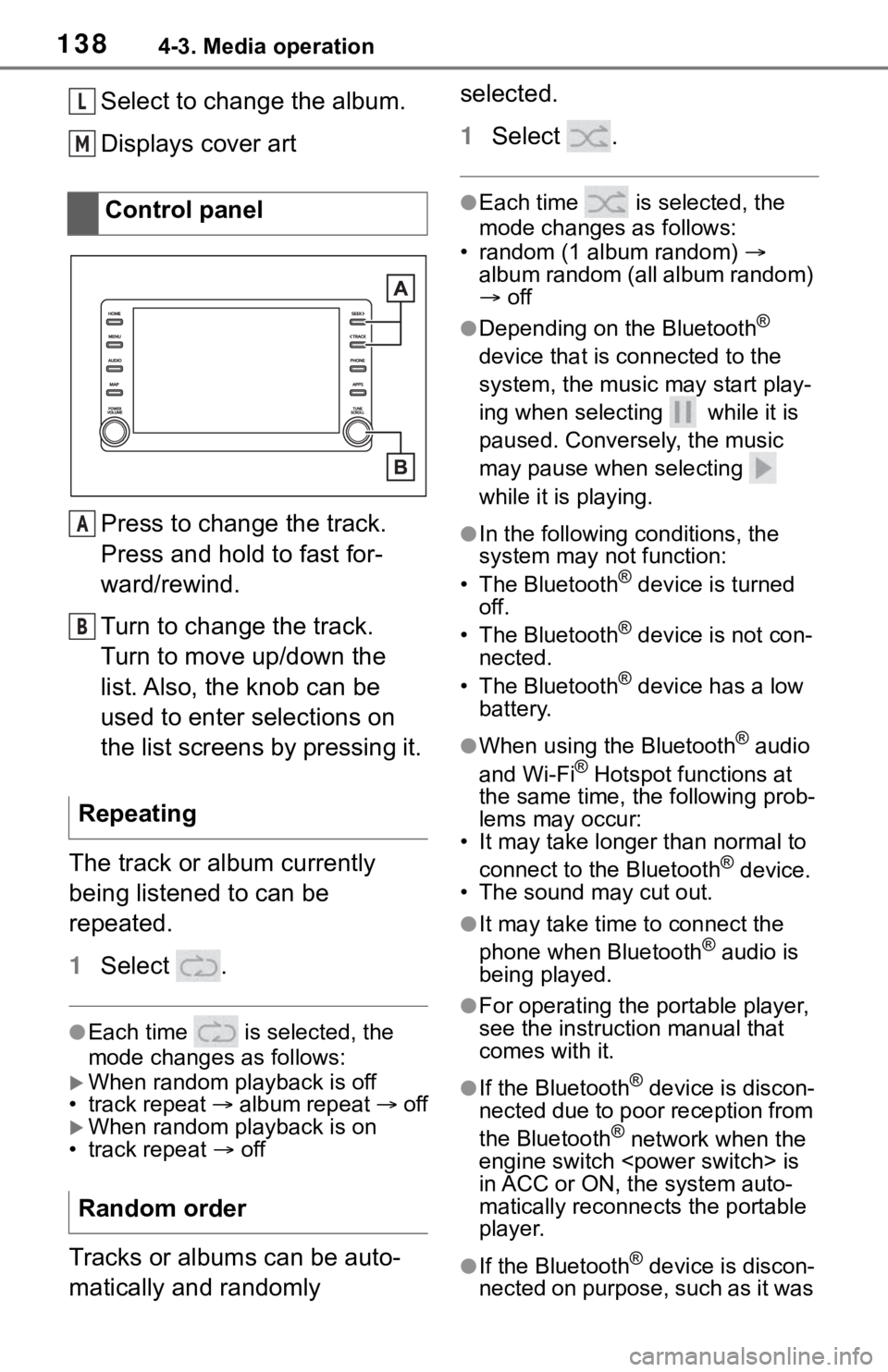
Select to change the album.
Displays cover art
Press to change the track.
Press and hold to fast for-
ward/rewind.
Turn to change the track.
Turn to move up/down the
list. Also, the knob can be
used to enter selections on
the list screens by pressing it.
The track or album currently
being listened to can be
repeated.
1 Select .
●Each time is selected, the
mode changes as follows:
When random playback is off
• track repeat album repeat off
When random playback is on
• track repeat off
Tracks or albums can be auto-
matically and randomly selected.
1
Select .
●Each time is selected, the
mode changes as follows:
• random (1 album random)
album random (all album random)
off
●Depending on the Bluetooth®
device that is connected to the
system, the music may start play-
ing when selecting while it is
paused. Conversely, the music
may pause when selecting
while it is playing.
●In the following c onditions, the
system may not function:
• The Bluetooth
® device is turned
off.
• The Bluetooth
® device is not con-
nected.
• The Bluetooth
® device has a low
battery.
●When using the Bluetooth® audio
and Wi-Fi® Hotspot functions at
the same time, the following prob-
lems may occur:
• It may take longer than normal to
connect to the Bluetooth
® device.
• The sound may cut out.
●It may take time to connect the
phone when Bluetooth® audio is
being played.
●For operating the portable player,
see the instruction manual that
comes with it.
●If the Bluetooth® device is discon-
nected due to poor reception from
the Bluetooth
® network when the
engine switch
is
in ACC or ON, the system auto-
matically reconnects the portable
player.
●If the Bluetooth® device is discon-
nected on purpose, such as it was
Control panel
Repeating
Random order
L
M
A
B
Page 139 of 244
1394-3. Media operation
4
Audio/visual system
turned off, this does not happen.
Reconnect the portable player
manually.
●Bluetooth® device information is
registered when the Bluetooth®
device is connected to the Blue-
tooth
® audio system. When selling
or disposing of the vehicle,
remove the Bluetooth
® audio
information from the system.
( P. 5 9 )
●In some situations, sound output
via the Bluetooth® audio system
may be out of syn c with the con-
nected device or output intermit-
tently.
To use the Bluetooth® audio
system, it is necessary to regis-
ter a Bluetooth
® device with the
system.
Registering an additional
device
1 Display the Bluetooth
® audio
control screen. ( P.137)
2 Select “Connect”.
3 Select “Add Device”.
When another Bluetooth
®
device is connected, a confir-
mation screen will be dis-
played. To disconnect the
Bluetooth
® device, select
“Yes”.
4 Follow the steps in “Register-
ing a Bluetooth
® phone for
the first time” from step 5.
( P.36)
Selecting a registered device
1 Display the Bluetooth
® audio
control screen. ( P.137)
2 Select “Connect”.
3 Select the desired device to
be connected.
WARNING
●Do not operate the player’s con-
trols or connect to the Blue-
tooth
® audio system while
driving.
●Your audio unit is fitted with
Bluetooth® antennas. People
with implantable cardiac pace-
makers, cardiac resynchroniza-
tion therapy-pacemakers or
implantable cardioverter defibril-
lators should maintain a reason-
able distance between
themselves and the Bluetooth
®
antennas. The radio waves may
affect the operation of such
devices.
●Before using Bluetooth®
devices, users of any electrical
medical device other than
implantable cardiac pacemak-
ers, cardiac resynchronization
therapy-pacemakers or implant-
able cardioverter defibrillators
should consult the manufacturer
of the device for information
about its operation under the
influence of radio waves. Radio
waves could have unexpected
effects on the operation of such
medical devices.
NOTICE
●Do not leave your portable
player in the vehicle. In particu-
lar, high temperatures inside the
vehicle may damage the porta-
ble player.
Registering/Connecting a
Bluetooth® device
Page 142 of 244
1424-4. Audio/visual remote controls
4-4.Audio/visual remote controls
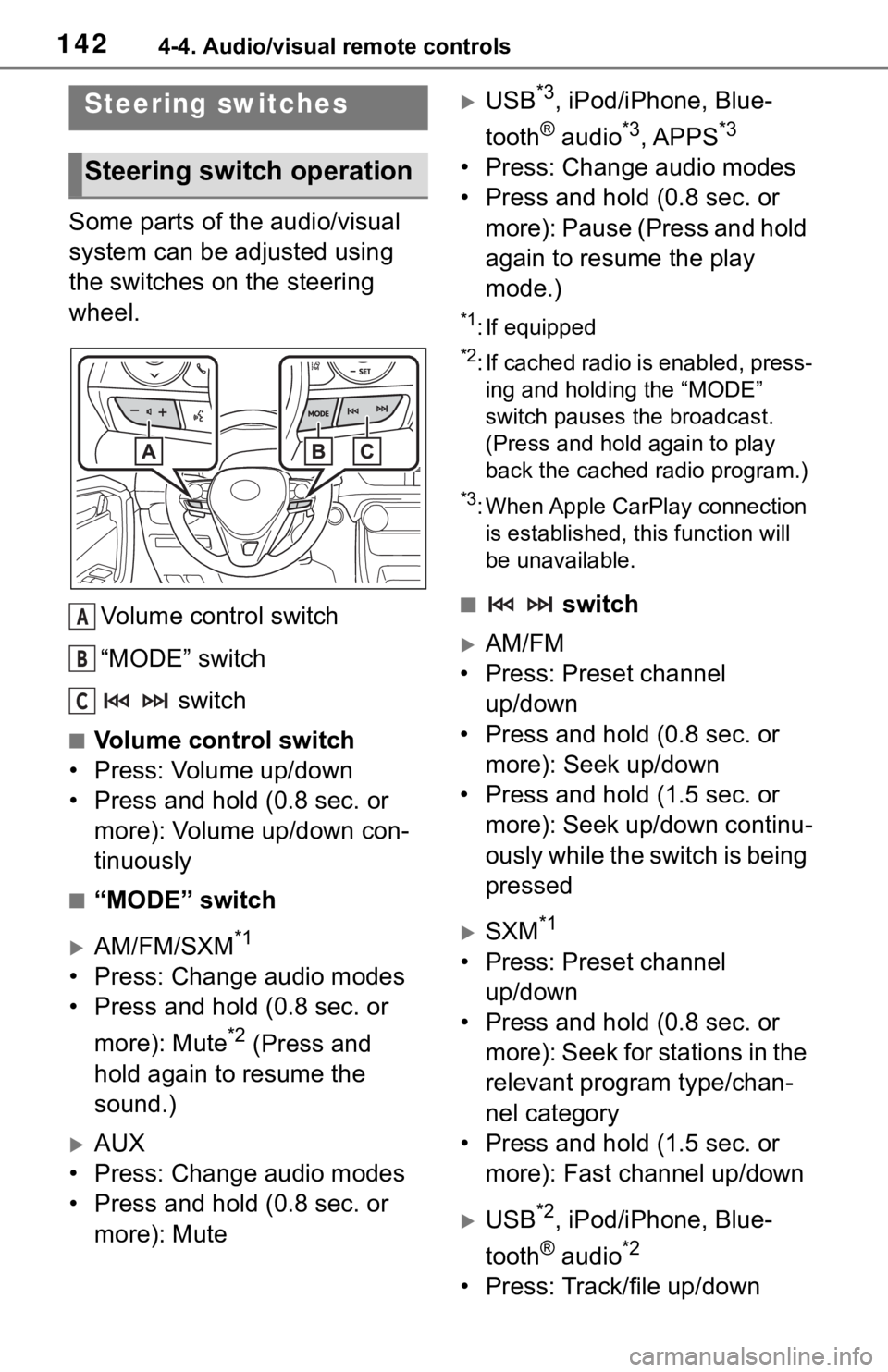
Some parts of the audio/visual
system can be adjusted using
the switches on the steering
wheel.Volume control switch
“MODE” switch switch
■Volume control switch
• Press: Volume up/down
• Press and hold (0.8 sec. or more): Volume up/down con-
tinuously
■“MODE” switch
AM/FM/SXM*1
• Press: Change audio modes
• Press and hold (0.8 sec. or
more): Mute
*2 (Press and
hold again to resume the
sound.)
AUX
• Press: Change audio modes
• Press and hold (0.8 sec. or more): Mute
USB*3, iPod/iPhone, Blue-
tooth
® audio*3, APPS*3
• Press: Change audio modes
• Press and hold (0.8 sec. or more): Pause (Press and hold
again to resume the play
mode.)
*1: If equipped
*2: If cached radio is enabled, press-ing and holding the “MODE”
switch pauses the broadcast.
(Press and hold again to play
back the cached radio program.)
*3: When Apple CarPlay connection is established, this function will
be unavailable.
■ switch
AM/FM
• Press: Preset channel up/down
• Press and hold (0.8 sec. or more): Seek up/down
• Press and hold (1.5 sec. or more): Seek up/down continu-
ously while the switch is being
pressed
SXM*1
• Press: Preset channel up/down
• Press and hold (0.8 sec. or more): Seek for stations in the
relevant program type/chan-
nel category
• Press and hold (1.5 sec. or more): Fast channel up/down
USB*2, iPod/iPhone, Blue-
tooth
® audio*2
• Press: Track/file up/down
Steering switches
Steering switch operation
A
B
C